
Quick answer
Keyword research is how you find the words people type into Google and AI tools, then pick the ones worth a page on your site. Start with seed ideas and your own Search Console data. Score each keyword on business value, intent fit, difficulty and click potential. Then map every group of similar keywords to one page.
Key takeaways
- Traffic potential beats volume. The #1 result rarely gets more than about 30% of a keyword’s searches. Judge a keyword by how much traffic the top page gets overall.
- Start with your own data. Search Console shows searches you already appear for but don’t get clicks on. These are your fastest wins.
- Score before you write. A simple 20-point score stops you from writing pages that bring visitors but no customers.
- One intent, one page. Group keywords that share the same top results so your own pages don’t compete.
- Check for AI Overviews. In Ahrefs’ December 2025 data, they cut clicks to the top result by about 58%.
- Don’t trust a single tool. Search volume and difficulty are estimates. Use them for direction and Search Console for truth.
I’ve reviewed a lot of content plans over the years. The same problem shows up again and again.
A team publishes 30 solid articles. They wait six months. Then they get almost no traffic.
The writing is usually fine. The keywords were the problem. Some had no real demand. Others were too competitive for the site to ever rank.
A few did bring visitors. They just weren’t people who would ever buy.
This happens a lot. Ahrefs found that 96.55% of pages get zero traffic from Google.
At OneLittleWeb, keyword research is the first thing we do for every client. We’ve run SEO for 1,200+ clients over 8+ years, mostly SaaS and AI brands. This guide is the process we actually use.
You’ll learn how to find keyword ideas and score them so you know what to write first. You’ll also see how AI Overviews and AI Mode change which keywords are still worth chasing in 2027.
What is keyword research?
Keyword research is the process of finding the search terms your customers use, then deciding which ones to target with a page. It covers searches on Google and, more and more, the questions people ask AI tools.
A keyword is any word or phrase someone types into a search box. “Project management software” is a keyword. So is “how do I stop my team missing deadlines.”
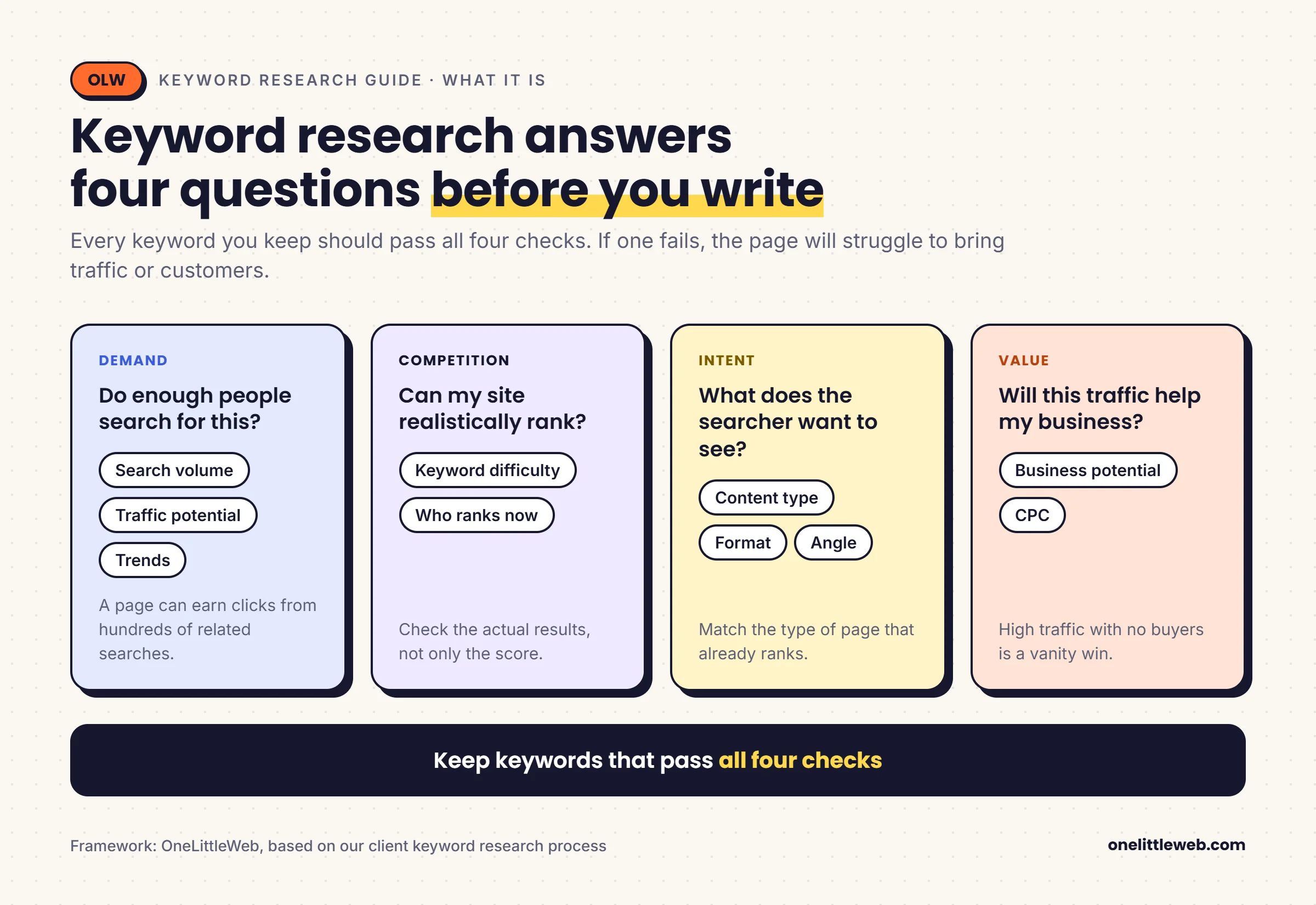
Good research tells you much more than a list of phrases. For each keyword, it answers these questions:
- Demand: how many people search for it, and how much traffic the top page gets.
- Competition: how hard it is to rank, and who already ranks.
- Intent: what the searcher wants to see, like a list or a product page.
- Value: whether that visitor could become a customer.
If a keyword fails any of these checks, the page you write for it will struggle. That’s why we treat keyword research as the plan for the whole site.
If you’re new to SEO overall, our beginner’s guide to SEO explains how rankings work before you dive into keywords.
Why keyword research matters more in 2027
Some people say keywords don’t matter now that AI writes answers. The data says the opposite. Picking the right keyword has become harder, and the cost of a wrong pick has gone up.
Most pages never get search traffic
Ahrefs’ research shows 96.55% of all pages get zero traffic from Google. Only 1.94% get between 1 and 10 visits a month.
A big reason is topic choice. Pages often target keywords nobody searches, or keywords where the site has no chance against stronger competitors.
Keyword research is how you avoid that. You check demand and competition before you spend money on writing.
Most searches are long and specific
Ahrefs found that 94.74% of keywords get 10 or fewer searches a month. Only 0.0008% get more than 100,000.
Google also says 15% of the searches it sees each day are brand new. It reconfirmed this number in 2025, even as AI made questions longer and more conversational.
So most of the real opportunity sits in specific, lower-volume searches. Those are hard to guess. You find them through research.
AI answers now take a big share of clicks
Ranking first used to mean a steady flow of visitors. That’s changing on searches where Google shows an AI Overview.
In an Ahrefs study of 300,000 keywords, AI Overviews cut the click-through rate for the #1 result by about 58%. Position 2 lost 50.8% and position 3 lost 46.4%.
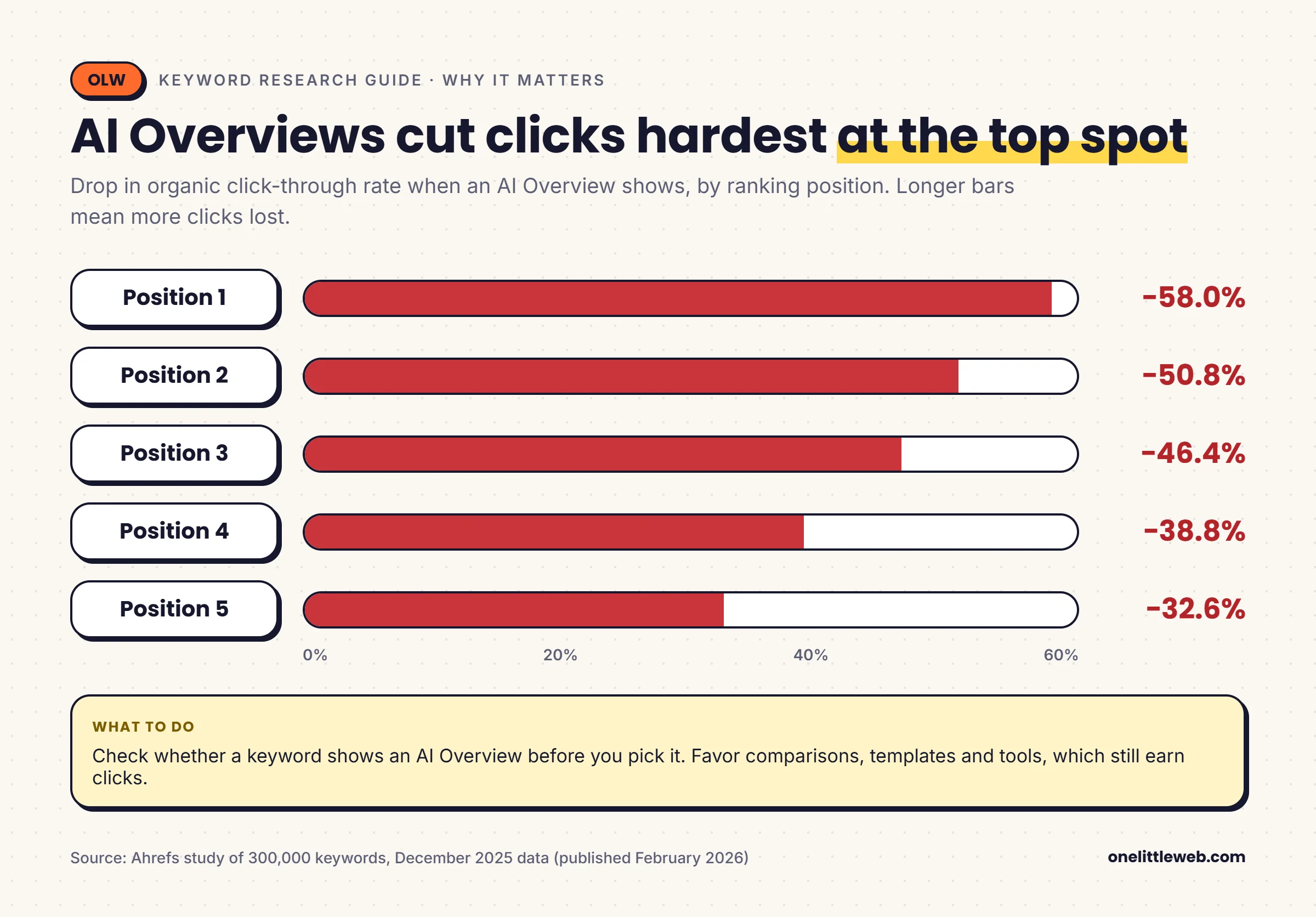
There is some good news. Seer Interactive tracked 5.47 million queries and saw click-through rates on AI Overview searches recover in early 2026. They rose from 1.3% in December 2025 to 2.4%.
Clicks are still well below where they were. This means you now need to judge a keyword’s click potential as well as its rank potential. We cover how in Step 4.
Keyword research myths vs reality
Most bad keyword choices come from a few common beliefs. Each one sounds reasonable. Each one leads you to the wrong page.
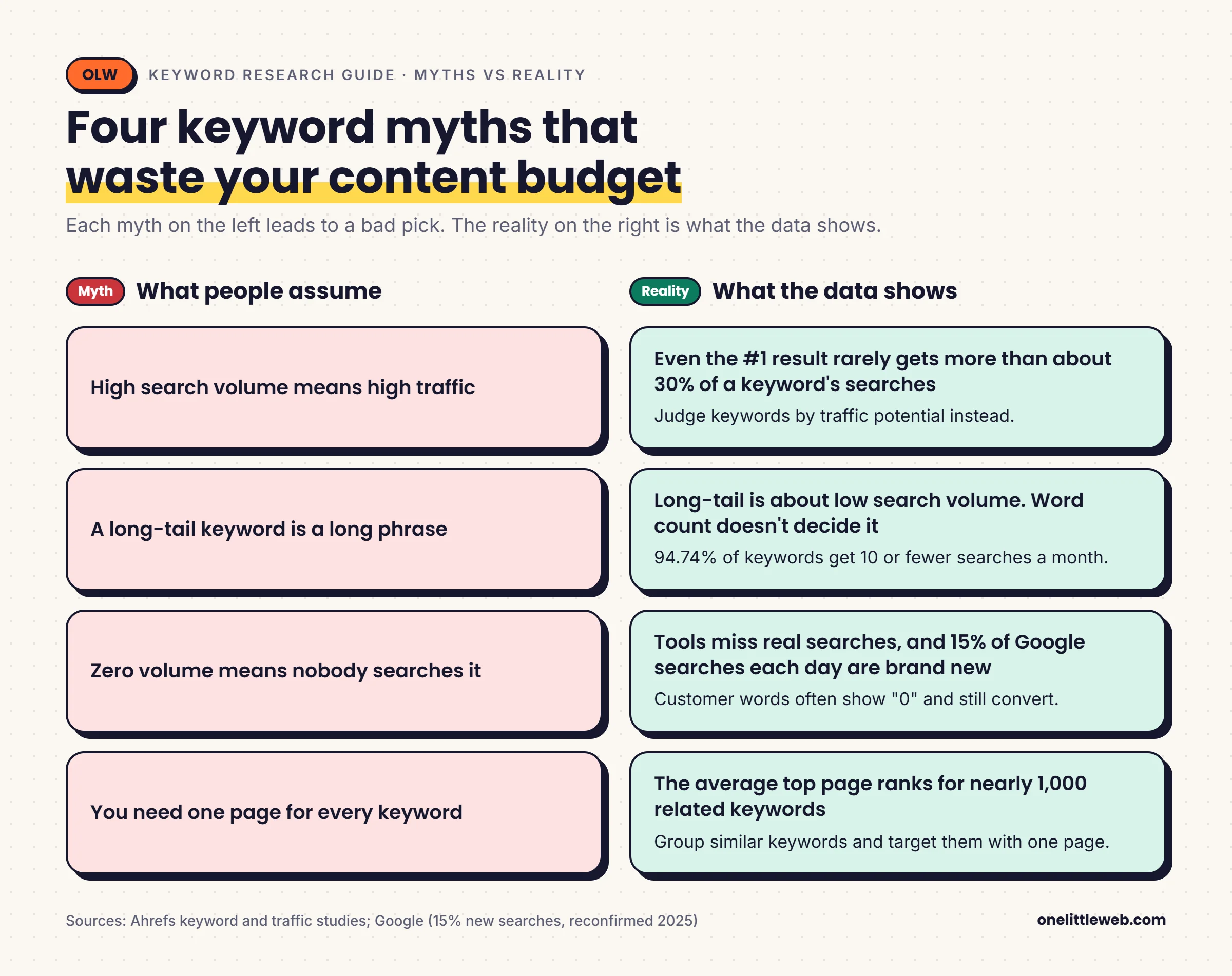
The biggest one is trusting search volume. A keyword with 5,000 monthly searches sounds better than one with 500. But the top result rarely gets more than about 30% of the searches, according to Ahrefs.
The smaller keyword might also be part of a bigger topic. In that case, the page that ranks for it can pull in traffic from hundreds of related searches.
The other myths follow the same pattern. Long-tail is about low volume, so word count doesn’t decide it. Zero-volume keywords can still bring buyers. And one page can rank for many keywords at once.
How to do keyword research: 6 steps
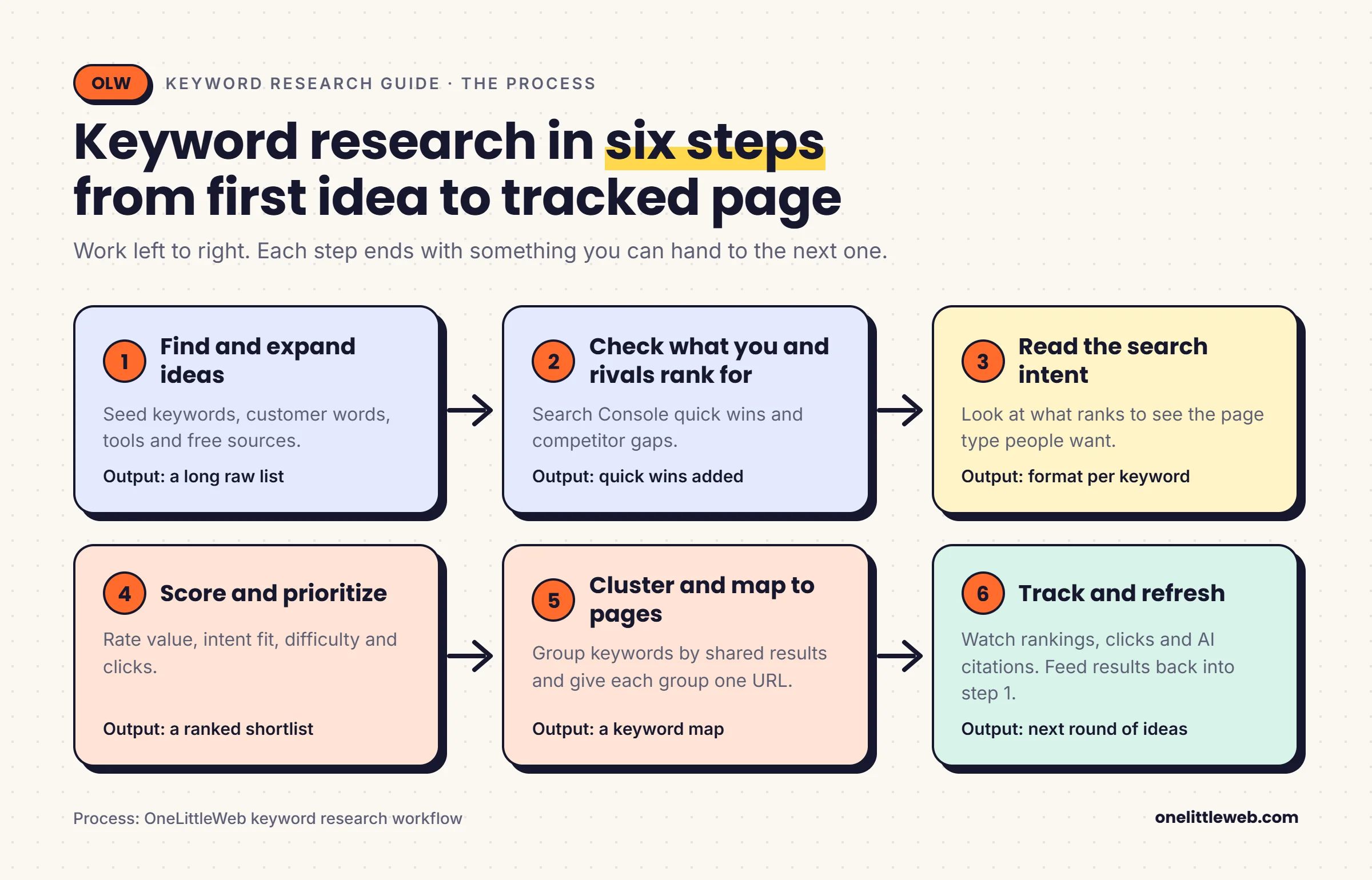
Here’s the process we use for client sites. It works for a new blog and for a SaaS site with thousands of pages.
Each step produces something you hand to the next one. By the end, you have a ranked list of keywords, each tied to a page.
Step 1: Find seed keywords and expand them
A seed keyword is a broad starting term. For a project management tool, seeds might be “project management” or “gantt chart.”
Seeds come from your product pages, your competitors’ menus and the words your customers use. I also like to ask ChatGPT for seed ideas. It’s quick for brainstorming, but it gives you no real search volume or difficulty data, so don’t stop there.
Next, put each seed into a keyword tool. A paid tool like Ahrefs or Semrush can turn one seed into thousands of ideas. Even Ahrefs’ free keyword generator returns 20 keyword ideas and 20 questions per seed.
Then add ideas from free sources:
- Google Autocomplete: start typing your seed and note the suggestions.
- People Also Ask: the question boxes on the results page show what people want to know next.
- Reddit and niche forums: real people describe their problems in their own words.
- AnswerThePublic: groups questions and comparisons around a seed.
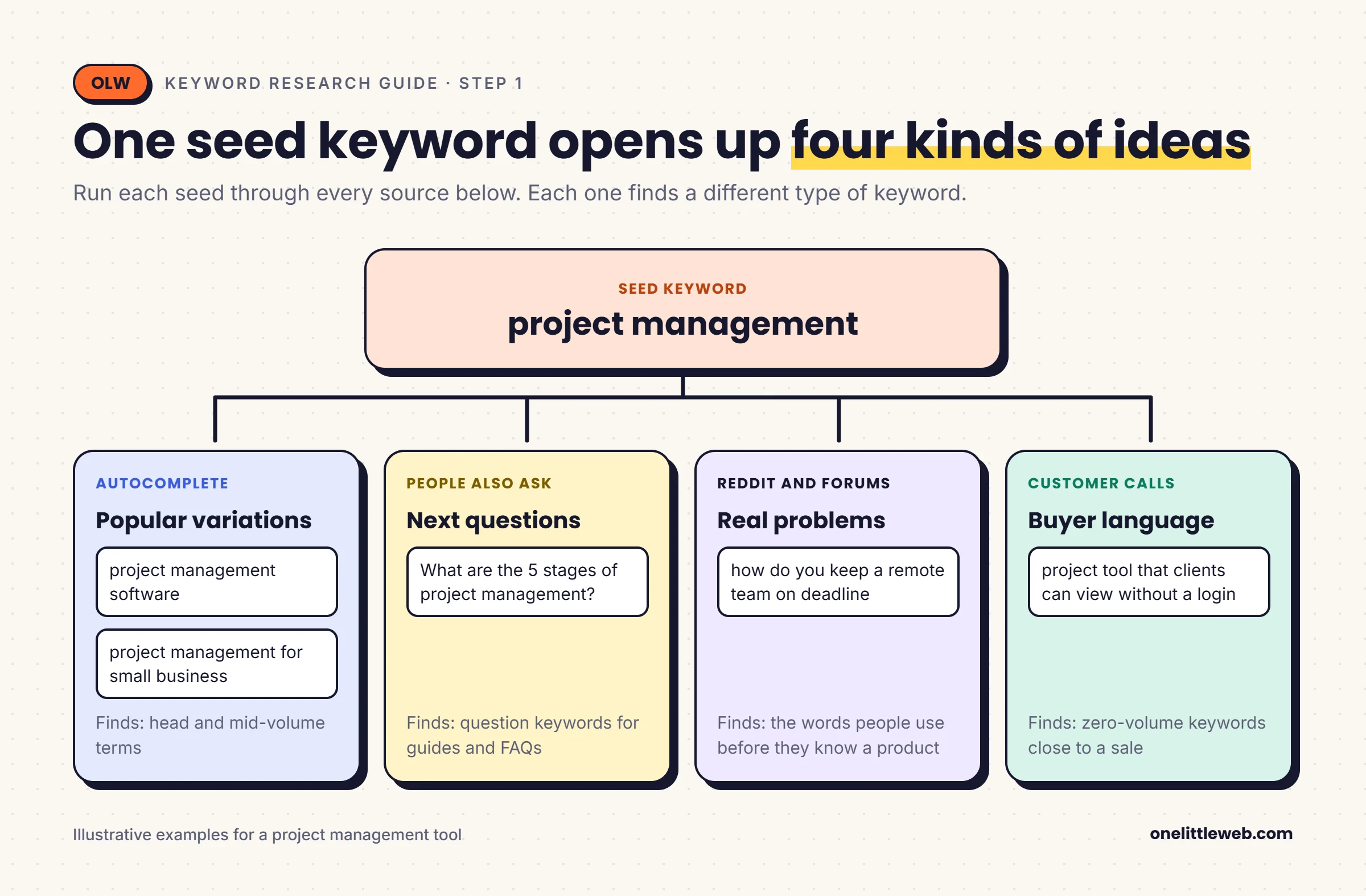
Don’t skip your own customers. Sales calls and support tickets are full of keywords no tool will show you.
For our SaaS clients, these often turn into the best-converting pages on the site. A tool might show “0” volume for a phrase that ten prospects asked about last month.
As your list grows, you’ll see these keyword types:
- Head keywords: short, broad and competitive. “Meditation” gets about 211,000 searches a month.
- Long-tail keywords: low volume and usually more specific. “Can meditation make you smarter” gets about 50.
- Question keywords: how, what and why searches. Great for guides and FAQ sections.
- Branded keywords: include a company name. These usually mean the searcher wants that brand’s site.
- Zero-volume keywords: real searches that tools show as zero. Often specific and close to a purchase.
Check: You have a raw list with seeds, tool ideas, questions and at least a few phrases from real customer conversations.
Step 2: Check what you and your competitors already rank for
Before chasing new keywords, look at the data you already have. This is where the fastest wins usually hide.
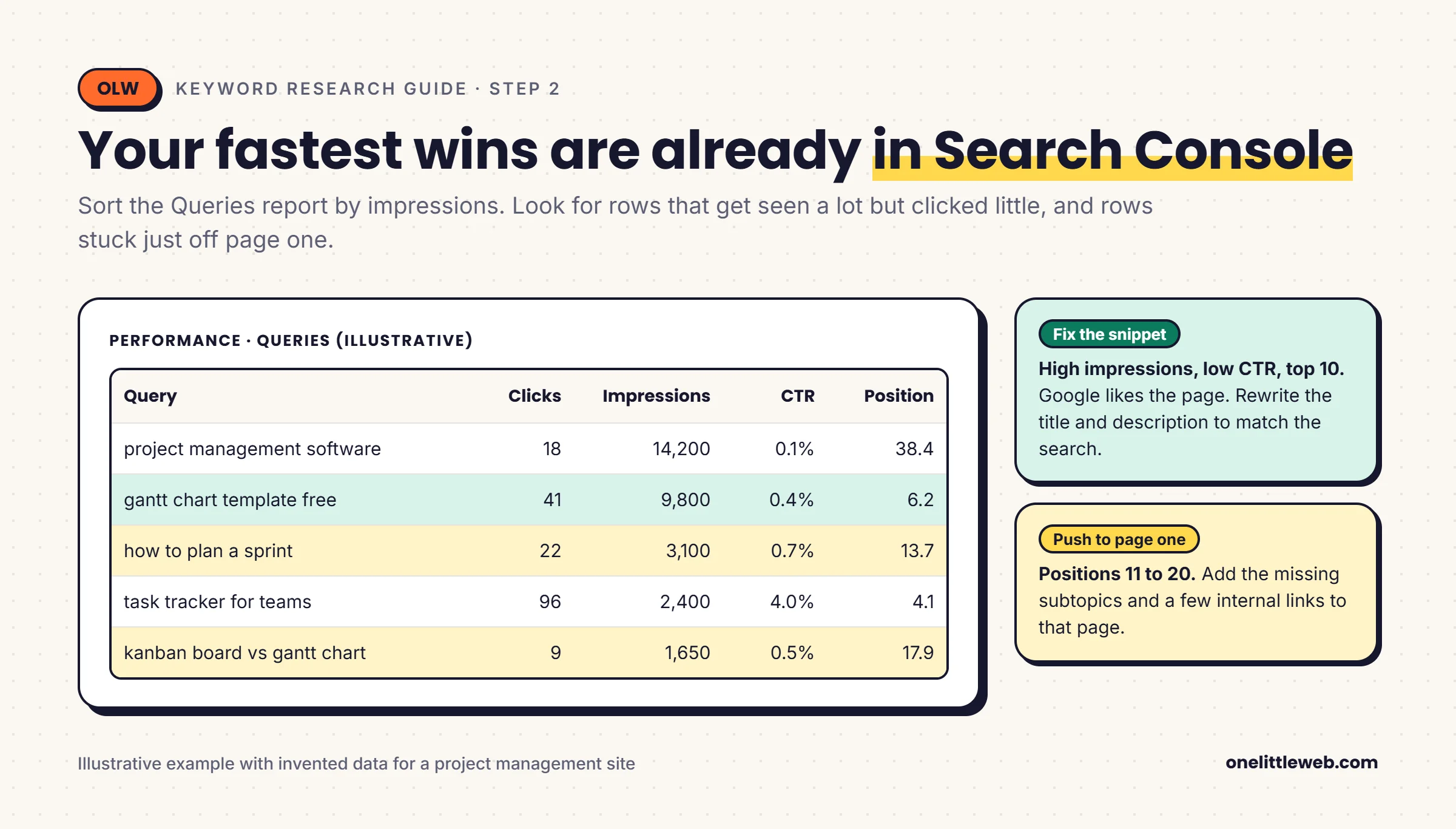
Open Google Search Console and go to Performance, then Queries. Sort by impressions. Look for two patterns:
- High impressions, low clicks: Google already sees your page as relevant, but people aren’t clicking. A better title or a better-matched page can fix that.
- Positions 11 to 20: you’re on page two. A focused update can often push these onto page one.
You can filter queries with regular expressions. This one finds question searches:
^(how|what|why|when|where|can|does|is|should)s
Keep the limits in mind. Search Console keeps 16 months of data and shows up to 1,000 rows in the interface. Google also hides rare queries for privacy, as explained in its Search Console data guide.
Next, run a keyword gap analysis. Pick 3 to 5 competitors that rank for your topics. A gap tool shows keywords they rank for that you don’t.
I focus on keywords where two or more competitors rank. That usually means the topic is a real part of the market.
Your search competitors may not be your business competitors. Publishers, review sites and forums often hold the spots you want. Include them in the gap check.
Check: You’ve added your quick wins from Search Console and the shared gaps from 3 to 5 competitors to your list.
Step 3: Read the search intent on the results page
Search intent is what the searcher wants to get from their search. Google shows the page types that best match it. If your page type doesn’t match, it’s very hard to rank.
There are four main intent types:
| Intent | Example search | What usually ranks | Business value |
|---|---|---|---|
| Informational | what is a gantt chart | Guides, definitions, how-to posts | Low to medium. Builds awareness. |
| Commercial | best project management software | Roundups, comparisons, reviews | High. The searcher is choosing. |
| Transactional | gantt chart template free | Product pages, tools, templates, sign-ups | High. Ready to act. |
| Navigational | asana login | The brand’s own page | Low unless it’s your brand. |
The fastest way to check intent is to search the keyword and look at the top results. Ask four questions:
- Type: are these blog posts or product pages?
- Format: are they lists or step-by-step guides?
- Angle: do titles mention “free” or the year?
- Features: is there an AI Overview or a video box?
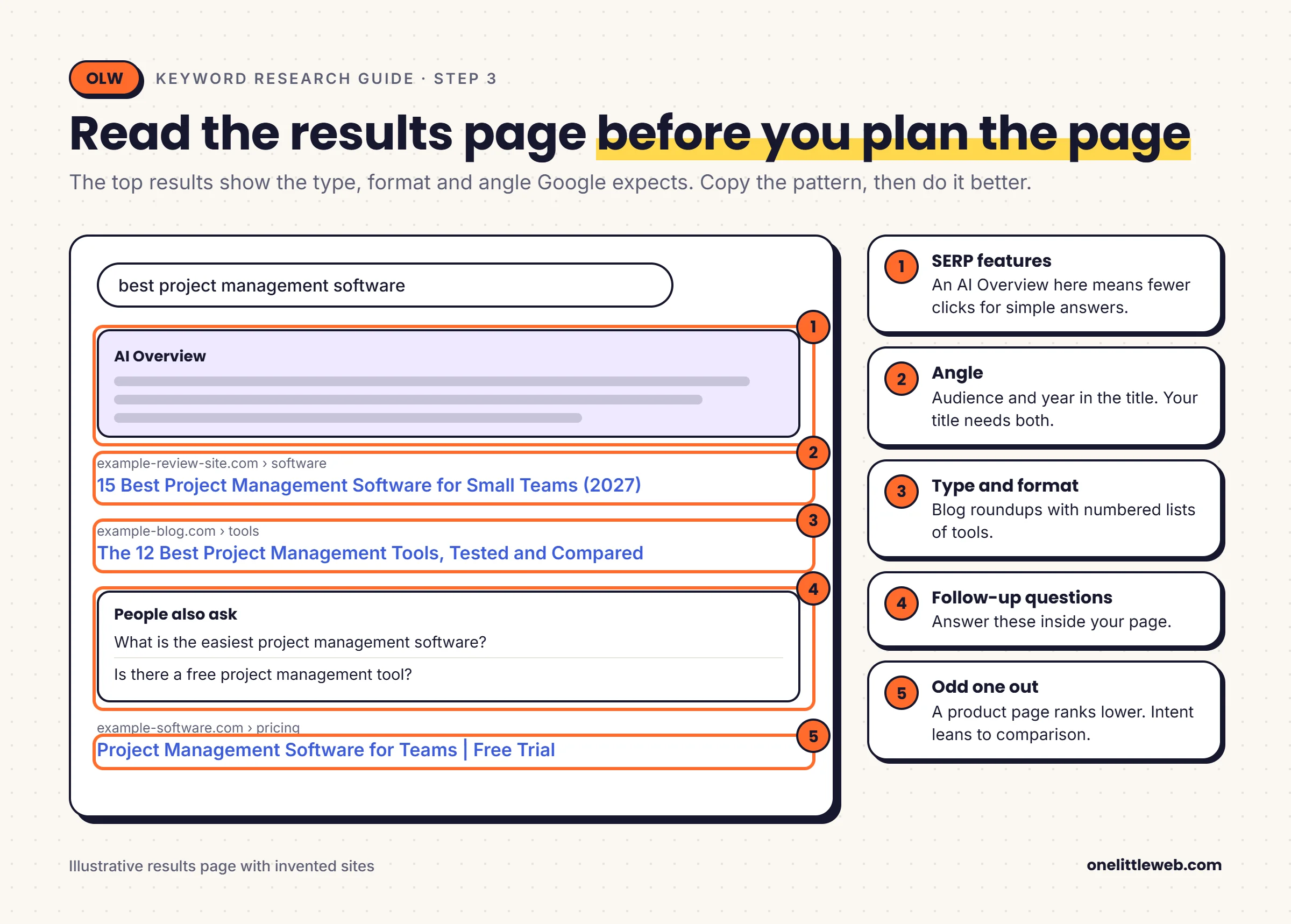
Sometimes the results are mixed. You might see guides and product pages together. That means Google isn’t sure what people want. In that case, follow the type that holds the top three spots.
Check: Every keyword on your list now has an intent label and a planned page format.
Step 4: Score and prioritize your keywords
By now you might have hundreds of keywords. You can’t write them all at once. This step decides what you write first.
Most guides stop at “it depends.” We use a simple score instead. It’s not perfect, but it forces a clear decision on every keyword.
Score each keyword on five factors. Multiply by the weight, then add up. The maximum is 20.
- Business value (0 to 3, weight ×3): 0 means no link to your product. 3 means your product is the answer. This follows the business potential scale Ahrefs uses.
- Intent fit (0 to 2, weight ×2): can you create the type of page that ranks?
- Difficulty fit (0 to 2, weight ×2): can your site realistically reach page one?
- Traffic potential (0 to 2): how much traffic does the top page get overall?
- Click potential (0 or 1): score 0 if an AI Overview or quick answer likely satisfies the search.
Business value gets the heaviest weight on purpose. Ahrefs says 77% of its own blog posts score 2 or 3 on business potential. Traffic that can’t turn into customers rarely pays back the cost of the content.
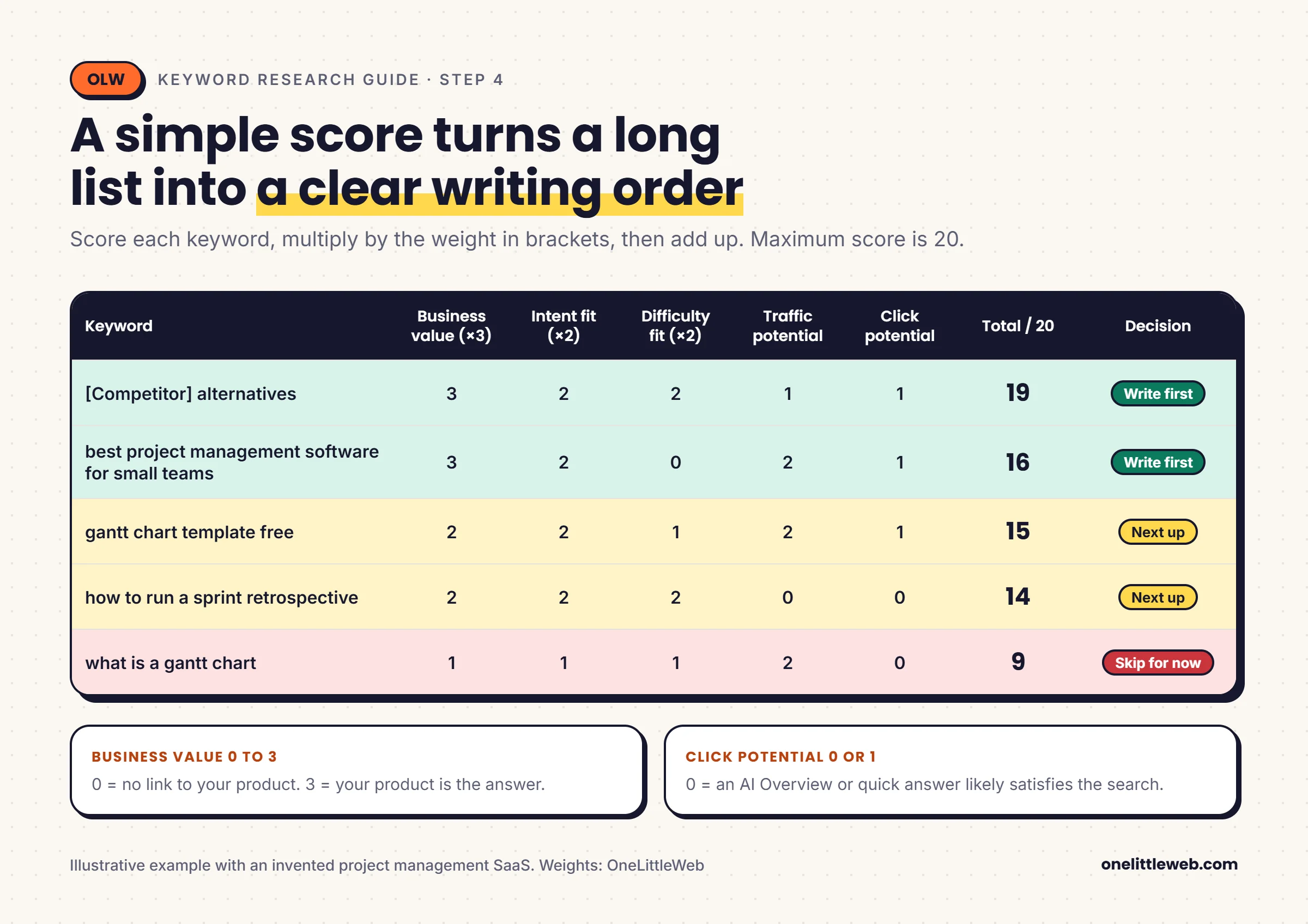
Look at the example. “What is a gantt chart” has decent traffic potential but scores only 9. It has weak business value, and an AI Overview likely answers it.
“[Competitor] alternatives” has less traffic. It scores 19 because the searcher is already looking to switch tools.
Once scored, split your list in two. Quick wins are keywords with good intent fit and low difficulty. Long-term bets are high-value keywords that will take months and links to win. Work on both, but publish quick wins first.
Need a refresher on any of these metrics? The keyword metrics cheat sheet below explains each one and its blind spots.
Check: Every keyword has a total score, and you’ve marked your top 10 to write first.
Step 5: Cluster keywords and map them to pages
You don’t need one page per keyword. You need one page per search intent.
The easiest test is to compare the top 10 results for two keywords. If they share several of the same URLs, Google sees them as the same topic. One page can rank for both.
Tools can do this at scale. Ahrefs groups keywords by “Parent Topic.” In its own example, “whipped coffee recipe” pulls together a cluster of 28 keywords.
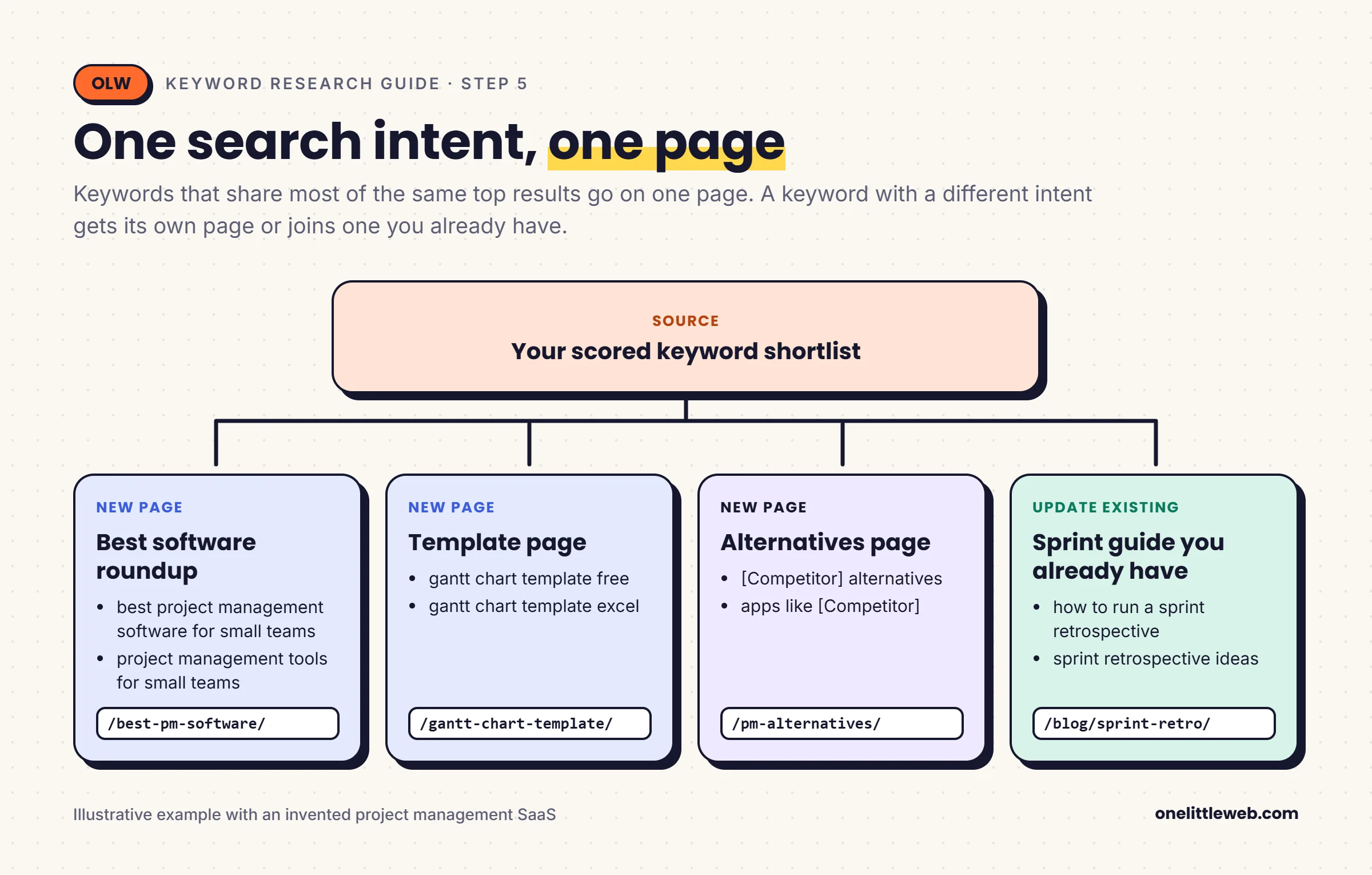
Next, build a keyword map. This is a simple spreadsheet with one row per page. We break down each column in the anatomy section below.
The map protects you from keyword cannibalization. That’s when two of your own pages compete for the same search, and neither ranks well.
To check for it, open Search Console, filter by one query, then click the Pages tab. If two or more URLs swap impressions for the same query, you have a problem. Fix it by merging the two pages or giving one of them a different intent.
Finally, group related pages into topic clusters. A main pillar page covers the broad topic. Supporting pages cover the details, and they all link to each other.
Check: Every keyword sits on exactly one row of your map, and no primary keyword appears twice.
Step 6: Track results and refresh your list
Keyword research isn’t done when you publish. Your rankings and Search Console data are the best source for your next round of ideas.
Track four things for each page. These are rankings, Search Console clicks and impressions, AI citations and conversions. We explain how to set each one up in the tracking section.
A good rhythm is a monthly check and a full refresh every 6 to 12 months. Do it sooner if a new AI feature appears on your main searches or your traffic drops.
Check: You have a monthly review on the calendar and a date for the next full refresh.
Real example: keyword research for a project management tool
Scores and frameworks are easier to trust when you see them on real data. So I ran seven keywords for a project management tool through Ahrefs Keywords Explorer.
This is US data, pulled in November 2026. Here’s what came back.
| Keyword | Monthly searches | KD | Traffic potential | Parent topic | CPC |
|---|---|---|---|---|---|
| project management software | 401,000 | 67 | 108,000 | project management software | $9.00 |
| best project management software | 4,300 | 56 | 3,400 | project management software | $6.00 |
| project management software for small teams | 250 | 34 | 30 | best project management tools for small teams | $10.00 |
| asana alternatives | 1,200 | 11 | 800 | asana alternatives | $9.00 |
| gantt chart template | 11,000 | 10 | 21,000 | gantt chart | $4.50 |
| what is a gantt chart | 5,600 | 49 | 4,600 | what is a gantt chart | $0.30 |
| how to run a sprint retrospective | 150 | 14 | 200 | how to run a sprint retrospective | $0.10 |
A few lessons jump out. Each one ties back to a step in the process.
The head term is out of reach for most sites
“Project management software” gets 401,000 searches a month. It also has a difficulty of 67, and the biggest software brands fight over it.
For a newer site, that’s a long-term bet at best. The real opportunity sits further down the list.
Parent topic tells you when keywords belong together
“Best project management software” has the head term as its parent topic. That means the page ranking first for it gets most of its traffic from the broader term.
So Google treats them as one topic. You’d target both with one page, and a smaller site would need a narrower angle to compete.
Volume can mislead in both directions
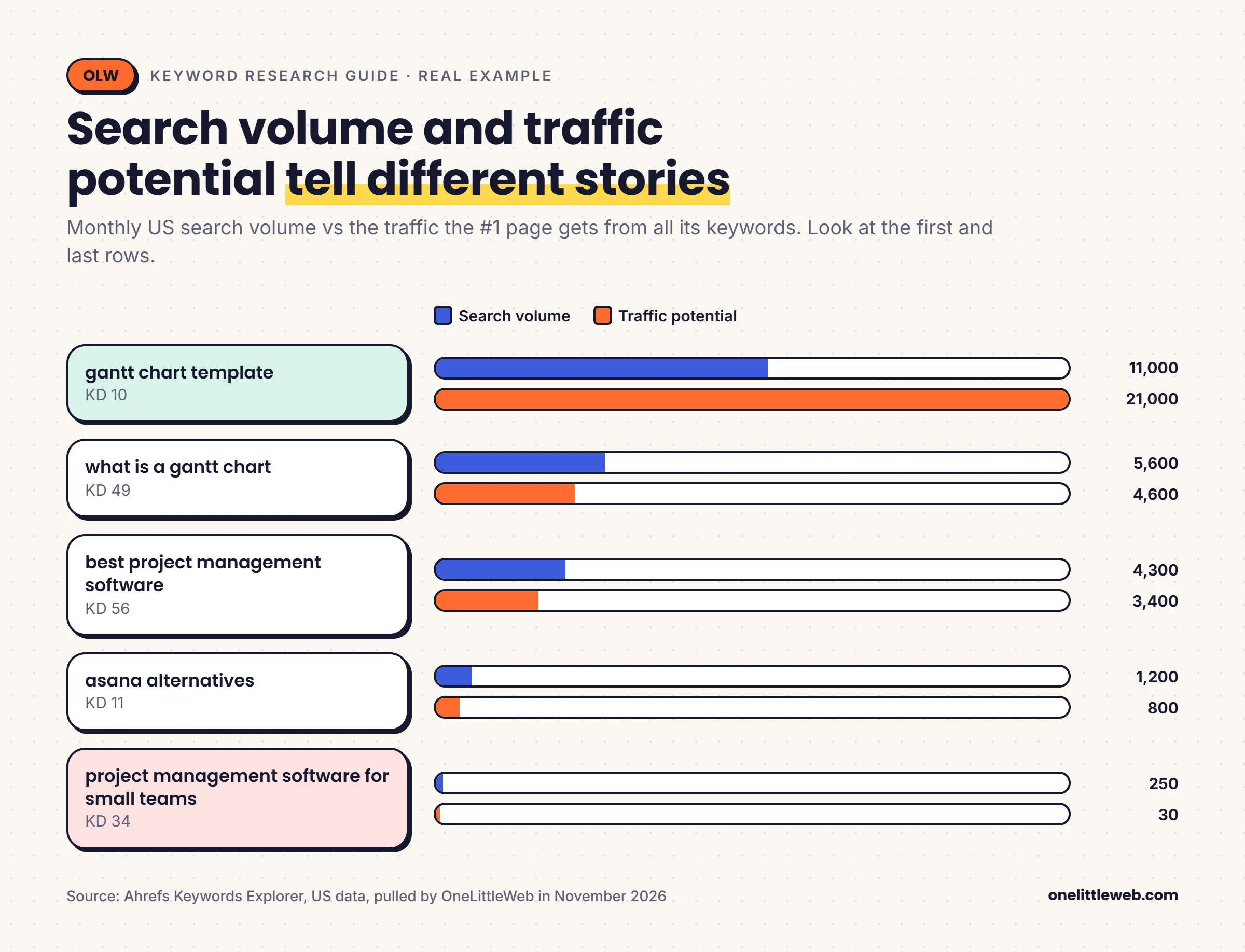
“Gantt chart template” gets 11,000 searches. Its traffic potential is almost double that, at 21,000. The top page also ranks for “gantt chart” and many related searches.
“Project management software for small teams” goes the other way. It shows 250 searches, but the top page gets only about 30 visits from it. Its parent topic is “best project management tools for small teams,” so that’s the phrasing to target.
Low difficulty plus buyer intent is the sweet spot
“Asana alternatives” has a difficulty of just 11. Advertisers still pay about $9 a click for it.
That high CPC is a signal. People searching it are ready to switch tools, which makes it one of the most valuable keywords on the list.
Every keyword showed an AI Overview
All seven results pages had an AI Overview. So you can’t skip a keyword just because one appears.
Look at what the searcher needs instead. A template or a list of alternatives still needs a click. “What is a gantt chart” can be answered in one sentence, and its $0.30 CPC shows little buyer intent.
If I were starting a new project management site, I’d write for “gantt chart template” and “asana alternatives” first. I’d park “what is a gantt chart” until the site has more authority.
Keyword metrics cheat sheet
Every keyword tool shows a row of numbers. Each number is useful. Each one also has a blind spot that can trick you.
| Metric | What it tells you | Where to find it free | Watch out for |
|---|---|---|---|
| Search volume | Average monthly searches over the last 12 months | Google Keyword Planner (ranges) | It’s an average. 120,000 searches in December and none the rest of the year shows as 10,000 a month. |
| Traffic potential | Total traffic the top page gets from all its keywords | Not free. Paid tools like Ahrefs. | Based on estimated traffic. Use it to compare, not as a forecast. |
| Keyword difficulty | How hard it is to reach the top 10, on a 0 to 100 scale | Free tiers of Semrush and Moz | Each tool uses a different formula. The same keyword can score 20 in one and 50 in another. |
| Cost per click (CPC) | What advertisers pay per click. A sign of commercial value. | Google Keyword Planner | It changes often. Low CPC doesn’t mean low value for SEO. |
| Trend | Whether interest is rising or seasonal | Google Trends | Trends shows relative interest on a 0 to 100 scale, not real search counts. |
| Impressions and clicks | Real data for searches you already appear in | Google Search Console | Only covers your own site. Rare queries are hidden. |
On difficulty, Semrush’s scale is a helpful guide. It rates 0 to 14 as very easy, 15 to 29 as easy and 30 to 49 as possible. Scores of 50 to 69 are difficult, 70 to 84 are hard and 85 to 100 are very hard. For newer sites, Semrush suggests sticking to 0 to 49.
Ahrefs calculates difficulty from the number of sites linking to the top 10 pages. That’s why stronger links help you compete for harder keywords. Our roundup of link building tools covers that side.
Volume data is the weakest number of all. Ahrefs found Google Keyword Planner overestimates volume 54.28% of the time. Low-spend Google Ads accounts only see ranges like 1K to 10K, a limit Google added in 2016, as Search Engine Land reported.
Search Console has blind spots too. Ahrefs found 46.08% of Search Console clicks go to hidden queries. Still, it’s real data from Google about your site. I trust it far more than any third-party estimate.
How to check keyword difficulty by hand
A difficulty score is a starting point. Before we commit to a keyword, we always look at the actual results page. It takes about five minutes per keyword and saves months of wasted work.
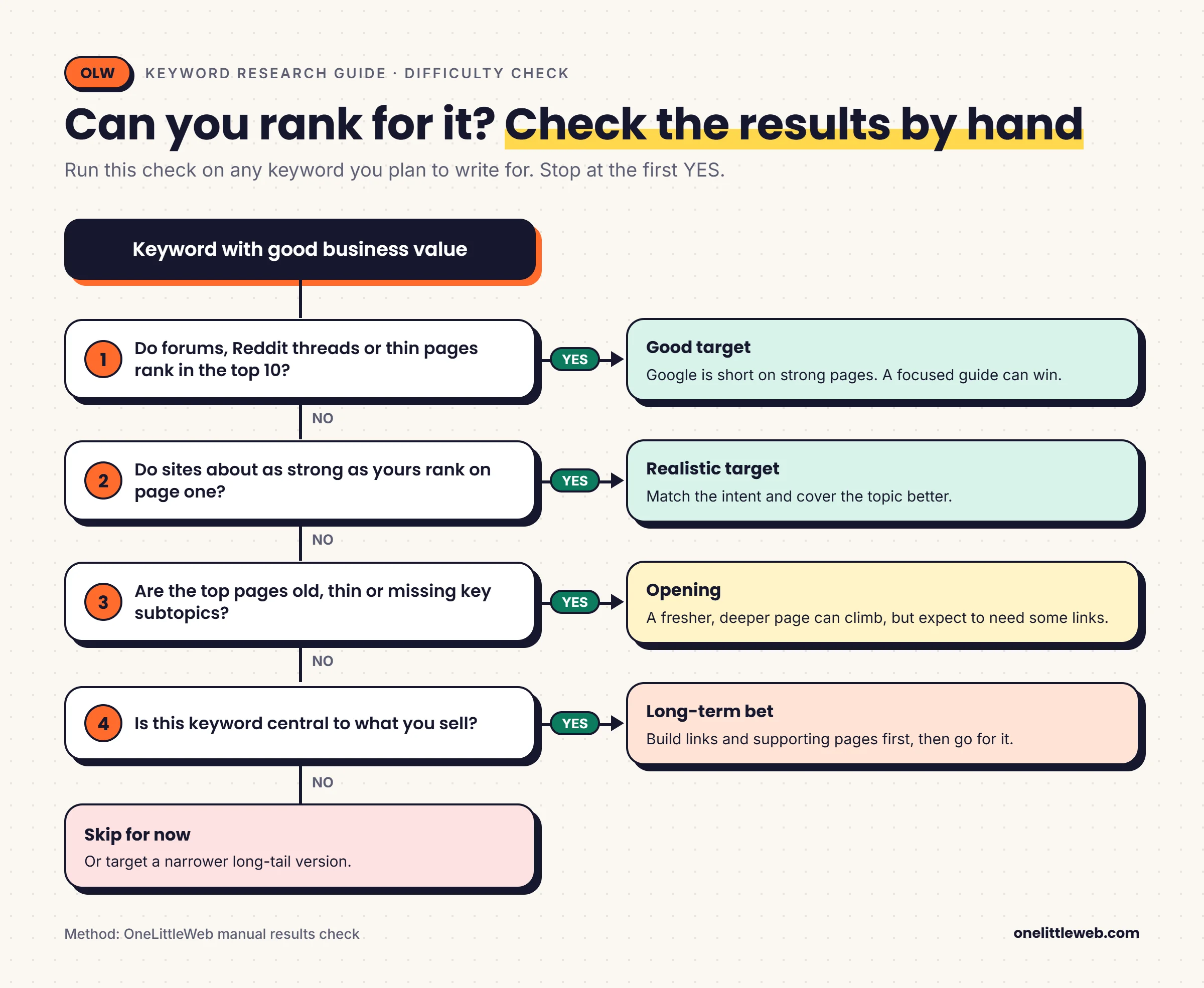
Here’s what to look for on page one:
- Forums and Reddit threads: when Google ranks discussions, it often lacks a strong dedicated page. That’s an opening.
- Sites like yours: if similar-sized sites rank, you can too. If every result is a household brand, plan for a long climb.
- Old or thin pages: check the dates and depth of the top results. Outdated content is easier to beat.
- Loose title matches: if few top results use the keyword in their title, Google may be filling the page with related content.
Then check links. Most tools show how many sites link to each top-10 page. If those pages have hundreds of linking sites and yours has 20, you’ll need links before that keyword is realistic.
Keyword research for AI search
AI Overviews, AI Mode and chat tools like ChatGPT don’t replace keyword research. They change which keywords are worth your time.
Favor keywords that still earn clicks
AI answers hit simple questions hardest. Definitions and quick facts often get answered right on the results page.
Some searches still earn plenty of clicks. These include comparisons, “best of” lists, templates and free tools. People want to see the full page for those.
That’s why click potential is part of our score. Before you pick a keyword, search it and see if an AI Overview shows.
Cover the follow-up questions
Google’s AI Mode uses a method called query fan-out. It breaks one question into smaller subtopics and runs many searches at once. It then builds the answer from the best passages it finds.
Google doesn’t show which fan-out searches it runs. But you can guess most of them. They’re the follow-up questions a person would ask next.
For keyword research, this means each cluster should include its follow-up questions. People Also Ask and your customers’ questions are the best places to find them.
Use Bing to see the queries AI uses
Bing gives you a rare look at AI search data. Its AI Performance report in Bing Webmaster Tools launched in public preview on February 10, 2026, as Bing announced.
It shows how often AI answers cite your pages. It also lists “grounding queries,” the phrases the AI used to find your content. A June 2026 update added intent labels, topics and citation share.
It doesn’t show clicks or the exact prompts people typed. Even so, grounding queries are a strong source of new keyword ideas.
We use this data with our AI and SaaS clients to spot topics where they get cited but don’t rank yet. For the full playbook on getting cited, see our LLM SEO guide.
How to use ChatGPT and other AI tools for keyword research
AI chat tools are useful for some parts of keyword research and unreliable for others. Knowing the difference saves you from bad data.
Use them for idea work:
- Brainstorming seeds and angles you hadn’t thought of.
- Grouping long lists into rough clusters.
- Guessing intent as a first pass.
- Writing follow-up questions for each cluster.
Don’t use them for numbers. Chat tools don’t have live search volume or difficulty data, and they can make numbers up if you ask. Paid tools like Ahrefs and Semrush now have AI suggestions built in, which pair ideas with real data.
Here are three prompts we use. Swap in your own details.
1. Find customer language:
I run a [product] for [audience]. List 40 phrases my customers might type into Google before they know my brand exists. Group them by the problem they're trying to solve. Don't include search volumes.
2. Draft clusters:
Here is a list of keywords. Group them into clusters where one page could rank for every keyword in the group. Name each cluster by its main keyword and label its search intent as informational, commercial, transactional or navigational.
3. Find follow-up questions:
For the keyword "[keyword]", list 10 follow-up questions someone would ask next. Phrase them the way a person would type or speak them.
Treat every answer as a draft. Run AI ideas through a keyword tool or Search Console before they go on your map. Confirm AI clusters by comparing the top results, as in Step 5.
Anatomy of a keyword map
Your keyword map is where the research turns into a plan. It’s one spreadsheet that tells your writers what to create and in what order.
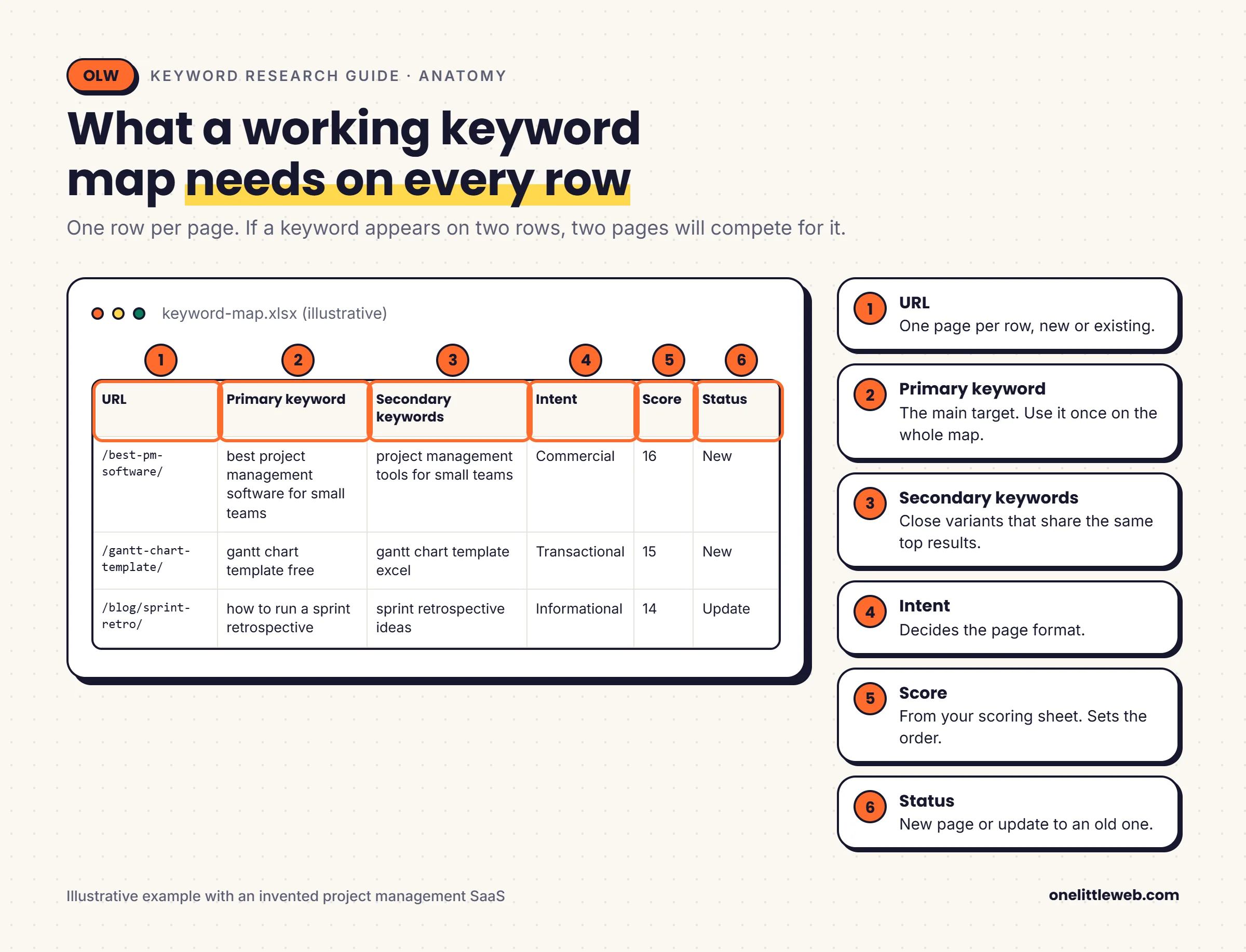
Each row is one page. The URL column can hold a page you already have or one you plan to create.
The primary keyword is the main target. It should appear only once on the whole map. The secondary keywords are close variants that share the same top results.
Intent decides the page format. The score comes from Step 4 and sets the writing order. Status shows whether the row is a new page or an update.
When a new keyword comes up, check the map first. If it fits an existing row, add it there. Only create a new row when the intent is truly different.
How to use your keywords on the page
Keyword research tells you what to write. The page itself still has to show readers and Google that it matches the search.
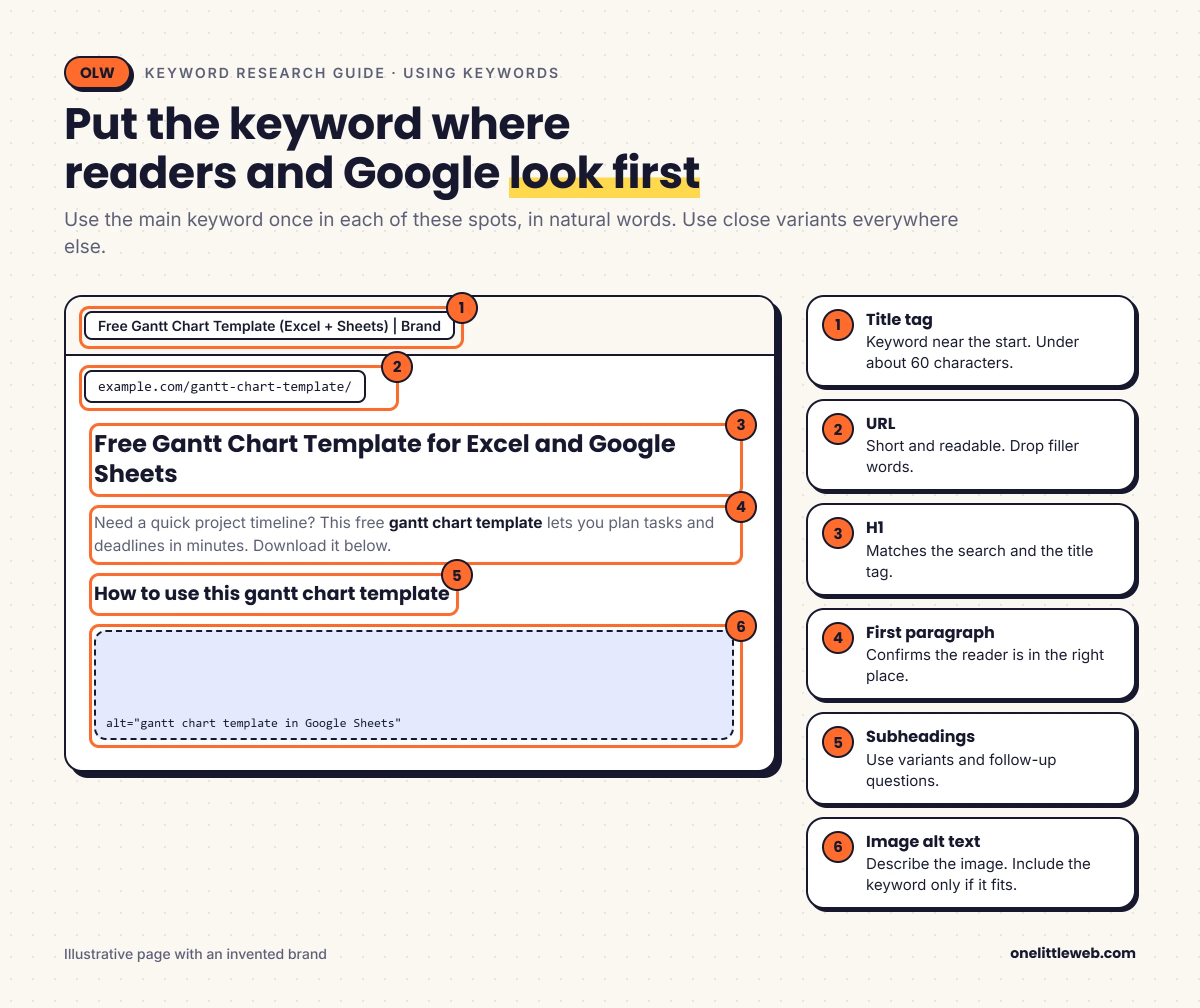
Use the main keyword once in each of these spots:
- Title tag: put the keyword near the start and keep it under about 60 characters.
- URL: short and readable, like /gantt-chart-template/.
- H1: match the search, and keep it close to the title tag.
- First paragraph: confirm early that the reader is in the right place.
- Subheadings: use secondary keywords and the follow-up questions from your cluster.
- Image alt text: describe the image. Add the keyword only when it fits naturally.
After that, write for the reader. Repeating the keyword over and over doesn’t help, and Google’s spam policies list keyword stuffing as spam.
Finally, link the pages in each topic cluster to each other with clear, descriptive anchor text. That helps Google see how your pages fit together.
Keyword research by business type
The process stays the same for every site. The keyword types that matter most depend on how you make money.
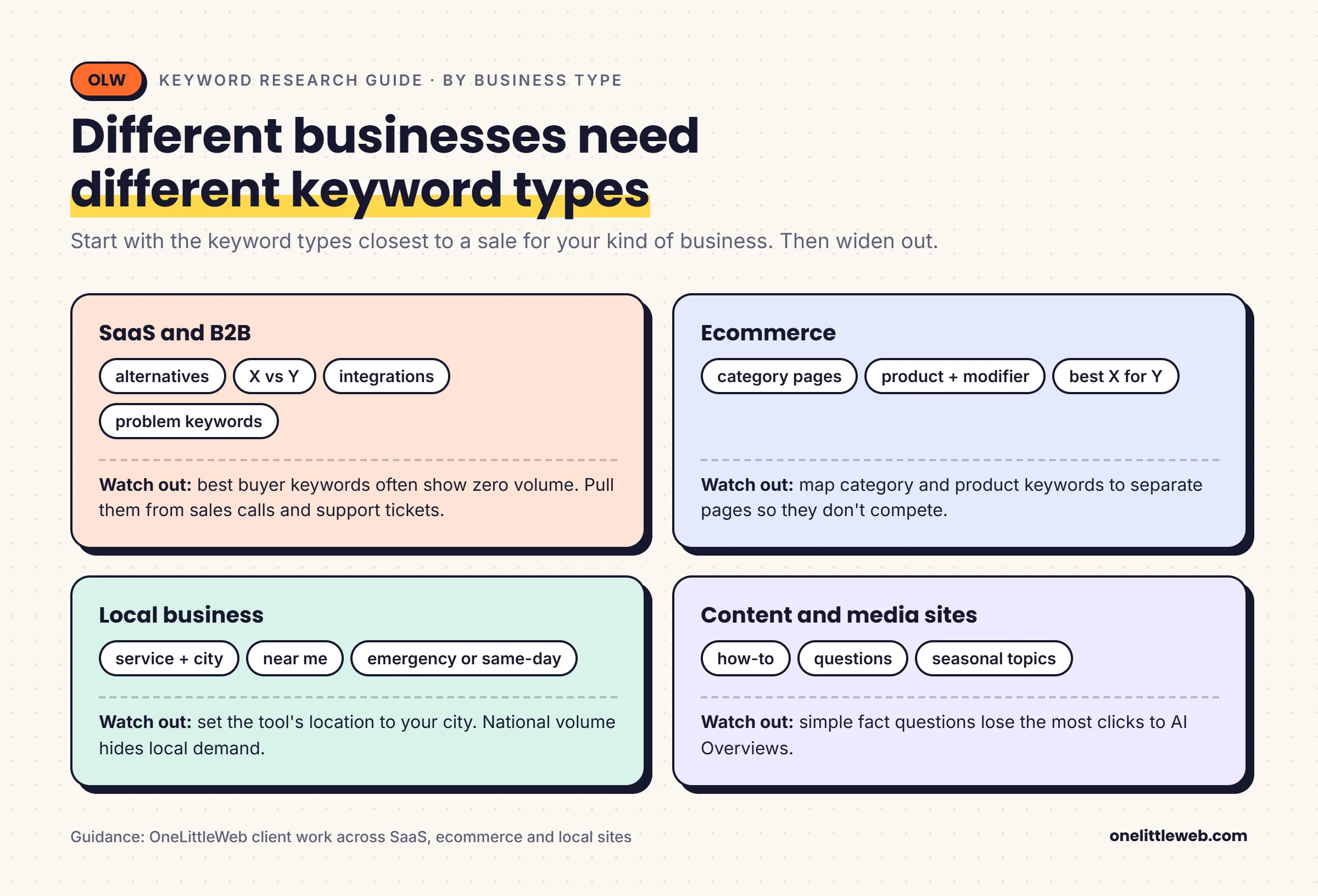
- SaaS and B2B: start with alternatives, “X vs Y,” integration and problem keywords. Many of the best ones show zero volume, so mine sales calls and support tickets. Our SaaS SEO guide goes deeper.
- Ecommerce: focus on category keywords and product keywords with modifiers like size or use. Keep category and product keywords on separate pages. See our ecommerce SEO guide.
- Local business: target service plus city keywords and urgent searches like “same-day plumber near me.” Set your keyword tool to your city, since national numbers hide local demand. The local SEO guide covers the rest.
- Content and media sites: build around how-to and question keywords, and plan seasonal topics ahead with Google Trends. Watch AI Overviews closely, since simple fact questions lose the most clicks.
How keyword research has changed
Keyword research looked very different a few years ago. Five changes explain most of the shift.
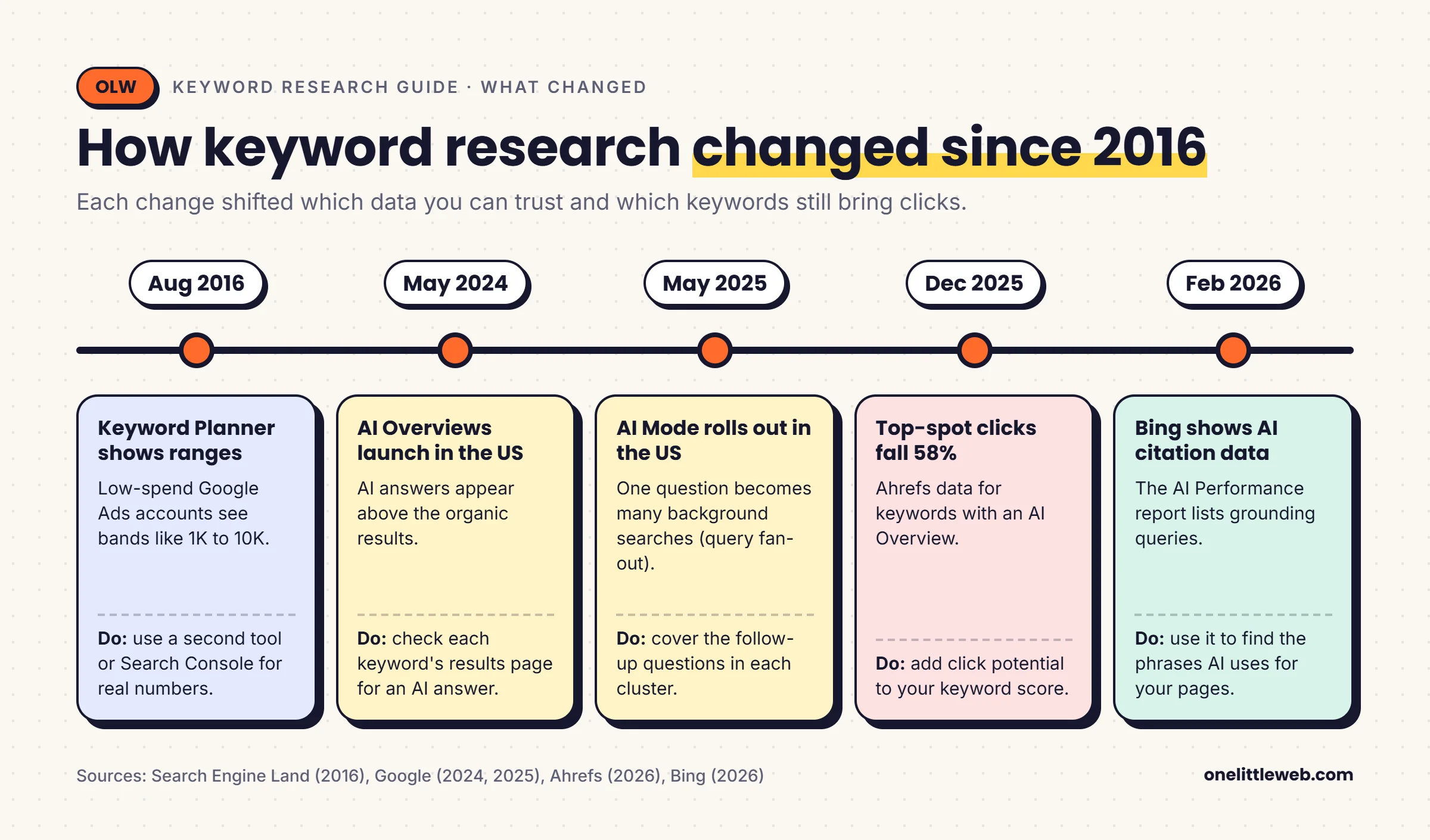
In 2016, Google started showing volume ranges in Keyword Planner to low-spend advertisers. Free, exact volume data mostly disappeared, and third-party tools filled the gap.
In May 2024, AI Overviews launched in the US. In May 2025, AI Mode rolled out to US users, bringing query fan-out with it.
By December 2025, Ahrefs measured a 58% click drop at the top spot on searches with AI Overviews. Then in February 2026, Bing gave site owners their first look at AI citation data.
Each change pushes in the same direction. Single keywords matter less. Intent and click potential matter more.
How to track your keyword results
You need more than rankings to know if your keyword choices worked. We track four layers.
| Layer | What it shows | Tool | How often |
|---|---|---|---|
| Search visibility | Impressions, clicks, CTR and average position for real searches | Google Search Console | Monthly review |
| Rankings | Daily or weekly position for your target keywords | A rank tracker | Weekly |
| AI citations | How often AI answers cite your pages, and for which queries | Bing Webmaster Tools | Monthly |
| Business results | Sign-ups, leads or sales from organic visitors | Your analytics tool | Monthly |
Search Console
Filter the Performance report by page to see every query each page ranks for. New queries you didn’t plan for are ideas for your next research round.
To find long, specific searches, filter queries with this regex. It matches searches of seven or more words:
^(S+s){6,}S+$
To split out branded searches, use your brand name and its common spellings:
yourbrand|your brand|yourbrand.com
Rankings
A rank tracker shows daily or weekly positions for the keywords on your map. It also shows which results pages have AI Overviews. Our guide on how to check keyword rankings walks through free and paid options.
AI citations
Set up Bing’s AI Performance report once, then review it monthly:
- Add and verify your site in Bing Webmaster Tools. You can import it from Search Console.
- Open the AI Performance report.
- Review the grounding queries and the pages cited most often.
- Add new grounding queries to your keyword list and map them to pages.
Business results
Tie each page on your keyword map to a goal in your analytics tool. A page that ranks well but never converts is a sign the keyword’s business value was lower than you scored it.
Best keyword research tools (free and paid)
You don’t need an expensive tool to start. Free tools cover a lot, especially for a small site. Here’s how the main options compare. Prices were checked in November 2026.
| Tool | Price | Best for | Main limit |
|---|---|---|---|
| Google Search Console | Free | Real data on searches you already appear for | Your own site only. 16 months of data. |
| Google Keyword Planner | Free with a Google Ads account | Volume ranges and CPC | Ranges only unless you spend on ads |
| Google Trends | Free | Seasonality and rising topics | Relative interest, no search counts |
| Bing Webmaster Tools | Free | AI citation data and grounding queries | No click data for AI answers |
| Ahrefs | Starter $29/mo (100 credits), Lite $129/mo, Standard $249/mo | Traffic potential, Parent Topic clusters, competitor gaps | Credit limits on lower plans |
| Semrush | Pro $139.95/mo, Guru $249.95/mo, about 17% less paid yearly | Intent filters, personal difficulty, keyword gap | Pricey for a single small site |
| Moz Pro | Starter from $49/mo | Simple difficulty scores and keyword lists | Small keyword limits on entry plans |
| Mangools KWFinder | [Re-check price on mangools.com] | Beginners on a budget | Smaller database than Ahrefs or Semrush |
One thing to know: most top-ranking keyword research guides are written by tool companies. Each recommends its own tool. We use several tools at OneLittleWeb and don’t sell any of them.
For a hands-on comparison, see our best keyword research tools roundup and our Ahrefs vs Semrush vs Moz breakdown.
Common keyword research mistakes
- Chasing volume: a big number doesn’t mean big traffic. Check traffic potential and click potential first.
- Ignoring intent: a guide won’t rank where Google shows product pages, no matter how good it is.
- Trusting one tool: tools disagree on volume and difficulty. Cross-check with Search Console and the live results page.
- One page per keyword: this creates thin, competing pages. Cluster first, then write.
- Skipping customer language: zero-volume phrases from real buyers often convert better than anything a tool suggests.
- Forgetting AI answers: a top ranking on a keyword with an AI Overview can bring far fewer clicks than you expect.
- Never revisiting the list: search behavior changes. A map from two years ago is out of date.
Keyword research checklist
Use this before you hand any keyword to a writer.
- The keyword came from a real source: a tool, Search Console or customer conversations.
- You checked traffic potential, not only search volume.
- You searched it and noted the intent, format and angle of the top results.
- You checked for an AI Overview and judged the click potential.
- You ran the manual difficulty check on page one.
- It has a score, and it’s in your top group.
- It sits on one row of your keyword map, with its secondary keywords.
- No other page on your site targets the same intent.
- The brief includes the follow-up questions from the cluster.
- Tracking is set up for the page once it goes live.
Do it yourself or get help
You can do everything in this guide yourself with free tools and a spreadsheet. For a small site, plan on a few focused days for the first round.
It gets harder at scale. Thousands of keywords and a large existing site take much longer to sort out.
That’s where we help. Keyword research and mapping are the base of every SEO plan we build. For one AI writing tool client, our SEO work took the site from 626 to 263,112 monthly search clicks in six months.
If you want a second pair of eyes, look at our SaaS SEO services or book a session through our SEO consulting services.
FAQ
What is keyword research in simple terms?
Keyword research is finding the words people type into Google and AI tools, then choosing which ones deserve a page on your site. You look at how many people search, how hard it is to rank, what the searcher wants and whether that traffic can turn into customers.
How do I do keyword research for free?
Start with Google Search Console to see the searches you already appear for. Add ideas from Google Autocomplete and People Also Ask. Use Google Keyword Planner for rough volume ranges and Google Trends for seasonality. Then check the live results page for each keyword by hand.
What is a good keyword difficulty for a new website?
On Semrush’s scale, newer sites do best with scores from 0 to 49. Ahrefs and other tools use different formulas, so the same keyword can score very differently. Treat the score as a first filter. Then look at who ranks and whether sites like yours appear on page one.
How many keywords should one page target?
One page should target one main keyword plus the close variants that share most of the same top results. That can be dozens of keywords. Ahrefs found the average top-ranking page also ranks for nearly 1,000 related keywords. Two different intents need two different pages.
Are long-tail keywords easier to rank for?
Often, but not always. Long-tail keywords are defined by low search volume, and many have weaker competition. Some long-tail keywords are close variants of a big topic, though, and the same strong pages rank for them. Check the results page before assuming a keyword is easy.
Is keyword research still important with AI search?
Yes. AI answers are built from searches too. Google’s AI Mode breaks one question into many smaller searches. Keyword research shows you those questions and the words people use. What changes is how you pick keywords. You now weigh click potential, since AI Overviews answer many simple questions directly.
How often should I do keyword research?
Check your Search Console data every month for new queries and pages that are slipping. Redo the full research every 6 to 12 months, or sooner after a big change on the results page or a drop in traffic.
Should I target keywords with zero search volume?
Sometimes. Tools miss many real searches, and 15% of Google searches each day are brand new. If a phrase comes straight from customer calls or support tickets and fits your product, it can be worth a page even when tools show zero.
How do I know if I can rank for a keyword?
Search the keyword and study page one. Forums, thin pages or sites about as strong as yours are good signs. If every result is a big brand with hundreds of linking sites, the keyword is a long-term bet. Use the tool’s difficulty score only as a first filter.
Which keyword research tool is best?
There is no single best tool. Google Search Console is the most accurate source for your own site. Ahrefs and Semrush are the strongest paid options for competitor data and keyword ideas. Many small sites can get far with free tools before paying for one.