
Quick answer
Web design mistakes hurt your SEO when they hide content from Google, slow your pages down or lose the visitor after the click. The costliest ones are quiet: broken URLs after a redesign, slow homepages, phone layouts that drop content and menus Google can’t follow.
Key takeaways
- Most sites still fail. Only 48% of mobile sites passed Core Web Vitals in 2025.
- Homepages are the weak spot. 45% of mobile homepages pass, against 56% of inner pages.
- Redesigns are the silent killer. Every changed URL needs a 301 to its closest match.
- Google reads your phone layout. Content missing on mobile may not count at all.
- Some fears are overblown. 404s don’t cause a sitewide penalty, and HTTPS is a small signal.
- Every check here is free. PageSpeed Insights, Search Console and your own phone catch most problems.
The worst web design mistakes don’t announce themselves. There’s no penalty notice, just a slow drop in traffic that nobody connects to the redesign.
Most guides on this topic list design pet peeves. We’ll go further. Each mistake below is tied to Google’s own documentation and labeled as a direct or indirect SEO problem.
You’ll also get real numbers on how common each problem is, a free way to check it and an honest note on when it isn’t worth fixing.
What counts as a web design mistake for SEO
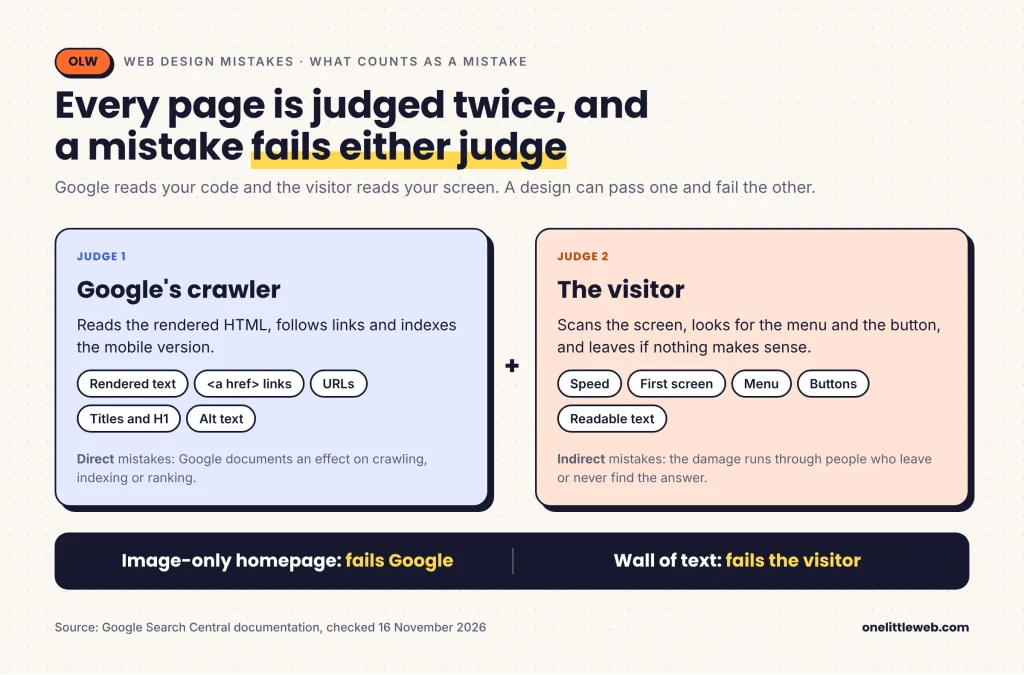
Every page has two judges. A search engine reads your code and your content. A visitor reads the screen, scans the menu, looks for the button and lets the eye land on whatever makes sense first.
A design mistake is any choice that fails one of those judges. A homepage built from images may delight people and tell Google almost nothing.
In this guide, every mistake gets one of two labels:
- Direct: Google documents an effect on crawling, indexing or ranking.
- Indirect: the damage runs through people. They leave, they don’t trust the page, or they never find the answer.
Google sets the limits here. Its page experience guidance says there’s no single page experience signal, and relevant content still wins. So no design fix is a magic ranking lever.
New to the basics? Start with what SEO is and how it works.
Why web design mistakes matter for SEO
Most sites still fail Core Web Vitals
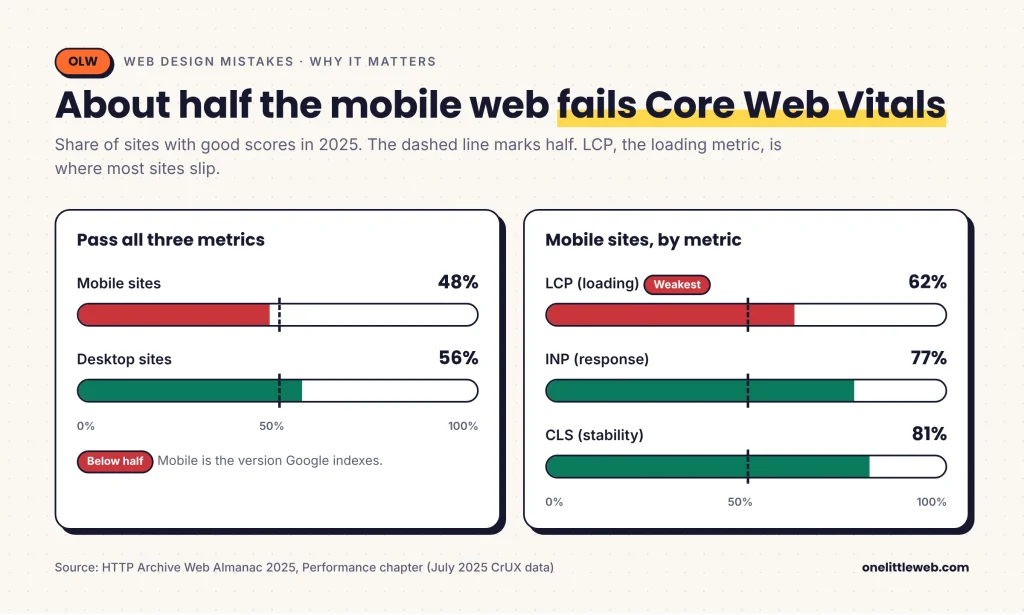
Google measures speed and stability with three Core Web Vitals. In the 2025 Web Almanac, only 48% of mobile sites and 56% of desktop sites passed all three.
Largest Contentful Paint (LCP) is the usual problem. Only 62% of mobile sites had a good LCP, against 77% for INP and 81% for CLS.
Homepages fail more than inner pages
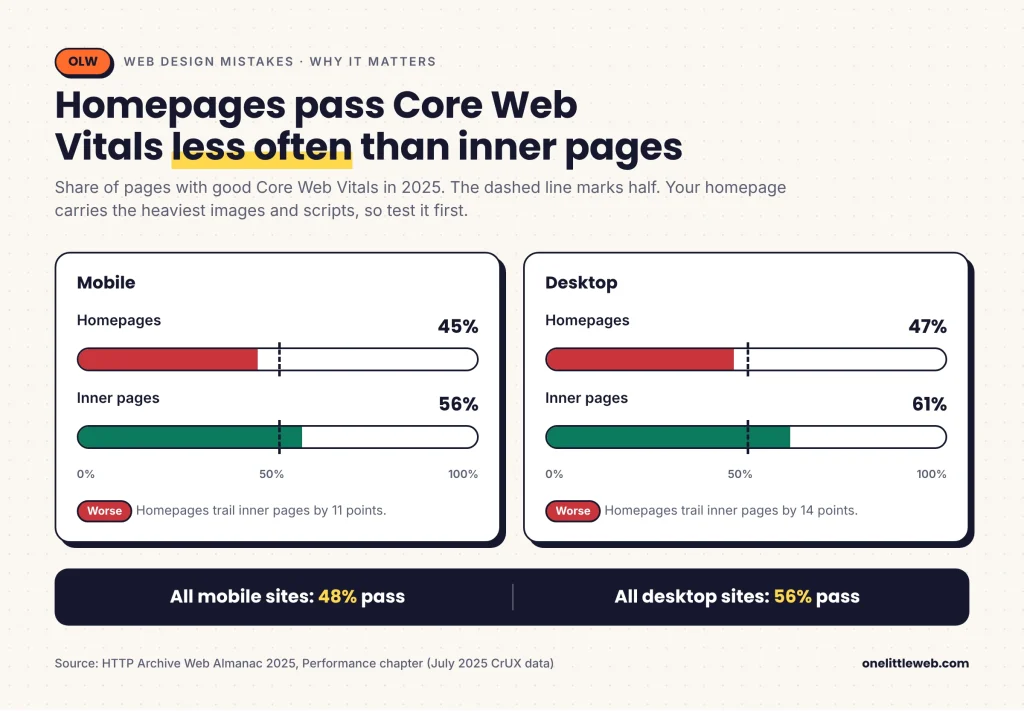
Here’s a detail most guides skip. Only 45% of mobile homepages passed Core Web Vitals, against 56% of secondary pages.
Homepages carry the heaviest hero images, sliders and scripts. They’re also where most redesign effort goes, so they’re where design choices cost the most.
Visitors leave before Google even notices
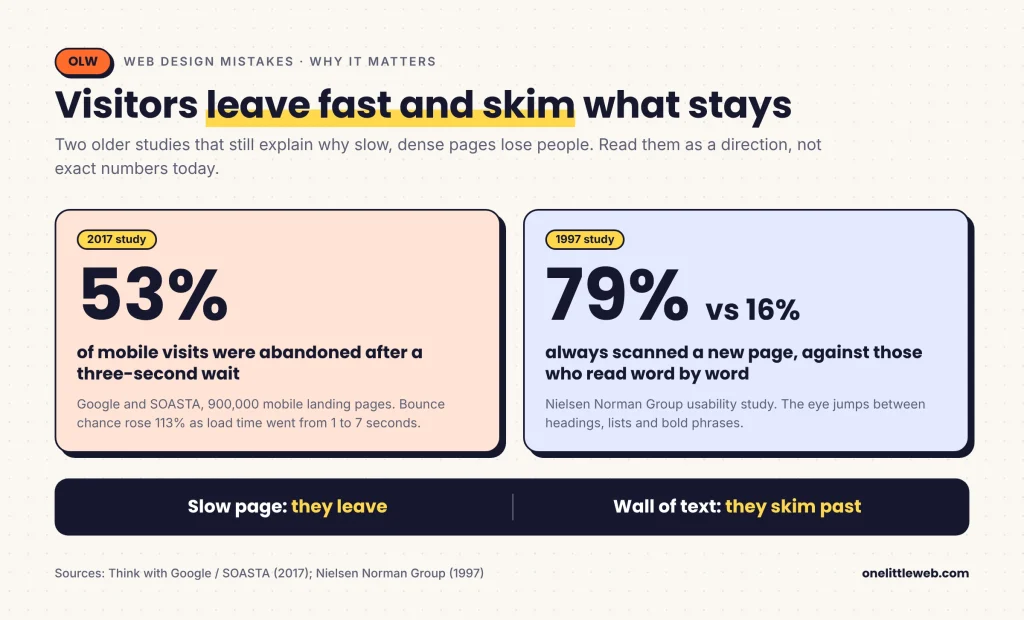
A 2017 Google and SOASTA study of 900,000 mobile landing pages found 53% of visits were abandoned after three seconds. The data is old, so read it as a direction.
People also skim. In a 1997 Nielsen Norman Group (NN/g) study, 79% of participants always scanned a new page, and only 16% read word by word.
Myths vs reality
Several ranking pages for this topic repeat claims that Google’s own documentation doesn’t support. These are the ones I see most.
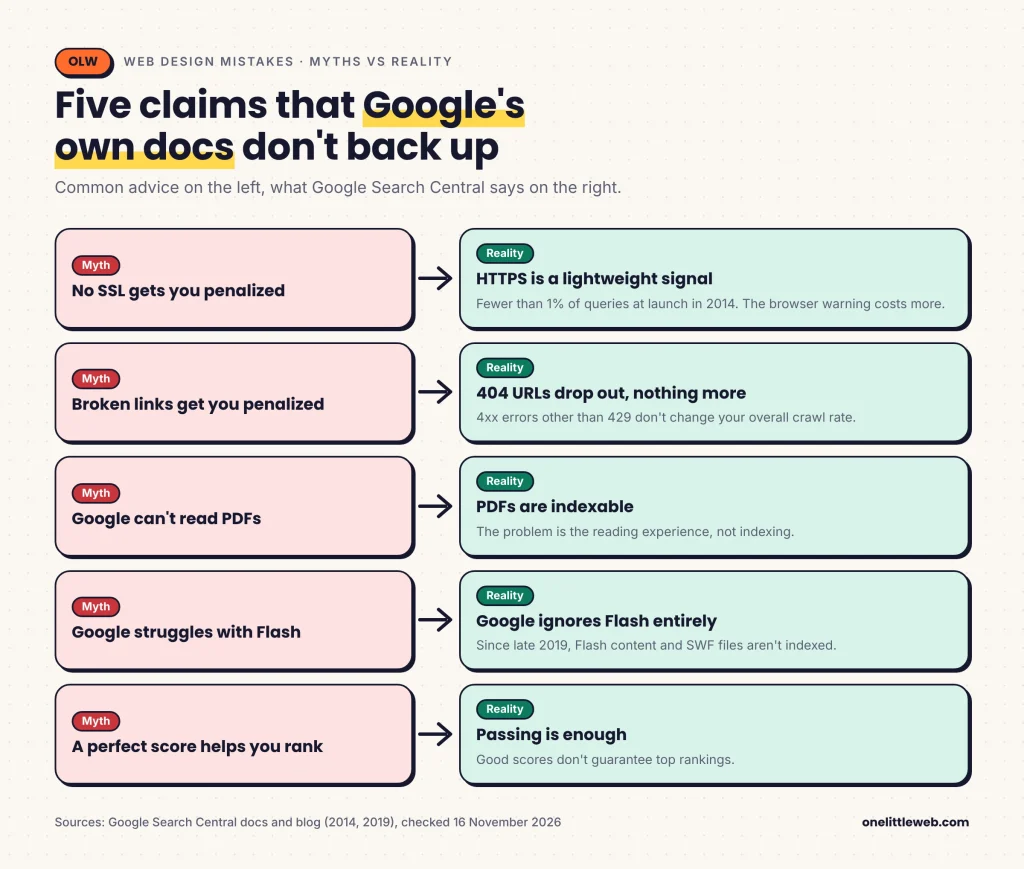
“No SSL gets you penalized.” Google called HTTPS a lightweight signal in 2014, affecting fewer than 1% of queries. Today it’s part of Google’s page experience self-assessment, not described as a direct boost.
“Broken links get you penalized.” Google drops URLs that return a 404 from its index. But it says 4xx errors, apart from 429, don’t change your overall crawl rate.
“Google can’t read PDFs.” It can. PDF is on Google’s list of indexable file types. The problem is the reading experience, not indexing.
“Google struggles with Flash.” It’s worse than that. Since late 2019, Google Search ignores Flash content and doesn’t index SWF files.
“A perfect PageSpeed score helps you rank.” Google says good scores don’t guarantee top rankings and advises against chasing perfect scores for SEO.
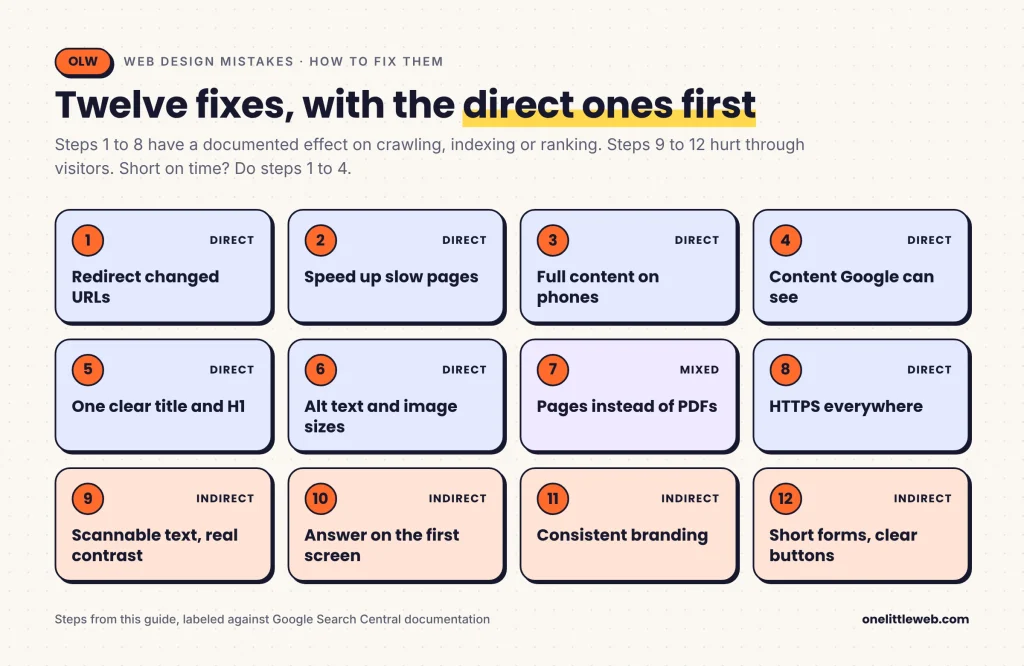
How to find and fix web design mistakes: 12 steps
The steps run from the quietest, costliest mistakes to the ones that hurt through visitors. If you only have an afternoon, do steps 1 to 4.
Step 1: Redirect every URL your redesign changed
Type: Direct.
A redesign renames pages, moves posts into new folders or switches platforms. Every old URL carried backlinks and search history. If it now returns a 404, that value has nowhere to go.
The fix is a permanent server-side redirect, a 301 or 308, from each old URL to its closest new match. Google says permanent redirects don’t lose PageRank.
- Point each old URL to its real equivalent. Sending hundreds of pages to the homepage can be treated as a soft 404.
- Keep chains short. Google suggests about three hops and never more than five.
- Keep redirects live for at least a year.
Get the new URLs right too. Google recommends hyphens between words, not underscores. URL paths are case sensitive, so /Services and /services count as two URLs.
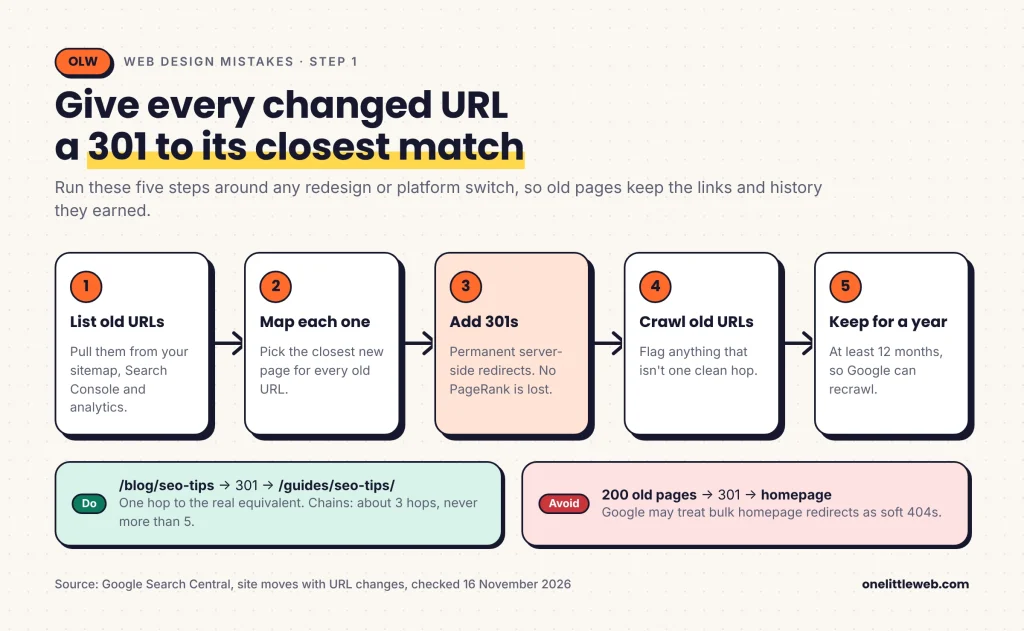
Check: Export old URLs from your sitemap, Search Console and analytics before launch, then crawl that list with an SEO crawler after launch and flag anything that isn’t a single clean redirect.
Step 2: Speed up your slowest pages, starting with the homepage
Type: Direct, with limits.
As of 16 November 2026, a page counts as good when it hits these at the 75th percentile of real visits:
| Metric | What it measures | Good |
|---|---|---|
| Largest Contentful Paint (LCP) | How fast the main content shows | 2.5 seconds or less |
| Interaction to Next Paint (INP) | How fast the page reacts to a tap or click | 200 milliseconds or less |
| Cumulative Layout Shift (CLS) | How much the layout jumps | 0.1 or less |
Two design habits cause a lot of the damage:
- Lazy-loading the main image. About 17% of mobile pages lazy-load their LCP image. web.dev says this always adds delay.
- Images with no size set. 62% of mobile pages have at least one image without width and height, so text jumps when it loads.
Ads and embeds cause jumps too, so reserve space for them even when no ad loads.
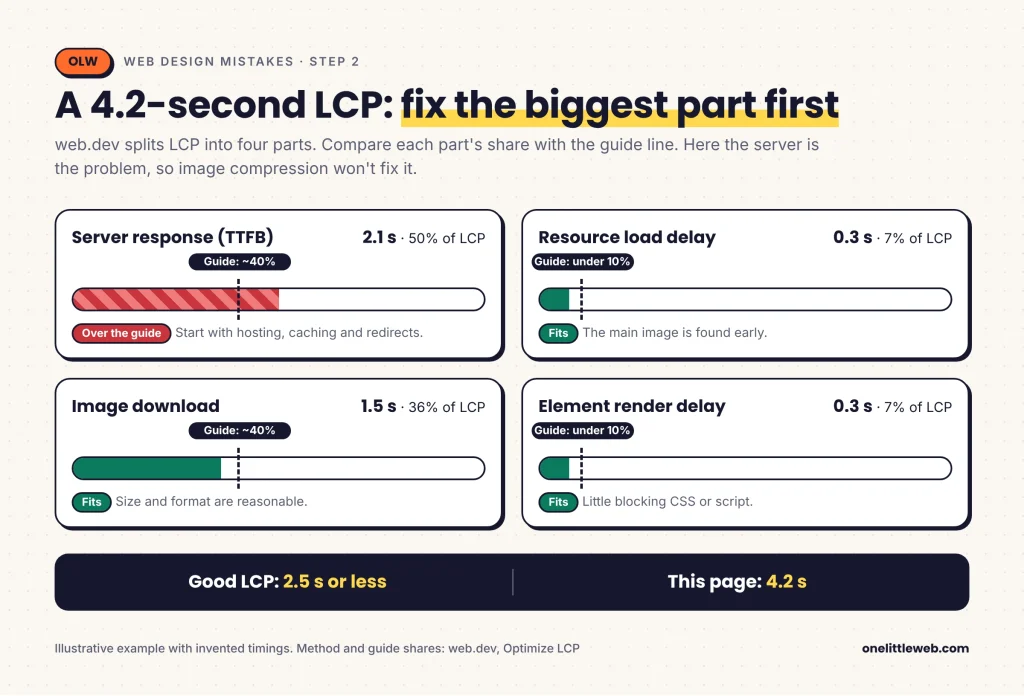
Worked example. Say your homepage LCP is 4.2 seconds. web.dev splits LCP into four parts. In a healthy load, about 40% goes to the server’s first byte and about 40% to downloading the main image. The two delays between them should each stay under 10%.
Now say your server alone takes 2.1 seconds. That’s half the total, well past the 40% guide. Image compression won’t fix it, so you’d start with hosting, caching and redirects. The 4.2-second page is made up to show the method.
Check: Run PageSpeed Insights on your homepage and one inner page. Once both pass, stop and spend the time on content.
Step 3: Make your phone layout carry the full page
Type: Direct.
Google indexes and ranks the mobile version of your page. As far as Google is concerned, your phone layout is your site.
Its mobile-first guide says less content on mobile can lead to traffic loss. Your phone page should carry the same main content, headings, title, meta description and structured data as desktop.
Tabs and accordions are fine if the content inside matches. Content that only loads after a swipe, tap or typing isn’t, because Google won’t perform those actions. A trimmed mobile menu also removes internal links from the version Google indexes.
Then there are pop-ups. Google announced in August 2016 that, from 10 January 2017, pages whose content is hard to reach after a mobile search click may rank lower. A full-screen offer on arrival is the classic case.
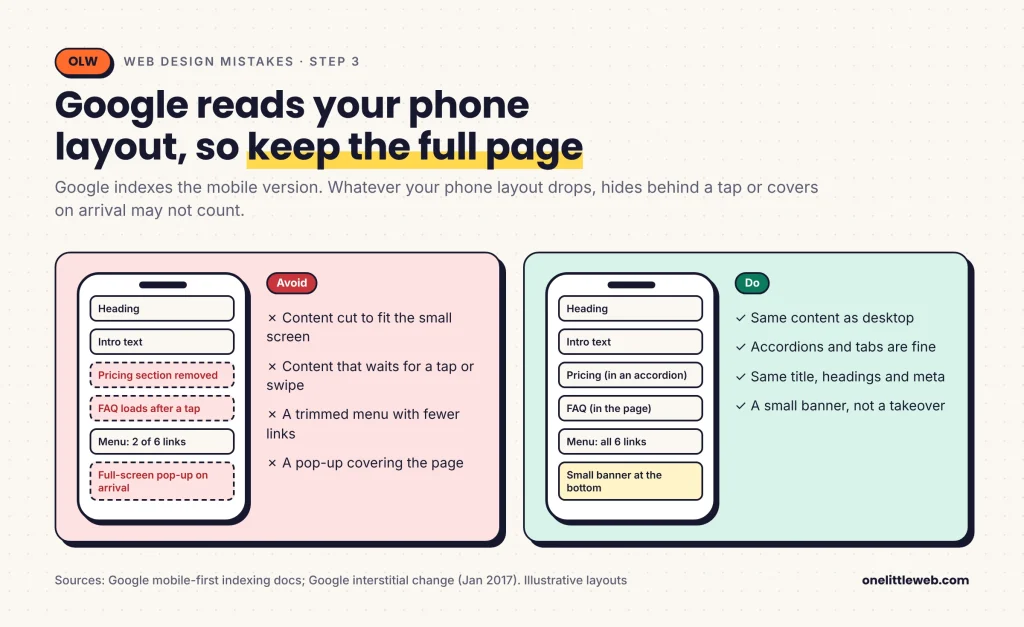
Check: Open your key pages on a real phone from a Google result, then use URL Inspection in Search Console to see the smartphone crawler’s view.
Step 4: Make sure Google can see your content and menus
Type: Direct.
Google indexes the rendered HTML of your page. Its JavaScript guide is blunt: if content isn’t in the rendered HTML, Google can’t index it.
- Buttons that aren’t links. Google generally follows only
<a>elements with anhref. A<span>with a click handler may not be parsed. - Vague link words. “Click here” tells Google little. “See web design pricing” tells it what the next page is.
- Text inside images. A headline baked into a graphic isn’t text. Keep it in HTML and style it with CSS.
- Orphan pages. Every page you want indexed needs a link from at least one other page on your site.
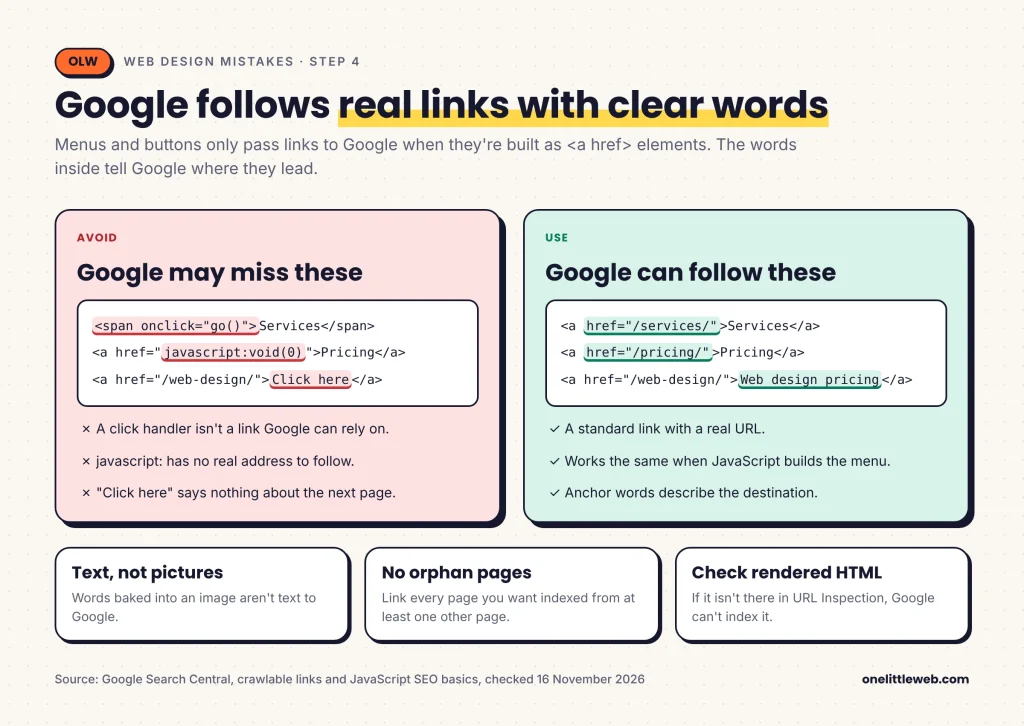
Check: In URL Inspection, open the rendered HTML and search it for your menu links and your main heading.
Step 5: Give every page one clear title and H1
Type: Direct.
Google builds the title link in search results from your <title>, visible headings, og:title and the anchor text of links pointing at you.
It rewrites titles that are incomplete, outdated, inaccurate or repeated across many pages. It also rewrites when several headings look equally prominent. Five huge headings in the same font size give Google no clear main topic.
- Use one visible H1 per page, styled as the largest text.
- Choose heading levels for structure, and use CSS for size.
- Write a unique title for every page, with a short site name at the end.
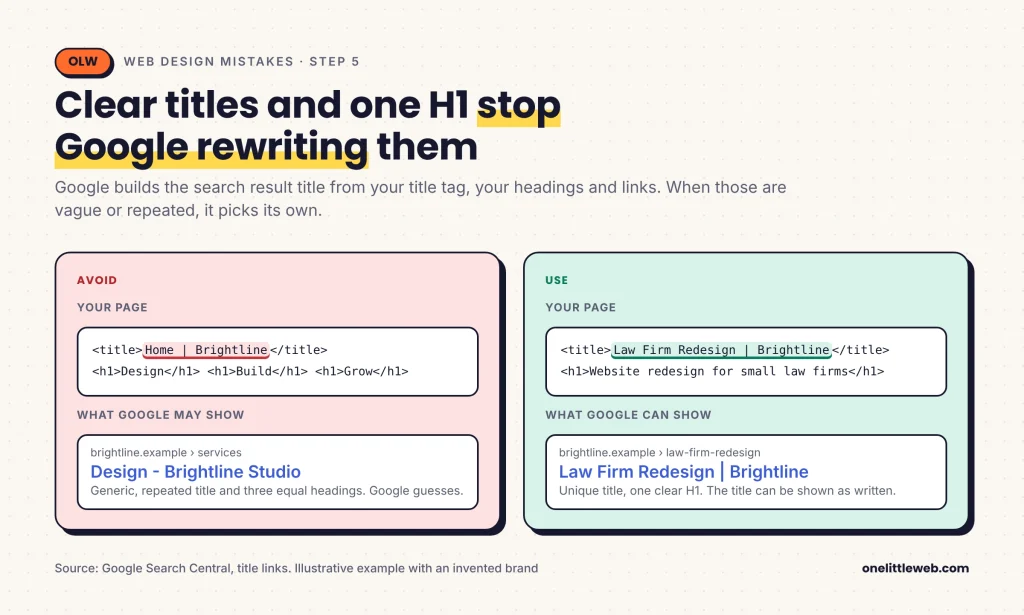
Check: Search site:yourdomain.com and compare the titles Google shows with the ones you wrote.
Step 6: Fix image alt text, sizes and markup
Type: Direct.
Google reads alt text alongside the surrounding content to understand an image. “Dalmatian puppy playing fetch” beats “puppy”. Stuffing keywords into alt text counts as spam.
Google prefers short, descriptive file names over IMG00023.jpg. It also recommends standard img elements over CSS background images, so a product photo set as a background may never reach image search.
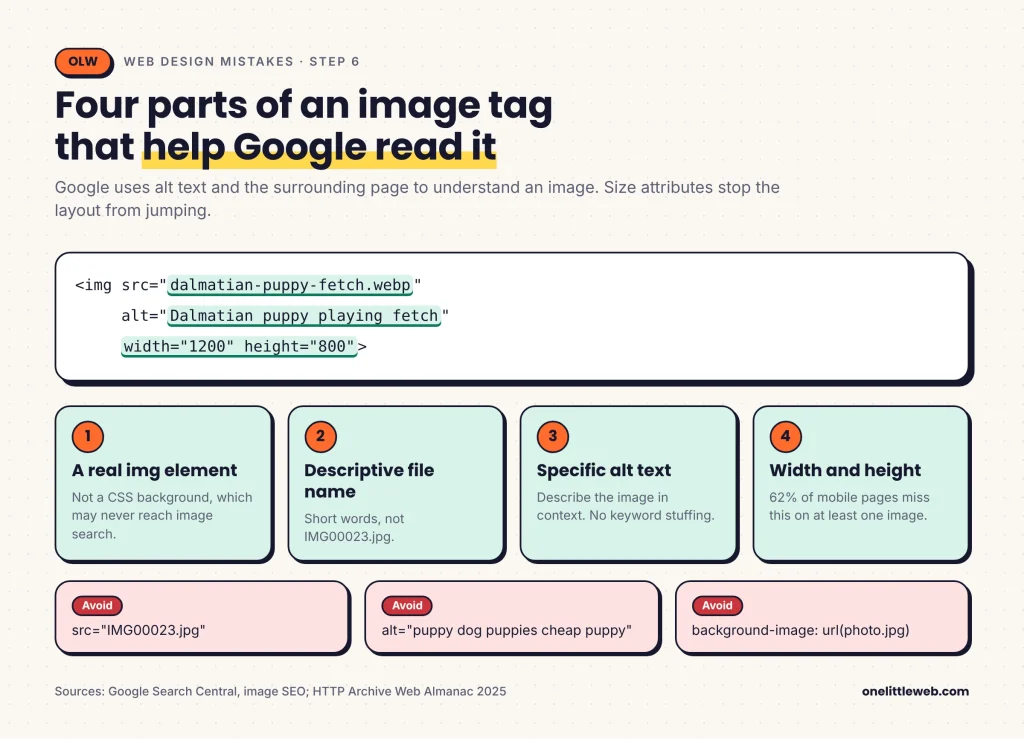
Check: View source on one key page and confirm each meaningful image has alt text, a width and a height.
Step 7: Turn reading PDFs into pages and retire Flash
Type: Mixed.
Google indexes PDFs, so they won’t vanish from search. The problem comes after the click. NN/g says PDFs disrupt browsing, and they lack your menu, so visitors have no easy way into your site.
Flash is a firmer no. Any old page that still relies on Flash for its text is invisible to Google.
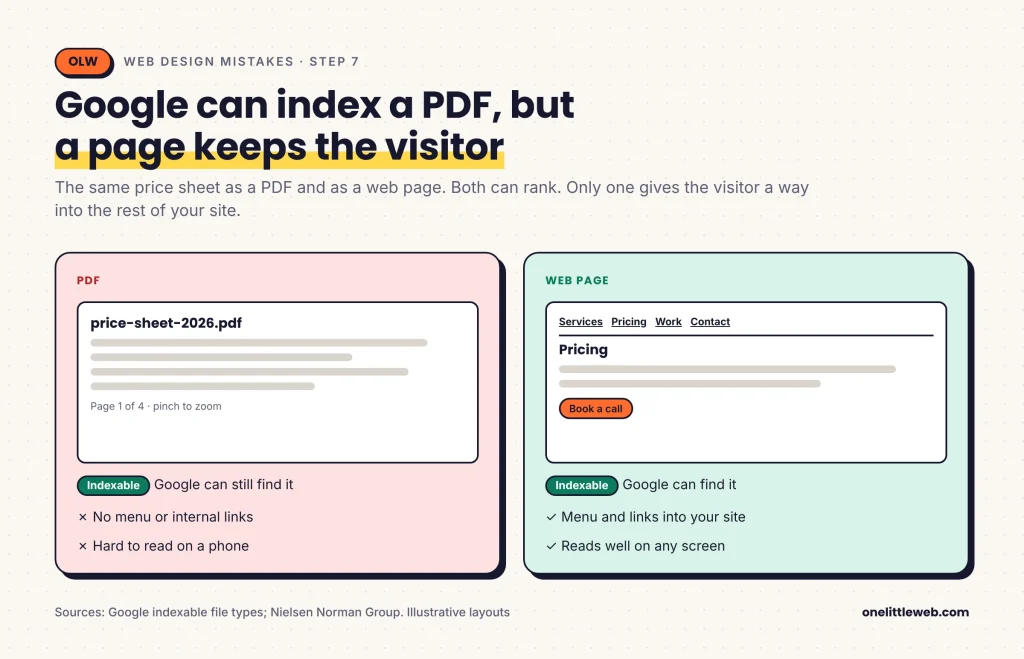
Check: Search site:yourdomain.com filetype:pdf and turn the most visited PDFs into pages first.
Step 8: Serve every page over HTTPS
Type: Direct, but small.
A missing certificate won’t sink a strong page by itself. The bigger cost is the browser’s “Not secure” warning, which sends visitors straight back to the results.
- Install a certificate. Many hosts include one for free.
- Redirect every HTTP URL to its HTTPS version with a 301.
- Update internal links, canonical tags and your sitemap.
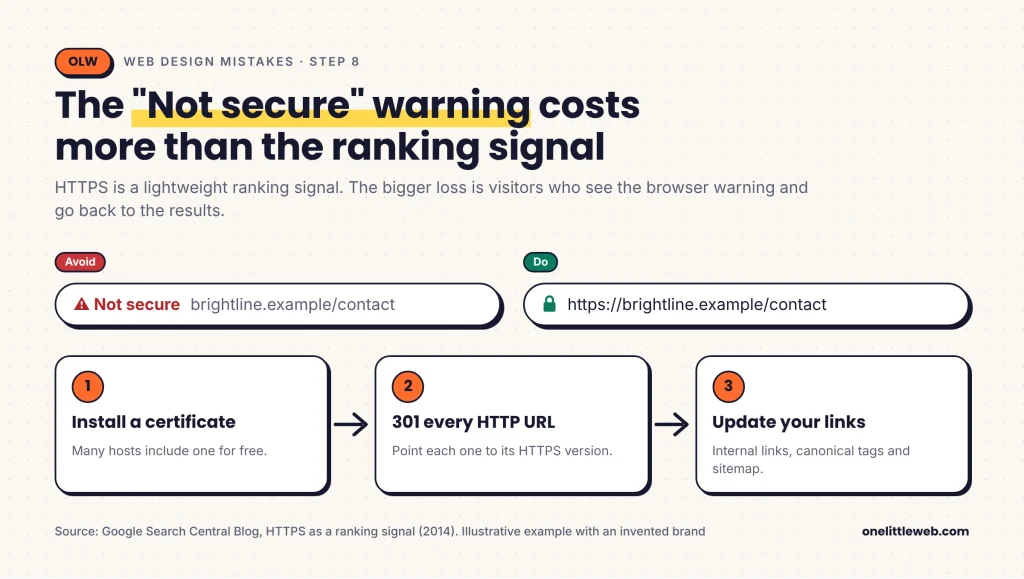
Check: Open the HTTPS report in Search Console and fix any page it lists.
Step 9: Break up walls of text and fix contrast
Type: Indirect.
Google’s starter guide asks for easy-to-read, well-organized text. There’s no documented ranking factor for font size, so the cost is indirect. People who can’t scan the page leave.
- Keep paragraphs short, with a subheading every few paragraphs.
- Turn runs of facts or steps into a list.
- Left-align body text, and save centered text for short headings.
- Use relative font units in CSS so text scales with the visitor’s settings.
Contrast is the one place with a hard number. WCAG 2.2 level AA asks for at least 4.5:1 for normal text and 3:1 for large text, about 24px or 18.5px bold.
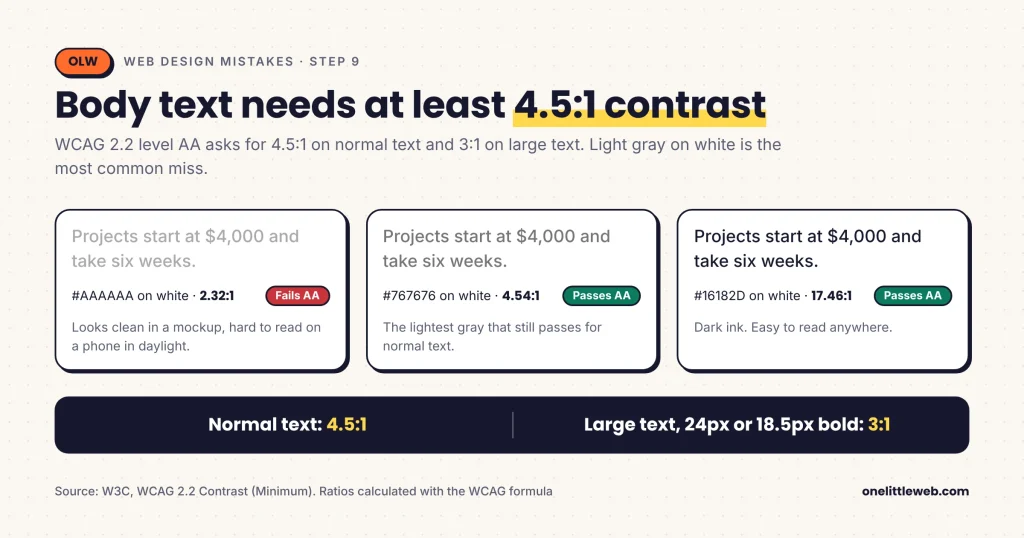
Check: Read the page on a phone at arm’s length, then run your body text color through a free contrast checker.
Step 10: Answer the visitor’s question on the first screen
Type: Indirect, and the first one I’d fix on most brochure sites.
NN/g lists hidden answers among its top web design mistakes, especially missing prices. B2B sites suffer most, because “contact us for a quote” is the default.
Google’s starter guide puts helpful, people-first content above most other tactics. A service page that never says what it costs can’t be the best result for that query.
- Answer the page’s main question on the first screen.
- Show a price, a starting range or the factors that move the price.
- Label menu items with the words people search for.
- Show your phone number and address as text near the top, with a simple address icon so people spot it fast.
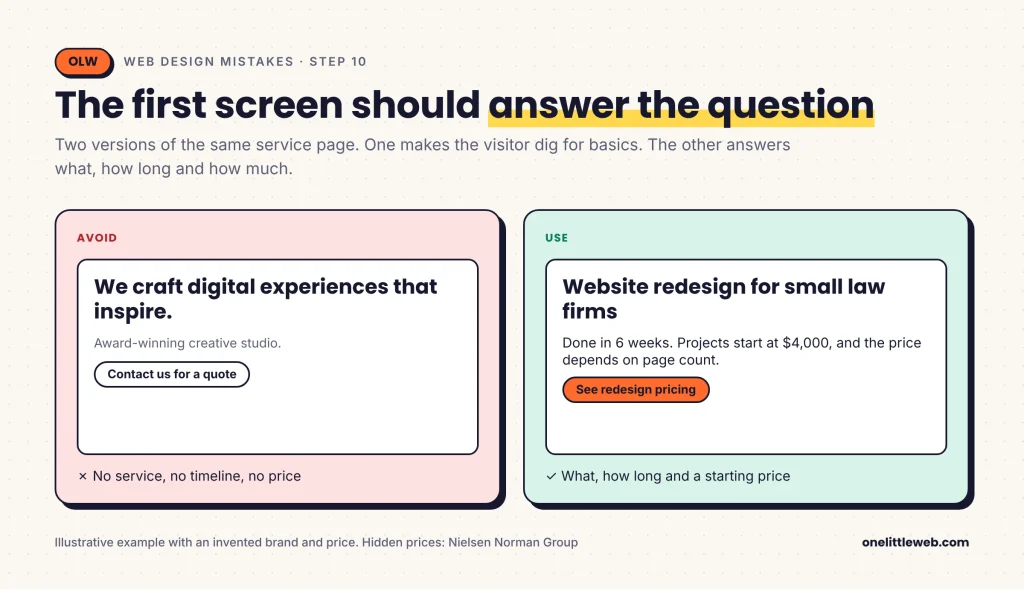
Check: Ask someone outside your team to find the price on your site in 30 seconds.
Step 11: Make your branding consistent
Type: Indirect.
A site that changes colors and fonts from page to page feels stitched together. People trust it less, so they leave sooner.
I found no Google documentation tying visual consistency to rankings. The closest thing is Google’s title link guidance, which asks you to brand titles briefly and consistently.
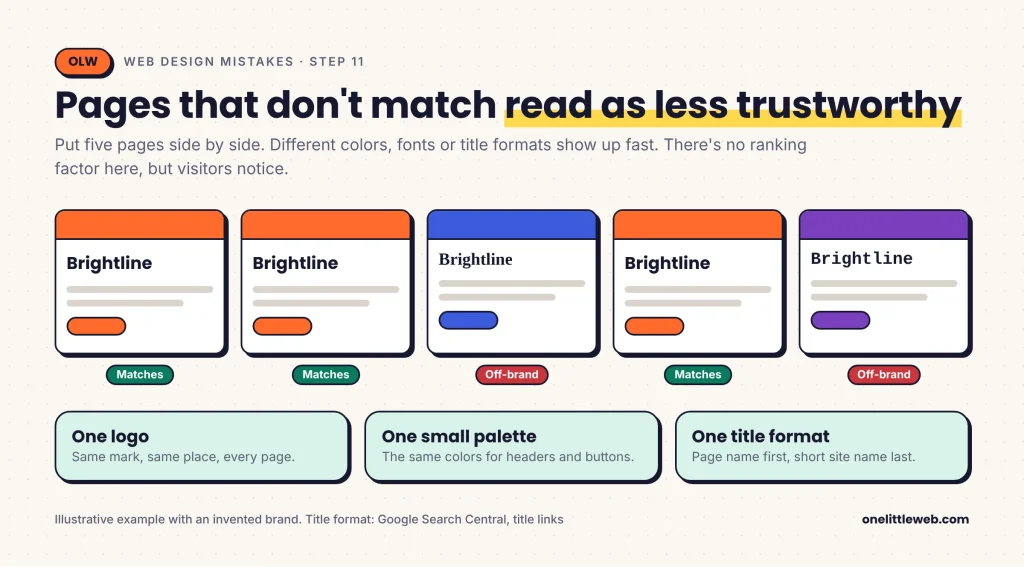
Check: Put five of your pages side by side and look for different fonts, colors or title formats.
Step 12: Shorten forms and rename generic buttons
Type: Indirect.
Long forms cost leads, not rankings. A page can rank, earn the visit and still lose it at a form with twelve required fields.
There’s one SEO angle. A link styled as a button still has anchor text, and “Submit” or “Learn more” tells Google nothing about the page behind it.
If forms keep losing leads, a UX design review usually finds the fields to cut.
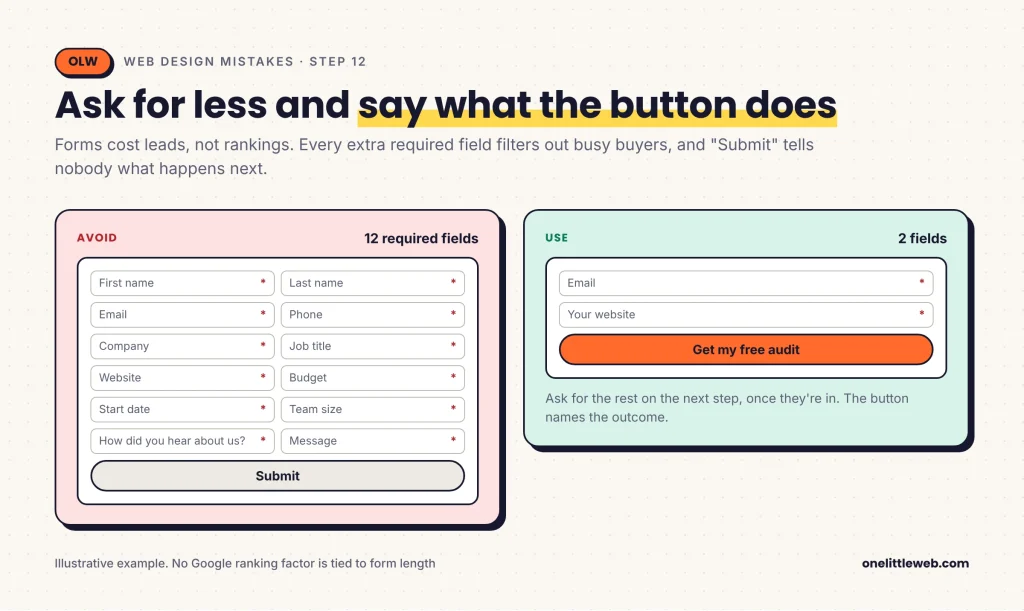
Check: Fill in your own form on a phone and count every field you could drop.
Web design mistakes at a glance
Use this as a copyable audit sheet. Work down the list in order.
| Mistake | Direct or indirect | Free check | First fix |
|---|---|---|---|
| Redesign breaks URLs | Direct | Crawl the old sitemap | 301 each old URL to its match |
| Slow pages | Direct, with limits | PageSpeed Insights | Stop lazy-loading the main image |
| Phone layout drops content | Direct | URL Inspection | Match mobile content to desktop |
| Content Google can’t see | Direct | Rendered HTML | Use real <a href> links |
| Weak titles and headings | Direct | site: search | One H1, unique titles |
| Images without alt or size | Direct | View source | Alt text, width and height |
| PDFs and Flash for reading | Mixed | filetype:pdf search | Publish HTML first |
| No HTTPS | Direct, small | Search Console HTTPS report | Certificate and 301s |
| Walls of text | Indirect | Contrast checker | Short paragraphs, 4.5:1 contrast |
| Dodging the question | Indirect | The 30-second price test | Answer on the first screen |
| Inconsistent branding | Indirect | Compare five pages | One palette, one title format |
| Clunky forms, generic buttons | Indirect | Fill in your own form | Cut fields, rename buttons |
The first eight rows are where Google documents a direct effect. If time is short, finish those before you touch the last four.
Anatomy of an SEO-safe page
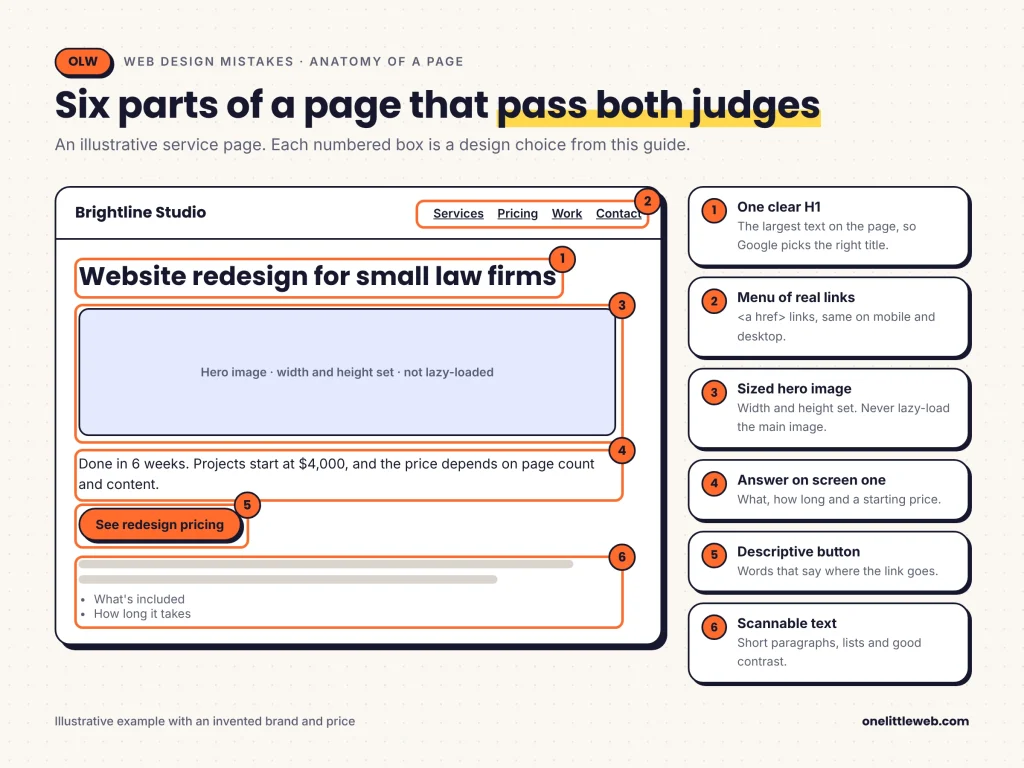
Start at the top. One H1 tells Google and the visitor what the page is about, and the hero image under it loads first because it isn’t lazy-loaded and has its size set.
The first screen answers the question. Below it, buttons are real links with words that describe where they go.
The rest of the page is easy to scan: short paragraphs, lists and images with alt text. Nothing covers the content when someone arrives from a search result.
Plan this layout in a wireframe tool before anyone writes code. It’s much cheaper to move a box than to rebuild a page.
Which mistakes to fix first, by site type
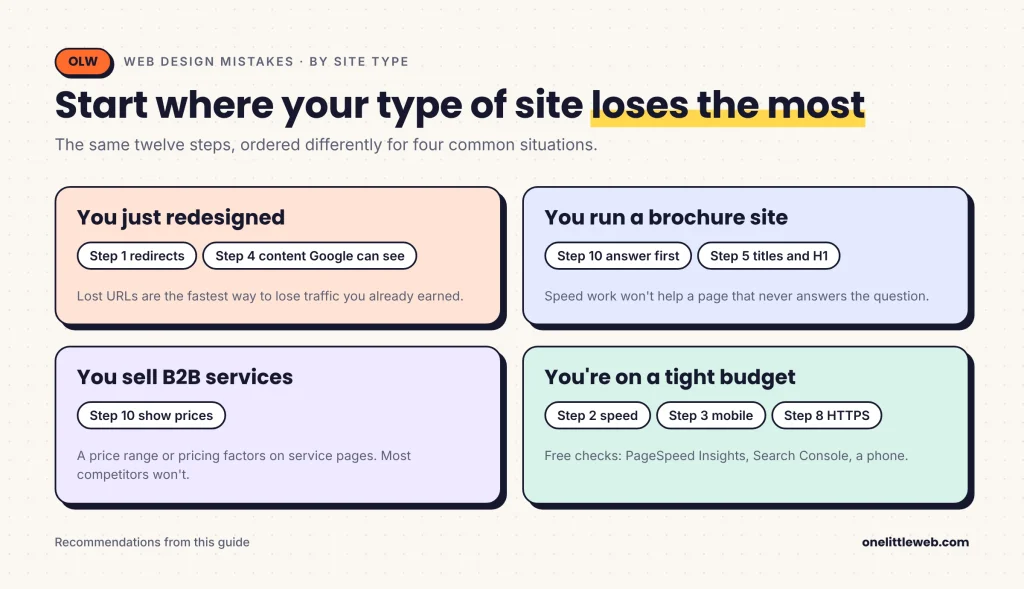
- You just redesigned or changed platforms: start with step 1, then step 4. Lost URLs are the fastest way to lose traffic you already earned.
- You run a small brochure site: start with step 10, then step 5. Speed work won’t help a page that never answers the question.
- You sell B2B services: put a price range or pricing factors on your service pages. Most competitors won’t, and our B2B SEO team sees this gap on most audits.
- You’re on a tight budget: run the free checks for steps 2, 3 and 8 first. They catch most direct problems at no cost. When you’re ready for help, see our small business SEO services.
How long fixes take to show
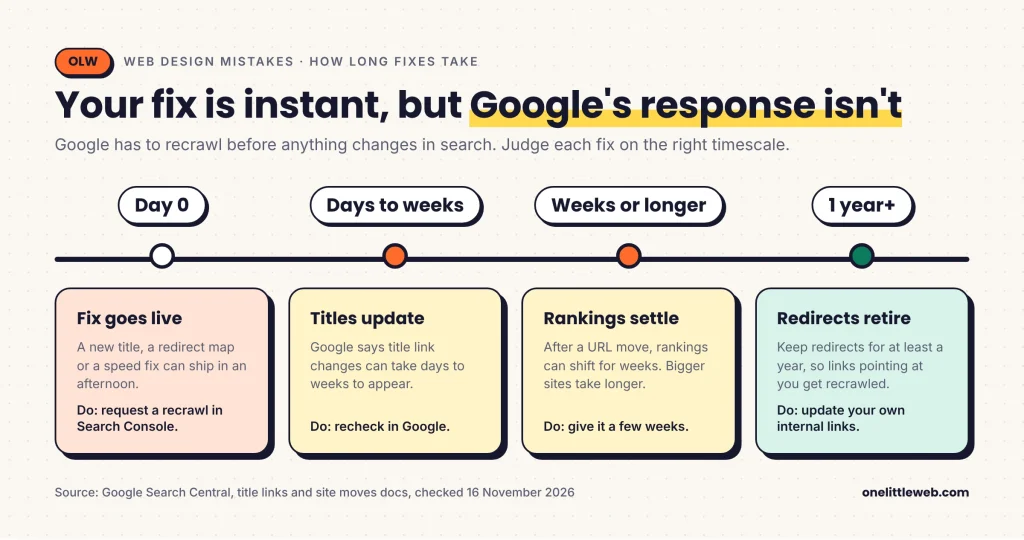
Your side moves fast. A title fix or a redirect map can go live in an afternoon.
Google’s side is slower because it has to recrawl. Google says title changes can take days to weeks to appear. After a URL move, rankings can shift for weeks or longer, and bigger sites take longer.
So keep redirects live for at least a year, and don’t judge a fix by the first week of data.
How to track whether your fixes worked
| Layer | Free tool | What it tells you | How often |
|---|---|---|---|
| Lab speed | PageSpeed Insights | LCP element, CLS sources, lab scores | After each change |
| Real-visitor data | Search Console Core Web Vitals report | Which URL groups pass on mobile and desktop | Monthly |
| Google’s view | URL Inspection | Rendered HTML, mobile crawl, indexing status | After each template change |
| Search results | Google search operators | Titles shown, indexed PDFs | Monthly |
Lab speed: PageSpeed Insights
Test your homepage and one inner page of each template. Look at which element is the LCP and whether it’s an image you can size or stop lazy-loading.
Real-visitor data: Core Web Vitals report
Lab scores are a guess. The Search Console report uses real visits, which is the data Google judges you on.
- Open Search Console and choose your property.
- Go to Experience, then Core Web Vitals.
- Open the mobile report first, since Google indexes mobile.
- Click a failing group to see example URLs.
Google’s view: URL Inspection
Paste a URL, run a live test and open the rendered HTML. Search it for your main heading and a menu link. If either is missing, Google can’t see it.
Search results: operators
These searches show what Google has stored for your site:
site:yourdomain.com
site:yourdomain.com filetype:pdf
site:yourdomain.com/services/
Mistakes to avoid while fixing
- Redirecting everything to the homepage. Google may treat mass homepage redirects as soft 404s. Map each URL to its closest match.
- Lazy-loading every image. It helps images below the fold and hurts the main one at the top.
- Cutting mobile content to speed things up. Google indexes mobile, so trimmed content may stop counting.
- Stuffing keywords into alt text. Google treats it as spam. Describe the image instead.
- Chasing a perfect score. Once pages pass, more speed work has little SEO payoff.
- Removing redirects too soon. Keep them for at least a year.
Fix it yourself or get help
Most of these checks are free and take an afternoon. If your site is small and built on a common platform, you can fix steps 5 to 12 yourself.
Steps 1 to 4 are where a mistake costs real traffic. Redirect maps, rendering problems and server speed often need a developer or an SEO who has done it before.
If you’d rather hand it off, our website design service includes these checks in every build. You can also talk to our team before a redesign, which is the cheapest time to avoid step 1 entirely.
Not sure what a fix should cost? See how much a website costs. After launch, ongoing website maintenance keeps redirects, certificates and speed from slipping.
Questions people ask
What are common website mistakes?
The most common website design mistakes are slow pages, broken URLs after a redesign and phone layouts that drop content. Vague titles and pages that dodge the visitor’s question are close behind.
What are the 7 C’s of website design?
The best-known version comes from Jeffrey Rayport and Bernard Jaworski’s 2000 book E-Commerce: context, content, community, customization, communication, connection and commerce. Other agencies publish different 7 C lists, so treat any version as an audit prompt, not a rulebook.
What are the top 10 web design mistakes?
The classic list is Nielsen Norman Group’s, first written in 1996 and updated in 2011. It includes poor site search, PDFs for online reading, non-scannable text, fixed font sizes, weak page titles and hidden prices.
What is the 3 second rule in website design?
It’s a rule of thumb from 2017 Google and SOASTA research: 53% of mobile visits were abandoned when a page took longer than three seconds to load. It isn’t a Google ranking rule; the ranking-related target is an LCP of 2.5 seconds or less.
How fast should your page load?
Aim for an LCP of 2.5 seconds or less, an INP of 200 milliseconds or less and a CLS of 0.1 or less, at the 75th percentile of real visits. Google says passing doesn’t guarantee top rankings, so fix the slow parts and move on.
Do broken links hurt SEO?
Not with a sitewide penalty. Google drops URLs that return a 404 from its index, and it says 4xx errors other than 429 don’t change your overall crawl rate. The real loss is the links and history the old URL had.
Does HTTPS affect Google rankings?
Only a little. Google called HTTPS a lightweight ranking signal in 2014, affecting fewer than 1% of queries. The bigger cost of skipping it is the browser’s Not secure warning.
Are PDFs bad for SEO?
No, Google can index PDFs. They’re a poor reading experience, though, and they lack your menu, so publish important content as HTML and offer the PDF as a download.
Does mobile design affect SEO?
Yes. Google indexes and ranks the mobile version of your page, so content missing from your phone layout may not count.
Do good Core Web Vitals guarantee rankings?
No. Google says good scores don’t guarantee top rankings and that relevant content still comes first. Pass the thresholds, then focus on content.