Your organic traffic is up. A few category pages finally made it to page one, and Search Console looks better every month. But orders haven’t moved much.
That gap happens more often than most store owners expect. Traffic and sales are different numbers, and an SEO plan built around one can quietly ignore the other.
At OneLittleWeb, we’ve worked with 1,200+ clients since 2018, and our campaigns generate more than 25 million organic visits a year. This guide focuses on the part that matters most to a store owner: turning those visits into orders.
You’ll learn how to attract shoppers who are ready to buy and how to get more of them to check out. We’ll also cover what AI shopping changes, since more of the buying journey now happens before anyone lands on your site. Let’s begin.
What Ecommerce SEO looks like going into 2027
Ecommerce SEO is the work of getting your category and product pages in front of shoppers in unpaid search results, then making sure those visits turn into sales. It covers keyword targeting, technical health, page content, product data and authority.
The basics haven’t changed much. What has changed is where shoppers find products and how often they click through to your store.
- AI search is now a real channel. Google’s AI Mode passed 1 billion monthly users in May 2026, about a year after launch.
- AI shoppers convert better. Adobe found that AI-referred visitors to US retail sites converted 42% better than other traffic in March 2026. By May, that gap had grown to 54%. A year earlier, AI traffic converted 38% worse.
- Fewer people click. When AI Overviews launched in France in July 2026, Ahrefs data showed ecommerce click-through rates fell 5.4% across 149 stores within days.
- Checkout is moving into AI. Google’s Universal Commerce Protocol lets shoppers buy from participating stores inside AI Mode and Gemini. Google expanded it at Google Marketing Live 2026 with retailers like Nike, Sephora, Target and Walmart.
So you’ll likely get fewer clicks in 2027, but the clicks you do get are worth more. That changes the goal. Revenue per organic visit now matters more than total visits, and your product data matters as much as your page copy.
Why More Organic Traffic Doesn’t Always Mean More Sales
Traffic only turns into revenue when the right shopper lands on the right page and finds a reason to buy. If one part of that chain breaks, visits keep climbing while orders stay flat. It usually breaks in one of four places.
You’re attracting people who aren’t ready to buy
Some keywords bring curious readers. Others bring buyers. A post on “how to clean leather boots” can pull thousands of visits, but most of those readers already own boots.
A category page ranking for “waterproof leather boots for women” reaches someone who’s shopping right now.
If most of your growth comes from informational searches, your traffic chart will look great while sales barely move.
Your best products aren’t getting indexed
Large catalogs create thousands of extra URLs through filters, colors, sizes and sort options. Google can spend its time crawling those copies and miss the product pages that actually sell. When that happens, your money pages never get a chance to rank.
This is often the first thing to check with an ecommerce SEO company that builds its work around revenue, because no amount of new content helps a page Google can’t find.
Shoppers land on the wrong page
Sometimes Google ranks a blog post or a single product for a search that should lead to a category page. Someone searching “running shoes for flat feet” wants to compare options. If they land on one product they don’t like, they leave instead of browsing.
Something after the click stops the sale
Even the right visitor on the right page can walk away. Surprise shipping costs, missing reviews, slow mobile pages and unclear return policies all cost you orders. SEO brought the shopper in, but the page still has to close the deal.
The math behind organic revenue
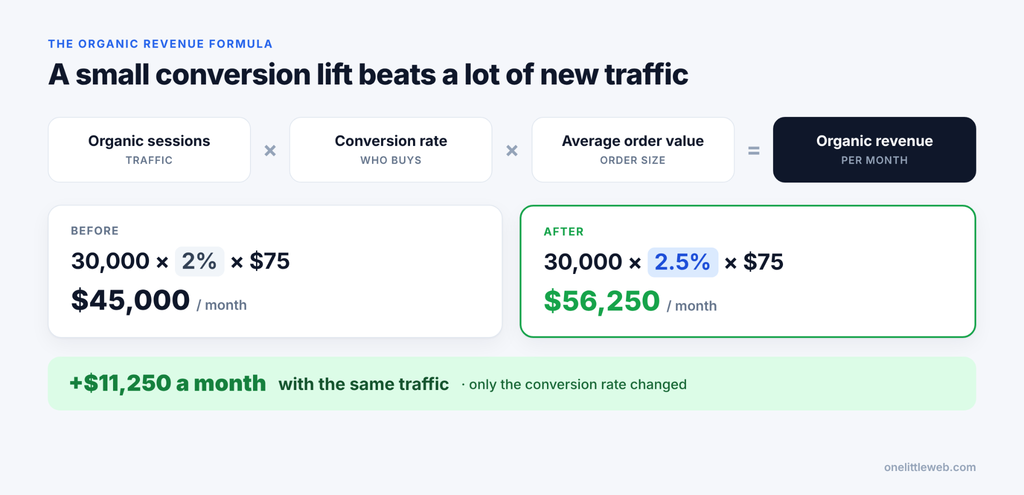
Organic revenue comes down to one formula:
Organic revenue = organic sessions × conversion rate × average order value
Here’s a simple example. Say your store gets 30,000 organic sessions a month, converts at 2% and has an average order value of $75.
- 30,000 × 2% × $75 = $45,000 a month
Now lift the conversion rate to 2.5% and leave everything else the same.
- 30,000 × 2.5% × $75 = $56,250 a month
That’s $11,250 more each month without a single new visitor. These numbers are only an illustration, and real results depend on margins and returns. Still, the takeaway holds: traffic is just one of the levers you can pull.
8 Ecommerce SEO Strategies That Turn Organic Traffic into Sales
Each strategy below fixes one of the leaks above. If you’re starting from scratch, work through them in order. If you already know where your store loses sales, start there.
1. Map every keyword to the page that sells
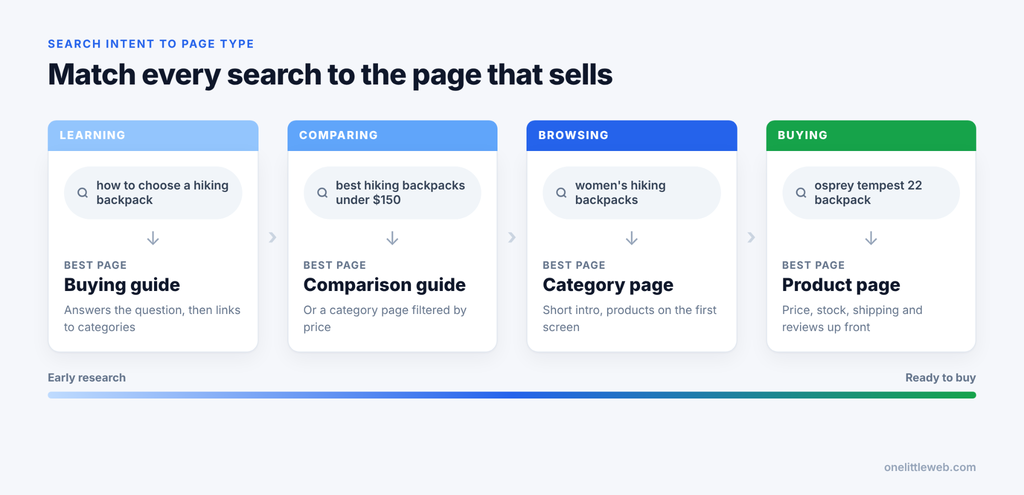
Most stores pick keywords by search volume, then rank whatever page is easiest. That’s how a blog post ends up ranking for a search that should send shoppers to a category page.
Start by sorting your keywords by what the searcher wants, then give each group the page type that matches.
| Search intent | Example search | Best page to rank |
|---|---|---|
| Learning | how to choose a hiking backpack | Buying guide |
| Comparing | best hiking backpacks under $150 | Comparison guide or category page |
| Browsing | women’s hiking backpacks | Category page |
| Buying | osprey tempest 22 backpack | Product page |
Give each important keyword one page. When two of your pages chase the same search, they often split the rankings and neither one wins.
Metric to watch: organic revenue by landing page in GA4.
2. Make category pages your revenue engine
For most stores, category pages rank for the broad shopping searches with the most demand. They’re also where shoppers compare options before they pick a product, so small improvements here pay off across every product in the grid.
A few changes make the biggest difference:
- Add a short intro above the product grid (50 to 150 words) that helps shoppers choose and use the main keyword naturally.
- Keep products visible on the first screen on mobile. Don’t push the grid down with a long copy.
- Put longer buying tips and FAQs below the grid.
- Create subcategories only where real search demand exists. “Trail running shoes” deserves its own page. “Blue trail running shoes size 9” doesn’t.
Metric to watch: entrances and conversion rate on category pages.
3. Build product pages for shoppers and AI agents
Many product pages still use the manufacturer’s description, the same copy found on every other store selling that item. That makes it hard for Google to pick your page, and it gives AI shopping tools very little to work with.
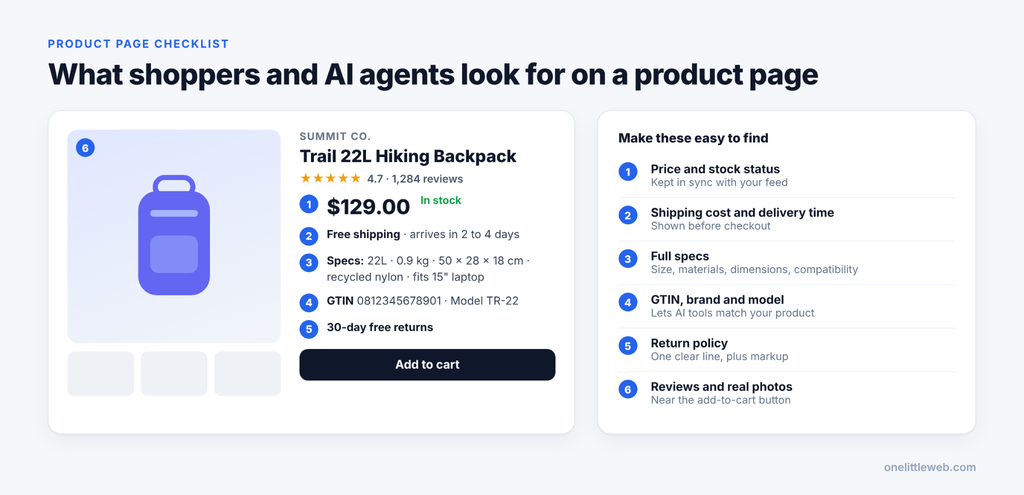
AI agents compare products using plain facts. If those facts are missing or buried in long paragraphs, your product can get skipped. A strong product page includes:
- A unique description that explains who the product is for
- Full specs, including size, materials, dimensions and compatibility
- GTIN, brand and model number
- Price, stock status, shipping cost and delivery time
- A return policy written in plain language
- Reviews and real product photos
Back this up with product structured data, including Offer and review markup. If you sell variants like sizes or colors, use ProductGroup markup so Google understands how they connect.
Metric to watch: product page click-through rate in Search Console and add-to-cart rate in GA4.
4. Fix the technical leaks that hide your products
Technical SEO on a store is mostly about one thing: making sure Google spends its time on the pages that sell. These are the usual problem areas.
Faceted navigation. Filters for color, size, price and brand can create thousands of near-duplicate URLs. Let Google index only the filter pages with real search demand, and block or canonicalize the rest. Google’s faceted navigation guidance covers the options.
Discontinued products. If an old product page still gets traffic or links, keep it live and point shoppers to a replacement. If it’s gone for good, redirect it to the closest category instead of letting it return a 404.
Speed by template. Test your product and category templates, not just the homepage. That’s where your shoppers actually spend time, and one slow script on the product template slows down every product.
JavaScript rendering. If prices or reviews only appear after scripts load, check that Google can see them using the URL Inspection tool in Search Console.
Metric to watch: indexed product pages in Search Console’s page indexing report, compared with the number of products you actually sell.
5. Treat your product feed like SEO
Your Google Merchant Center feed now does a lot of SEO work. It powers free product listings and the Shopping tab, and it also feeds product results inside AI Mode. With the Universal Commerce Protocol, it affects whether shoppers can buy your products without leaving Google.
According to Google’s own AI Mode data, shoppers most often specify price, location, color, brand and availability when they search. If those fields are empty or wrong in your feed, AI Mode has less reason to show your products.
Start with these fixes:
- Keep price and stock synced with your site, ideally updated daily or faster.
- Make sure feed data matches what’s on the product page.
- Fill in optional attributes like material, size, color and age group.
- Write clear product titles that lead with brand and product type.
Google has also added AI performance insights to Merchant Center, which helps you see how your products show up in AI shopping experiences.
Metric to watch: free listing clicks and conversions in Merchant Center.
6. Link buying guides to the categories they support
Buying guides catch shoppers early, while they’re still figuring out what to buy. The problem is that many guides end without sending readers anywhere useful.
Every guide should point readers toward the products it talks about. A guide on choosing a hiking backpack should link to your women’s hiking backpacks and ultralight backpacks categories, using clear, descriptive anchor text. Add a few product picks inside the guide, each linking to its product page.
The link should also run the other way. Link from the category page back to the guide for shoppers who want more help deciding.
Metric to watch: how often guide readers move on to a category or product page, which you can track with path exploration in GA4.
7. Earn authority Google and AI both trust
Backlinks still help category and product pages rank. AI tools also lean on what other sites say about you when they recommend products. Reviews, “best of” roundups, gift guides and news coverage all shape those answers.
The best ways to build that authority for a store:
- Run digital PR campaigns built on original data or product launches that journalists want to cover.
- Get your products into relevant “best X” roundups and gift guides.
- Ask suppliers, brands you stock and partners to link to you where it makes sense.
- Make it easy for customers to leave reviews, both on your site and on third-party platforms.
Point most of your link building at category pages, since that’s where the rankings with the most buying intent sit.
Metric to watch: referring domains to your priority category pages, plus how often your brand shows up in AI answers for your main product searches.
8. Remove friction after the click
SEO gets the shopper to your page. What happens next decides whether they buy. Most lost sales come from small problems that are easy to fix once you spot them:
- Show shipping costs early, before checkout.
- Place reviews and ratings near the add-to-cart button.
- Make mobile pages fast and easy to tap.
- Use site search that handles typos and synonyms.
- Offer guest checkout.
- Explain returns in one short, clear line on the product page.
Test one change at a time so you know what actually moved the numbers.
Metric to watch: organic conversion rate and checkout completion rate.
How to Measure Ecommerce SEO Beyond Traffic
Traffic tells you people showed up. It doesn’t tell you whether they bought anything. To know if SEO is paying off, track the numbers that connect search to sales.
| Metric | What it tells you | Where to find it |
|---|---|---|
| Organic revenue | How much search earns for your store | GA4, filtered to the Organic Search channel |
| Organic purchases | How many orders came from search | GA4 |
| Conversion rate | What share of organic visits end in a sale | GA4 |
| Revenue per session | What each organic visit is worth | GA4 (revenue divided by sessions) |
| Average order value | How much shoppers spend per order | GA4 |
| Clicks and impressions | How visible you are before the visit | Search Console |
Use GA4 and Search Console together
Search Console shows what happens before the click, like which searches show your pages and how often people click.
GA4 shows what happens after, like purchases and revenue. Match the two by landing page to see which rankings actually make money.
The numbers won’t line up exactly. Search Console counts clicks, GA4 counts sessions, and cookie consent can hide some visits from GA4. Compare trends over time instead of expecting the totals to match.
Track AI referrals
In GA4, build an exploration or custom channel group for sessions from sources like chatgpt.com, perplexity.ai, gemini.google.com and copilot.microsoft.com. That shows how much AI traffic you get and how well it converts.
Clicks from Google’s AI Overviews and AI Mode are counted inside your regular Search Console data, so you can’t separate them there.
To see whether AI tools recommend you, run a simple prompt test once a month. Ask ChatGPT, Gemini, Perplexity and AI Mode a few real shopping questions:
- “Best [product] for [use case]”
- “Best [product] under $[price]”
- “[Your brand] vs [competitor]”
- “Where to buy [product] online”
Note whether your store appears and which pages get cited. Run the same prompts each month so you can spot changes.
Calculate your SEO ROI
Use gross profit instead of revenue, since revenue ignores what the products cost you.
SEO ROI = (extra gross profit from organic search − SEO cost) ÷ SEO cost
If SEO costs $4,000 a month and adds $10,000 in gross profit, your ROI is 150%. Measure it over 6 to 12 months, since SEO results build over time and a single month can mislead you.
When to Hire an Ecommerce SEO Company
Plenty of stores handle SEO in-house, especially early on. But some problems take more time and technical skill than a small team can spare.
Signs your store needs outside help
- Product pages aren’t getting indexed, or they keep dropping out of search.
- Organic traffic or revenue is falling, and you can’t explain why.
- Competitors with weaker products rank above you.
- Traffic is steady, but shoppers aren’t finishing checkout.
- You’re planning a replatform or a big catalog change.
What an Ecommerce SEO company does
An ecommerce SEO company helps online stores rank their category and product pages and turn that search traffic into sales.
The work usually covers technical fixes, keyword mapping, page optimization, content, link building and revenue reporting. Strong agencies also manage your product data and track how often AI tools recommend your products.
How to vet an Ecommerce SEO company
Follow the below table to know what to check.
| What to check | What good looks like |
|---|---|
| Results | Case studies that show orders or revenue, not only traffic |
| Platform experience | Proof on your platform, whether that’s Shopify, WooCommerce, BigCommerce or Magento |
| Implementation | They make the fixes, or write clear tasks your developers can ship |
| Reporting | Monthly reports on organic revenue and conversion rate |
| AI search | A real way to measure AI visibility, not just a service name |
| Terms | Clear scope and a trial or short first term |
Walk away if you see any of these red flags:
- Guaranteed #1 rankings
- Reports that only cover rankings and traffic
- Plans built mostly around blog posts
- “AI SEO” with no way to measure it
On the sales call, ask questions that test how they think about your store:
- “Which of my category pages would you fix first, and why?”
- “How will you report organic revenue?”
- “Can you show a result on my platform?”
- “Who makes the changes, your team or mine?”
What Ecommerce SEO costs
In a WebFX survey of 250 US ecommerce businesses, 71% spent between $500 and $7,500 a month on SEO. About one in five spent more than $10,000 a month. Most put somewhere between 6% and 30% of their marketing budget into SEO.
Where your store lands depends on catalog size, platform complexity, competition and how much content and link building you need. A 200-product Shopify store and a 50,000-SKU Magento site need very different levels of work.
Agency or in-house?
One in-house SEO specialist typically costs $40,000 to $60,000 a year in salary, before tools and benefits. And one person rarely has every skill a store needs, from technical fixes to link building.
In-house makes sense for large stores with steady developer support. Many stores use both, with an internal owner who works alongside an agency.
If you want a team to take this on, OneLittleWeb is an ecommerce SEO company that works with Shopify, WooCommerce, BigCommerce and Magento stores. We start with a free ecommerce SEO and technical audit, and every plan comes with a 30-day risk-free trial.
Your First 90 Days of Revenue-focused Ecommerce SEO
You don’t need to fix everything at once. This plan starts with the work most likely to move sales. Treat it as a work schedule, not a deadline for results, since rankings and revenue often take longer than 90 days to show the full effect.
Days 1 to 30: Find where you’re losing sales
- Pull organic revenue by landing pages from GA4 for the last 12 months.
- Match those pages with Search Console data to spot pages with lots of impressions but few clicks or sales.
- Crawl your site to check indexing, duplicate filter URLs, broken links and slow templates.
- Compare your Merchant Center feed with your product pages and note any gaps.
- Choose 10 to 20 priority categories and product pages based on search demand and profit margin.
Days 31 to 60: Fix the pages that matter most
- Clear the technical issues blocking your priority pages first.
- Rewrite category intros and product descriptions on those pages.
- Add or correct product structured data.
- Fill in missing feed attributes.
- Link your buying guides to the categories they support.
Days 61 to 90: Measure and adjust
- Compare organic revenue and conversion rate on your priority pages against the baseline you set in month one.
- Run your monthly AI prompt test.
- Test one conversion fix, such as showing shipping costs earlier.
- Use what worked to pick your next batch of pages.
Bottom Line
You don’t need a bigger content calendar to grow organic sales in 2027. Most stores have more to gain from the pages they already have.
Open GA4 this week and sort your organic landing pages by revenue. Then look at the pages just below the top, the ones with steady traffic and weak sales. That’s where better targeting and a smoother path to checkout will pay off first.
Fix those and measure the change before you move on to the next batch. That steady loop is what turns organic traffic into a sales channel you can count on.
Frequently asked questions (FAQs)
How long does Ecommerce SEO take to work?
Technical and on-page fixes can start moving rankings within 60 to 90 days, especially if important pages were blocked or poorly targeted. Revenue gains usually take 6 to 12 months to build. Competitive niches and large catalogs can take longer.
Can SEO increase sales without more traffic?
Yes. Sending visitors to better landing pages and fixing friction on those pages can lift your conversion rate without a single extra visit. In the example earlier, moving conversion from 2% to 2.5% added $11,250 a month with the same traffic.
Is Ecommerce SEO still worth it in 2027?
For most stores, yes. AI Overviews mean fewer people click, but the shoppers who do click are often closer to buying.
AI-referred visitors also convert better than average, and SEO is what gets your products into those AI answers in the first place. Unlike paid search, you don’t pay for each click.
Can my store show up in ChatGPT and Google AI Mode?
It can, but no one can guarantee it. Google says its AI features rely on the same SEO basics as regular search, with no special markup required. Your best chances come from complete product data, an accurate Merchant Center feed and mentions on sites that AI tools trust.
What does an Ecommerce SEO company do?
It improves how your category and product pages rank in search and AI results, then ties that work to sales. That usually means technical fixes, keyword mapping, content, link building and reporting on organic revenue.