Quick answer
Shopify SEO is the work of getting your collection and product pages to rank in Google, and now in AI shopping tools like ChatGPT. Shopify sets up the technical basics for you. You still own keyword targeting, page copy, duplicate URL fixes, speed and links.
Key takeaways
- Collections do the heavy lifting. Broad buying searches usually rank category pages, so treat each collection as a landing page.
- Fix product card links first. Many themes link to /collections/…/products/ URLs that compete with your canonical /products/ URL.
- Use Shopify’s field limits. The title field takes 70 characters, but Shopify advises 60 or fewer. Aim for about 160 characters in descriptions.
- Leave robots.txt alone by default. You can edit it through robots.txt.liquid, but Shopify warns a mistake can cost all your traffic.
- Judge speed on real visits. Shopify’s Web performance report shows real-user LCP, INP and CLS. Good means 2.5 s, 200 ms and 0.1 or less.
- AI shopping reads your catalog. Agentic Storefronts send product data to ChatGPT, Google AI Mode and Gemini, Copilot and Meta, so clean product data now matters twice.
Your Shopify store is live. The theme looks great. Shopify told you it’s “SEO-ready.” And three months later, Search Console shows a few hundred impressions, mostly for your brand name.
That gap is the most common thing store owners ask us about. Shopify does handle the plumbing well. It builds your sitemap and adds canonical tags. It also keeps crawlers out of junk URLs.
But plumbing doesn’t rank pages. Rankings come from what you put on those pages, how your theme links them and how much the rest of the web trusts your store.
I’ve spent eight years running SEO campaigns at OneLittleWeb, across more than 1,200 clients in the US, UK, Canada and Australia.
One more thing before we start. A lot of Shopify SEO advice comes from Shopify itself or from app makers. Both have good reasons to make the platform sound complete, or to make an app sound essential. I’ll be direct about where Shopify falls short and where you don’t need an app at all.
This guide walks through nine steps in the order I’d do them on a new store. Each step ends with a quick check, so you know it’s done.
What is Shopify SEO?
Shopify SEO is search engine optimization for stores built on Shopify. The goal is simple: get your collection and product pages in front of people who are ready to buy.
The core ideas are the same as any ecommerce SEO. What changes is the platform. Shopify makes some decisions for you, and a few of them you can’t undo.
Here’s what Shopify handles automatically on every store:
- A sitemap.xml file that lists your products, collections, pages and blog posts and updates itself.
- Canonical tags on every page, which tell Google which version of a URL is the main one.
- A default robots.txt file that keeps crawlers out of the cart, checkout, internal search and sorted or filtered URLs.
- Free SSL, so every page loads over HTTPS.
- Fixed URL folders. Products always live under /products/, collections under /collections/, pages under /pages/ and posts under /blogs/. No plan lets you change this.
Everything else is your job. That includes which keyword each page targets, titles and descriptions, collection copy, how variants are handled, how fast the store loads and who links to you.
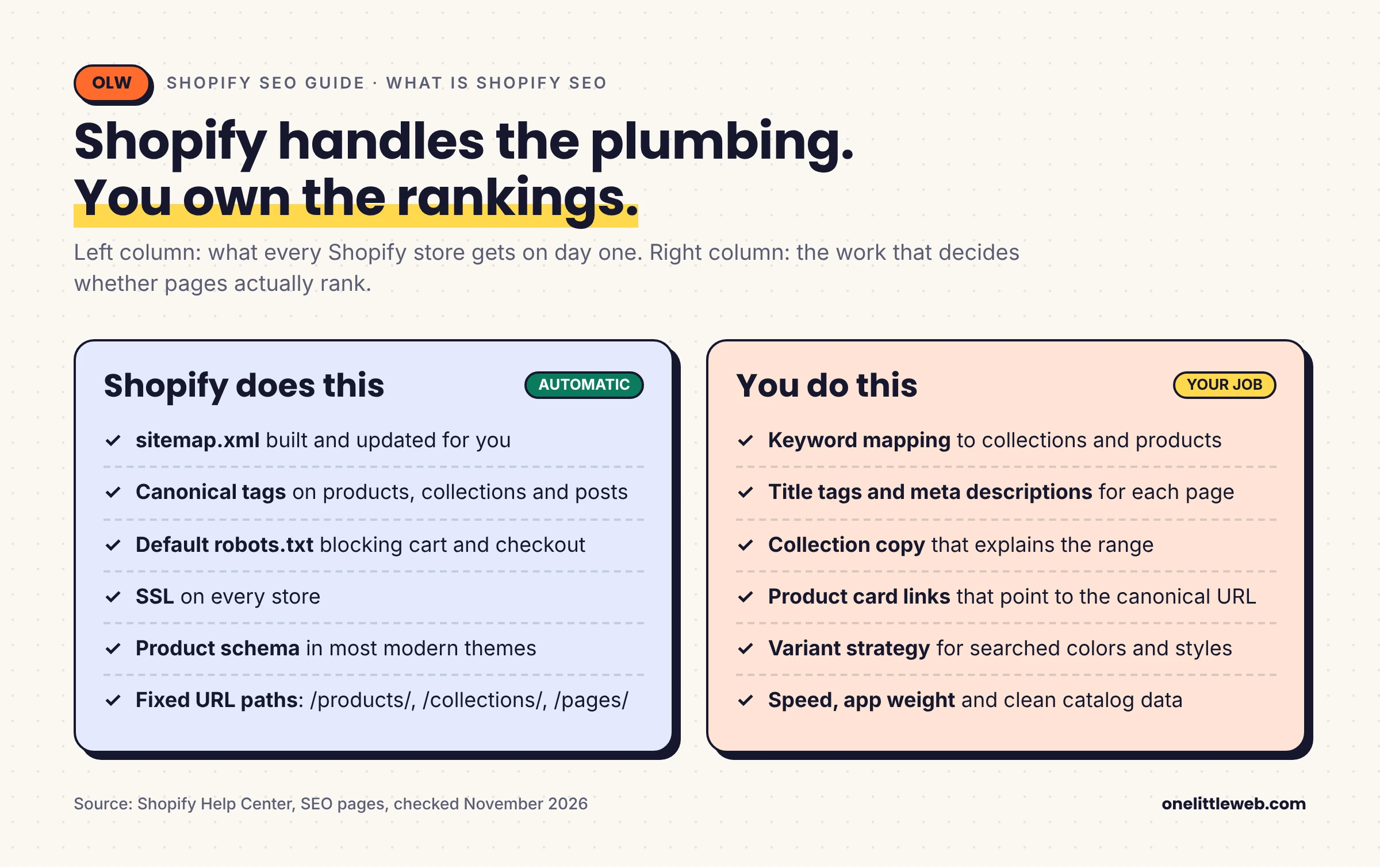
The fixed URL folders are the one limit you have to plan around. You can’t build /mens/linen-shirts/ like you could on WordPress. You work with /collections/mens-linen-shirts instead, and use menus and breadcrumbs to show the hierarchy.
Why Shopify SEO matters in 2027
Paid ads still work. But every click costs money, and the traffic stops the day the budget does. SEO is slower to start. Once a collection page ranks, though, it keeps bringing in buyers without a per-click bill.
Organic traffic is the channel you don’t rent
Most Shopify stores I look at rely heavily on Meta ads, Google Shopping and email. Those channels are fine. The problem is that all of them get more expensive as you grow.
A ranking collection page works the other way. The cost is upfront: research, copy, a few fixes and some links. After that, each extra visit is close to free.
This matters most for stores with steady demand. If people search “linen shirts” every summer, the store that ranks for it every summer wins without bidding against anyone.
AI shopping agents now read your catalog
This is the big change since most Shopify SEO guides were written. In December 2025, Shopify announced Agentic Storefronts in its Winter ’26 Edition.
On March 24, 2026, Shopify said millions of merchants could now sell to ChatGPT users this way. The channels named were ChatGPT, Microsoft Copilot, AI Mode in Google Search and the Gemini app, all managed from the Shopify admin.
Shopify also says these AI surfaces favor structured data, clean attributes and real-time accuracy. In plain terms, machines now read your product data to recommend products in a chat. Sloppy catalog data costs you twice: in Google and in AI answers. Step 9 covers what to fix.
Shopify’s defaults leave real gaps
When we audit Shopify stores, the same problems show up again and again. None of them are fixed by the platform on its own:
- Duplicate product URLs created by how many themes link product cards.
- Empty collection pages with a title and a product grid, but nothing for Google to read.
- App bloat, where each installed app adds scripts that slow the store.
- Manufacturer descriptions copied word for word across dozens of other stores.
The good news is that all four are fixable without a developer in most stores. The steps below cover each one.
Shopify SEO myths vs reality
Before the steps, it helps to clear out a few beliefs that send store owners in the wrong direction.
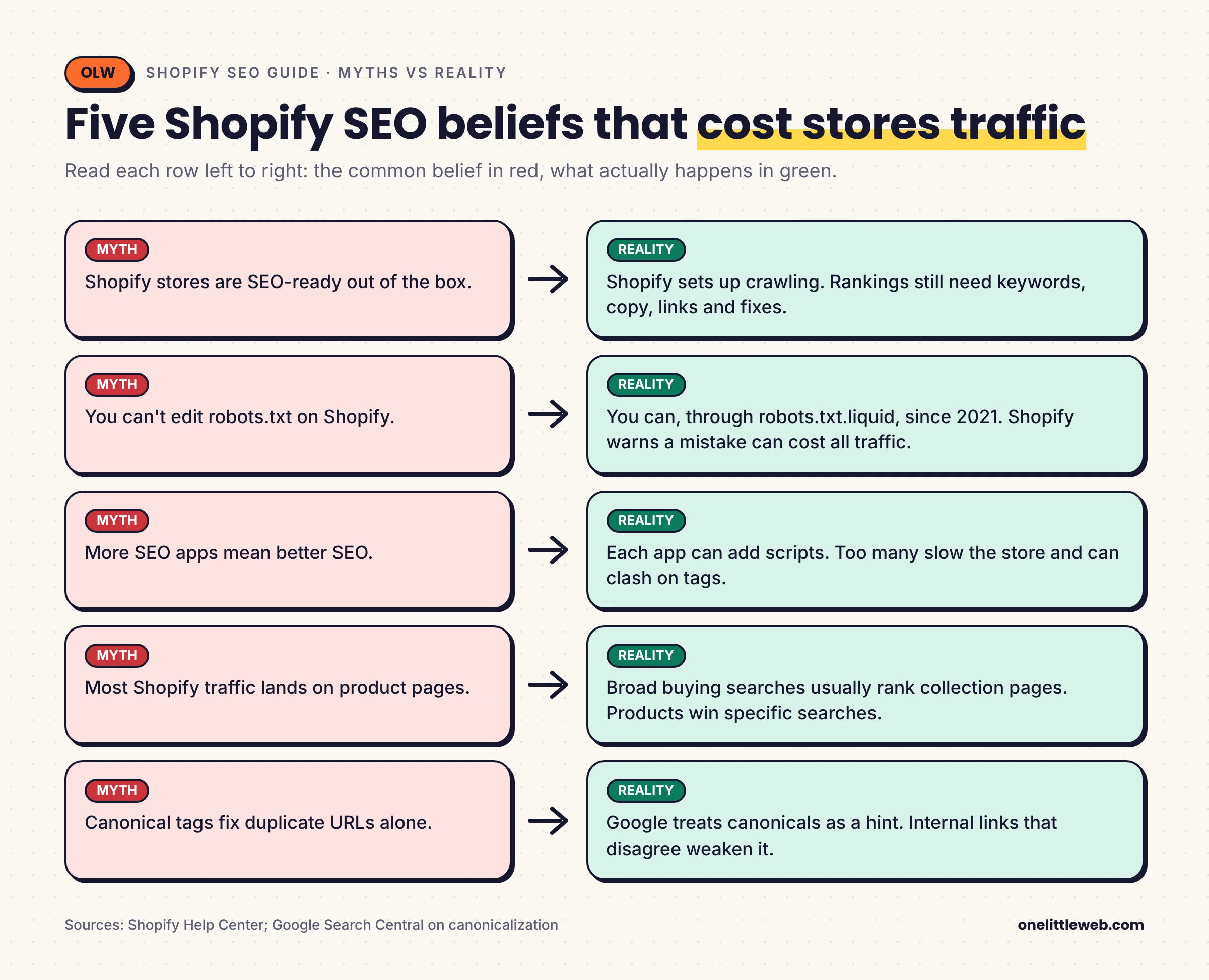
The first myth does the most damage. “SEO-ready” means Google can crawl your store. It doesn’t mean Google has a reason to rank it.
The robots.txt myth is outdated. Shopify opened robots.txt editing in June 2021. Most stores still shouldn’t touch it, but it’s no longer locked.
The canonical myth is the sneaky one. A canonical tag is a hint, and Google says it weighs other signals too, including your internal links. If your links say one thing and your canonical says another, Google may pick the URL you didn’t want.
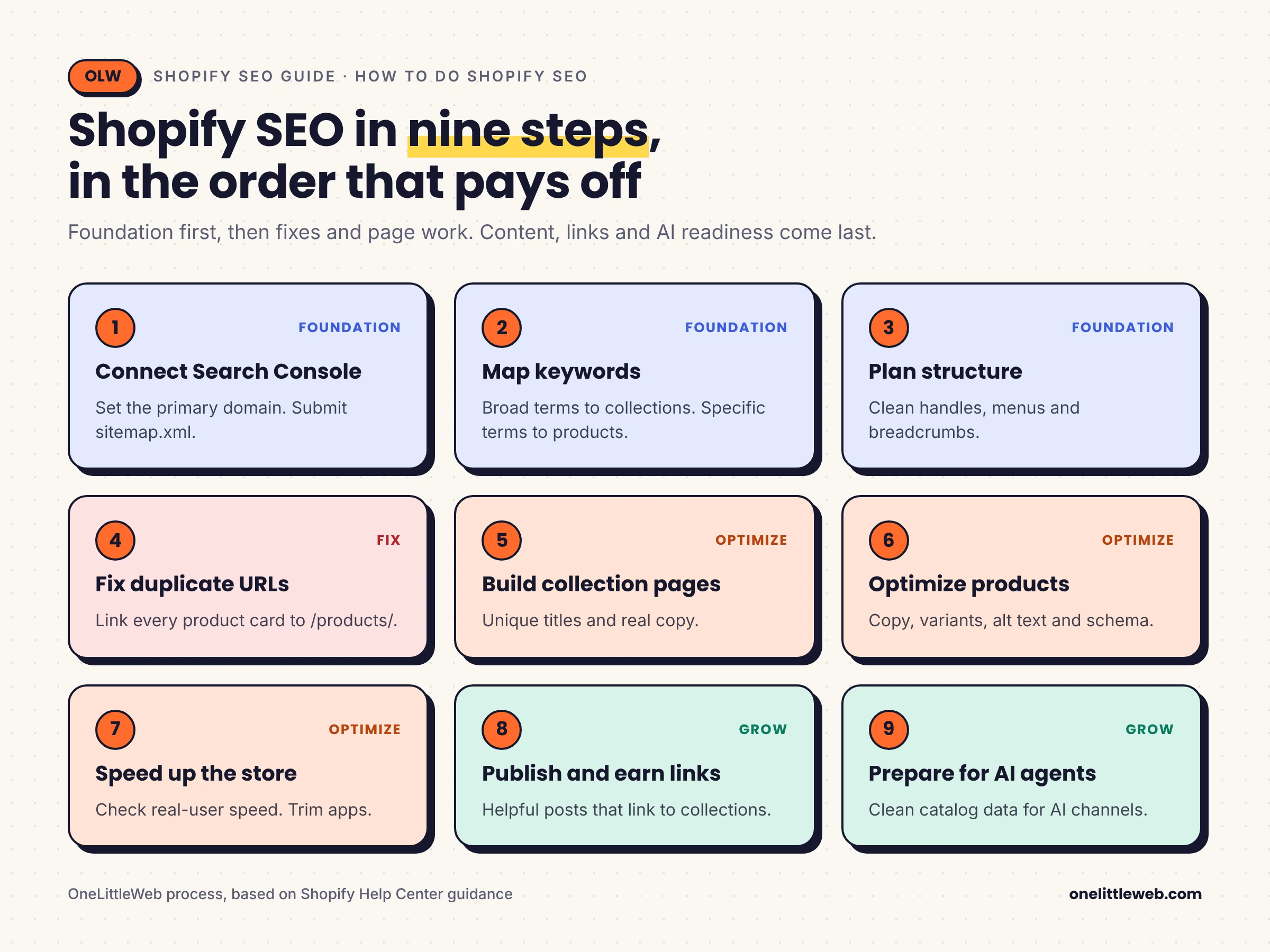
How to do Shopify SEO: 9 steps
Here’s the full process. The order matters. Fixing duplicate URLs before you write collection copy, for example, stops you from building signals on the wrong URLs.
Step 1: Connect Search Console and set your primary domain
Everything else depends on this step. Without Search Console, you’re guessing at what Google sees.
Start with your domain. A Shopify store can load on yourstore.com, www.yourstore.com and yourstore.myshopify.com. Shopify redirects the extras to one primary domain, but check that it picked the one you want.
Go to Settings › Domains in your admin. If the wrong version is marked as primary, choose the right one and set it as primary.
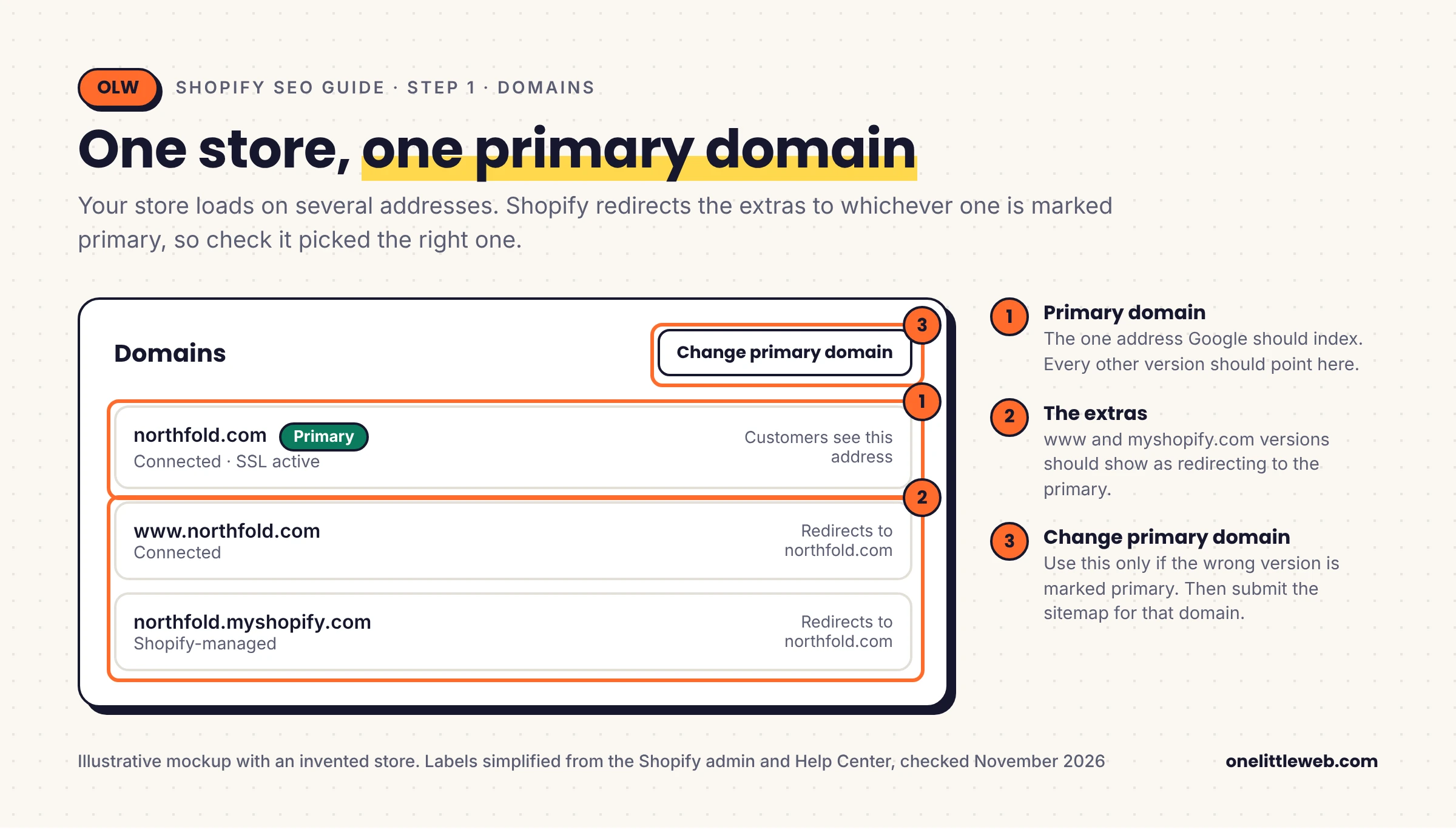
Next, verify your store in Google Search Console. I prefer a Domain property, verified with a DNS TXT record, because it covers every version of your domain at once.
Then submit your sitemap. It’s always at yourstore.com/sitemap.xml. That file is an index that points to child sitemaps for products, collections, pages and blog posts. You submit the index, and Google finds the rest.
- In Search Console, open Sitemaps.
- Enter
sitemap.xmland submit. - Import the same property into Bing Webmaster Tools. Bing lets you pull it straight from Search Console, so it takes a minute.
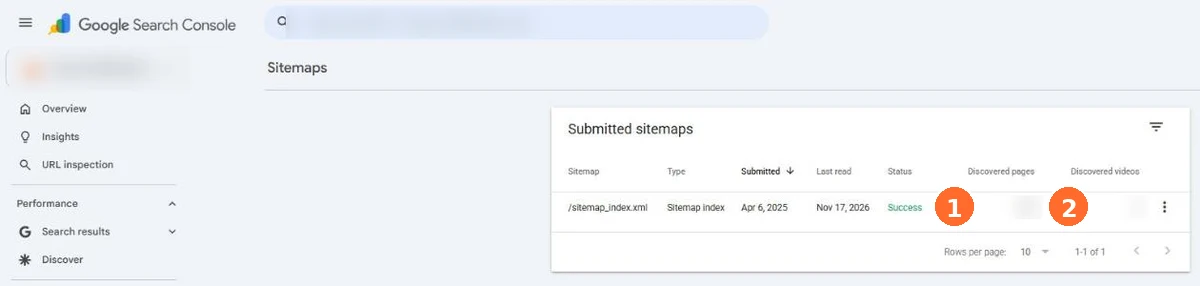
If you sell internationally with separate domains, each domain gets its own sitemap. Submit each one.
Check: The Sitemaps report shows “Success,” and the discovered URL count is roughly your number of products plus collections, pages and posts.
Step 2: Find keywords and map them to collections and products
This step decides which page should rank for which search. Skip it, and you end up with five pages loosely chasing the same term.
Start broad. List the main things you sell, then look up how people search for them in a keyword tool. We use Ahrefs and Semrush at OLW, but Google Search Console’s Queries report and Google’s own autocomplete are free places to start.
Then sort each keyword by search intent. This is the part most stores get wrong.
- Broad, choice-seeking terms like “men’s linen shirts” usually belong to a collection page. Searchers want to compare options.
- Specific terms like “white linen shirt slim fit” or a model name usually belong to a product page.
- Question terms like “how to wash linen” belong to a blog post that links to the collection.
Don’t guess the intent. Search the term in Google and look at what ranks. If the top ten are all category pages, a product page will struggle to break in, no matter how well you write it.
Finally, put it in a simple sheet: keyword, monthly searches, target URL and page type. One main keyword per URL. If two pages target the same main keyword, merge them or change one target.
Check: Every collection and top product has one main keyword, and no two URLs share a main keyword.
Step 3: Build a flat store structure with clean URL handles
Because Shopify forces products and collections into flat folders, your structure lives in menus, links and breadcrumbs instead of URLs.
A good rule: any product should be reachable within three clicks of the homepage. Homepage to collection, collection to subcollection, subcollection to product.
Build that in your main menu. Shopify supports nested menu items, so a “Men” menu item can open “Shirts,” which opens “Linen shirts.” Each of those is a real collection.
Then clean up your URL handles. A handle is the last part of the URL, like mens-linen-shirts in /collections/mens-linen-shirts. Shopify creates it from the title, which sometimes gives you long or messy handles.
- Keep handles short and readable.
- Use the main keyword, with hyphens between words.
- Drop filler like “copy-of,” dates and product codes nobody searches.
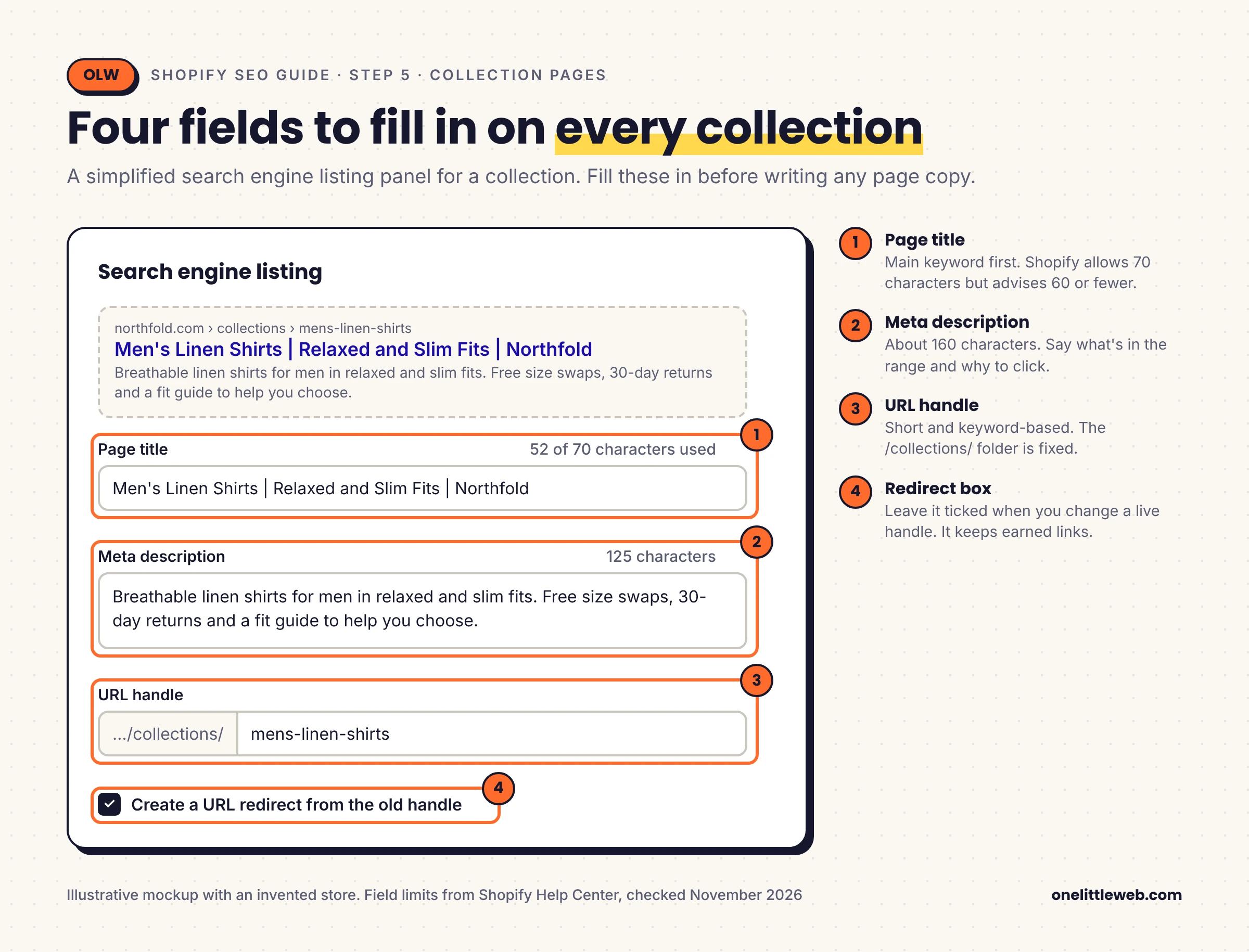
Be careful with live pages, though. When you edit a handle on a published product or collection, Shopify shows a Create a URL redirect checkbox. Leave it ticked (you’ll see it in the Step 5 figure). It sets up a 301 redirect from the old URL, so you keep the links and rankings it earned.
Last, turn on breadcrumbs if your theme supports them. Breadcrumbs show the path back up (Home › Shirts › Linen shirts) and give Google one more clue about your hierarchy.
Check: You can reach your deepest product in three clicks, and every changed handle has a working 301 redirect.
Step 4: Fix duplicate URLs before they spread
This is the most important technical fix on most Shopify stores. It’s also the one most guides skip.
Here’s the problem. A product in your “Shirts” collection can load at /products/linen-shirt and at /collections/shirts/products/linen-shirt. If it’s also in “Sale” and “All,” that’s more URLs for the same page.
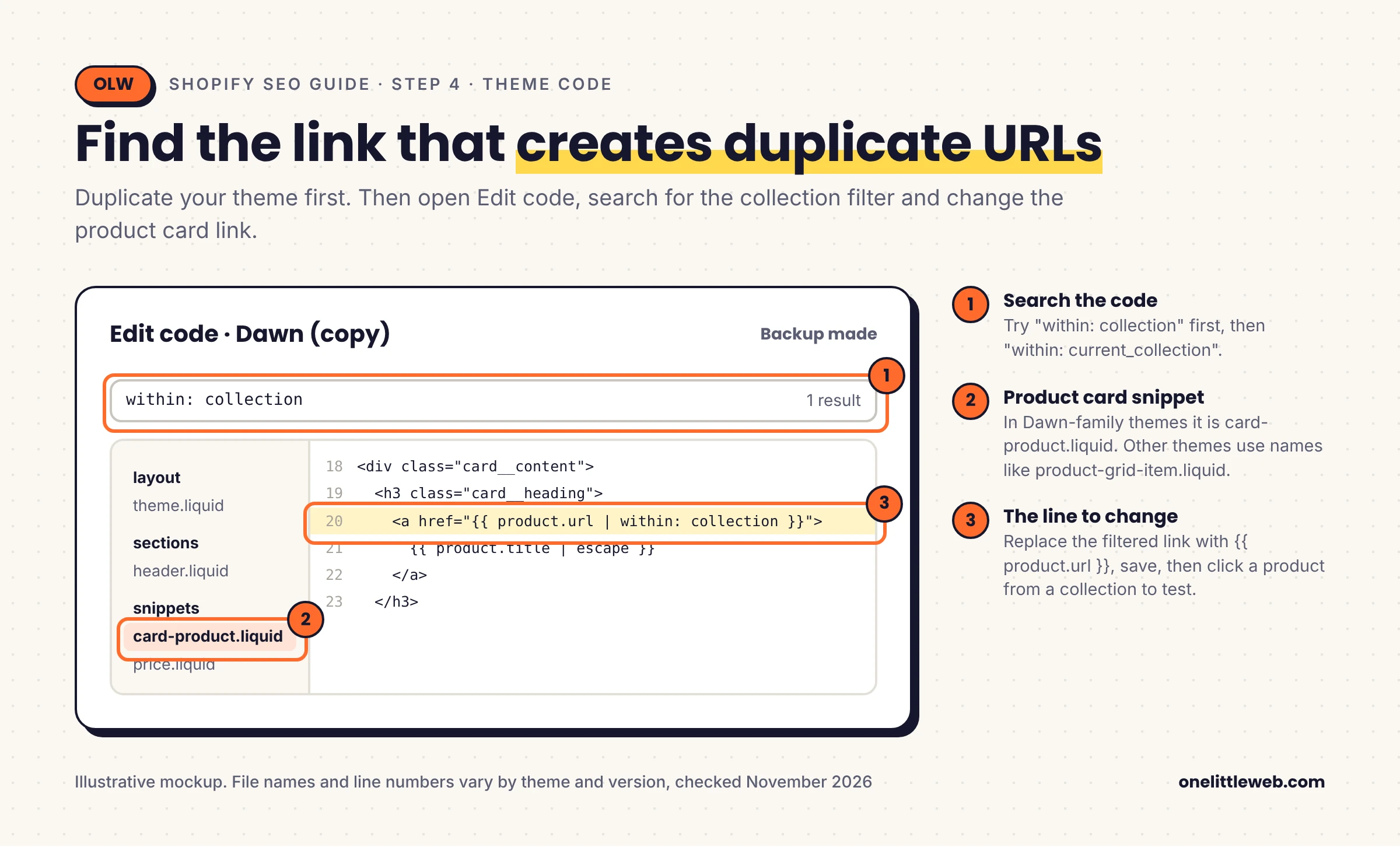
Shopify handles part of this. Every version carries a canonical tag pointing at the clean /products/ URL. But many themes then link product cards to the collection version, using a Liquid filter called within: collection. Liquid is the template language Shopify themes are written in.
So your canonical tag says one thing, and hundreds of internal links say another. Google sees the conflict, and sometimes picks the wrong URL. In Search Console, this often shows up as “Alternate page with proper canonical tag” or “Duplicate, Google chose different canonical than user.”
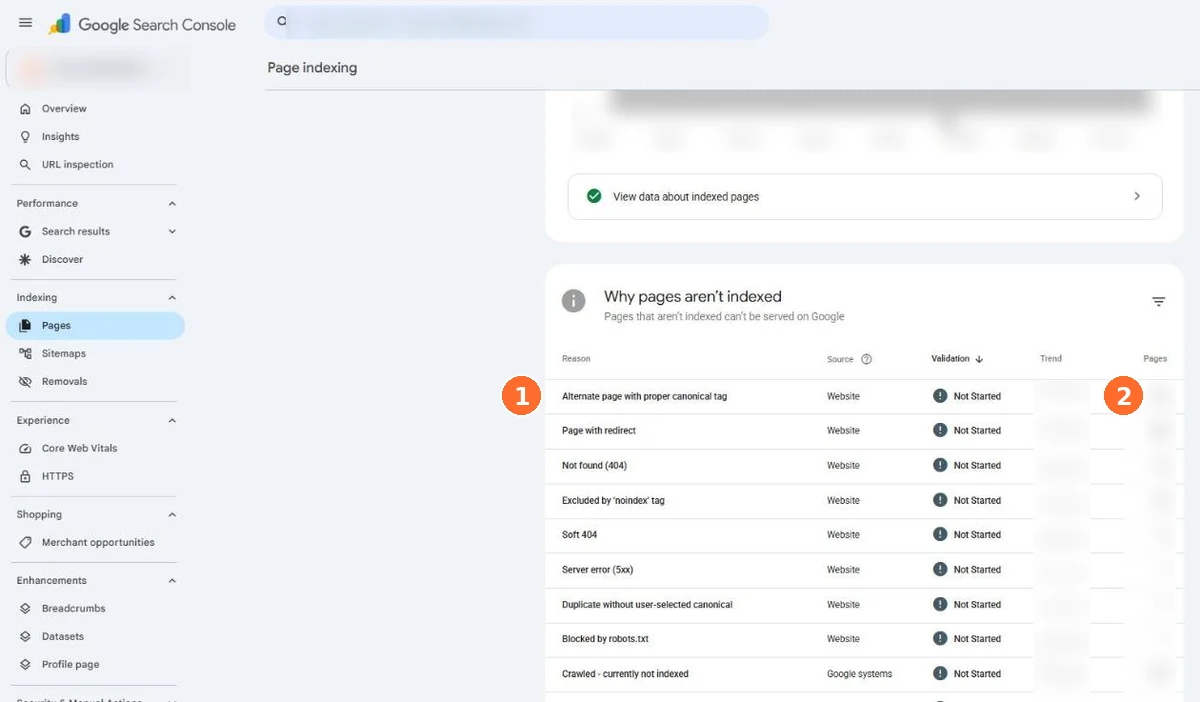
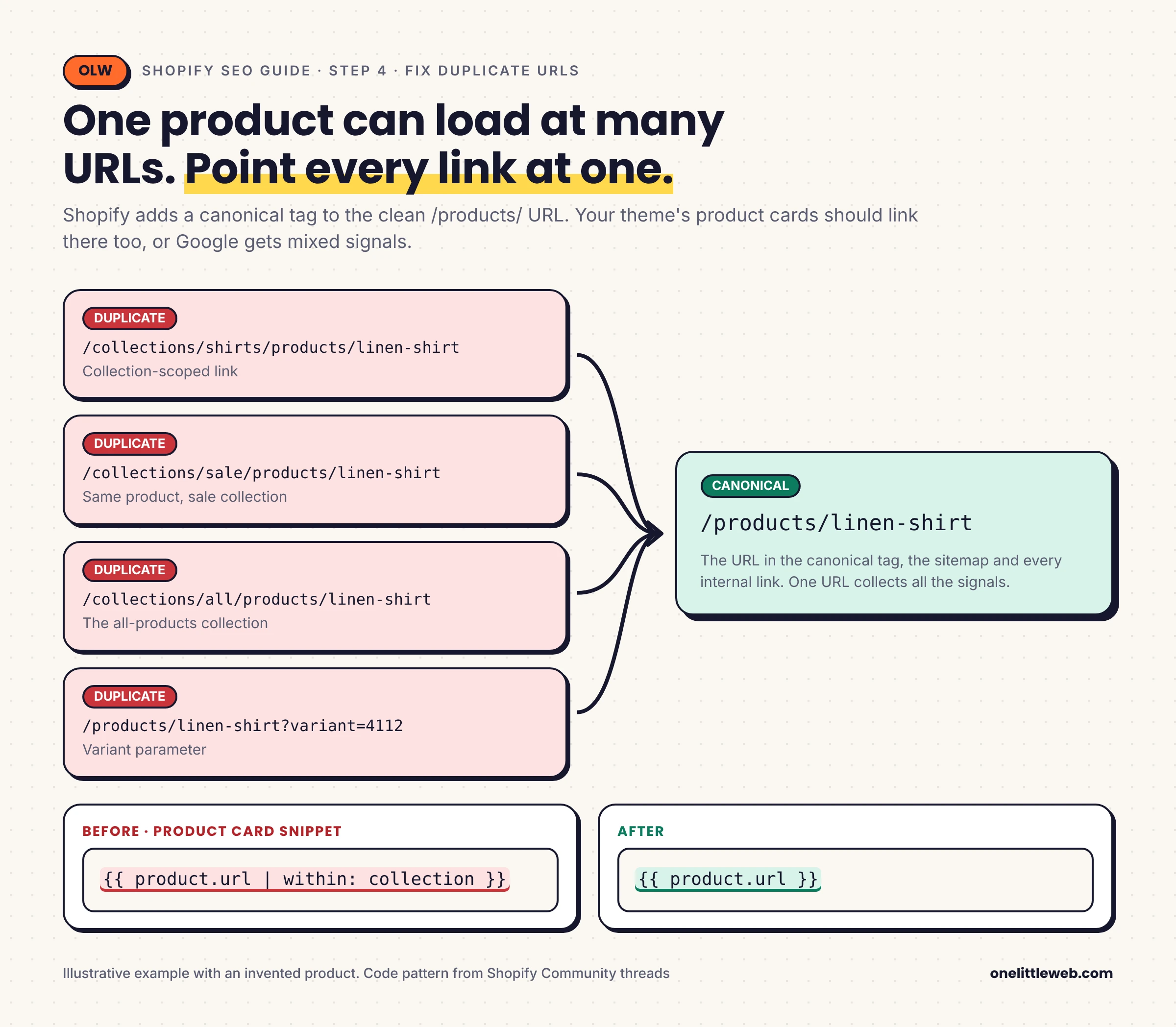
The fix is a small theme edit. Always duplicate your theme first, so you have a backup.
- Go to Online Store › Themes, open the menu on your theme and choose Edit code.
- Search the code for
within: collection(also trywithin: current_collection). - It usually sits in the product card snippet. In Dawn-family themes that file is
card-product.liquid. Other themes use names likeproduct-grid-item.liquid. - Replace the filtered link with the plain product URL, as shown below.
- Save, then click a product from a collection page and confirm the address bar shows /products/handle.
Before:  {{ product.url | within: collection }}
After:   {{ product.url }}
If you’re not comfortable editing code, this is a 30-minute job for any Shopify developer. Some SEO apps also offer a setting for it.
While you’re in duplicate-content mode, check two more sources:
- Tag pages. Older themes create pages like /collections/shirts/white for each product tag. Shopify’s default robots.txt blocks combined tags, but single tag pages can still get indexed. If they show up in Search Console as thin pages, link to real collections instead.
- Filter URLs. Shopify’s free Search & Discovery app powers storefront filters. Each filter adds a parameter, like
?filter.v.option.color=white. These URLs canonicalize back to the collection, and the default robots.txt blocks URLs that stack two or more filters. Single-filter URLs can still be crawled, so keep them out of menus. If a filter like “white” has real search demand, build a proper collection for it instead. - The /collections/all page. It lists every product in one long grid. If it’s indexed and ranking for nothing, keep it out of your main menu and internal links.
Check: A crawl of your store (Screaming Frog or Ahrefs Site Audit) finds no internal links to /collections/…/products/ URLs.
Step 5: Turn collection pages into ranking pages
On most stores, collections are the pages with the biggest search demand. “Men’s linen shirts” gets far more searches than any single shirt. Yet most collection pages are just a title and a grid of products.
Google needs words to understand a page. A grid of product names and prices gives it very little to work with.
Start with the search engine listing. Open the collection in Products › Collections, scroll to Search engine listing and click edit.
- Page title: put the main keyword first. Shopify’s field takes up to 70 characters, but Shopify recommends 60 or fewer so Google doesn’t cut it off.
- Meta description: about 160 characters. Say what’s in the range and give one reason to click, like free returns or a size guide.
- URL handle: short and keyword-based, as in Step 3.
A simple title pattern works for most collections:
[Main keyword] | [Benefit or range detail] | [Store name]
Men's Linen Shirts | Relaxed and Slim Fits | Northfold
That example is 52 characters, well inside the limit.
Next, add real copy. Shopify’s own Help Center suggests at least 250 words of descriptive text per page. I treat that as a floor for important collections, not a target to pad.
Where you put the copy matters for shoppers. A long block above the products pushes the grid down and annoys people who came to browse. I split it in two:
- Above the grid: two or three short sentences. What the range is and who it’s for.
- Below the grid: the longer part. How to choose, sizing or fit notes, materials, care and links to related collections or guides.
Most current themes have a section for content below the product grid. If yours doesn’t, a developer can add one, or you can use a collection metafield.
Write the copy for a buyer who’s comparing options. Answer the questions they’d ask a shop assistant. That naturally brings in the related terms Google expects, without stuffing the keyword.
While you’re writing titles, don’t forget the homepage. It has no Search engine listing box. Its title and meta description live in Online Store › Preferences. Lead with your brand name and say what you sell, like “Northfold | Linen Shirts and Summer Basics for Men”.
Check: Every collection you want to rank has a unique title under 60 characters and a meta description. Each one also has a short intro above the grid and at least 250 words of useful copy.
Step 6: Optimize product pages, variants and schema
Product pages win the specific searches. They’re also the pages AI shopping agents pull from, so this step pays off in two places.
Titles and H1s. Shopify uses the product title as the H1 on the page. So the product title should include the term people actually search, like “Relaxed Linen Shirt, White.” Then write a separate SEO title in the search engine listing, with your store name at the end if there’s room.
Descriptions. Don’t copy the manufacturer’s text. Shopify’s Help Center warns against it too, because the same text is probably on dozens of other stores. Write what a buyer needs: fit, materials, care, what’s included and who it’s for.
If you have hundreds of products, prioritize. Rewrite descriptions for your best sellers and products with search demand first. The long tail can wait.
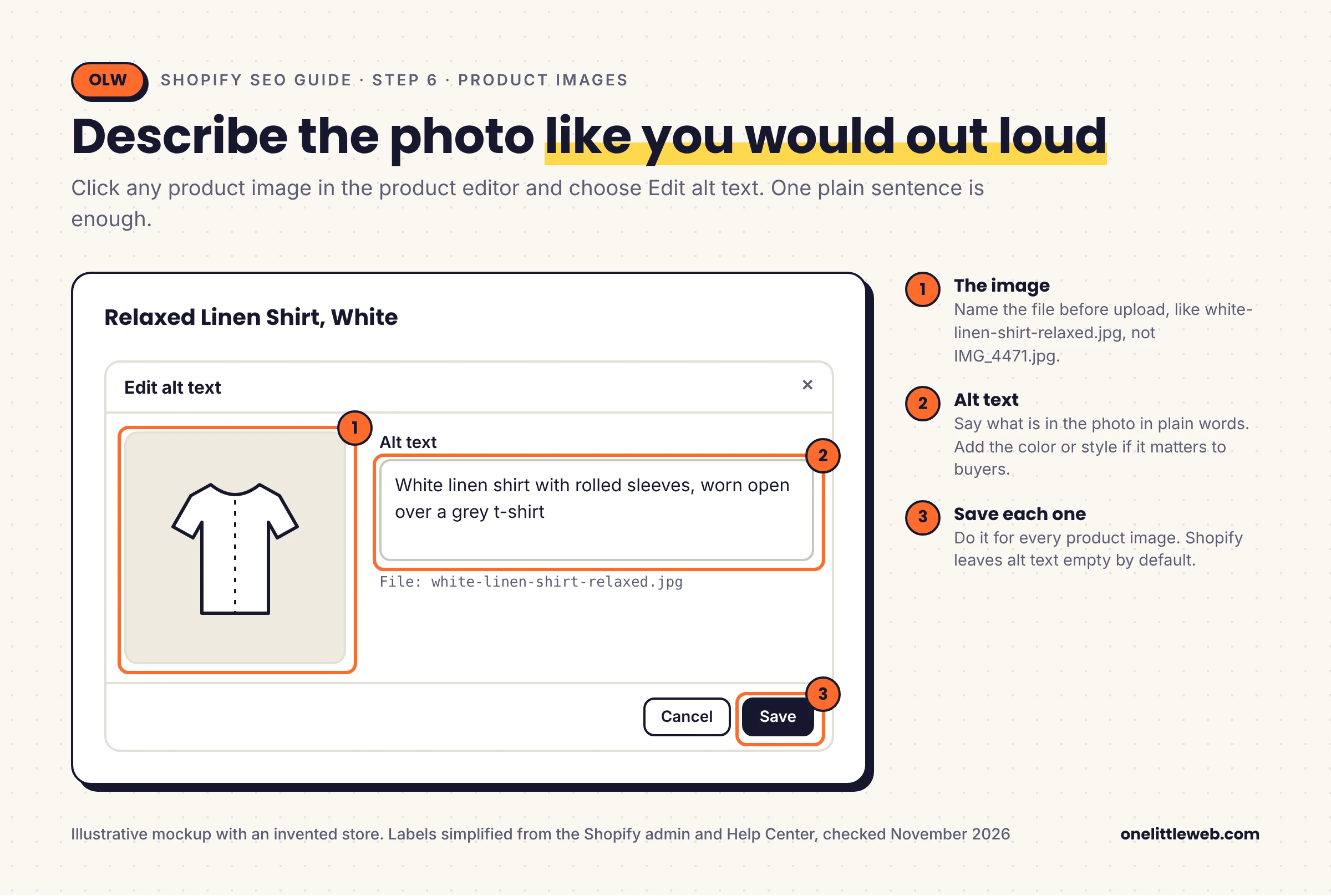
Images. Add alt text to every product image. Click the image in the product editor and choose Edit alt text. Describe what’s in the photo in plain words, like “white linen shirt with rolled sleeves on a model.” Compress large images before upload, and give files descriptive names instead of IMG_4471.jpg.
Variants. Shopify gives each variant a URL like /products/linen-shirt?variant=4112, and canonicalizes it back to the main product. For sizes, that’s exactly right.
For colors or styles with their own searches, it can cost you. If people search “white linen shirt” and white is only a variant, there’s no page dedicated to that term. Ahrefs makes the same point with a wallet example: a variant with real demand may deserve its own product page.
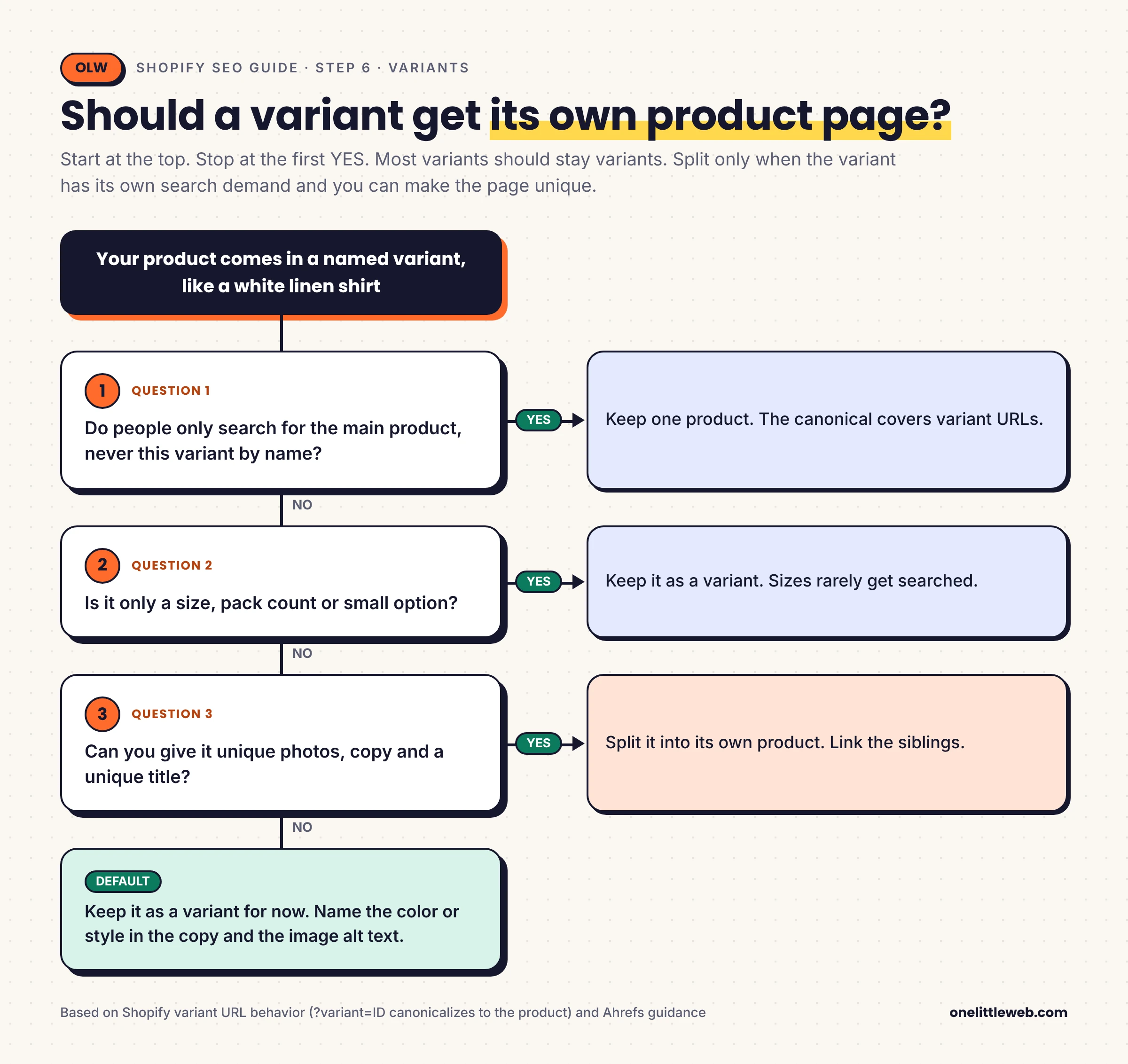
Don’t split variants on a hunch. Splitting means more pages to maintain. Your reviews also get spread across two products instead of one. Only do it when the variant has search demand and you can make the new page unique.
Structured data. Most modern Shopify themes, including Dawn, output Product schema from your product fields. That covers name, image, price and availability. It helps Google show rich results with price and stock in search.
Coverage varies by theme, though. Review stars usually come from a reviews app. Shipping and returns details often need extra markup. Run a product URL through Google’s Rich Results Test to see what your theme actually outputs.
One warning here. If you add a schema app on top of a theme that already outputs schema, you can end up with two conflicting Product blocks. Check the test results after installing anything.
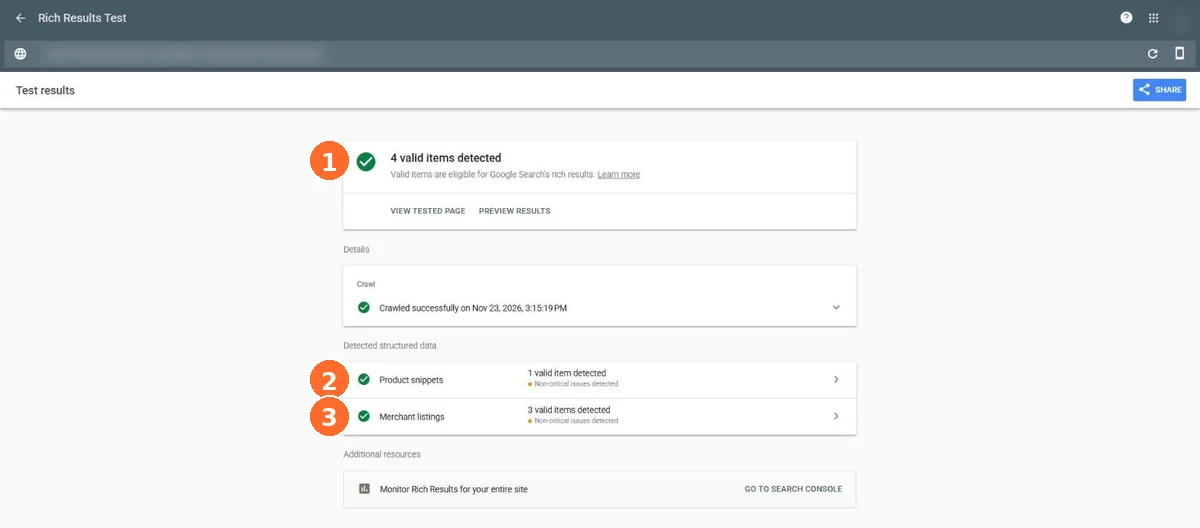
Out-of-stock and discontinued products. If a product is only sold out for now, keep the page live. It keeps its rankings for when stock returns. If your theme outputs Product schema, the availability updates there on its own.
If you’ve stopped selling it for good, add a 301 redirect in URL redirects to the closest product or its collection.
Check: Your top products have unique descriptions and alt text on every image. The Rich Results Test shows valid Product schema with no duplicate blocks.
Step 7: Speed up the store without breaking it
Speed affects rankings a little and sales a lot. A slow product page loses buyers before it has a chance to rank.
Google measures page experience with three Core Web Vitals, based on real visits. Each metric is judged at the 75th percentile. So a page passes a metric when at least 75% of visits hit that target:
| Metric | What it measures | Good | Common Shopify cause |
|---|---|---|---|
| LCP | How fast the main content loads | 2.5 s or less | Huge hero images or autoplay video |
| INP | How fast the page responds to taps and clicks | 200 ms or less | Heavy app scripts, chat widgets, popups |
| CLS | How much the layout jumps while loading | 0.1 or less | Banners and app widgets injected late |
Shopify gives you real-user data for all three. The Web performance report in your admin shows LCP, INP and CLS from actual store visits. Shopify’s developer docs note it breaks results down by page type, device and region.
Use that report over a single lab score from PageSpeed Insights. Lab tests run once on a simulated device. The real-user numbers are closer to what Google uses.
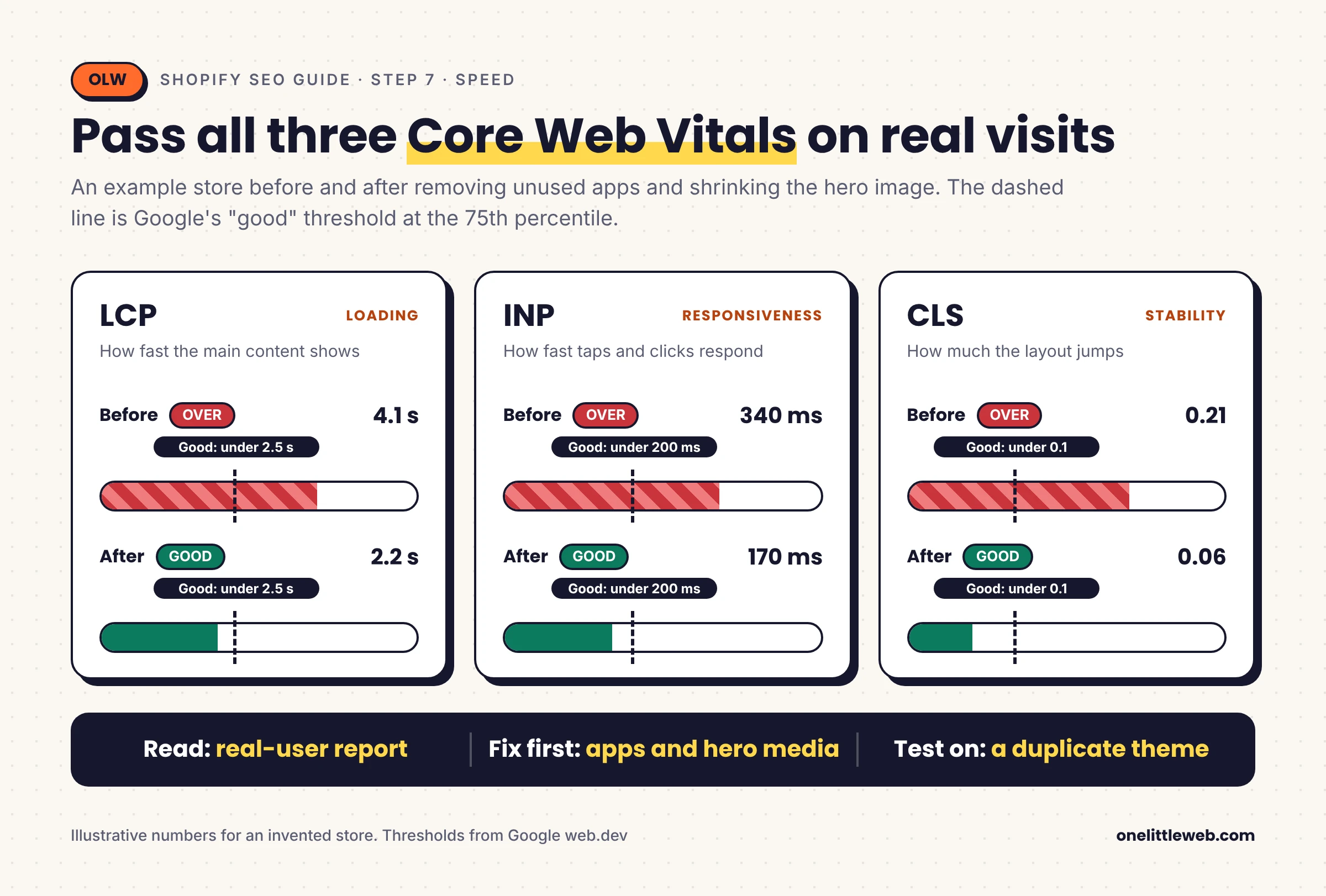
Then fix what the report points to. In our audits, the biggest wins usually come from these:
- Remove apps you don’t use. Each app can add scripts to every page. Uninstalling some apps leaves code behind in theme files, so check the theme afterwards or ask the app developer how to remove it fully.
- Shrink the hero. A full-width autoplay video or a 4 MB banner is often the LCP problem on its own.
- Compress images before upload. Shopify’s CDN resizes images for each device, but a bloated original still costs time.
- Pick a lean theme. A theme packed with sliders and animations pays for it in speed. Test the theme demo before you buy.
Make changes on a duplicate theme first. Preview it, then publish. Speed fixes that break the add-to-cart button aren’t worth it.
Check: The Web performance report shows all three Core Web Vitals in the good range for product and collection pages on mobile.
Step 8: Publish helpful content and earn links
Collection and product pages can only target buying searches. Content lets you reach people earlier, while they’re still researching, and gives you something other sites will link to.
Shopify has a built-in blog under Online Store › Blog posts. It’s basic, but it’s fine for SEO. Shopify recommends at least 500 words for blog posts and informational pages.
Pick topics close to a purchase. “How to wash linen” or “linen vs cotton shirts” brings in people who might buy. A general post about summer fashion trends usually brings in people who won’t.
Every post should link to the collection it supports. That’s how content passes value to the pages that make money. A post with no links to products is a dead end for both shoppers and Google.
Backlinks, meaning links from other sites, are the other half. Ecommerce stores find it hard to earn links straight to product pages, because few people link to a product listing. So most links will point to your homepage or to useful content, and your internal links carry that value on to collections.
Tactics that work well for stores:
- Get listed where competitors are. Find sites linking to two or more competitors, like “best places to buy” lists, and pitch for inclusion.
- Turn customer data into a story. A simple survey of your buyers can become a stat journalists cite.
- Supplier and brand pages. If you stock brands, many have “where to buy” pages that link to retailers.
- Guest posts on niche sites that your buyers actually read.
Our roundup of link building tools covers the tools we use to find these opportunities. If you’d rather hand it off, our outreach link building service does the prospecting and pitching for you.
Whatever you do, don’t buy cheap link packages. Spammy links can do more harm than good, and they’re hard to clean up.
Check: Each important collection has at least one helpful post linking to it, and you have a monthly link building routine, even a small one.
Step 9: Get your catalog ready for AI shopping agents
This step is new for 2027. Most Shopify SEO guides still don’t cover it.
Agentic Storefronts send your products to AI channels through Shopify Catalog. Shopify describes Catalog as a structured system that formats product attributes, pricing, availability and store policies so AI models can read them. When someone asks ChatGPT for “a breathable white shirt for a summer wedding,” the answer can pull straight from that data.
Underneath sits the Universal Commerce Protocol (UCP), an open standard Shopify co-developed with Google in January 2026. It lets AI agents find products and complete checkouts with any merchant that supports it. You don’t set it up yourself. Eligible stores are connected through Agentic Storefronts, with no extra app and no fees beyond standard processing.
So the quality of your product data now decides whether you show up in those answers. Here’s what to tidy:
- Product titles that say what the item is, plus the key attribute. “Relaxed Linen Shirt, White” beats “The Sunday One.”
- Product category and options. Set the Shopify product category on each product, and name variant options clearly (Color, Size, Material).
- Descriptions with facts, like materials, dimensions, fit and care. AI agents can’t recommend what you don’t state.
- Store policies. Every AI channel requires your Terms of service, Privacy policy and Return and refund policy to be filled in under Settings › Policies. Add an accurate shipping policy too.
- Accurate stock and prices. Shopify syncs these in real time, so keep your inventory honest.
Next, open Agentic storefronts in your admin. It’s on by default for eligible stores, and the current channels are ChatGPT, Google AI Mode and Gemini, Microsoft Copilot and Meta. Confirm your store is eligible and the channels you want are on. Orders from these channels arrive in your admin with a referral tag, like ChatGPT.
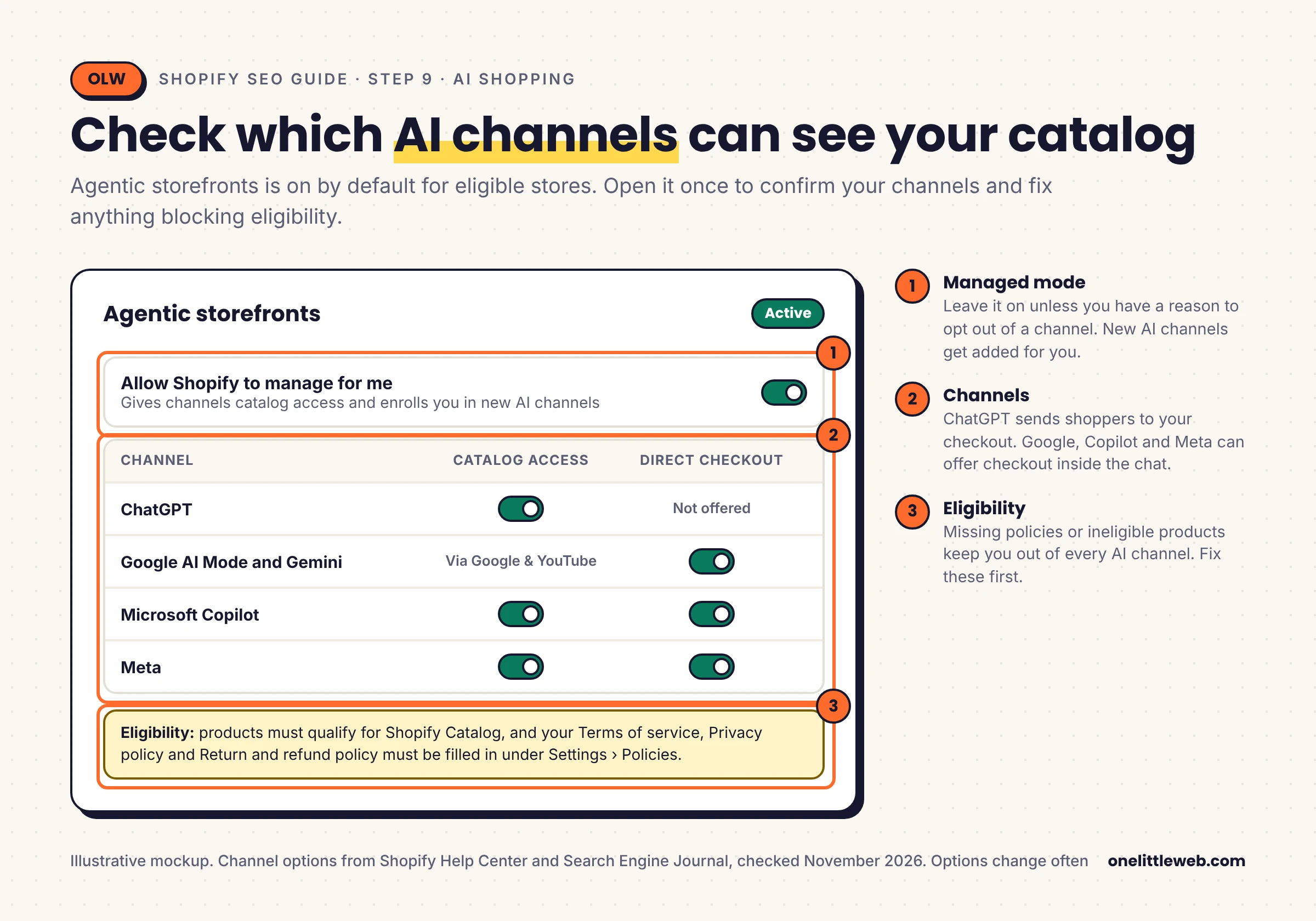
Google works a little differently. Shopify’s Help Center says products reach Google AI Mode through the free Google & YouTube channel or Google Merchant Center. That same feed powers free product listings in Google Shopping, so set the channel up if you haven’t.
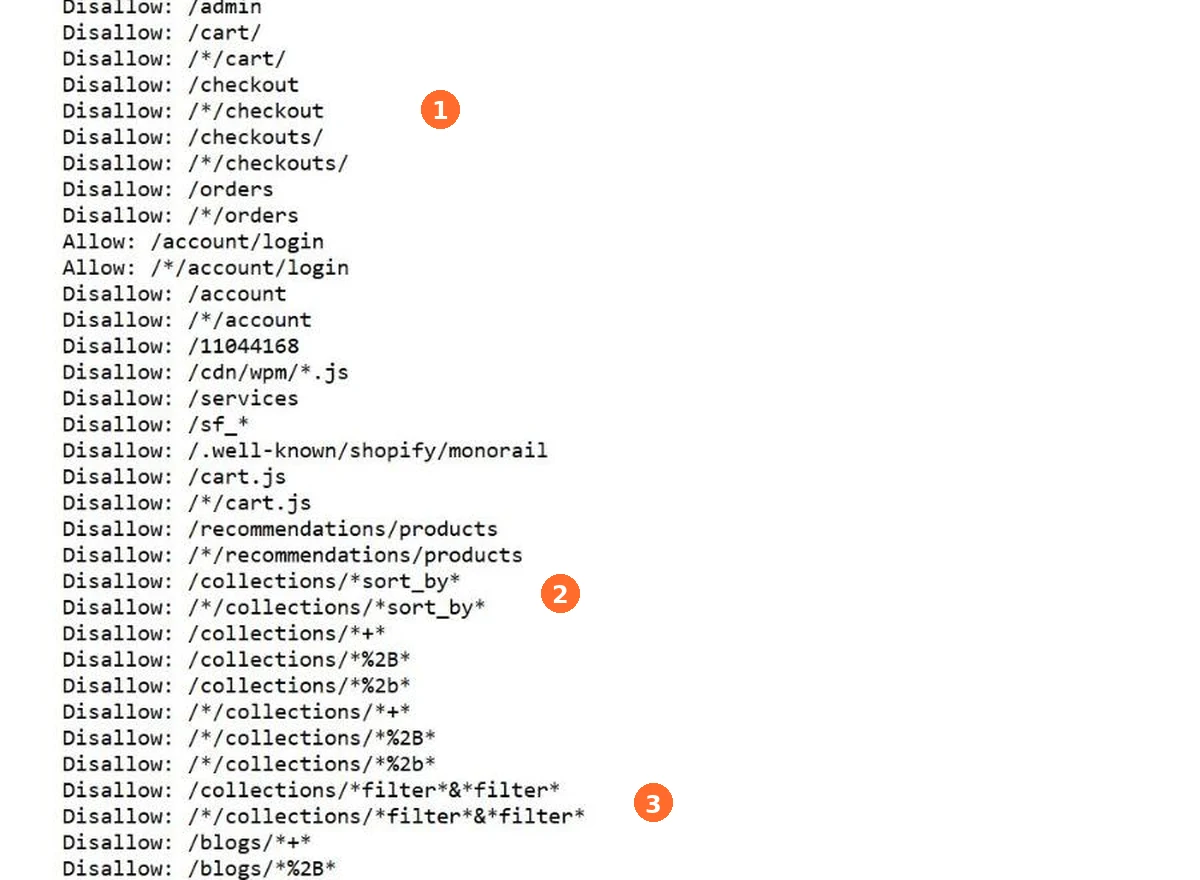
AI crawlers. Don’t forget AI search beyond shopping. ChatGPT search uses a crawler called OAI-SearchBot. If someone added a blanket “block all AI bots” rule to robots.txt.liquid, your store may be invisible there. Open yourstore.com/robots.txt and look for it.
Google’s AI Overviews and AI Mode use the normal Googlebot, so standard SEO covers those. Google-Extended, a separate token, doesn’t affect your Google Search rankings.
For the content side of AI visibility, our AI search optimization guide goes deeper.
Check: Agentic Storefronts shows your store as connected. Your top products have a category and factual descriptions. And robots.txt doesn’t block OAI-SearchBot.
What Shopify handles vs what you control
Here’s the whole platform in one table. Use it as a checklist when you audit a store, or when you hand the work to someone else.
| SEO element | Shopify default | What you do | Where in the admin |
|---|---|---|---|
| Sitemap | Built automatically at /sitemap.xml, can’t be edited | Submit it in Search Console and Bing | Not in admin; use Search Console |
| robots.txt | Default file blocks cart, checkout, search and filter combos | Leave it unless you have a diagnosed crawl problem | Online Store › Themes › Edit code › robots.txt.liquid |
| Canonical tags | Added to every page | Make internal links match the canonical (Step 4) | Theme code |
| Title tags | Page title plus store name if left blank | Write a unique title, 60 characters or fewer | Search engine listing on each page |
| Homepage title and description | Set separately from other pages | Brand name plus what you sell | Online Store › Preferences |
| Meta descriptions | Pulled from page content if left blank | Write one per page, about 160 characters | Search engine listing on each page |
| H1 | Generated from the product, collection or page title | Put the main keyword in the title field | Title field |
| URL handles | Generated from the title | Shorten; keep the redirect box ticked on changes | Search engine listing |
| Redirects | Offered when you change a handle | Add 301s for deleted products and old URLs | URL redirects (use the admin search box) |
| Structured data | Product schema in most modern themes | Test it; add review and breadcrumb markup if missing | Theme code or an app |
| Filter URLs | Canonical to the collection; stacked filters blocked in robots.txt | Keep single filters out of menus; build real collections for filters with demand | Search & Discovery app |
| Alt text | Empty | Describe every product and featured image | Image editor on each product |
| Speed | Global CDN and image resizing | Trim apps, shrink heroes, pick a lean theme | Web performance report |
| International | hreflang added when you set up Markets domains or subfolders | Translate properly; submit each domain’s sitemap | Settings › Markets |
| AI shopping | Agentic Storefronts on by default for eligible stores | Clean product data and policies; check channels | Agentic Storefronts settings |
The pattern is clear when you read down the middle column. Shopify gets your store crawled. Almost everything that decides ranking sits in the third column.
Anatomy of an optimized Shopify product page
Here’s what a well-built product page looks like, with every SEO element numbered.
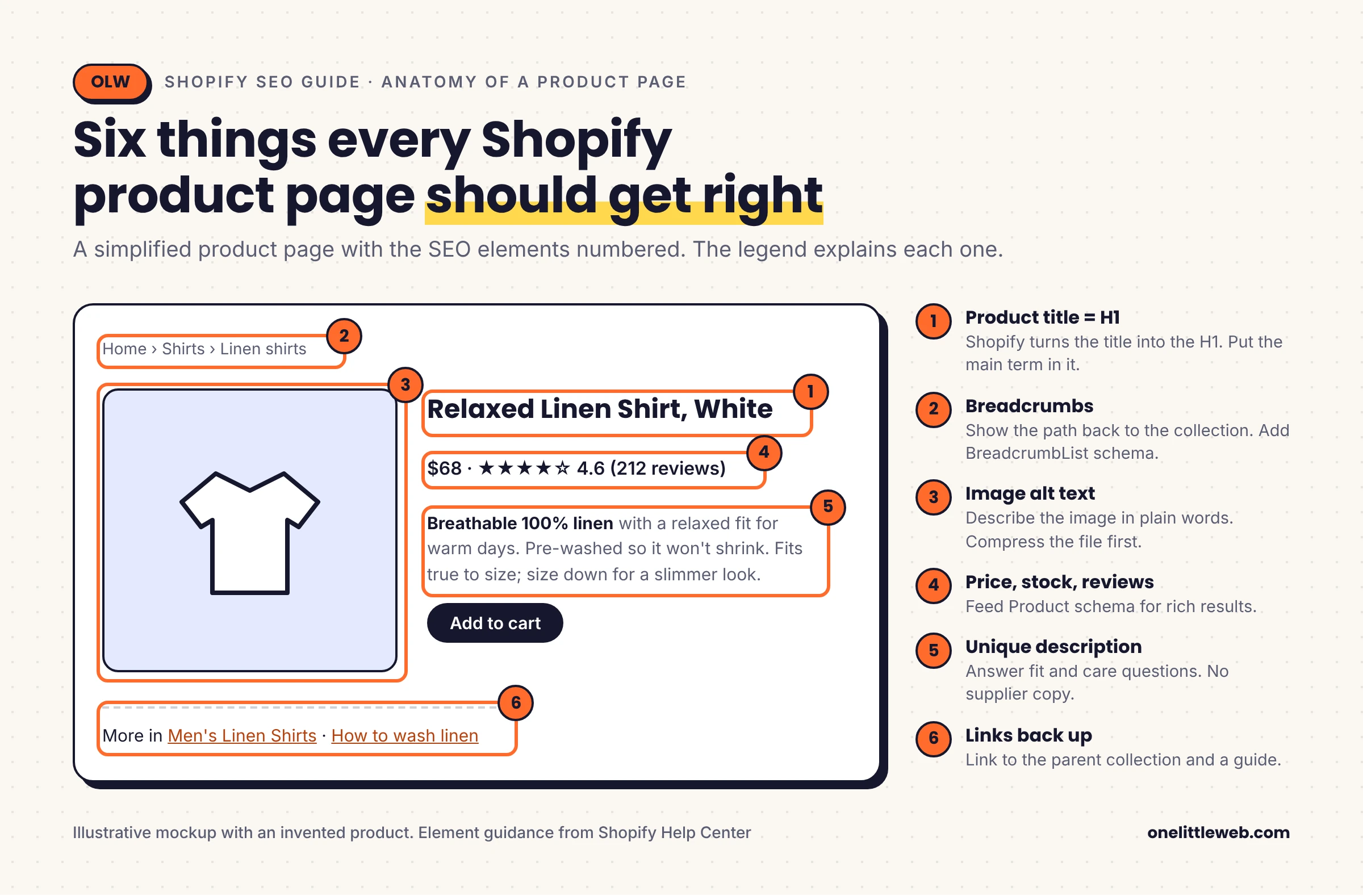
Two of these get overlooked more than the rest.
The first is number 4. Price, stock and review data do more than persuade a shopper. They feed Product schema for rich results, and the same fields feed the AI channels in Step 9. If your reviews live in an app, check that the app outputs review markup.
The second is number 6. Product pages are often dead ends, linking only to the cart. A breadcrumb plus one or two links to the parent collection and a related guide keep both shoppers and crawlers moving through the store.
Shopify SEO by store type
The nine steps apply to every store. The emphasis changes with your size and setup.
- New store, under 50 products. Put most of your effort into Steps 2 and 5. A handful of strong collection pages with real copy will do more than anything technical. Start a blog early, because links take time to build.
- Large catalog, 1,000+ products. Step 4 matters most. Duplicate URLs multiply with every collection a product sits in. Use a crawler to find thin tag pages, and write title and description templates for long-tail products instead of writing each by hand.
- Selling internationally. Set up markets through Shopify Markets so Shopify can add hreflang tags, which tell Google which language or country version to show. Subfolders (yourstore.com/en-gb/) are simpler, because every market shares one domain’s authority. Country domains (yourstore.co.uk) send a stronger local signal, but each one needs its own Search Console property and its own links. Translate content properly rather than relying on raw machine translation.
- Dropshipping or reselling brands. Your biggest risk is copied supplier descriptions. Rewrite descriptions for the products that matter, and add something the supplier’s page lacks, like your own photos, sizing notes or comparisons.
- Shopify Plus or headless. Plus doesn’t change the URL rules or core SEO controls. Headless storefronts are different: you own rendering and canonicals yourself, so get a developer who knows technical SEO involved from day one.
Most of these profiles can still handle the work in-house. The international and headless setups are where I’d bring in specialist help soonest.
How long Shopify SEO takes
Shopify’s Help Center says edits to title tags can take a couple of weeks to show in search results, because Google has to recrawl the page. That’s the fastest part.
Rankings take longer. In our client work, technical fixes like the Step 4 link change usually show up in Search Console within a few weeks. New collection pages in competitive niches commonly take three to six months to settle into stable positions. Brand-new domains with no links can take longer still.
The platform itself also keeps changing. These are the changes that shape Shopify SEO work today:
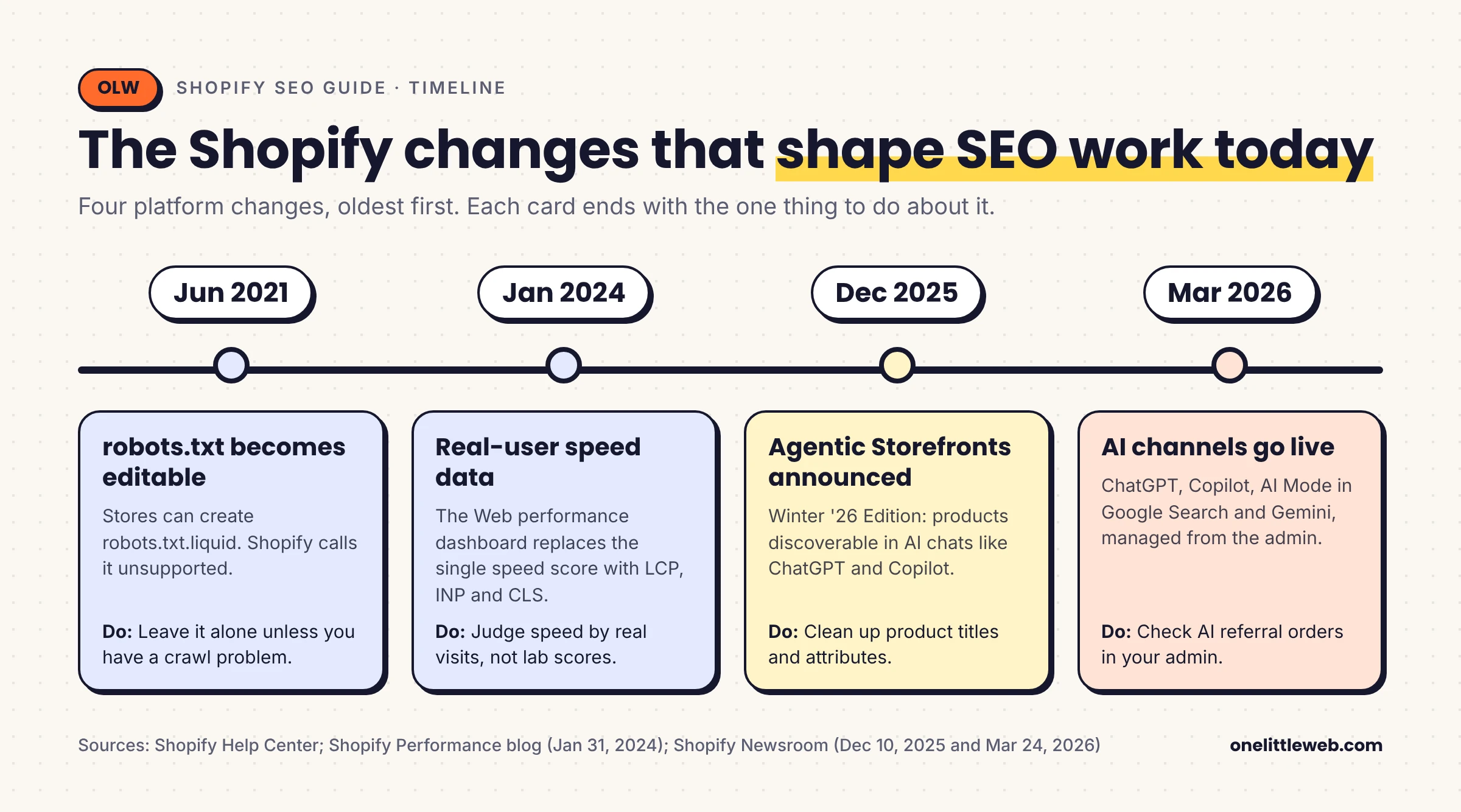
The last two are the reason older Shopify SEO guides feel incomplete. Your catalog data now shows up in places that didn’t exist when they were written.
Plan for steady work over months instead of a one-off sprint. Set up the foundation in week one and fix duplicates and speed in the first month. After that, keep adding collection copy and earning links every month.
How to track Shopify SEO results
Don’t judge SEO by a rank tracker alone. Use these four layers together:
| Layer | Tool | What it tells you | Check it |
|---|---|---|---|
| Visibility | Google Search Console | Impressions, clicks and positions by page and query | Weekly |
| Revenue | Shopify Analytics | Sessions and sales from organic search | Monthly |
| Experience | Web performance report | Real-user LCP, INP and CLS | After any theme or app change |
| AI channels | Shopify orders and Agentic Storefronts | Orders with ChatGPT and other AI referral tags | Monthly |
At OLW, we trust Search Console data far more than third-party traffic estimates. Tools like Ahrefs are useful for research, but their traffic numbers are estimates. Search Console shows what Google actually recorded for your store.
Search Console: split collections from products
In the Performance report, add a Page filter, choose Custom (regex) and paste one of these. Collection pages only:
/collections/[^/]+/?$
Product pages only:
/products/
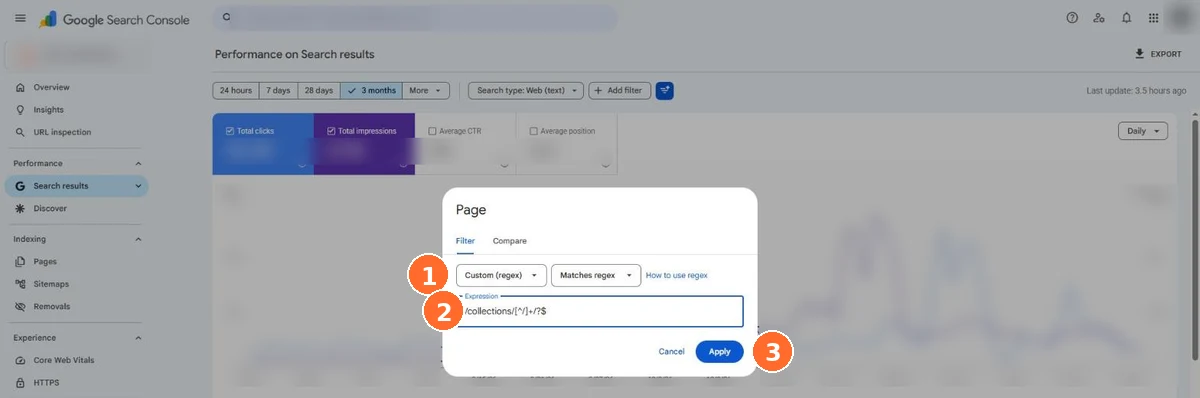
Comparing the two shows where your traffic really comes from. On most stores, collections should be pulling their weight.
Search Console: separate brand from non-brand searches
Branded searches would happen anyway. Non-branded growth is what SEO actually earned. Add a Query filter and choose Custom (regex). Set it to Doesn’t match regex, then enter your brand name and common misspellings:
northfold|north fold|nortfold
To find blog topics, flip it around. This query filter shows question searches you already appear for:
^(how|what|which|why|can|does|is|best)b
Set up a monthly SEO report
- Compare the last 28 days with the previous 28 days in Search Console, non-branded queries only.
- List collections with high impressions but positions 8 to 20. These are your next pages to improve.
- Check the Pages report for “Duplicate” and “Crawled, currently not indexed” spikes.
- Pull organic sessions and sales from Shopify Analytics.
- Note any theme or app changes, and check the Web performance report for dips.
Common Shopify SEO mistakes
These are the problems we see most often when stores come to us after a traffic drop. A few are covered in our wider guide to web design mistakes that hurt SEO.
- Copying a robots.txt snippet from a forum. One wrong line can block whole collections. Shopify says support can’t help with robots.txt.liquid edits. Its developer docs also admit the template’s output doesn’t always match the default file. A September 2026 developer report found it loaded an older rule set. Save your live robots.txt before any edit and compare afterwards.
- Changing handles without redirects. Unticking the redirect box, or deleting old products, turns earned links into 404s. Redirect deleted products to the closest collection.
- Stacking SEO apps. Two apps writing meta tags or schema will conflict. Pick one app per job, and remove the ones you stop using.
- Leaving collections empty. A title and a grid is the most common reason collections never rank.
- Using manufacturer descriptions. Identical text across many stores gives Google no reason to pick yours.
- Noindexing by accident. Some apps and theme settings add noindex tags. Check the Pages report in Search Console for “Excluded by noindex tag” on pages you want ranked.
- Ignoring variant demand. If a color gets real searches, a variant with no page of its own can’t rank for it (see Step 6).
- Blocking AI crawlers by default. A blanket AI block can hide your store from ChatGPT search while your competitors show up.
Do it yourself or get help?
Most of this guide is doable in-house. Steps 1, 2, 3 and 5 need time and care more than technical skill. A store owner who blocks out a few hours a week can make real progress.
A few parts are worth handing off. Theme code edits in Step 4, speed work in Step 7 and link building in Step 8 are where mistakes cost the most or where experience saves months.
If you’re unsure which way to go, our diagnostic guide on outsourcing Shopify SEO walks through the decision. To compare providers, see our ranked list of top Shopify SEO agencies.
If you’d like a second pair of eyes from us, our SEO consulting team can audit your store and hand you a prioritized fix list. We’ve helped clients grow organic traffic at scale, like the AI writing tool we took from 626 to 263,112 monthly search clicks in six months.
Shopify SEO FAQ
Is Shopify good for SEO?
Yes. Shopify handles sitemaps, canonical tags, robots.txt and SSL automatically, and gives you editable titles, descriptions, handles and alt text. Its main limits are the fixed /products/ and /collections/ URL folders and duplicate product URLs created by some themes.
Do I need an SEO app on Shopify?
Not to get started. Shopify’s built-in fields cover titles, descriptions, handles, alt text and redirects. Apps help with bulk edits on large catalogs or with review schema, but each app can slow the store, so add them only for a specific job.
Can I change the /products/ and /collections/ URL structure?
No. Shopify fixes those folders on every plan, including Shopify Plus. You can change the handle at the end of each URL, and you can show hierarchy through menus and breadcrumbs instead.
How long does Shopify SEO take to work?
Shopify says title tag changes can take a couple of weeks to appear in search. Technical fixes often show up in Search Console within a few weeks, while new collection pages in competitive niches commonly take three to six months to rank steadily.
Are collection descriptions or product descriptions more important?
For most stores, collection descriptions. Collections target broad buying searches with more demand, while products target specific searches. Write both, but start with your most important collections and best-selling products.
Does Shopify add schema markup automatically?
Most modern themes, including Dawn, output Product schema with name, image, price and availability. Review stars and some shipping details usually need an app or custom code. Test a product URL in Google’s Rich Results Test to see what your theme outputs.
Should I noindex Shopify tag pages and filtered collections?
Shopify’s default robots.txt already blocks sorted URLs, combined tags and multi-filter URLs. Single filter URLs canonicalize back to the collection, but single tag pages can still get indexed. If they show up as thin pages in Search Console, stop linking to them and point menus at real collections instead.
How do I get my Shopify products into ChatGPT?
Through Agentic Storefronts, which Shopify turns on by default for eligible stores. It makes your catalog available to ChatGPT, Google AI Mode and Gemini, Microsoft Copilot and Meta. Clear product titles, categories, factual descriptions and accurate policies improve how products appear.
Should I edit robots.txt.liquid to block AI crawlers?
Usually not. Blocking OAI-SearchBot can keep your store out of ChatGPT search results. Only edit robots.txt.liquid for a specific, diagnosed reason, save the live file first and compare it after saving.
Is Shopify Plus better for SEO?
Not on its own. Plus uses the same URL rules and core SEO controls as other plans. Its advantages are scale features, like more expansion stores and checkout customization, which matter more for operations than for rankings.