
Quick answer
Surfer SEO is still one of the best tools for turning a keyword into a complete, well-structured draft. Its Content Editor is fast and easy for writers to follow. What has changed is the package around it: Surfer now sells itself as an AI visibility platform, and your plan decides how much of that you get. I score it 7.5 out of 10.
Key takeaways
- Best for content teams. Agencies and in-house teams publishing or refreshing content every week get the most value.
- Plans start at $49. Discovery is $49 a month billed yearly. Most teams will want Standard at $99 or Pro at $182.
- The score is a coverage check. Surfer’s own study found a 0.28 correlation with rankings. Aim for 70 to 85, not 100.
- AI tracking is plan-gated. Standard tracks ChatGPT only, weekly. You need Pro for all five AI engines with daily updates.
- The trial auto-converts. You get 7 days of Pro, but a card is required and the plan starts unless you cancel.
- It won’t replace an SEO suite. Surfer has no backlink data, no technical crawler and only basic keyword research.
“My blog post has a Content Score of 89 and it still doesn’t rank.”
Some version of that line shows up in SEO forums every week. Someone bought Surfer, followed the guidelines, hit a green score, and then watched the page sit on page three.
The usual replies split into two camps. One camp says Surfer is broken. The other says the writer did it wrong.
Both are partly right, and neither helps you decide whether to pay for it.
At OneLittleWeb, we’ve used Surfer in client content work alongside Ahrefs, Semrush and Google Search Console. So I’ve seen what it’s good at and where people expect too much from it.
We will cover what the Content Score really measures, what Surfer costs now that the plans have changed again, how the new AI Tracker works by plan, and who should spend the money somewhere else.
This review combines our hands-on experience with Surfer’s pricing page and help docs (checked in November 2026), live ratings on G2, Capterra and Trustpilot, and published studies. Where something comes from documentation or third-party data rather than our own use, I say so.
What Is Surfer SEO in 2027?
Surfer is a content optimization platform. You give it a keyword, it studies the pages already ranking for that keyword, and it tells you what your page should cover to compete.
It started in 2017 as a side project at a small SEO agency in Poland. Co-founder Lucjan Suski built it to take the guesswork out of on-page SEO. The company is still based in Wrocław.
Two big changes happened since most reviews were written.
First, Surfer was acquired. French technology group Positive bought Surfer in October 2025. Terms weren’t disclosed. Positive also owns marketing tools like Iconosquare and noCRM. The name on many listings is now “Positive Surfer.”
Second, Surfer repositioned itself. surferseo.com now redirects to surfer.ai. The homepage calls Surfer an “AI visibility platform to get cited in AI search.” In June 2026 the company announced Surfer 3.0, a rebuild around visibility in both Google and AI answers.
Here’s what the platform includes today:
- Content Editor: writes and optimizes content against live search and AI-search data
- AI SEO Content Score: a 0 to 100 score for how well a draft covers the topic
- Surfer AI: generates full article drafts
- Surfy: an AI writing assistant inside the editor
- Content Audit and Sites: reviews your existing pages and connects to Google Search Console
- Topical Map: builds topic clusters for content planning
- AI Tracker: monitors how AI engines mention and cite your brand
- AI Humanizer and AI Detector: checks and rewrites AI-sounding text
- Keyword Surfer: a free Chrome extension
- API and MCP: connections for developers and AI agents
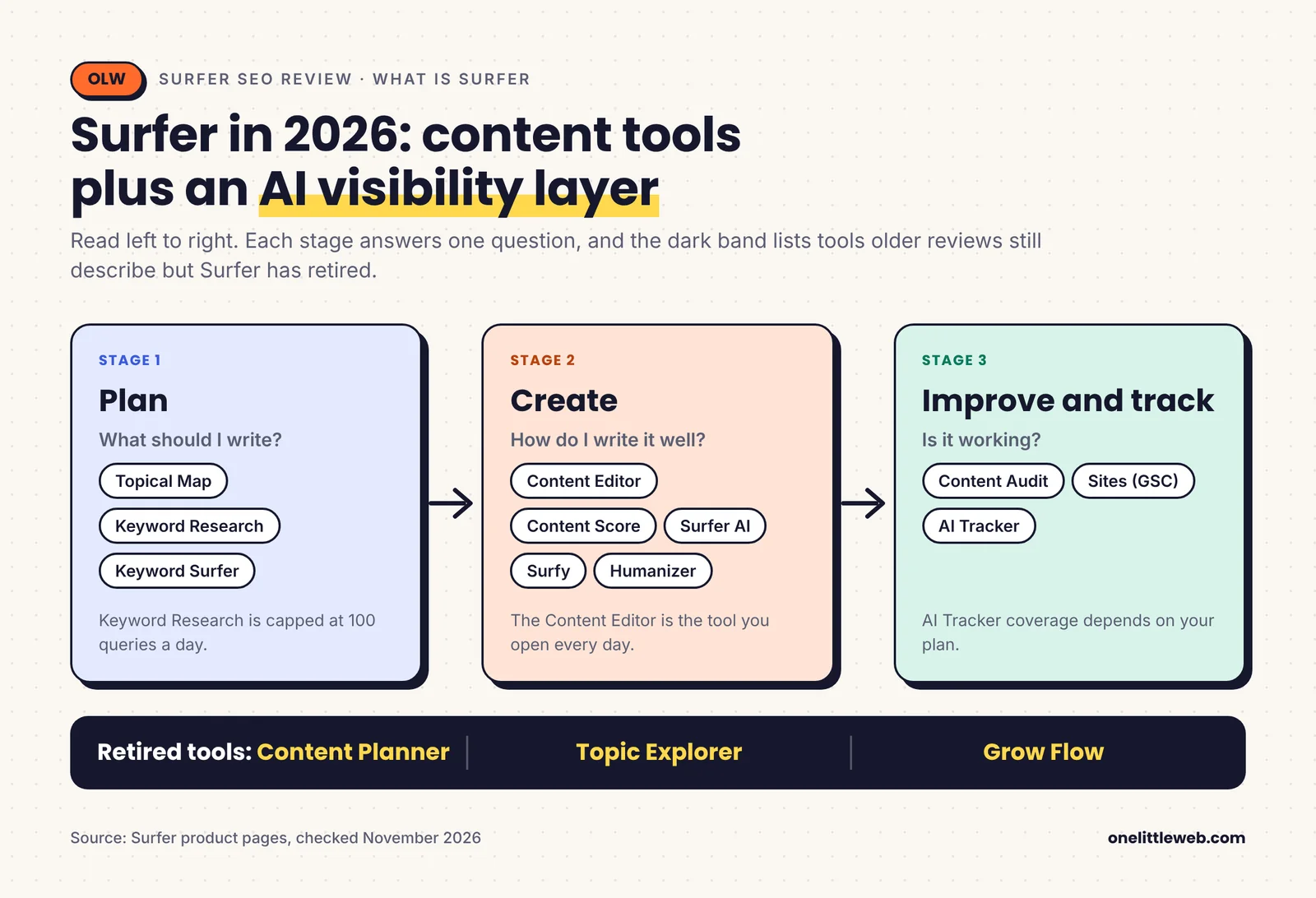
Several tools you’ll still see in older reviews are gone. Surfer lists Content Planner, Topic Explorer and Grow Flow as retired. Older tools like the SERP Analyzer and Rank Tracker are still in the app. They now sit under a “More tools” menu instead of front and center.
What does the repositioning mean for buyers?
For most people, less than the homepage suggests.
The Content Editor is still the tool you’ll open every day. What’s different is that AI tracking now shapes the pricing. The number of AI prompts you can track, and which AI engines you can see, is now one of the main differences between plans.
So if you only want a content editor, you can still buy one. You just need to pick the plan carefully so you’re not paying for tracking you won’t use.
What does Surfer not do?
Surfer is upfront about this, which I appreciate.
It isn’t a backlink tool. It doesn’t crawl your site for technical problems or check Core Web Vitals. It isn’t a full rank tracker. And its Content Audit only looks at your own pages, not competitors’.
That’s why most serious SEO teams run Surfer next to Ahrefs or Semrush rather than instead of them. I cover that pairing later, and our Ahrefs review covers the research side in detail.
Surfer Pros and Cons
I’m putting these early. You shouldn’t have to read the whole review to find out what’s wrong with a tool.
What are the pros of Surfer?
- The Content Editor is fast to learn. Writers understand the guidelines panel within a session or two. Capterra users rate ease of use 4.8 out of 5.
- Guidance is built from real ranking pages. You see the terms, headings and length that competing pages use, so briefs stop being guesswork.
- You can exclude bad competitors. Remove Reddit threads or thin pages from the analysis and the guidelines get noticeably better.
- The score now covers AI citations too. The AI SEO Content Score shows Google signals and AI citation signals side by side.
- It works where writers already write. Google Docs and WordPress integrations come with Standard and above, and the Chrome extension is free.
- AI Tracker connects to the editor. If AI answers don’t cite a page, you can send it straight to the Content Editor to improve it.
- Every plan includes the core toolset. Content Audit, Topical Map, Surfy, Keyword Research and the Humanizer are on all plans, including the $49 one.
- Surfer publishes how it measures itself. It released its Content Score correlation data and recommends a target range rather than pushing for 100.
What are the cons of Surfer?
- The score is easy to over-chase. It rewards adding terms, and nothing stops a writer from stuffing them in. This is the most common complaint across every review platform.
- Seats are capped by plan. Discovery has 1 seat, Standard 3, Pro 5 and Peace of Mind 10. Clearscope, by contrast, includes unlimited users on every plan.
- AI tracking is heavily plan-gated. Discovery tracks nothing. Standard tracks ChatGPT only, and only weekly. You need Pro at $182 a month for all five AI engines with daily updates.
- Credits don’t roll over. Unused Content Editor and AI credits disappear at the end of the cycle.
- AI drafts need real fact-checking. Capterra reviewers report inaccurate statistics and references in AI-generated content.
- Non-English output is weaker. Several reviewers say Spanish and other languages get less reliable guidance.
- Keyword research is basic. It’s capped at 100 queries per tool per day and doesn’t replace Ahrefs or Semrush.
- The trial auto-converts. The 7-day trial needs a card and turns into a paid plan unless you cancel. Some 2026 Trustpilot reviews describe charges after cancelling.
How I scored Surfer
I didn’t want to score Surfer on a generic checklist. Instead, I built the criteria from the problems Surfer users actually report.
Read enough Surfer reviews on G2, Capterra, Trustpilot and Reddit and the same issues repeat. The score pushes writers toward keyword stuffing. Credits expire. The price feels high for freelancers. AI drafts include made-up statistics. Non-English output is weaker.
Those pain points became the scoring model.
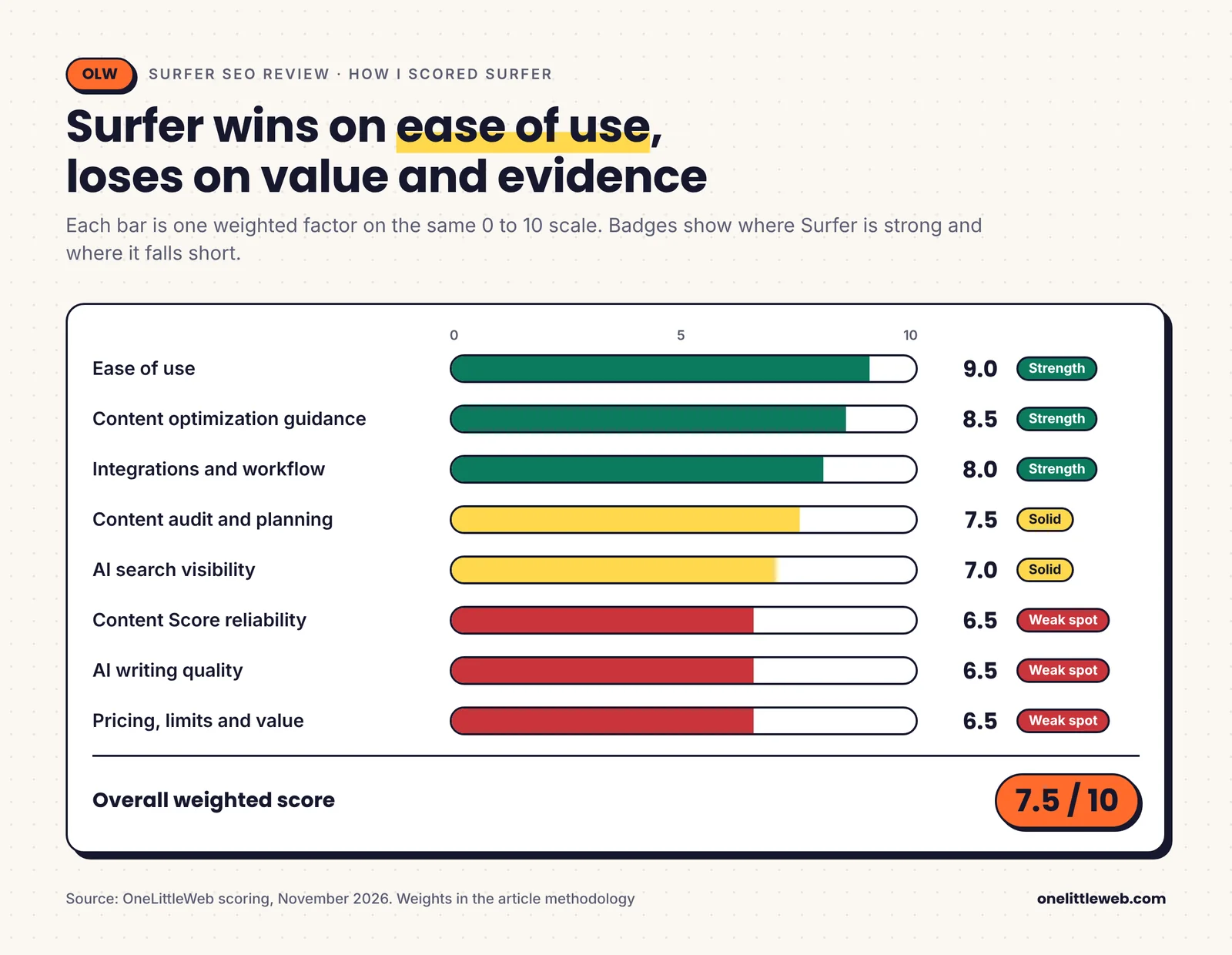
| Factor | Weight | Score | Why |
|---|---|---|---|
| Content optimization guidance | 25% | 8.5 | Still the reason people buy Surfer |
| Content Score reliability | 15% | 6.5 | The core promise, with modest evidence |
| AI search visibility | 15% | 7.0 | Plans are now priced around it |
| AI writing quality | 10% | 6.5 | Fast drafts, reported factual errors |
| Content audit and planning | 10% | 7.5 | Good refresh workflow, basic keyword data |
| Ease of use | 10% | 9.0 | Writers adopt it quickly |
| Pricing, limits and value | 10% | 6.5 | Low entry price, tight seat and credit rules |
| Integrations and workflow | 5% | 8.0 | Fits where writers work, API on top plan only |
| Overall | 100% | 7.5 | A strong content editor inside a platform that now charges more for AI tracking |
Does the Surfer Content Score Actually Predict Rankings?
This is the question that matters most. A high score feels like progress, so it’s worth knowing what it really tells you.
What does the Content Score measure?
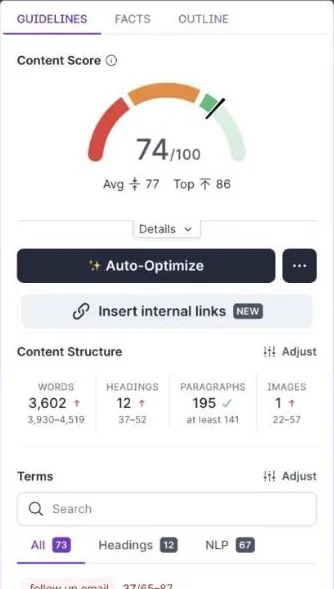
The Content Score is a number from 0 to 100. Surfer now calls it the AI SEO Content Score. It says the score covers both Google ranking signals and how likely AI answers are to cite your page. The editor also shows the average and top scores of the pages you’re competing with.
Surfer says four things drive it:
- Topical coverage: which questions and subtopics you address
- Keyword usage: whether expected terms appear naturally
- Structure and readability: headings, paragraphs and flow
- Depth and relevance: how fully you answer the query
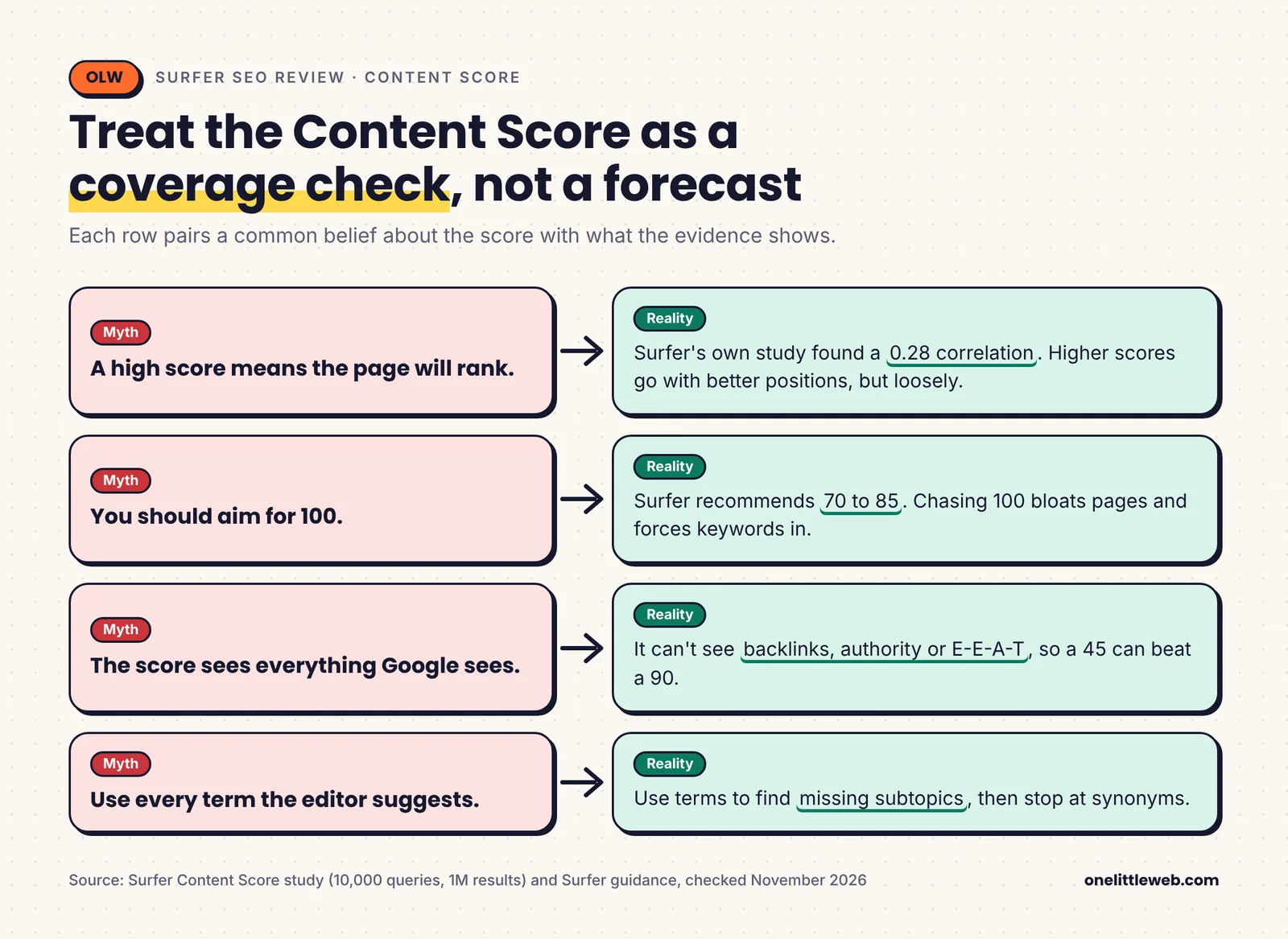
What it does not measure is just as important. It can’t see your backlinks or your brand’s authority. It doesn’t know whether you have real first-hand experience. Google’s E-E-A-T signals sit outside the score entirely.
That’s why a page can score 90 and still lose to a page that scores 45 on a stronger site.
What do the studies say?
There are two main studies. Both come from companies with something to sell, so I’ll give you both and the conflicts.
Surfer’s own study. Surfer analyzed 10,000 search queries and the top 100 results for each, about 1 million search results in total. It reports a Spearman correlation of 0.28 between Content Score and Google rankings.
The correlation varied by query type. It was highest for queries about consequences (0.30) and definitions (0.27). It was lowest for instructional and short-fact queries (0.19).
Surfer’s own published figures also vary a bit. Other Surfer posts cite 0.27 and 0.245 for similar analyses.
Ahrefs’ study. Ahrefs tested five content tools, including its own, across 20 random keywords. It found Surfer, Frase and Clearscope had “very weak” correlations. NeuronWriter and Ahrefs’ own tool scored best.
Keep in mind that Ahrefs sells a competing tool, and 20 keywords is a small sample.
What does 0.28 mean in plain words?
A correlation of 1 would mean the score perfectly predicts rankings. A correlation of 0 would mean no link at all.
At 0.28, higher scores tend to go with better positions, but loosely. Many other factors decide who ranks. For context, SEO studies often treat even small correlations as meaningful because Google uses so many signals at once.
So the fair reading is this. The Content Score is a useful coverage check. It is not a ranking forecast.
What Content Score should you aim for?
Surfer itself recommends 70 to 85 for most content. It says chasing a perfect score can bloat a page or force keywords in.
Backlinko gives similar advice: aim to match or slightly beat the average score of the ranking pages, not the top one.
That’s close to what we’ve done. We’ve looked at the competitor scores Surfer shows, aimed for the upper part of that range, and stopped once the draft covered the topic well.
Why does chasing 100 backfire?
Because the easiest way to raise the score is to add more terms.
Each extra mention nudges the number up. After a point, those mentions make sentences awkward and repetitive. Readers notice, and they leave.
Reddit threads about this follow a pattern. Someone hits a score in the high 80s, the page doesn’t rank, and the replies point out that the copy reads like a term list.
The fix is simple. Use the term list to find missing subtopics. Ignore it once you’re just adding synonyms. Our guide to AI search optimization goes deeper on writing pages that AI answers cite.
How to Get Real Value From Surfer: 5 Steps
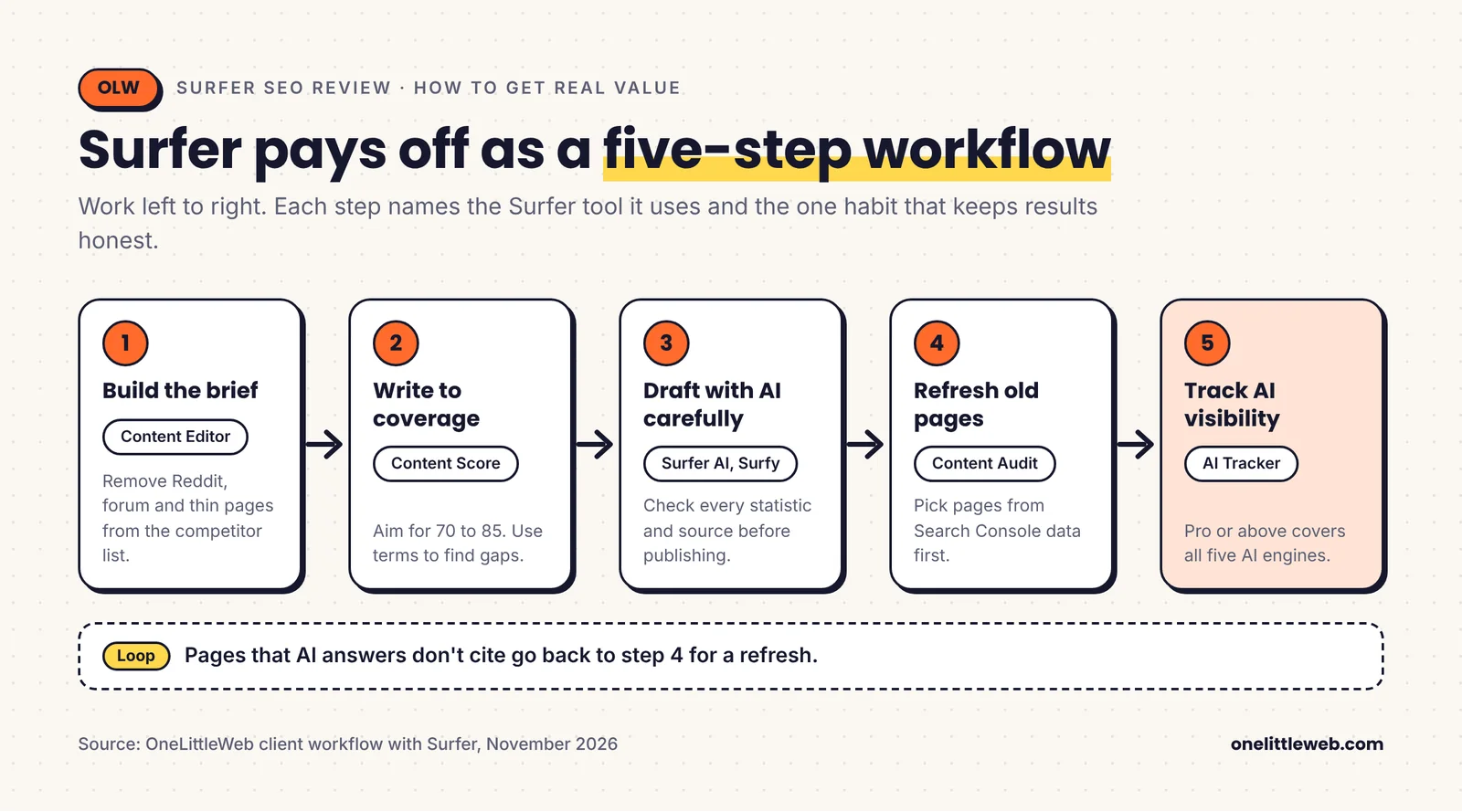
Surfer works best as a workflow, not a single feature. These are the five ways we’ve used it in client work, in the order we’d set them up.
Step 1: Build the brief in the Content Editor
The Content Editor is the reason Surfer exists. It’s where you’ll spend most of your time, and it’s still the best part of the product.
- Enter your keyword. Pick the target country and device. Surfer pulls the top-ranking results for that search.
- Review the competitors. Surfer shows the pages it will learn from. You can remove ones that don’t fit.
- Get your guidelines. Surfer sets targets for word count, headings, paragraphs and images. It lists the terms and entities that ranking pages use, with suggested counts.
- Write or paste your draft. The Content Score updates as you type.
- Check AI Search Guidelines. A separate tab shows facts and entities that make a page more likely to be cited in AI answers.
The whole setup takes a couple of minutes. That speed is a big part of why teams stick with it.
We’ve mainly used Surfer for two jobs: building briefs for writers and refreshing pages that had started to slip.
For briefs, the step that made the biggest difference was cleaning up the competitor list. When the top ten included a Reddit thread, a forum post or a thin affiliate page, we removed it. Otherwise Surfer averages those pages into your targets, and your guidelines get worse.
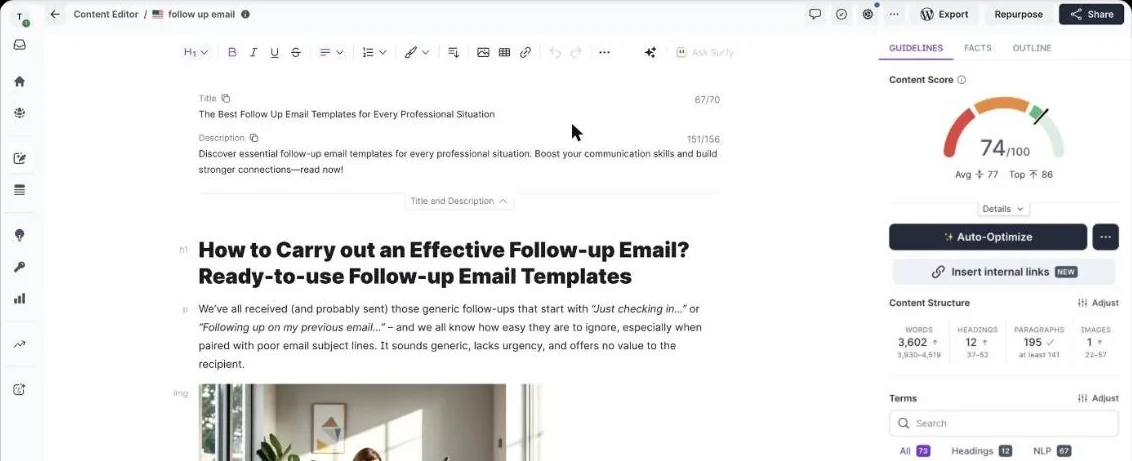
The editor’s biggest weakness is that it copies the average. If the ranking pages are mediocre, Surfer steers you toward mediocre coverage faster. Word count targets can also run long when competitors pad their pages. When we brief writers through our content marketing service, the brief always covers angle and experience the tool can’t see.
Check: Before writing, every page left in the competitor list should match the search intent you’re targeting.
Step 2: Write to coverage, not to 100
We’ve treated the term list as a coverage check, not a quota. If a term pointed to a subtopic the draft hadn’t covered, the writer added a section. If it was just a phrasing variant, we usually skipped it.
Auto-Optimize can add missing terms in one click. One reviewer saw a draft jump from 54 to 84 in about a minute and a half. It’s useful for a quick pass, but read every change it makes. Auto-Optimize also runs on its own credit system, which is still in beta.
G2 reviewers say some recommendations feel formulaic or like keyword stuffing when followed exactly. That matches what you’d expect from a tool that rewards term counts.
- Use the term list to spot missing subtopics.
- Aim for 70 to 85, or the upper end of the competitor range.
- Read the draft aloud. If a sentence exists only to fit a term, cut it.
Check: Your score sits in the 70 to 85 range and no paragraph repeats the same term just to raise it.
Step 3: Use Surfer AI and Surfy as draft helpers
Surfer has three AI writing tools, and they do different jobs.
Surfer AI writes a full article draft from your keyword. Surfer says it takes about three minutes and adds internal and external links as it writes. You can set a brand voice so drafts don’t all sound the same. You can also generate articles in bulk from the Topical Map.
Surfy is the assistant inside the Content Editor. You highlight text and ask it to expand, shorten or rewrite. It uses your saved brand voice and saves switching to ChatGPT.
The AI Detector and Humanizer come with every plan. The detector scores how likely text is to be AI-written, and the humanizer rewrites it. Capterra reviewers rate the humanizer as one of the weaker tools, so I’d treat it as a convenience, not a reason to buy.
How good is the output? Good enough for a first draft, but not good enough to publish without editing. The most serious complaint on Capterra is accuracy. Reviewers report AI-generated statistics and references that turned out to be wrong, and weaker non-English drafts.
That matches how we’ve handled AI drafts at OneLittleWeb. They sped up the structure. A human still checked every fact, added real experience, and rewrote anything generic before it went live.
Google’s guidance on AI content is clear that AI use isn’t the problem. Unhelpful content is. A Surfer draft published unedited is exactly the kind of page that guidance warns about.
Watch your AI credits. Plan AI credits renew with your billing cycle and don’t roll over. On-demand credits don’t expire while you’re subscribed. Surfer’s pricing page doesn’t list AI article allowances, so check your usage page before you buy more. One Trustpilot reviewer said Surfer refused to refund unused AI credits, so buy them in small batches.
Check: Every statistic and source in an AI draft has been checked against the original before publishing.
Step 4: Refresh old pages with Content Audit and Topical Map
Content Audit checks pages you’ve already published. It compares each page with what currently ranks and flags missing terms, structure gaps and other quick fixes.
It connects through Sites, which links your Google Search Console account. From there, Surfer surfaces recommendations, flags rank drops and suggests content ideas. Pro plans add a cannibalization report and a content coverage gap view.
Our refresh workflow has always started in Search Console, not Surfer.
- We looked for pages where impressions held but clicks were falling, or where a page had slipped from the top five.
- We ran those pages through Content Audit.
- We opened the weakest ones in the Content Editor and updated them.
Search Console told us which pages needed attention. Surfer told us what was missing on them.
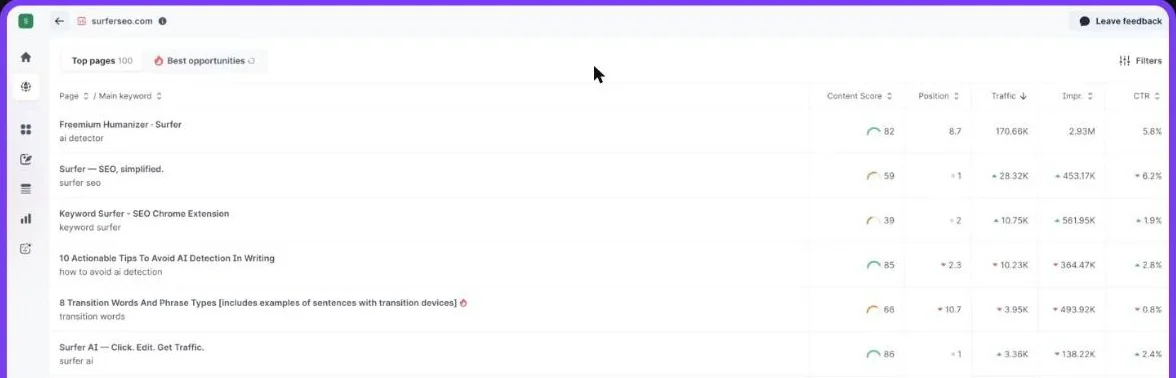
Content Audit only audits your own pages. It won’t analyze competitor sites, check backlinks, or flag technical problems like slow pages.
Topical Map takes a seed topic and builds clusters of related keywords. Each cluster becomes a pillar or supporting page. In 2026, Surfer added bulk actions, so you can create several documents from a map at once. It’s a good starting point for a content plan, but Capterra reviewers say clustering is weaker outside English.
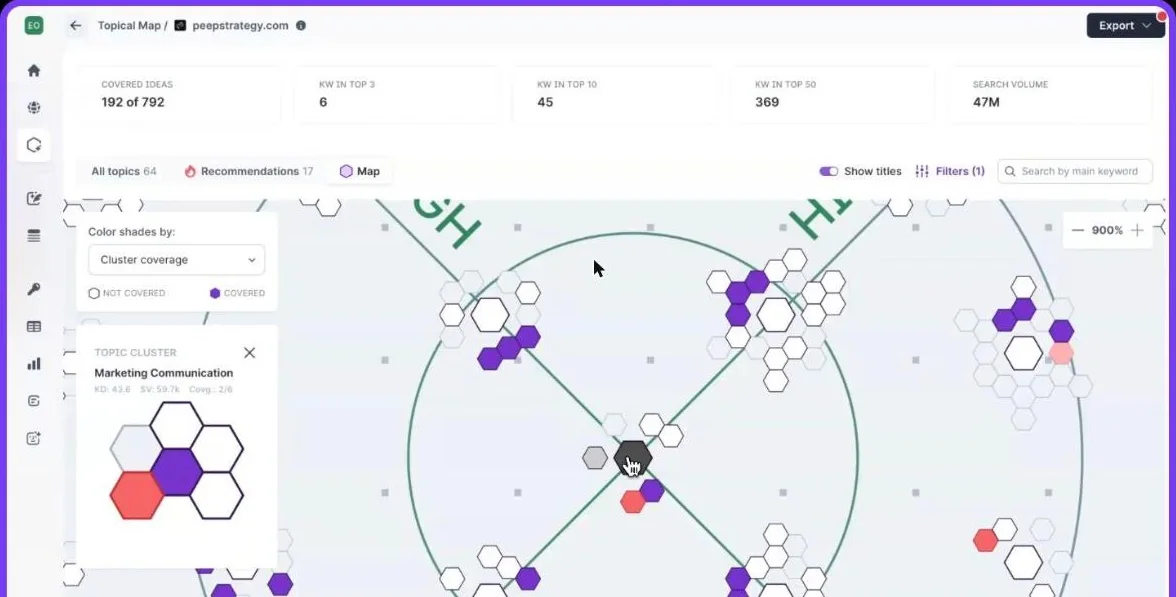
Keyword Research doesn’t use credits, but it’s capped at 100 queries per tool per day. The data is basic next to Ahrefs or Semrush. The free Keyword Surfer extension is handy for quick volume checks in Google results. If you’d rather hand refreshes to a team, that’s part of our SEO service.
Check: Every page you refresh was picked from Search Console data first, not from the audit list alone.
Step 5: Track AI visibility with AI Tracker
The AI Tracker is now Surfer’s headline product. You set a list of prompts, which are the questions buyers ask AI tools. Surfer runs them and reports:
- Mention rate: how often your brand appears in answers
- Average position: where you appear in the answer
- Visibility score and share of voice: your presence compared with competitors
- Sentiment: whether answers describe you positively, neutrally or negatively
- Mention gap: prompts where competitors show up and you don’t
- Cited sources: which pages the AI engines link to
- Fan-out queries: the sub-questions an AI engine researches behind one answer
It tracks ChatGPT, Gemini, Perplexity, Google AI Mode and Google AI Overviews. It doesn’t track Claude.
Surfer collects answers from the apps people actually use, not from AI company APIs. That’s a sensible choice. Surfer’s own test of 1,000 prompts found the API and app answers overlapped 30% at best.
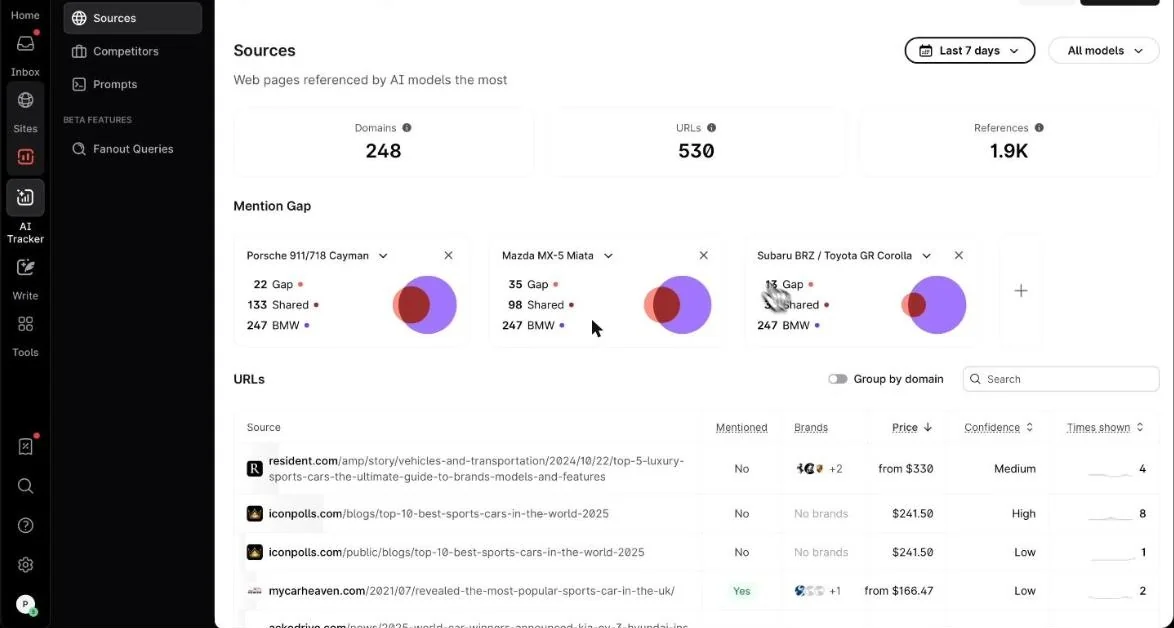
This is the detail almost no review explains: which AI engines you see depends on your plan.
| Plan | AI prompts | Refresh | AI engines |
|---|---|---|---|
| Discovery ($49) | None | n/a | None |
| Standard ($99) | 25 | Weekly | ChatGPT only |
| Pro ($182) | 50 | Daily | All five |
| Peace of Mind ($299) | 100 | Daily | All five |
| AI Search Analytics ($82) | 50 | Daily | All five, no content tools |
If Google AI Overviews matter to you, Standard won’t show them. You need Pro or above.
Where Surfer has an edge over standalone trackers is the link to the editor. When the tracker finds a page that AI answers don’t cite, you can send it to the Content Editor and improve it there. Since August 2026, Surfer also turns tracker findings into a prioritized to-do list, and you can pull the data into Looker Studio.
Where it falls short:
- Prompt counts are small. Fifty prompts covers your core category. It won’t cover a broad product range or several markets.
- It’s a sample. Like every AI tracker, it shows what your chosen prompts return. It can’t see private conversations.
- It shows the what, not the why. TechRadar’s review put it well: it tells you whether you’re winning, not why.
- Dedicated tools go deeper. If AI visibility is your main goal, tools like Peec AI or Profound focus on it full time.
About the Backlink Marketplace. Inside AI Tracker, Surfer now lets you buy placements on sites that AI engines often cite. You can see the Price column in the screenshot above. Paying for links carries real risk under Google’s spam policies if those links pass ranking value. Treat any paid placement as advertising, ask how links are marked, and judge each site on its own merits. Our outreach link building service page explains how we earn links instead.
For a wider view of this category, see our roundup of LLM tracking tools.
Check: Your plan covers the AI engines your buyers actually use, and your prompt list reflects real buyer questions.
Surfer Pricing in 2027
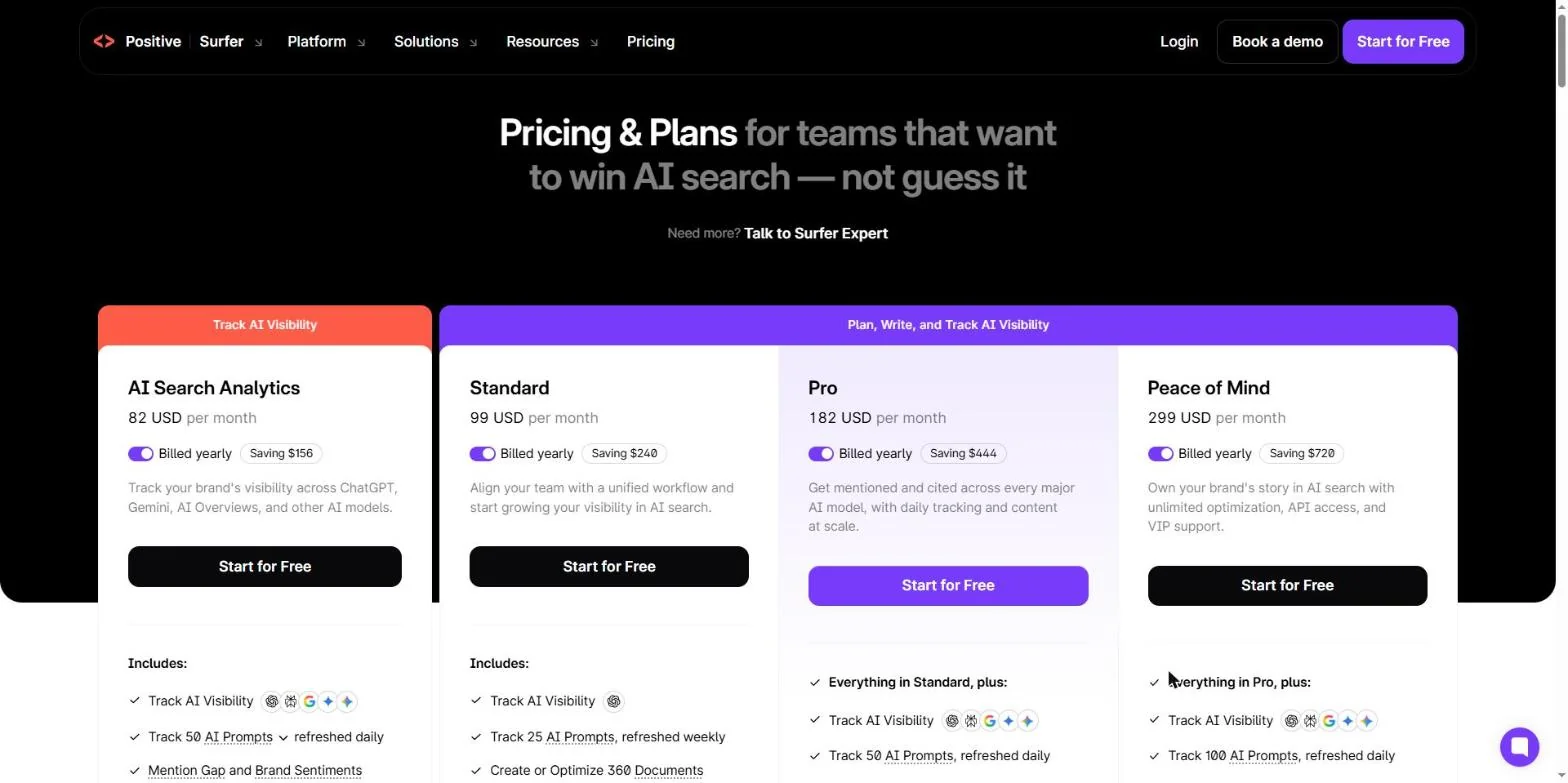
Here’s current pricing from Surfer’s own pricing page, checked in November 2026. Many reviews still show the old Essential and Scale plans. Those no longer exist.
| Plan | Billed yearly (per month) | Billed monthly | Best for |
|---|---|---|---|
| Discovery | $49 | $59 | Solo writers and bloggers |
| Standard | $99 | $119 | Small content teams |
| Pro | $182 | $219 | Teams that need AI visibility |
| Peace of Mind | $299 | $359 | Agencies and larger teams |
| AI Search Analytics | $82 | $95 | AI tracking only |
| Enterprise | Custom | Custom | Large organizations |
Yearly prices come from Surfer’s pricing page. Monthly prices come from Toolradar‘s check of Surfer’s page on November 13, 2026. Surfer’s own upgrade screen also showed Pro at $219 a month when we logged in. Annual billing is paid upfront and saves up to 17%.
What do you get at each tier?
| Feature | Discovery | Standard | Pro | Peace of Mind |
|---|---|---|---|---|
| Documents | 120 | 360 | 360 | Unlimited (fair use) |
| Team seats | 1 | 3 | 5 | 10 |
| Brand workspaces | 1 | 1 | 5 | Unlimited (fair use) |
| Pages tracked | 10 | 50 | 200 | 500 |
| AI prompts tracked | 0 | 25, weekly | 50, daily | 100, daily |
| AI engines | None | ChatGPT | All five | All five |
| Google Docs and WordPress | No | Yes | Yes | Yes |
| 1-click optimization | No | Yes | Yes | Yes |
| Rank drop detection | No | Yes | Yes | Yes |
| Cannibalization report | No | No | Yes | Yes |
| Custom templates | No | No | 10 | Unlimited (fair use) |
| MCP | No | No | Yes | Yes |
| API | No | No | No | Yes |
| Onboarding and success manager | No | No | No | Yes |
Every plan includes the Content Score, Surfy, Content Audit, Topical Map, Keyword Research, and the AI Detector and Humanizer.
How do documents and credits work?
Each document is one Content Editor, whether you’re writing new content or optimizing an existing page.
Here’s the catch. Surfer’s pricing page lists “120 Documents” and “360 Documents” without saying per month or per year. On annual plans, Surfer gives you the full year’s credits upfront. The old Essential plan described the same 360 figure as “articles per year.”
Surfer’s pricing FAQ adds that annual-plan credits reset yearly. So the 360 documents on Standard and Pro work out to about 30 a month, and Discovery’s 120 to about 10.
- Unused Content Editor and AI credits don’t roll over.
- A multi-keyword Content Editor still uses one credit.
- Keyword Research doesn’t use credits but is limited to 100 queries a day.
- “Unlimited” on Peace of Mind is subject to a fair use policy.
Is there a free trial?
Yes. Surfer now offers a 7-day free trial with full access to the Pro plan. Read the terms before you start:
- A card is required. You pick a plan at checkout.
- It doesn’t cancel on its own. After 7 days, your card is charged for the plan you chose.
- It’s for new accounts only. A card that was used on a Surfer account before isn’t eligible.
- Cancelling ends your data. When the trial expires, you lose access to anything stored in the account.
To cancel, go to Settings, then Billing, then Your subscription. You can also skip the trial and buy a plan directly.
What about refunds?
Surfer’s help center still describes a 7-day money-back guarantee for first-time subscribers. It excludes add-ons, on-demand AI credits and overages. It doesn’t apply if you’ve already had a trial.
That help page still refers to the old Essential and Scale plans. Ask support how it applies to the current ones before you rely on it. There’s no free plan.
What does Surfer really cost? Three scenarios
The sticker price is only part of the picture. Here’s what the bill looks like for three common setups, assuming annual billing and yearly document limits.
Solo freelance writer. You write about 8 to 10 optimized articles a month and don’t need AI tracking. Discovery costs $588 a year, about $4.90 per document. If you need Google Docs integration or more than 10 articles a month, Standard at $1,188 a year works out to about $3.30 per document.
Five-person content team. You publish around 25 articles a month and want to track how AI engines mention your brand. Pro costs $2,184 a year, about $6.07 per document. If you also refresh old pages, 360 documents runs out fast. At 60 documents a month, you’d need Peace of Mind.
Agency with 10 client brands. You need separate workspaces and API access. Peace of Mind costs $3,588 a year. The catch is prompts: 100 prompts across 10 clients is 10 per client, which is thin. Agencies serious about AI visibility often add a dedicated tracker.
| Team profile | Plan | Yearly cost | Per document |
|---|---|---|---|
| Solo writer | Discovery | $588 | ~$4.90 |
| Small team, no AI tracking | Standard | $1,188 | ~$3.30 |
| Five-person team with AI tracking | Pro | $2,184 | ~$6.07 |
| Agency, 10 brands | Peace of Mind | $3,588 | Unlimited docs (fair use) |
Which Surfer plan should you buy?
- Discovery ($49) if you’re a solo writer who just needs the Content Editor. No AI tracking, no Google Docs integration.
- Standard ($99) if you’re a small team that writes in Google Docs or WordPress and only cares about ChatGPT visibility. This is the best value plan for pure content work.
- Pro ($182) if AI Overviews and the other AI engines matter to you, or you need more than 3 seats. This is the plan most marketing teams will end up on.
- Peace of Mind ($299) if you’re an agency managing many brands or you need API access.
- AI Search Analytics ($82) if you only want AI tracking and already have a content tool you like.
Count your monthly output first. Then decide whether AI tracking is a real need or a nice extra. Those two numbers will tell you which plan makes sense, and because credits don’t roll over, unused documents are simply lost.
What Real Surfer Users Say
Surfer’s ratings are strong on software review sites and lower, but still good, on Trustpilot.
| Platform | Rating | Reviews | Main theme |
|---|---|---|---|
| G2 | 4.8/5 | 547 | Praise for guidance, some say suggestions feel formulaic |
| Capterra | 4.9/5 | 422 | Ease of use 4.8, support 4.8, credit and price complaints |
| Trustpilot | 4.2/5 | 222 | Mostly positive, 2026 billing complaints |
Ratings were checked in November 2026 and shift over time.
People praise the ease of use, the real-time scoring, faster and more complete briefs, and responsive support. At least one Capterra reviewer says they chose Surfer because it costs less than Clearscope.
The complaints are consistent too:
- Over-optimization. Some suggestions feel formulaic or like keyword stuffing.
- Credits. Unused credits expire, and some users want more flexible top-ups.
- Price. Freelancers and small businesses find it expensive.
- Non-English quality. Spanish and other languages get weaker guidance and clustering.
- AI accuracy. Some AI drafts included wrong statistics or references.
On Trustpilot, 108 of the 222 reviews are from the last 12 months. About 75% are five stars and 8% are one star. The 2026 negative reviews cluster around billing: charges after cancelling, a price that rose after signup, and a refused refund for unused AI credits. Trustpilot also notes that Surfer hasn’t replied to negative reviews.
Trustpilot doesn’t verify these accounts, and they’re a small share of the total. Most of the friction is about billing and limits, not the product itself.
Surfer vs Clearscope, Frase, NeuronWriter and MarketMuse
Clearscope is Surfer’s closest competitor, and the one most teams compare it with.
| Criterion | Surfer | Clearscope |
|---|---|---|
| Starting price | $49/mo yearly | $129/mo |
| Mid-tier | $99 to $182/mo | $399/mo (Business) |
| Users | 1 to 10 by plan | Unlimited on all plans |
| Content allowance | 120 to 360 documents, or unlimited | 20 drafts and 50 pages a month on Essentials |
| Scoring | 0 to 100, split for SEO and AI | Letter grade |
| AI writing | Surfer AI, Surfy | AI drafts (20 a month on Essentials) |
| AI tracking | Up to 5 engines, plan dependent | Tracked queries across ChatGPT and Gemini |
| Trial | 7 days, card required | 14 days |
Choose Surfer if you want the lower entry price, AI writing tools and broader AI engine tracking in one subscription.
Choose Clearscope if your team is large and seat limits would push you up Surfer’s tiers. Clearscope’s unlimited users can make it cheaper for big editorial teams, even at a higher base price.
Frase, NeuronWriter and MarketMuse
Frase starts at $39 a month billed yearly, or $49 monthly. The Starter plan includes 10 articles a month, 1 seat and 20 AI visibility prompts. It has a 7-day trial with no card required, and includes AI visibility tracking on every plan.
NeuronWriter is the budget pick. Plans run from $23 to $117 a month, with unlimited seats from the Gold plan up. There’s a 7-day trial and a 30-day refund on your first purchase. In Ahrefs’ correlation test, NeuronWriter’s score tracked rankings better than Surfer’s.
MarketMuse is now part of Siteimprove, which completed the acquisition in late 2024. Pricing is through a demo. It suits enterprise content strategy more than day-to-day article optimization, so it’s rarely a direct swap for Surfer.
| If your main need is | Consider | Starting price | Trial |
|---|---|---|---|
| Content optimization with unlimited users | Clearscope | $129/mo | 14 days |
| Content plus AI visibility on a budget | Frase | $39/mo yearly | 7 days, no card |
| Cheapest serious content optimizer | NeuronWriter | $23/mo | 7 days, 30-day refund |
| Enterprise content strategy | MarketMuse (Siteimprove) | Demo | Not listed |
| Content tools inside your SEO suite | Ahrefs Content Kit | $99/mo add-on | None |
| Dedicated AI visibility tracking | Peec AI, Profound | Varies by prompt volume | Varies |
Do you need Surfer if you have Ahrefs or Semrush?
Both suites now have content tools. Ahrefs sells AI Content Helper in its Content Kit add-on, from $99 a month. Semrush has its own content writing tools too. For light content work, those are enough.
For a team publishing and refreshing content every week, Surfer still offers more depth in the editor itself. The writer experience is better, and the guidelines are more detailed.
At OneLittleWeb, this is how the stack has fit together in our client work. Ahrefs and Semrush handled keyword research, competitor analysis and links. Google Search Console told us what was really happening on client sites. Surfer turned that research into briefs and better pages. Our Semrush vs Ahrefs comparison covers the research side.
Inside the Content Editor: Features, Integrations and Ease of Use
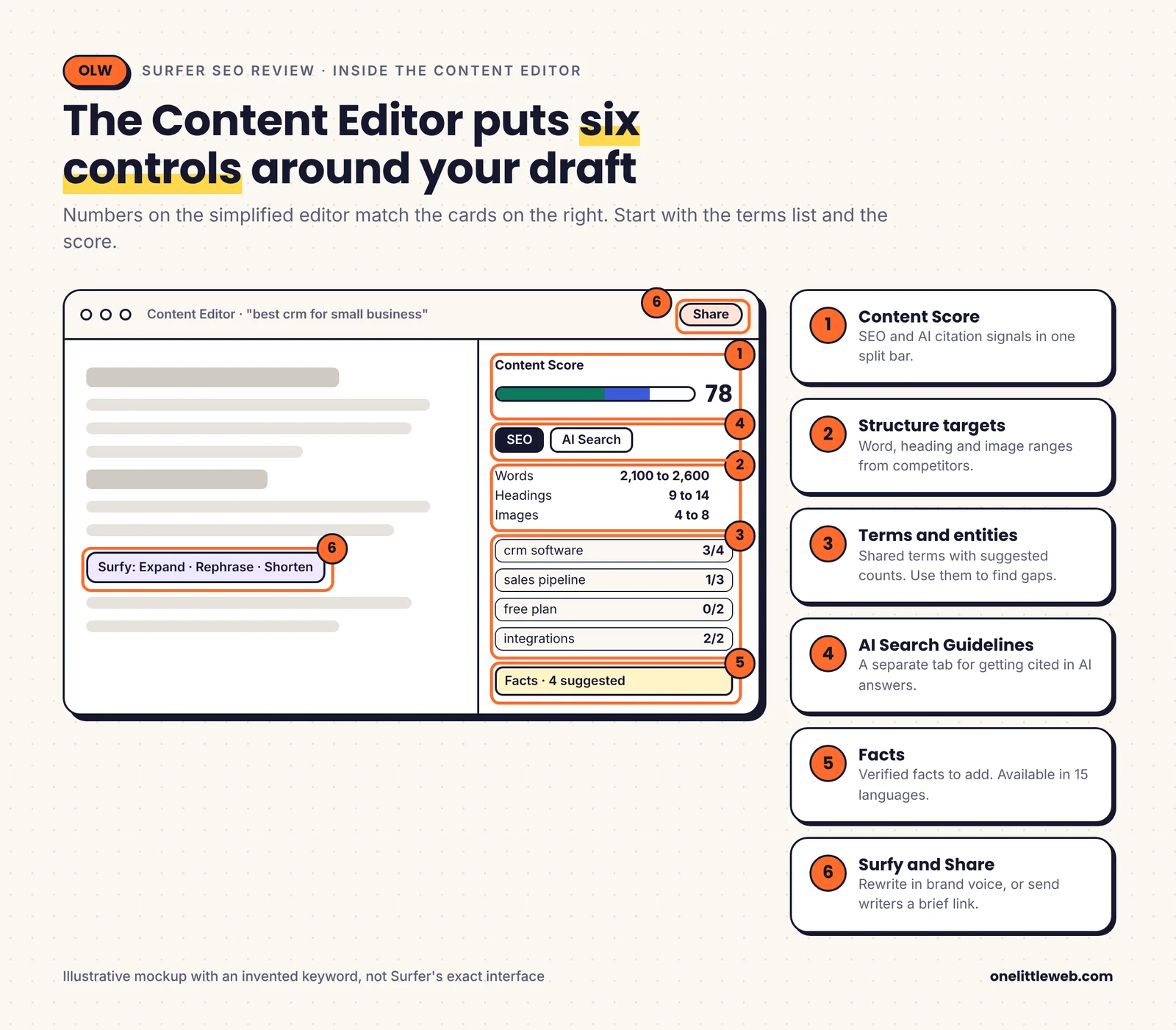
- Terms and entities: words and concepts the ranking pages share, with how often to use each. This is the core of the tool.
- Structure targets: suggested ranges for word count, headings, paragraphs and images.
- Competitor selection: choose which ranking pages feed the guidelines. This is the setting I’d tell every new user to learn first.
- AI Search Guidelines: added in early 2026. It includes Intent Alignment, which checks whether your introduction answers the query directly.
- Facts: verified facts you can add to the draft. Surfer says this works in 15 languages.
- Outline generation: builds a heading structure from what competitors cover.
- Shareable editor links: send a writer a link to the brief without giving them a full seat.
Integrations, API and MCP
Surfer fits into most content workflows, but the better integrations sit on higher plans.
- Google Docs and WordPress: Standard and above. Writers see the score without leaving their editor.
- Chrome extension: free on all plans.
- Contentful: Pro and above.
- Zapier: Peace of Mind and above.
- Looker Studio: for AI Tracker reporting.
- Google Search Console: through Sites, for Content Audit.
The Surfer API gives full control of the Content Editor, a single AI SEO score endpoint, and access to the Humanizer and AI Detector. On self-serve plans, it’s only included with Peace of Mind.
Surfer MCP lets AI assistants like Claude and ChatGPT use Surfer data and run Surfer actions. It’s still in beta and rolling out to Pro, Peace of Mind and Enterprise.
Workspaces keep each brand’s context, voice and internal linking separate. Pro gives you 5, and Peace of Mind gives you unlimited under a fair use policy. For an agency, this matters more than it first appears. Without workspaces, one client’s brand voice can bleed into another client’s drafts.
Is Surfer easy to use?
Yes. This is one of Surfer’s clearest strengths. Capterra users rate ease of use 4.8 out of 5, and most writers are productive within their first couple of documents.
Reports load quickly too. Building a new Content Editor takes seconds to a couple of minutes.
The learning curve shows up in the newer parts of the platform. Some Trustpilot reviewers find navigation confusing and the advanced features hard to master. With content tools, AI tracking and audits in one place, the menu has grown.
Support runs through live chat and email, and Surfer’s help docs say chat is available 24/5. Capterra users rate customer service 4.8. Personalized onboarding and a dedicated success manager only come with Peace of Mind and Enterprise.
Who Should Use Surfer, and Who Should Skip It?
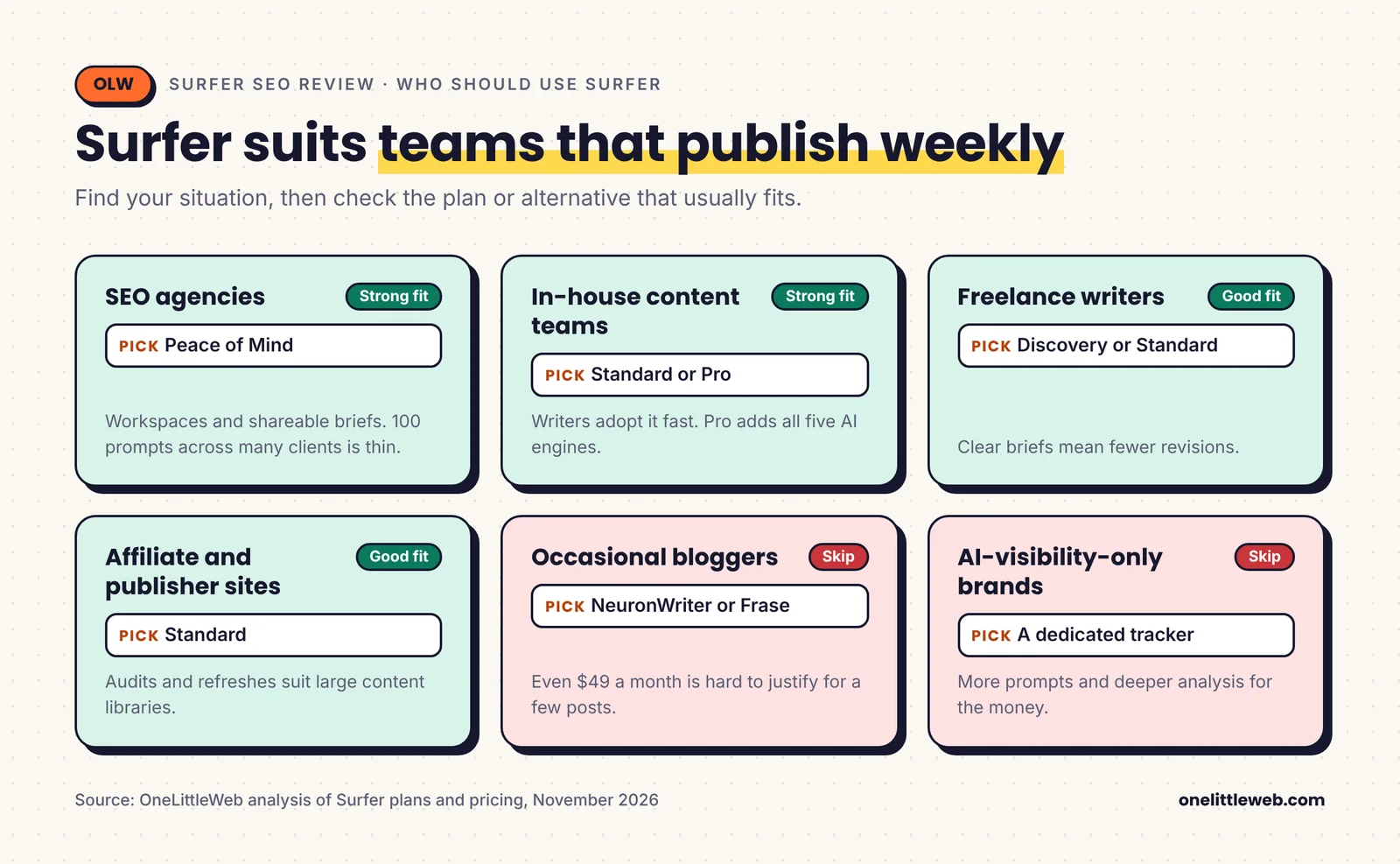
Surfer is a good fit for:
- SEO agencies producing content at volume. Shareable briefs, workspaces and fast setup make it easy to run many clients. Budget for Peace of Mind if you need many workspaces.
- In-house content teams. Strong fit on Standard or Pro. Writers adopt it quickly, and Pro adds AI visibility tracking for the brand.
- Freelance writers. Good fit on Discovery or Standard. Clear guidelines help you hand in drafts that need fewer revisions.
- Affiliate and publisher sites. Content Audit and refreshes work well on large libraries of informational content.
- Teams moving into AI search. Reasonable fit if you also write the content. The link between AI Tracker and the Content Editor is useful.
You should probably skip Surfer if you’re one of these:
- Bloggers publishing a few posts a month. Even $49 a month is hard to justify. NeuronWriter or Frase cost less.
- Teams whose main need is research. If you need keywords, backlinks and competitor data, buy Ahrefs or Semrush first.
- Large editorial teams. Seat caps add up. Clearscope’s unlimited users may cost less overall.
- Brands focused only on AI visibility. A dedicated tracker will give you more prompts and deeper analysis for the money.
- Teams writing mainly in languages other than English. Surfer says it works with all languages, but reviewers report weaker guidance and clustering outside English. Test it on your language during the trial.
- Anyone hoping a high score will rank a page on its own. It won’t. Authority, links and real expertise still decide most competitive results.
How Surfer Has Changed: 2017 to 2026
If you last looked at Surfer a couple of years ago, a lot has moved. This timeline explains why so many reviews disagree on features and prices.
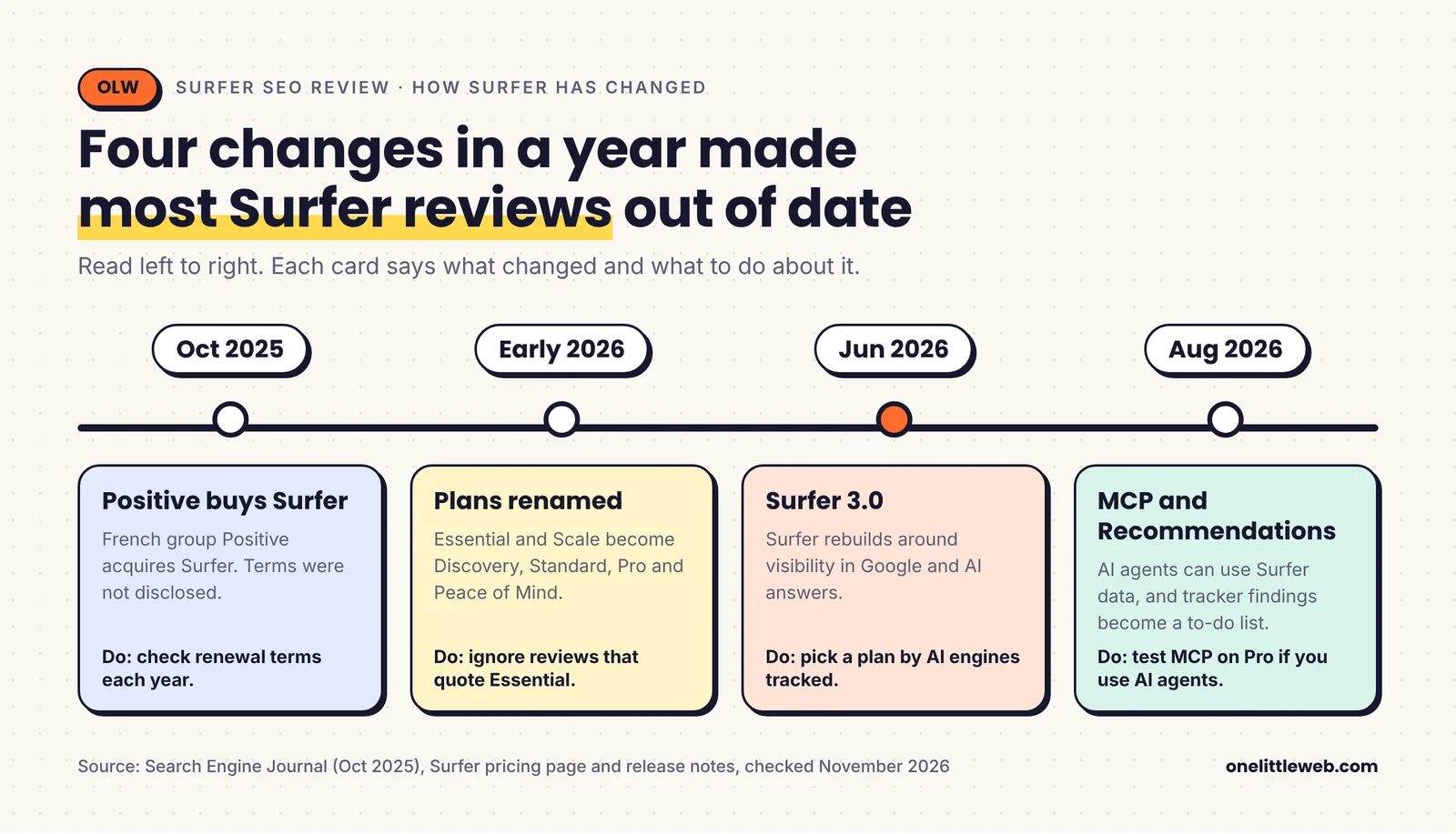
On the product side, Surfer moved from a content editor with a score to a platform built around AI visibility. The AI Tracker launched in 2025. AI Search Guidelines arrived in the Content Editor in early 2026, and Surfer 3.0 was announced that June. MCP access and tracker Recommendations followed in August 2026.
On the business side, Positive acquired Surfer in October 2025. Until then, Surfer sold Essential ($99 monthly, $79 yearly) and Scale ($219 monthly, $175 yearly). In 2026 those became Discovery, Standard, Pro and Peace of Mind, with a cheaper $49 entry point and AI tracking tied to higher tiers.
When you compare prices across reviews, check which plan names they use. If you see Essential or Scale, the page is out of date.
How to Tell if Surfer Is Paying Off
A tool earns its place by improving results, not by raising a score. These are the layers worth watching once you start using Surfer.
| Layer | What to measure | Where | Good sign |
|---|---|---|---|
| Search results | Clicks, impressions and position for optimized pages | Google Search Console | Refreshed pages recover clicks within a few months |
| Content coverage | Content Score against the competitor range | Surfer Content Editor | Drafts land in the 70 to 85 range without stuffing |
| AI visibility | Mention rate, share of voice and cited pages | Surfer AI Tracker | More prompts mention your brand over time |
| Cost | Documents used vs plan limit | Surfer usage page | You use most of your documents each cycle |
Search results
Search Console is the source of truth. Note the date you publish or refresh a page, then compare clicks and average position over the following months. Surfer’s own scores can’t tell you whether a page is actually performing.
Content coverage
Track the score you published at, not just the score you reached. If a page ranks well at 72, you don’t need to push the next one to 90. Over time, you’ll learn the range that works in your niche.
AI visibility
Your prompt list decides what the AI Tracker can see. Write prompts the way buyers ask questions, not as keywords. A few examples for a project management software brand:
best project management tool for small agencies
asana alternatives for a 10 person team
which project management software has the best client portal
is [your brand] good for remote teams
- List 20 to 50 real buyer questions from sales calls, support tickets and People Also Ask.
- Add your main competitors so share of voice has a baseline.
- Review the cited sources report monthly to see which pages AI engines trust.
- Send uncited pages to the Content Editor and track whether mentions change.
Cost
Check the usage page each month. If you’re using less than half your documents, drop a tier. If you run out every cycle, the next tier is usually cheaper than buying extras.
Common Surfer Mistakes to Avoid
- Chasing a score of 100. It pushes writers into keyword stuffing. Surfer itself recommends 70 to 85.
- Leaving bad competitors in the analysis. Reddit threads and thin pages drag your guidelines toward the wrong targets.
- Publishing AI drafts unedited. Reviewers report wrong statistics and references. Fact-check everything.
- Buying Standard for AI Overviews. Standard only tracks ChatGPT, weekly. AI Overviews need Pro or above.
- Pre-buying large batches of AI credits. Refunds on unused credits have been refused. Buy in small batches.
- Forgetting the trial converts. The 7-day trial charges your card unless you cancel in Billing settings.
- Using Surfer as your only SEO tool. It has no backlink data or technical audit. Pair it with an SEO suite and Search Console.
Should You Do This Yourself or Get Help?
Surfer’s Content Editor is still one of the best tools for turning research into a complete page. What’s changed is the platform around it, and how much of your bill now goes toward AI tracking.
If you’re a freelance writer, start with Discovery, or Standard if you work in Google Docs. Skip AI tracking until a client asks for it.
If you run an in-house content team, Standard is the best value for pure content work. Move to Pro if Google AI Overviews and multiple AI engines matter to your brand, or if you need more than three seats.
If you run an agency, model your seats, workspaces and documents before you buy. Peace of Mind covers most agency needs, but 100 prompts spread across many clients won’t go far.
If you mainly need research, buy Ahrefs or Semrush first. Add Surfer once you’re producing enough content to need it.
Whatever plan you choose, use the score as a coverage check, not a goal. Clean up the competitor list, aim for the range Surfer itself recommends, and let a human edit every AI draft.
If you’d rather have a team handle the research, writing and optimization for you, that’s what we do at OneLittleWeb. See our SEO services and case studies to see how we approach it.
Frequently Asked Questions
Is Surfer SEO worth it in 2027?
Yes, if you publish or refresh content every week and want clear on-page guidance. No, if you write occasionally or mainly need keyword and backlink research. In that case, an SEO suite or a cheaper content tool fits better.
How much does Surfer SEO cost?
Billed yearly, Discovery is $49 a month, Standard $99, Pro $182 and Peace of Mind $299. Monthly billing costs about 17 to 20% more. AI Search Analytics costs $82 a month on its own, and Enterprise is custom.
Does Surfer have a free trial?
Yes. You get 7 days of the Pro plan. A card is required, and the trial turns into a paid plan unless you cancel before day 7. There is no free plan, but the Keyword Surfer Chrome extension is free.
What is a good Content Score in Surfer?
Surfer recommends 70 to 85 for most content. A practical approach is to match or slightly beat the average score of the pages currently ranking. Pushing for 100 often leads to keyword stuffing.
Does a high Content Score guarantee rankings?
No. Surfer’s own study found a 0.28 correlation with rankings, which is modest. Backlinks, brand authority, intent match and real expertise all matter, and the score doesn’t measure them.
Can Surfer track ChatGPT and Google AI Overviews?
Yes, through AI Tracker. Standard tracks ChatGPT only, weekly. Pro and Peace of Mind track ChatGPT, Gemini, Perplexity, AI Mode and AI Overviews daily. Surfer doesn’t track Claude.
Who owns Surfer now, and is it still called Surfer SEO?
French group Positive acquired Surfer in October 2025. The product is now branded as Surfer, with Positive Surfer on many listings, and surferseo.com redirects to surfer.ai. People still call it Surfer SEO.
Do unused Surfer credits roll over?
No. Unused Content Editor and AI credits included in your plan don’t carry over. On-demand AI credits you buy separately don’t expire while your subscription is active.
Is Surfer better than Clearscope?
Surfer is cheaper to start, has more AI writing tools and tracks more AI engines. Clearscope includes unlimited users on every plan, which can make it cheaper for large teams.
Can Surfer replace Ahrefs or Semrush?
No. Surfer has no backlink data, no technical site audit and only basic keyword research. Most teams use it alongside an SEO suite.
Where to Go Next
- Best AI SEO tools, tested by our team
- Best content writing tools
- Semrush review
- SEO vs AEO vs GEO: what is the difference?
Methodology
Sources
- Our experience using Surfer at OneLittleWeb (88 documents in our onelittleweb.com workspace)
- Surfer’s pricing page (surfer.ai/pricing) and its product facts page (surfer.ai/ai-instructions)
- Surfer help docs on the free trial, money-back guarantee and credits
- Surfer’s Content Score study and Ahrefs’ content score study
- G2, Capterra and Trustpilot product pages
- Competitor pricing pages: Clearscope, Frase, NeuronWriter and Siteimprove (MarketMuse)
- Toolradar for Surfer’s monthly-billing prices
When we checked
- All pricing, plan limits and ratings were checked in November 2026. Screenshots of Surfer’s public product pages were taken on November 18, 2026.
- Monthly prices were verified by Toolradar against Surfer’s page on November 13, 2026.
How we scored Surfer
| Factor | Weight | Score /10 | Weighted | Notes |
|---|---|---|---|---|
| Content optimization guidance | 25% | 8.5 | 2.13 | Fast, clear guidelines from live results. Loses points for copying average competitors and long word counts. |
| Content Score reliability | 15% | 6.5 | 0.98 | Useful coverage check. 0.28 correlation is modest and self-published. |
| AI search visibility | 15% | 7.0 | 1.05 | Five engines and a link to the editor. Heavily plan-gated, small prompt counts, no Claude. |
| AI writing quality | 10% | 6.5 | 0.65 | Fast drafts with brand voice. Reported factual errors and weaker non-English output. |
| Content audit and planning | 10% | 7.5 | 0.75 | Solid refresh workflow with Search Console. Basic keyword research, own pages only. |
| Ease of use | 10% | 9.0 | 0.90 | One of the easiest SEO tools to learn. Navigation has grown. |
| Pricing, limits and value | 10% | 6.5 | 0.65 | Good entry price. Seat caps, non-rolling credits and an auto-converting trial. |
| Integrations and workflow | 5% | 8.0 | 0.40 | Google Docs, WordPress, Looker Studio, MCP. API only on the top self-serve plan. |
| Overall | 100% | 7.5 | A strong content editor inside a platform that now charges more for AI tracking. |
What separates a high score from a low one:
- Content optimization guidance. A 9 means specific direction that improves coverage without hurting readability. A 4 means generic term lists that push stuffing.
- Content Score reliability. A 9 means the score tracks real performance and discourages over-optimization. A 4 means it rewards term counts and says little about rankings.
- AI search visibility. A 9 means broad engine coverage, enough prompts and clear reasons behind changes. A 4 means one engine, few prompts and no path to action.
- AI writing quality. A 9 means drafts need light editing and facts hold up. A 4 means heavy rewrites and unreliable claims.
- Content audit and planning. A 9 means it finds the right pages to fix and builds a plan you can trust. A 4 means noisy suggestions and shallow keyword data.
- Ease of use. A 9 means a new writer is productive the same day. A 4 means training is needed for basic tasks.
- Pricing, limits and value. A 9 means the plan you need is affordable and limits rarely get in the way. A 4 means frequent upgrades just to keep working.
- Integrations and workflow. A 9 means it fits where your team already works. A 4 means constant copy and paste.
Content optimization carries a quarter of the score because it’s what people buy Surfer for. Content Score reliability and AI search visibility each get 15%, because the score is Surfer’s core promise and AI tracking now shapes its pricing. Integrations carry only 5%, since they rarely decide whether a team buys.
Why numbers may differ
- Surfer renamed and restructured its plans more than once between 2024 and 2026, so other sources may quote older plans.
- Surfer’s pricing page shows yearly prices. Monthly prices come from Toolradar and Surfer’s in-app upgrade screen.
- Review ratings and counts change weekly.
- Surfer’s own Content Score correlation figures range from 0.245 to 0.28 across its posts.
Limitations
- Both correlation studies come from companies that sell content tools.
- Trustpilot complaints are individual accounts that Trustpilot doesn’t verify.
- Surfer’s pricing page lists document limits without a time period. Its FAQ says annual-plan credits reset yearly, so our cost math treats them as yearly.
- AI Tracker results depend on the prompts you choose and can’t show private AI conversations.
Prices and ratings in this review were checked in November 2026 and will change, so confirm them on Surfer’s site before you buy.