I’ve had a Semrush login open in a browser tab for years now. Not because I love the tool. Because I keep needing it.
That’s probably the most honest way to open this. Semrush isn’t the kind of software people get excited about. It’s the kind you quietly rely on until a client asks “why does this cost so much” and you realize you’ve never justified it out loud.
So that’s what this review does. I’m walking through the tools I use, the things people argue about (accuracy, price, Ahrefs), and the things nobody mentions until they’ve been burned by them, like the cancellation flow and the seat limits.
Quick note before we start: Adobe completed its acquisition of Semrush on April 28, 2026. I’ll get into what that means later, but it’s relevant enough to flag up front.
The short version
If you want the verdict before the detail, here it is.
Semrush is worth it if you run SEO for more than one site, you need competitor research alongside your own keyword work, and you’ll use the breadth you’re paying for.
Semrush is probably not worth it if you manage one small site, you only need one function (just backlinks, or just rank tracking), or you haven’t priced out the cheaper Semrush alternatives yet.
What it’s best at: competitor research and keyword discovery. This is where the depth pays off.
What catches people off guard: the refund rules on monthly plans, and how fast the real price climbs once you add a second seat or a second toolkit.
Starting price: $139/month for the SEO plan, or $199/month (Starter) if you want AI visibility tracking bundled in.
Semrush at a glance
| Best for | SEO agencies and in-house marketing teams doing weekly competitor and keyword research across several sites |
| Starting price | $139/mo (SEO plan), $199/mo (Starter, includes AI visibility) |
| Annual discount | Up to 17% |
| Free option | Free plan (1 project, 10 reports/day) and a 7-day free trial on paid plans |
| Key differentiator | Keyword, competitor, PPC, and AI visibility research in one login |
| Database size | 28.8 billion keywords and 43 trillion backlinks (Semrush-reported) |
| Owner | Adobe, since April 28, 2026 |
What Semrush actually is now
For a long time, “Semrush” meant one thing: an SEO research platform built around keyword data, competitor research, and site audits.
That core is still the reason most people buy it. It lives in the SEO Toolkit, which is what your base plan pays for. Inside it you get Keyword Magic Tool, Organic Research, Keyword Gap, Backlink Analytics, Site Audit, and Position Tracking.
Put simply, one login covers keyword research, competitor analysis, backlink analysis, technical SEO, rank tracking, and on-page SEO. Ahrefs and SE Ranking cover most of the same ground. Semrush just goes wider. Its overall feature set is the broadest of the three, so it can stand in for more separate tools.
What’s changed is everything around that core. Semrush now sells separate toolkits for content, local SEO, advertising, social, traffic analytics, and digital PR.
It has also spent two years building AI Visibility. This tracks how your brand shows up in ChatGPT, Gemini, Perplexity, and Google’s AI answers. That matters more every month, because a growing share of buyers ask an AI tool for recommendations before they ever search Google.
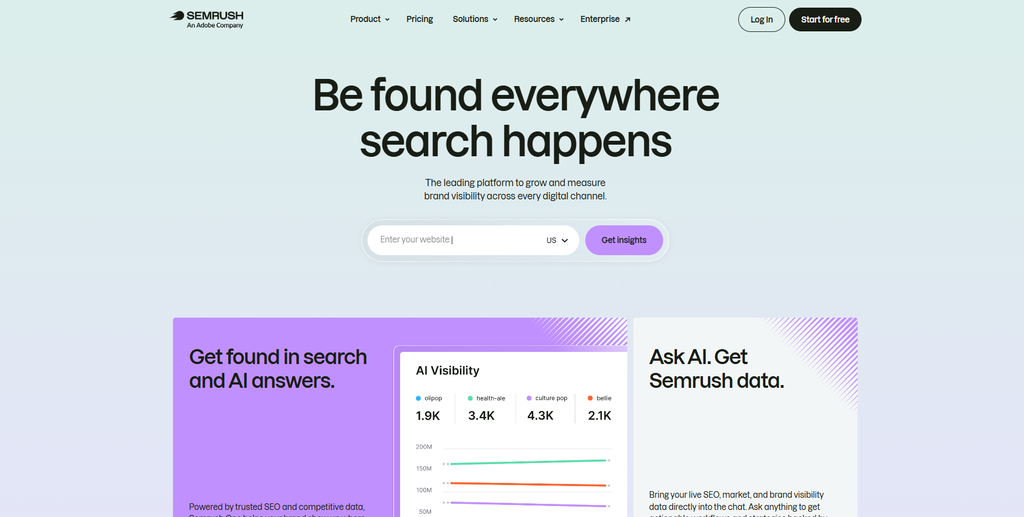
And as of April 28, 2026, Semrush is owned by Adobe. The stated reason for the deal was to plug Semrush’s search and AI visibility data into Adobe’s customer experience products.
How I’m evaluating this
I use Semrush regularly at OneLittleWeb for client keyword research, competitor gap analysis, backlink prospecting, and site audits. Most of our clients are SaaS and AI companies, so that’s the lens I’m using.
I keep two kinds of claims apart in this review. When I say “we use this” or “in my experience,” that’s from real client work. Those hands-on tests back up what I say about workflow and ease of use. For newer features I haven’t run full campaigns through, like the current AI Visibility toolkit, I’m working from Semrush’s documentation, its pricing pages, and independent testing. I’ll say so each time.
That split matters. It’s how I keep this evaluation credible, because you can see which claims come from daily use and which come from research.
All pricing and plan limits here were checked against Semrush’s own pricing pages in September 2026.
I’m not scoring Semrush against a generic checklist. The point of this review is simpler: by the end, you should know whether Semrush is worth the money for a user like you.
The core tools I actually use
This is the part most reviews skip. Here’s what’s inside the SEO Toolkit, how we use each tool at OLW, and where each one falls short.
Keyword Magic Tool and Keyword Overview
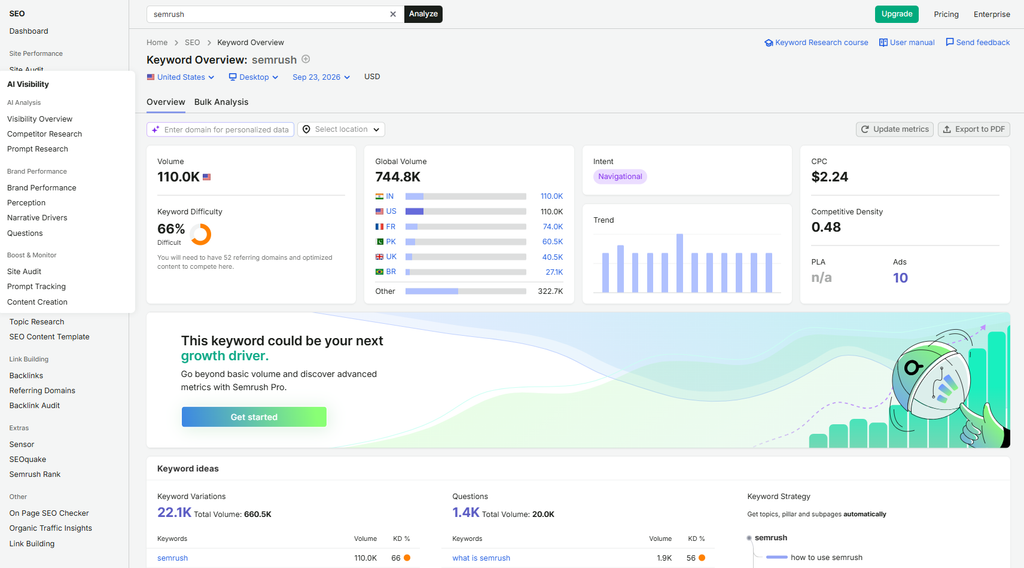
Keyword Magic Tool is where most of my keyword research starts. You enter a seed term and it returns a long list of related ideas, grouped by topic. One seed can turn into thousands of keywords in a few seconds.
The database behind it is big. Semrush reports 28.8 billion keywords, which is more than most rivals publish. That size matters most in small niches, where lighter tools run out of ideas after a page or two. More coverage means deeper keyword research.
Each keyword comes with search volume, keyword difficulty (KD%), search intent, CPC, and the SERP features on that results page. So you can judge a keyword in one view instead of opening three tools.
A few things to know about those numbers:
- Search volume is a monthly average. New or trending terms often show zero or very low volume. I cross-check those in Google Search Console, since it shows real impressions.
- Keyword difficulty runs from 0 to 100. In my experience, a KD under 30 is realistic for a newer site, while 70+ usually needs strong links. Treat it as a relative score, not a promise.
- Search intent is classified for each keyword. Semrush labels it as informational, commercial, transactional, or navigational. This saves real time when you’re sorting a list into blog posts versus landing pages. It’s also more consistent than labeling by hand.
Keyword Overview analyzes individual keywords, one at a time. I use it to check one term’s volume trend, difficulty, and who ranks on page one before I commit a brief to it. It stops us from writing for a keyword we can’t win.
My usual keyword discovery workflow is simple. Seed term in Keyword Magic Tool, filter by intent and KD, then check the best few in Keyword Overview. It’s much faster than building the same list in a spreadsheet.
Domain Overview and Organic Research
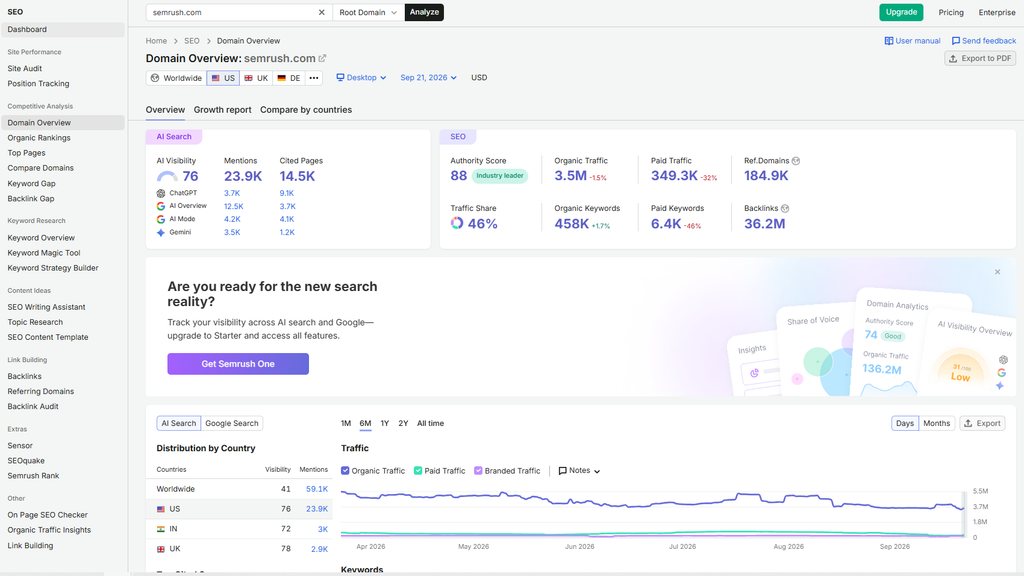
Domain Overview gives you a one-screen summary of any site’s search performance. You see Authority Score, estimated organic and paid traffic, top keywords, and a backlink snapshot. I use it for a quick read on a domain before a client call.
Organic Research goes deeper into a competitor’s organic performance. It shows every keyword a domain ranks for, its top pages, and recent position changes.
This is the report I open most. It helps you see which pages drive a competitor’s traffic, which is far more useful than a single traffic number. For a new client, I usually export a rival’s top 100 pages and look for topics we haven’t covered yet.
Where it falls short: the traffic numbers are modeled estimates. More on accuracy below.
Keyword Gap and Backlink Gap
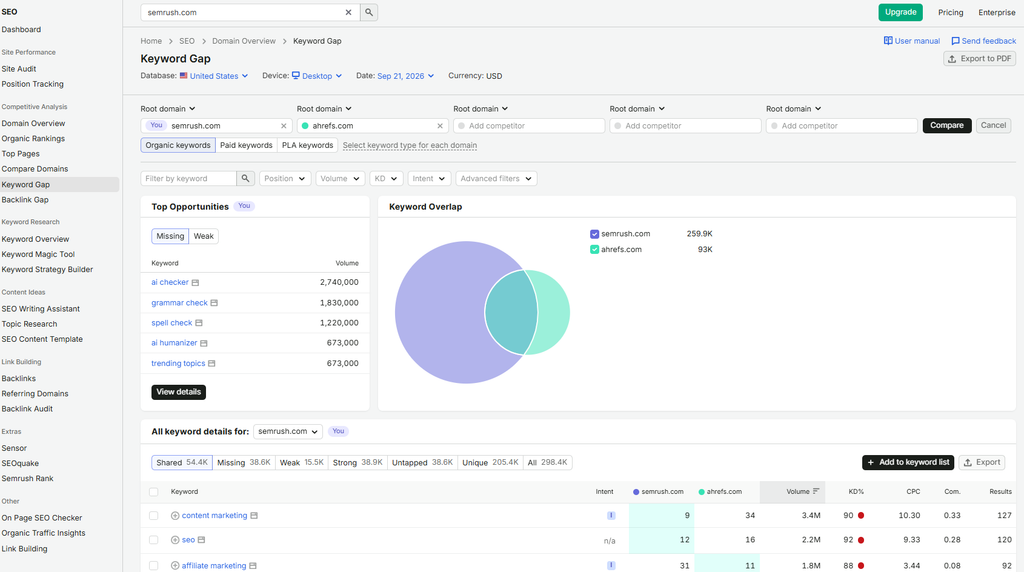
These two are the main reason I’d pay for Semrush over a cheaper tool.
Keyword Gap puts up to five domains side by side and compares their keyword portfolios. Filters like “Missing” and “Weak” show the keywords competitors rank for that you don’t, or where they outrank you. For a new client, this usually becomes the first content plan.
Backlink Gap does the same for links. It compares up to five backlink profiles and lists the sites linking to your competitors but not to you. As a link building agency, this is one of our most-used prospecting sources.
Where it falls short: both reports get noisy on big domains. You’ll need to filter by intent and authority before the list is useful, and that takes longer than the reports suggest.
Backlink Analytics
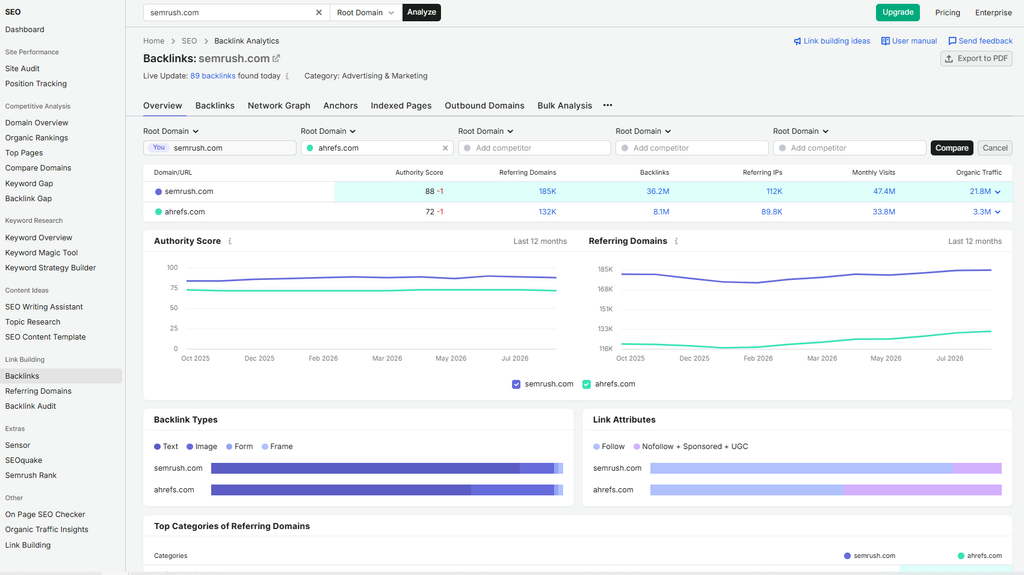
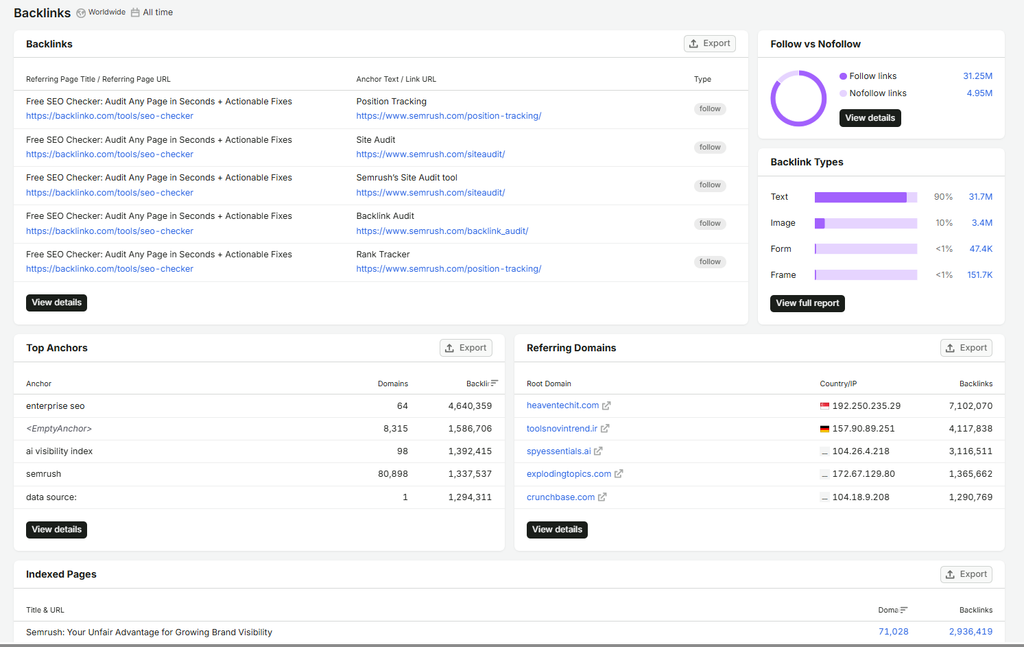
Backlink Analytics breaks down a domain’s backlinks and referring domains. You see anchor text, link types, and new versus lost links over time.
Semrush reports a database of 43 trillion backlinks. That puts it in the same league as Ahrefs, and well ahead of smaller tools. More coverage means deeper link analysis, because you see links that smaller databases miss.
The referring domains count is the number I care about most. A site with 8,000 backlinks from only 1,200 domains is weaker than it looks, because one site can send thousands of sitewide links.
For link discovery, I filter for new links a competitor earned in the last 30 days. It’s one of our faster prospecting shortcuts.
To judge a link before outreach, I look at Authority Score and the toxicity markers in the companion Backlink Audit tool. Backlink Audit also builds a disavow file. Both scores are rough signals, though. A quick manual look at the linking page is still more reliable.
Where it falls short: for pure backlink work, many link builders still prefer Ahrefs’ interface. We use both.
Site Audit
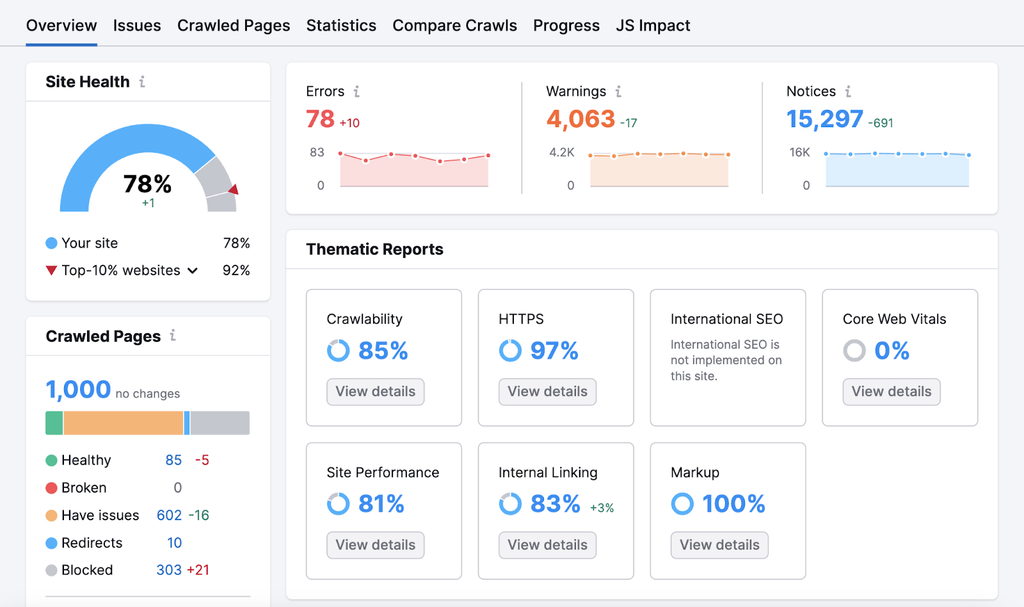
Site Audit crawls your site and checks it against 140+ technical and on-page issues. That includes broken links, crawl errors, duplicate content, slow pages, and Core Web Vitals.
Issues are grouped into errors, warnings, and notices, and each site gets a health score. Each issue also comes with a short note on why it matters and how to fix it. That helps a lot when the person fixing it isn’t a developer.
I use it for ongoing monitoring across client sites. Scheduled weekly crawls catch problems like a broken redirect after a deploy long before a monthly manual check would.
How much you can crawl depends on your plan: 100,000 pages a month on the entry plans, 300,000 on Pro+, and 1,000,000 on Advanced. For comparison, SE Ranking’s entry plan allows 250,000 pages, so large sites can hit Semrush’s cap faster.
Where it falls short: it won’t replace a deep crawl with Screaming Frog on a large site. Think early-warning system, not forensic tool.
Position Tracking
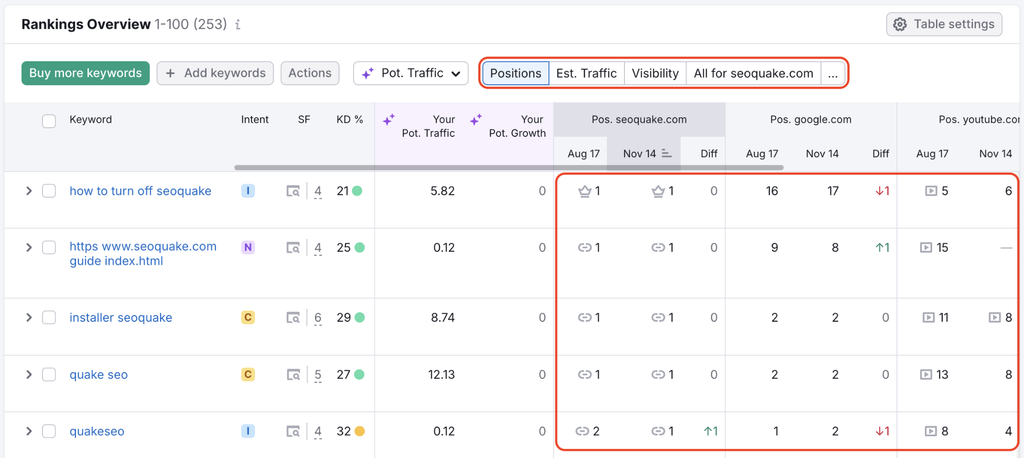
Position Tracking is Semrush’s rank tracker, and it updates rankings every day. That’s faster than Moz Pro’s weekly default, so you spot a drop days sooner.
It tracks desktop and mobile separately, which matters because the two often differ more than people expect. You can also track down to city or ZIP code level. For multi-location clients or sites that target several countries and markets, this is the feature that counts. National rankings can hide big gaps between cities.
It also tracks SERP features like featured snippets, People Also Ask, and local packs. Winning or losing a snippet can change your clicks more than moving up a spot, so it’s worth watching.
You can add competitors and compare visibility in the same chart. When rankings drop, this shows whether the whole niche moved or just you.
Your plan sets the keyword limit: 500 tracked keywords on the entry plans, 1,500 on Pro+, and 5,000 on Advanced. SE Ranking gives you 2,000 for $129. So if you manage more than two or three sites, 500 runs out fast.
On Page SEO Checker and SEO Writing Assistant
On Page SEO Checker compares your page to the current top-ranking pages and suggests changes. You get ideas for keywords to add, content length, backlink targets, and technical fixes. It’s most useful for optimizing pages already close to page one, where small changes can move the needle.
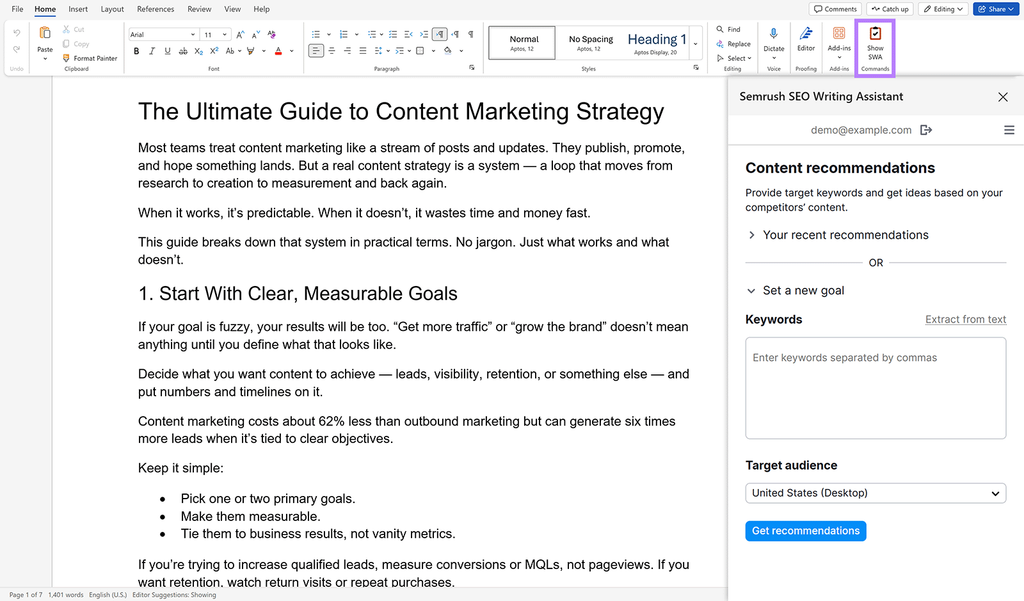
SEO Writing Assistant works inside Google Docs and WordPress. It scores a draft for readability, keyword use, and tone, so you can optimize content while you write.
Semrush’s newer Content Toolkit ($60/month) is a separate add-on. It helps you create topic ideas, content briefs, and AI-assisted drafts. Content marketers will get the most out of it. For most agencies, the core SEO tools matter more.
We use these for content refreshes more than new drafts. The suggestions are generic, so an editor still needs to decide what to act on.
Reporting: My Reports, Looker Studio, GSC, and GA4
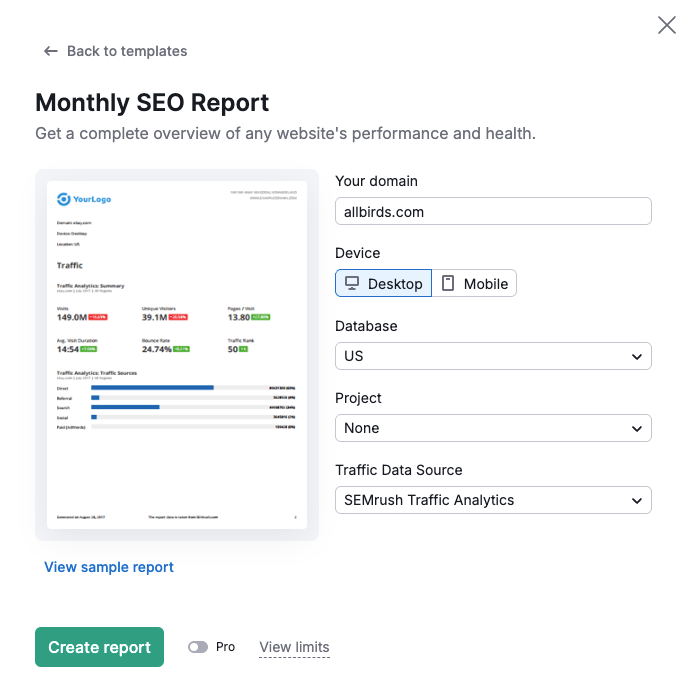
My Reports lets you build PDF reports from any Semrush tool, and you can customize each report with drag-and-drop widgets. You can schedule them to go out automatically, which saves hours of monthly marketing reporting for clients.
White-label reports (your logo, no Semrush branding) are available, with more branded reports on higher plans. Semrush also sells Base ($10/month) and Pro ($20/month) reporting add-ons.
You can connect Google Search Console and Google Analytics to your Semrush projects. That pulls your real clicks and traffic in beside Semrush’s estimates. It helps a lot when a client asks why the two don’t match.
Semrush also has a Looker Studio connector for agencies that build dashboards there. Inside Semrush itself, dashboard customization is limited, which is why many agencies build their client views in Looker Studio instead.
The other toolkits (sold separately)
Semrush’s core plans don’t include everything you see on the website. These toolkits are separate purchases:
| Toolkit | What it does | Price (Sept 2026) |
| AI Visibility Toolkit | Tracks brand mentions and citations in AI answers | $99/mo standalone (billed annually), or bundled in Starter and up |
| Local Toolkit | Google Business Profile management, map rank tracking, listings, reviews | $30/mo per location (Base), $60/mo (Pro) |
| Content Toolkit | Topic research, SEO briefs, AI-assisted drafting | $60/mo (Base) |
| Traffic & Market Toolkit | Website traffic analytics and market research | From $289/mo |
| Advertising Toolkit | PPC keyword and competitor ad research | Separate plan, check current pricing |
| Social Toolkit | Post scheduling, social analytics, influencer tools | Separate plan, check current pricing |
| AI PR Toolkit | Media outreach and monitoring | Separate plan, check current pricing |
A quick note on the ones people ask about most:
- Local Toolkit: the Pro plan adds listing management across 70+ directories and review management in one inbox. It’s built for multi-location businesses. Most SaaS companies won’t need it.
- Traffic & Market Toolkit: this is Semrush’s answer to Similarweb, with traffic analytics and market research. If you already pay for Similarweb, you probably don’t need both.
- Advertising Toolkit: useful if you run Google Ads alongside SEO. It shows competitors’ ads, ad copy, and paid keywords in far more detail than the SEO plans do.
- Social and AI PR Toolkits: these add scheduling, social analytics, and media outreach. Both are lighter than dedicated tools, so most teams I know use specialist software instead.
Extra users on the non-SEO toolkits cost $20 each, less than the $45+ you pay for an SEO seat.
AI visibility tracking: the newest and most hyped addition
AI Visibility tracks whether and how your brand shows up in AI-generated answers. Right now it covers ChatGPT, Gemini, Perplexity, and Google’s AI Overviews and AI Mode. That’s broader coverage than most SEO suites offer, though the supported platforms have changed more than once in 2026, so check the current list before you buy.
It’s a useful idea. More people ask AI tools for recommendations instead of typing a search query. If your brand never appears in those answers, you’re invisible to a growing group of buyers, even if your rankings look fine.
Here’s what it measures:
- AI Visibility Score: one number showing how often your brand appears across the answers you track.
- Mentions: how often AI tools name your brand in answers to your tracked prompts. Think of a mention as the AI version of a ranking.
- Citations: which of your pages the AI links to as a source. This shows which content AI tools trust.
- Prompt tracking: daily checks on the exact prompts you care about, so you can see when an answer changes. Starter tracks 50 prompts, Pro+ 100, and Advanced 200. The $99 standalone toolkit covers 25.
- Competitor benchmarking: how often rivals appear in the same answers. Seeing a competitor named twice as often as you is a clear gap to work on.
- Sentiment: whether AI tools describe your brand positively, neutrally, or negatively.
I want to be clear about where I’m working from documentation here. I haven’t run a full quarter of AI visibility tracking through client accounts yet. So I can’t give you 90-day results the way I can for keyword research.
What’s the catch? AI visibility measurement is still young across the whole industry. AI platforms change their answers constantly, and there’s no Search Console to verify results against. Treat early numbers as directional, the same way I’d treat any traffic estimate.
Is the data actually accurate?
This is the question that comes up most, and people answer it too simply.
Semrush’s traffic estimates, keyword volumes, and backlink counts are modeled, not measured. That’s true of every tool in this category, Ahrefs included. Semrush doesn’t see your Google Analytics. It estimates traffic from clickstream data, search patterns, and its own crawl of the web.
Why does this matter? Because every decision you make with the tool rests on these numbers. So you need to know which numbers to trust.
In practice, directional accuracy is generally solid. If Semrush says Competitor A gets much more organic traffic than Competitor B, that’s usually a trend you can trust.
Exact numbers won’t match your GA4 or Search Console data, and they’re not supposed to. I’ve seen this trip up clients more than once. They see Semrush’s estimate for their own site, compare it to their analytics, and assume the tool is broken.
It’s not broken. It estimates your traffic the same way it estimates a competitor’s.
How fresh is the data? Rankings in Position Tracking update daily. Keyword volumes are monthly averages, so they lag behind fast-moving trends. Stale data can hide a competitor’s new push, so for anything time-sensitive, check the date on the report.
How far back does it go? Historical data reaches back to 2012 for major databases, but only on Pro+ and Advanced. It’s the feature I miss most on the entry plans. Seeing how a rival grew over two or three years tells you far more than a one-month snapshot. It’s the key to long-term competitor research.
What does this mean for you? Use Semrush to compare yourself against competitors and to spot directional shifts. Use GA4 and Search Console for your own exact numbers.
What Semrush costs in 2026 (and what you really pay)
Pricing is the biggest decision factor, so I’ve put everything in one place.
The plans and their limits
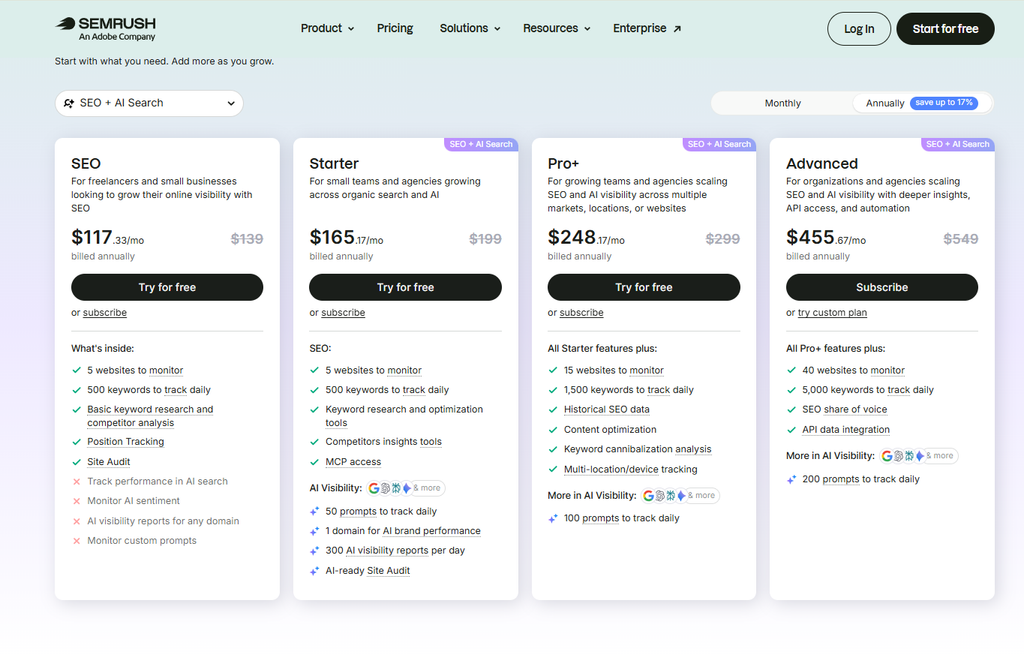
Here are Semrush’s current plans, from its pricing page in September 2026:
| Plan | Monthly | Annual (per month) | Projects | Tracked keywords | AI prompts | Site Audit pages/mo |
| SEO | $139 | $117.33 | 5 | 500 | None | 100,000 |
| Starter | $199 | $165.17 | 5 | 500 | 50 | 100,000 |
| Pro+ | $299 | $248.17 | 15 | 1,500 | 100 | 300,000 |
| Advanced | $549 | $455.67 | 40 | 5,000 | 200 | 1,000,000 |
Paying yearly saves up to 17%. On Starter, that’s about $165 a month instead of $199.
The plan you pick decides more than the price. It sets how many projects you get, how many keywords and AI prompts you can track, and which features you can use at all. A few that catch people out:
- Projects: each client site usually needs its own project. An agency with 8 clients has already outgrown the 5-project entry plans.
- Reports: you get about 3,000 analytics reports a day on the entry plans, 5,000 on Pro+, and 10,000 on Advanced. Export limits grow the same way, so higher plans export more rows. That matters if you pull large keyword lists often.
- Historical data: only on Pro+ and Advanced.
- API access: only on Advanced.
Every plan includes one user and a 7-day free trial. There’s also a free plan with 1 project and 10 reports a day. It’s fine for spot checks, but too tight for real work. Ahrefs has no comparable free plan, only its Webmaster Tools for sites you own.
You’ll probably run into two naming schemes
This one’s just confusing, so here’s a heads-up.
Semrush has sold plans called Pro, Guru, and Business for years ($139.95, $249.95, and $499.95 a month). These now sit under a line called “SEO Classic,” which covers traditional SEO only.
The newer “Semrush One” plans (Starter, Pro+, Advanced) bundle AI visibility in by default. They use roughly the same project and keyword limits as the Classic tiers, but each costs a bit more than its Classic equivalent.
Both schemes show up depending on which page you land on or which older review you read. Check the plan page directly before you buy, and confirm whether AI visibility is included. If it isn’t, it’s a $99/month add-on per domain.
Where the real price climbs
Seats and toolkits are where the price moves.
Every plan includes one user. Extra users cost from $45 up to about $100 a month each, depending on your tier. Ahrefs charges $40 to $80, so Semrush gets expensive faster for teams of three or more. And you can’t get around it by sharing one account login. Semrush’s terms don’t allow that, and it limits simultaneous sessions.
Then come the add-ons: $30 per location for Local, $60 for Content, $99 for AI Visibility if your plan doesn’t include it. None of these show up on the main pricing table.
That’s documented, not hidden. It’s just easy to miss when you’re comparing sticker prices.
What it costs at real usage levels
Here’s how the cost plays out across common setups, using current published pricing. I’ve assumed extra seats at roughly $45 (entry tier), $80 (Pro+), and $100 (Advanced).
| Setup | Plan | Base price | Realistic add-ons | Approx. monthly total |
| Solo consultant, one site | SEO | $139/mo | None needed | $139/mo |
| Small agency, 3-5 client sites, AI visibility wanted | Starter | $199/mo | +1 seat (~$45) | ~$244/mo |
| Growing agency, 10-15 sites, historical data needed | Pro+ | $299/mo | +2 seats (~$160), Local Base for one location ($30) | ~$489/mo |
| Large agency or in-house team, 20-40 sites, API access | Advanced | $549/mo | +3 seats (~$300), one extra toolkit | ~$900-1,000+/mo |
One caveat: Semrush lists extra users as “starting at $45/mo” and scaling by tier. The $80 and $100 figures come from the Classic Guru and Business tiers. Confirm current seat pricing before you budget.
How to pick the right plan
Start with your workload, not the feature list.
Count your sites and your tracked keywords first, so you know the usage limits you need. For an agency, client count decides how many projects and reports you need. That’s usually what forces the jump from 5 projects to 15, which is a $100 to $160 difference before you add seats.
Then count the people who’ll log in. Team size changes your total cost too. A three-person team pays roughly $90 to $200 a month more than a solo user on the same plan, so it’s worth budgeting for.
Only then look at features. Buying Advanced “just in case” is the most common way I see teams overpay.
Is it worth the price?
This is what everyone’s really asking, so here’s a direct answer.
At $139 to $199 a month, Semrush isn’t casual spend. It’s priced for people who use it to make money, not people who check it once a month.
Here’s the test I use with clients. If you can point to a specific, recurring task Semrush would replace or speed up, it tends to pay for itself. Examples are monthly competitor gap reports, weekly site audits, or rank tracking across several sites.
If you’re buying it “to have it,” it usually sits half-used and becomes an easy line item to cut. That’s especially true for small businesses, where $139 a month is a much bigger slice of the budget than it is for an agency.
What users say: G2, Capterra, and Trustpilot
If you look at review sites split by type, you’ll notice something strange.
G2 and Capterra mostly collect reviews from people judging the product itself. They put Semrush around 4.5 to 4.6 out of 5. Trustpilot skews toward people with a billing or account problem, and it rates Semrush 1.7 out of 5 (checked September 2026).
That’s not two opinions about the software. G2 and Capterra reviewers are mostly answering “does this tool do what I need.” Trustpilot reviewers are mostly answering “did I get charged when I didn’t expect to, and was it easy to fix.”
Which brings us to the part nobody warns you about.
The cancellation and refund rules nobody warns you about
This is the thing I most wish someone had told me before my first Semrush subscription, so I’m not going to soften it.
Semrush’s cancellation terms are the part I’d read twice. Canceling means submitting a form from inside your account. If you skip questions on that form, Semrush says your request may be denied. Confirmation can take up to three business days. Several reviewers report being billed after they tried to cancel before a renewal date.
The refund policy is stricter than most people assume:
- Monthly plans get no refunds. Not even if you cancel on day two.
- The 7-day money-back guarantee only covers your first annual subscription (or a first add-on purchase), bought directly from Semrush with a card.
- You must ask for the refund in writing in the cancellation form’s comment field. Refunds can take up to 30 days to process.
Compare that with Ahrefs, where you can cancel any time from your account settings. Semrush subscriptions are simply less flexible here, and a missed renewal date usually means paying for another month.
What does this mean for you? Set a calendar reminder a few days before your free trial ends or your renewal date. Start the cancellation form early if you’re not continuing.
What Adobe ownership changes for you
Adobe completed its acquisition of Semrush on April 28, 2026, in a deal worth roughly $1.9 billion. Semrush is now “an Adobe company.”
For current users, day-to-day use hasn’t changed. Same dashboard, same toolkits, same login. Adobe says customers “of all sizes” can expect continued investment as the two products integrate.
What’s worth watching is the direction. After Adobe bought Marketo in 2018, Marketo’s pricing moved further toward enterprise buyers over the following years, and smaller customers felt it. That doesn’t mean the same will happen to Semrush, or on the same timeline.
What does this mean for you? If you’re deciding whether to lock into an annual plan right now, factor in that pricing may shift as Adobe folds Semrush into its enterprise products. It’s a reason to stay aware, not a reason to avoid it.
API access and AI connectors
The Google integrations and Looker Studio are covered in the reporting section above. Two more integrations are worth a note.
API access is only on the Advanced plan ($549/month). It’s useful for agencies that pipe Semrush data into their own dashboards for custom reports and automations. SE Ranking, by comparison, sells API access as a $45 add-on.
AI assistant connectors are newer. Semrush launched an official connector for Claude on August 26, 2026, after joining ChatGPT’s connector program in November 2025. These pull live Semrush data into an AI conversation, so you don’t have to export CSVs by hand.
For tasks like “summarize this week’s ranking changes” or “build a disavow file from this backlink audit,” that cuts out a real chunk of manual work.
Who should care? If your team already does research and reporting inside Claude or ChatGPT, it’s worth setting up. If you mostly work in the Semrush dashboard, you can ignore it. You’ll need a paid Semrush plan (Semrush One or SEO Classic) and an AI plan that supports connectors.
Ease of use, support, and the learning curve
Semrush is usable for beginners, but it’s not the easiest place to start. Moz Pro and SE Ranking are both simpler to pick up.
The reason is breadth. There are dozens of tools across several toolkits, and some of them overlap. Domain Overview, Organic Research, and Traffic Analytics all show “traffic,” but from different angles. New users often don’t know which report answers their question.
That breadth cuts both ways. It’s the reason the learning curve is steep. It’s also why one subscription can cover so much of your workflow, which saves you paying for extra tools.
The interface itself packs a lot into the left sidebar, and you can’t rearrange much of it. Expect two or three weeks before it feels natural. A few things make that easier, and the training resources are better than most:
- Projects: once you set up a project with Site Audit and Position Tracking, most of your weekly work happens from one screen.
- Team access: you can give each seat access to specific projects, which keeps client work organized for agencies.
- Semrush Academy: free training courses and certifications on the tool and on SEO basics. It’s on par with Ahrefs Academy and better than what most smaller tools offer.
- Help docs: documentation quality is good. The knowledge base explains each report with screenshots and examples.
Support is available by chat, email, and phone. Feedback is mixed, and most complaints are about billing rather than product questions. In my experience, product questions get decent answers. Account issues are where people get stuck.
Two small extras worth knowing. Semrush Sensor is a free tracker for Google search volatility, handy when you suspect an algorithm update. The Semrush browser extension gives you quick page and domain checks while you browse.
The mobile experience is limited. Semrush works in a mobile browser, so quick checks are fine, but real analysis still needs a desktop.
Overall, it’s powerful but busy. It rewards daily users far more than occasional ones.
Semrush vs the alternatives
Semrush isn’t the only serious option. Each rival wins for a different kind of user, so here’s how it compares with the tools I get asked about most.
Semrush vs Ahrefs: the argument that never ends
The two differ on SEO workflow, datasets, features, pricing, and who they’re built for. That’s why “which is better” never gets a clean answer.
Ahrefs has historically had the edge in backlink data and a simpler, more focused interface. That’s why many link builders lean toward it. Semrush counters with more breadth: PPC research, content tools, local SEO, and AI visibility built into its plans. Ahrefs sells its AI tracking (Brand Radar) separately, from $199/month.
Neither one is “more accurate” in some objective sense. They use different crawlers and data pipelines, so you’ll see different numbers for the same domain. That’s normal.
What does this mean for you? If backlinks and a lean interface are your main need, trial Ahrefs alongside Semrush before you commit. If you want PPC, content, and AI visibility under one login, Semrush’s breadth is the stronger case.
Semrush vs SE Ranking
SE Ranking is the value pick. Its Core plan costs $129/month and tracks 2,000 keywords across 10 projects. That’s four times Semrush’s keyword allowance at a similar price.
The two differ on price, depth of data, limits, and the users they target. That matters because SE Ranking wins on value, while Semrush wins on depth. SE Ranking’s keyword and competitor databases are smaller, and AI visibility tracking is a paid add-on. For agencies whose main job is rank tracking and client reporting, it’s often the better deal. For heavy competitor research, Semrush still wins.
Semrush vs Moz Pro
Moz Pro is cheaper and simpler. It trades tool breadth and workflow depth for a lower price and easier use, which matters if you’re just starting out. Plans start at $49/month, and the Standard plan ($99/month) tracks 300 keywords.
It’s easier for beginners and small sites. But rankings update weekly by default rather than daily, and it has far less competitor and PPC data. It’s a good fit if you want core SEO metrics without the learning curve.
Semrush vs Ubersuggest
Ubersuggest is the budget option, with individual plans around $29/month. It covers basic keyword research, site audits, and rank tracking.
It’s fine for a blogger or small business owner doing light SEO. It isn’t built for agency work or deep competitor analysis.
Quick comparison
| Tool | Starting price | Tracked keywords (entry plan) | Best for | Main trade-off vs Semrush |
| Semrush | $139/mo | 500 | Competitor research, all-in-one breadth | Highest real cost with seats |
| Ahrefs | $129/mo | 750 | Backlink analysis, clean interface | AI tracking sold separately |
| SE Ranking | $129/mo | 2,000 | Rank tracking and agency reporting on a budget | Smaller databases |
| Moz Pro | $49/mo | Small (300 on $99 plan) | Beginners, simple SEO metrics | Weekly rank updates, less data |
| Ubersuggest | ~$29/mo | Limited | Light SEO for small sites | Not built for agencies |
Semrush pros and cons
I don’t want this review to read as one long complaint, because the tool does a lot right. Here’s the balance as I see it.
Pros
- Competitor research is the strongest reason to pay. Organic Research, Keyword Gap, and Backlink Gap show a competitor’s top pages, keyword gaps, and link sources in one place. That’s hard to replicate with free tools.
- Keyword research depth saves real time. Keyword Magic Tool’s topic grouping and intent labels turn a seed term into a content plan faster than building it by hand.
- Site Audit is a reliable early-warning system. Scheduled crawls with 140+ checks catch technical issues across multiple sites before they cost traffic.
- It replaces several specialist tools. PPC research, organic research, rank tracking, and reporting sit under one login, so you’re not stitching together separate subscriptions.
- AI visibility is bundled into the Semrush One plans. Ahrefs and SE Ranking both charge extra for it.
Cons
- The refund rules are strict. No refunds on monthly plans, and cancellation needs a full form plus a wait for confirmation. At this price, leaving should be easier.
- The real price climbs fast. One user per plan, extra seats from $45 to about $100 each, and toolkits billed separately.
- Keyword tracking is tight on the entry plans. 500 tracked keywords runs out quickly for agencies. SE Ranking gives you 2,000 for less.
- It’s a lot of tool if you only need one function. If your job is only rank tracking or only backlinks, you’re paying for toolkits you’ll rarely open.
- The learning curve is real. Overlapping reports can overwhelm first-time users.
- AI visibility is still first-generation. Treat early results with caution, as you would with any new measurement tool.
The pros show who should choose Semrush. The cons show who should consider alternatives. That’s why both lists are specific. Here’s how that plays out.
Who should buy Semrush
The best-fit customer runs SEO across several sites and opens the tool most days.
- SEO agencies managing multiple clients. The competitor research and reporting depth justify the cost when it’s spread across several accounts. It also scales well, from 5 projects up to 40 as you grow.
- SEO professionals and consultants. It suits people who need deep data for audits and strategy work, and who’ll use it every week.
- In-house marketing teams doing recurring competitive analysis. If competitor tracking is a weekly task, this earns its keep because it replaces hours of manual checks. It’s a good fit for larger teams too, but budget carefully for seats.
- SaaS companies and ecommerce teams that want AI visibility, PPC research, and organic SEO in one login instead of three subscriptions.
- Content marketers who plan content around keyword gaps and search intent, especially with the Content Toolkit added.
These are the use cases where the price is easiest to justify: agency client work, weekly competitor analysis, and multi-site monitoring.
Who should look elsewhere first
- Small businesses and solo site owners. $139 a month is more than most one-site businesses need. Moz Pro or Ubersuggest will cover the basics for much less.
- Freelancers and beginners who check data now and then. The learning curve and the price are both hard to justify for occasional use.
- Anyone who only needs one function. For just rank tracking, SE Ranking is cheaper. For just backlinks, Ahrefs is simpler.
- Anyone who’s price sensitive and hasn’t compared alternatives. Semrush is rarely the cheapest serious option in this category.
Frequently asked questions
Is Semrush worth it in 2026?
For agencies and teams doing competitor research every week, yes. For solo users on one site with one narrow need, it’s usually more tool and more cost than you need.
How much does Semrush cost?
Plans start at $139/month for the SEO plan, or $199/month for Starter with AI visibility bundled in. Pro+ is $299 and Advanced is $549. Annual billing saves up to 17%. Realistic team setups with extra seats usually land between $250 and $500 a month.
How many keywords can I track with Semrush?
500 keywords on the SEO and Starter plans, 1,500 on Pro+, and 5,000 on Advanced. Rankings update daily.
Is there a free version or free trial?
Yes. The free plan gives you 1 project and 10 reports per day, which is enough for spot checks but not regular work. Paid plans come with a 7-day free trial.
Is Semrush’s data accurate?
Directionally, yes, especially for comparing yourself against competitors. For exact traffic on your own site, trust GA4 and Search Console over any third-party estimate.
Is Semrush better than Ahrefs?
Neither wins outright. Ahrefs tends to have the edge for backlink work and interface simplicity. Semrush offers more breadth across PPC, content, and AI visibility.
Can I cancel Semrush and get a refund?
You can cancel through a form in your account, but start several days before renewal. Refunds only apply to a first annual subscription within 7 days of purchase. Monthly plans are not refundable.
Is Semrush good for beginners?
It’s usable, but not the easiest entry point. Expect a learning curve in your first few weeks. Semrush Academy’s free courses help.
What is Semrush’s AI Visibility feature?
It tracks whether your brand appears in AI answers from ChatGPT, Google AI Overviews and AI Mode, Gemini, and Perplexity. It reports mentions, citations, sentiment, and how you compare with competitors. It’s included in Starter and above, or $99/month standalone.
Who owns Semrush now?
Adobe, since April 28, 2026, after a roughly $1.9 billion acquisition. Day-to-day use hasn’t changed, but it’s worth watching how pricing evolves under Adobe.
The bottom line
Semrush earns its price when you use its breadth. The brand name alone won’t pay for it. If competitor research, keyword planning, and ongoing site monitoring are weekly work for you or your team, it holds up well against the alternatives.
If you’re a solo operator on one site, or you only need one function, you’re likely paying for toolkits you’ll never open. Price out SE Ranking, Moz Pro, or Ahrefs first.
Whichever way you land, set a reminder before your trial or renewal date. That’s the one piece of advice in this review I’d call non-negotiable.
If you’re weighing Semrush as part of a broader SEO strategy, that’s the kind of decision our team at OneLittleWeb works through with clients regularly.