There is a thread that shows up on r/SEO subreddit every few months. Someone posts that they have been on Moz for two years, they like it, and they just realised their competitor research is coming back thinner than what a colleague pulls from Ahrefs on a cheaper plan. The replies are always the same mix. Half the people say Moz is fine for beginners. The other half say they left years ago and never looked back.
I have watched that exact conversation play out inside client accounts too. At OneLittleWeb we manage SEO for businesses across SaaS, ecommerce, and local services, and Moz has been in the stack on more than a few of those accounts. It is a genuinely good first serious SEO tool. The problem is that people tend to outgrow it faster than they expect.
So I went through 12 Moz alternatives properly. Not a feature-table skim. I looked at what each one actually replaces, what it costs once you add the seats and add-ons nobody mentions, and where each one quietly falls apart.
You will get an honest shortlist, real pricing at more than one usage tier, the friction points people only mention in forums, and a scoring breakdown you can argue with. You will also get the part most roundups skip: how to leave Moz without torching your reporting history.
The Best Moz Alternatives at a Glance
If you do not want to compare every feature line by line, this table gives you the fast version. It shows where each Moz alternative fits best, what it costs to get started, and the main trade-off you should know before paying for it.
| Tool | Best for | Entry price |
|---|---|---|
| Semrush | Best overall replacement | $139.95/mo |
| Ahrefs | Backlink and competitor research | $29/mo Starter, $129 Lite |
| SE Ranking | Best value for agencies | $103.20/mo annual |
| Mangools | Easiest to learn | $29/mo entry |
| Ubersuggest | Lowest long-term cost | $29/mo, $290 lifetime |
| Serpstat | Combined SEO and PPC on a budget | $69/mo |
| Majestic | Pure backlink intelligence | $49.99/mo |
| SEO PowerSuite | Unlimited usage on a flat fee | $299/yr |
| WebCEO | White-label agency reporting | $36/mo Solo |
| Seobility | Cheap ongoing site monitoring | Around $50/mo |
| Search Atlas | Execution and automation | $99/mo |
| Morningscore | Beginners who want to be told what to do | $65/mo |
What Is Moz, and Which Moz Are You Actually Replacing?
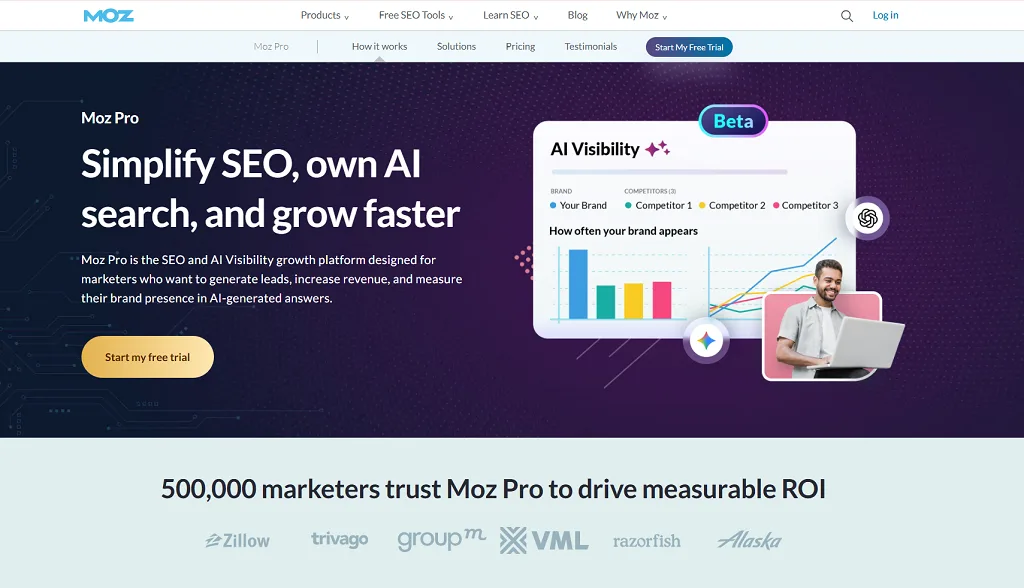
Before we get to alternatives, there is a distinction worth ten seconds of your time, because it changes the entire answer.
“Moz” is not one product. It is at least four, and they have completely different competitors.
Moz Pro is the all-in-one SEO platform. Keyword Explorer, Link Explorer, Site Crawl, Rank Tracking, On-Page Grader. This is what most people mean.
Moz Local is a separate subscription for business listings, citations, and review monitoring. It competes with BrightLocal and Whitespark, not with Ahrefs.
STAT is the enterprise rank tracking product, sold separately and priced at a different level entirely.
The Moz API sells SEO metrics to developers, and its competitors are DataForSEO and the Ahrefs API.
If you search “Moz alternatives” wanting to replace citation management and end up subscribing to Ahrefs, you have bought the wrong thing. This article focuses on Moz Pro, with separate sections covering Moz Local and the API further down.
What does Moz Pro actually cost?
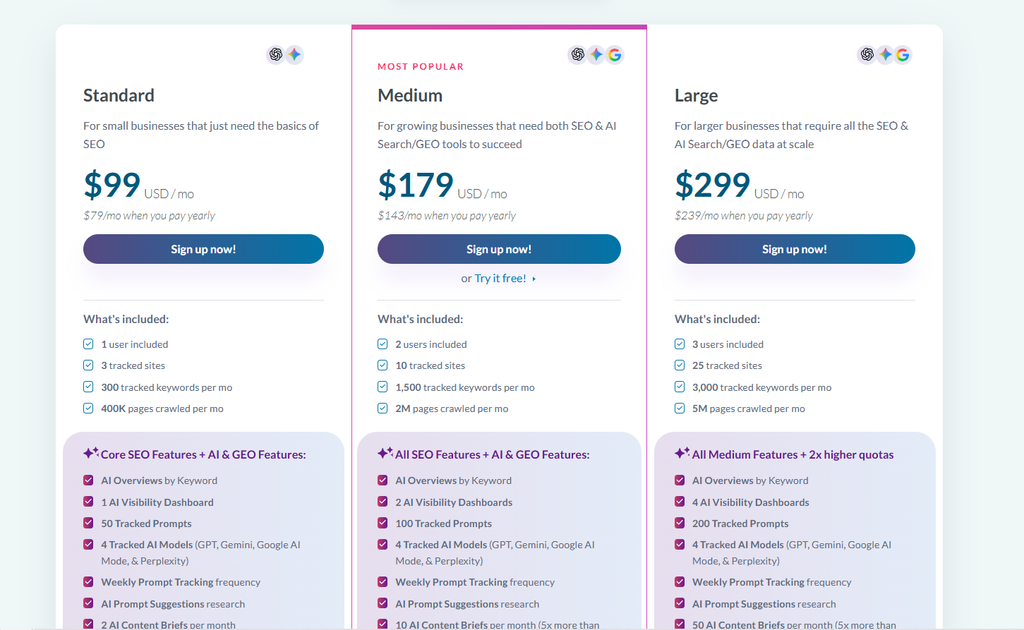
Moz Pro runs four public tiers. Starter at $49 per month, Standard at $99, Medium at $179, and Large at $299, with roughly 20% off for annual billing which brings those to $39, $79, $143, and $239.
The limits are where the real story sits. Starter gives you one site, 50 tracked keywords, and 20,000 pages crawled per month. Standard moves to three sites and 300 keywords. Medium gives you 10 sites and 1,500 keywords. Large gives you 25 sites and 3,000 keywords.
Seats matter more than most people budget for. Starter and Standard include one user, Medium includes two, Large includes three, and every additional seat costs $49 per month on top.
That last number catches teams out. A three-person marketing team on the Standard plan is not paying $99. It is paying $197.
What Should You Look For in a Moz Alternative?
Before the list, here is the filter I would apply if I were doing this for a client tomorrow.
- Which Moz module are you replacing?
Write it down before you look at a single pricing page. Backlinks, keywords, tracking, crawling, local, or reporting. The answer eliminates two thirds of this list immediately.
- What does it cost at your actual usage, not the entry tier?
Every platform on this list has a headline price that assumes a smaller operation than yours.
- How are limits metered?
This is the sneaky one. Moz meters by campaigns and keywords. Ahrefs meters by report credits. Mangools meters by daily lookups. Serpstat meters by API credits. The metering model decides whether the plan works for you more than the price does.
- How many seats do you need?
Seat pricing quietly doubles bills. Moz charges $49 per extra seat, Semrush around $80, Ahrefs $100 at the Enterprise tier.
- Does it survive your reporting workflow?
If you send client reports, white-label capability is not a nice-to-have. It is the whole job.
- Can you actually get your data out?
Export limits vary wildly, and you will care about this on the way in and on the way out.
How I Picked and Scored These Tools
I built the shortlist from three inputs.
First, the tools that actually surface when people ask for Moz replacements in forums, review sites, and search. Second, coverage across every Moz module, so the list is not twelve versions of the same all-in-one suite. Third, pricing transparency, because a tool that hides its plan limits behind a sales call is hard to compare honestly.
I scored every full-suite platform against ten weighted criteria drawn from the complaints above rather than a generic feature checklist. The full methodology, including what separates a 9 from a 4 on each criterion, sits near the end of this article alongside the complete score table.
Specialist tools are covered separately so a technical crawler is not penalised for having no keyword database. That would be a meaningless comparison.
Complete Score Breakdown
SEO Tool Score Breakdown: Top 13 Platforms
| Rank | Tool | Keyword Research | Backlinks | Rank Tracking | Pricing & Real Cost | Limits & Scale | Reporting | Technical Audit | AI Visibility | Ease of Use | Support | Overall Score |
|---|---|---|---|---|---|---|---|---|---|---|---|---|
| 1 | Semrush | 10 | 9 | 9 | 5 | 8 | 9 | 9 | 9 | 6 | 8 | 83.4/100 |
| 2 | SE Ranking | 8 | 6 | 10 | 8 | 9 | 10 | 8 | 8 | 8 | 9 | 83.2/100 |
| 3 | SEO PowerSuite | 7 | 6 | 9 | 10 | 10 | 7 | 8 | 2 | 5 | 7 | 75.7/100 |
| 4 | Ahrefs | 9 | 10 | 8 | 5 | 6 | 5 | 8 | 7 | 7 | 7 | 73.8/100 |
| 5 | Serpstat | 7 | 6 | 7 | 8 | 8 | 6 | 7 | 4 | 7 | 9 | 68.3/100 |
| 6 | Search Atlas | 6 | 6 | 7 | 5 | 6 | 7 | 7 | 9 | 6 | 6 | 63.9/100 |
| 7 | Moz Pro (baseline) | 6 | 5 | 5 | 6 | 6 | 7 | 8 | 5 | 9 | 8 | 60.2/100 |
| 8 | Mangools | 8 | 5 | 7 | 9 | 5 | 3 | 1 | 2 | 10 | 8 | 58.3/100 |
| 9 | WebCEO | 5 | 5 | 7 | 6 | 5 | 9 | 6 | 2 | 5 | 7 | 57.6/100 |
| 10 | Seobility | 4 | 4 | 6 | 9 | 6 | 5 | 9 | 1 | 8 | 8 | 57.4/100 |
| 11 | Ubersuggest | 6 | 4 | 6 | 9 | 5 | 4 | 5 | 3 | 8 | 5 | 56.0/100 |
| 12 | Morningscore | 5 | 4 | 6 | 6 | 5 | 5 | 6 | 2 | 10 | 10 | 52.7/100 |
| 13 | Majestic (specialist) | 1 | 10 | 2 | 6 | 5 | 4 | 1 | 1 | 5 | 5 | 41.5/100 |
Scores are out of 10 per criterion. The Overall Score is the weighted total out of 100. Majestic is a link specialist and is penalised here for lacking modules it was never designed to have, which is exactly why you should read its section rather than its score.
Two results worth calling out.
Semrush and SE Ranking finish within 0.2 points of each other for completely different reasons. Semrush wins on data and breadth. SE Ranking wins on price, tracking, and reporting. Which one is “better” depends entirely on whether you are buying capability or value.
And Moz Pro lands mid-table rather than last, which is the honest result. It is genuinely competitive on technical auditing and ease of use, and it beats several tools on this list outright.
The 12 Best Moz Alternatives for Different Purpose
There is no single Moz replacement that wins for every workflow. Some tools are stronger for backlinks, others for rank tracking, agency reporting, technical audits, or lower-cost SEO, so the better choice depends on what you actually need to replace.
- Semrush for the broadest replacement
- Ahrefs for backlink and competitor research
- SE Ranking for agency value
- Mangools for ease of use
- Ubersuggest for the lowest long-term cost
- Serpstat for SEO and PPC research together
- Majestic for pure link intelligence
- SEO PowerSuite for unlimited usage on a flat fee
- WebCEO for white-label client reporting
- Seobility for affordable site monitoring
- Search Atlas for execution rather than reporting
- Morningscore for guided beginner workflows
That list gives you the short answer. The more useful answer is why each tool fits that role, where it improves on Moz, and where it introduces a different compromise. So let’s go through them one by one, including the pricing, limits, strengths, and weak spots that matter once you start using them day to day.
1. Semrush: Best Overall Moz Alternative
Verdict: The most complete replacement for Moz Pro, and the one that covers workflows Moz never touched.
Best for: Teams that need SEO, competitor research, PPC data, content tools, and AI visibility in one subscription.
Semrush is the broadest platform in this category. Where Moz gives you a focused set of SEO tools, Semrush gives you an ecosystem: organic research, paid search intelligence, content tools, social monitoring, market analysis, and now AI visibility tracking.
That breadth is both the pitch and the problem. If you use a third of it, you are paying for two thirds you do not touch.
There is also news here that most roundups have not caught up with. Adobe completed its acquisition of Semrush in April 2026, in an all-cash deal worth around $1.9 billion at $12 per share, first announced in November 2025.
I would not panic about that, but I would factor it in. Semrush’s search intelligence now sits inside Adobe’s customer experience platform, and Reddit’s SEO community has already flagged concerns about Adobe’s pricing model and the pattern of acquired platforms slowing down after a deal closes.
If you are signing an annual contract this quarter, that is a reasonable thing to think about.
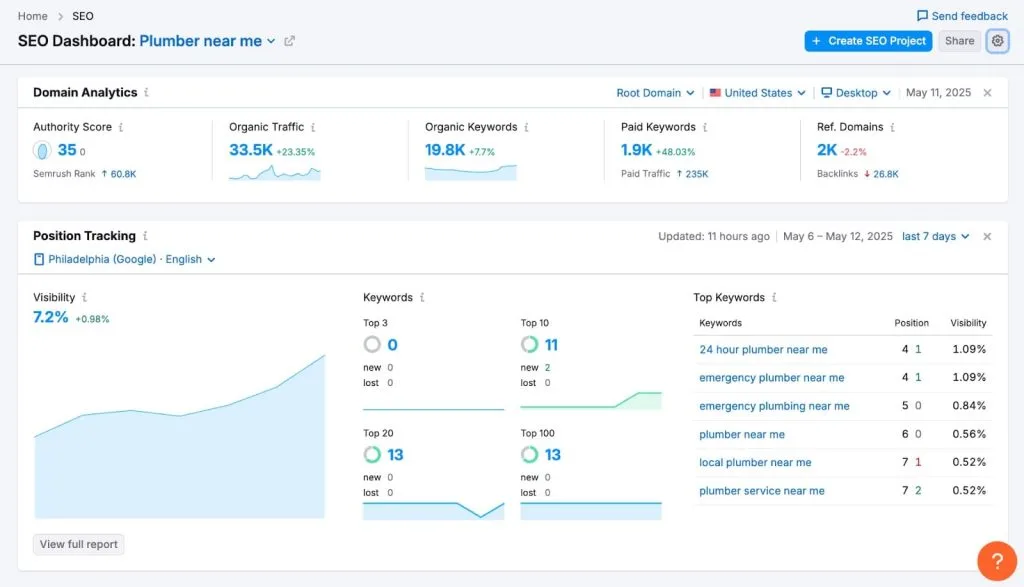
What are the key features of Semrush?
- Organic and paid competitor research, which Moz does not offer at all on the paid side
- Keyword research with intent, difficulty, and SERP feature data
- Position tracking with daily updates
- Site audit with a large technical issue library
- Backlink analytics, audit, and link building outreach
- Content marketing toolkit on Guru and above
- AI Visibility tracking for brand mentions in LLM responses
- API access, but only on the Business plan
What are the pros of Semrush?
The competitive research is the real reason to move here. Moz can tell you what a competitor ranks for. Semrush can tell you what they rank for, what they bid on, what their ad copy says, and how their traffic has moved over years.
Position tracking updates daily rather than weekly, which fixes one of the most common Moz complaints outright.
The AI Visibility toolkit is a genuine product rather than a bolted-on label, covering brand visibility inside AI-powered environments.
And the sheer keyword coverage means fewer of those moments where you type in a term and the tool shrugs.
What are the cons of Semrush?
The learning curve is real. There are more than fifty tools in the interface and no obvious path through them. New users at OneLittleWeb take noticeably longer to get productive in Semrush than in Moz.
Pricing is where it stings. Pro is $139.95 per month, Guru $249.95, Business $499.95, with annual billing saving roughly 17%.
Then the add-ons. Local SEO at $30 per month per location, Social at $20, Content at $60, Advertising at $99, AI Visibility at $99, and Traffic and Market Trends at $289.
Seats compound it further. A five-person team on Guru does not pay $2,500 a year. Once you add four seats at around $80 per month each, that is roughly $3,840 in seat costs alone on top.
Historical data, the content toolkit, and multi-location tracking are all gated above Pro, which catches people out. You can find keywords on Pro but you cannot build a content strategy around them without moving up a tier.
What does Semrush cost?
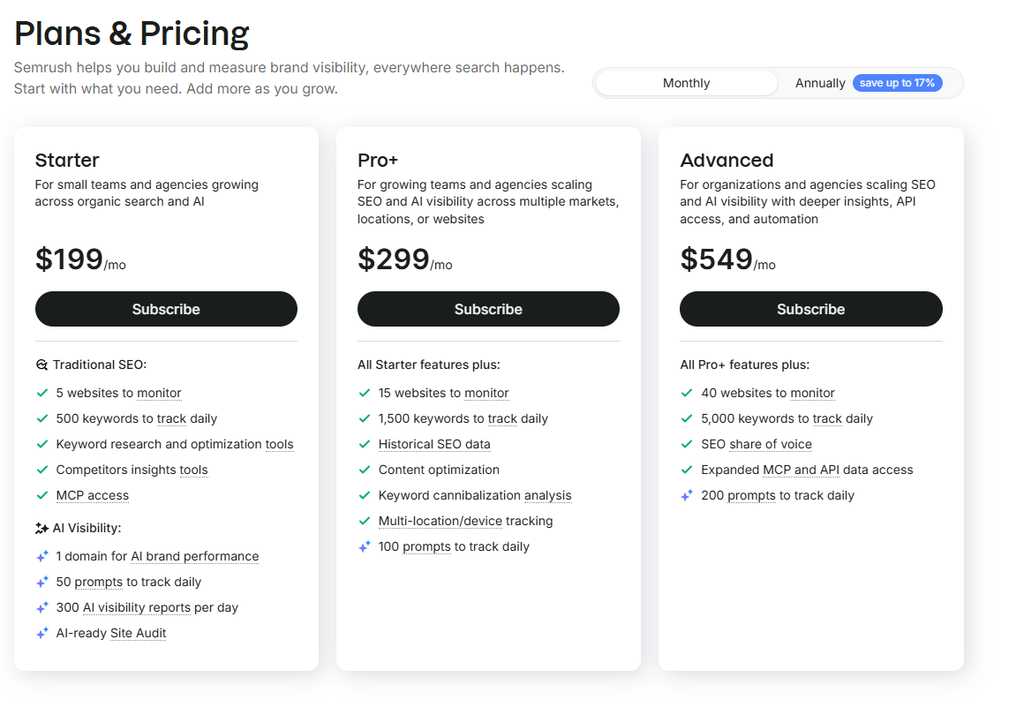
Semrush One bundles the classic toolkit with AI Visibility, starting at $199 per month, with Pro+ at $299 and Advanced at $549.
There is a worthwhile bit of maths here. If you are on classic Pro and want AI Visibility, that is $139.95 plus $99, which is $238.95. Semrush One Starter is $199 and includes both. The bundle is cheaper by about $40 a month.
There is also a free-forever account, but at roughly ten searches per day and ten tracked keywords it is a spot-check tool, not a working platform.
Reviews & Ratings
- G2: 4.4 out of 5 stars (4,034 reviews)
- Capterra: 4.6 out of 5 stars (2326 reviews)
Who should choose Semrush, and who should skip it?
Choose it if you are replacing most of Moz Pro at once, you need paid search data alongside organic, or you want AI visibility and traditional SEO in one bill.
Skip it if your budget is the reason you are leaving Moz. Semrush is the more expensive answer, not the cheaper one.
My verdict: The best all-round Moz replacement, and the safest choice if you are not sure which workflow matters most yet. Just go in with your eyes open about seats and add-ons.
2. Ahrefs: Best for Backlink and Competitor Research
Verdict: If Link Explorer is the reason you are leaving Moz, this is the answer, and it is not close.
Best for: Link builders, competitive researchers, and content teams who live in backlink and organic data.
Ahrefs is the tool people name when they explain why they left Moz. The backlink index is the product, and everything else has been built outward from it.
You get Site Explorer for domain and competitor analysis, Keywords Explorer, Site Audit, Rank Tracker, and Content Explorer for finding content opportunities across the web.
The philosophy is different from Moz. Moz optimises for clarity and teaching. Ahrefs optimises for depth and assumes you already know what you are looking at.
What are the key features of Ahrefs?
- The backlink index, with new, lost, and broken link tracking
- Competitor top pages and content gap analysis
- Keywords Explorer with parent topic and click data
- Rank Tracker with desktop and mobile
- Site Audit with a solid technical issue set
- Content Explorer, which has no real equivalent in Moz
- Brand Radar for mention monitoring across ChatGPT, Perplexity, and Gemini
- API access, widened to Lite and above in early 2026
What are the pros of Ahrefs?
The link data is the whole argument. Run the same domain through Moz and Ahrefs and the difference in referring domains surfaced is usually obvious within a minute.
Content Explorer is underrated. It is the fastest way I know to find what is already ranking in a topic and who linked to it.
The interface is dense but consistent. Once you learn it, you move fast.
And Ahrefs Free, formerly Webmaster Tools, gives verified site owners limited Site Explorer and Site Audit access on domains they own, at no cost. If your only need is monitoring your own site’s links, that is a legitimate free path.
What are the cons of Ahrefs?
The credit system is the thing nobody warns you about, and it deserves a proper explanation.
On Starter and Lite, every report you open and every filter you apply burns a report credit. Starter includes 200 credits per month, Lite includes 1,000 per user, and Standard removes the cap entirely.
Two hundred credits sounds like a lot until you spend an afternoon researching a competitor’s backlink profile. It is a metered sample, not a working tool. Ahrefs did raise these in April 2026, taking Starter from 100 to 200 credits and Lite from 500 to 1,000, which helps but does not change the model.
The second problem is evaluation. There is no free trial. The $29 Starter plan is the only low-cost way in, and Starter has no exports, so you cannot pull data out for a client deliverable.
Third, Ahrefs is not a local listings platform and does not pretend to be. If you actually meant Moz Local, this is the wrong product.
Extra seats run $100 per month each at the Enterprise tier, which is above what Moz charges.
What does Ahrefs cost?
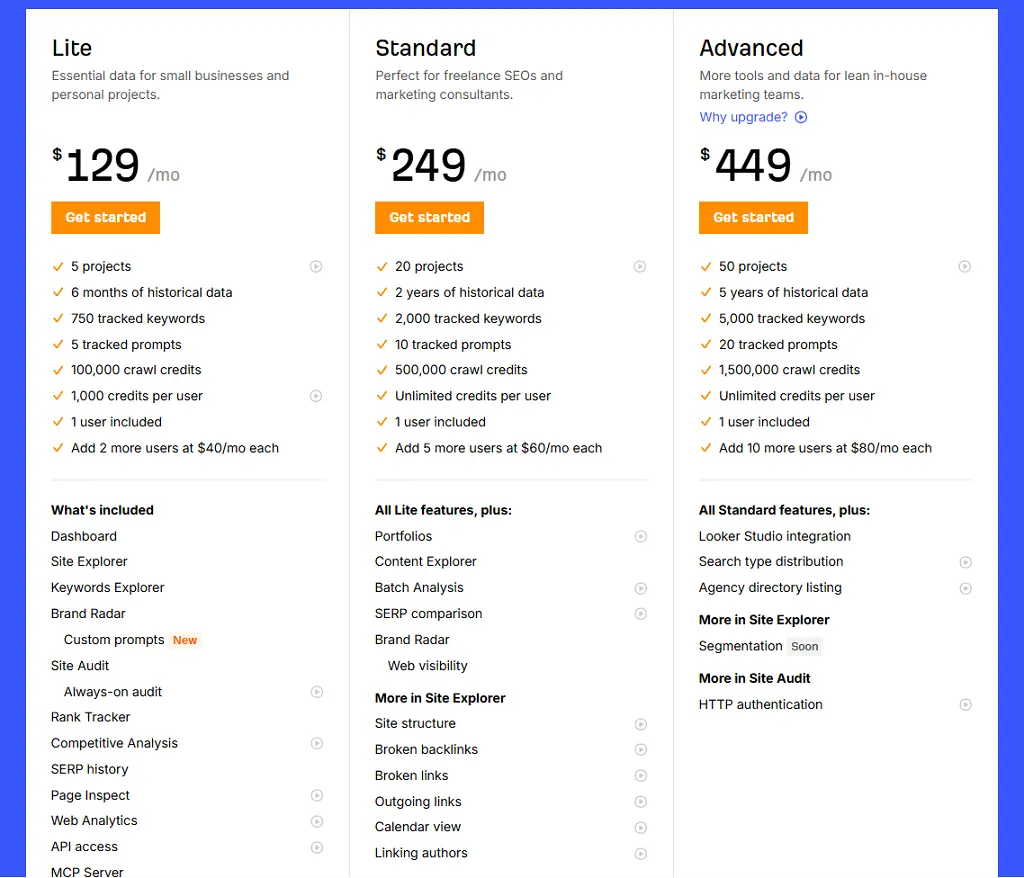
Annual billing gives roughly two months free on Lite and above, working out to about 17%. Starter has no annual discount. Ahrefs last raised core prices in April 2024, when Lite went from $99 to $129 and Standard from $199 to $249.
Here is the honest comparison against Moz. Moz Standard is $99 for three sites and 300 keywords. Ahrefs Lite is $129 for five projects and 750 tracked keywords. You pay 30% more and get materially better link data with tighter credit metering.
Reviews & Ratings
- G2: 4.5 out of 5 stars (713 reviews)
- Capterra: 4.7 out of 5 stars (585 reviews)
Who should choose Ahrefs, and who should skip it?
Choose it if backlink research, competitor organic analysis, or content opportunity discovery is the workflow you cannot compromise on.
Skip it if you need white-label client reporting, local citation management, or PPC data. Ahrefs does none of those well.
My verdict: The strongest single-purpose upgrade over Moz, provided you understand the credit model before you subscribe rather than after.
3. SE Ranking: Best Value for Agencies
Verdict: The best price-to-capability ratio in this list if you manage client sites.
Best for: Agencies, consultants, and anyone running rank tracking and reporting across multiple domains.
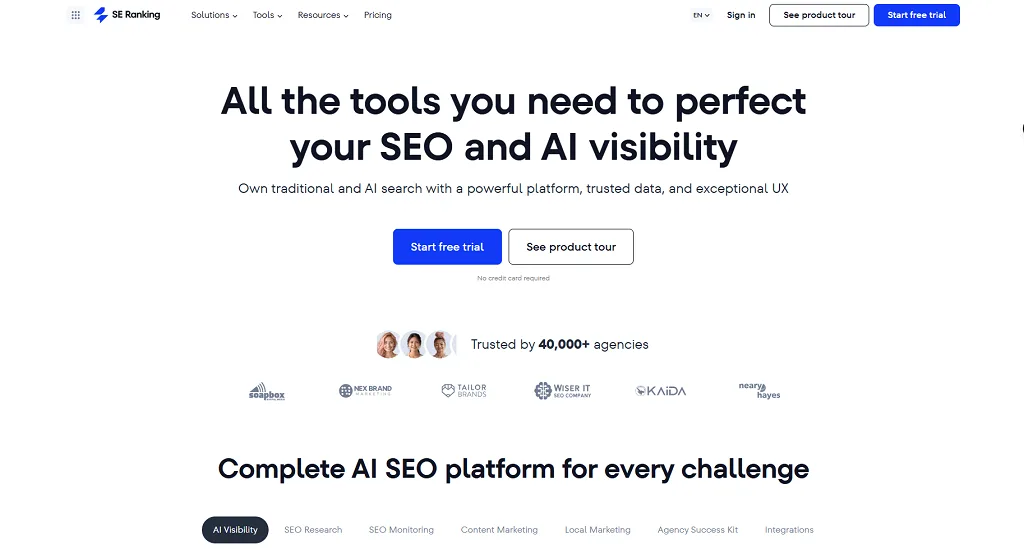
SE Ranking is the tool I recommend most often when an agency tells me Moz has become expensive for what it delivers.
It covers the full workflow: keyword research, daily rank tracking, site audits, backlink monitoring, competitor research, and white-label reporting. None of those individual modules beat the category leader. Together, at the price, they are hard to argue with.
SE Ranking restructured its pricing in late 2025, retiring the old Essential, Pro, and Business tiers. This causes real confusion because most published reviews still quote the old names and numbers.
What are the key features of SE Ranking?
- Daily rank tracking across desktop, mobile, and local
- White-label reporting and client dashboards
- Site audit and on-page checking
- Keyword research and competitor SEO plus PPC research
- Backlink monitoring
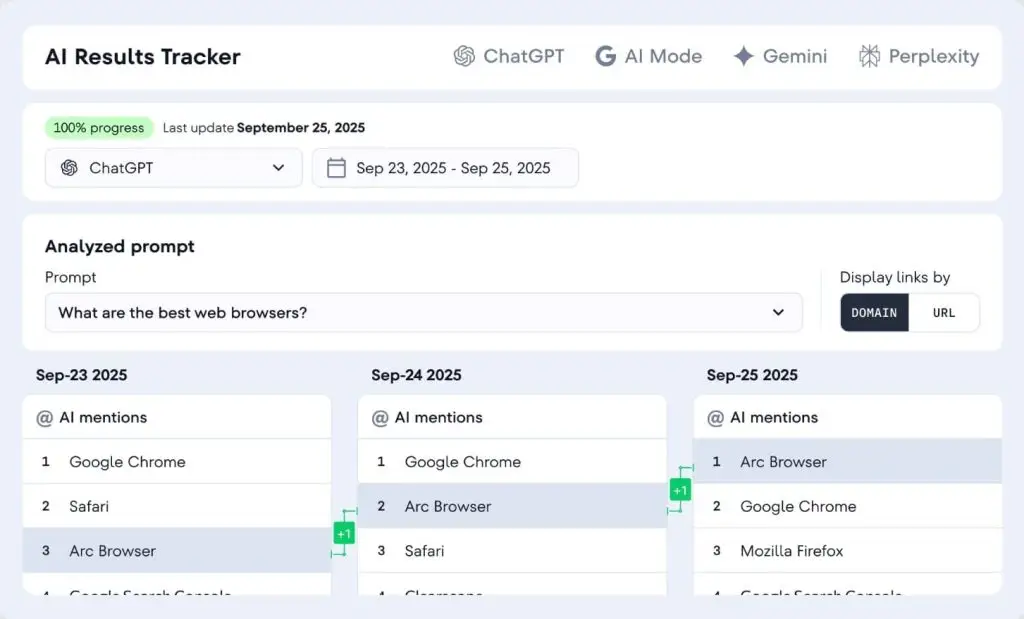
- AI Search Toolkit covering AI Overviews, AI Mode, Perplexity, and ChatGPT
- An official MCP server with a large tool set, which makes it unusually agent-ready for this price bracket
What are the pros of SE Ranking?
The keyword tracking allowance is the headline. The Core plan gives you 2,000 daily keyword checks. Semrush Pro at a higher price gives you 500.
That is a four times difference at a lower price, and for agency work it is the number that matters most.
The free trial is genuinely free. Fourteen days, no credit card, with 10 projects, 750 tracked keywords, and full tool access. Compare that to Ahrefs, which has no trial at all.
Free assisted migration is included when you switch from another platform, which matters if you are moving campaign data off Moz.
And SE Ranking publishes flat prices for the agency extras that rivals leave to a sales conversation.
What are the cons of SE Ranking?
The add-ons are the catch, and they are not small.
AI Search runs $89 per month, or $71.20 on annual billing, with 200 prompts at the entry tier. The Agency Pack for white-label reporting and client dashboards is a separate charge. Extra local locations cost from around $18.40 each on annual billing beyond the three included.
Stack those and a small agency’s real monthly cost lands closer to $145 to $292 than the $103.20 headline.
There is also a history of price restructuring that has annoyed existing customers. One Capterra reviewer explicitly said they left SE Ranking for Moz after subscription fees went up substantially. That is worth knowing before you sign an annual deal.
Backlink data is the weakest module. If link research is your priority, this is not the tool.
What does SE Ranking cost?
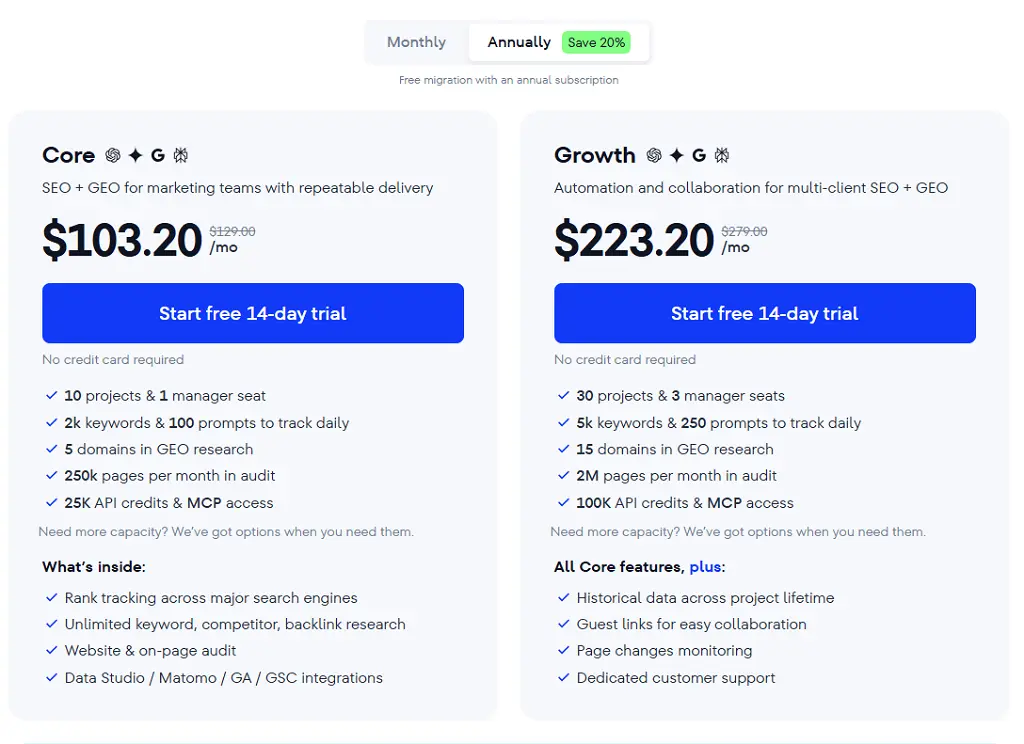
Realistic budgeting looks like this. A solo consultant on Core annual pays around $103 a month all in. A small agency needing client reporting is looking at Growth Pack, so it will be $223.20 on annual billing. A larger agency adding API access lands somewhere around $306 to $477.
Add AI Search only when you actually need it. That $71 is easy to defer.
Reviews & Ratings
- G2: 4.7 out of 5 stars (1602 reviews)
- Capterra: 4.7 out of 5 stars (297 reviews)
Who should choose SE Ranking, and who should skip it?
Choose it if you manage multiple client sites, need daily rank data, and want white-label reporting without enterprise pricing.
Skip it if backlink depth is your priority, or if the add-on model bothers you enough that you would rather pay one predictable higher price.
My verdict: The best value replacement for Moz Pro for agency work, as long as you price the add-ons into your decision instead of the headline number.
4. Mangools: Best Moz Alternative for Ease of Use
Verdict: The friendliest SEO toolset in the category, and the closest thing to Moz’s “approachable” positioning at a lower price.
Best for: Bloggers, freelancers, affiliate marketers, and anyone who found Semrush overwhelming.
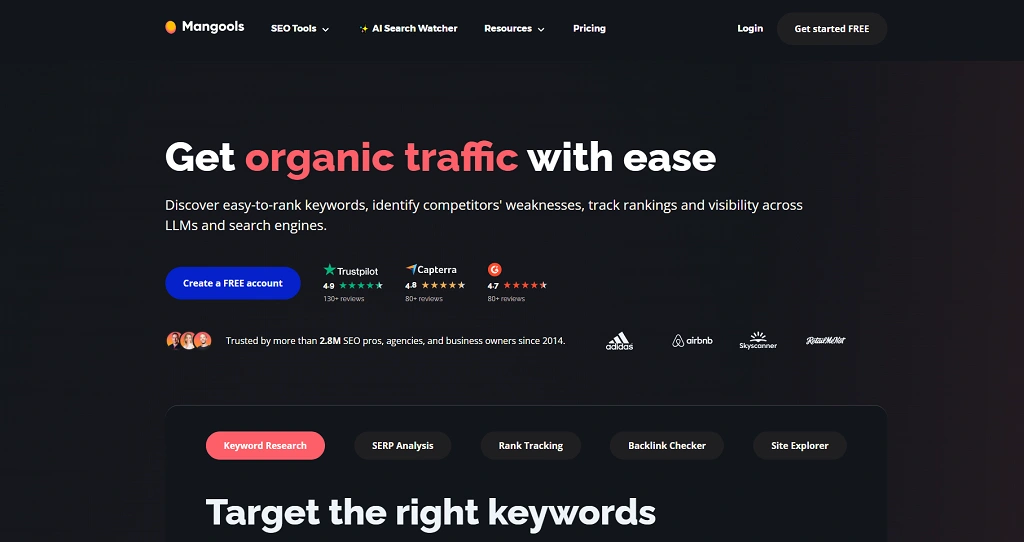
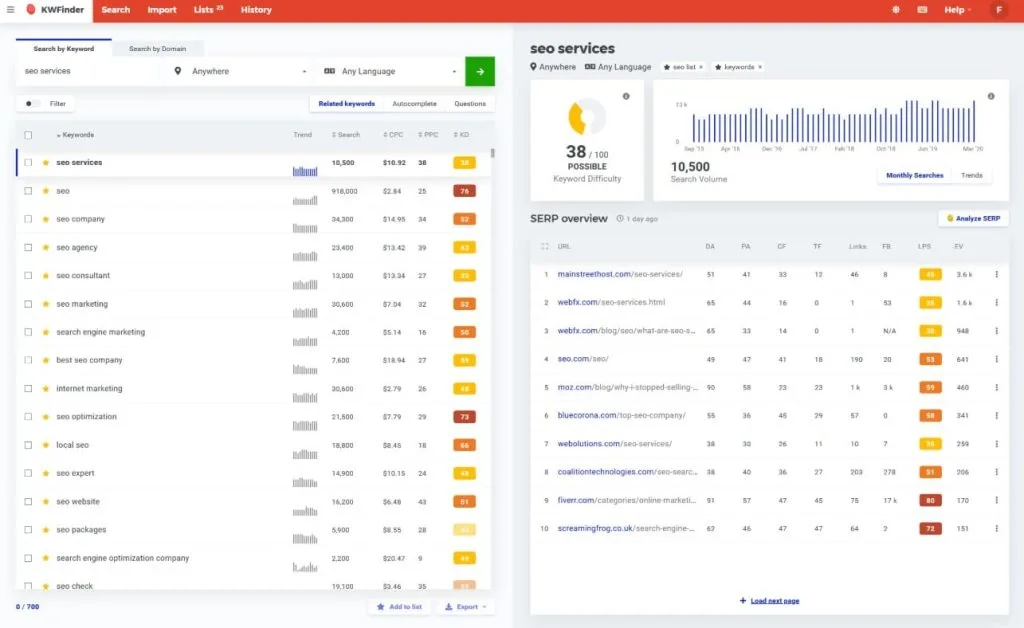
Mangools is five tools sold together: KWFinder for keyword research, SERPChecker for SERP analysis, SERPWatcher for rank tracking, LinkMiner for backlinks, and SiteProfiler for domain overviews.
If you liked Moz because it did not bury you in features, Mangools is the natural next step. It is the same design philosophy executed at a lower price point.
KWFinder in particular has a reputation for one of the more accurate keyword difficulty scores on the market, and for surfacing genuinely low-competition long-tail terms.
What are the key features of Mangools?
- KWFinder keyword research with difficulty scoring
- Keyword research across a very large set of locations, useful for local work
- SERPChecker for analysing who ranks and why
- SERPWatcher rank tracking
- LinkMiner for basic backlink exploration
- SiteProfiler for domain-level authority metrics
- All five tools included on every paid plan
What are the pros of Mangools?
Setup time is close to zero. That sounds trivial until you have onboarded a junior marketer onto Semrush.
The pricing is the lowest of any credible premium suite here. Basic runs $30 per month, or $18.85 on annual billing, which is a saving of around 60%.
There is a permanent free plan giving three searches per day, plus a separate 10-day free trial with no credit card required and higher limits. Those are two different things, and the trial is the one to use for evaluation.
Local keyword coverage across a very large number of locations is genuinely useful and not something you would expect at this price.
What are the cons of Mangools?
The daily lookup cap is the real constraint. Basic includes 100 keyword lookups per day, and a freelancer juggling two clients can burn through that before lunch.
There is no technical site auditing. None. If you were using Moz’s Site Crawl, Mangools does not replace it, and you will need to pair it with something like Screaming Frog.
Once you do that, the maths changes. Add a crawler and a content optimisation tool and your real spend drifts into Semrush territory anyway.
Agency workflow is thin. There is no meaningful white-label reporting story here, and competitive research at scale is not what this tool is for.
What does Mangools cost?
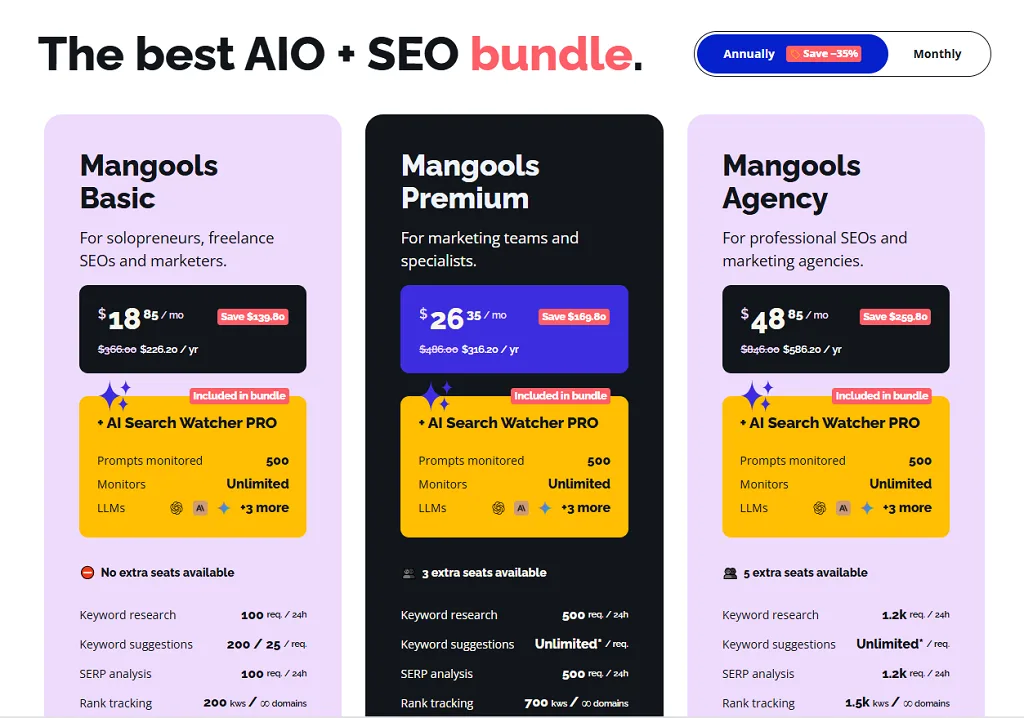
The Premium plan removes the daily lookup cap, which for most working users is the tier that actually makes sense rather than Basic.
Against Moz Starter at $49 for 50 tracked keywords, Mangools Basic at $18.85 offers 200 tracked keywords is straightforwardly better value for keyword work. Moz wins at crawling.
Reviews & Ratings
- G2: 4.7 out of 5 stars (97 reviews)
- Capterra: 4.8 out of 5 stars (92 reviews)
Who should choose Mangools, and who should skip it?
Choose it if keyword research and rank tracking are 80% of what you did in Moz, and you value speed of use over data depth.
Skip it if you need site audits, client reporting, or serious competitive research.
My verdict: The best easy-to-use alternative, but not a complete Moz Pro replacement. Budget for a crawler alongside it.
5. Ubersuggest: Best Budget Moz Alternative
Verdict: Worth considering mainly for the lifetime deal, not the monthly price.
Best for: Small business owners and solo site owners who hate subscriptions.
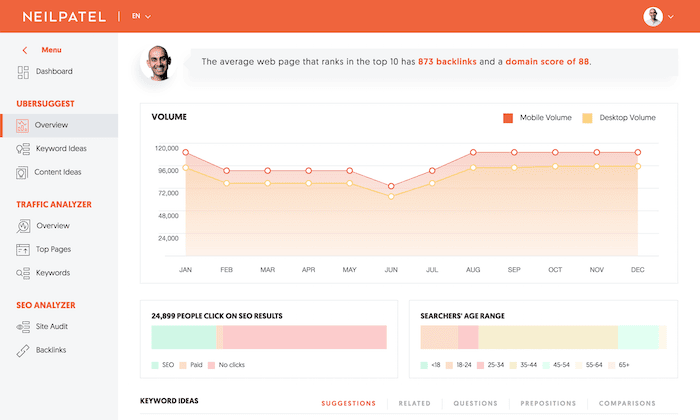
Ubersuggest is Neil Patel’s SEO platform, and its positioning has shifted meaningfully in 2026.
For years the pitch was simple: it was the cheap one. That advantage has largely evaporated. The standard plan moved to $29 per month, which is exactly what Mangools charges at entry.
What remains distinctive is the lifetime option at $290 one time. In a category where everything is a recurring subscription, that is a real differentiator for a certain kind of buyer.
What are the key features of Ubersuggest?
- Keyword research and content ideas
- Competitor domain overview
- Basic site auditing
- Rank tracking
- An AI content writer
- Chrome extension for in-SERP data
- A lifetime purchase option
What are the pros of Ubersuggest?
The lifetime deal genuinely changes the total cost conversation. At $290 once, you are past the break-even point against any monthly subscription inside a year.
The interface is approachable and the onboarding is fast. It is built for people who are not SEO professionals, and it does that job.
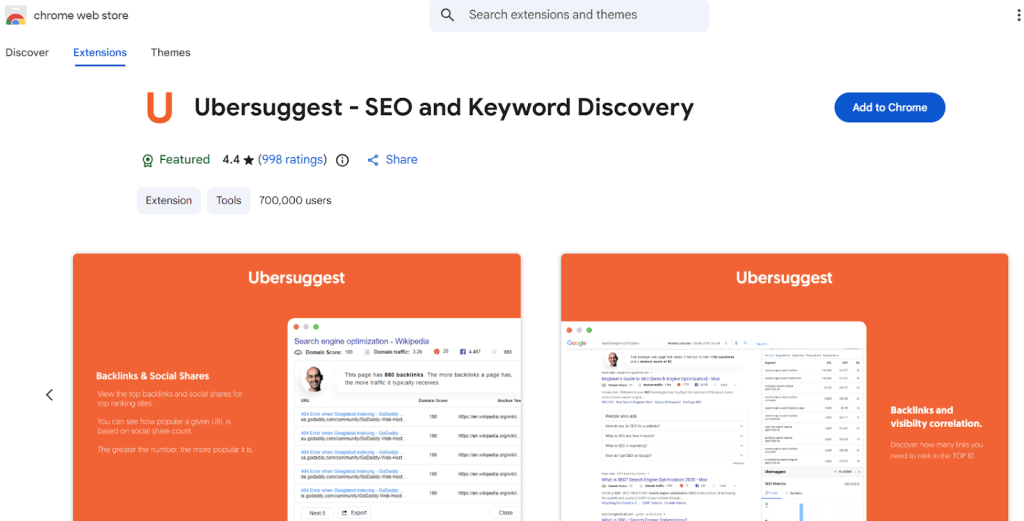
The Chrome extension is convenient for quick checks while browsing, similar in spirit to MozBar.
What are the cons of Ubersuggest?
Data depth is the honest weakness. Against Ahrefs or Semrush, the keyword and backlink databases return less, and that gap widens as your queries get more specific.
The old price advantage is gone. At $29 you are now paying Mangools money for a tool most reviewers rate lower on data quality.
Rankings are estimated through scraping rather than pulled from your actual Search Console data, so treat the numbers as directional.
And some comparison articles still quote Ubersuggest at $12 per month, which was true a while ago and is not now. If you see that number, the article is stale.
What does Ubersuggest cost?
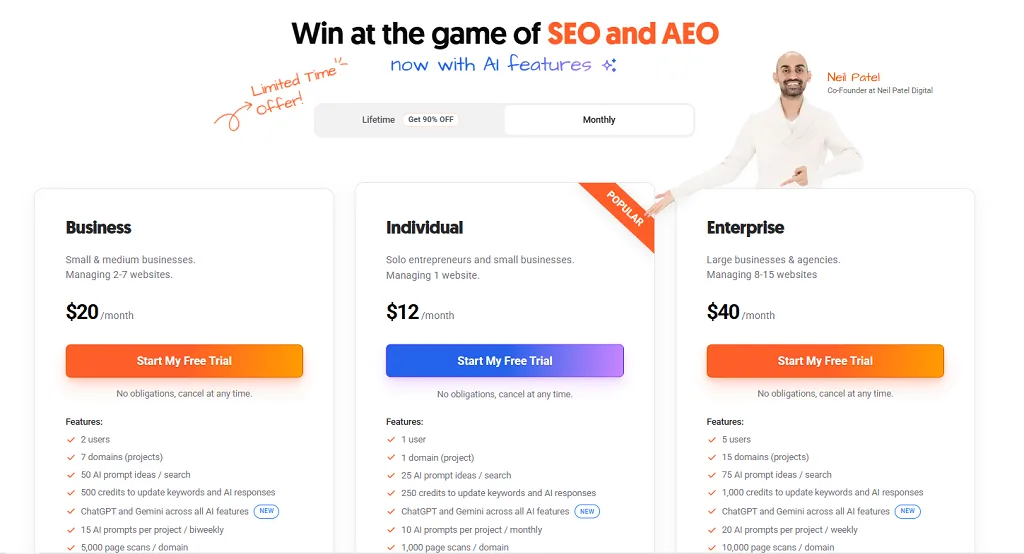
The comparison that matters: Moz Standard costs $99 per month, which is $1,188 a year. Ubersuggest’s lifetime deal is $290 once. If your needs are basic, that is a difference worth taking seriously even accounting for the data gap.
Reviews & Ratings
- G2: 4.2 out of 5 stars (160reviews)
- Capterra: 4.4 out of 5 stars (93 reviews)
Who should choose Ubersuggest, and who should skip it?
Choose it if you run one or two sites, your SEO needs are basic, and you would rather pay once than monthly forever.
Skip it if you do client work, competitive research at any depth, or serious link analysis.
My verdict: The budget option, but buy it for the lifetime deal, not because you think it competes with the majors on data.
6. Serpstat: Best Affordable SEO and PPC Suite
Verdict: A credible all-in-one at well under Semrush pricing, with API access far cheaper than anyone else here.
Best for: Teams doing organic and paid research together, and anyone who needs API data without an enterprise contract.
Serpstat is an SEO and PPC research platform founded in 2013 in Odesa, with more than 1.1 million users and particularly strong adoption in Central and Eastern Europe, DACH, and Latin America.
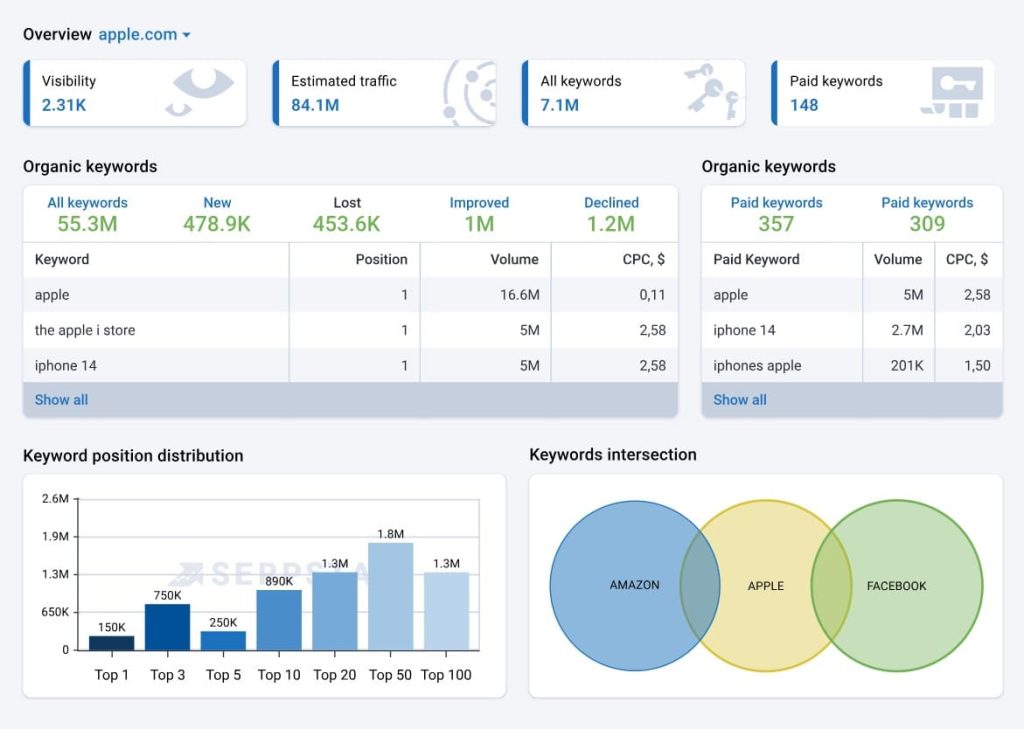
It covers five core areas: keyword research, backlinks, rank tracking, site audit, and competitor analysis. The positioning is straightforward. It sits in the gap between Mangools and Semrush.
What are the key features of Serpstat?
- Keyword research with organic and paid data together
- Backlink analysis
- Rank tracking
- Site audit
- Competitor research across SEO and PPC
- API access included in-plan from the Team tier
- Clustering and text analytics tools
What are the pros of Serpstat?
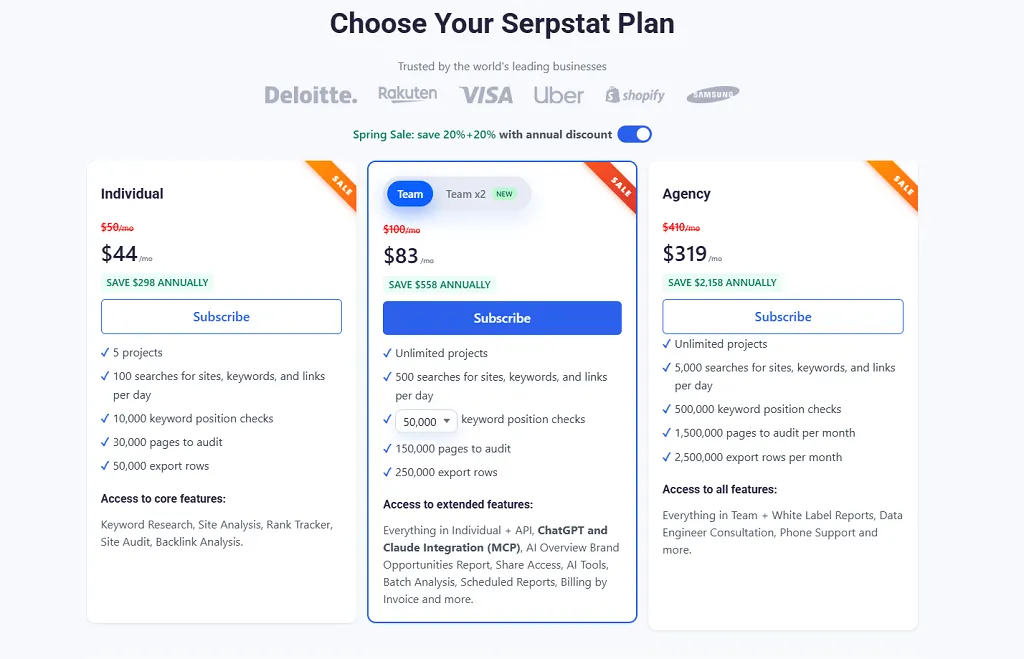
The API story is the standout. API access is included in the plan from the Team tier at around $100 per month, with 200,000 to 400,000 credits.
Compare that to Ahrefs, where API access on paid tiers arrives as a separate paid add-on, or Majestic’s dedicated API plan at $399.99 per month. For teams building internal dashboards, that difference is enormous.
Combining organic and paid research in one tool at this price is unusual. Moz offers no PPC data at all.
Serpstat also has a reputation for responsiveness to feature requests, and the documentation includes programming examples, which is more than most competitors bother with.
What are the cons of Serpstat?
Traffic estimates run high. This is the most consistent criticism I found, and it matters because inflated estimates lead to bad prioritisation decisions.
The backlink tool has no page-level authority metric, only domain-level. If you are used to Moz’s Page Authority for evaluating individual link targets, that is a real workflow loss.
PPC keyword tracking is described by users as fairly basic compared to the research side.
Pricing sources also vary quite a bit depending on region and promotion, with entry points quoted anywhere from $50 to $69 per month depending on the source and the current offer. Check the live page.
What does Serpstat cost?
Here’s the pricing of Serpstat. Take a look. Black Friday and seasonal promotions run regularly, which is worth waiting for if your timing is flexible.
Reviews & Ratings
- G2: 4.6 out of 5 stars (466 reviews)
- Capterra: 4.4 out of 5 stars (171 reviews)
Who should choose Serpstat, and who should skip it?
Choose it if you need SEO and PPC research together, or you want API access without paying enterprise rates.
Skip it if you rely on page-level authority scoring or need traffic estimates you can quote to a client without caveats.
My verdict: The best value all-in-one for mixed search research, and the cheapest credible route to SEO API data.
7. Majestic: Best Moz Link Explorer Replacement
Verdict: The specialist choice if backlinks are the only Moz module you actually care about.
Best for: Link builders, backlink auditors, and anyone doing historical link investigation.
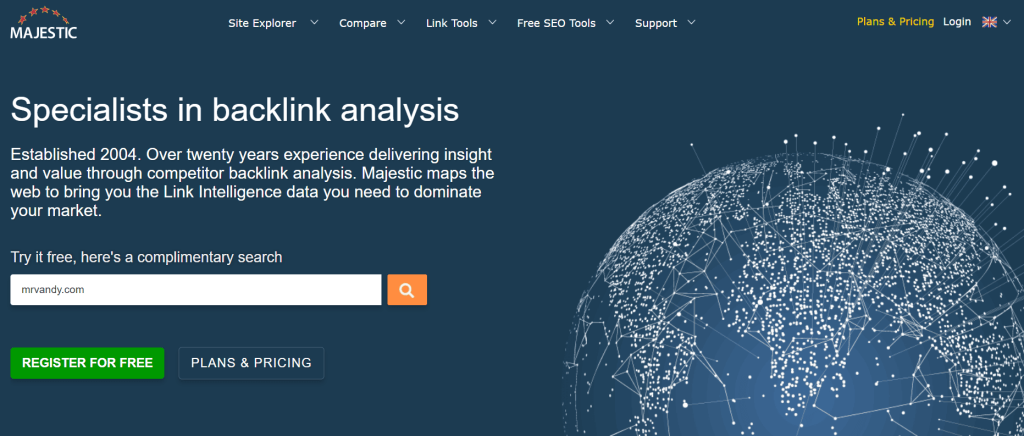
Majestic does one thing. It maps links, and it has been doing it longer than almost anyone.
There is no keyword research here. No site auditing. No rank tracking worth the name. If you want a full Moz Pro replacement, this is not it, and I want to be clear about that before you read the rest.
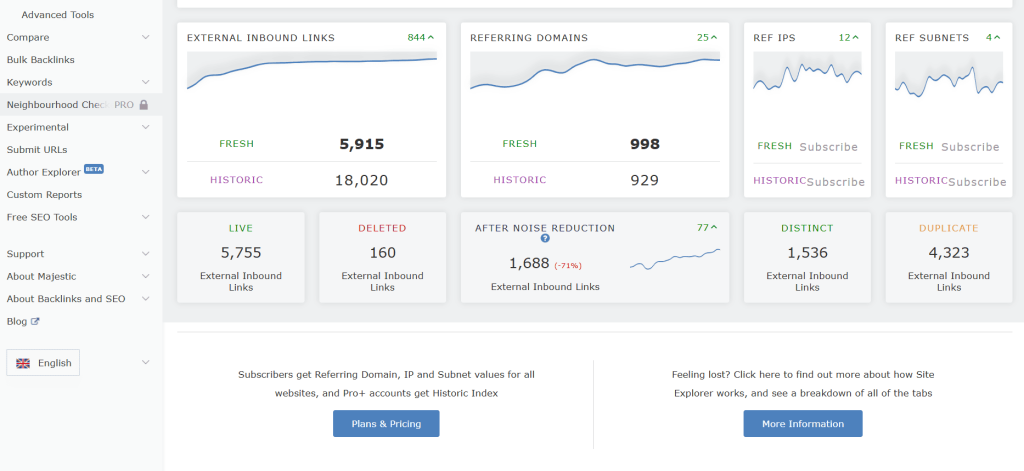
What you get instead is a link index with its own metric system: Trust Flow, Citation Flow, and Topical Trust Flow, which scores link authority by subject area rather than a single number.
What are the key features of Majestic?
- Fresh Index, a rolling 90-day backlink index refreshed continuously
- Historic Index on the Pro plan, covering years of link history
- Trust Flow and Citation Flow metrics
- Topical Trust Flow for subject-level authority
- Clique Hunter for comparing multiple domains’ link overlap
- Bulk backlink checking
- Full API on the top plan
What are the pros of Majestic?
Topical Trust Flow is genuinely useful and has no direct Moz equivalent. Knowing that a domain’s authority is concentrated in the wrong subject area tells you something Domain Authority never will.
Clique Hunter gets specific praise from G2 reviewers for comparing domains effectively and understanding a competitive link landscape.
The Historic Index on Pro is the real differentiator for audit work. If you are investigating why a site lost rankings after a link cleanup, the long-term database is where you find the answer.
There are also free public Site Explorer lookups on majestic.com, which is a reasonable way to sanity-check the data before paying.
What are the cons of Majestic?
It replaces roughly one module of Moz Pro. Realistically that is 20% to 30% of what you were paying Moz for. You will need to pair it with something else.
The Historic Index is gated to Pro. Lite is Fresh Index only, so if you need long-term history, your entry point is $99.99, not $49.99.
Analysis Units meter heavier reports, and bulk checks and large backlink exports burn through them quickly. Lite users doing heavy bulk work will hit the ceiling.
Both Lite and Pro are single-seat. Adding teammates costs extra per seat per month.
There is no free trial, only a 7-day money-back guarantee for new customers on Lite and Pro.
The interface also feels dated compared to Ahrefs, and G2 reviewers rate its ease of use and support meaningfully lower than most competitors here.
What does Majestic cost?
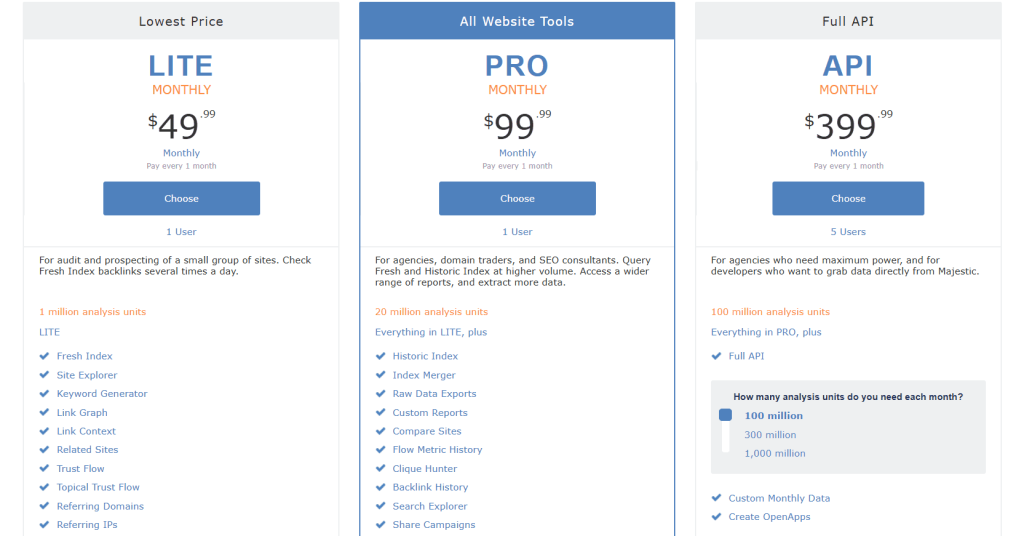
Lite and Pro include one user. The API plan includes five.
Annual billing saves roughly two months. Site Explorer rows per search jump from 5,000 on Lite to 30,000 on Pro, which is a bigger practical difference than the price gap suggests.
Reviews & Ratings
- G2: 4.3 out of 5 stars (73 reviews)
- Capterra: 4.4 out of 5 stars (30 reviews)
Who should choose Majestic, and who should skip it?
Choose it if link analysis is your job rather than one of your tasks, and you need historical depth or topical authority scoring.
Skip it if you need keywords, audits, tracking, or reporting. It does not do any of them.
My verdict: The best pure Link Explorer replacement, but understand you are buying one module and will need to build a stack around it.
8. SEO PowerSuite: Best Desktop Alternative
Verdict: The only tool here with no keyword caps, no per-query limits, and no seat fees, because it runs on your machine.
Best for: Consultants and agencies who track a lot of keywords and hate metered pricing.
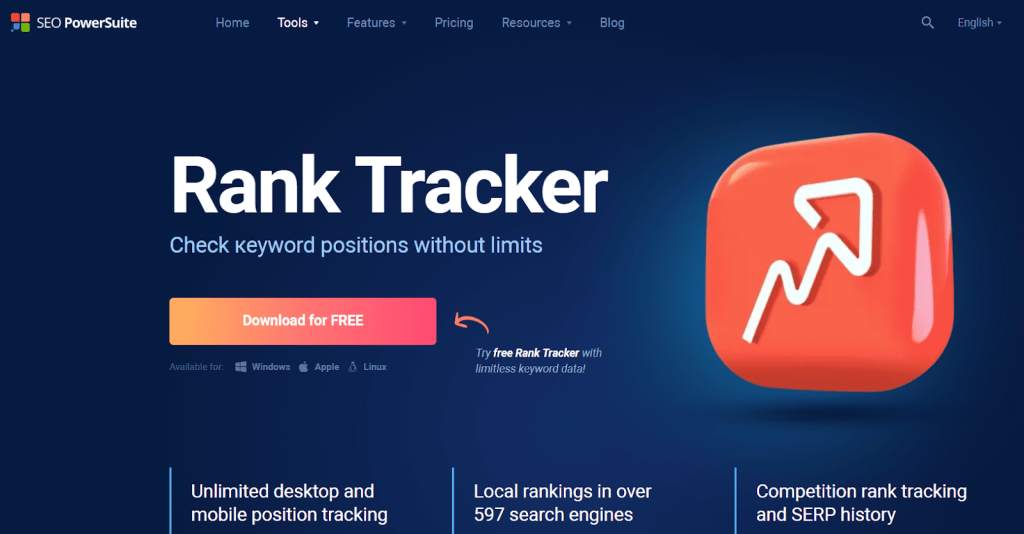
SEO PowerSuite takes a genuinely different approach. Instead of a cloud subscription metered by keywords and projects, it is four desktop applications sold under a flat annual licence.
Rank Tracker handles keyword research and tracking. WebSite Auditor does technical and on-page audits. SEO SpyGlass analyses backlinks. LinkAssistant runs outreach.
Because the software runs locally, the usual limits do not apply. All tiers include unlimited keyword tracking and unlimited projects.
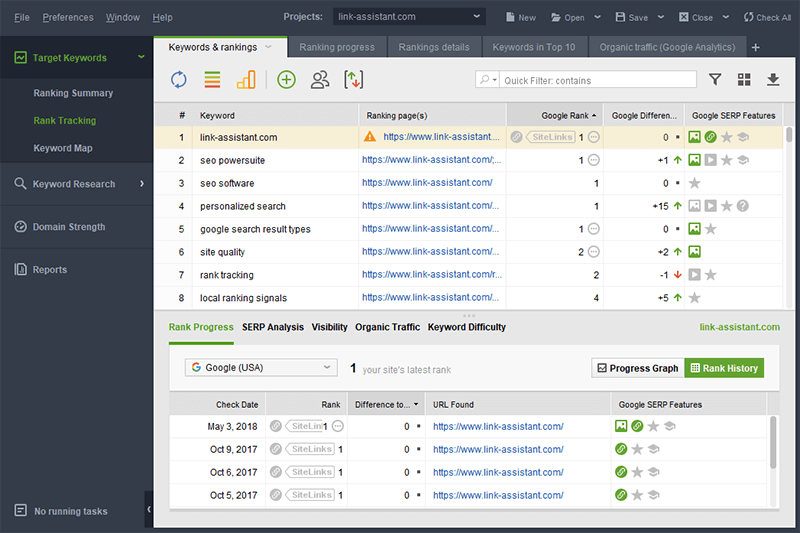
What are the key features of SEO PowerSuite?
- Rank Tracker with unlimited keywords
- WebSite Auditor for technical audits and site structure visualisation
- SEO SpyGlass for backlink analysis and toxic link detection
- LinkAssistant for link building outreach
- White-label reporting on Enterprise and above
- Integrations with Search Console, Analytics, and Keyword Planner
- Local rank tracking
What are the pros of SEO PowerSuite?
The cost structure is the entire pitch, and it is a strong one. Professional is $299 per year, which works out to about $24.95 per month. Enterprise is $499 per year, around $41.60 per month.
Compare that to Moz Large at $299 per month for 3,000 tracked keywords. SEO PowerSuite Enterprise is $499 for the year with no keyword cap at all.
Multi-year pricing goes further, with a two-year plan saving around 20% and three years around 34%.
No seat fees is the other underrated advantage. Every cloud tool here charges per user. This one does not.
What are the cons of SEO PowerSuite?
It is desktop software in 2026, and that comes with real consequences.
Crawling runs on your machine. Official minimum requirements are modest, but users report the software becomes resource-intensive on larger sites, and a big crawl will occupy your laptop for a while.
Heavy rank tracking can trigger CAPTCHAs. There is a built-in anti-block system handling around three million daily checks, but for 10,000-plus keywords with daily checks you may need the integrated anti-CAPTCHA service at $14.95 per 1,000 solves, or external proxies. Budget $50 to $150 a year for typical agency usage, or $300-plus for heavy daily tracking.
The Professional plan has no report export, no white-label, and no scheduling. So for client work, Enterprise at $499 is your actual entry point, not $299.
Note also that some sources list higher pricing at $349, $599, and $899, so verify the current tiers before budgeting.
Collaboration is awkward. Data lives on individual machines rather than in a shared cloud workspace.
What does SEO PowerSuite cost?
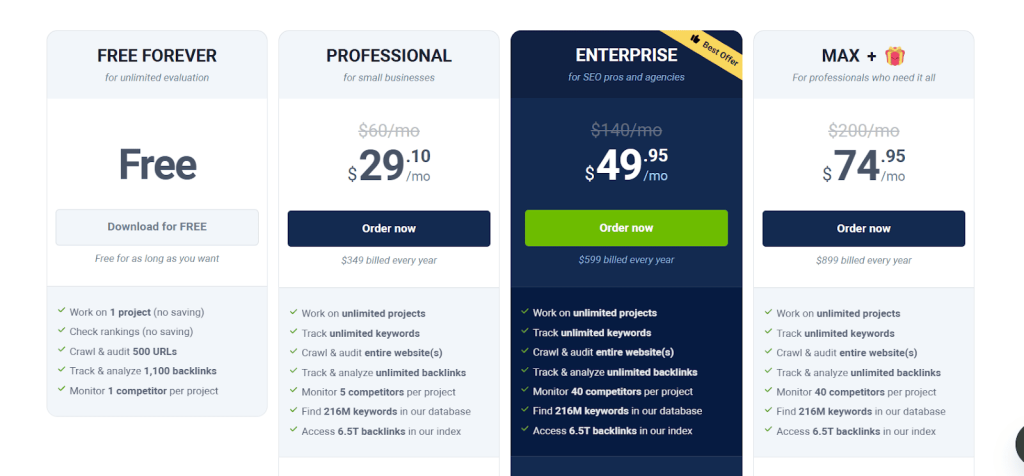
Add anti-CAPTCHA or proxy costs if you track large keyword sets daily. That is the hidden line item.
Reviews & Ratings
- G2: 4.5 out of 5 stars (559 reviews)
- Capterra: 4.4 out of 5 stars (382 reviews)
Who should choose SEO PowerSuite, and who should skip it?
Choose it if you track thousands of keywords, you are cost-sensitive, and you are comfortable running software locally.
Skip it if you need cloud collaboration, want AI search visibility, or do not want to think about proxies.
My verdict: The best cost-per-keyword option in this roundup by a wide margin, with real operational trade-offs attached.
9. WebCEO: Best for White-Label Agency Reporting

Verdict: Built specifically for agencies who want SEO tools running on their own domain.
Best for: Agencies that sell SEO reporting as part of the deliverable.
WebCEO is an agency-first SEO platform with around 24 tools covering keyword research, audits, domain analysis, rank tracking, backlink checking, internal linking, and content submission.
The differentiator is the white-label service. You can run WebCEO’s tools on your own domain with your own branding, including an SEO lead generation button that captures prospects.
That is a different pitch from every other tool here. Most offer white-label reports. WebCEO offers a white-label product.

What are the key features of WebCEO?
- White-label platform on your own domain
- SEO lead generation widget
- Rank tracking with configurable SERP scan depth
- Site audits with per-project page limits
- Backlink analysis with per-project caps
- Branded client reports
- Social analytics including Facebook and LinkedIn data
What are the pros of WebCEO?
The white-label domain setup is genuinely differentiated. For an agency selling SEO as a productised service, having the tooling appear as your own is worth real money.
The lead generation widget is a small feature with an outsized payoff. Startup includes 5 SEO leads per day.
Pricing at the bottom is low. Solo starts at $36 per month, or around $32 on annual billing with roughly a 16% discount.
Reviewers consistently frame it as understanding agency needs, from tracking client performance to running audits and managing white-label reports.
What are the cons of WebCEO?
The real cost is well above the sticker price, and this is the thing to know before you sign up.
The cheapest plan carries a three-month minimum that is not obvious until checkout. And the Agency Unlimited plan’s real cost lands closer to $159 per month than its $99 headline once you add seats and white labelling.
The plan limits are also tighter than they look. Solo gives you one project, 100 keywords, 1,000 pages audited, and 1,000 backlinks analysed. Startup gives 5 projects, 750 keywords, 5,000 pages, and 10,000 backlinks, but those are capped per project as well as in total.
The cheapest genuinely business-usable plan is Startup at around $119 per month, not the $36 Solo tier.
Setting up the white-label domain is also fiddly, because Google and Facebook each run an approval process for every new domain the software points to.
The interface feels dated next to SE Ranking, and the data depth does not match the majors.
What does WebCEO cost?
Annual billing saves around 16%.

Reviews & Ratings
- G2: 4.7 out of 5 stars (166 reviews)
- Capterra: 4.8 out of 5 stars (75 reviews)
Who should choose WebCEO, and who should skip it?
Choose it if you sell SEO as a productised service and want the tooling to carry your brand rather than someone else’s.
Skip it if you need best-in-class data, or if surprise renewals and minimum terms are a dealbreaker.
My verdict: A specialist agency answer. Price the real tier you need, not the $36 headline.
10. Seobility: Best for Affordable Site Monitoring
Verdict: Cheap, continuous technical monitoring rather than a competitive research platform.
Best for: Site owners who want ongoing audit coverage without a research suite bill.
Seobility is a website audit and monitoring platform. It crawls your site, finds technical issues, monitors rankings, and keeps checking over time.
It is popular in the German-speaking market and has a large review base there. What it is not is a competitor research tool. Treat it as a Moz Site Crawl replacement with rank monitoring attached.
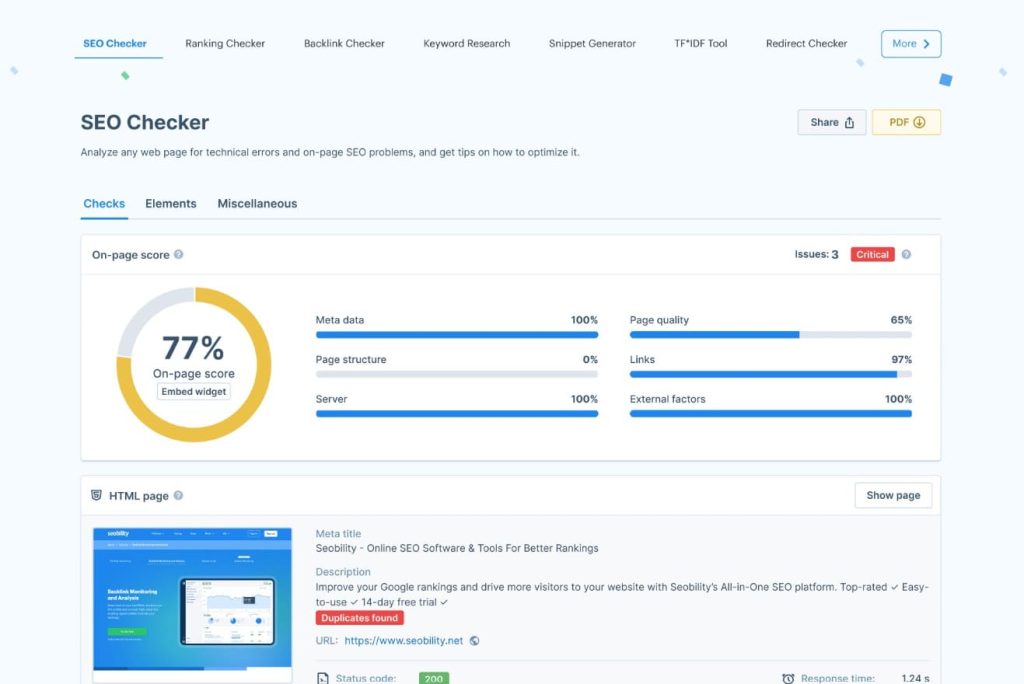
What are the key features of Seobility?
- Full site crawling with issue detection
- Continuous monitoring with change alerts
- On-page optimisation checks
- Rank monitoring
- Backlink checking
- Keyword research basics
- A usable free tier
What are the pros of Seobility?
The price is the point. Premium sits at around $50 per month, which is half of Moz Standard.
The free tier is genuinely usable for small sites, which is rare in this category.
The audit reporting is clear and prioritised rather than dumping a thousand issues on you at once. G2 reviewers rate its ease of use and setup highly, and support quality scores well.
What are the cons of Seobility?
Competitive research is thin. If you used Moz to work out what a competitor was doing, Seobility will not fill that gap.
The keyword database is not in the same league as the majors, and neither is the backlink index.
Agency features are limited compared to SE Ranking or WebCEO.
And it is a narrower product than Moz Pro overall, so it replaces perhaps one and a half modules rather than the whole platform.
What does Seobility cost?
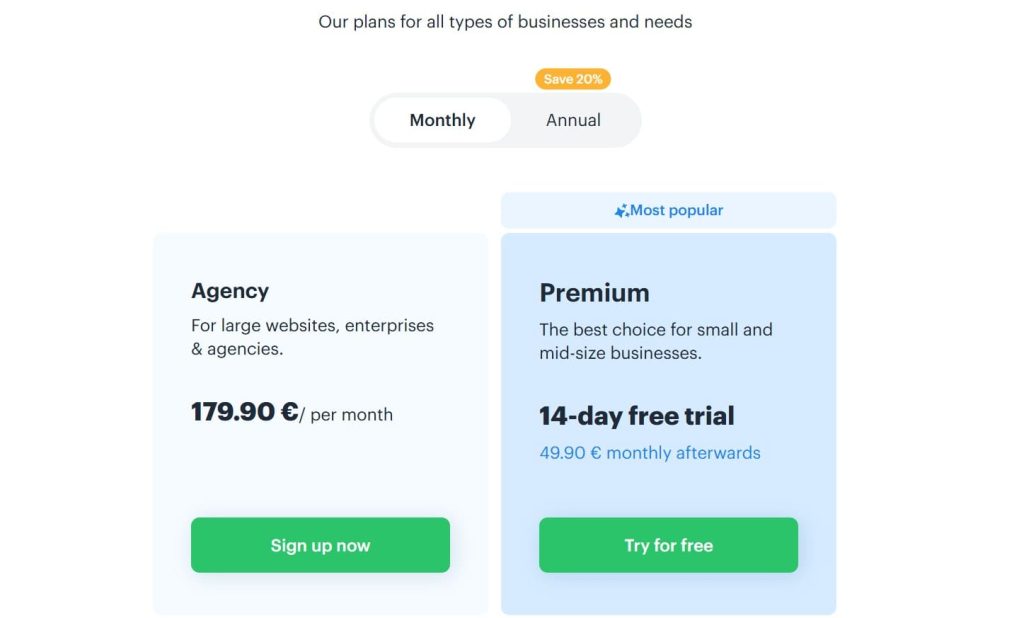
A free trial is available on the paid tiers.
Reviews & Ratings
- G2: 4.6 out of 5 stars (406 reviews)
- Capterra: 4.7 out of 5 stars (62reviews)
Who should choose Seobility, and who should skip it?
Choose it if ongoing technical health monitoring on your own sites is the job, and you want it cheap.
Skip it if you need competitive intelligence, deep link data, or agency reporting.
My verdict: The affordable monitoring option. Pair it with a research tool rather than expecting it to be one.
11. Search Atlas: Best for SEO Execution
Verdict: The tool that tries to do the work rather than just report on it.
Best for: Teams who want automated fixes and content production alongside analysis.
Search Atlas approaches SEO from the execution side. Its OTTO product automates implementation tasks rather than only surfacing recommendations, and Content Genius handles AI-assisted content production.
It also tracks LLM visibility, which puts it ahead of Moz on AI search coverage, and offers white-label options for agencies.
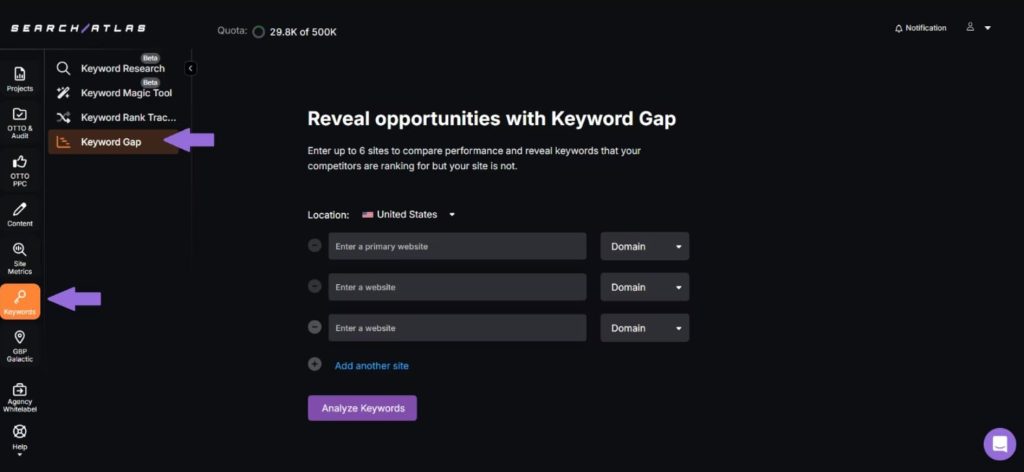
What are the key features of Search Atlas?
- OTTO SEO automation for implementing changes
- Content Genius AI content production
- LLM and AI search visibility tracking
- Keyword research and rank tracking
- Site auditing
- White-label capability for agencies
What are the pros of Search Atlas?
Automation is the actual differentiator. Every other tool in this roundup tells you what to fix. This one attempts to fix it.
For small teams without a developer on call, that gap between recommendation and implementation is where most SEO work dies. Closing it has real value.
LLM visibility tracking is included rather than sold as a $99 add-on, which compares favourably to Semrush and SE Ranking.
What are the cons of Search Atlas?
Pricing climbs steeply. Tiers run from $99 to $999 per month, and the useful automation capacity tends to sit above the entry tier.
Review volume is thin. Search Atlas holds 4.6 out of 5 across 110 reviews on G2, against SE Ranking’s 4.8 across more than 1,400. That is not a knock on quality, but it means less independent evidence to rely on.
Automated changes to a client site require trust. I would want a staging environment and a rollback plan before letting any tool push changes to a production site, and that is an operational cost the pricing page does not mention.
The research data is not as deep as Ahrefs or Semrush.
What does Search Atlas cost?
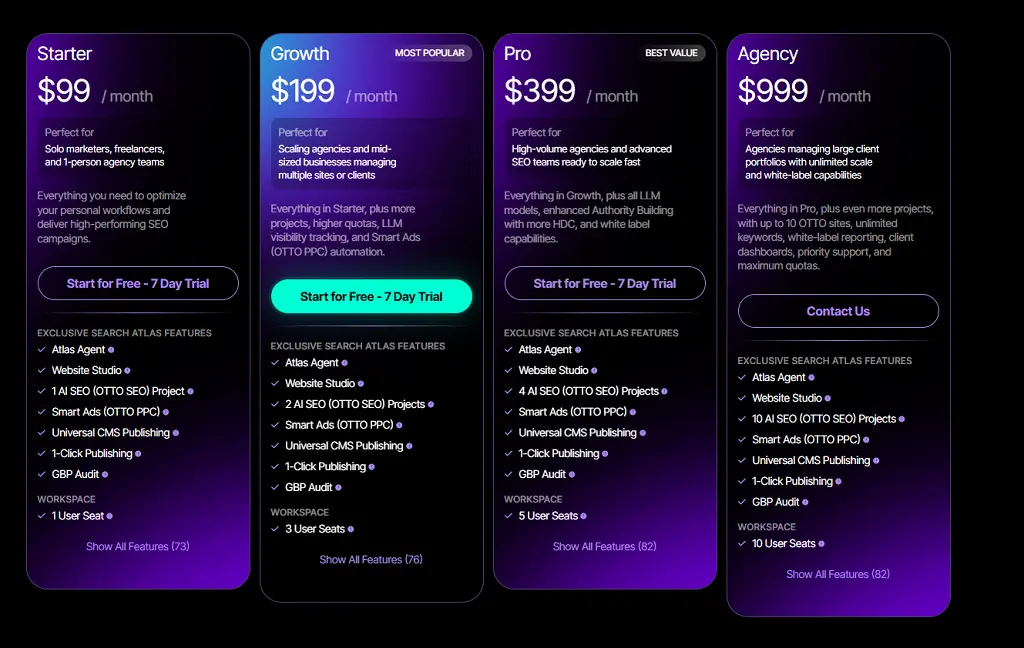
Budget for the tier that gives you enough OTTO capacity, because that is the feature you are actually buying.
Reviews & Ratings
- G2: 4.6 out of 5 stars (163 reviews)
- Capterra: 4.7 out of 5 stars (87 reviews)
Who should choose Search Atlas, and who should skip it?
Choose it if your bottleneck is implementation rather than analysis, and you want AI visibility included.
Skip it if you need the deepest research data, or you are not comfortable with a tool making changes to live sites.
My verdict: The most interesting tool here for teams who are drowning in recommendations they never implement.
12. Morningscore: Best for Guided Beginner Workflows
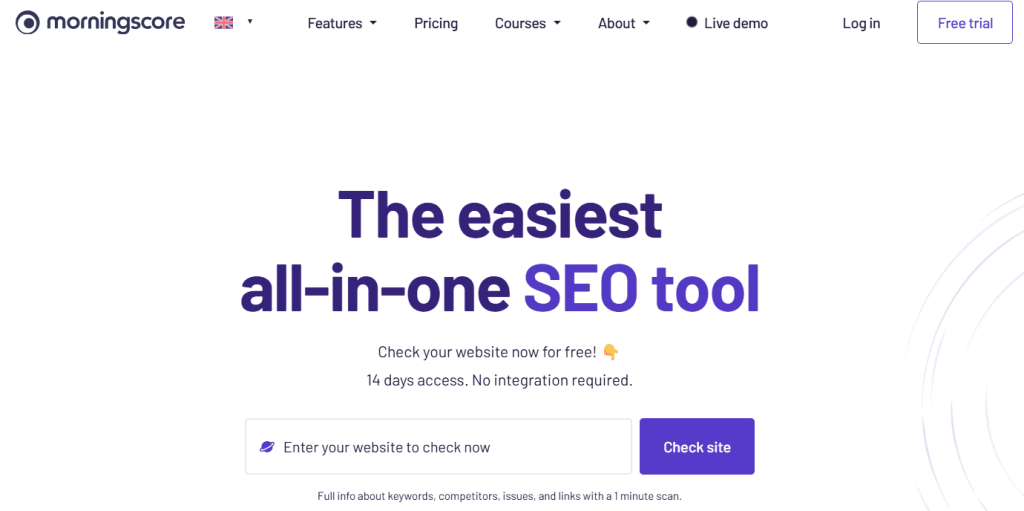
Verdict: SEO turned into a task list, for people who freeze when a dashboard shows them forty metrics.
Best for: Small business owners and beginners who need to be told what to do next.
Morningscore is a gamified SEO platform. Instead of presenting data and leaving you to interpret it, it converts findings into missions with estimated impact and turns your site’s performance into a single score.
It is the opposite design philosophy from Ahrefs. Ahrefs assumes expertise. Morningscore assumes you do not have any and builds the guidance in.
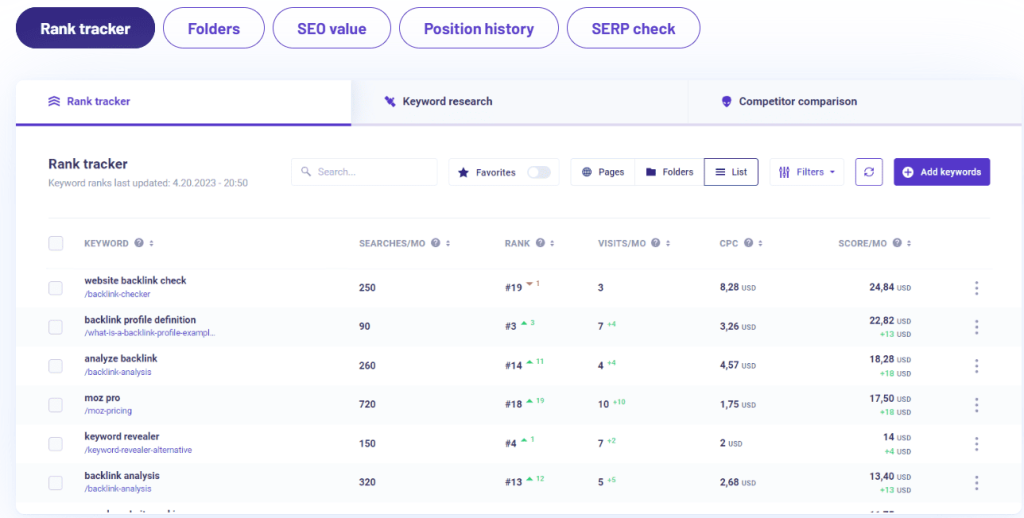
What are the key features of Morningscore?
- Mission-based task guidance
- A single site health and performance score
- Keyword research and rank tracking
- Site auditing
- Backlink monitoring
- Estimated value of traffic in currency terms
What are the pros of Morningscore?
The guidance layer works. For a business owner doing SEO alongside six other jobs, a prioritised task list beats a data dashboard every time.
The traffic-value estimate in currency terms is a smart touch for justifying SEO spend to someone who does not care about rankings.
Support quality scores exceptionally well on G2, at 9.9 out of 10 across its reviews, and reviewers found it easier to set up and administer than tools costing far more.
It is the tool most often recommended to people who found other dashboards confusing.
What are the cons of Morningscore?
Data depth is limited. This is not a competitive research platform and it does not claim to be.
Reviewers felt it meets business needs less well than dedicated tools like AccuRanker, and product direction scores lower than the specialists.
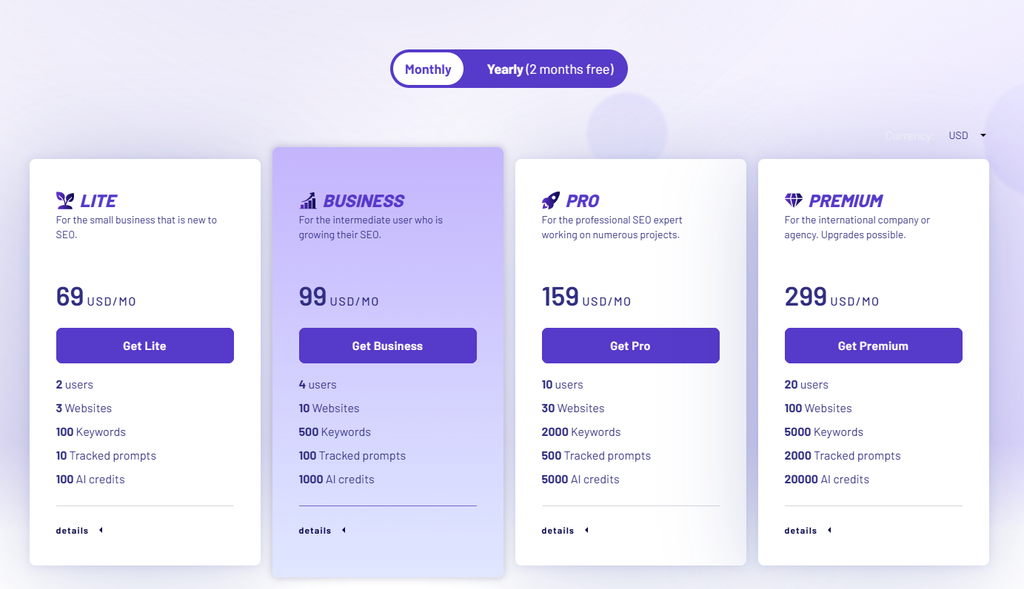
At $69 per month it is not cheap for what it covers, especially against Mangools at $29.
What does Morningscore cost?
Reviews & Ratings
- G2: 4.5 out of 5 stars (27 reviews)
- Capterra: 4.8 out of 5 stars (43 reviews)
Who should choose Morningscore, and who should skip it?
Choose it if you are a small business owner who wants SEO turned into instructions rather than metrics.
Skip it if you are a professional. You will outgrow it in months.
My verdict: A well-designed beginner tool. Genuinely useful for its audience, genuinely limited outside it.
Are There Free Moz Alternatives?
Yes, but not as a single product. You build a stack.
- Google Search Console for real query, click, and page performance data. This is first-party data no paid tool can match.
- Bing Webmaster Tools for Bing performance and additional crawl diagnostics.
- Screaming Frog free version for crawls up to its page limit.
- Ahrefs Free for Site Explorer and Site Audit on domains you verify.
- Google Keyword Planner for volume ranges and commercial data.
- Google Trends for relative demand over time.
- PageSpeed Insights for Core Web Vitals.
- Looker Studio for dashboards and client reporting.
- Mangools free plan for three keyword searches a day.
The trade-off is honest: this stack costs nothing and takes significantly more of your time. You are trading money for manual work and context switching.
For a solo site owner, that trade is often worth it. For an agency billing hourly, it almost never is.
How Do You Switch From Moz Without Losing Your Data?
This is the part almost every roundup skips, and it is where migrations go wrong.
Audit what you actually use. Open Moz and list the tools you touched in the last 60 days. Most teams use three or four modules, not twelve. Your replacement only needs to cover those.
Export tracked keywords before you cancel. Pull your keyword lists, tags, and groupings out as CSV while you still have access.
Export campaign and backlink data. Historical ranking data is the thing you cannot get back. Export it even if you think you will not need it.
Screenshot your current reports. Sounds crude. It is the fastest way to preserve a reporting baseline you can point at in three months.
Rebuild competitor sets manually. No tool imports these. Write them down first.
Run both tools in parallel for 30 to 60 days. For teams with client or leadership reporting obligations, this parallel run is worth the double cost. It preserves reporting continuity and lets you validate the new tool’s data against your existing baseline. Solo operators can usually get away with a clean switch and exported CSVs.
Rebuild scheduled reports before you need them. Do this in week one of the overlap, not the day before a client call.
Prepare the Domain Authority conversation. If your client reports show DA, the new tool will show a different number on a different scale. Explain that before the first report lands, not after.
Cancel only after you have validated a full reporting cycle. Annual Moz subscriptions are non-refundable, so time the cancellation against your renewal date rather than your migration date.
How I Scored These Tools: The Full Methodology
I did not want to score these against a generic “ease of use, pricing, features” checklist, because that is not why anyone leaves Moz.
Instead I built the criteria from the switching triggers that actually show up in reviews, forums, and the client conversations I have had. Then I weighted them by how often each one is the reason someone moves.
| Criterion | Weight | Why it carries this weight |
|---|---|---|
| Keyword and competitor research | 15% | The most-used module in any SEO suite, and a common depth complaint against Moz |
| Backlink analysis | 15% | The single most cited reason people leave Moz |
| Rank tracking | 15% | Moz’s weekly cadence is a recurring frustration, especially for client work |
| Pricing and real cost | 15% | Includes seats and add-ons, not the headline number |
| Data limits and scalability | 10% | Campaign and keyword caps are what trigger the 12 to 18 month exit |
| Reporting and agency features | 10% | For agencies this is the deliverable, not a nice-to-have |
| Technical SEO auditing | 8% | Important, but Moz is actually competitive here |
| AI search visibility | 7% | Growing fast, but still a small share of real traffic today |
| Ease of use | 3% | Matters, but rarely the reason anyone switches |
| Support and integrations | 2% | A tiebreaker, not a decision driver |
What separates a 9 from a 4 on each criterion?
Keyword and competitor research. A 9 returns deep data on obscure long-tail and local terms, includes intent and SERP feature data, and supports competitor gap analysis. A 4 returns volume and difficulty for common terms and thins out fast on anything specific.
Backlink analysis. A 9 surfaces materially more referring domains than Moz on the same domain, tracks new and lost links, and supports historical analysis. A 4 gives you a link count and a domain metric with limited filtering.
Rank tracking. A 9 offers daily updates, desktop and mobile, local and city-level tracking, and competitor comparison. A 4 gives weekly national-only positions with no segmentation.
Pricing and real cost. A 9 means the price you see is close to the price you pay, with no seat fees or essential add-ons. A 4 means the working configuration costs more than double the headline.
Data limits and scalability. A 9 means you can grow from three sites to twenty without changing tiers or hitting a metering wall. A 4 means the entry plan is a demo and you will upgrade within a quarter.
Reporting and agency features. A 9 includes white-label, scheduled delivery, client dashboards, and custom branding at no extra charge. A 4 means PDF export and nothing else.
Technical SEO auditing. A 9 detects the full issue set including JavaScript rendering, hreflang, canonical conflicts, and orphan pages, with clear fix guidance. A 4 flags broken links and missing titles.
AI search visibility. A 9 tracks brand citations across AI Overviews, AI Mode, ChatGPT, Perplexity, and Gemini with competitor share of voice. A 4 tells you whether a keyword triggers an AI Overview and nothing more.
Ease of use. A 9 means a competent marketer is productive in an afternoon. A 4 means formal training is required.
Support and integrations. A 9 means live chat, fast response, good documentation, and connections to Search Console, Analytics, and Looker Studio. A 4 means email tickets and a thin knowledge base.
Where the scores came from
Scores are based on published plan limits, official documentation, review analysis across G2, Capterra, and Trustpilot, forum discussion, and hands-on use where OneLittleWeb has run the platform on live work. I did not score data quality from marketing claims.
Moz Pro is included in the table as a baseline so you can see where it genuinely still wins, rather than assuming every alternative beats it on everything.
Frequently Asked Questions
The answers below keep the comparisons short and direct, so you can quickly see where Moz still holds up, where another tool is stronger, and which trade-offs matter for your setup.
What is the best Moz alternative overall?
Semrush, if you are replacing most of Moz Pro and budget is not the constraint. It covers more ground than Moz ever did, including PPC data and AI visibility. If value matters more, SE Ranking scores almost identically at a much lower real cost.
What is the best free alternative to Moz?
There isn’t a single one. The workable free stack is Google Search Console for real performance data, Screaming Frog’s free version for crawling, Ahrefs Free for links on sites you own, and Looker Studio for reporting. It costs nothing and takes considerably more of your time.
Does Moz track AI Overviews and AI search?
Yes, and this is where a lot of published comparisons are out of date. Moz has AI Visibility dashboards and tracked prompts across GPT, Gemini, and Google AI Mode. The catch is that full dashboards start at the $179 Medium tier, while Standard only gives you AI Overviews by keyword.
Is Domain Rating the same as Domain Authority?
No. Ahrefs Domain Rating, Semrush Authority Score, Majestic Trust Flow, and Moz Domain Authority are separate proprietary metrics built on different data. There is no reliable conversion formula between them, and none of them is a Google ranking factor.
Can I transfer my tracked keywords from Moz?
You can export them as CSV and import them into most alternatives. What you cannot transfer is historical ranking data. Export everything before you cancel, and SE Ranking offers free assisted migration if you are moving there.
Is there a Moz alternative with a lifetime deal?
Ubersuggest at $290 one time is the main one. Against Moz Standard’s $1,188 a year, that pays for itself quickly if your needs are basic. Be realistic about the data depth trade-off.
Should I be worried that Adobe bought Semrush?
Not immediately, but factor it in if you are signing annually. The $1.9 billion acquisition closed in April 2026 and Semrush now sits inside Adobe Experience Cloud. The concern raised in SEO communities is that consolidation tends to bring enterprise pricing and fewer options for smaller teams. That is a reasonable worry rather than a confirmed outcome.
Which Moz Alternative Should You Actually Pick?
There is no universal Moz replacement. The right choice depends on the workflow you are trying to replace.
Solo consultants and bloggers: Mangools for keyword research, SEO PowerSuite for heavy rank tracking.
Agencies: SE Ranking for daily tracking, reporting, and value.
Backlink-focused teams: Ahrefs, with Majestic added only for deeper historical link analysis.
All-in-one users: Semrush if you want the broadest feature set in one platform.
Budget-conscious users: Start with Search Console, Screaming Frog, Ahrefs Free, and Looker Studio.
If you are still unsure, run Moz and your shortlist side by side for 30 days using the same domains and keywords. That will tell you far more than any feature comparison.