Quick answer
Small business SEO is getting your business found in Google search, Google Maps and AI answers without paying for every click. For most small businesses, it comes down to a complete Google Business Profile, pages that match what customers search, steady reviews, and a fast, mobile-friendly site.
Key takeaways
- Start with your Google Business Profile. Experts rank your primary category as the #1 local ranking factor (Whitespark, 2026).
- SEO is slow, so start now. Only 1.74% of new pages reach Google’s top 10 within a year (Ahrefs).
- Reviews matter twice. Google confirms review count and rating affect local ranking, and 97% of consumers read reviews (BrightLocal, 2026).
- AI changed the clicks, not the basics. AI Overviews cut clicks to the #1 result by 58% on informational searches (Ahrefs), but local and buying searches still send calls and visits.
- Most of the tools are free. Search Console, Analytics, Business Profile and Keyword Planner cost nothing.
- Hiring help costs less than you might think. The most common SEO retainer is $501 to $1,000 a month (Ahrefs survey of 439 SEOs).
Most small business owners I talk to have the same problem. They know they should “do SEO,” but they have about five spare hours a week and no idea where to put them.
So they try a bit of everything. A blog post here, a directory listing there. Six months later, nothing has moved, and SEO goes on the “doesn’t work for us” pile.
The fix isn’t more effort. It’s doing the right things in the right order.
At OneLittleWeb, we’ve run SEO campaigns for more than 1,200 clients across the US, UK, Canada and Australia over the past eight years. That includes local service businesses, ecommerce stores and fast-growing AI and SaaS brands.
This guide is the order we’d follow if we were starting your SEO from scratch today. I’ll cover what to do first, which free tools to use, what SEO really costs, and how AI search changes the picture.
What is small business SEO?
Small business SEO is the process of making your website and online listings easy for search engines to find, understand and trust. The goal is simple: show up when potential customers search for what you sell.
It’s different from enterprise SEO in one big way. You have less time, less budget and fewer pages. So you can’t do everything. You have to pick the work that pays off fastest for a business your size.
Google is still where most of that work pays off. It handled 91% of searches worldwide in October 2026, with Bing at about 4.8% (StatCounter). In the US, Bing’s share is higher, at roughly 10%.
Small business SEO vs local SEO
People often use these terms as if they mean the same thing. They don’t.
Local SEO is about showing up for searches tied to a place. Think “dentist near me,” “plumber in Austin,” or the map results that appear for those searches.
Small business SEO is broader. It covers every way your business can show up in search, including national searches, product searches and questions your customers ask.
| Local SEO | Small business SEO | |
|---|---|---|
| Goal | Get found by people nearby | Get found by anyone who needs what you sell |
| Where you show up | Google Maps, the local pack, “near me” results | Normal search results, local results, AI answers |
| Main levers | Google Business Profile, reviews, local listings | Keywords, content, site quality, links, plus local SEO |
| Who needs it | Storefronts and service-area businesses | Every small business with a website |
If you serve customers in a specific area, local SEO will be most of your work. If you sell online across the country, it’ll be a smaller piece.
Where customers find you in 2027
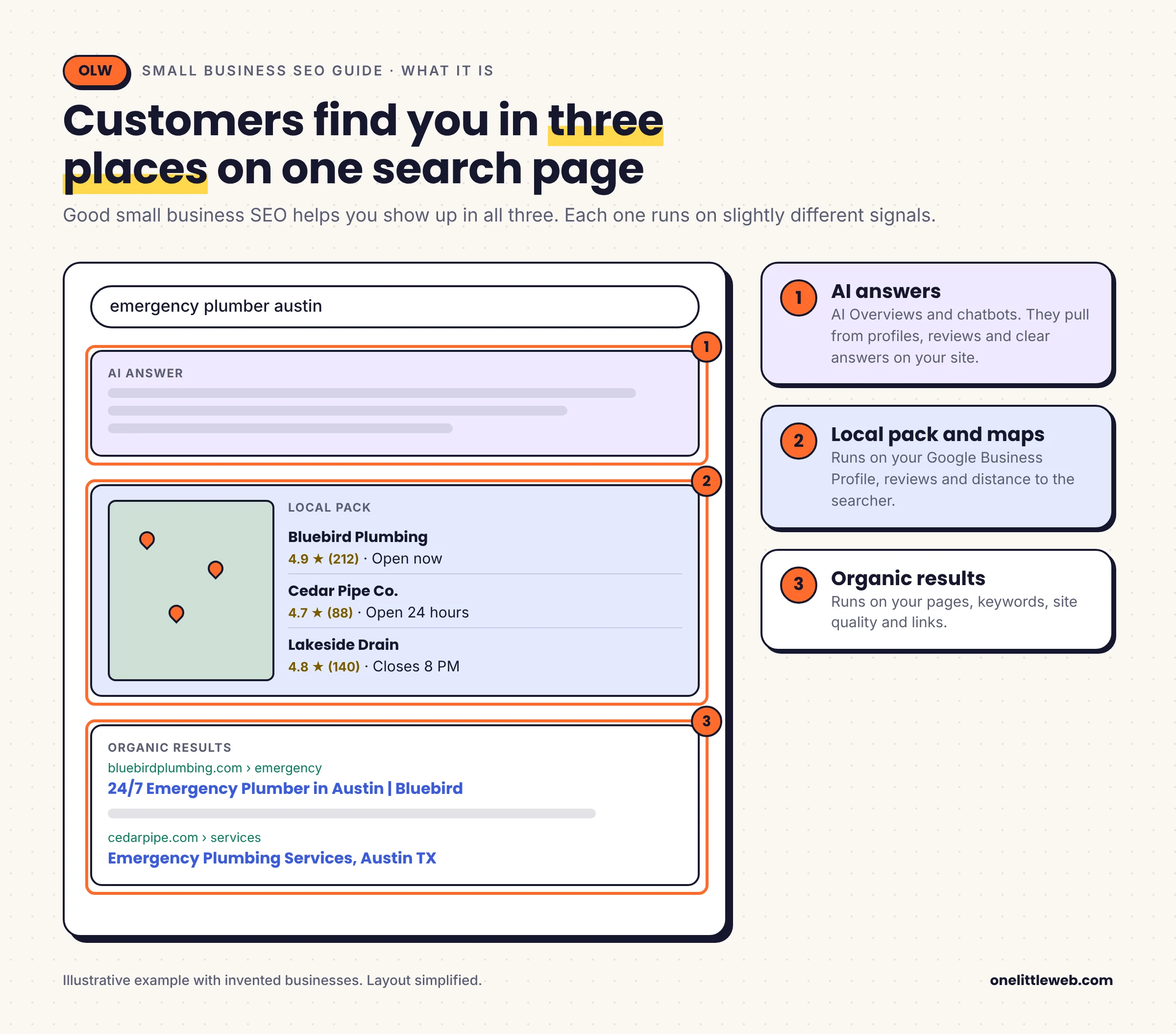
Today, customers find small businesses in three places.
1. Normal search results. The classic list of links. This is still where most organic traffic comes from.
2. The local pack and maps. The map with three businesses that shows up for local searches. One in five local searches now starts directly in a maps app like Google Maps or Apple Maps (BrightLocal).
3. AI answers. Google’s AI Overviews, ChatGPT, Gemini and Perplexity now answer many questions directly. Sometimes they name and link to businesses. Sometimes they don’t.
Good SEO helps you in all three. The steps later in this guide are built that way.
Is SEO worth it for a small business?
Short answer: yes, for most businesses. But only if you know what to expect going in.
The owners who give up on SEO usually expected results in a month or two. Here’s what the data says about time, clicks and cost.
How long SEO takes to work
SEO is slow. Ahrefs tracked 1 million newly published pages and found only 1.74% reached Google’s top 10 within a year. In 2017, that number was 5.7%.
There’s a hopeful side, though. Of the pages that did make the top 10, 40.82% got there within a month. Pages targeting easier, low-volume keywords also ranked faster than pages chasing big ones.
The pages that dominate page one are old. In the same study, 72.9% of top-10 pages were more than three years old, and the average #1 page was about five years old.
What this means for a small business: a local service page targeting “emergency plumber in [your town]” can move within weeks. A blog post chasing a broad, national term may take a year or more, if it ranks at all.
SEO vs paid ads
Many owners ask whether they should just run Google Ads instead. Both have a place. They just work differently.
| SEO | Paid ads (PPC) | |
|---|---|---|
| How you pay | Time, or a monthly fee to an expert | Every click or lead |
| Speed | Months | Same day |
| What happens when you stop | Rankings and traffic usually stay for a while | Traffic stops the day spend stops |
| Trust | Many people skip ads and click organic results | Clearly labeled as ads |
| Best for | Steady, long-term leads | Fast leads, testing offers, busy seasons |
The way I explain it to clients: ads are renting traffic, SEO is building something you own. Most of our clients who run both use ads to fill the gap while SEO grows, then lean on ads less over time.
What AI search changed (and what it didn’t)
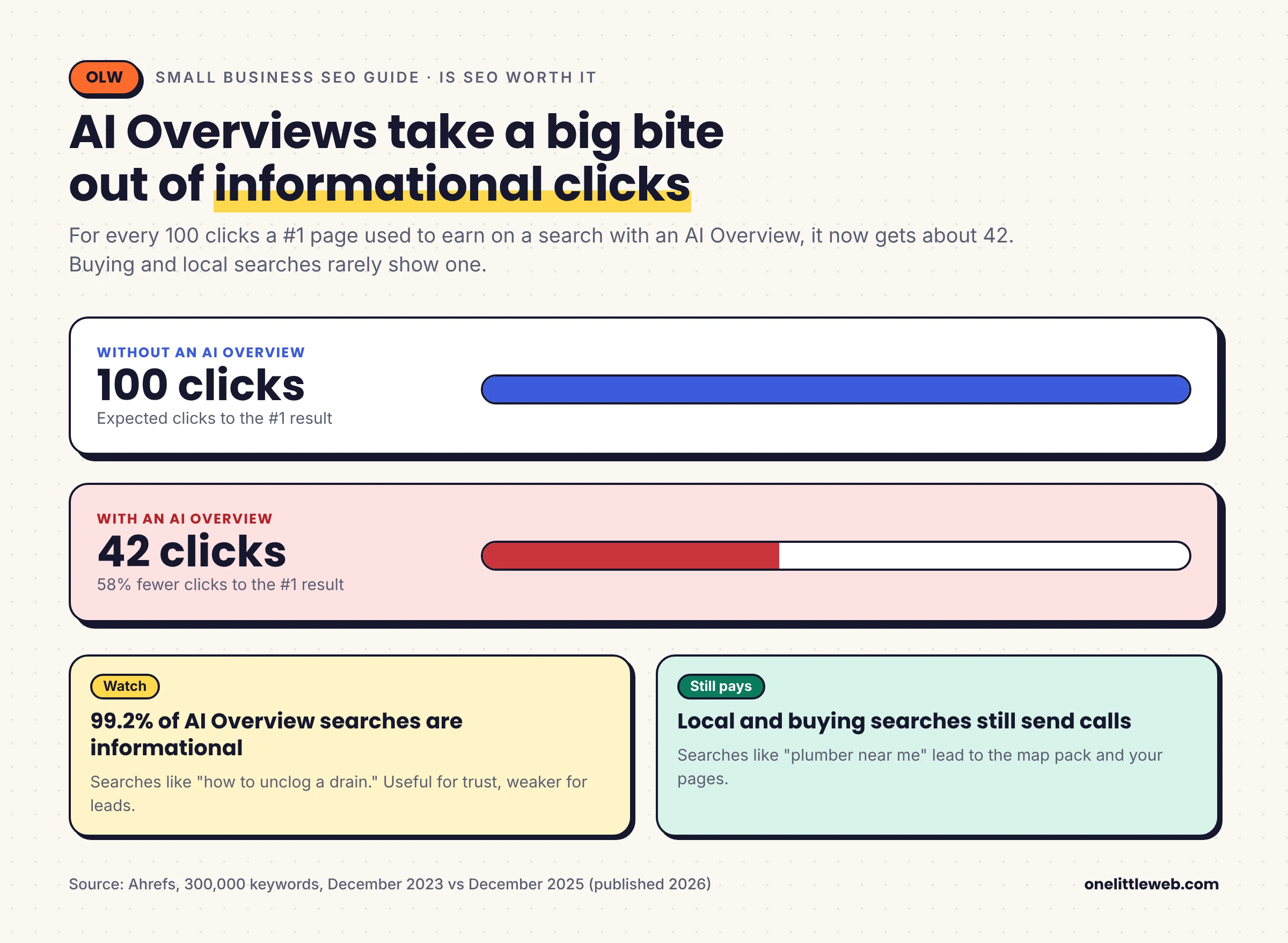
AI Overviews have cut clicks on some searches. Ahrefs compared 300,000 keywords from December 2023 to December 2025. When an AI Overview appeared, the top-ranking page got 58% fewer clicks than expected.
But 99.2% of the keywords that trigger AI Overviews are informational. These are searches like “how to unclog a drain,” not “plumber near me.”
That matters. The searches that bring in calls, bookings and sales are mostly local and buying searches. Those still send traffic to businesses that show up.
Click-through rates for the #1 result vary a lot by study. First Page Sage’s September 2026 report puts the blended rate at 7.1% across pages with and without AI answers. Studies of cleaner results pages from Backlinko and SISTRIX put it around 28%. Either way, ranking #1 gets far more clicks than ranking #5.
There’s also a new upside. First Page Sage found the first source cited in an AI answer got a 5.2% click-through rate, compared with 3.6% for the #1 organic result on the same page. Being the cited business is now a win of its own. I’ll cover how in Step 8.
Set up your free SEO toolkit first
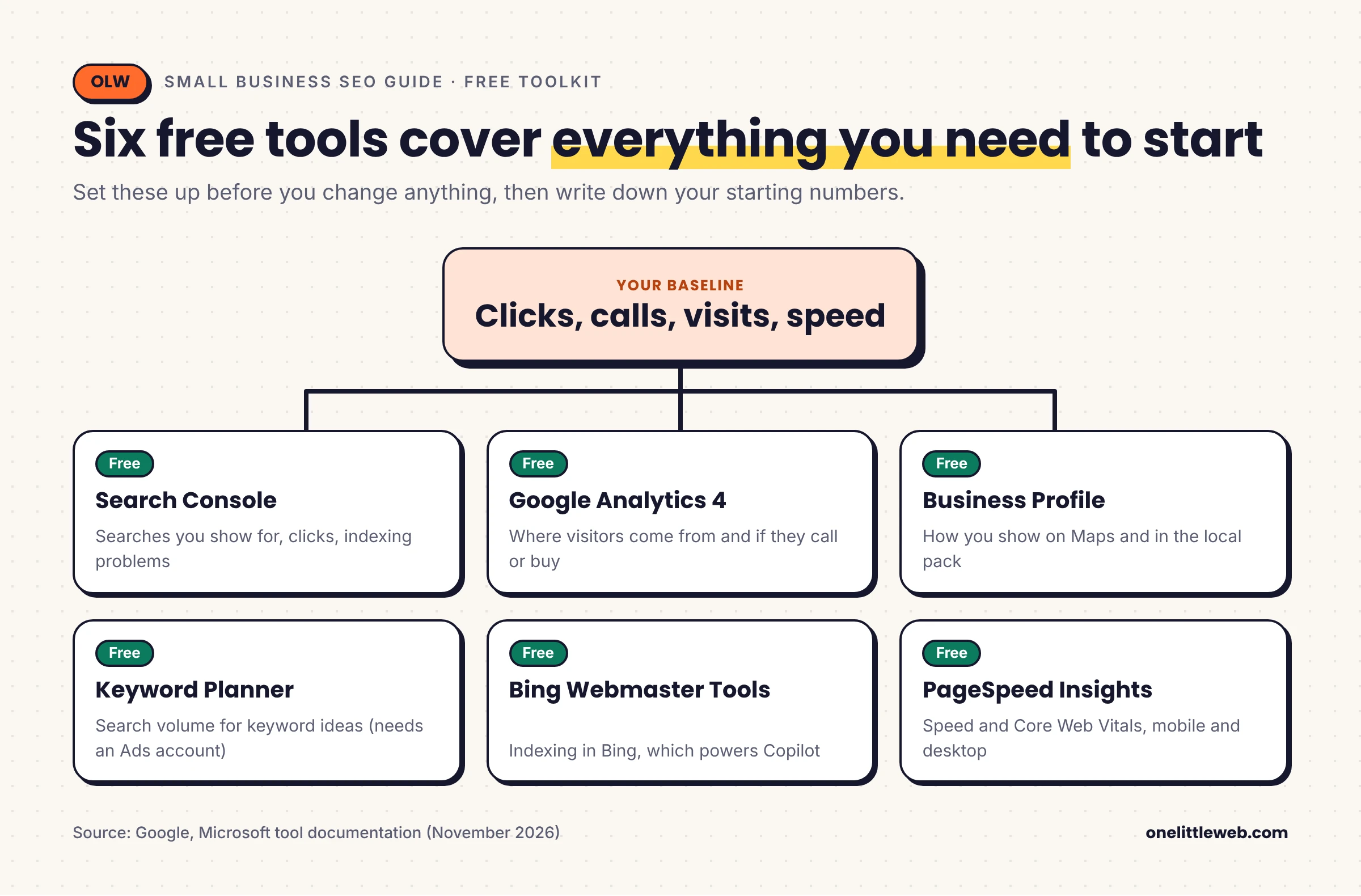
Before you change anything on your site, set up your tools. You need a baseline so you can see what’s working three months from now.
The good news: you don’t need to buy anything to start.
| Free tool | What it does for you | Setup time |
|---|---|---|
| Google Search Console | Shows the searches you appear for, your clicks, rankings and indexing problems | 15 to 30 minutes |
| Google Analytics 4 | Shows how visitors arrive and whether they call, book or buy | 30 to 60 minutes |
| Google Business Profile | Controls how you appear on Google Maps and in the local pack | 30 minutes, plus verification |
| Google Keyword Planner | Shows search volume ranges for keyword ideas | 15 minutes |
| Bing Webmaster Tools | Gets your site indexed in Bing, which also powers Microsoft Copilot | 10 minutes (you can import from Search Console) |
| PageSpeed Insights | Tests how fast your pages load on mobile and desktop | No setup |
A few notes on setup:
- Google Keyword Planner is free, but it sits inside Google Ads. Google asks you to add billing details and create a campaign first. You can pause the campaign and never spend a cent.
- Search Console is where you submit your XML sitemap. Most website builders create one for you automatically.
- Bing Webmaster Tools is often skipped. It takes minutes, and Bing still handles about one in ten US searches.
Once everything is connected, write down your starting numbers: monthly clicks, impressions, organic sessions, calls and form fills. That’s your baseline.
When a paid SEO tool is worth it
Paid tools like Ahrefs and Semrush show you what competitors rank for, how hard a keyword is, and who links to them. That’s useful, but it’s not essential on day one.
Ahrefs starts at $129 a month (Lite), and Semrush starts at about $140 a month (Pro, or around $117 a month billed yearly). Both have limited free options.
My rule of thumb: buy a paid tool when you’re actively publishing content or building links every month and need competitor data to decide what’s next. Until then, the free stack is enough. For a deeper comparison, see our list of the best SEO tools.
Check: Search Console, GA4 and Bing Webmaster Tools are connected, your sitemap is submitted, and your baseline numbers are written down.
How to do small business SEO: 8 steps
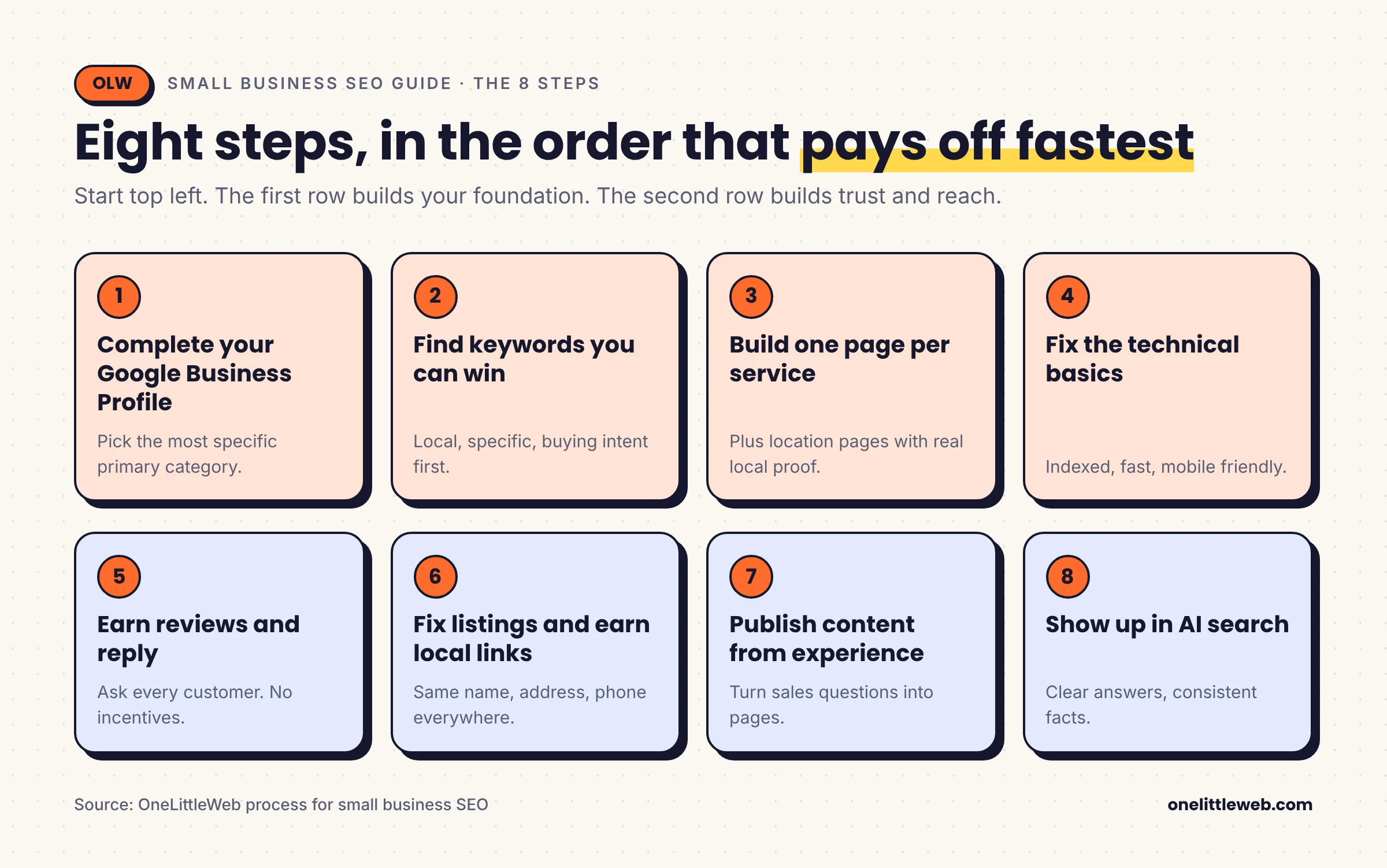
Here’s the order we follow with small business clients. Steps 1 to 4 build your foundation. Steps 5 to 8 build trust and reach.
Each step ends with a check, so you know when it’s done and can move on.
Step 1: Claim and complete your Google Business Profile
If you serve local customers, this is the single most valuable hour you’ll spend on SEO. Your Google Business Profile (GBP) is what shows up in the map pack and on Google Maps. It’s free.
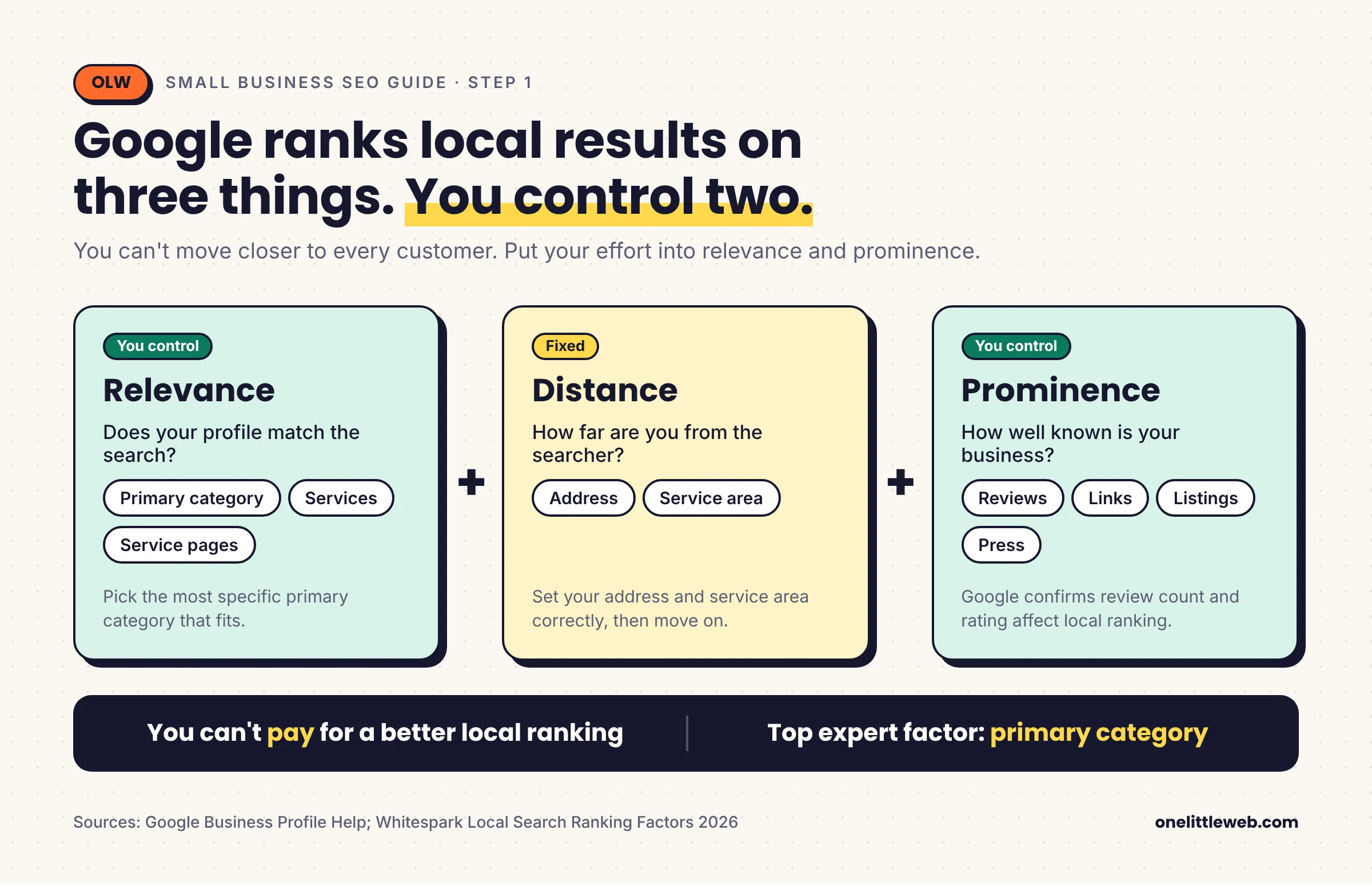
Google says local results are based on three things:
- Relevance: how well your profile matches the search
- Distance: how far you are from the person searching
- Prominence: how well-known your business is, based on reviews, links, articles and directory listings
You can’t change your distance. And Google is clear that there’s no way to pay for a better local ranking. So relevance and prominence are where your effort goes.
What matters most in your profile
Every year, Whitespark surveys local SEO experts on what drives local rankings. In the 2026 report, the top factors for the local pack were:
- Your primary business category
- Distance from the searcher
- Keywords in the business name
- A physical address in the city being searched
- Being open at the time of the search
The first one is fully in your control, and it’s the one I see businesses get wrong most often.
Pick the most specific primary category you can. A bakery that mostly makes wedding cakes should pick “Wedding bakery” over plain “Bakery” if that fits better. Then add secondary categories for your other main services.
A word of warning about the business name. Keywords in the name help rankings, but adding keywords that aren’t part of your real business name breaks Google’s guidelines. Competitors can report it, and Google can suspend your profile. Use your real name only.
Fill in everything
A complete profile helps Google match you to more searches. It also helps customers choose you. Fill in:
- Services or products, with short descriptions
- Hours, including holiday hours
- Service areas, if you travel to customers
- Real photos of your work, team and location
- Your website link and phone number
- Attributes, like “wheelchair accessible” or “women-owned”
Then keep it active. Post updates, add new photos and answer questions when they come in.
Google also lets you check performance in the profile itself: calls, direction requests and website clicks. Add these to your baseline.
If you have Apple customers (and you do), claim your free listing on Apple Business Connect too. BrightLocal found Apple Maps use for finding reviews nearly doubled, from 14% in 2025 to 27% in 2026.
Check: Your profile is verified, uses the most specific primary category, has every section filled in and at least 10 real photos. Apple Business Connect is claimed.
Step 2: Find keywords you can actually win
Keyword research is how you find out what your customers type into Google. Without it, you’re guessing what to put on your pages.
For a small business, the goal isn’t to find the biggest keywords. It’s to find the ones you can realistically rank for and that bring in buyers.
Match keywords to search intent
Every search has a purpose behind it. Google calls this search intent. Your page needs to match it, or it won’t rank.
| Intent | What the searcher wants | Example | Best page type |
|---|---|---|---|
| Local / transactional | To hire or buy now | “emergency plumber austin” | Service page or GBP |
| Commercial | To compare options | “best water heater brand” | Comparison or guide |
| Informational | To learn something | “why is my water heater leaking” | Blog post or FAQ |
| Navigational | To find a specific business | “smith plumbing reviews” | Homepage, GBP, review profiles |
Start with local and transactional keywords. They’re closest to a sale, and big national sites rarely compete for them.
Pick keywords you can win
Here’s a simple process that works with free tools:
- List your services and locations. Combine them: “roof repair dallas,” “roof replacement plano.”
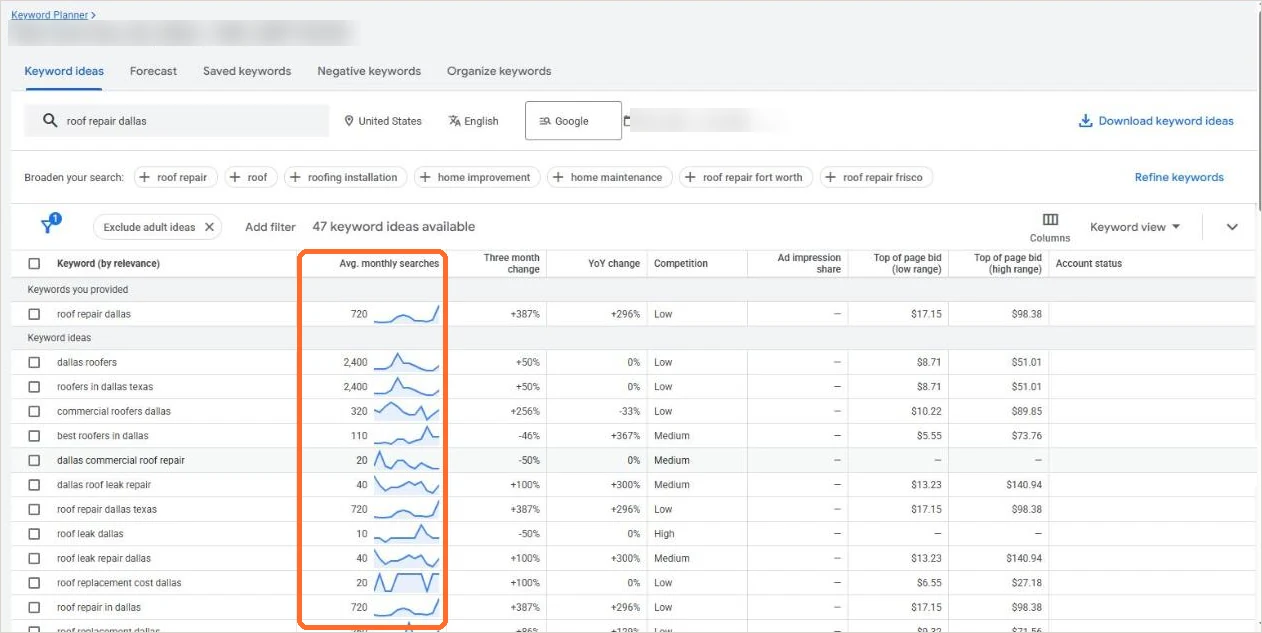
- Check volume in Keyword Planner. If your Ads account has never spent, you’ll see ranges, like 100 to 1K a month. Accounts that run ads see exact averages. Either is enough to compare.
- Search the keyword yourself. Look at who ranks. If page one is full of Yelp, Angi and national brands, go more specific. “Metal roof repair dallas” is easier than “roofer dallas.”
- Favor longer phrases. Long-tail keywords have less volume, but they’re easier to win and usually show clearer buying intent.
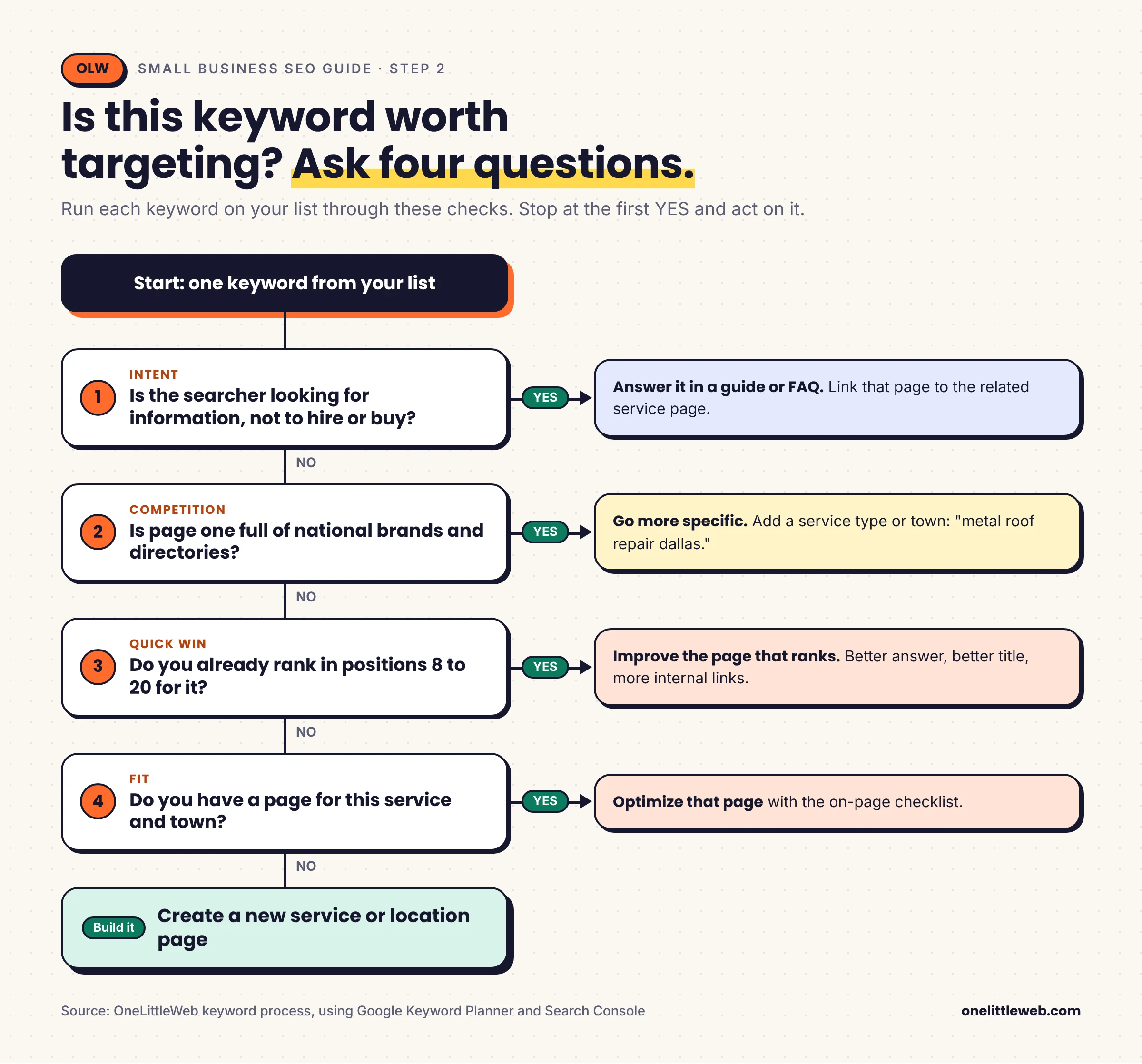
Paid tools add a keyword difficulty score, which estimates how hard a keyword is to rank for. It’s handy, but searching the keyword yourself and looking at the results tells you most of what you need.
Find quick wins in Search Console
If your site already gets some traffic, this is my favorite shortcut.
In Search Console, open the Performance report. Filter for queries where your average position is between 8 and 20. These are searches where Google already sees you as relevant, but you’re stuck at the bottom of page one or on page two.
Improving the page that ranks for those queries is often the fastest win you’ll get. Add a section that answers the query better, improve the title, and add a few internal links to it.
For a deeper walkthrough, see our full keyword research guide.
Check: You have 20 to 30 service + location keywords grouped by service, plus a list of your position 8 to 20 queries.
Step 3: Build pages that match what people search
Once you know your keywords, you need pages that match them. This is on-page SEO: making each page clearly about one thing, so Google and customers understand it fast.
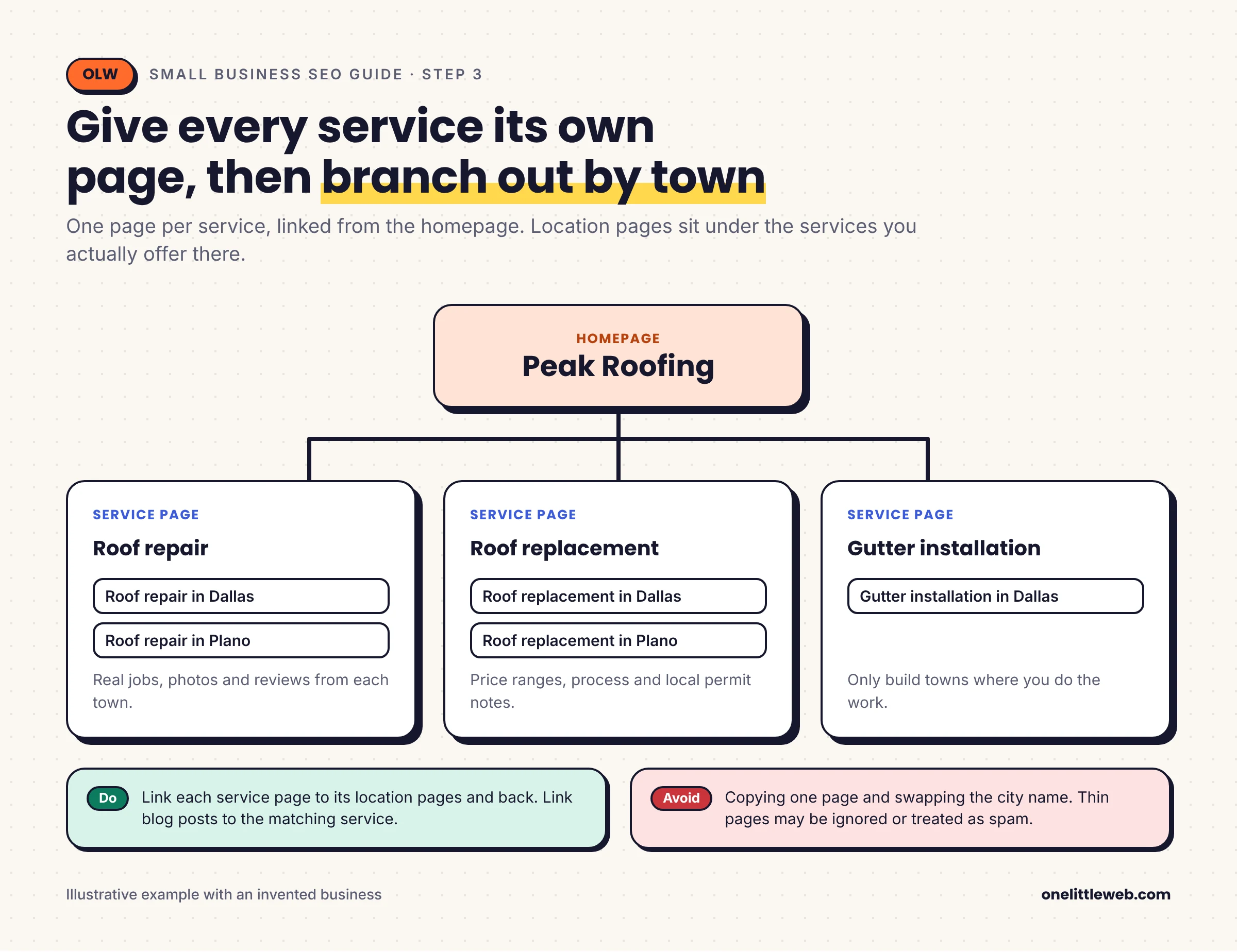
One page per service
The biggest on-page mistake I see on small business sites is one “Services” page that lists everything.
If you offer roof repair, roof replacement and gutter installation, each one should have its own page. In Whitespark’s 2026 survey, having a dedicated page for each service was the #1 factor for local organic rankings.
Each service page should cover:
- What the service is and who it’s for
- Your process, from first call to finished job
- Price ranges or what affects the price
- Photos of real jobs
- Reviews that mention that service
- A clear way to call, book or get a quote
Location pages that aren’t thin
If you serve several towns, location pages can help you rank in each one. But only if each page is useful on its own.
A page that copies the same text and swaps the city name is a thin page. Google may ignore it or treat it as spam.
Good location pages include something real about that area: jobs you’ve done there, local photos, staff based there, reviews from local customers, or details like local permit rules.
The on-page checklist
Use this checklist on every service and location page:
| Element | What good looks like |
|---|---|
| Title tag | Main keyword + location + brand. Aim for about 50 to 60 characters so it isn’t cut off. |
| Meta description | A short pitch with the main benefit and a call to action, about 150 to 160 characters. |
| H1 heading | One clear heading that matches the page’s main topic. |
| Opening lines | Answer the main question in the first two sentences. |
| Subheadings | Break the page into sections that match related questions. |
| Images | Real photos, compressed, with alt text that describes the image. |
| Internal links | Link to related services, locations and your contact page. |
| Call to action | Phone number, booking button or form near the top and bottom. |
A note on character counts: Google has no official limit. It cuts off titles based on pixel width, and it rewrites many titles and descriptions anyway. Treat these numbers as a guide, not a rule.
Link your pages together
Internal links are links from one page on your site to another. They help Google find your pages and understand how they relate.
Link each service page to the location pages where you offer it, and the other way around. Link blog posts to the service they relate to. This is free, and it’s one of the most overlooked fixes on small sites.
Check: Each main service has its own page, your top five pages pass the checklist, and related services and locations link to each other.
Step 4: Fix the technical basics
Technical SEO sounds scary, but for most small business sites, the basics are simple. The goal: make sure Google can find your pages, load them fast and read them on a phone.
You don’t need a developer for most of these checks.
Speed and Core Web Vitals
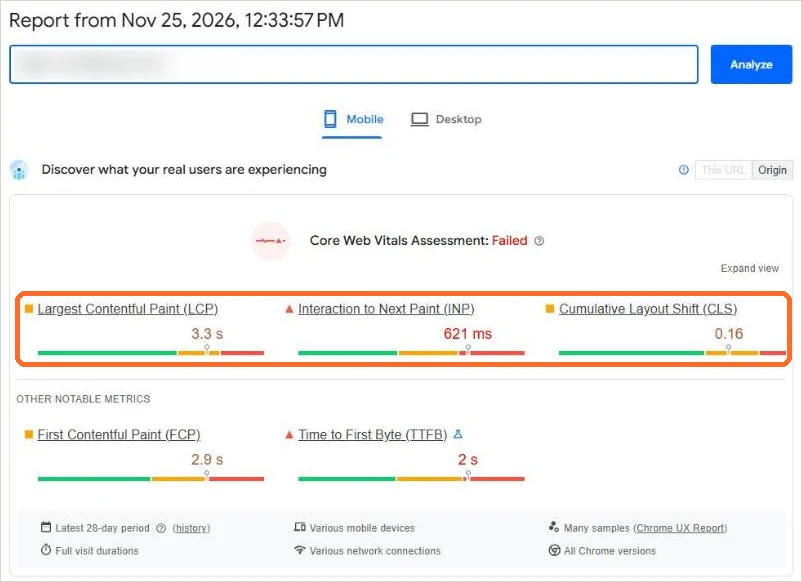
Google measures page experience with three metrics called Core Web Vitals. Here’s what “good” looks like, based on Google’s own thresholds:
| Metric | What it measures | Good | Poor |
|---|---|---|---|
| Largest Contentful Paint (LCP) | How fast the main content loads | 2.5 seconds or less | Over 4 seconds |
| Interaction to Next Paint (INP) | How fast the page responds to taps and clicks | 200 milliseconds or less | Over 500 milliseconds |
| Cumulative Layout Shift (CLS) | How much the page jumps around while loading | 0.1 or less | Over 0.25 |
INP replaced an older metric called First Input Delay in March 2024, so older guides may still mention FID.
You can check all three in PageSpeed Insights or in the Core Web Vitals report in Search Console. The most common fixes on small sites are compressing large images, removing unused plugins and using decent hosting.
Mobile first
Google mainly looks at the mobile version of your site when deciding rankings. This is called mobile-first indexing.
That matters because your customers are on their phones too. BrightLocal found 73% of local searches start on a mobile device. Open your site on your phone and try to call, book and find your prices. If anything is hard, fix it.
A 5-minute technical check
| Check | Where to look | What good looks like |
|---|---|---|
| Pages are indexed | Search Console, Pages report | Your key pages show as “Indexed” |
| Sitemap is submitted | Search Console, Sitemaps | Status shows “Success” |
| Site uses HTTPS | Your browser’s address bar | Padlock icon, no warnings |
| Mobile works | Your own phone | Easy to read, tap and call |
| Speed passes | PageSpeed Insights | Core Web Vitals pass on mobile |
| No broken pages | Search Console, Pages report | No important pages showing errors |
Schema markup
Schema markup is code that tells search engines specific facts about your business, like your name, address, hours and services.
For a small business, the most useful types are LocalBusiness (or a more specific type like Plumber or Dentist) and Service. Many SEO plugins add these for you.
One update: Google stopped showing FAQ rich results in search on May 7, 2026. You can keep FAQ markup if you have it, since it does no harm. Just don’t add it expecting those dropdowns in Google.
Your website builder matters
Your CMS (the system your site runs on) decides how much of this you can control. WordPress gives you the most control. Shopify, Wix and Squarespace handle sitemaps and HTTPS for you, but limit some technical changes.
If your site is very slow or your key pages aren’t indexed after a few weeks, that’s when to bring in a developer.
Check: Your homepage and top service page pass Core Web Vitals on mobile, your key pages are indexed, and LocalBusiness schema is in place.
Step 5: Earn more reviews (and answer them)
Reviews help you in two ways. They help you rank, and they help customers choose you over the business next to you in the map pack.
Google says it directly: review count and review score factor into local search ranking. In Whitespark’s 2026 survey, experts estimated reviews make up about 20% of what drives local pack rankings.
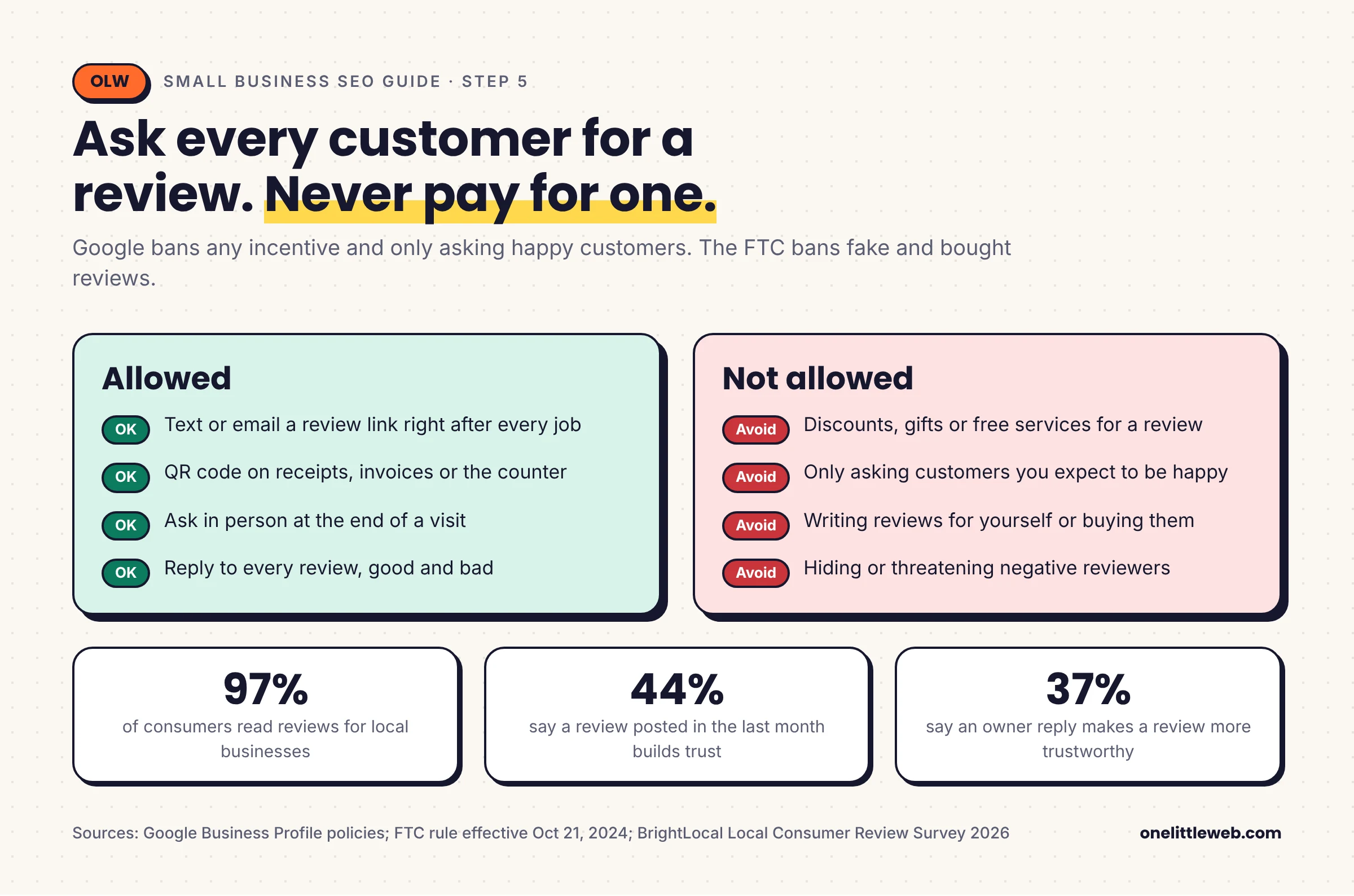
And customers read them. BrightLocal’s 2026 survey found:
- 97% of consumers read reviews for local businesses
- 41% “always” read reviews, up from 29% a year earlier
- Consumers use an average of six review sites
- The things that make a review most trustworthy include being recent (44%) and getting a reply from the owner (37%)
That last point matters. A steady flow of new reviews beats a big batch from two years ago.
How to get reviews the right way
The best review systems are boring and consistent. Ask every customer, every time, at the moment they’re happiest.
- Send a review link by text or email right after the job is done
- Add a QR code to receipts, invoices or your counter
- Train your team to ask in person at the end of a visit
- Make the link one tap, straight to your Google review form
What you can’t do
Two sets of rules apply here: Google’s and the FTC’s.
Google’s rules are strict. Google prohibits offering any incentive, like discounts, gifts or free services, in exchange for reviews. It also bans review gating, which means only asking customers you expect to be happy. Breaking these rules can get your reviews removed or your profile restricted.
The FTC’s rule took effect on October 21, 2024. It bans fake reviews, buying positive or negative reviews, and hiding negative ones. The FTC can now seek civil penalties against businesses that break it.
So ask everyone, offer nothing in return, and never write reviews for yourself.
Reply to every review
Reply to good reviews with a short, personal thank-you. Reply to bad reviews calmly, without arguing, and offer to fix the problem offline.
Future customers read your replies as much as the reviews. A thoughtful reply to a one-star review can win more trust than ten five-star ones.
Check: Every customer gets a review link after the job, and every review from the last three months has a reply.
Step 6: Get listed and earn local links
So far, everything has happened on your own site and profile. This step is about what the rest of the internet says about you. Google uses this to judge your prominence.
Lock down your NAP and core listings
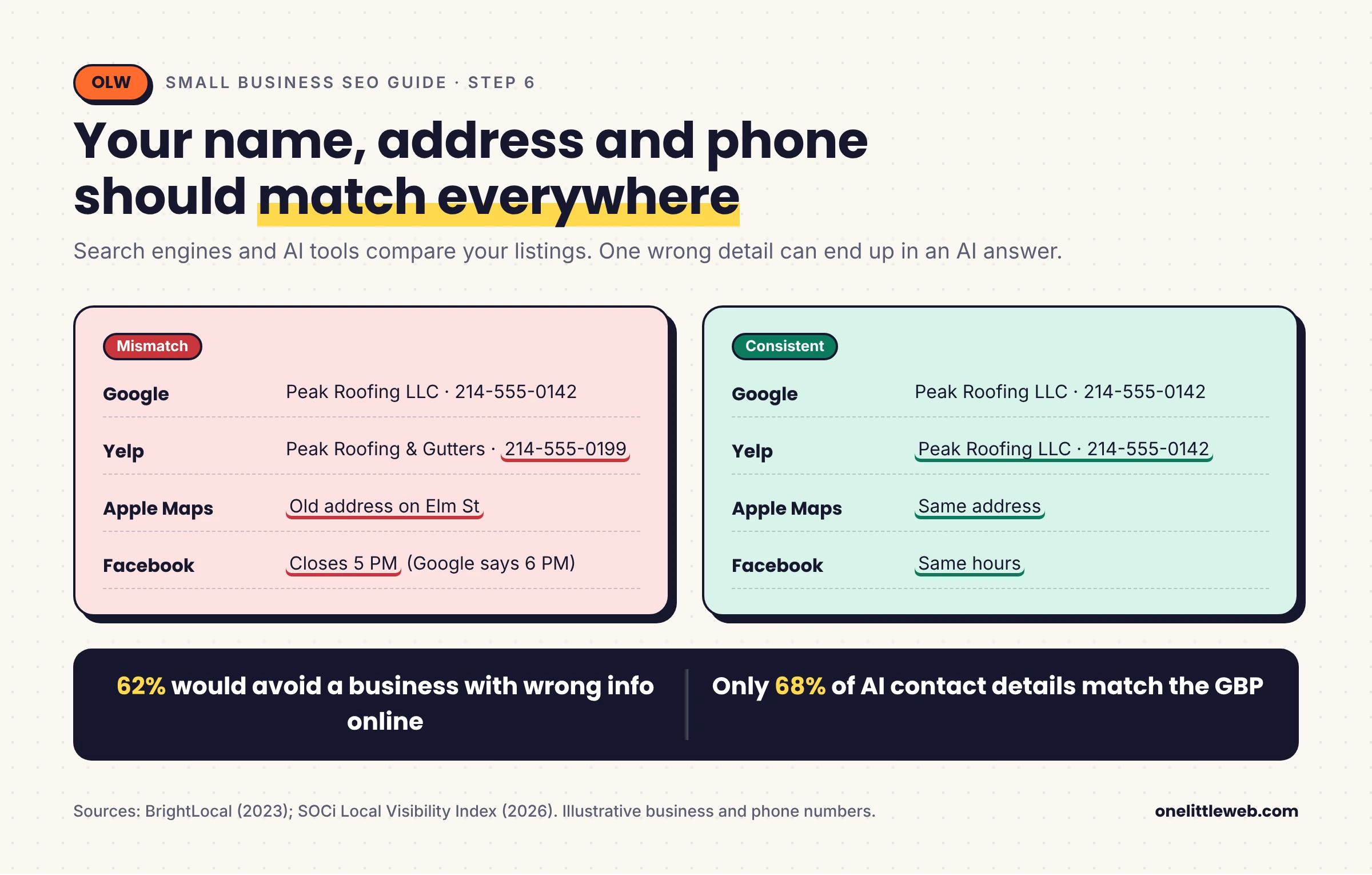
NAP stands for name, address and phone number. It should be exactly the same everywhere your business is listed.
Mismatched details confuse search engines and customers. BrightLocal found 62% of consumers would avoid a business if they found incorrect information online.
AI tools make this even more important. A 2026 SOCi study found only 68% of business contact details on ChatGPT and Perplexity matched the business’s Google Business Profile. AI tools pull from many listings, so one wrong listing can end up in an AI answer.
Start with the listings that matter most:
- Google Business Profile
- Apple Business Connect
- Bing Places for Business
- Yelp
- Your industry’s main directory (for example, Avvo for lawyers or Healthgrades for doctors)
- Your local chamber of commerce
You don’t need 500 directory listings. A dozen accurate, relevant ones beat hundreds of low-quality ones.
Local link ideas that work
Backlinks are links from other websites to yours. They’re one of the strongest signs to Google that your business is trusted. In Whitespark’s 2026 survey, links were estimated to drive about 24% of local organic rankings.
For a small business, the best links usually come from real-world relationships:
- Local sponsorships. Youth sports teams, charity runs and school events often list sponsors with a link.
- Chamber of commerce and business groups. Membership usually includes a directory listing.
- Suppliers and partners. Ask brands you use or partners you work with to list you as a dealer, installer or partner.
- Local press. A new location, an unusual project or a community effort can earn a mention in local news.
- Industry associations. Member directories are often trusted, relevant links.
- Customer case studies. B2B clients may feature you on their site if you helped them.
Link building is the part of SEO where we spend the most time at OLW, and it’s where shortcuts cause the most damage. Avoid anyone selling “1,000 backlinks for $99.” Those links are usually spam, and they can hurt more than help.
If you want to see who links to your competitors, a tool like Ahrefs or Semrush shows their backlinks. That often reveals local sites you haven’t approached yet.
Check: Your name, address and phone match on your top 10 listings, and two local link efforts are underway.
Step 7: Publish content that shows real experience
Content is anything you publish that answers your customers’ questions: service pages, guides, FAQs, project write-ups and blog posts.
Google’s guidance says it rewards helpful, people-first content. It also looks for signs of E-E-A-T: experience, expertise, authoritativeness and trust. In plain terms, Google wants to see that a real business with real experience wrote the page.
That’s good news for small businesses. You have something big brands and AI-written content don’t: first-hand experience with real customers.
Turn your sales questions into pages
The best content ideas aren’t in keyword tools. They’re in your inbox and on your phone.
Write down every question customers ask before they buy. Things like:
- “How much does it cost?”
- “How long does it take?”
- “Do I need a permit?”
- “What’s the difference between X and Y?”
- “Is it worth repairing, or should I replace it?”
Each good question can become a section on a service page or a short article. Answer it honestly, with real numbers and examples from your own work.
Show the experience
Readers and search engines trust content that shows proof. Add:
- Photos from real jobs, not stock images
- Before-and-after examples with short notes on what you did
- Price ranges based on your actual quotes
- An author bio with your real experience and credentials
Update before you publish more
You don’t need a new blog post every week. For most small businesses, one or two strong pieces a month is plenty.
Every few months, review your most important pages. Update prices, add new photos and answer new questions. Fresh, accurate pages tend to hold their rankings better, and AI tools prefer recent content too.
Check: Your top three pre-sale customer questions are answered on your site, and your blog has an author bio.
Step 8: Show up in AI search
More customers now ask AI tools for recommendations. BrightLocal’s 2026 survey found AI tools like ChatGPT are now among the most common sources people use to find local businesses, behind only Google and Facebook.
The good news: most of what gets you into AI answers is what you’ve already done in Steps 1 to 7.
How AI tools choose businesses
AI tools like Google’s AI Overviews, ChatGPT and Perplexity search the web, read a few sources, and write an answer. For local recommendations, they lean heavily on:
- Business profiles (Google, Apple, Bing)
- Review sites and the reviews themselves
- Directory listings and “best of” lists
- Your website, if it clearly answers the question
This is sometimes called generative engine optimization, or GEO. For a small business, it’s mostly good SEO plus consistency.
Whitespark’s 2026 report was the first to score AI visibility factors. The experts found local and AI search signals now overlap heavily.
What to do
- Make your facts consistent everywhere. AI tools pull from many sources. If your hours or services differ across listings, the AI may get them wrong.
- Answer questions clearly on your site. Put the direct answer in the first sentence or two of each section. “We charge $150 to $300 for a standard drain cleaning” is easy for AI to quote. “Contact us for pricing” isn’t.
- Get on the lists AI cites. Search “best [your service] in [your city]” in ChatGPT and Google. See which sites get cited. Then work on getting listed or reviewed on those sites.
- Don’t forget Bing. Microsoft Copilot runs on Bing, and ChatGPT has used Bing data among its sources. Verify your site in Bing Webmaster Tools and claim Bing Places.
- Keep reviews coming. AI tools often summarize reviews when they recommend businesses.
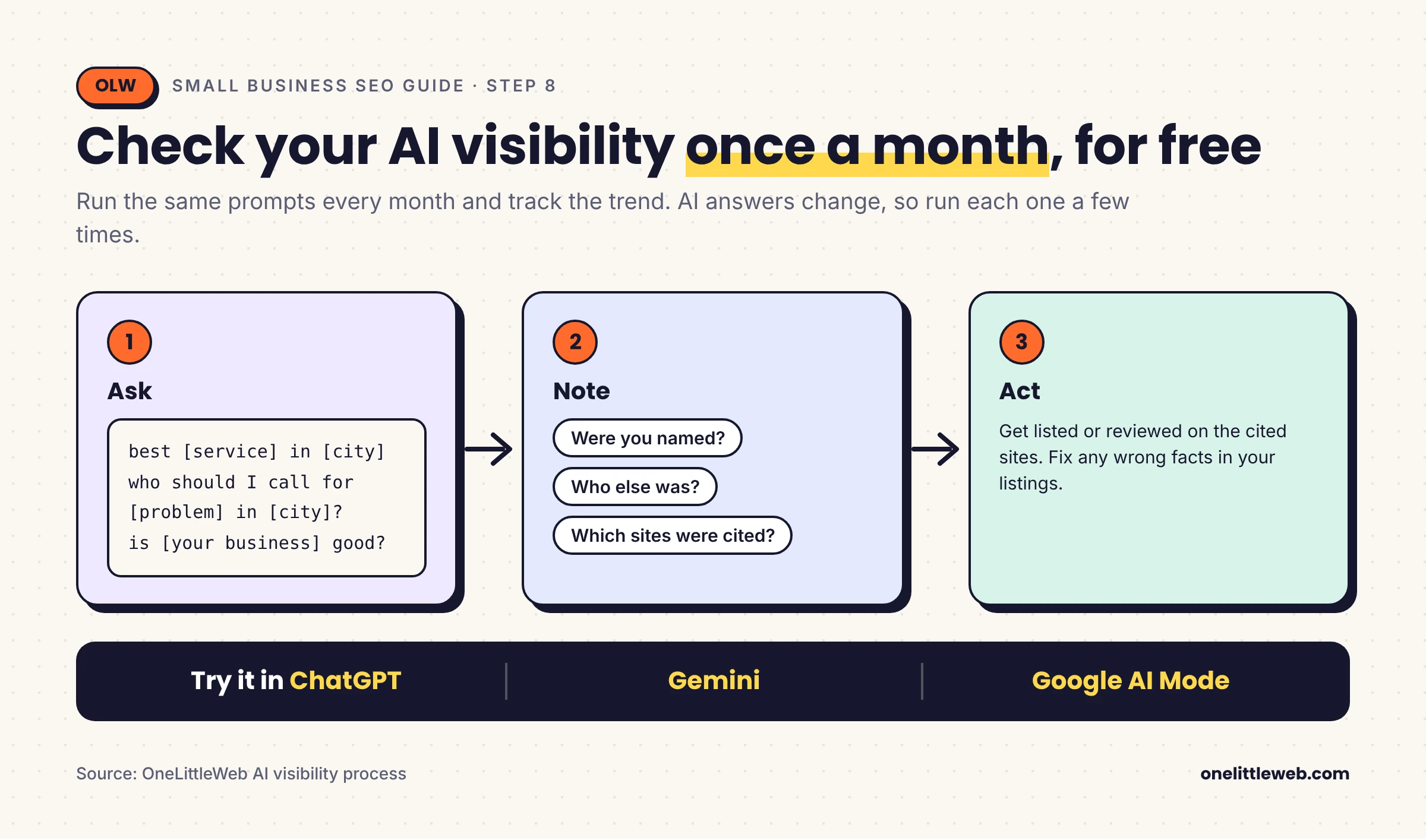
Check your AI visibility once a month
You don’t need an expensive tool to start. Once a month, ask ChatGPT, Gemini and Google (AI Mode) questions like:
- “Best [service] in [city]”
- “Who should I call for [problem] in [city]?”
- “Is [your business name] good?”
Write down whether you’re mentioned, who else is mentioned, and which sites are cited. Run each prompt a few times, because AI answers change.
It’s worth the effort. First Page Sage found the #1 business recommended by ChatGPT got a 10.3% direct click-through rate, plus more visits from people who searched the brand name afterward.
For the full process, read our guide to LLM SEO or our broader AI search optimization guide.
Check: You’ve run five “best [service] in [city]” prompts, noted which sites are cited, claimed Bing Places and fixed any wrong details.
How to track your SEO progress
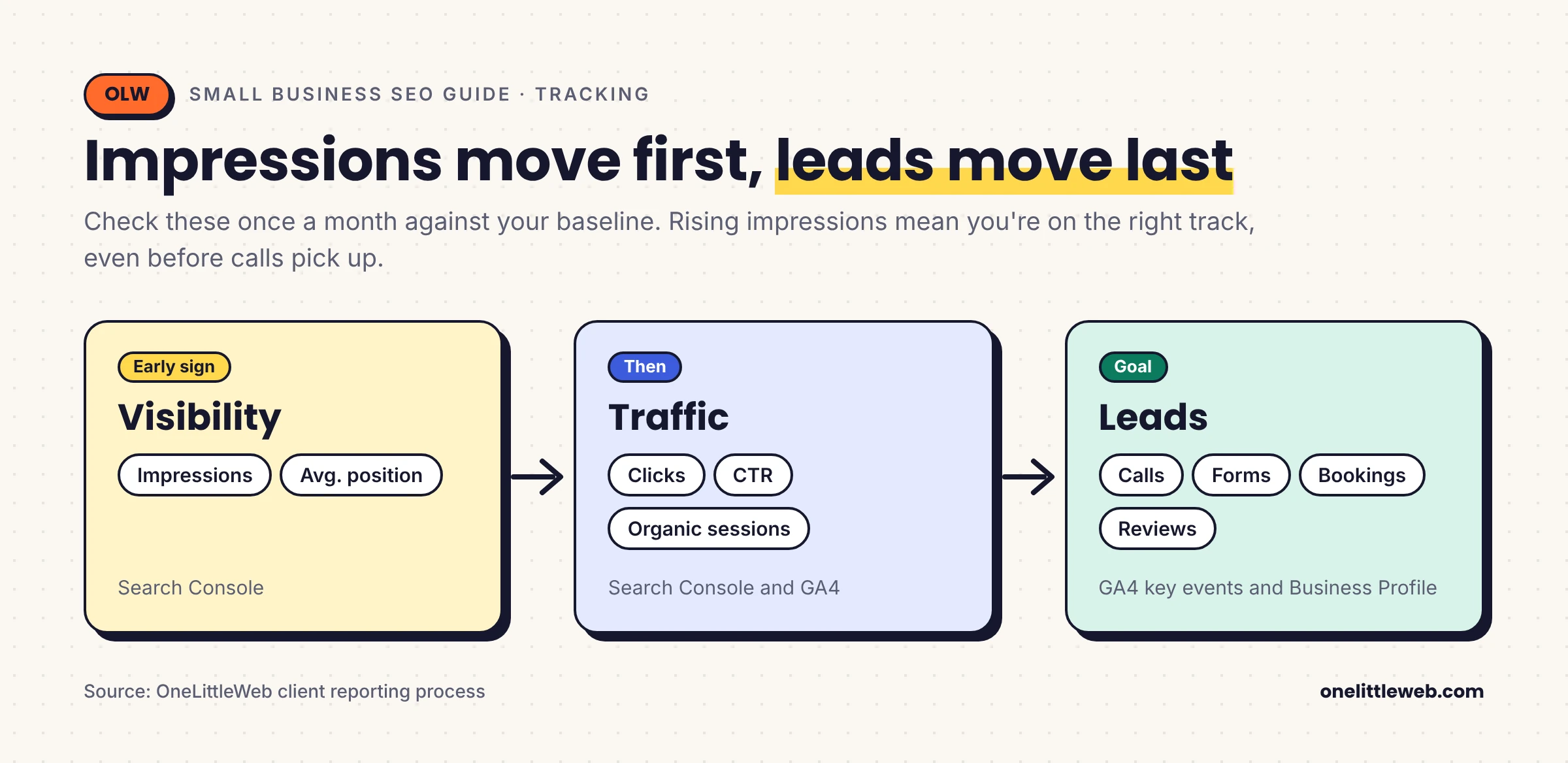
SEO takes months, so you need early signs that it’s working before the leads pick up. That’s why you set a baseline at the start.
Here are the numbers worth tracking, and where to find each one:
| Metric | Where to find it | Why it matters | How often to check |
|---|---|---|---|
| Impressions | Search Console | Shows Google is showing you for more searches. Usually the first thing to grow. | Monthly |
| Clicks | Search Console | Real visitors from search | Monthly |
| Average position | Search Console | Direction of your rankings over time | Monthly |
| Click-through rate | Search Console | Whether your titles and descriptions win the click | Monthly |
| Organic sessions | GA4 | Total visits from search | Monthly |
| Key events (conversions) | GA4 | Calls, forms and bookings from search. The number that pays the bills. | Monthly |
| Calls, directions, website clicks | Google Business Profile | Local pack performance | Monthly |
| Review count and rating | Google Business Profile | Your reputation and a local ranking factor | Monthly |
| AI mentions | Manual prompt checks | Whether AI tools recommend you | Monthly |
Impressions usually grow first, then clicks, then leads. If impressions are rising, you’re on the right track, even if calls haven’t picked up yet.
A 30-minute monthly review
Once a month, block 30 minutes and do this:
- Compare the last 28 days in Search Console with the previous period.
- Note which pages gained or lost clicks.
- Check your position 8 to 20 queries for new quick wins.
- Check calls and website clicks in your Business Profile.
- Count new reviews and reply to any you missed.
- Run your AI prompts and note any changes.
- Pick the one or two tasks for next month.
Avoid checking rankings every day. They move up and down constantly, and daily checks lead to panic changes that do more harm than good.
Your first 90 days: a simple SEO plan
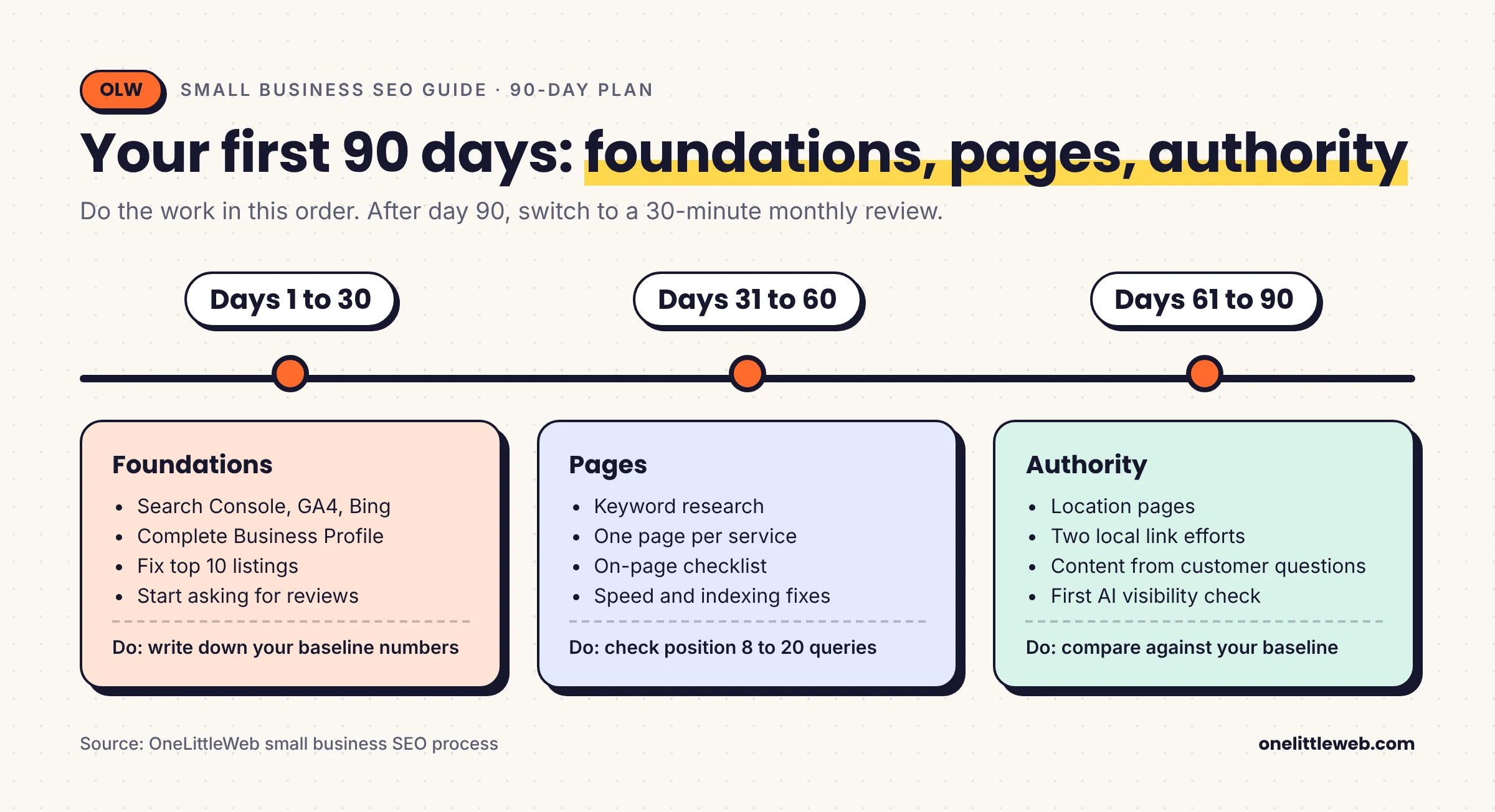
If you only remember one section of this guide, make it this one. Here’s how I’d spend the first 90 days for a typical local small business.
This is the 80/20 rule applied to SEO: a small number of tasks drive most of the results. Do these first, in this order.
| Period | Focus | Tasks |
|---|---|---|
| Days 1 to 30 | Foundations | Set up Search Console, GA4, Bing Webmaster Tools. Complete your Google Business Profile. Fix NAP on your top 10 listings. Start asking every customer for a review. |
| Days 31 to 60 | Pages | Do keyword research. Create or improve one page per main service. Run the on-page checklist. Fix speed and indexing issues. |
| Days 61 to 90 | Authority | Build location pages for your main areas. Start two local link efforts. Turn your top customer questions into content. Run your first AI visibility check. |
After 90 days, switch to the monthly routine: track, update one or two pages, keep reviews flowing, and add one local link effort each month.
Common small business SEO mistakes
- Choosing the wrong primary category. It’s the top local ranking factor. Pick the most specific one that fits.
- One page for all services. Give each main service its own page.
- Copy-paste location pages. Swapping the city name isn’t enough. Add real local proof or skip the page.
- Chasing big keywords. Start with specific, local, buying-intent searches you can win.
- Not tracking anything. Without a baseline, you can’t tell what’s working.
- Buying cheap links or reviews. Both can get you penalized, and fake reviews now break FTC rules.
- Publishing AI filler. Generic posts don’t help. Content with your real experience does.
- Giving up at month three. Most SEO results take longer. Impressions usually rise before leads do.
Should you do SEO yourself or hire help?
You can do a lot of small business SEO yourself. Steps 1 to 5 in this guide are very doable for most owners.
Where it gets harder is competitive markets, technical problems and link building. Those take more time, skill and contacts.
Here’s what the different options typically cost, based on Ahrefs’ survey of 439 SEO professionals:
| Option | Typical cost | Best for | Watch out for |
|---|---|---|---|
| Do it yourself | Your time, plus $0 to about $140/month for tools | Low-competition local markets, owners with time to learn | Slow progress if you can’t keep it up |
| Freelancer | About $1,349/month on average | Specific tasks like content or on-page fixes | Varying skill levels; gaps when they’re busy |
| Agency | About $3,209/month on average | Competitive markets, full strategy, link building | Long contracts, unclear reporting |
A few more numbers from the same survey:
- The most common monthly retainer is $501 to $1,000
- 68.8% of SEOs charge $2,000 a month or less
- The US median is $1,501 to $2,000 a month
- Local SEO averages $1,557 a month
- The most common hourly rate is $75 to $100
The survey was last updated in 2024, so prices today may be a little higher. A separate SE Ranking survey found agencies charge about $937 a month on average for newer AI search optimization services.
Red flags when hiring
Walk away if an SEO provider:
- Guarantees #1 rankings (no one can)
- Won’t explain what they’ll actually do each month
- Won’t give you access to your own Search Console, Analytics or Business Profile
- Sells links in bulk or uses “private networks”
- Locks you into a long contract before showing results
- Reports only on rankings, not on traffic, calls or sales
Questions to ask before you hire
- What will you do in the first 90 days?
- How will you report results, and how often?
- Can you show results for a business like mine?
- How do you build links?
- Who owns the content and accounts if we stop working together?
What about Local Services Ads?
For some service businesses, Google’s Local Services Ads are worth testing alongside SEO. They appear above the map pack, and you pay per lead instead of per click. Google says lead prices vary by location, job type and how you bid.
Google is moving Local Services Ads into Google Ads as Performance Max campaigns with pay-per-lead goals. The move started with some US categories in August 2026, with other businesses following in phases. They’re ads, not SEO, but they rely on the same Google Business Profile and reviews you’re building now.
At OneLittleWeb, we help businesses with the parts that are hardest to do alone, like link building, local SEO and AI search optimization. If you want a second opinion first, you can get a free SEO + AI growth audit to see where your site stands.
FAQ
How do I do SEO for my small business?
Start with a complete Google Business Profile, then research the keywords your customers use. Create one clear page per service, fix basic speed and mobile issues, ask every customer for a review, and get listed on key directories. Track progress monthly in Google Search Console.
How much does SEO cost for a small business?
If you do it yourself, the main cost is your time, since the core Google tools are free. Hiring help usually costs $501 to $1,000 a month for the most common retainers, with an average of $2,917 a month, according to an Ahrefs survey of 439 SEOs. Local SEO averages $1,557 a month.
How long does SEO take for a small business?
Expect a few months before you see steady results. Easier local searches can move within weeks, but Ahrefs found only 1.74% of new pages reach Google’s top 10 within a year. Impressions in Search Console usually rise first, then clicks, then leads.
Can I do SEO myself?
Yes. Setting up your Google Business Profile, building service pages, collecting reviews and fixing listings are all doable without an expert. Many owners hire help later for link building, technical fixes or competitive markets where progress is harder.
Is SEO still worth it in 2027?
Yes, for most small businesses. AI Overviews have reduced clicks on informational searches, but local and buying searches still send calls and visits. SEO also helps you show up in AI answers, since AI tools pull from the same profiles, reviews and websites.
What is the 80/20 rule in SEO?
It’s the idea that about 20% of SEO tasks drive about 80% of results. For a small business, that 20% is usually your Google Business Profile, one strong page per service, a steady flow of reviews, and accurate listings.
Can ChatGPT do SEO for me?
Not on its own. ChatGPT can help you brainstorm keywords, draft page outlines and write first drafts. But it can’t build links, earn reviews, set up your Business Profile or check real search data. And content it writes still needs your real experience added to be useful.
Is local SEO different from regular SEO?
Yes. Local SEO focuses on showing up in map results and “near me” searches, using your Google Business Profile, reviews and local listings. Regular SEO covers all search results. Most small businesses with a local customer base need both.
Start small, stay consistent
SEO rewards the businesses that keep going. Not the ones that do everything at once.
If you’re starting this week, do three things: complete your Google Business Profile, set up Search Console, and start asking every customer for a review. Those alone put you ahead of most of your local competitors.
Then work through the steps one month at a time. Check your numbers, fix what’s weak, and keep adding proof of the good work you already do. That’s what search engines, AI tools and customers are all looking for.
Where to go next
- LLM SEO: How to Get Cited by ChatGPT, Google AI Overviews and Perplexity
- AI Search Optimization: How to Get Your Business Found in AI Answers
- SEO vs AEO vs GEO: What’s the Difference?
- Best SEO Tools
- Keyword Research Guide
- SaaS SEO Guide
Methodology
Sources
This guide uses public studies and official documentation. Main sources: Google Business Profile Help, Google Search Central and web.dev (local ranking, Core Web Vitals, FAQ rich results), Google Ads Help (Keyword Planner, Local Services Ads), the FTC (Consumer Reviews and Testimonials rule), Ahrefs (ranking time, AI Overviews CTR, SEO pricing survey), BrightLocal (Local Consumer Review Survey 2026, local SEO statistics), Whitespark (Local Search Ranking Factors 2026), First Page Sage (CTR reports, September 2026), SOCi, SE Ranking and StatCounter.
Time periods
- Ahrefs ranking study: 1M URLs first seen in September 2023, tracked for one year.
- Ahrefs AI Overviews study: 300,000 keywords, December 2023 vs December 2025.
- Ahrefs SEO pricing survey: 439 respondents, last updated August 2024.
- BrightLocal review survey: published February 11, 2026.
- Whitespark ranking factors: published November 6, 2025.
- StatCounter market share: October 2026.
Why numbers differ
Click-through rate studies measure different search result layouts. Some measure clean pages with only organic links. Others blend in pages with ads, maps and AI answers. We show ranges where studies disagree.
Limitations
- Whitespark’s ranking factors come from an expert survey, not Google data.
- SEO pricing data comes from self-reported surveys.
- AI search behavior changes quickly. Check AI-related figures again before relying on them.
Last checked November 2026.