Creating high-quality content that ranks well, engages readers, and drives real results is tough. Most writers and marketers face the same issues every day: tight deadlines, writer’s block, consistent brand voice across pieces, optimizing for SEO without sounding robotic, and more.
I get it because I’ve lived it. At OneLittleWeb (OLW), we’ve managed content for hundreds of clients over the past 8+ years, from SaaS startups to B2C brands across the US, UK, Canada, and Australia, supporting everything from content optimization to advanced keyword research strategies.
We’ve tested dozens of content writing tools while producing blog posts, landing pages, email copy, and more for over 500 client campaigns. This hands-on work helps us spot what actually saves time and improves results versus what just adds hype.
One strong example comes from our work with an AI SaaS client. Their monthly SEO traffic jumped from 10.5M to 18.5M (a 76% year-over-year increase), plus massive gains in chatbot and LLM referrals.
Content played a key role here. We needed tools that helped craft clear, structured, and optimized pieces fast to support those gains.
In this guide, I share the 12 best content writing tools I personally tested across those real campaigns.
You’ll get honest picks based on what delivered measurable wins (better rankings, faster production, higher engagement), not just shiny features.
I selected these tools using clear criteria:
- Accuracy and output quality
- Ease of use
- Pricing and value
- Integrations
- Reliability and speed
- Specific features
What is a Content Writing Tool?
A content writing tool is software that helps create, edit, improve, and optimize written content like blog posts, social media captions, emails, or marketing copy. Many modern tools now sit alongside AI marketing tools, supporting faster ideation and smarter execution.
These tools handle tasks such as checking grammar and spelling, suggesting better words, generating ideas or full drafts (especially with AI), researching keywords, analyzing readability, and making content SEO-friendly so it ranks higher on Google.
Some also support SEO audit insights and basic competitor analysis to guide what content to create and how to improve it.
Freelance writers, bloggers, marketers, business owners, and content teams benefit most. They save time, reduce errors, and produce higher-quality work faster, especially when tools are integrated into broader SEO automation workflows.
In marketing, content writing tools matter because great content attracts visitors, builds trust, engages audiences, and drives leads or sales. Businesses using them often see more traffic and better results from their online efforts without extra effort.
One key business value: These tools cut content creation time by 50% or more while improving quality, helping companies publish consistently and grow faster online.
What to Look for in a Content Writing Tool?
When I choose content writing tools for my own blogs, client SEO posts, or marketing copy, these 6 things matter most to me. They help the tool actually save time, improve Google rankings, and keep the content sounding natural instead of robotic.
Accuracy and Human-Like Output
I always test if the output feels real and matches the brand voice I want. Tools with good NLP and the ability to learn from my past writing work best. Robotic or repetitive text kills reader trust and hurts rankings under Google’s helpful content rules.
SEO Optimization Features
I look for built-in keyword tools, search intent matching, NLP suggestions, and real-time scoring (like Surfer does). These let me weave in primary and secondary keywords naturally, build topical authority, and fix on-page issues fast.
Key Features and Versatility
I need tools that handle drafts, outlines, tone edits, readability checks, plagiarism scans, and templates for blogs, emails, or socials. Big context windows (50,000+ tokens) keep long articles consistent, which I find super helpful.
Brand Voice and Customization
I want easy ways to save and apply my brand voice or style guide across projects. This keeps everything consistent and supports E-E-A-T by making the content sound experienced and trustworthy.
Pricing and Value
I compare free trials, word limits, and monthly costs to what I actually get. Tools with fair pricing and strong SEO features give me the best return, especially when I’m working on tight budgets for clients or my own sites.
Ease of Use and Integrations
I pick ones with a clean dashboard that loads fast and feels simple to use. WordPress or Google Docs integration and easy team sharing make my workflow smoother so I can publish quicker.
These come straight from my real testing in campaigns. They show which tools deliver better rankings and faster work, not just marketing promises.
How I Selected the Best Content Writing Tools
I tested over 40 content writing tools across hundreds of real client campaigns at OneLittleWeb (OLW). We rely on them daily for blog posts, SEO-optimized articles, landing pages, and email copy for SaaS startups, e-commerce stores, and B2C brands in the US, UK, Canada, and Australia.
I’ve personally used these tools to target tough keywords, build strong topical clusters, strengthen E-E-A-T signals, and drive real organic traffic growth in live projects.
Here’s what I prioritized during my hands-on testing:
Real-World Ranking and Traffic Impact
I tracked keyword positions (using Ahrefs and Semrush) and organic session growth after publishing. The tools that consistently helped content climb rankings, match search intent better, and lower bounce rates stood out to me.
On-Page SEO Quality and Optimization Depth
I looked closely at how well each tool handled keyword density, semantic relevance (NLP entities and LSI terms), readability scores (Flesch-Kincaid), and topical coverage gaps. I only kept ones that spotted thin content risks or weak subtopic areas before I hit publish.
Output Quality and Natural Flow
I read every output aloud to check if it sounded human, avoided hallucinations or repetition, and stayed on-brand. Tools that created content Google treats as helpful (per the latest helpful content updates) and needed almost no rewriting ranked highest for me.
Speed and Workflow Fit
I timed how quickly they generated drafts, built outlines, suggested edits, and exported to WordPress or Google Docs. The ones that cut my writing time by 50% or more while keeping quality high became my go-to choices.
Customization and Brand Consistency
I tested how easily I could save and apply voice, tone, and style rules across multiple pieces. Good tools helped me keep everything consistent and expert-sounding, which supports E-E-A-T without extra effort.
Value and Practical Limits
I compared word credits, pricing plans, free trials, and team sharing features against actual daily use. Affordable options with solid SEO capabilities and fair limits gave me the best results when scaling for clients.
Summary Table: 12 Best Content Writing Tools
Before I break down each tool in detail, here’s a quick comparison table to help you narrow down your options based on what you need most.
| Tool Name | Best For | Key Features | Starting Price | Our Notes |
| Jasper | AI content generation at scale | AI templates, brand voice, SEO mode | $59/month | Best AI writer but pricey for solopreneurs |
| Grammarly | Grammar and style checking | Real-time edits, tone detection, plagiarism checker | $12/month | Must-have for error-free content across platforms |
| Surfer | SEO content optimization | Content editor, NLP terms, SERP analysis | $79/month | Excellent for on-page optimization and rankings |
| Copy.ai | Quick AI copywriting | Short-form templates, brand voice, workflow tools | $29/month | Great for ads and social, weak on long-form |
| Hemingway Editor | Readability improvement | Sentence complexity, passive voice, adverb detection | Free | Simple but effective for clearer writing |
| Frase | Content research and optimization | Topic research, AI writing, content briefs | $38/month | Best value for SEO content workflow |
| Clearscope | Enterprise content optimization | Keyword relevance, content grading, Google Docs integration | $129/month | Top-tier but expensive for small teams |
| WriteSonic | Budget AI writing | AI templates, bulk generation, chatbot feature | $39/month | Affordable AI option with decent output quality |
| Wordtune | AI rewriting and paraphrasing | Sentence rewriting, tone adjustment, AI summaries | $10/month | Helpful for improving existing drafts quickly |
| QuillBot | Paraphrasing and summarizing | Paraphrase modes, grammar checker, citation generator | $4.17/month | Good for students and light rewriting needs |
| Rytr | Affordable AI content generation | 40+ templates, tone control, plagiarism checker | N/A | Cheapest AI writer with acceptable quality |
| Scalenut | All-in-one SEO content platform | Keyword clustering, AI writing, content optimization | $354/year | Good for small teams needing research and writing |
12 Best Content Writing Tools in 2026 (Free + Paid)
- Jasper — best for AI content at scale
- Grammarly — best for grammar and style checking
- Surfer — best for SEO content optimization
- Copy.ai — best for quick AI copywriting
- Hemingway Editor — best for readability improvement
- Frase — best for content research and briefs
- Clearscope — best for enterprise content optimization
- WriteSonic — best for budget AI writing
- Wordtune — best for AI rewriting and paraphrasing
- QuillBot — best for paraphrasing and summarizing
- Rytr — best for affordable AI generation
- Scalenut — best for all-in-one SEO content
Time to break down each one.
1. Jasper – Best for AI Content at Scale
Best For: Marketing teams and agencies that need to produce high-volume content quickly while maintaining brand voice consistency across multiple writers.
How I Use It: I use Jasper for first drafts of blog intros, social media posts, and email campaigns when we’re scaling content production for clients with tight deadlines.
Quick Overview
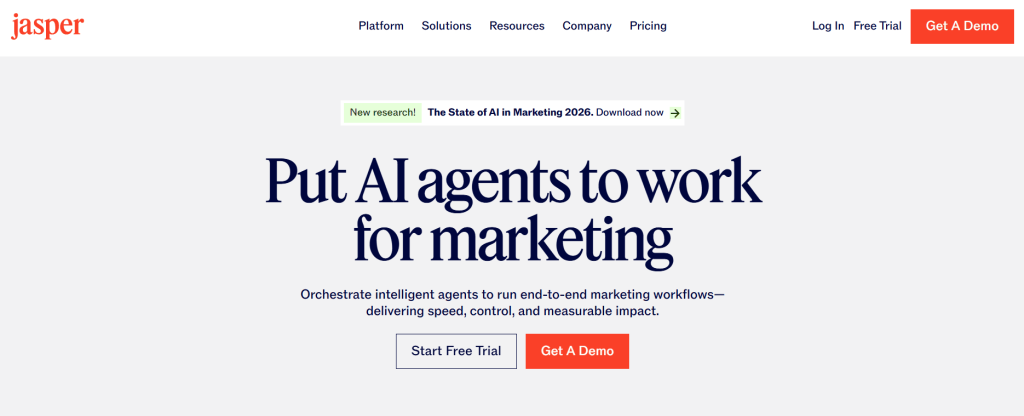
Jasper is an AI writing assistant built specifically for marketing and business content. I started testing it in 2021 when it launched, and it quickly became one of the most popular AI writing tools by combining GPT-4 technology with marketing-focused templates and brand voice customization.
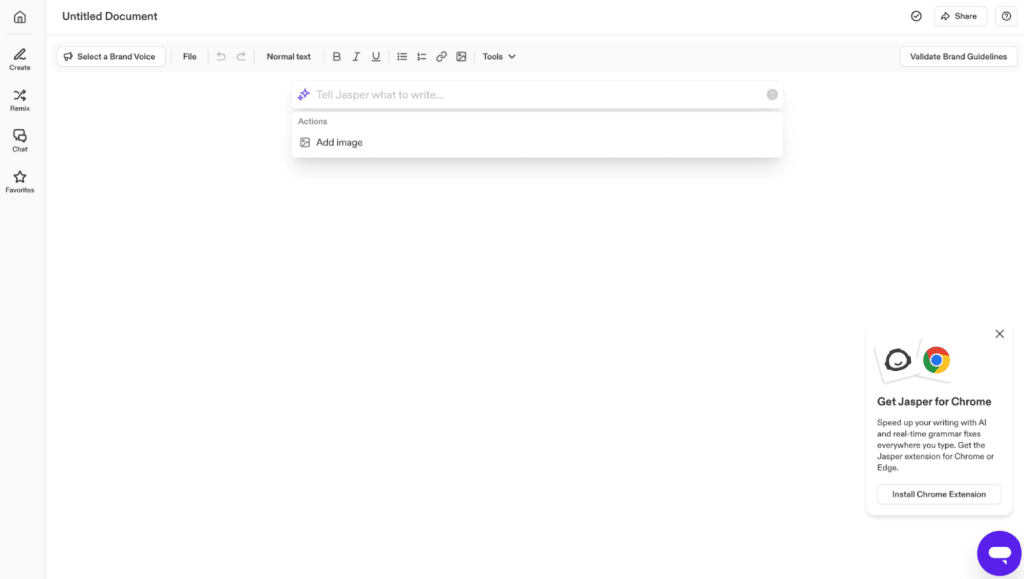
The standout feature is Brand Voice, which learns your company’s tone and style from sample content, then applies it consistently across everything you create.
At OLW, we use it primarily for scaling content production when clients need 20+ pieces per month without sacrificing voice consistency.
I recommend Jasper for agencies, in-house marketing teams, and content operations that prioritize volume without losing brand identity. If you’re writing fewer than 10 pieces monthly or working solo, the price point might not justify the value.
Jasper Key Features
- Brand Voice Training: Upload existing content samples and Jasper analyzes tone, vocabulary, and style to replicate your brand voice across all AI-generated content automatically.
- Boss Mode Editor: Long-form editor lets you write commands in plain English like “write three benefits of SEO” and Jasper generates content that flows naturally within paragraphs.
- SEO Mode Integration: Built-in Surfer integration provides content scores and keyword suggestions directly in the editor, eliminating the need to switch between multiple optimization platforms constantly.
- 50+ Marketing Templates: Pre-built frameworks for blog posts, product descriptions, Facebook ads, email sequences, and landing pages speed up content creation by providing proven structural outlines.
- Jasper Chat: Conversational AI interface similar to ChatGPT but trained on marketing knowledge, useful for brainstorming campaign ideas, generating outlines, or expanding bullet points into paragraphs.
- Team Collaboration Features: Workspaces, shared templates, and user permissions let multiple writers access the same brand voice settings and maintain consistency across distributed teams or freelancers.
Jasper Pros
- Brand Voice Consistency Across Teams: Jasper keeps brand voice consistent across blogs, emails, and social media using minimal samples, removing heavy style guides.
- Boss Mode Speeds Up Drafting: Boss Mode enables mid-paragraph commands, removing templates, speeding conversational drafting, and reducing writing time by forty percent overall.
- Integrated SEO Workflow Saves Time: Integrated Surfer SEO displays scores and keyword opportunities inside editor, eliminating platform switching and shortening long-form production cycles.
- Marketing Templates Deliver Usable First Drafts: Marketing templates like AIDA, PAS, and email frameworks deliver strong first drafts requiring minimal edits and conversions consistently.
- Output Quality Improved After GPT-4: Post GPT-4 updates produce natural, accurate drafts with varied structure, making Jasper reliable for real content creation workflows.
Jasper Cons
- AI Outputs Require Fact-Checking: Jasper sometimes invents statistics, misrepresents ideas, or confidently states errors, requiring manual verification always.
- Steeper Learning Curve Than Alternatives: Brand Voice setup, Boss Mode syntax, and templates confuse beginners, delaying productivity significantly.
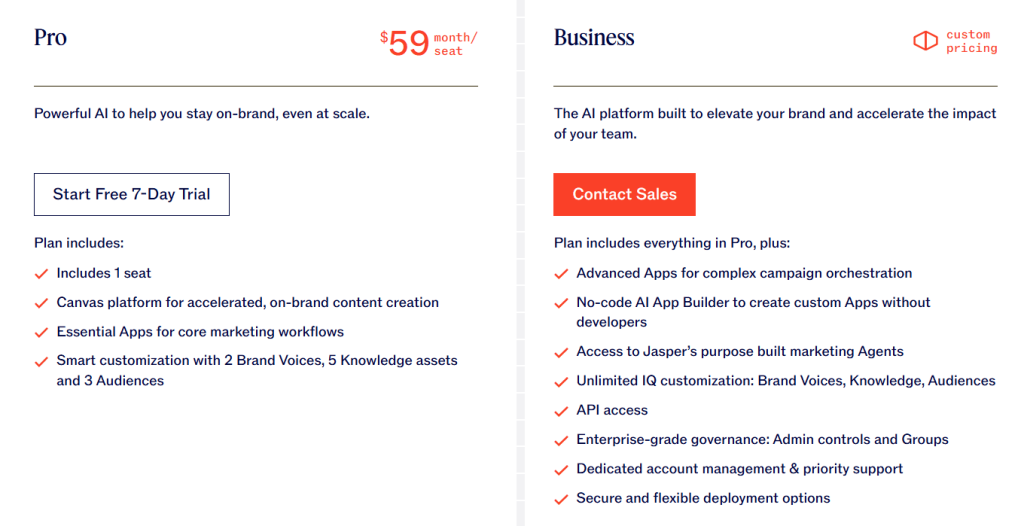
Jasper Pricing
- 7-day free trial available
- Pro: $59/month
- Business: Custom pricing
Jasper Reviews
- G2: 4.7 out of 5 stars (1,266+ reviews)
- Capterra: 4.8 out of 5 stars (1,851+ reviews)
Users praise Jasper’s content quality and brand voice consistency but frequently mention the high cost and occasional need for heavy editing.
Many reviewers note it works best for marketing teams with established workflows rather than individual bloggers or occasional content creators.
2. Grammarly – Best for Grammar and Style Checking
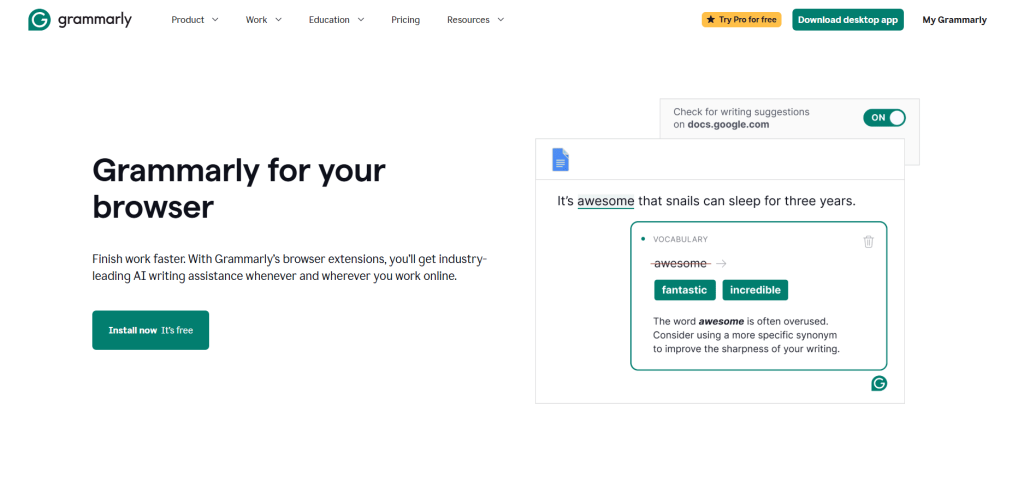
Best For: Anyone who writes regularly and needs real-time grammar correction, tone detection, and clarity improvements across all platforms and applications.
How I Use It: I run Grammarly on every piece of content we produce at OLW—blog posts, client emails, proposals, and social media. It catches errors I miss during editing and flags unclear phrasing before content goes live.
Quick Overview
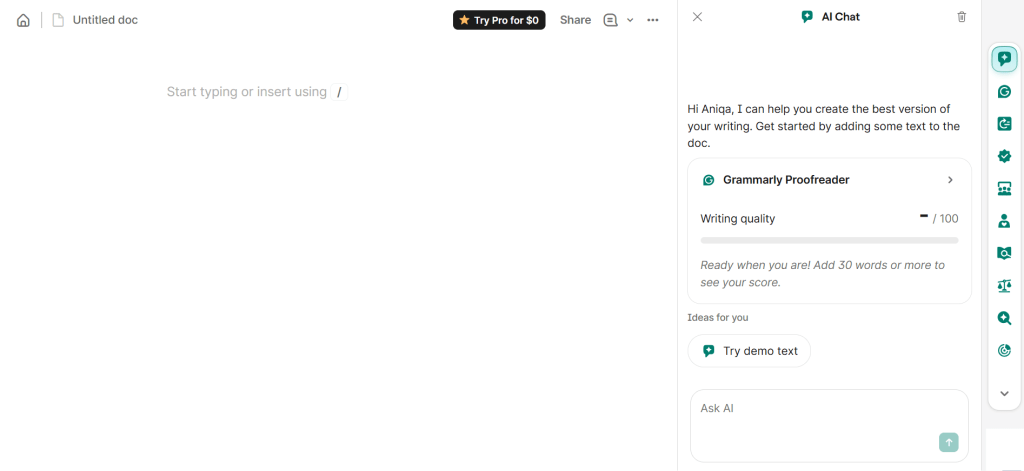
Grammarly is a writing assistant that checks grammar, spelling, punctuation, and style in real-time across your browser, desktop apps, and mobile devices.
Founded in 2009, it’s become the industry standard for error-free writing because it works everywhere you type—Google Docs, WordPress, Gmail, Slack, and even social media platforms.
What makes Grammarly essential is the browser extension that provides corrections as you write, eliminating the need to copy-paste content into a separate editing tool.
At OLW, every team member uses Grammarly because it catches mistakes before clients see them and maintains professional communication quality across all channels.
I recommend it for writers, marketers, students, and anyone who communicates professionally online. The free version handles basic grammar and spelling. Premium adds tone detection, clarity suggestions, and plagiarism checking that matter for content marketing and client-facing work.
Grammarly Key Features
- Real-Time Grammar and Spelling Corrections: Underlines errors as you type with explanations and one-click fixes, working across browsers, email clients, word processors, and messaging apps without platform switching.
- Tone Detector: Analyzes your writing and identifies whether it sounds formal, casual, confident, or uncertain, helping you match communication style to audience expectations before hitting send.
- Clarity and Conciseness Suggestions: Flags wordy sentences, passive voice, complex phrasing, and redundant language, then recommends simpler alternatives that improve readability without changing your intended meaning.
- Plagiarism Checker (Premium): Scans your content against billions of web pages and academic databases to identify unintentional duplicate content, protecting you from accidental copyright issues or content penalties.
- Browser Extension: Works natively in Chrome, Safari, Firefox, and Edge, providing corrections in Gmail, Google Docs, WordPress, LinkedIn, Twitter, and hundreds of other web applications automatically.
- Writing Goals Customization: Set audience type, formality level, domain, and intent to get context-specific suggestions tailored for academic papers, business emails, casual blog posts, or technical documentation.
Grammarly Pros
- Works Everywhere You Write: Grammarly works everywhere you write, correcting text across email, documents, CMS, chat tools seamlessly without extra copying steps.
- Catches Errors Humans Miss: It catches typos, punctuation mistakes, and grammar errors humans miss, preventing embarrassing publishing issues in professional content workflows.
- Tone Detection Improves Communication: Tone detection previews emotional impact, helping adjust emails and proposals to sound confident, polite, and clear before sending.
- Explanations Improve Writing Skills: Clear explanations teach grammar rules with each suggestion, improving team writing skills and reducing repeat editing errors over.
- Free Version Delivers Real Value: The free version delivers strong grammar and spelling checks, offering real value without restricting essential features for writers.
Grammarly Cons
- Premium Suggestions Can Be Overly Aggressive: Grammarly flags intentional stylistic choices as errors, encouraging robotic writing unless suggestions are reviewed selectively by experienced editors.
- Plagiarism Checker Has Limitations: Plagiarism detection misses paraphrased content and fails identifying AI text closely mirroring existing sources, especially during advanced spinning.
- Writing Goals Don’t Always Match Reality: Writing goals still trigger formal suggestions that clash with conversational marketing and diverse brand voices across industries frequently.
Grammarly Pricing
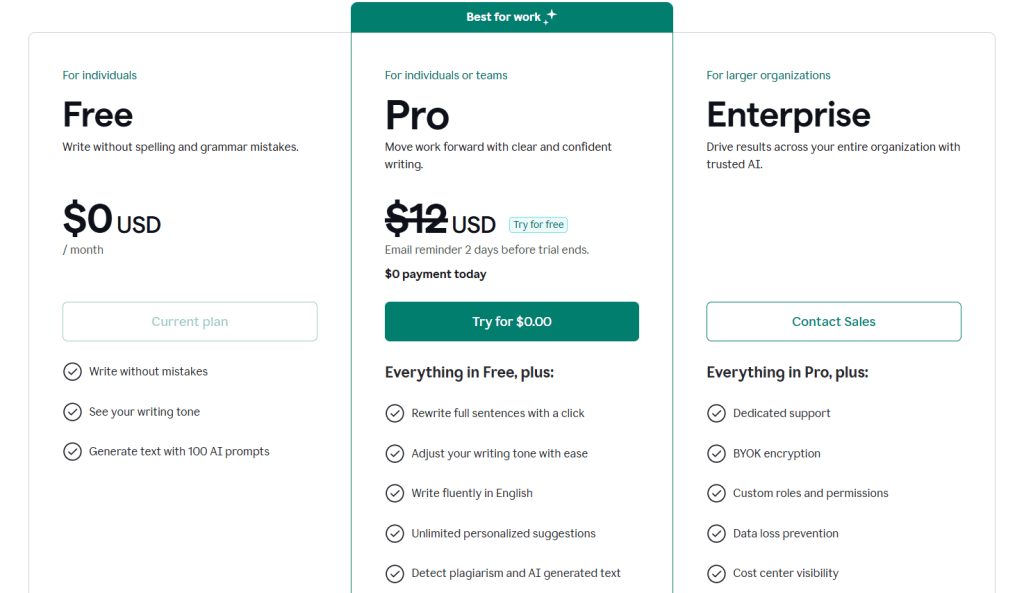
- Free
- Pro: $12/month
- Enterprise: Custom
Grammarly Reviews
- G2: 4.7 out of 5 stars (13,030+ reviews)
- Capterra: 4.7 out of 5 stars (7,197+ reviews)
Users consistently praise Grammarly’s accuracy and cross-platform functionality but note that Premium suggestions can feel excessive.
Many reviewers mention the free version meets most needs, while Premium is worth it primarily for plagiarism checking and tone detection in professional settings.
3. Surfer – Best for SEO Content Optimization
Best For: Content teams and SEO professionals who need data-driven optimization guidance to rank content on the first page of Google.
How I Use It: I use Surfer’s Content Editor for every blog post we publish at OLW. It shows exactly which keywords to include, optimal content length, and how our draft compares to top-ranking competitors before we hit publish.
Quick Overview
Surfer is a content optimization platform that analyzes top-ranking pages for your target keyword and provides a data-driven content brief.
Founded in 2017, it’s become essential for SEO content because it removes guesswork by showing exactly what’s working in the SERPs right now.
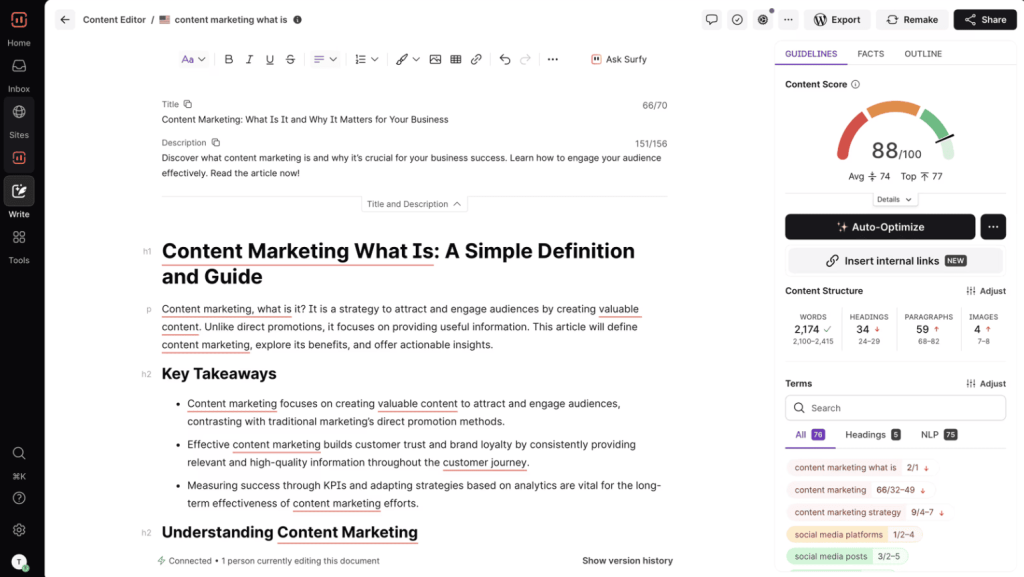
What makes Surfer valuable is the real-time content score that updates as you write, highlighting which changes improve ranking potential.
At OLW, we’ve used Surfer across hundreds of client campaigns and consistently see faster rankings compared to content optimized with basic keyword research alone.
I recommend it for content marketers, SEO agencies, and in-house teams managing competitive keywords. If you’re publishing content hoping to rank on page one, Surfer gives you the competitive edge by reverse-engineering what Google is already rewarding.
Surfer Key Features
- Real-Time Content Score: Analyzes your draft against top-ranking pages and provides a live score showing optimization quality, updating with every sentence to highlight improvements that matter for rankings.
- NLP Keyword Analysis: Identifies semantic keywords, LSI terms, and NLP entities appearing across ranking content, prioritized by importance so you’re not treating every suggested keyword with equal weight.
- SERP Analyzer: Shows content structure, word count, headings, images, and keyword usage across the top 50 results, revealing patterns in what’s ranking and gaps in competitor coverage.
- Content Outline Generator: Creates a data-driven outline by extracting headings and topics from top-ranking pages, giving writers a proven structure before they start drafting instead of guessing content flow.
- Audit Tool: Evaluates existing content and identifies optimization opportunities by comparing current rankings against SERP data, showing specific changes needed to improve positions without full rewrites.
- Surfy AI Writer: Generates AI content drafts based on Surfer’s optimization data, though output quality varies and requires significant editing compared to tools like Jasper or ChatGPT.
Surfer Pros
- Real-Time Scoring Eliminates Guesswork: Live content scores update instantly, showing which edits improve optimization and preventing keyword overuse or unnecessary changes overall.
- NLP Keyword Prioritization Prevents Stuffing: Surfer prioritizes NLP keywords by importance, guiding writers to use primary terms naturally without stuffing in ranking content.
- SERP Analysis Reveals Ranking Patterns: SERP analysis exposes word counts, headings, and keyword patterns from top results, removing speculation about content strategy decisions.
- Content Editor Integrates With Workflow: Surfer integrates with Google Docs and WordPress, displaying optimization scores while writing and reducing platform switching during workflows.
- Audit Feature Improves Existing Content: Audits identify specific optimization gaps in underperforming pages, enabling targeted fixes that improve rankings quickly without guesswork delays.
Surfer Cons
- AI Writer Produces Generic Content: Surfy generates drafts but quality is inconsistent, lacks brand voice, and requires editing, limiting usefulness beyond writer’s block.
- Keyword Suggestions Sometimes Feel Repetitive: Surfer suggests repetitive keyword variants for similar queries, inflating optimization requirements without adding real semantic value to content.
- Content Score Can Be Misleading: Content scores can mislead; chasing perfection causes over-optimization, while lower-scoring articles often rank better due to user experience.
Surfer Pricing
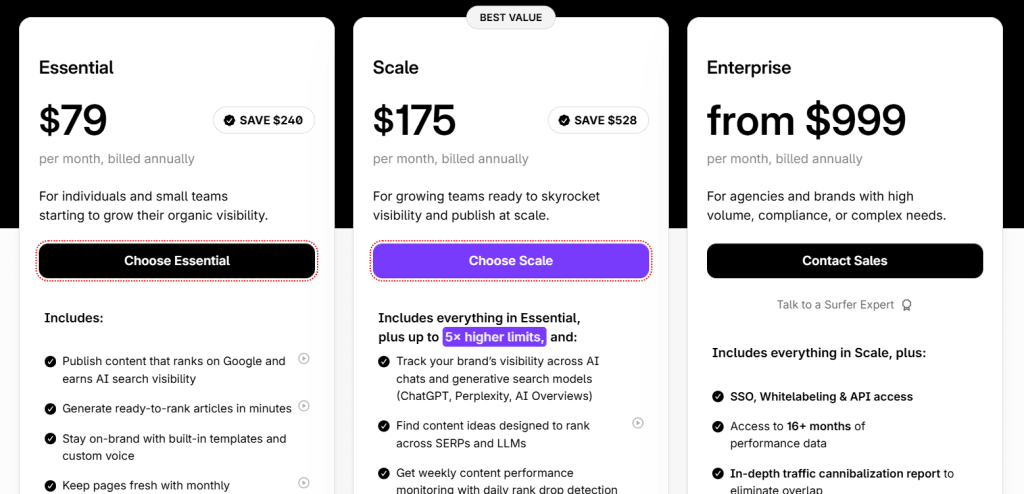
- Essential: $79/month
- Scale: $175/month
- Enterprise: $999/month
Surfer Reviews
- G2: 4.8 out of 5 stars (537+ reviews)
- Capterra: 4.9 out of 5 stars (421+ reviews)
Users praise Surfer’s data accuracy and real-time scoring but mention the AI writer needs improvement and pricing can be high for solo creators.
Many reviewers note it’s most valuable when combined with strong writing skills rather than relying solely on optimization scores.
4. Copy.ai – Best for Quick AI Copywriting
Best For: Marketers and small business owners who need short-form copy for ads, social media, emails, and landing pages generated fast.
How I Use It: I use Copy.ai when I need quick variations of ad headlines, email subject lines, or social media captions. It’s faster than brainstorming from scratch and generates multiple options in seconds.
Quick Overview
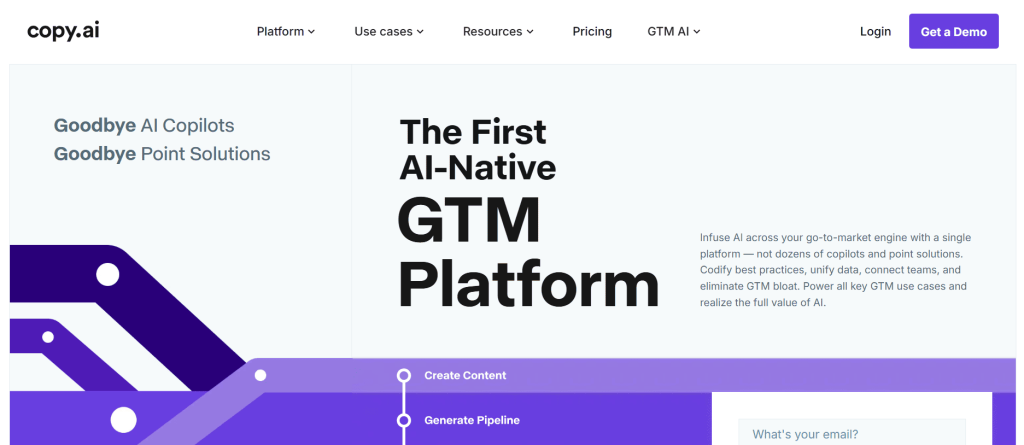
Copy.ai is an AI copywriting tool built for marketers who need short-form content fast. I started using it in 2020 when it launched, and what immediately stood out was how simple it made AI writing. No complex prompting, just pick a template and fill in basic details.
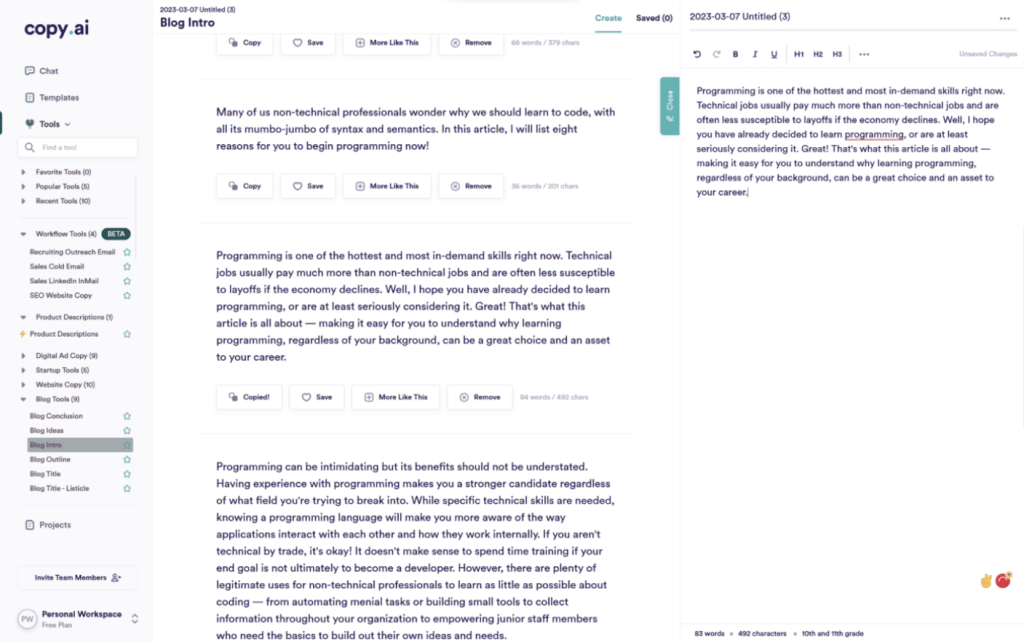
The real strength is speed. At OLW, I can generate 20 headline variations for Facebook ads or test different email subject lines in under two minutes.
We don’t use it for blog posts or long-form content because the quality drops significantly past 500 words, but for quick marketing copy iterations, it saves hours of manual brainstorming.
I recommend it if you’re running paid campaigns, managing social media, or need product descriptions at scale.
The template library covers most marketing formats you’ll encounter. Just don’t expect it to replace a real copywriter for anything that requires depth or strategic thinking.
Copy.ai Key Features
- 90+ Copywriting Templates: Pre-built frameworks for ads, emails, product descriptions, landing pages, and social posts speed up content creation by providing proven structural formulas like AIDA and PAS.
- Long-Form Document Editor: Allows extended content creation beyond templates with AI assistance, though output quality for blog posts and articles doesn’t match dedicated long-form tools like Jasper.
- Brand Voice Settings: Upload content samples to train the AI on your tone and style, helping maintain consistency across different copy formats and team members using the platform.
- Workflow Builder: Automates multi-step content creation processes by chaining templates together, useful for creating complete campaign assets from a single input like product features or campaign goals.
- Chrome Extension: Generates copy directly in Gmail, Google Docs, and social media platforms without switching to the Copy.ai dashboard, integrating AI writing into existing workflows.
- Team Collaboration: Shared workspaces, folders, and templates let multiple users access the same brand voice settings and organize content by client, campaign, or project type.
[Image Source: Zapier]
Copy.ai Pros
- Fast Short-Form Copy Generation: Generating headlines and email subjects in seconds accelerates testing more ad angles without slowing creative production timelines overall.
- Template Variety Covers Marketing Needs: Templates for ads, product descriptions, and emails let new marketers produce usable copy without mastering formulas like AIDA.
- Free Plan Offers Real Functionality: Copy.ai free plan provides two thousand monthly words and all templates, enabling low risk testing for solo creators.
- Brand Voice Improves Consistency: Brand voice training keeps tone consistent across formats and writers, making client campaigns feel cohesive and professional everywhere.
- Workflow Automation Saves Time: Workflow automation chains templates to create full campaigns from one input, saving time across launches and reducing repetition.
Copy.ai Cons
- Long-Form Content Quality is Weak: Long-form outputs feel generic, lack depth, and need heavy editing, making them inefficient beyond five hundred words.
- AI Outputs Can Feel Formulaic: Short-form templates create repetitive patterns across ads, reducing creative variety unless manually rewritten by editors.
- Limited SEO Features: Copy.ai lacks keyword research, content scoring, and SERP analysis, requiring separate SEO tools for ranking content.
Copy.ai Pricing
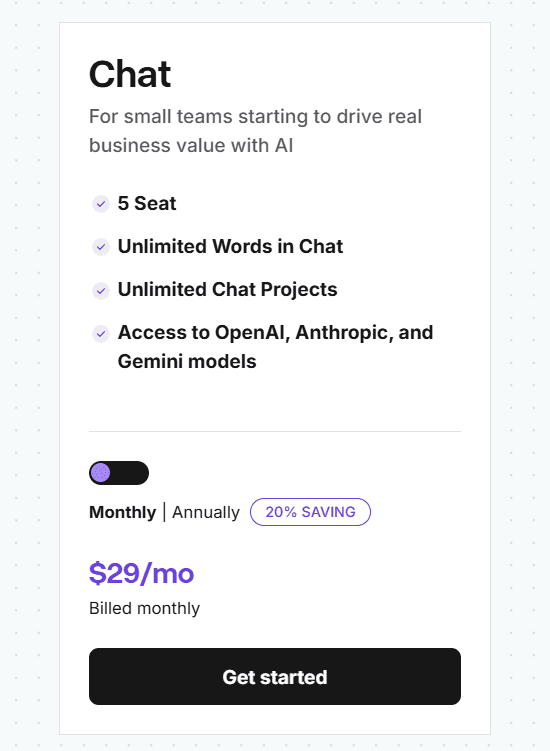
- Self-Serve: $29/month
- Enterprise: Custom pricing
Copy.ai Reviews
- Capterra: 4.4 out of 5 stars (67+ reviews)
Users appreciate Copy.ai’s ease of use and template variety for short-form content but note that long-form outputs need significant editing. Many reviewers mention it’s best for generating ideas and variations rather than final copy, particularly for ads and social media.
5. Hemingway Editor – Best for Readability Improvement
Best For: Writers who want to simplify complex sentences, reduce passive voice, and make content easier to read without changing the core message.
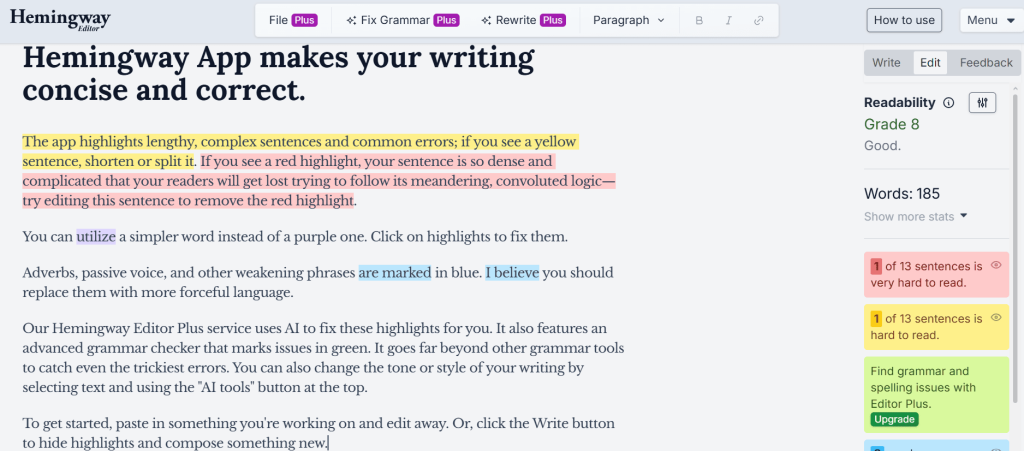
How I Use It: I run every blog post through Hemingway Editor after the first draft. It highlights sentences that are too complex or hard to read, helping me simplify content before final edits.
Quick Overview
Hemingway Editor is a writing tool that analyzes readability and highlights areas that make content difficult to understand.
Named after Ernest Hemingway’s clear, direct writing style, it focuses on sentence complexity, passive voice, adverbs, and reading grade level.
What makes Hemingway valuable is the simplicity. There’s no AI, no templates, just a color-coded editor that shows exactly where your writing gets confusing.
At OLW, we use it to ensure client content stays accessible to general audiences, not just industry experts.
I recommend it for bloggers, content marketers, and anyone writing for online audiences. If your content consistently tests above a grade 10 reading level or uses too much passive voice, Hemingway fixes those issues quickly.
Hemingway Editor Key Features
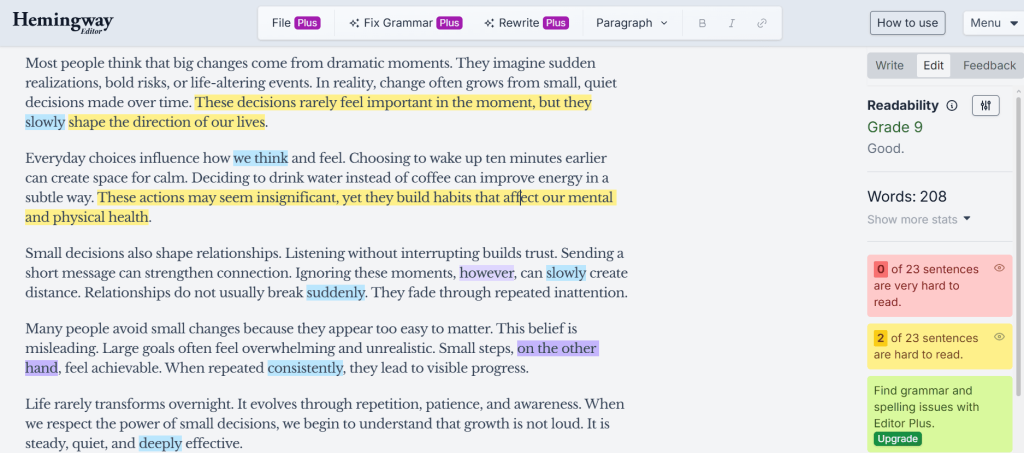
- Readability Grade Level: Calculates reading difficulty using the Automated Readability Index, showing whether your content targets grade 6, 10, or college-level readers based on sentence length and word complexity.
- Sentence Complexity Highlighting: Color-codes sentences by difficulty with yellow for moderate complexity and red for very hard to read, making problem areas visually obvious without analyzing each paragraph manually.
- Passive Voice Detection: Identifies passive voice constructions in green, helping writers shift to active voice that creates stronger, more direct statements and improves content engagement.
- Adverb and Weak Phrase Flagging: Highlights adverbs in blue and suggests removing or replacing them with stronger verbs, reducing filler words that weaken writing impact without adding meaningful content.
- Word and Sentence Count: Displays character count, word count, sentences, paragraphs, and estimated reading time, useful for meeting content length requirements or ensuring consistent post formatting.
- Distraction-Free Writing Mode: Offers a clean interface without formatting options during writing mode, then switches to edit mode for analysis, separating content creation from editing processes.
Hemingway Editor Pros
- Immediately Shows Readability Issues: Color highlighting instantly reveals readability issues, exposing complex sentences and passive voice, enabling rapid scans of long drafts.
- Improves Writing Skills Over Time: Repeated flags teach better habits, helping writers produce clearer first drafts with fewer passive constructions, saving editing time.
- Free Web Version Delivers Full Functionality: Hemingway’s free web editor includes all features, offering professional readability analysis at no cost for everyone online writers.
- No Learning Curve Required: Self explanatory interface with color highlights needs no training, letting new writers fix issues immediately without tutorials onboarding.
Hemingway Editor Cons
- Suggestions Can Be Overly Prescriptive: Hemingway flags intentional stylistic choices, so blindly accepting suggestions can make writing feel choppy and lose personality.
- No Grammar or Spelling Checking: Focused only on readability, Hemingway misses typos and grammar errors, requiring another tool for full proofreading.
- Reading Level Targets May Not Fit Brand: Grade 6-8 readability conflicts with brands using complex language for authority, technical content, or expert audiences.
Hemingway Editor Pricing
Free
Hemingway Editor Reviews
- G2: 4.4 out of 5 stars (48+ reviews)
- Capterra: 4.4 out of 5 stars (12+ reviews)
Users praise Hemingway’s simplicity and effectiveness for improving readability but note it doesn’t replace comprehensive grammar checkers.
Many reviewers mention it’s most valuable when combined with other editing tools rather than used as a standalone solution for professional content.
6. Frase – Best for Content Research and Briefs
Best For: Content teams and SEO writers who need comprehensive research, topic clustering, and AI-assisted content creation in one platform.
How I Use It: I use Frase to build content briefs before writing. It pulls SERP data, generates outlines, and identifies topic gaps that competitors missed, giving our writers a clear roadmap.
Quick Overview
Frase is an AI-powered content research and optimization tool that helps create SEO-focused content briefs. Launched in 2016, it’s gained traction by combining research, writing, and optimization into a single workflow instead of requiring multiple tools.
What makes Frase stand out is the research depth. It analyzes top-ranking content, extracts key topics, generates questions people ask, and creates outlines based on what’s actually working in the SERPs. At OLW, we use it to speed up the research phase and ensure content briefs cover all the angles competitors are hitting.
I recommend it for content marketers, SEO agencies, and writers who want research automation without sacrificing quality. The AI writing features are decent but secondary to the research and brief creation capabilities.
Frase Key Features
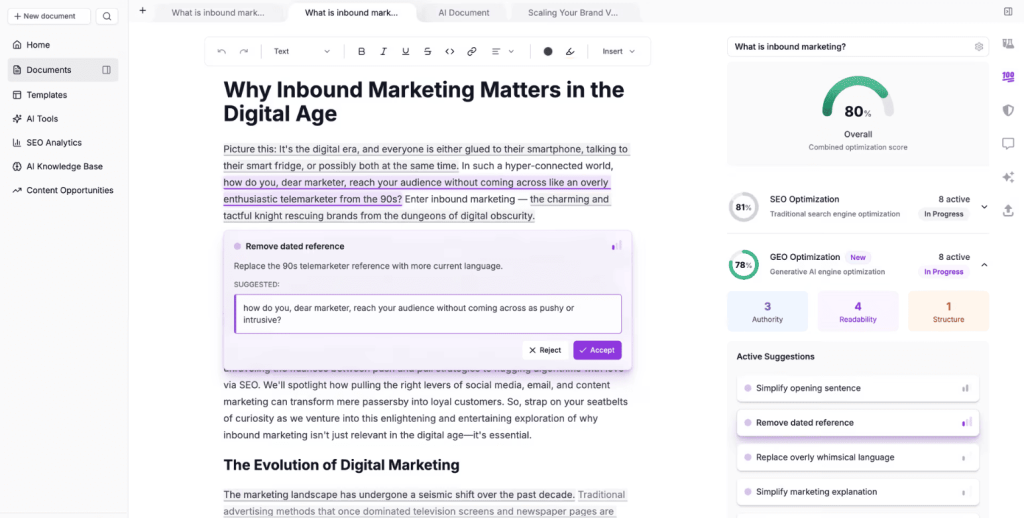
- SERP Content Analysis: Scrapes and analyzes top 20 Google results for your target keyword, extracting headings, topics, questions, and statistics used by ranking competitors automatically.
- AI Outline Generator: Creates content outlines by identifying common heading structures across top-ranking pages, giving writers a proven framework before drafting instead of guessing optimal content flow.
- Topic Clustering: Groups related keywords and topics together based on search intent, helping you create comprehensive content that covers semantic variations without writing separate articles for similar queries.
- Question Research: Pulls “People Also Ask” boxes and related questions from SERPs, identifying common queries your content should answer to match search intent and win featured snippets.
- AI Content Writer: Generates paragraphs and sections using templates based on your research data, though output quality requires editing and doesn’t match dedicated AI writing tools like Jasper.
- Content Optimization Score: Analyzes your draft against top-ranking pages and provides a score showing keyword coverage and topic completeness, similar to Surfer but integrated with research workflow.
Frase Pros
- Research Phase Takes Minutes Instead of Hours: Frase extracts headings, topics, and questions in minutes, replacing hours of manual research and note-taking efficiently.
- Question Research Identifies Content Gaps: “People Also Ask” questions reveal overlooked angles, helping create thorough content competitors fail to cover effectively.
- AI Outlines Provide Proven Structure: AI-generated outlines use top-ranking patterns, giving writers content structures already rewarded by Google, improving ranking speed.
- Topic Clustering Prevents Keyword Cannibalization: Clustering related keywords shows which topics need single articles versus separate posts, avoiding self-competition in search results.
Frase Cons
- AI Writing Quality Is Inconsistent: Generated content can feel generic, requiring heavy edits to add depth or brand voice before publishing reliably.
- Content Score Less Accurate Than Surfer: Optimization scores sometimes suggest keyword stuffing or unnatural terms, making guidance less reliable for ranking content.
- Learning Curve for Full Feature: Using all advanced Frase features requires time to learn, as beginners may struggle to use the platform effectively.
Frase Pricing
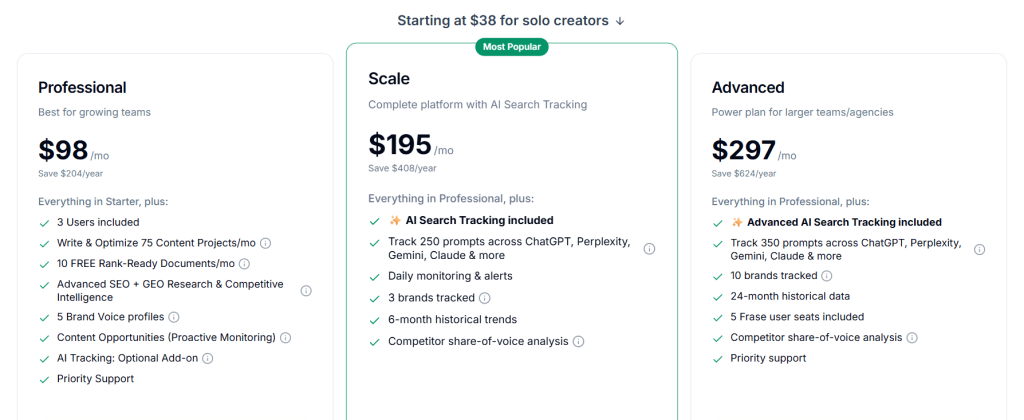
- Solo: $38/month
- Professional: $98/month
- Scale: $195/month
- Advanced: $297/month
Frase Reviews
- G2: 4.8 out of 5 stars (299+ reviews)
- Capterra: 4.8 out of 5 stars (335+ reviews)
Users love Frase’s research capabilities and value for money but note the AI writing needs improvement compared to specialized tools. Many reviewers mention it’s best used for research and brief creation, with AI writing as a helpful bonus rather than primary feature.
7. Clearscope – Best for Enterprise Content Optimization
Best For: Enterprise content teams and established agencies that need advanced SEO optimization with Google Docs integration and team collaboration features.
How I Use It: I use Clearscope for high-priority client content where ranking on page one matters most. Keyword relevance scoring is more sophisticated than basic tools, though the price limits how often we can use it.
Quick Overview
Clearscope is a content optimization platform focused on keyword relevance and semantic analysis. Founded in 2016, it’s become the go-to tool for enterprise SEO teams because of its accuracy, Google Docs integration, and depth of analysis.
What makes Clearscope different is the relevance-based approach instead of simple keyword density.
It analyzes how top-ranking pages use related terms and topics, then scores your content based on semantic comprehensiveness rather than hitting exact keyword counts.
At OLW, we’ve seen consistently strong results with Clearscope-optimized content, but the pricing keeps it reserved for important projects.
I recommend it for large content teams, enterprise companies, and agencies managing Fortune 500 clients. Solo creators and small businesses will find better value in Surfer or Frase.
Clearscope Key Features
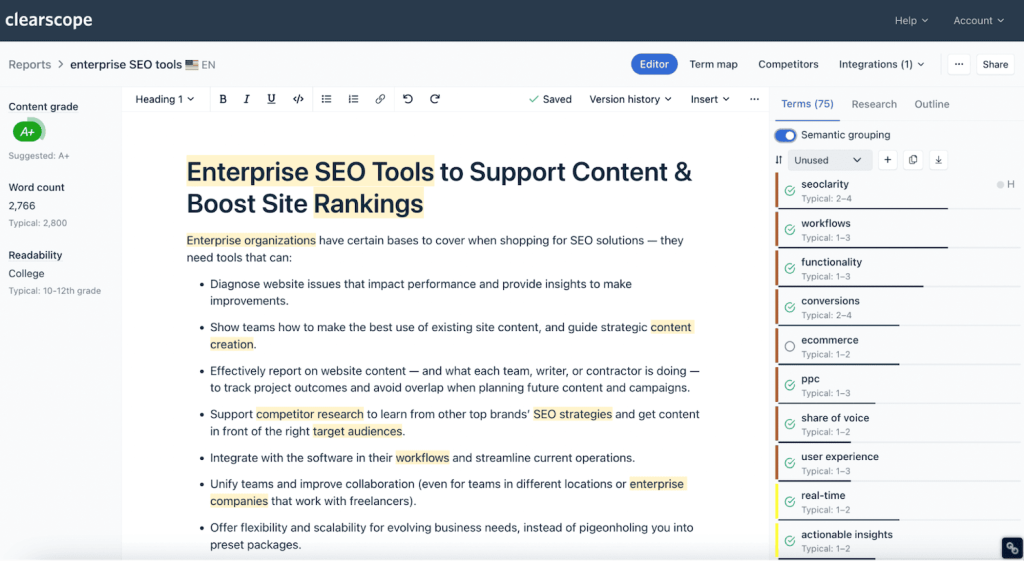
- Keyword Relevance Grading: Scores content based on semantic term usage rather than keyword density, analyzing how well your draft covers topics compared to top-ranking pages using NLP analysis.
- Google Docs Integration: Provides real-time optimization scoring directly in Google Docs through a sidebar, eliminating platform switching and letting teams collaborate while optimizing content simultaneously.
- Content Inventory Reports: Analyzes your existing content library and identifies optimization opportunities, cannibalization issues, and gaps in topic coverage across your site’s published articles.
- Readability Analysis: Evaluates sentence complexity, paragraph length, and reading grade level alongside SEO metrics, ensuring content remains accessible while hitting optimization targets for rankings.
- Competitor Content Analysis: Shows which topics and terms competitors rank for that you’re missing, revealing content gaps and opportunities to create more comprehensive coverage than existing pages.
- Team Collaboration Features: Multiple users can work on content briefs, share optimization reports, and maintain consistent SEO standards across distributed teams or freelance writers using centralized guidelines.
Clearscope Pros
- Most Accurate Content Optimization I’ve Tested: Clearscope’s relevance scores reliably predict ranking success, helping high-value keywords reach page one faster.
- Google Docs Integration Streamlines Workflow: Integration in Google Docs shows scores in real time, reducing platform switching and improving team adoption for content optimization.
- Relevance Over Keyword Stuffing: Semantic optimization focuses on comprehensive topic coverage rather than exact keyword counts, keeping content natural and readable.
- Content Inventory Identifies Quick Wins: Inventory reports reveal page-two content needing minor optimization, enabling targeted improvements without rewriting full articles.
- Excellent for Team Standardization: Shared reports and collaboration features ensure consistent SEO standards across writers, simplifying onboarding and workflow adoption.
Clearscope Cons
- Limited Article Credits Restrict Usage: Paid plans cap monthly optimizations, so Clearscope is reserved for high-priority pages and keywords only.
- Learning Curve Steeper Than Alternatives: Understanding scores, grade distributions, and recommendations takes time, making new users struggle compared to simpler tools like Surfer.
- Optimization Can Still Miss Ranking Factors: Clearscope emphasizes content and keywords but ignores backlinks, technical SEO, authority, and user signals, limiting ranking guarantees.
Clearscope Pricing
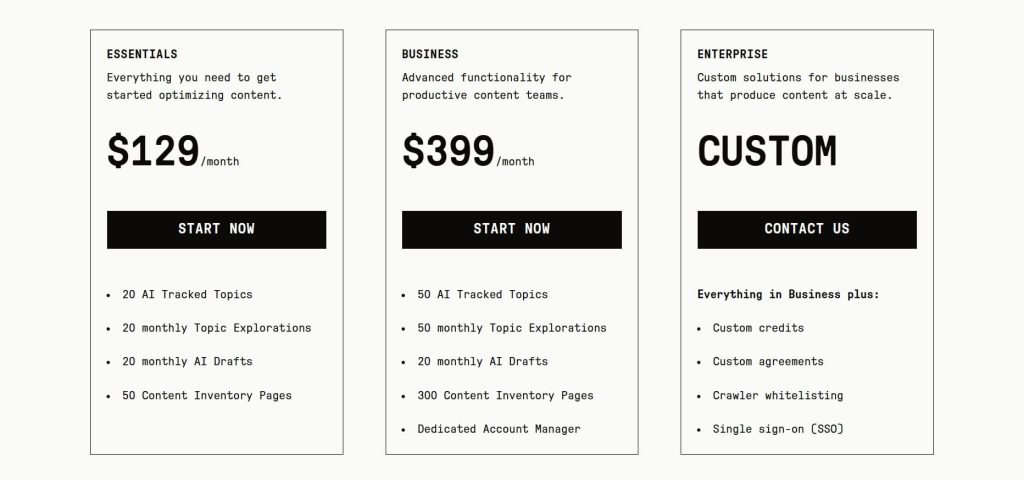
- 7-day free trial
- Essentials: $129/month
- Business: $399/month
- Enterprise: Custom
- Cancel anytime without penalty or hassle
Clearscope Reviews
- G2: 4.9 out of 5 stars (91+ reviews)
- Capterra: 4.9 out of 5 stars (60+ reviews)
Users consistently praise Clearscope’s accuracy and Google Docs integration but frequently cite high pricing as the main limitation.
Many reviewers note it delivers the best optimization results they’ve tested but requires significant budget commitment that’s only justified for enterprise teams or high-value content.
8. Writesonic– Best for Budget AI Writing
Best For: Small businesses and solo creators who need AI-generated content without spending $50+ monthly on premium tools like Jasper.
How I Use It: I use WriteSonic when clients have tight budgets but still need AI assistance for blog drafts, product descriptions, and social media content. It’s not as polished as Jasper, but it gets the job done at a fraction of the cost.
Quick Overview
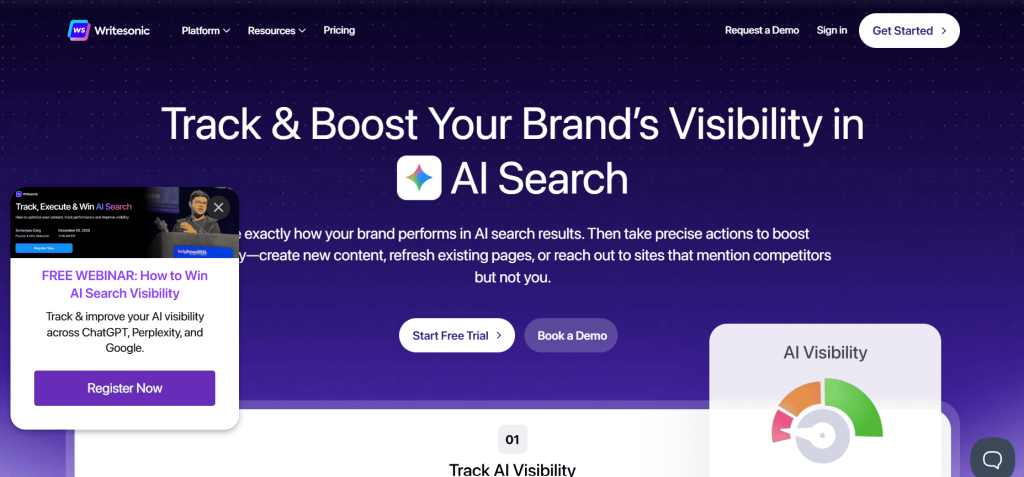
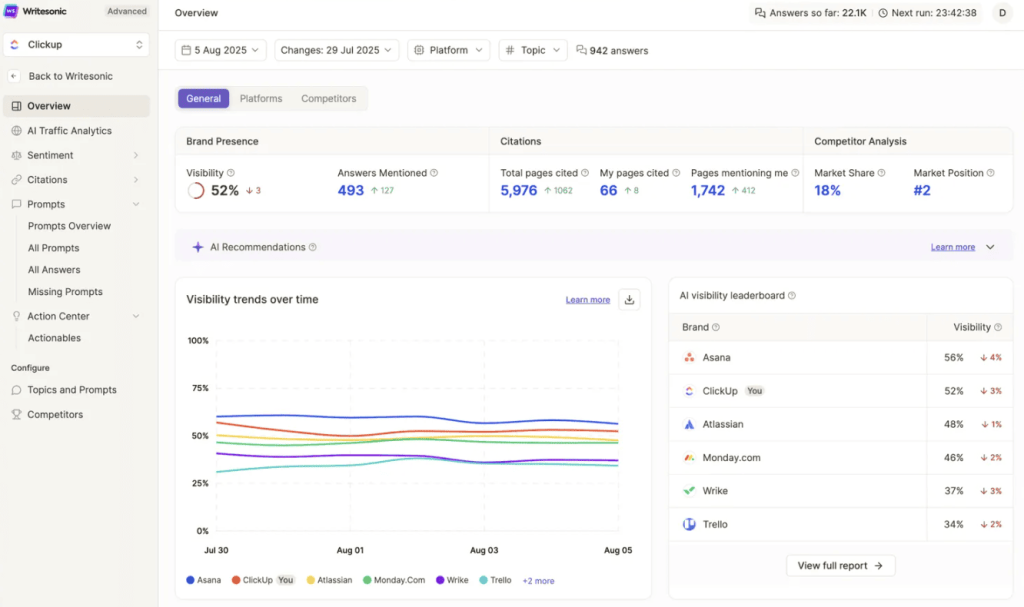
WriteSonic is an affordable AI writing platform that covers most content formats you’d need—blog posts, ads, emails, product descriptions, and social media.
I started testing it in 2021 as a budget alternative to premium AI tools, and while the output quality isn’t quite at Jasper’s level, it’s surprisingly decent for the price.
The platform includes over 100 templates and recently added features like AI article writing, chatbot functionality, and image generation.
At OLW, we use WriteSonic for clients who can’t justify expensive AI subscriptions but still want writing assistance that’s better than struggling through ChatGPT prompts.
I recommend it for freelancers, small business owners, and startups working with limited marketing budgets.
If you’re generating 10-20 pieces of content monthly and need something better than free tools but can’t afford premium platforms, WriteSonic hits that sweet spot.
Writesonic Key Features
- Article Writer 5.0: Generates full blog posts from keywords or topics using AI research and outline creation, producing 1,500-2,500 word drafts in minutes with minimal input required.
- 100+ Content Templates: Pre-built frameworks for landing pages, Google ads, Facebook ads, product descriptions, emails, and social posts cover most marketing content needs without custom prompting.
- Sonic Editor: Long-form document editor with AI commands similar to Jasper’s Boss Mode, letting you generate, expand, or rewrite sections while maintaining document flow and context.
- Chatsonic: AI chatbot with Google Search integration that provides current information beyond GPT’s training cutoff, useful for researching recent events or data-driven content creation.
- Bulk Content Generation: Creates multiple content variations simultaneously from CSV uploads, helpful for scaling product descriptions, meta tags, or ad variations across large inventories.
- AI Image Generation: Built-in image creation using Stable Diffusion and DALL-E, eliminating the need for separate tools when you need visuals alongside written content.
Writesonic Pros
- Article Writer Produces Usable First Drafts: Automated blog generator creates structured drafts with headings and sections, saving hours despite needing some editing.
- Chatsonic Provides Current Information: Pulls live Google search results for recent events and data, making it reliable for time-sensitive content creation.
- Bulk Generation Saves Time on Repetitive Content: Processes spreadsheets to create hundreds of product descriptions or meta tags quickly for large-scale operations.
- No Learning Curve Required: Simple interface with templates guides inputs, letting new users generate content immediately without tutorials or advanced prompting skills.
Writesonic Cons
- Output Quality Below Premium Tools: Content feels generic, needs heavy editing, and sometimes contains inaccurate statements requiring thorough fact-checking.
- Brand Voice Consistency is Weak: Tone settings don’t fully standardize style, so multiple articles require manual edits to maintain brand voice.
- Templates Can Feel Limiting: Many templates are minor variations, forcing awkward structures when content needs don’t perfectly match preset formats.
Writesonic Pricing
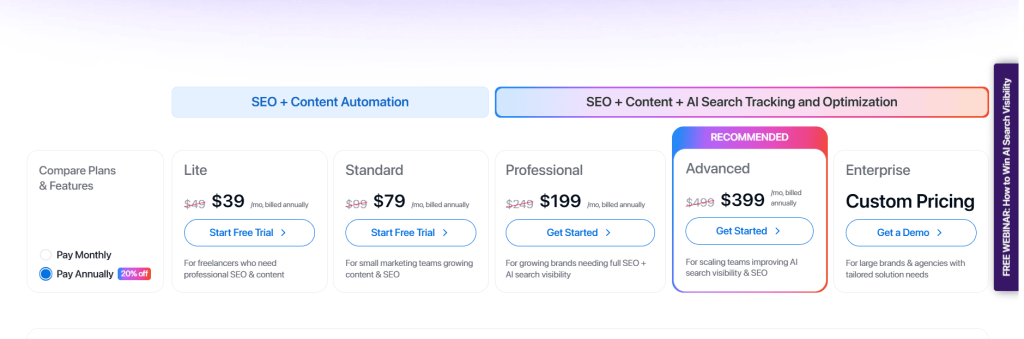
- Lite: $39/month
- Standard: $79/month
- Professional: $199/month
- Advanced: $399/month
- Enterprise: Custom
Writesonic Reviews
- G2: 4.7/5 stars (2,070+ reviews)
- Trustpilot: 4.8/5 stars (2,102+ reviews)
Users appreciate WriteSonic’s affordability and feature variety but frequently mention output quality doesn’t match premium tools.
Many reviewers use it as a budget alternative to Jasper, accepting lower quality in exchange for significant cost savings on similar functionality.
9. Wordtune – Best for AI Rewriting and Paraphrasing
Best For: Writers who have existing drafts but need help improving clarity, varying sentence structure, or finding better ways to phrase ideas.
How I Use It: I use Wordtune when I’m stuck on phrasing or when a sentence feels clunky but I can’t figure out how to fix it. It offers instant rewrites that often solve the problem in one click.
Quick Overview
Wordtune is an AI writing assistant focused specifically on rewriting and improving existing text rather than generating content from scratch.
I started using it in 2021, and it’s become my go-to tool for sentence-level improvements when editing.
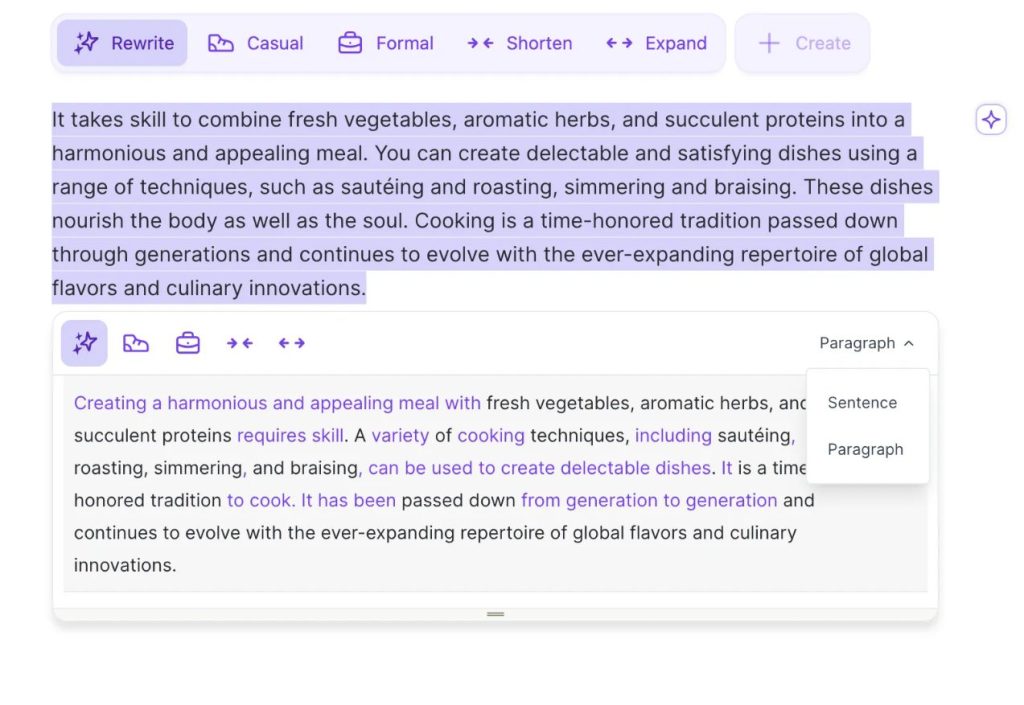
What makes Wordtune valuable is the specificity. Instead of vague suggestions to “improve this,” you get 3-5 concrete rewrites showing different approaches—casual, formal, shortened, or expanded.
At OLW, I use it mostly during editing phases when content is already drafted but needs polish or when I’m rewriting client content that feels stiff.
I recommend it for editors, content refiners, and anyone who struggles with phrasing despite understanding what they want to say. If you need help starting from blank pages, other tools work better.
Wordtune Key Features
- Multiple Rewrite Suggestions: Generates 3-5 alternative phrasings for selected sentences, showing casual, formal, shortened, and expanded versions to choose the best fit for context.
- Tone Adjustment: Shifts writing between casual and formal styles instantly, useful when repurposing content for different audiences or adjusting brand voice without manual rewriting.
- Expand and Shorten: Automatically lengthens brief sentences with additional detail or condenses wordy passages while maintaining core meaning, helping hit specific word count targets.
- AI Text Generation: Creates new sentences or paragraphs from prompts within your document, though this feature is less developed than dedicated AI writing tools.
- Spices Feature: Suggests specific improvements like adding examples, counterarguments, statistics, or analogies to strengthen points without leaving the editing interface.
- Browser Extension and Desktop Apps: Works across Google Docs, Gmail, LinkedIn, WordPress, and most web platforms through extensions, plus native desktop apps for offline writing.
Wordtune Pros
- Solves Writer’s Block at Sentence Level: Wordtune suggests multiple rewrites, helping phrase ideas clearly and overcome sentence-level writer’s block quickly.
- Tone Shifting Saves Rewriting Time: Instantly converts formal to casual tone or vice versa, repurposing content without rewriting every sentence manually.
- Expand Feature Adds Useful Detail: Expands brief sentences with relevant context, adding meaningful explanation instead of filler or unnecessary padding.
- Works Where You’re Already Writing: Chrome extension gives suggestions in Gmail, Google Docs, WordPress, and LinkedIn without switching platforms during workflow.
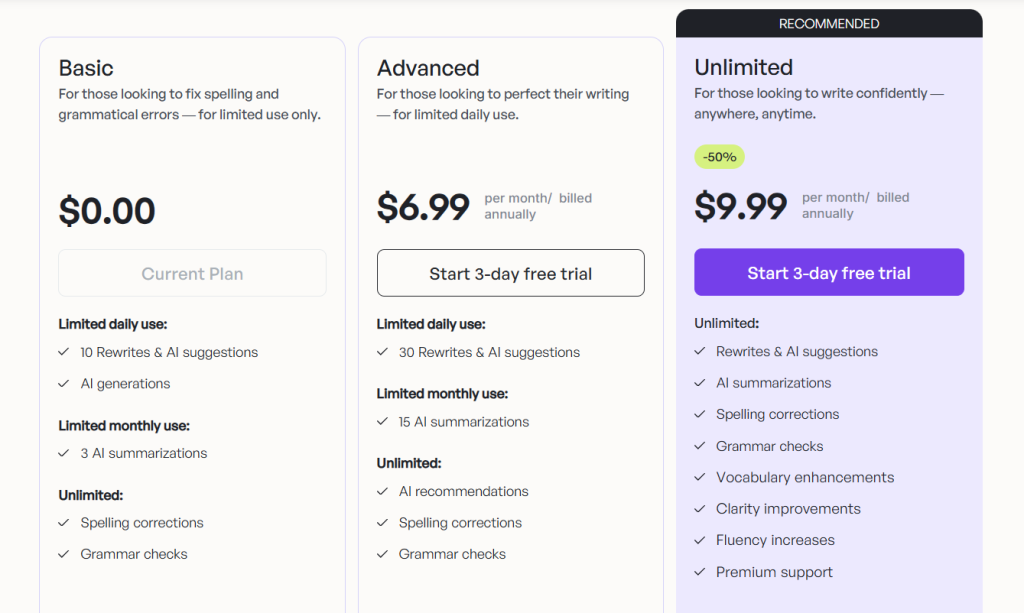
- Free Version Offers Real Value: Free plan includes ten daily rewrites, providing real utility and a proper trial without paying for casual users.
Wordtune Cons
- Limited Value for Generating New Content: Wordtune improves existing text well but struggles creating original content compared to dedicated AI writing tools.
- Rewrite Suggestions Can Miss Context: AI edits sometimes change meaning or clash with tone, requiring careful review instead of blind acceptance.
- Doesn’t Replace Comprehensive Editing: Handles sentence-level improvements only; grammar, structure, and flow still require Grammarly or manual editing for full quality control.
Wordtune Pricing
- Free: 10 rewrites per day
- Plus: $10/month
- Unlimited: $15/month
- Business: Custom pricing
Wordtune Reviews
- G2: 4.6 out of 5 stars (196+ reviews)
- Capterra: 4.4 out of 5 stars (82+ reviews)
Users appreciate Wordtune’s rewriting accuracy and ease of use but mention the pricing feels high for limited functionality.
Many reviewers use it specifically for editing and rephrasing existing content rather than as a primary writing tool.
10. QuillBot – Best for Paraphrasing and Summarizing
Best For: Students, researchers, and writers who need to paraphrase content, summarize long documents, or avoid plagiarism when working with source material.
How I Use It: I use QuillBot occasionally when I need to paraphrase research findings or summarize lengthy reports for clients. It’s particularly useful for condensing competitor content analysis into digestible summaries.
Quick Overview
QuillBot started as a paraphrasing tool for academic writing, and that’s still where it shines. I’ve been testing it since 2019, mostly for research tasks rather than actual content production for clients.
The main draw is control. You can adjust how aggressively QuillBot rewrites text—anywhere from light synonym changes to complete sentence restructuring. At OLW, I use it when summarizing competitor research or condensing long industry reports for internal review, not for creating client deliverables.
If you’re a student, researcher, or regularly work with source material that needs paraphrasing, QuillBot does this well.
But for professional content marketing or SEO writing, it’s too limited. You’ll get better results from tools actually designed for content creation rather than academic paraphrasing.
QuillBot Key Features
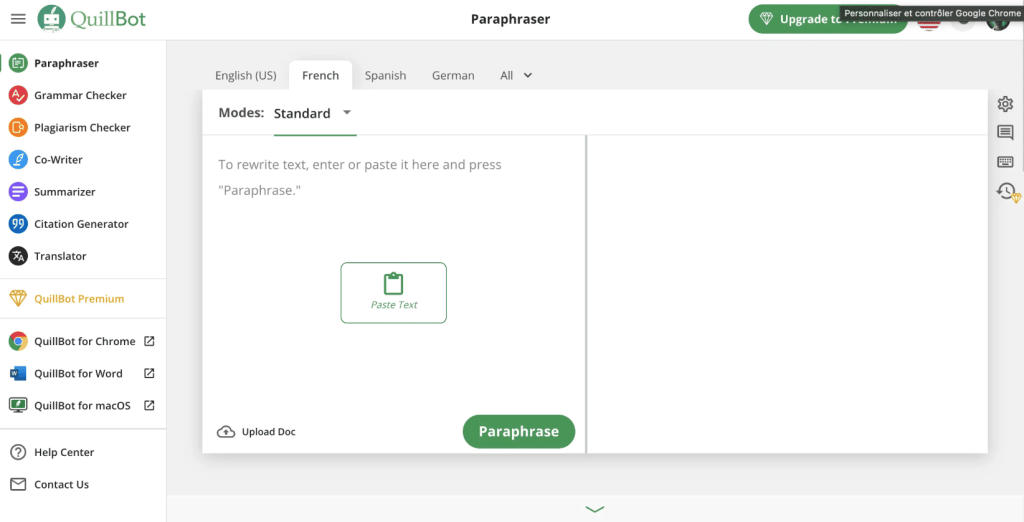
- Seven Paraphrasing Modes: Choose between Standard, Fluency, Formal, Simple, Creative, Expand, and Shorten modes to control how aggressively QuillBot rewrites text while preserving core meaning.
- Synonym Slider: Adjust how many words get replaced with synonyms versus keeping original phrasing, giving you control over the balance between originality and meaning preservation.
- Summarizer Tool: Condenses long articles or documents into key points using extractive summarization, useful for research review or competitor analysis without reading entire pieces.
- Grammar Checker: Basic grammar and spelling correction integrated with paraphrasing, catching errors while rewriting text though not as comprehensive as dedicated tools like Grammarly.
- Citation Generator: Creates properly formatted citations in MLA, APA, and Chicago styles, helpful for academic writing or research documentation requiring source attribution.
- Plagiarism Checker (Premium): Scans paraphrased content against web sources to ensure sufficient originality, though the database is smaller than dedicated plagiarism tools.
QuillBot Pros
- Paraphrasing Actually Changes Structure: QuillBot restructures sentences and paragraphs, producing genuinely different text while preserving the original meaning accurately.
- Summarizer Saves Reading Time: Condenses long articles into brief summaries, letting me quickly review multiple sources during research efficiently.
- Affordable Premium Pricing: At $4.17/month, QuillBot delivers professional paraphrasing quality affordably for students and occasional users compared to other AI tools.
- Citation Generator Simplifies Research Documentation: Automatically creates properly formatted citations, saving time and reducing errors in academic or source-based writing.
- Multiple Modes Fit Different Needs: Standard, Formal, Simple, and Creative modes allow QuillBot to handle varied paraphrasing needs with one tool.
QuillBot Cons
- Paraphrased Content Often Sounds Awkward: QuillBot outputs are grammatically correct but unnatural, requiring editing to maintain smooth, readable sentence flow.
- Limited Value Beyond Paraphrasing: The tool only paraphrases and doesn’t assist with content creation, SEO, or original writing for marketing purposes.
- Plagiarism Checker Less Comprehensive: Smaller database than Copyscape or Grammarly may miss matches, so it shouldn’t be relied on exclusively for verification.
- Not Suitable for Professional Content Marketing: Rewriting competitor or existing articles produces derivative content lacking originality, limiting value for ranking or engaging readers.
QuillBot Pricing
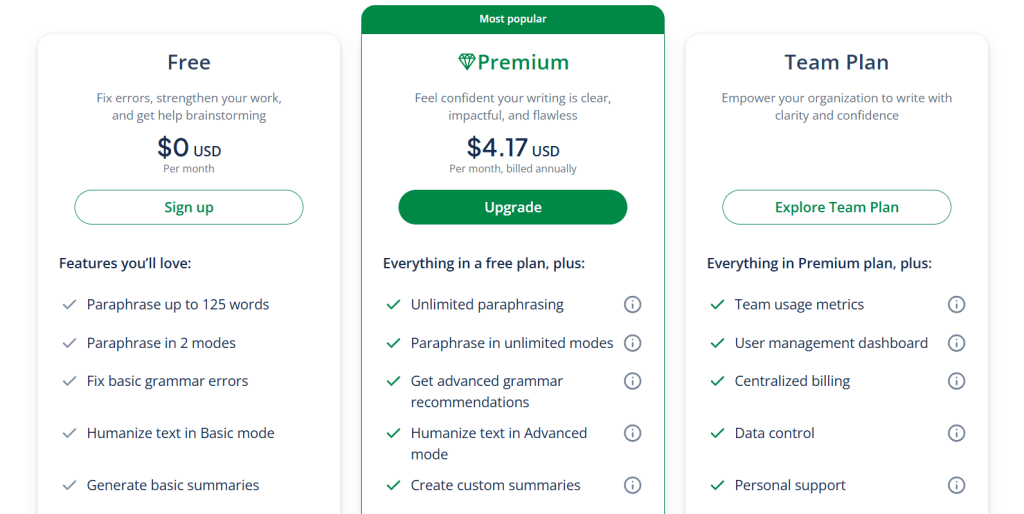
- Free: Limited paraphrasing
- Premium: $4.17/month
- Team: Custom
QuillBot Reviews
- G2: 4.4 out of 5 stars (110+ reviews)
- Capterra: 4.5 out of 5 stars (155+ reviews)
Users praise QuillBot’s paraphrasing accuracy and affordability but note outputs often need editing for natural flow.
Many reviewers are students or academic writers who find it valuable for research work, while professional content creators mention limited applicability beyond paraphrasing tasks.
11. Rytr – Best for Affordable AI Generation
Best For: Budget-conscious creators who need basic AI writing assistance for blogs, social media, and marketing copy at the lowest possible price point.
How I Use It: I’ve tested Rytr for clients with minimal budgets who still want AI assistance. I think it’s the cheapest viable AI writer, though you definitely get what you pay for in output quality.
Quick Overview
Rytr is a budget AI writing tool that competes by being one of the most affordable options available. Launched in 2021, it gained traction by offering unlimited content generation when most competitors were charging premium prices.
The appeal is straightforward. You get 40+ templates, 30+ languages, tone controls, and a plagiarism checker at a price point that’s hard to beat.
At OLW, we don’t use it for client work because the output quality doesn’t meet our standards, but I’ve recommended it to solopreneurs and local businesses just starting content marketing with minimal budgets.
I recommend it if you’re working with tight constraints and need AI assistance. That’s a step up from free tools.
Just be prepared to invest significantly more editing time compared to premium alternatives. You’re trading cost savings for additional manual work.
Rytr Key Features
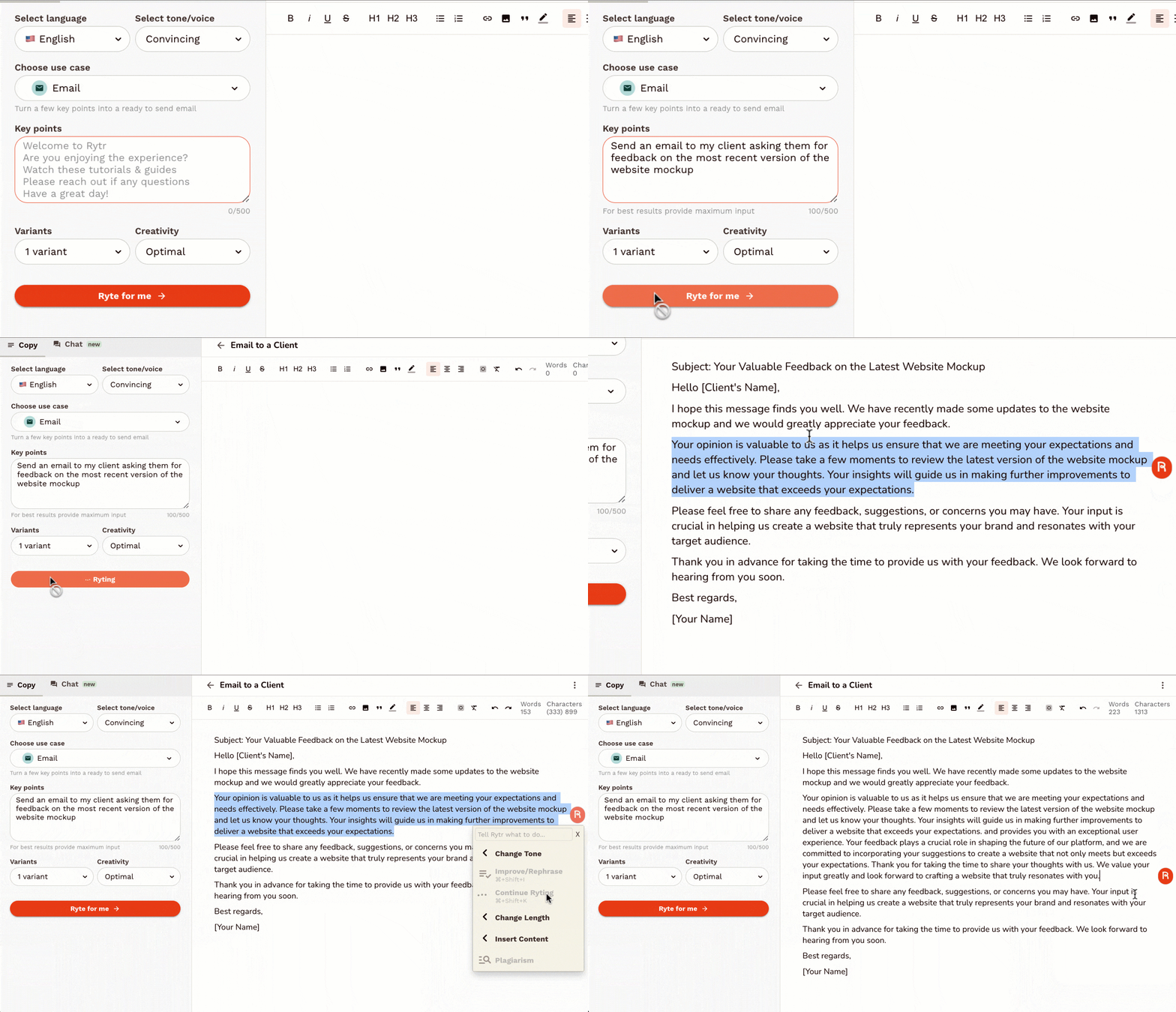
- 40+ Use Case Templates: Pre-built frameworks for blog posts, product descriptions, social media content, emails, and ads cover basic marketing needs without requiring custom prompting skills.
- 30+ Language Support: Generates content in major languages including Spanish, French, German, Italian, Portuguese, and others, useful for basic multilingual content creation without translation services.
- Tone of Voice Options: Choose from 20+ tones including casual, formal, professional, urgent, enthusiastic, and humorous to match brand voice requirements without manually adjusting every output.
- Built-in Plagiarism Checker: Scans generated content against web sources to verify originality, included at all pricing tiers unlike competitors that charge extra for plagiarism detection.
- SEO Meta Description Generator: Creates optimized meta descriptions that fit character limits and include target keywords, helpful for bulk SEO tasks on e-commerce or blog sites.
- Team Collaboration: Premium plans include user management and shared workflows, though features are more basic than enterprise tools like Jasper or specialized project management platforms.
Rytr Pros
- Covers Essential Content Formats: Templates for blogs, products, emails, and social media meet basic small business content needs without paying for extras.
- Plagiarism Checker Included: Rytr provides plagiarism detection at all tiers, giving creators confidence against duplicate content without extra cost.
- Tone Controls Work Reasonably Well: Switching between casual, professional, or urgent tones changes outputs noticeably, suitable for basic tone matching needs.
- No Learning Curve: Simple interface and templates let new users generate content immediately without tutorials, making it beginner-friendly and accessible.
Rytr Cons
- Output Quality Below All Competitors: Content feels generic, robotic, and factually unreliable, requiring heavy edits that reduce any real time savings.
- Limited Customization and Control: Cannot train brand voice or fine-tune style beyond basic tones, resulting in inconsistent outputs across content pieces.
- Templates Feel Basic and Limiting: Rytr’s bare-bones templates lack variety and rigidity makes them unsuitable when content needs don’t match preset formats.
Rytr Pricing
N/A
Rytr Reviews
- G2: 4.7 out of 5 stars (818+ reviews)
- Capterra: 4.6 out of 5 stars (18+ reviews)
Users appreciate Rytr’s affordability and unlimited generation but consistently mention output quality requires heavy editing.
Many reviewers use it as a starting point for ideas or first drafts rather than expecting publication-ready content, accepting lower quality for significant cost savings.
12. Scalenut – Best for All-in-One SEO Content
Best For: Small marketing teams and agencies that want keyword research, content planning, AI writing, and optimization in one platform instead of juggling multiple tools.
How I Use It: I’ve tested Scalenut for clients who want a comprehensive content workflow without paying for Ahrefs, Surfer, and Jasper separately. It combines these functions adequately, though each individual feature isn’t as strong as dedicated tools.
Quick Overview
Scalenut is an all-in-one SEO content platform that combines keyword research, content planning, AI writing, and optimization. Launched in 2020, it targets small teams who want consolidated workflows without managing subscriptions to multiple specialized tools.
What makes Scalenut different is the attempt to replace your entire content stack. You get keyword clustering, topic research, AI article generation, content briefs, SERP analysis, and optimization scoring in one platform.
At OLW, we’ve used it for smaller clients where paying for Ahrefs and Surfer separately doesn’t make financial sense.
I recommend it for small agencies, in-house marketing teams of 2-5 people, and businesses producing 10-30 SEO articles monthly.
If you’re enterprise-scale or need best-in-class performance for each function, dedicated tools still win.
Scalenut Key Features
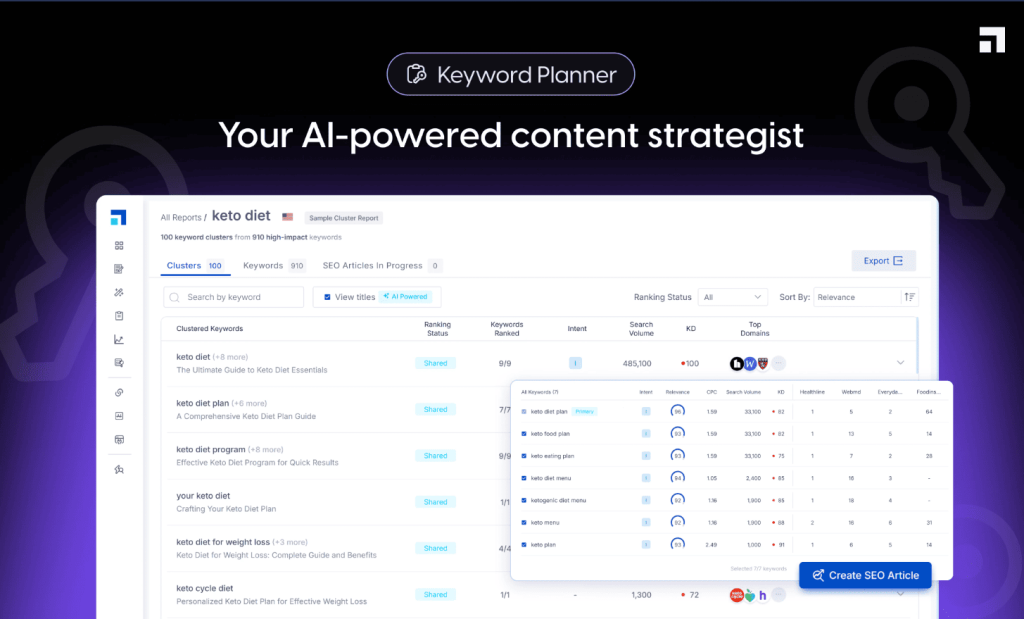
- Keyword Research and Clustering: Discovers related keywords and groups them by topic, helping you plan comprehensive content that covers semantic variations without creating separate articles for similar queries.
- AI Article Writer: Generates complete blog posts from keywords using SERP analysis and outline creation, producing 1,500-2,500 word drafts with optimization built in from the start.
- Content Briefs: Creates detailed outlines with suggested headings, questions, and keywords by analyzing top-ranking competitors, giving writers a data-driven roadmap before drafting.
- SEO Content Optimizer: Scores drafts against ranking pages with real-time feedback on keyword usage, content structure, and readability similar to Surfer’s optimization workflow.
- Topic Clusters: Identifies pillar content opportunities and supporting articles, helping structure site architecture around topic authority rather than scattered keyword targeting.
- Cruise Mode: Automated content creation workflow that takes you from keyword to published draft with minimal manual intervention, though output quality requires editing.
Scalenut Pros
- Consolidates Multiple Tool Subscriptions: Replaces separate tools for research, planning, writing, and optimization, saving small teams large monthly plans.
- Keyword Clustering Prevents Cannibalization: Groups related keywords to show which topics need single articles versus separate posts, avoiding self-competition.
- Content Briefs Save Research Time: Competitor-based outlines give writers clear direction, reducing hours of manual research and speeding content planning.
- All-in-One Workflow Reduces Platform Switching: Keyword research, briefs, drafting, and optimization occur in one interface, improving production speed and efficiency.
- Topic Cluster Planning Improves Site Structure: Organizes pillar and supporting content strategically, building topical authority rather than relying on random keyword targeting.
Scalenut Cons
- Individual Features Weaker Than Specialists: Keyword research, AI writing, and optimization aren’t as strong as Ahrefs, Jasper, or Surfer individually.
- AI Content Quality Needs Heavy Editing: Cruise Mode produces complete articles, but content feels generic and requires substantial rewriting for quality.
- Learning Curve Across Multiple Features: Mastering clustering, briefs, AI generation, and optimization scoring takes time, making full platform use challenging for new users.
Scalenut Pricing
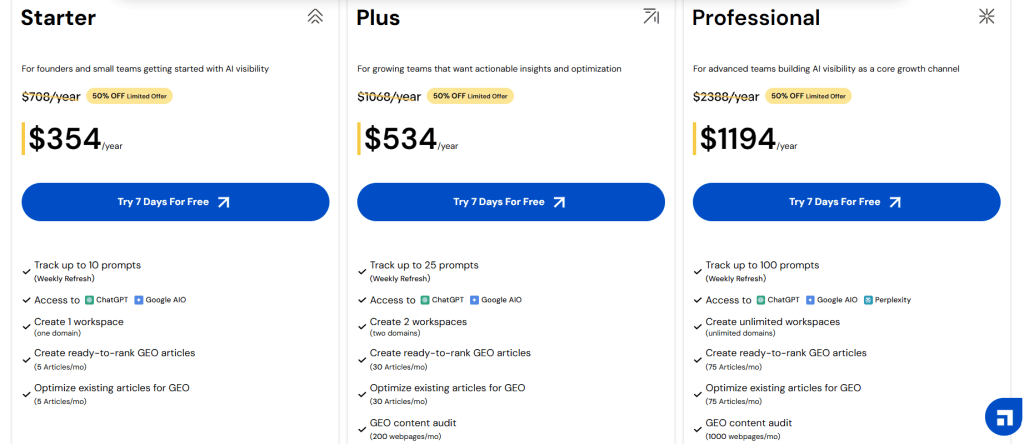
- 7 days trial available
- Starter: $354/year
- Plus: $534/year
- Professional: $1194/year
Scalenut Reviews
- G2: 4.7 out of 5 stars (314+ reviews)
- Capterra: 4.8 out of 5 stars (397+ reviews)
Users appreciate the all-in-one approach and consolidated workflow but frequently mention individual features don’t match specialized tools.
Many reviewers recommend it for small teams wanting adequate performance across multiple functions rather than best-in-class execution in any single area.
What’s the Best Content Writing Tool for You?
Choosing the right tool depends on your specific needs and workflow. Here’s how these platforms stack up for different situations:
- Best for Beginners
Grammarly stands out for newcomers. Its real-time suggestions teach you as you write, the browser extension works everywhere, and the free version handles most basic needs. I’ve recommended it to countless clients just starting their content journey.
- Best Budget Choice
Hemingway Editor gives you powerful editing for free. No subscription, no upsells—just clean, readable content. I still use it for quick clarity checks even with premium tools in my stack. Perfect when budgets are tight.
- Best AI-Powered Workflow
Jasper transforms how we create content at scale. The AI generates solid first drafts in our brand voice, cutting writing time by 60%. Templates for every format mean consistent quality across campaigns, which matters when managing dozens of clients.
- Best All-Rounder
Copy.ai balances AI power with practical features. Whether you’re writing blog posts, social content, or email campaigns, it handles everything without overwhelming you. The pricing is fair, and the learning curve is minimal—exactly what most marketers need.