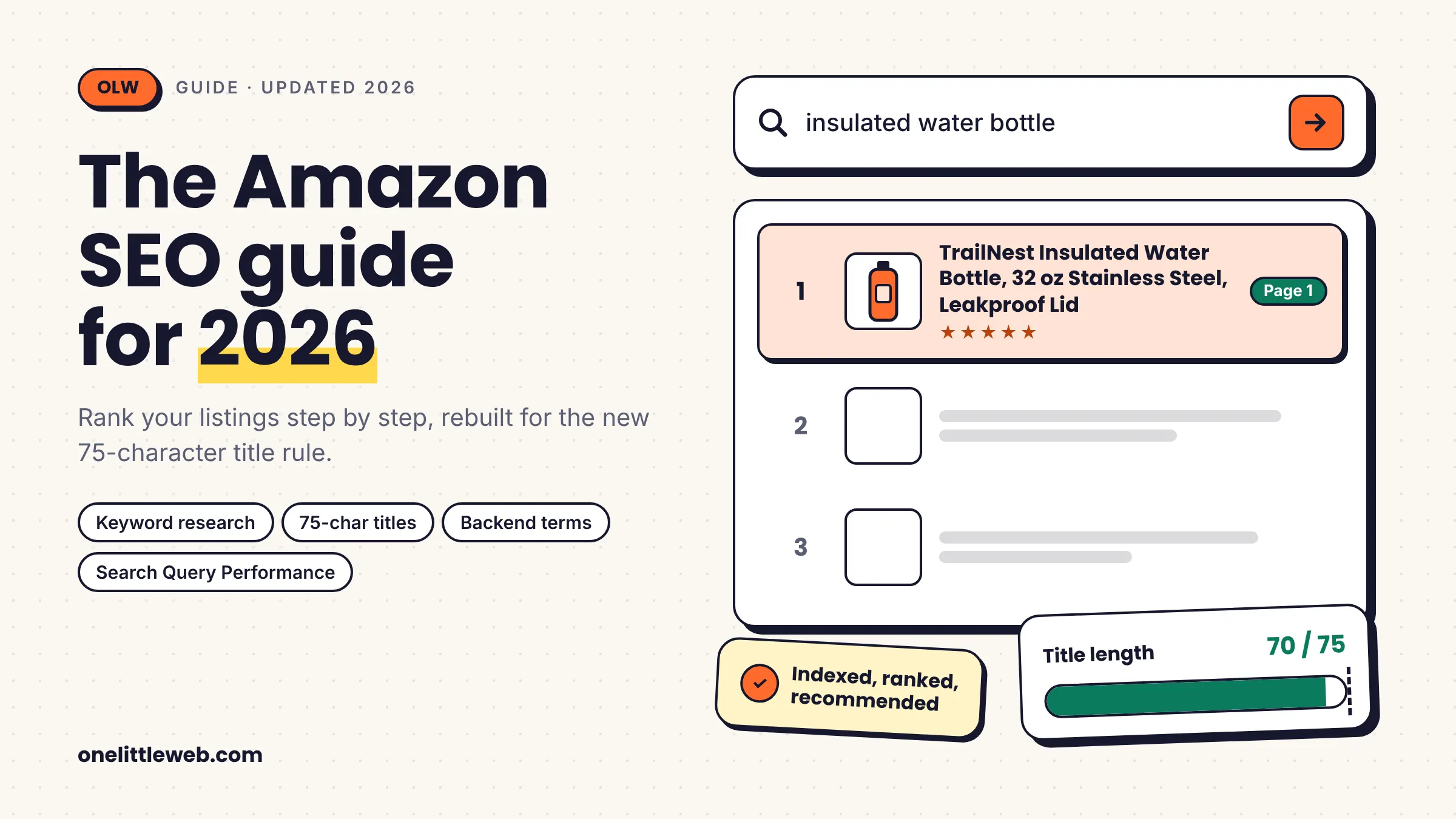
If you open Seller Central, you’ll see your best-selling title looks different. You didn’t change it. Amazon did.
Since July 27, 2026, Amazon caps product titles at 75 characters. Titles that run longer get swapped, bit by bit, for a version Amazon’s own AI writes. Most sellers had 150 to 200 characters of carefully placed keywords in there.
That one change broke a lot of old Amazon SEO advice. Even Amazon’s own SEO guide still tells sellers the limit is 200.
In this Amazon SEO guide, I’ll walk you through how Amazon search works now, step by step. You’ll learn where your keywords go, how to measure what’s working, and which “ranking factors” are real versus guesswork.
What Changed in Amazon SEO in 2026
If you last updated your listings in 2025, here’s what’s different.
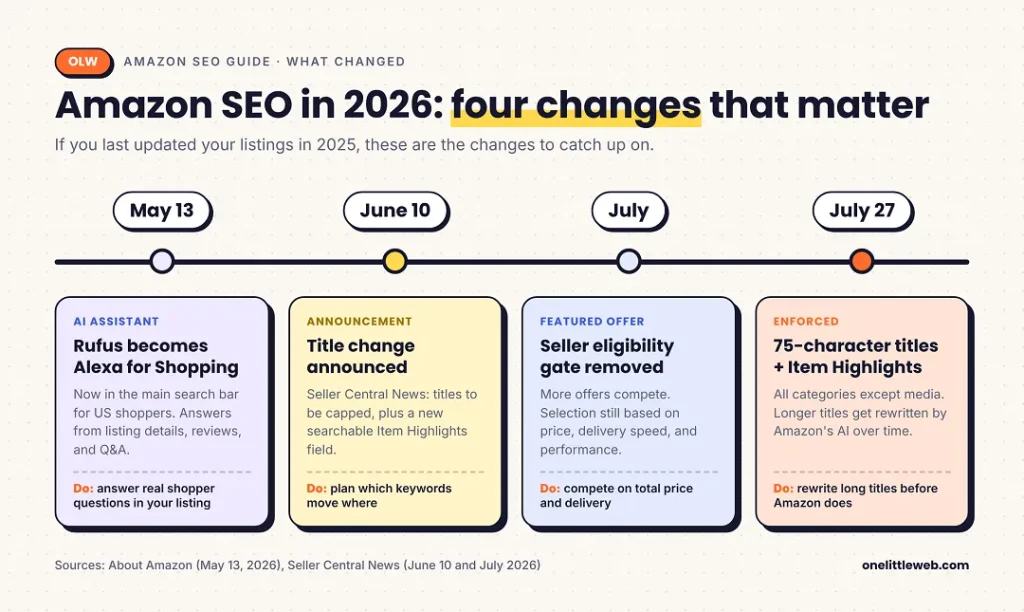
Amazon has said titles that already fit the new rules won’t be touched. Titles over the limit get replaced over time with an AI-written version, according to an Amazon moderator quoted by Canopy Management.
The rest of this guide is built around these rules.
What Is Amazon SEO?
Amazon SEO is the work of making your products show up higher in Amazon’s own search results, so more shoppers see them and buy them. It covers your listing content, your catalog data, and how well your product sells once people find it.
Amazon describes it in similar terms in its own SEO guide: strategies that improve product and brand visibility in Amazon search.
The goal is simple. You want the right shoppers to find your product, and you want them to buy it when they do.
How Amazon SEO differs from Google SEO
If you’ve done SEO for a website, some habits carry over. Many don’t.
| Amazon SEO | Google SEO | |
|---|---|---|
| Goal of the search engine | Sell the product shown | Answer the question asked |
| Main signals | Keyword relevance plus sales performance | Relevance, content quality, links |
| Backlinks | No direct role | A major signal |
| What you optimize | Fixed listing fields | Open web pages |
| First-party data | Search Query Performance (brand owners only) | Search Console (any site owner) |
| Shopper intent | Mostly ready to buy | Mixed |
The biggest shift is how Amazon judges success. Google wants to answer a question well. Amazon wants a sale.
So on Amazon, a listing that matches the search but doesn’t convert will struggle to hold its spot. Good copy alone isn’t enough.
The data gap matters too. On Google, any site owner gets Search Console for free. On Amazon, query-level data only comes to brands enrolled in Brand Registry. I’ll show you how to use it later in this guide.
How Amazon Search Works
Amazon doesn’t publish its ranking formula. But it has published research on how its search systems are built, and that’s a better starting point than seller rumors.
I find it easiest to think about Amazon search in three layers.
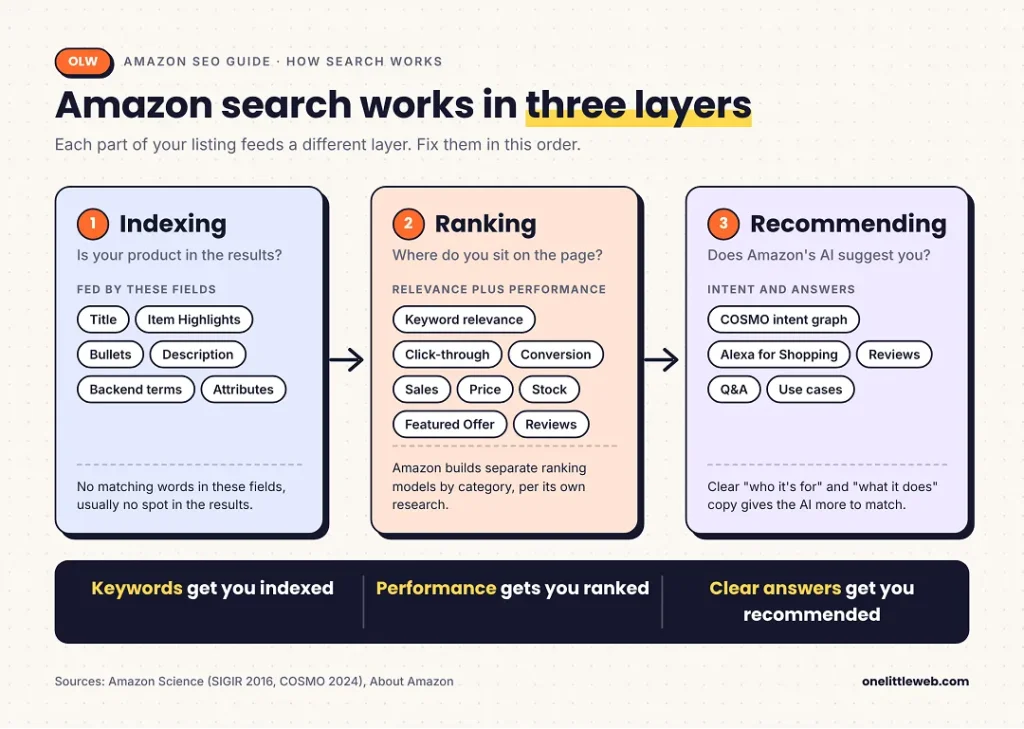
Indexing: getting into the results
Before your product can rank for a search, Amazon has to connect it to that search. This is indexing.
Amazon pulls words from your title, Item Highlights, bullets, description, backend search terms, and attributes. If none of those fields contain the words a shopper types, your product usually won’t appear for that search.
That’s why keyword placement still matters, even in 2026. Keywords get you into the race.
Ranking: relevance plus performance
Once you’re in the results, Amazon decides your position.
Amazon’s search scientists described this in a 2016 SIGIR paper. Amazon moved from a few hand-tuned ranking formulas to machine-learned models. It also builds separate models for different product categories.
What does that mean for you? Ranking signals likely work differently in different categories. Advice that worked for phone cases may not carry over to vitamins.
Most practitioners agree on the broad shape. Amazon looks at how relevant your listing is to the search, and at how well it performs once shown. Performance means things like clicks, conversions, and sales.
Recommending: COSMO and Alexa for Shopping
The newest layer is about intent.
COSMO is a system Amazon described in a 2024 research paper. It builds a knowledge graph of what shoppers actually need, based on what people search for and then buy. It covers 18 major product categories.
Amazon says COSMO runs in search features like relevance and navigation. Its online tests reached about 10% of US traffic.
Amazon’s own example: a search for shoes for pregnant women can surface slip-resistant shoes, even if the listings never mention pregnancy. The system understands the need behind the search.
Alexa for Shopping is Amazon’s AI shopping assistant. It used to be called Rufus. Amazon renamed it on May 13, 2026 and moved it into the main search bar for US shoppers.
It answers shopper questions using your listing details, reviews, and Q&A. So a listing that clearly says what a product does, and who it’s for, gives the assistant more to work with.
Is there an Amazon A10 algorithm?
No. At least, Amazon has never said there is.
“A9” comes from A9.com, a real Amazon subsidiary in Palo Alto that built its product search. “A10” is a label sellers started using for changes they noticed. It never came from Amazon.
Even Helium 10 ran a podcast episode titled “No Such Thing As The Amazon A10 Algorithm.”
Why does this matter? Many guides attach specific “A10 factors” to the name, like seller authority scores or bonus weight for outside traffic. None of those have an Amazon source. When you see them, treat them as opinions.
Organic vs sponsored results
The search results page mixes two kinds of listings.
Organic results are earned through relevance and performance. Sponsored results, like Sponsored Products, are paid placements bought through Amazon Ads.
This guide focuses on organic ranking. I cover how ads relate to it in a later section.
Amazon Ranking Factors: What Amazon Confirms vs What Sellers Infer
Most Amazon SEO guides list ranking factors with equal confidence. That’s misleading. Some come from Amazon. Others are educated guesses.
Here’s how I’d sort them, based on Amazon’s own documentation.
| Signal | What Amazon has said | Confidence | What to do |
|---|---|---|---|
| Keyword relevance | Its SEO guide tells sellers to use keywords in titles, bullets, descriptions, and backend terms | Confirmed | Put the right words in the right fields |
| Keyword stuffing | Amazon says it hurts the customer experience and your rankings | Confirmed | Use each key phrase once |
| Price | Its SEO guide says adjusting price can improve product ranking | Confirmed (Amazon’s wording) | Stay competitive on total price |
| Images | Its guide lists image best practices | Confirmed for conversion | Follow the main image rules |
| Featured Offer selection | Competitive price, delivery speed, and performance | Confirmed | Protect your Featured Offer |
| Sales history | Not published | Widely inferred | Treat as likely, not proven |
| Click-through and conversion | Not published as factors, but measured in Brand Analytics | Strongly inferred | Track them and improve them |
| Reviews and ratings | Not published as ranking factors | Inferred | Earn them for conversion first |
| Stock availability | No stock means no sales | Logical inference | Avoid stockouts |
| Ads lifting organic rank | Amazon says ads help offers rise in results, which describes paid placement | Unproven | Don’t buy ads just for organic rank |
| Seller authority, outside traffic weight | No Amazon source | Unverified | Ignore numeric claims |
A few patterns stand out.
The confirmed factors are mostly about relevance and the offer itself. The inferred ones are mostly about performance. That fits the two-layer model above.
Notice that Amazon never publishes weights. Any guide that tells you “conversion rate is 30% of your ranking” is making that up.
The only place Amazon names its selection criteria directly is the Featured Offer. That’s useful, because winning the Featured Offer drives the sales that the performance layer seems to reward.
Before You Optimize: Set Your Baseline
The most common Amazon SEO mistake happens before any editing. Sellers change five things at once, then can’t tell what worked.
So start by writing down where you are today.
What to capture
For each product you plan to optimize, record these numbers over a fixed window. I’d use the last four full weeks.
- Search Catalog Performance: impressions, clicks, cart adds, and purchases for the ASIN
- Search Query Performance: your top 10 search queries, with your brand’s share at each step
- Business Reports: sessions and unit session percentage (Amazon’s conversion rate)
- Organic rank: your position for 5 to 10 target keywords, from a rank tracker
- Featured Offer percentage: how often your offer wins the Buy Box
Use the same window length later. If you compare four weeks before against two weeks after, seasonality and noise will fool you.
If you don’t have Brand Registry
Search Query Performance and Search Catalog Performance live inside Amazon Brand Analytics. That’s only available to brands enrolled in Amazon Brand Registry.
Brand Registry also unlocks A+ Content, Manage Your Experiments, and Vine. If you own your brand, enrolling is usually worth it for the data alone.
Without it, you can still use Business Reports in Seller Central and a third-party rank tracker. You’ll just have less detail on which searches bring shoppers to you.
Step 1: Do Amazon Keyword Research
Keyword research tells you which words shoppers use when they look for products like yours. Everything else in your listing builds on it.
Here’s the workflow I’d follow, from free sources to paid tools.
Start with Amazon’s free sources
Amazon autocomplete. Type your main product term into the Amazon search bar and note the suggestions. They show how real shoppers phrase their searches.
Try adding letters after your main term (“water bottle a,” “water bottle b”) to pull more ideas.
Product Opportunity Explorer. This tool in Seller Central shows search terms and demand trends for a product niche. Amazon names it as a keyword research source in its own SEO guide.
Use Search Query Performance if you’re brand registered
If you have Brand Analytics, this is your best keyword source. It’s the only Amazon data that shows real search queries with real numbers.
The Search Query Performance dashboard shows which queries led shoppers to your brand or ASIN. For each one, it shows impressions, clicks, cart adds, and purchases. It also shows your share of each step compared with everyone else on that query.
Look for two things:
- Queries where you get impressions but few clicks. You’re indexed, but your search tile isn’t winning.
- Queries that convert well for you. Those belong in your title or Item Highlights.
Third-party tools give you estimates. This dashboard gives you Amazon’s own counts.
Reverse-engineer competitor keywords
Look at the top 5 to 10 listings for your main search. Read their titles and bullets for phrases you haven’t covered.
Paid tools speed this up. Helium 10’s Cerebro and Jungle Scout’s Keyword Scout can show which keywords a competitor’s ASIN ranks for. This is often called a reverse ASIN lookup.
Add third-party tool data, and know its limits
Tools like Helium 10, Jungle Scout, and MerchantWords estimate search volume on Amazon. They’re useful for comparing keywords against each other.
But they’re estimates, not Amazon data. Two tools can show very different volumes for the same keyword. Use them to rank options, not as exact counts.
If you run Sponsored Products ads, your search term reports are another strong source. They show which searches actually led to sales.
Pick primary, secondary, and long-tail keywords
Sort your list by how specific each keyword is.
- Short-tail keywords are broad, like “furniture” or “shoes.” High volume, heavy competition.
- Long-tail keywords are specific, like “water resistant lawn furniture.” Lower volume, but clearer buying intent.
That example comes straight from Amazon’s guide, which recommends using a mix of both.
Your primary keyword should describe exactly what the product is. Your secondary keywords describe features, uses, and variations. Long-tail terms often fill gaps.
Also check intent. “Water bottle for kids” and “water bottle for hiking” may both be relevant to one bottle. But they point to different shoppers, and your copy should speak to the one you actually serve.
Assign keywords to fields
Once your list is ready, map each type to the field where it does the most good.
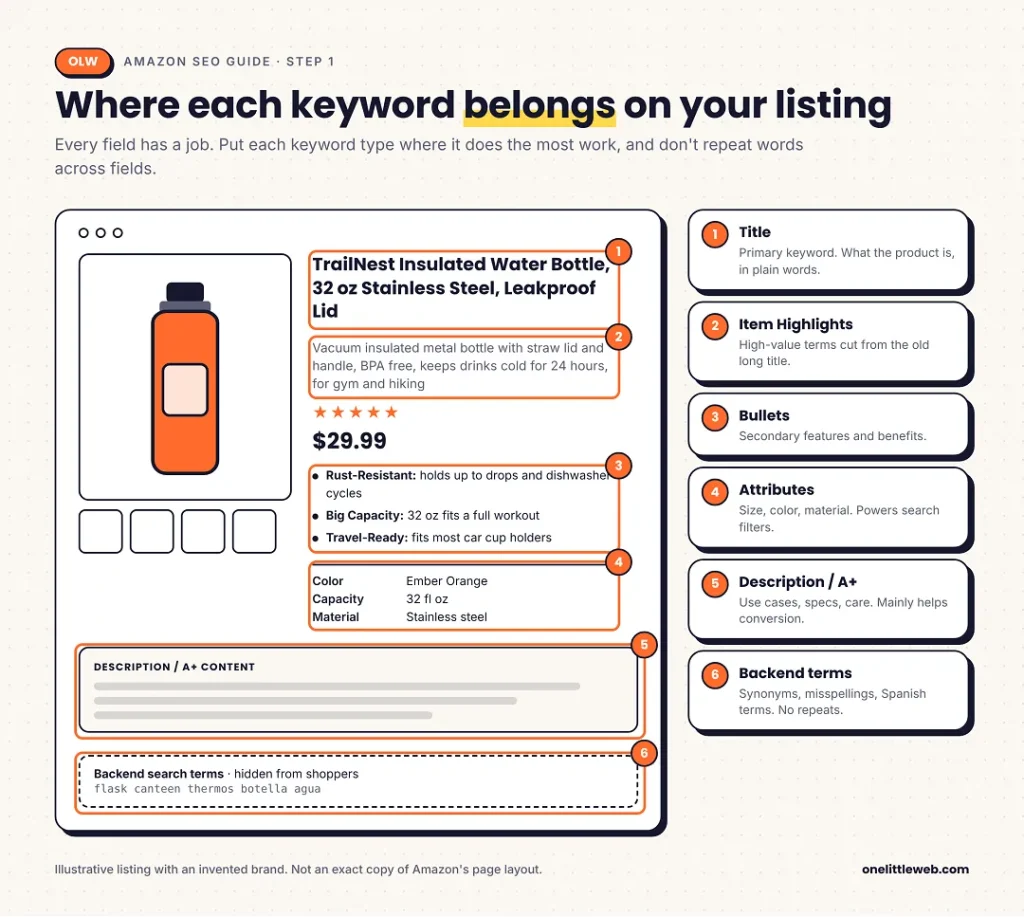
The next six steps walk through each of these fields.
Step 2: Write a 75-Character Title and Use Item Highlights
This is the biggest change to Amazon SEO in years. If you do nothing else after reading this guide, check your titles.
The new title rules
Amazon announced the change on June 10, 2026, and started enforcing it on July 27, 2026.
Here’s what’s in effect:
- 75 characters maximum, including spaces and your brand name
- Applies to every category except media, like books, music, and video
- Applies to parent and child titles
- Titles over the limit are gradually replaced with an AI-written version from Amazon
- Titles that already comply are left alone
The old limit was 200 characters, with lower caps in some categories. That means most sellers lost more than half their title space overnight.
Even Amazon’s own SEO page still lists the 200-character limit as I write this. So if you’re reading older guides, double-check any title advice.
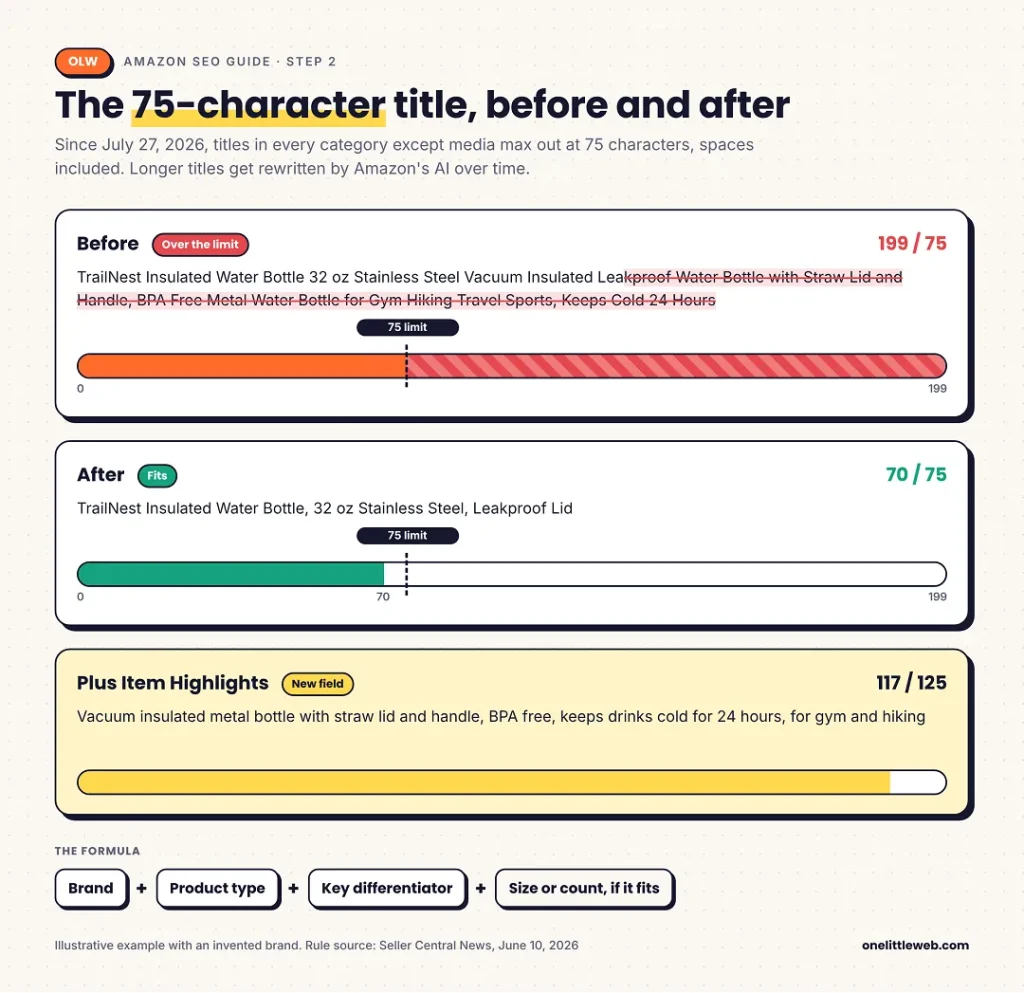
A simple 75-character formula
With only 75 characters, every word needs a job. This structure works for most products:
Brand + product type + key differentiator + size or count (if it fits)
- Brand: so shoppers recognize you
- Product type: your primary keyword, in plain words
- Key differentiator: the one thing that makes a shopper pick you
- Size or count: only if it changes the buying decision
Write it for a person first. A short, clear title is also easier to read on a phone, where most titles get cut off anyway.
What to cut, and where it goes
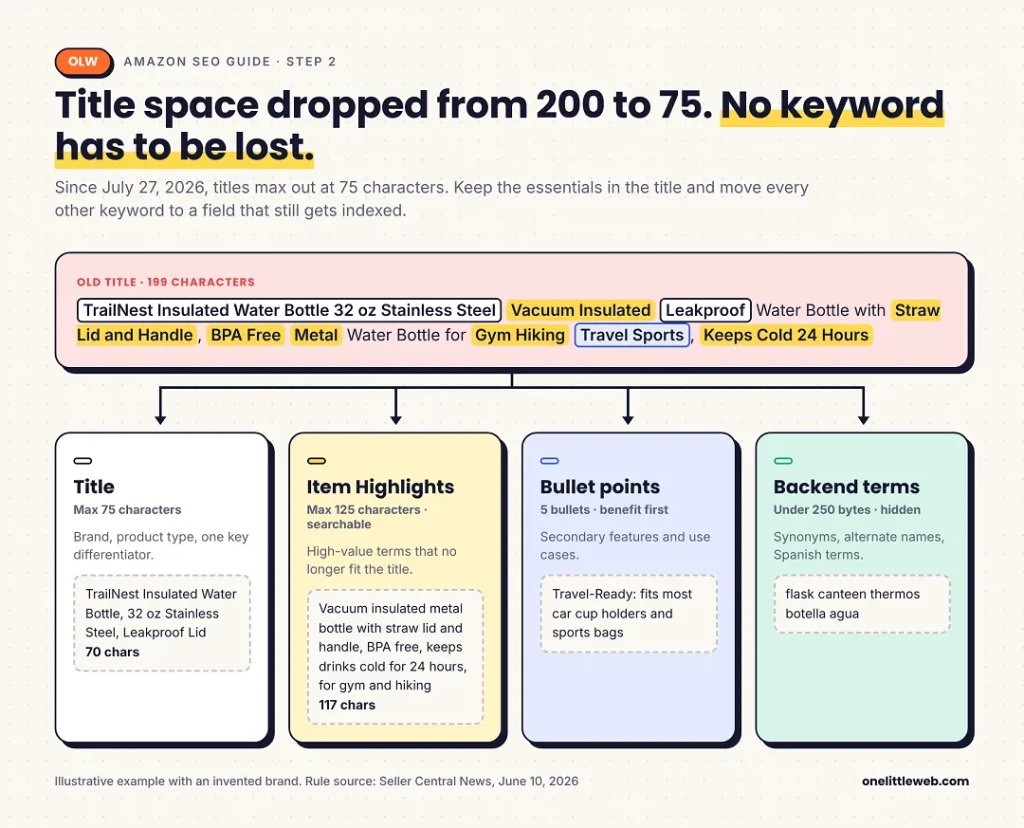
Your old title probably had 10 or more keywords. You can’t fit them all now. Here’s how I’d decide where each one goes.
- Keep your primary keyword in the title.
- Move the next most valuable keywords to Item Highlights.
- Work secondary features into your bullet points.
- Put synonyms and alternate names in backend search terms.
Nothing has to be lost. It just has to move.
Writing Item Highlights
Item Highlights is a new field Amazon added alongside the title change. It gives you 125 characters that are searchable and show near your title.
Several seller agencies report that Item Highlights only displays when your title is 75 characters or fewer.
Treat this field as the second half of your old title. Use it for:
- The keywords you cut from the title
- A key spec or two (material, capacity, compatibility)
- A use case shoppers search for
Keep it readable. It’s visible to shoppers, so a string of keywords will hurt you here just as much as it would in a title.
Before-and-after example
Here’s an illustrative rewrite for an invented brand.
Old title (199 characters): TrailNest Insulated Water Bottle 32 oz Stainless Steel Vacuum Insulated Leakproof Water Bottle with Straw Lid and Handle, BPA Free Metal Water Bottle for Gym Hiking Travel Sports, Keeps Cold 24 Hours
New title (70 characters): TrailNest Insulated Water Bottle, 32 oz Stainless Steel, Leakproof Lid
Item Highlights (117 characters): Vacuum insulated metal bottle with straw lid and handle, BPA free, keeps drinks cold for 24 hours, for gym and hiking
The title now says what the product is and why it’s different. The Item Highlights line keeps the search terms that used to crowd the title.
Check whether Amazon rewrote your title
If you had long titles before July 27, Amazon may already have changed some. Open each priority listing in Seller Central and compare the live title with your version.
Some sellers report seeing Amazon-applied changes in the listing’s change history. If Amazon’s version is weak, write a compliant one and resubmit it.
Step 3: Write Bullet Points That Rank and Convert
Bullet points do two jobs. They carry secondary keywords for indexing, and they help shoppers decide to buy.
Follow Amazon’s format
Most sellers get 5 bullet points. Amazon’s own guide gives a clear format:
- Start each bullet with a one- or two-word description
- Explain it in 100 characters or fewer
- Use fragments, not full sentences
- Capitalize the first letter
The hard character limit per bullet varies by category. Sources disagree on the exact number, so check the limit your listing form shows.
Amazon also tightened its bullet rules on August 15, 2024. It now restricts special characters, emojis, and some phrases. Old bullets with icons or symbols may need a cleanup.
Lead with the benefit
A feature says what the product has. A benefit says why the shopper should care.
Weak: Stainless steel construction.
Better: Rust-Resistant: Stainless steel body holds up to daily drops and dishwasher cycles.
The second version uses Amazon’s lead-word format, includes a secondary keyword, and tells the shopper what they get.
A simple bullet order
When I plan bullets, I like this order:
- Main benefit: the reason most people buy it
- Key spec: size, capacity, material
- Use case: where or how people use it
- Fit or compatibility: what it works with
- Care or warranty: what happens after purchase
Each bullet should answer a different question. If two bullets say the same thing, merge them and use the space for a new point.
Step 4: Write the Description and Use A+ Content
The description gives you room for detail. A+ Content gives you room for visuals.
What the description is for
Amazon’s guide suggests using the description for things like materials, colors, quantities, sizes, dimensions, care instructions, and warranty information.
Think of it as the place for every detail a careful shopper might check before buying. Use cases fit here too, since they help both shoppers and Amazon’s intent systems understand who the product is for.
Amazon gives a useful rule: if you’ve used a key phrase once, you probably don’t need it again. Use variations instead of repeats.
When to use A+ Content
A+ Content lets you add images, comparison charts, and rich text to your product page. It’s free for brands enrolled in Brand Registry.
On many listings, A+ Content shows in place of the plain description. So if you use A+, make sure the important details still appear somewhere a shopper will read them.
Modules I’d prioritize:
- Comparison chart: helps shoppers pick between your own variants or product lines
- Feature callouts: show the benefit and the proof side by side
- FAQ-style module: answers the questions shoppers ask most
Does A+ Content help rankings?
Honest answer: nobody outside Amazon knows for sure. Some guides say A+ text isn’t indexed for search. Others say it is. I couldn’t find an Amazon statement either way.
What’s clear is that A+ Content can help shoppers decide. So treat it as a conversion tool. If it also helps indexing, that’s a bonus.
Step 5: Fill Backend Search Terms the Right Way
Backend search terms are keywords shoppers never see. Amazon reads them and uses them to connect your product to more searches.
Where to find the field
In Seller Central, go to Inventory > Manage All Inventory. Click Edit on the product, open the Product details tab, and find the Generic keyword field.
If you upload in bulk, the field is called generic_keywords in your flat file.
How much space you get
The limit is measured in bytes, not characters.
| Marketplace | Limit |
|---|---|
| Most marketplaces (including the US) | Under 250 bytes |
| India | Under 200 bytes |
| Japan | 500 bytes |
These limits come from Amazon staff and help text quoted in the Seller Forums.
For plain English, one letter or number is one byte. Accented letters like “é” take two bytes. The euro sign takes three. If you add Spanish terms for US shoppers, count bytes, not characters.
Sources disagree on what happens if you go over. Some say Amazon ignores the whole field. Others say the field just stops accepting input. Either way, stay a few bytes under the limit.
Formatting rules
Amazon’s guide gives these rules:
- Use all lowercase
- Separate words with spaces only, no commas
- Skip articles and prepositions like “a,” “the,” and “for”
What to include and what to leave out
Include: synonyms, abbreviations, alternate names, common misspellings, and Spanish terms for the US market.
Leave out: competitor brand names, claims like “best” or “#1,” words already in your title or bullets, and anything not relevant to the product.
Repeating visible words wastes space. Amazon already reads your title and bullets.
Before-and-after example
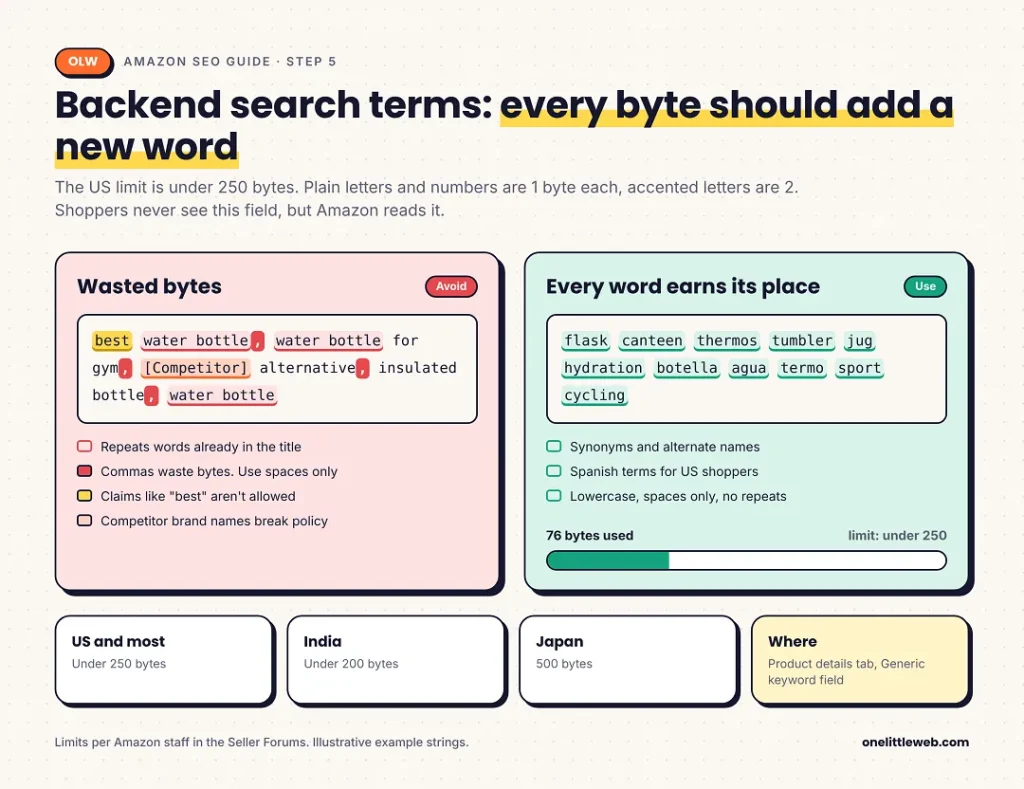
Weak backend string: best water bottle, water bottle for gym, Hydro Flask alternative, insulated bottle, water bottle
This repeats “water bottle,” uses commas, makes a “best” claim, and names a competitor brand.
Better backend string (76 bytes): flask canteen thermos tumbler jug hydration botella agua termo sport cycling
No repeats from the title, no claims, no brand names. Each word adds a new way to be found.
Step 6: Optimize Product Images and Video
Your main image does most of the work in search results. Your other images do most of the work on the product page.
Main image rules
The main image has strict rules. These come from Amazon staff posts in the Seller Forums:
- Pure white background, RGB 255, 255, 255
- Product fills 85% or more of the frame
- No text, graphics, or watermarks
- Only the product being sold, with no props that aren’t included
- At least 1,000 pixels on the longest side, so zoom works
- File types: JPEG, TIFF, or PNG
Many sellers use 1,600 pixels or more for sharper zoom.
Watch the background closely. Off-white looks white to people but fails Amazon’s check. Studio photos often have shadows in the corners that push them below pure white.
Plan the rest of your image slots
Each image should answer one shopper question. Here’s a simple plan:
| Slot | What it shows | Question it answers |
|---|---|---|
| Main | Product on white | What is it? |
| 2 | Size or dimensions | Will it fit? |
| 3 | Feature infographic | What does it do better? |
| 4 | Lifestyle shot | Is it for someone like me? |
| 5 | Comparison | Why this one? |
| 6 | What’s in the box | What do I get? |
| Video | Product in use | How does it work? |
This ties into the next sections. When images answer real questions, shoppers buy with more confidence, and your listing gives Amazon’s assistant more to work with.
Alt text
Amazon’s guide recommends adding alt text to images. Write a simple sentence that describes the image and includes one or two keywords.
Step 7: Complete Attributes, Categories, and Variations
This is the part of Amazon SEO most sellers skip. It’s also one of the easiest fixes.
Attributes power search filters
Shoppers narrow results with filters like color, size, and material. Your product only shows up under a filter if that attribute is filled in.
Here’s a simple example. If you sell a red backpack but leave the color field empty, it won’t appear when a shopper filters by red. No amount of title work fixes that.
Go through every attribute field for your category. Fill in everything that applies.
Attributes also help Alexa for Shopping. Each filled field is one more question your listing can answer.
Pick the right category
Amazon sorts products into categories and browse nodes. If yours is in the wrong one, it can miss relevant browsing paths and filters.
Check where your top competitors are listed. If they sit in a more specific category than you, look into moving.
Set up variations correctly
Variations group true options of one product, like sizes, colors, or scents, under one parent ASIN. Each option is a child ASIN.
Done right, variations keep reviews and sales together on one listing. Separate listings for the same product split your traffic and compete with each other.
Don’t group different products as variations to pool reviews. That breaks Amazon’s variation policy and can get listings suppressed.
Product identifiers
Each ASIN is tied to identifiers like UPC, EAN, or GTIN. These help Amazon match your product correctly in its catalog. Make sure yours are accurate before you list.
Step 8: Keep the Offer Healthy (Price, Stock, Featured Offer, Reviews)
A perfect listing can still sink if the offer behind it is weak. This step covers the signals outside your copy.
Win and keep the Featured Offer
The Featured Offer, often called the Buy Box, is the offer with the Add to Cart and Buy Now buttons. Most sales on a product page go through it.
Amazon says it picks the Featured Offer using competitive pricing, delivery speed, and performance.
In July 2026, Amazon started removing its separate seller eligibility gate. Before, some sellers couldn’t compete at all. Now more offers enter the race, but the selection criteria stay the same.
If you lose the Featured Offer, you lose sales. And fewer sales likely means weaker performance signals for search.
Price for total cost
Shoppers compare the total price, including shipping. Amazon’s guide also says price adjustments can improve ranking.
Check your competitors’ total price, not just their list price. Use Amazon’s Revenue Calculator to find your floor before you cut.
Stay in stock
When you run out of stock, sales stop. That puts both your rankings and your Featured Offer at risk.
Better SEO brings more demand, so plan inventory for it. A listing that climbs and then runs out loses the ground it gained.
FBA vs FBM
Fulfillment by Amazon (FBA): Amazon stores, packs, ships, and handles returns. Your offer is usually Prime-eligible.
Fulfilled by Merchant (FBM): you handle fulfillment yourself. You keep more control and can avoid some fees.
Both can win the Featured Offer. What matters is your delivery speed and performance, not the method itself.
Earn reviews the right way
Reviews help shoppers trust you. Amazon doesn’t list them as ranking factors, but they clearly affect clicks and conversions.
Use the Request a Review button in Seller Central after delivery. Never pay for reviews or offer anything in return for them. That breaks Amazon’s policy and can get your account suspended.
Read your reviews for patterns. If the same complaint keeps showing up, fix the product, packaging, or listing.
When Amazon Vine makes sense
Amazon Vine sends free units to trusted reviewers in exchange for honest reviews. It’s built for new products.
To enroll, you need Brand Registry, and your parent ASIN needs fewer than 30 reviews. You can enroll up to 30 units per parent ASIN, and each ASIN can only be enrolled once.
The fee is unclear in 2026. Most sources report $0 for 1 to 2 units, $75 for 3 to 10, and $200 for 11 to 30. A few report a change in March 2026 that made enrollment free for products under $100. Check the current fee in Seller Central before you commit.
Step 9: Optimize for Alexa for Shopping
Alexa for Shopping is now built into the main Amazon search bar for US shoppers. It answers questions like “is this good for beginners?” or “is this dishwasher safe?”
According to Amazon, as reported by Pattern, it builds answers from your listing details, customer reviews, and Q&A.
So the goal is simple: make sure your listing answers the questions shoppers actually ask.
Five steps to follow
- Collect real questions. Pull them from reviews, Q&A, buyer messages, and return reasons.
- Answer them in your listing. Put the answers in your bullets, description, or A+ Content, in plain words.
- Fill every attribute. Each field answers a question before anyone asks it.
- State use cases and audiences. Say who the product is for and where they use it. This also helps COSMO match your product to intent-based searches.
- Test the assistant. Ask it your five most common customer questions about your own product. Fix your listing wherever the answer is wrong or missing.
That last step takes 10 minutes and shows you exactly what Amazon’s AI understands about your product.
Step 10: Test Changes with Manage Your Experiments
Once your listing is rebuilt, the next question is whether your changes actually helped. Amazon gives brand owners a tool for that.
What Manage Your Experiments does
Manage Your Experiments runs A/B tests on your listing. It shows half of shoppers one version and half another, then reports which performs better.
According to Amazon’s help page, you can test:
- Product title
- Product images
- Bullet points
- Product description
- A+ Content
- A+ Brand Story
- Several attributes at once (multi-attribute)
Who can use it
You need Brand Registry as the brand owner. Your ASIN also needs enough recent traffic. Low-traffic products won’t qualify.
The help page is marked for the US marketplace. If you sell elsewhere, check whether it’s available in your store.
How long tests run
You can pick a test length between 4 and 10 weeks. Amazon also offers a “run to significance” option in beta for title and image tests, which ends the test once there’s a clear result.
Good first tests in 2026
The title change makes this the perfect time to test.
Write two compliant 75-character titles. One could lead with the product type, the other with the key benefit. Let Amazon tell you which one shoppers prefer.
Test one element at a time. If you change the title and the main image together, you won’t know which one moved the result.
How to Measure Amazon SEO Results
Most guides give you a list of metrics. That’s not enough. You need to know what each number tells you to fix.
The Search Query Performance funnel
Search Query Performance breaks each query into four steps:
- Impressions: how often products showed for the search
- Clicks: how often shoppers clicked
- Cart adds: how often they added to cart
- Purchases: how often they bought
For each step, you see the total for everyone, your brand’s count, and your brand’s share.
The trick is comparing your share across steps. Where your share drops, that’s where your listing loses shoppers.
Diagnose problems with share gaps
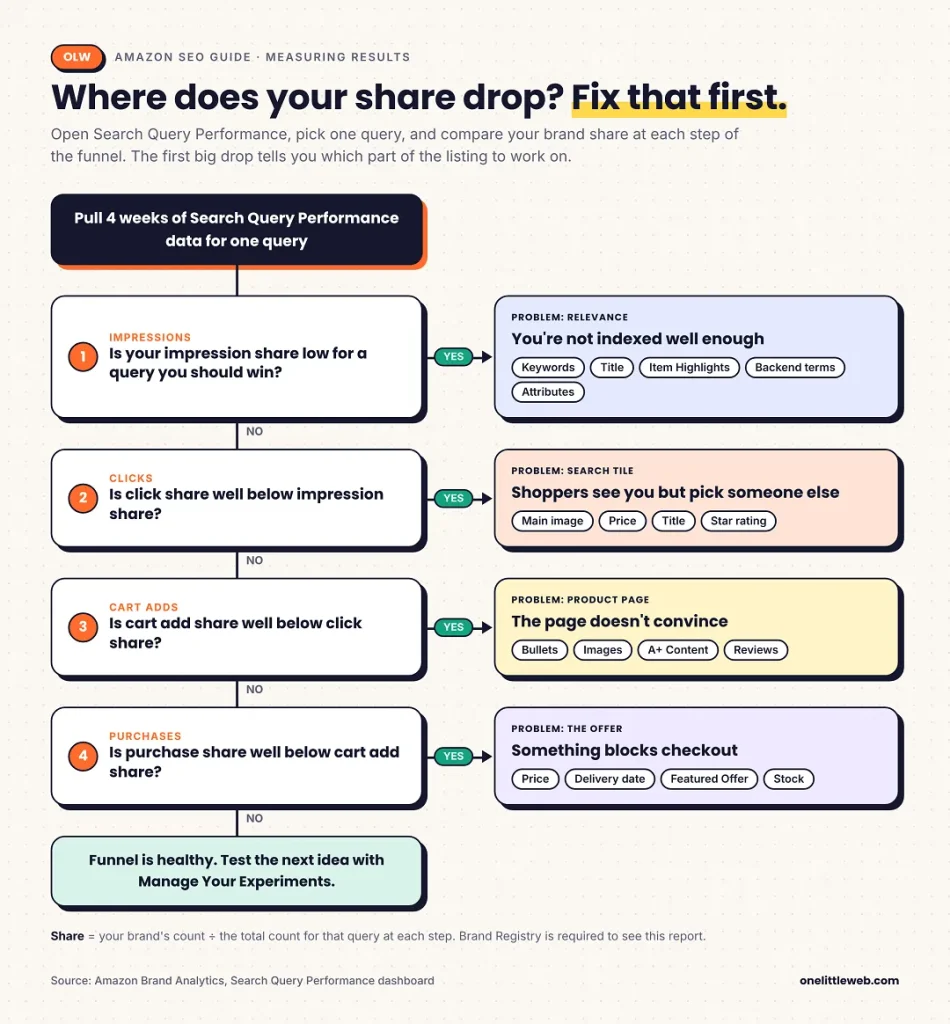
This turns a wall of numbers into a to-do list.
Track funnel ratios per ASIN
Search Catalog Performance shows the same funnel for each ASIN across all searches. From it, work out three ratios:
- Clicks ÷ impressions: how strong your search tile is
- Cart adds ÷ clicks: how strong your product page is
- Purchases ÷ cart adds: how smooth checkout is
Compare each ASIN against the median of your own catalog. The products furthest below the median are your first fixes.
Worked example (illustrative)
Say the TrailNest bottle from Step 2 shows this for the query “insulated water bottle” over four weeks:
| Step | Total | TrailNest | Share |
|---|---|---|---|
| Impressions | 500,000 | 15,000 | 3.0% |
| Clicks | 20,000 | 300 | 1.5% |
| Cart adds | 6,000 | 110 | 1.8% |
| Purchases | 3,000 | 55 | 1.8% |
Impression share is 3.0%, but click share falls to 1.5%. That’s the biggest gap. Shoppers see the product but pick someone else.
Once they click, the brand holds its share. So the product page isn’t the main problem. The search tile is.
The fix would start with the main image and the title. Then you’d run a Manage Your Experiments test and compare the next four weeks against this baseline.
Other numbers to understand
Best Sellers Rank (BSR) shows how well a product sells within its category. It’s useful for tracking sales trends. But it isn’t your keyword rank, and a good BSR doesn’t mean you rank for a specific search.
ACoS (advertising cost of sales) is ad spend divided by ad sales. TACoS (total advertising cost of sales) is ad spend divided by total sales. If TACoS falls while sales hold steady, organic sales are carrying more of the load.
How long results take
There’s no official answer, and I’d be wary of anyone who promises results in days.
Amazon’s own testing tool runs for 4 to 10 weeks. That’s a sensible frame for judging content changes. Indexing changes, like a new backend keyword, may show up sooner in impressions. Ranking changes that depend on sales usually take longer.
Measure against your baseline, using the same window length.
Do Amazon Ads Help Organic Rankings?
This is one of the most common questions in Amazon SEO. Most answers are more confident than the evidence allows.
What’s true
Ads buy paid placement. Sponsored Products put your product in sponsored spots on the search page. That’s separate from organic ranking.
Ad sales are still sales. If sales history matters for ranking, which most practitioners believe, ad-driven sales add to that history.
Ad reports reveal keywords. Your Sponsored Products search term reports show which searches led to sales. That’s great input for your title, Item Highlights, and backend terms.
What’s unproven
That ads directly raise your organic rank.
Amazon’s guide says ads can help offers rise through search results and stand out. Read that carefully. It describes paid placement, not a boost to organic ranking.
How I’d use ads for SEO
Use ads to collect keyword data, especially for new products with no sales history. Watch TACoS over time. If it drops while total sales hold, your organic presence is growing.
Don’t run ads only to “train the algorithm.” There’s no public evidence it works that way.
Driving External Traffic to Amazon Listings
You can send shoppers to your Amazon listing from outside Amazon. Think Google search, social media, email, or creators.
How to measure it
Amazon Attribution tracks visits and sales from off-Amazon channels. It shows which campaigns actually bring buyers.
Brand Referral Bonus gives brand owners a credit on qualifying sales that come from outside Amazon.
Send traffic to listings that already convert
If you send lots of low-intent visitors to a weak listing, your conversion rate can drop. Fix the listing first, then add outside traffic.
Point campaigns at a specific product page or your Amazon Store, not a general Amazon search. That way, the sales are credited to the right product.
Some guides claim Amazon gives extra ranking weight to outside traffic. There’s no Amazon source for that. Treat outside traffic as more sales, not a secret ranking boost.
Amazon SEO for Different Situations
The steps above apply to every listing. But some situations need a different emphasis.
New product launches
A new product has no sales history, few reviews, and little data. That’s the hardest place to rank from.
Focus on exact, specific keywords first. You’re more likely to win narrow searches early. Amazon Vine can help you earn first reviews. Ads can bring early traffic and keyword data.
Established listings
If a listing already sells, your job is to protect what works and fix what doesn’t.
Start with Search Query Performance. Find the queries with the biggest share gaps and fix those. Test changes with Manage Your Experiments before rolling them out.
Be careful rewriting titles on products that already rank well. Since you have to cut to 75 characters anyway, test two versions instead of guessing.
Selling in other marketplaces
Don’t just translate your listing. Do keyword research in each marketplace, since people in Germany or Japan may search for the same product with different words.
Remember that backend limits differ. India allows under 200 bytes. Japan allows 500.
Seasonal demand
Search demand changes through the year. Gift terms spike before holidays. Outdoor products rise in summer.
Update keywords, images, and Item Highlights a few weeks before your peak season. Check last year’s Search Query Performance to see when demand started rising.
Mobile shoppers
Many shoppers browse on their phones, where titles get cut off and only the first bullets show without tapping.
The new 75-character limit helps here. Check your listing on a phone. Make sure the main image, title, and first two bullets tell the full story on their own.
Using AI to write listings
AI tools can draft titles and bullets fast. Helium 10 and Jungle Scout both include AI listing builders, and Amazon itself now writes titles for non-compliant listings.
But AI drafts can include wrong specs, banned claims, or phrases that break Amazon’s policy. Always check every fact and every claim before you publish.
Common Amazon SEO Mistakes (and How to Fix Suppressed Listings)
Most ranking problems come from a short list of mistakes. Here are the ones I’d check first.
- Leaving titles over 75 characters. Amazon’s AI will rewrite them, and you lose control of your most important field.
- Keyword stuffing. Repeating keywords in titles and bullets hurts readability, and Amazon says it can hurt rankings.
- Using competitor brand names. In titles or backend terms, this breaks policy and confuses shoppers.
- Repeating visible words in backend terms. Amazon already reads your title and bullets. Repeats waste bytes.
- Copying one backend string across your catalog. Each product needs its own terms.
- Leaving attributes empty. Your product disappears from filtered searches.
- Using an off-white main image background. It looks fine to you but fails Amazon’s check.
- Running out of stock. Sales stop, and your Featured Offer and rankings suffer.
- Incentivizing reviews. It breaks policy and can lead to suspension.
- Optimizing once and never measuring. Without a baseline and follow-up, you can’t tell what worked.
How to fix a suppressed listing
A suppressed listing is hidden from search, often without much warning. Here’s how I’d work through it:
- Open Seller Central and check your suppressed or inactive listings.
- Read the reason Amazon gives.
- Fix the issue. Common ones include missing required attributes, image problems, banned words, and pricing errors.
- Resubmit the listing.
- Search for your product on Amazon to confirm it shows up again.
Best Amazon SEO Tools (Free and Paid)
You can do a lot of Amazon SEO with Amazon’s free tools. Paid tools mainly save time and add competitor data.
One thing worth knowing: most guides ranking for “amazon seo” are written by tool or software companies. They tend to recommend their own products. Keep that in mind when you read tool lists, including the ones below, which we chose based on how often sellers use them, not on any partnership.
| Tool | Best for | Price (as of October 2026) | Main limit |
|---|---|---|---|
| Brand Analytics (Search Query Performance, Search Catalog Performance, Top Search Terms) | First-party search and funnel data | Free with Brand Registry | Brand owners only |
| Product Opportunity Explorer | Niche demand and search trends | Free in Seller Central | |
| Manage Your Experiments | A/B testing listing content | Free with Brand Registry | Needs traffic; US first |
| Helium 10 | All-in-one research, tracking, and listing building | From $99/mo billed yearly ($129 monthly) | Platinum caps keyword research at 100 searches/mo |
| Jungle Scout | Product and keyword research for newer sellers | From $29/mo billed yearly ($49 monthly) | Starter caps Keyword Scout at 50 searches/mo |
| MerchantWords | Amazon search volume across marketplaces | From about $29 to $35/mo | Estimates only; no free trial |
Amazon’s free tools
Best for: brand owners who want real Amazon data
Starting price: free with Brand Registry
Key differentiator: the only source of Amazon’s own query and funnel numbers
Brand Analytics is where I’d start. Search Query Performance and Search Catalog Performance show what Amazon actually sees, which no third-party tool can match. Manage Your Experiments lets you prove changes work.
The catch is access. Without Brand Registry, you won’t get most of this.
Skip if: you resell other brands’ products and can’t enroll in Brand Registry.
Helium 10
Best for: sellers who want one platform for keywords, tracking, and listings
Starting price: $99/mo billed yearly, or $129 monthly (Platinum)
Key differentiator: reverse ASIN keyword research (Cerebro) plus an AI listing builder
Helium 10 covers most of the Amazon SEO workflow in one place. Cerebro shows the keywords a competitor ranks for, and Magnet finds new keyword ideas. Keyword Tracker follows your ranks over time.
Pricing comes from Helium 10’s pricing page. Diamond costs $279/mo billed yearly ($359 monthly). Enterprise starts at $1,499/mo, billed yearly.
The Platinum plan caps keyword research at 100 searches a month. Heavy researchers may hit that fast.
Skip if: you only need keyword volume and nothing else. It’s a lot of platform for one job.
Jungle Scout
Best for: newer sellers doing product and keyword research
Starting price: $29/mo billed yearly, or $49 monthly (Starter)
Key differentiator: strong product research alongside keyword tools
Jungle Scout started as a product research tool and still shines there. Keyword Scout covers keyword research, and the Growth Accelerator plan adds an AI listing builder.
Plans run from Starter at $49/mo ($29 yearly) to Growth Accelerator at $79/mo ($49 yearly) and Brand Owner + CI at $149/mo ($129 yearly).
The Starter plan caps Keyword Scout at 50 searches a month.
Skip if: your main need is deep keyword tracking across a large catalog.
MerchantWords
Best for: sellers who want Amazon keyword volume without a full suite
Starting price: about $29 to $35/mo (sources conflict)
Key differentiator: search volume estimates across many Amazon marketplaces
MerchantWords does one job: it estimates what shoppers search for on Amazon. It covers many marketplaces, which helps if you sell internationally.
There’s no free trial. Reports describe a short refund window instead.
Skip if: you need rank tracking, listing tools, or competitor product data.
Should You Hire an Amazon SEO Agency?
You can do Amazon SEO yourself. Whether you should depends on your catalog and your time.
Do it yourself if
- You manage a small number of ASINs
- You have time to learn, test, and measure
- You have Brand Registry and can use Amazon’s own data
Get help if
- You manage a large catalog
- You sell in several marketplaces
- Nobody on your team has time for testing and measurement
What to ask before hiring
- How do you measure results? A good answer mentions Search Query Performance and a baseline.
- How do you handle the 75-character title rule? Any current agency should have a clear answer.
- Do you guarantee rankings? If yes, walk away. Nobody controls Amazon’s ranking.
Other red flags: talk of “A10 secrets” and any review scheme that offers buyers something in return.
Amazon SEO Checklist
Use this as a quick pass on any listing.
Baseline –
- Record four weeks of Search Query Performance and Search Catalog Performance data
- Note organic rank for 5 to 10 target keywords
- Note Featured Offer percentage
Keywords –
- Collect terms from autocomplete, Product Opportunity Explorer, and competitors
- Check Search Query Performance for real queries
- Assign each keyword to one field
Title and Item Highlights –
- Title is 75 characters or fewer, including spaces
- Title follows brand + product type + differentiator
- Item Highlights holds the keywords cut from the title
- Amazon hasn’t rewritten the title
Bullets and description
- Five bullets with a short lead and a clear benefit
- No emojis or banned special characters
- Description covers specs, care, warranty, and use cases
- A+ Content in place if brand registered
Backend search terms
- Under 250 bytes (US), lowercase, spaces only
- No repeats, competitor names, or “best” claims
Images and attributes
- Main image on pure white, product fills 85%+
- At least 1,000 pixels on the longest side
- Each image slot answers one shopper question
- Every relevant attribute filled in
- Correct category and variation setup
Offer health
- Competitive total price, including shipping
- Enough stock for higher demand
- Reviews requested through Request a Review only
Alexa for Shopping
- Top five shopper questions answered in the listing
- Assistant tested with those five questions
Testing and measurement
- One change tested at a time with Manage Your Experiments
- Results compared with the baseline over the same window
FAQ
What is Amazon SEO?
Amazon SEO is the process of improving how high your products appear in Amazon’s search results. It covers keyword research, listing content like titles and bullets, catalog data like attributes, and performance signals like price, stock, and sales. The goal is to get the right shoppers to find your product and buy it.
How long does Amazon SEO take to work?
There’s no official timeline. Amazon’s own A/B testing tool runs tests for 4 to 10 weeks, which is a good frame for judging content changes. Indexing changes, like new backend keywords, may show up in impressions sooner. Ranking changes tied to sales usually take longer. Always compare results with a baseline from the same length of time.
What is the Amazon product title character limit in 2026?
Since July 27, 2026, Amazon product titles can have up to 75 characters, including spaces and the brand name. This applies to every category except media, like books, music, and video. Amazon gradually replaces longer titles with AI-written versions. The old limit was 200 characters.
What is Item Highlights on Amazon?
Item Highlights is a field Amazon added in July 2026 alongside the shorter title limit. It allows 125 characters, is searchable, and shows near your title. Use it for keywords and details you had to cut from your title, like materials, specs, or use cases. Some sources report it only displays when your title is 75 characters or fewer.
Is the Amazon A10 algorithm real?
Amazon has never confirmed an A10 algorithm. “A9” comes from A9.com, a real Amazon subsidiary that built product search. “A10” is a name sellers started using for changes they noticed. Be careful with any advice tied to specific “A10 factors,” because none of them come from Amazon.
How many bytes can backend search terms have?
In most Amazon marketplaces, including the US, backend search terms must be under 250 bytes. India allows under 200 bytes, and Japan allows 500. Bytes aren’t the same as characters. Plain letters and numbers count as one byte each, but accented letters count as two.
Do Amazon ads help organic rankings?
There’s no public proof that ads directly raise organic rank. Ads buy paid placement, and ad sales add to your total sales, which most sellers believe affects ranking. Ad search term reports are also a great source of keywords for your listing. Use ads for data and sales, not as a guaranteed ranking boost.
Does A+ Content help Amazon SEO?
A+ Content helps shoppers understand your product, which can improve conversions. Whether Amazon indexes A+ text for search is unclear. Amazon hasn’t said either way, and guides disagree. Treat A+ as a conversion tool that’s free for Brand Registry brands, and keep your important keywords in fields Amazon clearly indexes.
What is the best Amazon SEO strategy?
The best strategy combines relevance and performance. Put the right keywords in the right fields, then make your listing convert with clear images, strong bullets, a competitive price, and steady stock. Measure your starting point with Search Query Performance, change one thing at a time, and test with Manage Your Experiments.
Can I do Amazon SEO without Brand Registry?
Yes, but with less data and fewer tools. You can still optimize titles, bullets, descriptions, backend terms, images, and attributes. You can track sales in Business Reports and use a third-party rank tracker. You’ll miss Search Query Performance, A+ Content, Manage Your Experiments, and Vine, which all need Brand Registry.
Conclusion
Amazon SEO in 2026 comes down to three layers. Keywords get you indexed. Performance gets you ranked. Clear answers get you recommended by Amazon’s AI.
If you only do two things this week, start here. First, check that every priority title is 75 characters or fewer, before Amazon rewrites it for you. Second, pull four weeks of Search Query Performance data so you know where you stand.
From there, work through the steps one at a time, and measure each change against your baseline.