
Entry plans with a published price for an HVAC answering service run from $29 to $449 a month. The $29 plan includes 150 minutes, and the $449 plan includes 500. That works out to more than 15 times the price for about three times the minutes.
Price is harder to compare than that gap suggests. Only five of the nine services we ranked publish plan prices. The other four quote through a demo, a custom quote or talk-time billing. So the better place to start is the type of service.
Two of the nine use live agents, four are AI and three are AI with a person as backup. Each type changes the bill and the setup. That is why our ranking weighs HVAC fit, integrations, setup, price and security together.
Every price and feature below comes from the vendors’ own pages, read in November 2026. Each review then covers what scored well, what to check and who it suits.
Our top picks
HVAC answering service picks to shortlist first are byVoice, Juney and Sameday AI. byVoice suits owners who want a low published entry price. Juney suits crews that book through Google Calendar. Sameday AI suits contractors who want a home-services AI with published plans.
- byVoice is best for owners who want a low published entry price. Its Starter plan costs $29 a month for 150 minutes.
- Juney is best for crews that book through Google Calendar. Its Starter plan costs $49 a month for 200 minutes.
- Sameday AI is best for contractors who want a home-services AI with published plans. Its Launch plan costs $449 a month for 500 minutes.
- OnCrew is best for a low-cost start with strong setup support. Its Starter plan costs $49 a month for 250 minutes.
- ServiceTitan AI Virtual Agent is best for contractors who already run ServiceTitan. Integrations and workflows scored 13 of 15.
Prices are entry-plan, in US dollars, checked November 20, 2026. Ratings are out of 100, and four more services sit below with their own reviews. How we scored them.
Quick comparison table
| Provider | Best for | Entry price and billing | Type | Key capability | Main trade-off | Our rating |
|---|---|---|---|---|---|---|
| 1. byVoice | A low published entry price | Starter $29/month for 150 minutes | AI with live handover | Pricing and value 6 of 6 | Industry and audience fit 18 of 25 | 82.9 / 100 |
| 2. Juney | Google Calendar booking | Starter $49/month for 200 minutes | AI receptionist app | Security and transparency 5 of 5 | Industry and audience fit 12 of 25 | 64.5 / 100 |
| 3. Sameday AI | Published plans for home services | Launch $449/month for 500 minutes | AI | Core capabilities 13 of 15 | Pricing and value 1 of 6 | 73.7 / 100 |
| 4. OnCrew | A low-cost start | Starter $49/month for 250 minutes | AI | Pricing and value 6 of 6 | Does not book into Jobber or ServiceTitan | 72.4 / 100 |
| 5. ServiceTitan AI Virtual Agent | ServiceTitan shops | No price published; demo | AI with live CSR escalation | Integrations and workflows 13 of 15 | Pricing and value 0 of 6 | 64.5 / 100 |
| 6. Avoca | AI with a human CSR transfer | No price published; demo | AI with human CSR transfer | Integrations and workflows 11 of 15 | Pricing and value 0 of 6 | 61.8 / 100 |
| 7. Ainora | A second look at an HVAC AI agent | No price published; custom quote | AI | Core capabilities 13 of 15 | Pricing and value 0 of 6 | 60.5 / 100 |
| 8. Allcity | Live agents with a 14-day trial | Flex $39/month with no minimum minutes | Live agents | Security and transparency 4 of 5 | Setup and support 5 of 10 | 56.6 / 100 |
| 9. Unicom | Live agents billed on talk time | No rates published | Live agents | Setup and support 7 of 10 | Security and transparency 2 of 5 | 55.3 / 100 |
Table note:Prices were checked on November 20, 2026, and exclude taxes. Ratings are out of 100 and do not compare with scores in other guides. Gaps under 1.3 points are ties, and gaps of 1.3 to 3.9 points are small.
What is an HVAC answering service?
An HVAC answering service answers your company’s calls and sends each one where your rules say. A call might go to your on-call technician, into your schedule or into a message for the office.
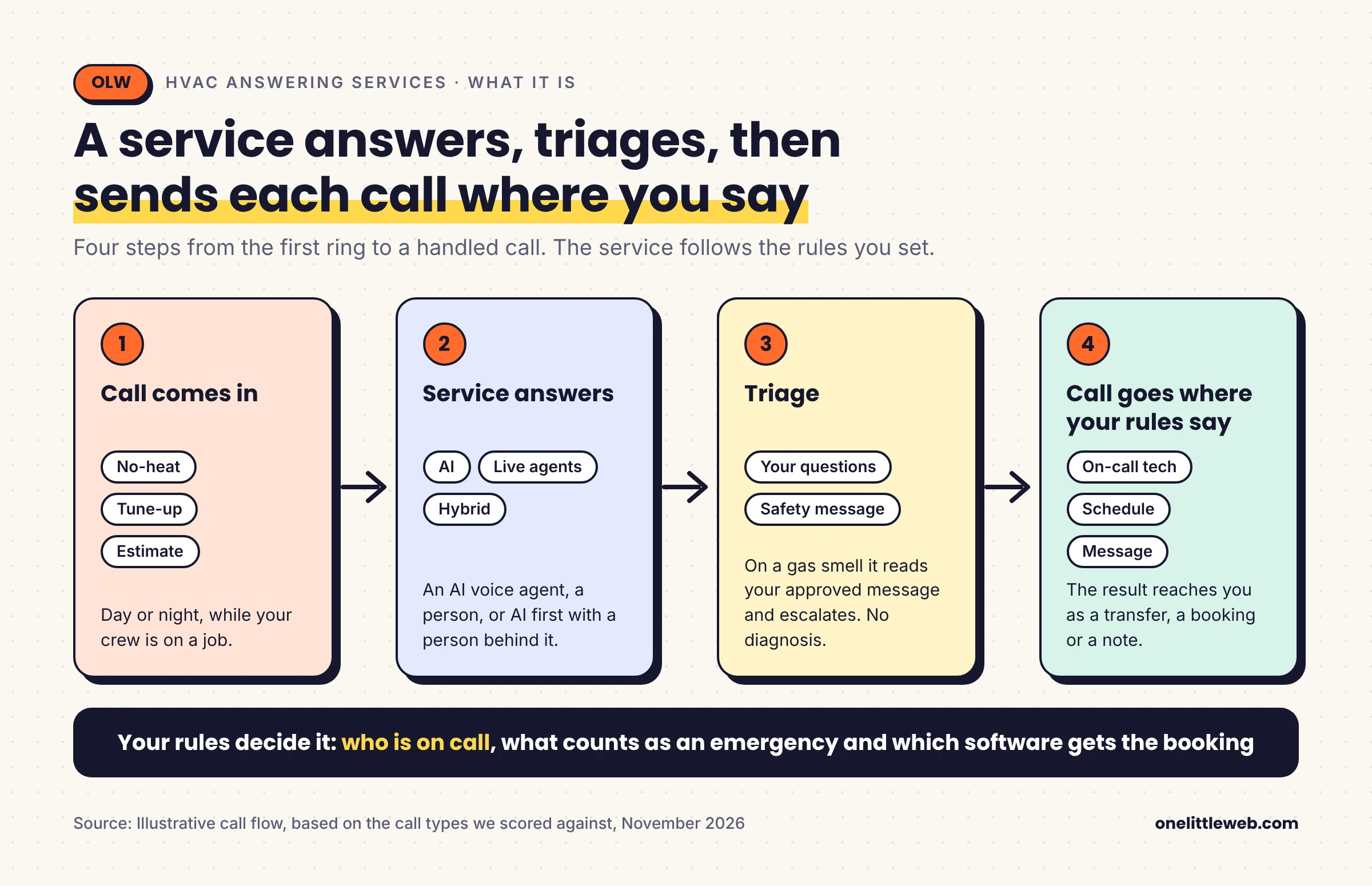
Services come in three kinds. An AI service answers with a voice agent. A live service uses human agents. A hybrid starts with AI and hands the call to a person.
The calls that matter most to a contractor are a short list. They are no-heat or no-cooling emergencies, gas smell or carbon monoxide reports, repair bookings, tune-up scheduling and estimate requests. Add reschedules and ETA calls from existing customers. Add filtering of vendor and wrong-number calls.
AI, live or hybrid: which type fits your shop?
The right type depends on who you want talking to a caller first. Four services here are AI only, three are hybrids and two use live agents.
| Type | Who answers first | Services here | Fits best when | Ask before you sign |
|---|---|---|---|---|
| AI | A voice agent | Juney, Sameday AI, OnCrew, Ainora | Your calls follow set steps such as triage, booking and dispatch | How it handles a no-heat or gas-smell call, and which tools it books into |
| Hybrid | A voice agent, then a person | byVoice, ServiceTitan AI Virtual Agent, Avoca | You want AI first, with a person ready to take the transfer | What a transfer to a person adds to the bill |
| Live | A person | Allcity, Unicom | You want people answering every call | How a typical HVAC call is counted and billed |
Table note:Types follow each vendor’s own description in our research records.
Pick the type before you compare prices, because the type shapes both the bill and the setup. Then test it. During a trial or demo, run the same no-heat and gas-smell calls through two types.
Is an HVAC answering service worth it?
Yes, if missed calls cost you jobs, because a service covers the hours your team cannot. The U.S. Bureau of Labor Statistics reports a 2025 median of $38,010 a year for receptionists. That is the cost of one front-desk hire before benefits.
A service is a different kind of cost, so compare coverage and not wages. Heat waves and cold snaps bring surges of calls. Ask each vendor how it handles overflow in your busiest weeks.
How we picked
We screened 23 candidates against an entry gate. The gate looks at emergency triage, on-call dispatch and field-service software.
Nine passed and are ranked. Eleven were unclear, and three are platform-tied alternatives that we list but do not rank.
The rating is out of 100 and has six areas, built from 76 scoring points. Industry and audience fit carries the most weight, at 32.9 points. Services whose checks are all confirmed rank first, and the rest follow by rating.
The full methodology explains the areas, the 100-point conversion and how we handled gaps.

The 9 best HVAC answering services for US contractors
The nine reviews run in rank order. byVoice and Juney lead because every check behind their ratings is confirmed. Each review shows what scored well, what to check and who it suits.
1. byVoice: best for a low published entry price
Our verdict:byVoice suits owners who want the lowest published entry price from an AI service with a live handover. Ask which field-service tools it connects to before you sign.

| Plan we priced | Starter, $29 a month for 150 minutes |
| Type | AI answering service with live handover |
| Other plans | Pro, $99 a month for 700 minutes; Business, $199 a month for 1,500 minutes |
| Reviews | None located for the exact product |
| Our rating | 82.9 / 100 |
Table note:Prices were checked on November 20, 2026, and the vendor says they exclude VAT. The product is byVoice’s AI answering service for plumbing, HVAC and roofing.

What stands out:
- Security and transparency. It scored the full 5 of 5 in this area.
- Pricing and value. It scored the full 6 of 6.
- Live handover. The service is AI, with a live handover to a person.
Pricing. Starter costs $29 a month and includes 150 minutes and 10 simultaneous calls. Pro costs $99 a month for 700 minutes. Business costs $199 a month for 1,500 minutes.
These are plan prices and not modeled bills. Count your own minutes before you pick a tier.

What customers say. Our research located no review listing for the exact product, so we show no rating.
Watch out for:
- Industry fit. Its lowest area is industry and audience fit, at 18 of 25.
- Plan limits. Starter stops at 150 minutes and 10 simultaneous calls, so count your minutes first.
- No reviews to read. No listing for the exact product turned up, so ask the vendor for references.
Why byVoice ranks #1. byVoice rates 82.9 / 100, and every check behind the rating is confirmed. That is 18.4 points above Juney. Its lowest area is industry and audience fit, at 18 of 25.
Choose byVoice if you want a published entry price and the top rating in this guide.
Skip byVoice if you need to see a named ServiceTitan or Jobber link first. Ask which field-service tools it connects to.
Skip it too if you want live agents on every call, because byVoice answers with AI first.
2. Juney: best for crews that book through Google Calendar
Our verdict:Juney, a product of Trillet, suits crews that book through Google Calendar. Calendar booking sits on the higher plan, so check that plan covers your schedule before you pick.

| Plan we priced | Starter, $49 a month for 200 minutes |
| Type | AI receptionist app |
| Other plans | Pro, $99 a month for 800 minutes; Enterprise is custom |
| Trial | Pro has a 7-day free trial; Starter has none |
| Reviews | None located for the exact product |
| Our rating | 64.5 / 100 |
Table note:Prices were checked on November 20, 2026. The product is Juney, sold by Trillet, and the plans come from Juney’s own pricing page.

What stands out:
- Security and transparency. It scored the full 5 of 5 in this area.
- Pricing and value. It scored the full 6 of 6.
- Google Calendar booking. Its HVAC pass rests on booking through Google Calendar.
Pricing. Starter costs $49 a month for 200 minutes, about 200 calls. Pro costs $99 a month for 800 minutes, and Enterprise is priced per customer.
The page lists calendar booking and urgent-call transfer under Pro, not Starter.

What customers say. Our research located no review listing for the exact product, so we show no rating.
Watch out for:
- Industry fit. Its lowest area is industry and audience fit, at 12 of 25.
- Booking sits on Pro. Juney lists calendar booking under its $99 plan, so Starter may not cover your pass.
- No reviews to read. No listing for the exact product turned up, so ask the vendor for references.
Why Juney ranks #2. Juney rates 64.5 / 100 and ranks second because every check behind that rating is confirmed. It sits 18.4 points below byVoice. Sameday AI and OnCrew rate higher, and ServiceTitan ties it.
Choose Juney if you book through Google Calendar and want a rating with every check confirmed.
Skip Juney if you run a field-service platform and need a documented booking link.
Skip it too if you want no minute limit. Both listed plans cap minutes, at 200 and 800 a month.
3. Sameday AI: best for a home-services AI with published plans
Our verdict:Sameday AI suits home-service shops that want an AI built for the trade, with minutes published up front. Its entry price is the highest of the published plans, so price your minutes first.

| Plan we priced | Launch, $449 a month for 500 minutes |
| Type | AI answering service and receptionist |
| Other plans | Scale from $789 a month for 1,000 minutes; Enterprise listed |
| Reviews | None located for the exact product |
| Our rating | 73.7 / 100 |
Table note:Prices were checked on November 20, 2026. The product is Sameday’s AI answering service for home services.

What stands out:
- Core capabilities. It scored 13 of 15 in this area.
- Security and transparency. It scored the full 5 of 5.
- Published plans. Launch and Scale each list a price and included minutes.
- Home-services focus. The service is built for home-service trades.
Pricing. Launch costs $449 a month for 500 minutes. Scale costs $789 a month for 1,000 minutes. An Enterprise tier is also listed.
Here is our arithmetic. Launch works out to about $0.90 per included minute, and Scale to about $0.79.

What customers say. Our research located no review listing for the exact product, so we show no rating.
Watch out for:
- Pricing and value. It scored 1 of 6, its lowest area.
- Contract terms. Ask for contract terms in writing before you sign.
- Higher entry cost. Launch costs more per month than the other published entry plans here.
Why Sameday AI ranks #3. Sameday AI rates 73.7 / 100. That is 9.2 points above Juney, which ranks higher on fully confirmed checks. OnCrew is 1.3 points behind, a small gap.
Choose Sameday AI if you want an AI built for home services with published minutes.
Skip Sameday AI if a low monthly bill matters most.
Skip it too if you need the contract terms confirmed in writing before you sign.
4. OnCrew: best for a low-cost start with strong setup support
Our verdict:OnCrew suits owners in any trade who want a low published price and will relay bookings themselves. It does not book into Jobber or ServiceTitan schedules, so plan how jobs get passed on.

| Plan we priced | Starter, $49 a month for 250 minutes |
| Type | AI answering service for all trades |
| Other plans | Pro, $149 a month for 500 minutes; Multi-Truck, $349 a month for 1,500 minutes |
| Overage | $0.49 a minute on Starter, $0.39 on Pro and $0.29 on Multi-Truck |
| Trial | 14 days free with no card |
| Reviews | None located for the exact product |
| Our rating | 72.4 / 100 |
Table note:Prices were checked on November 20, 2026. The product is OnCrew’s AI answering service for all trades.

What stands out:
- Pricing and value. It scored the full 6 of 6.
- Setup and support. It scored 8 of 10 in this area.
- All trades. The service is built for all trades, HVAC included.
- Low entry price. Starter ties Juney’s Starter as the second-lowest published entry price here.
Pricing. Starter costs $49 a month for 250 minutes, then $0.49 for each extra minute. Pro costs $149 a month for 500 minutes, and Multi-Truck costs $349 for 1,500.
Here is our arithmetic. At 300 minutes, Starter costs $73.50. That is $49 plus 50 extra minutes at $0.49.

What customers say. Our research located no review listing for the exact product, so we show no rating.
Watch out for:
- No schedule booking. The vendor says it does not dispatch or book into Jobber or ServiceTitan schedules.
- Integrations. Its lowest area is integrations and workflows, at 9 of 15.
- Security documents. Ask for its agreements and security documents before you sign.
Why OnCrew ranks #4. OnCrew rates 72.4 / 100. It is 1.3 points behind Sameday AI, a small gap. It is 7.9 points ahead of ServiceTitan AI Virtual Agent.
Choose OnCrew if you want a low published price and plan to relay bookings yourself.
Skip OnCrew if you need bookings written straight into your field-service schedule.
Skip it too if you want security documents reviewed before you sign.
5. ServiceTitan AI Virtual Agent: best for contractors who already run ServiceTitan
Our verdict:ServiceTitan’s AI Virtual Agent suits ServiceTitan users wanting AI that escalates to a live customer service rep (CSR). It publishes no price, so book a demo and ask for a quote.

| Plan we priced | No price published; the vendor points buyers to a demo |
| Type | AI with live CSR escalation |
| Sold as | Part of Contact Center Pro |
| Reviews | None located for the exact product |
| Our rating | 64.5 / 100 |
Table note:Prices were checked on November 20, 2026. The product is ServiceTitan’s AI Virtual Agent, sold through Contact Center Pro.

What stands out:
- Integrations and workflows. It scored 13 of 15 in this area.
- Setup and support. It scored 8 of 10.
- Live CSR escalation. The AI hands calls to a live customer service rep.
- Contact Center Pro. The agent is sold as part of that ServiceTitan product.
Pricing. ServiceTitan publishes no price for the agent. The vendor points buyers to a demo. Ask for a quote based on your call volume and hours.
What customers say. Our research located no review listing for the exact product, so we show no rating.
Watch out for:
- Pricing and value. It scored 0 of 6, its lowest area.
- Terms to ask about. Ask for usage and fee rules, contract terms, and retention and deletion in writing.
- Browser-only page. The Contact Center Pro page opens only in a browser, so check details on the live page.
Why ServiceTitan AI Virtual Agent ranks #5. It rates 64.5 / 100, which ties Juney. Juney ranks higher on fully confirmed checks. Avoca is 2.7 points behind, a small gap.
Choose ServiceTitan AI Virtual Agent if you already run ServiceTitan and want an agent from the same vendor.
Skip ServiceTitan AI Virtual Agent if you need a price before you book a demo.
Skip it too if you need retention and deletion terms confirmed first.
6. Avoca: best for AI with a human CSR transfer
Our verdict:Avoca suits home-service companies that want AI to answer first, with a person ready to take the transfer. It publishes no price, so ask what a transfer adds to the bill.

| Plan we priced | No price published; the vendor points buyers to a demo |
| Type | AI with human CSR transfer |
| Reviews | None located for the exact product |
| Our rating | 61.8 / 100 |
Table note:Prices were checked on November 20, 2026. The product is Avoca’s AI CSR and hybrid call center for home services.

What stands out:
- Security and transparency. It scored 4 of 5 in this area.
- Integrations and workflows. It scored 11 of 15.
- Hybrid handling. The AI takes the call and can transfer it to a human CSR.
- Home-services focus. The service is built for home-service companies.
Pricing. Avoca publishes no price. The vendor points buyers to a demo. Ask what a transfer to a human CSR adds to the bill.
What customers say. Our research located no review listing for the exact product, so we show no rating.
Watch out for:
- Pricing and value. It scored 0 of 6, its lowest area.
- Terms to ask about. Ask for usage and fee rules, contract terms and access controls in writing.
- Demo-led buying. You will see a price only after a demo.
Why Avoca ranks #6. Avoca rates 61.8 / 100. It is 2.7 points behind ServiceTitan AI Virtual Agent, a small gap. Ainora is 1.3 points behind it, also a small gap.
Choose Avoca if you want AI first with a person ready to take the transfer.
Skip Avoca if you need a published price.
Skip it too if you need access controls confirmed before you share customer data.
7. Ainora: best for a second look at an HVAC AI agent
Our verdict:Ainora suits buyers who want to check an AI voice agent with an HVAC and plumbing page. It publishes no price, so ask for the custom quote and what it includes.

| Plan we priced | No price published; its pricing page offers a custom quote |
| Type | AI voice agent |
| Reviews | None located for the exact product |
| Our rating | 60.5 / 100 |
Table note:Prices were checked on November 20, 2026. The product is Ainora’s AI voice agents, HVAC and plumbing page.

What stands out:
- Security and transparency. It scored the full 5 of 5 in this area.
- Core capabilities. It scored 13 of 15.
- A trade page. The vendor has a page written for HVAC and plumbing companies.
Pricing. Ainora publishes no price. Its pricing page offers a fixed quote after discovery. Ask for the quote and what it includes.

What customers say. Our research located no review listing for the exact product, so we show no rating.
Watch out for:
- Pricing and value. It scored 0 of 6, its lowest area.
- Terms to ask about. Ask for usage and fee rules and contract terms in writing.
Why Ainora ranks #7. Ainora rates 60.5 / 100. It is 1.3 points behind Avoca, a small gap. Treat its place as a reason to look, not as a pick over Allcity.
Choose Ainora if you want to add a core-capabilities check on an HVAC AI agent to your shortlist.
Skip Ainora if you want a rating that rests on more confirmed checks.
Skip it too if you need a published price or confirmed contract terms.
8. Allcity: best for live agents with a 14-day trial
Our verdict:Allcity suits trades that want people on every call and a free trial before they commit. Its pricing page is written for Wisconsin, so confirm rates for your area.

| Plan we priced | Flex, $39 a month with no minimum minutes |
| Type | Live agents |
| Other plans | Starter, $129 for 100 minutes; Business, $250 for 200; Executive, $476 for 400 |
| Overage | $1.39 a minute on Flex, down to $1.19 on Executive |
| Trial | 14-day free trial |
| Reviews | None located for the exact product |
| Our rating | 56.6 / 100 |
Table note:Prices were checked on November 20, 2026. The product is Allcity’s trades answering service, and the plans come from its Wisconsin pricing page.

What stands out:
- Security and transparency. It scored 4 of 5 in this area.
- Pricing and value. It scored 4 of 6 in this area.
- Live agents. People answer the calls.
- A free trial. The vendor offers 14 days.
Pricing. Allcity lists four plans. Flex costs $39 a month with no minimum minutes. Starter costs $129 for 100 minutes, Business $250 for 200 and Executive $476 for 400.
Extra minutes cost $1.39 on Flex, $1.29 on Starter, $1.25 on Business and $1.19 on Executive. The page is written for Wisconsin businesses, so confirm rates for your area.

What customers say. Our research located no review listing for the exact product, so we show no rating.
Watch out for:
- Setup and support. Its lowest area is setup and support, at 5 of 10.
- Recording and consent. Ask for its recording and consent terms in writing.
- Wisconsin pricing page. The plans sit on a page written for Wisconsin businesses, so confirm that they apply to you.
Why Allcity ranks #8. Allcity rates 56.6 / 100. It is 3.9 points behind Ainora, a small gap. Unicom is 1.3 points behind it, also a small gap.
Choose Allcity if you want people answering and a 14-day trial before you commit.
Skip Allcity if you want an AI agent to answer first, because people take the calls.
Skip it too if you need recording and consent terms confirmed first.
9. Unicom: best for live agents billed on talk time
Our verdict:Unicom suits trades that want live agents and a bill that follows agent talk time. It publishes no rates, so ask how a typical HVAC call is counted.

| Plan we priced | No rates published; billed on agent talk time |
| Type | Live agents |
| Reviews | None located for the exact product |
| Our rating | 55.3 / 100 |
Table note:Prices were checked on November 20, 2026. The product is Unicom’s trades answering service, with plumbing and HVAC pages.

What stands out:
- Setup and support. It scored 7 of 10 in this area.
- Pricing and value. It scored 4 of 6, with no rates published.
- Live agents. People answer the calls.
- Talk-time billing. The vendor says you pay only for actual agent talk time.
Pricing. Unicom lists service tiers but publishes no rates. Billing follows agent talk time, so ask how a typical HVAC call is counted.
What customers say. Our research located no review listing for the exact product, so we show no rating.
Watch out for:
- Security and transparency. Its lowest area is 2 of 5.
- Terms to ask about. Ask for workflow automation, retention and deletion, recording and consent, and security documents in writing.
- No published rates. You cannot compare cost until you ask.
Why Unicom ranks #9. Unicom rates 55.3 / 100. It is 1.3 points behind Allcity, a small gap. Its security score is the lowest of the nine.
Choose Unicom if you want live agents and a bill that follows talk time.
Skip Unicom if security terms matter and you cannot confirm them.
Skip it too if you need workflow automation confirmed before you sign.
What the published prices leave out
A plan price covers a set number of minutes, and anything beyond that is billed on top. Five of the nine services publish plan prices, so the table below compares those.
| Provider and plan | Monthly price | Included minutes | Per included minute | Billed on top |
|---|---|---|---|---|
| byVoice Starter | $29 | 150 | $0.19 | Rate not recorded |
| byVoice Pro | $99 | 700 | $0.14 | Rate not recorded |
| byVoice Business | $199 | 1,500 | $0.13 | Rate not recorded |
| Juney Starter | $49 | 200 | $0.25 | Rate not recorded |
| Juney Pro | $99 | 800 | $0.12 | Rate not recorded |
| Sameday AI Launch | $449 | 500 | $0.90 | Rate not recorded |
| Sameday AI Scale | $789 | 1,000 | $0.79 | Rate not recorded |
| OnCrew Starter | $49 | 250 | $0.20 | $0.49 a minute over |
| OnCrew Pro | $149 | 500 | $0.30 | $0.39 a minute over |
| OnCrew Multi-Truck | $349 | 1,500 | $0.23 | $0.29 a minute over |
| Allcity Flex | $39 | None | Not applicable | $1.39 a minute |
| Allcity Starter | $129 | 100 | $1.29 | $1.29 a minute over |
| Allcity Business | $250 | 200 | $1.25 | $1.25 a minute over |
| Allcity Executive | $476 | 400 | $1.19 | $1.19 a minute over |
Table note:Prices were checked on November 20, 2026, and exclude taxes. Per included minute is our arithmetic: monthly price divided by included minutes, rounded to the cent. Plans differ in features, so it is a guide and not a ranking.

The four other services publish no usable rate. Unicom bills for agent talk time, and ServiceTitan and Avoca quote through a demo. Ainora gives a fixed quote after discovery.
What it costs at your volume
Count your minutes first. Multiply calls per month by minutes per call. As an illustration, 100 calls at 3 minutes each is 300 minutes. This is an example and not an industry average.
At 300 minutes, OnCrew Starter costs $73.50, from its $49 plan plus 50 extra minutes at $0.49. The $99 Pro plans from byVoice and Juney include 700 and 800 minutes, so 300 fits inside both.
Sameday AI Launch includes 500 minutes, so 300 fits inside its $449 plan. Allcity Starter costs $129 plus 200 extra minutes at $1.29, which is $387. Ask the others to price 300 minutes in writing.

Side-by-side comparison
This table shows how each service is priced, what customer reviews exist and how it rates.
| Provider | Type | How you get a price | Customer reviews | Our rating |
|---|---|---|---|---|
| byVoice | AI with live handover | Published plans | None located | 82.9 / 100 |
| Juney | AI receptionist app | Published plans | None located | 64.5 / 100 |
| Sameday AI | AI | Published plans | None located | 73.7 / 100 |
| OnCrew | AI | Published plans | None located | 72.4 / 100 |
| ServiceTitan AI Virtual Agent | AI with live CSR escalation | Through a demo | None located | 64.5 / 100 |
| Avoca | AI with human CSR transfer | Through a demo | None located | 61.8 / 100 |
| Ainora | AI | Custom quote | None located | 60.5 / 100 |
| Allcity | Live agents | Published plans; 14-day trial | None located | 56.6 / 100 |
| Unicom | Live agents | Billed on talk time; no rates | None located | 55.3 / 100 |
Table note:This table is based on vendor pages and our research records, checked on November 20, 2026.

Which one fits your business?
Start with the need that matters most to you. The table points to where to look first. It is a place to start, not a recommendation.
| If you need | Start by looking at | Why |
|---|---|---|
| The lowest published entry price | byVoice | Its Starter plan is the lowest published entry price among the nine |
| Google Calendar booking | Juney | Its HVAC pass rests on Google Calendar, and booking sits on the Pro plan |
| Published plans at 500 or 1,000 minutes | Sameday AI | Launch and Scale list prices and included minutes |
| A low published price and strong setup support | OnCrew | Pricing and value 6 of 6 and setup and support 8 of 10 |
| A ServiceTitan-based setup | ServiceTitan AI Virtual Agent | It scored 13 of 15 on integrations and workflows |
| AI with a human fallback | Avoca or ServiceTitan AI Virtual Agent | Both hand calls to a live CSR |
| Live agents | Allcity or Unicom | Both use human agents, and Allcity offers published plans and a 14-day trial |

How to choose in six steps
- Decide who answers. Pick between AI, live agents or a hybrid.
- Write your emergency rules. List what counts as an emergency and who is on call.
- Name your software. Say whether you dispatch from ServiceTitan, Housecall Pro, Jobber or FieldEdge, and ask for booking write-back.
- Count your minutes. Include after-hours calls and your busiest weeks.
- Compare two finalists. Ask each for a price based on your minutes.
- Run the five-call test. Do it inside the trial or demo.
Run a five-call test
We placed no test calls. Run these five checks yourself before you sign.
| Call | What to do | What to look for |
|---|---|---|
| 1. No-heat emergency | Report no heat late at night | Does it ask your triage questions and reach the on-call technician? |
| 2. Gas smell | Report a gas smell | Does it read your approved safety message first, with no diagnosis, then escalate at once? |
| 3. Repair booking | Ask for a repair visit | Does the job reach your schedule or dispatch board? |
| 4. Existing customer | Ask to reschedule or for an ETA | Does it recognize the customer and update the visit? |
| 5. Noise call | Pose as a vendor or a wrong number | Does it filter the call without waking the on-call technician? |
Decision checklist
Other options we looked at but didn’t rank
More products came up in our research. We did not rank them, so they carry no rating. Each group was left out for a different reason.
| Group | Products | What kept them unranked |
|---|---|---|
| Platform-tied AI inside field-service software | Jobber AI Receptionist, Housecall Pro CSR AI voice receptionist, Hatch Voice AI | They are sold with a platform, so they are alternatives and not ranked picks. Housecall Pro’s pricing pages differ on whether the AI team is in every plan. |
| AI products with an unclear gate result | Podium Voice AI, Workiz AI Genius, Netic, CallRail Voice Assist, AgentZap, ServiceAgent | Their gate result was unclear. Some pricing pages were linked but not read, and some open only in a browser. |
| Other services with an unclear gate result | AnswerPro, Direct Line, Nexa Voice + AI, Dexcomm, Signpost | Their gate result was unclear. Direct Line’s HVAC page lists plans from $115 a month with no allowances, and the others publish no rates. |
Want a general answering service? Our guide to the best answering services compares live, virtual and AI options.
Want an AI receptionist for any trade? Our guide to the best AI receptionists for small business ranks general options.
Work in more trades than HVAC? Our guide to construction answering services compares ten services for contractors.
Frequently asked questions
What should an HVAC answering service do on a no-heat call?
It should ask your triage questions, then reach your on-call technician. No-heat and no-cooling triage with escalation is one of the core workflows we scored against. Ask each vendor to show how its escalation works before you sign.
Can an AI answering service handle HVAC emergencies?
All nine services here passed our entry gate on emergency triage and on-call dispatch, based on their own pages. We placed no test calls. Run your own no-heat and gas-smell calls during any trial or demo.
Which answering services connect to ServiceTitan, Housecall Pro or Jobber?
ServiceTitan sells its own AI Virtual Agent through Contact Center Pro. Jobber and Housecall Pro sell AI receptionists inside their platforms, so we list them as alternatives. OnCrew says it does not book into Jobber or ServiceTitan schedules. Ask every other vendor which tools it writes bookings into.
How should an answering service handle a gas smell or carbon monoxide call?
It should read your approved safety message first, then escalate the call at once. It should not try to diagnose the problem. Ask each vendor to show you the script before you sign.
Is an AI or a live answering service better for HVAC?
It depends on how you handle emergencies and bookings. Most services in this guide use AI, some with a human backup, and two use live agents. Pick the model that matches your on-call process, then test it.
How much does an HVAC answering service cost?
It depends on the billing unit: included minutes, calls or agent talk time. Five services in this guide publish plan prices. For the others, ask for a quote based on your minutes. The cost section shows the published plans.
Can an answering service book maintenance and tune-up visits?
Booking repair visits and tune-ups into your schedule is one of the workflows we scored against. The depth of booking differs between vendors. Ask which software each one writes bookings into, and test it during the trial.
Do answering services work with my on-call roster?
After-hours dispatch from your on-call roster and schedule is a workflow we scored against. The research does not show which vendor does it best. Ask each one how it reads your roster and what happens when the first technician does not answer.
How did you rank these services?
We ranked nine services on one rubric of 76 scoring points, shown as a rating out of 100. Services whose checks are all confirmed come first, and the rest follow by rating. Items we could not confirm count as zero, which reflects missing evidence and not a failure.
Methodology
This guide ranks answering services for HVAC contractors. It is research-based. We read published vendor sources and placed no test calls.
What this guide covers
We split the candidates into groups.
- Services that passed the entry gate. Nine are scored and ranked here.
- Services with an unclear gate result. Eleven are listed under Other options.
- Platform-tied products. Three are listed as alternatives and not ranked.
Phone systems are excluded. Scores from this guide do not compare with scores from other guides.
Which services we considered
We screened 23 candidates. Eligible types were human answering services, AI plus human services, industry-specific AI and standalone AI receptionists. US availability was not an entry gate, so confirm coverage for your area.
What we checked
The rubric has six areas and 76 scoring points. We show the total as a rating out of 100. The second column shows each area’s scoring points, and the third shows its share of the 100.
| Area | Scoring points | Share of 100 | What we looked at |
|---|---|---|---|
| Industry and audience fit | 25 | 32.9 | HVAC call types such as emergency triage, safety scripts, repair and maintenance booking, estimates and after-hours dispatch |
| Core capabilities | 15 | 19.7 | How the service answers, routes and hands off calls |
| Integrations and workflows | 15 | 19.7 | Named field-service links with booking write-back, and workflow automation |
| Setup and support | 10 | 13.2 | Setup effort and support access |
| Pricing and value | 6 | 7.9 | Published prices, usage and fee transparency, contract flexibility |
| Security and transparency | 5 | 6.6 | Retention and deletion, recording and consent, access controls, security documents |
| Total | 76 | 100 | The sum of the six areas |
How the score works
Each check is marked as verified or not verified. Only verified evidence earns points. A check we could not verify counts as zero, which reflects missing evidence and not a failure.
So a service that publishes less, or falls short on fit, pricing or security, scores lower. Each review names the main reasons.
Why we scored out of 76 first
Our full scoring rubric has 100 points. Cost for an illustrative scenario holds 9, and customer reviews hold 15.
We could not score either for any of the nine services. No scenario cost could be verified, and we located no review listing for the exact product.
So 76 points were open to every service, and we scored on those. A check we cannot verify earns zero. Scoring out of 100 would have made every service look short on cost and review points that none could earn.
If cost and reviews are scored later, the full 100-point rating will replace this one.
Why the rating is out of 100
We show the rating out of 100 because readers compare scores more easily on that scale. Divide a service’s scoring points by 76, multiply by 100 and round to one decimal. For example, 49 points becomes 64.5.
The rescale is proportional. It adds no points, changes no area weight and keeps the same order. Every gap keeps its size relative to the whole. The tie and small-gap limits scale the same way: 1 point becomes 1.3, and 3 points becomes 3.9.
Area scores in the reviews stay as scoring points, such as 13 of 15, so each traces to its checks. Only the overall rating is rescaled.
A rating of 100 would mean all 76 points were earned, not a perfect product. Each guide uses its own rubric, so ratings do not compare across guides.
| Rank | Service | Scoring points | Rating out of 100 |
|---|---|---|---|
| 1 | byVoice | 63 | 82.9 |
| 2 | Juney | 49 | 64.5 |
| 3 | Sameday AI | 56 | 73.7 |
| 4 | OnCrew | 55 | 72.4 |
| 5 | ServiceTitan AI Virtual Agent | 49 | 64.5 |
| 6 | Avoca | 47 | 61.8 |
| 7 | Ainora | 46 | 60.5 |
| 8 | Allcity | 43 | 56.6 |
| 9 | Unicom | 42 | 55.3 |
Table note:Rating is scoring points divided by 76, times 100, rounded to one decimal. Gaps in the guide use the rounded ratings.
How we handle reviews
We look for review listings that match the exact product. We located none for the nine services, so no review ratings appear in this guide.
How we handle pricing
We recorded published plan prices and rates as each vendor’s page states them, excluding taxes. Where a vendor publishes no price, we say how to get one. We re-read prices on November 20, 2026, after the November 11 research check. The per-minute figures in the cost section are our arithmetic from published prices.
How we rank
We rank services by how fully we could confirm each score, then by rating. byVoice and Juney have every check confirmed, so they come first. That is why Juney ranks above two services with higher ratings. The rest follow in rating order.
Gaps under 1.3 points are ties, and gaps of 1.3 to 3.9 points are small. We did not recalculate the order.
What we did not do
We did not place test calls. We did not measure voice quality, accuracy or uptime. Compliance claims are what each vendor states, and we did not verify them.
Where to double-check before you buy
Facts come from each vendor’s official pages, read through page summaries. Exact wording is worth a quick look on the live page before you commit.
- Some pages open only in a browser, including ServiceTitan’s Contact Center Pro page. Confirm those on the live page.
- A lower rating means we could confirm fewer checks or the service fell short in an area. Each review names the main reasons.
- US availability was not an entry gate, so check that the service covers your area.
- Pages change. Prices were checked on November 20, 2026.
Prices were checked on November 20, 2026.
Independence and disclosure
No provider paid for placement in this guide. Rankings come from the scored evidence only.
The bottom line
byVoice leads at 82.9 / 100. Juney ranks second at 64.5, ahead of Sameday AI (73.7) and OnCrew (72.4). Every check behind its rating is confirmed. Sameday AI and OnCrew sit 1.3 points apart.
Services ranked 3 to 9 rate lower on our rubric, but some still suit a specific need. ServiceTitan fits shops that run its software, and Allcity and Unicom answer with live agents.
Pick by how you handle emergencies and which software you dispatch from. Then run the five-call test with two finalists. Once your calls are covered, the next job is getting more homeowners to your site. See our list of HVAC web design companies.
Sources
Prices and plans were read from the vendor pages below on November 20, 2026.