Finding the right WordPress SEO plugin can feel overwhelming. There are dozens of options promising top rankings, but most leave you with bloated code, confusing settings, or features you never use.
For this 2026 guide, I personally installed, configured, and ran real tests on the leading WordPress SEO plugins, including heavy hitters like Rank Math, Yoast SEO, AIOSEO, and others that keep popping up in recent reviews.
I looked at how they perform today, especially as SEO automation tools, SEO audit tools, and keyword research tools become more integrated inside WordPress dashboards.
With AI search changes, faster Core Web Vitals requirements, built-in competitor analysis, schema enhancements, and smarter content analysis, the bar is much higher in 2026.
My testing focused on what actually matters: ease of use for quick setup, accuracy of on-page suggestions, speed impact on the site, reliable integrations (like with WooCommerce or page builders), pricing value, and proven ranking help without glitches.
By the end of this blog, you’ll know exactly which plugins I still use and recommend with clear winners for different needs, honest pros and cons, and why they made my short list.
No hype, just practical picks that can help your site rank higher and grow traffic in 2026. Let’s get into this!
What is a WordPress SEO Plugin?
A WordPress SEO plugin is a tool that helps you optimize your website for search engines without needing to write code or manually edit files.
It works alongside your existing AI marketing tools, and even advanced AI SEO tools to streamline optimization directly inside WordPress.
It handles technical SEO tasks like generating XML sitemaps, adding meta tags, implementing schema markup, managing redirects, and improving site structure — all from your WordPress dashboard.
These plugins are built for anyone running a WordPress site: bloggers, eCommerce store owners, agencies, and enterprise teams.
Whether you’re publishing your first post or managing hundreds of pages, a good SEO plugin simplifies on-page optimization and ensures search engines can crawl and index your content properly.
Why does this matter? Without proper SEO setup, even great content can get buried in search results.
A solid WordPress SEO plugin gives you the tools to rank higher, drive more organic traffic, and ultimately grow your business without hiring a developer or SEO specialist for every small tweak.
What to Look for in a WordPress SEO Plugin
Not all WordPress SEO plugins are built the same. Some focus on technical SEO, others prioritize content optimization, and a few try to do everything (often poorly).
Here’s what I pay attention to when testing and recommending plugins for our clients.
On-Page Optimization Features
The plugin should handle meta titles, descriptions, Open Graph tags, and canonical URLs without requiring manual coding. Look for tools that let you control indexing settings, nofollow/noindex tags, and breadcrumb structure easily.
Schema Markup Support
Structured data helps search engines understand your content. Choose a plugin that supports multiple schema types (Article, Product, FAQ, HowTo) and integrates cleanly with Google’s rich results requirements.
Technical SEO Capabilities
Strong plugins manage XML sitemaps, robots.txt editing, redirect management (301/302), and .htaccess modifications. These features prevent crawl errors and preserve link equity during site migrations or URL changes.
Performance Impact
Avoid bloated plugins that slow down your site. Check if the plugin loads scripts only where needed, supports lazy loading, and doesn’t add unnecessary database queries that hurt page speed.
Ease of Use
A good plugin should be beginner-friendly but powerful enough for advanced users. Look for clear dashboards, setup wizards, and actionable recommendations instead of confusing jargon or buried settings.
Integrations
The best plugins connect with Google Search Console, Google Analytics, and other marketing tools. This lets you track performance, submit sitemaps, and monitor indexing issues without leaving WordPress.
How I Selected the Best WordPress SEO Plugins
I tested over 20 WordPress SEO plugins hands-on across hundreds of real client campaigns at OneLittleWeb (OLW).
We use WordPress SEO plugins every day for on-page tweaks, technical audits, schema setup, and content optimization on sites for SaaS startups, e-commerce stores, and B2C brands in the US, UK, Canada, and Australia.
I’ve personally used these tools to fix crawl issues, implement advanced schema markup, manage redirect chains, track keyword rankings, and boost E-E-A-T signals in live projects that drove real organic traffic growth.
Here’s what I prioritized during my hands-on testing:
Real-World Ranking and Traffic Impact
I tracked keyword positions (using tools like Ahrefs and Semrush) and organic session growth after applying optimizations.
The plugins that helped pages climb rankings faster, better match search intent, and reduce bounce rates stood out right away.
On-Page SEO Quality and Optimization Depth
I checked how well each plugin handled focus keyword optimization, semantic relevance (NLP entities, LSI terms), readability scores (Flesch-Kincaid), internal linking ideas, and spotting thin content or coverage gaps. Only the ones that caught real issues before publishing made the cut.
Technical SEO Strength and Modern Features
I tested core elements like XML sitemaps, robots.txt editing, canonical tags, hreflang support, JSON-LD schema (with rich snippet types), redirects manager, 404 monitoring, IndexNow for quick crawling, and low-impact on Core Web Vitals.
With AI search changes in 2026, I also looked at extras like llms.txt support, AI-generated metas, and traffic tracking from AI sources.
Speed and Site Performance Impact
I measured page load times before and after activation (via Lighthouse reports). Lightweight plugins with minimal bloat won because slow sites hurt rankings no matter how good the on-page work is.
Integrations, Reliability, and Workflow Fit
I ran them with WooCommerce (for product schema and reviews), page builders like Elementor, caching plugins, and during updates to check for conflicts or bugs. The ones that saved time on bulk edits, exports, or team access ranked higher.
Summary Table: 12 Best WordPress SEO Plugins
Before diving into the individual reviews, here’s a comprehensive comparison of the top WordPress SEO plugins I tested and recommend. This table will help you quickly identify which plugin matches your needs, budget, and technical skill level.
| Tool Name | Best For | Key Features | Starting Price | Our Notes |
| Rank Math | Power users wanting advanced control | Schema, keyword tracking, 5 focus keywords free | $4.08/month | Feature-packed free version, steeper learning curve initially |
| Yoast SEO | Beginners and content creators | Readability analysis, traffic light system, meta optimization | $118.80/year | Most beginner-friendly, sometimes overly opinionated on content |
| AIOSEO | Agencies and growing businesses | TruSEO score, WooCommerce support, AI features | $49.50/year | Clean interface, excellent value, strong documentation |
| SEOPress | Privacy-focused and multi-site owners | White label, no ads, unlimited keywords | $49/year | Best value for money, lightweight, zero bloat |
| The SEO Framework | Minimalists and developers | Automated SEO, zero bloat, ultra-lightweight | $7/month | Fastest plugin tested, no hand holding for beginners |
| Squirrly SEO | AI-powered optimization for non-technical users | Live assistant, Focus Pages, keyword research tool | $9.99/month | AI-guided approach, overwhelming interface |
| Schema Pro | Rich snippets and structured data | 20+ schema types, automation, WooCommerce integration | $69/year | Best dedicated schema plugin, pairs with any SEO tool |
| Redirection | Site migrations and URL management | 301/302 redirects, import/export, error tracking | N/A | Essential for migrations, works alongside any SEO plugin |
| Slim SEO | Speed-obsessed minimalists | Auto meta tags, auto schema, minimal settings | $179/year | Fastest setup, zero learning curve, set-and-forget approach |
| W3 Total Cache | Advanced caching on a budget | Page, database, object caching, CDN integration, minification | $8.25/month | Powerful but complex, breaks sites easily, technical |
| MonsterInsights | Google Analytics integration | Dashboard reports, ecommerce tracking, form conversion tracking | $299.50/year | Simplifies GA4 setup, free version too limited |
| WP Rocket | Page speed optimization | One-click caching, lazy loading, minification, database cleanup | $59/year | Works immediately, no free version, annual subscription |
12 Best WordPress SEO Plugins in 2026 (Free + Paid)
- Rank Math — best for power users wanting control
- Yoast SEO — best for beginners and content creators
- AIOSEO — best for agencies and growing businesses
- SEOPress — best for privacy-focused multi-site owners
- The SEO Framework — best for minimalists and developers
- Squirrly SEO — best for AI-powered content optimization
- Schema Pro — best for rich snippets and structured data
- Redirection — best for site migrations and URL management
- Slim SEO — best for speed-obsessed minimalists
- W3 Total Cache — best for advanced caching on a budget
- MonsterInsights — best for Google Analytics integration
- WP Rocket — best for page speed optimization
Here’s what each plugin brings to the table and how they performed in real-world testing across our client sites.
1. Rank Math — Best for Power Users Wanting Control
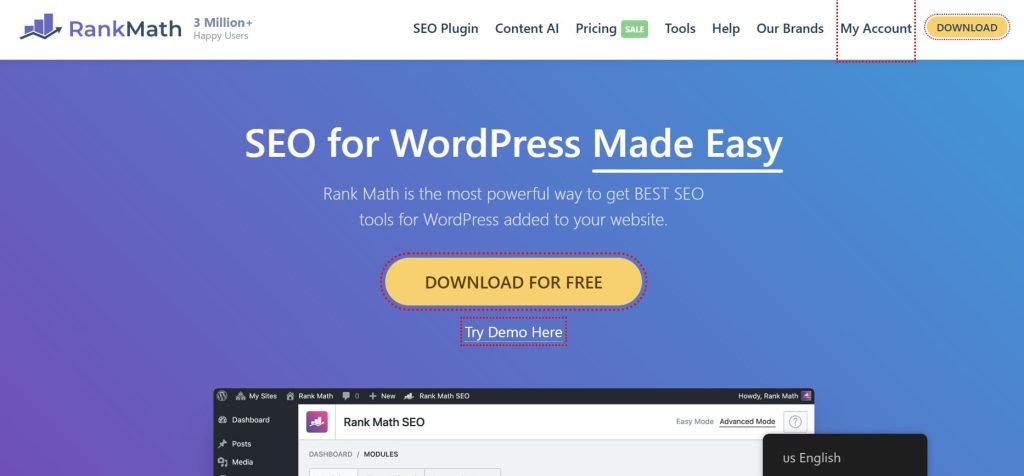
Best For: Advanced WordPress users, SEO professionals, and agencies who want comprehensive features without paying premium prices, especially those managing multiple client sites.
How I Use It: We’ve deployed Rank Math on 15+ client sites at OneLittleWeb, primarily for its free schema markup generator, multi-keyword optimization, and built-in rank tracking that eliminates the need for separate tools.
Quick Overview
Rank Math launched in 2018 and quickly disrupted the WordPress SEO market by offering features that competitors lock behind expensive paywalls.
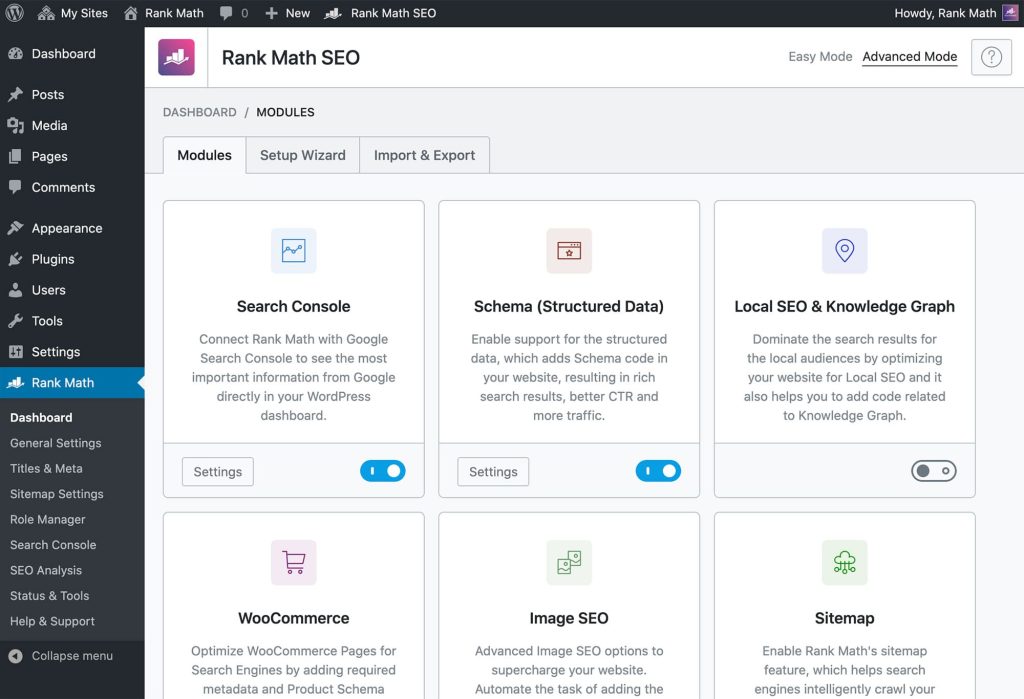
What makes it stand out is the aggressive feature set: 20+ schema types, 5 focus keywords per post, redirection manager, 404 monitoring, and Google Search Console integration, all in the free version.
It’s built for users who want granular control over every SEO element rather than simplified guidance. The interface is feature-dense but well-organized, with a setup wizard that walks you through configuration.
The plugin includes AI-powered content suggestions, local SEO tools, video sitemap generation, and WooCommerce optimization.
It’s ideal for developers, agencies, and SEO practitioners who know exactly what they’re optimizing and want maximum flexibility without paying for basic functionality that other plugins restrict.
Rank Math Key Features
- Advanced Schema Markup Generator: Supports 18+ schema types with auto-mapping, rules, and Google Rich Results validation.
- Multi-Keyword Optimization (5 Keywords Free): Optimize posts for up to five keywords and handle multiple search intents at once.
- Google Search Console Integration: Connect to GSC, see rankings, impressions, clicks, CTR, and export reports inside WordPress.
- Built-In Redirection Manager: Set up redirects, track 404s, import/export CSV, and fix broken links automatically.
- Keyword Rank Tracking: Watch up to 500 keywords with history, positions, and data from Google Search Console.
- Content AI Tools (Separate Subscription): Create titles, metas, outlines, FAQs, and content with AI (needs editing often).
Rank Math Pros
- Setup Wizard: Imports settings from Yoast, AIOSEO, or SEOPress without data loss, preserving meta, sitemaps, redirects, social metadata.
- Flexible Schema Implementation: Create custom JSON-LD schemas, set conditional display rules, and map dynamic fields beyond pre-built schema types.
- Minimal Performance Impact: Adds only 50–100ms to page load, modular architecture lets you disable unused features for efficiency.
- Active Development: Quickly responds to Google algorithm updates, rolling out Core Web Vitals, Discover optimization, and llms.txt generator promptly.
- Keyword Rank Tracking: Monitor positions, identify content decay, and spot ranking opportunities directly inside WordPress, replacing multiple third-party tracking tools.
Rank Math Cons
- Overwhelming Interface: Too many modules and settings can confuse beginners who lack SEO experience.
- Inaccurate Analytics Sometimes: Rank tracking and GSC links can glitch or need re-authentication.
- Pro Feature Restrictions: Advanced video sitemaps, full WooCommerce schema, white-label, and more need paid upgrade.
Rank Math Pricing
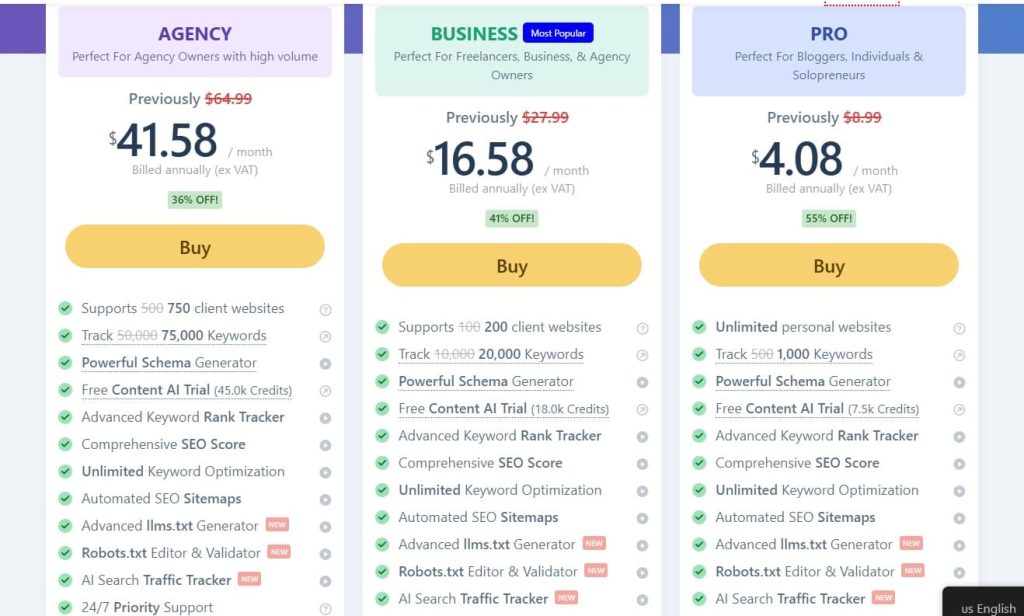
- Pro: $4.08/month
- Business: $16.58/month
- Agency: $41.58/month
Rank Math Reviews
- G2: 4.8 out of 5 stars (111+ reviews)
- Capterra: 4.5 out of 5 stars (52+ reviews)
Users love the free features and pricing but report analytics inaccuracies, weak customer support, billing problems with unauthorized charges, and AI content that needs complete rewrites.
2. Yoast SEO — Best for Beginners and Content Creators

Best For: New users, bloggers, and content teams who want simple, guided SEO help with strong focus on readable, user-friendly writing that ranks well.
How I Use It: I use Yoast for quick readability checks and on-page guidance when clients are creating blog posts or pages without deep SEO knowledge.
Quick Overview
Yoast SEO is the most well-known WordPress SEO plugin with 10+ million active installations and over 17 years of constant development. It is famous for being extremely beginner-friendly while still giving solid on-page SEO tools.
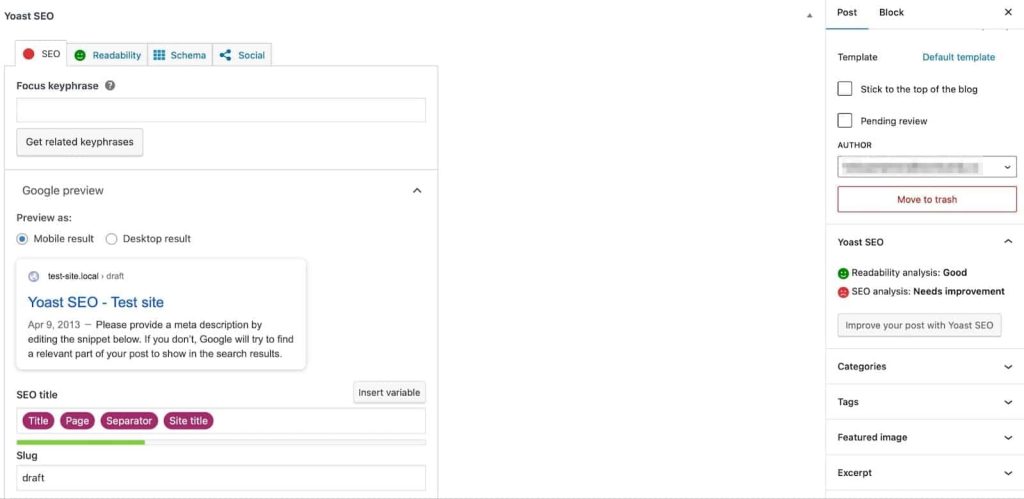
The plugin shines with its real-time traffic-light scoring system for both SEO and readability, clear step-by-step setup wizards, and lots of helpful educational tips that teach you SEO as you work.
It keeps getting regular updates to stay current with Google’s latest guidelines, including better support for structured data and mobile-first indexing.
Yoast is perfect for bloggers, new website owners, content writers, and teams that want simple, guided SEO without getting overwhelmed by hundreds of settings.
Compared to Rank Math, it gives fewer free advanced features but wins when ease of use and content quality are your top priorities.
Yoast SEO Key Features
- Real-Time SEO and Readability Analysis: Traffic-light scores flag keyword use, sentence length, passive voice, transitions, and readability instantly.
- AI-Powered Writing Tools in Premium: Generate titles, improve keyphrases, and summarize content quickly using integrated artificial intelligence features.
- Automatic XML Sitemaps and Schema: Creates clean sitemaps, adds breadcrumbs, and structured data to improve search engine understanding.
- Internal Linking Suggestions in Premium: Recommends relevant internal links automatically, strengthening site structure, navigation, and overall SEO performance.
- Google Docs Integration: Check SEO and readability scores inside Docs before importing content into WordPress.
- Bundled Premium Add-ons: Includes Local, Video, and News SEO features together under one annual subscription price.
Yoast SEO Pros
- Beginner-Friendly Interface: Clear wizards and explanations make SEO approachable even for total newbies without overwhelming options or technical jargon.
- Strong Readability Focus: Helps create natural, user-friendly content that keeps visitors longer and performs better in search rankings with lower bounce rates.
- Reliable Long-Term Updates: Works smoothly across WordPress versions with very few bugs after years of consistent development and testing.
- Educational Tips During Use: Teaches real SEO best practices while you work, helping users improve their skills over time without needing separate courses.
- AI Tools Speed Up Workflow: Premium AI features create optimized titles, metas, and summaries faster, fitting well with 2026’s AI-influenced search landscape.
Yoast SEO Cons
- Limited Free Version Keywords: Restricts you to only one focus keyword per page, which limits optimization for competitive or multi-topic posts until you upgrade.
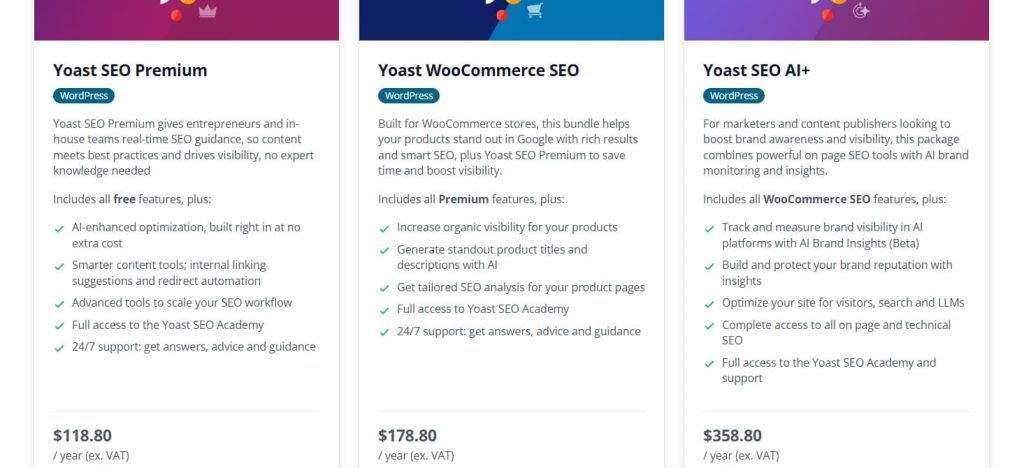
- High Premium Pricing: Around $118.80 per year feels expensive when competitors offer more advanced features for free or at lower cost.
- Missing Tools in Free Tier: Some powerful features like internal linking and redirects require the paid version, so you miss out unless you upgrade.
Yoast SEO Pricing
- Premium: $118.80/year
- WooCommerce: $178.80/year
- AI+: $358.80/year
Yoast SEO Reviews
- Capterra: 4.6 out of 5 stars (128+ reviews)
Users praise the easy setup, helpful guidance, and content-focused tools that make SEO feel straightforward.
Many beginners say it helped them rank better quickly, but some complain about the premium cost and limited free keywords, calling it expensive compared to newer alternatives.
3. AIOSEO — Best for Agencies and Growing Businesses
Best For: Agencies, e-commerce sites, and growing businesses that need easy setup with strong tools for local SEO, WooCommerce, and multi-site management without too much complexity.
How I Use It: I use AIOSEO for quick TruSEO scoring and seamless migrations when handling client sites that need WooCommerce or local optimizations fast.
Quick Overview
AIOSEO is a powerful, long-standing WordPress SEO plugin with millions of installs and a focus on user-friendly features plus smart automation.
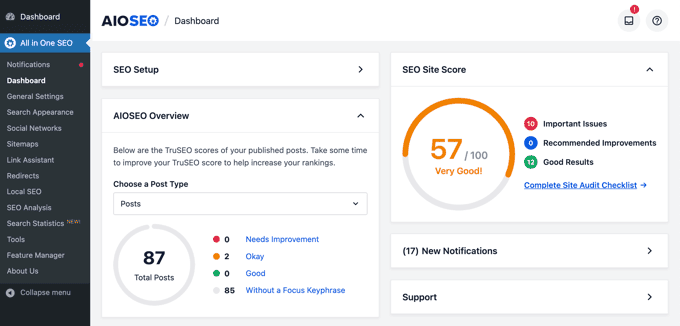
It stands out with its detailed TruSEO on-page scoring (out of 100), built-in AI tools, and extras like Link Assistant and Redirection Manager that save time on big sites.
It keeps getting updates for things like AI insights, page builder integrations, and better schema support to match 2026 search needs.
AIOSEO is great for agencies and businesses because of its clean dashboard, good value for multiple sites, and strong WooCommerce/Local features right out of the box.
Compared to Yoast, it offers more free advanced tools and better multi-site pricing. Compared to Rank Math, it feels simpler for teams but has fewer unlimited free options.
AIOSEO Key Features
- TruSEO Score Analysis: Gives a clear 0-100 score with a detailed checklist and content highlighter that shows exactly what to fix for better on-page optimization during editing.
- Smart Schema Markup: Automatically adds advanced schema types with dynamic options for rich snippets, including support for WooCommerce products, reviews, and local business data.
- Redirection Manager in Pro: Handles bulk redirects, 404 monitoring, and HTTP headers to fix broken links and improve crawl efficiency without extra plugins.
- Link Assistant in Pro: AI-powered internal linking tool scans content and suggests relevant links to add, helping boost site structure and SEO flow automatically.
- Local SEO and WooCommerce Tools: Built-in modules for Google Business listings, store product schema, reviews, and image SEO to make e-commerce and local sites rank higher.
- AI Title/Description Generator: Creates optimized metas quickly, plus AI insights for keyword reports and content suggestions tailored to your site.
AIOSEO Pros
- Fast Setup Wizard: Easy setup wizard gets sites optimized in minutes with smart defaults that work well for most businesses without manual tweaks.
- Strong WooCommerce & Local SEO: Strong WooCommerce and local SEO features built-in, saving time and money compared to needing separate add-ons in other plugins.
- Clear TruSEO Scoring: TruSEO scoring gives clear, actionable feedback with highlights so you fix issues fast and improve rankings effectively.
- Great for Agencies & Multi-Site: Good multi-site support and agency-friendly pricing tiers make it scalable for handling client work without huge costs.
- Keeps Up with Updates: Regular updates add modern tools like AI insights and page builder integrations to keep up with 2026 search changes.
- Reliable & Well-Supported: Reliable performance with low bugs and helpful support that solves problems quickly for growing sites.
AIOSEO Cons
- Limited Free Version: Free version covers basics but locks key tools like Redirection Manager and Link Assistant behind paid plans.
- Higher Cost for Scale: Pricing scales by site count and features, so full power on many sites gets expensive compared to unlimited options in Rank Math.
- Minor Performance Impact: Some users report slight speed impact or higher memory use versus lighter plugins like Rank Math or The SEO Framework.
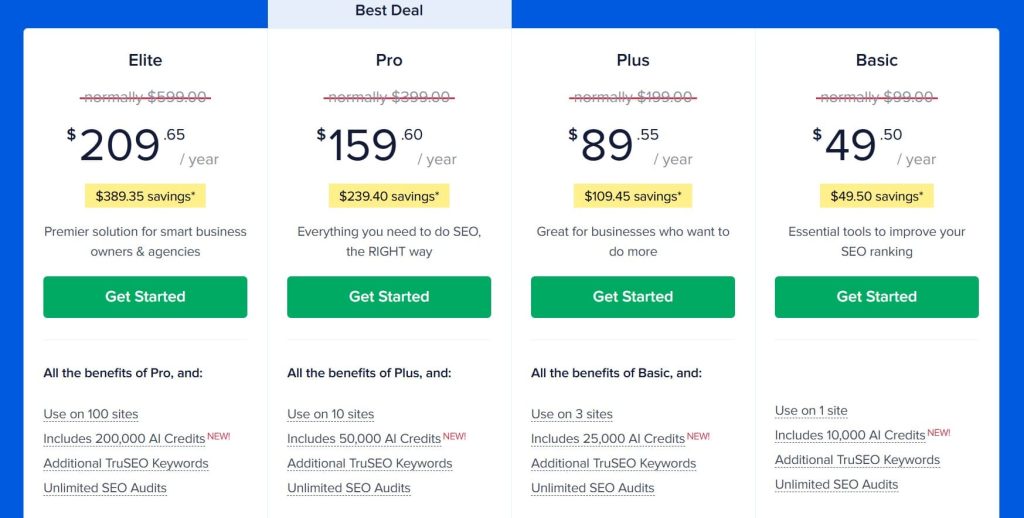
AIOSEO Pricing
- Basic: $49.50/year
- Plus: $89.55/year
- Pro: $159.60/year
- Elite: $209.65/year
AIOSEO Reviews
- G2: 4.8 out of 5 stars (187+ reviews)
Users love the easy setup, powerful free basics, and time-saving tools like TruSEO and Link Assistant for real traffic growth.
Many agencies praise multi-site value, but some mention higher costs for full features and occasional speed concerns compared to competitors.
4. SEOPress — Best for Privacy-Focused Multi-Site Owners
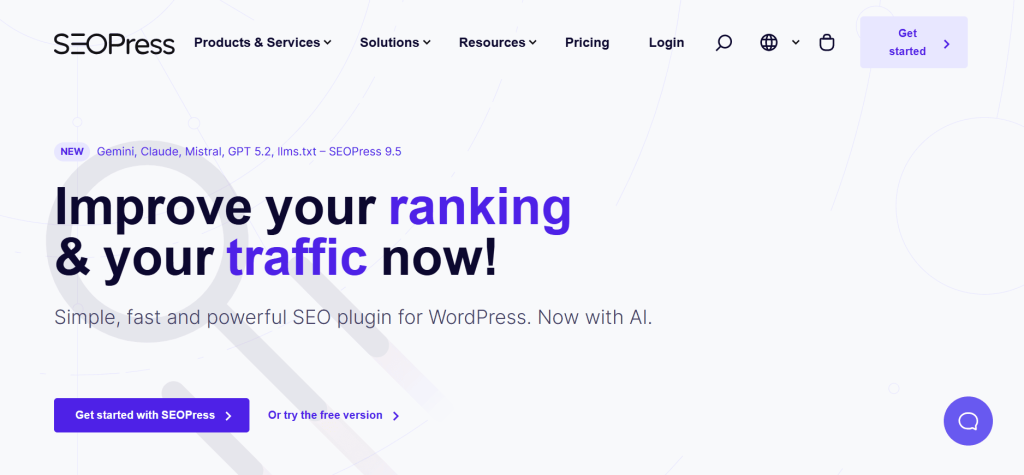
Best For: Privacy-conscious users, developers, and agencies managing multiple sites who want a clean, lightweight, no-ads SEO plugin with strong free features and unlimited site usage in Pro.
How I Use It: I use SEOPress on client multi-site setups and when I need full control without any tracking or external calls that could affect privacy or speed.
Quick Overview
SEOPress is a modern, lightweight WordPress SEO plugin that has grown quickly because it focuses on privacy, performance, and value.
It gives you unlimited keywords and most advanced features in the free version, which makes it one of the strongest free options available in 2026.
It stands out by being completely GDPR-friendly with no outbound requests, no ads, and no upsell banners inside the dashboard.
The Pro version adds white-label, unlimited sites, and extras like advanced redirects and analytics.
SEOPress is ideal for developers, agencies, and anyone who runs multiple sites or cares about clean code and user privacy.
Compared to Yoast and AIOSEO, it offers much more in the free plan and better pricing for unlimited sites; compared to Rank Math, it feels simpler and more privacy-first.
SEOPress Key Features
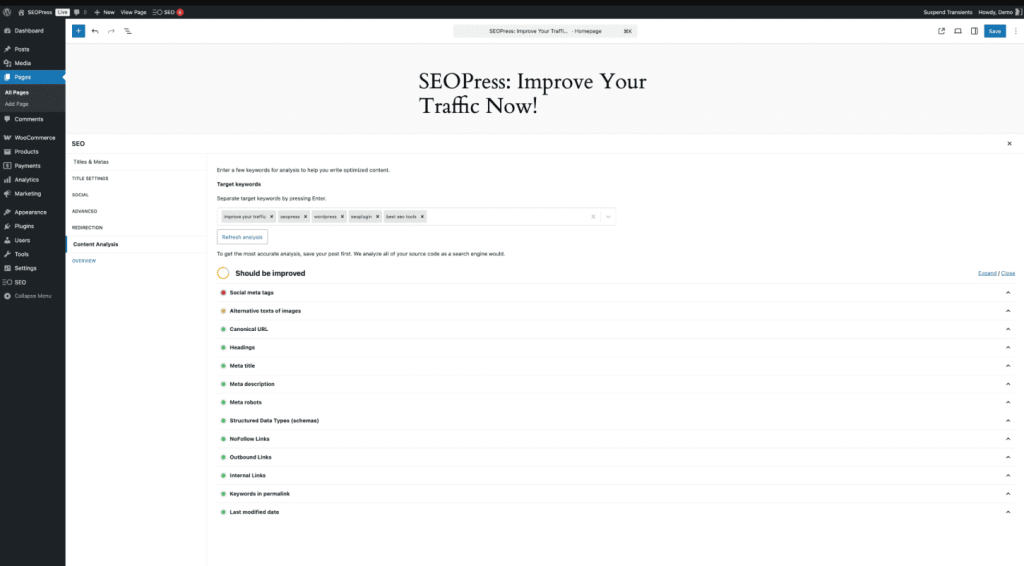
- Unlimited Keywords & Content Analysis: Optimize for as many focus keywords as you want with detailed on-page SEO scoring and suggestions in both free and Pro versions.
- Advanced Schema Markup: Supports JSON-LD schema for articles, products, reviews, local business, events, and more with easy templates and custom fields.
- Built-in Redirection & 404 Monitoring: Manage 301/302/307 redirects, monitor 404 errors, and clean up broken links directly from the plugin dashboard.
- White-Label & Unlimited Sites in Pro: Completely remove SEOPress branding and use it on unlimited client sites without extra fees or restrictions.
- XML Sitemaps & Robots.txt Editor: Create custom sitemaps (including image/video/news), edit robots.txt, and control crawling behavior with simple settings.
- Breadcrumbs & Social Previews: Automatic breadcrumbs navigation plus full Open Graph and Twitter Card control for better social sharing appearance.
SEOPress Pros
- Extremely Strong Free Version: Gives unlimited keywords, schema, redirects, and analytics that most plugins lock behind paid plans.
- True Privacy Focus: No external API calls, no tracking pixels, and full GDPR compliance make it safe for EU clients and privacy-sensitive sites.
- Lightweight & Fast: Adds almost no bloat so it performs well on speed-optimized sites and helps maintain good Core Web Vitals scores.
- Unlimited Sites in Pro: One Pro license covers unlimited websites, which is perfect for agencies and developers managing many client projects.
- Clean, No-Nonsense Dashboard: No ads, no upsell popups, and a simple interface that stays out of your way while working.
SEOPress Cons
- Less AI Features: Does not include built-in AI title/meta generation or content rewriting like AIOSEO or Rank Math offer in paid plans.
- Steeper Setup for Beginners: Fewer guided wizards and hand-holding compared to Yoast or AIOSEO, so new users may need more time to learn it.
- Basic Content Readability: Readability analysis is simple and not as detailed or color-coded as Yoast’s traffic-light system.
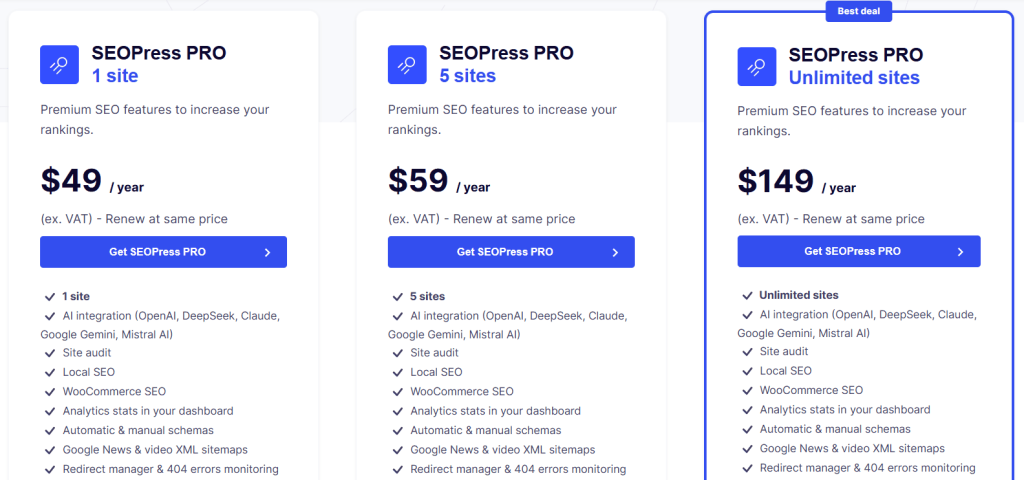
SEOPress Pricing
- 1 Site: $49/year
- 5 Sites: $59/year
- Unlimited Sites: $149/year
SEOPress Reviews
- G2: 4.4 out of 5 stars (15+ reviews)
- Capterra: 4.6 out of 5 stars (8+ reviews)
Users highlight its strong free offering, privacy focus, speed, and cost efficiency across multiple sites. Developers and agencies often cite it as a full replacement for Yoast or Rank Math, while beginners sometimes point to less guidance and fewer AI features.
5. The SEO Framework — Best for Minimalists and Developers
Best For: Speed-focused site owners and developers who value automation over hand-holding.
How I Use It: I installed The SEO Framework on client sites where speed is critical and the team doesn’t want constant notifications or upsells cluttering the dashboard.
Quick Overview
The SEO Framework is a lightweight, automated WordPress SEO plugin that handles technical SEO quietly in the background without ads, bloat, or constant prompts.
Founded by Dutch developer Sybre Waaijer in 2015, it automatically generates meta tags, sitemaps, and schema markup using intelligent defaults that work immediately upon activation.
What makes it stand out is its philosophical approach: SEO should be infrastructure, not a teaching tool that scores your content. It’s built for users who want technical SEO handled efficiently without the hand-holding that Yoast provides.
The plugin is significantly faster than competitors (1.1x faster than Slim SEO, 5.6x faster than Yoast, 6.2x faster than Rank Math), making it ideal for performance-focused sites.
Best suited for developers, agencies, and experienced users who understand SEO fundamentals and prefer automation over constant guidance.
SEO Framework Key Features
- Automated Meta Tag Generation: Creates SEO-friendly titles and descriptions from content automatically, using post title plus site name format with manual override options available anytime.
- Color-Coded SEO Indicators: Visual feedback system shows optimization status with green for well-optimized and red for issues, making quick audits possible without technical knowledge.
- Lightweight Performance Impact: Minimal code footprint with virtually zero overhead ensures fast site speed, outperforming Yoast by 5.6x and Rank Math by 6.2x in speed tests.
- Automated Structured Data: Generates schema markup for articles, breadcrumbs, and organization details automatically using JSON-LD format without requiring any configuration or technical knowledge.
- XML Sitemap Automation: Creates and updates sitemaps automatically for posts, pages, and custom post types, submitting directly to search engines without manual intervention required.
- No Ads Or Upsells: Clean, distraction-free interface with zero marketing notifications, upgrade prompts, or constant reminders that interrupt workflow or clutter the WordPress dashboard.
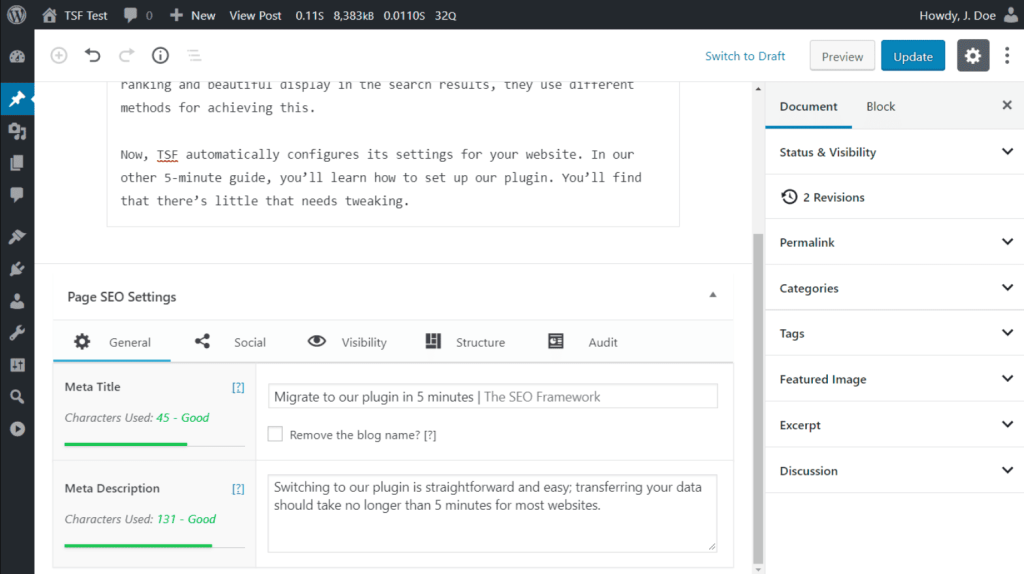
[Image Source: WordPress]
SEO Framework Pros
- Speed Performance: Significantly outperforms competitors, running 5.6x faster than Yoast and 6.2x faster than Rank Math with virtually zero overhead on sites.
- Automation Handles Everything: Meta tags, canonicals, sitemaps, and schema automatically with sensible defaults, eliminating manual work while still allowing overrides when needed.
- Clean Interface: Without ads, notifications, or upsells creates focused user experience, unlike competitors that constantly prompt upgrades and interrupt workflow with marketing messages.
- Pre-Configured Out Of The Box: With proven settings that work for most sites, providing a solid SEO foundation immediately upon activation without requiring hours of setup.
- Privacy-First Design: With no tracking, no external calls, and no data collection makes it GDPR-compliant and suitable for privacy-conscious users and European clients.
- Lower Pricing Than Competitors: With Pro at $7/month compared to Yoast $118.80/year, making it cost-effective for multi-site users.
- Active Developer Support: With responsive forum assistance and commitment to never release updates containing bugs, maintaining stability and reliability over time.
SEO Framework Cons
- No Content Analysis: Or keyword guidance means beginners won’t get the real-time feedback, traffic light scores, or readability checks that Yoast provides.
- Limited Documentation: With sparse knowledge base and no search function makes finding specific solutions harder compared to Yoast’s extensive tutorials and guides.
- Two-Site Minimum Policy: For premium plans forces single-site users to pay for unused licenses, unlike competitors offering single-site options at lower costs.
- No Built-In Content Optimization: Means missing features like focus keyword tracking, readability analysis, and the step-by-step guidance beginners rely on for learning.
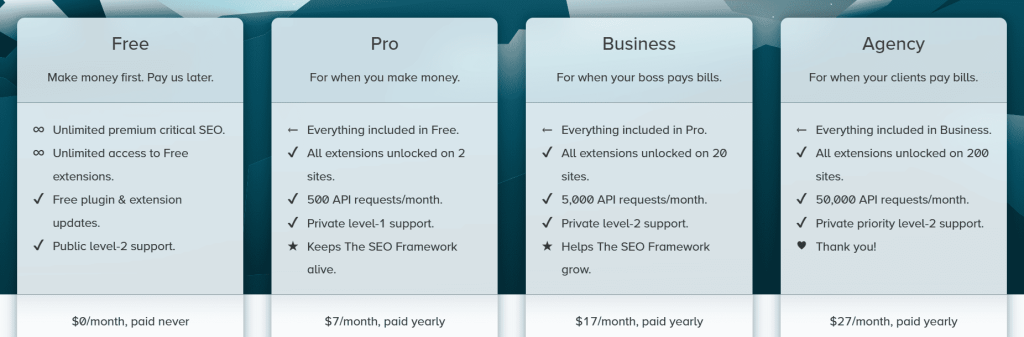
SEO Framework Pricing
- Free
- Pro: $7/month
- Business: $17/month
- Agency: $27/month
SEO Framework Reviews
- G2: 4 out of 5 stars (1+ reviews)
Users praise The SEO Framework’s lightweight performance and automation. Common feedback highlights its speed advantage over Yoast and Rank Math.
However, beginners mention the lack of content guidance makes learning SEO harder compared to plugins with built-in analysis and keyword optimization features.
6. Squirrly SEO — Best for AI-Powered Content Optimization

Best For: Bloggers and small business owners who want AI-guided SEO optimization and keyword research directly inside WordPress without needing technical expertise or separate tools.
How I Use It: I recommend Squirrly SEO to clients who need real-time content feedback and step-by-step SEO guidance without getting overwhelmed by technical settings or complex dashboards.
Quick Overview
Squirrly SEO launched in 2012 and serves over 23,000–25,000 paying customers in 150+ countries, including teams at BBC, Microsoft, and Top Gear.
It acts as an AI-powered all-in-one SEO suite — like a virtual consultant giving real-time advice while you write.
Unlike Rank Math or Yoast (which assume some SEO knowledge), Squirrly simplifies with AI explanations, step-by-step tasks, and automation.
It combines keyword research, content optimization, rank tracking, technical audits, and Focus Pages in one platform.
Perfect for non-technical users wanting results without specialists, content creators needing writing help, and small teams after consistent optimization.
Squirrly SEO Key Features
- Live SEO Assistant: Gives real-time feedback while writing in WordPress or page builders, updating scores instantly as you edit.
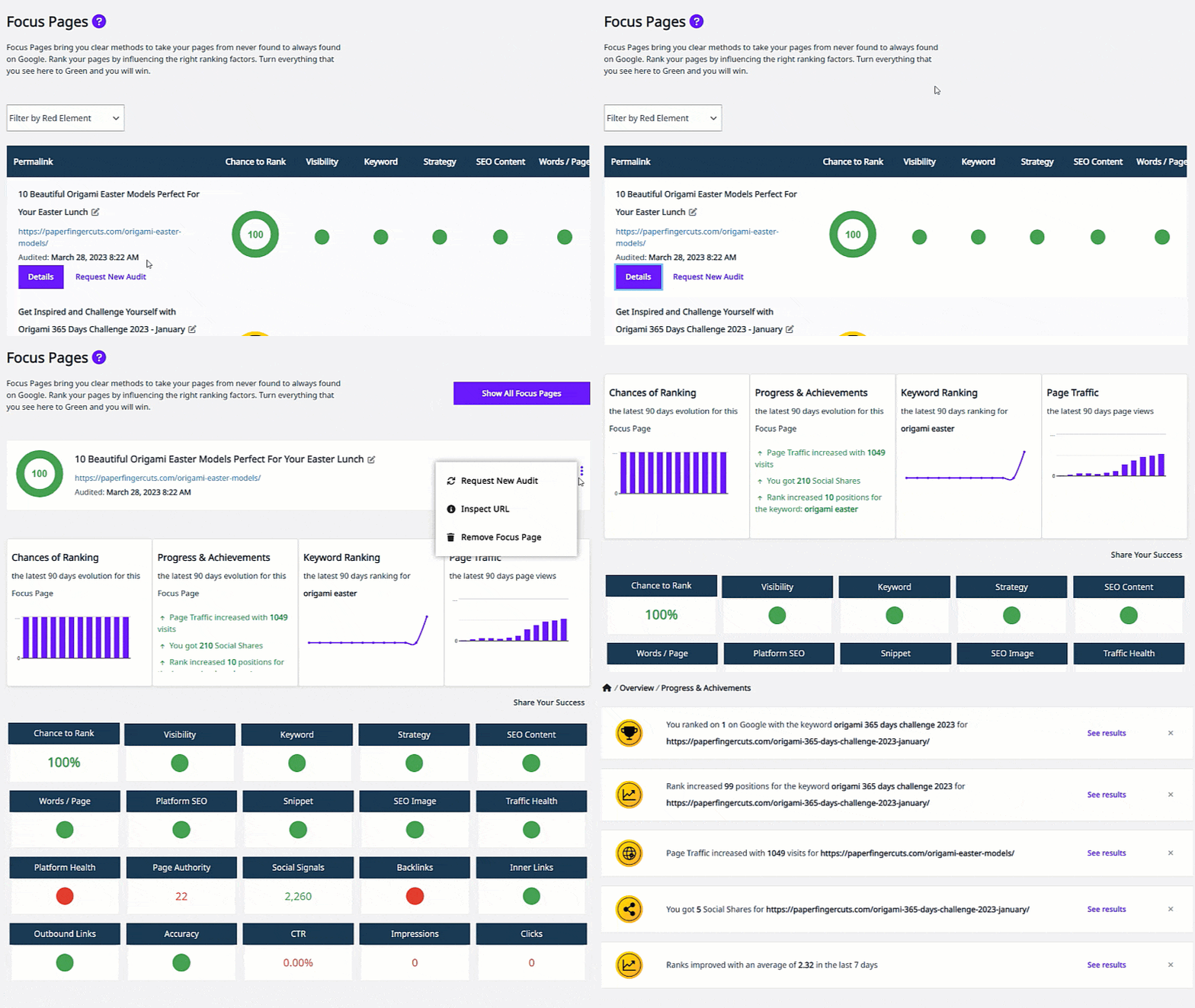
- Focus Pages System: Targets specific URLs, tracks ranking probability, lists page-specific tasks, and monitors progress to top 10.
- AI-Powered Keyword Research: Finds keywords with volume, competition, trends in 140+ languages — all inside WordPress, no extra tools.
- SEO Automation: Auto-handles technical settings, sitemaps, meta tags, and structured data with minimal input.
- Content Audit: Scans existing posts for issues, prioritizes fixes by impact, and tracks improvements.
Squirrly SEO Pros
- AI Guidance Helps Beginners: Explains changes in simple language, making SEO easy without courses or docs.
- Keyword Research Inside WordPress: Saves time by avoiding external tools and subscriptions.
- Real-Time Feedback While Writing: Scores update live, so you improve content during creation.
- Focus Pages Offer Deep Analysis: Shows exactly why pages aren’t ranking and what to fix.
- Replaces Multiple Tools: 650+ features cover research, optimization, audits, tracking in one place.
- Regular Updates and Roadmap: Keeps up with WordPress changes and adds user-requested features.
Squirrly SEO Cons
- Free Version Severely Limited: Only 1 site, 1 focus page, 5 keyword researches/month — misses core tools.
- Interface Feels Overwhelming: Many sections and features make navigation cluttered at first.
- Basic Keyword Research: Less depth/data than dedicated tools like Ahrefs or Semrush.

Squirrly SEO Pricing
- Free
- Pro: $9.99/month
- Web Dev Kit: $51.20/month
- Business: $71.99/month
Squirrly SEO Reviews
- G2: 4.7 out of 5 stars (149+ reviews)
- Capterra: 4.7 out of 5 stars (168+ reviews)
Users love the AI guidance, Focus Pages depth, and beginner-friendly approach that reduces SEO intimidation.
Many report real ranking improvements. However, some find the interface cluttered with too many features and say the free version is too restricted for proper testing.
7. Schema Pro — Best for Rich Snippets and Structured Data
Best For: Site owners who want dedicated schema markup management without coding.
How I Use It: We use Schema Pro on client sites where rich snippets are critical for visibility, especially for recipes, reviews, local businesses, and products.
Quick Overview
Schema Pro is a premium WordPress plugin by Brainstorm Force (makers of Astra theme) that specializes in structured data and schema markup.
It launched around 2017 and simplifies adding schema with a point-and-click interface and smart automation.
Unlike general SEO plugins with basic schema, Schema Pro focuses only on this — supporting 13–20+ types like Article, Product, Recipe, Event, FAQ, How-To, Course, Job Posting, Local Business, Person, and Review.
It uses Google’s JSON-LD format, integrates with WooCommerce/ACF/custom fields, and applies schema automatically via rules. Lightweight and performance-friendly — no extra bloat.
Best suited for bloggers, businesses, and agencies that want professional-grade schema implementation without dealing with code or manual JSON-LD configuration.
Schema Pro Key Features
- 20+ Schema Types Supported: Covers Article, Product, Recipe, Event, Review, FAQ, How-To, Course, Job Posting, Local Business, Person, and more specialized ones.
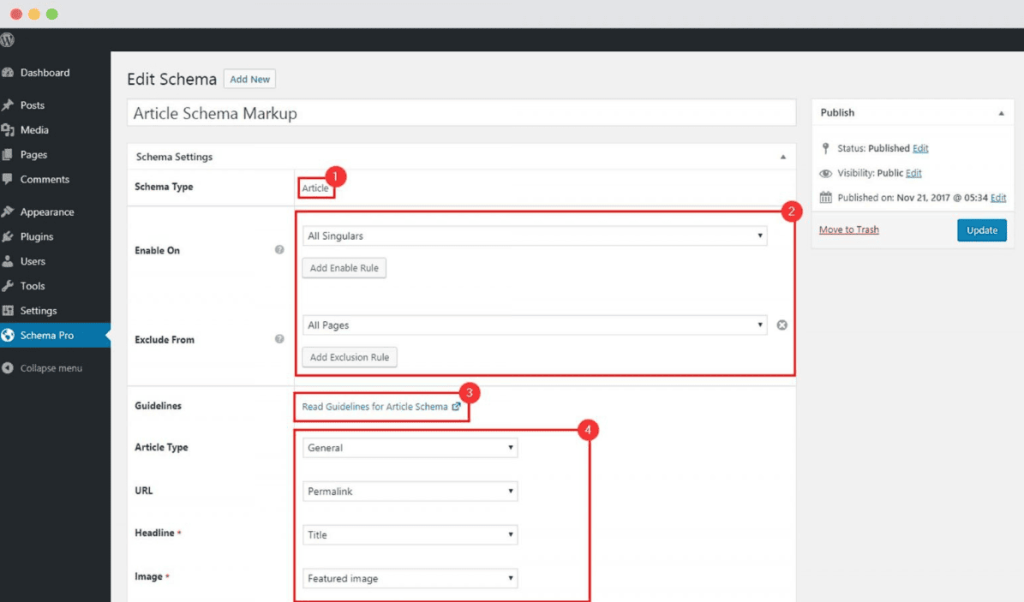
- Visual Schema Builder: Point-and-click to create and map schema fields without any code.
- Automatic Schema Generation: Analyzes content and applies correct schema sitewide based on post type, category, or structure.
- WooCommerce Integration: Auto-adds product schema with price, availability, reviews, ratings, and inventory for rich snippets.
- ACF Compatibility: Maps custom fields from Advanced Custom Fields to schema properties easily.
- Conditional Display Rules: Show schema only on specific post types, categories, tags, or custom conditions.
[Image Source: WPSchema]
Schema Pro Pros
- Dedicated Schema Focus: Provides more comprehensive and flexible structured data options than general SEO plugins that bundle schema as secondary features.
- Visual Interface Eliminates Coding: Eliminates need for coding knowledge or manual JSON-LD editing, making professional-grade schema markup accessible to non-developers and content creators.
- Automatic Schema Application: Saves hours of manual work by intelligently detecting content type and applying appropriate structured data across the entire site automatically.
- Regular Updates Keep Pace: Keep pace with Google’s evolving schema standards ensuring compliance with latest structured data requirements and new schema types as they emerge.
- Rich Results Test Validation: Confirms schema accuracy before publishing, preventing errors that could invalidate structured data and harm search visibility in rich snippets.
- Lightweight Performance Impact: With minimal code bloat ensures schema doesn’t slow down websites unlike some plugins that add significant overhead to page loads.
- Brainstorm Force Reputation: For reliable products backed by Astra theme success provides confidence in ongoing development, support, and long-term plugin maintenance.
Schema Pro Cons
- Premium-Only Pricing: With no free version limits accessibility for small websites and bloggers who want to test schema functionality before committing to purchase.
- Learning Curve for Advanced Configurations: Despite visual interface, as mapping custom fields and creating complex conditional rules requires understanding schema structure fundamentals.
- Occasional Conflicts: Some users report occasional conflicts with page builders and other plugins, requiring troubleshooting or support tickets to resolve compatibility issues on specific sites.
Schema Pro Pricing
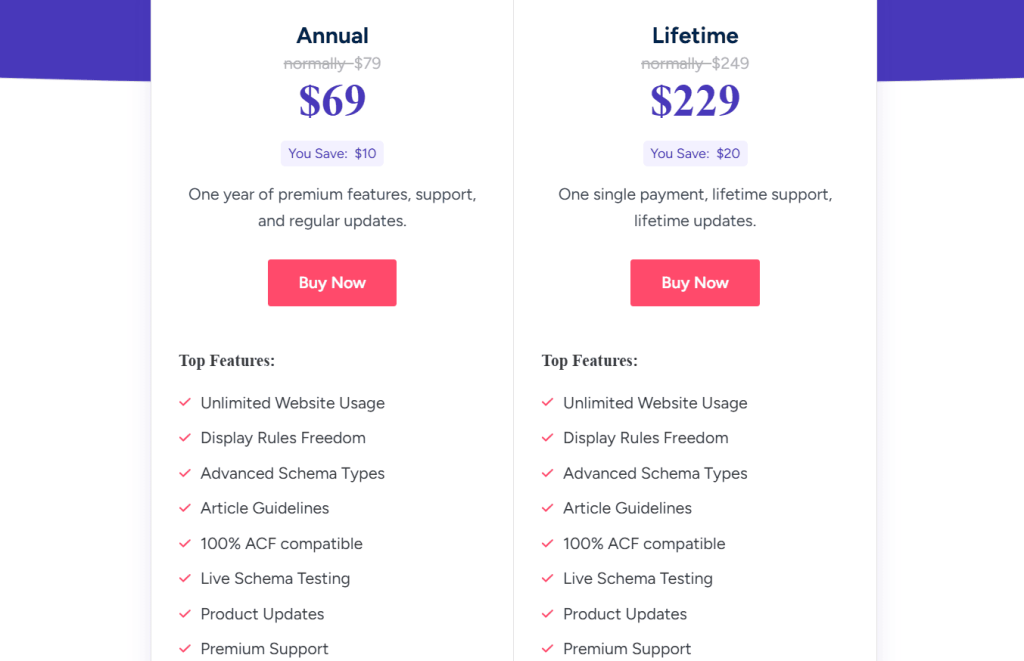
- Annual: $69/year
- Lifetime: $229
Schema Pro Reviews
N/A
Users consistently praise Schema Pro’s ease of use and comprehensive schema type coverage. Reviews highlight successful rich snippet implementations and increased click-through rates.
However, some users question whether the cost justifies features already available in free SEO plugins, noting that Rank Math and Yoast provide basic schema without additional expense.
8. Redirection — Best for Site Migrations and URL Management
Best For: Site owners managing URL changes, migrations, or ongoing 404 error cleanup.
How I Use It: We use Redirection on every client site to manage 301 redirects during migrations and monitor 404 errors that need fixing.
Quick Overview
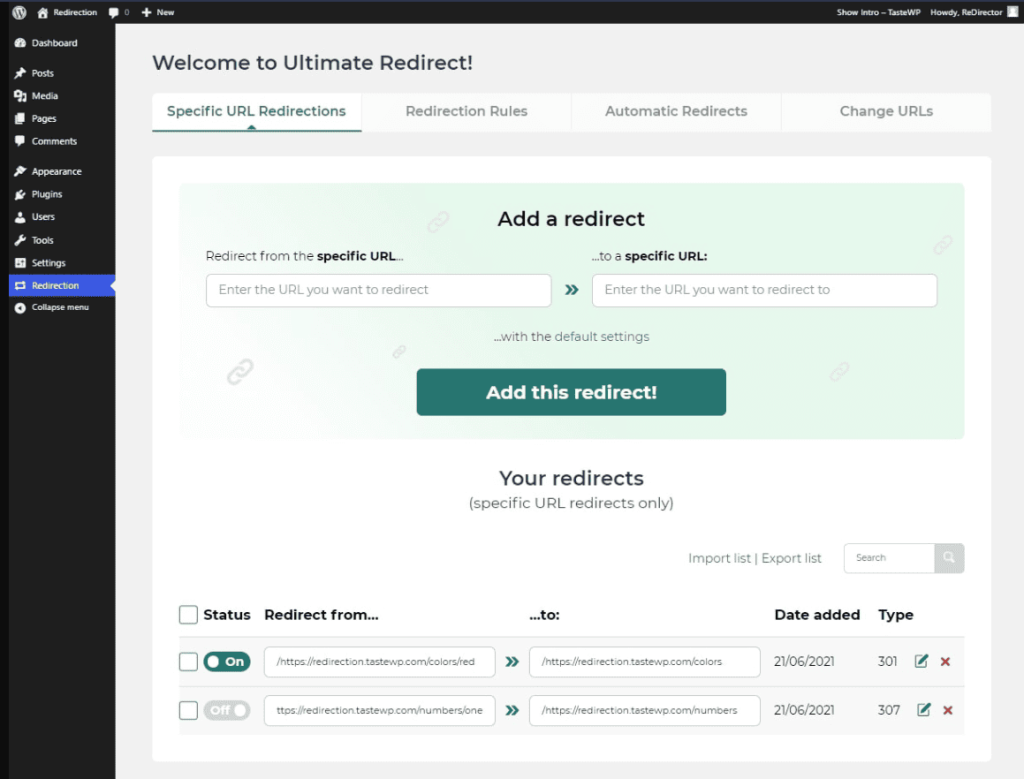
Redirection is the most popular free WordPress redirect plugin with over 2 million active installations, developed and maintained by John Godley since 2008.
It makes managing 301 redirects and tracking 404 errors simple without needing to touch server files or write code.
The plugin supports multiple redirect types (301, 302, 307), regex patterns for bulk redirects, and conditional redirects based on user role, referrer, browser type, or cookies.
It features a built-in 404 error log that shows exactly where visitors are hitting dead ends, allowing quick creation of redirects to fix broken links.
Redirection also supports CSV import/export for transferring or backing up redirect rules, making site migrations easier.
Despite being packed with features, it’s lightweight and works well even on large sites with thousands of redirects.
Best suited for site owners doing migrations, changing URL structures, or maintaining SEO value when deleting or moving content.
Redirection Key Features
- Simple Redirect Management: Create 301, 302, or 307 redirects directly inside WordPress dashboard with no .htaccess editing, server access, or technical knowledge required.
- 404 Error Tracking: Automatically logs broken links showing URL, hits, referrer, and user agent so you can spot issues and create instant redirects.
- Regex Support: Handle complex or bulk redirects using regular expressions, perfect for changing URL structures, migrating large sites, or creating pattern-based rules.
- Conditional Redirects: Create rules based on user role, referrer, browser type, login status, or cookies giving precise control over user experience and targeting.
- CSV Import/Export: Transfer or backup redirect rules with CSV support making site migrations, client handoffs, and multi-site deployments significantly easier and faster.
- Logging and Monitoring: View all redirects occurring on site including visitor information, browser used, and referrer providing insights into redirect performance and usage.
[Image Source: WordPress]
Redirection Pros
- Completely Free: With no premium version or paywalls meaning all features including conditional redirects, logging, and regex support are available at zero cost.
- Lightweight Performance: Runs efficiently even with thousands of redirects without affecting site speed, unlike some redirect plugins that add significant overhead to page loads.
- Built-In 404 Monitoring: Automatically detects broken links before they hurt SEO, allowing proactive fixes instead of waiting for Google to discover and penalize them.
- Regex Support Enables: Bulk redirect management through patterns, saving hours when restructuring sites or migrating hundreds of URLs with similar patterns to new locations.
- Apache and Nginx Compatibility: Supports both server types with automatic .htaccess export for Apache or Nginx rewrite rules for optimized server-level redirect handling.
- CSV Import/Export: Makes transferring redirects between sites trivial, essential for agencies managing multiple clients or developers working across staging and production environments.
Redirection Cons
- Interface Can Feel Dated: And less polished compared to modern plugins, lacking the visual design and user experience refinements of premium alternatives.
- No Visual Sitemap: Or redirect chain detection means identifying circular redirects or complex redirect paths requires manual checking or third-party tools.
- Steep Learning Curve: For regex patterns requiring technical knowledge to use advanced bulk redirect features, making it intimidating for non-technical users who need them.
- 404 Log Can Grow Large: Over time requiring manual cleanup since there’s no automatic pruning of old entries, potentially impacting database performance.
Redirection Pricing
N/A
Redirection Reviews
N/A
Users consistently praise Redirection for its reliability and comprehensive feature set at zero cost. The 404 monitoring and regex support receive particular appreciation from site owners managing migrations.
Some users report occasional interface confusion with older design patterns, but most agree functionality and price make it the best redirect solution for WordPress.
9. Slim SEO — Best for Speed-Obsessed Minimalists
Best For: Users who want automated SEO without complexity, configuration, or performance overhead.
How I Use It: I install Slim SEO on speed-critical client sites where automated optimization is needed without the bloat of feature-heavy alternatives.
Quick Overview
Slim SEO is an ultra-lightweight WordPress SEO plugin developed by the Meta Box team with over 15 years of plugin development experience.
Launched in 2020, it focuses on complete automation with zero configuration required upon activation.
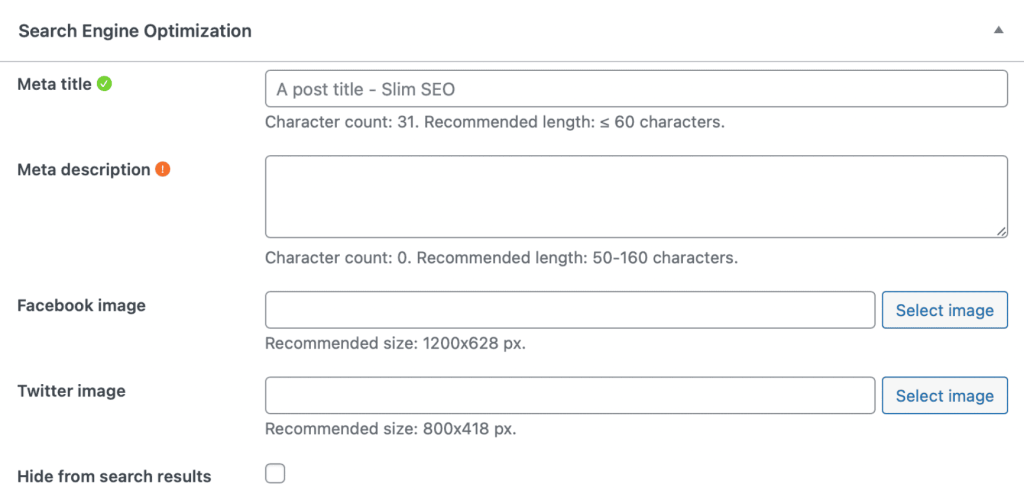
The plugin automatically generates SEO titles, meta descriptions, XML sitemaps, breadcrumbs, schema markup, and Open Graph tags from content without any manual intervention.
Unlike competitors that overwhelm users with dozens of options and content analysis tools, Slim SEO handles technical SEO quietly in the background with intelligent defaults.
It’s built with a minimal codebase that adds virtually no overhead to site performance, making it one of the fastest SEO plugins available.
The free version covers all essentials, while Slim SEO Pro ($59/year) adds visual schema builder, link manager, and Google Search Console integration.
Best suited for beginners who want SEO handled automatically, developers building fast sites, and users who don’t need keyword guidance or content scoring.
Slim SEO Key Features
- Complete Automation: Generates titles, descriptions, sitemaps, breadcrumbs, schema, and social tags automatically upon activation without requiring any configuration or settings adjustment.
- Automatic Alt Text: Adds image file names as alt text when missing, ensuring better accessibility and SEO even when users forget to add alt attributes.
- Schema Markup Automation: Creates JSON-LD structured data for articles and breadcrumbs automatically with intelligent defaults based on content type and site structure.
- Zero-Configuration Approach: Works immediately after activation with no setup wizard, no options to configure, just instant automated SEO optimization from first page load.
- Migration Support: Imports SEO data from Yoast, Rank Math, The SEO Framework, Redirection, and 301 Redirects making switching from other plugins seamless and quick.
- Minimal Performance Impact: Ultra-lightweight code adds less than 50ms load time compared to Yoast’s 150-200ms, making it the fastest SEO plugin available for WordPress.
[Image Source: WordPress]
Slim SEO Pros
- Fastest SEO Plugin Available: With minimal code footprint adding virtually zero overhead to site performance, crucial for Core Web Vitals and page speed scores.
- Zero Configuration Required: Means SEO works immediately upon activation without hours of setup, making it perfect for non-technical users who want automatic optimization.
- Automated Meta Generation: Creates reasonable defaults for titles and descriptions from content, eliminating blank fields while still allowing manual overrides when needed.
- Clean Interface Without Bloat: Ads, or constant notifications provides focused user experience compared to feature-heavy competitors that clutter WordPress dashboard with upsells.
- Regular Updates: From an experienced Meta Box development team with 15+ years in WordPress plugin development ensures stability, compatibility, and ongoing improvements.
- Migration Tools: Make switching from Yoast, Rank Math, or other SEO plugins quick and painless, importing existing SEO data to prevent losing optimization work.
Slim SEO Cons
- No Content Analysis: Or keyword optimization means missing the real-time feedback, focus keyword tracking, and readability checks that help beginners learn SEO fundamentals.
- Limited Customization Options: For automated outputs can be frustrating for advanced users wanting precise control over meta tag patterns and schema structure.
- No Built-In Redirect Management: Requires separate plugin like Redirection for handling 301 redirects during migrations or URL changes, adding plugin bloat.
- Sparse Documentation: And tutorials compared to Yoast or Rank Math means less help available for troubleshooting or learning advanced configurations and optimizations.
Slim SEO Pricing
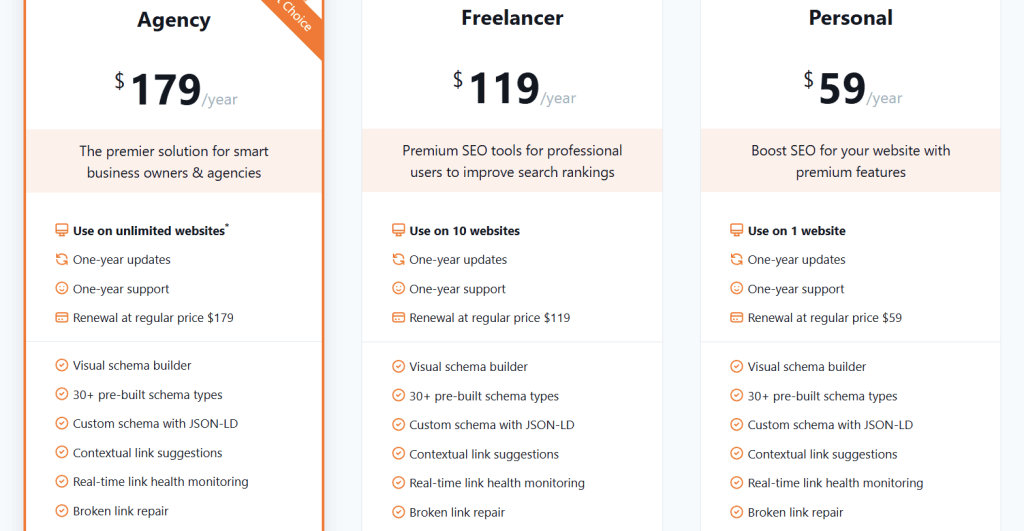
- Agency: $179/year
- Freelancer: $119/year
- Personal: $59/year
Slim SEO Reviews
N/A
Users consistently praise Slim SEO’s simplicity, speed, and set-and-forget approach. Reviews highlight setup taking under 2 minutes with immediate SEO improvements.
Some beginners miss content guidance and keyword suggestions that help them learn SEO best practices while writing content for their websites.
10. W3 Total Cache — Best for Advanced Caching on a Budget
Best For: WordPress users with technical knowledge who want enterprise-level caching features for free but accept complex setup and troubleshooting needs.
How I Use It: I use W3 Total Cache on high-traffic client sites where budget limits premium options yet powerful caching is required.
Quick Overview
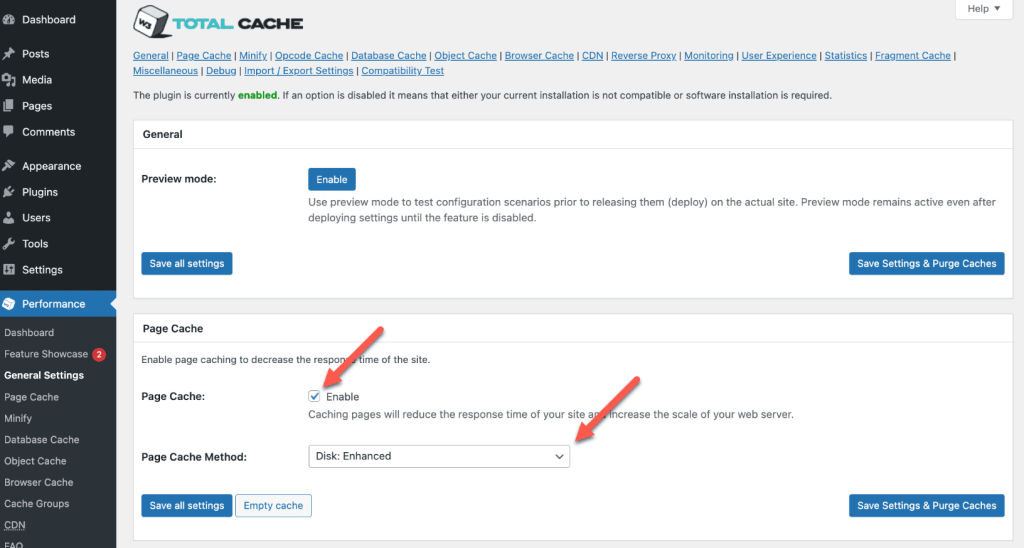
W3 Total Cache is the most comprehensive free caching plugin for WordPress, first released in 2009 and now active on over 900,000 websites with a 4.4 out of 5 rating.
It’s built for people who understand caching concepts and want granular control over every performance aspect.
Where WP Rocket simplifies everything with smart defaults, W3 Total Cache gives you dozens of configuration options for page caching, database caching, object caching, browser caching, minification, and CDN integration.
The plugin is powerful but complex, requiring technical knowledge to configure properly without breaking your site. Major sites like AT&T and Mashable trust W3 Total Cache for high-traffic situations.
It’s perfect for developers wanting free enterprise features, agencies managing performance on tight budgets, and experienced WordPress users comfortable troubleshooting caching conflicts when they inevitably occur.
W3 Total Cache Key Features
- Page Caching: Generates static HTML versions of pages with disk or memory options to reduce server load dramatically.
- Database Caching: Stores query results in memory using Memcached or Redis to reduce MySQL load significantly.
- Object Caching: Caches WordPress objects using Memcached or Redis to minimize repeated database queries noticeably.
- Browser Caching: Sets proper headers for static assets so browsers store files locally and reduce bandwidth usage.
- Minification: Compresses HTML, CSS, JavaScript files, removes whitespace/comments, and combines them to cut HTTP requests.
- CDN Integration: Connects to Cloudflare, BunnyCDN, and other CDNs to deliver assets globally and lower origin load.
[Image Source: WPML]
W3 Total Cache Pros
- Completely Free Enterprise Features: Provides page, object, database caching, minification, and CDN integration without any payment required.
- Granular Control Over Everything: Lets advanced users fine-tune rules, exclude pages, and optimize performance precisely as needed.
- Works with Popular CDNs: Integrates easily with Cloudflare, BunnyCDN, or custom CDNs for budget-friendly global delivery.
- Supports Advanced Caching Methods: Enables Memcached, Redis, or APC for enterprise performance without costly hosting upgrades.
- Active Development and Updates: Regular updates maintain compatibility with latest WordPress versions and prevent breaks.
- Setup Guide Tests Methods: Built-in wizard tests caching options and shows speed differences to choose best setup.
- No Vendor Lock-In: Deactivation leaves no residual settings or clutter unlike some plugins that cause issues.
W3 Total Cache Cons
- Extremely Complex Configuration: Overwhelms beginners with dozens of technical options needing expertise to avoid site breaks.
- Breaks Sites Easily: Wrong settings or aggressive minification often cause white screens, broken layouts, or feature failures.
- Steep Learning Curve: Requires external research because built-in explanations are brief and assume prior knowledge.
W3 Total Cache Pricing
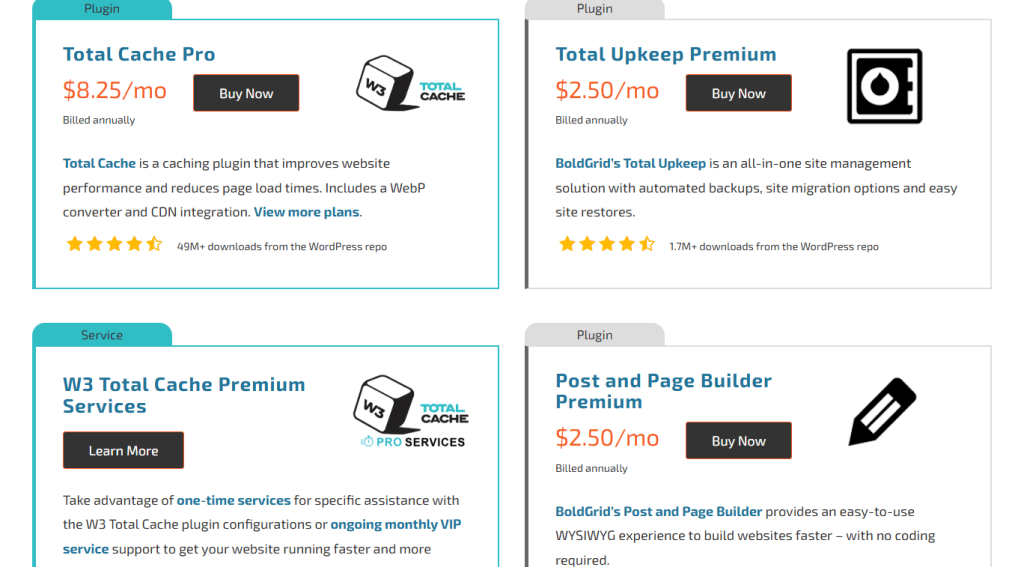
- Total Cache Pro: $8.25/month
- Total Upkeep Premium: $2.50/month
- Post and Page Builder Premium: $2.50/month
- Crio Pro SuperTheme: $3.25/month
- Cloud WordPress5: $1.67/month
W3 Total Cache Reviews
- G2: 4.5 out of 5 stars (23+ reviews)
Users appreciate powerful, enterprise-level caching features for free with excellent customization options. However, many note the complex configuration often breaks sites and requires significant technical expertise to implement safely.
11. MonsterInsights— Best for Google Analytics Integration

Best For: WordPress users who need to track website performance, understand user behavior, and make data-driven decisions without touching code or leaving their WordPress dashboard.
How I Use It: I use MonsterInsights on client sites to track conversions, monitor traffic sources, and see which content performs best, all without logging into Google Analytics or deciphering confusing reports.
Quick Overview
MonsterInsights is the most popular Google Analytics plugin for WordPress, trusted by over 3 million websites since its launch in 2013.
It bridges the gap between WordPress and Google Analytics by bringing your most important metrics directly into your dashboard with clean, understandable reports.
Where Google Analytics can overwhelm beginners with hundreds of metrics and complex interfaces, MonsterInsights distills everything into actionable insights you can actually use.
The plugin handles all the technical setup, implements tracking code correctly, and offers advanced features like ecommerce tracking, form analytics, and custom dimensions without requiring developer skills.
It’s perfect for bloggers who want to understand their audience, businesses tracking conversions, and agencies managing analytics across multiple client sites.
MonsterInsights Key Features
- One-Click Google Analytics Setup: Connects WordPress to GA4 automatically, implements tracking code correctly, and eliminates manual code insertion completely.
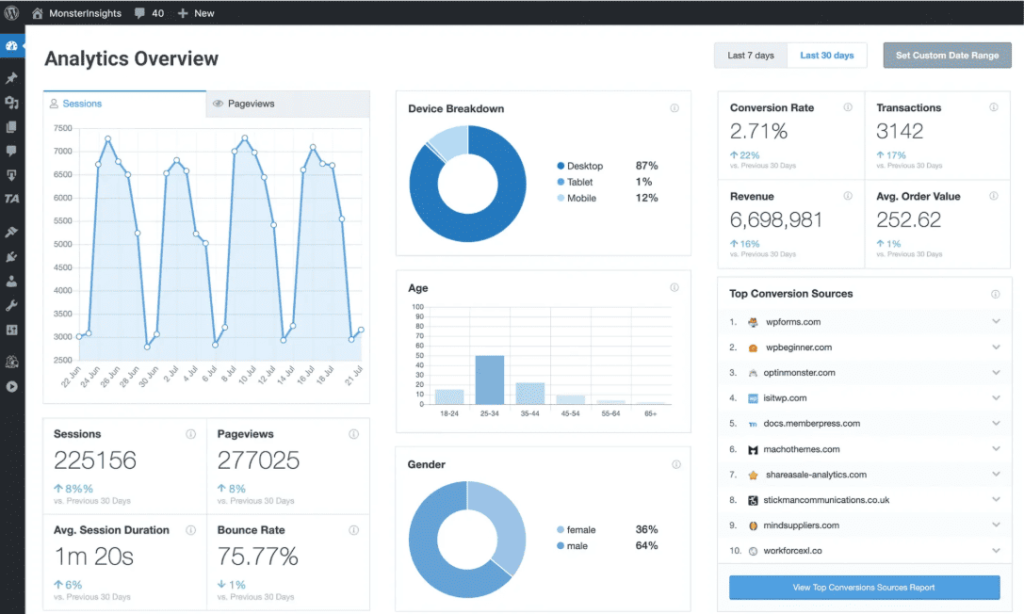
- Dashboard Reports Inside WordPress: Displays pageviews, sessions, bounce rates, and top content in WordPress, eliminating constant switching between platforms today.
- Enhanced Ecommerce Tracking: Tracks WooCommerce transactions automatically, monitors product performance, calculates conversion rates, and attributes revenue to traffic sources.
- Form Conversion Tracking: Monitors Contact Form submissions, tracks conversion rates, identifies high-performing forms, and shows where users abandon form completions.
- Custom Dimensions and Events: Tracks authors, post types, categories, tags, and custom content as dimensions, providing granular insights into performance.
- Real-Time Stats: Shows live visitor activity, current active users, geographic locations, and real-time traffic sources directly in WordPress today.
MonsterInsights Pros
- Eliminates Google Analytics Complexity: Beginners see clean reports immediately instead of drowning in Google Analytics’ overwhelming interface with hundreds of metrics.
- Setup Takes Literally Seconds: Authentication happens with one click, tracking code installs automatically, and data flows without touching code or hiring developers.
- Ecommerce Tracking Works Automatically: WooCommerce integration tracks transactions and product performance without writing custom tracking code or using Google Tag Manager.
- Form Analytics Reveal Issues: Seeing which forms convert and where users abandon helps optimize lead generation without guessing why forms underperform.
- Author and Content Tracking: Understanding which authors drive traffic and what post types perform helps inform content strategy with actual data.
- GDPR Compliance Features Included: Built-in IP anonymization, cookie consent integration, and data privacy controls help maintain compliance without separate privacy plugins.
- Universal Tracking Prevents Errors: MonsterInsights handles tracking across subdomains, prevents duplicate pageviews from AMP, and excludes admin traffic for accurate reporting.
MonsterInsights Cons
- Free Version Missing Features: The lite version only shows basic reports, blocking ecommerce tracking, form analytics, and most features that matter.
- Expensive for Small Businesses: Starting at $299.50/year feels steep for solo bloggers, especially when Google Analytics itself is completely free.
- Reports Are Simplified: Dashboard widgets show high-level metrics but lack the depth of Google Analytics, requiring GA4 for detailed analysis.
MonsterInsights Pricing
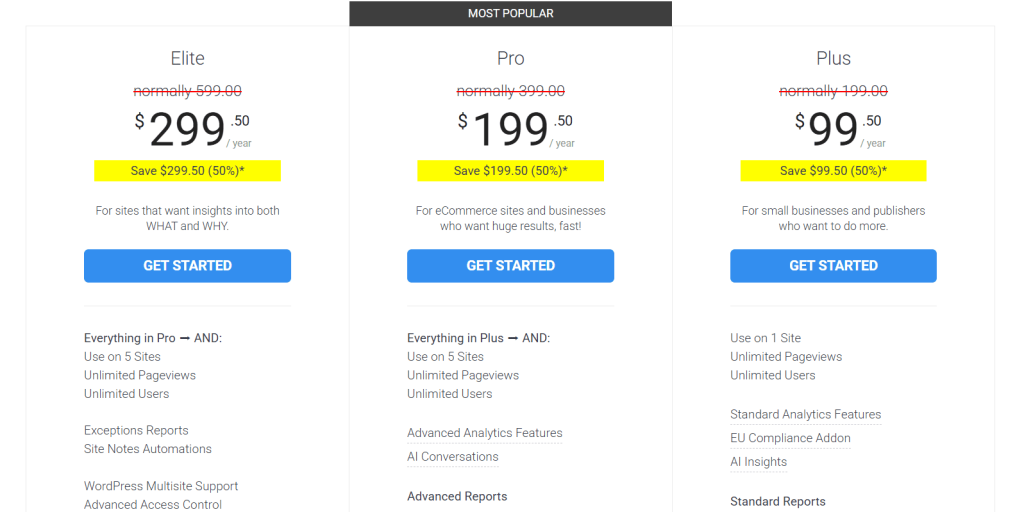
- Elite: $299.50/year
- Pro: $199.50/year
- Plus: $99.50/year
MonsterInsights Reviews
- G2: 4.4 out of 5 stars (36+ reviews)
- Capterra: 4.8 out of 5 stars (13+ reviews)
Users love how MonsterInsights simplifies Google Analytics setup and makes data accessible for non-technical users, though many feel the free version is too limited and premium pricing seems high for what’s essentially a connection layer to free analytics.
12. WP Rocket – Best for Page Speed Optimization

Best For: WordPress site owners who need faster page speeds and better Core Web Vitals scores without deep technical knowledge or managing multiple performance plugins simultaneously.
How I Use It: I install WP Rocket on every client site we build at OLW because it delivers immediate speed improvements with minimal configuration, turning slow sites into fast ones in minutes.
Quick Overview
WP Rocket is the most popular premium caching plugin for WordPress, launched in 2013 and now powering over 5.32 million websites (+5,322,000 Websites in Orbit).
It’s built for people who want maximum performance without touching code or understanding complex caching rules.
Where free caching plugins require endless tweaking and technical knowledge, WP Rocket works immediately after activation with smart defaults that handle most optimization automatically.
The plugin combines page caching, file optimization, lazy loading, database cleanup, and CDN integration into one interface that actually makes sense.
It’s perfect for businesses that need fast sites without hiring developers, bloggers competing for search rankings, and agencies managing performance across multiple client sites.
WP Rocket consistently delivers measurable speed improvements that affect both user experience and Google’s Core Web Vitals rankings.
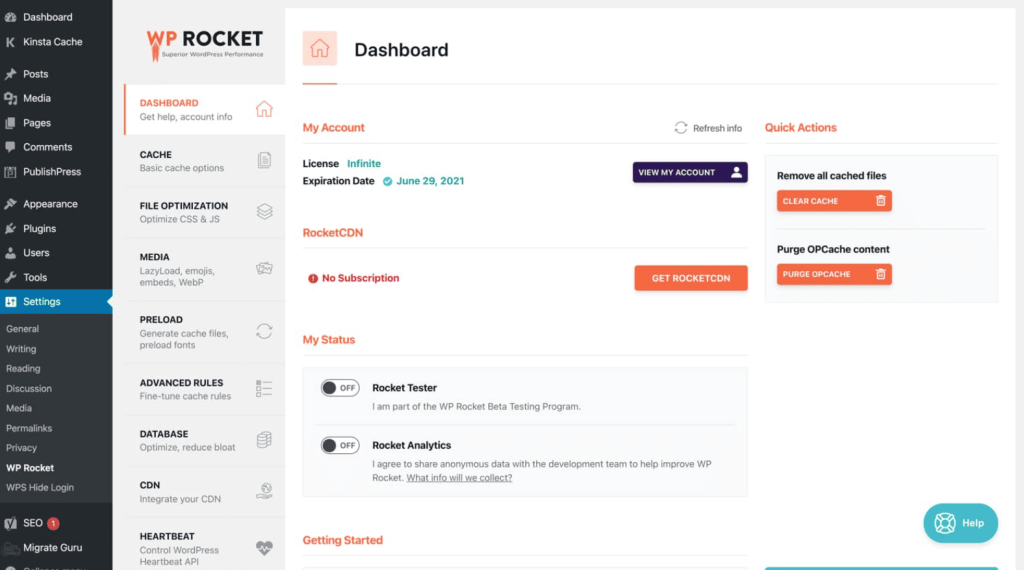
WP Rocket Key Features
- Page Caching: Creates static HTML versions of pages instantly, serves cached files to visitors, and speeds up load times dramatically.
- File Optimization: Minifies CSS and JavaScript automatically, combines files to reduce requests, and defers non-critical scripts for faster rendering.
- Lazy Loading: Delays loading images and videos until users scroll to them, reducing initial page weight and improving performance.
- Database Optimization: Cleans post revisions, auto-drafts, spam comments, and transients automatically, keeping your database lean and queries fast.
- CDN Integration: Connects to Cloudflare and other CDNs easily, delivers assets from global servers, and reduces server load significantly.
- Preloading and Prefetching: Generates cache proactively, preloads fonts and DNS requests, and prefetches pages before users click links.
[Image Source: Colibri]
WP Rocket Pros
- Works Immediately After Activation: The plugin applies intelligent defaults instantly, delivering measurable speed improvements with minimal configuration, reading documentation, or expertise.
- Consistently Improves Core Web Vitals: Sites regularly see better LCP, INP, and CLS scores, helping meet Google’s ranking signals without hiring specialists.
- One Plugin Replaces Several: WP Rocket handles caching, minification, lazy loading, and database cleanup, eliminating conflicts from running multiple performance plugins.
- Support Team Actually Helps: Premium support responds quickly with specific solutions, not generic replies, making troubleshooting compatibility issues actually productive.
- No Vendor Lock-In: Deactivating WP Rocket leaves no database clutter or broken settings, unlike some plugins that damage sites when removed.
- Regular Updates for Compatibility: Frequent updates ensure compatibility with WordPress core, popular themes, and plugins, preventing performance breaks after major updates.
- Clear Performance Metrics: Built-in tools show before and after speed improvements, making it easy to demonstrate ROI to clients or stakeholders.
WP Rocket Cons
- Annual Subscription Required: Unlike one-time purchases, WP Rocket requires yearly renewals to receive updates, support, and continued functionality on sites.
- Sometimes Needs Manual Tweaking: Dynamic content, membership sites, and ecommerce checkouts occasionally require exclusion rules to prevent caching from breaking functionality.
- Limited Control for Developers: Advanced users wanting granular control over caching rules find WP Rocket’s simplified interface restrictive compared to technical alternatives.
WP Rocket Pricing
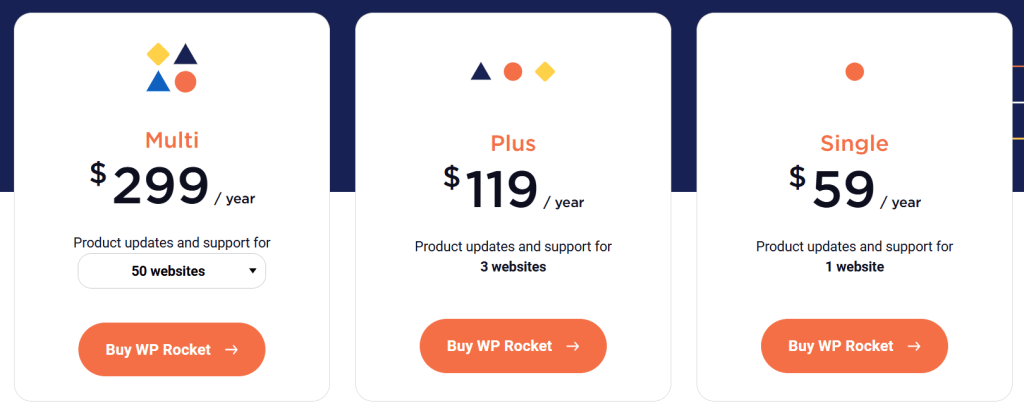
- Single: $59/year
- Plus: $119/year
- Multi: $299/year
WP Rocket Reviews
- G2: 4.2 out of 5 stars (45+ reviews)
Users consistently praise WP Rocket for delivering instant speed improvements with minimal effort and helpful support, though some wish a free version existed for testing and find the annual subscription model frustrating compared to one-time payment options.
What’s the Best WordPress SEO Plugin for You?
Best for Beginners: Yoast SEO remains the most beginner-friendly option with its traffic light system, clear explanations, and gentle hand-holding through optimization. The interface never overwhelms, making SEO accessible for complete newcomers.
Best for Agencies: AIOSEO offers the best agency toolkit with client management features, white label options, multi-site support, and comprehensive documentation that makes onboarding team members straightforward and efficient.
Best Budget Choice: SEOPress delivers premium features at $49/year with no bloat, unlimited keywords, white label options, and zero upselling. The free version is also surprisingly capable for tight budgets.
Best AI-Powered Workflow: Squirrly SEO provides the most comprehensive AI guidance with its Live Assistant, Focus Pages system, and step-by-step optimization tasks that explain exactly what to fix and why it matters.
Best All-Rounder: Rank Math offers the best balance of power and usability with an aggressive free feature set, clean interface, regular updates, and advanced capabilities that satisfy both beginners and experts equally.