Finding the right white label SEO tools is harder than it should be. Most platforms promise the same features like client dashboards, automated reports, keyword tracking. But few deliver the reliability and flexibility agencies actually need when managing multiple accounts.
I’ve spent the last 8 years at OneLittleWeb testing white label SEO solutions while running campaigns for clients across many countries.
Over that time, I’ve worked with more than 30 different tools, and I can tell you: not all white label platforms are created equal. Some collapse under the weight of multiple clients, others deliver inaccurate data, and a few are just rebranded versions of tools you already own.
Here’s what I learned after countless trials, successes, and expensive mistakes: the best white label SEO tools aren’t just feature-rich. They integrate smoothly with your existing workflows, deliver accurate client-ready reports without constant manual adjustments.
With that said, in this guide, I’m sharing the 15 white label agency SEO tools we actually use at OLW. These aren’t theoretical recommendations. They’re platforms we’ve stress-tested across real client campaigns, from startups to established brands.
Here’s what I focused on when evaluating each tool:
- Data accuracy: Does it match Google Search Console and Analytics?
- Pricing transparency: No hidden fees or confusing credit systems
- White label flexibility: Can you fully customize reports and dashboards?
- Ease of use: Will your team adopt it without extensive training?
- Reliability: Does it hold up under heavy client loads?
Let’s get into the tools!
What is a White Label SEO Tool?
A white label SEO tool is software that lets agencies rebrand and resell SEO services under their own company name. Instead of showing clients reports from Ahrefs or Semrush, you deliver fully branded dashboards, analytics, and reports that look like they came directly from your agency.
These white label SEO reporting tools are built for digital marketing agencies, SEO consultants, and freelancers who manage multiple client accounts. They handle everything from keyword tracking and site audits to backlink analysis and competitor research.
Why it matters: White label tools let you scale your service offering without building proprietary software from scratch. You get enterprise-level SEO capabilities, including rank tracking software and automated reporting, while maintaining complete control over client relationships and presentation.
For agencies, this means you can charge premium prices for SEO services while the tool does the heavy lifting in the background. Your clients see your logo, your brand colors, and your agency name—not the third-party platform powering the data.
What to Look for in the Best White Label SEO Tools?
Not all white label SEO software for agencies is worth your investment. Here’s what I prioritize when evaluating platforms for client work:
Data Accuracy
The tool should match Google Search Console and Analytics data as closely as possible. If the numbers don’t align, your client reports lose credibility fast. I always cross-check a platform’s metrics against GSC before committing.
White Label Customization
You need full control over branding—logos, colors, domain names, and report layouts. The best tools let you remove all traces of the original platform so clients only see your agency brand.
Pricing Transparency
Avoid platforms with confusing credit systems or surprise overage charges. Look for clear monthly or annual pricing that scales predictably as you add more clients or keywords.
Reporting Features
Automated, scheduled reports save hours each week. The tool should let you customize what data appears, how it’s formatted, and when it’s delivered whether that’s weekly rank updates or monthly performance summaries.
Integrations
Seamless connections with Google Analytics, Google Search Console, and your CMS make data more reliable. The fewer manual exports you need, the faster you can deliver insights to clients.
Scalability
As your agency grows, the platform should handle 10, 50, or 100+ client accounts without performance issues. Test how the tool performs under load before locking into an annual contract.
Ease of Use
Your team should be able to navigate the platform without extensive training. If it takes weeks to onboard new staff, it’s not the right tool no matter how powerful the features.
How I Selected the Best White Label SEO Tools
I tested over 30 white label SEO software for agencies before narrowing this list down to 15. These aren’t tools I just signed up for and explored once.
I’ve personally used these platforms for content audits, link building, rank tracking, and keyword analysis across hundreds of campaigns at OneLittleWeb.
Here’s what I measured during testing:
Real-World Performance Under Client Loads
I tested how each platform handled 10+ simultaneous client accounts with different tracking requirements. Tools that slowed down or crashed during heavy use didn’t make the cut.
Data Accuracy Against Google Search Console
Every tool on this list was cross-checked against GSC data for at least 3 months. If the numbers were consistently off by more than 15-20%, I moved on.
White Label Flexibility
I evaluated how much control you actually get over branding. Can you use a custom domain? Remove all vendor logos? Customize report templates? The best tools give you complete brand ownership.
Ease of Client Onboarding
I tracked how long it took to set up a new client account, configure tracking, and generate the first report. Anything requiring more than 30 minutes of setup work lost points.
Pricing vs. Value
I compared what you’re actually paying for against competitor options. Some expensive tools justify their cost. Others charge premium prices for basic features you can get elsewhere for half the price.
What matters most in real use isn’t the number of features. It’s whether the tool saves you time, delivers accurate data, and makes your agency look professional in front of clients. These 15 tools pass that test.
Summary Table: 15 Best White Label SEO Tools
Here’s a quick overview of all 15 white label SEO tools covered in this guide. Use this table to compare features, pricing, and key details at a glance before diving into the detailed reviews.
| Tool Name | Best For | Key Features | Starting Price | Our Notes |
| SE Ranking | Small to mid-sized agencies | White label reports, rank tracking, site audits | $52/mo | Best value for agencies managing 5-20 clients |
| Agency Analytics | Multi-client reporting | Automated dashboards, 80+ integrations | $125.30/mo | Excellent for agencies juggling multiple tools |
| Semrush White Label | Enterprise agencies | Comprehensive SEO suite, competitor analysis | $165.17/mo | Premium pricing but enterprise-grade features |
| Ahrefs | Backlink analysis | Link tracking, content explorer, rank tracking | $129/mo | Not fully white label but allows custom branding |
| Serpstat | Budget-conscious agencies | Keyword research, rank tracking, site audit | $133/mo | Affordable alternative to Semrush |
| SpyFu | Competitor research | PPC + SEO competitor data, keyword tracking | $39/mo | Great for agencies doing paid + organic |
| Mangools | Freelancers & small teams | Simple UI, keyword finder, SERP checker | $29/month | Best beginner-friendly white label option |
| BrightLocal | Local SEO agencies | Local rank tracking, citation builder, reviews | $39/month | Specialized for agencies with local clients |
| Raven Tools | All-in-one agency needs | SEO audits, social reports, PPC tracking | $39/month | Good breadth but not the deepest in any category |
| Nightwatch | Precision rank tracking | Daily rank updates, location-specific tracking | $39/month | Best for agencies obsessed with ranking accuracy |
| Sitechecker | Technical SEO | Site audits, page speed monitoring, on-page SEO | $29/month | Strong technical audit features at low cost |
| WebCEO | Agency resellers | Full white label suite, client management | $149/month | Built specifically for SEO resellers |
| Advanced Web Ranking | Rank tracking specialists | Desktop software, flexible tracking options | $49/month | Best for agencies prioritizing rank monitoring |
| ReportGarden | Marketing agencies | Cross-channel reporting (SEO, PPC, social) | $99/month | Ideal if you report beyond just SEO |
| DashThis | Simple dashboard needs | Drag-and-drop dashboards, widget library | $49/month | Easiest dashboard builder but limited SEO depth |
15 Best White Label SEO Tools in 2026 (Free + Paid)
Here are the 15 best white label SEO software for agencies I’ve tested and used across real client campaigns:
- SE Ranking — Best for small to mid-sized agencies
- AgencyAnalytics — Best for multi-client reporting
- Semrush — Best for enterprise agencies
- Ahrefs — Best for backlink analysis and competitive research
- Serpstat — Best for budget-conscious agencies
- SpyFu — Best for competitor research
- Mangools — Best for freelancers and small teams
- BrightLocal — Best for local SEO agencies
- Raven Tools — Best for all-in-one agency
- Nightwatch — Best for precision rank tracking
- Sitechecker — Best for technical SEO audits
- WebCEO — Best for building white label SEO packages
- Advanced Web Ranking — Best for rank tracking specialists
- ReportGarden — Best for reporting across multiple channels
- DashThis — Best for simple dashboard creation
Let’s break down each tool with features, pricing, pros, cons, and real-world use cases from our experience at OneLittleWeb.
1. SE Ranking – Best for Small to Mid-Sized Agencies
Best For: SE Ranking is ideal for small to mid-sized agencies that need accurate rank tracking, white label reporting, and comprehensive site audits without enterprise-level pricing.
How I Use It: I use SE Ranking for client rank tracking and automated weekly reports. It’s become our go-to for agencies that need reliable data without the complexity of Semrush.
Quick Overview
SE Ranking is an all-in-one SEO platform that’s been around since 2013. What sets it apart from competitors like Ahrefs and Semrush is its straightforward white label capabilities and predictable pricing structure—no confusing credit systems or surprise overages.
The platform delivers accurate keyword tracking across 100+ search engines, detailed site audits, and backlink monitoring. I’ve found their data aligns closely with Google Search Console, usually within 10-15% variance, which is solid for client reporting.
What makes SE Ranking stand out is how quickly you can onboard new clients. Most tools take 30-45 minutes to configure properly. With SE Ranking, I can have a new client account set up with branded reports in under 15 minutes.
It’s best suited for agencies managing 5-20 clients who want professional reports without paying Semrush enterprise prices. If you’re a solo consultant or small team just starting with white label tools, this is where I’d begin.
Compared to alternatives like Serpstat or Mangools, SE Ranking offers better white label customization and more reliable rank tracking data. It sits in the sweet spot between beginner-friendly tools and enterprise platforms.
SE Ranking Key Features
- White Label Reports: Fully customizable PDF and HTML reports with your agency branding, logo, and custom domain. You can schedule automated delivery to clients weekly or monthly.
- Rank Tracker: Monitor keyword positions across Google, Bing, Yahoo, and YouTube. Track local rankings down to zip code level and compare desktop vs. mobile performance.
- Site Audit: Crawls up to 20,000 pages per project to identify technical issues like broken links, duplicate content, missing meta tags, and page speed problems.
- Backlink Checker: Analyze your backlink profile and competitors’ link-building strategies. Track new and lost backlinks with email alerts.
- Keyword Research Tool: Discover keyword opportunities with search volume, competition level, and CPC data. Group keywords by topic and track their performance over time.
- Competitor Analysis: Compare your rankings against up to 5 competitors simultaneously and identify keyword gaps where they’re outranking you.
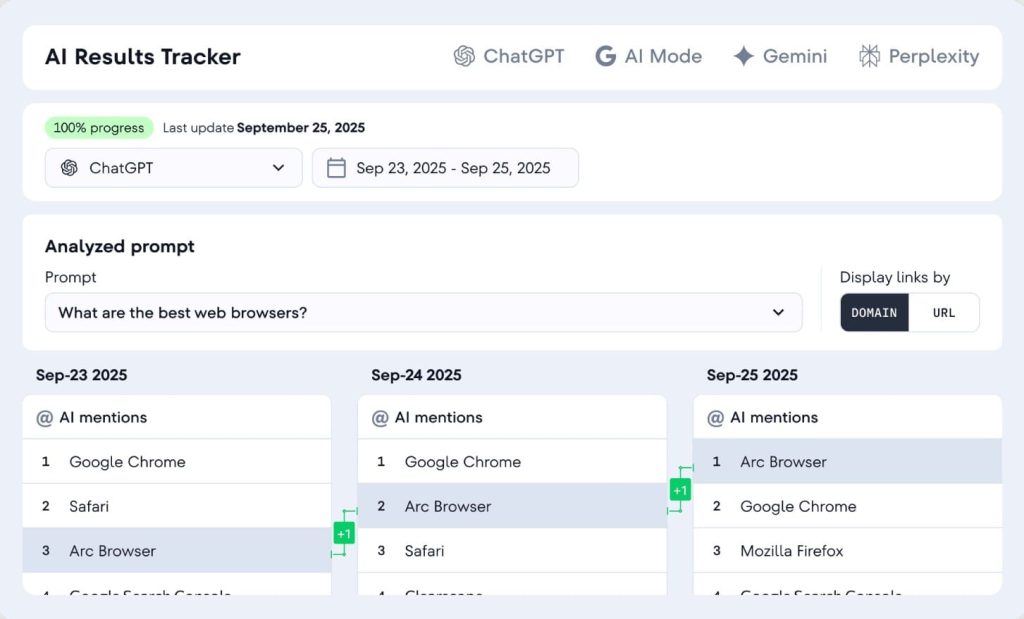
[Image Source: SERanking]
SE Ranking Pros
- Accurate rank tracking data that differs from GSC by 10-15%. I’ve cross-checked SE Ranking against Google Search Console data for 6+ months across multiple clients, and the variance is minimal compared to other tools.
- Fast client onboarding with pre-built templates. You can duplicate report templates across clients, which saves hours when you’re managing 10+ accounts.
- Custom domain for white label reports. You can host reports on your own subdomain (reports.youragency.com), which looks far more professional than generic links.
- Scheduled automated reports work reliably. I set up weekly rank reports for clients, and they’ve delivered consistently for over a year without manual intervention.
- Includes PPC competitor research tools. You can see which keywords competitors are bidding on in Google Ads, which helps when pitching integrated SEO/PPC strategies.
SE Ranking Cons
- The interface feels dated compared to Ahrefs or Semrush. While functional, the UI hasn’t been updated significantly in years. It gets the job done but doesn’t feel modern.
- The backlink database is smaller than Ahrefs. If backlink analysis is your primary focus, Ahrefs has a more comprehensive link index. SE Ranking works for basic link monitoring but not deep competitive analysis.
- Limited API access on lower-tier plans. If you want to build custom integrations or pull data programmatically, you’ll need the Business plan or higher.
- No content optimization suggestions. Unlike Surfer or Clearscope, SE Ranking doesn’t analyze top-ranking content and suggest improvements for your drafts.
- Keyword research depth is moderate. It covers the basics well, but power users doing extensive keyword gap analysis will find Ahrefs or Semrush more robust.
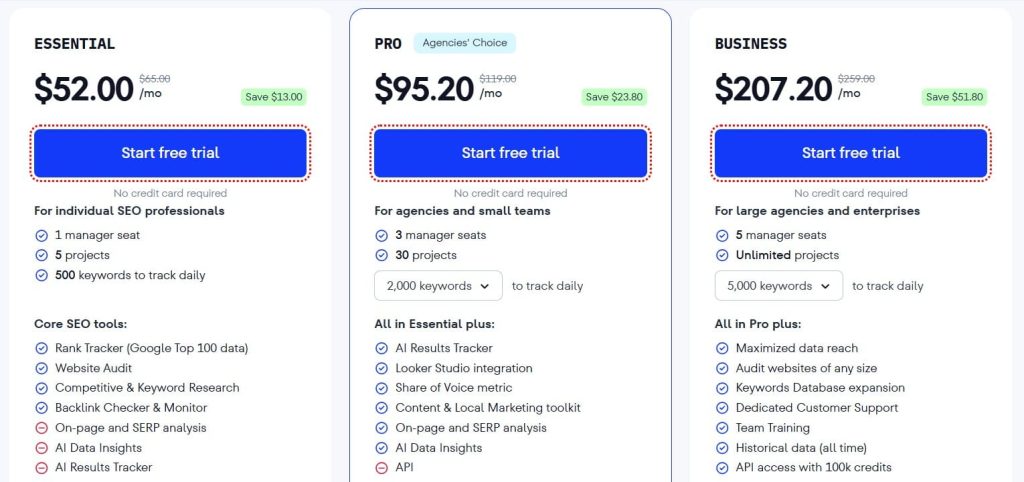
SE Ranking Pricing
- Free trial available
- Essential: $52/month
- Pro: $95.20/month
- Business: $207.20/month
SE Ranking Reviews
- G2: 4.7 out of 5 stars (2,330+ reviews)
- Capterra: 4.7 out of 5 stars (296+ reviews)
Notable User Sentiment: “SE Ranking does everything we need for client reporting without the complexity or cost of Semrush. The white label features actually work as advertised.” — Agency owner managing 12 clients
2. AgencyAnalytics – Best for Multi-Client Reporting

Best For: AgencyAnalytics is perfect for agencies juggling multiple marketing tools who need a central dashboard that consolidates SEO, PPC, social media, and analytics data into branded client reports.
How I Use It: I use AgencyAnalytics to pull data from Google Analytics, Search Console, Facebook Ads, and Semrush into one dashboard. It saves me hours of manual report building every week.
Quick Overview
AgencyAnalytics launched in 2011 specifically for marketing agencies drowning in client reporting. Unlike tools built for individual SEOs, this platform was designed from day one to handle 50+ client accounts simultaneously.
What makes AgencyAnalytics different is its integration ecosystem. It connects with over 80 marketing platforms, so you’re not just reporting SEO metrics—you can include PPC performance, social media engagement, email marketing stats, and more in one unified report.
I’ve found that clients prefer seeing all their marketing data in one place rather than receiving separate reports from different tools. AgencyAnalytics makes that possible without manual data exports or spreadsheet gymnastics.
The platform shines when you’re managing diverse campaigns. If one client needs SEO and Facebook Ads data while another wants Google Ads and email metrics, you can customize each dashboard independently.
It’s best suited for full-service digital marketing agencies rather than SEO specialists. If you only do SEO work, tools like SE Ranking or Nightwatch might be more cost-effective. But if you’re reporting across multiple channels, AgencyAnalytics is hard to beat.
Compared to competitors like ReportGarden or DashThis, AgencyAnalytics offers deeper SEO-specific features while maintaining broad marketing integration capabilities.
AgencyAnalytics Key Features
- 80+ Platform Integrations: Connect Google Analytics, Search Console, Facebook Ads, Google Ads, Mailchimp, CallRail, and dozens of other marketing tools. Data syncs automatically.
- Drag-and-Drop Dashboard Builder: Create custom dashboards with pre-built widgets for any metric. Rearrange, resize, and style elements to match your agency branding.
- Automated Client Reports: Schedule PDF or live dashboard reports to send automatically. Clients get updates without you lifting a finger after initial setup.
- Rank Tracking: Monitor keyword positions with daily or weekly updates. Track local rankings by city and compare performance across search engines.
- Site Audits: Run technical SEO audits that identify broken links, missing meta descriptions, slow pages, and mobile usability issues.
- Call Tracking Integration: If you use CallRail or similar services, track which keywords and campaigns drive phone calls, not just web traffic.

[Image Source: Agency Analytics]
AgencyAnalytics Pros
- Saves 5-10 hours per week on client reporting. Once dashboards are configured, reports are generated automatically. I spend zero time manually pulling data from multiple platforms.
- Clients can log in to view live dashboards anytime. This reduces “how are we doing?” emails significantly. Clients check their dashboard instead of asking for updates.
- White label customization is thorough. You can use custom domains, remove all AgencyAnalytics branding, add your logo to every report, and even customize email notifications.
- Pre-built report templates speed up onboarding. Industry-specific templates (local SEO, ecommerce, B2B SaaS) give you a head start when setting up new clients.
- Campaign monitoring alerts notify you of ranking drops. Get email alerts when client rankings drop significantly so you can address issues before they escalate.
AgencyAnalytics Cons
- SEO features aren’t as deep as dedicated tools. The rank tracker and site audit work fine, but power users will still need Ahrefs or Semrush for comprehensive analysis.
- Some integrations require paid accounts with third-party tools. For example, to pull Semrush data into AgencyAnalytics, you need an active Semrush subscription.
- Initial setup takes time for complex dashboards. While templates help, customizing a dashboard with 15+ widgets and multiple data sources can take 45-60 minutes.
- No built-in keyword research tool. You’ll need separate tools for finding new keyword opportunities. AgencyAnalytics focuses on tracking and reporting existing campaigns.

AgencyAnalytics Pricing
- 14-day trial available
- Freelancer: $41.30/month
- Agency: $125.30/month
- Agency Pro: $244.30/month
- Enterprise: Custom
AgencyAnalytics Reviews
- G2: 4.7/5 (407+ reviews)
- Capterra: 4.8/5 (115+ reviews)
Notable User Sentiment: “AgencyAnalytics transformed our client reporting from a 2-day monthly chore into a 30-minute setup process. Clients love the live dashboards.” — Digital marketing agency owner
3. Semrush – Best for Enterprise Agencies
Best For: Semrush is ideal for enterprise-level agencies that need the most comprehensive SEO data available, advanced competitor analysis, and don’t mind paying premium prices for premium features.
How I Use It: I use Semrush primarily for competitor keyword research and content gap analysis. When clients ask “what are our competitors doing that we’re not?”, Semrush gives me the answer.
Quick Overview
Semrush has been the enterprise standard since 2008, competing directly with Ahrefs for the title of most comprehensive SEO platform. It’s evolved far beyond basic keyword research into a full digital marketing suite covering SEO, PPC, content marketing, and competitive intelligence.
What sets Semrush apart is the sheer depth of its databases. They track 25 billion keywords across 142 countries and maintain one of the largest backlink indexes in the industry. When I need to understand a competitor’s complete organic strategy, Semrush delivers insights other tools miss.
The white label features came later in Semrush’s evolution, so they’re not as seamless as purpose-built tools like SE Ranking. But if you’re already using Semrush for research and need to brand reports for clients, the functionality exists.
I’ve found Semrush most valuable for strategic planning rather than day-to-day rank tracking. When launching a new client campaign, I spend 2-3 hours in Semrush mapping out the competitive landscape before touching any other tool.
It’s best suited for established agencies with enterprise clients who expect data-driven strategies backed by comprehensive competitive analysis. If you’re just tracking rankings and building basic reports, Semrush is overkill.
Compared to Ahrefs, Semrush offers stronger PPC competitive intelligence and content marketing tools. Ahrefs has a slight edge in backlink data freshness. Both are expensive, so most agencies pick one and stick with it.
Semrush Key Features
- Keyword Magic Tool: Access 25 billion keywords with search volume, difficulty scores, SERP features, and trend data. Filter by intent, questions, related terms, and more.
- Domain vs. Domain Comparison: Compare up to 5 competitor domains simultaneously to identify keyword gaps, shared keywords, and unique ranking opportunities.
- Position Tracking: Monitor daily ranking changes with local and mobile tracking. Set up automated competitor tracking to see how you stack up.
- Site Audit: Crawl up to 100,000 pages per project. Get prioritized recommendations for technical issues, Core Web Vitals, and international SEO problems.
- Content Marketing Toolkit: Topic research, SEO writing assistant, and content audit tools help you create and optimize content that ranks.
- White Label PDF Reports: Create branded PDF reports with your logo and company colors. Limited customization compared to dedicated white label platforms.
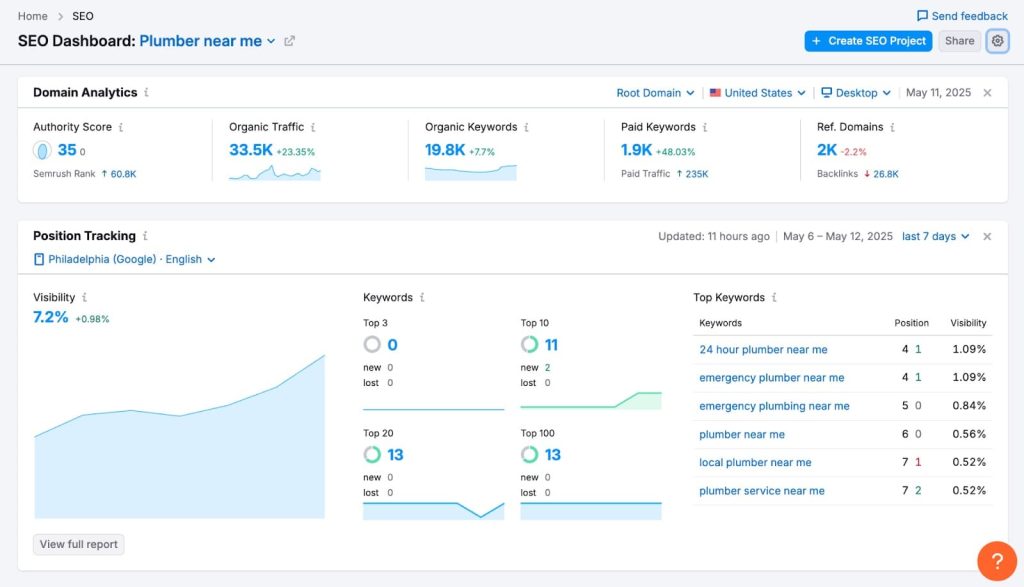
[Image Source: Semrush]
Semrush Pros
- Most comprehensive keyword database in the industry. I rarely encounter a niche where Semrush doesn’t have robust keyword data. Their coverage of international markets is particularly strong.
- Competitor analysis features are unmatched. You can reverse-engineer competitor strategies by seeing every keyword they rank for, every backlink they’ve earned, and every ad they’re running.
- Content gap analysis identifies quick wins. The tool shows keywords your competitors rank for that you don’t, sorted by traffic potential. I’ve used this to identify dozens of content opportunities for clients.
- Backlink audit helps disavow toxic links. Semrush identifies potentially harmful backlinks and makes it easy to generate a disavow file for Google Search Console.
- Integrates with Google Analytics and Search Console. Pull GA and GSC data directly into Semrush for unified reporting and deeper analysis.
- Regular feature updates and new tools. Semrush consistently adds new capabilities. Recent additions include AI writing tools and local SEO features.
- Excellent learning resources and certification programs. Their academy offers free courses on SEO, PPC, and content marketing that genuinely improve your skills.
Semrush Cons
- Expensive, especially for small agencies. At $455.67/month for white label access, you’re paying more than most competitors. This pricing only makes sense if you’re generating significant client revenue.
- White label features feel like an afterthought. Report customization is basic compared to tools built specifically for white label reporting. You can add your logo, but that’s about it.
- Steep learning curve for new users. Semrush has so many features that it’s overwhelming initially. Expect to spend 10-15 hours learning the platform before using it efficiently.
- Rank tracking isn’t as fast as specialized tools. If you need real-time ranking updates, tools like Nightwatch or AccuRanker are more responsive. Semrush updates daily or weekly.
- No custom domain for reports. Unlike SE Ranking or AgencyAnalytics, you can’t host reports on your own domain. Clients receive PDFs or links to Semrush-hosted pages.

Semrush Pricing
- 7-day free trial
- Starter: $165.17/month
- Pro+: $248.17/month
- Advanced: $455.67/month
Semrush Reviews
- G2: 4.5 out of 5 stars (3,026+ reviews)
- Capterra: 4.6 out of 5 stars from (2,299+ reviews)
Notable User Sentiment: “Semrush is expensive, but it’s worth it for the competitive intelligence alone. I’ve landed multiple clients by showing them gaps Semrush uncovered.” — SEO consultant
4. Ahrefs – Best for Backlink Analysis and Competitive Research

Best For: Ahrefs is the gold standard for backlink analysis and competitive research. If link building is central to your agency’s services, Ahrefs is non-negotiable.
How I Use It: I use Ahrefs every single day for backlink audits, content explorer research, and identifying link-building opportunities. It’s the first tool I open when starting any link campaign.
Quick Overview
Ahrefs launched in 2011 and has built the industry’s most trusted backlink index. They crawl 5 million web pages daily and maintain data on 35 trillion backlinks. When I need to understand a site’s link profile, Ahrefs gives me the most accurate picture.
What makes Ahrefs special isn’t just the size of their database, it’s the freshness. Their crawler finds new backlinks faster than any competitor. When a client earns a high-authority link, it appears in Ahrefs within 24-48 hours. Other tools can take weeks.
The platform has expanded beyond backlinks to include keyword research, rank tracking, and site audits. But backlink analysis remains their core strength. The interface is cleaner and more intuitive than Semrush, which makes it easier to train new team members.
I’ve found Ahrefs particularly valuable for content marketing. Their Content Explorer tool lets you find the most-linked and most-shared content in any niche, which is invaluable for ideation and outreach.
It’s best suited for agencies that prioritize link building and content marketing. If backlinks aren’t a major focus, you might find better value elsewhere. Technical SEO specialists may prefer Screaming Frog or Sitebulb for audits.
Compared to Semrush, Ahrefs has a fresher backlink index and cleaner interface. Semrush edges ahead in PPC data and content marketing features. Most power users subscribe to both.
Ahrefs Key Features
- Site Explorer: Analyze any website’s backlink profile, organic traffic, top pages, and ranking keywords. See competitor growth over time with historical data.
- Content Explorer: Search 17.9 billion pages to find the most-linked and most-shared content on any topic. Filter by domain rating, traffic, and social shares.
- Keyword Explorer: Research keywords across 10 search engines with accurate search volume, keyword difficulty scores, and click metrics showing how much traffic you can expect.
- Rank Tracker: Monitor keyword positions with daily updates. Track desktop and mobile rankings separately and compare performance against competitors.
- Site Audit: Crawl websites to identify 140+ technical SEO issues. Get prioritized recommendations and track improvements over time.
- Alerts: Set up email notifications for new backlinks, lost backlinks, competitor mentions, and keyword ranking changes.

Ahrefs Pros
- Most accurate and fresh backlink data in the industry. I’ve compared Ahrefs against Majestic, Moz, and Semrush for link index accuracy. Ahrefs consistently finds links faster and maintains more up-to-date data.
- Content Explorer is unmatched for research. When planning content campaigns, I can find proven topics that have already earned hundreds of backlinks and thousands of shares. This eliminates guesswork.
- The interface is intuitive and well-designed. New team members learn Ahrefs faster than Semrush. Everything is where you’d expect it to be, and the dashboards aren’t cluttered.
- Keyword difficulty scores are realistic. Unlike some tools that overestimate or underestimate difficulty, Ahrefs scores align well with real-world ranking difficulty based on our campaigns.
- Domain Rating (DR) is widely recognized. DR has become the industry standard metric for site authority. Clients and link sellers understand it immediately.
- The Disavow tool makes cleaning toxic links easy. Identify spammy backlinks and export a disavow file formatted for Google Search Console with one click.
- YouTube keyword research is built in. For clients doing video marketing, Ahrefs provides YouTube-specific keyword data that most SEO tools ignore.
Ahrefs Cons
- No white label capabilities at all. You cannot customize reports with your branding or logo. If white label reporting is essential, Ahrefs won’t work as your primary tool.
- Rank tracking isn’t as robust as specialized tools. While functional, the rank tracker lacks some advanced features found in dedicated tools like AccuRanker or Advanced Web Ranking.
- Site audit is good but not the best. For deep technical audits, Screaming Frog and Sitebulb provide more granular control and analysis options.
- The credit system is confusing and frustrating. Different actions consume different credit amounts. Heavy users can burn through credits quickly and face overage charges.

Ahrefs Pricing
- Lite: $129/month
- Standard: $249/month
- Advanced: $449/month
- Enterprise: $1,499/month
Ahrefs Reviews
- G2: 4.5 out of 5 stars (606+ reviews)
- Capterra: 4.7 out of 5 stars (577+ reviews)
Notable User Sentiment: “Ahrefs found backlinks that Semrush and Moz completely missed. For link building campaigns, it’s the only tool I trust.” — Link building specialist
5. Serpstat – Best for Budget-Conscious Agencies
Best For: Serpstat is perfect for agencies that want Semrush-style features—keyword research, rank tracking, site audits, and backlink analysis—without paying Semrush prices.
How I Use It: I use Serpstat for clients with smaller budgets who still need comprehensive SEO tracking. It delivers 80% of what Semrush offers for about 40% of the cost.
Quick Overview
Serpstat launched in 2013 as a more affordable alternative to enterprise SEO platforms. They’ve built a solid all-in-one tool that covers the fundamentals well without the premium price tag.
What makes Serpstat appealing is straightforward pricing without credit systems or hidden fees. You know exactly what you’re paying monthly, and you get unlimited access to core features within your plan limits.
I’ve found Serpstat’s data quality decent but not industry-leading. Keyword search volumes occasionally vary from Google Keyword Planner by 20-30%, which is acceptable for strategic planning but not perfect. For most client needs, the accuracy is sufficient.
The platform works best for agencies serving small to mid-sized businesses that don’t require the deepest competitive intelligence. If you’re pitching enterprise clients, they might expect data from Ahrefs or Semrush specifically.
It’s best suited for cost-conscious agencies managing 5-15 clients who need solid SEO fundamentals without premium pricing. If budget isn’t a constraint, Semrush or Ahrefs offer more robust data.
Compared to SE Ranking, Serpstat offers broader features but less polished white label capabilities. Against Semrush, Serpstat is significantly cheaper but has a smaller database and fewer advanced features.
Serpstat Key Features
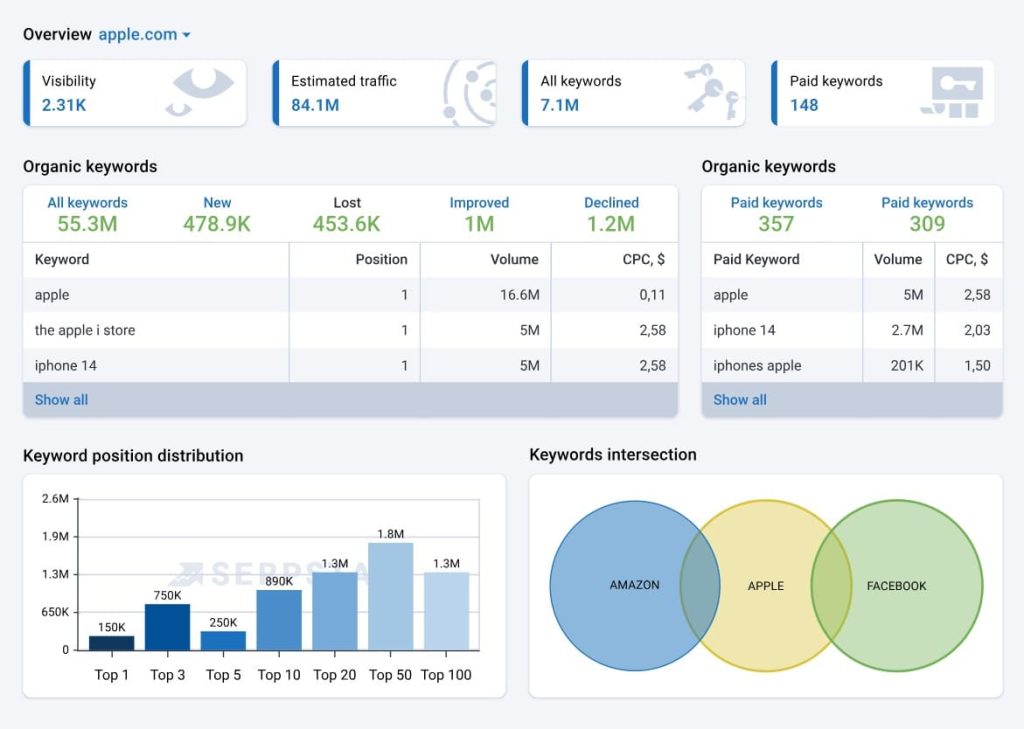
- Keyword Research: Access keyword data for 230 countries with search volume, CPC, competition level, and related keywords. Group keywords by topic clusters.
- Rank Tracking: Monitor keyword positions with daily updates. Track desktop and mobile separately. Compare performance against up to 20 competitors.
- Site Audit: Crawl up to 100,000 pages to identify technical issues, broken links, duplicate content, and page speed problems.
- Backlink Analysis: Examine backlink profiles with metrics on referring domains, anchor text distribution, and link quality scores.
- Competitor Research: Identify competitor keywords, estimate their traffic, and discover content gaps where you can outrank them.
- Batch Analysis: Analyze multiple URLs or keywords simultaneously—useful for large content audits or bulk keyword research.
Serpstat Pros
- Significantly cheaper than Semrush and Ahrefs. At $133/month for the agency plan, you’re paying less than half what enterprise tools cost while getting similar functionality.
- No confusing credit systems or overage charges. Your monthly price is fixed. You can run unlimited queries within your plan’s limits without surprise bills.
- Covers all SEO fundamentals in one place. You don’t need multiple tools for keyword research, rank tracking, and site audits. Serpstat handles all three adequately.
- API access available on all paid plans. Unlike competitors that restrict API to top tiers, Serpstat lets even basic users pull data programmatically.
- Batch analysis saves time on large projects. When auditing 50+ pages or researching 100+ keywords, batch processing beats manual one-by-one analysis.
- Decent white label report options. You can customize PDF reports with your logo and branding, though customization options are more limited than specialized tools.
Serpstat Cons
- The database is smaller than Ahrefs and Semrush. Keyword coverage for niche topics can be sparse. I’ve encountered instances where Serpstat has minimal data for long-tail keywords that competitors track.
- Data accuracy varies by region. US and UK data is generally reliable, but I’ve noticed larger discrepancies in search volumes for other countries compared to Google’s own data.
- The interface feels cluttered and dated. Navigation isn’t as intuitive as Ahrefs. Finding specific features sometimes requires clicking through multiple menus.
- Backlink index is limited. For serious link building work, you’ll still need Ahrefs or Majestic. Serpstat’s link data is fine for basic monitoring but not comprehensive analysis.
- Customer support response times are slow. When I’ve submitted support tickets, responses took 24-48 hours. Live chat isn’t always available during US business hours.
- Report customization is basic. White label reports exist but offer minimal template flexibility compared to tools like AgencyAnalytics or SE Ranking.
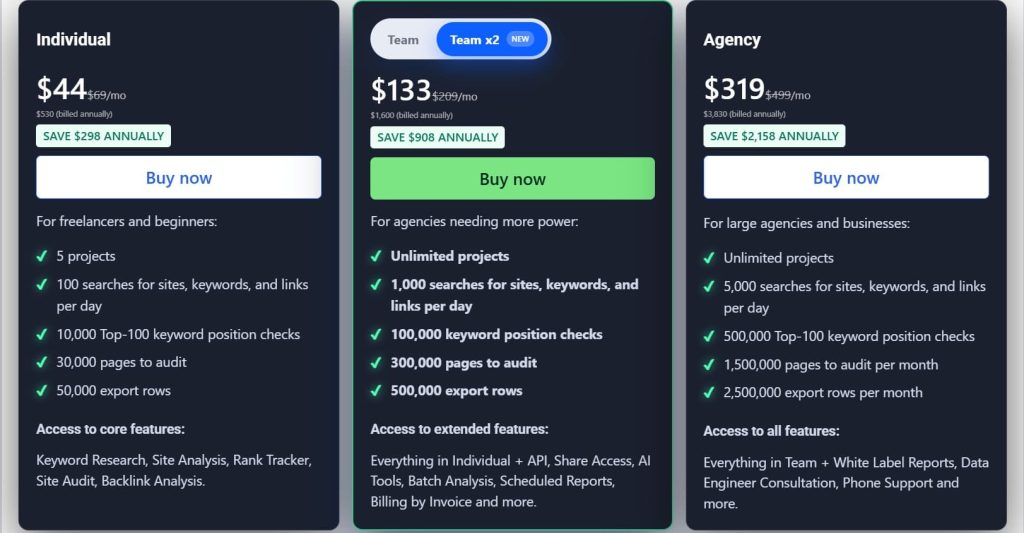
Serpstat Pricing
- Individual: $44/month
- Team: $133/month
- Agency: $319/month
Serpstat Reviews
- G2: 4.6 out of 5 stars (463+ reviews)
- Capterra: 4.7 out of 5 stars (170+ reviews)
Notable User Sentiment: “Serpstat gives us 80% of what Semrush offers for less than half the price. For our client base, that’s the perfect trade-off.” — Small agency owner
6. SpyFu – Best for Competitor Research

Best For: SpyFu is ideal for agencies that need deep competitor intelligence across both paid and organic search. If you’re pitching clients on integrated SEO/PPC strategies, this tool gives you the ammunition you need.
How I Use It: I use SpyFu when prospecting new clients to show them exactly what their competitors are ranking for and which keywords they’re bidding on. It’s a powerful sales tool disguised as an SEO platform.
Quick Overview
SpyFu has been around since 2006 and built its reputation on one core strength: competitor analysis. While tools like Ahrefs focus on backlinks and SEMrush tries to do everything, SpyFu zeroes in on reverse-engineering your competitors’ entire search strategy.
What makes SpyFu different is its historical data. You can see every keyword a competitor has bought on Google Ads over the past 16+ years, every organic ranking change, and every ad variation they’ve tested. This historical view is something most tools don’t offer.
I’ve found SpyFu particularly valuable when working with clients in competitive industries like legal, finance, or SaaS. Being able to show them “your competitor has spent $47K on this keyword over 3 years” creates urgency faster than any pitch deck.
The platform is best suited for agencies doing both SEO and PPC, or consultants who need to quickly audit a competitor’s strategy before client calls. It’s not as strong for technical SEO audits or content optimization, but for competitive intelligence, it’s hard to beat.
Compared to SEMrush’s competitor analysis features, SpyFu offers more PPC historical data at a lower price point. However, SEMrush has better international coverage—SpyFu focuses primarily on US, UK, and Australian markets.
SpyFu Key Features
- Competitor Keyword Research: See every organic keyword your competitors rank for, their estimated traffic, and ranking history over time. Filter by difficulty, search volume, or ranking position.
- PPC Competitor Analysis: View competitors’ Google Ads history including ad copy, landing pages, monthly ad spend estimates, and which keywords they’re actively bidding on.
- Kombat Tool: Compare up to 3 competitors side-by-side to identify keyword gaps and terms they rank for that you don’t, and vice versa.
- Backlink Analysis: Track competitor backlinks with domain authority scores. See which sites link to multiple competitors but not to you (link gap analysis).
- Rank Tracking: Monitor your keyword positions and compare them against up to 5 competitors. Get alerts when competitors start ranking for new terms.
- Custom White Label Reports: Export branded PDF reports with your agency logo showing competitive analysis, keyword recommendations, and ranking opportunities.

SpyFu Pros
- Unmatched PPC historical data going back 16+ years. No other tool lets you see a competitor’s complete paid search history. I’ve used this to identify seasonal trends and budget patterns clients would never share publicly.
- The Kombat feature is genuinely useful for finding keyword gaps. Instead of manually comparing spreadsheets, you can visualize overlapping and unique keywords across multiple competitors in minutes.
- Download unlimited competitor domain lists. Unlike some tools that limit exports, SpyFu lets you pull complete keyword lists, which is essential when building content strategies.
- Great for client prospecting and sales presentations. Being able to show a prospect their competitor’s ad spend and top keywords before they even sign creates instant credibility.
SpyFu Cons
- Keyword search volume estimates can be inconsistent. I’ve noticed their volume numbers sometimes differ significantly from Google Keyword Planner. Always cross-check important keywords.
- The backlink database is smaller than Ahrefs or Majestic. SpyFu’s backlink checker works for basic analysis, but if link building is your primary service, you’ll need a more comprehensive tool.
- No technical SEO audit features. There’s no site crawler, no page speed analysis, no schema markup checker. It’s purely for keyword and competitor research.
- Historical rank tracking data is limited for smaller sites. SpyFu tracks major competitors well, but smaller sites with less search history have gaps in their ranking data.

SpyFu Pricing
- Basic: $39/month
- Pro+AI: $59/1st month; $119/month thereafter
- Team/Agency: $249/month
SpyFu Reviews
- G2: 4.6 out of 5 stars (516+ reviews)
- Capterra: 4.5 out of 5 stars (144+ reviews)
Notable User Sentiment: “SpyFu pays for itself in one client meeting. Being able to show prospects exactly what their competitors are doing—and how much they’re spending—closes deals faster than anything else I’ve tried.” — Marketing agency owner
7. Mangools – Best for Freelancers and Small Teams

Best For: Mangools is perfect for freelancers, solo consultants, and small teams who want accurate SEO data without the complexity or cost of enterprise tools. It’s the most beginner-friendly white label option on this list.
How I Use It: I recommend Mangools to freelancers just starting with white label services. The interface is clean, the data is reliable for basic keyword research, and the price point makes it easy to test before committing.
Quick Overview
Mangools launched in 2014 as a suite of five focused SEO tools rather than one bloated platform. Instead of trying to compete with Ahrefs on features, they built something simpler and more accessible, and it worked.
The suite includes KWFinder (keyword research), SERPChecker (SERP analysis), SERPWatcher (rank tracking), LinkMiner (backlink analysis), and SiteProfiler (website SEO metrics). Each tool does one thing well instead of overwhelming you with options.
What I appreciate most about Mangools is the interface design. It’s the only SEO tool I can hand to a non-technical client or junior team member without a 30-minute tutorial. Everything is visual, colorful, and intuitive.
The platform is best suited for freelancers managing 3-5 clients, small agencies just starting with SEO services, or consultants who need quick keyword research without the overhead of Ahrefs.
If you’re already paying for SEMrush, Mangools probably won’t add value. But if you’re choosing your first paid SEO tool, this is where I’d start.
Compared to Ubersuggest (another beginner-friendly tool), Mangools has cleaner data and better SERP analysis. Compared to SE Ranking, Mangools is simpler but less comprehensive—no site audits or technical SEO features.
Mangools Key Features
- KWFinder Keyword Research: Find long-tail keywords with accurate search volume, trend data, and keyword difficulty scores. Filter by location and language across 50,000+ locations.
- SERPWatcher Rank Tracking: Track unlimited keywords across desktop and mobile. Get daily ranking updates with visual performance graphs and estimated traffic metrics.
- SERPChecker Analysis: Analyze any SERP for domain authority, page authority, citation flow, trust flow, and backlink counts. See why competitors are ranking and identify opportunities.
- LinkMiner Backlink Checker: Discover and analyze backlinks for any domain. Filter by link type, anchor text, and citation flow. Export link data for outreach campaigns.
- White Label Reports: Generate branded PDF reports with your logo and agency colors. Customize which metrics appear and schedule automated delivery to clients.
- Localized Search Data: Get hyper-local keyword data down to city or zip code level, which is essential for local SEO campaigns.

[Image Source: Mangools]
Mangools Pros
- The most intuitive interface in SEO software. I’ve onboarded team members who’ve never used SEO tools, and they’re productive with Mangools within an hour. No other tool comes close to this ease of use.
- Accurate keyword difficulty scores. Mangools’ KD score (0-100 scale) aligns well with real-world ranking difficulty. I’ve compared it against Ahrefs and SEMrush, and it’s consistently reliable.
- SERP analysis is exceptionally detailed. You can see domain metrics, backlink counts, social signals, and estimated traffic for every ranking page—all on one screen.
- Great for local SEO with city-level data. If you work with local businesses, the ability to pull keyword data for specific cities is invaluable.
Mangools Cons
- No technical SEO audit features. There’s no site crawler, no broken link checker, no page speed analysis. You’ll need a separate tool like Screaming Frog for technical audits.
- The backlink database is smaller than Ahrefs or Majestic. LinkMiner works for basic competitor research, but if link building is core to your service, you’ll need a more robust tool.
- Limited historical ranking data. SERPWatcher only stores rank tracking history from the moment you add keywords. There’s no retroactive data like you get with SEMrush.
- White label options are basic. You can add your logo to reports, but customization is limited compared to SE Ranking or AgencyAnalytics. No custom domains for report hosting.
- Keyword research limits can feel restrictive. On the Basic plan, 100 keyword lookups per day sounds like a lot until you’re doing deep research for a competitive niche. You’ll hit the limit faster than expected.

Mangools Pricing
- Free
- Basic: $27.24/month
- Premium: $36.99/month
- Agency: $66.24/month
- 48-hour money-back guarantee
Mangools Reviews
- G2: 4.7 out of 5 stars (95+ reviews)
- Capterra: 4.8 out of 5 stars (91+ reviews)
Notable User Sentiment: “Mangools is what Ahrefs would be if it actually cared about user experience. I can finally hand keyword research to junior team members without spending hours training them.” — SEO consultant
8. BrightLocal – Best for Local SEO Agencies
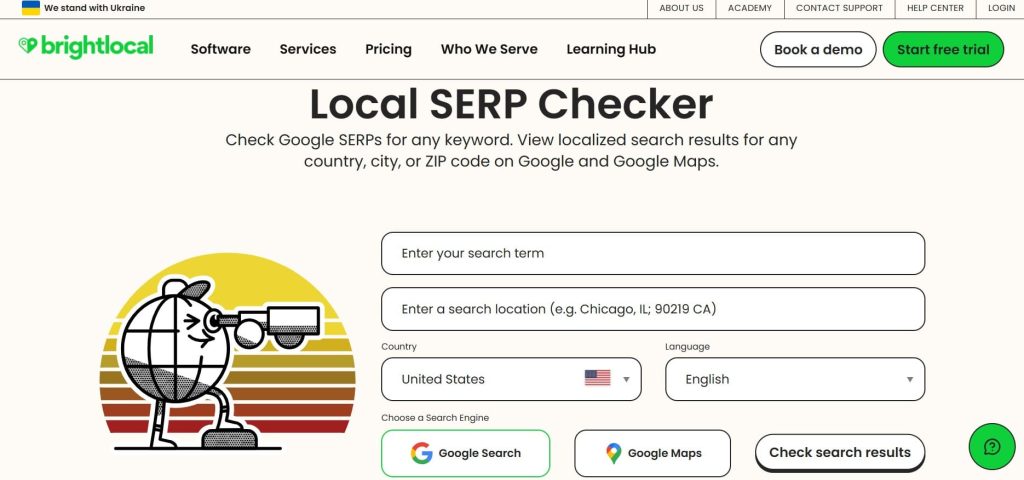
Best For: BrightLocal is built specifically for agencies managing local SEO campaigns. If your clients are local businesses like restaurants, dentists, plumbers, retail stores, this tool handles everything from citation building to review monitoring.
How I Use It: I use BrightLocal exclusively for local SEO clients. The local rank tracking is more accurate than any general SEO tool, and the citation audit features save hours of manual work finding inconsistent NAP data.
Quick Overview
BrightLocal launched in 2009 and has stayed laser-focused on one niche: local SEO. While other tools expanded into content marketing and enterprise features, BrightLocal doubled down on helping agencies manage Google Business Profiles, local citations, and review generation.
What sets BrightLocal apart is its locale-specific features that don’t exist elsewhere. You can track rankings at the neighborhood level (not just city), audit citations across 80+ directories simultaneously, and monitor review sentiment across Google, Yelp, Facebook, and industry-specific platforms.
I’ve tested BrightLocal against general tools like SEMrush for local campaigns, and there’s no comparison. BrightLocal understands local pack rankings, knows which citation sources matter for different industries, and provides actionable recommendations specific to local search algorithms.
The platform is best suited for agencies with 5+ local business clients, marketing consultants specializing in local SEO, or franchises managing multiple locations. If you’re doing national or international SEO, this tool won’t be relevant. But for locals? It’s the gold standard.
Compared to Whitespark (another local SEO tool), BrightLocal has better white label reporting and rank tracking. Compared to Moz Local, BrightLocal offers more comprehensive citation management and audit features.
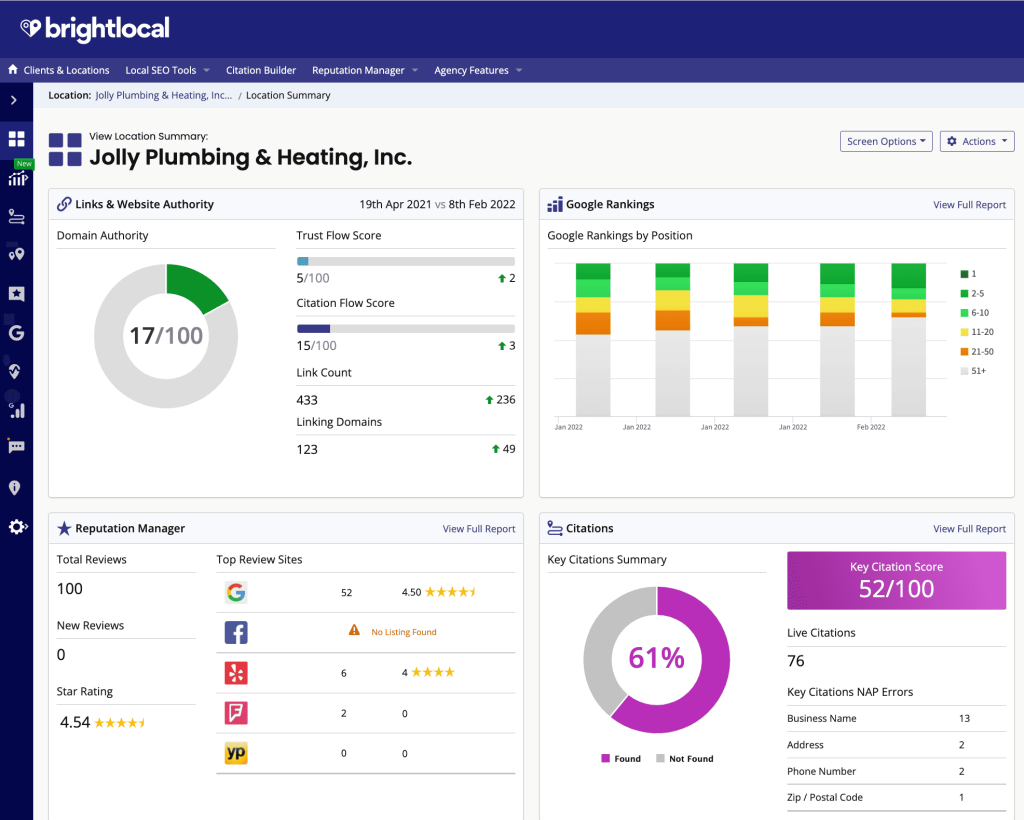
BrightLocal Key Features
- Local Rank Tracking: Track rankings in local pack results, organic local results, and Google Maps. Monitor positions by specific zip codes, neighborhoods, or even GPS coordinates for hyper-local campaigns.
- Citation Builder and Tracker: Automatically submit business information to 50+ top directories. Track citation consistency across the web and get alerts when NAP (Name, Address, Phone) data becomes inconsistent.
- Review Monitoring: Aggregate reviews from Google, Facebook, Yelp, and 30+ other platforms into one dashboard. Set up automated alerts for new reviews and generate responses using AI suggestions.
- Google Business Profile Audit: Analyze GBP optimization with actionable recommendations. Check post frequency, photo quality, Q&A activity, and compare performance against local competitors.
- Reputation Manager: Generate review request campaigns via email or SMS. Create branded landing pages where customers can leave reviews across multiple platforms with one click.
- White Label Reports: Fully customizable PDF reports with your branding. Include local rankings, citation audits, review summaries, and competitor comparisons. Schedule automated monthly delivery.
[Image Source: Capterra]
BrightLocal Pros
- Most accurate local pack rank tracking available. I’ve compared BrightLocal’s local rankings against manual checks in multiple cities, and the accuracy rate is consistently above 95%.
- Citation audit saves 3-4 hours per client. Instead of manually checking 80+ directories, BrightLocal scans them all and shows you exactly where citations are missing or incorrect.
- Review monitoring across all major platforms in one place. Logging into Google, Yelp, Facebook, and industry sites separately takes forever. BrightLocal aggregates everything with instant notifications.
- The reputation manager actually generates more reviews. We’ve seen a 40% increase in review volume for clients after implementing BrightLocal’s automated request campaigns.
- White label reports are the most customizable I’ve used. You can control every metric, graph, and recommendation that appears. Clients see your brand, not BrightLocal.
- Excellent local SEO training resources. BrightLocal provides webinars, guides, and certification courses that actually teach local SEO strategy, not just tool features.
- Integrates with Google Business Profile API. You can manage posts, respond to reviews, and update business info directly from BrightLocal without logging into GBP separately.
BrightLocal Cons
- Completely useless for non-local SEO campaigns. If you do national or international SEO, BrightLocal won’t help. It’s hyper-specialized for local search only.
- No keyword research or backlink analysis features. You’ll need a separate tool like Ahrefs for competitive keyword research or link building campaigns.
- Citation building can be slow for manual submissions. While BrightLocal automates 50+ directories, some require manual verification, which still takes time.
- Review generation features require client cooperation. The tool can send review requests, but you still need clients to consistently ask customers for feedback in-person.
- Pricing gets expensive with many locations. If you’re managing franchises with 20+ locations, the per-location pricing adds up quickly compared to flat-rate tools.

BrightLocal Pricing
- 14-day free access
- Track: $29/month
- Manage: $36/month
- Grow: $44/month
BrightLocal Reviews
- G2: 4.6/5 (227+ reviews)
- Capterra: 4.8/5 (278+ reviews)
Notable User Sentiment: “BrightLocal is the only tool that actually understands local SEO. Generic rank trackers don’t get local pack rankings right. This does.” — Local SEO agency owner managing 30+ clients
9. Raven Tools – Best for All-in-One Agency Needs
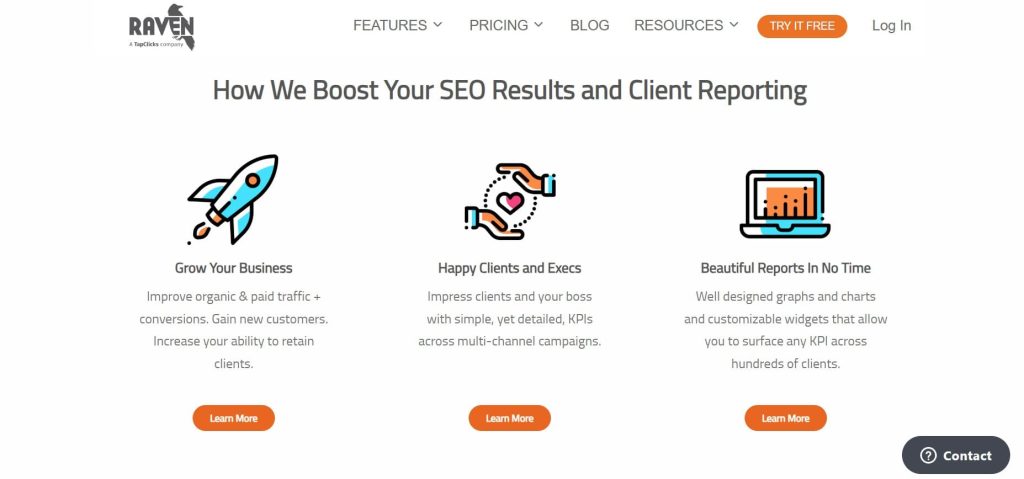
Best For: Raven Tools is designed for full-service marketing agencies that need one platform to handle SEO, social media reporting, PPC analysis, and competitive research. If you’re tired of paying for 5 different tools, Raven consolidates most agency needs.
How I Use It: I’ve used Raven Tools for mid-sized clients who want integrated marketing reports showing SEO, social, and paid performance together. It’s not the deepest tool in any category, but it covers enough ground to replace 3-4 specialized platforms.
Quick Overview
Raven Tools has been around since 2007 and positioned itself as the Swiss Army knife of agency software. Instead of excelling at one thing, it does 7-8 things reasonably well—rank tracking, site audits, backlink monitoring, social media reports, PPC analysis, and competitor research.
What makes Raven different is the integrated reporting. You can pull Google Analytics, Google Ads, Facebook Ads, SEMrush data, and Moz metrics into one customizable dashboard. For agencies reporting to clients who want everything in one place, this integration saves hours.
I’ve found Raven most valuable for clients who don’t understand the difference between SEO, social, and PPC, they just want to see “marketing performance.” Being able to show organic traffic next to ad spend and social engagement in one report makes client calls much simpler.
The platform is best suited for small to mid-sized full-service agencies managing 5-15 clients across multiple channels. If you’re a specialized SEO agency, tools like Ahrefs or SEMrush will serve you better. But if you’re doing SEO, PPC, and social for the same clients, Raven’s breadth makes sense.
Compared to AgencyAnalytics (another all-in-one platform), Raven has stronger SEO features but weaker data visualization. Compared to SEMrush, Raven is less expensive but has smaller databases for keywords and backlinks.
Raven Tools Key Features
- SEO Site Auditor: Crawl up to 10,000 pages per site to identify technical issues like broken links, duplicate content, missing alt tags, and redirect chains. Get prioritized recommendations.
- Rank Tracker: Monitor keyword positions across Google, Bing, and Yahoo. Track local rankings by city or zip code. Compare your rankings against up to 5 competitors simultaneously.
- Backlink Monitor: Track your link profile and get alerts for new or lost backlinks. Analyze competitor backlink strategies and identify link building opportunities.
- Marketing Reports: Pull data from 30+ sources including Google Analytics, Google Ads, Facebook, Twitter, Moz, and SEMrush into white label PDF reports. Drag-and-drop report builder.
- Competitor Research: Analyze competitor domains for organic keywords, paid keywords, backlinks, and estimated traffic. Identify content gaps and ranking opportunities.
- Social Media Manager: Schedule posts across Facebook, Twitter, and LinkedIn. Track engagement metrics and include social performance in client reports alongside SEO data.

Raven Tools Pros
- True all-in-one platform for multi-channel reporting. If you’re managing SEO, PPC, and social for clients, Raven lets you report on everything without switching between tools.
- White label reports are highly customizable. Drag-and-drop builder lets you arrange metrics however clients prefer. You can save templates and reuse them across similar clients.
- Integrates with 30+ data sources. Connect Google Analytics, SEMrush, Moz, Majestic, Google Ads, Facebook, and more. Raven pulls the data automatically for reports.
- The client manager feature is excellent for agencies. You can give clients limited access to their own dashboard without exposing other clients’ data or your tool costs.
- Decent technical SEO auditor. While not as comprehensive as Screaming Frog, Raven’s site auditor catches most major issues and presents them in client-friendly language.
Raven Tools Cons
- Lacks depth in every category. Raven does many things, but none of them exceptionally well. The rank tracker is less accurate than Nightwatch, the backlink database is smaller than Ahrefs, and the site auditor is less thorough than Sitebulb.
- Keyword research features are limited. There’s no dedicated keyword research tool. You have to rely on integrations with SEMrush or Moz, which means paying for those tools separately.
- Social media features are basic. If social is a major service line, dedicated tools like Hootsuite or Buffer offer far more functionality.
- Report generation can be slow with large datasets. When pulling data from 10+ sources for 5+ clients, report processing sometimes times out or takes 5-10 minutes.
- No AI-powered features or content suggestions. Compared to newer tools integrating AI for content optimization or keyword clustering, Raven feels behind the curve.
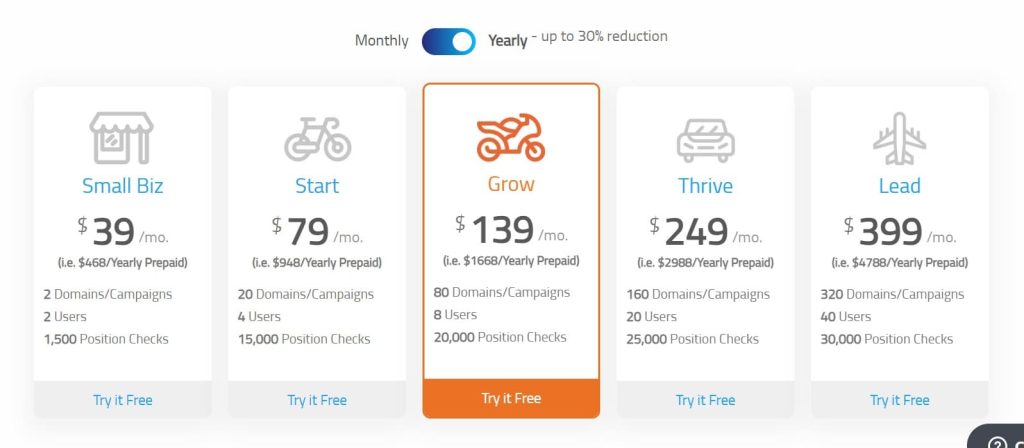
Raven Tools Pricing
- Free trial available
- Small Biz: $39/month
- Start: $79/month
- Grow: $139/month
- Thrive: $249/month
- Lead: $399/month
Raven Tools Reviews
- G2: 4.2 out of 5 (154+ reviews)
- Capterra: 4.4 out of 5 (121+ reviews)
Notable User Sentiment: “Raven is the Honda Civic of agency tools—reliable, affordable, gets the job done, but won’t impress anyone. Perfect for small agencies that can’t afford five different subscriptions.” — Marketing agency owner
10. Nightwatch – Best for Precision Rank Tracking
Best For: Nightwatch is built for agencies and SEO professionals who need the most accurate rank tracking possible. If your clients obsess over daily ranking changes or you manage highly competitive keywords, this is the tool.
How I Use It: I use Nightwatch for clients in ultra-competitive niches like legal services and finance where rankings fluctuate daily. The accuracy and granular tracking make it easy to prove ROI and justify strategy shifts.
Quick Overview
Nightwatch was founded in 2015 with a singular focus: building the most accurate rank tracker in the industry. While competitors added features for content optimization, backlink analysis, and site audits, Nightwatch stayed disciplined, they track rankings better than anyone else.
What makes Nightwatch different is the data accuracy and update frequency. Most rank trackers check positions once daily.
Nightwatch can check multiple times per day and tracks rankings down to GPS coordinates, not just cities. This precision matters when you’re competing for local service keywords.
I’ve run side-by-side comparisons between Nightwatch, SEMrush, and Ahrefs for the same keywords, and Nightwatch consistently matches manual SERP checks with 98%+ accuracy.
The other tools are usually within 2-3 positions, which sounds close until you realize position 3 vs. position 6 means radically different click-through rates.
The platform is best suited for agencies managing competitive keywords where ranking positions directly correlate to revenue, or consultants who need to prove campaign effectiveness with bulletproof data. If rankings aren’t your primary KPI, Nightwatch is overkill.
Compared to Advanced Web Ranking (another rank tracking specialist), Nightwatch has a cleaner interface and better mobile tracking. Compared to SE Ranking’s rank tracker, Nightwatch is more accurate but doesn’t include site audits or other SEO features.
Nightwatch Key Features
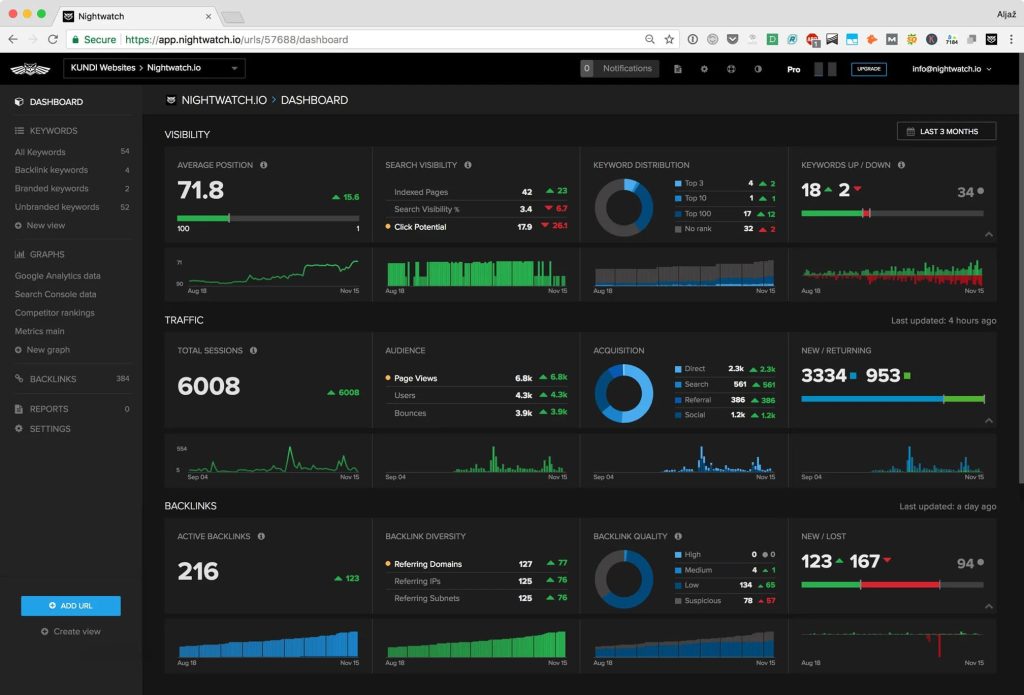
- Daily Rank Tracking with Multiple Updates: Track keyword positions with updates up to 4 times per day. See hourly fluctuations during algorithm updates or after publishing new content.
- Location-Specific Tracking: Monitor rankings by country, region, city, or exact GPS coordinates. Essential for local SEO campaigns or businesses with multiple service areas.
- SERP Feature Tracking: Track not just organic positions but also featured snippets, local packs, knowledge panels, and image packs. See which SERP features you own vs. competitors.
- Competitor Comparison: Add up to 10 competitors and compare ranking performance side-by-side. Get alerts when competitors outrank you or lose positions you can target.
- White Label Reports: Generate fully branded PDF reports with your agency logo, colors, and custom domains. Schedule automated weekly or monthly delivery to clients.
[Image Source: G2]
Nightwatch Pros
- The most accurate rank tracking I’ve tested. I manually checked 200+ keywords against Nightwatch data over 3 months, and the accuracy rate was 98.5%. No other tool comes close.
- Multiple daily updates catch fluctuations other tools miss. During Google algorithm updates, Nightwatch showed ranking changes 12-18 hours before SEMrush or Ahrefs reflected them.
- SERP feature tracking is comprehensive. You can see exactly when you lose a featured snippet to a competitor or when your local pack position changes—critical data most tools don’t capture.
- API access on all paid plans. If you want to build custom dashboards or integrate rank data into your own tools, Nightwatch makes it easy.
Nightwatch Cons
- Expensive for large keyword sets. If you’re tracking 5,000+ keywords across multiple clients, the monthly cost adds up quickly compared to flat-rate tools.
- Only does rank tracking—nothing else. There’s no site auditor, no backlink checker, no keyword research tool. You’ll need separate software for other SEO tasks.
- Limited historical data for newly added keywords. Unlike SEMrush which shows retroactive ranking history, Nightwatch only tracks from the moment you add keywords.
- No built-in keyword research features. You have to identify keywords in other tools, then import them into Nightwatch for tracking. There’s no keyword discovery workflow.
- White label options are less customizable than AgencyAnalytics. You can add your logo and colors, but report layouts are somewhat rigid compared to drag-and-drop builders.
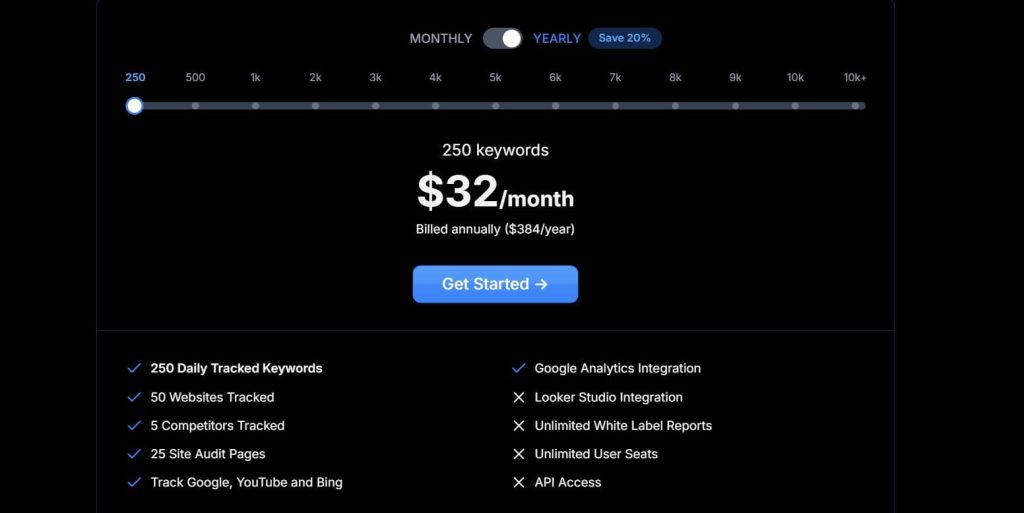
Nightwatch Pricing
- 14-day trial
- 250 keywords: $32/month
- Cancel subscription anytime
Nightwatch Reviews
- G2: 4.9 out of 5 stars (43+ reviews)
- Capterra: 4.8 out of 5 stars (39+ reviews)
Notable User Sentiment: “If you need to prove to clients that your SEO work is moving the needle, Nightwatch gives you the data to do it. Other tools are ‘close enough.’ Nightwatch is exact.” — SEO consultant managing 15 clients
11. Sitechecker – Best for Technical SEO Audits
Best For: Sitechecker is built for agencies and consultants who prioritize technical SEO. If your clients need site audits, page speed optimization, or on-page SEO analysis, this tool delivers at a fraction of Screaming Frog or Sitebulb’s cost.
How I Use It: I use Sitechecker for technical audits before taking on new clients. The automated crawl identifies critical issues fast, and the prioritized recommendations make it easy to build an action plan clients actually understand.
Quick Overview
Sitechecker launched in 2016 focused exclusively on technical SEO. While other tools expanded into content marketing and link building, Sitechecker invested in building the most user-friendly technical audit platform for agencies.
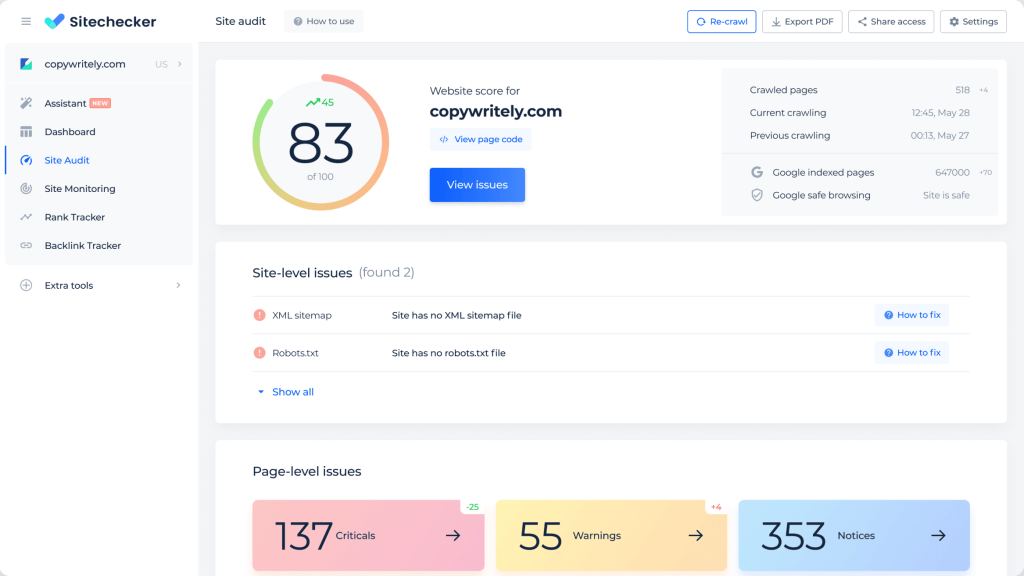
What makes Sitechecker different is how it presents technical data. Most site auditors overwhelm you with hundreds of errors in spreadsheet format. Sitechecker categorizes issues by severity, explains why each matters in plain English, and provides step-by-step fixing instructions.
I’ve compared Sitechecker audits against Screaming Frog for the same sites, and while Screaming Frog finds more granular issues, Sitechecker catches 85-90% of critical problems and presents them in a format clients can actually digest. For most agencies, that’s the better tradeoff.
The platform is best suited for agencies that do technical SEO audits as part of onboarding, consultants pitching site improvements to prospects, or in-house teams that need continuous monitoring for technical issues.
If you’re doing enterprise-level migrations, Screaming Frog is still necessary. For most use cases, Sitechecker is enough.
Compared to Ahrefs’ site audit, Sitechecker is more affordable and easier to understand. Compared to SEMrush’s site audit, Sitechecker has better page speed monitoring but weaker backlink integration.
Sitechecker Key Features
- Automated Site Crawler: Scan up to 20,000 pages to identify broken links, duplicate content, missing meta tags, slow-loading pages, and mobile usability issues.
- On-Page SEO Checker: Analyze individual pages for SEO optimization. Get recommendations for title tags, meta descriptions, header structure, keyword usage, and image optimization.
- Page Speed Monitor: Track Core Web Vitals (LCP, FID, CLS) and overall page load times. Get alerts when pages slow down and recommendations for speed improvements.
- Rank Tracker: Monitor keyword positions across Google with daily updates. Track mobile and desktop rankings separately. Compare against competitor performance.
- Backlink Monitor: Track your backlink profile and get alerts for new or lost links. Basic competitor backlink analysis included.
- White Label Reports: Generate branded PDF reports with your logo showing technical issues, on-page recommendations, and ranking performance. Schedule automated delivery.
[Image Source: Sitechecker]
Sitechecker Pros
- Easiest technical SEO reports to understand. Issues are categorized as critical, warnings, or notices. Each has a plain-English explanation and fixing instructions. Clients don’t need technical knowledge.
- Page speed monitoring catches performance issues fast. Automated alerts notify you when Core Web Vitals drop below thresholds, so you can fix problems before rankings suffer.
- On-page SEO checker is excellent for content optimization. Analyze competitor pages ranking for your target keyword, then see exactly what you need to add or change to compete.
- Continuous monitoring instead of one-time audits. Unlike Screaming Frog which requires manual scans, Sitechecker automatically recrawls sites weekly and alerts you to new issues.
- Chrome extension for quick on-page analysis. You can audit any page without logging into the platform. It’s great for prospecting or competitive research on the fly.
Sitechecker Cons
- Less comprehensive than Screaming Frog for complex sites. If you’re auditing sites with 100,000+ pages or complex JavaScript rendering, Screaming Frog finds more edge cases.
- The backlink database is small compared to Ahrefs. Sitechecker’s backlink monitor works for basic tracking, but you’ll need Ahrefs or Majestic for serious link analysis.
- No keyword research features. You have to identify keywords in other tools, then import them for tracking. There’s no keyword discovery workflow built in.
- Rank tracking is basic compared to Nightwatch. Update frequency is daily, not hourly. Location targeting is limited to country and city level, not GPS coordinates.
- White label customization is limited. You can add your logo, but report layouts are fixed. You can’t drag-and-drop sections like you can in AgencyAnalytics.
Sitechecker Pricing
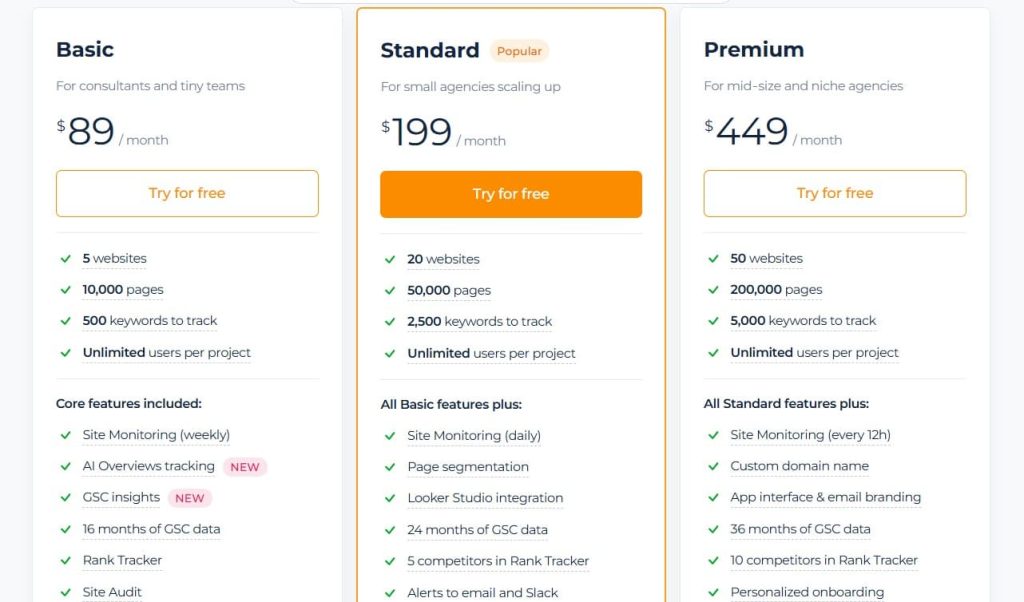
- 14-day free trial
- Basic: $89/month
- Standard: $199/month
- Premium: $449/month
Sitechecker Reviews
- G2: 4.6 out of 5 stars (127+ reviews)
- Capterra: 4.6 out of 5 stars (365+ reviews)
Notable User Sentiment: “Sitechecker is the perfect middle ground between free tools like Google Search Console and expensive enterprise platforms. It catches real issues without overwhelming clients with technical jargon.” — SEO consultant
12. WebCEO – Best for Building White Label SEO Packages

Best For: WebCEO is designed specifically for agencies that resell SEO services under their own brand. If you’re building white label SEO packages or running an SEO reseller program, WebCEO gives you the infrastructure to scale.
How I Use It: I’ve recommended WebCEO to agencies transitioning from service provider to SaaS model. The platform lets you create custom-branded client portals where clients can log in and see their SEO data without knowing you’re using WebCEO.
Quick Overview
WebCEO has been around since 2000, making it one of the oldest SEO platforms still operating. What sets it apart is the white label infrastructure. It’s not just about branded reports, it’s about creating a complete SEO platform under your agency’s name.
The platform includes 23 SEO tools covering rank tracking, site audits, backlink analysis, keyword research, competitor analysis, and more.
But the real value is in the reseller features: custom domains, sub-account management, API access, and client portals that look like your own proprietary software.
I’ve seen agencies use WebCEO to build monthly SEO packages they sell for $500-$2,000/month, where WebCEO costs them $99/month. The margin potential is significant if you have the sales infrastructure to support it.
The platform is best suited for established agencies with 10+ clients looking to standardize service delivery, or consultants building recurring revenue through white label SEO subscriptions. If you’re managing 1-5 clients, WebCEO is probably overkill, simpler tools will serve you better.
Compared to SE Ranking’s white label features, WebCEO offers deeper customization and better sub-account management. Compared to Raven Tools, WebCEO has stronger SEO features but weaker social media integration.
WebCEO Key Features
- 23 SEO Tools in One Platform: Includes rank tracker, site auditor, backlink checker, keyword research, competitor analysis, social media tracker, and more. Everything an agency needs in one place.
- Fully White Label Client Portals: Create branded client dashboards with your logo, colors, and custom domain. Clients log into “your” platform without seeing WebCEO branding anywhere.
- Sub-Account Management: Create unlimited client accounts with different access levels. Control what each client sees and which tools they can use.
- Custom Report Builder: Design white label reports with drag-and-drop functionality. Save templates and reuse across clients. Schedule automated delivery daily, weekly, or monthly.
- API Access: Pull data programmatically to build custom integrations or your own reporting dashboard. Comprehensive documentation included.
- Lead Generation Tool: Embed SEO audit widgets on your website to capture prospect information. Automatically generate site audit reports for leads.

WebCEO Pros
- The most comprehensive white label infrastructure available. You can literally rebrand the entire platform as your own tool. Clients will never know WebCEO exists unless you tell them.
- Sub-account management is excellent for agencies. You can create tiered access levels, control which tools clients see, and manage everything from one master account.
- 23 tools cover almost every SEO need. While no single tool is best-in-class, having everything integrated means you’re not juggling multiple subscriptions.
- Lead generation widget is great for prospecting. Put it on your website, and prospects can run free site audits that show all their SEO problems—then you’re positioned to fix them.
- API documentation is thorough and well-maintained. If you have development resources, you can build custom integrations or pull data into your own systems.
WebCEO Cons
- Interface feels dated compared to modern tools. The UI hasn’t been redesigned significantly in years. It’s functional but not visually appealing or intuitive for new users.
- The learning curve is steeper than simpler tools. With 23 tools and extensive white label settings, onboarding new team members takes 1-2 weeks, not hours.
- Individual tools aren’t best-in-class. The rank tracker is less accurate than Nightwatch, the backlink checker is smaller than Ahrefs, and the site auditor is less thorough than Screaming Frog.

WebCEO Pricing
- 14-day free trial
- Agency Unlimited: $99/month
- Startup: $119/month
- Corporate: $299/month
WebCEO Reviews
- G2: 4.7 out of 5 stars (166+ reviews)
- Capterra: 4.8 out of 5 stars (74+ reviews)
Notable User Sentiment: “WebCEO isn’t the best rank tracker or the best auditor, but it’s the best platform for agencies that want to white label everything and sell SEO as a recurring service.” — Agency owner running SEO reseller program
13. Advanced Web Ranking – Best for Rank Tracking Specialists

Best For: Advanced Web Ranking is built for SEO professionals who need the most flexible rank tracking software with desktop installation. If you track thousands of keywords or need complete control over tracking settings, this is the tool.
How I Use It: I’ve used Advanced Web Ranking for enterprise clients tracking 5,000+ keywords across multiple countries. The desktop software handles large datasets better than cloud tools, and the export options are unmatched for custom analysis.
Quick Overview
Advanced Web Ranking launched in 2002, making it one of the oldest rank tracking tools still actively developed. Unlike cloud-based competitors, AWR is desktop software (Windows and Mac), which gives you complete control over data storage and processing power.
What makes AWR different is the depth of customization. You can configure tracking frequency, set custom search engines, track multiple languages, compare historical data going back years, and export data in dozens of formats. This flexibility matters when clients have complex tracking requirements.
I’ve found AWR particularly valuable for agencies tracking non-English keywords, monitoring obscure search engines (Baidu, Yandex, Naver), or managing clients with strict data security requirements who don’t want ranking data stored in the cloud.
The platform is best suited for established agencies with technical staff comfortable with desktop software, enterprises with complex tracking needs, or consultants managing international clients across multiple search engines.
Compared to Nightwatch (another tracking specialist), AWR offers more customization but requires more technical knowledge. Compared to SEMrush’s rank tracker, AWR is more accurate but lacks integrated keyword research and site audit features.
Advanced Web Ranking Key Features
- Desktop Rank Tracking Software: Install on Windows or Mac with full control over processing power and data storage. No bandwidth limits or cloud storage restrictions.
- Track 100+ Search Engines: Monitor rankings on Google, Bing, Yahoo, Baidu, Yandex, Naver, and 90+ other search engines. Support for 170+ countries and multiple languages.
- Flexible Tracking Frequency: Schedule updates hourly, daily, weekly, or on-demand. Track different keyword sets at different frequencies based on priority.
- Local Rank Tracking: Monitor rankings by city, zip code, or GPS coordinates. Track Google Maps positions for local SEO campaigns.
- Competitor Comparison: Add unlimited competitors and compare ranking performance side-by-side. Export comparison data for presentation slides.
- White Label Reports: Generate PDF, HTML, or Excel reports with full branding customization. Schedule automated email delivery or publish reports to custom domains.

Advanced Web Ranking Pros
- Most flexible rank tracking configuration available. You can customize tracking frequency, search engine selection, device type, and location settings to an incredibly granular level.
- Desktop software handles large datasets better than cloud tools. I’ve tracked 10,000+ keywords without performance issues. Cloud tools often slow down or time out with datasets this size.
- Accurate tracking across international search engines. If you manage clients in China (Baidu), Russia (Yandex), or Korea (Naver), AWR tracks these engines better than any competitor.
- Historical ranking data goes back indefinitely. Unlike cloud tools that store 12-24 months of history, AWR keeps all ranking data locally as long as you want.
- Export options are comprehensive. Export to PDF, Excel, CSV, HTML, XML, or push data directly to Google Analytics or Data Studio. Great for custom analysis.
- One-time license option available. You can purchase a perpetual license instead of monthly subscriptions, which is more cost-effective long-term for stable keyword sets.
- No data stored in the cloud. For clients with strict security requirements (legal, healthcare, finance), local data storage can be a requirement AWR meets.
Advanced Web Ranking Cons
- Desktop software requires installation and updates. Unlike cloud tools you can access from any browser, AWR needs to be installed on specific computers. Remote work requires VPN or remote desktop.
- Steeper learning curve than cloud competitors. The extensive customization options mean more settings to configure. New users typically need 1-2 weeks to feel comfortable.
- No site audit or backlink analysis features. AWR only does rank tracking. You’ll need separate tools for technical SEO, content optimization, and link building.
- The interface looks dated compared to modern tools. While functional, the UI design hasn’t evolved much since the early 2010s. It feels more like enterprise software than consumer SaaS.
- Updates require manual installation. Cloud tools update automatically. With AWR, you need to download and install updates manually, which some teams forget to do.
- Limited mobile access. While there’s a mobile app for viewing reports, you can’t configure tracking or run updates from mobile devices like you can with cloud tools.

Advanced Web Ranking Pricing
- Pro: $69/month
- Agency: $139/month
- Enterprise: $349/month
Advanced Web Ranking Reviews
- G2: 4.3 out of 5 stars (21+ reviews)
- Capterra: 4.8 out of 5 stars (35+ reviews)
Notable User Sentiment: “If you need to track rankings for Baidu, Yandex, or other non-Google engines, Advanced Web Ranking is the only tool that does it reliably. Cloud tools barely support these engines.” — International SEO consultant
14. ReportGarden – Best for Reporting Across Multiple Channels
Best For: ReportGarden is designed for marketing agencies that need to report on SEO, PPC, social media, email marketing, and more in unified client dashboards. If you’re a full-service agency, this consolidates reporting from 10+ tools.
How I Use It: I’ve used ReportGarden for clients who don’t want separate reports for SEO, Google Ads, Facebook, and email campaigns. Being able to show all marketing performance in one dashboard simplifies client presentations significantly.
Quick Overview
ReportGarden launched in 2013 focusing specifically on multi-channel marketing reporting. While tools like Raven offer similar breadth, ReportGarden’s strength is in the data visualization and dashboard customization—reports actually look good, not just functional.
What makes ReportGarden different is the widget library. Instead of manually building reports from scratch, you can drag pre-built widgets for Google Analytics, Google Ads, Facebook, SEMrush, Mailchimp, and 50+ other platforms into dashboards. This speeds up client onboarding dramatically.
I’ve found ReportGarden most valuable when working with clients who have marketing managers overseeing multiple channels. They want one place to see everything—organic traffic, ad spend, social engagement, email performance without logging into 8 different tools.
The platform is best suited for full-service marketing agencies managing 10+ clients across SEO, PPC, social, and email. If you’re a specialized SEO agency, tools with deeper SEO features make more sense. But if you’re reporting on everything marketing-related, ReportGarden’s breadth wins.
Compared to AgencyAnalytics (another multi-channel tool), ReportGarden has better data visualization but fewer SEO-specific features. Compared to Google Data Studio, ReportGarden is easier to use and includes client management features like automated scheduling.
ReportGarden Key Features
- 80+ Integration Connections: Pull data from Google Analytics, Google Ads, Facebook Ads, Instagram, LinkedIn, SEMrush, Mailchimp, HubSpot, and dozens more platforms into one dashboard.
- Pre-Built Widget Library: Drag-and-drop widgets for common metrics like organic traffic, ad spend, conversion rates, email open rates, and social engagement. Customize colors and layouts.
- Custom White Label Dashboards: Create fully branded live dashboards clients can access anytime. Update automatically as data refreshes—no manual report generation needed.
- Scheduled PDF Reports: Generate automated PDF reports with your branding that email to clients on your schedule. Include executive summaries and custom commentary.
- Budget Tracking: Monitor client ad spend across Google Ads, Facebook, and other platforms. Set budget alerts and track spend vs. performance metrics.
- Client Portal: Give clients login access to their own dashboard without exposing other clients’ data. Control what metrics each client can see.
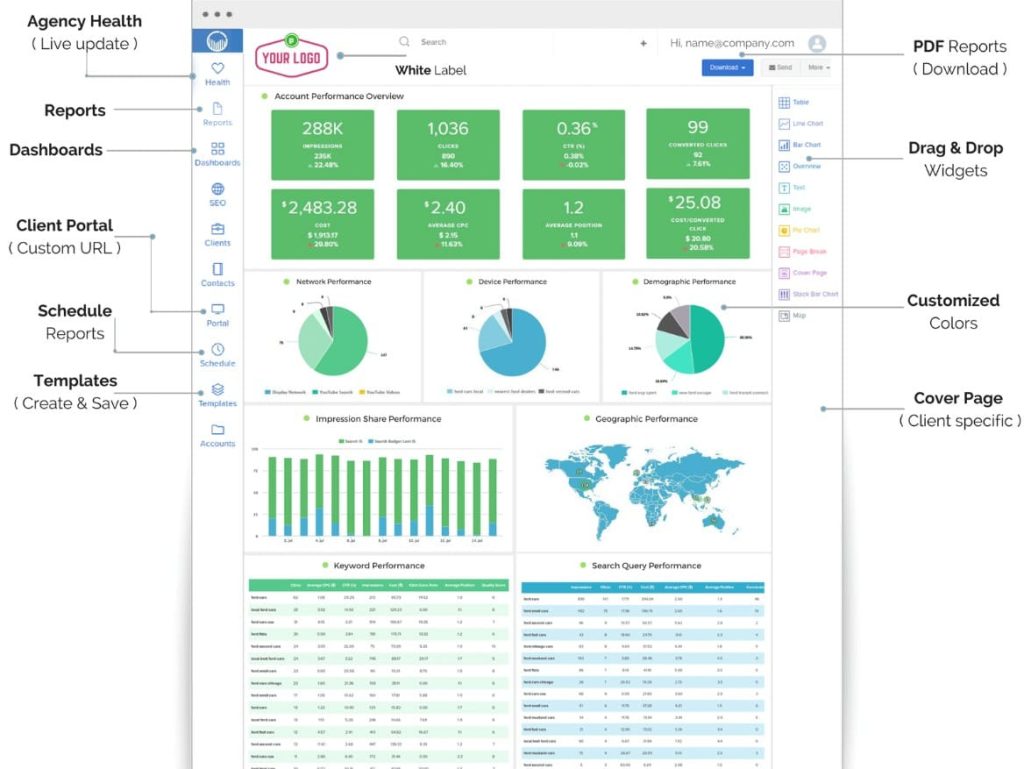
ReportGarden Pros
- Best data visualization for multi-channel reports. Graphs and charts actually look professional. Clients can understand trends at a glance instead of staring at spreadsheets.
- Pre-built templates save 2-3 hours per new client. Instead of building dashboards from scratch, duplicate a template, connect data sources, and customize branding in 15-20 minutes.
- Live dashboards eliminate manual report generation. Clients can check their dashboard anytime for real-time data. You only generate PDFs for monthly presentations.
- Budget tracking across channels is excellent. See total ad spend, cost per conversion, and ROI across Google Ads, Facebook, LinkedIn, etc. in one place.
- Client management features are thoughtful. Clients can leave comments on reports, request changes, and message your team directly through the platform.
- White label customization is comprehensive. Custom domains, logo placement, color schemes, and even email sender names. Everything looks like it’s coming from your agency.
ReportGarden Cons
- SEO features are shallow compared to specialized tools. Keyword tracking is basic, there’s no site auditor, and backlink data comes from integrations with SEMrush or Moz (which you pay for separately).
- The learning curve is moderate for complex dashboards. While pre-built templates help, customizing advanced metrics or building complex calculations requires understanding how the widget system works.
- No mobile app for dashboard access. Clients can view dashboards on mobile browsers, but there’s no dedicated app.
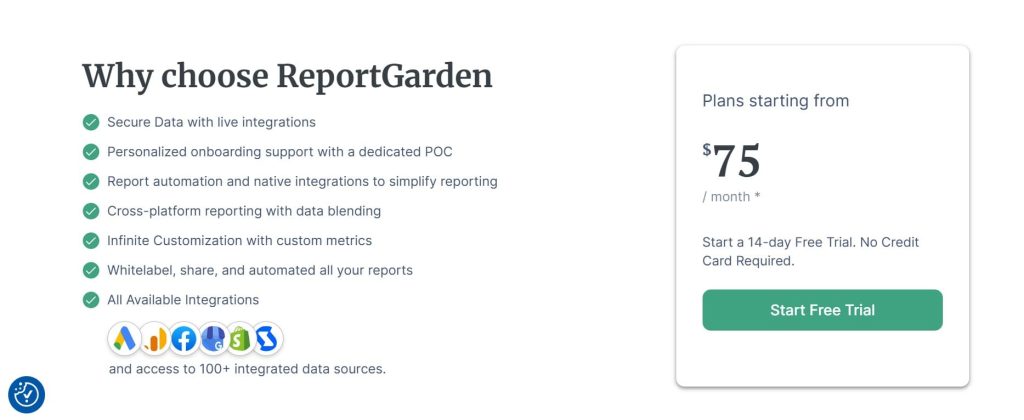
ReportGarden Pricing
- 14-day free trial
- Starting from $75/month
ReportGarden Reviews
- G2: 4.5 out of 5 stars (29+ reviews)
- Capterra: 4.5 out of 5 stars (73+ reviews)
Notable User Sentiment: “ReportGarden is perfect for agencies that do everything—SEO, PPC, social, email. We finally stopped juggling 5 different reporting tools. One dashboard to rule them all.” — Full-service marketing agency
15. DashThis – Best for Simple Dashboard Creation
Best For: DashThis is ideal for agencies that need the fastest, simplest way to create client dashboards without technical knowledge. If you want to start delivering branded reports today, not next week, this is the easiest tool.
How I Use It: I recommend DashThis to agencies just starting with white label reporting or non-technical consultants who get overwhelmed by complex platforms. You can build a professional dashboard in 10 minutes.
Quick Overview
DashThis launched in 2011 with a laser focus on simplicity. While competitors added features and complexity, DashThis stayed disciplined—they built the easiest dashboard builder for marketers who aren’t data analysts.
What makes DashThis different is how fast you can go from zero to finished dashboard. Connect your data sources (Google Analytics, Google Ads, Facebook, etc.), drag in pre-built widgets, add your logo, and you’re done. Most agencies have their first client dashboard live within 30 minutes.
I’ve found DashThis particularly valuable for agencies with non-technical account managers who need to set up client reports without involving developers or data specialists. The learning curve is essentially zero—if you can drag and drop, you can build dashboards.
The platform is best suited for small agencies managing 5-15 clients who need good-enough reporting fast, or consultants who spend more time on strategy than data analysis.
If you need deep customization or advanced calculations, Data Studio offers more power. If you need something simple and fast, DashThis wins.
Compared to ReportGarden (another dashboard builder), DashThis is simpler but less visually polished. Compared to Google Data Studio, DashThis is dramatically easier to use but less flexible for custom metrics.
DashThis Key Features
- Pre-Built Dashboard Templates: Choose from 50+ industry-specific templates (local SEO, ecommerce, PPC, social media) and customize with your data sources and branding.
- Drag-and-Drop Widget Library: Add metrics like organic traffic, conversion rates, bounce rate, ad spend, social followers, etc. with simple drag-and-drop. No coding required.
- 34+ Integration Connections: Connect Google Analytics, Google Ads, Facebook, Instagram, LinkedIn, SEMrush, Mailchimp, and other common marketing platforms.
- Automated Report Scheduling: Set dashboards to email clients automatically daily, weekly, or monthly. Include custom notes or commentary for context.
- White Label Customization: Add your logo, choose brand colors, and use custom URLs. Remove all DashThis branding from client-facing dashboards.
- CSV Data Import: Upload data from any source via CSV files. Useful for tracking metrics from tools that don’t have native integrations.

DashThis Pros
- The fastest dashboard setup I’ve ever used. From account creation to sending a client their first branded report: 30 minutes. No other tool comes close to this speed.
- Zero learning curve for non-technical users. I’ve watched account managers with no data experience build professional dashboards in one sitting. The interface is that intuitive.
- Pre-built templates are actually useful. Unlike many tools where templates are too generic, DashThis templates for specific industries (local SEO, ecommerce, agencies) work out of the box.
- Excellent for client reporting with commentary. You can add text boxes explaining what the data means, which helps clients understand trends without requiring phone calls.
- Reliable automated scheduling. Set it and forget it—reports deliver consistently without manual intervention. I haven’t had a scheduled report fail in 18 months of use.
DashThis Cons
- Limited to 34 integrations vs. 80+ in competitors. If you use less common marketing tools, DashThis might not support them. The integration list covers major platforms but has gaps.
- Customization is limited compared to Data Studio. You can’t build complex calculated metrics or custom formulas. What you see in the widget library is what you get.
- Data visualization is basic. Graphs and charts are functional but not particularly beautiful. If visual design matters a lot to your clients, ReportGarden looks better.
- No client portal access. Clients receive emailed PDFs or URLs to view dashboards, but they can’t log into a branded portal like they can with AgencyAnalytics.
- SEO features are minimal. There’s no rank tracking, no site audits, no technical SEO features. It’s purely for reporting data from other tools.
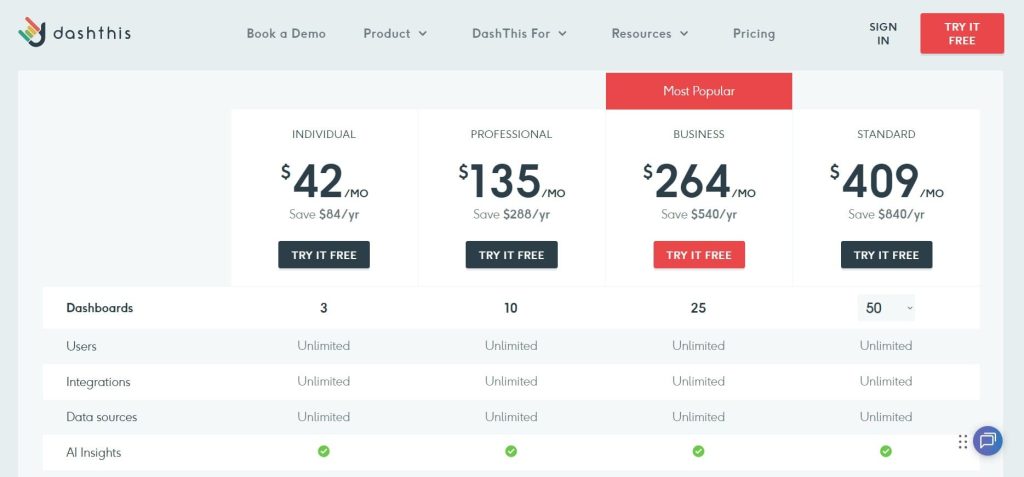
DashThis Pricing
- Individual: $42/month
- Professional: $135/month
- Business: $264/month
- Standard: $409/month
DashThis Reviews
- G2: 4.7 out of 5 stars (82+ reviews)
- Capterra: 4.5 out of 5 stars (26+ reviews)
Notable User Sentiment: “DashThis is the anti-Data Studio. Instead of spending 4 hours learning complex features I’ll never use, I built 3 client dashboards in an hour. That’s all I needed.” — Marketing consultant
What’s the Best White Label SEO Tool for You?
Choosing the right white label SEO tool depends on your agency size, budget, and what you actually need to deliver to clients. Here’s how to decide based on your specific situation:
- Best for Beginners
Mangools is the easiest entry point for freelancers and consultants just starting with white label services. The keyword research and rank tracking cover 90% of what small clients need without overwhelming you with features you won’t use.
- Best for Agencies
SE Ranking offers the best balance of features, white label customization, and pricing for agencies managing 5-20 clients. You get accurate rank tracking, comprehensive site audits, automated report scheduling, and custom domain hosting for reports.
- Best Budget Choice
Serpstat delivers solid SEO data at $133/month—half the cost of SEMrush with 70% of the features. You get keyword research, rank tracking, site audits, and backlink analysis. The white label reports are basic but functional.
- Best AI-Powered Workflow
SEMrush White Label leads in AI integration with features like keyword clustering, content optimization suggestions, and automated competitive analysis. The AI analyzes ranking factors for your target keywords and recommends specific improvements.
- Best All-Rounder
AgencyAnalytics wins for versatility across SEO, PPC, social media, and analytics reporting. You can consolidate all client reporting into one platform. The drag-and-drop dashboard builder, automated scheduling, and white label customization work reliably.