Choosing the right SEO software is confusing when every platform claims to be “the best for agencies.”
Over the last 8 years at OneLittleWeb, I’ve tested more than 50 SEO tools while working with thousands of clients across the US, UK, Canada, and Australia.
Many of these tools helped us grow traffic for clients like those in our AI SaaS SEO case study, where we achieved significant ranking improvements and organic growth.
The truth? Most agencies waste money on tools they don’t need or choose platforms that can’t scale with their client load.
I’ve personally used these tools for keyword research, technical audits, rank tracking, and client reporting across hundreds of campaigns. Some became essential parts of our workflow. Others looked impressive but failed when we needed them most.
In this guide, I’ve listed the tools we personally use and trust for real campaigns. You’ll find honest pros and cons based on hands-on experience, not marketing claims.
Here’s what I evaluated:
- Accuracy: Does the data match reality, or are you making decisions based on guesses?
- Pricing: Can you actually afford it when managing 10+ clients?
- Integrations: Does it play well with your existing tools, or create more work?
- Ease of use: Can your team start using it today, or does it require weeks of training?
- Reliability at scale: Does it work smoothly with 5 clients? What about 50?
If you’re an agency owner, SEO manager, or marketing consultant juggling multiple client projects, this roundup will help you build a stack that actually works.
What are SEO Software/Tools for Agencies?
SEO tools for agencies are specialized software platforms that help marketing teams optimize multiple client websites for search engines at scale.
Unlike tools built for individual bloggers or single-site owners, agency SEO software handles the complexity of managing 5, 10, or 50+ client projects simultaneously.
They provide the infrastructure for keyword research, technical audits, rank tracking, backlink analysis, and client reporting — all from a centralized dashboard.
Agency SEO tools are essential for marketing agencies, SEO consultancies, freelancers managing multiple clients, and in-house teams handling large website portfolios. These tools matter because they help you scale your work without increasing your workload.
They allow you to identify ranking opportunities quickly, automate repetitive tasks, and deliver clear ROI through professional client reports. Ultimately, agency SEO platforms make it possible to serve more clients profitably while maintaining, and often improving, the quality of your work.
What to Look for in an SEO Tool for Agencies
Not all SEO tools are built for agency workflows. Here’s what actually matters when you’re managing multiple clients.
Scalability
Can the tool handle 5 clients today and 50 next year? Check project limits, keyword tracking capacity, and whether pricing scales reasonably. Tools with hard limits force you to switch platforms mid-growth.
White-Label Capabilities
Your clients should see your brand, not the tool’s logo. Look for customizable reports, branded dashboards, and client portals. This separates professional agencies from freelancers using off-the-shelf solutions.
Multi-Project Management
You need to switch between client accounts in seconds, not minutes. The best tools offer unified dashboards where you can compare all projects side-by-side without endless clicking.
Automation Features
Manual reporting kills profitability. Automated rank tracking, scheduled reports, and alert systems free your team to focus on strategy instead of data collection.
Data Accuracy
Inaccurate keyword rankings or outdated backlink data leads to bad decisions. Tools with fresh data and reliable crawlers (like Ahrefs and Semrush) give you confidence in your recommendations.
Integrations
Does it connect with Google Analytics, Search Console, and your CMS? Isolated tools create data silos. The best platforms integrate with your existing workflow.
Team Collaboration
Multiple team members need different access levels. Look for user roles, task assignment, and permissions that let you control who sees what.
Pricing Transparency
Hidden fees for extra users, API access, or white-label features add up fast. Understand the total cost before committing, not after your first invoice arrives.
Summary Table: 15 Best SEO Tools for Agencies in 2026
| Tool Name | Best For | Key Features | Starting Price | Our Notes |
| Semrush | All-in-one SEO platform | 50+ tools, keyword research, site audits, competitor analysis, Agency Growth Kit | $165.17/mo | Most comprehensive toolkit, steep learning curve |
| Ahrefs | Backlink analysis & competitor research | 36T backlinks, Site Explorer, Keywords Explorer, Content Gap | $129/mo | Best backlink data, expensive for multiple users |
| AgencyAnalytics | White-label reporting & dashboards | 80+ integrations, automated reports, client portals | $41.30/mo | Built specifically for agencies, no keyword research |
| Google Search Console | Search performance monitoring | Free official Google data, indexing reports, Core Web Vitals | Free | Essential foundation, limited historical data |
| Screaming Frog | Technical SEO audits | Unlimited crawling, broken links, redirects, site architecture | $279/year | Industry standard for technical audits, desktop only |
| SE Ranking | Affordable all-in-one solution | Rank tracking, audits, keyword research, white-label reports | $52/mo | Best value for money, smaller backlink database |
| Moz Pro | Domain authority & local SEO | DA metric, Link Explorer, local ranking tools | $31/mo | Easiest to learn, slower data updates |
| Surfer SEO | Content optimization | Real-time content scoring, SERP analysis, AI writing | $79/mo | Proven ranking improvements, content-focused only |
| Rank Math | WordPress SEO plugin | On-page analysis, schema markup, unlimited sites | $4.08/mo | Best WordPress value, WP-only limitation |
| Sitechecker | All-in-one SEO monitoring | Unified dashboard, LLM tracking, unlimited users | $89/mo | AI search tracking included, newer platform |
| Mangools | Budget-friendly toolkit | KWFinder, rank tracking, backlinks, SERP analysis | $30.50/mo | Most beautiful UI, limited for enterprise |
| Google Analytics 4 | Website analytics | User behavior, conversions, AI insights, free | Free | Essential for traffic analysis, learning curve |
| Search Atlas | AI-powered automation | OTTO AI agent, automated fixes, LLM visibility | $99/mo | First AI SEO agent, requires trust in automation |
| WebCEO | White-label platform | 90+ reports, custom domain, lead generation widget | $99/mo | True white-label solution, dated interface |
| AIOSEO | WordPress agency management | TruSEO scoring, team access controls, multisite | $49.50/year | Best for WP agencies, WordPress-only |
Key Insights
- For comprehensive needs: Semrush or Ahrefs cover the most ground but require significant investment
- For agency-specific features: AgencyAnalytics or WebCEO provide the best white-label and reporting capabilities
- For budget-conscious agencies: SE Ranking, Mangools, or Serpstat deliver solid features at half the cost
- For specialized needs: Surfer (content), Screaming Frog (technical), SpyFu (competitors) excel in their focus areas
- Essential free tools: Google Search Console and Google Analytics 4 belong in every agency’s stack
15 Best SEO Tools for Agencies in 2026 (Free + Paid)
Here’s the complete list of tools we’ve tested and recommend for agency work:
- Semrush – best for all-in-one SEO
- Ahrefs – best for backlink analysis and competitor research
- AgencyAnalytics – best for white-label client reporting
- Google Search Console – best for search performance data
- Screaming Frog – best for technical SEO audits
- SE Ranking – best for affordable all-in-one solution
- Moz Pro – best for domain authority tracking
- Surfer SEO – best for content optimization
- Rank Math – best WordPress SEO plugin
- Sitechecker – best for project monitoring
- Mangools – best budget-friendly toolkit
- Google Analytics 4 – best for free website analytics
- Search Atlas – best for SEO automation
- WebCEO – best for white-label platform
- AIOSEO – best for WordPress team management
1. Semrush – Best for All-in-One SEO
Best For: Agencies managing multiple clients who need SEO, PPC, content marketing, and competitive analysis in one platform.
How I Use It: I use Semrush daily for keyword research, competitor analysis, site audits, and content planning across our client portfolio. The Agency Growth Kit helps us manage leads and deliver white-label reports.
Quick Overview
Semrush is one of the most comprehensive all-in-one digital marketing platforms, widely considered an industry standard since its launch in 2008.
Unlike tools focused only on SEO, Semrush covers keyword research, technical audits, content marketing, PPC, social media, and competitor analysis—all from one dashboard.
Agencies get extra value from the Agency Growth Kit, which adds a built-in CRM, lead generation tools, and full white-label reporting for client management.
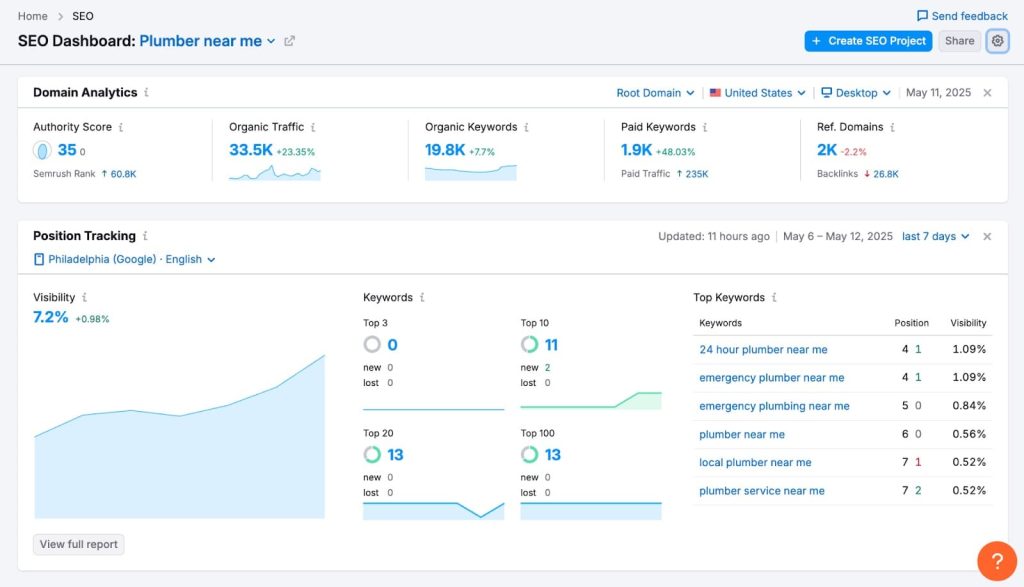
Its massive database of 25+ billion keywords across 130 countries makes it suitable for global and local clients alike. Daily Position Tracking, powerful Site Audits (up to 1M pages on Business plans), and detailed insights help agencies optimize at scale.
While Semrush offers the broadest feature set in the market, it comes with a learning curve. It’s best suited for established agencies with diverse client needs, while smaller teams may prefer more affordable, specialized tools.
Key Features
- Keyword Magic Tool with access to 25+ billion keywords globally
- Position Tracking for daily rank monitoring across multiple locations
- Site Audit crawling up to 1 million pages monthly (Business plan)
- Content Marketing Toolkit with SEO writing assistant and topic research
- Competitive Analysis showing competitor keywords, traffic, and ad strategies
- Agency Growth Kit with built-in CRM, lead finder, and client management
[Image Source: Semrush]
Pros
- Most comprehensive all-in-one solution: Semrush covers SEO, PPC, content, social media, and competitive research in a single platform, eliminating the need for multiple subscriptions. This saves money and streamlines workflows for agencies managing diverse client needs.
- Agency Growth Kit transforms client management: Includes a purpose-built CRM, lead generation tools, white-label PDF reports, and a client portal on your custom subdomain—offering agency-specific features not found in other major SEO platforms.
- Massive keyword database with global coverage: Provides access to 25+ billion keywords across 130 countries, with accurate keyword difficulty scores, supporting both local and international client campaigns.
- Historical data dating back to 2012: Available on Guru and Business plans, enabling analysis of long-term trends, tracking algorithm impacts, and building strategies based on proven historical patterns.
Cons
- Steep learning curve for beginners – The platform’s breadth means new users face weeks of learning before using it effectively.
- Premium pricing – At $139.95/month minimum, it’s expensive compared to specialized tools that cost $29-79/month.
- Report generation slows with large datasets – Pulling comprehensive reports for enterprise clients can take several minutes.
Pricing
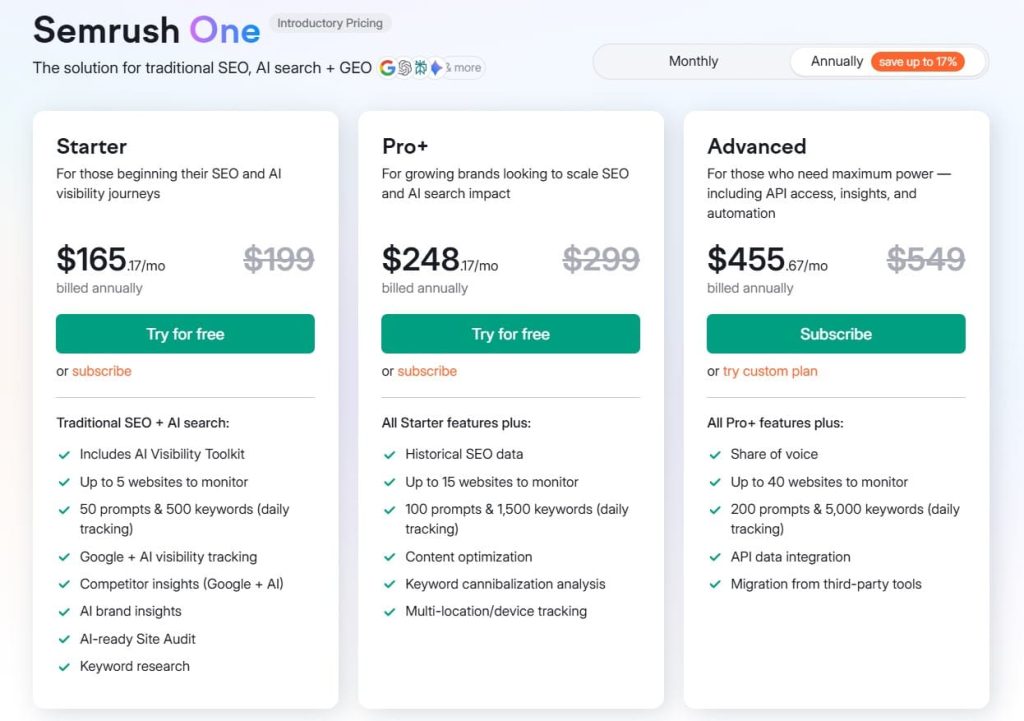
- 7-day free trial
- Starter: $165.17/month
- Pro+: $248.17/month
- Advanced: $455.67/month
Reviews
- G2: 4.5/5 (3,035+ reviews)
- Capterra: 4.6/5 (2,299+ reviews)
Users consistently praise Semrush as the “industry standard” for agency SEO work. The most common positive feedback highlights the comprehensive feature set and data accuracy. Marketing agencies note that having SEO, PPC, and content tools in one platform justifies the higher price.
2. Ahrefs – Best for Backlink Analysis and Competitor Research
Best For: Agencies that prioritize backlink analysis, competitor research, and need the most accurate link data available
How I Use It: I use Ahrefs daily for backlink audits, competitive gap analysis, and finding link-building opportunities. The “Lowest DR” filter helps us identify easy-win keywords where weak competitors are ranking.
Quick Overview
Ahrefs is the gold standard for backlink analysis and competitive research. Launched in 2010, it operates the second-most active web crawler after Google and maintains an index of 36+ trillion backlinks.
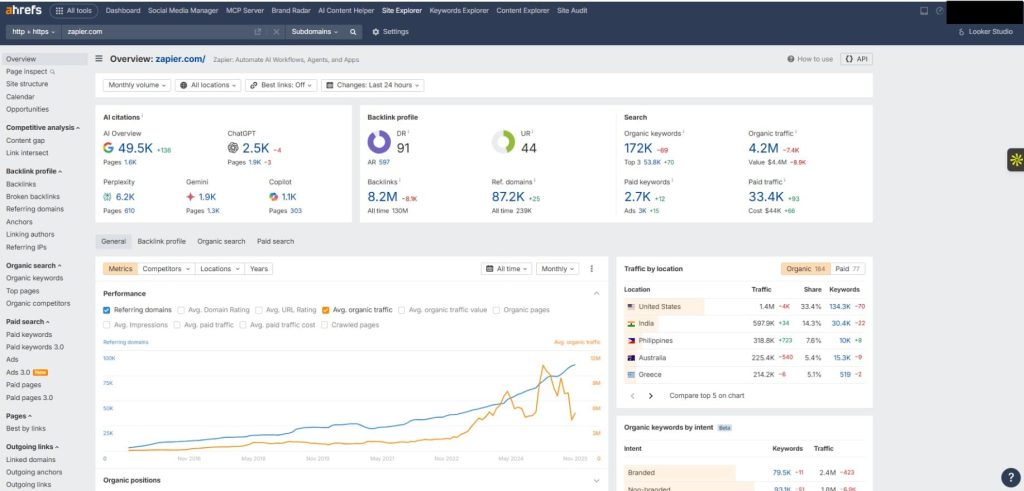
Its flagship tool, Site Explorer, shows competitor backlinks, top-performing content, and traffic-driving keywords—letting agencies reverse-engineer winning strategies.
Ahrefs updates its backlink index every 15–30 minutes, giving near real-time insights for link-building and competitor tracking.
Keywords Explorer includes 24 billion keywords across 243 countries with highly trusted difficulty scores. Content Explorer helps identify top-performing content in any niche, making it ideal for SEO and content strategy.
Unlike Semrush, Ahrefs focuses strictly on SEO—no PPC or social tools—resulting in a cleaner, more intuitive interface but requiring extra platforms for full digital marketing.
Its biggest downside for agencies is cost, with additional user seats priced at $40–80 per month, which adds up quickly for larger teams.
Key Features
- Site Explorer with 36 trillion backlinks and fresh data updated every 15-30 minutes
- Keywords Explorer covering 24 billion keywords across 243 countries
- Content Explorer to find top-performing content and identify content opportunities
- Rank Tracker for monitoring keyword positions across multiple locations
- Site Audit for technical SEO issues with crawl budget of 250K-2M pages depending on plan
- Content Gap Analysis showing keywords competitors rank for that you don’t
Pros
- World’s best backlink database – Ahrefs maintains 36+ trillion backlinks with the second-most active crawler after Google.
The index updates every 15-30 minutes, giving you near real-time visibility into new links. This freshness is unmatched—competitors update daily or weekly at best. - Most accurate keyword difficulty scores – The keyword difficulty metric considers multiple ranking factors including backlink profiles, domain authority, and content quality.
In our testing, Ahrefs KD scores most accurately predict how hard it will be to rank, helping agencies prioritize the right keywords. - Content Gap analysis drives strategy – This feature reveals keywords your competitors rank for that you don’t. It’s like having a roadmap showing exactly where content gaps exist. I’ve used this to build entire content strategies that resulted in significant traffic gains for clients.
- Batch Analysis saves time – Analyze up to 200 URLs simultaneously for key metrics. When you’re auditing a client’s site or evaluating link prospects, this feature saves hours of manual checking.
Cons
- Expensive for multiple users – Additional team members cost $40-80 per month each, making it prohibitively expensive for agencies with large teams.
- No PPC or social media tools – Focuses purely on SEO, requiring separate subscriptions for comprehensive digital marketing.
- Limited white-label reporting – Doesn’t offer the same white-label capabilities as agency-specific platforms like AgencyAnalytics or WebCEO.
Pricing
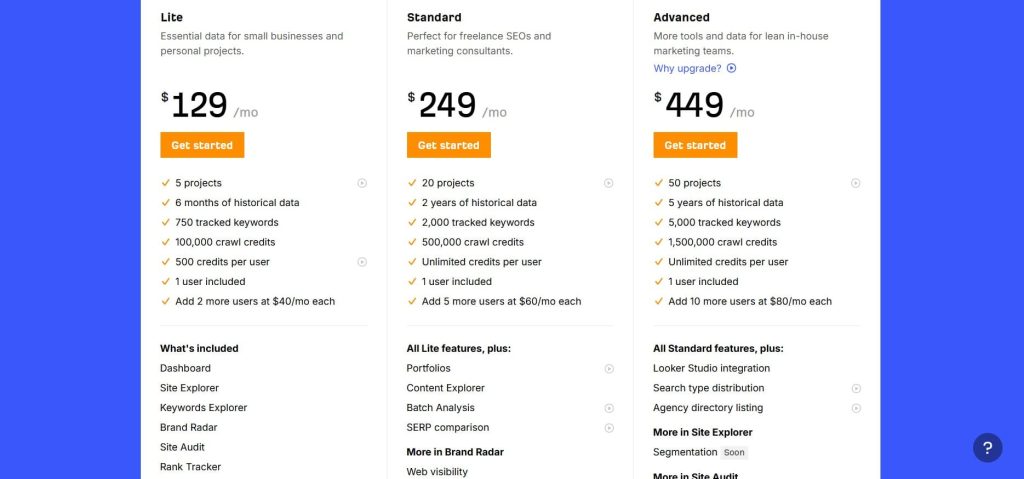
- Lite: $129/month
- Standard: $249/month
- Advanced: $449/month
- Enterprise: $1,499/month
Reviews
- G2: 4.5 out of 5 stars (606+ reviews)
- Capterra: 4.7 out of 5 stars (577+ reviews)
The most common praise focuses on the depth of competitor insights and the accuracy of keyword difficulty scores. One agency review states: “Ahrefs gives me accurate info about website errors and keyword rankings. It suggests great keywords for my content.
3. AgencyAnalytics – Best for White-Label Client Reporting
Best For: Agencies that need professional, automated client reporting with complete white-label capabilities.
How I Use It: I use AgencyAnalytics to consolidate data from all our SEO tools into branded client dashboards. The automated reporting saves our team 10+ hours per month that we used to spend building reports manually.
Quick Overview
AgencyAnalytics is built specifically for agencies that need streamlined reporting across SEO, PPC, social media, and web analytics.
Instead of keyword research or backlink tools, its strength is pulling data from 80+ platforms, including Semrush, Ahrefs, Moz, Google Analytics, Search Console, and all major social networks, and turning it into branded, client-ready dashboards and reports.
Its white-label system is a standout: you can fully brand reports, dashboards, and even client portals with your logo, colors, and custom domain.
For agencies handling 10+ clients, the time savings are huge. Monthly reports that once took 2 days can take as little as 2 hours thanks to automated scheduling.
The platform also offers first-party benchmarking data and an “Ask AI” feature that generates plain-language explanations for performance changes.
AgencyAnalytics does not replace Semrush or Ahrefs. Instead, it complements them by making client reporting cleaner, faster, and far more professional.
Key Features
- 80+ platform integrations including all major SEO, PPC, social, and analytics tools
- Automated report scheduling for PDF, web-based, or email delivery
- White-label dashboards with full branding control and custom domain options
- Client portal access with granular permissions for what clients can see
- Custom KPI tracking and goal monitoring across all channels
- Ask AI feature for automated campaign summaries and plain-language insights
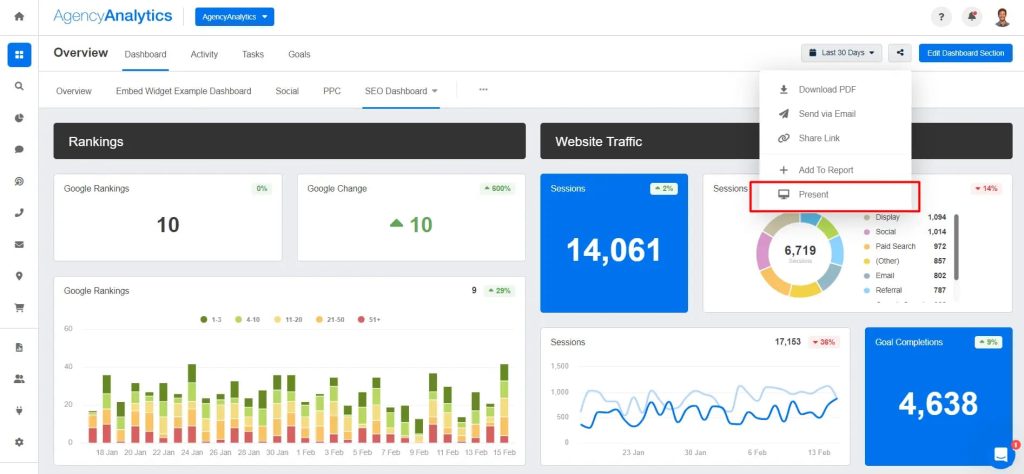
[Image Source: Agency Analytics]
Pros
- Purpose-built for agencies: Designed specifically for client reporting from day one, with features tailored to agency workflows—white-labeling, client portals, team collaboration, and automated delivery.
- 80+ integrations: Connects Google Analytics, Search Console, Ahrefs, Semrush, Moz, Facebook, Instagram, LinkedIn, Google Ads, and many more, bringing all data into unified dashboards and eliminating platform-hopping.
- Massive time savings on reporting: Automated daily, weekly, or monthly reports reduce reporting workloads by 10–20 hours per month; as one G2 reviewer noted, it has “saved us countless hours with our monthly reporting.”
- Drag-and-drop dashboard builder: Build custom dashboards in minutes using pre-built widgets and reusable templates—no coding required.
Cons
- No keyword research or backlink discovery – This is a reporting platform, not an SEO research tool. You’ll still need Semrush, Ahrefs, or similar for actual SEO work.
- Requires other tool subscriptions – The integrations only work if you have active subscriptions to the tools you’re connecting.
- Limited technical SEO auditing – Doesn’t crawl sites or identify technical issues like Screaming Frog or Semrush Site Audit.
Pricing
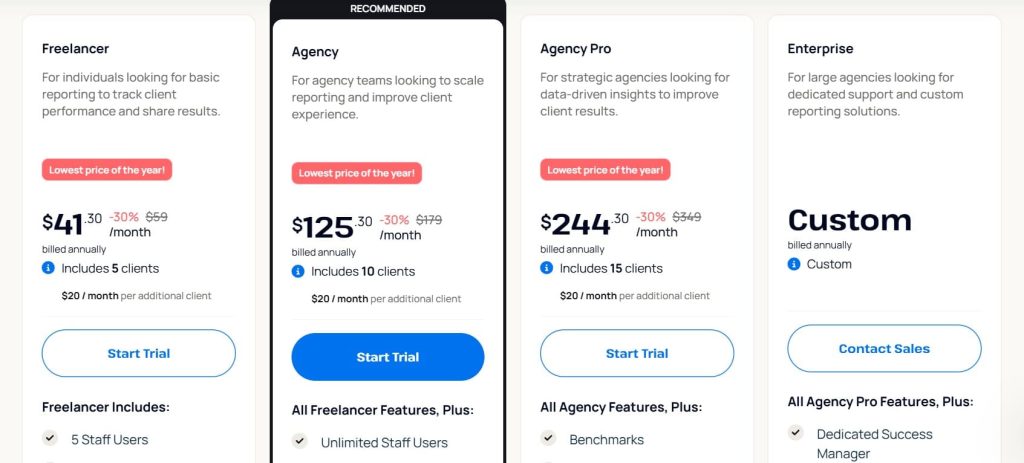
- 14-day trial available
- Freelancer: $41.30/month
- Agency: $125.30/month
- Agency Pro: $244.30/month
- Enterprise: Custom
Reviews
- G2: 4.7/5 (407+ reviews)
- Capterra: 4.8/5 (115+ reviews)
The most frequent praise mentions the white-label capabilities, ease of setup, and how it makes agencies look more professional to clients. Users appreciate that all team members can access the platform without additional fees.
4. Google Search Console – Best for Search Performance Data
Best For: Every agency — it’s free, essential, and provides official data directly from Google
How I Use It: I check Search Console daily for indexing issues, performance drops, and to identify which queries are driving clicks. It’s the first place I look when a client’s rankings suddenly change.
Quick Overview
Google Search Console is Google’s official tool for tracking how a site performs in search, and every agency should connect it to every client site.
Unlike paid tools that rely on estimates, it shows exactly what Google sees: indexed pages, errors, queries triggering impressions, and click-through behavior.
The Performance report includes impressions, clicks, CTR, and average positions with 16 months of historical data, making it ideal for spotting trends and seasonal shifts.
For technical SEO, the Index Coverage report highlights crawl errors, blocked pages, and duplication issues, often explaining sudden ranking drops.
Core Web Vitals provides Google’s official metrics for loading speed, interactivity, and visual stability, helping you prioritize fixes that genuinely affect rankings.
Search Console integrates smoothly with Google Analytics and Looker Studio, and most agencies use it alongside tools like Ahrefs or Semrush.
Key Features
- Performance reports showing search queries, clicks, impressions, CTR, and position data
- Index Coverage revealing which pages are indexed, excluded, or have errors
- Core Web Vitals monitoring with official Google performance metrics
- Mobile Usability reports identifying mobile-specific issues
- URL Inspection Tool for checking individual page status and requesting indexing
- Sitemap submission and monitoring for crawl efficiency
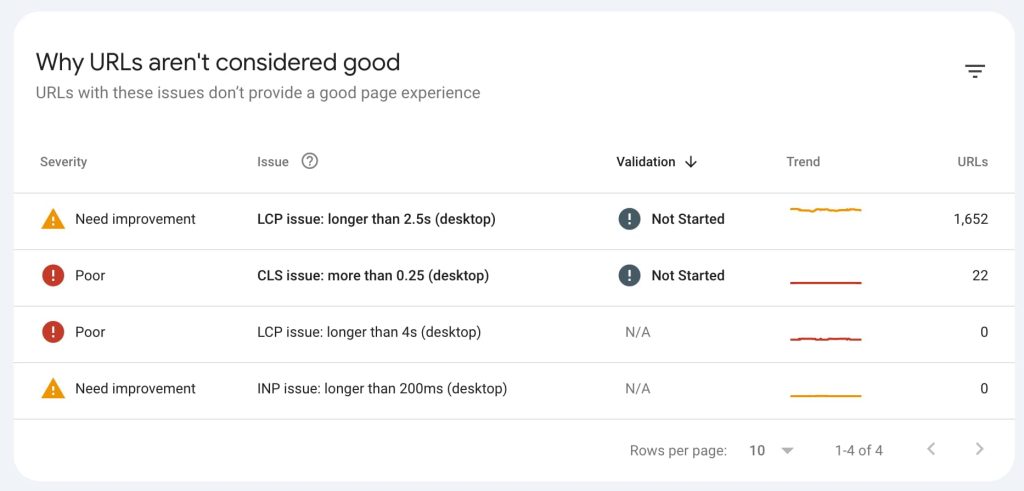
[Image Source: Yoast]
Pros
- Free and official from Google: Zero cost with no hidden fees or usage limits. Since it’s from Google directly, you’re getting the most authoritative data about how Google sees your site—not estimates from third-party crawlers.
- Real-time indexing visibility: See exactly which pages Google has indexed, which are excluded, and why. When you publish new content or fix technical issues, the URL Inspection tool lets you request immediate indexing instead of waiting for natural crawls.
- Actual search query data: Unlike keyword tools that estimate volume, Search Console shows the exact queries people used to find your site, along with real impressions, clicks, CTR, and positions. This data drives content strategy based on what’s actually working.
- Core Web Vitals from the source: Google’s official performance metrics that directly impact rankings. You’re not guessing whether speed issues matter—you’re seeing the exact metrics Google uses for ranking decisions.
Cons
- Limited historical data – Only 16 months of data available, making long-term trend analysis difficult
- No competitor analysis – Only shows your own site’s data, not competitor performance or opportunities
- No keyword research capabilities – Can’t discover new keyword opportunities outside your existing rankings
- Basic reporting functionality – The native reports are functional but not client-ready. Most agencies export data to create professional presentations
Pricing
Free
Reviews
- G2: 4.7 out of 5 stars (437+ reviews)
- Capterra: 4.8 out of 5 stars (211+ reviews)
The SEO community consistently praises its accuracy since it’s official Google data. The main complaints focus on the 16-month data limit and the wish for longer historical access. Some users find the interface less intuitive than paid tools like Semrush or Ahrefs.
5. Screaming Frog – Best for Technical SEO Audits
Best For: Agencies conducting deep technical SEO audits and crawling large websites
How I Use It: I use Screaming Frog for every new client onboarding to crawl their entire site and identify technical issues. The unlimited crawling capability makes it essential for auditing enterprise sites with millions of pages.
Quick Overview
Screaming Frog SEO Spider is the industry-standard desktop tool for technical SEO audits, trusted by agencies since 2010.
Unlike cloud tools with crawl limits, the paid version has no URL restrictions, you can audit sites with 10,000 to 10 million pages, limited only by your computer’s processing power.
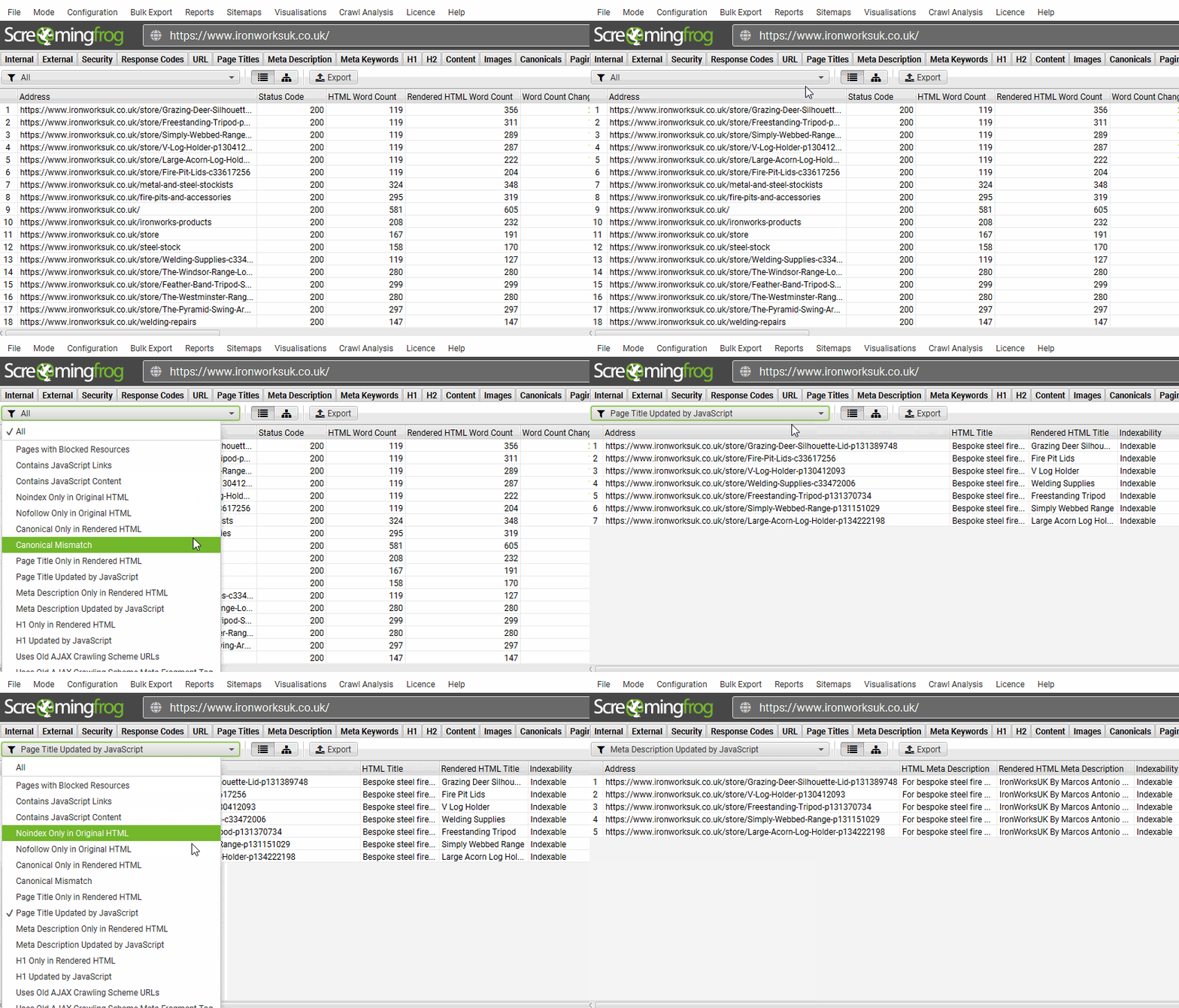
The crawler detects issues other tools miss, including redirect chains, canonical problems, hreflang errors, broken links, missing meta descriptions, duplicate content, and schema errors.
It renders JavaScript, connects to Google Analytics and Search Console, and allows custom data extraction via XPath or regex.
Screaming Frog gives agencies full crawl control, including exclusions, external links, and custom data exports for spreadsheets or client reports.
The desktop setup ensures faster crawling than cloud tools. At £149/year, it’s cost-effective compared to $100, 500 monthly SaaS subscriptions. The learning curve is steep, but technical SEOs consider it essential.
Key Features
- Unlimited URL crawling on paid version (no restrictions on site size)
- Broken link detection finding 404s, redirects, and redirect chains
- Duplicate content analysis identifying title and meta description duplicates
- XML sitemap generation for automated sitemap creation
- JavaScript rendering to crawl sites like Google does
- Custom data extraction using XPath, regex, and CSS selectors
[Image Source: Screaming Frog]
Pros
- Unlimited crawling capability – The paid version has no URL limits, unlike cloud tools that cap crawls at 100K-1M pages. You can audit enterprise sites with millions of pages, making it indispensable for agencies with large clients.
- Desktop speed advantage – Crawls run on your local machine, making them significantly faster than cloud-based tools, especially for large sites. A 50,000-page site that takes hours on cloud platforms might finish in 30-60 minutes with Screaming Frog.
- Identifies issues others miss – The depth of technical analysis exceeds most cloud tools. It finds redirect chains, canonical errors, hreflang implementation problems, orphaned pages, and schema markup issues that simpler tools overlook.
- Custom data extraction – Use XPath or regex to extract any data from pages—pricing, product availability, specific content elements. This flexibility lets you create highly customized audits addressing unique client needs.
Cons
- Requires technical knowledge – The interface and features assume SEO expertise. Beginners face a learning curve understanding crawl settings, filters, and how to interpret results.
- Desktop application only – Not cloud-based, so you can’t access it from anywhere or share live dashboards with team members.
- No rank tracking or keyword research – Purely a crawling and technical audit tool. You’ll need separate tools for keyword research and ranking monitoring.
- No automated monitoring – Unlike cloud tools that crawl sites automatically on schedules, you manually run each crawl.
Pricing
- Free version available
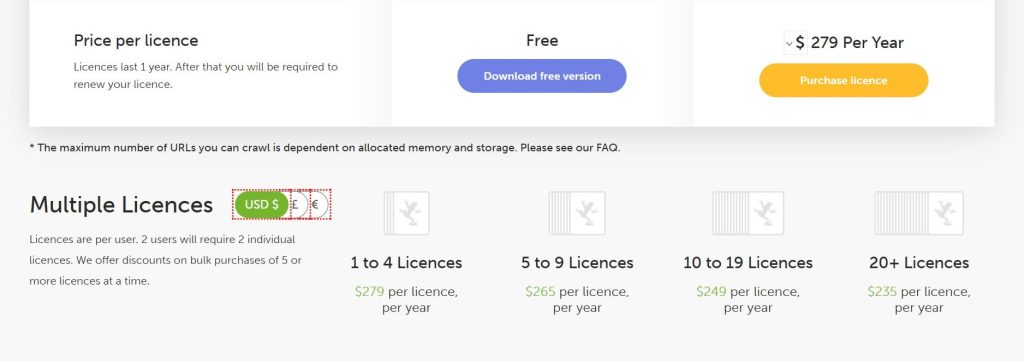
- Paid: $279/year
Reviews
- G2: 4.7 out of 5 stars (184+ reviews)
- Capterra: 4.9 out of 5 stars (132+ reviews)
The most common praise focuses on the value proposition—unlimited crawling at £149/year when competitors charge monthly fees with restrictions. Agencies managing large sites emphasize that it’s the only tool that can handle their crawl volume requirements.
6. SE Ranking – Best for Affordable All-in-One Solution
Best For: Small to mid-sized agencies needing comprehensive SEO features at half the cost of Semrush or Ahrefs
How I Use It: We use SE Ranking for clients with tighter budgets where the full Semrush suite would be overkill. The white-label reports included at every tier make it excellent for smaller agency operations.
Quick Overview
SE Ranking is one of the best value all-in-one SEO platforms for agencies that want strong features without premium pricing. Launched in 2013, it has become a real competitor to Semrush and Ahrefs by offering similar functionality at roughly half the cost.
It includes everything agencies need: rank tracking, website audits, backlink monitoring, competitor analysis, keyword research, and on-page SEO insights—all with reliable data.
Its biggest advantage is flexible pricing. You can choose how often keywords are tracked (daily, every 3 days, or weekly), allowing agencies to control costs based on client priorities. High-priority clients get daily updates, while others can use less frequent tracking.
AI tools like the on-page checker, SERP analyzer, and content assistant are included, replacing the need for extra subscriptions. White-label reporting is also standard on all plans.
With an interface rated 9.4/10 for ease of use, SE Ranking offers the best price-to-feature ratio for agencies handling 5–15 clients.
Key Features
- Keyword rank tracker with flexible frequency options (daily, 3-day, or weekly)
- Website audit identifying technical SEO issues and site health scores
- Backlink checker for monitoring link profiles and discovering opportunities
- Competitor analysis showing competitor keywords, traffic estimates, and rankings
- Keyword research with search volume, difficulty, and related keyword suggestions
- On-Page SEO Checker with AI-powered optimization recommendations
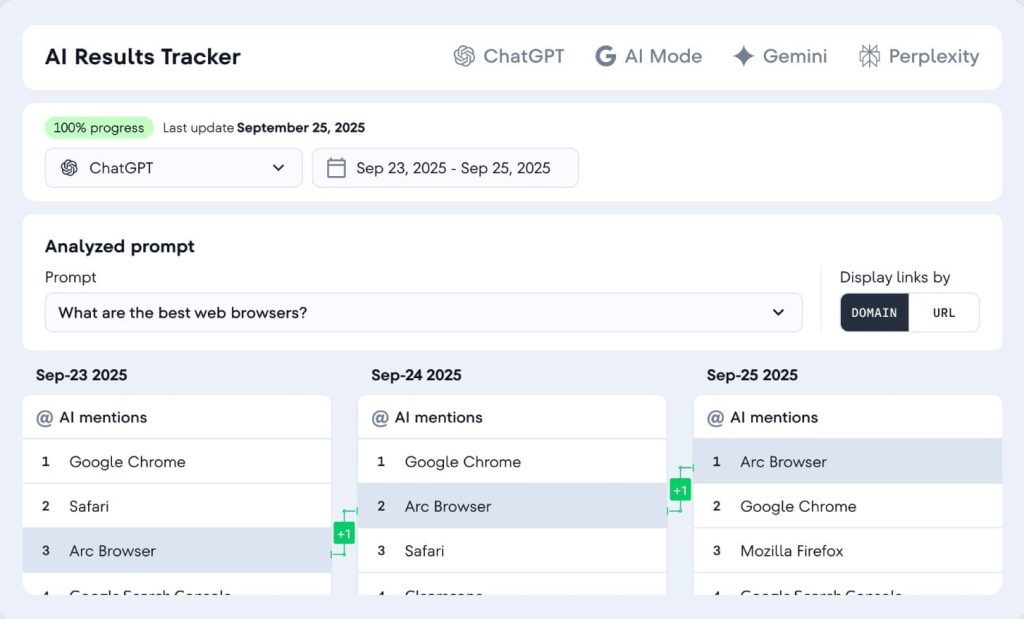
[Image Source: SE Ranking]
Pros
- Most affordable all-in-one option: Starting at $65/month annually, SE Ranking costs about half of Semrush while offering similar core features—saving agencies thousands per year without losing essential functionality.
- AI-powered tools included as standard: Comes with AI writing assistance, on-page SEO checker, and SERP analyzer at no extra cost, unlike competitors that charge additional fees.
- White-label capabilities on all plans: Branded reports, custom dashboards, and client portals are included even in the Essential plan, making it fully client-ready from the start.
- Flexible keyword tracking pricing: Choose daily, 3-day, or weekly tracking to manage costs across different clients based on their monitoring needs.
Cons
- Smaller backlink database than Ahrefs – While adequate for most needs, the link index doesn’t match Ahrefs’ 36 trillion backlinks. For agencies where deep backlink analysis is critical, this limitation matters
- Less comprehensive for PPC and social – Focuses primarily on SEO. While it includes some PPC features, it’s not as robust as Semrush for managing comprehensive digital marketing campaigns
- Newer platform with less brand recognition – Established in 2013 versus Semrush (2008) or Ahrefs (2010), it lacks the market presence of older competitors, though functionality is competitive
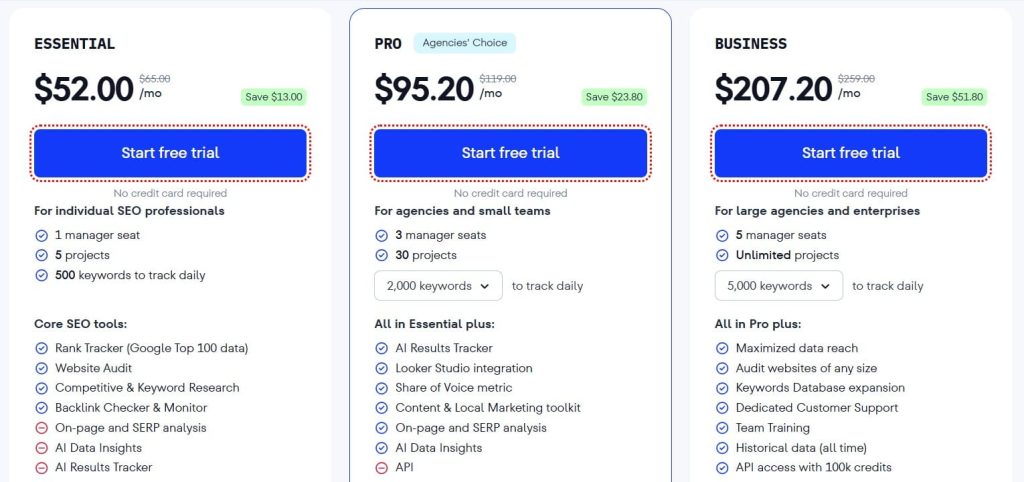
Pricing
- Free trial available
- Essential: $52.00/month
- Pro: $95.20/month
- Business: $207.20/month
Reviews
- G2: 4.7 out of 5 stars (2,330+ reviews)
- Capterra: 4.7 out of 5 stars (296+ reviews)
One verified review captures the sentiment: “SE Ranking offers excellent value for the price. We get all the features we need for client work—rank tracking, audits, and reports—at half what we were paying for Semrush. The interface is actually easier to use too.”
7. Moz Pro – Best for Domain Authority Tracking
Best For: Agencies focusing on local SEO and those who want the most beginner-friendly platform with strong educational resources
How I Use It: I use Moz primarily for Domain Authority benchmarking and local SEO campaigns. The DA metric provides a quick reference point that clients understand, and the local ranking tools are excellent for multi-location businesses.
Quick Overview
Moz Pro, founded in 2004 by Rand Fishkin, is one of the original SEO platforms and is best known for creating Domain Authority (DA), the industry’s most widely used metric for evaluating site strength.
Its biggest advantage for agencies is accessibility—Moz is consistently rated as the easiest major SEO tool to learn, making it ideal for mixed-skill teams and clients who need simple, intuitive reporting.
The platform covers all core SEO functions, including keyword research, rank tracking, site audits, link analysis, and on-page optimization.
It particularly excels in local SEO, with strong local ranking features and Moz Local integration, making it a top choice for agencies serving restaurants, clinics, retailers, and other location-based businesses.
DA remains a helpful 1–100 benchmark for comparing site authority, even though it’s not a Google ranking factor. Moz also offers one of the strongest educational ecosystems, though its slower link index updates and smaller keyword database are notable limitations.
Key Features
- Domain Authority (DA) metric – Industry-standard site authority score on 1-100 scale
- Keyword Explorer with search volume, difficulty, and opportunity scores
- Rank Tracker monitoring keyword positions across locations
- Site Crawl identifying technical SEO issues and on-page problems
- Link Explorer for backlink analysis with 44 trillion links
- Local SEO tools including local rank tracking and Moz Local integration
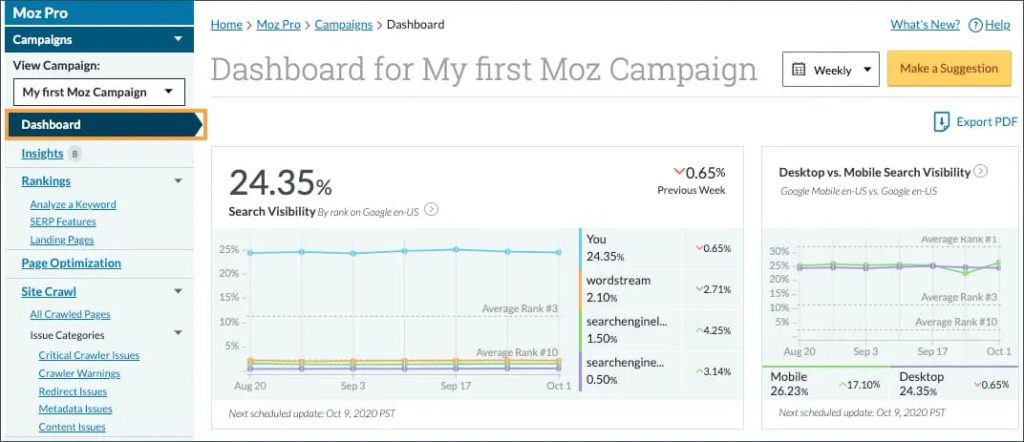
[Image Source: Moz]
Pros
- Trusted Domain Authority metric: DA is the industry-standard authority score widely referenced in SEO. Clients easily understand metrics like “we increased your DA from 25 to 35,” and the score reliably predicts ranking potential.
- Excellent for local SEO: Local ranking tools track positions by geographic area, and Moz Local manages business listings across directories—making it ideal for multi-location clients.
- Most beginner-friendly interface: Rated easiest to learn among major platforms, allowing new team members to become productive within days and reducing training and support needs.
- SERP feature tracking: Monitors visibility in featured snippets, local packs, knowledge panels, and other SERP features, important as traditional organic results occupy less real estate.
Cons
- Smaller link index than competitors – While 44 trillion links sounds large, the index updates slower than Ahrefs’ near-real-time updates. For agencies where backlink monitoring is critical, this lag matters.
- More expensive per feature – At comparable feature levels, Moz costs more than SE Ranking or Mangools while offering less than comprehensive platforms like Semrush.
- Slower data updates – Keyword rankings and backlink data refresh less frequently than Ahrefs or Semrush, making it less suitable for time-sensitive campaigns.
Pricing
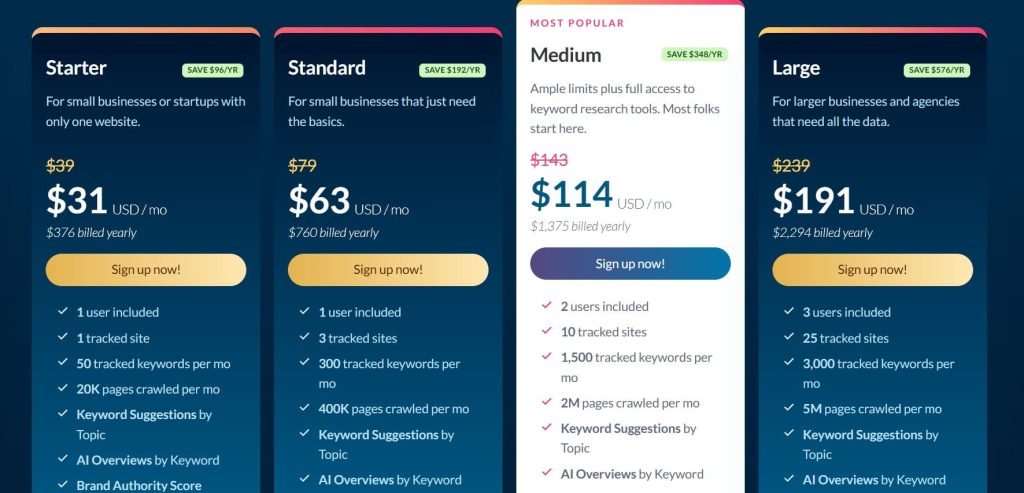
- Starter: $31/month
- Standard: $63/month
- Medium: $114/month
- Large: $191/month
Reviews
- G2: 4.3/5 (605+ reviews)
- Capterra: 4.5/5 (349+ reviews)
One verified agency review states: “Moz Pro is perfect for our team because everyone can use it effectively, from senior strategists to junior coordinators. The learning curve is minimal, and the DA metric gives us a simple way to show progress to clients.”
8. Surfer SEO – Best for Content Optimization
Best For: Agencies focused on content marketing who need data-driven optimization recommendations
How I Use It: I use Surfer for every content brief we create. The Content Editor provides real-time optimization scores as our writers work, ensuring content is properly optimized before publication instead of requiring revisions later.
Quick Overview
Surfer SEO, founded in 2017, is the leading content optimization platform for agencies producing SEO content at scale.
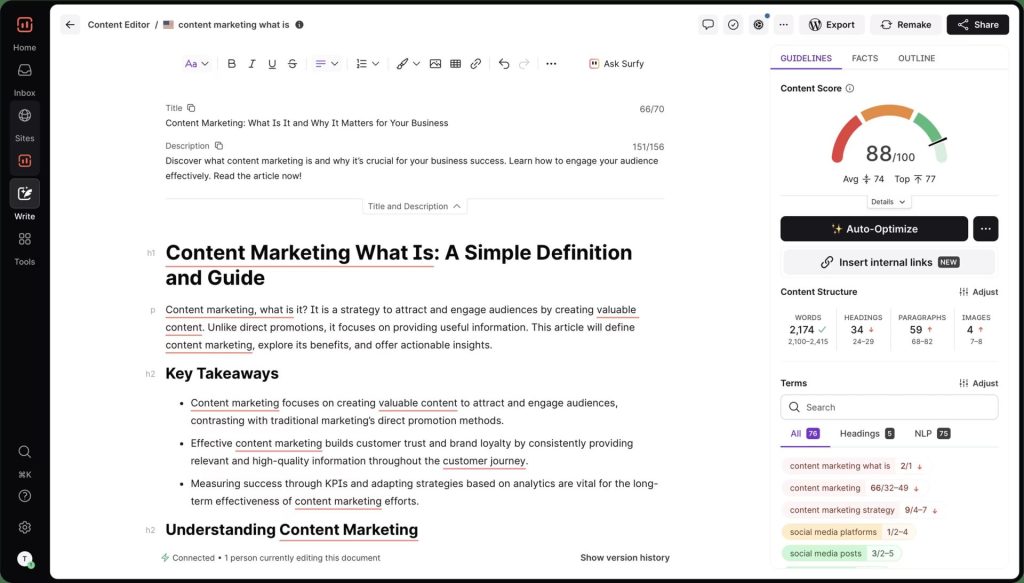
Its standout feature is the Content Editor, which gives real-time optimization scores as you write, analyzing word count, keyword usage, headings, structure, and semantic terms based on top-ranking pages.
Instead of relying on writers’ intuition, agencies get objective, data-backed guidance that ensures consistent quality across teams and clients.
The Content Audit tool helps identify which existing pages need updates and which improvements will have the biggest traffic impact.
Surfer also includes templates to maintain brand voice, making it ideal for teams working with freelancers or producing high-volume content.
The Scale AI plan offers unlimited AI-generated drafts optimized for target keywords, speeding up production while still requiring human refinement.
Compared to tools like Clearscope or MarketMuse, Surfer is more affordable and easier to use. Its main limitation is scope. Surfer focuses solely on content optimization, so agencies need other tools for keyword research, backlinks, and technical SEO.
Key Features
- Content Editor with real-time optimization scores and keyword recommendations
- Content Audit identifying which existing pages need optimization
- SERP Analyzer showing what’s working for top-ranking competitors
- Keyword Research integrated into the content creation workflow
- AI Content Generation on Scale AI plan for automated first drafts
- Brand voice templates ensuring consistent style across all content
[Image Source: SurferSEO
Pros
- Real-time content scoring: The Content Editor provides live optimization scores with actionable recommendations for keywords, content length, headers, images, and semantic terms — removing guesswork from content optimization.
- SERP analysis integration: Surfer analyzes the top 10–50 ranking pages for your target keyword, offering data-driven recommendations based on what actually works in search results.
- Custom brand voice templates: Create templates for brand voice, tone, and style so writers maintain consistency across all content, especially useful when managing multiple writers or freelancers.
- Proven ranking improvements: Implementing Surfer’s recommendations consistently leads to measurable ranking gains, directly linking optimization suggestions to SERP performance.
Cons
- Content-focused only – Surfer doesn’t handle keyword research, backlink analysis, technical SEO, or rank tracking. You’ll need complementary tools for comprehensive SEO work.
- Can encourage over-optimization – Following recommendations too rigidly can result in keyword-stuffed content that reads unnaturally. Requires editorial judgment about when to ignore suggestions.
- No native Microsoft Word integration – Requires using the web editor or Google Docs add-on. Teams preferring Word face workflow friction.
Pricing
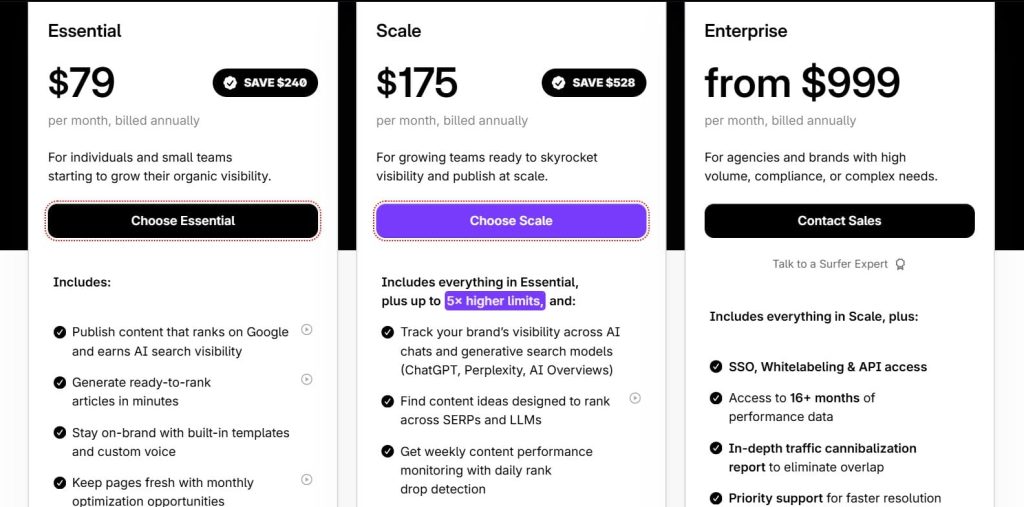
- Essential: $79/month
- Scale: $175/month
- Enterprise: from $999/month
Reviews
- G2: 4.8 out of 5 stars (538+ reviews)
- Capterra: 4.9 out of 5 stars (421+ reviews)
One verified agency review captures the typical experience: “Surfer transformed our content process. Instead of hoping our content ranks, we now have data-driven confidence.
We’ve seen clients’ articles move from page 2 to top 3 positions within weeks of optimization. The ROI justifies the cost easily.”
9. Rank Math – Best WordPress SEO Plugin
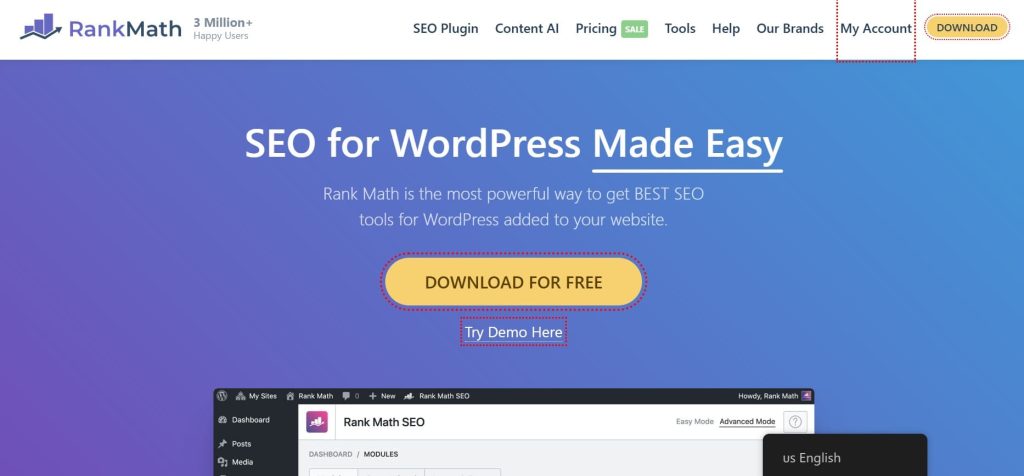
Best For: Agencies managing multiple WordPress client sites who need comprehensive on-page SEO at scale
How I Use It: We use Rank Math on all our WordPress client sites. The Pro plan’s unlimited site license at $59/year is unbeatable value—we manage 20+ sites with one subscription instead of paying per site like competitors charge.
Quick Overview
Rank Math SEO is one of the most feature-rich WordPress SEO plugins, offering more capabilities than competitors like Yoast SEO, often at no cost. Launched in 2018, it grew quickly by delivering premium-level features for free.
For agencies, the biggest advantage is the Pro plan’s unlimited site license. At 59 dollars per year, you can install Rank Math Pro on every client site you manage, unlike Yoast Premium’s per-site pricing or AIOSEO’s 10-site limit.
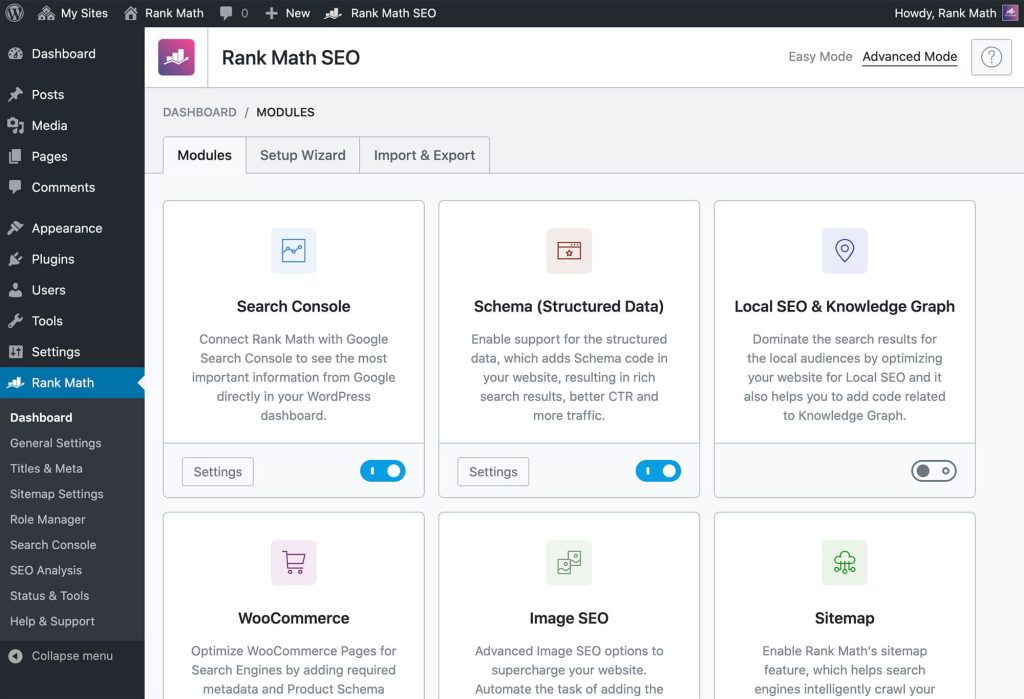
The plugin covers all essential on-page SEO including meta tags, schema markup with more than 40 types, XML sitemaps, breadcrumbs, redirects, 404 monitoring, and local SEO. The free version includes most features, while Pro adds advanced schema, content AI tools, and deeper analytics.
Its analytics dashboard pulls Google Search Console and Google Analytics data into WordPress, making client reporting easier.
Rank Math also supports instant indexing through Google and Bing APIs and offers a lightweight codebase that helps maintain fast site speed. Overall, it delivers stronger value than Yoast or AIOSEO.
Key Features
- On-page SEO analysis with real-time scoring and recommendations
- Schema markup with 40+ types and visual builder (no coding required)
- Built-in analytics showing Search Console and Analytics data in WordPress
- Instant indexing API for immediate Google and Bing submission
- Local SEO module with Google Business Profile integration
- Content AI integration for optimization suggestions powered by AI
[Image Source: Rank Math]
Pros
- Unlimited sites at $59/year: The Pro plan covers unlimited WordPress installations for just $59 annually, saving agencies thousands compared to per-site licensing—ideal for managing 10, 20, or 50 client sites.
- Most feature-rich WordPress plugin: Rank Math offers more built-in features than competitors, even in the free version, including schema markup, local SEO, redirects, 404 monitoring, and analytics.
- Comprehensive schema implementation: With 40+ schema types and a visual builder, structured data can be implemented without coding, providing enterprise-level capabilities for rich search results.
- Built-in analytics dashboard: Access Search Console and Analytics data directly in WordPress, viewing keyword performance, traffic trends, and top pages from the admin panel, saving time across multiple client sites.
Cons
- WordPress-only limitation – Only works on WordPress sites. Agencies managing clients on Shopify, Wix, or custom platforms need different tools.
- Pro features require paid plan – While the free version is powerful, advanced schema, Content AI, and some analytics require Pro subscription.
- Learning curve for advanced features – The extensive feature set can overwhelm users initially. Schema implementation requires understanding structured data concepts.
Pricing
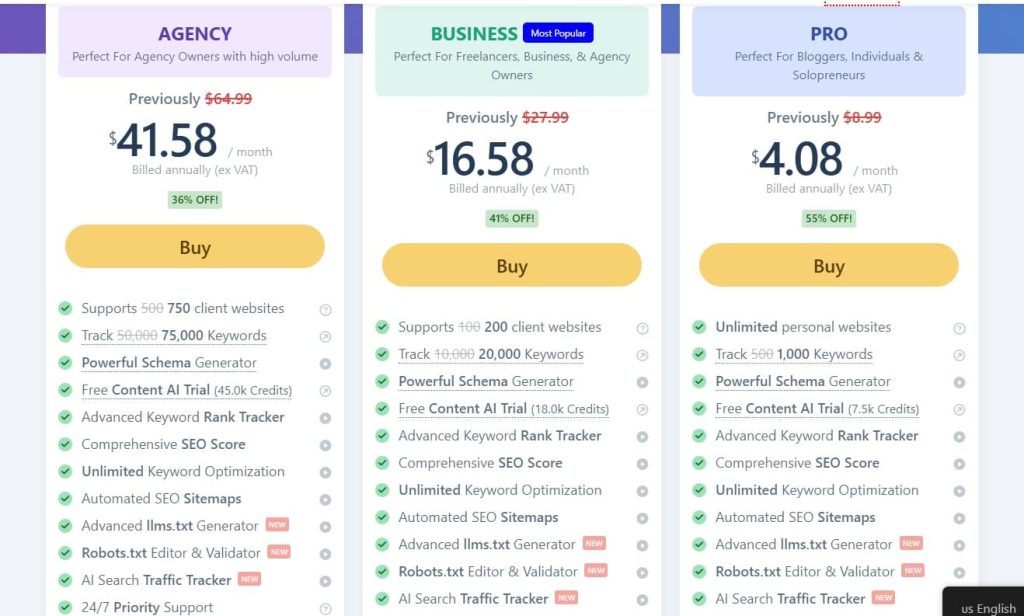
- Pro: $4.08/month
- Business: $16.58/month
- Agency: $41.58/month
Reviews
- G2: 4.8 out of 5 stars (111+ reviews)
- Capterra: 4.5 out of 5 stars (52+ reviews)
Users particularly appreciate the schema markup capabilities, with many noting they no longer need separate schema plugins. The instant indexing feature receives positive feedback for helping new content rank faster.
10. Sitechecker – Best for Project Monitoring
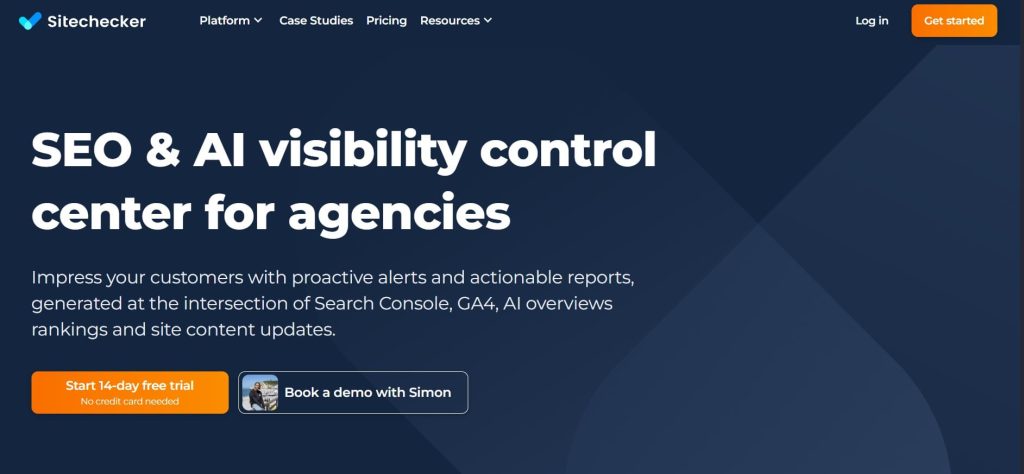
Best For: Agencies wanting a unified dashboard for all client projects with AI search visibility tracking included
How I Use It: We use Sitechecker to monitor all client sites from a single dashboard. The LLM tracking feature shows how clients appear in ChatGPT and Google AI Overviews, which is becoming increasingly important as search evolves.
Quick Overview
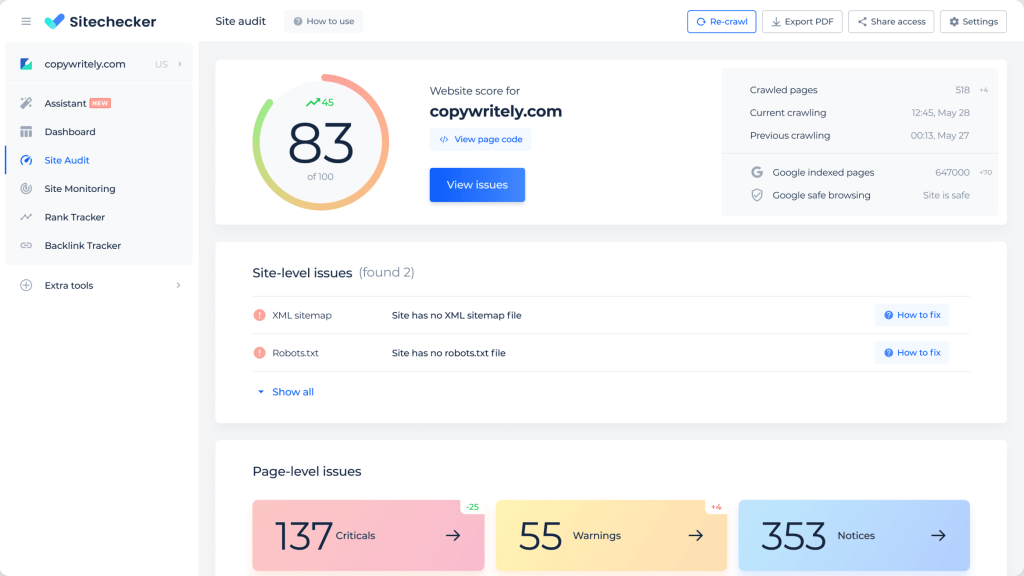
Sitechecker is an all-in-one SEO monitoring platform built for agencies managing multiple client projects. Founded in 2015, it combines traditional SEO tracking with advanced AI search visibility monitoring.
Its unified dashboard displays all client projects side by side with customizable columns, showing rankings, traffic, issues, and performance metrics at a glance. This makes it easy to spot problems and opportunities across your portfolio.
Sitechecker stands out with built-in LLM visibility tracking, monitoring how client sites appear in AI-powered search results from ChatGPT, Perplexity, Claude, and Google AI Overviews.
Automated site audits allow custom crawl frequencies, and issues are prioritized by severity. Content monitoring tracks additions, modifications, removals, and indexability status.
All plans include unlimited users, making team collaboration cost-effective. Pricing is transparent and project-based, scaling predictably as your agency grows. With these features, Sitechecker provides agencies a powerful, efficient, and future-ready SEO management solution.
Key Features
- Unified dashboard displaying all client projects with customizable metrics
- LLM visibility tracking for ChatGPT, Perplexity, Claude, and Google AI Overviews
- Automated site audits with flexible crawl frequency per project
- Content change monitoring tracking all updates and indexability status
- Rank tracking across multiple locations and search engines
- Backlink monitoring with new and lost link notifications
[Image Source: Sitechecker]
Pros
- True unified dashboard: View all client projects side-by-side with customizable columns showing the metrics that matter most, eliminating the need to log into separate accounts and saving time when managing 10+ clients.
- LLM visibility tracking included: Monitor how client sites appear in AI-driven search results from ChatGPT, Perplexity, Claude, and Google AI Overviews—standard with Sitechecker while competitors charge extra.
- Flexible crawl frequency: Set custom audit schedules per project; critical sites can be crawled daily while smaller clients run weekly audits, optimizing crawl budgets and prioritizing resources effectively.
- Unlimited users on all plans: Add team members at no extra cost, making collaboration affordable for teams of any size, unlike competitors charging $40–80 per user.
Cons
- Smaller brand recognition – Less established than Semrush, Ahrefs, or Moz, which may concern agencies wanting recognizable tools.
- Newer platform – Founded in 2015 versus competitors from 2004-2010, resulting in a less extensive feature set for specialized needs.
- Limited third-party integrations – Fewer integrations compared to Agency Analytics’ 80+ connections. You can’t pull in social media or PPC data as easily.
Pricing
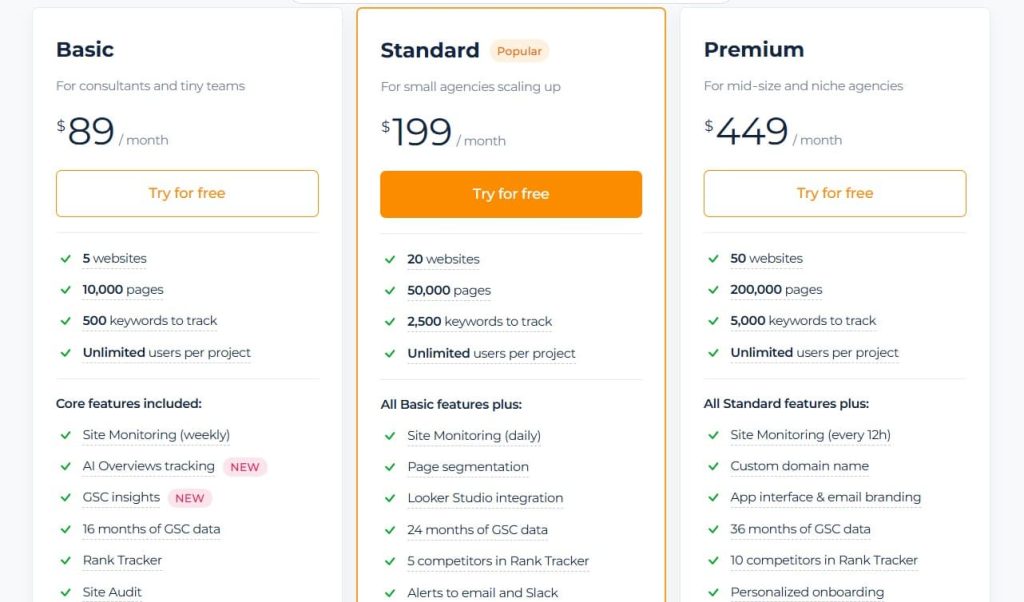
- 14-day free trial
- Basic: $89/month
- Standard: $199/month
- Premium: $449/month
Reviews
- G2: 4.6 out of 5 stars (127+ reviews)
- Capterra: 4.6 out of 5 stars (365+ reviews)
Users particularly appreciate the unlimited team members benefit, with agencies noting significant cost savings compared to per-user pricing models. The content monitoring feature receives praise for catching issues before they impact rankings.
11. Mangools – Best Budget-Friendly Toolkit
Best For: Freelancers and small agencies needing essential SEO tools with the most beautiful, intuitive interface in the industry
How I Use It: We use Mangools KWFinder for initial keyword research with new clients. The interface is so intuitive that even clients understand it when we share screens during strategy calls.
Quick Overview
Mangools is a budget-friendly SEO toolkit that combines simplicity, beautiful design, and essential functionality. Founded in 2014, it has earned a loyal following among freelancers and small agencies seeking reliable SEO tools at an affordable price.
The suite includes five integrated tools: KWFinder for keyword research, SERPChecker for SERP analysis, SERPWatcher for rank tracking, LinkMiner for backlink analysis, and SiteProfiler for competitor research. Bundling all tools into one subscription offers better value than platforms that charge separately.
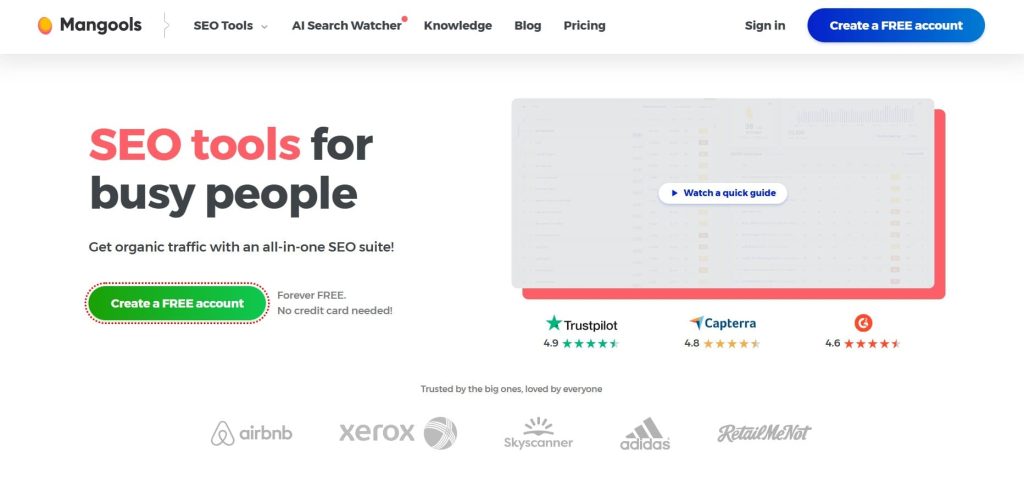
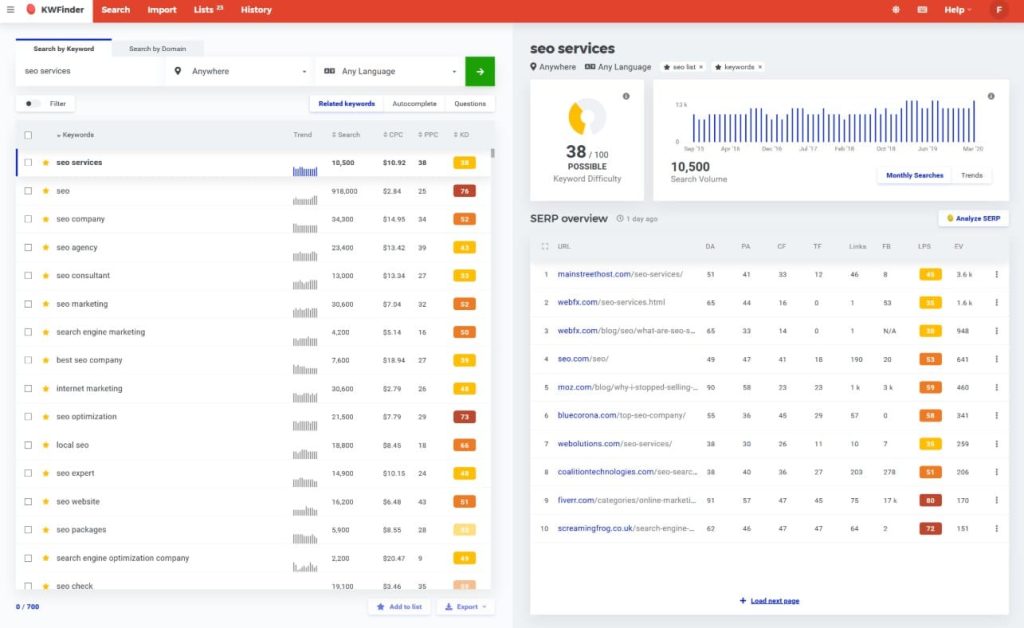
Mangools stands out for its intuitive, clean interface. New users become productive within hours, making onboarding and team training quick and easy. KWFinder highlights low-competition keywords with solid search volume, while SERPChecker provides domain and page authority, link metrics, and social signals for top-ranking pages.
The Agency plan at 79 dollars per month includes generous limits suitable for small agencies. While its database is smaller than premium tools, Mangools delivers reliable core SEO insights at a fraction of the cost.
Key Features
- KWFinder for keyword research with accurate difficulty scores
- SERPChecker analyzing ranking difficulty and SERP features
- SERPWatcher for daily rank tracking with visual performance charts
- LinkMiner for backlink analysis and link prospecting
- SiteProfiler showing competitor authority and citation flow metrics
[Image Source: Mangools]
Pros
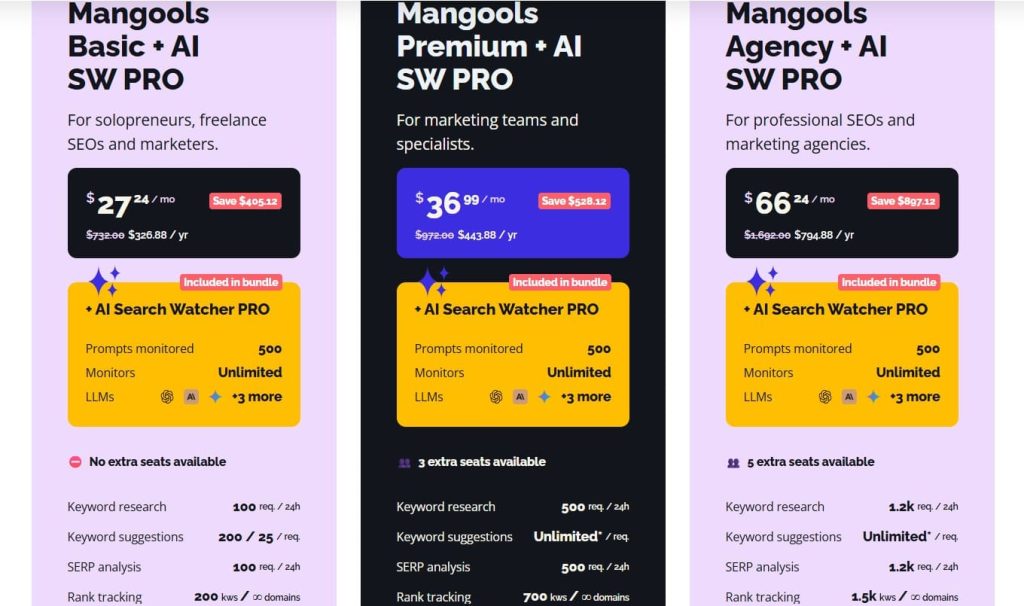
- Extremely affordable entry point: Starting at just $29/month for the Basic plan, Mangools gives new agencies and freelancers access to five complete SEO tools for less than competitors charge for a single platform.
- Most beautiful interface in SEO: The clean, modern design is highly praised for being visually appealing and intuitive, making complex data approachable for clients and junior team members.
- Accurate keyword difficulty scores: KWFinder’s difficulty metric is considered one of the most reliable, with a color-coded system (green for easy, orange for medium, red for hard) that simplifies keyword selection.
- No learning curve: Intuitive design allows users to become productive immediately, minimizing training time and delivering fast value to teams.
Cons
- Limited features for advanced needs – Lacks advanced capabilities like technical site audits, content optimization, or API access that larger agencies require.
- Smaller databases – The keyword and backlink databases are smaller than Semrush or Ahrefs, potentially missing some long-tail keywords or niche backlinks.
- Usage limits on Agency plan – Even the top-tier plan has daily lookup limits (1,200 keywords) that high-volume agencies may exceed.
Pricing
- Free
- Basic: $27.24/month
- Premium: $36.99/month
- Agency: $66.24/month
- 48-hour money-back guarantee
Reviews
- G2: 4.7 out of 5 stars (95+ reviews)
- Capterra: 4.8 out of 5 stars (91+ reviews)
One verified user review captures the sentiment: “Mangools is the best-designed SEO tool I’ve ever used. The interface is so clean and intuitive that I actually enjoy using it, which is rare for SEO software. For the price, you can’t find better value.”
12. Google Analytics 4 – Best for Free Website Analytics
Best For: Every agency — essential free platform for understanding website traffic, user behavior, and conversion tracking
How I Use It: We connect GA4 to every client site on day one. The organic traffic data, user engagement metrics, and conversion tracking provide the foundation for measuring SEO success and proving ROI.
Quick Overview
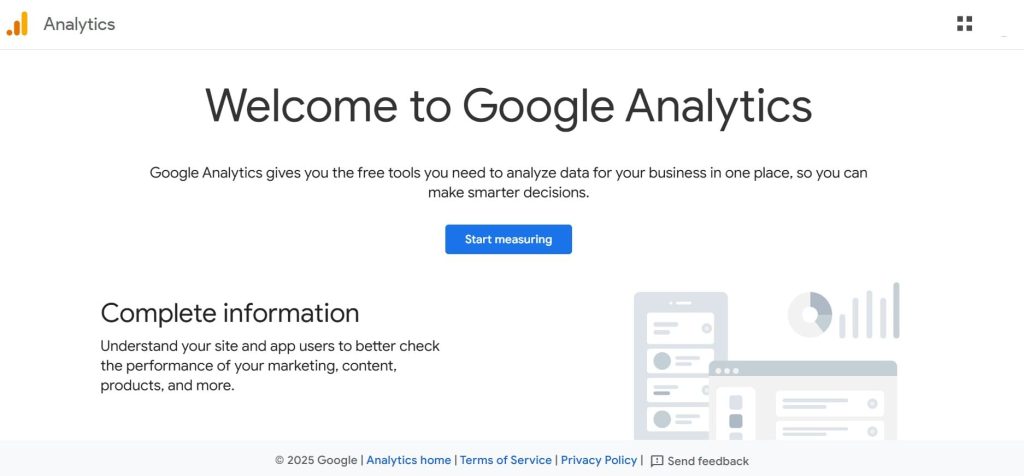
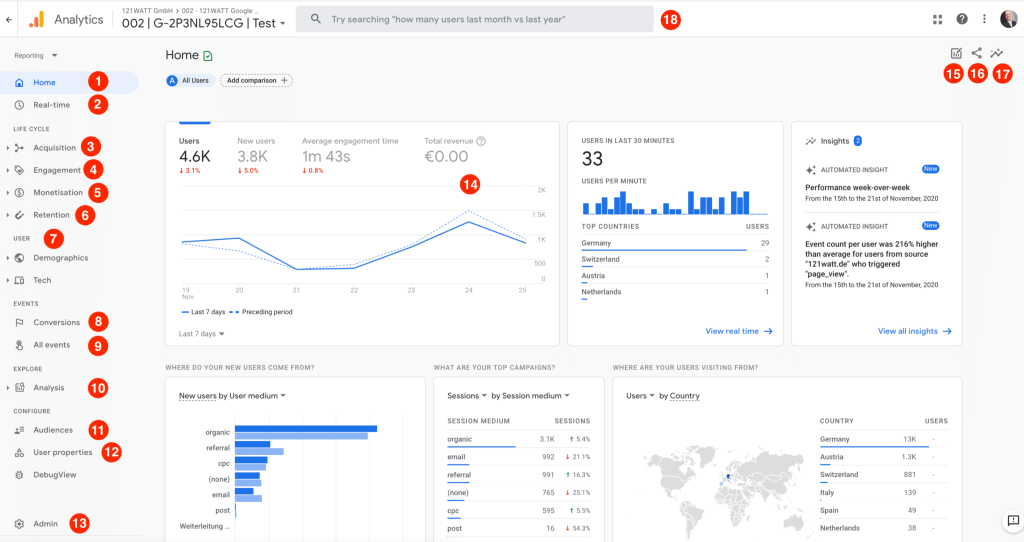
Google Analytics 4 (GA4) is Google’s latest analytics platform, tracking user interactions across websites and apps. Released in 2020 and mandatory since July 2023, it replaces Universal Analytics with an event-based tracking model.
For agencies, GA4 is essential infrastructure. It provides traffic data, user behavior insights, and conversion metrics that show whether SEO efforts are driving real business results. Without it, proving ROI is difficult.
The event-based model tracks actions like page views, clicks, video plays, form submissions, and purchases, giving granular insight into user interactions beyond broad visit patterns.
GA4 also includes AI-powered insights that automatically highlight anomalies, trends, and predictions, helping agencies identify issues or opportunities faster.
Native integrations with Google Ads, Search Console, and BigQuery allow analysis of the entire customer journey, linking SEO performance to business outcomes. While there is a learning curve, mastering GA4 is crucial since Universal Analytics no longer collects data.
Key Features
- Event-based tracking for granular user action monitoring
- AI-powered insights automatically detecting anomalies and trends
- Conversion tracking measuring specific business goals and outcomes
- Audience segmentation analyzing user groups by demographics and behavior
- Cross-platform tracking following users across website and mobile app
- Native Google integrations with Search Console, Ads, and BigQuery
[Image Source: Ryte]
Pros
- Deep user behavior insights: Track complete user journeys from first touchpoint through conversion, seeing which pages users visit, how long they engage, what actions they take, and where they drop off—informing content strategy and site optimization.
- AI-powered predictions: Machine learning identifies trends, detects anomalies, and predicts future behavior automatically, providing insights like “users who viewed product pages are 40% likely to convert within 7 days” without manual analysis.
- Cross-device tracking: Follow users across desktop, mobile, tablet, and apps when logged into Google accounts, revealing complete user journeys that single-device tracking misses.
Cons
- Steep learning curve – The interface and concepts differ significantly from Universal Analytics. Agencies face weeks of learning before feeling comfortable, and training clients on GA4 takes time.
- Requires proper setup – Out-of-the-box tracking misses crucial events. Achieving useful data requires configuring custom events, conversions, and enhanced measurements.
- Data sampling on large sites – High-traffic sites may experience data sampling in reports, reducing accuracy for detailed analysis.
Pricing
- Free with limits
- Google Analytics 360: $50,000/year
Reviews
N/A
13. Search Atlas – Best for SEO Automation
Best For: Forward-thinking agencies wanting to automate repetitive SEO tasks and track visibility in AI-powered search results
How I Use It: We’re testing Search Atlas for its OTTO AI agent that can deploy fixes and optimizations autonomously. The LLM visibility tracking shows how clients appear in ChatGPT and Google AI Overviews, which clients are increasingly asking about.
Quick Overview
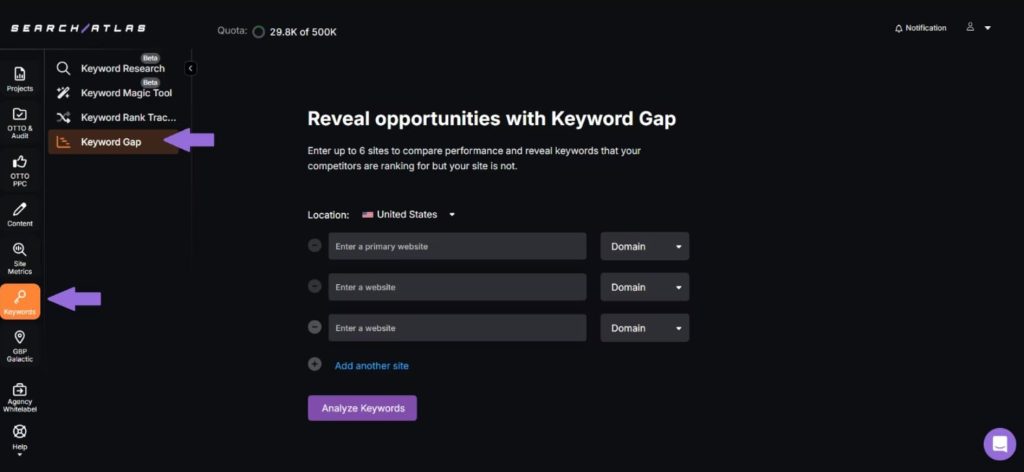
Search Atlas is an AI-powered SEO automation platform designed to replace more than a dozen traditional tools with one intelligent system. Its standout feature, OTTO SEO, is the first AI agent that executes tasks autonomously, not merely suggesting them.
Founded by the Search Atlas Group, a thirty million dollar revenue company with 220 employees, the platform envisions AI handling tactical SEO while humans focus on strategy. OTTO deploys technical fixes, optimizes content, builds links, and publishes changes directly with minimal human intervention.
The LLM Visibility feature monitors how clients appear in AI-generated results from ChatGPT, Claude, Gemini, and Google AI Overviews. Traditional SEO tools are included: keyword research, rank tracking, audits, backlink analysis, local SEO, and white-label reporting.
For agencies, Search Atlas consolidates automation and reporting into one platform. It promises significant cost savings and operational efficiency, though adoption requires trusting AI-driven SEO trends. Early users are investing in emerging capabilities rather than proven long-term results.
Key Features
- OTTO AI SEO agent for autonomous execution of SEO tasks
- LLM visibility tracking across ChatGPT, Claude, Gemini, and Google AI Overviews
- Automated technical fixes deployed directly to websites
- Content automation with AI-powered writing and optimization
- Link building automation for outreach and placement
- White-label dashboards for client reporting and management
[Image Source: Search Atlas]
Pros
- First true AI SEO agent: OTTO goes beyond suggestions to autonomously deploy fixes, optimize content, build links, and publish changes, saving significant time across client portfolios.
- Comprehensive automation: Automates entire SEO workflows from audits to fixes, content, and link building, reducing the manual labor that makes SEO services costly.
- Built for AI search (GEO/LLM): Prioritizes Generative Engine Optimization and LLM visibility tracking, positioning agencies ahead as search shifts toward AI-driven answers.
- One platform replaces 12+ tools: Consolidates SEO, content, AI visibility, local SEO, reporting, and Google Ads management, offering compelling ROI by replacing multiple subscriptions.
Cons
- Newer platform with limited traction – Less market presence than established tools means fewer proven case studies and user reviews to validate claims.
- AI automation requires trust and oversight – Autonomous changes to client sites require confidence in the AI’s decisions. Mistakes could damage client rankings, requiring careful monitoring initially.
- Learning curve for AI capabilities – Effectively training and managing AI agents requires understanding how to set parameters, review outputs, and override when necessary.
Pricing
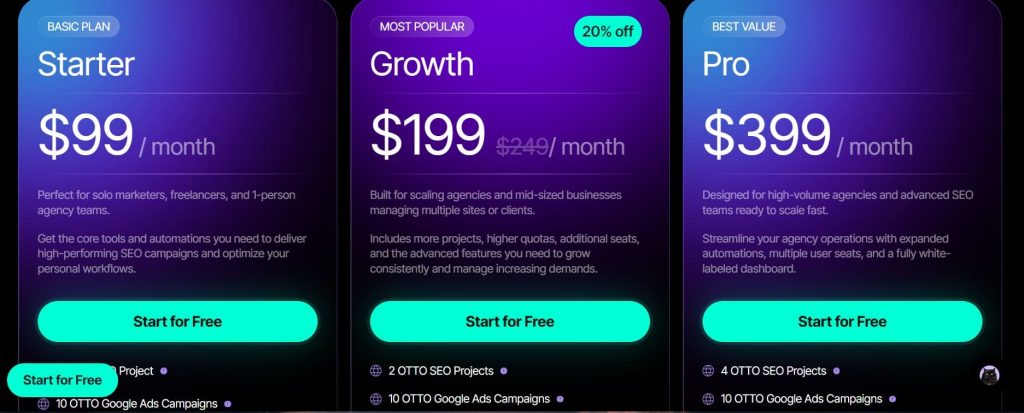
- 7-day free trial
- Starter: $99/month
- Growth: $199/mont
- Pro: $399/month
Reviews
- G2: 4.7 out of 5 stars (99+ reviews)
- Capterra: 4.8 out of 5 stars (67+ reviews)
Users particularly interested in the platform tend to be forward-thinking agencies looking to differentiate their services with AI capabilities. The consolidation of multiple tools into one platform receives positive feedback when it works smoothly.
14. WebCEO – Best for White-Label Platform
Best For: Agencies wanting to host a fully white-labeled SEO platform on their own domain as if they developed it themselves
How I Use It: We considered WebCEO for its true white-label capability where the entire platform can be hosted on your custom subdomain with your branding. The lead generation widget is particularly useful for capturing prospects through free site audits.
Quick Overview
WebCEO is a comprehensive white-label SEO platform built for agencies that want to present SEO tools as their own proprietary software. Founded in 1998, it has evolved through decades of search algorithm changes while remaining actively developed.
Its defining feature is full white-labeling, allowing you to host the entire interface on a custom domain, fully branded. Clients log in to what appears to be your agency’s platform rather than third-party software, providing a level of branding control that most competitors cannot match.
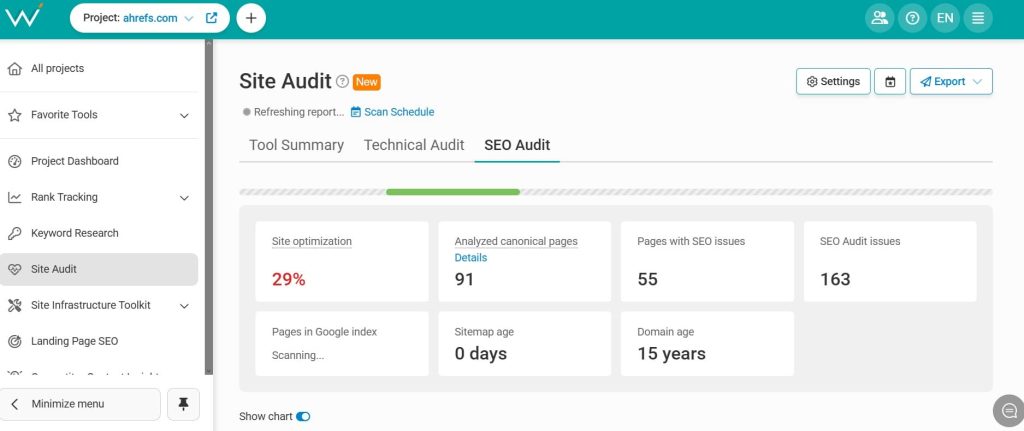
WebCEO includes over ninety pre-built SEO reports covering technical audits, keyword rankings, backlink analysis, competitor research, and social engagement monitoring.
Reports are customizable and can be automatically emailed to clients branded with your logo and styling, streamlining reporting workflows for agencies.
The platform integrates with major data sources such as Majestic, Moz, Google Analytics, Search Console, PageSpeed Insights, Google Business Profile, Google Ads, Pinterest, and Facebook.
API access allows feeding data into custom CRMs or portals. While the interface feels dated, its white-label capabilities make it highly valuable for agencies prioritizing branding.
Key Features
- 90+ SEO reports covering technical audits, rankings, backlinks, and competitor analysis
- True white-label hosting on your custom domain with complete branding
- Lead generation widget for free audits that capture prospect information
- Automated scheduling for reports, audits, backlinks, and social monitoring
- Free integrations with Majestic, Moz, Google Analytics, Search Console, and more
- API access with dedicated support for custom integrations
Pros
- Most comprehensive white-label solution: Host the entire platform on your domain (seo.youragency.com) with full branding control.
Clients see your logo, colors, and agency name throughout, making it appear as your proprietary software—exceeding most competitors’ white-label options. - Built-in lead generation tools: The free audit widget automatically attracts prospects to your website. Visitors enter their URL, receive an instant audit, and you capture their contact details. On Agency Unlimited, unlimited audits at $0.49 each make this cost-effective.
- 90+ pre-built reports: Access a comprehensive report library covering every SEO aspect. Customize professionally designed reports with your branding and schedule automatic delivery, eliminating the need to build reports from scratch for each client.
Cons
- Interface feels dated – The design hasn’t evolved with modern platforms. While functional, it lacks the polish and intuitive feel of tools like Semrush or Ahrefs.
- Less intuitive navigation – Finding specific features requires more clicks than competitors. The learning curve is steeper due to interface complexity.
- Smaller brand recognition – Less market presence than major competitors may concern agencies wanting recognizable tool names.
Pricing
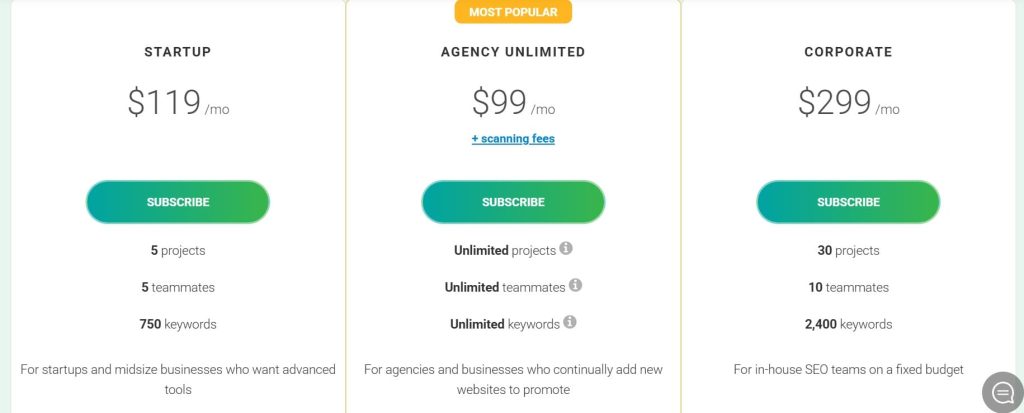
- 14-day free trial
- Agency Unlimited: $99/month
- Startup: $119/month
- Corporate: $299/month
Reviews
- G2: 4.7 out of 5 stars (166+ reviews)
- Capterra: 4.8 out of 5 stars (74+ reviews)
One verified agency review states: “WebCEO’s white-label solution lets us present SEO tools as our own platform. Clients have no idea they’re using third-party software — it’s completely branded as our agency’s proprietary system. The lead generation widget has captured dozens of qualified prospects.”
15. AIOSEO – Best for WordPress Team Management
Best For: Agencies managing WordPress client sites who need team access controls and comprehensive on-page SEO
How I Use It: We use AIOSEO on select WordPress client sites where the Access Control feature shines — we can give writers access to SEO tools without granting full admin permissions, maintaining security while enabling optimization.
Quick Overview
AIOSEO, or All In One SEO, is a comprehensive WordPress SEO plugin built for agencies managing multiple client sites with team collaboration needs. Founded in 2007, it has over three million active installations and decades of trusted development.
Its standout feature is the Access Control system, which assigns specific SEO roles to different users. Writers can use Focus Keyphrase and Content Analysis tools without accessing global settings. Clients view analytics safely, preventing accidental changes, which is essential for managing teams with varying skill levels efficiently.
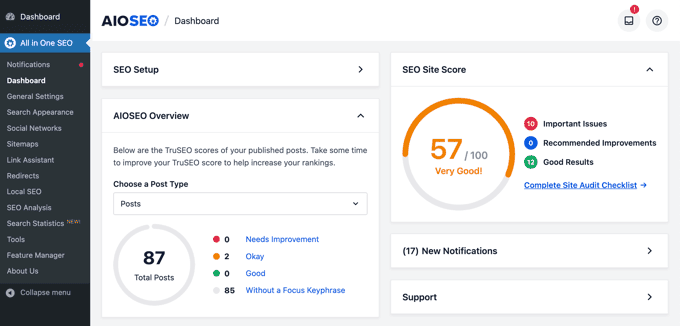
The TruSEO Score evaluates pages in real time across twenty plus factors, including keywords, meta descriptions, links, content length, images, and schema markup.
Unlike basic checklists, it assesses actual implementation quality, helping writers produce fully optimized content without constant SEO oversight or supervision.
AIOSEO Pro’s unlimited site license at ninety-nine dollars sixty cents per year allows installation on every WordPress client site without per-site fees.
Essential SEO features, multisite support, and analytics integration make it ideal for agencies seeking scalable, predictable, and team-friendly solutions.
Key Features
- Access Control with granular user roles for team and client management
- TruSEO Score providing real-time comprehensive page analysis
- Schema markup for articles, products, events, recipes, and more
- WordPress multisite support for managing multiple sites centrally
- Local business SEO with Google Business Profile integration
- WooCommerce SEO optimized for e-commerce sites
[Image Source: wpbeginner]
Pros
- Best for WordPress agencies: Built specifically for agencies managing multiple WordPress client sites with team workflows. The Access Control feature enables team optimization while maintaining security.
- TruSEO real-time scoring: Evaluates pages across 20+ factors beyond keyword presence, including keyword placement quality, readability, schema implementation, and link structure, ensuring consistent quality across large content teams.
- Access control for teams: Assign SEO roles to writers, editors, developers, and clients. Writers can use Focus Keyphrase tools but not schema settings, while clients can view analytics without changing configurations, enabling safe collaboration.
- WordPress multisite support: Manage all client sites from a central dashboard with network-level settings, ideal for agencies handling 20+ WordPress installations.
Cons
- WordPress-only limitation – Only works on WordPress sites. Agencies managing clients on Shopify, Wix, Webflow, or custom platforms need different solutions.
- Some features require higher tiers – While the free version is functional, advanced features like local SEO, WooCommerce optimization, and full analytics require paid plans.
- Learning curve for team controls – Setting up granular access controls and roles requires understanding WordPress user permissions, which can be complex initially.
Pricing
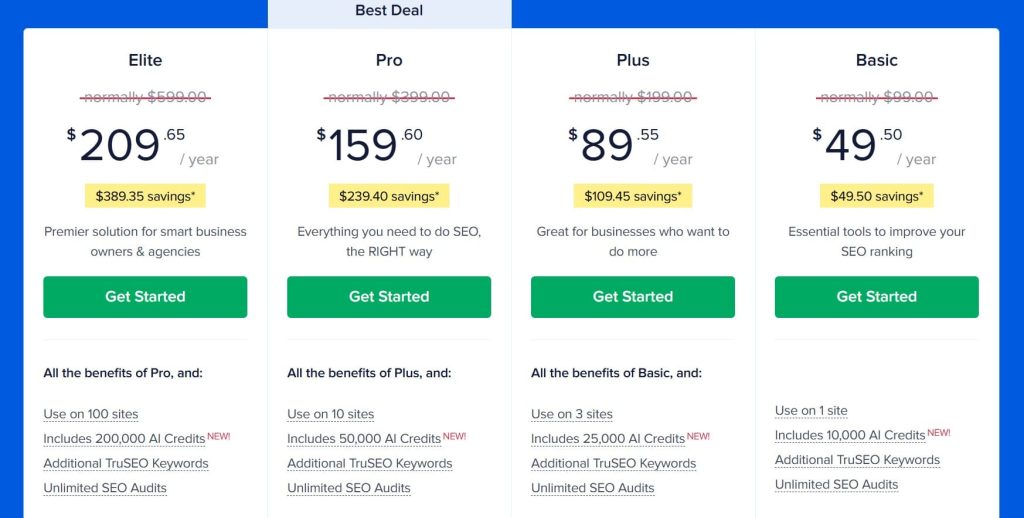
- Basic: $49.50/year
- Plus: $89.55/year
- Pro: $159.60/year
- Elite: $209.65/year
Reviews
G2: 4.8 out of 5 stars (187+ reviews)
WordPress developers particularly value the multisite support for managing large client portfolios. The TruSEO real-time scoring helps maintain consistent quality across distributed teams of varying skill levels.
Conclusion: Best SEO Tools for Agencies?
Choosing the right SEO platform depends on your agency’s priorities, budget, and client needs. For all-in-one solutions, Semrush and Ahrefs cover every aspect of SEO, with Semrush excelling for diverse client services and Ahrefs leading in backlink and competitor research.
Budget-conscious agencies will find SE Ranking, Mangools, and Serpstat deliver essential features at affordable prices without sacrificing reliability. For agencies focused on client reporting and branding, WebCEO and AgencyAnalytics offer robust white-label capabilities and lead generation tools.
WordPress-focused teams benefit from Rank Math SEO or AIOSEO for comprehensive site management, while technical SEO specialists rely on Screaming Frog paired with Google Search Console.
Content-heavy operations thrive with Surfer SEO, local SEO campaigns excel with Moz Pro, and competitor intelligence is strongest with SpyFu.
Finally, forward-looking agencies can explore AI-driven platforms like Search Atlas or Sitechecker to gain early advantages in autonomous SEO and AI visibility tracking. The best tool always aligns with your agency’s goals and growth strategy.
My Recommendation for Different Agency Stages
Just Starting (1 – 5 Clients)
- Mangools ($66.24/month) for SEO basics
- Rank Math ($41.58/month) for WordPress clients
- Google Search Console + Analytics 4 (free)
- Total: ~$107.82/month
Growing Agency (5 – 15 Clients)
- SE Ranking ($95.20/month) for all-in-one SEO
- AgencyAnalytics ($125.30/month) for client reporting
- Screaming Frog ($279/year) for technical audits
- Surfer SEO ($175/month) if content-focused
- Total: ~$674.5/month
Established Agency (15 – 40 Clients)
- Semrush Business ($455.67/month) with Agency Growth Kit
- AgencyAnalytics Pro ($244.30/month) for reporting
- Screaming Frog ($279/year) for technical work
- Surfer SEO Scale ($999/month) for content production
- Total: ~$1,977.97/month
Enterprise Agency (40+ Clients)
- Semrush Business ($455.67/month) or Ahrefs Advanced ($449/month)
- AgencyAnalytics Enterprise (custom) for reporting
- Conductor (custom) if managing Fortune 500 clients
- Specialized tools as needed
- Total: Custom based on scale
The right stack evolves as your agency grows. Start with essentials, add specialized tools as specific needs emerge, and always prioritize tools that directly impact client results and retention.