Managing SEO at scale should not feel like a constant battle against spreadsheets, manual checks, and scattered tools.
But without the right automation in place, that is exactly what happens. Hours are lost to rank tracking, site audits, backlink monitoring, report generation, and content scheduling, with little time left for actual strategy or growth.
Over the last 8 years at OneLittleWeb, I have tested more than 21 SEO automation tools while managing campaigns for 1,200+ clients across the US, UK, Canada, and Australia.
When we onboarded a B2C branding SaaS client operating across multiple markets, automation played a critical role from day one.
We used SEO agency tools to manage technical audits, rank tracking, and monthly SEO reporting at scale. These efforts ultimately drove a 326% increase in organic traffic within 12 months!
As for this blog, here I am breaking down the 14 best SEO automation tools we rely on in 2026. These platforms have been tested in real client campaigns and cover everything from reporting and technical audits to link building, rank tracking, and content optimization.
Here is how I evaluated each tool:
- Workflow efficiency and time save
- Data accuracy and crawl quality
- Technical SEO
- Scheduling and real-time monitoring
- Report generation and client deliverables
- API access and integration
- Scalability and data volume
- Pricing and ROI
- Ease of use and learning curve
Let’s get into the tools that actually work, not just the ones with the loudest marketing.
What are SEO Automation Tools?
SEO automation tools handle repetitive SEO tasks without manual input, reducing reliance on spreadsheets and disconnected marketing tools.
They automatically track rankings, perform technical audit checks, monitor backlinks, generate reports, and schedule content updates so you can focus on strategy instead of data entry.
These tools benefit agencies, in-house marketing teams, and solo consultants managing multiple sites or clients, especially those relying on AI SEO tools and scalable white label SEO tools to streamline operations.
Instead of spending hours pulling reports from different platforms or manually checking keyword positions, SEO automation tools support faster keyword research, ongoing competitor analysis, and smoother content optimization workflows.
The business value is simple: automation tools turn hours of manual work into minutes of review time. This allows you to manage more clients, scale campaigns faster, and catch technical or ranking issues early, before they impact performance.
What to Look for in an SEO Automation Tool
Here’s what separates basic automation from tools that actually scale your workflow:
Automation Depth and Workflow Coverage
When I evaluate a tool, I look for one that automates complete workflows, not just individual tasks. I test whether it can handle scheduled crawls with JavaScript rendering, automated rank tracking with SERP feature detection, backlink monitoring with anchor text analysis, and report generation without me having to trigger anything manually.
Technical SEO and Data Accuracy
In my experience, strong automation tools provide accurate crawl diagnostics. I check if they detect redirect chains, orphaned pages, canonicalization conflicts, structured data errors, and Core Web Vitals issues.
For rank tracking, I pay attention to tools that handle location-based tracking, device segmentation, and SERP volatility alerts. I’ve found that inaccurate data from poorly configured crawlers or keyword trackers wastes a lot of time chasing false positives.
Scheduling and Real-Time Monitoring
I’ve learned that one-off automation isn’t enough. The best tools let me schedule daily rank checks, weekly site crawls, and monthly backlink audits so I can catch indexation drops, ranking shifts, or toxic links before they hurt performance.
Real-time alerts for critical issues like 5xx errors, deindexation, or sudden ranking drops are essential for me to stay proactive.
Report Generation and Client Deliverables
For reporting, I want automation that produces clean, branded deliverables without manual formatting. I look for white-label options with custom domains, customizable templates, severity-based issue prioritization, and multi-format exports (PDF, CSV, API).
When running an agency, I rely on tools that let me schedule client reports to send automatically without logging in.
API Access and Integration Capabilities
I make sure the tool integrates natively with Google Search Console, Google Analytics 4, BigQuery, Looker Studio, and project management platforms.
Robust API access with webhooks allows me to pull data in real time, build custom dashboards, or trigger workflows based on ranking changes or crawl errors, eliminating manual CSV exports.
Scalability Across Sites and Data Volume
When managing multiple clients or enterprise sites, I need a tool that can handle hundreds of tracked keywords with daily updates, crawl domains with 100K+ URLs without slowing down, and support multi-site dashboards with role-based access.
I also check whether per-site or per-keyword pricing scales affordably without arbitrary caps on crawl frequency, keyword limits, or data retention.
Pricing Structure and ROI
I always evaluate whether a tool charges per site, per tracked keyword, per crawl, per user seat, or offers unlimited tiers.
In my experience, a tool costing $300/month that automates 20 hours of manual rank tracking, technical audits, and report assembly pays for itself immediately compared to a $75/month tool that requires constant manual intervention and data manipulation.
How I Selected the Best SEO Automation Tools
I tested over 40 SEO automation tools across 1,200+ client campaigns at OneLittleWeb, measuring them against the workflows that actually matter: automated rank tracking with SERP feature detection, scheduled technical audits with JavaScript rendering, backlink monitoring with anchor text analysis, and white-label report generation.
I’ve personally used these tools for site crawls on enterprise domains with 50K+ URLs, daily rank tracking across multiple geographic markets, automated GSC data pulls for indexation monitoring, and bulk backlink audits to catch toxic link patterns before manual review penalties hit.
Here’s what I prioritized:
Workflow Efficiency and Time Savings
I measured how much manual work each tool eliminated. Tools that required CSV exports, manual report formatting, or constant reconfiguration didn’t make the cut.
The best platforms handle complete workflows from data collection to client-ready deliverables without manual intervention.
Data Accuracy and Crawl Quality
I validated crawl diagnostics against Google Search Console, cross-referenced rank tracking data with actual SERP positions, and tested how tools handled edge cases like redirect chains, hreflang implementation errors, and canonicalization conflicts.
API Reliability and Integration Depth
I tested API rate limits, webhook functionality for real-time alerts, and native integrations with GSC, GA4, and Looker Studio.
Tools with robust APIs that support bulk data pulls and custom dashboard builds scored higher than platforms requiring manual exports or third-party connectors.
Scalability Under Real Agency Loads
I tested how tools performed when crawling large sites (100K+ pages), tracking 500+ keywords with daily updates, and managing multi-site dashboards for 20+ clients simultaneously.
Tools that throttled crawls, capped keyword limits, or slowed down under volume didn’t scale for agency use.
Reporting Flexibility and Client Presentation
I evaluated white-label options, custom report templates, automated scheduling, and export formats. Tools that produced clean, branded PDFs with severity-based issue prioritization and executive summaries made client handoffs easier than platforms requiring manual formatting or watermarked outputs.
The tools that made this list consistently saved 10-20 hours per week across our team while delivering reliable data we could trust for strategic decisions.
Summary Table: 14 SEO Automation Tools
Before diving into individual reviews, here’s a quick comparison of all 14 tools to help you find the right fit for your workflow:
| Tool Name | Best For | Key Features | Starting Price | Our Notes |
| Semrush | All-in-one SEO automation | Scheduled crawls, position tracking, backlink monitoring, automated reporting, content audit workflows | $165.17/month | Best for agencies managing multiple clients with comprehensive automation needs |
| Ahrefs | Backlink automation and content research | Automated backlink monitoring, rank tracking, content gap analysis, site audit scheduling | $129/month | Strong crawl depth but limited white-label reporting options |
| Screaming Frog | Technical site audits at scale | JavaScript rendering, custom extraction, scheduled crawls via CLI, API integration | $279/year | Essential for deep technical audits but requires manual report formatting |
| SE Ranking | Budget-friendly automation for small teams | Automated rank tracking, white-label reports, backlink monitoring, scheduled audits | $52/month | Great ROI for solo consultants but API limits restrict enterprise scaling |
| Sitebulb | Visual technical audits with automation | Automated crawl scheduling, hint prioritization, visual reports, GSC integration | $180/year | Best reporting clarity but crawl speed slower on large sites |
| BrightEdge | Enterprise SEO automation | AI-powered recommendations, automated content briefs, rank tracking, competitive monitoring | Custom pricing | Built for enterprise teams with dedicated SEO budgets |
| Conductor | Content workflow automation | Automated content audits, keyword clustering, performance tracking, editorial calendars | Custom pricing | Strong for content teams but overkill for technical SEO workflows |
| seoClarity | AI-driven automation at scale | Automated site audits, rank tracking, content optimization, predictive analytics | Custom pricing | Powerful API and AI features but steep learning curve |
| Lumar | Enterprise technical SEO monitoring | Continuous crawling, automated alerts, GSC integration, custom segmentation | Custom pricing | Best for large sites needing constant monitoring |
| Surfer | Automated content optimization | Content scoring, NLP analysis, automated content briefs, SERP analyzer | $79/month | Strong for content automation but limited technical SEO coverage |
| MarketMuse | AI content planning automation | Automated content gap analysis, topic clustering, competitive research | N/A | Excellent for content strategy but doesn’t handle technical audits |
| Oncrawl | Log file analysis and automation | Automated log analysis, crawl budget optimization, segmentation, API access | N/A | Unmatched for crawl budget work but niche use case |
| AccuRanker | Fast daily rank tracking | Real-time rank updates, automated reporting, API access, unlimited competitors | $116/month | Fastest rank tracking but no technical SEO features |
| Zapier | Workflow automation between SEO tools | Multi-step workflows, 7,000+ integrations, automates cross-platform SEO data flows | Free | Automates data transfer between SEO tools without coding required |
14 Best SEO Automation Tools in 2026 (Free + Paid)
- Semrush — best for all-in-one SEO automation
- Ahrefs — best for backlink monitoring automation
- Screaming Frog — best for technical audit automation
- SE Ranking — best for budget-friendly workflow automation
- Sitebulb — best for visual automated audit reports
- BrightEdge — best for enterprise automation workflows
- Conductor — best for content workflow automation
- seoClarity — best for AI-driven automation at scale
- Lumar — best for continuous site monitoring
- Surfer — best for automated content optimization
- MarketMuse — best for content planning automation
- Oncrawl — best for log file analysis automation
- AccuRanker — best for fast daily rank updates
- Zapier — best for workflow automation integration
Here’s a detailed breakdown of each platform, including what workflows they automate, how they perform under real agency loads, and where they fit best in your SEO stack:
1. Semrush – Best for All-in-One SEO Automation
Best For: Agencies and in-house teams managing multiple sites who need comprehensive automation across rank tracking, technical audits, backlink monitoring, and client reporting without switching between platforms.
How I Use It: I use Semrush daily at OneLittleWeb for automated rank tracking across 200+ client keywords, scheduled site audits that catch technical issues before they hurt rankings, and white-label reports that go straight to clients without manual formatting.
Quick Overview
Semrush is an all-in-one SEO platform that automates nearly every major SEO workflow: position tracking with SERP feature detection, scheduled technical audits with JavaScript rendering, backlink monitoring with toxic link alerts, content gap analysis, and automated report generation.
Founded in 2008, it’s evolved from a keyword research tool into the most comprehensive SEO automation platform available.
What makes Semrush stand out is workflow integration. Instead of using five different tools for rank tracking, audits, backlinks, content analysis, and reporting, Semrush handles all of it with cross-tool data sharing.
A ranking drop triggers an automatic crawl to check for technical issues. Backlink alerts connect to spam score analysis. Content recommendations pull from actual SERP data.
It’s best suited for agencies managing 10+ clients or in-house teams running complex campaigns across multiple sites.
Semrush Key Features
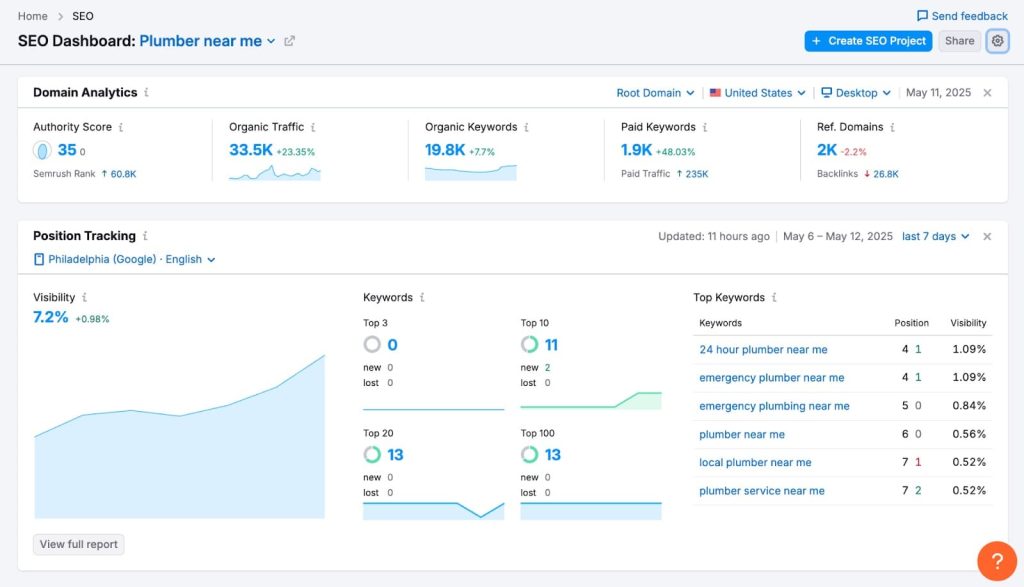
- Position Tracking: Tracks daily keyword rankings across desktop and mobile with precise locations, monitors SERP features, and sends alerts for ranking drops, competitor gains, and volatility.
- Site Audit: Scheduled crawls identify technical SEO issues, categorize them by severity, group related problems thematically, and generate clear reports for developers without manual explanation.
- Backlink Analytics: Monitors backlinks daily, detects new and lost links, flags toxic domains, categorizes risk levels, and automatically generates Google Search Console–ready disavow files.
- Content Marketing Platform: Automates topic research, builds keyword clusters, surfaces SERP questions, and provides real-time SEO writing guidance inside Google Docs and WordPress.
- Automated Reporting: Creates white-label PDF or web reports combining rankings, traffic, backlinks, and site health, scheduled for automatic delivery to clients.
- Market Explorer: Tracks competitor rankings, backlinks, and traffic trends automatically, with alerts highlighting new keyword wins, link acquisition, and emerging competitive threats.
Semrush Pros
- Unified Automation: Integrated tools share data across the platform, eliminating CSV exports, reducing context switching, and saving hours previously spent cross-referencing multiple SEO tools.
- White-Label Reporting: Automated branded reports pull live SEO data, remove manual formatting work, and deliver consistent client updates on autopilot.
- JavaScript Rendering: Accurately audits JavaScript-heavy sites, detecting technical issues on dynamic frameworks that static crawlers commonly miss.
- API Access: Enables custom dashboards, workflow automation, and integrations with analytics or BI tools using ranking, backlink, and audit data.
- Historical Data: Stores long-term rankings, backlink history, and audit results, enabling trend analysis without manual data exports or archiving.
- Toxic Link Cleanup: Automates spam link detection, risk classification, and disavow file creation, dramatically reducing backlink cleanup time.
- Keyword Clustering: Automatically groups keywords by intent and topic, simplifying content planning and reducing manual research effort.
Semrush Cons
- Slow Large Crawls: JavaScript-enabled site audits on large websites can take several hours, limiting fast diagnostics after migrations or urgent technical changes.
- Smaller Backlink Index: Backlink database may report fewer links than Ahrefs for newer sites or niche industries.
- Limited Report Customization: White-label report templates offer limited flexibility for complex enterprise dashboards or highly tailored client reporting.
- Local Rank Variability: Hyper-local or volatile SERPs can show minor daily ranking inconsistencies, requiring manual validation for accuracy.
Semrush Pricing
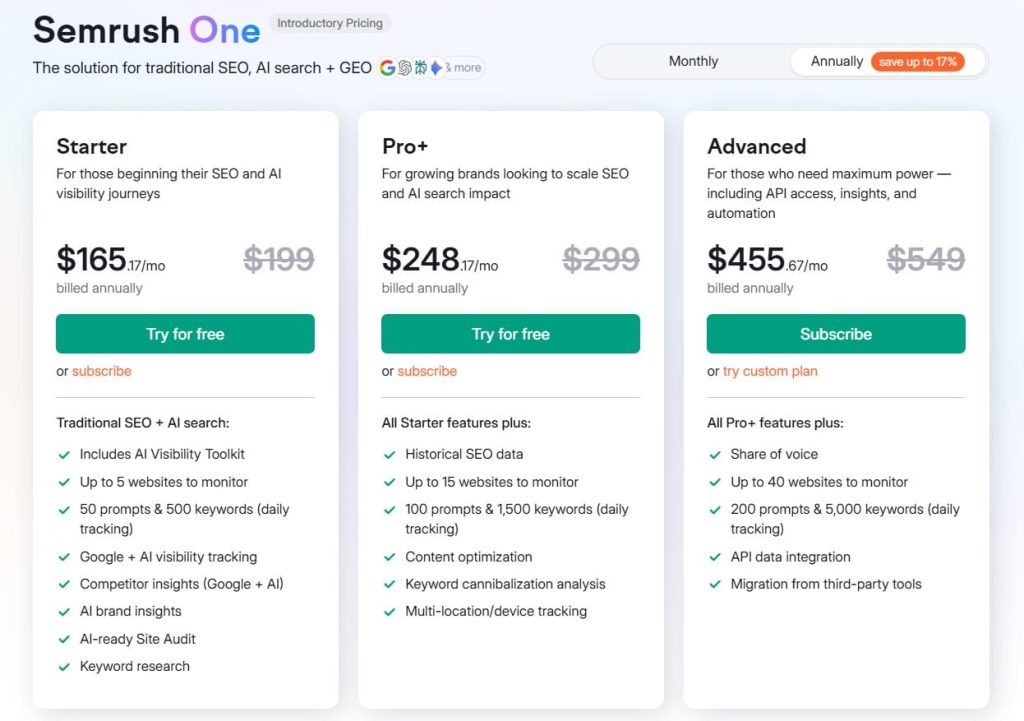
- 7-day free trial
- Starter: $165.17/month
- Pro+: $248.17/month
- Advanced: $455.67/month
Semrush Reviews
- G2: 4.5 out of 5 stars (3,026+ reviews)
- Capterra: 4.6 out of 5 stars from (2,299+ reviews)
Users consistently praise the breadth of automation and workflow integration. Common sentiment: “Semrush replaced four separate tools we were paying for and automated reports that used to take our team an entire day every month. The ROI is undeniable once you’re managing more than a handful of clients.”
2. Ahrefs – Best for Backlink Monitoring Automation
Best For: Agencies and SEO teams who need comprehensive backlink monitoring, competitor analysis, and content research automated across multiple client sites.
How I Use It: At OneLittleWeb, I use Ahrefs daily to monitor backlink profiles for 50+ clients, track when competitors gain high-authority links, and identify content gaps we can exploit. The automated alerts save hours of manual competitor checking every week.
Quick Overview
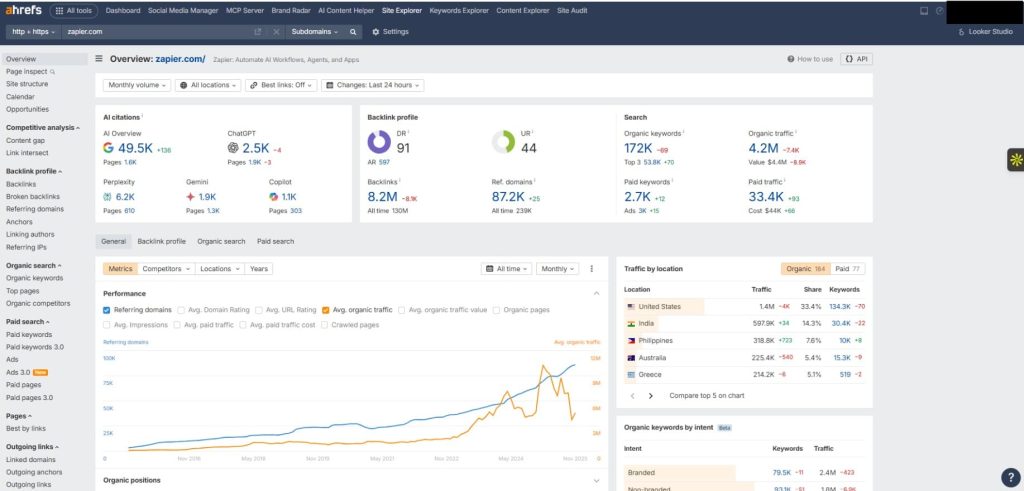
Ahrefs is an all-in-one SEO platform founded in 2010 that’s built its reputation on having the web’s most comprehensive backlink index.
It crawls over 8 billion pages daily and updates its backlink database every 15 minutes, making it the gold standard for link analysis and competitive research.
What sets Ahrefs apart is the depth and freshness of its backlink data. You can track every link pointing to your site or competitors’ sites, see when links are gained or lost, and analyze anchor text distribution to spot over-optimization risks.
The platform also handles rank tracking, site audits, keyword research, and content gap analysis, but backlink monitoring is where it dominates.
It’s best suited for agencies managing multiple clients, in-house SEO teams building links at scale, and anyone doing serious competitive analysis.
Compared to Semrush (stronger on keyword research and reporting), Ahrefs wins on backlink depth and crawl freshness. If link building is central to your strategy, Ahrefs is non-negotiable.
Ahrefs Key Features
- Backlink Monitoring: Continuously tracks backlinks, sending real-time alerts for new, lost, or competitor links, with custom triggers by domain rating, referring domains, or anchor text patterns.
- Site Audit: Crawls up to 100,000 pages per project, detects technical issues, supports scheduled audits, emails reports automatically, and uses a simple health score to track improvements over time.
- Content Gap Analysis: Identifies keywords competitors rank for that you don’t by comparing up to ten domains, surfacing missed ranking opportunities without manual SERP comparisons or spreadsheet-heavy analysis.
- Rank Tracking: Tracks daily keyword rankings across desktop and mobile with city-level precision, detects SERP features, and lets you tag keywords by campaign, funnel stage, or content initiative.
- Organic Traffic Research: Estimates organic traffic for any domain or URL, revealing top-performing pages, ranking keywords, and visibility changes to reverse-engineer competitor content strategies accurately.
- Batch Analysis: Analyzes up to 200 URLs or domains simultaneously for authority, backlinks, traffic estimates, and keywords, enabling fast outreach prospecting and scalable link-building research.
Ahrefs Pros
- Fresh Backlink Index: Maintains the most comprehensive and frequently updated backlink index, enabling fast detection of lost links, new links, and competitor link-building activity in near real time.
- Automated Competitor Monitoring: Delivers scheduled competitor digests showing backlink gains, content updates, and keyword movements, eliminating hours of manual competitive research every week.
- Content Gap Automation: Quickly identifies keyword opportunities competitors rank for, filtering by difficulty, volume, and competition to prioritize realistic targets for existing content optimization.
- Scalable Batch Research: Processes hundreds of domains simultaneously, streamlining link prospecting, partnership vetting, and competitive analysis that would otherwise require hours of manual checks.
- Historical Backlink Data: Stores long-term backlink history, allowing analysis of link growth trends, outreach campaigns, and correlations between referring domains and organic traffic performance.
Ahrefs Cons
- Limited Technical Audits: Site Audit lacks advanced crawl customization, deep JavaScript rendering, and extraction features found in specialized tools like Screaming Frog or Sitebulb.
- Daily Rank Updates: Ranking data refreshes once daily, limiting visibility into rapid SERP fluctuations compared to tools offering hourly or near real-time rank tracking.
- Weak White-Label Reporting: Lacks native branded report generation, requiring agencies to export data into third-party tools for client-ready, automated, white-label deliverables.
- Steep Learning Curve: Feature-rich interface can overwhelm new users, requiring time to understand tool differences, metrics, and workflows compared to simpler SEO platforms.
Ahrefs Pricing
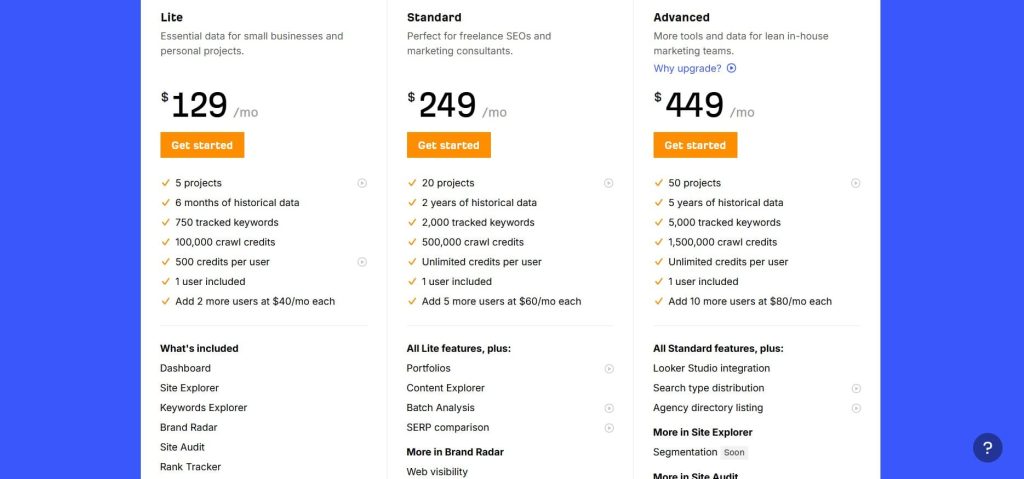
- Lite: $129/month
- Standard: $249/month
- Advanced: $449/month
- Enterprise: $1,499/month
Ahrefs Reviews
- G2: 4.5 out of 5 stars (606+ reviews)
- Capterra: 4.7 out of 5 stars (577+ reviews)
Users consistently praise the backlink index depth and competitive analysis features. Common sentiment: “Ahrefs has the most accurate backlink data available. The competitor monitoring alone justifies the cost because it shows exactly what’s working in our niche without weeks of manual research.”
3. Screaming Frog – Best for Deep Technical Audits
Best For: SEO professionals and agencies who need the most comprehensive technical crawl data available, especially for large or complex sites.
How I Use It: I fire up Screaming Frog whenever we onboard a new client at OneLittleWeb. It’s my go-to for deep technical audits: uncovering redirect chains, identifying orphaned pages, and spotting canonicalization issues that lighter tools miss entirely.
Quick Overview
Screaming Frog SEO Spider is a desktop crawling tool founded in 2010 that’s become the industry standard for technical SEO audits.
Unlike cloud-based tools with crawl limits, Screaming Frog crawls your entire site from your local machine, whether that’s 500 pages or 500,000.
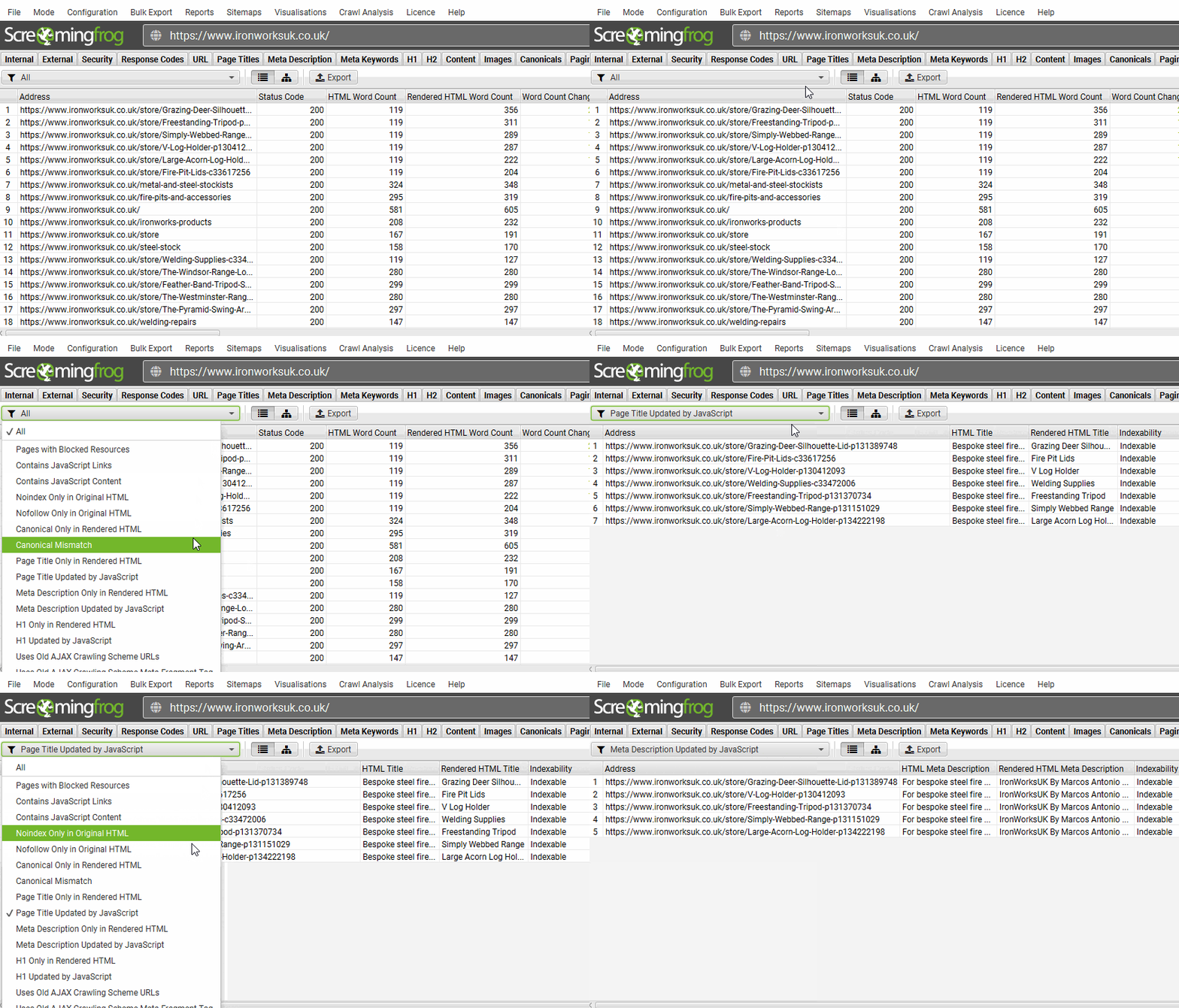
What sets it apart is the sheer depth of data extraction and customization. You can configure custom extraction using XPath or regex, integrate it with Google Analytics and Search Console APIs, and export nearly any data point you need. It renders JavaScript, follows redirect chains, and generates detailed XML sitemaps.
This isn’t a beginner-friendly tool with pretty dashboards. It’s built for SEO professionals who understand site architecture and need granular control over crawl settings.
If you’re managing enterprise sites, migrating domains, or diagnosing complex technical issues, Screaming Frog is irreplaceable. For casual users who want automated reports, it’s overkill.
Screaming Frog Key Features
- Unlimited Desktop Crawling: Paid version removes crawl limits, allowing audits of sites with 100,000+ pages. Control crawl speed, user agent, rendering mode, essential for rate-limited or JavaScript-heavy sites, unlike capped cloud tools platforms.
- Custom Extraction and Data Mining: Uses XPath, CSS paths, and regex to extract any page element during crawls, enabling schema, metadata, pricing, and taxonomy extraction for advanced SEO audits and data mining workflows at scale.
- JavaScript Rendering: Chromium-based JavaScript rendering crawls sites as Google sees them, revealing hidden content, comparing rendered versus HTML views, and identifying indexation issues on modern frameworks like React, Vue, or Angular applications.
- API Integration: Integrates Google Analytics, Search Console, and PageSpeed APIs into crawl data, adding traffic and performance context to prioritize fixes by impact, not technical severity during large enterprise SEO audits projects.
- Redirect Chain Mapping: Detects multi-hop redirect chains, maps each step clearly, and helps flatten paths to reduce crawl waste, improve page speed, and fix performance issues across large ecommerce and content-heavy websites effectively.
- Structured Data Validation: Validates Schema.org markup during crawls, flags missing properties, deprecated types, and syntax errors across JSON-LD, Microdata, and RDFa formats automatically, saving hours of manual rich results testing for large sites.
Screaming Frog Pros
- Unlimited Crawl Capacity: Unlimited crawl capacity removes site size limits, enabling audits of massive ecommerce and enterprise websites without extra fees or URL-based pricing constraints common with cloud-based SEO auditing tools today globally.
- Custom Extraction Power: Custom extraction transforms Screaming Frog into a data mining tool, supporting competitor analysis, content audits, migrations, and business intelligence beyond traditional SEO checks for agencies, consultants, and advanced teams worldwide.
- JavaScript Issue Detection: Chromium rendering uncovers indexation issues on JavaScript-heavy sites, revealing content Google indexes versus raw HTML missed by traditional crawlers on modern React, Vue, Angular, and headless CMS-driven websites today often.
- API Contextual Insights: API integrations combine crawl data with analytics and performance metrics, helping teams prioritize fixes that impact traffic, conversions, and Core Web Vitals across large websites, ecommerce stores, and SaaS platforms.
- Scheduling and Automation: Command-line scheduling enables automated crawls, exports, and monitoring, matching cloud automation benefits while running locally without recurring subscription costs for agencies, consultants, and in-house technical SEO teams managing large sites.
Screaming Frog Cons
- Steep Learning Curve: Steep learning curve challenges non-technical users, with dense interfaces, complex configurations, and limited prioritization guidance compared to beginner-friendly cloud SEO tools used by junior marketers, analysts, and content-focused teams initially.
- Resource Intensive: Large crawls with JavaScript rendering consume significant CPU and RAM, causing slowdowns, stalls, or overnight runs on local machines, especially older hardware, laptops, or limited-resource environments, unlike cloud-based crawling tools.
- No Built-In Reporting: Lacks built-in reporting, requiring manual spreadsheet exports and custom report creation, adding time for agencies delivering client-facing audit documents and polished executive summaries across multiple stakeholders and brands regularly today.
- No Cloud Collaboration: No cloud collaboration limits team access, as licenses are machine-based, forcing file sharing and reducing efficiency for remote or distributed teams compared with centralized dashboards offered by cloud-native SEO platforms.
Screaming Frog Pricing
- Free version available
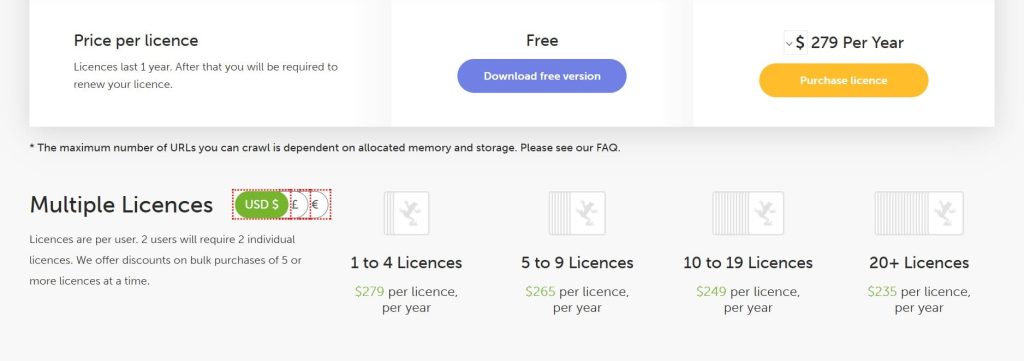
- Paid: $279/year
Screaming Frog Reviews
- G2: 4.7 out of 5 stars (184+ reviews)
- Capterra: 4.9 out of 5 stars (132+ reviews)
Users consistently praise the crawl depth and data customization capabilities. Common sentiment: “Screaming Frog is the Swiss Army knife of technical SEO. Nothing else comes close for granular crawl control, but expect a learning curve before you’re proficient.”
4. SE Ranking – Best for Budget Workflow Automation
Best For: Solo consultants, small agencies, and freelancers who need comprehensive SEO automation without enterprise pricing or project limits.
How I Use It: I use SE Ranking for smaller clients at OneLittleWeb where Semrush or Ahrefs would be overkill budget-wise.
The white-label reports are client-ready without customization, and the unlimited projects at lower price points make it perfect for managing 15 to 20 smaller accounts efficiently.
Quick Overview
SE Ranking is an all-in-one SEO platform founded in 2013 that’s built specifically for agencies and consultants who need professional features without enterprise costs.
It handles rank tracking, site audits, backlink monitoring, keyword research, competitor analysis, and automated white-label reporting, all at price points 30 to 50% lower than Semrush or Ahrefs.
What sets SE Ranking apart is the pricing structure. Most plans include unlimited projects and websites, so you’re not paying extra per client or hitting arbitrary project caps.
The white-label reporting is also exceptionally strong, with customizable PDF templates, branded client portals, and scheduled delivery that rivals tools costing twice as much.
It’s best suited for agencies managing 10 to 30 clients, freelance SEO consultants, and in-house teams with limited budgets.
Compared to Semrush (more features but higher cost) or Ahrefs (deeper backlink data), SE Ranking offers the best value for money when you need solid automation across multiple workflows without paying for enterprise-level depth you won’t use.
SE Ranking Key Features
- Rank Tracking: Tracks unlimited keywords across desktop and mobile with flexible update frequency, detects SERP features, tracks visibility, and sends alerts for ranking changes, competitor movements, or keyword group fluctuations.
- White-Label Reporting: Generates branded PDF reports combining rankings, audits, backlinks, and traffic, supports custom templates, schedules automatic delivery, and includes plain-language summaries for clients without manual editing.
- Site Audit: Crawls up to 250,000 pages, detects technical SEO issues, prioritizes by severity, explains impact clearly, supports scheduled crawls, and emails alerts when critical problems appear.
- Backlink Monitoring: Tracks new and lost backlinks daily, monitors anchor text changes, assigns toxic scores using spam signals, and helps detect risky link patterns or sudden profile changes.
- Keyword Research: Pulls search volume, difficulty, CPC, and related keywords, automatically groups terms by topic or intent, and accelerates content planning and roadmap creation significantly.
- Competitor Analysis: Tracks up to 20 competitors per project, monitors rankings, backlinks, and top pages, and sends alerts when competitors gain keywords or acquire new links.
SE Ranking Pros
- Unlimited Projects: Unlimited projects on most plans remove per-client limits, allowing agencies to scale freely without paying extra fees for onboarding additional clients.
- White-Label Quality: White-label reports and client portals rival higher-priced tools, offering customization, professional design, live dashboards, and client-friendly summaries.
- User-Friendly Interface: Clean, intuitive interface reduces onboarding time, helps teams work faster, and allows clients to understand dashboards without constant explanations.
- Flexible Tracking Costs: Adjustable rank tracking frequency lets teams monitor priority keywords daily and stable terms weekly, maximizing keyword coverage within plan limits.
SE Ranking Cons
- Smaller Backlink Index: Backlink database is smaller than Ahrefs or Semrush, limiting deep competitive link analysis and advanced prospecting for aggressive link-building strategies.
- Slower Site Crawls: Cloud-based audits run slower on large sites, delaying diagnostics after migrations or major updates compared to desktop crawling tools.
- API Rate Limits: API rate limits restrict large-scale automation, making it less suitable for advanced dashboards pulling frequent data across many client accounts.
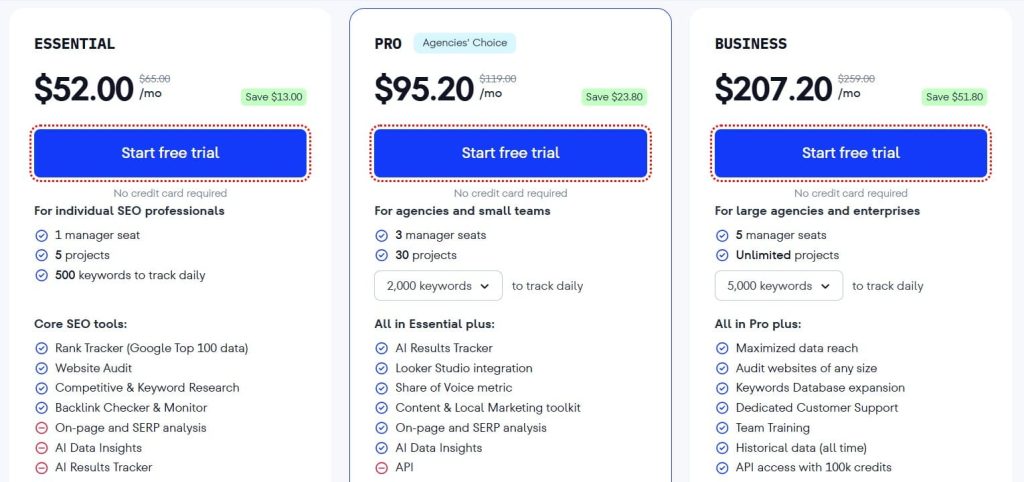
SE Ranking Pricing
- Free trial available
- Essential: $52/month
- Pro: $95.20/month
- Business: $207.20/month
SE Ranking Reviews
- G2: 4.7 out of 5 stars (2,330+ reviews)
- Capterra: 4.7 out of 5 stars (296+ reviews)
Users consistently praise the value for money and white-label reporting. Common sentiment: “SE Ranking gives us 80% of Semrush’s functionality at 40% of the cost. The white-label reports alone save us 15 hours a month, and clients love the branded dashboards.”
5. Sitebulb – Best for Visual Automated Audit Reports
Best For: Agencies and consultants who need technical audit reports that clients and developers can actually understand without extensive explanation.
How I Use It: At OneLittleWeb, I use Sitebulb when presenting audits to non-technical clients or development teams.
The visual reports with screenshots, flowcharts, and priority hints make it easy to communicate technical issues without translating crawler output into plain English manually.
Quick Overview
Sitebulb is a desktop SEO auditing tool founded in 2017 that’s built specifically to make technical SEO accessible through visualization.
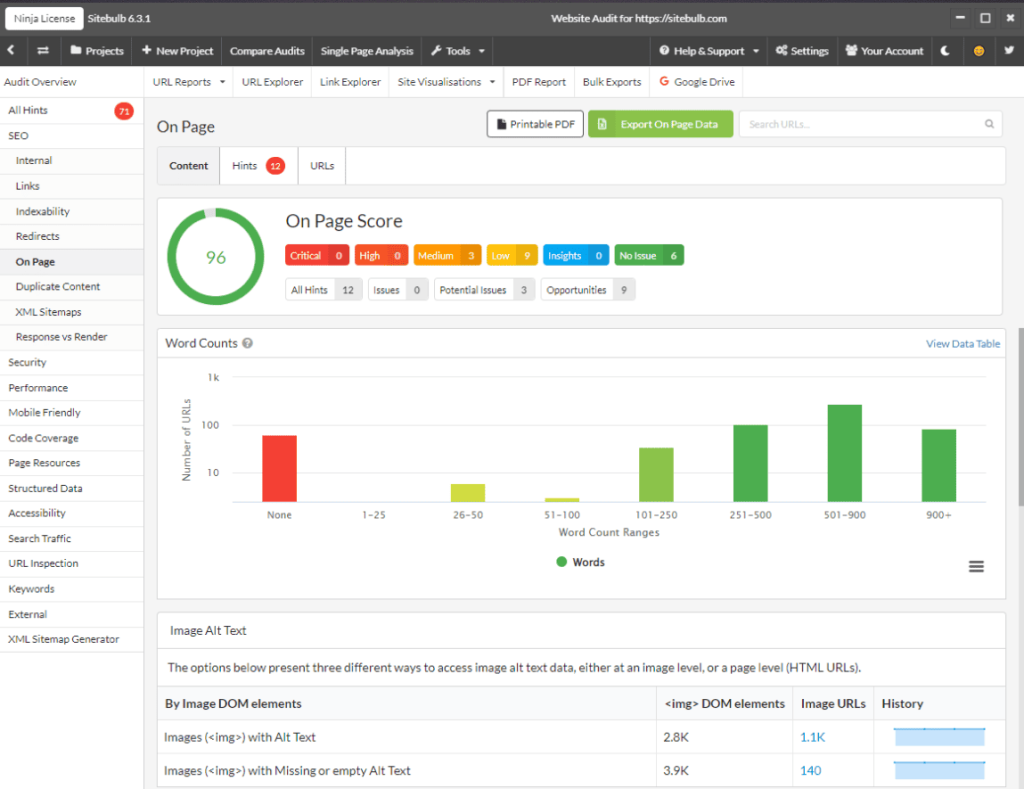
Unlike traditional crawlers that dump spreadsheets of raw data, Sitebulb generates visual reports with color-coded priority hints, decision tree flowcharts, and before-and-after comparison views that make technical issues immediately clear.
What sets Sitebulb apart is the hint system. Instead of just flagging “duplicate title tags,” Sitebulb explains why it matters, shows which pages are affected with screenshots, and prioritizes fixes based on traffic and link equity.
The reports are designed for presentation to clients and developers who don’t speak SEO fluently.
It’s best suited for agencies doing technical audits for clients who need visual deliverables, consultants working with developer teams, and in-house SEOs who need buy-in from non-technical stakeholders.
Compared to Screaming Frog (more data, less presentation) or cloud-based auditors (less depth), Sitebulb balances comprehensive crawling with report clarity better than any alternative.
Sitebulb Key Features
- Hint-Based Prioritization: Sitebulb categorizes issues by SEO impact and page importance, providing clear explanations, fixes, and affected URLs, helping teams focus on critical changes that actually improve rankings efficiently.
- Visual Site Architecture: Generates interactive diagrams showing internal linking, orphaned pages, crawl depth, and link equity flow, making structural SEO issues instantly understandable for developers without spreadsheet explanations or prolonged walkthroughs.
- Automated Crawl Monitoring: Scheduled crawls run automatically, compare results over time, highlight new issues and improvements, and catch regressions quickly after site updates or development releases.
- JavaScript Rendering Comparison: Compares rendered and non-rendered crawls side by side, revealing content hidden behind JavaScript and diagnosing indexation, internal linking, and crawlability issues on modern frameworks.
- Accessibility and Core Web Vitals: Audits accessibility issues alongside SEO checks, integrates PageSpeed Insights data, and flags Core Web Vitals problems at scale affecting rankings, usability, and compliance.
- Custom PDF Reporting: Creates branded, customizable PDF reports combining findings, visuals, and recommendations, suitable for developer handoff and executive presentations without manual formatting work.
Sitebulb Pros
- Visual Reporting: Visual hints, diagrams, and flowcharts eliminate lengthy explanations, enabling developers to understand and fix issues quickly without follow-up questions or clarification emails.
- High-Impact Focus: Hint prioritization prevents teams from wasting effort on low-impact issues, directing resources toward fixes that drive measurable ranking improvements faster.
- Crawl Comparison: Automated crawl comparisons highlight regressions and improvements over time, simplifying monitoring after redesigns, migrations, or ongoing development changes.
- JavaScript Diagnosis: Side-by-side rendering analysis quickly explains indexation failures and broken internal linking on JavaScript-heavy websites.
- Client-Ready Reports: Automated PDF reports reduce production time, allowing agencies to deliver polished, branded audits without building presentations manually.
Sitebulb Cons
- Slower Crawl Speed: Large crawls take longer than Screaming Frog due to visualization processing, limiting suitability for urgent diagnostics after migrations or critical site issues.
- No Cloud Collaboration: Desktop-only licensing restricts team collaboration, requiring file sharing instead of real-time shared access for distributed teams.
- Limited Data Extraction: Lacks advanced XPath or regex extraction, making it less flexible for custom data mining compared to Screaming Frog.
- Advanced Customization Learning Curve: Customizing hints, thresholds, and report templates requires deeper platform understanding, slowing adoption for new users seeking tailored audits.
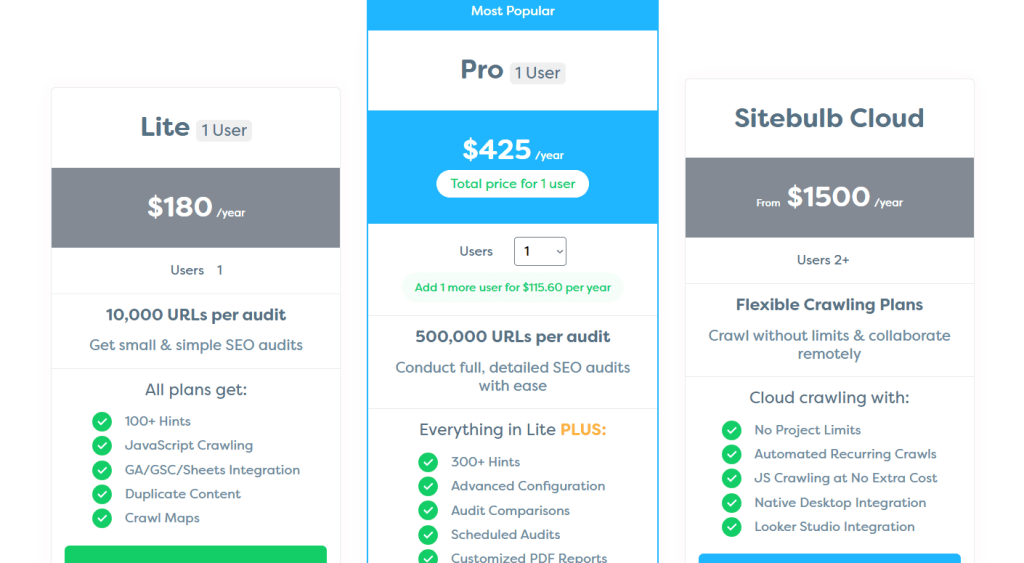
Sitebulb Pricing
- Lite: $180/year
- Pro: $425/year
- Cloud: $1500/year
Sitebulb Reviews
- G2: 4.5 out of 5 stars (13+ reviews)
- Capterra: 4.9 out of 5 stars (24+ reviews)
Users consistently praise the visual reporting and hint prioritization. Common sentiment: “Sitebulb turns technical audits into something non-technical stakeholders actually understand. Our clients and dev teams love the visual reports, and we’ve cut audit presentation time in half.”
6. BrightEdge – Best for Enterprise Automation Workflows
Best For: Enterprise marketing teams and large agencies managing complex SEO programs across multiple brands, regions, or business units.
How I Use It: We’ve used BrightEdge for enterprise clients at OneLittleWeb who need centralized SEO management across 10+ regional sites.
The automated content recommendations and competitive tracking at scale handle workflows that would require dedicated teams on other platforms.
Quick Overview
BrightEdge is an enterprise SEO platform founded in 2007 that’s built for large organizations managing SEO at scale across multiple properties, teams, and markets.
It combines automated rank tracking, content optimization, competitive intelligence, and workflow management in one platform designed for companies spending six figures annually on SEO.
What sets BrightEdge apart is the scale of automation and the depth of AI-powered recommendations. The platform doesn’t just track rankings or audit sites.
It automatically generates content briefs, identifies optimization opportunities across thousands of pages, monitors competitor movements in real time, and integrates with enterprise marketing stacks like Adobe, Salesforce, and Google Analytics 360.
It’s best suited for Fortune 500 companies, enterprise ecommerce sites with 100,000+ pages, and agencies managing multiple large brands.
Compared to tools like Semrush or Ahrefs (built for agencies and SMBs), BrightEdge offers enterprise-grade permissioning, custom integrations, and dedicated support. The trade-off is cost and complexity that makes it overkill for smaller operations.
BrightEdge Key Features
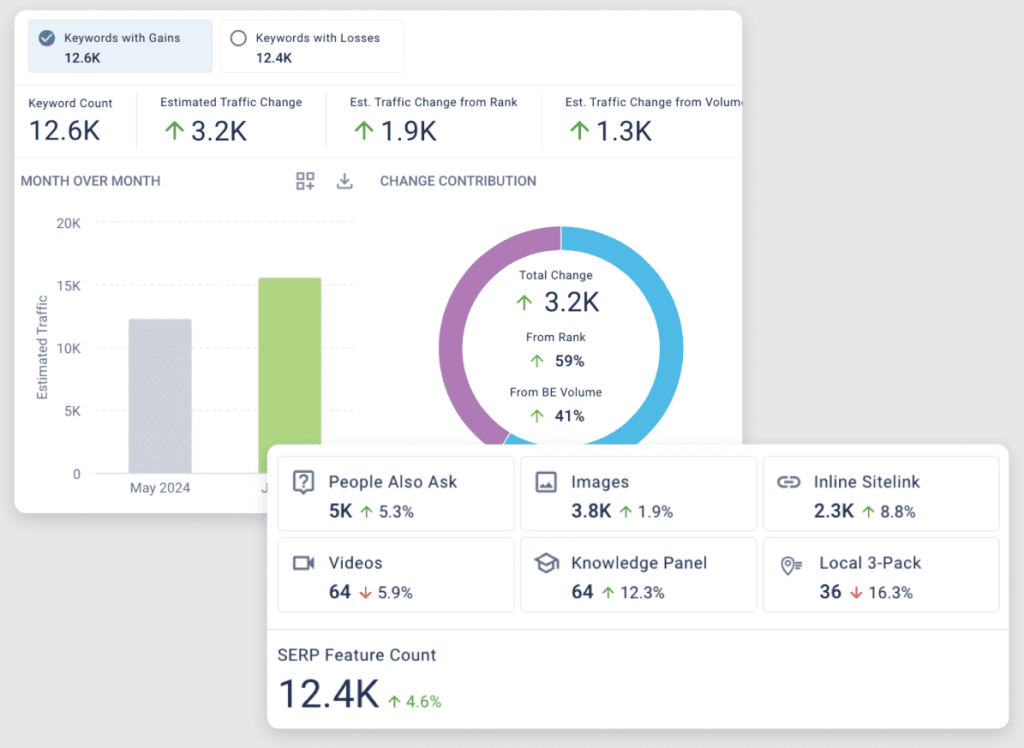
- Data Cube: Tracks billions of industry keywords, monitors competitor rankings, share of voice shifts, and emerging opportunities, automatically alerting teams to competitive threats and sudden ranking changes requiring rapid strategic response.
- ContentIQ: Analyzes existing content performance, search intent, and competitors to prioritize page updates, identify quick wins, and recommend optimizations that drive traffic before creating new content.
- StoryBuilder: Generates automated executive reports connecting SEO metrics to revenue, conversions, and business outcomes, pulling data from analytics and CRM systems to clearly demonstrate ROI.
- Autopilot: Automates metadata, schema deployment, and internal linking at scale, pushing recommendations into CMS workflows to execute SEO changes across massive enterprise websites efficiently.
- Enterprise Integrations: Integrates with Adobe, Salesforce, and analytics platforms, enabling SEO data to flow into enterprise dashboards and attribution models tied to revenue and customer lifetime value.
BrightEdge Pros
- Enterprise Automation: Handles SEO workflows across hundreds of thousands of pages and multiple sites, enabling large organizations to deploy optimizations at a scale impossible for SMB-focused tools.
- Business-Focused AI: Prioritizes SEO actions by estimated traffic, conversion impact, and competitive urgency, preventing wasted effort on low-value pages while high-impact opportunities remain untouched.
- Market Share Intelligence: Automatically tracks competitive share of voice, alerts teams to content strategy shifts, and surfaces missed keyword opportunities without manual competitor setup or monitoring.
- Deep Integrations: Eliminates data silos by connecting SEO performance with revenue, acquisition cost, and lifetime value inside enterprise marketing and CRM platforms.
- Dedicated Support: Provides white-glove onboarding, technical guidance, and strategic consultation through dedicated account managers for complex enterprise implementations.
BrightEdge Cons
- Steep Learning Curve: Complex interface and modular structure require extensive training before teams fully understand workflows, reports, and interdependencies between platform features.
- Overkill for SMBs: Enterprise automation and multi-site capabilities exceed the needs of small teams managing limited pages or simple SEO programs.
- Developer-Dependent Integrations: Custom integrations with proprietary systems require API development resources, limiting accessibility for teams without in-house technical support.
- Reporting Complexity: Automated reports can overwhelm executives without customization, requiring additional effort to distill insights into concise, KPI-focused summaries.
BrightEdge Pricing
Custom pricing
BrightEdge Reviews
- G2: 4.4 out of 5 stars (764+ reviews)
- Capterra: 4.1 out of 5 stars (45+ reviews)
Users praise the enterprise features but note the learning curve and cost. Common sentiment: “BrightEdge is the only platform that handles SEO at our scale across 50+ sites and 20+ markets.
The cost is high and the learning curve is steep, but for enterprise operations, nothing else comes close to the automation depth.”
7. Conductor – Best for Content Workflow Automation
Best For: Enterprise content teams and publishers who need to automate content planning, optimization, and performance tracking across large content libraries.
How I Use It: We’ve implemented Conductor for clients at OneLittleWeb who publish 100+ pieces of content monthly.
The automated content briefs, editorial calendar integration, and performance tracking streamline workflows that would require dedicated content strategists on other platforms.
Quick Overview
Conductor is an enterprise SEO and content marketing platform founded in 2010 that’s built specifically for organizations where content creation is central to SEO strategy.
Unlike technical-focused tools, Conductor automates the entire content lifecycle from keyword research and brief creation through publishing, optimization, and performance tracking.
What sets Conductor apart is the workflow automation for content teams. The platform automatically generates content briefs with target keywords, recommended structure, competitor analysis, and optimization guidelines.
It integrates with editorial calendars, CMS platforms, and content management workflows to keep teams aligned and productive at scale.
It’s best suited for publishers, media companies, large ecommerce sites with extensive content libraries, and enterprise brands producing 50+ content pieces monthly.
Compared to technical SEO platforms like BrightEdge (stronger on automation) or all-in-one tools like Semrush (broader features), Conductor specializes in content operations. If content is your primary SEO driver, Conductor automates planning and execution better than generalist tools.
Conductor Key Features
- Automated Content Briefs: Generates detailed briefs with word count, headings, related topics, competitor analysis, and SEO guidance, reducing strategist workload while enabling writers to produce optimized content efficiently at scale.
- Keyword Clustering and Topic Discovery: Automatically groups keywords into topic clusters based on semantic relationships and intent, helping content teams build comprehensive guides instead of isolated posts, avoiding cannibalization and improving content relevance.
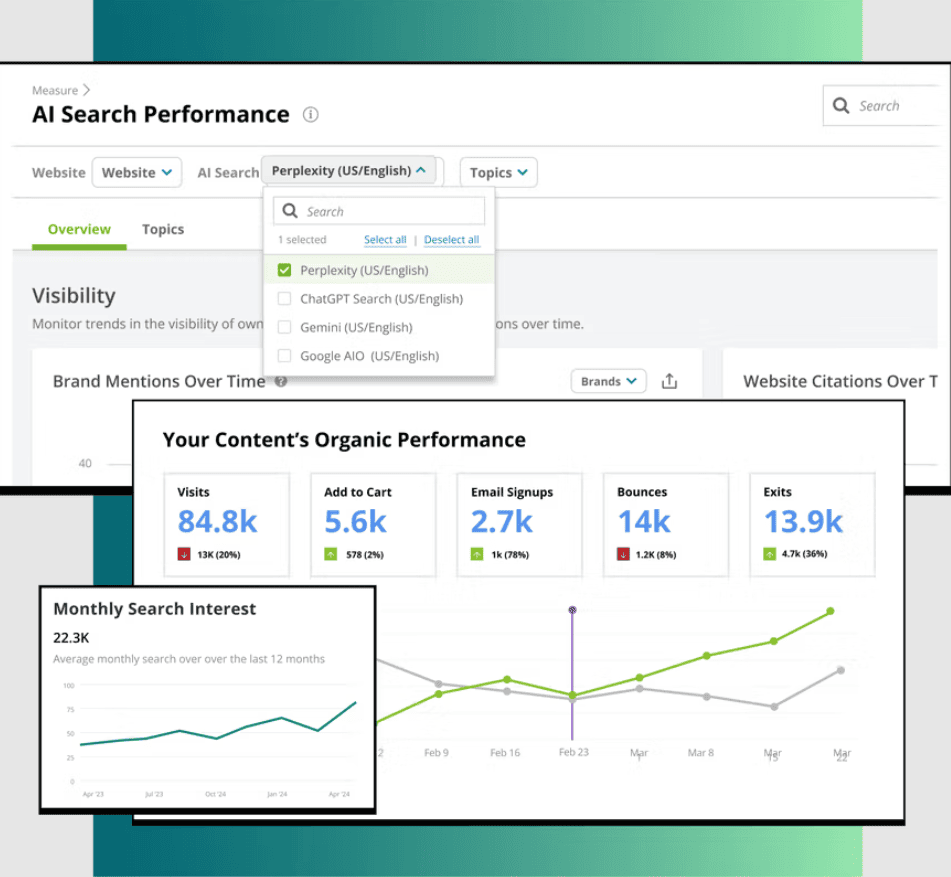
- Content Performance Tracking and Alerts: Monitors published content and sends automated notifications for declining performance or optimization opportunities, ensuring high-traffic pages are refreshed promptly without manually reviewing thousands of pages.
- Editorial Calendar Integration: Integrates with project management tools to assign briefs, track progress, and meet deadlines, centralizing workflows for distributed content teams and preventing miscommunication or missed publication dates.
- Competitive Content Gap Analysis: Identifies competitor topics, formats, and keywords missing from your strategy, revealing opportunities for guides, comparisons, and high-performing content types your brand hasn’t yet created.
- Content ROI Attribution: Connects organic content performance to leads, conversions, and revenue, helping teams prioritize topics that drive business outcomes rather than just traffic, optimizing strategy for measurable impact.
Conductor Pros
- Automated Briefs Scale Production: Reduces strategist hours dramatically, allowing organizations to increase content output without hiring additional staff, tripling monthly post production while maintaining quality using Conductor-generated briefs.
- Topic Clustering Prevents Cannibalization: Guides content teams to create comprehensive authoritative pages rather than competing posts, improving search rankings while saving effort on redundant content that would compete for the same keywords.
- Performance Alerts Catch Decay Early: Flags declining content before rankings drop significantly, allowing teams to refresh and recover traffic quickly, preventing lost visibility that manual quarterly checks would fail to identify.
- Editorial Workflow Integration: Centralizes assignments, deadlines, and feedback in one system, reducing coordination overhead across distributed teams, eliminating reliance on Slack threads, email chains, or scattered documentation.
- Content Gap Analysis Reveals Strategy Opportunities: Beyond keywords, identifies missing content formats and topic categories competitors dominate, allowing brands to capitalize on untapped areas driving substantial traffic and business growth.
Conductor Cons
- Limited Technical SEO Features: Focuses on content strategy; lacks robust site audits, redirect management, and crawl diagnostics, requiring supplementary tools for full technical SEO coverage or complex site migrations.
- Variable Brief Quality: Automated briefs work best for straightforward topics; niche or technical subjects may require strategist review to ensure accuracy, completeness, and alignment with specialized industry content requirements.
- Integration Requires Developers: Custom CMS connections need API development; small teams without technical resources may struggle to integrate Conductor fully into publishing workflows, limiting platform utility to planning and content ideation.
- Steep Learning Curve for Non-SEO Teams: Writers and editors without SEO experience need training to understand briefs, clustering, and performance alerts, which can slow adoption and reduce platform effectiveness initially.
Conductor Pricing
Custom pricing
Conductor Reviews
- G2: 4.6 out of 5 stars (680+ reviews)
- Capterra: 4.4 out of 5 stars (36+ reviews)
Users praise the content workflow automation but note the cost and learning curve. Common sentiment: “Conductor transformed our content operation from chaotic to systematic.
The automated briefs and performance tracking are game-changers for teams publishing at scale, but it’s expensive and requires buy-in from the entire content team to work.”
8. seoClarity – Best for AI-Driven Automation at Scale
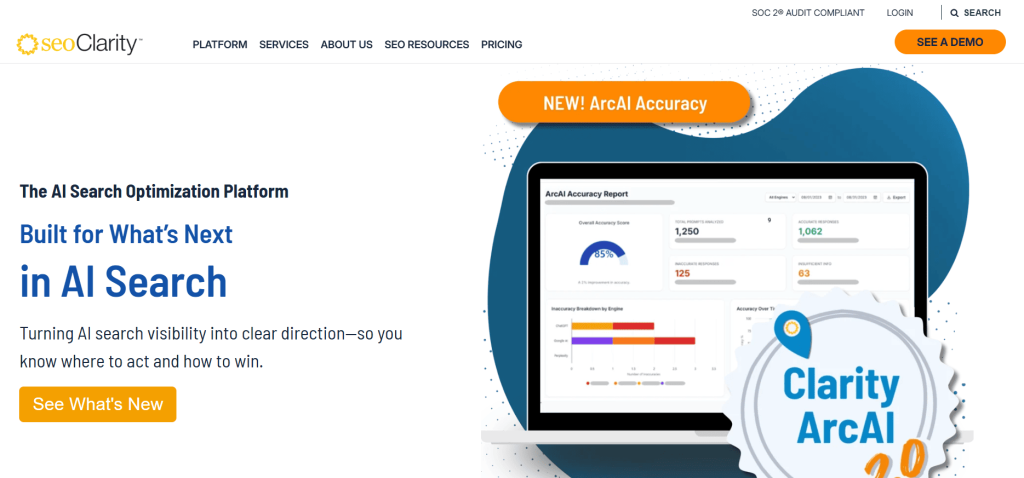
Best For: Enterprise SEO teams and large agencies managing complex multi-site operations who need AI-powered insights and predictive analytics across massive keyword sets and content libraries.
How I Use It: We’ve used seoClarity for enterprise clients at OneLittleWeb who track 100,000+ keywords across multiple markets. The AI-driven content recommendations and predictive ranking models automate strategic planning that would require dedicated analysts on other platforms.
Quick Overview
seoClarity is an enterprise SEO platform founded in 2011 that’s built around AI and machine learning to automate insights at scale.
Unlike tools that just collect data, seoClarity’s Clarity Grid AI analyzes millions of data points to predict ranking opportunities, automate content optimization, and identify technical issues before they impact performance.
What sets seoClarity apart is the scale of data processing and AI automation. The platform handles unlimited keyword tracking, crawls sites with millions of pages, and uses machine learning to prioritize opportunities based on effort versus impact.
It’s best suited for Fortune 500 companies, large ecommerce platforms, multi-location enterprises, and agencies managing 50+ enterprise clients.
Compared to BrightEdge (stronger on content workflows) or Conductor (content-focused), seoClarity offers the deepest AI automation and handles the largest data sets. The trade-off is complexity and cost that makes it overkill for smaller operations.
seoClarity Key Features
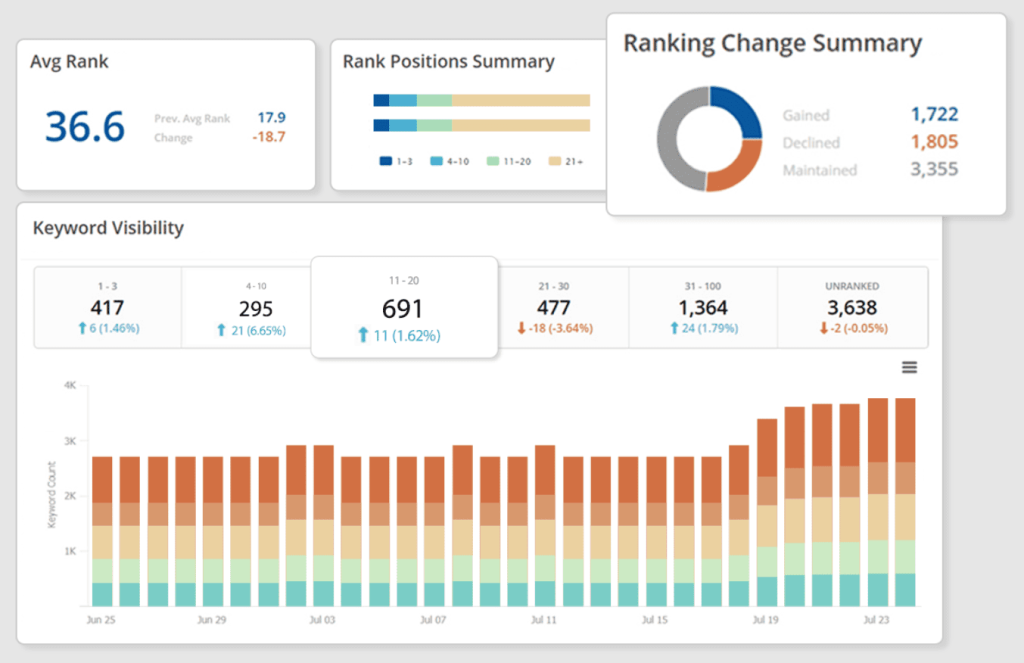
- Clarity Grid AI for Predictive Ranking Analysis: AI predicts which pages can rank higher with minimal effort, identifying quick wins. Optimizing flagged pages captured 40+ featured snippets within 60 days for enterprise clients.
- Unlimited Keyword Tracking and SERP Monitoring: Track 500,000+ keywords daily across multiple markets, devices, and search engines. Automatically detects SERP features, competitor movements, and volatility patterns without additional fees or tracking limitations.
- Content Fusion for AI-Powered Optimization: Uses NLP to analyze top-ranking content, suggests semantic keywords, structure, and optimization improvements. For 50,000 articles, 500 pages were prioritized for refresh, automating tasks that took weeks manually.
- Site Clarity for Deep Technical Auditing: Crawls unlimited pages, identifies issues, and prioritizes fixes by business impact. Detects indexation problems, crawl budget waste, duplicates, and Core Web Vitals for massive enterprise-scale websites.
- Research Grid for Competitive Intelligence Automation: Tracks unlimited competitors, revealing ranking strategies, content gaps, and backlinks. AI highlights emerging threats or opportunities, letting teams respond quickly to competitor shifts, trends, or content strategies.
- Custom Dashboards and API Access: Build unlimited dashboards with any metrics, integrating with BI tools, CRM systems, and reporting platforms. Supports enterprise clients’ complex analytics stacks without manual exports or workflow interruptions.
seoClarity Pros
- Unlimited Keyword Tracking: Tracks 100,000+ keywords without per-keyword costs. Enterprise clients save significantly versus platforms charging per keyword, enabling comprehensive coverage instead of rationing or prioritizing only select pages.
- AI Prioritization Maximizes Impact: Clarity Grid ranks pages based on effort versus potential results, highlighting high-impact opportunities. Focused optimization increased one client’s organic traffic 40% by addressing AI-recommended pages first.
- Handles Enterprise Scale Efficiently: Crawls millions of pages, monitors unlimited keywords and competitors, maintaining performance for large ecommerce or multi-site operations. Handles volumes that tools like Semrush or Ahrefs cannot without additional accounts.
- Content Recommendations Using NLP: Content Fusion analyzes topic coverage, semantic relationships, and headings. Implementing AI recommendations improved rankings for 30 target pages in 45 days, showing machine-guided optimization outperforms manual content audits.
- Custom Dashboard Flexibility: Dashboards can display relevant metrics for brands, regions, or categories. Multi-brand clients create separate views for managers, reducing information overload and ensuring stakeholders access only data relevant to them.
seoClarity Cons
- Steep Learning Curve: Feature depth requires extensive training. Understanding Clarity Grid, Content Fusion, and custom dashboards can take weeks. Team members often struggle initially to utilize the platform effectively.
- AI Recommendations Lack Niche Context: Predictions work best for mainstream topics. Specialized B2B or technical content may receive generic suggestions, requiring human review to ensure recommendations align with actual buyer intent.
- Overkill for Smaller Clients: Enterprise features, unlimited tracking, and massive crawl capacity are unnecessary for sites under 50,000 pages. Agencies with small portfolios may pay for capabilities they never fully use.
- Integration Requires Technical Resources: API connections and advanced workflow setups require developer expertise. Teams without technical support may find integrating seoClarity into their systems challenging, limiting it to a standalone SEO platform.
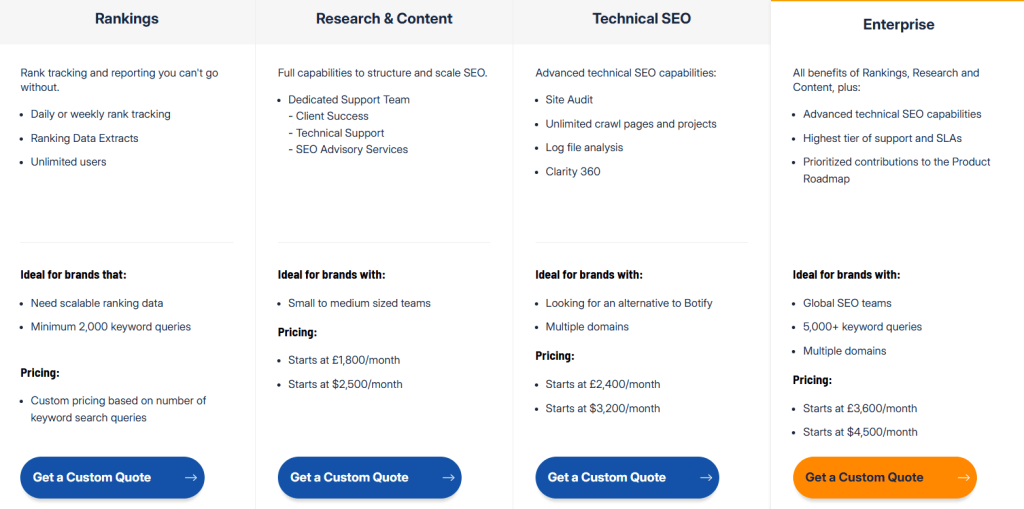
seoClarity Pricing
- Rankings: Custom
- Research & Content: Starts at £1,800/month, $2,500/month
- Technical SEO: Starts at £2,400/month, $3,200/month
- Enterprise: Starts at £3,600/month, $4,500/month
seoClarity Reviews
- G2: 4.5 out of 5 stars (205+ reviews)
- Capterra: 4.8 out of 5 stars (14+ reviews)
Users praise the unlimited tracking and AI insights but note the cost and complexity. Common sentiment: “seoClarity is the only platform that handles our scale across 300,000 tracked keywords and 20 sites. AI prioritization is incredibly valuable, but expect a steep learning curve and enterprise-level investment.”
9. Lumar – Best for Continuous Site Monitoring
Best For: Enterprise SEO teams and agencies managing large sites where catching technical issues in real time prevents revenue loss and ranking drops.
How I Use It: We use Lumar (formerly DeepCrawl) for enterprise clients at OneLittleWeb who can’t afford downtime or technical issues slipping through.
The continuous monitoring catches problems like broken canonicals or indexation drops within hours instead of waiting for weekly crawls.
Quick Overview
Lumar (formerly DeepCrawl) is an enterprise technical SEO platform founded in 2009 that specializes in continuous website monitoring and technical auditing.
Unlike tools that crawl sites on a schedule, Lumar monitors sites constantly and alerts you to technical changes, errors, and potential issues in real time.
What sets Lumar apart is the continuous crawling model. Traditional crawlers audit your site weekly or monthly, meaning issues can exist for weeks before detection.
Lumar’s continuous monitoring catches problems within hours of occurrence, whether that’s a developer accidentally noindexing a category, broken canonicals after a deployment, or redirect chains introduced during a site update.
It’s best suited for large ecommerce platforms, enterprise sites with frequent updates, and organizations where technical SEO issues directly impact revenue.
Compared to Screaming Frog (deeper one-time crawls) or Sitebulb (better reporting), Lumar excels at ongoing monitoring and change detection.
If your site changes frequently or technical issues are costly, Lumar’s real-time monitoring justifies the premium pricing.
Lumar Key Features
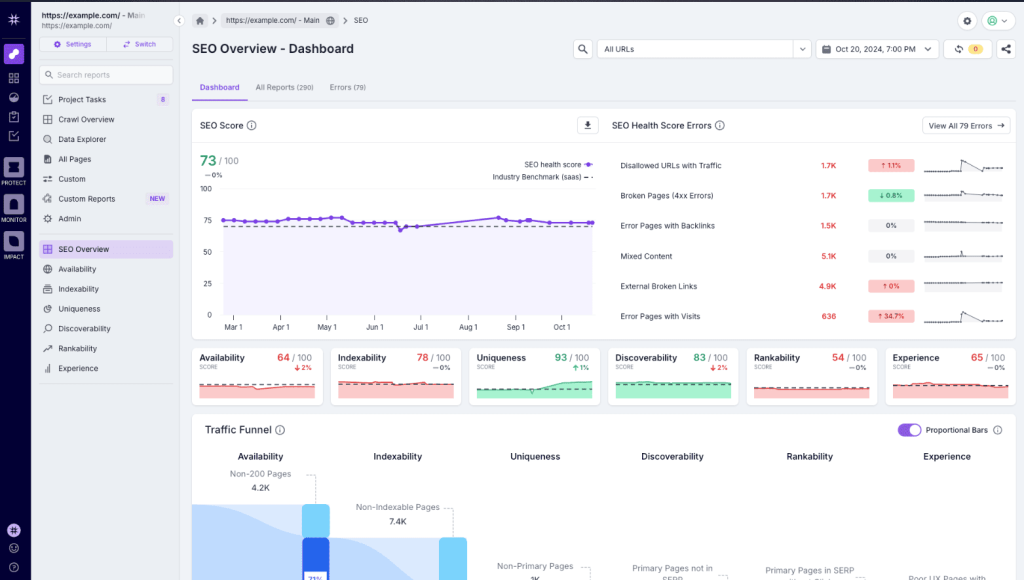
- Continuous Crawling and Real-Time Monitoring: Lumar continuously tracks site changes and sends immediate alerts. A staging noindex tag was caught hours after deployment, preventing a potential indexation disaster for an ecommerce client.
- Automated Change Detection and Version Comparison: Detects page changes automatically, comparing new and previous versions. Canonical removals or meta changes are flagged, letting teams fix 200+ affected pages before Google recrawled the site post-redesign.
- Google Search Console Integration and Index Coverage Analysis: Cross-references crawl data with GSC to find discrepancies, unindexed pages, or incorrectly indexed content. One client discovered 5,000 missing pages due to redirect chains previously unnoticed.
- Custom Segmentation for Large Site Analysis: Segment large sites by URL pattern, category, page type, or custom parameters. For 500,000 products, segmentation revealed concentrated technical issues, enabling strategic prioritization instead of treating the entire site uniformly.
- Automated Reporting and Alert Configuration: Configure email or Slack alerts for critical issues and thresholds. Weekly or monthly automated reports summarize site health, resolved problems, and new issues, keeping distributed teams informed without manual checks.
- Log File Analysis Integration: Analyzes server logs to understand Google’s crawl behavior, optimize crawl budget, and detect unwanted indexing. For a publishing client, log analysis redirected wasted crawl budget to fresh content discovery.
Lumar Pros
- Continuous monitoring catches issues quickly: Technical problems are detected within hours instead of days. Alerts prevented a client’s broken hreflang tags across 10,000 pages from affecting international search visibility before Google recrawled.
- Change detection prevents regressions: Post-deployment comparisons highlight unintended technical changes immediately. One client’s CMS migration changed 5,000 URLs from HTTPS to HTTP, which Lumar flagged before organic traffic dropped significantly.
- GSC integration identifies indexation gaps: Cross-referencing crawls with Search Console reveals crawlable pages Google cannot access, or indexed pages clients assumed were noindexed. This discrepancy analysis is unique and actionable.
- Custom segmentation improves large site management: Segmenting 500,000 pages allows prioritizing high-impact sections. A multi-category ecommerce client fixed high-margin categories first, maximizing revenue impact while addressing less critical sections later.
- Log file analysis optimizes crawl budget: Understanding actual Google crawling versus expected behavior identifies inefficiencies. Redirecting 40% of wasted crawl budget from faceted navigation to product pages improved fresh content discovery and indexation.
Lumar Cons
- Continuous monitoring can cause alert fatigue: Without proper configuration, minor issues generate constant notifications. Teams may start ignoring alerts, so threshold tuning and severity filtering are necessary to make real-time monitoring effective.
- Steep learning curve for new users: Lumar handles continuous data, segmentation, version comparison, and log analysis simultaneously. New team members may take 3–4 weeks to become proficient versus simpler crawlers learned in days.
- Overkill for small or infrequently updated sites: Sites under 5,000 pages or with weekly updates gain minimal value from real-time monitoring. Continuous alerts benefit only frequently changing or large-scale websites.
- Reporting less visually appealing for clients: Data-heavy reports are functional for internal teams but not presentation-ready. Agencies often need to export Lumar data into other tools for client-facing deliverables compared to Sitebulb.
Lumar Pricing
Custom pricing
Lumar Reviews
- G2: 4.6 out of 5 stars (101+ reviews)
- Capterra: 4.3 out of 5 stars (12+ reviews)
Users praise the continuous monitoring and change detection but note the cost and complexity. Common sentiment: “Lumar saved us from multiple technical disasters by catching issues in real time.
The continuous monitoring is worth the premium cost for enterprise sites where downtime or technical errors cost thousands per hour.”
10. Surfer – Best for Automated Content Optimization
Best For: Content creators, bloggers, and SEO teams who need real-time optimization guidance while writing to ensure content ranks without guesswork.
How I Use It: At OneLittleWeb, we use Surfer for content optimization across client blog posts and landing pages. The real-time content score eliminates back-and-forth between writers and SEO strategists because writers can optimize as they write instead of waiting for feedback.
Quick Overview
Surfer is a content optimization platform founded in 2017 that uses natural language processing to analyze top-ranking content and provide real-time optimization suggestions.
Unlike keyword research tools that just give you terms to target, Surfer tells you exactly how to use those keywords, what topics to cover, and how to structure content to maximize ranking potential.
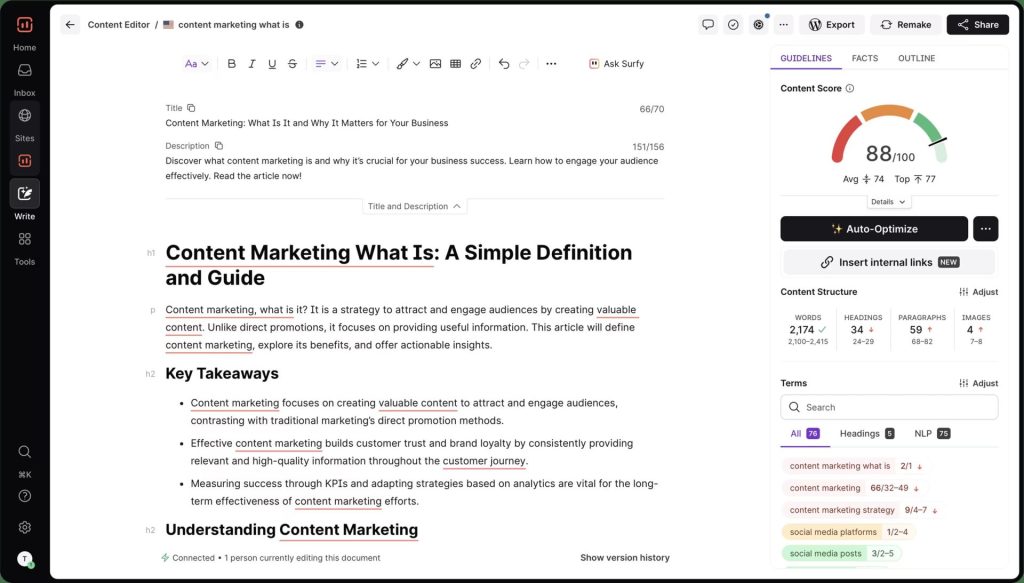
What sets Surfer apart is the real-time content editor that scores your content as you write. The interface integrates with Google Docs and WordPress, showing a live optimization score (0 to 100) that updates with every sentence.
Writers see immediately whether adding a keyword helps or whether they’ve hit optimal usage and should focus on other topics.
It’s best suited for content-driven SEO strategies, agencies producing 20+ blog posts monthly, and in-house content teams who need to scale optimization without bottlenecking on SEO review.
Compared to Clearscope (similar functionality) or Frase (AI writing focus), Surfer offers the most intuitive real-time optimization interface. If content quality directly impacts your rankings, Surfer automates optimization that traditionally required experienced SEO editors.
Surfer Key Features
- Real-Time Content Score and Optimization Feedback: Surfer updates a 0–100 content score live as you write, showing which changes improve ranking potential, preventing over-optimization, and helping writers optimize efficiently without penalties.
- NLP Keyword Analysis and Semantic Suggestions: Surfer identifies semantic keywords, LSI terms, and NLP entities. Keywords are prioritized by importance, helping rank competitive terms naturally without stuffing while focusing on high-value variations that truly impact SEO.
- Content Structure Recommendations: Recommends optimal heading counts, paragraph lengths, and content organization based on top-ranking pages. Matching competitor formats helped a client rank for “best CRM software” using structured comparison tables instead of long narratives.
- SERP Analyzer for Competitive Content Research: Analyzes top-ranking pages for word counts, keyword density, media usage, backlinks, and freshness. Insights guide content length, format, and media inclusion to outperform competitors for target keywords effectively.
- Content Audit for Optimization Prioritization: Audits existing content to identify pages with ranking potential. For 500 blog posts, 50 high-opportunity pages were prioritized for updates, boosting search performance without creating unnecessary new content.
- Google Docs and WordPress Integration: Surfer integrates directly with Google Docs or WordPress, providing real-time optimization guidance in the familiar writing environment, eliminating workflow disruption and keeping content teams productive from day one.
Surfer Pros
- Real-time content scoring eliminates guesswork: Live 0–100 scores show which optimizations improve rankings, preventing over-optimization. Single-pass content optimization reduced revision cycles from multiple rounds to one, improving efficiency and workflow.
- NLP keyword prioritization prevents stuffing: Surfer ranks semantic keywords by importance, focusing on high-value terms and avoiding repetition. Writers create natural, conversational content that ranks well, scoring 80+ while maintaining readability for audiences.
- Structure recommendations based on actual ranking data: Surfer analyzes top-performing content and suggests headings, paragraphs, and organization. Following recommendations, one client moved from position eight to three in thirty days for competitive keywords.
- Google Docs integration maintains workflow: Writers use familiar platforms while receiving live optimization guidance. Surfer’s sidebar reduces adoption friction, making teams productive immediately without requiring dedicated environments or extensive training to start.
- Content Audit identifies quick wins efficiently: Surfer highlights pages closest to ranking improvements, allowing clients to update the right content. This focus increased traffic 25% by optimizing thirty strategic pages instead of random content updates.
Surfer Cons
- AI writing assistant produces generic content: Surfy drafts sections inconsistently and lacks brand voice. Useful for overcoming writer’s block, but every AI-generated paragraph requires editing. Not a replacement for professional writing or strategy.
- Keyword suggestions can feel repetitive: Related terms often appear as minor variations, offering little semantic value. Writers must apply judgment, ignoring redundant suggestions instead of following every recommendation blindly to prevent unnatural optimization.
- Content score can encourage over-optimization: Chasing a perfect 100 may lead to keyword stuffing or awkward phrasing. Scores of 75–85 usually provide better user experience than forcing every suggested optimization.
- Limited technical SEO capabilities: Surfer focuses primarily on content. It lacks site audits, backlink analysis, and full keyword research, requiring supplemental tools like Semrush or Ahrefs for complete SEO workflows.
Surfer Pricing
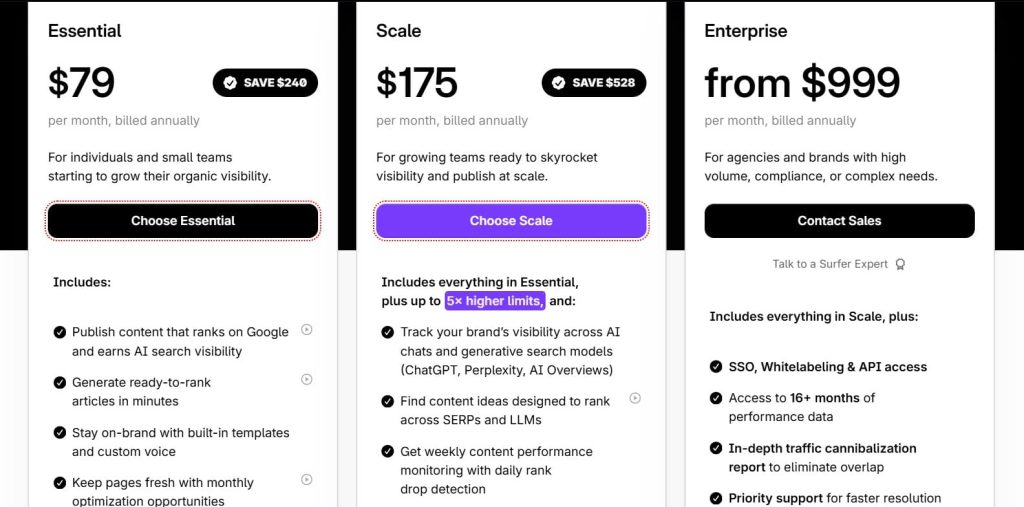
- Essential: $79/month
- Scale: $175/month
- Enterprise: from $999/month
Surfer Reviews
- G2: 4.8 out of 5 stars (538+ reviews)
- Capterra: 4.9 out of 5 stars (421+ reviews)
Users consistently praise real-time optimization and ease of adoption. Common sentiment: “Surfer turned our content team into an SEO-optimized machine without requiring everyone to become an SEO expert.
The real-time scoring means writers know immediately if they’re on track instead of waiting for SEO review.”
11. MarketMuse – Best for Content Planning Automation
Best For: Content strategists and marketing teams who need AI-driven content gap analysis and topic clustering to build comprehensive content strategies at scale.
How I Use It: We use MarketMuse at OneLittleWeb for content planning with clients who need data-driven topic selection instead of gut-feel decisions.
The AI identifies content gaps, clusters topics, and prioritizes what to write based on competitive analysis and traffic potential.
Quick Overview
MarketMuse is an AI-powered content strategy platform founded in 2015 that automates content planning, topic research, and competitive gap analysis.
Unlike optimization tools that help you write better, MarketMuse tells you what to write by analyzing your content library against competitors and identifying strategic opportunities.
What sets MarketMuse apart is the depth of AI analysis for content planning. The platform doesn’t just suggest keywords.
It builds topic models showing what constitutes comprehensive coverage for any subject, identifies where your content is thin compared to competitors, and prioritizes topics based on difficulty and opportunity.
It’s best suited for content-heavy sites, publishers, enterprise content teams planning 6 to 12 months ahead, and agencies building comprehensive content strategies for clients.
Compared to Surfer (optimization-focused) or Clearscope (writing guidance), MarketMuse excels at strategic planning before writing begins. If you need to know what content to create rather than how to optimize existing content, MarketMuse automates the research and prioritization.
MarketMuse Key Features
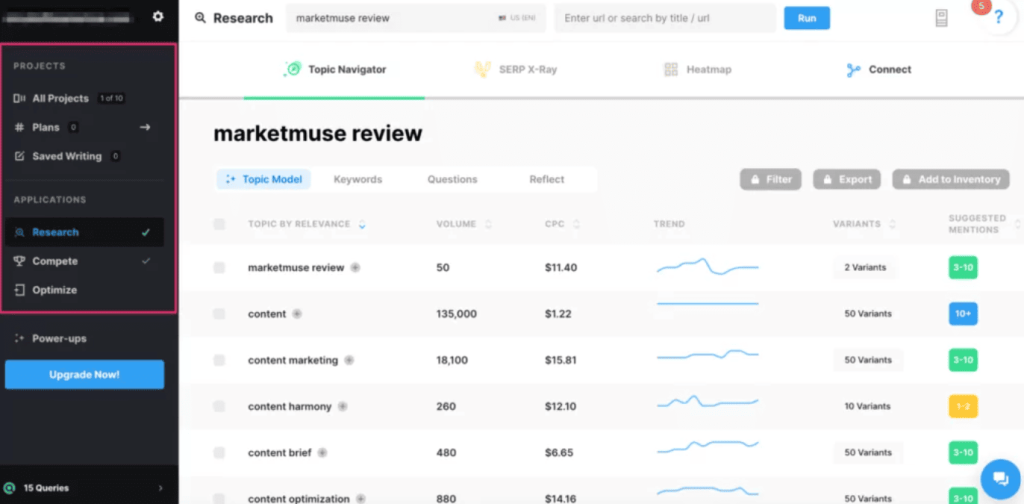
- AI-Driven Topic Modeling and Content Inventory Analysis: MarketMuse analyzes thousands of pages to model comprehensive topic coverage, identifies gaps in your content, and reveals missing subtopics competitors dominate for strategic content improvement.
- Competitive Content Gap Analysis: The platform compares your site to competitors, revealing content types and topic clusters they dominate. Gap analysis identifies opportunities to outrank competitors beyond simple keyword-level comparisons efficiently.
- Content Brief Automation with Topic Authority Scoring: MarketMuse generates data-driven content briefs, showing topics, questions, and subtopics to cover with topic authority scores. Writers produce authoritative articles without manual competitor research.
- Cluster and Pillar Strategy Planning: Identifies topic clusters and suggests pillar pages with supporting articles, improving internal linking and hierarchical organization. Clients restructure scattered blogs into cohesive clusters for better SEO outcomes.
- Content Decay Detection and Refresh Prioritization: Monitors published content for declining topic authority or competitor threats. Alerts prioritize pages to refresh based on traffic and competitive risk, maintaining search visibility proactively.
- Difficulty and Opportunity Scoring: Provides difficulty and opportunity metrics for topics, helping prioritize content with realistic ranking potential and meaningful traffic. Avoids wasted effort on overly competitive keywords, focusing on high-opportunity targets.
MarketMuse Pros
- Topic modeling reveals strategic content gaps: AI identifies missing or thin coverage that manual research misses. One client discovered “email deliverability” gaps overlooked by keyword research, enabling strategic content expansion and audience growth.
- Competitive analysis at scale automates research: MarketMuse evaluates multiple competitors across hundreds of topics, revealing areas to outrank them efficiently. This saves weeks of manual research while highlighting high-value content opportunities.
- Content briefs based on comprehensive topic models: Writers follow briefs derived from hundreds of top-ranking pages, reducing guesswork. This approach shortens revision cycles and ensures content covers authoritative elements thoroughly from the start.
- Cluster planning creates coherent content strategies: Topic clusters prevent disconnected blog posts. Strategic pillar and cluster planning improves internal linking, reduces keyword cannibalization, and creates clear content pathways that enhance user engagement and rankings.
- Difficulty scoring prevents wasted effort: Shows which topics are realistically achievable versus overly competitive. Clients avoid low-chance keywords, redirecting resources to winnable content opportunities, saving months of effort on dead-end content projects.
MarketMuse Cons
- AI-generated briefs sometimes lack niche nuance: MarketMuse analyzes general web content, so briefs can miss critical details for specialized B2B or technical industries. Manual research is often required to supplement recommendations.
- Steep learning curve for non-SEO teams: Understanding topic authority, difficulty scores, and cluster insights requires SEO knowledge. Content teams need weeks of training to interpret insights and implement actionable content strategies.
- Limited optimization features compared to writing tools: MarketMuse provides planning and briefs but no live optimization scoring. Agencies often need additional tools like Surfer for real-time guidance while drafting content efficiently.
- Topic modeling can be overwhelming: Broad topics may generate 50+ suggested subtopics, producing extremely long articles if followed blindly. Writers must filter recommendations to focus on user-relevant, actionable content instead of exhaustive coverage.
MarketMuse Pricing
N/A
MarketMuse Reviews
- G2: 4.6/5 stars (216+ reviews)
- Capterra: 4.6/5 stars (28+ reviews)
Users praise the strategic planning automation but note the cost and learning curve. Common sentiment: “MarketMuse transformed our content planning from reactive to strategic.
The topic modeling and competitive analysis revealed gaps we never would’ve found manually, but it takes time to learn how to interpret the data effectively.”
12. Oncrawl – Best for Log File Analysis Automation
Best For: Enterprise SEO teams and large sites optimizing crawl budget, diagnosing indexation issues, and understanding how search engines actually interact with their websites.
How I Use It: We use Oncrawl at OneLittleWeb for enterprise clients with massive sites where crawl budget optimization matters.
The automated log file analysis shows us exactly how Google crawls the site, where crawl budget is wasted, and which pages aren’t being discovered, informing technical decisions other tools can’t answer.
Quick Overview
Oncrawl is an enterprise SEO platform founded in 2013 that specializes in log file analysis, crawl budget optimization, and data-driven technical SEO for large sites.
While it handles standard site auditing, Oncrawl’s unique strength is combining server log data with crawl data to show how search engines actually behave on your site versus how you think they should behave.
What sets Oncrawl apart is the depth of log file analysis automation. Most SEO tools show you what exists on your site. Oncrawl shows you what Google actually crawls, how often, which pages consume crawl budget, and which valuable pages Google never discovers.
This insight is critical for sites with 100,000+ pages where crawl budget waste prevents important content from being indexed.
It’s best suited for large ecommerce platforms, publishers with millions of archive pages, enterprise sites with complex architectures, and SEO teams managing technical optimization at scale.
Compared to standard crawlers like Screaming Frog (no log analysis) or monitoring tools like ContentKing (real-time focus), Oncrawl offers unique crawl budget insights unavailable elsewhere.
Oncrawl Key Features
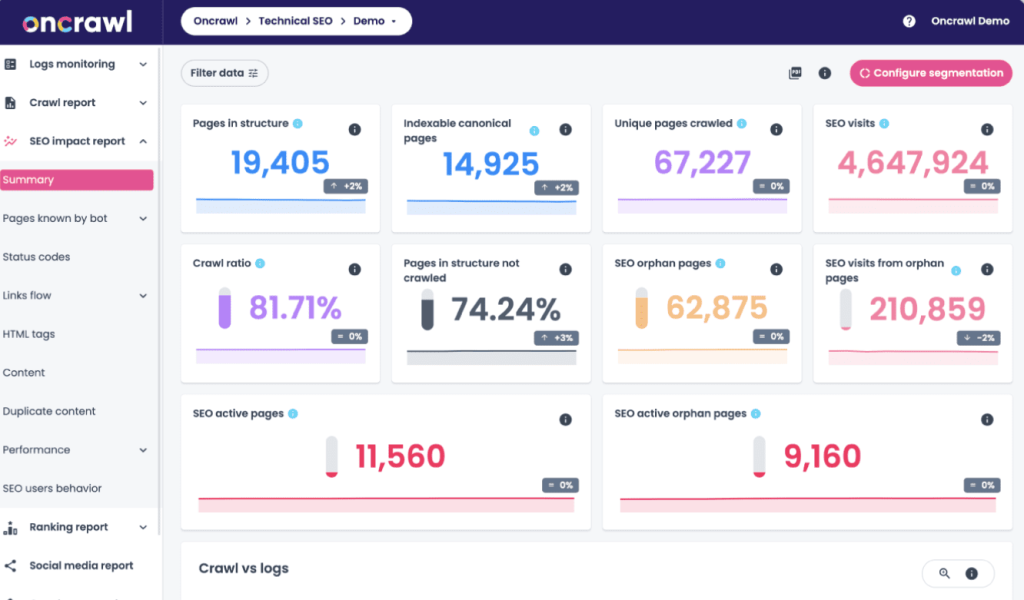
- Automated Log File Analysis and Crawl Budget Optimization: Oncrawl processes server logs automatically, showing how search engines crawl, which pages waste budget, and patterns in bot behavior to optimize indexing effectively.
- Crawl Budget Segmentation and Pattern Analysis: Segments crawl activity by page type, depth, or URL pattern to identify where Google prioritizes or ignores content, informing noindex, redirects, and crawl budget allocation decisions.
- Indexability and Discoverability Analysis: Identifies pages Google never crawls, pages crawled but not indexed, and those with crawl efficiency problems, revealing orphaned or hidden content that requires internal linking or structural improvements.
- Custom Data Layer Integration and Advanced Segmentation: Import metrics like revenue, conversions, or performance data to analyze crawl behavior against business value. Segment pages by profitability to prioritize high-value content for Google indexing.
- Predictive Analytics and Ranking Correlation: Uses machine learning to identify site-specific technical factors affecting rankings, revealing which elements like schema or click-depth most influence visibility for prioritizing optimization effectively.
- Automated Reporting and API Access: Schedule reports combining crawl, log, and custom metrics, with API support for integration into BI tools, dashboards, or internal analytics, enabling enterprise-wide SEO monitoring and insights.
Oncrawl Pros
- Log file analysis reveals crawl budget waste: Shows what Google actually crawls versus assumptions. Optimizing based on bot behavior improved indexation of fresh content, reducing wasted crawl budget on low-value or faceted URLs.
- Crawl budget segmentation optimizes large sites systematically: Identifies where Google spends crawl resources inefficiently, enabling strategic noindexing or prioritization. For large ecommerce sites, this improved discovery of new, high-priority product pages dramatically.
- Custom data integration ties technical SEO to business metrics: Overlaying revenue, conversions, or margins shows if Google prioritizes high-value pages. This analysis helped secure budget for targeted technical optimizations that improve revenue impact.
- Predictive analytics identify site-specific ranking factors: Machine learning reveals which technical elements correlate with rankings on each site. This prevents wasted effort on generic tactics, focusing optimization where it truly moves the needle.
- Enterprise-grade segmentation handles complexity: Advanced segmentation manages multi-subdomain, international, or complex URL structures. Oncrawl tracks technical issues and performance across dozens of markets, a capability unavailable in simpler SEO tools.
Oncrawl Cons
- Steep learning curve requires technical expertise: Understanding log file analysis, crawl metrics, and translating insights into action demands advanced SEO knowledge. Junior team members may struggle without dedicated support or experience.
- Overkill for small to mid-sized sites: Sites under 50,000 pages rarely face crawl budget constraints. Oncrawl’s advanced features provide minimal value for smaller sites where standard crawlers already cover the entire site efficiently.
- Log file setup requires server access: Implementing Oncrawl requires access to raw server logs and technical configuration. Teams without DevOps support or server permissions may struggle to enable this core feature.
- Interface complexity can overwhelm users: Oncrawl presents extensive data across modules and visualization types. Even experienced SEOs require time to navigate and interpret combined crawl, log, and custom analyses effectively.
Oncrawl Pricing
N/A
Oncrawl Reviews
- G2: 4.4 out of 5 stars (17+ reviews)
- Capterra: 3.8 out of 5 stars (4+ reviews)
Users praise the log analysis depth but note the complexity and niche focus. Common sentiment: “Oncrawl revealed crawl budget waste that cost us millions in lost revenue from products Google wasn’t indexing.
The insights are invaluable for large sites, but the learning curve is steep and the tool is overkill if you don’t have crawl budget problems.”
13. AccuRanker – Best for Fast Daily Rank Updates
Best For: SEO professionals and agencies who need the fastest, most accurate rank tracking with on-demand updates and minimal lag between searches and data.
How I Use It: We use AccuRanker at OneLittleWeb for clients running SEO experiments where we need to see ranking changes within hours instead of waiting for daily updates.
The on-demand rank checking lets us validate optimization impacts immediately without waiting 24 hours for scheduled crawls.
Quick Overview
AccuRanker is a dedicated rank tracking platform founded in 2013 that’s built for speed and accuracy. Unlike all-in-one SEO platforms where rank tracking is one feature among many, AccuRanker focuses exclusively on delivering the fastest, most precise ranking data possible with on-demand updates and minimal latency.
What sets AccuRanker apart is update speed and on-demand checking. Most rank trackers update once daily at scheduled times.
AccuRanker lets you trigger rank checks on demand and see results within minutes. For SEO experiments, algorithm update monitoring, or time-sensitive campaigns, this real-time capability matters more than the comprehensive features of slower platforms.
It’s best suited for SEO professionals running experiments, agencies managing client campaigns where ranking speed matters, and anyone who needs to validate optimization impacts quickly.
Compared to Semrush or Ahrefs (daily updates only), AccuRanker offers faster data at competitive pricing.
AccuRanker Key Features
- On-Demand Rank Checking and Real-Time Updates: Trigger instant rank checks anytime instead of waiting for daily updates. Results appear within minutes, enabling rapid SEO experiment validation and immediate insights into ranking changes.
- Unlimited Competitor Tracking: Monitor unlimited competitors without extra cost. Track rankings, share of voice, and SERP feature visibility across markets. This enables full competitive intelligence for industries with many rivals simultaneously.
- Share of Voice and Market Share Calculation: Calculates share of voice weighted by search volume, showing your market presence versus competitors. Updates dynamically, revealing shifts in visibility that inform immediate competitive strategy adjustments.
- Landing Page Performance Tracking: Tracks which URLs rank for multiple keywords, highlighting content assets driving visibility. Identifies opportunities to expand targeting, optimize high-potential pages, and maximize traffic from existing landing pages efficiently.
- API Access and Webhook Integrations: Access ranking data via API, automate workflows, and trigger webhooks for ranking changes. Enables Slack alerts, dashboards, and integration with CRM systems for proactive SEO monitoring.
- SERP Feature Tracking and Click Potential Analysis: Monitors visibility in featured snippets, local packs, and knowledge panels. Estimates traffic potential beyond raw rankings, revealing realistic click opportunity for pages across SERP features accurately.
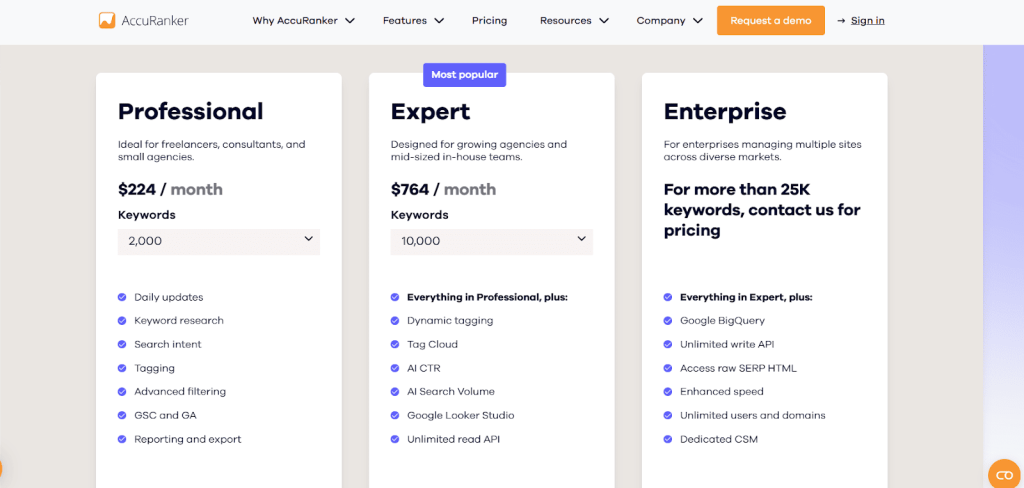
AccuRanker Pros
- Fastest rank updates available: On-demand checks return results in 2–5 minutes versus daily-only platforms. Rapid insights validate SEO experiments, accelerating optimization iterations up to five times faster than traditional daily trackers.
- Unlimited competitor tracking eliminates constraints: Monitoring 25 or more competitors costs the same as tracking five. This enables full visibility of competitive landscapes, share of voice, and strategic threats across markets.
- Share of voice metrics provide context: Weighting rankings by search volume shows true market position relative to competitors. This uncovers hidden losses or gains missed by raw ranking numbers, guiding immediate campaign adjustments.
- API flexibility supports automation workflows: Integrates ranking data into dashboards, triggers alerts, and automates actions when rankings drop. Connects SEO performance to CRM and workflow systems for operational efficiency and proactive responses.
- Landing page performance view optimizes content: Identifies pages ranking for multiple keywords, highlighting top-performing assets for further optimization. Enables strategic expansion of high-potential pages to maximize traffic and search visibility efficiently.
AccuRanker Cons
- No technical SEO features beyond rank tracking: Focuses exclusively on rankings. Does not handle audits, backlink analysis, or content optimization. Requires additional tools for complete SEO workflows or comprehensive platform coverage.
- Interface prioritizes function over visual polish: Data-dense and utilitarian interface built for speed. Not designed for client-ready visual reports. Agencies often export data to other tools for presentation purposes.
- On-demand checks count against daily limits: Each instant rank check consumes credits from your daily allowance. Heavy usage may require plan upgrades or waiting for scheduled updates to continue testing.
- Limited historical data retention on lower plans: Basic plans retain only 12 months of ranking history. Long-term trend analysis, algorithm studies, or multi-year reporting require higher-tier plans or manual export and archiving.
AccuRanker Pricing
- Professional: $224/month
- Expert: $764/month
- Enterprise: Custom pricing
AccuRanker Reviews
- G2: 4.8 out of 5 stars (225+ reviews)
- Capterra: 4.9 out of 5 stars (300+ reviews)
Users consistently praise the update speed and accuracy. Common sentiment: “AccuRanker is the fastest, most accurate rank tracker we’ve used.
The on-demand checking is invaluable for testing optimizations in real time instead of waiting days for results. It’s not cheap, but the speed justifies the cost.”
14. Zapier – Best for Workflow Automation Integration
Best For: SEO teams and agencies who need to connect SEO tools with other platforms, automate repetitive tasks, and build custom workflows without coding.
How I Use It: We use Zapier at OneLittleWeb to automate SEO workflows. These include sending rank drop alerts to Slack, logging new Ahrefs backlinks in Google Sheets, and triggering content optimization tasks in Asana when keyword rankings improve.
Quick Overview
Zapier is a workflow automation platform founded in 2011 that connects over 7,000 apps and automates tasks between them without requiring coding.
While not an SEO tool itself, Zapier has become essential for SEO operations by automating data flows between rank trackers, analytics platforms, reporting tools, and project management systems.
What sets Zapier apart is the breadth of integrations and ease of automation. You can build Zaps that trigger automated workflows when specific events occur.
These include sending Slack alerts for ranking drops in AccuRanker, logging new Ahrefs backlinks in Google Sheets, and creating Jira tickets for indexation errors in Google Search Console.
Compared to building custom integrations with APIs (requires developers) or doing everything manually (time-consuming), Zapier offers the fastest path to workflow automation for non-technical teams.
Zapier Key Features
- Multi-Step Workflows with Conditional Logic: Build automations with multiple steps and decision branches. Workflows can check conditions, trigger different actions, and handle nuanced scenarios automatically, reducing manual intervention and complex task management.
- Integration with Major SEO Platforms: Connect Semrush, Ahrefs, GSC, GA, Screaming Frog, RankRanger, ContentKing, and dozens of SEO tools. Automate data flows between multiple platforms without custom development or manual exports.
- Scheduled Automation and Polling: Automations can run on schedules or continuously poll for updates. Detect errors, ranking changes, or data anomalies automatically, replacing manual checks and exports with reliable, recurring monitoring workflows.
- Data Formatting and Transformation: Use built-in formatters to parse dates, extract patterns, perform calculations, and reformat data between steps. Eliminates intermediate spreadsheets, ensuring destination tools receive clean, usable, standardized data automatically.
- Error Handling and Retry Logic: Automatically retries failed workflow steps, logs automation runs, and sends error notifications. Ensures critical automations run reliably, even when APIs fail temporarily or exceed rate limits unexpectedly.
- Team Collaboration and Shared Workflows: Share Zaps across teams, create organization-wide automation libraries, and deploy workflows for multiple clients efficiently, preventing duplication and enabling consistent, collaborative SEO automation across departments or accounts.
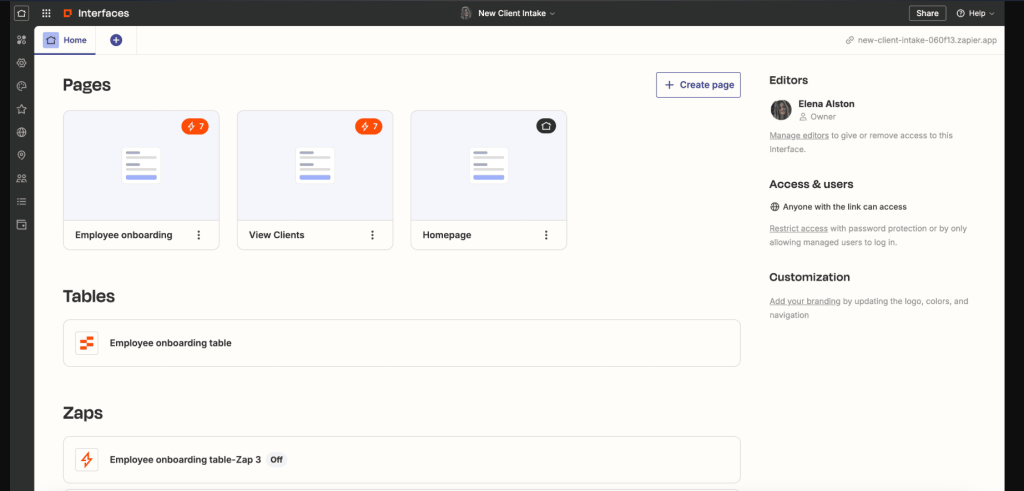
Zapier Pros
- No-code automation for non-technical teams: Visual drag-and-drop workflow builders let anyone create automations. Content managers and junior SEO specialists can build complex automations without programming, democratizing workflow automation across the organization.
- Eliminates hours of manual data transfer weekly: Automates rank tracking, backlink alerts, GSC error notifications, and data exports, saving agencies 5–10 hours per client. Scales to reclaim 100+ hours monthly across multiple accounts.
- Integration breadth covers virtually any tool combination: With 7,000+ app integrations, Zapier connects niche SEO tools, CRM platforms, social schedulers, and review systems, enabling automations previously requiring custom development or API coding.
- Reliability handles critical workflows without manual monitoring: Retry logic and error handling ensure automations continue despite API failures or rate limits. Alerts for ranking drops or errors run consistently without oversight.
- Rapid prototyping and iteration of workflows: Building Zaps takes minutes versus days for custom integration. Teams can experiment, test, validate, and iterate automation concepts quickly, keeping only workflows that demonstrate measurable value.
Zapier Cons
- Limited data transformation compared to custom code: Formatters handle basic tasks, but complex calculations, regex, or advanced API logic require custom code steps. High-complexity workflows may need developer intervention beyond Zapier’s built-in capabilities.
- Polling-based triggers create lag for some workflows: Zapier checks for new data every 5–15 minutes depending on plan tier, which introduces delays for time-sensitive alerts like immediate ranking drops or urgent SEO issues.
- Debugging failed workflows can be frustrating: API changes, authentication issues, or mismatched data formats require understanding multiple platforms. Error messages are often unclear, demanding time-consuming troubleshooting to restore broken automations.
- No version control or rollback for workflow changes: Modifying a working Zap can break it. Unlike code-based systems with Git, recovering previous versions requires manual reconstruction, creating risk for complex, multi-step automation workflows.
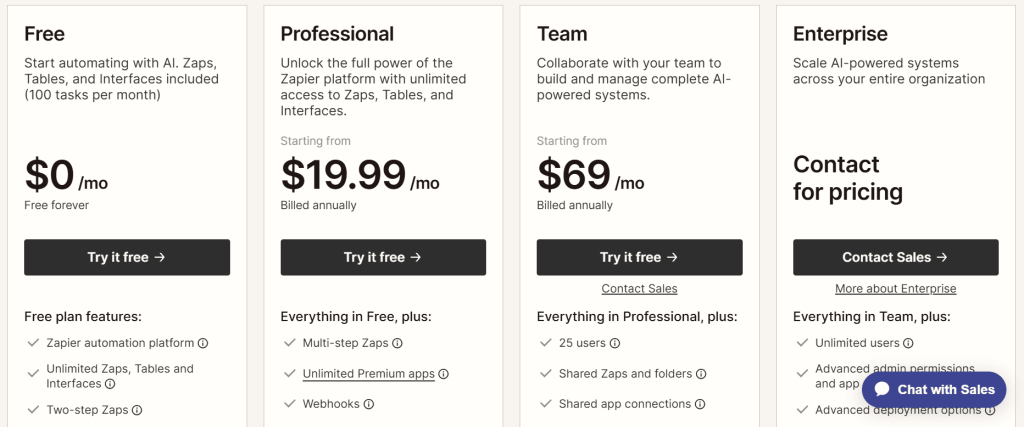
Zapier Pricing
- Free
- Professional: $19.99/month
- Team: $69/month
- Enterprise: Custom
Zapier Reviews
- G2: 4.5 out of 5 stars (1,781+ reviews)
- Capterra: 4.7 out of 5 stars (3,034+ reviews)
Users praise the integration breadth and ease of use but note scaling costs. Common sentiment: “Zapier transformed our SEO operations from manual data shuffling to automated workflows.
The no-code interface means anyone on the team can build automations, and we’ve reclaimed 20+ hours weekly. Just watch task consumption because costs scale quickly.”
What’s the Best SEO Automation Tool for You?
Choosing the right SEO automation tool depends on your budget, team size, and which workflows you need to automate. Here’s my breakdown based on real-world use cases:
- Best for Beginners: SE Ranking
If you’re new to SEO automation, SE Ranking offers the easiest onboarding with comprehensive features. You get automated rank tracking, site audits, backlink monitoring, and white-label reports for $52/month with unlimited projects.
- Best for Agencies: Semrush
For agencies managing 10+ clients, Semrush automates the most workflows in one platform. Rank tracking triggers automatic crawls when rankings drop, backlink alerts connect to spam analysis, and white-label reports combine multiple data sources without manual assembly.
- Best Budget Choice: Screaming Frog
For technical SEO automation on a tight budget, Screaming Frog’s $279/year license delivers unlimited crawling, JavaScript rendering, and custom data extraction without recurring monthly fees.
- Best for Content Teams: Surfer SEO
If your SEO strategy centers on content, Surfer SEO ($79/month) automates optimization with real-time scoring as you write.
The live 0 to 100 content score updates with every sentence, NLP keyword suggestions prevent over-optimization, and Google Docs integration keeps writers in familiar tools.