Link building is one of those things that sounds simple until you actually try to do it at scale.
You need to find real prospects, verify contact info, send outreach that doesn’t get ignored, and then track everything without losing your mind.
I know because we do it every single day at OneLittleWeb.
Over the past 8+ years, we’ve run link building campaigns for clients across SaaS, ecommerce, B2C, and local businesses.
Our outreach has landed placements on sites like Mens Health, Screen Rant, Runners World, and HubPages.
In one campaign alone, we built 377 high-quality backlinks for a cycling brand, helping them grow from 1.4M to 1.8M monthly organic visits in just six months. (Full case study here.)
That kind of work requires good tools.
Success at this scale requires the right tools. We rely on WordPress SEO plugins for technical optimization, content writing tools for compelling outreach materials, and AI SEO tools and AI marketing platforms to automate repetitive tasks.
And after testing dozens of them across real campaigns, I can tell you that most link building tools fall into one of two buckets: overpriced or underwhelming.
So I put together this guide to save you the trial and error. You’ll get my honest breakdown of the best link building tools available right now, based on what actually works in live outreach campaigns, not just feature lists.
Here’s what I evaluated each tool on:
- Prospect quality (does it surface real, relevant link opportunities?)
- Outreach efficiency (how fast can you go from prospect to sent email?)
- Contact data accuracy (are the emails valid and up to date?)
- Backlink analysis depth (how useful is the link data for strategy?)
- Pricing vs. value (is it worth the cost for your team size?)
- Ease of use (can your team actually use it without a week of onboarding?)
Let’s unpack this.
What is a Link Building Tool?
A link building tool is software that helps you find websites to get backlinks from, manage your outreach, and track the links you earn over time.
These tools handle the heavy lifting that would otherwise take hours to do manually. Things like discovering relevant prospects, finding contact information, sending personalized emails, analyzing competitor analysis and backlink profiles, and monitoring whether your links stay live.
They’re built for SEO professionals, agency teams, in-house marketers, and business owners who want to improve their search rankings through quality backlinks.
Whether you’re running outreach for one site or managing campaigns across dozens of clients, the right tool keeps everything organized and saves a ton of time.
Link building still remains one of the strongest ranking signals in Google’s algorithm. And having the right tools in place can be the difference between a campaign that earns 10 links a month and one that earns 100.
What to Look for in a Link Building Tool?
Not every link building tool does the same thing. Some focus on backlink analysis, others on outreach, and a few try to do both.
Here’s what I look for before recommending any tool to our clients at OLW:
Backlink Database Size and Freshness
The quality of any link building tool depends on its backlink index. Look for tools that crawl billions of pages and update their data frequently. Stale indexes mean you’re working with dead links and missed opportunities.
Tools like Ahrefs and Semrush refresh their indexes daily, which matters when you’re trying to spot new competitor backlinks before everyone else does.
Prospect Discovery and Filtering
A good tool should help you find link-worthy prospects fast, not just dump thousands of random domains on your screen.
Look for filtering options like Domain Rating (DR), Domain Authority (DA), traffic estimates, topical relevance, and spam score. The more granular the filters, the less time you waste vetting junk sites manually.
Outreach Automation and Personalization
Sending cold emails one by one doesn’t scale. The best link building tools let you create email sequences with follow-ups, merge personalization fields (like name, site URL, and recent post titles), and track open and reply rates.
But avoid tools that prioritize volume over personalization. Templated spam gets ignored.
Contact Data Accuracy
Finding a great prospect means nothing if you can’t reach them. Look for tools with built-in email finders and verification.
Bounce rates above 10% hurt your sender reputation and tank deliverability. Tools that pull verified emails from multiple sources and flag outdated contacts save you from landing in spam folders.
Competitor Backlink Analysis
Reverse engineering competitor link profiles is one of the fastest ways to build a prospect list. A good tool should show backlink gaps, filter link types, and sort by domain authority. This tells you exactly which sites are linking to competitors but not to you.
Integrations and Workflow Compatibility
Link building rarely lives in a single tool. Check whether the platform integrates with your CRM, email provider (Gmail, Outlook), Google Sheets, Slack, or project management tools like Trello and Asana.
Native integrations cut down on manual data exports and keep your team aligned across prospecting, outreach, and reporting.
Pricing and Scalability
Some tools charge per user, others per campaign or per email sent. Make sure you understand the pricing model before committing.
A tool that works for a solo freelancer running one campaign won’t necessarily scale for an agency managing 20 clients. Look for flexible plans that grow with your workload without surprise overages.
How I Selected the Best Link Building Tools
Picking the right link building tools isn’t something I did over a weekend. This list is the result of testing 30+ tools across real outreach campaigns we’ve run at OneLittleWeb over the past several years.
I’ve personally used these tools for backlink prospecting, competitor gap analysis, outreach sequencing, link monitoring, and domain authority vetting across hundreds of client campaigns.
That includes everything from SaaS startups building their first batch of referring domains to enterprise brands scaling digital PR across multiple markets.
Here’s what I measured during testing:
Prospecting Accuracy
I looked at how well each tool surfaces relevant, high-authority domains. A tool that returns 500 prospects with 80% junk is worse than one that gives you 50 solid targets with strong topical relevance and clean spam scores.
Outreach Deliverability
I tracked email bounce rates, open rates, and reply rates across tools. If a platform’s built-in email finder consistently pulls outdated contacts, your sender reputation takes a hit and campaigns stall before they start.
Data Reliability
I cross-referenced backlink metrics like DR, DA, referring domains, anchor text distribution, and link velocity against Google Search Console data.
Some tools inflate traffic estimates or miss toxic backlinks entirely. That’s a problem when you’re making strategic decisions based on that data.
Workflow Speed
I timed how long it takes to go from entering a seed keyword or competitor domain to having a ready-to-send outreach list. In agency work, hours matter. A tool that saves 20 minutes per campaign adds up fast when you’re managing dozens of clients.
Real-World ROI
At the end of the day, I kept the tools that consistently helped us earn quality backlinks at a reasonable cost per link. If a tool looked impressive on the feature page but didn’t translate to actual placements, it didn’t make this list.
Summary Table: Best Link Building Tools
Here’s a quick comparison to help you find the right tool before diving into the full reviews:
| Tool Name | Best For | Key Features | Starting Price | Our Notes |
| Ahrefs | Backlink analysis and competitor research | Largest backlink index, content explorer, backlink gap | $129/month | Best raw backlink data we’ve used |
| Semrush | All-in-one link building workflow | Backlink gap, outreach module, link monitoring | $165.17/month | Full pipeline from research to outreach |
| Majestic | Deep backlink index and trust analysis | Trust Flow, Citation Flow, historic index | $49.99/month | Unmatched for raw link data depth |
| BuzzSumo | Content-driven link prospecting | Content analyzer, journalist database, backlink alerts | $199/month | Best for research before building linkable assets |
| Mangools (LinkMiner) | Budget-friendly backlink analysis | Majestic-powered index, link strength scoring, inline preview | $30.50/month | Best value five-tool SEO suite for beginners |
| Screaming Frog | Technical SEO and broken link audits | Site crawling, redirect chains, internal link analysis | $279/year | We run this before every link campaign |
| Linkody | Backlink monitoring on a budget | 24/7 link tracking, disavow tool, competitor monitoring | $11.20/month | Best dedicated backlink watchdog for small teams |
| Pitchbox | Enterprise-scale outreach automation | AI templates, campaign workflows, SEO integrations | $165/month | Best for agencies running 100+ links/month |
| Respona | Content-driven personalized outreach | AI personalization, pre-built campaigns, prospecting | $100/placement | Strong balance of automation and personalization |
| BuzzStream | Outreach CRM for teams and agencies | Email sequences, contact discovery, team collaboration | $24/month | Our go-to CRM for managing outreach |
| Hunter.io | Finding and verifying email contacts | Email finder, domain search, email verification | $49/month | Essential for keeping bounce rates low |
11 Best Link Building Tools in 2026 (Free + Paid)
- Ahrefs – best for backlink analysis and research
- Semrush – best for all-in-one link building
- Majestic – best for deep backlink index data
- BuzzSumo – best for content-driven link prospecting
- Mangools (LinkMiner) – best for budget-friendly backlink analysis
- Screaming Frog – best for technical link audits
- Linkody – best for backlink monitoring on a budget
- Pitchbox – best for enterprise outreach automation
- Respona – best for personalized content outreach
- BuzzStream – best for outreach team collaboration
- Hunter.io – best for finding verified emails
I’ve tested each of these across real client campaigns at OLW. Here’s exactly what works, what doesn’t, and who each tool is built for:
1. Ahrefs – Best for Backlink Analysis and Research
Best For: SEO professionals and agencies who need the deepest, most frequently updated backlink data to reverse engineer competitor link profiles and uncover high-value outreach targets.
How I Use It: I use Ahrefs at OLW to audit client backlink profiles, run backlink gap analysis against competitors, and identify broken link opportunities before launching any outreach campaign.
Quick Overview
Ahrefs was founded in 2010 in Singapore and has grown into one of the most trusted SEO platforms in the industry.
It operates the second most active web crawler after Google, which powers what is widely considered the largest live backlink index available, over 14 trillion links and counting.
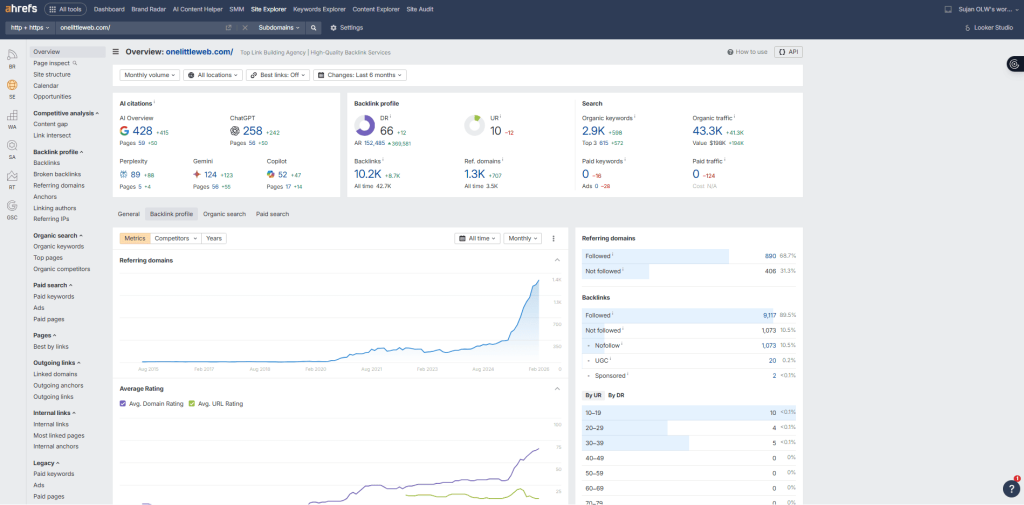
For link building specifically, this is where I start every single campaign. Site Explorer lets you plug in any domain and instantly see every backlink, referring domain, anchor text pattern, and link growth trend.
The Backlink Gap tool compares up to five domains side by side, surfacing sites that link to your competitors but not to you. That alone generates more qualified prospects in 10 minutes than hours of manual research.
Content Explorer is another underrated feature for link builders. It searches billions of pages by topic, showing you the most linked-to and shared content in any niche. I use it to find linkable assets and identify who is already linking to similar content.
That said, Ahrefs is not a beginner tool. There’s no built-in outreach module, no email sequencing, and no CRM. It’s purely a research and analysis platform.
Ahrefs Key Features
- Site Explorer Backlink Analysis: Shows every backlink, referring domain, anchor text, and link type for any URL, helping you fully map competitor strategies.
- Backlink Gap Comparison Tool: Compares up to five competing domains side by side, instantly revealing link prospects already linking to competitors but not you.
- Content Explorer for Link Prospecting: Searches billions of pages by topic, surfacing high-authority content with strong backlink profiles worth targeting for outreach campaigns.
- New and Lost Backlink Monitoring: Tracks backlink changes in near real time with 15-minute refresh cycles, alerting you when links appear, disappear, or break.
- Broken Backlink Finder: Identifies broken pages on competitor sites still receiving live backlinks, creating easy replacement link building opportunities for your outreach.
Ahrefs Pros
- Largest Live Backlink Index Available: Over 35 trillion links with 15-minute refresh cycles means no other tool delivers backlink data this fresh or this comprehensive.
- Competitor Research is Unmatched: Site Explorer reveals complete competitor link strategies including growth trends, anchor text patterns, and their highest-linked pages instantly.
- Backlink Gap Builds Prospect Lists Fast: Comparing domains surfaces hundreds of qualified targets already linking to competitors, cutting manual prospecting time down to minutes.
- Content Explorer Saves Research Hours: Finding linkable content and identifying who links to similar topics takes minutes, replacing tedious manual searches across dozens of tabs.
- Data Accuracy is Industry Leading: Cross-referencing Ahrefs data against Google Search Console consistently shows the closest match compared to other third-party SEO tools available.
- Clean Interface Despite Data Depth: Even complex backlink reports with thousands of referring domains remain easy to read, filter, sort, and export for team use.
Ahrefs Cons
- No Built-In Outreach Features: Unlike Semrush, Ahrefs has no email outreach, campaign management, or CRM features, requiring a separate tool for actual link building.
- Credit System Limits Heavy Usage: Daily report credits restrict how much research you can do, which feels frustrating when managing multiple client campaigns simultaneously.
- Steep Learning Curve for New Users: The sheer volume of data, metrics, and features can overwhelm beginners who don’t yet know which reports matter most.
Ahrefs Pricing
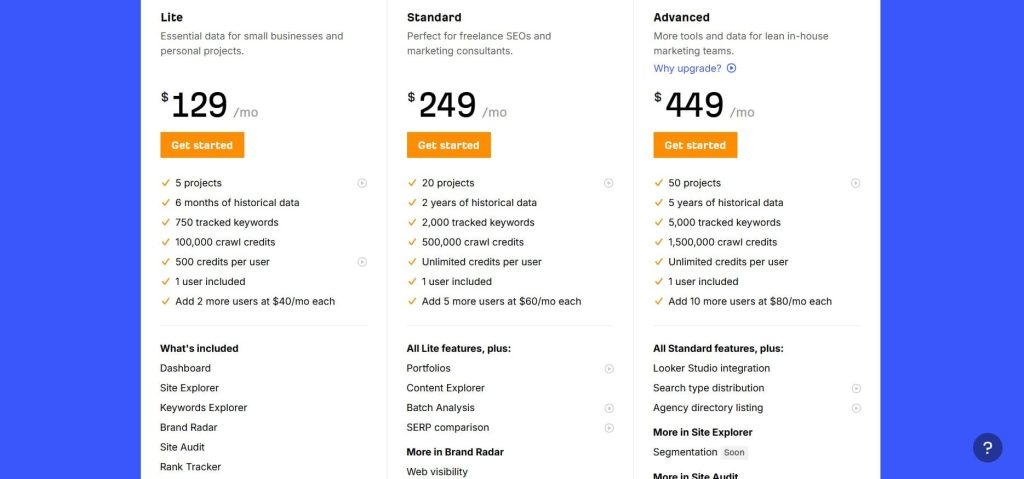
- Lite: $129/month
- Standard: $249/month
- Advanced: $449/month
- Enterprise: $1,499/month
Ahrefs Reviews
- G2: 4.5 out of 5 stars (669+ reviews)
- Capterra: 4.7 out of 5 stars (579+ reviews)
User Sentiment: Users consistently praise Ahrefs for having the most accurate and comprehensive backlink database on the market.
The most common complaints are the high pricing, the credit-based usage system that can lead to surprise charges, and the lack of a built-in outreach module.
2. Semrush – Best for All-in-One Link Building
Best For: Marketing teams and agencies who want backlink research, prospect discovery, email outreach, and link monitoring inside one platform without managing multiple separate subscriptions.
How I Use It: I use Semrush’s Link Building Tool and Backlink Gap at OLW to run full link campaigns from competitor analysis through outreach and link tracking, all without leaving the platform.
Quick Overview
Semrush was founded in 2008 and has grown into one of the most widely used digital marketing platforms in the world, with over 55 tools covering SEO, PPC, content, and social media.
But for link building specifically, it’s the only major SEO platform that lets you go from research to outreach to monitoring in a single workflow.
The Backlink Gap tool is where I usually start. You plug in your domain alongside up to four competitors and it instantly shows you which sites link to them but not to you.
From there, you can send those prospects directly into the Link Building Tool, which lets you organize campaigns, connect your Gmail, send personalized outreach emails, and track responses without switching to a separate CRM.
Semrush’s backlink database is massive too, with over 43 trillion links. It’s not quite as fresh as Ahrefs on the update cycle, but the data is solid and the traffic estimates tend to be more accurate when I cross-reference them with Google Search Console.
Semrush is best suited for agencies managing multiple clients, in-house teams that need a single tool for everything, and anyone who values having research and outreach under one roof.
Semrush Key Features
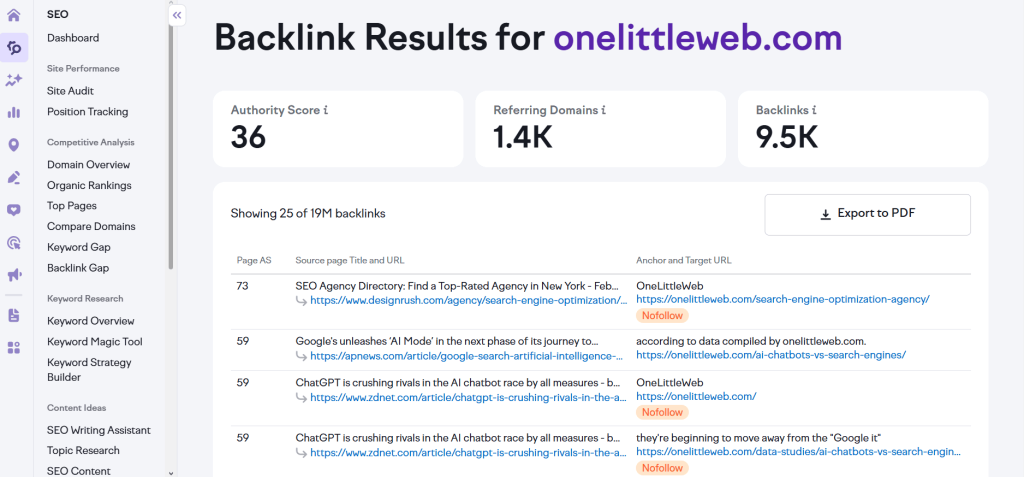
- Backlink Gap Analysis: Compares your domain against up to four competitors, instantly revealing referring domains linking to them but missing from your profile.
- Built-In Link Building Tool: Manages the full outreach pipeline from prospect discovery through email sending, follow-ups, and link status tracking inside one dashboard.
- Backlink Audit with Toxicity Scoring: Scans your entire backlink profile for harmful or spammy links, assigns toxicity scores, and generates disavow files for Google automatically.
- Prospect Email Outreach Integration: Connects directly to Gmail, lets you customize email templates, schedule sends, and track open and reply rates within the platform.
- Link Monitoring Dashboard: Tracks active, broken, lost, and rejected backlinks over time, alerting you when a placement disappears so you can follow up immediately.
- Authority Score Metric: Provides a proprietary domain quality score combining backlink data, organic traffic, and spam signals to help you quickly vet prospect quality.
Semrush Pros
- Full Campaign Workflow in One Tool: No other major SEO platform lets you research, prospect, outreach, and monitor links without leaving the dashboard or buying extras.
- Backlink Gap is a Prospecting Shortcut: Comparing domains surfaces hundreds of missed opportunities in minutes, making it one of the fastest ways to build qualified outreach lists.
- Traffic Estimates are More Accurate: Cross-referencing Semrush traffic data against Google Analytics and Search Console consistently shows closer estimates than most competing tools available.
- Backlink Audit Catches Toxic Links: The toxicity scoring system helped us identify and disavow harmful links on client sites that other tools missed during routine backlink audits.
- 55+ Tools Beyond Link Building: Keyword research, site audits, rank tracking, and content tools are all included, making Semrush genuinely useful across your entire SEO workflow.
Semrush Cons
- Outreach Tool is Basic Compared to Dedicated CRMs: The built-in email outreach works, but it lacks the depth of BuzzStream or Pitchbox for personalization, sequencing, and team management.
- Interface Can Feel Overwhelming: With 55+ tools crammed into one platform, new users often struggle to find what they need and can feel lost during the first few weeks.
- Backlink Data Refresh is Slower Than Ahrefs: While the database is large, updates don’t happen as frequently as Ahrefs’ 15-minute refresh cycle, which matters for real-time link tracking.
Semrush Pricing
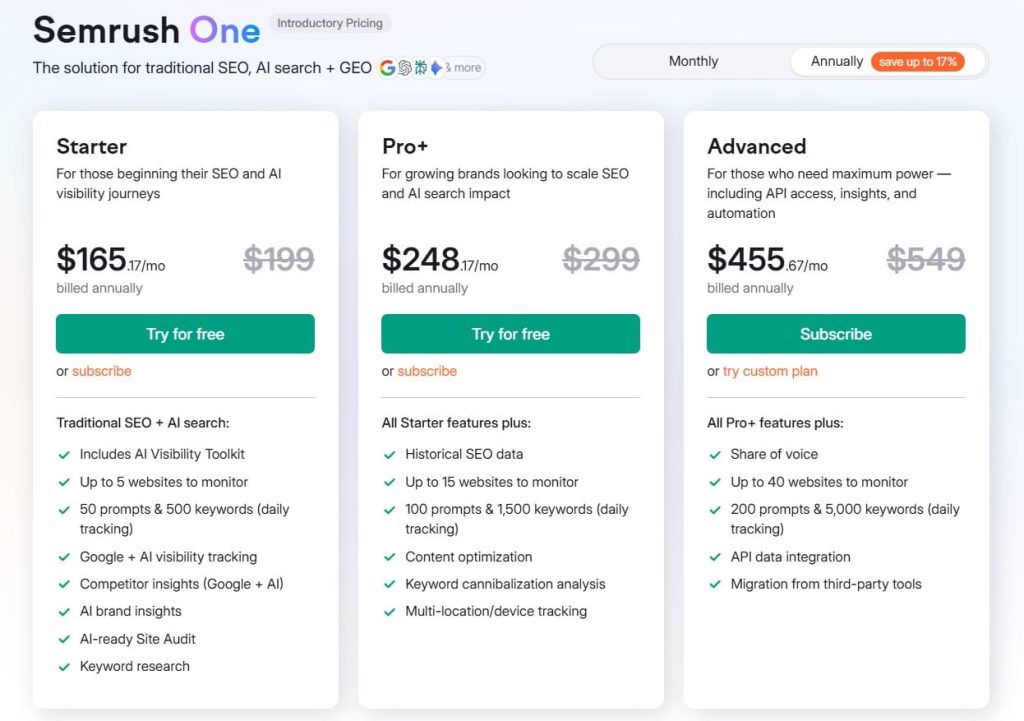
- 7-day free trial
- Starter: $165.17/month
- Pro+: $248.17/month
- Advanced: $455.67/month
Semrush Reviews
- G2: 4.5 out of 5 stars (3,414+ reviews)
- Capterra: 4.6 out of 5 stars from (2,314+ reviews)
User sentiment: Users praise Semrush for its unmatched breadth of features and the ability to manage SEO, content, and link building from a single platform.
The most common complaints are the steep pricing, occasional data inaccuracies for niche keywords, and a cancellation process that multiple reviewers describe as frustrating.
3. Majestic – Best for Deep Backlink Index Data
Best For: Link builders, SEO consultants, and domain investors who need the deepest historical backlink data available, with proprietary trust metrics that no other tool replicates.
How I Use It: I use Majestic at OLW when I need to dig into a domain’s full link history, especially for legacy audits, expired domain research, and evaluating Trust Flow before committing to outreach targets.
Quick Overview
Majestic has been focused on one thing since it launched in 2004: mapping the internet’s link graph. While other tools branched out into keyword research, rank tracking, and content optimization, Majestic stayed laser-focused on backlink intelligence. And that specialization shows.
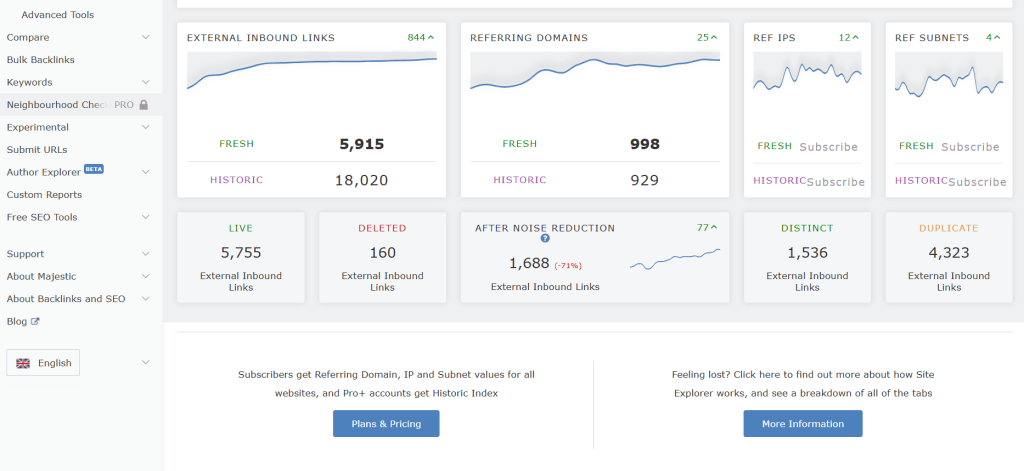
The platform maintains two separate indexes. The Fresh Index updates daily and covers the most recently crawled data. The Historic Index goes all the way back to 2006 and contains over 21 trillion discovered URLs.
What really sets Majestic apart are its proprietary Flow Metrics. Trust Flow measures the quality of backlinks pointing to a site based on how close those links are to a set of trusted seed sites. Citation Flow measures the raw quantity of links.
The ratio between the two tells you a lot. A domain with high Trust Flow and low Citation Flow typically has a clean, authoritative profile. A domain where Citation Flow far outweighs Trust Flow usually signals spammy or low-quality links.
I also find Topical Trust Flow useful for link building. It breaks Trust Flow down by category, so you can see whether a domain’s authority comes from tech sites, health sites, news outlets, or something else entirely. That kind of topical relevance scoring is something Ahrefs and Semrush don’t offer.
Majestic Key Features
- Dual Index System: Maintains a daily-updated Fresh Index and a Historic Index dating back to 2006, offering unmatched depth for backlink research.
- Trust Flow and Citation Flow: Proprietary metrics that measure link quality and link quantity separately, giving you a clear picture of any domain’s profile.
- Topical Trust Flow Categorization: Breaks down a domain’s authority by topic category, helping you assess whether a prospect’s relevance actually matches your niche.
- Link Context Analysis: Shows the surrounding text and placement of each backlink on the linking page, helping you evaluate whether links are editorial or buried.
- Bulk Backlink Checker: Lets you analyze up to one million URLs in a single batch, making it efficient for large-scale prospect vetting and agency workflows.
Majestic Pros
- Deepest Historical Backlink Data Available: The Historic Index spans back to 2006 with over 21 trillion URLs, making it irreplaceable for legacy audits and domain research.
- Trust Flow is Uniquely Valuable: No other tool offers a comparable trust-based metric that traces link quality back to seed sites, giving you a genuine quality signal.
- Topical Relevance Scoring is a Real Advantage: Knowing whether a domain’s authority comes from your niche or an unrelated category prevents wasted outreach on irrelevant prospects.
- Link Context Shows Real Placement Quality: Seeing where a backlink sits on the page, whether it’s editorial, sidebar, or footer, helps you judge the actual SEO value.
- Bulk Analysis Scales for Agency Work: Processing up to one million URLs at once makes Majestic practical for large-scale prospect evaluation without slowing down your workflow.
Majestic Cons
- No Keyword Research or Rank Tracking: Majestic is exclusively a backlink tool. You’ll need a separate platform for keywords, audits, rank tracking, and everything else.
- No Outreach or Campaign Management: Like Ahrefs and Moz, there are no email outreach, CRM, or prospecting workflow features built into the platform at all.
- Traffic Estimates are Not Available: Unlike Ahrefs and Semrush, Majestic doesn’t provide organic traffic estimates for domains, limiting your ability to assess prospect value fully.
Majestic Pricing
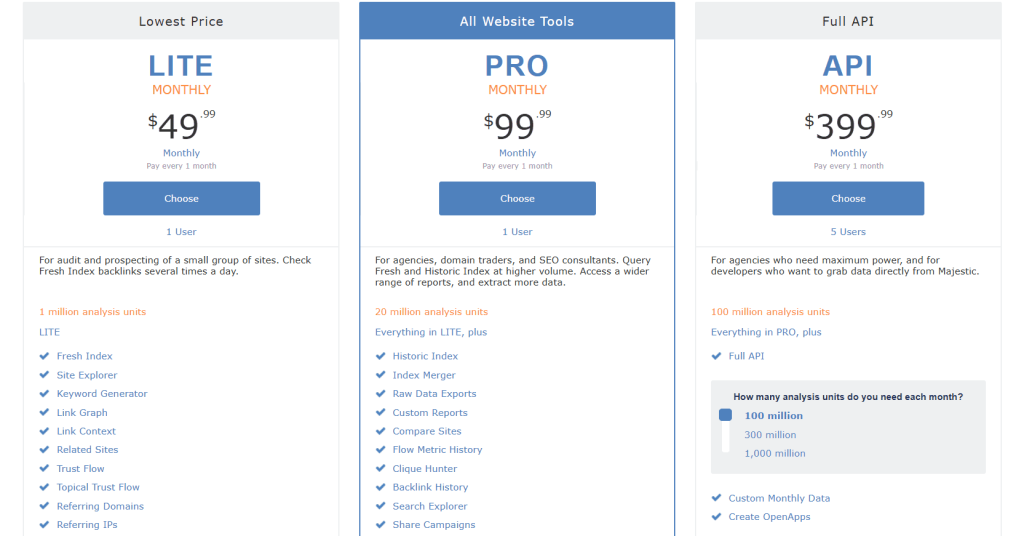
- Lite: $49.99/month
- Pro: $99.99/month
- API: from $399.99/month
Majestic Reviews
- G2: 4.3 out of 5 stars (73+ reviews)
- Capterra: 4.4 out of 5 stars (30+ reviews)
User sentiment: Long-time users praise Majestic for having the largest and most reliable link index available, with several reviewers noting they’ve used it for over a decade without switching.
The main criticisms are the outdated interface, the narrow focus on links only, and the lack of modern features that competing all-in-one platforms now include.
4. BuzzSumo – Best for Content-Driven Link Prospecting
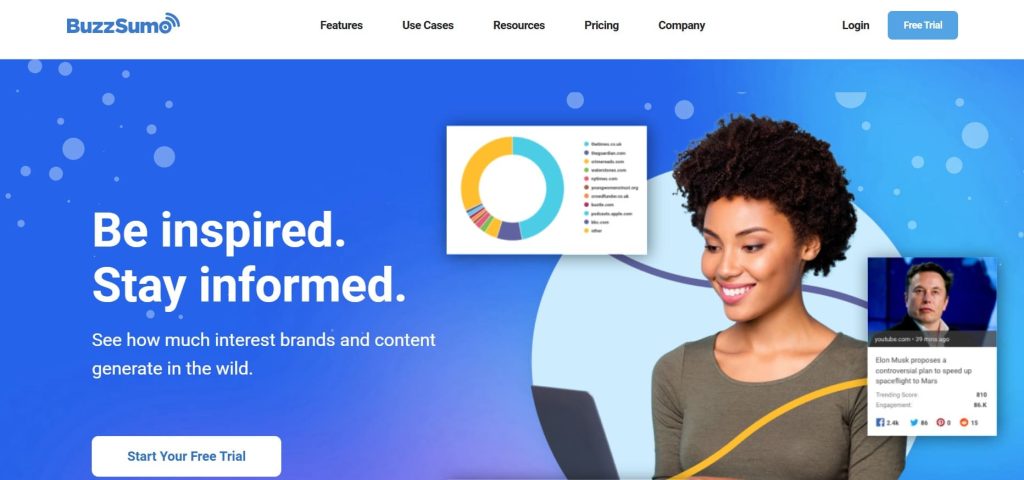
Best For: Content marketers and PR teams who want to find top-performing content, track its backlinks, and run outreach campaigns.
How I Use It: At OLW, I use BuzzSumo to research linkable content before starting any client campaign. It reveals which formats earn the most links in the niche, guiding our outreach strategy.
Quick Overview
BuzzSumo launched in 2013 and has become the go-to content intelligence platform for marketers who want data behind their content decisions.
It indexes over 8 billion articles across the web and tracks social engagement, backlinks, and content performance across all major platforms.
For link building, BuzzSumo’s value is in the research phase. You enter a topic or competitor domain, and it shows you the most shared and most linked content in that space.
From there, you can see exactly which sites linked to those pieces, identify the journalists and influencers who shared them, and build outreach lists based on people who have already demonstrated interest in similar content.
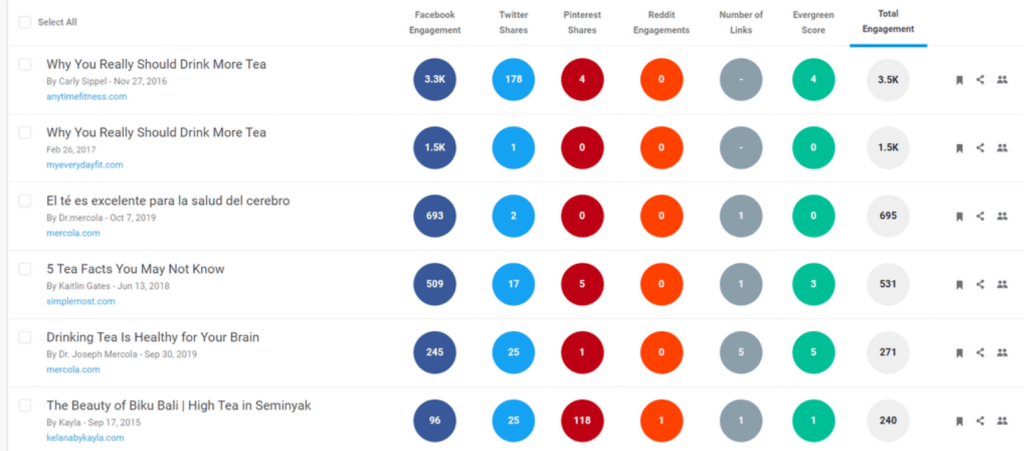
The Backlink Analyzer lets you track which domains link to any URL over time. The Content Analyzer breaks down what content types, formats, and lengths earn the most engagement and links in your niche.
Combined with the journalist database of over 700,000 contacts, BuzzSumo bridges the gap between content research and outreach planning.
BuzzSumo is a research engine that feeds your outreach strategy. If you pair it with BuzzStream or Pitchbox for execution, the combination becomes very effective.
BuzzSumo Key Features
- Content Analyzer with Backlink Data: Search any topic or domain to find the most shared and linked content, with full backlink profiles and engagement breakdowns.
- Journalist and Influencer Database: Access over 700,000 journalist profiles with recent articles, beat coverage, and contact details for building targeted digital PR lists.
- Competitor Content Intelligence: Enter any competitor domain to see their top-performing content by engagement, backlinks, and social shares, revealing link-earning formats.
- Backlink Alerts and Monitoring: Set alerts for any domain or URL to receive notifications when new backlinks appear, tracking competitor link acquisition and campaign results.
- Trending Content Discovery: Real-time feeds surface content gaining traction right now, giving you timely opportunities to create assets and pitch journalists while topics trend.
- Question Analyzer Across Forums: Searches millions of forum posts on Reddit, Quora, and Q&A sites to surface audience questions that inform link-attracting content.
BuzzSumo Pros
- Content and Link Performance Visible Together: Seeing which content earns social shares and backlinks in one view shapes smarter content-led link building strategies.
- Journalist Database Bridges Research and Outreach: Finding reporters who already cover your topic with their recent articles makes your outreach pitch list more targeted.
- Competitor Analysis Reveals Link-Earning Formats: Knowing which content types earn competitors the most links lets you replicate successful formats rather than guessing blindly.
- Backlink Alerts Track Campaigns in Real Time: Monitoring new links to your content or competitor pages through daily alerts keeps your campaign reporting current and completely effortless.
- Trending Feeds Create Timely Outreach Opportunities: Identifying rising topics early lets you create reactive content and pitch journalists while the story is still newsworthy.
- Eight Billion Article Index for Deep Research: The sheer scale of indexed content means you can find performance data for virtually any topic, niche, or geographic market.
BuzzSumo Cons
- No Outreach or Campaign Management Features Built In: BuzzSumo is research only. You will need BuzzStream, Pitchbox, or another outreach tool to execute link building campaigns.
- Social Data Can Favor Viral Over Link-Worthy Content: High share counts don’t always correlate with backlink potential, so filtering results requires real experience and careful editorial judgment.
- B2B Niches Return Limited Useful Results Often: Teams in specialized industries may find BuzzSumo’s engagement-based rankings less useful than expected because business topics generate lower social sharing.
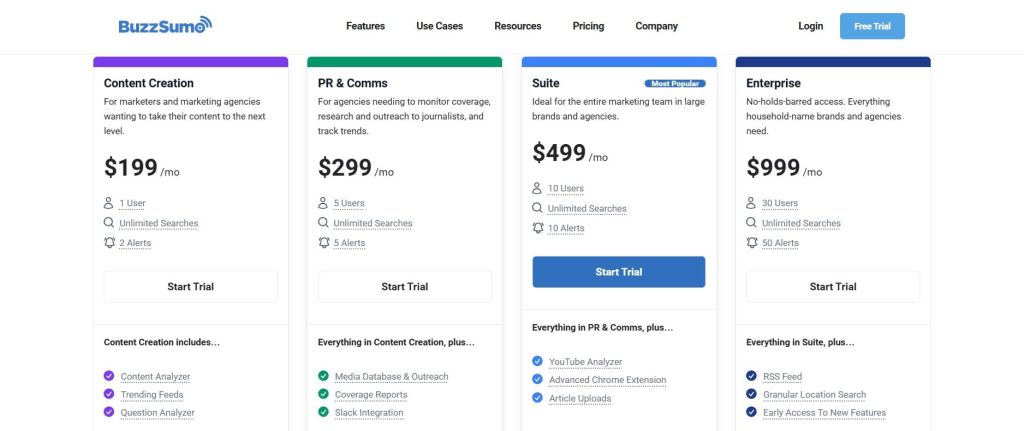
BuzzSumo Pricing
- Trial available
- Content Creation: $199/month
- PR & Comms: $299/month
- Suite: $499/month
- Enterprise: $999/month
BuzzSumo Reviews
- G2: 4.5 out of 5 stars (106+ reviews)
- Capterra: 4.5 out of 5 stars (146+ reviews)
User sentiment: Marketers consistently praise BuzzSumo for content discovery accuracy and its ability to surface trending topics quickly.
The most common criticisms are the high price point for smaller teams, limited value for B2B niches, and the learning curve for maximizing the platform’s deeper features.
5. Mangools (LinkMiner) – Best for Budget-Friendly Backlink Analysis
Best For: Freelancers, bloggers, small businesses, and beginner SEOs who need affordable backlink analysis alongside keyword research and rank tracking.
How I Use It: I recommend Mangools to clients and smaller teams who are just getting started with link building and need a reliable way to analyze competitor backlink profiles. LinkMiner gives them enough data to identify opportunities and prioritize targets.
Quick Overview
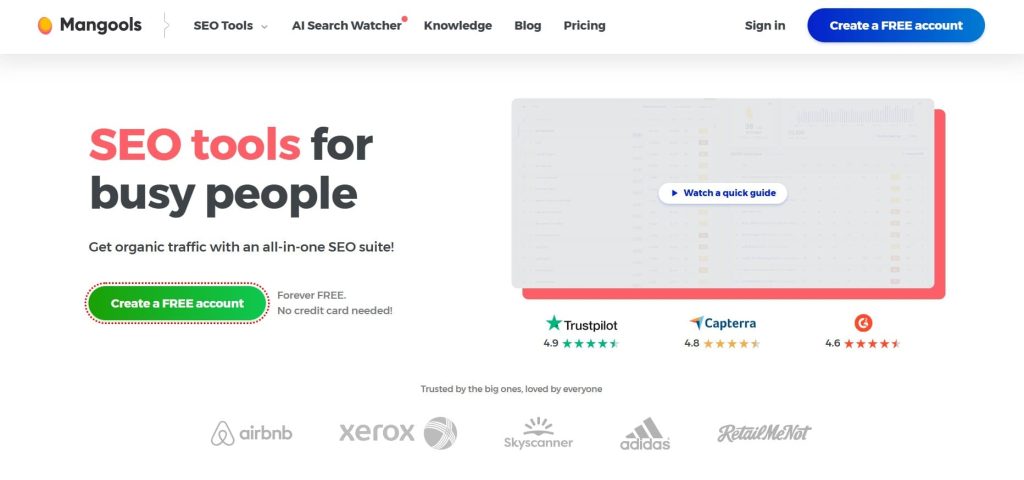
Mangools launched in 2014 from Bratislava, Slovakia, and has grown to serve over 1.1 million users worldwide, gaining popularity for its simple, effective SEO tools.
The platform bundles five SEO tools into a single subscription: KWFinder for keyword research, SERPChecker for SERP analysis, SERPWatcher for rank tracking, SiteProfiler for domain metrics, and LinkMiner for backlink analysis.
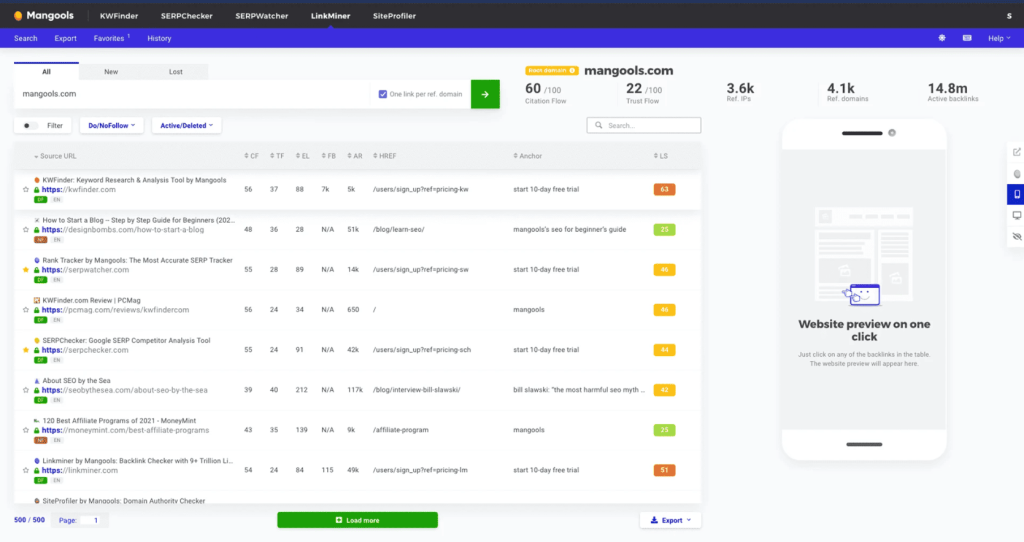
LinkMiner is the backlink tool in the suite. It pulls its data from the Majestic SEO API, which means you’re accessing one of the largest backlink indexes available, just through a cleaner, more beginner-friendly interface.
Enter any domain or URL, and LinkMiner shows all backlinks pointing to it, along with Citation Flow, Trust Flow, Link Strength scores, and anchor text data.
One feature I find particularly useful is the inline site preview. You can see exactly where a backlink sits on the source page without opening a new tab.
This saves significant time during manual prospect evaluation. You can also filter by follow and no-follow status, view new and lost links, and sort by Link Strength to prioritize the most valuable opportunities.
Mangools (LinkMiner) Key Features
- Backlink Analysis Powered by Majestic Index: Accesses 9.5 trillion links through Majestic’s API, providing Citation Flow, Trust Flow, and Link Strength scores for every backlink discovered.
- Inline Source Page Preview: Shows exactly where each backlink is placed on the linking page without leaving the tool, saving significant time during manual prospect evaluation.
- New and Lost Backlink Tracking: Filters backlinks by acquisition date to show recently gained and recently lost links, helping you monitor competitor link velocity and spot opportunities.
- Full Five-Tool SEO Suite Included: Every Mangools subscription includes KWFinder, SERPChecker, SERPWatcher, SiteProfiler, and LinkMiner, covering keyword research through backlink analysis in one platform.
- Browser Extension for Quick Metrics: Free Chrome and Firefox extension displays SEO metrics for any page you visit, including backlink data, Domain Authority, and SERP difficulty scores.
- AI Search Watcher for LLM Monitoring: Tracks how your brand appears across AI search engines like ChatGPT, Gemini, and Claude, a newer feature unique to Mangools in this category.
Mangools (LinkMiner) Pros
- Majestic-Powered Index Without Separate Subscription: You get access to one of the industry’s largest link indexes through a cleaner, more accessible interface than Majestic’s own platform.
- Most Beginner-Friendly Backlink Tool Interface Tested: Clean design, intuitive navigation, and helpful visualizations make Mangools ideal for teams without deep technical SEO experience or training.
- Inline Page Preview Saves Evaluation Time: Seeing exactly where backlinks sit on linking pages without opening new tabs speeds up manual prospect qualification during large research sessions.
- Link Strength Simplifies Backlink Prioritization Quickly: Instead of manually weighing Citation Flow, Trust Flow, and external link counts separately, Link Strength gives you one quick quality indicator.
Mangools (LinkMiner) Cons
- Fewer Referring Domains Than Ahrefs or Semrush: For comprehensive competitor backlink research, Mangools may miss links that larger databases catch, requiring supplemental analysis for critical campaigns.
- No Backlink Audit or Disavow File Tools: You cannot perform link profile cleanup or spam detection inside Mangools, which is a notable gap for teams managing ongoing site health.
- No Outreach or Campaign Management Features Included: LinkMiner is purely analytical. You still need separate tools for contact finding, email sending, and tracking campaign results afterward.
Mangools Pricing
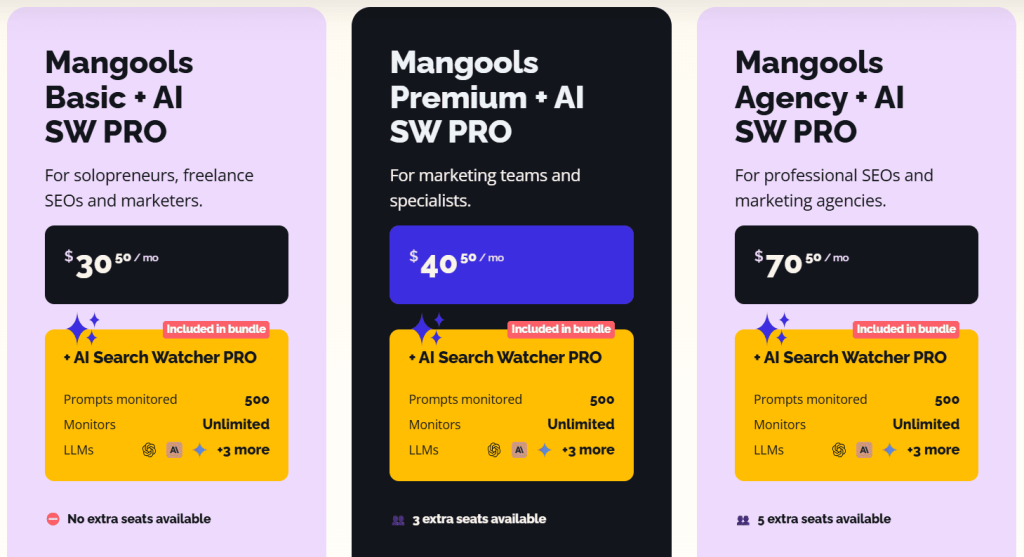
- Free
- Basic: $30.50/month
- Premium: $40.50/month
- Agency: $70.50/month
- 48-hour money-back guarantee
Mangools (LinkMiner) Reviews
- G2: 4.7 out of 5 stars (95+ reviews)
- Capterra: 4.8 out of 5 stars (91+ reviews)
User sentiment: Users overwhelmingly praise Mangools for its clean interface, affordability, and accuracy of keyword difficulty scores. LinkMiner earns specific praise for making backlink analysis accessible to beginners.
The most common criticisms are daily usage limits on lower plans, less comprehensive backlink data compared to Ahrefs, and the lack of technical site audit features.
6. Screaming Frog – Best for Technical Link Audits
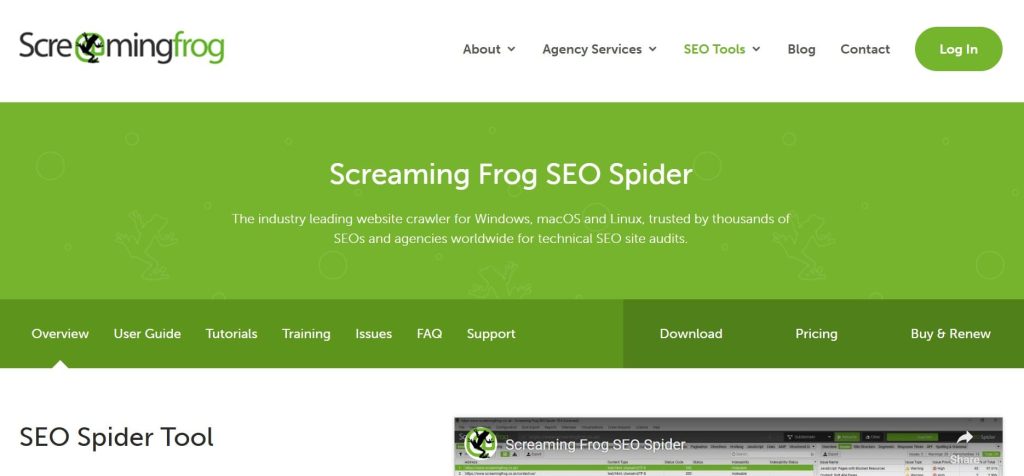
Best For: SEO professionals and agencies needing a desktop crawler to audit backlinks, find broken links, and fix link equity issues.
How I Use It: At OLW, Screaming Frog is part of every link building campaign we run. Before we start building links to a client’s site, we crawl it to find broken internal links, redirect chains, and orphan pages that would waste the equity those new backlinks deliver.
Quick Overview
Screaming Frog SEO Spider launched in 2010 out of Henley-on-Thames, England, and it’s become the most trusted technical SEO crawler in the industry.
While it’s primarily known as a site audit tool, its link analysis capabilities make it essential for any serious link building operation.
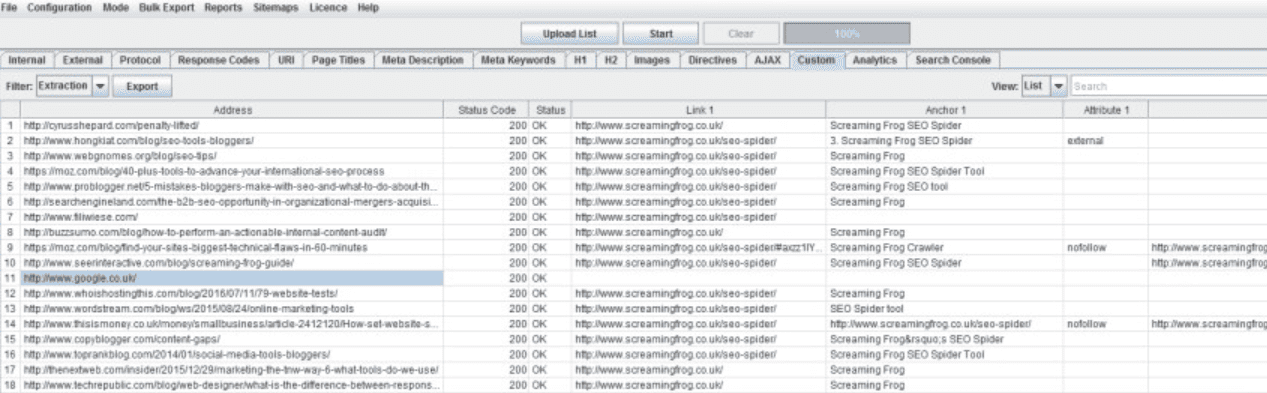
The crawler scans websites and returns detailed data on every URL, including status codes, redirect chains, canonical tags, internal and external links, anchor text, and response times.
For link building, this means you can identify broken outbound links across an entire site, not just one page at a time like Check My Links.
I use Screaming Frog in two specific ways for link building. First, I audit client sites before campaigns begin to fix internal link issues that would dilute new backlink value.
Second, I crawl competitor and prospect sites to map their link structures and find broken link opportunities at scale.
The learning curve is steep. Screaming Frog is a technical tool with a dense interface. But once you understand the filters and export options, it becomes indispensable for link audit work that no browser extension can handle.
Screaming Frog Key Features
- Site-Wide Broken Link Detection: Crawls entire websites to find every broken internal and external link, giving you a complete picture no single-page scanner can provide.
- Redirect Chain and Loop Identification: Maps all redirects across a site, identifying chains and loops that waste link equity and slow down crawl efficiency for search engines.
- Internal Link Structure Visualization: Generates crawl path diagrams and internal link maps that show how link equity flows through a site and where orphan pages exist.
- Custom Extraction with XPath and Regex: Extracts specific data from page HTML during crawls, letting you pull contact details, social links, or any structured data from prospect sites.
- Google Analytics and Search Console Integration: Connects crawl data with traffic and indexing metrics so you can prioritize link building efforts toward pages with real performance potential.
- Scheduled Crawls and Change Detection: Automates recurring site audits and flags changes between crawls, helping you monitor backlink landing pages and catch issues before they impact rankings.
Screaming Frog Pros
- Most Thorough Broken Link Discovery at Scale: Crawls entire websites to surface every broken link, making it far more comprehensive than page-level tools like Check My Links.
- Essential for Pre-Campaign Link Audits: Identifying redirect chains, orphan pages, and internal link issues before building new backlinks ensures incoming link equity is not wasted on broken paths.
- Free Version is Genuinely Useful for Small Sites: Crawling up to 500 URLs at no cost gives freelancers and small teams a powerful audit tool without any subscription commitment.
- Custom Extraction Opens Advanced Prospecting Possibilities: Using XPath to pull emails, social profiles, or specific page elements from crawled sites adds prospecting power beyond standard link analysis.
- Integrations Add Context That Standalone Crawlers Lack: Connecting Google Analytics and Search Console data to crawl results helps prioritize link targets based on real traffic and indexing performance.
Screaming Frog Cons
- No Outreach, Email, or Campaign Features: Screaming Frog is purely an audit and analysis tool. You’ll need separate platforms for contact discovery, email outreach, and campaign management.
- No Built-In Backlink Index or External Link Database: Unlike Ahrefs or Majestic, Screaming Frog only analyzes sites you crawl directly. It doesn’t maintain its own backlink database for research.
Screaming Frog Pricing
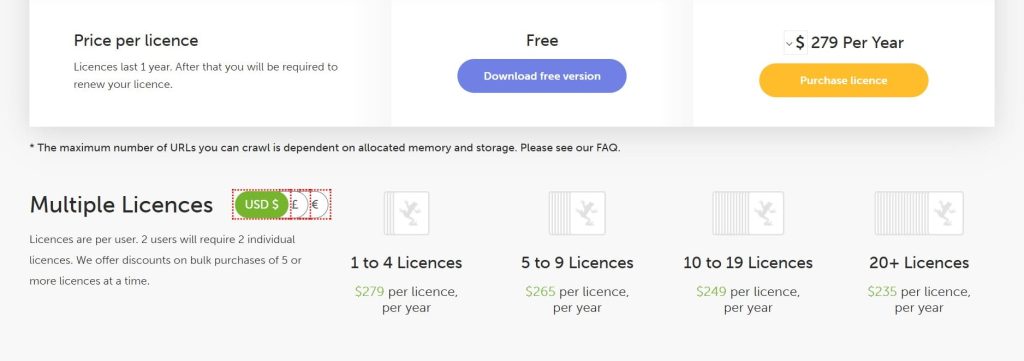
- Free version available
- Paid: $279/year
Screaming Frog Reviews
- G2: 4.7 out of 5 stars (184+ reviews)
- Capterra: 4.9 out of 5 stars (133+ reviews)
User sentiment: SEO professionals overwhelmingly consider Screaming Frog an essential tool in their stack, praising its crawl depth, reliability, and value.
The most common criticisms are the steep learning curve, heavy resource usage on large crawls, and the dated desktop interface.
7. Linkody – Best for Backlink Monitoring on a Budget
Best For: Freelancers, small agencies, and in-house teams needing affordable backlink monitoring with alerts and disavow management.
How I Use It: At OLW, I use Linkody as a watchdog for client backlink profiles during and after active link building campaigns. It alerts us within 24 hours if a link we earned gets removed, switched to nofollow, or returns a broken status.
Quick Overview
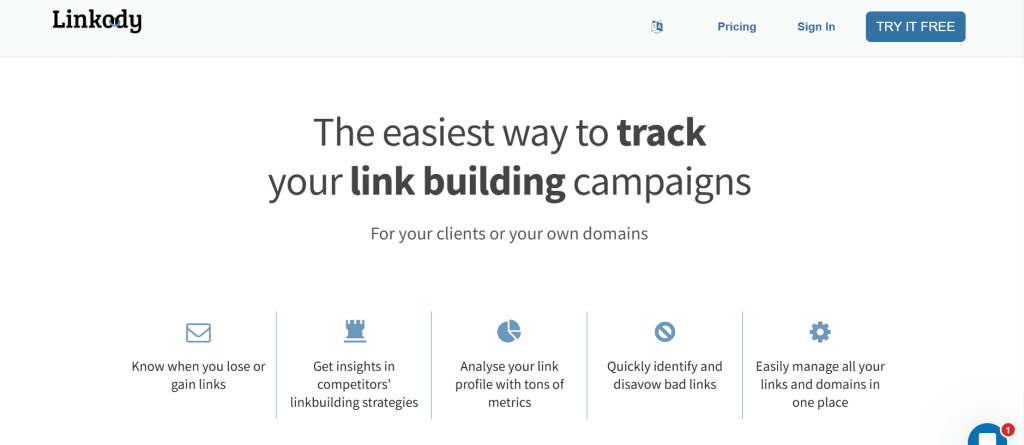
Linkody is a cloud-based backlink monitoring tool headquartered in Amsterdam. It launched with a singular focus: track your backlinks 24/7 and alert you when anything changes.
Unlike Ahrefs or Semrush, which bundle backlink tracking inside massive SEO suites, Linkody does one thing and does it well.
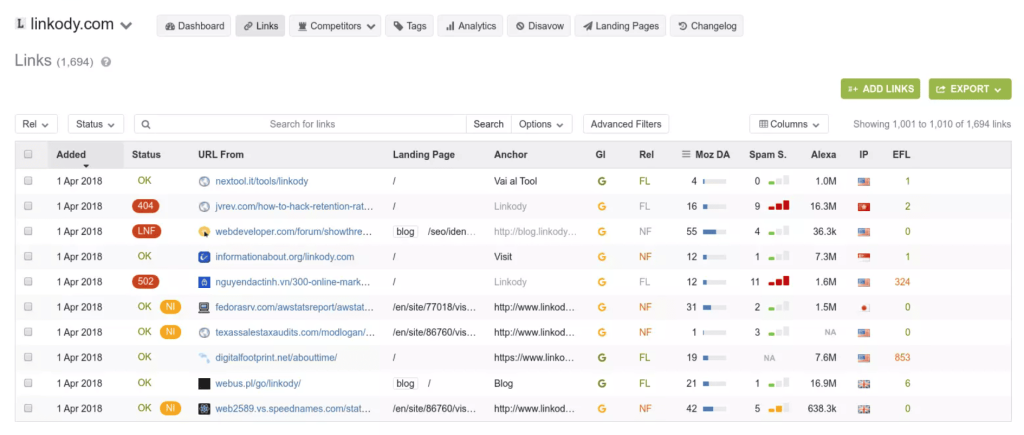
The dashboard is clean and fast. You see new links, lost links, and at-risk links immediately when you log in. Color-coded status indicators make it easy to spot problems at a glance.
Every link shows key metrics including Moz Domain Authority, Page Authority, spam score, and anchor text distribution.
For link building campaigns, Linkody’s real value is in protecting what you build. When you invest time and budget earning backlinks, losing them silently can undo months of work.
Linkody catches those losses within hours. The built-in disavow tool also helps you identify potentially toxic links and generate a disavow file for Google Search Console without needing a separate tool.
Competitor monitoring is included on all plans. You can track up to five competitor domains per project and receive alerts when they gain new backlinks. This surfaces opportunities you can pursue through similar outreach.
Linkody Key Features
- 24/7 Backlink Status Monitoring: Checks every tracked link daily for status changes including removal, nofollow switches, redirect changes, and HTTP errors, alerting you within hours.
- Built-In Disavow File Generator: Identifies potentially harmful backlinks using spam scores and quality metrics, then generates a disavow file ready to submit directly to Google Search Console.
- Competitor Backlink Tracking: Monitor up to five competitor domains per project to discover their new backlinks and identify link building opportunities you can replicate for your own campaigns.
- Anchor Text Distribution Analysis: Visualizes how your anchor text is distributed across your backlink profile, helping you spot over-optimization risks before they trigger algorithmic penalties.
- White-Label PDF Reports for Clients: Generates branded reports with your logo and colors that are ready to share with clients, managers, or stakeholders without exposing the underlying tool.
- Email Alerts for New and Lost Links: Receive daily or weekly email digests summarizing all backlink changes so you can stay informed without logging into the dashboard every single day.
Linkody Pros
- Daily Status Checks Catch Removals Fast: New and lost links trigger immediate alerts, keeping campaign tracking accurate and current.
- Daily Link Status Checks Catch Removals and Changes Faster: Immediate alerts for new or lost links maintain accurate, up-to-date campaign tracking.
- Disavow Workflow Simplifies Toxic Link Cleanup: Identify harmful links and generate disavow files within one interface, saving time efficiently.
- Clean, Focused Interface is Easy for New Users: Minimal learning curve lets teams become productive quickly without overwhelming features or clutter.
- Competitor Monitoring Reveals Link Opportunities: Track competitor backlinks in real time to create targeted outreach campaigns and updated prospect lists.
- White-Label Reporting Supports Agencies at Scale: Branded PDF reports present client backlink progress professionally, without exposing the tool used.
Linkody Cons
- Limited SEO Features: Linkody focuses on backlink monitoring only; keyword research, rank tracking, audits, and content tools require other platforms.
- Smaller Backlink Index: Some competitor links may appear late or be missed; larger databases like Ahrefs or Semrush supplement coverage.
- No API Support: Teams needing backlink data for custom dashboards or external tools face integration limitations with Linkody.
Linkody Pricing
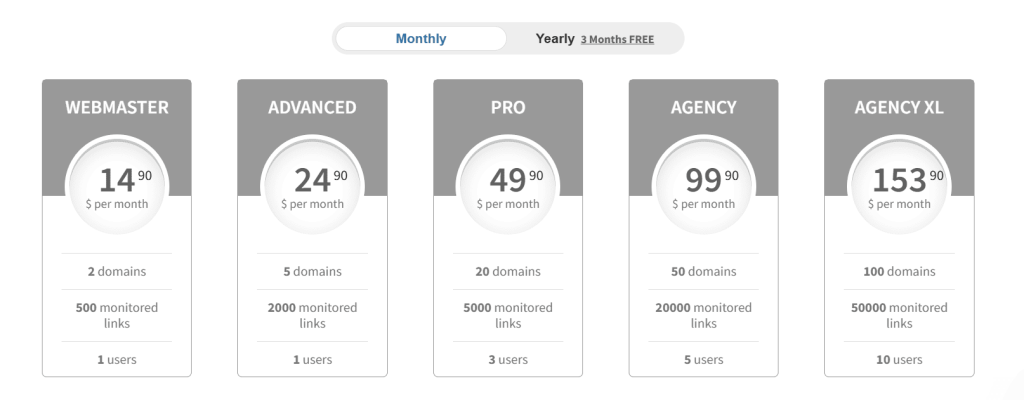
- Webmaster: $11.20/month
- Advanced: $18.70/month
- Pro: $37.40/month
- Agency: $74.90/month
- Agency XL: $115.40/mo
- 30-day free trial
Linkody Reviews
- G2: 4.5 out of 5 stars (4+ reviews)
- Capterra: 4.8 out of 5 stars (24+ reviews)
User sentiment: Users consistently praise Linkody for its simplicity, affordable pricing, and responsive customer support.
The most common criticisms are the limited feature set beyond backlink monitoring, occasional crawl error notifications, and the need to pair it with other tools for complete SEO coverage.
8. Pitchbox – Best for Enterprise Outreach Automation
Best For: SEO agencies and large in-house teams that run high-volume link building campaigns across multiple clients, and need enterprise-grade prospecting, sequencing, and deliverability tools in one platform.
How I Use It: At OLW, we’ve used Pitchbox to manage outreach at scale when running simultaneous campaigns for multiple clients.
It’s the platform I recommend when an agency outgrows BuzzStream and needs more automation, better deliverability controls, and deeper reporting.
Quick Overview
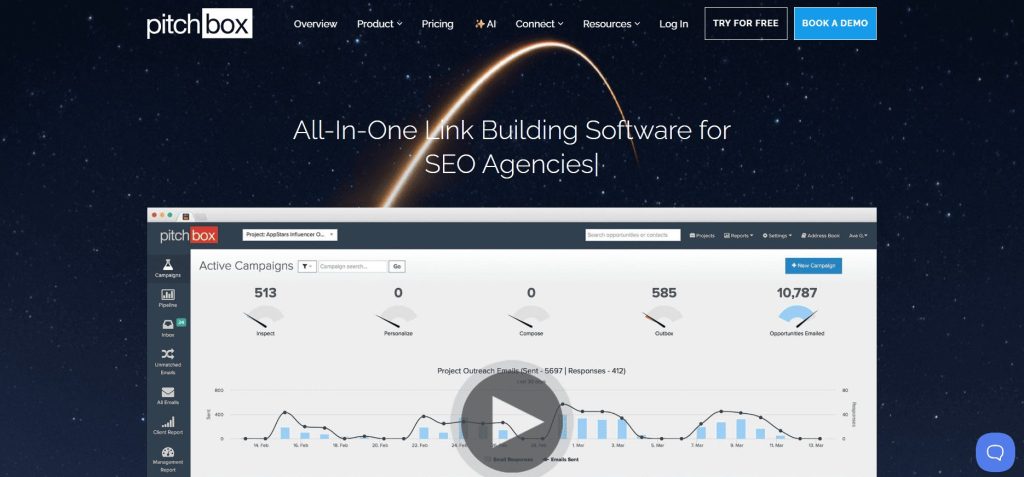
Pitchbox is built for teams that take link building seriously enough to invest in a dedicated outreach platform. It covers the full outreach lifecycle in a single workflow.
Prospecting, email discovery, personalized sequencing, automated follow-ups, pipeline management, and reporting. You don’t need to stitch together multiple tools to go from “find prospects” to “earn a backlink.”
What separates Pitchbox from BuzzStream is its approach to automation and scale. The prospecting engine integrates directly with Ahrefs, Semrush, Moz, and Majestic, so you can filter prospects by Domain Rating or Trust Flow before sending a single email.
The email sequencing is where Pitchbox really performs. Multi-step drip campaigns with conditional logic adjust messaging based on recipient behavior. Follow-ups pause when someone replies. Out-of-office detection snoozes sequences until contacts return.
Pitchbox has also leaned into AI with personalization for outreach emails, a template assistant for building pitches, and reply suggestions for negotiating placements.
On deliverability, Pitchbox includes inbox placement monitoring, IP blacklist tracking, domain reputation checks, and template spam testing.
These are features you won’t find in BuzzStream or most other outreach tools. If deliverability matters to your team, Pitchbox takes it more seriously than any competitor in this category.
Pitchbox Key Features
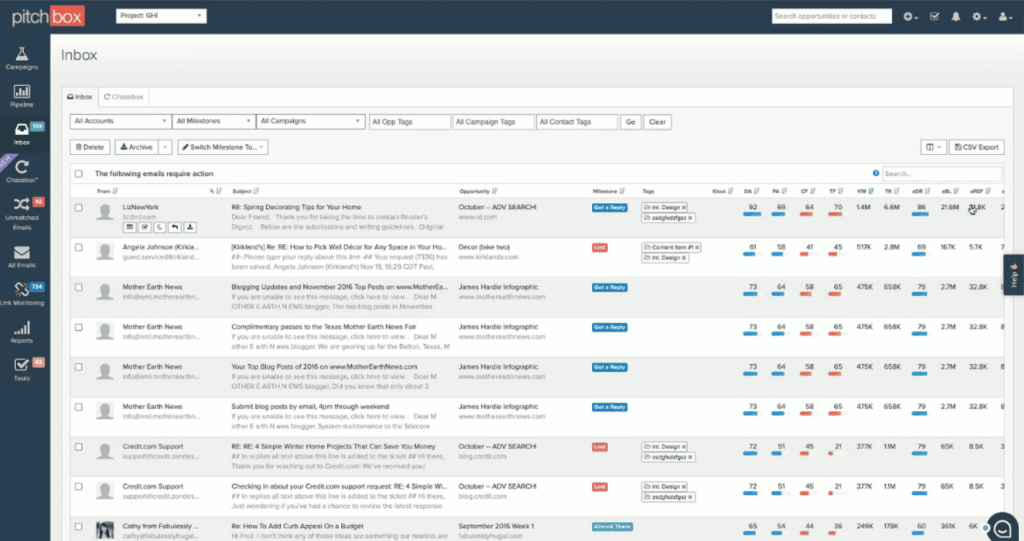
- End-to-End Outreach Workflow: Covers prospecting, contact discovery, email sequencing, automated follow-ups, CRM, and reporting in a single platform built for link builders.
- Direct SEO Tool Integrations: Connects natively with Ahrefs, Semrush, Moz, and Majestic, letting you filter prospects by domain metrics before outreach begins.
- AI Personalization and Reply Assistance: Uses AI to generate personalized outreach emails at scale, qualify link opportunities, and draft negotiation replies from the inbox.
- Advanced Deliverability Monitoring: Includes inbox placement tracking, IP blacklist checks, domain reputation monitoring, template spam testing, and email server location selection.
- Skill-Based Team Workflow: Assigns team members to specific outreach stages like prospecting, personalizing, or negotiating, so each person focuses on their strengths.
- Link Monitoring and Health Tracking: Monitors earned backlinks for status changes, verifies Google indexing, and checks that destination pages return healthy status codes.
[Image Source: G2]
Pitchbox Pros
- Most Complete Outreach Automation Available: No other tool covers prospecting, sequencing, follow-ups, CRM, deliverability, and reporting as thoroughly as Pitchbox in one platform.
- Deliverability Tools are Best in Class: IP blacklist monitoring, template spam testing, and inbox placement tracking give you real deliverability control that competitors lack.
- SEO Integrations Save Significant Time: Filtering prospects by Ahrefs DR or Moz DA directly inside Pitchbox eliminates exporting, cross-referencing, and re-importing from separate tools.
- AI Features Genuinely Speed Up Workflow: Bulk AI personalization and reply suggestions reduce manual email drafting time, especially for teams sending thousands of pitches monthly.
- Scales Effectively for Multi-Client Agencies: Workspace organization, unlimited users on Advanced plans, and white-label reporting make it practical for agencies managing many clients.
Pitchbox Cons
- Steep Learning Curve for New Users: The platform is feature-dense, and multiple reviewers note the interface feels overwhelming during the first few weeks of use.
- No Backlink Analysis or Research Features: Pitchbox is purely an outreach platform. You’ll still need Ahrefs, Semrush, or another tool for competitor research and backlink data.
- Prospecting Sometimes Returns Irrelevant Results: Blogger outreach campaigns occasionally surface websites that don’t match the intended niche.
Pitchbox Pricing
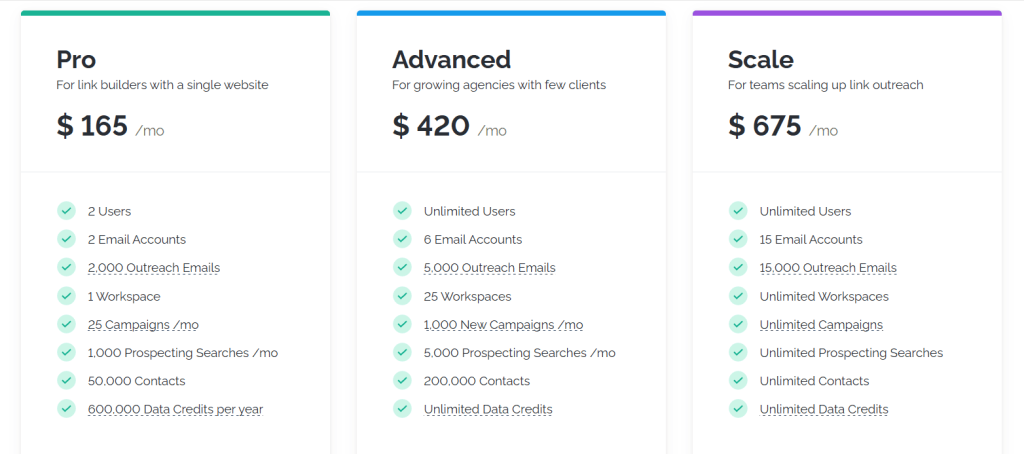
- Pro: $165/month
- Advanced: $420/month
- Scale: $675/month
- Enterprise: Custom pricing
Pitchbox Reviews
- G2: 4.7 out of 5 stars (98+ reviews)
- Capterra: 4.6 out of 5 stars (42+ reviews)
User sentiment: Pitchbox consistently earns the highest satisfaction ratings in the outreach tool category. Users praise the prospecting speed, sequencing power, and responsive support team.
The most common criticisms are the premium pricing, the initial learning curve, and occasional irrelevant results in automated prospecting campaigns.
9. Respona – Best for Personalized Content Outreach
Best For: B2B SaaS companies and growth-driven agencies needing an AI-powered outreach platform with smart prospecting, automated personalization, and verified contact discovery in one workflow.
How I Use It: I’ve used Respona at OLW for content-driven outreach campaigns where we needed to find relevant articles, identify the right contacts, and personalize pitches at scale.
It’s the tool I reach for when the campaign strategy is built around earning links through content relevance rather than brute-force volume.
Quick Overview
Respona was originally built as an internal tool for Visme, the visual content platform, to scale their own link building. It was designed by people who actually ran link building campaigns, not just people building software for marketers.
The core approach is content-first prospecting. Instead of starting with domain lists and scraping for emails, Respona uses a built-in search engine to find relevant articles, blog posts, and even podcasts in real time.
From there, you pull backlink data, filter by metrics like Domain Rating through the Ahrefs integration, and build prospect lists based on content relevance rather than just domain authority.
What makes Respona stand out is AI-driven personalization. The platform goes beyond basic merge fields. It analyzes prospect content and organization attributes to generate suggestions that reference specific details. In my experience, that level of personalization directly impacts reply rates.
The email finder uses over 24 data sources to locate and verify contacts in bulk, with filters for job title and seniority. A shared inbox, automated sequences, and built-in analytics round out the workflow.
Respona has also expanded beyond its DIY platform to offer a done-for-you placement service with pay-per-result pricing. The DIY outreach platform is still available for teams that want to manage campaigns themselves.
Respona Key Features
- Content-First Prospecting Engine: Finds relevant articles and podcasts in real time using content relevance, not just SEO metrics.
- AI-Driven Email Personalization: Generates tailored outreach emails using prospect content insights, improving authenticity and reply rates at scale.
- Verified Contact Discovery: Finds and verifies emails across 24+ sources using job title and seniority filters.
- Automated Email Sequences: Multi-step campaigns with smart follow-ups that automatically pause when prospects respond.
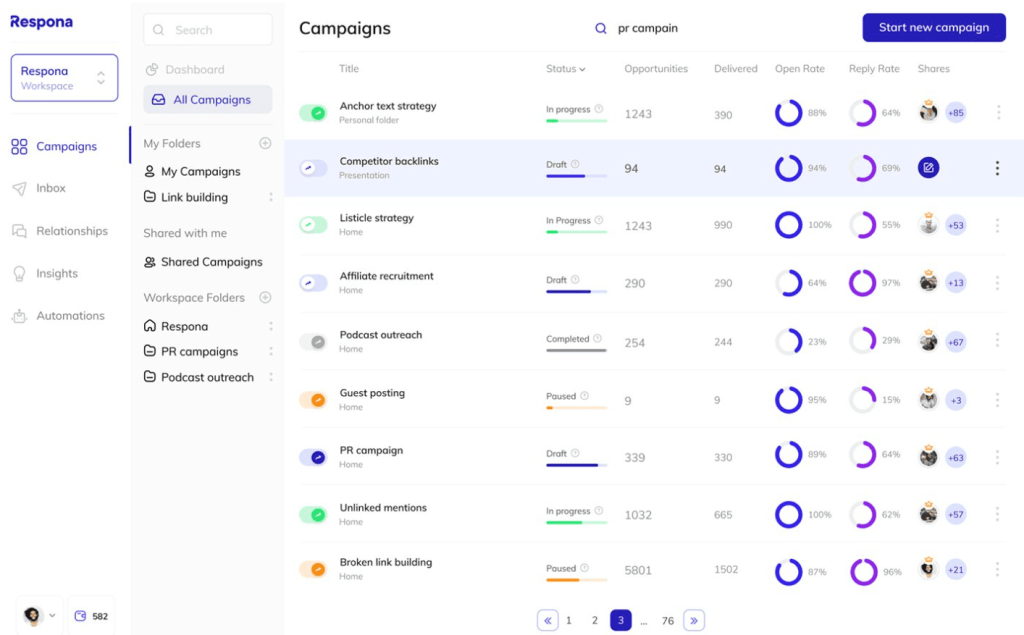
- Shared Inbox and Tracking: Central inbox tracks conversations and relationship status for seamless team collaboration.
- Done-for-You Placement Service: Pay-per-result service handling outreach, content creation, and guaranteed placements.
[Image Source: Backlink Manager]
Respona Pros
- Content-Based Prospecting: Higher-quality prospects discovered through contextual relevance instead of generic domain lists.
- Strong AI Personalization: References specific content details, increasing response rates beyond basic merge-field personalization.
- Accurate Email Finder: Multi-source verification reduces bounce rates and wasted outreach effort.
- Podcast Search Feature: Unique podcast prospecting tool enabling direct host outreach within platform.
- Excellent Onboarding Support: Fast, helpful support team praised for smooth onboarding experiences.
- Flexible Usage Model: Supports both self-serve outreach and managed placement campaigns.
Respona Cons
- Credit Costs Add Up: Credits deplete quickly on large campaigns, increasing overall outreach costs.
- No API Access: Lacks API integrations for custom dashboards and internal systems.
- Templates Not Editable: Live campaigns require duplication to modify messaging errors.
Respona Pricing
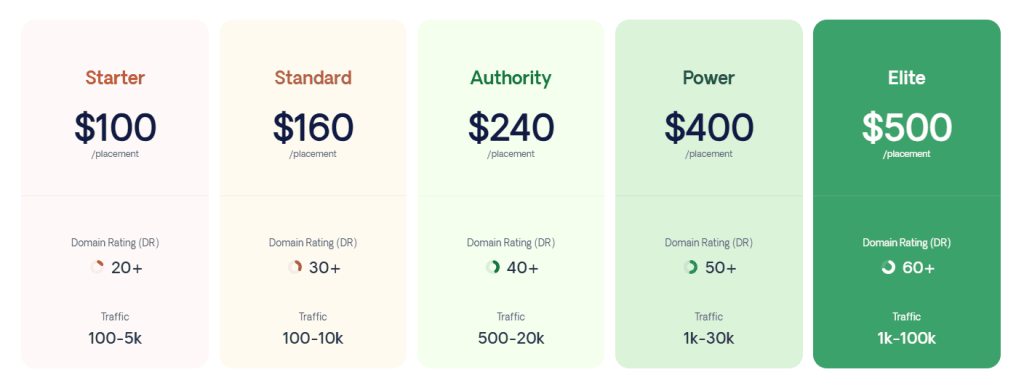
- Starter: $100/placement
- Standard: $160/placement
- Authority: $240/placement
- Power: $400/placement
- Elite: $500/placement
Respona Reviews
- G2: 4.8 out of 5 stars (199+ reviews)
- Capterra: 4.8 out of 5 stars (61+ reviews)
User sentiment: Respona earns the highest user ratings of any outreach tool on this list. Reviewers consistently praise the AI personalization quality, the content-first prospecting approach, and the support team’s responsiveness.
The most common criticisms are the credit consumption rate on larger campaigns, the inability to edit live campaigns, and the initial learning curve during setup.
10. BuzzStream – Best for Outreach Team Collaboration
Best For: Link building teams and digital PR agencies that need a dedicated outreach CRM to manage prospect relationships, coordinate team outreach, and track campaign performance across multiple projects.
How I Use It: At OLW, BuzzStream is our outreach command center. It’s where we manage prospect lists, send personalized pitches, track follow-ups, and make sure no one on the team contacts the same person twice across different campaigns.
Quick Overview
BuzzStream launched in 2008 out of Austin, Texas, built to solve the operational headache of running link building and digital PR outreach at scale.
While Ahrefs and Semrush focus on research, BuzzStream picks up where they leave off, handling everything from prospecting to pitching to follow-up tracking to team coordination.
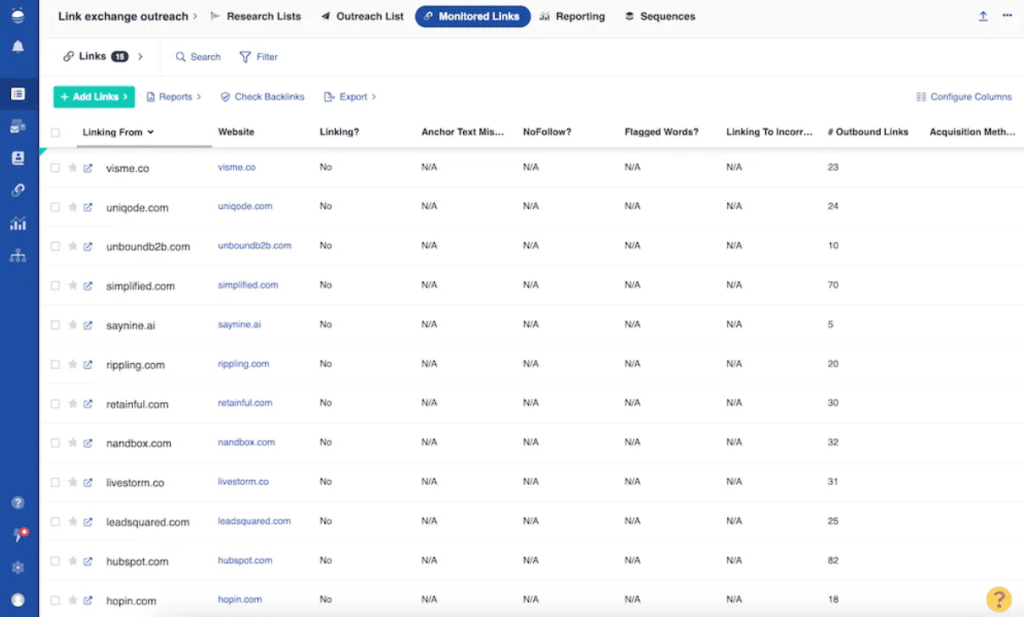
Think of it as a CRM built specifically for outreach. Every contact gets a full profile with communication history, site metrics, social profiles, tags, and notes.
If someone on your team pitched a prospect three months ago on a different campaign, BuzzStream flags that before you send a duplicate email.
The BuzzMarker Chrome extension lets you save prospects as you browse, pulling in contact details and domain metrics automatically. You can also import lists from Ahrefs or Semrush and let BuzzStream enrich them with contact information.
Email outreach is where BuzzStream earns its place. Personalized templates, automated follow-up sequences, open and click tracking, and bulk sending that still feels one-to-one. For agencies sending hundreds of emails per week, it eliminates massive amounts of manual tracking.
Project-level reporting, team activity comparisons, and campaign performance data give you the visibility you need for client reporting and budget decisions.
BuzzStream Key Features
- Outreach CRM with Full Contact Profiles: Stores communication history, site metrics, social data, tags, and notes for every prospect in a centralized, searchable database.
- Automated Email Sequences and Follow-ups: Lets you build multi-step drip campaigns that pause automatically when a prospect replies, preventing awkward double-sends and keeping conversations natural.
- BuzzMarker Chrome Extension: Saves prospects directly from any webpage with one click, pulling in contact details, domain authority, and social metrics without leaving your browser.
- Team Collaboration and Duplicate Prevention: Assigns contacts to specific team members and flags prospects already in your database, ensuring no one on your team pitches the same person twice.
- Project-Level Reporting and Analytics: Tracks open rates, reply rates, template performance, and team activity across campaigns, giving you clear data to optimize outreach and report to clients.
- ListIQ AI-Powered Media List Building: A newer product that uses AI to research journalists and contacts, verify email addresses, and build targeted media lists faster than manual prospecting.
BuzzStream Pros
- Purpose-Built for Link Building Outreach: Designed from the ground up for link building and PR, so workflows actually match how outreach teams operate daily.
- Duplicate Contact Prevention Saves Embarrassment: Automatically flags when a prospect has been contacted before, even across different campaigns, preventing overlap for multi-client agencies.
- Email Sequences Boost Reply Rates: Automated follow-ups pause when someone replies, keeping your outreach cadence consistent without annoying prospects who’ve already responded to your pitch.
- BuzzMarker Extension Speeds Up Prospecting: Save and evaluate prospects as you browse without switching tabs or copying data into spreadsheets, cutting prospecting time significantly.
- Strong Community and Digital PR Resources: Publishes its annual State of Digital PR Report and runs a podcast that helps practitioners stay current on outreach trends.
BuzzStream Cons
- Steep Learning Curve for New Users: The interface feels dated and feature-dense, so new team members regularly need a few weeks before they’re comfortable navigating the platform.
- Contact Data Accuracy is Inconsistent: Built-in email scraping often returns generic addresses instead of direct contacts, meaning you’ll likely still need Hunter.io for reliable verification.
- No Backlink Analysis or Research Features: BuzzStream is purely an outreach tool. You’ll need Ahrefs, Semrush, or another platform for prospect research and backlink data.
BuzzStream Pricing
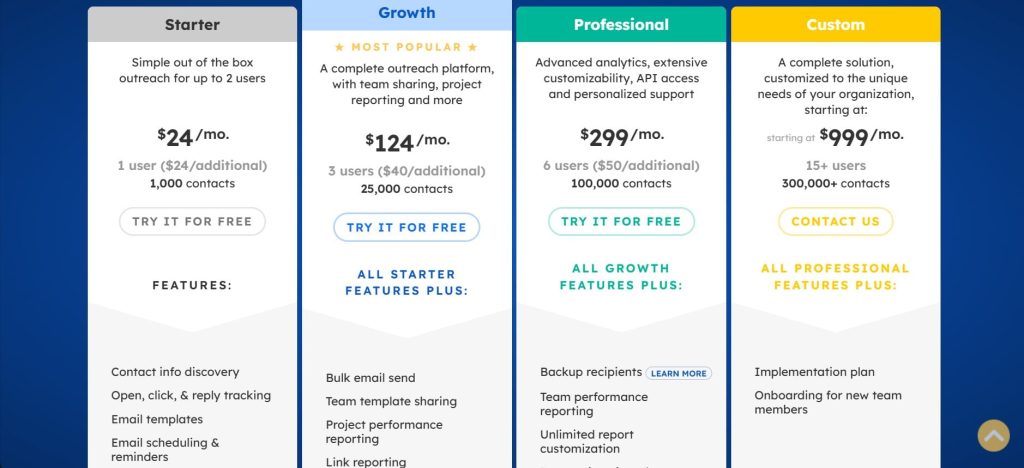
- Starter: $24/month
- Growth: $124/month
- Professional: $299/month
- Custom: from $999/month
BuzzStream Reviews
- G2: 4.2 out of 5 stars (165+ reviews)
- Capterra: 4.5 out of 5 stars (22+ reviews)
User sentiment: Long-time users consistently praise BuzzStream as the most effective outreach CRM for link building, with several noting it reduced their manual outreach time by 70% or more.
The most common criticisms are the dated interface, the learning curve for new team members, and recent pricing increases that some smaller agencies found difficult to absorb.
11. Hunter.io – Best for Finding Verified Emails
Best For: Link builders, digital PR professionals, and outreach teams who need a fast, reliable way to find and verify professional email addresses before running campaigns.
How I Use It: At OLW, Hunter.io is the tool I open when I’ve built a prospect list in Ahrefs or Semrush and need verified email addresses before loading contacts into BuzzStream or Pitchbox. It fills the gap that most outreach CRMs leave open.
Quick Overview
Hunter.io was founded in 2015 by Antoine Finkelstein and Francois Grante, and it does one thing exceptionally well: finding and verifying professional email addresses.
Over 6 million professionals use it, and for good reason. When your outreach depends on reaching the right person, not a generic contact form, Hunter is the fastest way to get there.
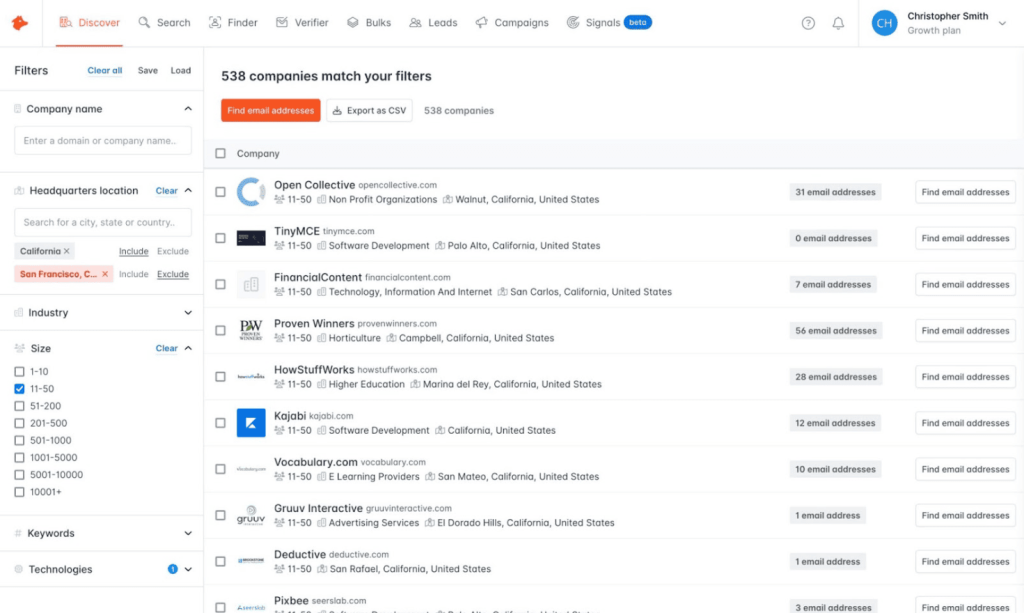
The platform has three core functions. Domain Search finds all email addresses associated with a company’s website. Email Finder locates a specific person’s email when you enter their name and company. Email Verifier checks whether an address is deliverable before you send anything.
What makes Hunter valuable for link building specifically is the Chrome extension. While you’re reviewing a prospect’s site, you can pull up associated email addresses in one click without leaving the page. I use this constantly during manual prospecting.
Hunter also includes a built-in Campaigns tool for sending cold emails with personalization, scheduling, and automated follow-ups. It connects directly to Gmail and Outlook. For smaller teams that don’t need a full outreach CRM, this can replace tools like BuzzStream entirely.
Hunter.io Key Features
- Domain Search Discovery: Finds company-wide professional emails with sources, confidence scores, and department filters included.
- Email Finder Tool: Locates specific contact emails using name and company across 76+ million indexed domains.
- Bulk Email Verification: Validates addresses at format, domain, and server levels to reduce bounce rates.
- Chrome Prospecting Extension: One-click email discovery while browsing websites for faster manual research.
- Built-in Email Campaigns: Create scheduled sequences with follow-ups, open tracking, and Gmail or Outlook integration.
- Bulk CSV Processing: Upload large lists for domain search, email finding, and verification simultaneously.
[Image Source: Skrapp]
Hunter.io Pros
- High Email Accuracy: Confidence scores and multi-source verification improve outreach reliability before sending emails.
- Useful Free Plan: Includes limited monthly searches and verifications for real-world testing.
- Seamless Chrome Workflow: Pull contact data directly from websites without switching tabs.
- Beginner-Friendly Interface: Simple layout enables fast productivity without steep learning curves.
- Campaigns for Small Teams: Built-in outreach removes the need for separate CRM tools.
- API and Integrations: Connects with HubSpot, Salesforce, Zapier, and other workflow tools.
Hunter.io Cons
- Regional Coverage Limits: Lower accuracy in Asia, Latin America, and smaller markets.
- Credits Drain Quickly: Finding and verification of shared credit pool, increasing costs.
- No SEO Metrics: Lacks backlink data, authority metrics, and prospect qualification tools.
Hunter.io Pricing
- Free
- Starter: $49/month
- Growth: $149/month
- Scale: $299/month
- Enterprise: Custom pricing
Hunter.io Reviews
- G2: 4.4 out of 5 stars (629+ reviews)
- Capterra: 4.6 out of 5 stars (701+ reviews)
User sentiment: Users consistently praise Hunter.io for its simplicity, accuracy, and time-saving value during prospecting. The Chrome extension and bulk verification are frequently cited as standout features.
The most common criticisms are regional coverage gaps, credit limitations on larger campaigns, and occasional generic email results instead of direct personal contacts.
What’s the Best Link Building Tool for You?
The right tool depends on your team size, budget, and where you need the most help in your link building workflow. Here are my recommendations based on what I’ve seen work across dozens of campaigns at OLW:
- Best for Beginners
Mangools (LinkMiner) gives you backlink analysis, keyword research, and rank tracking in one clean interface that anyone can learn quickly. It’s the simplest way to start building links without feeling overwhelmed by complex dashboards or enterprise features.
- Best for Agencies
Pitchbox handles the full outreach lifecycle from prospecting to placement tracking with built-in deliverability tools and unlimited users on higher plans. If your team sends thousands of emails monthly across multiple clients, nothing matches its scale.
- Best for Budget-Conscious Teams
Linkody gives you dedicated backlink monitoring with daily alerts and disavow tools at a price that won’t strain a small budget. Pair it with free tools like Google Search Operators and Check My Links for a complete stack.
- Best AI-Powered Workflow
Respona combines AI-driven email personalization with content-first prospecting and a built-in email finder using 24+ data sources. It automates the tedious parts of outreach while keeping pitches genuine enough to earn strong reply rates from editors.
- Best All-Rounder
Semrush covers backlink research, competitor analysis, outreach, and link monitoring inside one platform with 55+ tools included. At OLW, we use it as the backbone for most client campaigns because it handles everything from research to reporting.