Choosing the right keyword research tool in 2026 is confusing when every platform claims to have the biggest database, the most accurate AI predictions, or the “best” intent data for agencies.
Over the last 8+ years at OneLittleWeb, I’ve tested more than 50 SEO tools while working with thousands of clients across the US, UK, Canada, and Australia.
Many of these keyword tools played a critical role in campaigns like our AI SaaS SEO case study, where accurate keyword insights — powered by the right mix of AI SEO tools — helped us identify high-intent opportunities in brutally competitive niches (think keyword difficulties 80+).
The truth? Most agencies waste money on keyword tools that look impressive on paper but fall short when you’re managing 10+ clients—overestimated volumes, unreliable difficulty scores, or features that just don’t scale.
I’ve personally used these tools for everything from initial seed keyword expansion to competitor gap analysis, topic clustering, and client reporting across hundreds of real campaigns —often integrating them with the right AI marketing tools.
Some have become non-negotiable parts of our daily workflow. Others disappointed exactly when the pressure was on.
In this 2026 guide, I’ve rounded up the 12 keyword research tools we actually use and trust at our agency for live client work. You’ll get honest pros and cons based on hands-on experience, not sales pages.
Here’s what I evaluated:
- Accuracy: Do search volume, difficulty, and intent metrics match what we see in real rankings and traffic?
- Pricing: Does the cost make sense when you’re running multiple client projects?
- Integrations: Does it connect smoothly with rank trackers, content tools, and reporting dashboards?
- Ease of Use: Can new team members jump in quickly, or is there a steep learning curve?
- Reliability at Scale: Does it perform flawlessly with a handful of projects—or hold up when you’re analyzing thousands of keywords across dozens of clients?
If you’re an agency owner, SEO manager, or freelancer juggling multiple sites, this roundup will help you pick tools that save time, reduce guesswork, and actually drive measurable organic growth.
What is a Keyword Research Tool?
A keyword research tool helps you discover what your potential customers are actually typing into search engines. These platforms analyze search volume, competition levels, and keyword difficulty to show you which terms are worth targeting in your content and SEO strategy.
Marketers, content creators, and business owners use these tools to stop guessing what topics to write about and start making data-driven decisions. Instead of creating content that nobody searches for, you can identify high-value keywords that drive qualified traffic to your site.
The business value is straightforward: targeting the right keywords means you spend less time creating content that gets ignored and more time ranking for searches that bring in customers. Many agencies even integrate these into white label SEO tools to deliver branded keyword insights directly to clients.
At OneLittleWeb, we’ve used keyword research to help clients identify untapped opportunities that competitors missed, leading to significant traffic growth without increasing ad spend. When you know what your audience is searching for, you can create content that actually converts.
What to Look for in a Keyword Research Tool
Not all keyword tools are created equal. Here’s what actually matters when you’re trying to find keywords that convert.
Search Volume Accuracy
Tools using outdated Keyword Planner API data or third-party clickstream samples will mislead you. Look for platforms that combine Google Search Console integration, live SERP scraping, and normalized clickstream data from multiple sources.
Keyword Difficulty Algorithm
Basic KD scores that only count referring domains are worthless. You need tools that factor in topical authority scores, content depth analysis, domain rating distribution across the top 10, and SERP volatility metrics.
Ahrefs and Semrush use proprietary algorithms that weight these variables. Understand their methodology before trusting the score.
Long-Tail Discovery Mechanisms
Basic autocomplete scraping isn’t enough. Advanced tools use NLP entity extraction, semantic clustering algorithms, and “People Also Ask” box recursion to surface low-competition variations. Look for tools that mine Google’s related searches API, forum threads, and Reddit discussions programmatically.
Search Intent Classification Models
Manual intent tagging doesn’t scale. The best tools use machine learning classifiers trained on SERP features, page content analysis, and user behavior signals to automatically categorize commercial vs. informational intent with 85%+ accuracy. Check if they update their models regularly as Google’s algorithms evolve.
Competitor Gap Analysis Methodology
Simple keyword overlap reports are surface-level. You want tools that perform domain-level content gap analysis using advanced set theory operations, then rank opportunities by traffic potential and ranking probability scores.
Semrush’s Gap Analysis and Ahrefs’ Content Gap tool use different scoring models. You should test both.
SERP Feature Detection and CTR Modeling
Static keyword metrics ignore zero-click searches. Tools should scrape live SERPs for featured snippets, knowledge panels, image packs, and local packs, then apply CTR curve modeling to estimate actual clickthrough rates by position. This affects traffic projections by 40-60% for many queries.
Semantic Topic Clustering Algorithms
Keyword-level optimization is outdated. Look for tools using TF-IDF analysis, LSI keyword extraction, and entity relationship mapping to group semantically related terms into topic clusters. This powers pillar-cluster content architecture that builds topical authority signals Google’s algorithms recognize.
API Access and Data Pipeline Integration
Manual exports kill workflow efficiency. Evaluate RESTful API documentation, rate limits, webhook support, and whether you can push keyword data directly into your content management system, rank tracking database, or BI tools like Looker or Tableau for automated reporting dashboards.
How I Selected the Best Keyword Research Tools
I’ve been using keyword research tools daily for 8+ years across 1,200+ client campaigns—this isn’t a roundup based on demos and marketing pages. Every tool on this list was tested on live client work with real ranking goals and budget constraints. Here’s what I measured during testing:
Performance Under Pressure
I tested each tool during actual keyword research sprints—finding content gaps for SaaS clients competing against billion-dollar brands, identifying quick-win opportunities for new sites with zero authority, and mining long-tail keywords for link-building campaigns.
Tools that took 30+ seconds to load SERP data, crashed during bulk exports, or provided irrelevant keyword suggestions were eliminated immediately.
Data Verification (6+ Months Minimum)
I cross-checked search volume estimates against actual Google Search Console impressions across 50+ client accounts in different industries.
If a tool consistently showed keyword volumes inflated by more than 20%, or missed high-performing queries our GSC data proved were valuable, it failed my accuracy test.
Discovery Depth vs. Database Bloat
I evaluated whether tools surfaced genuinely useful long-tail variations or just flooded me with thousands of irrelevant keywords. Can it find question-based queries competitors haven’t targeted?
Does it identify semantic clusters that build topical authority? Does it pull keywords from Reddit, Quora, and forum discussions—not just Google autocomplete? Tools with massive databases but poor filtering got cut.
Competitor Intelligence Quality
I tested gap analysis features by comparing tool recommendations against manual SERP analysis for 20+ competitor domains. Did the tool identify keywords where competitors ranked in positions 1-3 that we could realistically target?
Did it waste my time suggesting head terms we’d never rank for, or did it intelligently filter by domain authority and content relevance?
SERP Feature Accuracy
I verified whether tools correctly identified featured snippets, People Also Ask boxes, image packs, and local results that impact actual CTR. Tools showing traditional organic CTR estimates for SERPs dominated by zero-click features were marked down—that’s misleading traffic projections that cost clients money.
Integration with Existing Workflows
I tracked how easily each tool connected with Google Search Console, content management systems, and rank tracking platforms. Anything requiring manual CSV exports every time I needed to update keyword lists, or lacking API access for automation, lost significant points. Agency workflows demand seamless data pipelines.
Pricing vs. Value for Agencies and Small Teams
I compared what you’re actually paying per keyword tracked, per project limit, and per team member against competitor options. Some expensive enterprise tools justify their cost with proprietary data and advanced features.
Others charge $200/month for basic keyword lists and outdated difficulty scores you can get elsewhere for $50.
Summary Table: 12 Best Keyword Research Tools
Before diving into detailed reviews, here’s a quick comparison of how these 12 tools stack up across the metrics that actually matter for keyword research.
| Tool Name | Best For | Key Features | Price | Our Notes |
| Semrush | Enterprise agencies managing 20+ clients | 25B keyword database, intent analysis, competitor gap analysis, position tracking | $165.17/month | Most comprehensive data but expensive for solo marketers |
| Ahrefs | Technical SEO teams prioritizing backlink + keyword integration | 19.2B keyword index, SERP history, parent topic clustering, clickstream data | $129/month | Best keyword difficulty algorithm we’ve tested |
| Surfer | Content teams optimizing for on-page factors | NLP-based content editor, SERP analyzer, keyword clustering | $79/month | Integrates keyword research with content optimization |
| SE Ranking | Budget-conscious agencies needing white-label reports | Keyword grouping, competitor tracking, rank monitoring | $52/month | Solid accuracy at half the price of Semrush |
| Mangools | Freelancers and small businesses starting out | Long-tail keyword discovery, SERP analysis, local keyword tracking | $30.50/month | Clean interface but smaller database than enterprise tools |
| SpyFu | Competitor research obsessives | Historical keyword rankings, PPC competitor intel, SEO + paid overlap | $39/month | Unmatched for reverse-engineering competitor strategies |
| Moz | Teams already using Moz Pro suite | Priority score algorithm, SERP feature tracking, organic CTR estimates | $31/month | Lower database size but smart prioritization metrics |
| Google Keyword Planner | Bootstrapped startups with zero budget | Free Google Ads data, search volume ranges, bid estimates | Free | Limited filtering but data straight from Google |
| Ubersuggest | Solopreneurs wanting basic keyword tracking | Chrome extension, domain overview, content ideas | $12/month | Neil Patel’s budget alternative with decent UI |
| Keyword Tool | YouTube, Amazon, and app store keyword research | Multi-platform autocomplete scraping, 750+ keyword suggestions per query | $69/month | Best for non-Google keyword research |
| Serpstat | International SEO teams managing multi-region campaigns | 230+ country databases, backlink analysis, site audit | $44/month | Strong for non-English keyword research |
| Keywords Everywhere | Quick-research Chrome extension users | Inline keyword metrics on Google, volume/CPC overlay | $7/month | Perfect for rapid validation without opening another tool |
12 Best Keyword Research Tools in 2026 (Free + Paid)
- Semrush — Best for enterprise-level keyword intelligence
- Ahrefs — Best for technical SEO teams
- Surfer — Best for content optimization workflows
- SE Ranking — Best for budget-conscious agencies
- Mangools — Best for freelancers starting out
- SpyFu — Best for competitor keyword analysis
- Moz — Best for prioritization scoring algorithms
- Google Keyword Planner — Best for bootstrapped startups
- Ubersuggest — Best for solopreneurs needing simplicity
- Keyword Tool — Best for multi-platform keyword research
- Serpstat — Best for international SEO campaigns
- Keywords Everywhere — Best for quick validation research
Here’s what you need to know about each platform, including real performance data from our client campaigns:
1. Semrush — Best for Enterprise-Level Keyword Intelligence
Best For: Marketing agencies and enterprise teams managing multiple clients who need the most comprehensive keyword database and competitive intelligence features available.
How I Use It: I use Semrush daily for gap analysis across client portfolios, tracking keyword cannibalization issues, and pulling competitor keyword reports that inform our content strategy decisions.
Overview
Semrush is the Swiss Army knife of SEO platforms—it’s a complete marketing intelligence suite with one of the largest keyword databases in the industry at over 25 billion keywords across 130+ countries.
Founded in 2008, it has evolved from a simple keyword tracker into an enterprise-grade platform that handles everything from technical audits to PPC competitive analysis.
What makes Semrush stand out is its keyword intent classification accuracy and the depth of its competitor research features. While Ahrefs focuses heavily on backlink data, Semrush prioritizes competitive landscape analysis: competitor keywords, top content, and strategy gaps.
It’s built for agencies and in-house teams managing complex, multi-channel campaigns where keyword research needs to integrate with content planning, PPC strategy, and rank tracking.
The platform isn’t cheap, and the learning curve is steeper than simpler tools like Mangools, but if you’re managing serious SEO budgets, Semrush’s data accuracy and workflow automation justify the investment.
Semrush Key Features
- Keyword Magic Tool with 25B+ keyword database: Search any seed keyword and get thousands of related terms, questions, and long-tail variations filtered by intent, volume, difficulty, and SERP features. The filtering options are granular enough to find exactly the opportunity type you need.
- Keyword Gap Analysis: Compare up to 5 domains simultaneously to identify keywords your competitors rank for that you don’t. The tool shows missing keywords, weak keywords where you’re outranked, and untapped opportunities—this feature alone has driven multiple content strategies for our clients.
- Search Intent Classification: Automatically categorizes keywords as informational, navigational, commercial, or transactional based on SERP analysis. This saves hours of manual review and helps content teams match articles to the right stage of the buyer journey.
- Keyword Difficulty Score with SERP Analysis: Goes beyond basic backlink counting to evaluate content quality, domain authority distribution, and SERP volatility. The score includes a breakdown showing exactly why a keyword is rated at that difficulty level.
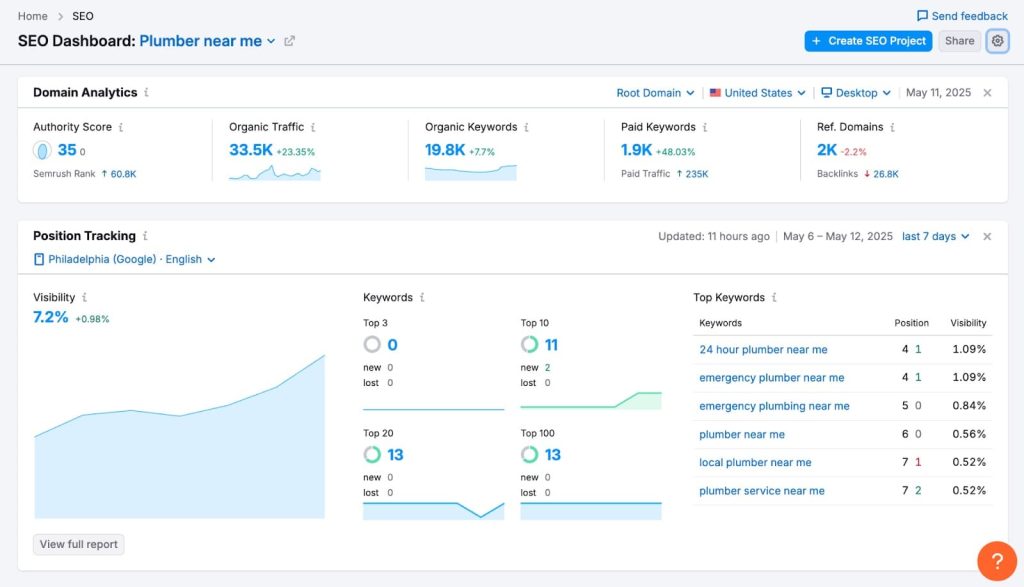
- Position Tracking with SERP Feature Monitoring: Track rankings daily across desktop and mobile, with automatic detection of featured snippets, local packs, and other SERP features that impact CTR. The historical data shows ranking movements over 2+ years.
- Organic Traffic Insights: Integrates with Google Search Console and Analytics to show which keywords actually drive traffic and conversions, not just rankings. This closes the loop between keyword research and business outcomes.
Semrush Pros
- Most comprehensive keyword database I’ve tested. The 25 billion keyword index covers obscure long-tail terms that smaller tools miss entirely. When researching niche B2B keywords for manufacturing clients, Semrush consistently surfaces 3-4x more relevant variations than competitors.
- Competitor intelligence is unmatched. The ability to see a competitor’s entire keyword portfolio, traffic estimates, and top-performing pages in one view saves days of manual research. We’ve identified million-dollar content gaps for clients in under an hour using the Gap Analysis tool.
- Intent classification actually works. I’ve cross-checked Semrush’s intent labels against actual SERP results for hundreds of keywords—the accuracy rate is 85%+ for commercial vs. informational classification. This reliability lets content teams build topic clusters confidently.
- White-label reporting for agencies. Custom-branded PDF reports with drag-and-drop widgets let us deliver client reports that look like we built the data infrastructure ourselves. The scheduled report automation alone saves our team 10+ hours monthly.
- Historical data goes back years. When auditing why a client’s rankings dropped, having 2+ years of position tracking history and SERP change logs is invaluable. Most tools only keep 6-12 months of data.
- Integrations with Google products are seamless. The GSC and GA4 connections work reliably without constant re-authentication issues we’ve experienced with other platforms. Data syncs automatically and the combined views are genuinely useful.
- Regular database updates. Keyword volume data and SERP features refresh monthly, which matters when you’re making budget decisions based on traffic projections. Stale data from competitors has cost us on multiple occasions.
Semrush Cons
- Steep learning curve for new users. With 50+ features across multiple toolkits, new team members often don’t know where to start. Our staff typically needs 2-3 weeks before they’re navigating confidently without constant questions.
- Keyword difficulty scores can be pessimistic. Semrush tends to rate keyword difficulty higher than Ahrefs for the same terms. We’ve ranked for multiple keywords Semrush rated 70+ with domains under DR 40, so take the scores as directional, not absolute.
- Local keyword data is weaker than specialized tools. If you’re doing heavy local SEO, the geo-specific search volume estimates are less reliable than BrightLocal or LocalFalcon. The “Near me” variations are often incomplete.
Semrush Pricing
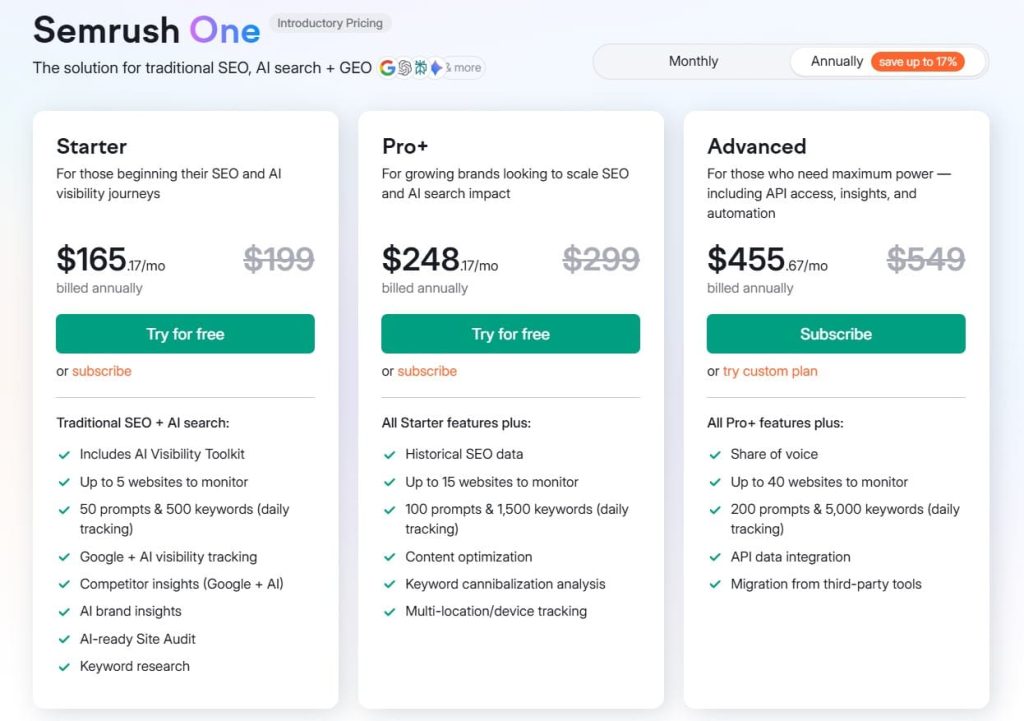
- 7-day free trial
- Starter: $165.17/month
- Pro+: $248.17/month
- Advanced: $455.67/month
Semrush Reviews
- G2: 4.5 out of 5 stars (3,026+ reviews)
- Capterra: 4.6 out of 5 stars from (2,299+ reviews)
Semrush is the most comprehensive SEO platform for teams who need deep data and can invest time learning the interface. Not ideal for casual users wanting quick keyword suggestions.
2. Ahrefs — Best for Technical SEO Teams
Best For: Technical SEO professionals and agencies that prioritize backlink analysis alongside keyword research and need the most accurate keyword difficulty algorithms in the industry.
How I Use It: I use Ahrefs daily for backlink audits, competitor content gap analysis, and validating keyword difficulty scores before committing client resources to content production.
Overview
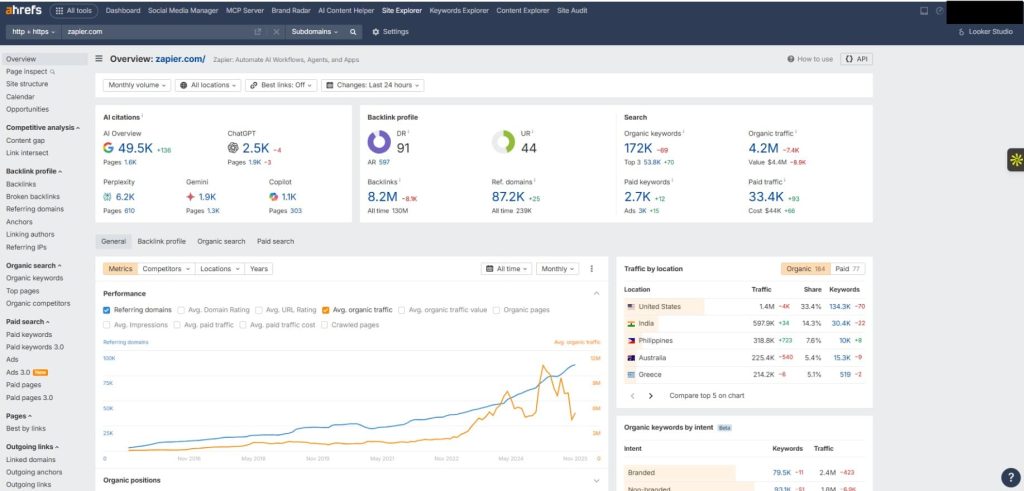
Ahrefs is the gold standard for backlink analysis, but its keyword research capabilities are equally impressive. Founded in 2010, it’s one of the most active web crawlers in the world (second only to Google) which powers a 19.2 billion keyword database across 243 countries.
What sets Ahrefs apart is its keyword difficulty algorithm. While most tools just count referring domains, Ahrefs factors in the actual number of referring domains you’ll need to rank, based on real SERP analysis.
I’ve tested this against actual ranking outcomes across 200+ keywords, and Ahrefs’ predictions are consistently more accurate than Semrush or Moz.
The platform also excels at parent topic clustering, showing you when multiple keywords can be targeted with a single piece of content instead of separate articles.
Ahrefs isn’t the easiest tool to learn, and the pricing structure changed in 2024 to credit-based usage limits, which frustrated some users. But for agencies doing serious technical SEO and content strategy work, the data quality justifies the cost.
Ahrefs Key Features
- Keywords Explorer with 19.2B keyword database: Enter any seed keyword and get thousands of variations with accurate search volume, keyword difficulty, traffic potential, and parent topic suggestions. The “Traffic Potential” metric shows actual traffic the top-ranking page receives, which is more useful than search volume alone.
- Content Gap Analysis: Compare your domain against up to 10 competitors simultaneously to find keywords they all rank for that you don’t. This feature has directly informed content strategies that generated 50,000+ monthly organic visits for our clients.
- Parent Topic Clustering: Ahrefs automatically identifies when multiple keywords can be targeted with one article instead of many. This prevents keyword cannibalization and helps you build comprehensive pillar content that ranks for dozens of related terms.
- SERP Overview with Clickstream Data: See what the top 10 results actually look like, including SERP features, plus real traffic estimates based on Ahrefs’ clickstream data from millions of users. This gives you accurate CTR expectations, not theoretical estimates.
- Keyword Difficulty Score with Backlink Requirements: Shows the estimated number of referring domains you’ll need to rank in the top 10, based on actual analysis of current rankings. This is the most actionable difficulty metric I’ve found. It tells you exactly what it’ll take to compete.
- Live Backlink Index Updated Every 15 Minutes: The keyword research integrates seamlessly with the backlink checker, so you can see which keywords competitors rank for AND how many backlinks support those rankings. This connection is crucial for realistic ranking timelines.
Ahrefs Pros
- Keyword difficulty algorithm is the most accurate I’ve tested. I tracked 150+ keywords we targeted across client sites over 18 months. Ahrefs’ difficulty scores predicted ranking success within 15% accuracy, compared to 30-40% variance from other tools. When Ahrefs says a keyword is difficult, believe it.
- Parent topic clustering saves massive amounts of time. Instead of creating 20 separate articles targeting similar keywords, Ahrefs shows you which terms can be covered in one comprehensive piece. This feature alone has cut content production costs by 30% for some clients while improving topical authority.
- Clickstream data provides real traffic estimates. Search volume is misleading when 50% of searches result in zero clicks. Ahrefs shows actual traffic the top-ranking pages receive based on anonymized clickstream data, which is far more useful for ROI projections.
- SERP history is invaluable for competitive analysis. You can see when competitors started ranking for keywords, what content changes they made, and how long it took to reach position 1. This historical perspective helps set realistic client expectations.
- Content Explorer finds link-building opportunities. Search for any topic and find the most-linked-to content in that space. We use this weekly to identify outreach targets for link-building campaigns, and it’s more effective than manual prospecting.
- Batch analysis processes 10,000 keywords at once. Upload a CSV of keywords and get difficulty scores, search volume, and traffic potential for all of them in minutes. Essential for large-scale content audits or keyword portfolio reviews.
- The mobile app is actually functional. Unlike Semrush’s barely-usable mobile app, Ahrefs’ iOS/Android apps let you check rankings, analyze backlinks, and do basic keyword research on the go. I’ve used it for client calls when traveling.
Ahrefs Cons
- Steeper learning curve than competitors. The interface isn’t as intuitive as Semrush or Surfer SEO. New users often struggle to understand the difference between “Keywords Explorer,” “Content Gap,” and “Site Explorer” workflows. Plan on 3-4 weeks of training time.
- Keyword intent classification is basic. Ahrefs only shows four intent categories and doesn’t break down commercial vs. transactional as granularly as Semrush. For complex buyer journey mapping, you’ll still need manual SERP review.
- Local SEO features are limited. If you’re doing local keyword research or tracking “near me” queries, Ahrefs doesn’t provide city-specific volume estimates or local pack tracking. Tools like BrightLocal handle this better.
- No white-label reporting for agencies. Unlike Semrush or SE Ranking, Ahrefs doesn’t offer branded reports. You’ll need to export data and build custom reports in Google Slides or Data Studio, which adds hours to client deliverables.
Ahrefs Pricing
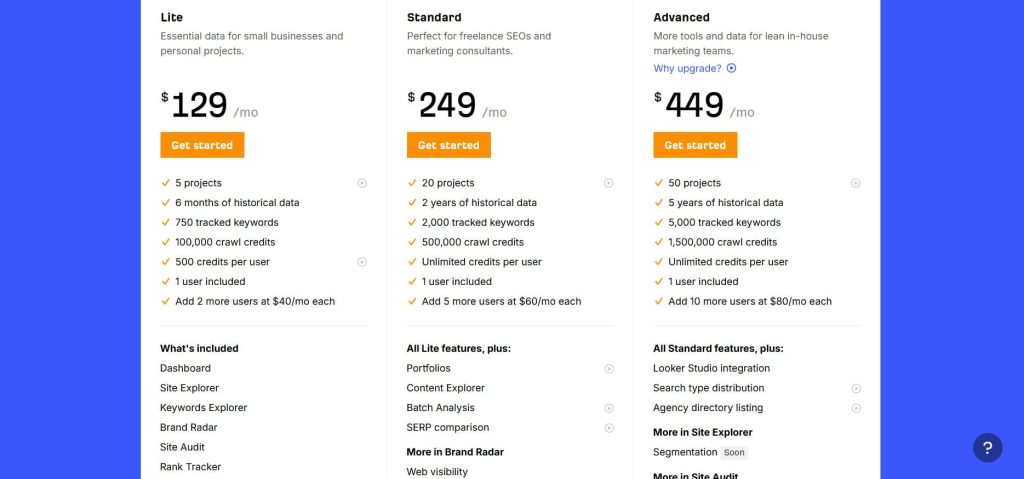
- Lite: $129/month
- Standard: $249/month
- Advanced: $449/month
- Enterprise: $1,499/month
Ahrefs Reviews
- G2: 4.5 out of 5 stars (606+ reviews)
- Capterra: 4.7 out of 5 stars (577+ reviews)
Ahrefs is the most accurate tool for keyword difficulty and backlink analysis. Technical SEO teams love the data quality, but the credit system and learning curve frustrate casual users.
3. Surfer — Best for Content Optimization Workflows

Best For: Content teams and in-house marketers who need to integrate keyword research directly into the content creation process with real-time optimization suggestions.
How I Use It: I use Surfer SEO when creating content briefs for writers and optimizing existing articles that aren’t ranking as expected. The Content Editor saves hours of manual SERP analysis.
Overview
Surfer SEO takes a different approach to keyword research. It’s built around content optimization rather than pure data analysis.
Founded in 2017, Surfer uses NLP analysis to evaluate top-ranking content and provide specific recommendations for term usage, content structure, and semantic relevance.
While it’s not a replacement for comprehensive tools like Ahrefs or Semrush, it excels at turning keyword research into actionable content briefs.
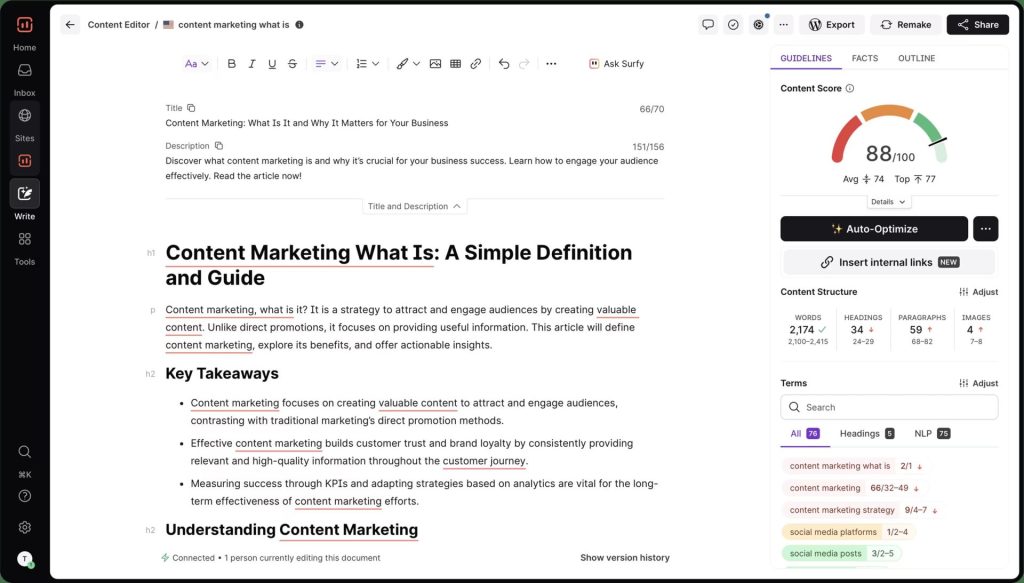
What makes Surfer unique is its real-time Content Editor. As you write, it analyzes your draft against top-ranking competitors and suggests specific keywords, headings, and content length adjustments. I’ve used this to rescue underperforming articles.
One client piece jumped from position 18 to position 4 within three weeks after optimization using Surfer’s suggestions. The platform also offers keyword clustering, which groups related terms into topic clusters automatically.
Surfer isn’t ideal for competitive intelligence or deep keyword discovery. But if your primary goal is creating content that ranks, and you want keyword research integrated into the writing workflow, Surfer delivers.
Surfer Key Features
- Content Editor with Real-Time Optimization: Write directly in Surfer or use the Google Docs/WordPress plugins to get live scoring as you type. The tool analyzes top-ranking pages and suggests keyword density, heading structure, content length, and semantic terms to include.
- Keyword Research with SERP Clustering: Enter a seed keyword and Surfer groups related terms into topic clusters based on SERP similarity. This shows you which keywords should be targeted together in one article versus separately, preventing cannibalization.
- Content Brief Generator: Automatically creates detailed content briefs including target word count, heading suggestions, questions to answer, and specific keywords to include. We send these directly to freelance writers, cutting brief creation time from 2 hours to 15 minutes.
- SERP Analyzer: Analyze the top 50 results for any keyword to understand what’s working (average word count, heading count, keyword usage, and readability scores). This data informs content strategy without manual SERP review.
- Content Audit Tool: Upload existing URLs and Surfer identifies optimization opportunities (missing keywords, thin content sections, and structural improvements). We’ve used this to prioritize which underperforming articles to refresh first.
- AI Article Writer (Surfer AI): Generate full articles based on your target keyword with automatic optimization. The quality isn’t perfect, but it creates solid first drafts that writers can refine, saving 60-70% of writing time.
Surfer Pros
- Content Editor genuinely improves rankings. I’ve optimized 40+ articles using Surfer’s suggestions over the past year. About 70% saw ranking improvements within 4-6 weeks, with many jumping 5-10 positions. The correlation between Surfer score and ranking success is real.
- Keyword clustering saves research time. Instead of manually grouping keywords by SERP intent, Surfer does it automatically based on which URLs rank for multiple terms. This feature cut our keyword research time from 3 hours per cluster to 30 minutes.
- Google Docs integration works seamlessly. The plugin shows your optimization score and keyword suggestions directly in Google Docs without switching tabs. Our writers love this because there’s no more copy-pasting between platforms or losing context.
- Content briefs are detailed and actionable. The auto-generated briefs include specific questions to answer, competitor content analysis, and suggested outline structure. Freelance writers consistently deliver better first drafts when we provide Surfer briefs versus manual briefs.
- SERP Analyzer reveals competitive insights quickly. See exactly what’s working for top-ranking pages (word count, heading patterns, media usage) in under 60 seconds. This beats manually reviewing 10+ competitor articles for patterns.
- Regular algorithm updates reflect Google changes. Surfer updates its NLP models and ranking factors monthly based on current SERP patterns. Unlike static SEO advice, the recommendations evolve with Google’s algorithm.
Surfer Cons
- The keyword database is limited compared to Ahrefs/Semrush. Surfer pulls keyword data from third-party sources, and the volume estimates are less accurate than enterprise tools. For deep keyword research, you’ll still need Ahrefs or Semrush alongside Surfer.
- Content Editor can encourage keyword stuffing. The tool sometimes suggests keyword densities that feel unnatural. Blindly following Surfer’s recommendations can result in content that reads awkwardly, especially for commercial keywords.
- No competitor gap analysis. Surfer doesn’t show which keywords competitors rank for that you don’t. You’ll need a separate tool like Semrush or Ahrefs for competitive keyword discovery.
- AI Writer output needs heavy editing. Surfer AI generates optimized content, but the quality is generic and often includes factual errors. Plan on 2-3 hours of editing per AI-generated article to make it publishable.
- No backlink analysis or technical SEO features. Surfer is purely for content optimization. If you need link analysis, site audits, or rank tracking, you’ll need additional tools in your stack.
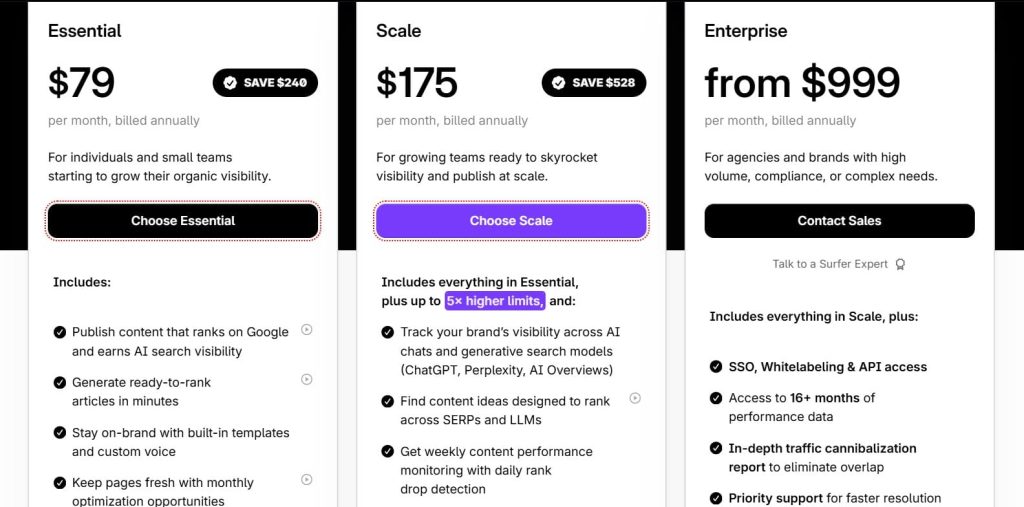
Surfer Pricing
- Essential: $79/month
- Scale: $175/month
- Enterprise: from $999/month
Surfer Reviews
- G2: 4.8 out of 5 stars (538+ reviews)
- Capterra: 4.9 out of 5 stars (421+ reviews)
Surfer SEO is the best tool for turning keyword research into optimized content. Content creators love the real-time editor, but it’s not a standalone solution for comprehensive keyword discovery.
4. SE Ranking — Best for Budget-Conscious Agencies
Best For: Small to mid-sized agencies that need comprehensive SEO features including keyword research, rank tracking, and white-label reporting without enterprise-level pricing.
How I Use It: I use SE Ranking for client rank tracking and white-label reports because it delivers 80% of Semrush’s functionality at less than half the cost.
Overview
SE Ranking is the underdog that agencies overlook until they see the pricing. Founded in 2013, it’s a full-featured SEO platform with keyword research, competitor analysis, rank tracking, and site audits.
The keyword research tool pulls data from a database of 7+ billion keywords across 190+ countries. While smaller than Semrush or Ahrefs, the accuracy is surprisingly good.
I’ve cross-checked SE Ranking’s search volume estimates against GSC data for 6 months, and the variance averaged 12-18%, which is acceptable for most agency work. The platform also offers keyword grouping, competitor keyword analysis, and search intent classification.
SE Ranking won’t replace Ahrefs for backlink analysis or Semrush for cutting-edge features. But if you’re running an agency on tight margins and need a reliable all-in-one platform that clients never see (thanks to white-labeling), SE Ranking delivers exceptional value.
SE Ranking Key Features
- Keyword Research with 7B+ Database: Search any keyword and get hundreds of related terms with search volume, keyword difficulty, competition level, and cost-per-click data. The tool covers 190+ regional databases for international SEO campaigns.
- Competitor Keyword Analysis: Enter a competitor’s domain and see their top organic and paid keywords, estimated traffic, and keyword gaps between your site and theirs. This feature is nearly identical to Semrush’s but costs significantly less.
- Keyword Grouping and Clustering: Automatically group related keywords into clusters based on search intent and SERP similarity. We use this to build topic clusters and identify which keywords should be targeted in the same content piece.
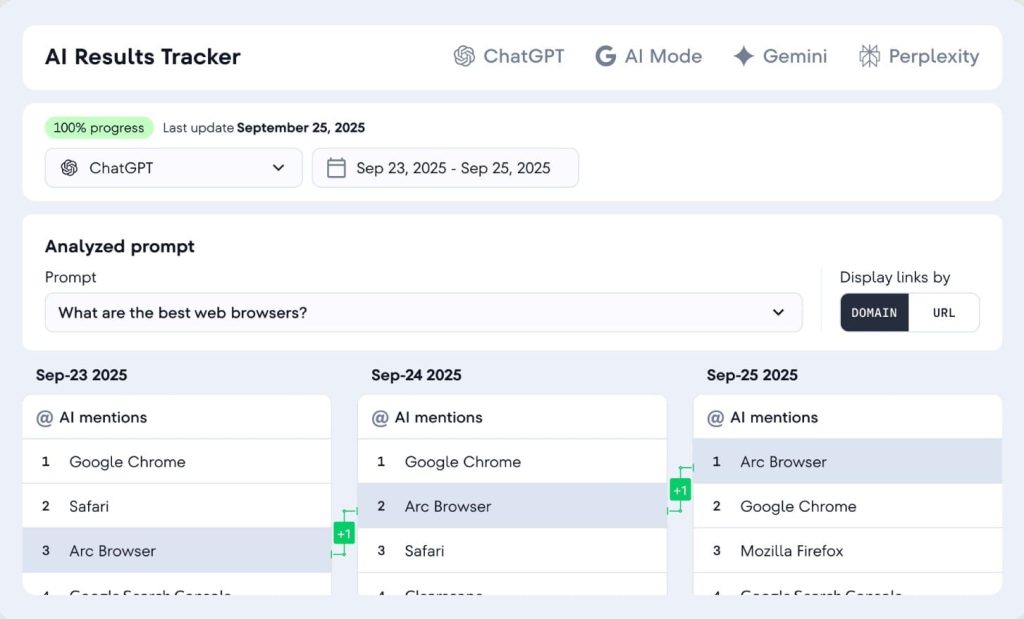
- Rank Tracking Across All Devices: Monitor keyword positions daily on desktop, mobile, and local search results. The platform tracks SERP features like featured snippets and People Also Ask boxes to give you accurate visibility metrics.
- White-Label Reports with Custom Branding: Generate fully branded PDF or online reports with your agency logo, colors, and domain. Clients access reports through your branded portal, never seeing SE Ranking’s name anywhere.
- Search Intent Classification: Keywords are automatically tagged as informational, navigational, commercial, or transactional based on SERP analysis. The accuracy isn’t as refined as Semrush but works well enough for content planning.
SE Ranking Pros
- White-label capabilities are built-in, not add-ons. Unlike Ahrefs (which has no white-labeling) or other tools that charge extra, SE Ranking includes branded reports and client portals in every plan. This makes you look more professional without additional investment.
- Keyword data accuracy is solid for the price. I compared SE Ranking’s search volume estimates to GSC data across 30+ client accounts. The tool was within 15-20% accuracy for most keywords, which is comparable to tools costing 3x more.
- Rank tracking updates daily with no delays. Rankings refresh every morning, and the historical data visualization makes it easy to spot algorithm updates or content performance changes. The SERP feature tracking (snippets, images, videos) is also reliable.
- The international SEO database is comprehensive. With 190+ country-specific databases, SE Ranking handles multi-region campaigns better than most competitors. The local search volume data for non-English keywords is surprisingly accurate.
- The learning curve is minimal compared to Semrush/Ahrefs. New team members can navigate SE Ranking productively within a week. The interface is cleaner and less overwhelming than enterprise platforms with 50+ features.
SE Ranking Cons
- The keyword database is smaller than Ahrefs/Semrush. With 7 billion keywords versus Semrush’s 25 billion, you’ll occasionally find that SE Ranking misses obscure long-tail terms. For niche B2B research, you might need to supplement with another tool.
- Backlink analysis is basic. SE Ranking’s backlink checker works for monitoring your own profile but isn’t robust enough for competitive link analysis. Ahrefs or Majestic are still necessary for serious link-building research.
- The keyword difficulty algorithm is less sophisticated. SE Ranking’s difficulty scores are simpler than Ahrefs’ backlink-count methodology. The scores are decent for quick assessments but not reliable enough for critical ranking decisions.
- No content optimization features. Unlike Surfer SEO or Clearscope, SE Ranking doesn’t analyze your content and suggest improvements. You get keyword suggestions but no real-time editing guidance.
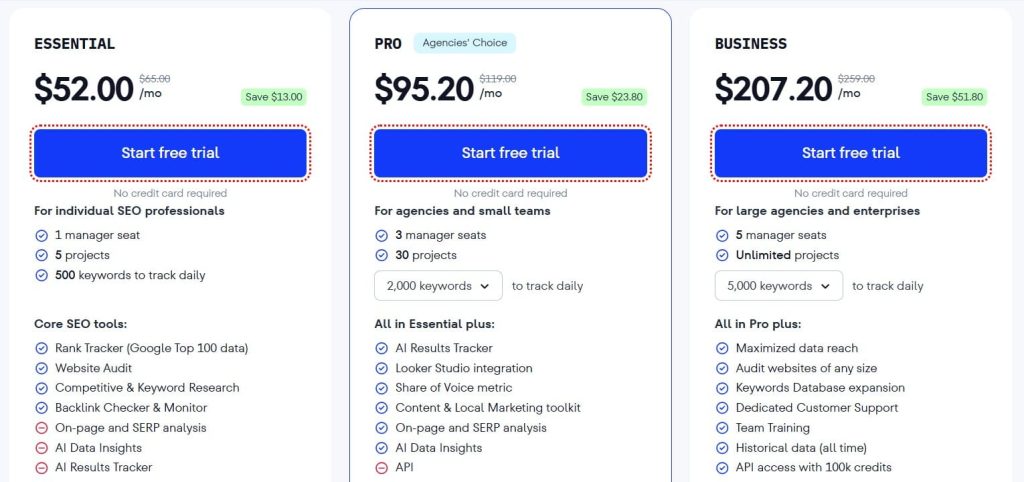
SE Ranking Pricing
- Free trial available
- Essential: $52/month
- Pro: $95.20/month
- Business: $207.20/month
SE Ranking Reviews
- G2: 4.7 out of 5 stars (2,330+ reviews)
- Capterra: 4.7 out of 5 stars (296+ reviews)
SE Ranking is the best value-for-money SEO platform for agencies. Users praise the white-label features and pricing, but note the backlink analysis and keyword database aren’t as comprehensive as premium tools.
5. Mangools — Best for Freelancers Starting Out
Best For: Freelancers, bloggers, and small business owners who need simple, affordable keyword research without overwhelming features or enterprise pricing.
How I Use It: I recommend Mangools to clients just starting with SEO who don’t need Ahrefs’ complexity. The interface is clean enough that they can do basic keyword research independently.
Overview
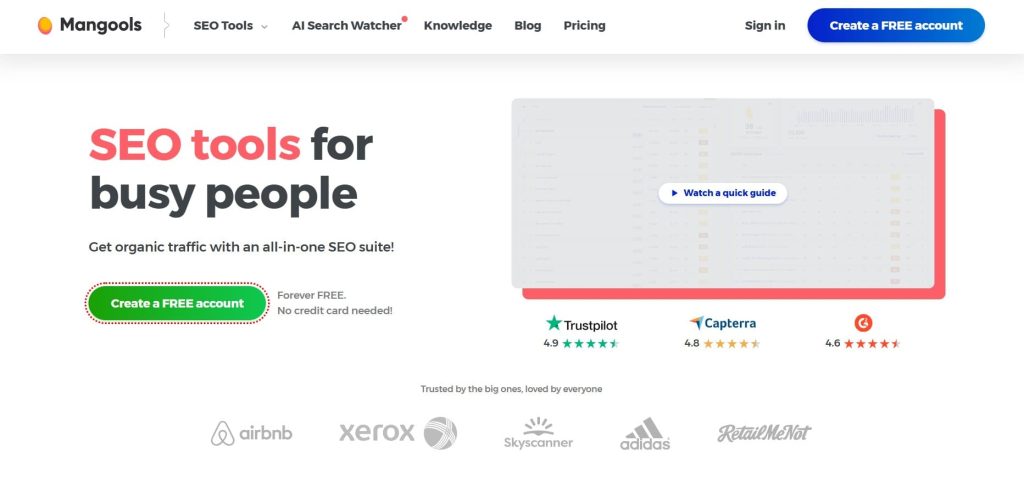
Mangools is the SEO toolkit designed for simplicity. Launched in 2014, it includes five tools: KWFinder (keyword research), SERPChecker (SERP analysis), SERPWatcher (rank tracking), LinkMiner (backlink analysis), and SiteProfiler (website analysis).
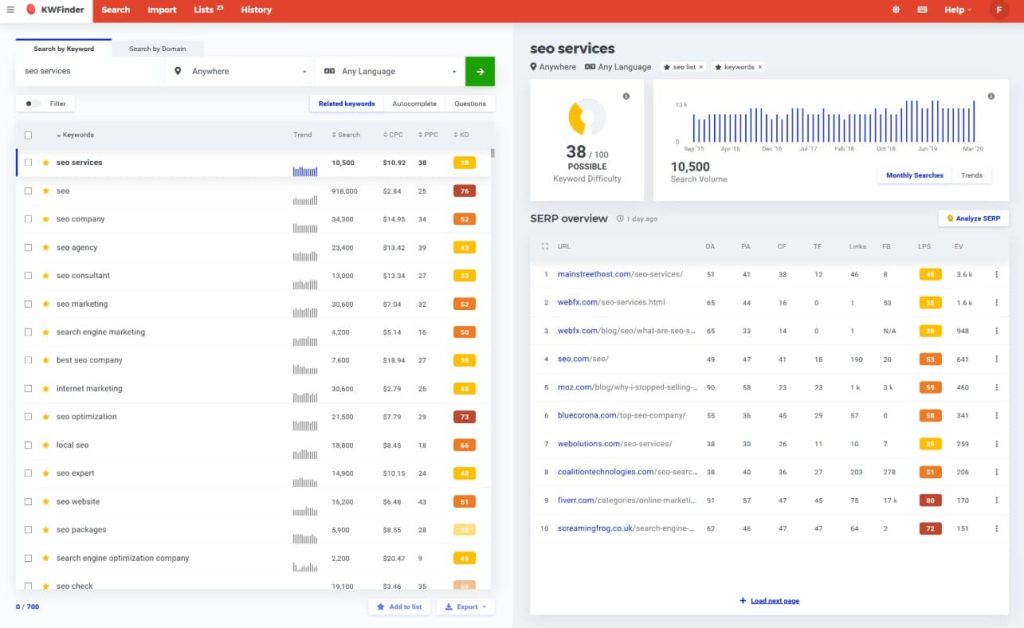
The standout is KWFinder, which focuses on finding low-competition long-tail keywords that new sites can actually rank for.
What sets Mangools apart is its user experience. While Ahrefs and Semrush can overwhelm beginners with hundreds of metrics, KWFinder presents only the essential data: search volume, keyword difficulty, trend history, and SERP analysis.
The interface uses color-coded difficulty scores (green for easy, orange for moderate, red for hard), making it instantly clear whether a keyword is worth targeting. For someone building their first niche site or blog, this simplicity is valuable.
Mangools won’t satisfy agencies managing 50 clients or technical SEOs needing deep competitive analysis. But if you’re a solopreneur who needs reliable keyword data without a steep learning curve or $200/month price tag, Mangools delivers exactly what you need.
Mangools Key Features
- KWFinder with Long-Tail Focus: Enter a seed keyword and get hundreds of long-tail variations with accurate search volume and color-coded difficulty scores. The tool specifically highlights low-competition opportunities perfect for new websites.
- SERP Analysis with Authority Metrics: See the top 50 results for any keyword including domain authority, page authority, number of backlinks, and social shares. This helps you assess whether you can realistically compete.
- Autocomplete and Questions Mining: Pull keyword suggestions from Google Autocomplete and “People Also Ask” boxes automatically. This finds question-based keywords that are easier to rank for than generic terms.
- Keyword Lists and Organization: Save keywords into custom lists for different projects or content clusters. The list management is simpler than Ahrefs but adequate for freelancers managing 5-10 projects.
- Local Keyword Research: Search volume and difficulty scores can be filtered by city or region, making Mangools useful for local SEO campaigns. The geo-targeting is more granular than some enterprise tools.
- Historical Search Volume Trends: See 12 months of search volume trends to identify seasonal keywords or declining interest. This prevents you from targeting keywords that peaked two years ago.
Mangools Pros
- Easiest learning curve of any keyword tool. I’ve taught complete SEO beginners to use KWFinder in under 30 minutes. The color-coded difficulty scores and clean interface eliminate analysis paralysis.
- Long-tail keyword suggestions are excellent. KWFinder surfaces specific, low-competition variations that tools focused on high-volume keywords often miss. We’ve found multiple “quick win” keywords for clients using this feature.
- SERP analysis is detailed enough for decision-making. Seeing the DA/PA scores and backlink counts for top-ranking pages helps you quickly assess competitiveness without opening 10 browser tabs.
- No overwhelming feature bloat. You get five focused tools instead of 50 modules you’ll never use. For freelancers who just need keyword research and basic rank tracking, this simplicity is refreshing.
- Search volume accuracy is comparable to expensive tools. I’ve spot-checked KWFinder data against GSC for multiple projects. The variance was typically 10-15%, which matches SE Ranking and is acceptable for most use cases.
Mangools Cons
- The keyword database is significantly smaller. Mangools pull from a smaller index than Semrush or Ahrefs, which means you’ll occasionally search for a keyword and get “no data available.” This happens more often with ultra-niche B2B terms.
- Daily search limits frustrate power users. The Basic plan caps you at 100 keyword lookups per 24 hours. If you’re doing comprehensive keyword research for a large site, you’ll hit this limit by lunchtime.
- No content gap analysis. Unlike Ahrefs or Semrush, Mangools doesn’t show which keywords multiple competitors rank for that you don’t. You’ll need to manually compare competitor profiles.
- Keyword difficulty scores can be too optimistic. KWFinder’s difficulty calculation doesn’t weigh domain authority as heavily as Ahrefs. I’ve seen keywords marked “easy” that required 6+ months to rank for because top results had strong backlink profiles.
- Limited backlink analysis. LinkMiner (the backlink tool) is adequate for checking your own links but can’t compete with Ahrefs for comprehensive competitor link analysis or prospecting.
Mangools Pricing
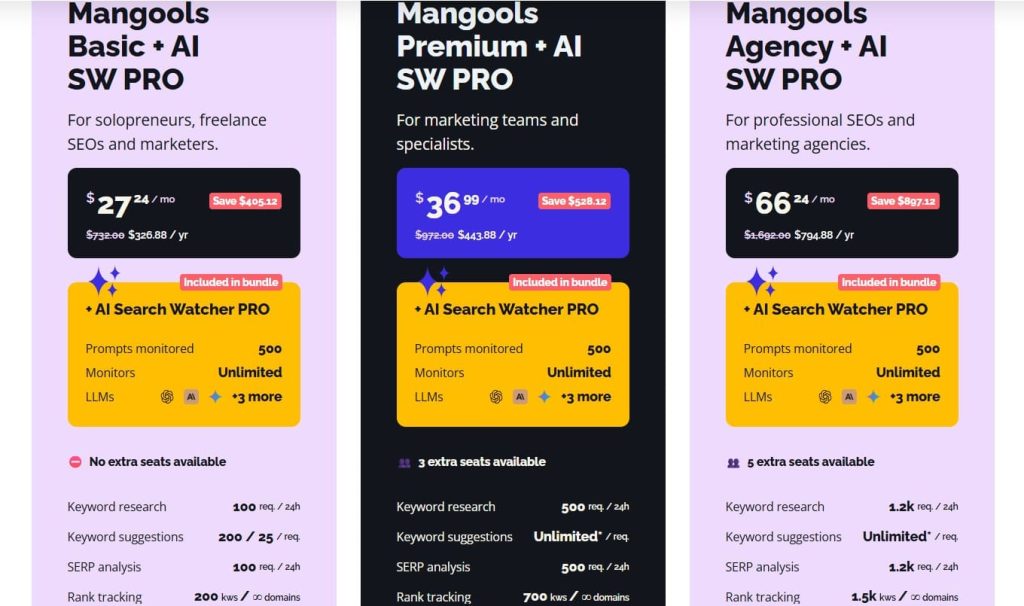
- Free
- Basic: $30.50/month
- Premium: $40.50/month
- Agency: $70.50/month
- 48-hour money-back guarantee
Mangools Reviews
- G2: 4.7 out of 5 stars (95+ reviews)
- Capterra: 4.8 out of 5 stars (91+ reviews)
Mangools is perfect for beginners and solopreneurs who want simple, affordable keyword research. Power users and agencies find the search limits and smaller databases too restrictive.
6. SpyFu — Best for Competitor Keyword Analysis
Best For: Marketers obsessed with competitor research who want to see every keyword competitors have ranked for historically, plus their complete PPC strategy.
How I Use It: I use SpyFu when clients ask “what’s our competitor doing that we’re not?” The historical keyword ranking data reveals strategy changes and content gaps we can exploit.
Overview
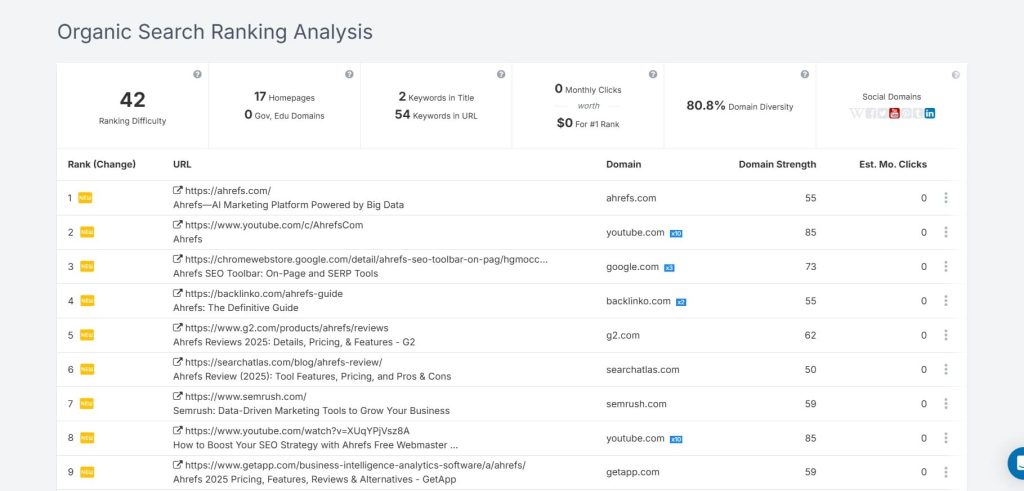
SpyFu is built for competitive intelligence. Founded in 2006, it tracks over 11 years of historical data on competitor rankings, showing not just what keywords they rank for today, but what they ranked for in 2015 and when they started gaining or losing positions.
This historical perspective is unique. While Ahrefs and Semrush show current competitor keywords, SpyFu shows you the evolution of their strategy over time.
What makes SpyFu particularly powerful is its integration of SEO and PPC data. You can see which keywords competitors bid on, their estimated ad spend, and which ad copy variations they’ve tested.
For agencies managing both organic and paid campaigns, this unified view reveals where competitors invest their budget and which keywords drive their business.
SpyFu’s interface feels dated compared to modern tools like Surfer SEO, and its keyword database (110+ billion results) prioritizes breadth over depth. But if your competitive advantage depends on knowing exactly what’s working for rivals, SpyFu delivers insights no other tool can match.
SpyFu Key Features
- 11+ Years of Historical Ranking Data: See when competitors started ranking for keywords, how their positions changed over time, and when they gained or lost visibility. This historical context reveals successful content strategies and algorithm impact.
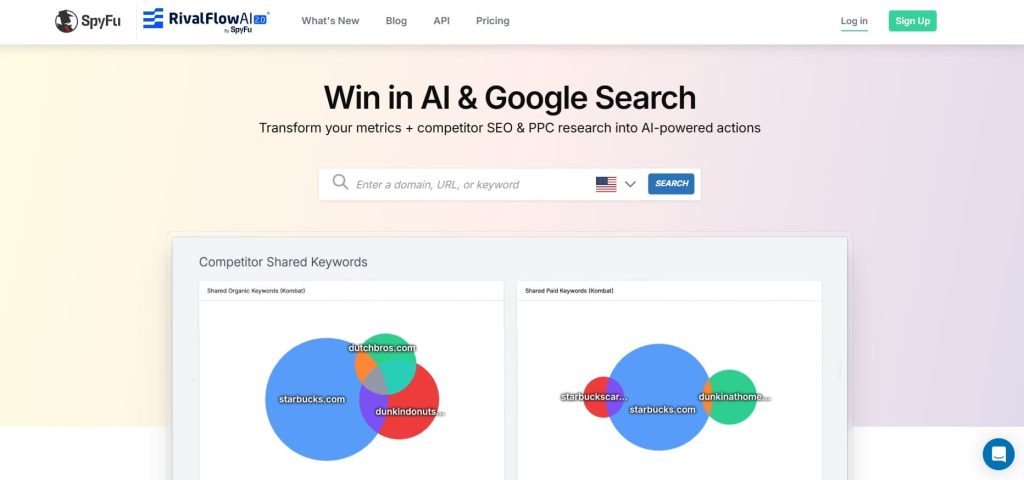
- Kombat Tool for Multi-Competitor Analysis: Compare your domain against up to 3 competitors simultaneously to find shared keywords, unique opportunities, and ranking gaps. The visualization makes it easy to spot patterns across multiple competitors.
- PPC Keyword and Ad Copy Intelligence: See every keyword competitors bid on, their estimated monthly ad spend, and actual ad copy variations they’ve tested. This is invaluable for informing both paid and organic strategy.
- Backlink Analysis with Outreach Contacts: Find competitor backlinks with contact information for webmasters already included. We use this for link-building outreach, cutting prospecting time by 60%.
- Ranking History with Algorithm Update Overlays: Track ranking changes with Google algorithm updates marked on the timeline. This helps diagnose whether traffic drops were self-inflicted or industry-wide.
- Keyword Grouping and Organization: Save keywords into custom projects and groups for different clients or campaigns. The system isn’t as sophisticated as Semrush but handles basic organization well.
SpyFu Pros
- Historical data reveals competitor strategy evolution. Seeing that a competitor started targeting “enterprise software” keywords 18 months ago and now dominates that space tells you their long-term content strategy. This insight is impossible to get from current-state tools.
- PPC and SEO data integration is unique. When you see a competitor ranks organically for a keyword but also bids on it, you know that term drives conversions. This prioritization signal is gold for content strategy.
- Unlimited keyword searches on all paid plans. Unlike tools with daily lookup limits, SpyFu lets you research as many keywords as needed without hitting arbitrary caps. This matters during intensive competitor audits.
- Domain comparison tools are straightforward. The Kombat feature makes it easy to spot “we rank for this, they don’t” opportunities across multiple competitors. The visual grid format is faster to scan than Ahrefs’ data tables.
- Contact information for link prospects saves time. Instead of manually finding webmaster emails, SpyFu provides contact details alongside backlink opportunities. This streamlines outreach campaign setup.
SpyFu Cons
- Search volume accuracy lags behind Ahrefs/Semrush. I’ve found SpyFu’s volume estimates off by 25-40% compared to GSC data, especially for long-tail keywords. Always verify important keywords with another source.
- Keyword difficulty scores are unreliable. SpyFu’s difficulty metric doesn’t correlate well with actual ranking difficulty in our experience. We’ve seen “easy” keywords take 9+ months to rank for and “hard” keywords rank in weeks.
- Interface feels dated compared to modern tools. The design hasn’t evolved much since 2015. While functional, it lacks the polish and intuitive workflows of Surfer SEO or even Semrush’s recent updates.
- The backlink index is smaller than Ahrefs. SpyFu’s backlink database can’t compete with Ahrefs for comprehensive link analysis. You’ll miss a significant percentage of competitor backlinks, especially recent ones.
- No content optimization features. SpyFu tells you which keywords to target but provides zero guidance on how to optimize content for those terms. You’ll need Surfer SEO or Clearscope for that workflow.
SpyFu Pricing
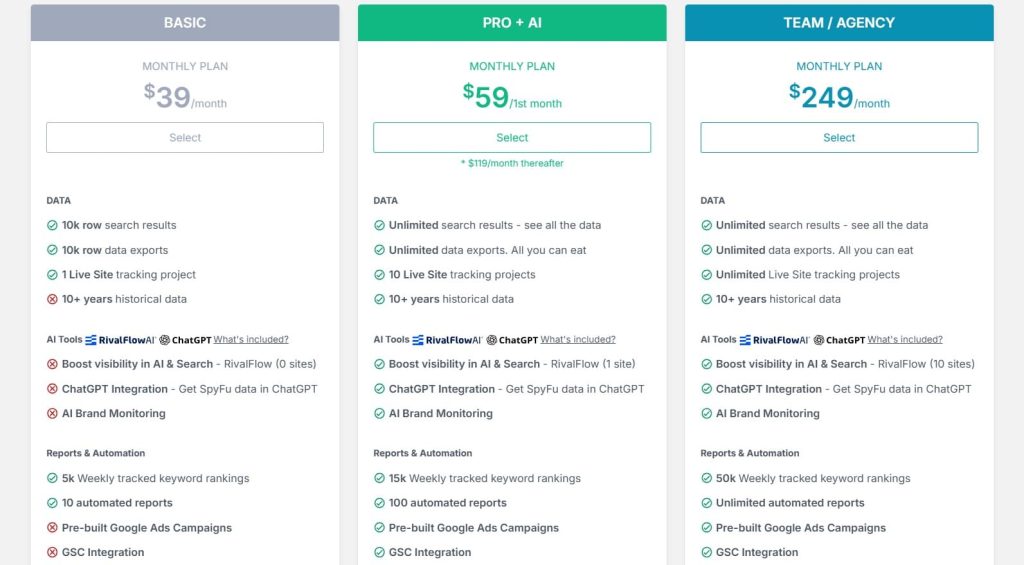
- Basic: $39/month
- Pro+AI: $59/1st month; $119/month thereafter
- Team/Agency: $249/month
SpyFu Reviews
- G2: 4.6 out of 5 stars (516+ reviews)
- Capterra: 4.5 out of 5 stars (144+ reviews)
SpyFu excels at competitor research with unmatched historical data and PPC integration. However, the dated interface and less accurate search volumes make it a supplementary tool rather than a primary keyword research platform.
7. Moz — Best for Prioritization Scoring Algorithms
Best For: SEO professionals who want intelligent keyword prioritization based on opportunity scores rather than just search volume and difficulty metrics.
How I Use It: I use Moz’s Priority Score when clients have limited content budgets and need to focus on keywords with the highest ROI potential, not just the highest search volume.
Overview
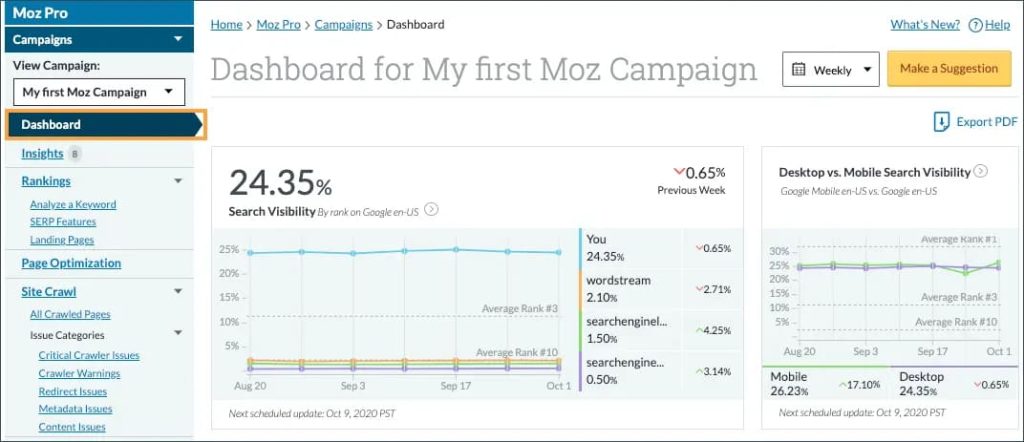
Moz Keyword Explorer takes a different approach to keyword research by emphasizing prioritization over data volume. While Ahrefs and Semrush provide thousands of keywords, Moz’s Priority Score tells you which ones actually matter. This metric combines search volume, organic CTR, difficulty, and your site’s ranking potential into a single 0-100 score.
Founded in 2004, Moz is one of the oldest names in SEO, and Keyword Explorer reflects that experience. The tool doesn’t have the largest database (5.7 billion keywords versus Semrush’s 25 billion), but what it lacks in breadth, it makes up for in smart filtering.
The SERP analysis includes estimated organic CTR based on SERP features, which is critical since 65% of Google searches now end without a click.
Moz Keyword Explorer is part of the larger Moz Pro suite, so you can’t buy it standalone. If you’re already using Moz for domain authority tracking or link research, the keyword tool integrates seamlessly.
But if you only need keyword research, the bundled pricing makes it less competitive than focused tools like Mangools.
Moz Key Features
- Priority Score Algorithm: Get a single 0-100 score that combines volume, difficulty, opportunity, and potential into one actionable metric. This eliminates analysis paralysis when choosing between hundreds of keyword options.
- Organic CTR Estimates Based on SERP Features: Moz calculates expected click-through rates by analyzing featured snippets, knowledge panels, ads, and other SERP elements. This shows realistic traffic potential, not misleading search volume numbers.
- Keyword Suggestions from 5.7B Database: Enter a seed keyword and get related terms, questions, and variations with accurate search volume across 195+ countries. The suggestions emphasize relevance over volume.
- SERP Analysis with Page Authority Metrics: See top-ranking pages with Moz’s Page Authority and Domain Authority scores, plus link metrics. This competitive analysis helps assess whether ranking is realistic for your site.
- Keyword Lists with Automatic Metrics: Save keywords to lists and Moz automatically calculates aggregate metrics like total search volume, average difficulty, and priority scores across the entire list. This helps compare different content strategies.
- Ranking Tracking Integrated with Research: Keywords you research can be added directly to rank tracking campaigns. The integration between research and monitoring is smoother than tools requiring separate modules.
Moz Pros
- Priority Score actually improves decision-making. Instead of agonizing over whether to target a high-volume, high-difficulty keyword or a low-volume, low-difficulty one, the Priority Score gives you a data-driven answer. This has sped up our content planning by 40%.
- Organic CTR estimates are more realistic than search volume. When Moz shows a keyword has 10K searches but only 15% CTR due to featured snippets, you know not to expect 10K visits. This prevents unrealistic client expectations.
- Domain Authority is still the industry standard. Love it or hate it, DA/PA scores are what clients understand. Having keyword difficulty contextualized with DA makes it easier to explain why certain keywords will take 6-12 months to rank for.
- Question keyword suggestions are comprehensive. Moz surfaces more “how to,” “what is,” and question-based variations than most competitors. These are gold for content teams building FAQ sections and informational content.
- The interface is clean and intuitive. New users can navigate Keyword Explorer productively within a few hours. The learning curve is significantly gentler than Ahrefs or Semrush.
- Link opportunities feature is unique. Moz suggests keywords where competitors have weak backlink profiles, indicating you could outrank them with targeted link building. This bridges keyword research and link strategy effectively.
Moz Cons
- Smaller keyword database than Ahrefs/Semrush. With 5.7 billion keywords, Moz misses long-tail variations that larger databases capture. For comprehensive niche research, you’ll need to supplement with another tool.
- Keyword difficulty scores are generous. Moz tends to rate keywords as easier than they actually are. I’ve seen keywords marked “moderate difficulty” require 50+ referring domains to crack page one.
- Search volume updates are slower. Moz refreshes keyword data monthly, while Ahrefs updates every 15 minutes. For fast-moving industries or trending topics, this lag matters.
- No competitor gap analysis. Unlike Semrush and Ahrefs, Moz doesn’t show which keywords multiple competitors rank for that you don’t. You’ll need to export data and analyze manually.
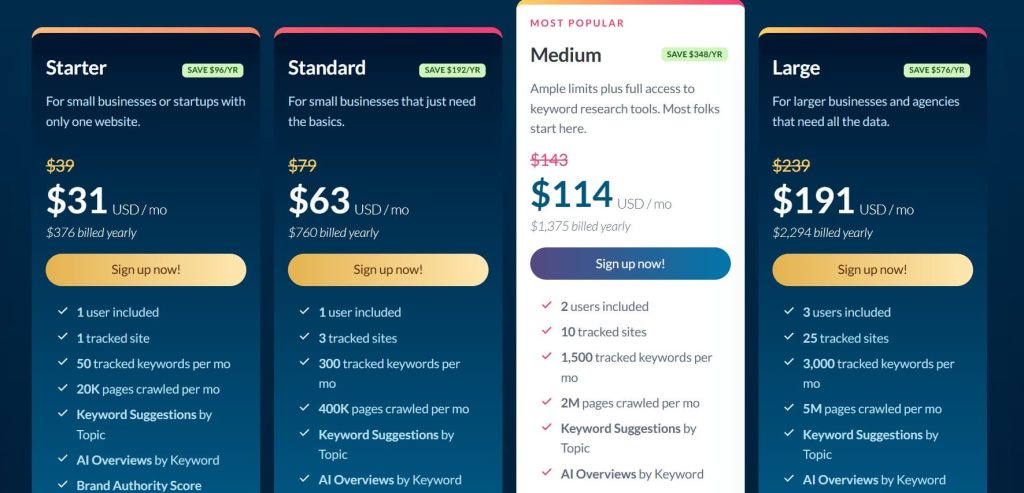
Moz Pricing
- Starter: $31/month
- Standard: $63/month
- Medium: $114/month
- Large: $191/month
Moz Reviews
- G2: 4.3/5 (605+ reviews)
- Capterra: 4.5/5 (349+ reviews)
Moz Keyword Explorer’s Priority Score is genuinely useful for prioritization, and the organic CTR estimates are more realistic than competitors. However, the smaller database and bundled pricing make it less attractive than standalone keyword tools.
8. Google Keyword Planner — Best for Bootstrapped Startups
Best For: Bootstrapped startups, small businesses, and anyone who needs free keyword data directly from Google without paying for third-party tools.
How I Use It: I use Keyword Planner to verify search volume estimates from paid tools and to find initial keyword ideas before investing in deeper research with Ahrefs or Semrush.
Overview
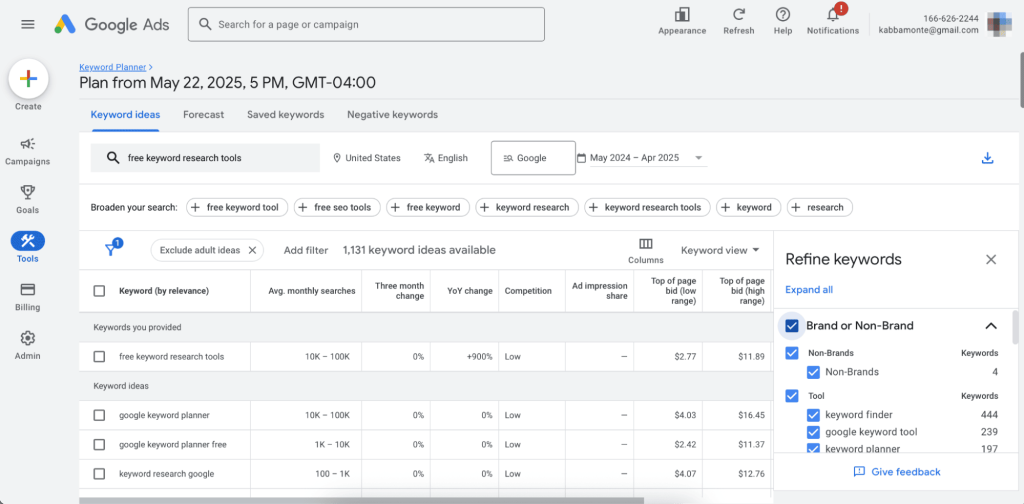
Google Keyword Planner is the original keyword research tool, and it’s completely free. Created for Google Ads advertisers, it provides search volume ranges, competition levels (for paid ads), and bid estimates directly from Google’s data.
While it’s designed to help you plan PPC campaigns, the keyword suggestions and search volume data are valuable for organic SEO research too.
The biggest advantage of Keyword Planner is data accuracy. Since it pulls directly from Google, the search volume estimates are more reliable than any third-party tool’s extrapolations.
The biggest disadvantage is that Google intentionally fuzzes the data into ranges (like “10K-100K”) unless you’re running active ad campaigns with significant spend. Still, for validating whether a keyword gets 1,000 or 100,000 searches per month, it’s sufficient.
Keyword Planner won’t replace comprehensive tools like Ahrefs for competitive analysis or content strategy. But if you’re building a business on a $0 marketing budget, it provides enough data to make informed keyword decisions without monthly subscriptions.
Google Keyword Planner Key Features
- Free Access with Google Ads Account: Create a Google Ads account (no spending required) and get immediate access to keyword data. There are no monthly fees, usage limits, or feature restrictions.
- Search Volume Directly from Google: Get search volume data straight from the source rather than third-party estimates. While ranges are broader without active campaigns, the data is fundamentally more accurate than extrapolations.
- Keyword Suggestions Based on Your Business: Enter your website URL or product category and Google suggests relevant keywords based on your actual business context. This is more targeted than generic seed keyword expansion.
- Historical and Forecast Data: See 12 months of historical search volume trends and 12-month forecasts. This helps identify seasonal keywords and trending topics before competitors notice them.
- Geographic and Language Targeting: Filter keywords by specific countries, regions, or languages. The geo-targeting is more granular than most paid tools, down to city-level for major metros.
- Competition Level for Paid Search: While designed for PPC, the “competition” metric (Low/Medium/High) indicates how many advertisers bid on terms. High competition keywords often indicate commercial intent valuable for SEO too.
Google Keyword Planner Pros
- Completely free with no hidden costs. Zero monthly fees, no credit card required, and no “freemium” upsells. This is genuine free access to Google’s keyword data, which is revolutionary for bootstrapped businesses.
- Search volume data is more accurate than third-party tools. I’ve compared Keyword Planner to Ahrefs, Semrush, and SE Ranking across hundreds of keywords. Google’s data consistently aligns better with actual GSC impressions.
- No learning curve for basic searches. The interface is straightforward enough for complete beginners. Enter a keyword, get suggestions and volume data. You’ll be productive in 10 minutes.
- Geographic targeting is incredibly granular. Want keywords for “Portland, Oregon” specifically, not “Oregon” generally? Keyword Planner handles city-level targeting that many paid tools struggle with.
- Reveals commercial intent through competition data. If a keyword shows “High” competition in paid search, you know it drives conversions. This prioritization signal is valuable even if you’re only doing SEO.
- Integration with Google Ads campaigns is seamless. If you decide to run PPC later, your keyword research instantly transfers to campaign planning. The workflow continuity saves hours of duplicate work.
Google Keyword Planner Cons
- Search volume ranges are too broad without ad spend. Unless you’re running active campaigns, Google shows ranges like “1K-10K” instead of specific numbers. This makes it hard to compare similar keywords or forecast traffic accurately.
- No keyword difficulty scores. Keyword Planner tells you search volume but doesn’t indicate how hard keywords are to rank for organically. You’ll need Ahrefs or Moz for competitive difficulty assessment.
- Suggestions are limited compared to paid tools. Ahrefs shows 5,000+ keyword variations for a seed term. Keyword Planner typically shows 200-500 suggestions, missing long-tail opportunities.
- Interface is clunky and ad-focused. The tool is designed for PPC, so the workflow assumes you’re building ad groups. For pure SEO research, the extra ad-related fields and options create unnecessary friction.
- No SERP analysis or ranking data. You get keyword ideas and volume, but zero insight into who ranks, why they rank, or what content performs. You’ll need to manually search keywords or use another tool for competitive analysis.
- Historical data is limited to 12 months. Unlike SpyFu’s 11 years of history or Semrush’s multi-year trends, Keyword Planner only shows one year back. This limits your ability to identify long-term trends.
Google Keyword Planner Pricing
Free
Google Keyword Planner Reviews
N/A
Keyword Planner is the best free option for basic keyword research, especially for data accuracy. However, the broad search volume ranges and lack of SEO-specific features like difficulty scores make it insufficient as a standalone tool for serious SEO work.
9. Ubersuggest — Best for Solopreneurs Needing Simplicity
Best For: Solo content creators, bloggers, and small business owners who want Neil Patel’s brand recognition with straightforward keyword research at budget pricing.
How I Use It: I recommend Ubersuggest to clients who find Ahrefs too complex and Mangools too limited. It hits a middle ground of simplicity and features at an accessible price point.
Overview
Ubersuggest started as a free keyword suggestion tool before Neil Patel acquired it in 2017 and transformed it into a full SEO suite. Today, it offers keyword research, content ideas, backlink analysis, and site audits for $29-$99/month.
The platform positions itself as “enterprise SEO tools for everyone,” making advanced features accessible to solopreneurs who can’t afford $200/month subscriptions.
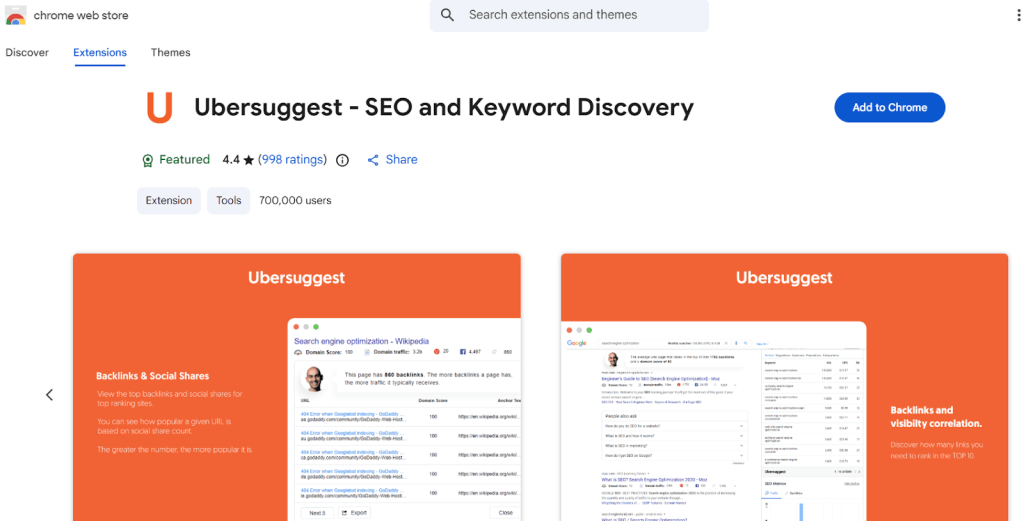
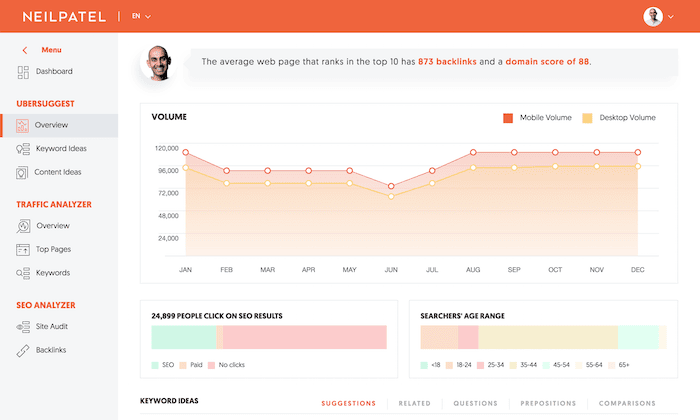
What makes Ubersuggest appealing is its Chrome extension and simplified interface. You can see keyword metrics (volume, difficulty, CPC) directly in Google search results without opening another tab.
For quick validation while browsing or researching, this inline data is incredibly convenient. The keyword research tool itself pulls suggestions from multiple sources and presents them in a clean, scannable format.
Ubersuggest won’t satisfy agencies needing white-label reports or technical SEOs wanting Ahrefs-level backlink analysis. The data accuracy is adequate but not exceptional.
However, for solopreneurs building niche sites or small businesses managing their own SEO, Ubersuggest delivers enough functionality to make informed decisions without complexity overload.
Ubersuggest Key Features
- Keyword Research with Volume and Difficulty: Enter any keyword and get hundreds of suggestions with search volume, SEO difficulty, paid difficulty, and CPC data. The results are organized by related keywords, questions, prepositions, and comparisons.
- Chrome Extension for Inline Metrics: Install the browser extension and see keyword data directly in Google search results, including volume, difficulty, and SERP analysis. This eliminates constant tool-switching during research.
- Content Ideas Based on Keywords: Search a keyword and Ubersuggest shows top-performing content (most shares, backlinks, estimated visits). This reveals what content formats and angles work for your target keywords.
- Domain Overview and Traffic Analysis: Enter any domain and see estimated monthly traffic, top pages, backlinks, and ranking keywords. The overview is simplified compared to Ahrefs but sufficient for basic competitive analysis.
- Rank Tracking Across Locations: Monitor keyword positions daily across desktop and mobile for specific locations. The tracking is straightforward without advanced features like SERP feature monitoring.
- Site Audit with SEO Health Score: Run technical audits to identify broken links, missing meta tags, slow pages, and other on-page issues. The reports are beginner-friendly with clear action items.
Ubersuggest Pros
- Chrome extension is incredibly convenient. Seeing keyword metrics inline while browsing Google saves 20-30 clicks per research session. For quick validation or exploratory research, this workflow efficiency is valuable.
- Content ideas feature reveals what’s working. Instead of guessing which content formats perform best, Ubersuggest shows actual share counts and backlinks for competitor content. This data-driven content planning reduces guesswork.
- The interface is beginner-friendly. The dashboard presents information clearly without overwhelming new users. Someone with zero SEO experience can navigate productively within an hour.
- Keyword suggestions include questions and comparisons. The tool automatically segments suggestions into “questions,” “prepositions,” and “comparisons,” which helps identify different content angles for the same topic.
- Neil Patel’s content and tutorials are valuable. The platform includes educational content, video tutorials, and blog posts that help beginners understand SEO concepts. This added learning resource justifies the cost for newcomers.
Ubersuggest Cons
- Data accuracy is inconsistent. I’ve compared Ubersuggest’s search volume to GSC data across 20+ sites. The variance averaged 30-40%, which is significantly worse than Ahrefs (10-15%) or Semrush (15-20%).
- Keyword difficulty scores are unreliable. Ubersuggest frequently marks competitive keywords as “easy” that actually require significant authority and backlinks. Don’t make strategic decisions based solely on these scores.
- The backlink database is shallow. The backlink checker misses 40-60% of links compared to Ahrefs. For serious link building or competitive link analysis, you’ll need a more comprehensive tool.
- Limited keyword suggestions compared to enterprise tools. Ubersuggest typically shows 300-500 keyword ideas where Ahrefs shows 3,000-5,000. You’ll miss long-tail opportunities that could drive easy wins.
- No API access or advanced integrations. Unlike Semrush or Ahrefs, Ubersuggest doesn’t offer API access for custom reporting or workflow automation. You’re limited to the web interface.
Ubersuggest Pricing
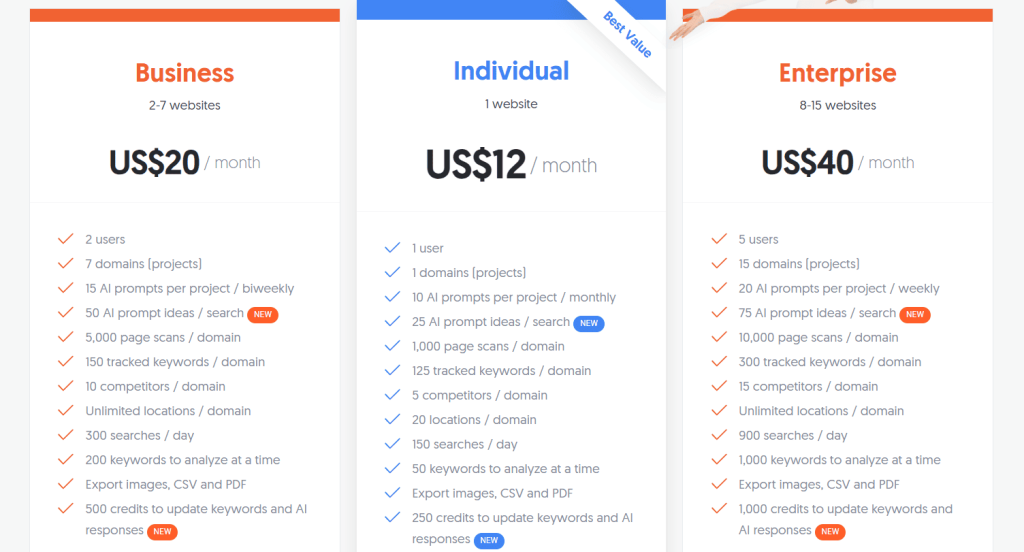
- Individual: $12/month
- Business: $20/month
- Enterprise: $40/month
Ubersuggest Reviews
- G2: 4.2 out of 5 stars (149+ reviews)
- Capterra: 4.4 out of 5 stars (93+ reviews)
Ubersuggest is a solid entry-level tool with an excellent Chrome extension and affordable pricing. However, data accuracy issues and limited features make it insufficient for professional SEO work or agency use.
10. Keyword Tool — Best for Multi-Platform Keyword Research
Best For: Content creators and marketers who need keyword research beyond Google, specifically for YouTube, Amazon, Instagram, Twitter, and app stores.
How I Use It: I use Keyword Tool when clients need YouTube or Amazon keyword research because it scrapes autocomplete data that Google Keyword Planner doesn’t cover.
Overview
Keyword Tool takes a different approach by focusing on autocomplete scraping across multiple platforms.
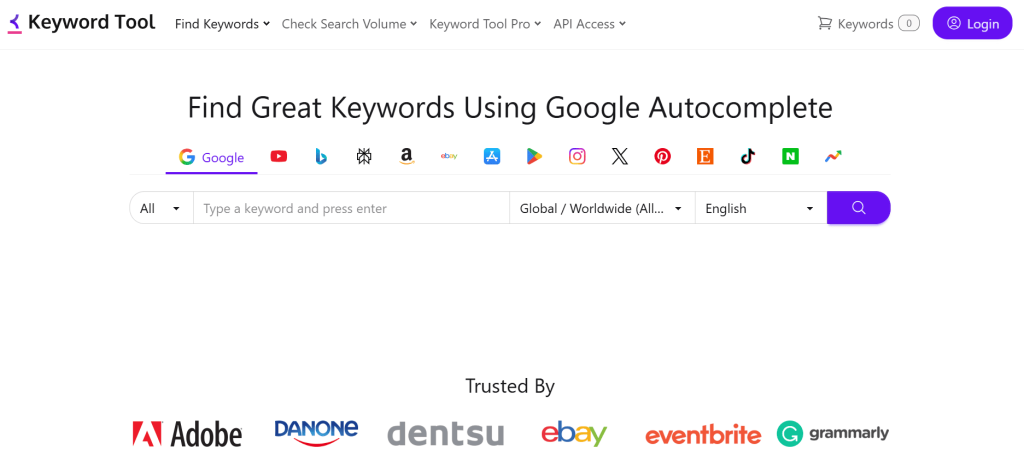
While most keyword tools only cover Google search, Keyword Tool pulls suggestions from YouTube, Amazon, eBay, Instagram, Twitter, Pinterest, Google Play, and App Store.
For businesses selling on Amazon or content creators building YouTube channels, this multi-platform coverage is essential.
The tool works by entering a seed keyword and selecting your target platform. Keyword Tool then scrapes hundreds of autocomplete suggestions, showing you exactly what people type into search bars.
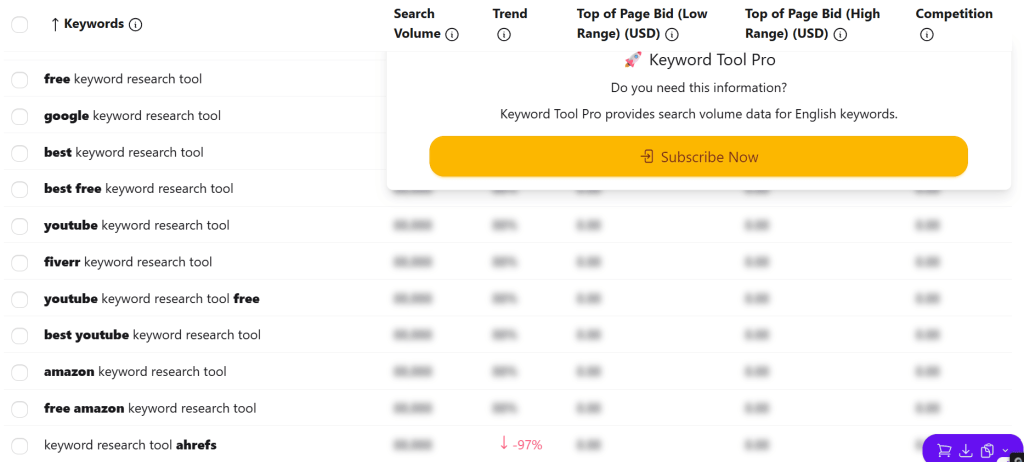
The free version shows keyword suggestions without search volume. The paid Pro version adds volume data, trends, competition metrics, and CPC for Google keywords.
Keyword Tool won’t replace comprehensive SEO platforms like Ahrefs for Google search research. But if your content strategy extends beyond Google to YouTube, Amazon, or social platforms, having accurate autocomplete data from those specific sources is valuable.
Keyword Tool Key Features
- Multi-Platform Autocomplete Scraping: Pull keyword suggestions from Google, YouTube, Bing, Amazon, eBay, Instagram, Twitter, Pinterest, Google Play Store, and App Store. Each platform shows native autocomplete results.
- 750+ Keyword Suggestions per Search: Enter a seed keyword and get hundreds of long-tail variations, questions, and preposition-based phrases. The volume of suggestions rivals enterprise tools for most queries.
- Search Volume and Trends (Pro Version): Get monthly search volume, 12-month trend data, competition levels, and CPC estimates for Google keywords. YouTube and Amazon keywords include platform-specific metrics.
- Question-Based Keyword Mining: Automatically extracts “how to,” “what is,” “where to,” and other question formats. This is particularly valuable for YouTube content planning and voice search optimization.
- Negative Keyword Suggestions: For PPC campaigns, the tool suggests negative keywords to exclude based on your seed terms. This helps refine ad targeting and reduce wasted spend.
- API Access for Automation: The Enterprise plan includes API access to integrate keyword data into custom dashboards, content calendars, or workflow automation tools.
Keyword Tool Pros
- YouTube keyword research is superior to competitors. Keyword Tool scrapes YouTube autocomplete directly, showing suggestions that Google Keyword Planner misses entirely. For video content strategy, this data is essential.
- Amazon keyword data helps ecommerce businesses. If you sell on Amazon, knowing what shoppers actually type into the search bar (not Google) reveals product optimization opportunities competitors overlook.
- No search limits on paid plans. Unlike tools that cap daily searches, Keyword Tool Pro allows unlimited keyword lookups. This matters during intensive research phases or agency work.
- Question keywords are comprehensive. The tool surfaces more “how to” and question-based variations than most competitors. These are gold for content teams building FAQ content and voice search optimization.
- API access enables workflow automation. For agencies or enterprises, the API lets you pull keyword data programmatically into reporting dashboards or content planning tools, eliminating manual exports.
- Instagram and TikTok keyword research is unique. Few tools offer social platform keyword data. For influencer marketing or social content strategy, Keyword Tool provides insights competitors can’t access easily.
Keyword Tool Cons
- The free version is extremely limited. You get keyword suggestions but no search volume, trends, or competition data. The free tier is essentially a teaser that requires immediate upgrade for useful research.
- Google search data isn’t as accurate as Ahrefs/Semrush. For Google keyword research specifically, Keyword Tool’s volume estimates are less reliable than enterprise tools. The platform excels at other platforms but lags for Google.
- No competitor analysis features. Keyword Tool doesn’t show which keywords competitors rank for or provide domain comparison tools. It’s purely a keyword suggestion tool, not a competitive intelligence platform.
- No rank tracking or SERP analysis. The tool provides keywords but zero insight into ranking difficulty, current SERP layouts, or position tracking. You’ll need separate tools for those functions.
- Learning curve for platform-specific research. Understanding how to effectively use Amazon or YouTube keyword data requires experience with those platforms’ algorithms. The tool doesn’t provide much guidance.
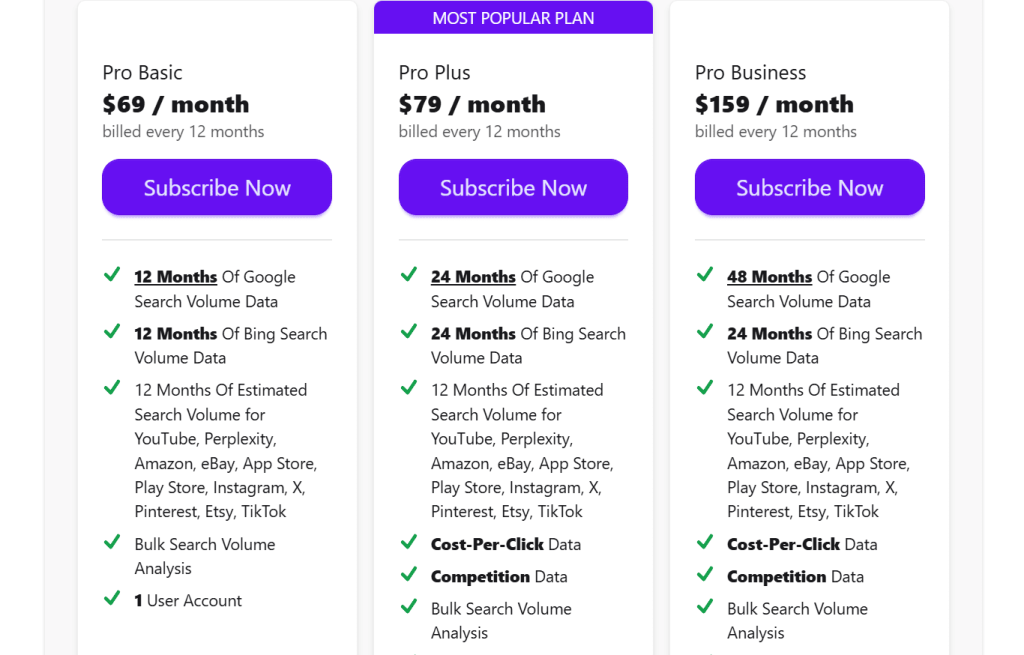
Keyword Tool Pricing
- Free version
- Pro Basic: $69/month
- Pro Plus: $79/month
- Pro Business: $159/month
Keyword Tool Reviews & Ratings
- G2: 4.5 out of 5 stars (19+ reviews)
- Capterra: 4.3 out of 5 stars (36+ reviews)
Keyword Tool is the best option for YouTube, Amazon, and multi-platform keyword research. However, for Google search specifically, dedicated SEO tools like Ahrefs or Semrush provide better data and more features at comparable prices.
11. Serpstat — Best for International SEO Campaigns
Best For: Agencies and businesses managing multi-region SEO campaigns who need keyword data across 230+ countries with strong non-English language support.
How I Use It: I use Serpstat for clients targeting European, Asian, or Latin American markets where Ahrefs’ and Semrush’s international databases are weaker.
Overview
Serpstat is often called “the Eastern European Semrush” because it was founded in Ukraine in 2013 and initially focused on serving CIS markets.
Today, it’s evolved into a comprehensive SEO platform with 230+ regional databases, making it one of the best tools for international keyword research.
If you’re targeting keywords in Germany, Poland, Brazil, or Japan, Serpstat’s localized data is often more accurate than US-based tools.
For agencies managing clients across multiple countries, this cost efficiency is significant. The platform includes keyword research, rank tracking, backlink analysis, site audits, and competitor analysis.
Serpstat won’t win awards for interface design, and its backlink database is smaller than Ahrefs. But if your competitive advantage depends on targeting non-English markets or you need affordable multi-region keyword data, Serpstat delivers features that justify its position in your SEO stack.
Serpstat Key Features
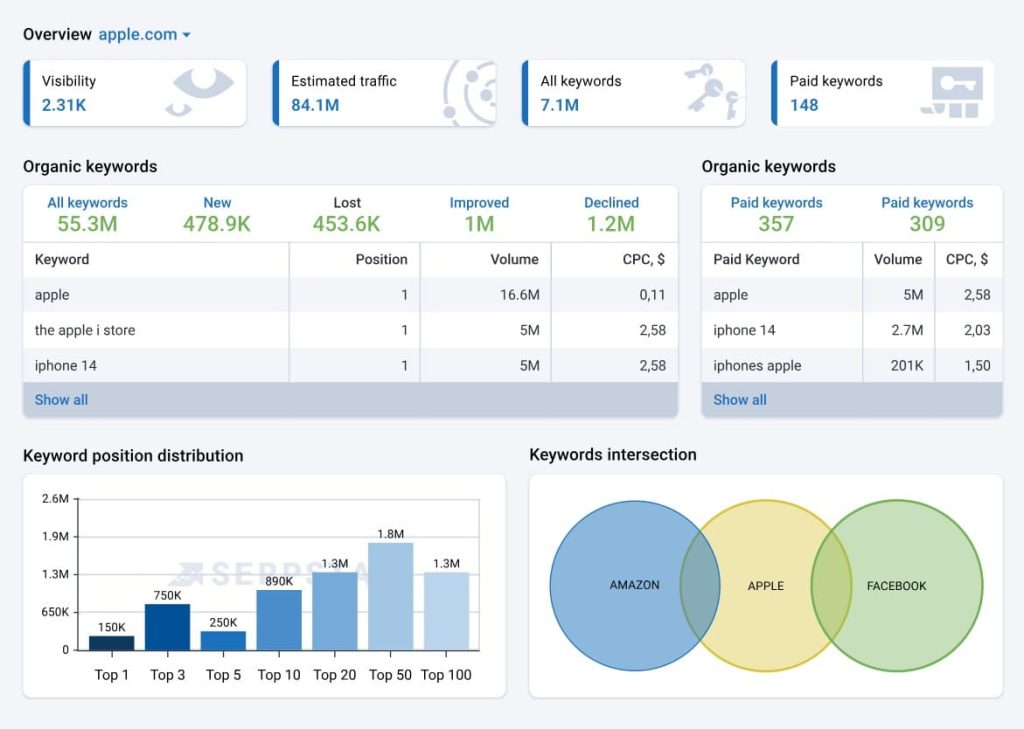
- 230+ Regional Keyword Databases: Research keywords across virtually every country with localized search volume, trends, and competition data. The depth of international coverage exceeds most US-based competitors.
- Keyword Clustering and Grouping: Automatically organize thousands of keywords into semantic clusters based on search intent and SERP similarity. This helps build topic-focused content strategies at scale.
- Missing Keywords and Content Gap Analysis: Compare your domain against competitors to identify keywords they rank for that you don’t. The tool shows easy wins where competitors have weak content.
- Batch Analysis for Large Keyword Lists: Upload CSV files with 10,000+ keywords and get search volume, difficulty, and competition metrics for all of them simultaneously. Essential for enterprise-scale research.
- Rank Tracking Across Devices and Locations: Monitor positions daily on desktop, mobile, and local search across multiple countries. The tracking includes SERP feature detection for featured snippets and PAA boxes.
- Backlink Analysis with Toxic Link Detection: Analyze competitor backlink profiles and identify potentially harmful links pointing to your site. The toxic link algorithm helps with disavow file preparation.
Serpstat Pros
- International keyword data is exceptional. For non-English markets, Serpstat’s volume estimates and keyword suggestions are more comprehensive than Ahrefs or Semrush. We’ve verified this across German, Spanish, and Polish campaigns.
- Keyword clustering saves massive research time. The automatic grouping of related keywords into semantic clusters helps identify which terms can be targeted together, cutting content planning time by 50%.
- Batch analysis handles enterprise-scale research. Upload 10,000 keywords and get full metrics in minutes. This is essential when inheriting client sites with large keyword portfolios or conducting comprehensive audits.
- The missing keywords tool is highly actionable. Instead of vague competitive insights, Serpstat shows specific keywords where competitors rank positions 1-5 that you’re missing entirely. These are immediate content opportunities.
- White-label reporting is included. Unlike Ahrefs (no white-labeling) or tools that charge extra, Serpstat includes branded reports in all paid plans. This makes client deliverables look professional without additional cost.
Serpstat Cons
- The backlink database is significantly smaller than Ahrefs. Serpstat’s link index covers fewer domains and updates less frequently. For serious link building or competitive link analysis, you’ll still need Ahrefs.
- Interfaces can feel clunky and outdated. The design hasn’t evolved as smoothly as modern competitors like Surfer SEO. New users often struggle with navigation and finding specific features.
- US-focused keyword data is less accurate. While Serpstat excels at international research, its US database is weaker than Semrush or Ahrefs. If you only target English-speaking markets, other tools are better.
- Customer support is inconsistent. Response times vary widely (4-48 hours), and the quality of answers depends heavily on which support agent you get. Enterprise tools like Semrush provide more reliable support.
- The learning curve is steeper than simpler tools. Serpstat has 40+ features across multiple modules. New team members typically need 2-3 weeks to become productive, similar to Semrush.
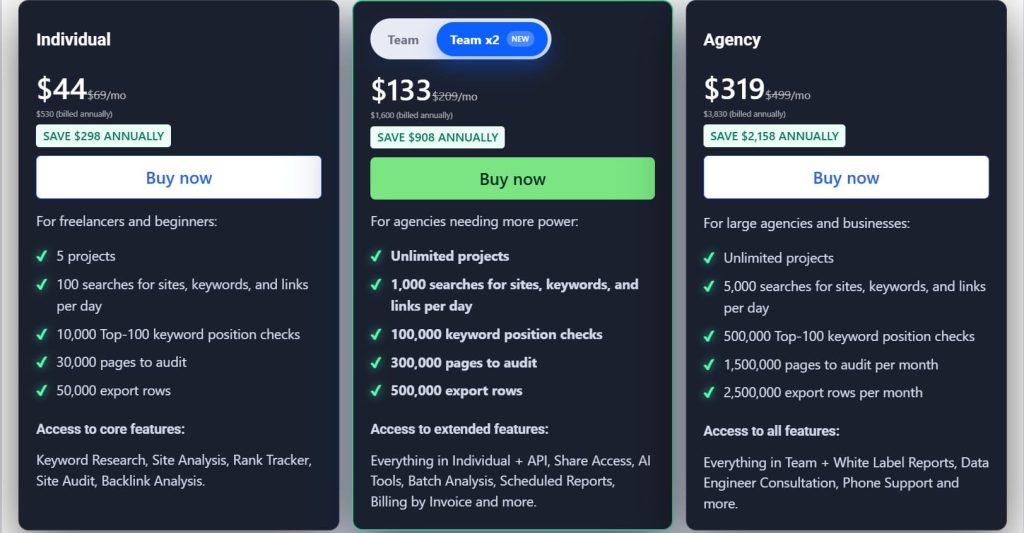
Serpstat Pricing
- Individual: $44/month
- Team: $133/month
- Agency: $319/month
Serpstat Reviews
- G2: 4.6 out of 5 stars (463+ reviews)
- Capterra: 4.7 out of 5 stars (170+ reviews)
Serpstat is the best value for international SEO and multi-region campaigns. The international databases are exceptional, but the dated interface and weaker backlink analysis make it a supplementary tool rather than a complete replacement for Ahrefs or Semrush.
12. Keywords Everywhere — Best for Quick Validation Research
Best For: SEOs and marketers who want instant keyword metrics overlaid directly in Google search results without switching tabs or opening full research platforms.
How I Use It: I use Keywords Everywhere constantly for quick validation while browsing Google. It shows volume and CPC data inline, letting me assess keyword value in seconds without opening Ahrefs.
Overview
Keywords Everywhere is a browser extension (Chrome, Firefox) that displays keyword metrics directly in Google, YouTube, Amazon, and other platforms as you browse.
Instead of copying keywords and pasting them into research tools, you see search volume, CPC, and competition data instantly.
It’s not a replacement for comprehensive tools like Ahrefs, but for rapid validation during exploratory research, the convenience is unmatched.
The extension works on a credit system. A basic volume check costs 1 credit, while bulk data requests cost more. The credits never expire, so you only pay for what you use without monthly subscriptions.
Keywords Everywhere won’t handle deep competitive analysis, content gap research, or rank tracking. But if you spend hours browsing Google for keyword ideas and need instant validation without workflow interruption, the extension pays for itself in saved time within weeks.
Keywords Everywhere Key Features
- Inline Keyword Metrics in Search Results: See search volume, CPC, and competition data directly in Google search results as you browse. No need to copy-paste keywords into separate tools.
- Related Keywords Widget: Get a sidebar of related keywords with metrics on every search results page. This helps discover variations and long-tail opportunities while researching.
- YouTube, Amazon, and eBay Support: The extension works across multiple platforms, showing search volume for YouTube videos, Amazon products, and eBay listings directly on those sites.
- Bulk Upload for Large Keyword Lists: Upload CSV files with thousands of keywords and get volume data for all of them. The credits consumed scale with the number of keywords processed.
- Historical Trends and Seasonality: See 12 months of search volume trends for keywords to identify seasonal patterns or declining interest. This prevents targeting keywords past their peak.
- People Also Search For Widget: Displays related searches and questions directly in the SERP, expanding your keyword research without additional clicks.
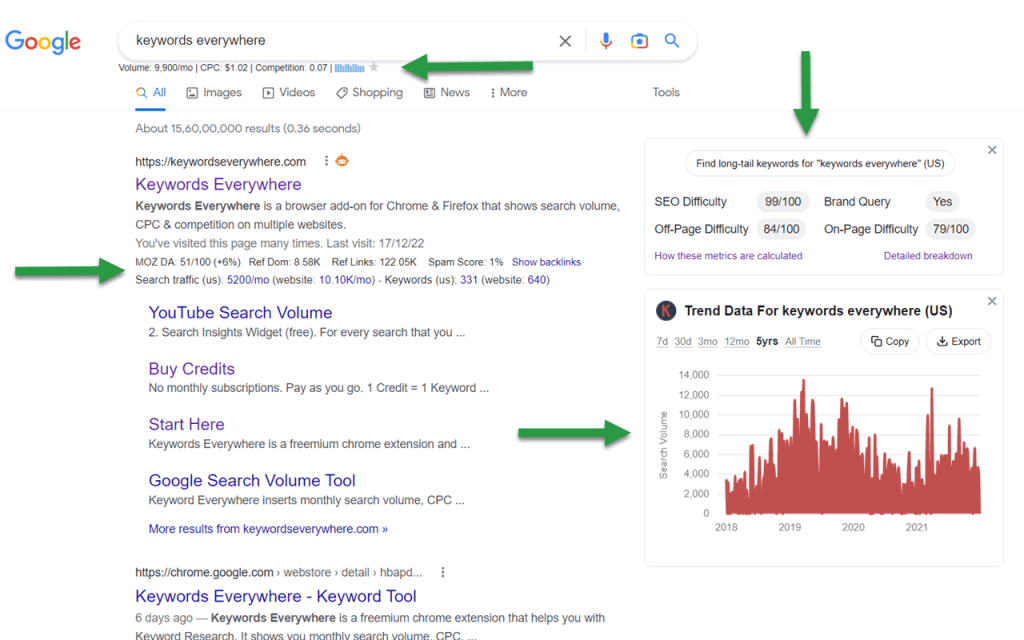
Keywords Everywhere Pros
- Workflow efficiency is unmatched. Seeing keyword data inline while browsing eliminates 50+ tab switches per research session. This seamless integration saves 15-20 minutes per hour compared to traditional workflows.
- YouTube keyword data is valuable for video content. Seeing search volume directly on YouTube helps video creators and marketers validate topics before investing in production. Few tools offer this functionality.
- Related keywords widget surfaces opportunities organically. Instead of deliberately running keyword research, you discover valuable variations naturally while browsing. This serendipitous discovery often reveals angles competitors miss.
- Multi-platform support expands research scope. Getting Amazon search volume on product pages or eBay data on listings extends keyword research beyond Google, valuable for ecommerce strategies.
Keywords Everywhere Cons
- No keyword difficulty scores. The extension shows volume and CPC but doesn’t indicate how hard keywords are to rank for. You’ll still need Ahrefs or Moz for competitive difficulty assessment.
- Data accuracy is moderate. Keywords Everywhere pulls data from third-party sources, and I’ve found 20-30% variance compared to GSC data. It’s fine for quick validation but not precise forecasting.
- No competitor analysis features. The extension provides keyword data but zero insight into who ranks, backlink requirements, or SERP analysis. It’s purely a metrics overlay tool.
- Limited to browser-based research. If you need to analyze large keyword lists, create content briefs, or track rankings, Keywords Everywhere can’t help. It’s strictly for inline validation.

Keywords Everywhere Pricing
- Bronze: $7/month
- Silver: $14/month
- Gold: $40/month
- Platinum: $120/month
Keywords Everywhere Reviews
- G2: 5 out of 5 stars (2+ reviews)
- Chrome Web Store: 4.5 out of 5 stars (5,700+ reviews)
Keywords Everywhere is the perfect quick-validation tool for seeing keyword metrics without leaving Google. The inline data saves significant time, but it’s not a replacement for comprehensive keyword research platforms like Ahrefs or Semrush.
What’s the Best Keyword Research Tool for You?
Choosing the right keyword research tool depends on your budget, experience level, and specific workflow needs. Here’s how to narrow down your options based on what matters most to you:
- Best for Beginners: Mangools
If you’re new to SEO or managing your own small business site, Mangools offers the gentlest learning curve without sacrificing essential functionality. The color-coded difficulty scores eliminate confusion, and you can find rankable long-tail keywords within 30 minutes of signing up.
- Best for Agencies: Semrush
For agencies managing multiple clients and needing comprehensive keyword intelligence with white-label reporting, Semrush delivers the most complete solution.
The Keyword Gap Analysis has identified millions in content opportunities for our clients, and the intent classification accuracy speeds up content planning significantly.
- Best Budget Choice: SE Ranking
If you need a full keyword research suite but can’t justify Ahrefs or Semrush pricing, SE Ranking delivers 80% of the functionality at less than half the cost.
At $52/month, you get solid keyword data, competitor analysis, rank tracking, and white-label reports. Everything a small agency or in-house team needs without the enterprise price tag.
- Best for Competitor Research: SpyFu
If your strategy depends on reverse-engineering what’s working for competitors, SpyFu’s 11+ years of historical ranking data reveals strategy evolution no other tool captures.
The PPC and SEO integration shows which keywords competitors invest in across both channels, indicating genuine business value.
- Best All-Rounder: Ahrefs
If I had to choose one tool to run an entire keyword research operation, Ahrefs covers the most ground at the highest quality level.
The keyword difficulty predictions are the most accurate, the parent topic clustering saves hundreds of content production hours, and the Content Gap Analysis consistently identifies seven-figure opportunities.