Marketing teams are drowning in AI tool options. Every platform promises to “transform your workflow” or “20x your results,” but most deliver the same basic features wrapped in different branding.
The real question isn’t whether to use AI. It’s which tools actually work when you’re managing real campaigns with real budgets.
Over the last 8 years at OneLittleWeb, I’ve tested more than 40 AI marketing tools while working with clients across industries.
We don’t just demo these platforms. We use them daily to manage SEO campaigns, create content at scale, and optimize ad spend for businesses generating millions in revenue.
One example: when we worked with a B2C cycle brand to scale their organic traffic, we relied heavily on AI-powered marketing tools for valuable content creation, matching the content with the right product pages, and linking to our client’s products.
The outcome was remarkable: a 30% boost in organic traffic and 400,000+ additional monthly visitors. Read the full case study here.
In this guide, I’ve listed 14 AI marketing tools we personally use and trust for real campaigns, not just the ones with the biggest marketing budgets.
I evaluated each platform based on practical criteria: accuracy of outputs, pricing transparency, integration capabilities, ease of use, and long-term reliability.
Here’s what actually works in 2026.
What is an AI Marketing Tool?
An AI marketing tool is software that uses artificial intelligence to automate, optimize, or enhance marketing tasks.
These tools analyze data, predict customer behavior, personalize content, and streamline workflows and handle work that would otherwise require significant time and manual effort.
Who Benefits: Marketing teams, content creators, social media managers, and business owners use these tools to work faster and make smarter decisions.
Why It Matters: In today’s competitive landscape, marketers need to reach the right audience with the right message at the right time. AI tools process massive amounts of data instantly, uncovering insights and opportunities humans might miss while freeing teams to focus on strategy and creativity.
Business Value: Companies using AI marketing tools typically see improved campaign performance, reduced costs, and faster execution—turning data into revenue more efficiently than manual methods allow.
Note: Many teams also rely on SEO tools, rank tracking tools, and SEO reporting tools to measure performance and optimize their online presence.
What to Look for in an AI Marketing Tool
After testing dozens of AI platforms for our clients at OLW, I’ve learned that not all tools are created equal. Here’s what matters most when choosing one for your team.
Accuracy
I only stick with tools that produce consistent, verifiable outputs. If generated insights don’t match ground truth from GA4, Search Console, or your conversion APIs, the tool becomes noise instead of signal.
I always validate model outputs against baseline performance data in the first 2-3 weeks before trusting recommendations.
Features
I look for features that solve specific bottlenecks—keyword clustering, semantic content optimization, audience segmentation, or bid strategy automation.
If it doesn’t measurably reduce time spent on research, content production, targeting, or reporting, it won’t survive in our stack.
The best tools focus on solving a few problems exceptionally well rather than offering surface-level coverage across everything.
Pricing
I always check how a tool charges—per seat, token consumption, API calls, or data processing volume. Some tools look cheap until your workload scales.
Make sure the pricing makes sense for your team today and at 3x your current usage. I calculate projected costs under increased load to avoid vendor lock-in with unsustainable unit economics.
AI Capabilities
Good AI tools don’t just automate repetitive tasks—they demonstrate learning behavior. I look for platforms that use fine-tuned models or RAG implementations that improve entity recognition over time, adapt to your writing style and brand voice, incorporate audience behavior patterns, and refine recommendations based on historical campaign performance.
Workflow Compatibility
A tool should reduce context-switching and fit existing operational pipelines. I measure time-to-first-value and whether it requires process refactoring.
Critical evaluation points include export format compatibility, collaborative editing capabilities, version control, approval workflows, and CMS integration—all without forcing your team to rebuild how they work.
Integrations
The more it connects with your existing infrastructure—GA4, Search Console, Meta Conversions API, Google Ads API, HubSpot, WordPress, Shopify—the less time you spend on manual data transfers.
Native API connections eliminate workflow friction and enable automation. Integration depth is often the difference between daily active use and 60-day abandonment.
Data Quality
I prefer tools that rely on verifiable, current data sources. If reports feel outdated (30+ days old), use unclear data provenance, or can’t be cross-referenced, the tool becomes unreliable.
Real-time or near-real-time API access consistently outperforms scraped or aggregated datasets for decision accuracy.
Scalability
Some tools work well for small teams but hit rate limits or performance degradation when you manage multiple clients or campaigns.
I always test how concurrent users, project volume, data throughput, and API restrictions scale as you grow. Check tier-based limits and overage costs before committing.
How I Selected the Best AI Marketing Tools
I didn’t put this list together by reading feature pages. I tested 40+ AI marketing tools over the past year across real client projects at OLW — content audits, link-building workflows, keyword research, ad testing, email personalization, reporting automation, and everything in between.
To keep things fair, I measured each tool on a few things that actually matter in day-to-day work:
- How accurate the insights are compared to the data we see in Google Search Console, GA4, and campaign dashboards
- How well the AI understands context — not just generating text, but producing helpful suggestions backed by real patterns
- How smoothly it fits into our workflow without slowing the team down
- How quickly the tool saves time compared to manual processes
- How stable and scalable it feels when dealing with multiple clients, channels, or large datasets
- How predictable the pricing is once your workload grows
After running these tools through dozens of tests, certain patterns became clear. Some platforms look impressive on the surface but fall apart the moment you use them for a real campaign. Others quietly outperform competitors because they solve one problem extremely well.
The ones that made this roundup are the tools I would actually trust in a live client environment. If a tool didn’t help us move faster, improve accuracy, or create better outcomes for clients, it didn’t make the list.
Summary Table: 14 AI Marketing Tools for 2026
Before we break down each tool in detail, here’s a quick comparison table. This helps you see which platforms match your workflow, budget, and marketing goals. These notes come from hands-on testing across OLW’s client campaigns, not guesswork.
| Tool Name | Best For | Key Features | Price | Our Notes |
| Jasper | AI content creation | Templates, brand voice, long-form editor, workflows | $59/month | Great for teams producing content daily; works well but can feel generic if not tuned. |
| Copy.ai | Automating marketing workflows | Workflows, AI agents, multi-step automation | $29/month | Strong automation features; useful for teams that want AI to handle repetitive tasks. |
| Writesonic | Fast content + lightweight SEO | Chatsonic, article writer, SEO features | $39/month | Good speed and variety; best for small teams creating lots of content quickly. |
| Surfer | AI content optimization | Content audits, NLP scoring, briefs | $79/month | Still one of the most reliable SEO optimization tools we use at OLW. |
| Frase | Content research + outlines | SERP analysis, AI drafts, content scoring | $38/month | Ideal for writers who want quick outlines and competitive insights. |
| Semrush | SEO + competitive analysis | Keyword data, AI writing, topic clusters | $165.17/month | Great data accuracy; AI writing still improving but offers strong insights. |
| HubSpot | CRM + marketing automation | Email AI, content assistant, predictive tools | $800/month | Best for teams already using HubSpot; smooth workflow integration. |
| Notion | Content structuring + internal docs | Writing assistant, summarizer, planning tools | $10/month | Useful for teams that keep their content workflows inside Notion. |
| Zapier | Automated marketing workflows | AI actions, triggers, automations | $19.99/month | Perfect for connecting tools and reducing manual tasks across campaigns. |
| MarketMuse | AI content strategy | Topic modeling, authority mapping, optimization | N/A | Strong for long-term content planning; shines for large websites. |
| Clearscope | Content optimization | Keyword recommendations, readability scoring | $129/month | Known for accuracy; still one of the top choices for high-quality SEO teams. |
| Ocoya | Social media AI | AI posts, image editor, scheduler | $15/month | Good for small brands managing many social posts in less time. |
| Predis | AI social media visuals | Reels, posts, captions, templates | $19/month | Great for quick social content; visuals are stronger than most AI tools. |
| AdCreative | AI ad creatives | Image ads, text suggestions, analytics | $20/month | One of the best for generating ad variations that actually perform. |
Best AI Marketing Tools in 2026
I’ve organized these tools by their core strengths—not alphabetically. This list reflects what we actually use at OLW and what delivers measurable results across different marketing functions.
- Jasper — Best for high-volume content teams
- Copy.ai — Best for marketing workflow automation
- Writesonic — Best for fast content creation
- Surfer SEO — Best for content optimization rankings
- Frase — Best for content research outlines
- Semrush — Best for SEO competitive intelligence
- HubSpot — Best for CRM marketing automation
- Notion — Best for internal content planning
- Zapier — Best for workflow tool connections
- MarketMuse — Best for enterprise content strategy
- Clearscope — Best for SEO accuracy optimization
- Ocoya — Best for multi-platform social management
- Predis — Best for social media visuals
- AdCreative — Best for ad creative variations
Here’s what you need to know about each platform—including where they excel, where they fall short, and who should actually use them.
1. Jasper – Best for High-Volume Content Teams
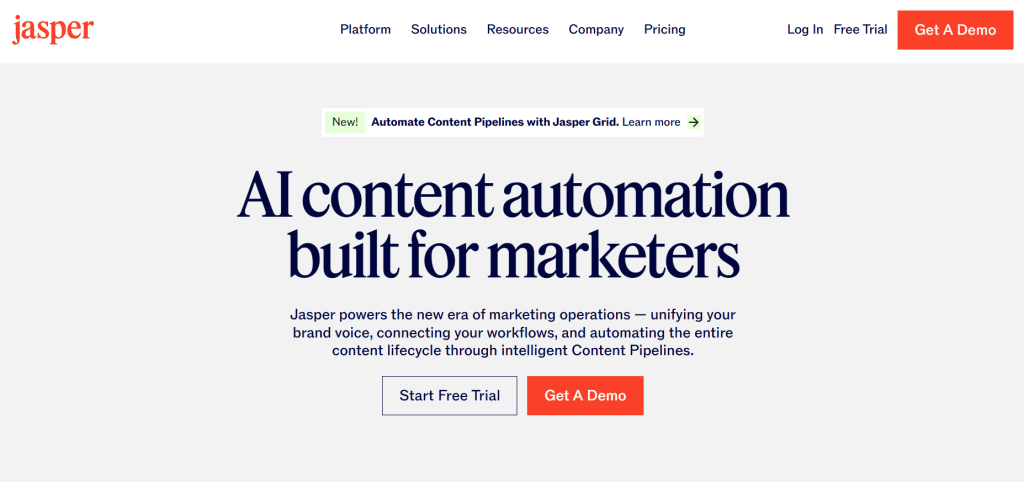
Best For: Teams cranking out branded content daily and need consistency without burning out writers.
How I Use It: I lean on Jasper when we’re producing 10+ blog posts a week for clients. It handles first drafts fast, which lets our team focus on strategy and editing instead of staring at blank pages.
Jasper is probably the most well-known AI writing tool out there. It launched in 2021 and quickly became the go-to for marketers who needed more than ChatGPT’s basic interface.
What separates Jasper from other AI writers is the brand voice feature—you train it on your existing content and it actually mimics your style pretty well.
I’ll be honest: Jasper isn’t cheap, and if you’re just writing occasionally, it’s overkill. But if you’re running an agency or managing content for multiple brands, it saves ridiculous amounts of time.
We’ve used it for everything from blog posts to ad copy, and while it’s not perfect, it beats starting from scratch every single time.
Jasper Key Features
- Brand Voice that actually works: You upload 5-10 samples of your content and Jasper picks up your tone. I tested this with a fintech client who had a very specific voice. Jasper nailed it better than our junior writers did at first.
- Boss Mode for long-form content: This is where you write alongside the AI. Highlight a sentence, tell it what you want next, and it continues from there. Way better than generating entire articles that miss the mark.
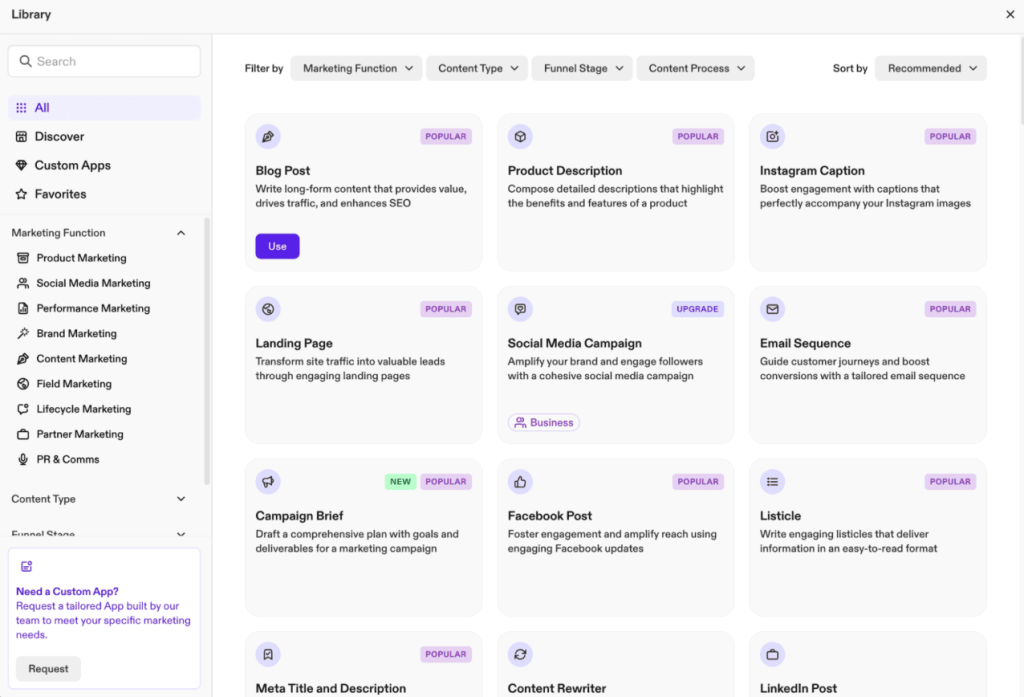
- Templates for common marketing tasks: AIDA framework, blog intros, product descriptions—all the basics. I don’t use these much anymore, but they’re great when you’re learning.
- Surfer SEO integration: You can optimize content for search while you write. It’s convenient but honestly, I prefer doing SEO optimization separately in Surfer for better control.
- Chrome extension: Write with AI help directly in Google Docs or WordPress. I use this constantly for quick social posts and email drafts.
[Image Source: Zapier]
Jasper Pros
- Brand voice training actually captures your style. I trained it on content from a fintech client with very specific tone requirements, and Jasper matched their voice better than our junior writers did on first drafts. It picks up sentence structure, terminology, and formality level consistently.
- Boss Mode speeds up long-form content dramatically. Instead of generating full articles that miss the mark, you write alongside the AI. Highlight a paragraph, tell it what comes next, and it continues naturally. We’ve cut blog production time by 40% using this workflow.
- Output speed handles tight deadlines easily. When we’re producing 10+ client blog posts per week, Jasper generates 2,000-word first drafts in under 5 minutes. That lets our team focus on strategy and editing instead of staring at blank pages.
- Team collaboration features work smoothly. Multiple people can work in one workspace with shared brand voices and templates. Essential when juggling client accounts at an agency. No confusion about which voice to use for which client.
- Chrome extensions integrate everywhere. I use it constantly for LinkedIn posts, Google Docs drafts, and WordPress editing. Write with AI assistance directly in your normal workflow without switching tools.
Jasper Cons
- Default output feels generic without training. The baseline AI voice is bland and corporate. You have to invest 2-3 hours upfront teaching it your style or you’ll spend just as long editing anyway.
- Word count limits hit faster than expected. On the starter plan, long-form content eats through your monthly allocation quickly. We’ve had team members run out of words mid-month during heavy production periods.
- Learning curve for advanced features takes time. Templates and workflows aren’t intuitive. Expect a week or two of trial and error before you’re actually efficient with the platform.
- Repetitive phrasing shows up in volume work. It loves certain transitions and sentence structures. Read five drafts back to back and you’ll notice the patterns immediately.
Jasper Pricing
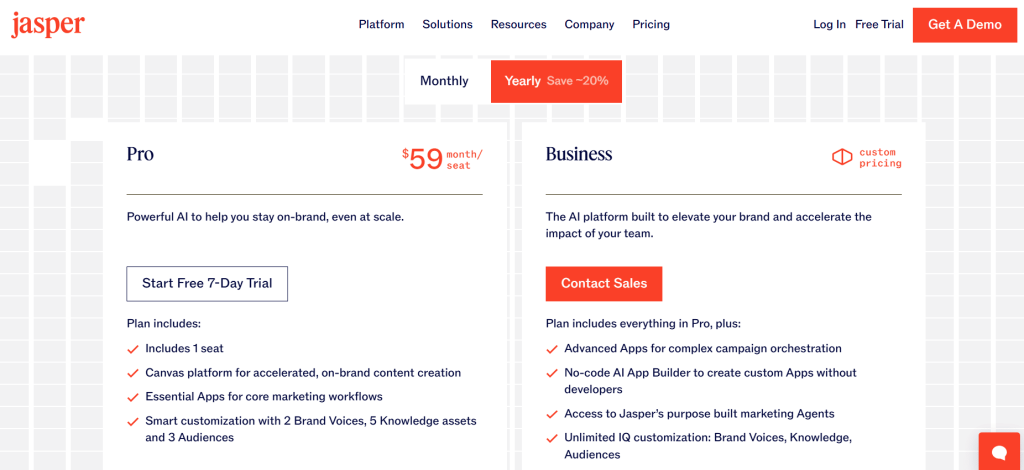
- 7-day free trial available
- Pro: $59/month
- Business: Custom
Jasper Reviews
- G2: 4.7/5 stars (1,264+ reviews)
- Capterra: 4.8/5 stars (1,851+ reviews)
Most people love the time savings and brand voice accuracy. The main complaints? Price and occasional quality drops. Five-star reviews mostly come from agencies where the ROI justifies the cost.
2. Copy.ai – Best for Marketing Workflow Automation
Best For: Teams tired of manually reformatting the same content for different channels.
How I Use It: I use Copy.ai’s workflows to turn one blog post into social captions, email copy, and ad variations automatically. It’s not perfect, but it cuts 2-3 hours of busywork per piece.
Copy.ai started as just another AI copywriter in 2020, but they’ve evolved into something different—marketing automation powered by AI. Instead of just helping you write better, it helps you do less repetitive work.
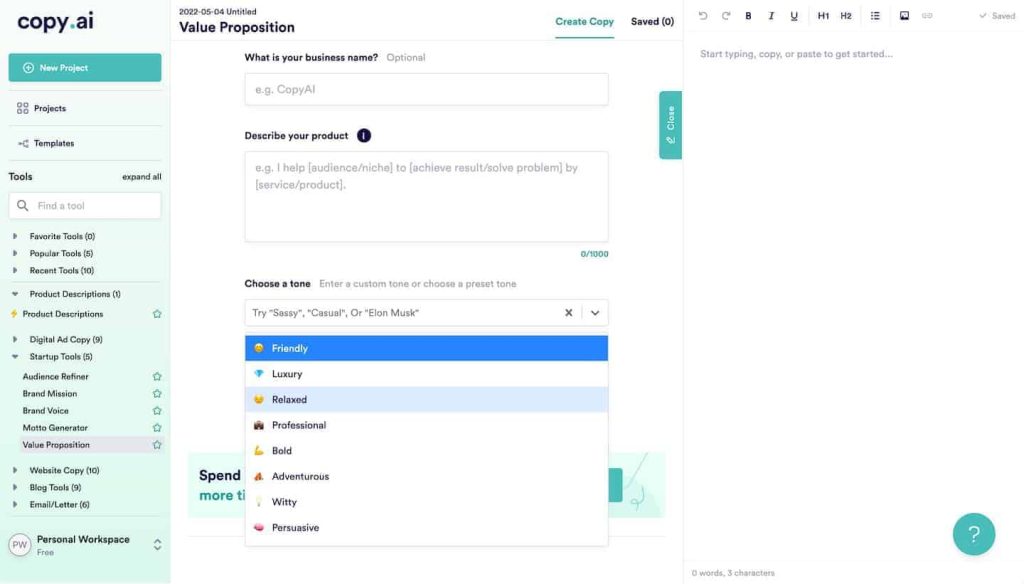
The workflow builder is where it shines: you input one thing (like a product description) and get dozens of marketing assets back.
This makes sense if you’re constantly repurposing content across channels. Publish a blog post, then spend an hour creating LinkedIn posts, tweets, and email snippets from it?
Copy.ai automates that. It’s less about perfecting individual pieces (Jasper’s strength) and more about producing volume efficiently.
Copy.ai Key Features
- Workflow automation: Build sequences where one input becomes multiple outputs. I’ve set up workflows that turn podcast transcripts into blog posts, social threads, and email sequences automatically.
- Infobase for context: Store your product details, company info, and brand guidelines once. The AI references it when writing, so you’re not explaining your business in every prompt.
- 90+ templates: Pre-built generators for blog intros, product descriptions, ad copy, etc. Quality varies. Some are excellent, some feel basic.
- Brand voice profiles: Upload sample content and Copy.ai matches your tone. Simpler to set up than Jasper’s version, works well for smaller brands.
- Multi-language support: Creates content in 25+ languages. I’ve tested Spanish outputs. It is decent but always runs the final copy by native speakers.
[Image Source: The Meta Blog]
Copy.ai Pros
- Workflows save massive time: Once set up, repurposing content takes seconds. We cut our social media prep time by 60% using Copy.ai.
- Easier to learn than Jasper: New team members start producing quality content within an hour. The interface just makes sense.
- Infobase prevents repetitive prompting: Instead of explaining your product every time, store it once. Outputs stay consistent and accurate.
- Good for e-commerce: Product description generators work well. Used it for a client with 100+ SKUs who needed a unique copy fast.
Copy.ai Cons
- Workflows need setup time: Building effective automations takes a few hours of testing. The time savings come later, not immediately.
- No real SEO features: You’ll need Surfer or Clearscope if you’re creating search-focused content. Copy.ai doesn’t handle keyword optimization.
- Too many template options: 90 sounds great until you’re wasting time figuring out which blog template to use. I stick to 5-6 favorites now.
Copy.ai Pricing
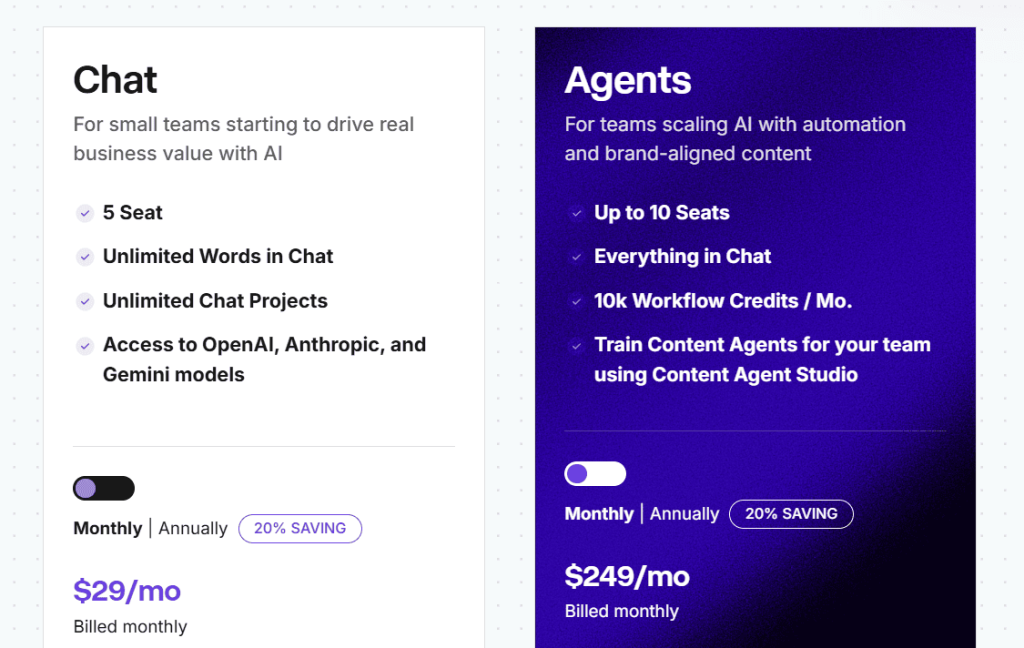
- Chat: $29/month
- Agents: $249/month
Copy.ai Reviews
N/A
3. Writesonic – Best for Fast Content Creation
Best For: Small teams and solo marketers who need to pump out blog posts and social content quickly without getting bogged down in complex features.
How I Use It: I use Writesonic when speed matters more than perfection. Like when I need a client blog post drafted in 10 minutes or want to generate 5 landing page variations for A/B testing. It’s my quick-and-dirty content tool.
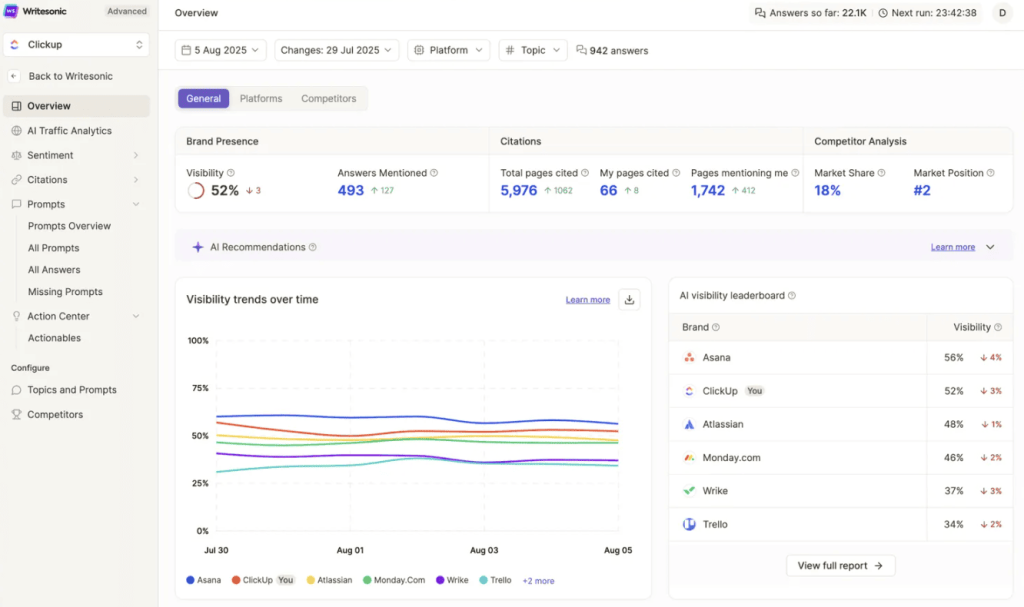
Writesonic launched in 2020 as an affordable Jasper alternative and it’s stayed in that lane. It combines AI writing with basic SEO features and even includes Chatsonic, an AI chatbot that can browse the web for current information.
The platform tries to do everything: writing, SEO, images, and chat. Which works fine if you value speed and affordability over specialization.
This tool fits bootstrapped startups, freelance marketers, or small agencies on tight budgets. You won’t get Surfer-level SEO optimization or Jasper’s sophisticated brand voice training. But you’ll create serviceable content fast and cheap. That’s the trade-off.
Writesonic Key Features
- Article Writer 5.0: Their main blog generator. Input a topic, pick your tone and length, get a full article in 2-3 minutes. Quality varies but it works as a starting point.
- Chatsonic with web search: AI chatbot that can pull current information from Google and generate images. More useful than basic ChatGPT for fact-based content, though I still verify everything.
- Built-in SEO tools: Keyword analysis and optimization suggestions included. Not as sophisticated as dedicated SEO tools but decent for basic on-page optimization.
- Bulk article generation: Upload a CSV of topics and generate multiple articles at once. I’ve used this for content refreshes. Created 20 updated posts in one afternoon.
- Photosonic for images: Creates AI images right in the platform. Quality is okay for blog featured images but not professional marketing materials.
- Brand voice feature: Upload sample content to maintain consistency. Less advanced than Jasper but functional for smaller projects.
Writesonic Pros
- Extremely fast content generation: From blank page to 2,000-word article in under 5 minutes. When deadlines are crushing you, Writesonic delivers something publishable quickly.
- Chatsonic includes web search: Unlike standard ChatGPT, it can pull current information. Useful for news-based content or fact-checking recent events.
- All-in-one platform reduces tool switching: Writing, SEO, images, and chat in one place. Not the best at any individual function but convenient.
- Good for content volume: If you need 20 blog posts fast and editing time is available, Writesonic cranks them out. We’ve used it for content sprints.
Writesonic Cons
- Output quality is inconsistent: Some articles come out great, others need heavy editing. You’re rolling the dice each time, which gets frustrating.
- SEO features are pretty basic: The keyword suggestions and optimization scores help but they’re not replacing Surfer or Clearscope anytime soon.
- AI-generated images look generic: Photosonic creates images that scream “AI-made.” Fine for internal docs, not for client-facing materials.
- Limited customization options: You can’t fine-tune outputs as precisely as other tools. What you get is what you get, basically.
Writesonic Pricing
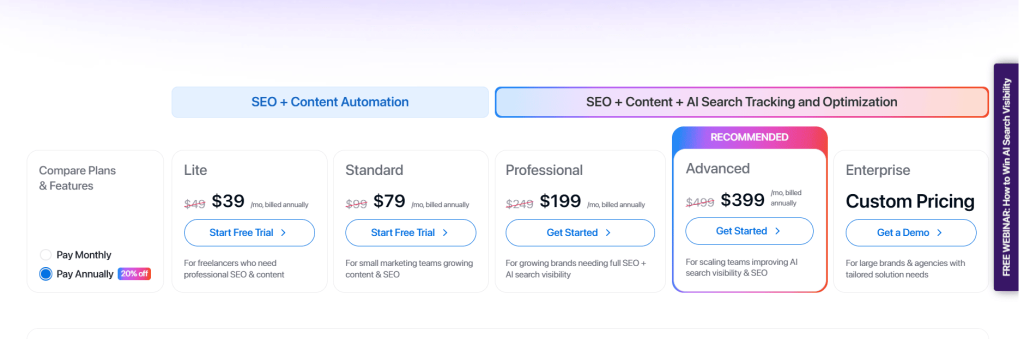
- Lite: $39/month
- Standard: $79/month
- Professional: $199/month
- Advanced: $399/month
- Enterprise: Custom
Writesonic Reviews
- G2: 4.7/5 stars (2,070+ reviews)
- Trustpilot: 4.8/5 stars (2,102+ reviews)
Users appreciate the speed and pricing. Common complaints mention inconsistent quality and that SEO features aren’t as powerful as advertised. People who love it typically value quantity over perfection.
4. Surfer – Best for Content Optimization Rankings
Best For: Content teams and SEO agencies that need data-driven optimization to rank blog posts and landing pages on Google.
How I Use It: We use Surfer SEO at OLW for almost every client blog post. I run content audits to find optimization gaps, create content briefs for writers, and score drafts before publishing. It’s probably our most-used SEO tool.
Surfer SEO launched in 2017 and has become the standard for AI-powered content optimization. It analyzes top-ranking pages for your target keyword and tells you exactly what to include: word count, headings, keywords, images, everything.
The AI writing feature is newer and honestly still catching up to dedicated writing tools. But the optimization engine? Still one of the best.
This tool makes sense if you’re serious about ranking content. Not just publishing blog posts and hoping. Actually analyzing SERPs, understanding what Google rewards, and optimizing accordingly.
It’s overkill for personal blogs or companies that don’t care about organic traffic. But if SEO drives your business, Surfer is worth every dollar.
Surfer SEO Key Features
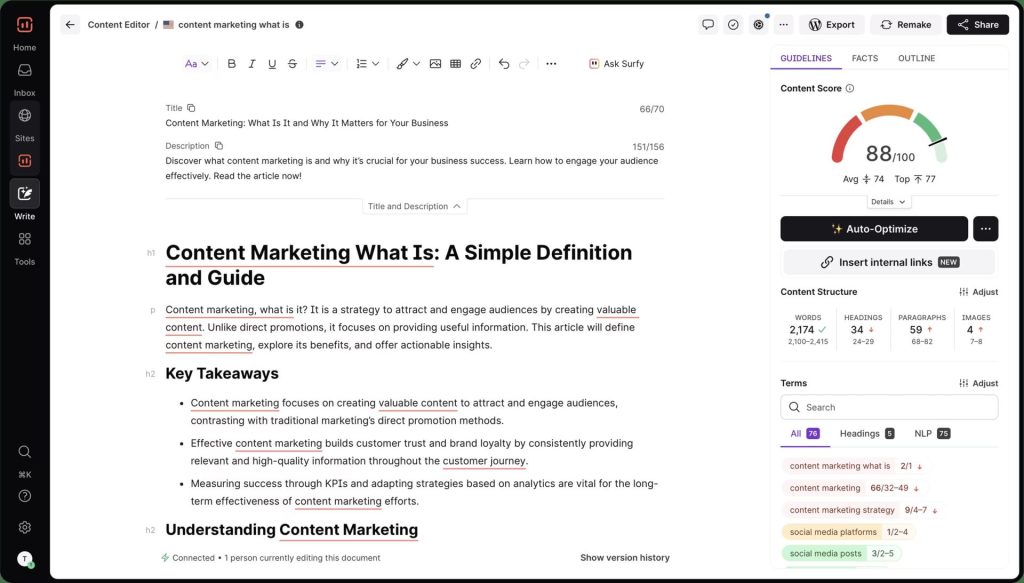
- Content Editor with real-time scoring: Write or paste your content and Surfer scores it based on top-ranking competitors. Shows you exactly what keywords to add, where to improve structure, and how you compare.
- Content Audit tool: Analyzes your existing content and identifies optimization opportunities. I run this quarterly for clients. Always finds quick wins that boost rankings.
- SERP Analyzer: Deep dive into what’s ranking for your target keyword. Shows word count, keyword density, headings, images. Takes the guesswork out of content planning.
- Content Brief generator: Creates detailed outlines based on top-ranking content. I send these to writers so they know exactly what to cover before starting.
- AI writing assistant: Generates content sections while maintaining your optimization score. Decent but not as good as Jasper or Copy.ai for pure writing quality.
- Keyword research tool: Find related keywords and questions people are searching for. Integrates directly into the content editor.
Surfer SEO Pros
- Data-driven optimization that actually works: We’ve seen consistent ranking improvements using Surfer. It’s not magic but it removes the guessing from SEO content.
- Content scoring is incredibly accurate: The real-time score correlates strongly with ranking potential. If Surfer says your content is optimized, it usually performs well.
- Saves massive research time: Instead of manually analyzing 10 top-ranking articles, Surfer does it in seconds. Used to take me an hour per brief, now takes 5 minutes.
- Content audit finds quick wins: Run an audit on existing content and you’ll find dozens of optimization opportunities. Low-hanging fruit that boosts traffic fast.
- Integrates with Google Docs and WordPress: Write in your normal workflow while Surfer scores in real-time. No copying and pasting between tools.
- Regular algorithm updates: Surfer adjusts its recommendations as Google’s algorithm evolves. You’re not optimizing based on outdated data.
Surfer SEO Cons
- AI writing lags behind specialized tools: The content generation works but outputs feel generic. I use Surfer for optimization, other tools for actual writing.
- Learning curve for advanced features: Content briefs and SERP analysis take time to master. Expect a week or two before you’re efficient.
- Can encourage over-optimization: Following every Surfer suggestion sometimes makes content feel keyword-stuffed. You need to balance scores with readability.
- Limited to Google SEO: If you’re optimizing for other search engines or platforms, Surfer doesn’t help. It’s Google-specific.
Surfer SEO Pricing
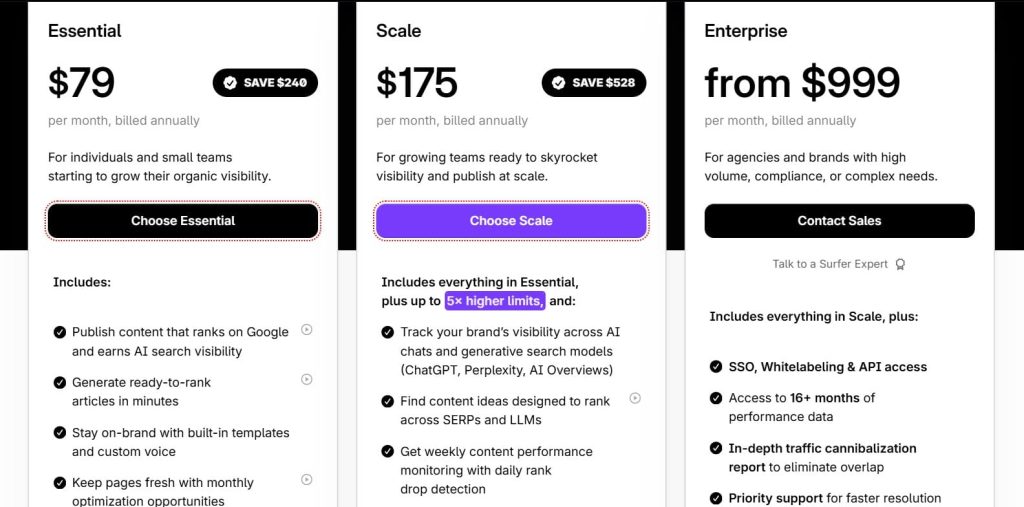
- Essential: $79/month
- Scale: $175/month
- Enterprise: from $999/month
Surfer SEO Reviews
- G2: 4.8 out of 5 stars (538+ reviews)
- Capterra: 4.9 out of 5 stars (421+ reviews)
Users consistently praise the accuracy of optimization recommendations and ranking improvements. Main complaints center on pricing and the AI writing quality. SEO professionals rate it higher than casual users.
5. Frase – Best for Content Research Outlines
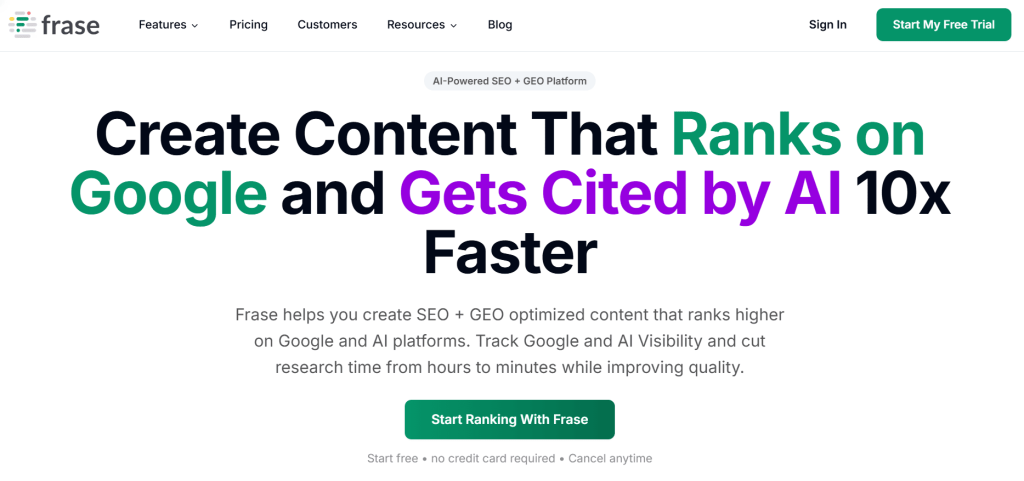
Best For: Content writers and strategists who need to research topics quickly and create data-backed outlines before writing.
How I Use It: I use Frase when I’m diving into unfamiliar topics. It pulls SERP data, generates content briefs, and shows me what questions people are asking. Cuts my research time from an hour to 15 minutes.
Frase launched in 2016 as an AI research tool before pivoting hard into SEO content optimization. It sits somewhere between Surfer’s data-heavy approach and Jasper’s writing focus. The strength here is competitive analysis. You input a keyword, Frase analyzes the top 20 results, and gives you a blueprint for what to write.
This tool works best for writers who start with research rather than jumping straight into drafting. If you’re writing about topics you don’t know well, Frase gets you up to speed fast. It’s less useful if you’re already an expert in your niche or if you prefer to write first and optimize later.
Frase Key Features
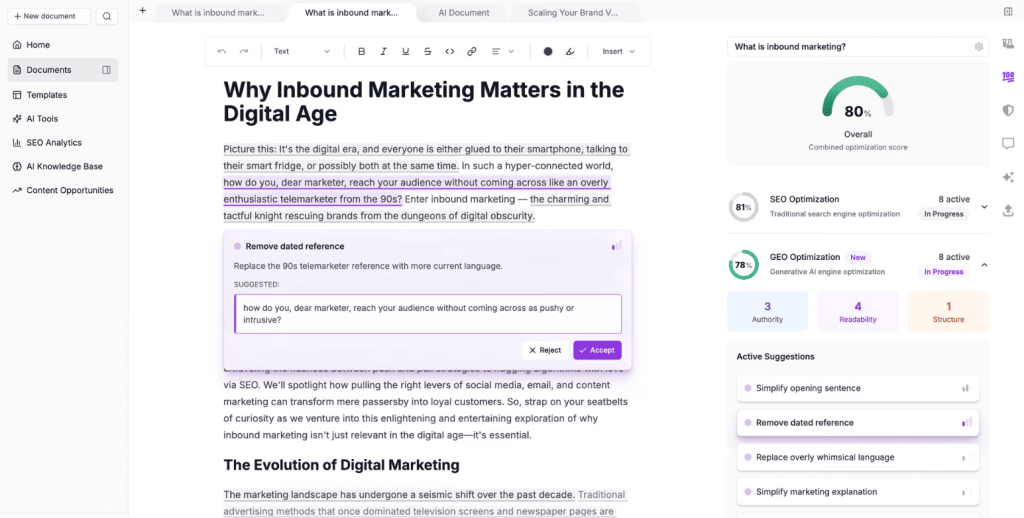
- SERP research with competitor analysis: Analyzes top-ranking content for your keyword and extracts common topics, headings, and questions. Shows you exactly what’s working.
- Content brief generator: Creates detailed outlines based on SERP analysis. Includes recommended headings, word count, and key points to cover.
- Question research tool: Pulls “People Also Ask” questions and forum discussions. Great for finding content angles and FAQ sections.
- AI content writer: Generates paragraphs and sections based on your outline. Quality is okay but needs editing. Better for overcoming writer’s block than publishing as-is.
- Content optimization scoring: Similar to Surfer but simpler. Shows how well your draft matches top-ranking content for target keywords.
- Google Search Console integration: Analyzes your existing content performance and suggests optimization opportunities based on actual traffic data.
Frase Pros
- Incredibly fast topic research: From knowing nothing about a topic to having a solid outline in 10 minutes. Saves hours compared to manual research.
- Question extraction is super useful: Finding what questions people actually ask helps create more relevant content. I use this for every FAQ section.
- Affordable compared to Surfer: Starting at $38/month makes it accessible for freelancers and small teams. Good value for the research features alone.
- Great for content briefs: If you’re managing writers, Frase generates detailed briefs that eliminate back-and-forth clarification. Writers know exactly what to cover.
- Simple interface: Less overwhelming than Surfer’s data-heavy approach. New users get productive quickly.
- Works well for informational content: Particularly strong for how-to guides, tutorials, and educational content where question research matters.
Frase Cons
- AI writing quality isn’t great: Outputs are generic and often need heavy rewriting. Fine for inspiration, not for final drafts.
- Optimization features less sophisticated than Surfer: The scoring is helpful but doesn’t give you the same depth of insights. You’re trading power for simplicity.
- Limited to one search engine: Only pulls data from Google. If you’re optimizing for other platforms, you’re out of luck.
- Content briefs can be overwhelming: Sometimes generates briefs with 40+ headings. You need to edit them down to what’s actually useful.
- Support response times vary: Sometimes fast, sometimes slow. Depends on when you reach out.
Frase Pricing
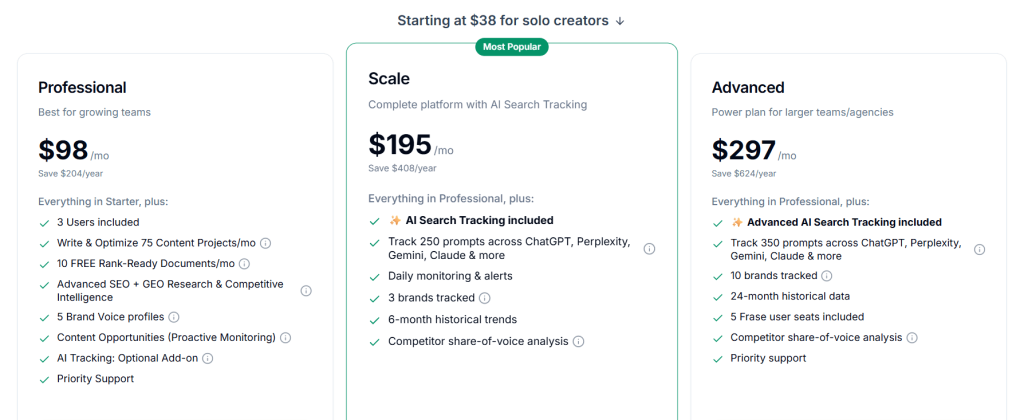
- Solo: $38/month
- Professional: $98/month
- Scale: $195/month
- Advanced: $297/month
Frase Reviews
- G2: 4.8 out of 5 stars (299+ reviews)
- Capterra: 4.8 out of 5 stars (335+ reviews)
Users love the research capabilities and pricing. Common complaints mention that AI writing needs improvement and that unlimited articles are locked behind the highest tier. Writers rate it higher than SEO specialists who prefer Surfer’s depth.
6. Semrush – Best for SEO Competitive Intelligence
Best For: SEO professionals and agencies that need comprehensive competitive analysis, keyword research, and site auditing alongside AI content features.
How I Use It: Semrush is our go-to at OLW for competitor research and keyword strategy. I use it daily to analyze what’s working for competitors, find keyword gaps, and audit technical SEO issues. The AI writing tools are a bonus, not the main attraction.
Semrush has been around since 2008 as one of the most comprehensive SEO platforms available. They added AI writing features recently to compete with tools like Surfer and Frase.
But honestly, you buy Semrush for the data. The keyword database, backlink analysis, and competitive intelligence are industry-leading. The AI writing is just extra.
This tool makes sense for serious SEO practitioners. Not bloggers who want to optimize a few posts. We’re talking agencies managing dozens of clients, in-house SEO teams, or businesses where organic search is a primary revenue channel.
It’s expensive and feature-rich. Overkill for most people, essential for SEO professionals.
Semrush Key Features
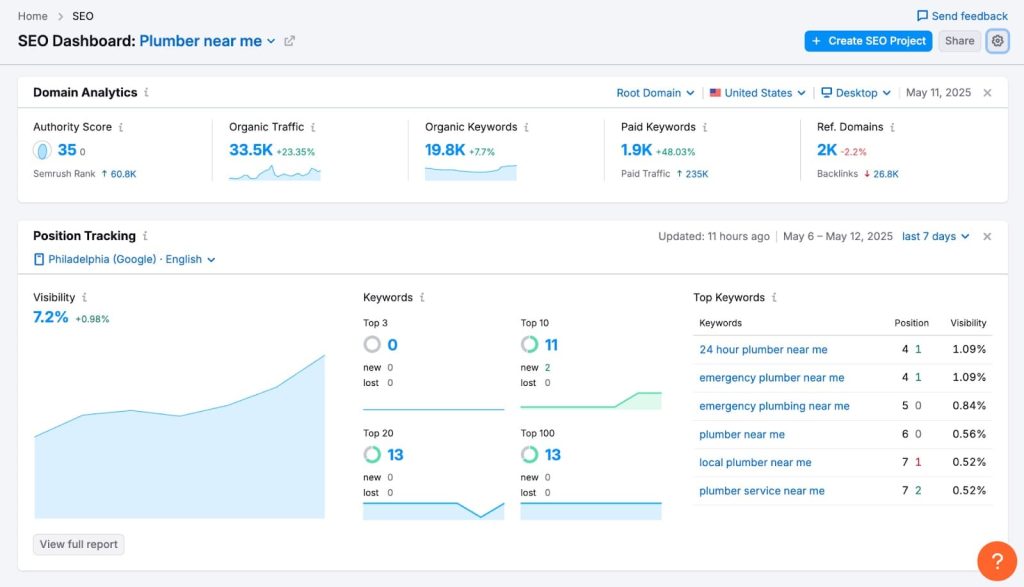
- Keyword research with insane depth: 25+ billion keywords across 130 countries. Shows search volume, difficulty, SERP features, and related keywords. Still the most comprehensive database I’ve used.
- Competitive analysis tools: See exactly what keywords competitors rank for, their top pages, backlink profiles, and paid search strategies. We run this analysis for every new client.
- Site audit for technical SEO: Crawls your site and identifies technical issues affecting rankings. Broken links, slow pages, duplicate content, everything.
- Content AI writing assistant: Generates content based on top-ranking competitors and your target keywords. Decent but not as good as dedicated writing tools.
- Position tracking: Monitor your rankings daily for target keywords. Useful for proving ROI and catching ranking drops quickly.
- Backlink analysis: See who links to you and competitors. Essential for link-building strategies and identifying opportunities.
Semrush Pros
- Most accurate keyword data available: I’ve compared multiple tools and Semrush consistently has the most reliable search volume and difficulty scores.
- Competitor research is unmatched: You can reverse-engineer entire competitor strategies. Keyword targeting, content gaps, backlink sources, paid ads, everything.
- Technical SEO audits save hours: Instead of manually checking technical issues, Semrush finds them automatically. I run audits monthly for every client.
- All-in-one SEO platform: Keyword research, content optimization, technical audits, backlink analysis, rank tracking. You can run entire SEO campaigns from one tool.
- Regular data updates: The keyword database and SERP data update constantly. You’re working with current information, not stale data.
- Strong reporting features: Client reports are professional and customizable. Makes it easy to show value to stakeholders.
Semrush Cons
- Expensive for individuals: Starting at $165.17/month is a tough pill for solo bloggers or small businesses. ROI only makes sense at scale.
- Overwhelming feature set: There’s so much functionality that new users get lost. Expect weeks before you’re using it efficiently.
- AI writing still developing: The content tools work but they’re not replacing Jasper or Copy.ai anytime soon. Use Semrush for strategy, other tools for writing.
- Steep learning curve: Each tool within Semrush has its own complexity. Training new team members takes serious time investment.
- Limits on cheaper plans: Entry-level plans restrict how many reports you can run, keywords you can track, and pages you can audit. Easy to hit limits fast.
Semrush Pricing
- 7-day free trial
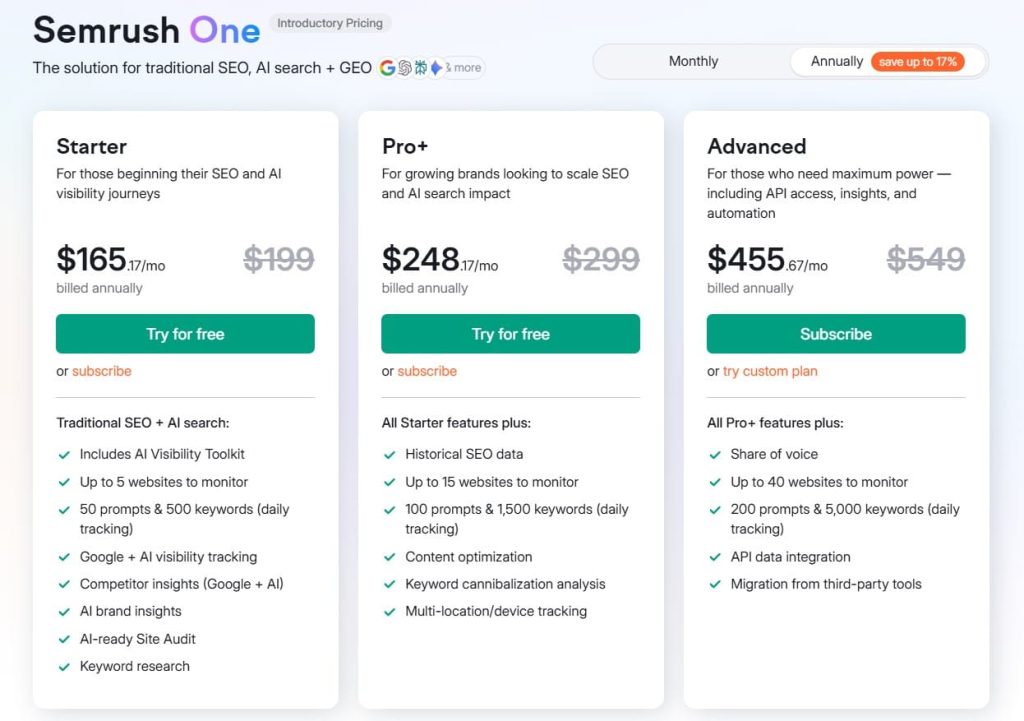
- Starter: $165.17/month
- Pro+: $248.17/month
- Advanced: $455.67/month
Semrush Reviews
- G2: 4.5 out of 5 stars (3,026+ reviews)
- Capterra: 4.6 out of 5 stars from (2,299+ reviews)
SEO professionals consistently rate it 5 stars for data accuracy and competitive analysis. Common complaints mention pricing and complexity. The AI writing features get mixed reviews. People buy Semrush for SEO data, not AI content generation.
7. HubSpot – Best for CRM Marketing Automation
Best For: Marketing teams already using HubSpot who want AI features integrated directly into their CRM and automation workflows.
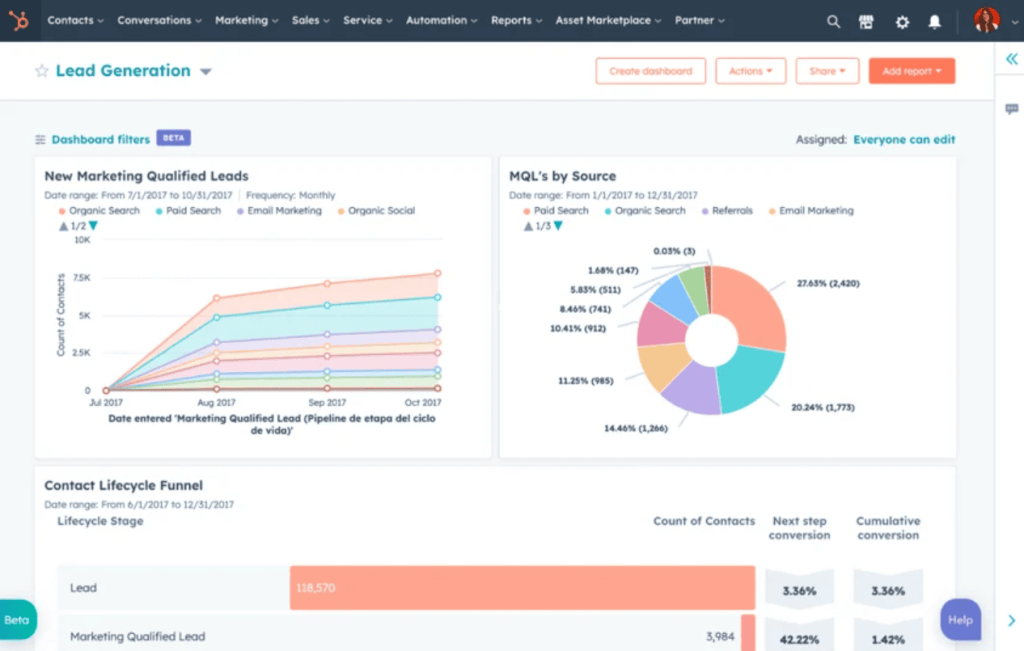
How I Use It: We use HubSpot AI for client campaigns where email marketing and CRM are central. The AI helps write email sequences, generate landing page copy, and predict lead scores. It’s convenient when you’re already in the HubSpot ecosystem.
HubSpot launched their AI tools in 2023 as ChatSpot and various AI assistants throughout their platform. Unlike standalone AI writing tools, HubSpot’s AI is embedded in your marketing workflows.
It knows your contacts, campaigns, and performance data. So the AI assistance feels contextual rather than generic.
This makes sense exclusively for existing HubSpot users. If you’re not using HubSpot for CRM and marketing automation, their AI tools aren’t accessible to you.
But if you are using HubSpot, the AI features add value without requiring another subscription. It’s integrated intelligence rather than another tool to manage.
HubSpot Key Features
- AI email writer: Generates email sequences based on your campaign goals and contact data. Pull from your CRM to personalize messaging for different segments.
- Content Assistant for blogs and landing pages: Helps write and optimize web content directly in HubSpot’s content management system. Maintains brand voice across your site.
- ChatSpot for conversational commands: Ask questions in natural language and ChatSpot pulls data, creates reports, or generates content. Like having an AI assistant who knows your marketing stack.
- Predictive lead scoring: AI analyzes contact behavior and assigns lead scores automatically. Helps prioritize follow-up and identify hot prospects.
- Campaign optimization suggestions: Reviews your campaigns and recommends improvements based on performance data. Actually learn from what works for your audience.
- Social media content generation: Creates posts optimized for each platform. Integrates with HubSpot’s social media scheduling tools.
HubSpot Pros
- Seamless integration with existing workflows: No copying data between tools. The AI works where you’re already working.
- Context-aware assistance: Because it accesses your CRM data, suggestions are relevant to your actual contacts and campaigns. Not generic advice.
- No additional subscription needed: AI features are included in HubSpot plans. You’re not paying extra for another tool.
- Learns from your performance data: The AI improves recommendations based on what actually works for your business. Gets smarter over time.
- Good for team collaboration: Everyone on your HubSpot account can use AI features. No seat limits or access issues.
- Professional support: HubSpot’s customer support is excellent. When you have questions, you get answers fast.
HubSpot Cons
- Only useful if you use HubSpot: If you’re not already a HubSpot customer, you can’t access these AI features. They’re not standalone products.
- AI features less advanced than specialized tools: The writing quality doesn’t match Jasper. The SEO optimization doesn’t match Surfer. It’s good but not best-in-class.
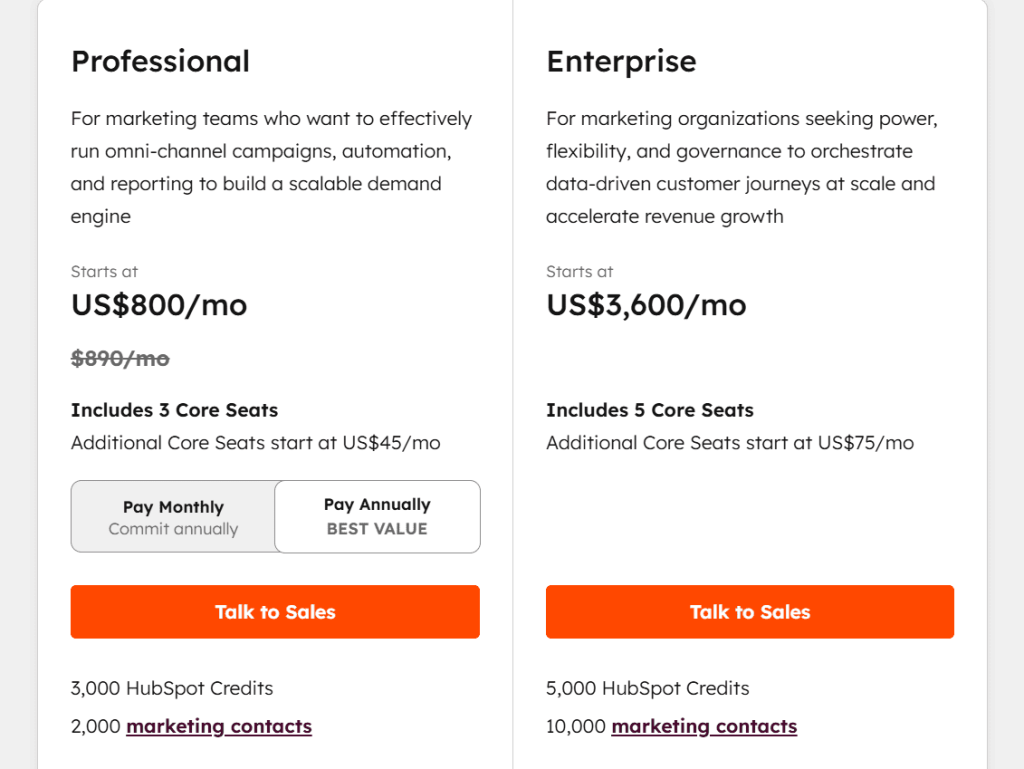
- HubSpot itself is expensive: The AI is included, but HubSpot plans start at $800+/month for Marketing Hub Professional where AI features really shine.
- Limited customization options: You can’t fine-tune the AI as precisely as dedicated tools. It works within HubSpot’s frameworks.
- Learning curve if you’re new to HubSpot: The AI is just one piece of a complex platform. New users need time to learn the entire system.
HubSpot Pricing
- Professional: $800/month
- Enterprise: $3,600/month
HubSpot Reviews
- G2: 4.4/5 stars (14,187+ reviews)
- Capterra: 4.5/5 stars (6,192+ reviews)
Users appreciate the integration and convenience. The AI features specifically get positive feedback for email writing and lead scoring.
Common complaints mention that HubSpot’s overall cost is high and AI features are less powerful than dedicated tools. Reviews focus more on HubSpot as a platform than the AI specifically.
8. Notion – Best for Internal Content Planning
Best For: Teams that organize their content workflows, briefs, and documentation in Notion and want AI assistance without leaving the platform.
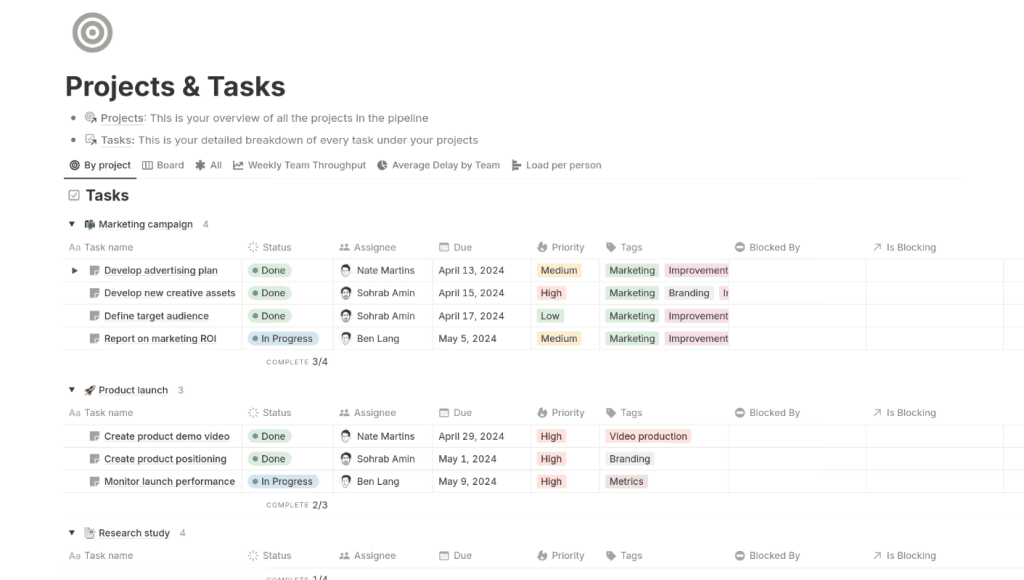
How I Use It: We keep all our content planning in Notion at OLW. I use Notion AI to draft content briefs, summarize meeting notes, and brainstorm campaign ideas. It’s not replacing dedicated writing tools but it’s perfect for internal workflow stuff.
Notion added AI features in 2023 as a native add-on to their workspace platform. It’s not trying to be Jasper or Copy.ai. Instead, it helps with the work you’re already doing in Notion: planning, organizing, summarizing, and brainstorming. The AI understands your workspace context, so it can reference your existing docs and projects.
This makes sense if Notion is already your team’s hub for content operations. If you’re not using Notion, the AI features aren’t worth adopting the entire platform for. But if you live in Notion like we do, the AI capabilities eliminate constant context-switching to other tools.
Notion Key Features
- Writing assistance for any page: Highlight text and ask AI to improve it, expand it, summarize it, or change the tone. Works across all your Notion pages.
- Content generation from prompts: Create blog outlines, meeting agendas, project briefs, or any structured content directly in your workspace.
- Summarization of long documents: Condense meeting notes, research docs, or reports into key points. I use this constantly after client calls.
- Translation across 10+ languages: Translate content without leaving Notion. Useful for international teams or multilingual content projects.
- Action item extraction: Reads through meeting notes and pulls out tasks automatically. Saves time on post-meeting follow-up.
- Tone and style adjustments: Rewrite content to be more professional, casual, persuasive, or any style you need. Helpful for adapting internal docs for external use.
Notion Pros
- Zero context switching: Work stays in one platform. No copying between Notion and separate AI tools.
- Understands your workspace: Can reference other pages and projects when generating content. The AI knows what you’re working on.
- Great for internal collaboration: Everyone on your team can use AI features in shared workspaces. Improves consistency across projects.
- Summarization actually works well: The ability to condense long docs into key points is surprisingly accurate. Saves serious reading time.
- Simple to use: No learning curve. If you know Notion, you can use Notion AI immediately.
Notion Cons
- Not built for marketing content: You’re not creating client-ready blog posts or ad copy here. It’s for internal workflows, not external content production.
- Output quality below dedicated tools: The writing is fine for drafts and internal docs but doesn’t match Jasper or Copy.ai for polished content.
- Limited SEO capabilities: No keyword optimization, content scoring, or SERP analysis. Use other tools for SEO-focused work.
- Can’t replace specialized writing tools: If you need high-volume branded content, you’ll still need Jasper or similar. Notion AI handles different use cases.
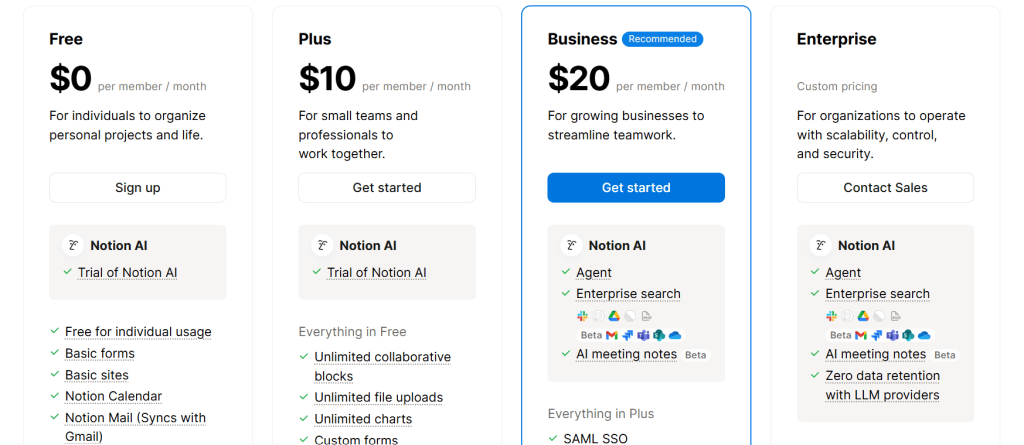
Notion Pricing
- Free
- Plus: $10/month
- Business: $20/month
- Enterprise: Custom
Notion Reviews
- G2: 4.6/5 stars (8,729)+ reviews)
- Capterra: 4.7/5 stars (2,649+ reviews)
Users love the convenience and integration. The AI features get praised for summarization and internal collaboration. Common feedback mentions it’s not powerful enough for external content creation. People use it for process improvement, not content marketing.
9. Zapier – Best for Workflow Tool Connections
Best For: Marketing teams drowning in repetitive tasks who need to connect their tools and automate workflows without learning to code.
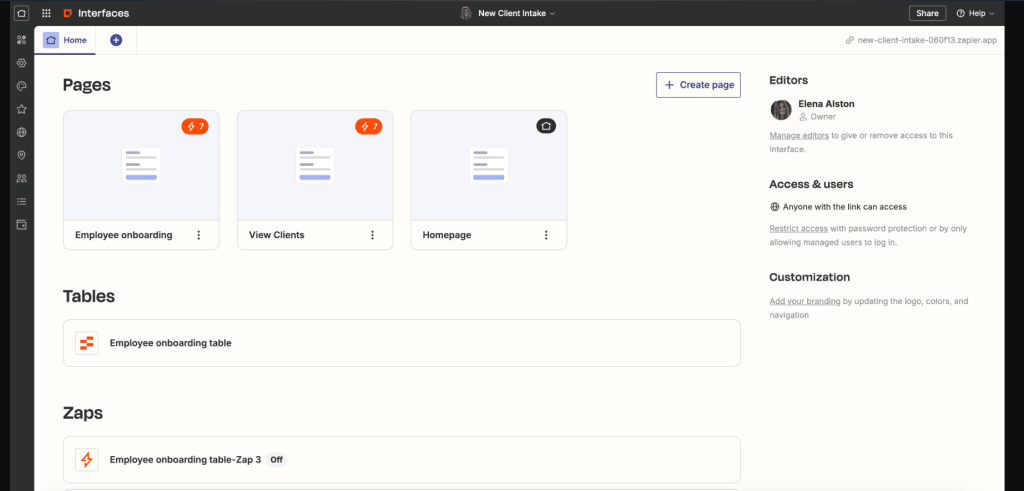
How I Use It: We use Zapier to automate data flow between our marketing tools at OLW. When a new lead fills a form, Zapier automatically adds them to our CRM, email list, and Slack channel. The AI features help build these automations faster.
Zapier has been the automation standard since 2011, connecting 6,000+ apps without code. They added AI features in 2023 to make automation creation easier and add intelligent actions.
Now you can describe what you want in plain English and Zapier builds the workflow. Or use AI steps within automations to analyze data, generate content, or make decisions.
This tool is essential for any marketing team using multiple platforms. CRM, email marketing, social media, analytics, project management. Instead of manually moving data between them, Zapier does it automatically.
Zapier Key Features
- Natural language automation builder: Describe your workflow in plain English and Zapier creates it. “When someone fills my Typeform, add them to Mailchimp and notify me in Slack.” Done.
- AI-powered actions in workflows: Use ChatGPT, Claude, or other AI models as steps in your automations. Generate personalized emails, analyze sentiment, categorize data, anything.
- Smart data formatting: AI cleans and formats data as it moves between tools. Fixes phone numbers, capitalizes names, extracts information from text.
- Conditional logic suggestions: Zapier AI recommends filters and branches for your workflows. Makes automations more sophisticated without complex setup.
- Error handling improvements: AI suggests fixes when automations break. Reduces time spent troubleshooting failed workflows.
- 6,000+ app integrations: Connects virtually every marketing tool you use. If it has an API, Zapier probably supports it.
Zapier Pros
- Saves insane amounts of time: Automations that would take hours manually happen instantly. We’ve eliminated probably 10 hours per week of manual data entry.
- No coding required: If you can describe what you want, you can build it. Makes automation accessible to entire marketing teams, not just technical people.
- AI features speed up creation: Building automations used to take trial and error. Now AI suggests the right triggers and actions immediately.
- Incredibly reliable: Once set up, automations just work. We’ve had Zaps running for years without issues.
- Scales with your complexity: Start with simple two-step automations, gradually build multi-step workflows as you learn. The growth path is natural.
- Strong community and templates: Thousands of pre-built automation templates. Start with proven workflows and customize them.
Zapier Cons
- Can get expensive at scale: Free tier is limited. Once you need multiple automations and high task volumes, costs add up fast.
- Learning curve for complex workflows: Simple automations are easy. Multi-step workflows with conditional logic take time to master.
- Occasional sync delays: Most automations are instant but some have 1-15 minute delays depending on your plan. Not ideal for time-sensitive tasks.
- Troubleshooting failed Zaps takes time: When something breaks, figuring out why can be frustrating. Error messages aren’t always clear.
- Some integrations are limited: Not all apps expose their full functionality through Zapier. You might hit walls with advanced features.
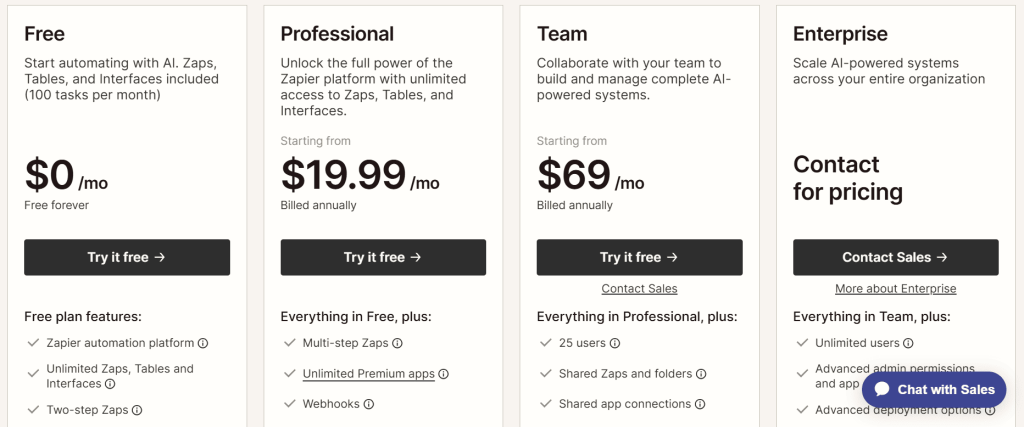
Zapier Pricing
- Free
- Professional: $19.99/month
- Team: $69/month
- Enterprise: Custom
Zapier Reviews
- G2: 4.5/5 stars (1,674+ reviews)
- Capterra: 4.7/5 stars (3,024+ reviews)
Users consistently praise the time savings and reliability. Common complaints mention pricing at higher tiers and occasional integration limitations.
The AI features specifically get positive feedback for simplifying automation creation. Most negative reviews come from users hitting free tier limits.
10. MarketMuse – Best for Enterprise Content Strategy
Best For: Large websites and content teams that need AI-powered content planning, gap analysis, and authority building across hundreds or thousands of pages.
How I Use It: I’ve used MarketMuse for enterprise clients with massive content libraries. It identifies what topics you’re missing, which existing content needs updates, and how to build topical authority. It’s overkill for small sites but powerful for scale.
MarketMuse launched in 2015 focusing on content intelligence before AI content tools became mainstream. They use natural language processing to analyze your entire website against competitors and identify content opportunities. It’s less about writing individual articles and more about building comprehensive topic coverage.
This tool makes sense for established websites with 100+ pages or content teams planning months ahead. Startups and small businesses won’t get ROI from MarketMuse.
But if you’re managing enterprise content strategy, competing in saturated niches, or building authority sites, MarketMuse shows you exactly where to invest your content resources.
MarketMuse Key Features
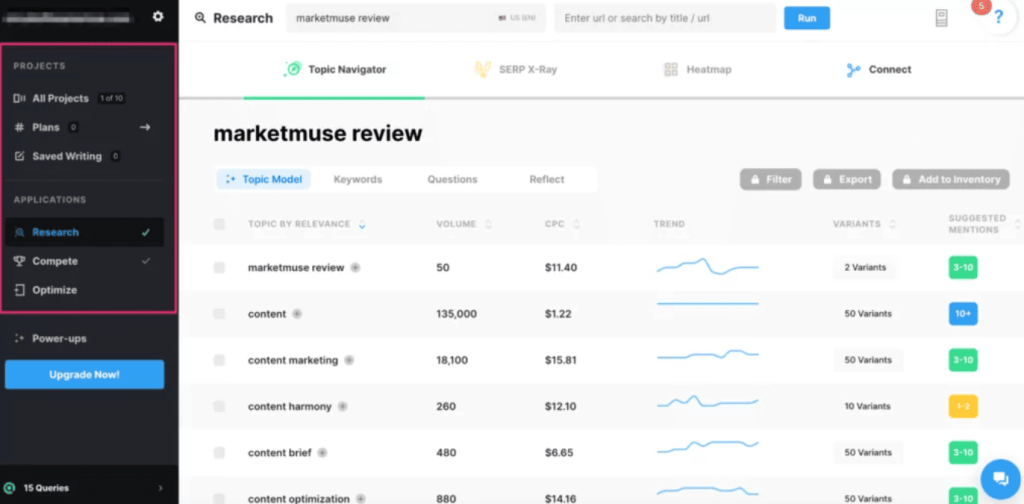
- Content inventory analysis: Scans your entire site and scores every page for content quality and topic authority. Shows you what’s strong and what needs work.
- Topic authority mapping: Identifies subject areas where you have authority and gaps where competitors dominate. Helps prioritize content investment.
- Content brief generation: Creates detailed outlines based on topic modeling and competitive analysis. More sophisticated than Frase or Surfer for complex topics.
- Competitive content gap analysis: Shows exactly what topics competitors cover that you don’t. We’ve found dozens of quick-win opportunities using this.
- Content decay monitoring: Tracks when your content starts losing rankings and flags it for updates. Proactive rather than reactive content maintenance.
- Keyword clustering and research: Groups related keywords into topic clusters. Helps plan content that targets multiple related searches rather than individual keywords.
MarketMuse Pros
- Unmatched for large-scale content planning: When you’re managing 500+ pages, MarketMuse makes strategy manageable. You can see the entire content landscape.
- Topic modeling is sophisticated: Goes beyond simple keyword matching. Understands semantic relationships and content depth in ways other tools don’t.
- Finds content opportunities you’d miss manually: The gap analysis has consistently revealed topics we didn’t know we should cover. Valuable for competitive niches.
- Great for building topical authority: Shows you how to become the go-to resource for entire subject areas, not just rank for individual keywords.
- Content briefs are extremely detailed: Much more comprehensive than Frase or Surfer. Gives writers deep context and direction.
- Scales with enterprise needs: Handles massive websites without performance issues. Built for scale from the ground up.
MarketMuse Cons
- Steep learning curve: The platform is complex. Expect a month before you’re using it effectively. Not intuitive for new users.
- Overkill for small websites: If you have 20 blog posts, you don’t need MarketMuse. The insights matter at scale, not for small content libraries.
- AI writing features are weak: The content generation exists but it’s not the point of MarketMuse. Use dedicated writing tools for actual content creation.
- Requires content strategy knowledge: The tool provides data but you need to know how to interpret and act on it. Not beginner-friendly.
MarketMuse Pricing
N/A
MarketMuse Reviews
- G2: 4.6/5 stars (216+ reviews)
- Capterra: 4.6/5 stars (28+ reviews)
Enterprise content strategists rate it highly for planning capabilities and topic analysis. Common complaints mention cost and complexity. Small business reviews are more mixed. People who need what MarketMuse does love it. Everyone else finds it overwhelming and expensive.
11. Clearscope – Best for SEO Accuracy Optimization
Best For: SEO teams and content marketers who need the most accurate content optimization recommendations to compete in difficult keywords.
How I Use It: Clearscope is what we use at OLW when ranking really matters. High-value keywords, competitive niches, client priority content. The optimization recommendations are consistently more accurate than alternatives. If content needs to rank, we run it through Clearscope.
Clearscope launched in 2016 and built their reputation on one thing: accuracy. While other tools added flashy AI writing features, Clearscope focused on perfecting content optimization.
They analyze SERPs deeper than competitors and their recommendations correlate strongly with actual ranking performance. It’s not cheap but it works.
This tool is for serious SEO practitioners who need content to rank for competitive keywords. Not bloggers optimizing easy long-tail terms. We’re talking keywords with real search volume where the second page means zero traffic.
If you’re investing significant resources in content and rankings directly impact revenue, Clearscope justifies its cost.
Clearscope Key Features
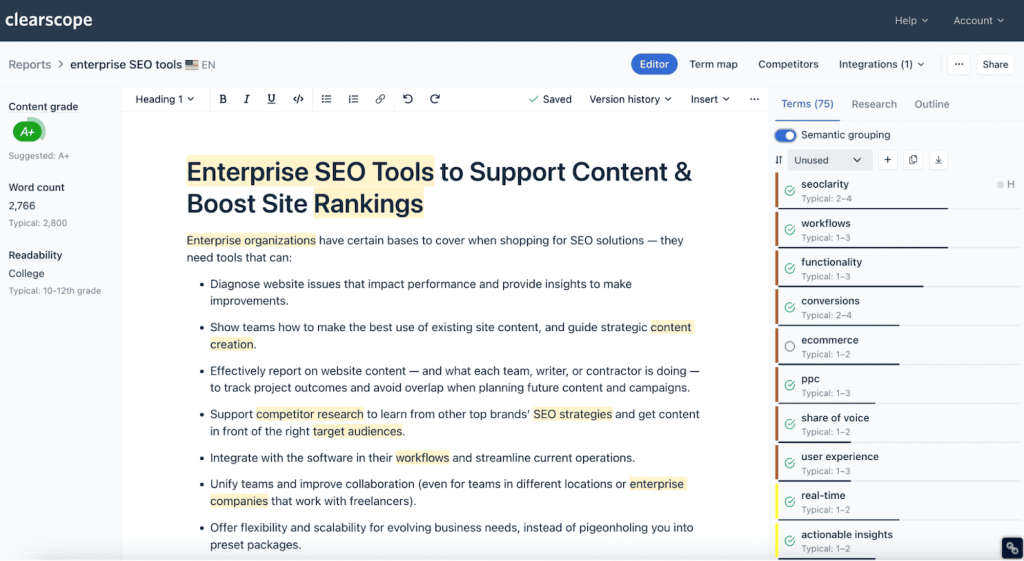
- Content optimization with grade scoring: Write or paste content and Clearscope scores it against top-ranking competitors. Shows exactly what terms to include and optimal content structure.
- Highly accurate keyword recommendations: The suggested terms correlate strongly with ranking success. I’ve compared multiple tools and Clearscope consistently gives the best keyword lists.
- Readability analysis: Checks grade level, sentence length, and readability metrics. Helps balance SEO optimization with user experience.
- Content inventory tracking: Monitor all your optimized content in one dashboard. See what’s ranking, what’s declining, what needs updates.
- Google Docs and WordPress integration: Optimize content directly in your writing environment. Real-time scoring as you write.
- Competitive content analysis: Deep SERP analysis showing what makes top-ranking content successful. More detailed than most alternatives.
Clearscope Pros
- Best-in-class optimization accuracy: Content optimized in Clearscope ranks consistently. The recommendations actually correlate with Google’s algorithm.
- Clean, focused interface: No feature bloat. The tool does one thing incredibly well. Makes it fast to use once you learn it.
- Excellent for competitive keywords: Where ranking is hard and matters financially, Clearscope gives you the best shot. We’ve won tough keywords using it.
- Strong readability balance: Prevents over-optimization that hurts user experience. Keeps content optimized but natural.
- Reliable performance: The tool works consistently. No weird bugs or data issues. It just functions reliably every time.
- Good for proving ROI: Because optimization correlates so strongly with rankings, you can demonstrate content investment value to stakeholders.
Clearscope Cons
- No AI writing features: Clearscope doesn’t generate content. It only optimizes what you write. You need separate tools for content creation.
- Learning curve for interpretation: The data is accurate but you need to understand how to apply it. Not as prescriptive as some alternatives.
- Limited keyword research: Clearscope is for optimization, not keyword discovery. You’ll need Semrush or similar for finding keyword opportunities.
- Can’t handle very long content well: Articles over 3,000-4,000 words sometimes have scoring issues. Works best for standard blog post lengths.
Clearscope Pricing
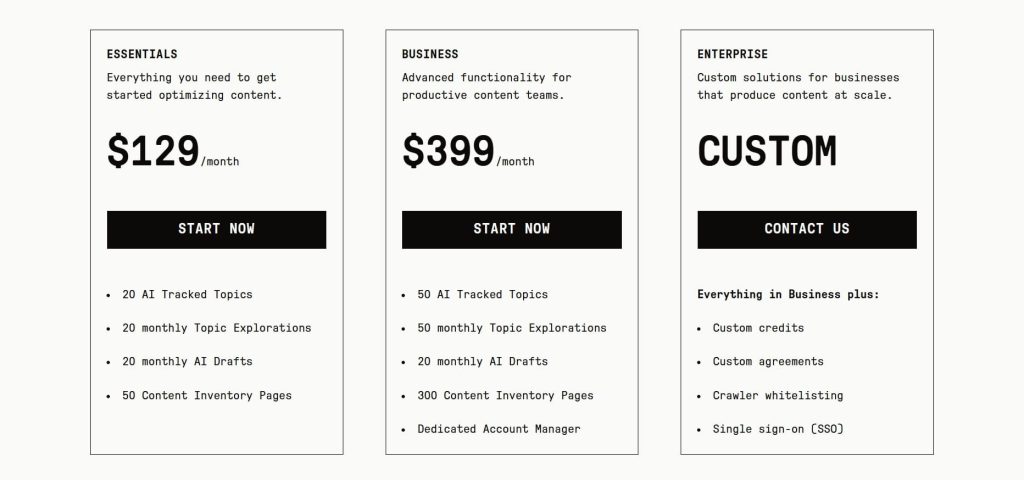
- 7-day free trial
- Essentials: $129/month
- Business: $399/month
- Enterprise: Custom
- Cancel anytime without penalty or hassle
Clearscope Reviews
- G2: 4.9 out of 5 stars (91+ reviews)
- Capterra: 4.9 out of 5 stars (60+ reviews)
SEO professionals consistently give Clearscope perfect ratings. Common praise mentions accuracy and ranking results. The only consistent complaint is pricing. Every negative review mentions cost. People who can afford it love it. Everyone else wishes it were cheaper.
12. Ocoya – Best for Multi-Platform Social Management
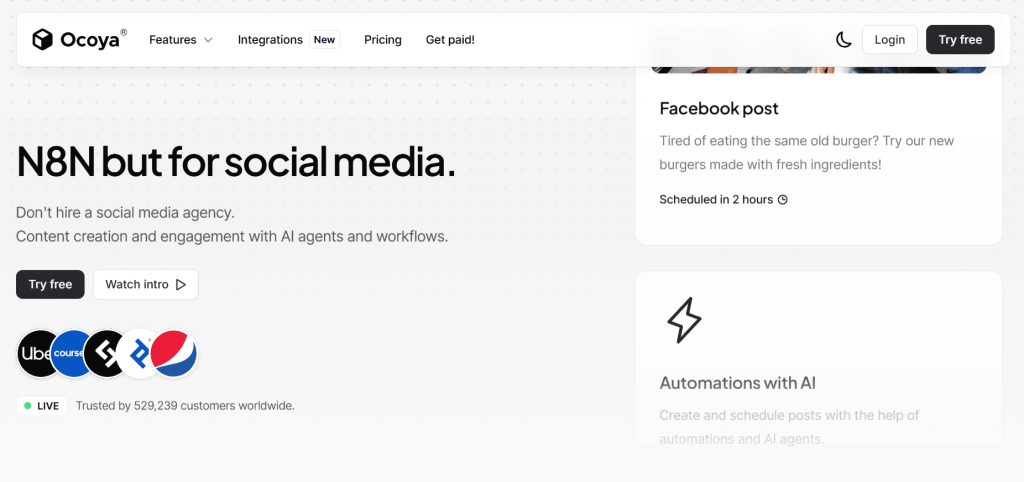
Best For: Small businesses and solo marketers managing social media across multiple platforms who need AI to speed up content creation and scheduling.
How I Use It: I use Ocoya for clients with active social presence but limited resources. It generates post variations, creates graphics, and schedules everything in one place. Cuts social media management time in half.
Ocoya launched in 2020 as an AI-first social media management tool. Unlike Buffer or Hootsuite that added AI later, Ocoya built AI into every feature from day one.
It combines content generation, graphic creation, scheduling, and basic analytics. The goal is making social media management fast and affordable for smaller teams.
This tool fits businesses that post regularly across Facebook, Instagram, LinkedIn, Twitter, and TikTok but don’t have dedicated social media staff.
If you’re manually creating posts, finding images, and scheduling across platforms, Ocoya consolidates that workflow and adds AI assistance throughout.
Ocoya Key Features
- AI post generation for multiple platforms: Input a topic or URL and Ocoya creates platform-specific posts. LinkedIn gets professional copy, Instagram gets casual captions with hashtags, etc.
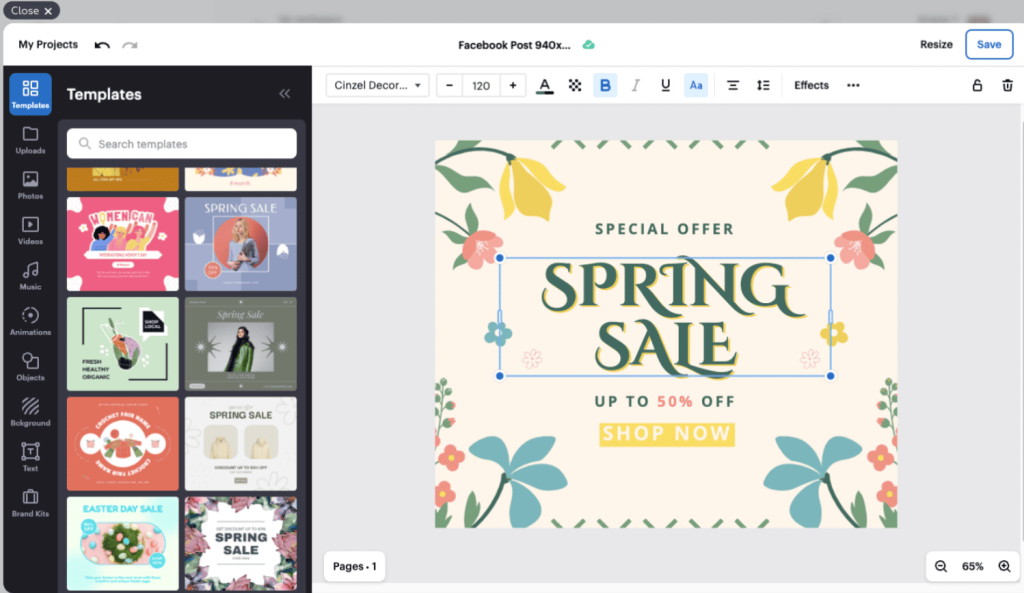
- Built-in graphic editor: Create and edit images directly in Ocoya. Templates for each platform, basic design tools, and AI-generated visuals.
- Multi-platform scheduling: Plan and schedule posts to all your social accounts from one calendar. Supports major platforms plus Pinterest and Google My Business.
- Content library: Store your brand assets, templates, and frequently-used content. Makes creating consistent posts faster.
- Hashtag suggestions: AI recommends relevant hashtags based on your content and platform. Helps improve discoverability without manual research.
- Basic analytics: Track post performance across platforms. Not as detailed as dedicated analytics tools but good enough for small businesses.
[Image Source: G2]
Ocoya Pros
- Fast content creation: From idea to scheduled posts across platforms in 10 minutes. The AI handles most of the heavy lifting.
- Platform-specific optimization: Posts are automatically formatted correctly for each platform. Saves time on manual adjustments.
- Decent graphic creation: The built-in editor is simple but functional. Good enough for social graphics without needing Canva.
- Good for consistent posting: The scheduling and calendar make maintaining regular social presence much easier.
- Supports many platforms: Unlike tools that focus on 2-3 networks, Ocoya covers most places small businesses need to be.
Ocoya Cons
- AI content quality is basic: Posts work fine but they’re not brilliant. You’ll spend time editing to match your exact voice.
- Limited analytics depth: The performance tracking is surface-level. Serious social media analysis requires dedicated tools.
- Graphics look AI-generated: The visual quality is okay but obviously computer-made. Fine for small businesses, not professional brands.
- No advanced scheduling features: Can’t do things like optimal time posting or recurring post templates. Scheduling is straightforward but basic.
- Learning curve for all features: Ocoya does a lot. Getting efficient with the entire platform takes time.
Ocoya Pricing
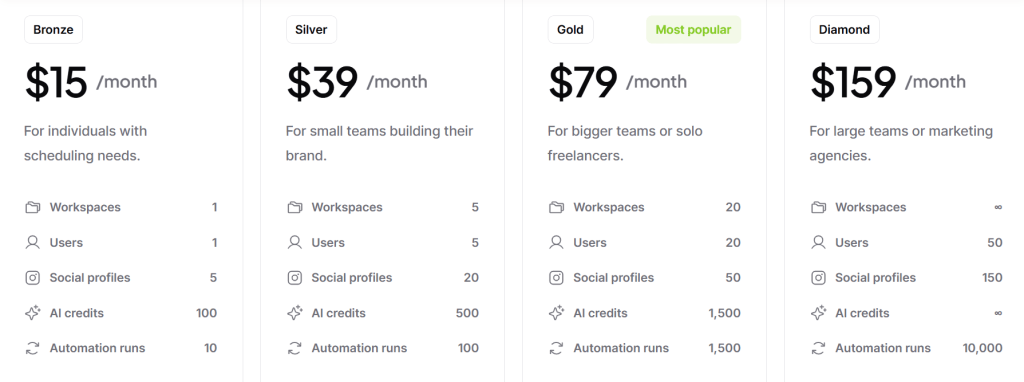
- Bronze: $15/month
- Silver: $39/month
- Gold: $79/month
- Diamond: $159/month
Ocoya Reviews
- G2: 4.6/5 stars (169+ reviews)
- Capterra: 4.6/5 stars (367+ reviews)
Users appreciate the all-in-one approach and pricing. Common feedback mentions that content quality requires editing and analytics are limited.
Small business owners rate it higher than marketing professionals. Good for resource-constrained teams, less impressive for experienced social media managers.
13. Predis – Best for Social Media Visuals
Best For: Small brands and content creators who need to produce high-quality social media graphics and short-form videos without design skills or expensive tools.
How I Use It: I use Predis when clients need to volume social content fast. It generates Instagram posts, Reels, Stories, and carousel posts with surprisingly good visuals. Much better than most AI design tools I’ve tested.
Predis launched in 2021 specifically for social media content creation. Where tools like Ocoya focus on scheduling and management, Predis focuses on making your content look professional.
It generates images, videos, captions, and hashtags designed for social platforms. The visual quality is notably better than generic AI image generators.
This tool makes sense if you’re posting multiple times per day across social platforms but don’t have a designer on staff.
Or if you’re a solo creator who needs content that doesn’t scream “I made this myself.” The visuals won’t win design awards but they’re clean, on-brand, and social-ready.
Predis Key Features
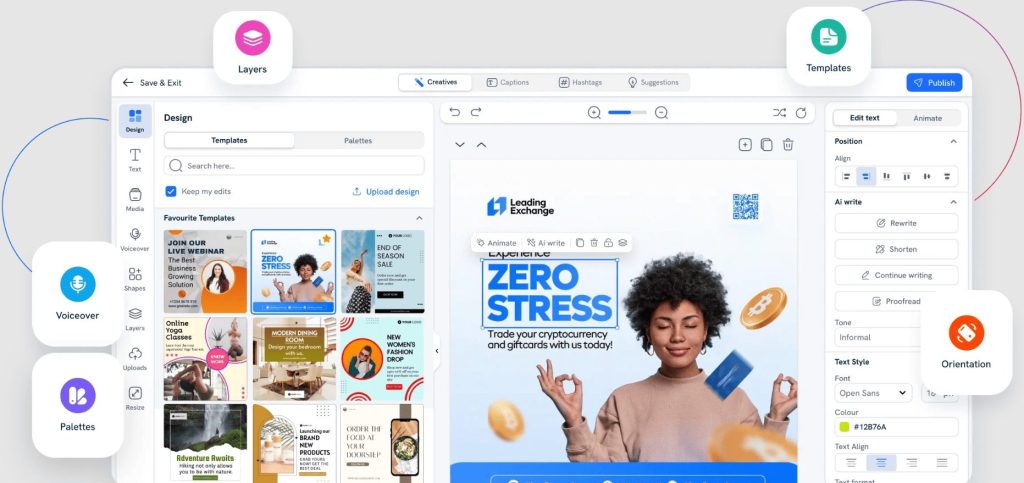
- AI social post generator: Input your topic or paste a URL and Predis creates complete posts. Images, captions, hashtags, everything formatted for your chosen platform.
- Video content creation: Generates Reels and TikTok-style videos from text input. Adds transitions, text overlays, and music. Quality is decent for social, not broadcast.
- Carousel post builder: Creates multi-image carousel posts for Instagram and LinkedIn. Particularly good for educational or list-based content.
- Brand kit integration: Upload your logos, colors, and fonts once. All generated content maintains your brand consistency automatically.
- Content calendar with competitor analysis: Shows what content performs well in your industry. Helps with content planning and trend identification.
- Multi-language support: Creates content in 18+ languages. Useful for brands with international audiences.
Predis Pros
- Visual quality above most AI tools: The generated images actually look professional. Not perfect but significantly better than early AI design tools.
- Fast content production: From idea to finished social post in 2-3 minutes. When you need volume, Predis delivers quickly.
- Good for video content: The Reels and short video generation works surprisingly well. Saves hours compared to manual video editing.
- Brand consistency is solid: Once you set up your brand kit, everything maintains your visual identity. No manual color matching or logo placement.
- Carousel posts save time: Creating multi-image posts manually is tedious. Predis generates entire carousels from simple input.
- Affordable for what it does: Starting at $29/month for unlimited content generation. Cheaper than hiring designers or paying for stock photos.
Predis Cons
- Captions need editing: The AI-generated text is generic. You’ll spend time rewriting to match your actual voice and messaging.
- Limited customization options: You can’t fine-tune designs as precisely as tools like Canva. What Predis generates is mostly what you get.
- Videos feel template-based: The video content works but multiple posts start looking similar. Limited variety in transitions and layouts.
- Occasional brand color mismatches: Sometimes the AI uses your brand colors in ways that don’t quite work. Requires manual adjustment.
- No direct posting: You generate content in Predis but need separate tools for scheduling and posting. Not an all-in-one solution.
Predis Pricing
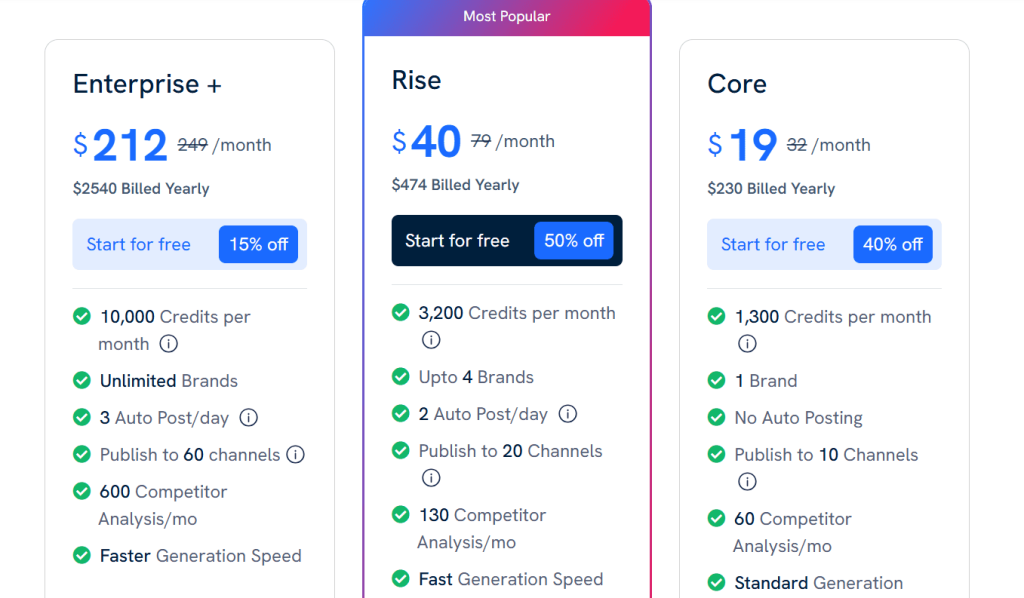
- Core: $19/month
- Rise: $40/month
- Enterprise: $212/month
Predis Reviews
- G2: 4.7/5 stars (91+ reviews)
- Capterra: 4.7/5 stars (184+ reviews)
Users consistently praise the visual quality and speed. Common complaints mention caption quality and limited customization. Content creators and small business owners rate it highest. Professional designers are less impressed but acknowledge it’s good for non-designers.
14. AdCreative – Best for Ad Creative Variations
Best For: Performance marketers and agencies running paid campaigns who need to generate and test multiple ad variations quickly without a design team.
How I Use It: We use AdCreative.ai at OLW for client paid social campaigns. It generates 10-20 ad variations in minutes, which we then A/B test. The ads that perform best are usually surprising, making the testing volume essential.
AdCreative.ai launched in 2021 focused exclusively on advertising creative generation. Unlike general design tools that added ad templates later, this platform studies what actually performs in paid campaigns and generates ads based on that data.
It’s not about making pretty designs. It’s about making ads that convert.
This tool is essential for anyone spending serious money on Facebook, Instagram, Google, or LinkedIn ads. The platform generates variations you wouldn’t think of manually, and testing shows that AI-generated ads often outperform designer-made ads.
Not because they’re better designed, but because they test what actually drives clicks and conversions.
AdCreative Key Features
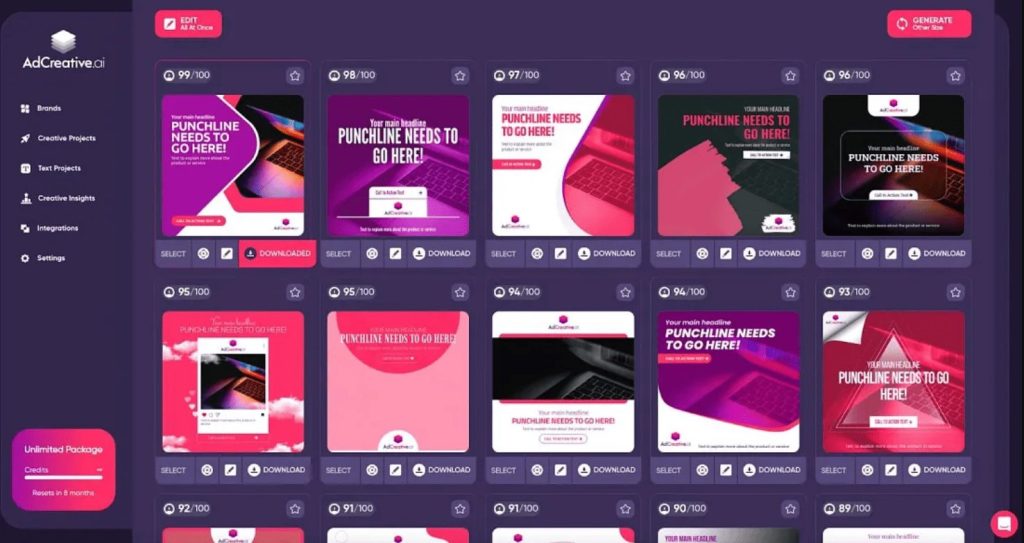
- AI ad generation for multiple platforms: Creates image and text ads optimized for Facebook, Instagram, Google Display, LinkedIn. Each variation follows platform best practices.
- Performance scoring: Every generated ad gets a predicted performance score based on historical data. Helps prioritize which variations to test first.
- Text and headline variations: Generates multiple copy options for each visual. Tests different angles, CTAs, and messaging approaches automatically.
- Brand-consistent output: Upload your brand assets and guidelines. All generated ads maintain visual consistency while testing different approaches.
- Competitor ad inspiration: Shows what ads competitors are running and which formats perform well in your industry. Useful for strategic direction.
- Creative insights dashboard: Tracks which ad elements perform best across your campaigns. Colors, layouts, CTAs, everything. Helps refine future creative strategy.
[Image Source: Medium]
AdCreative Pros
- Generates high-performing ad variations: We’ve consistently seen AI-generated ads outperform manually created ones. The volume of testing makes the difference.
- Saves massive design time: Creating 20 ad variations manually takes days. AdCreative.ai does it in 10 minutes. Essential for testing velocity.
- Performance predictions are accurate: The scoring system correlates well with actual campaign results. High-scoring ads usually perform better.
- Good for rapid iteration: When campaigns aren’t performing, you can generate new variations immediately. No waiting on designers.
- Learns from your results: Upload performance data and the AI improves recommendations based on what actually works for your audience.
AdCreative Cons
- Design quality isn’t premium: The ads work but they don’t look like high-end brand creative. Fine for performance marketing, not brand campaigns.
- Limited control over specific elements: You can’t precisely position elements like you would in Photoshop. It’s template-based generation.
- Copy needs refinement: The headline and text variations are functional but generic. You’ll edit them to match your exact messaging.
- Best for direct response, not branding: If your goal is conversions and clicks, great. If you’re building brand awareness with beautiful creative, look elsewhere.
- Requires testing volume: One AI ad probably won’t be your winner. The value comes from generating 20 variations and finding what works.
AdCreative Pricing
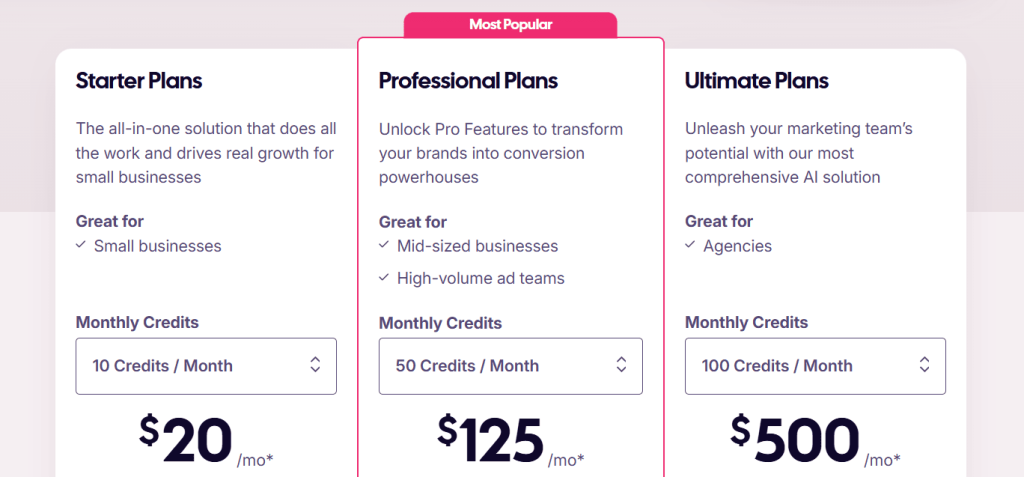
- Starter: $20/month
- Professional: $125/month
- Ultimate: $500/month
AdCreative Reviews
- G2: 4.3/5 stars (791+ reviews)
- Capterra: 3.4/5 stars (165+ reviews)
Performance marketers love the testing volume and conversion results. Common praise mentions ROI improvement and time savings.
Complaints focus on design quality and that some ads look similar. People running direct response campaigns rate it highly. Brand marketers are less enthusiastic.
What’s the Best AI Marketing Tool for You?
- If You’re Starting Out: Writesonic ($39/month) + Frase ($38/month) = $77/month total
Why This Combo: Writesonic handles fast content creation. Frase covers content research and outlines. Together they deliver 70% of what expensive tools provide at a fraction of the cost.
- If You’re Running an Agency: Jasper ($59/month) + Surfer SEO ($79/month) = $138/month total
Why This Combo: Jasper creates on-brand content at scale. Surfer optimizes for rankings. This stack covers high-volume content production and SEO optimization without hiring writers.
- If You’re Creating Paid Ads & Social Content: AdCreative ($20/month) + Predis ($19/month) = $39/month total
Why This Combo: AdCreative.ai generates ad variations based on competitor data. Predis creates social visuals and captions. Covers ad testing and multi-platform social management.
- If You’re Focused on SEO Content Strategy: Frase ($38/month) + Clearscope ($129/month) = $167/month total
Why This Combo: Frase handles content research and competitor analysis. Clearscope provides the most accurate optimization recommendations. Together they cover planning and SEO accuracy at scale.