Ahrefs was one of the first keyword research tools I started using back in 2018, right after I found OneLittleWeb. Since then, they’ve added many new features, but the core experience, the way the tool feels and works, hasn’t changed much.
Ahrefs has always kept my favorite report, Site Explorer. I use it constantly to analyze competitor sites, track backlink profiles, and identify content gaps. It’s been a reliable part of my workflow for years, especially when working with clients across the US, UK, Canada, and Australia.
For a long time, Ahrefs was my go-to choice among SEO tools. It’s focused, powerful, and built specifically for SEO professionals, unlike some all-in-one platforms that try to do everything.
But over the years, I’ve tested dozens of other tools, and I’ve found some strong alternatives that work just as well, and in some cases, better for specific needs.
Some clients need more affordable options. Others want simpler interfaces or better integration with tools they already use. A few have asked for platforms that focus more on content strategy, rank tracking software, or emerging AI SEO tools without all the extra features they won’t touch.
That’s why I put together this guide. Every tool here is something I’ve personally used in real client campaigns, not just demo accounts or free trials. Some are well-known. Others are newer platforms that don’t get enough attention but deliver solid results when you need them.
Before we dive in, here’s what I focused on when comparing them:
- Data Reliability: Accurate, up-to-date keyword metrics, backlinks, and traffic estimates. Cross-checked against Google Search Console and Analytics on real client sites.
- Feature Depth: Covers essentials like keyword research, backlink analysis, site audits, rank tracking, and competitor insights without bloat or gaps.
- Pricing: Transparent plans with strong value, fair scaling for agencies, and no hidden fees or restrictive limits.
- User Experience: Intuitive, fast interface with minimal learning curve, even for teams.
- Scalability: Handles large sites, multiple projects, and seamless connections to tools like Google Analytics/Search Console.
- Real-World Results: Delivers actionable insights that drive actual ranking improvements and traffic growth in client campaigns.
Let’s jump into details!
What to Look for in the Best Ahrefs Alternatives
When I’m evaluating SEO tools for client campaigns, I focus on a few key factors that actually matter in day-to-day use. Here’s what I pay attention to:
Data Accuracy
The numbers need to be reliable. I compare keyword volumes and backlink data against what I see in Google Search Console and Analytics. If a tool consistently overestimates or underestimates traffic, it becomes hard to trust for strategic decisions.
Feature Set
Does it cover the essentials like keyword research, backlink analysis, site audits, and rank tracking? Some tools try to do everything, while others focus on doing a few things really well. I look for the features that match the actual work I need to get done.
Pricing
Cost matters, especially for smaller teams or solo marketers. I want to know if the pricing is transparent, if there are hidden limits, and whether the value matches what you’re paying. Some tools offer more flexibility at lower price points without sacrificing quality.
Ease of Use
A powerful tool isn’t helpful if it takes hours to figure out, especially for big teams scaling with SEO agency tools. I look for clean interfaces, logical workflows, and the ability to get results quickly without digging through endless menus or documentation.
Integrations
Does it work with the tools you already use? I need platforms that connect with Google Analytics, Search Console, and other marketing tools we rely on. Good integrations save time and make it easier to pull everything into one place.
Scalability
Can the tool grow with you? I test whether it handles larger sites, multiple projects, and team collaboration without slowing down or hitting hard limits. The best tools work just as well for a 50-page site as they do for a 5,000-page one.
How I Selected the Best Ahrefs Alternatives
Over the last 8 years at OneLittleWeb, I’ve run site audits on 10,000+ page websites, tracked keyword rankings across 15+ countries, and built content strategies based on keyword datasets pulling from billions of search queries.
Some tools handled the workload without breaking a sweat. Others looked impressive in demos but struggled when we scaled up.
For this guide, I focused on tools I’ve personally used for content audits, link building, rank tracking, and keyword analysis across hundreds of campaigns.
I didn’t just sign up for free trials and poke around. I ran actual client work through these platforms to see how they performed under pressure.
Here’s what I measured:
Data Reliability
I compared keyword volumes, backlink counts, and traffic estimates against what we saw in Google Search Console and Analytics. If the numbers didn’t line up, the tool didn’t make the list. I also tested how frequently each tool updated its index.
Some platforms refresh backlink data every 24 hours, while others lag weeks behind. For keyword data, I looked at database size and geographic coverage, especially for international campaigns where local search volumes matter.
Real-World Performance
I tested how each tool handled large sites, complex audits, and competitive research. The best tools stayed fast and accurate even when we threw heavy workloads at them.
I ran crawls on sites with 50,000+ URLs, pulled competitor reports for domains with 100,000+ backlinks, and exported keyword lists with 10,000+ terms. Tools that timed out, crashed, or throttled requests during peak usage didn’t make the cut.
Value for Money
I looked at pricing, feature limits, and whether the cost made sense for the results you get. Some expensive tools are worth it. Others charge premium prices without delivering premium value.
I paid close attention to credit systems, API limits, and whether plans included full feature access or gated core functionality behind higher tiers. I also checked if pricing scaled reasonably as you added more projects, users, or tracked keywords.
Ease of Use
I paid attention to how quickly our team could get results without constant troubleshooting or hunting through documentation. The best tools feel intuitive, even when you’re using advanced features.
I tested navigation speed, report customization options, and whether filters and bulk actions worked as expected. Tools with clunky UIs or buried features slowed down workflows, even when the underlying data was solid.
Client Results
At the end of the day, the tools that made this list are the ones that helped us rank pages, build links, and drive measurable traffic for real clients. That’s what matters most.
I tracked which tools identified content gaps that led to new rankings, which backlink datasets uncovered outreach opportunities, and which rank trackers gave us early signals when algorithm updates hit. If a tool didn’t contribute to measurable wins, it didn’t earn a spot here.
Summary Table: 7 Ahrefs Alternatives
Before we dive into the detailed reviews, here’s a quick comparison of all the tools I’ve tested. This table gives you an at-a-glance view of what each platform does best, what it costs, and how it performed in real client work.
| Tool Name | Best For | Key Features | Price | Our Notes |
| Semrush | All-in-one SEO & marketing | Keyword research, backlink analysis, site audits, rank tracking, competitor research | $165.17/month | Most comprehensive feature set. Best for teams that need more than just SEO tools. Data accuracy is consistently strong. |
| SE Ranking | Budget-conscious agencies | Keyword tracking, competitor analysis, white-label reports, backlink checker | $52/month | Excellent value for agencies. White-label reporting works well for client deliverables. The interface is clean and easy to navigate. |
| Mangools | Keyword research simplicity | Keyword difficulty scores, SERP analysis, rank tracking, backlink analysis | $30.50/month | Best beginner-friendly interface. Keyword difficulty metrics are accurate. Limited depth for advanced link analysis. |
| Ubersuggest | Solo marketers on a budget | Keyword ideas, content suggestions, site audits, backlink data | $12/month | Affordable entry point. Good for basic keyword research. Data depth doesn’t match enterprise tools but works for smaller sites. |
| Moz Pro | Domain authority tracking | Keyword explorer, link analysis, site crawls, rank tracking, DA/PA metrics | $31/month | Domain Authority is still widely referenced. Backlink index is smaller than Ahrefs but data quality is solid. Good for local SEO. |
| Serpstat | Multi-regional campaigns | Keyword research, rank tracking, competitor analysis, site audits | $44/month | Strong international database. Good for tracking rankings across multiple countries. Bulk analysis tools save time on large projects. |
| SpyFu | Competitor PPC & SEO research | Competitor keyword history, PPC ad copy analysis, backlink tracking, rank monitoring | $39/month | Unique historical data on competitor keywords and ads. Great for understanding what’s worked over time. Less robust for technical SEO. |
This table covers the core alternatives I’ve used consistently at OneLittleWeb. Each tool has different strengths, and the right choice depends on your budget, team size, and what you need to accomplish.
7 Best Ahrefs Alternatives in 2026 (Free + Paid)
Here are the top Ahrefs alternatives I’ve tested and used in real client campaigns at OneLittleWeb. Each one brings something different to the table, whether it’s affordability, ease of use, or specialized features that Ahrefs doesn’t offer.
- Semrush — best for all-in-one SEO
- SE Ranking — best for agency white-label reports
- Mangools — best for beginner keyword research
- Ubersuggest — best for tight budgets
- Moz Pro — best for Domain Authority tracking
- Serpstat — best for international SEO campaigns
- SpyFu — best for competitor PPC research
Now let’s break down each tool, what makes it worth using, and where it fits best in your workflow.
1. Semrush – Best for All-in-One SEO
Best For: Teams that need keyword research, backlink analysis, site audits, rank tracking, and competitor intelligence in one platform.
How I Use It: I’ve used Semrush at OneLittleWeb since 2016 for everything from competitive analysis to content gap research. It’s my go-to when a client needs deep market insights or we’re building a content strategy from scratch.
Semrush is one of the most complete SEO platforms available. It started as a competitive research tool back in 2008 and has evolved into a full marketing suite that covers SEO, PPC, content marketing, and social media.
What separates Semrush from Ahrefs is the breadth of features. Ahrefs focuses heavily on backlinks and site exploration. Semrush gives you that plus keyword magic tools, position tracking across 200+ countries, content marketing workflows, and advertising research.
I’ll be honest—it’s not the cheapest option, and the interface can feel overwhelming at first. But once you know where everything is, it’s incredibly efficient. We’ve used it to identify ranking opportunities for industrial clients, track brand visibility across international markets, and audit technical SEO issues on enterprise-level sites.
Semrush Key Features
- Keyword Magic Tool generates massive keyword lists fast: Pull thousands of keyword variations in seconds with accurate search volumes, keyword difficulty scores, and intent data. I used this to build a 500+ keyword content strategy for a SaaS client that resulted in 40% organic traffic growth over six months.
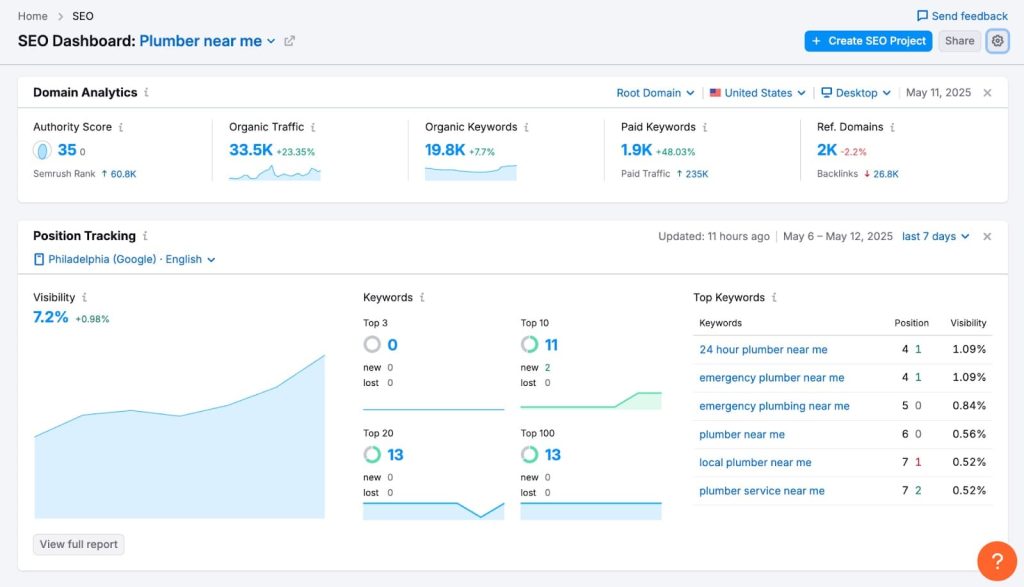
- Position Tracking monitors rankings across 200+ countries: Set up projects to track your rankings daily with SERP feature tracking, mobile vs desktop splits, and competitor comparison. Essential when managing clients in multiple markets like we do across the US, UK, Canada, and Australia.
- Site Audit crawls and identifies technical SEO issues: It flags broken links, duplicate content, crawlability problems, and Core Web Vitals issues. I run this monthly for all our clients. The prioritization system helps focus on fixes that actually matter.
- Backlink Analytics shows your link profile and competitors’: See new and lost backlinks, referring domains, anchor text distribution, and toxic link alerts. The referring domains database is massive—over 43 trillion backlinks indexed as of 2025.
- Content Marketing Toolkit guides content strategy: Find content gaps, track content performance, get SEO writing recommendations in real-time, and manage your editorial calendar. We use this heavily when scaling content production for clients.
- Organic Research reveals competitor traffic sources: See which keywords competitors rank for, their top-performing pages, and traffic trends over time. I use this constantly when auditing new clients to understand their competitive landscape quickly.
Semrush Pros
- Database size covers nearly every market we work in. With data from 200+ countries and billions of keywords, I’ve never run into geographic coverage issues. Whether it’s a UK industrial client or an Australian SaaS company, the data is there and it’s accurate.
- Keyword difficulty scores match real-world ranking difficulty well. I’ve compared Semrush KD scores against actual ranking results for hundreds of keywords. They’re consistently reliable. When it says a keyword is hard to rank for, we plan accordingly and it’s usually right.
- Historical data goes back years for trend analysis. When analyzing seasonal keywords or understanding traffic patterns, having 5+ years of historical data is invaluable. I used this to identify a traffic decline pattern for a client that turned out to be an algorithm penalty from 2019.
- Position tracking updates daily without manual checks. Set it and forget it. Every morning I check ranking changes across all client projects. The interface makes it easy to spot winners, losers, and SERP feature changes at a glance.
- Content Marketing Platform streamlines our editorial workflow. We manage content calendars, track performance, and collaborate with writers all in one place. It’s replaced three separate tools we used to juggle. The SEO content template feature alone saves hours per article.
- Reporting is client-ready with minimal editing. White-label reports pull data automatically and look professional. We send monthly reports to 30+ clients, and Semrush handles most of the heavy lifting. Saves our team at least 10 hours per month.
- API access enables custom integrations. We’ve built internal dashboards that pull Semrush data alongside Google Analytics and Search Console. Essential for larger clients who want everything in one view.
Semrush Cons
- Learning curve is steep for new users. The platform has so many features that it takes weeks to learn where everything lives. I’ve onboarded team members who felt overwhelmed for their first month. If you just need basic keyword research, it’s overkill.
- Pricing climbs quickly as you scale. Adding more projects, users, or tracked keywords means jumping to higher tiers. We’re on a Business plan now and it’s expensive. Smaller agencies or solo consultants might find the cost hard to justify.
- Some tools feel buried in the interface. Features like the Listing Management tool or Market Explorer are powerful but hidden in submenus. I still Google “where is X in Semrush” occasionally after using it for 8 years.
- Backlink index updates slower than Ahrefs. Semrush refreshes backlink data every few weeks, while Ahrefs updates continuously. If you’re actively building links and want real-time feedback, Ahrefs has the edge here.
Semrush Pricing
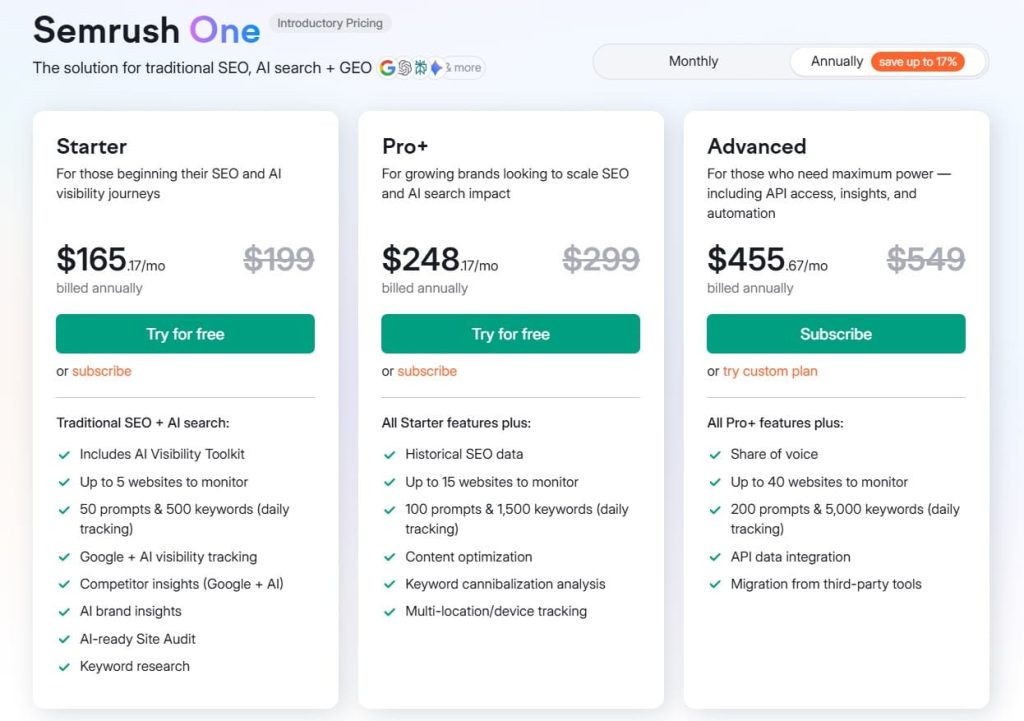
- 7-day free trial
- Starter: $165.17/month
- Pro+: $248.17/month
- Advanced: $455.67/month
Semrush Reviews
- G2: 4.5 out of 5 stars (3,026+ reviews)
- Capterra: 4.6 out of 5 stars from (2,299+ reviews)
Users consistently praise the depth of features and data accuracy. The most common complaints are about pricing and the learning curve. Five-star reviews come mostly from agencies and enterprise users who need the full feature set and can justify the cost.
2. SE Ranking – Best for Agency White-Label Reports
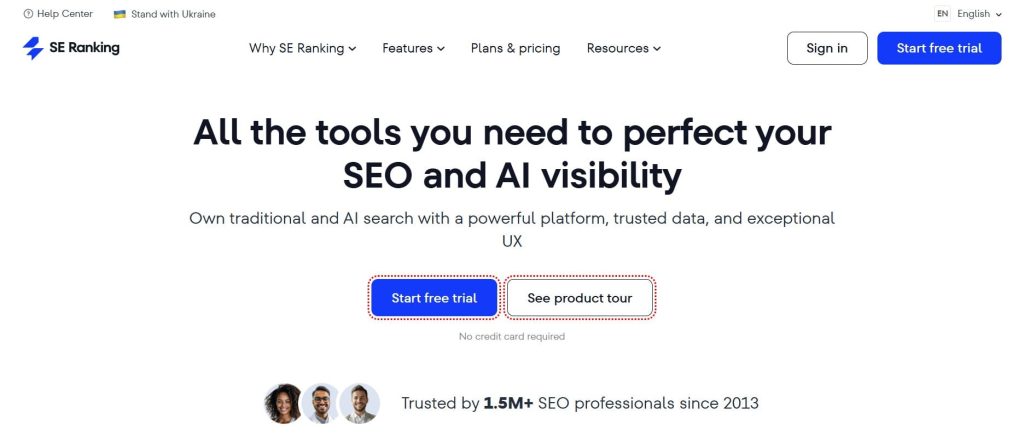
Best For: Agencies and consultants who need professional client reports, keyword tracking, and SEO audits at a reasonable price point.
How I Use It: We use SE Ranking at OLW for clients who need regular reporting but don’t require the full depth of Semrush. The white-label reports look professional and save us hours every month when delivering client updates.
SE Ranking launched in 2013 as an affordable alternative to enterprise SEO tools. It’s grown into a solid all-in-one platform that covers most of what agencies need without the premium price tag.
What separates SE Ranking from more expensive tools is the value proposition. You get keyword tracking, competitor analysis, site audits, and backlink monitoring for a fraction of what Semrush or Ahrefs costs. The white-label reporting is honestly better than most premium tools.
This tool makes sense for agencies managing multiple clients who need clean, professional deliverables. It’s also great for in-house teams that want solid data without paying enterprise prices.
The interface is clean and intuitive. New team members get up to speed in days, not weeks.
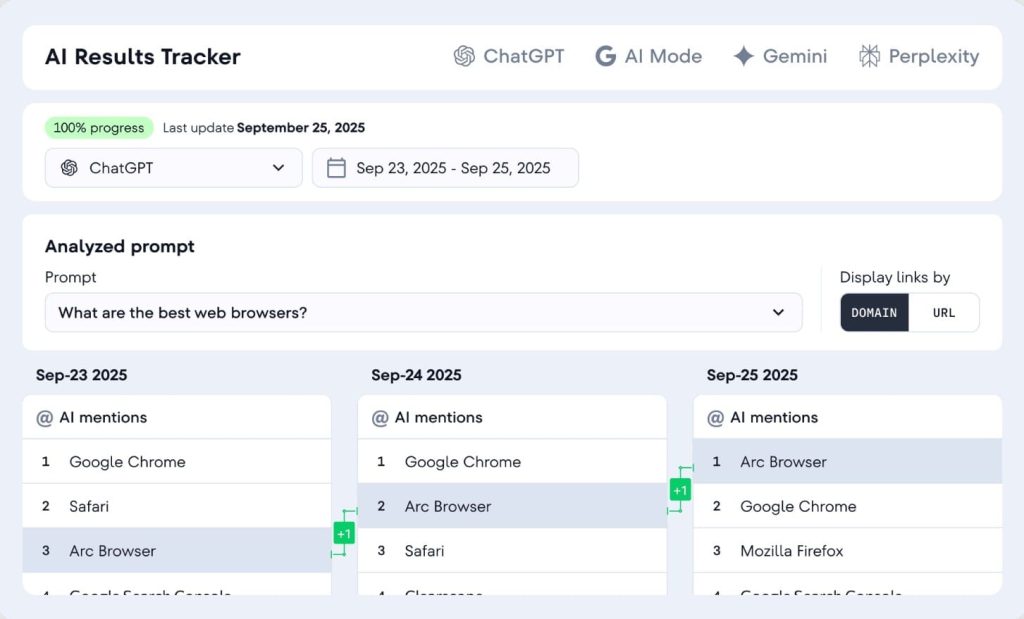
SE Ranking Key Features
- White-label reporting that actually looks professional: Create custom-branded reports with your logo, colors, and domain. The templates are clean and client-ready. I’ve sent thousands of these reports and never had to explain what a metric means—it’s that clear.
- Keyword rank tracking across 100+ countries: Monitor rankings daily with accurate position tracking and SERP feature detection. We track keywords for clients in the US, UK, Canada, and Australia with consistent accuracy.
- Competitor SEO analysis: See competitor rankings, traffic estimates, and keyword gaps. Not as deep as Semrush but covers 90% of what we need for competitive research on client projects.
- Website audit tool: Crawls sites and identifies technical SEO issues with clear prioritization. It flags duplicate content, broken links, page speed issues, and crawlability problems. Updates weekly automatically.
- Backlink checker and monitor: Track your backlink profile and get alerts for new and lost links. The database isn’t as large as Ahrefs but it catches the links that matter for most small to mid-size sites.
- Marketing plan generator: Creates SEO task lists based on your site audit and competitor analysis. Helpful for clients who want a roadmap but don’t know where to start.
SE Ranking Pros
- White-label reports save massive time: Automated reports with custom branding eliminate manual report building. What used to take 2 hours per client now takes 10 minutes. The ROI on this feature alone justifies the subscription.
- Interface is beginner-friendly: Clean design with logical navigation. I’ve trained junior team members on SE Ranking in a single afternoon. Compare that to weeks with Semrush or Ahrefs.
- Rank tracking accuracy matches premium tools: I’ve compared SE Ranking’s position tracking against manual checks and Google Search Console data. The accuracy is consistently within 1-2 positions, which is all you need.
- All-in-one platform eliminates tool juggling: Keyword research, rank tracking, audits, backlinks, and reporting in one place. For most agency work, you won’t need to open another SEO tool.
- Responsive customer support: When we’ve had questions or technical issues, their support team responds within hours. Helpful for agencies that can’t afford downtime when client reports are due.
SE Ranking Cons
- Backlink database is smaller than Ahrefs: If you’re doing aggressive link building or need comprehensive backlink analysis, you’ll notice gaps. Fine for monitoring your own links, limited for deep competitive research.
- Keyword database has fewer international keywords: Coverage is solid for major markets but weaker in smaller countries or niche languages. We’ve hit limitations with clients in less common markets.
- Feature depth doesn’t match enterprise tools: SE Ranking does many things well but nothing exceptionally deep. If you need advanced features like Semrush’s topic research or Ahrefs’ content explorer, this won’t cut it.
- API access only on higher tiers: If you want to build custom integrations or pull data programmatically, you need the Business plan. The entry-level plans lock you into their interface.
SE Ranking Pricing
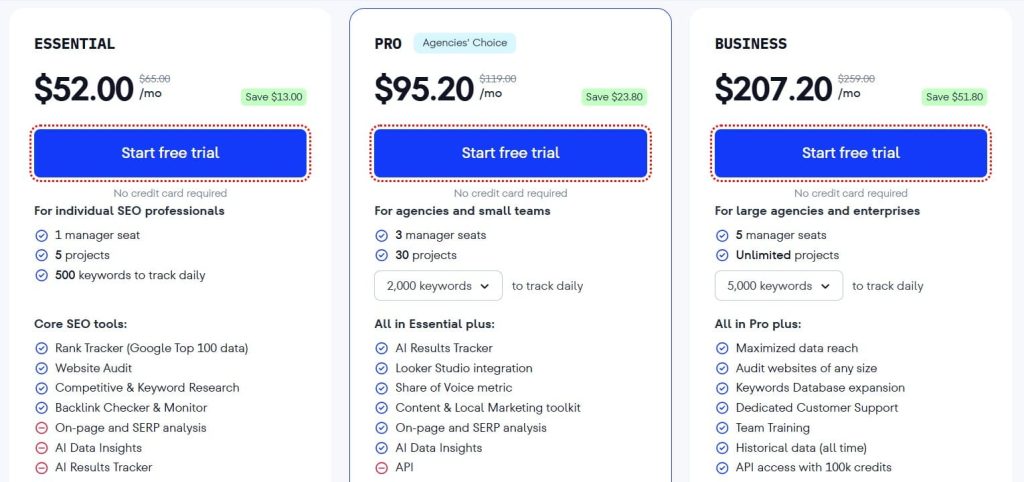
- Free trial available
- Essential: $52/month
- Pro: $95.20/month
- Business: $207.20/month
SE Ranking Reviews
- G2: 4.7 out of 5 stars (2,330+ reviews)
- Capterra: 4.7 out of 5 stars (296+ reviews)
Great pricing and clean white-label reports earn this tool consistent praise. The only common downside is its relatively smaller backlink database. In summary, it’s ideal for agencies seeking a budget-conscious solution without compromising professionalism.
3. Mangools – Best for Beginner Keyword Research
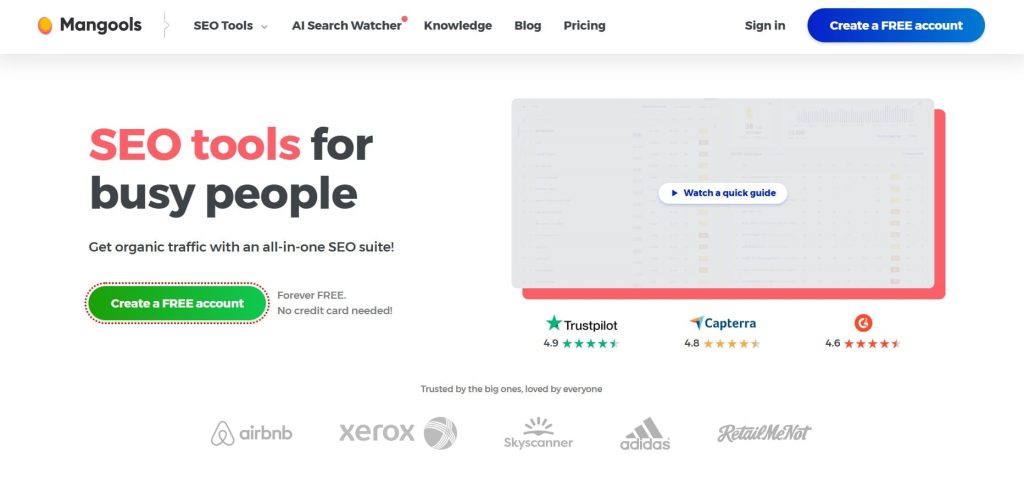
Best For: Solo marketers, bloggers, and small businesses who need simple, accurate keyword research without a steep learning curve.
How I Use It: I recommend Mangools to clients who are just starting with SEO and feel overwhelmed by complex tools. The keyword difficulty scores are accurate and the interface makes keyword research actually enjoyable.
Mangools launched in 2014 with KWFinder as their flagship tool. They’ve since added SERPChecker, SERPWatcher, LinkMiner, and SiteProfiler—all focused on simplicity and usability.
What separates Mangools from other keyword tools is the interface. Everything is visual, intuitive, and designed for people who aren’t SEO experts. The keyword difficulty metric is one of the most accurate I’ve tested, consistently matching real-world ranking difficulty.
This tool makes sense for content creators, small business owners, and beginner SEOs who need reliable keyword data without paying for features they won’t use. It’s also great as a secondary tool for quick keyword checks.
The learning curve is practically nonexistent. You’ll be productive within minutes of signing up.
Mangools Key Features
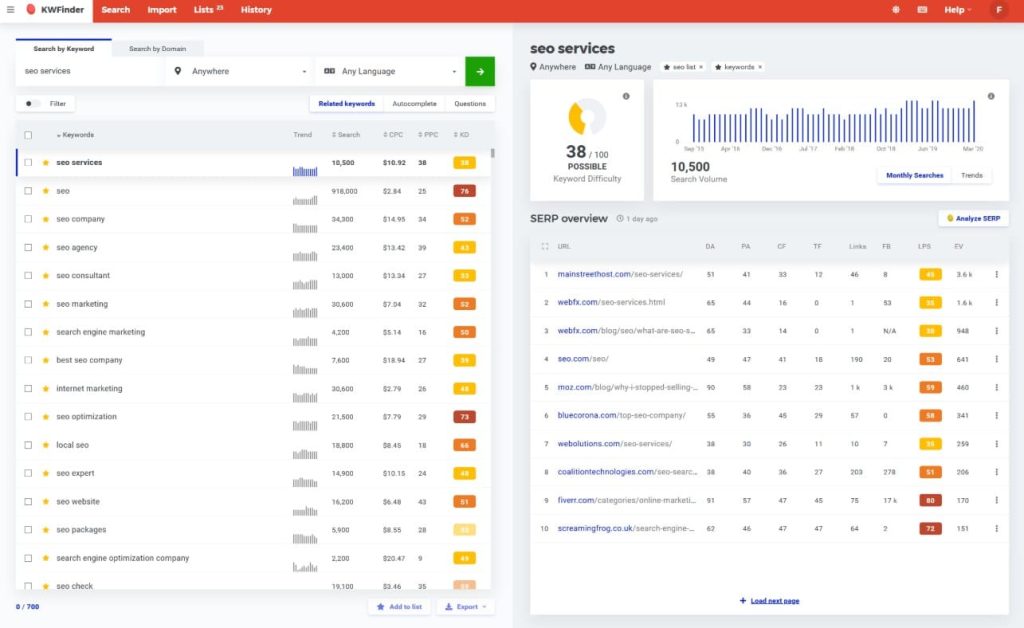
- KWFinder for keyword research: Enter a seed keyword and get hundreds of related terms with search volume, keyword difficulty, and trend data. The difficulty score actually works. I’ve validated it against ranking results for years.
- Visual SERP analysis: See the top 10 ranking pages with their domain authority, page authority, backlinks, and social signals. Makes it easy to assess if you can realistically rank for a keyword.
- SERPWatcher for rank tracking: Clean, simple rank tracking interface that shows your position changes over time. Not as feature-rich as dedicated rank trackers but perfect for monitoring 50-200 keywords.
- LinkMiner for backlink analysis: Find and analyze backlinks for any domain. The chrome extension lets you check link metrics while browsing, which is handy for quick prospecting.
- Historical search volume data: See keyword trends over time to identify seasonal patterns. Essential for content planning and understanding whether a keyword is growing or declining.
- Local keyword research: Search volume and difficulty scores for specific locations. Critical if you’re doing local SEO or targeting regional markets.
Mangools Pros
- Easiest interface in the SEO tool space: Nothing else comes close to Mangools for usability. The design is clean, colorful, and actually pleasant to use. Makes keyword research feel less like work.
- Keyword difficulty scores are remarkably accurate: I’ve tested Mangools KD scores against actual ranking results across hundreds of keywords. When it says a keyword is easy, medium, or hard, that prediction holds up in practice.
- Fast results without lag: Keyword searches return instantly. SERP analysis loads quickly. No waiting around for reports to generate like some enterprise tools that feel sluggish.
- Historical data helps with seasonal planning: Seeing 12+ months of search volume trends prevents you from targeting keywords that only spike during specific seasons. Saved us from building content for dead keywords multiple times.
- Chrome extension for on-the-go research: Check keyword metrics and backlink data while browsing without opening the full tool. Surprisingly useful for quick competitive checks.
Mangools Cons
- Limited depth for advanced link analysis: The backlink database is significantly smaller than Ahrefs or Semrush. Fine for basic link checking, not sufficient for comprehensive link building campaigns.
- Keyword tracking limits fill up quickly: Even the higher plans cap you at a few hundred tracked keywords. If you’re managing multiple sites or doing enterprise SEO, you’ll hit limits fast.
- No technical site audit features: Mangools doesn’t crawl your site or identify technical SEO issues. You’ll need a separate tool like Screaming Frog or Semrush for that.
- Competitor analysis is basic: You can see what keywords competitors rank for but it’s not as comprehensive as Semrush’s competitive analysis suite. Works for quick checks, not deep competitive research.
Mangools Pricing
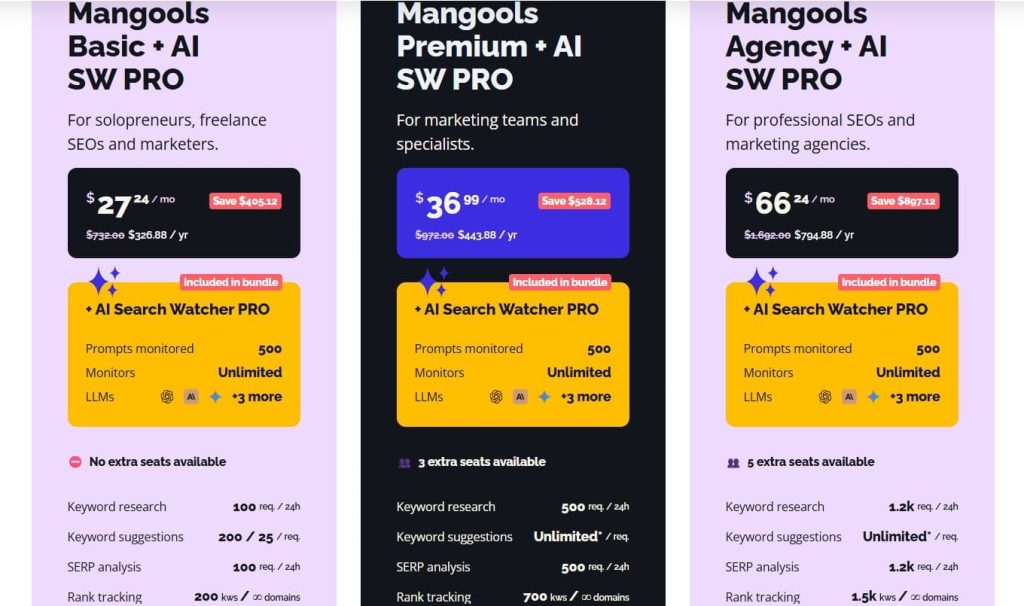
- Free
- Basic: $30.50/month
- Premium: $40.50/month
- Agency: $70.50/month
- 48-hour money-back guarantee
Mangools Reviews
- G2: 4.7 out of 5 stars (95+ reviews)
- Capterra: 4.8 out of 5 stars (91+ reviews)
People enjoy how easy it is to use and how precise the keyword difficulty rating feels. The trade-offs are tracking limits and fewer backlinks in the database. Best suited for beginners looking for accuracy minus the complexity.
4. Ubersuggest – Best for Tight Budgets
Best For: Solopreneurs and small businesses who need basic SEO tools at the lowest price point possible.
How I Use It: I’ve used Ubersuggest for quick keyword checks and competitor research when I don’t need the full depth of premium tools. It’s also what I recommend to clients who are just starting and can’t justify spending $100+ per month.
Ubersuggest was acquired by Neil Patel in 2017 and transformed from a simple keyword suggestion tool into a budget SEO suite. It’s not as powerful as Ahrefs or Semrush, but at $12/month, it covers the basics.
What separates Ubersuggest from free tools is that it actually provides useful data. Search volumes are reasonably accurate, keyword suggestions are relevant, and the site audit catches major issues. It’s not professional-grade, but it’s far better than nothing.
This tool makes sense for people on extremely tight budgets or those testing whether SEO is worth investing in before committing to expensive tools.
The interface is simple, though sometimes oversimplified. It feels like it’s designed for absolute beginners.
Ubersuggest Key Features
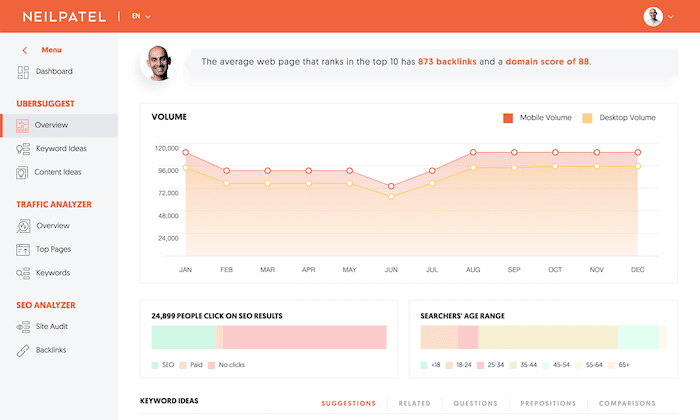
- Keyword research with decent accuracy: Enter a keyword and get search volume, SEO difficulty, paid difficulty, and CPC data. The database isn’t massive but covers major markets adequately for most small business needs.
- Content ideas based on what’s ranking: Shows you the top-performing content for any keyword with social shares, backlinks, and traffic estimates. Helpful for understanding what type of content performs.
- Site audit for basic SEO issues: Crawls your site and identifies critical problems like broken links, missing meta tags, and slow pages. Not as thorough as Semrush but catches the obvious stuff.
- Backlink data and opportunities: See who links to you and competitors. The database is smaller than premium tools but covers major backlinks. Includes outreach suggestions for link building.
- Rank tracking for keywords: Monitor your position for target keywords. Basic functionality without advanced features like SERP feature tracking or local rank variations.
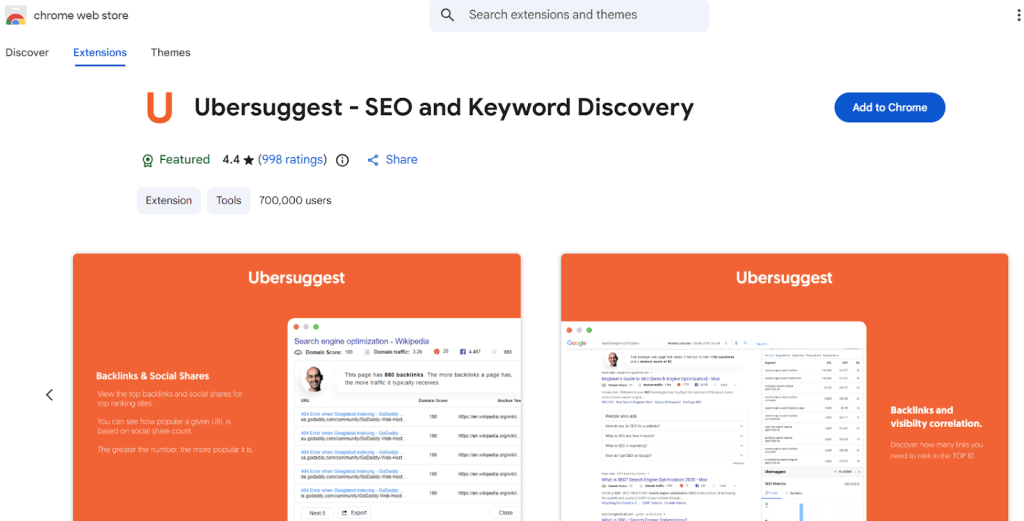
- Chrome extension for quick checks: Look up domain stats, keyword data, and backlinks while browsing. Convenient for fast competitive checks without opening the full platform.
Ubersuggest Pros
- Lowest price point for an all-in-one SEO tool: At $12/month, it’s cheaper than most keyword tools alone. For someone just starting, this removes the financial barrier to trying SEO tools.
- Lifetime deal available: Ubersuggest offers one-time lifetime purchase options. I’ve seen clients pay once and use it for years without recurring fees. Rare in the SaaS SEO space.
- Neil Patel’s SEO training included: Comes with video courses and tutorials. If you’re new to SEO, having built-in education alongside the tool helps you actually use it effectively.
- Simple enough for complete beginners: No overwhelming dashboards or complex workflows. You can figure out most features without reading documentation. Good for non-technical users.
- Keyword suggestions include question-based queries: Shows related questions people search for. Useful for content planning and identifying FAQ sections to add to pages.
Ubersuggest Cons
- Data accuracy is noticeably lower: When I compare Ubersuggest search volumes to Google Search Console data, the discrepancies are larger than with Semrush or Ahrefs. Treat the numbers as directional, not precise.
- Backlink database is significantly smaller: You’ll miss a lot of backlinks compared to Ahrefs. Fine for basic monitoring, problematic if you’re doing serious link building or competitive analysis.
- Feature limitations on cheaper plans: The entry plan caps daily searches, reports, and tracked keywords. You’ll hit limits quickly if you’re doing any serious SEO work.
Ubersuggest Pricing
- Individual: $12/month
- Business: $20/month
- Enterprise: $40/month
Ubersuggest Reviews
- G2: 4.2 out of 5 stars (149+ reviews)
- Capterra: 4.4 out of 5 stars (93+ reviews)
Praised for being budget-friendly and simple to use, but criticised for imperfect data and lack of advanced features. A solid entry point for newcomers or those working with minimal funds.
5. Moz Pro – Best for Domain Authority Tracking
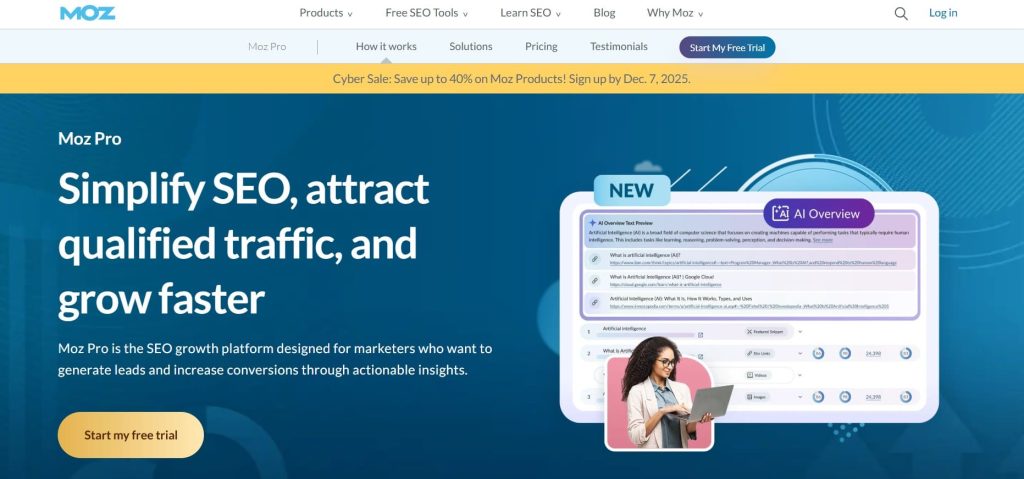
Best For: SEO professionals who need Domain Authority metrics, local SEO tools, and solid link analysis.
How I Use It: I use Moz primarily for Domain Authority and Page Authority metrics when communicating with clients and prospects. DA is still the most widely understood authority metric in the industry.
Moz launched in 2004 as one of the first SEO software companies. They invented Domain Authority and built a reputation for quality data and SEO education. The tool has evolved but maintains a focus on link analysis and on-page optimization.
What separates Moz from other tools is Domain Authority. Whether you agree with the metric or not, DA is still the most commonly referenced authority score in the SEO industry. Clients understand it, and it’s useful for quick site assessments.
This tool makes sense for agencies that need client-friendly metrics, local SEO specialists, and SEO professionals who value data quality over database size.
The interface is clean and professional. It feels like a mature, stable platform.
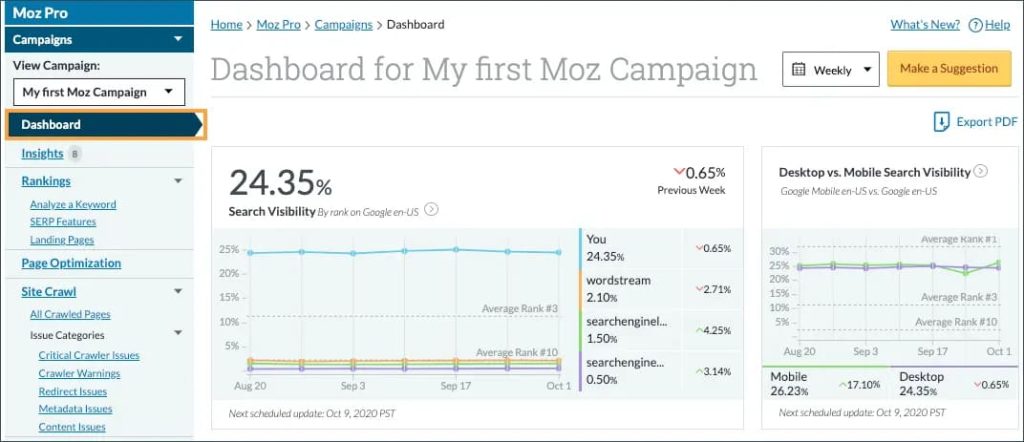
Moz Pro Key Features
- Domain Authority and Page Authority metrics: Industry-standard metrics for measuring site and page-level authority. We use DA scores constantly when assessing link opportunities and explaining SEO potential to non-technical clients.
- Keyword Explorer with accurate difficulty scores: Research keywords with search volume, organic CTR estimates, priority scores, and SERP analysis. The difficulty scores are reliable and the priority metric helps identify quick wins.
- Link Explorer for backlink analysis: See your backlink profile with spam score metrics, anchor text distribution, and new/lost link tracking. The index is smaller than Ahrefs but the data quality is high.
- Site crawl for technical SEO: Weekly site audits that identify crawlability issues, duplicate content, missing tags, and page speed problems. The visualization makes it easy to understand site architecture.
- Rank tracking with local search capability: Monitor rankings with SERP feature tracking and local rank variations. Particularly strong for local SEO with city-level tracking.
- On-page optimization recommendations: Analyze individual pages and get specific suggestions for title tags, content, links, and technical elements. More actionable than generic site audit findings.
Moz Pro Pros
- Domain Authority is universally understood: When I tell a client their DA is 35 and we want to grow it to 50, they immediately grasp the goal. No other authority metric has this level of industry recognition.
- Data quality over quantity approach: Moz filters out low-quality links and spam better than most tools. You get a cleaner picture of your actual link profile without wading through garbage links.
- Local SEO features are excellent: Local rank tracking, local SERP analysis, and integration with local business data make Moz strong for local SEO. Better than Ahrefs or Semrush for local-focused campaigns.
- Spam score helps with link audits: Every backlink gets a spam score from 0-17 based on flags. Makes it fast to identify potentially harmful links during audits. Saved us hours on client link cleanup projects.
- MozBar Chrome extension is invaluable: See DA, PA, and link metrics on any page while browsing. I use this dozens of times per day for quick competitive checks and link prospecting.
Moz Pro Cons
- Backlink index is smaller than Ahrefs: Moz has fewer backlinks in their database. You’ll see fewer referring domains and miss some links, especially newer ones or links from smaller sites.
- Slower index updates: Backlink data refreshes less frequently than Ahrefs. If you’re actively building links, you’ll wait longer to see new links appear in Moz.
- Keyword database has gaps: Coverage is weaker than Semrush or Ahrefs, especially for long-tail keywords and international markets. Works for main target keywords, limited for comprehensive research.
- The interface feels older than modern tools: Moz works but the UI hasn’t evolved as quickly as competitors. It’s functional but not as sleek or intuitive as newer platforms.
Moz Pro Pricing
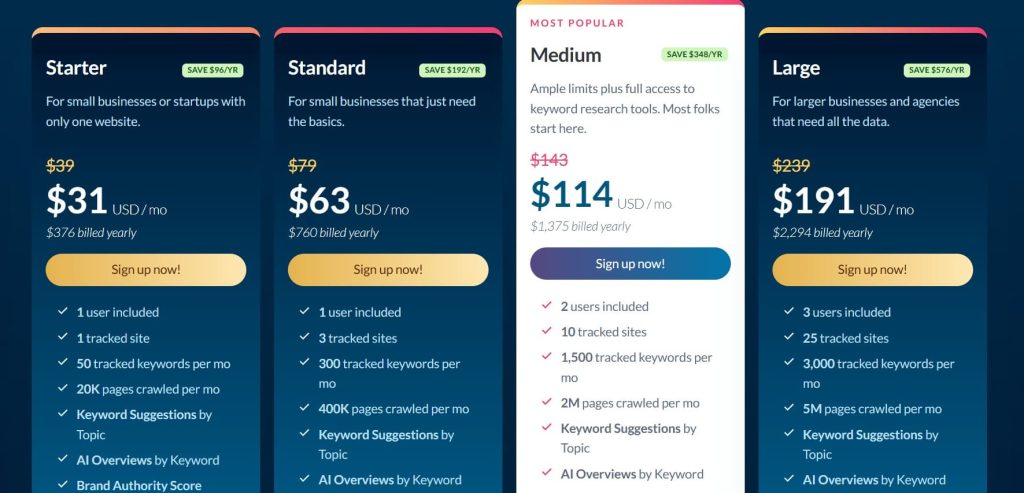
- Starter: $31/month
- Standard: $63/month
- Medium: $114/month
- Large: $191/month
Moz Pro Reviews
- G2: 4.3/5 (605+ reviews)
- Capterra: 4.5/5 (349+ reviews)
Users appreciate its strong Domain Authority metrics and extensive learning materials. The trade-off is a smaller backlink index and pricing that feels high for what’s included. Overall, it’s a smart fit for agencies focused on DA and local SEO, but less suited for backlink-heavy workflows.
6. Serpstat – Best for International SEO Campaigns
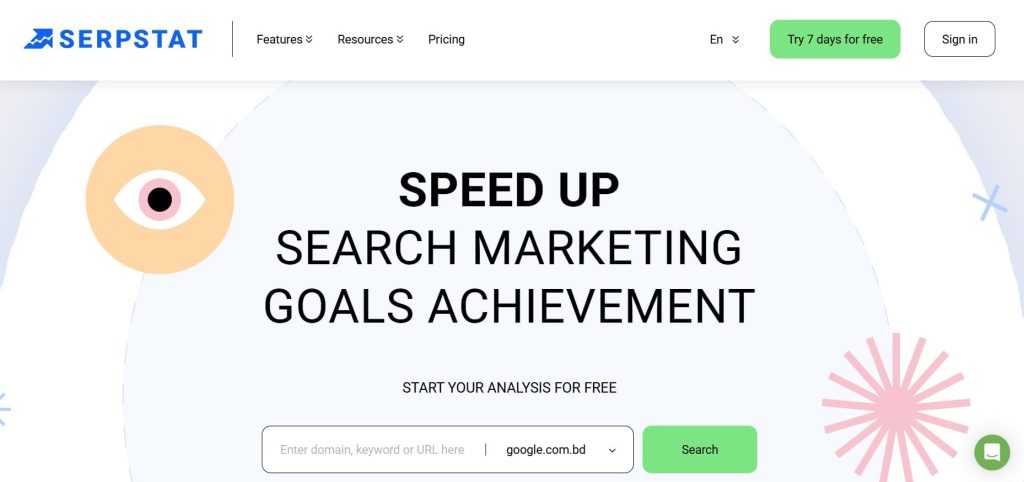
Best For: SEO professionals managing campaigns across multiple countries and languages who need affordable international data.
How I Use It: We use Serpstat at OLW for clients with international presence. The keyword database covers 230+ countries and the bulk analysis tools help us process large datasets quickly.
Serpstat launched in 2013 and positioned itself as an affordable all-in-one SEO platform with strong international coverage. It’s grown into a solid tool for agencies and in-house teams working across borders.
What separates Serpstat from other tools is the breadth of international data at a reasonable price. You get keyword research, rank tracking, and competitor analysis for countries that other tools ignore or charge premium prices to access.
This tool makes sense for agencies with international clients, eCommerce businesses selling in multiple markets, and SEO teams that need to track rankings across many regions.
The interface is functional but not as polished as Semrush or Ahrefs. There’s a learning curve, but nothing unreasonable.
Serpstat Key Features
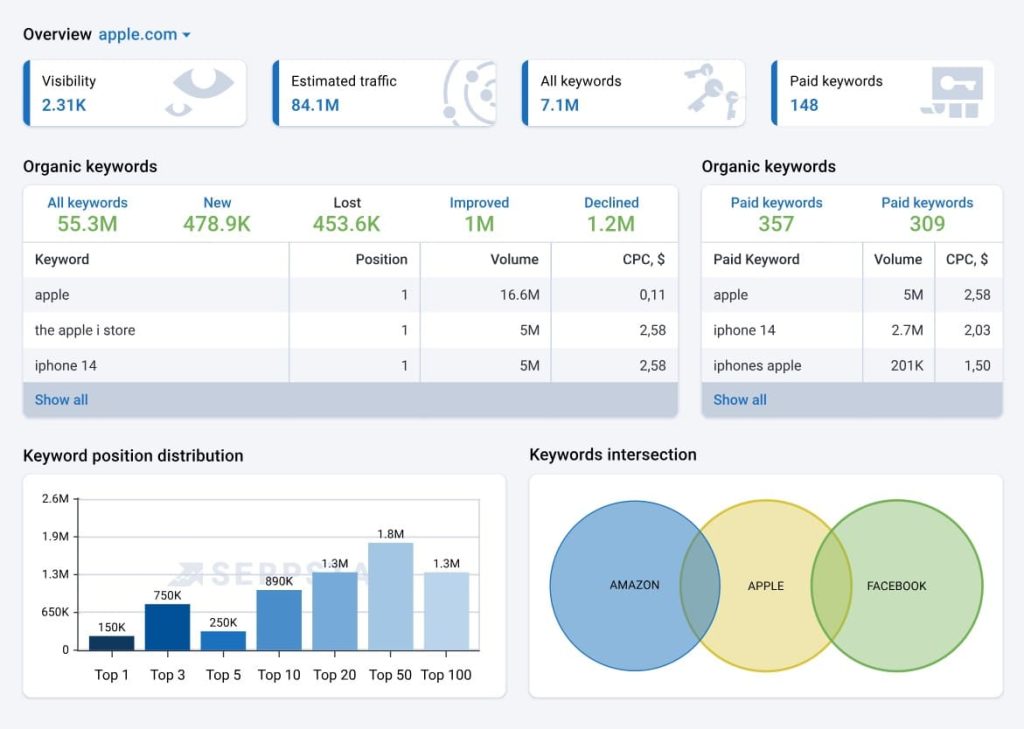
- Keyword database covering 230+ countries: Research keywords with local search volumes across nearly every market globally. I’ve used this for clients in Australia, UK, Canada, and smaller markets like New Zealand and Ireland with consistent coverage.
- Bulk keyword analysis tools: Upload hundreds or thousands of keywords and get search volume, competition, and CPC data at once. Saves massive time when processing large keyword lists from client sites or content audits.
- Missing keywords report: Shows keywords competitors rank for that you don’t. One of the fastest ways to identify content gaps. I run this for every new client during competitive analysis.
- Rank tracking across multiple regions: Monitor rankings in different countries and cities simultaneously. Essential for international campaigns where you need to track London vs Manchester or Toronto vs Vancouver.
- Batch analysis for domains: Compare multiple domains at once for traffic estimates, keywords, and visibility. Helpful when analyzing a competitive landscape with 10+ competitors.
- Tree view for site structure: Visualize your site’s structure and see which sections perform best. Makes it easier to identify content silos and architectural issues affecting crawlability.
Serpstat Pros
- International coverage beats most competitors: For clients in non-US markets, Serpstat often has better keyword data than more expensive tools. The 230+ country database is genuinely comprehensive.
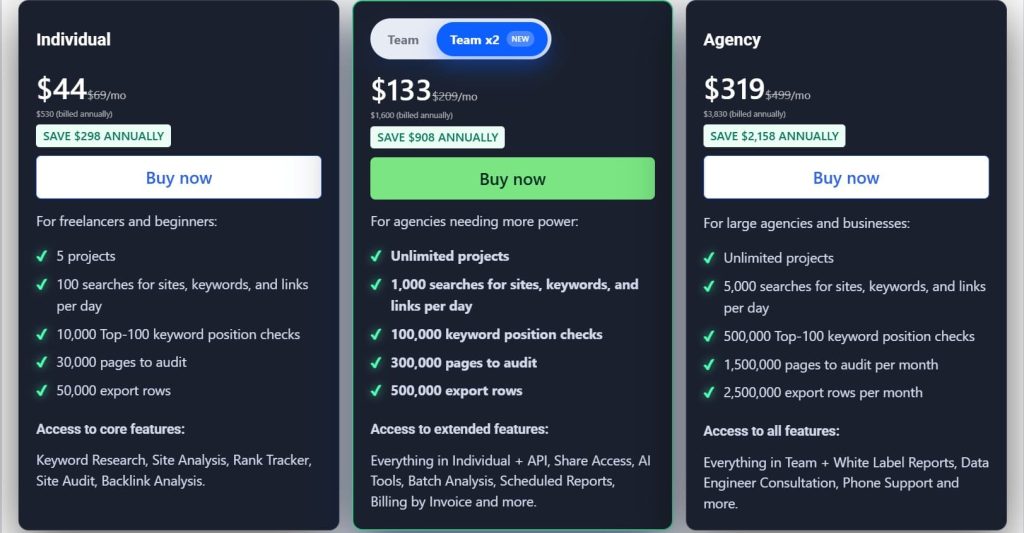
- Pricing is very competitive: Starting at $133/month makes this accessible for smaller agencies and consultants. You get a lot of functionality for significantly less than Semrush or Ahrefs.
- Bulk analysis saves hours on large projects: When processing 5,000+ keywords or comparing dozens of competitor domains, Serpstat’s bulk tools are faster than running individual queries. Essential for enterprise-level work.
- Missing keywords feature identifies opportunities fast: Instead of manually comparing competitor rankings, this report shows gaps instantly. It’s become one of my go-to starting points for content strategy.
- API access on all plans: Even the entry-level plan includes API access. If you’re building custom dashboards or integrating with other tools, this flexibility is valuable.
- Team collaboration features included: Multiple users, shared projects, and permission controls without jumping to expensive enterprise plans. Good for growing agencies.
Serpstat Cons
- Interface is less intuitive than competitors: Navigation isn’t always logical. Features are sometimes buried in unexpected places. New team members take longer to learn Serpstat compared to Semrush or Ahrefs.
- The backlink database is smaller: Like most Ahrefs alternatives, the backlink index doesn’t match Ahrefs’ coverage. Fine for monitoring your own links, limited for comprehensive competitive backlink analysis.
- Data accuracy varies by market: Core markets like US, UK, and major European countries have solid data. Smaller markets sometimes show questionable search volumes. Always cross-reference with Search Console.
- Report limits on cheaper plans: The entry plan caps how many reports you can generate daily. If you’re doing heavy research or managing multiple clients, you’ll hit limits.
Serpstat Pricing
- Individual: $44/month
- Team: $133/month
- Agency: $319/month
Serpstat Reviews
- G2: 4.6 out of 5 stars (463+ reviews)
- Capterra: 4.7 out of 5 stars (170+ reviews)
Users praise the international coverage and bulk analysis features. Common complaints focus on interface usability and inconsistent customer support. The consensus: best value for international SEO work, especially if you’re managing campaigns in multiple countries.
7. SpyFu – Best for Competitor PPC Research
Best For: PPC specialists and SEO professionals who need historical competitor data for both paid and organic search.
How I Use It: I use SpyFu when analyzing competitors’ paid search strategies. Seeing years of historical ad copy, budgets, and keyword testing gives insights you can’t get anywhere else.
SpyFu launched in 2006 with a focus on competitive intelligence for paid search. They’ve expanded to include SEO features but their strength remains in PPC and historical data that goes back over 15 years.
What separates SpyFu from other tools is the time machine. You can see exactly what keywords competitors bid on, what ad copy they tested, and how their strategy evolved over years. No other tool provides this level of historical PPC data.
This tool makes sense for PPC agencies, businesses running significant paid search campaigns, and SEO professionals who want to understand what’s worked for competitors historically.
The interface is straightforward but dated. It works efficiently once you know where things are.
SpyFu Key Features
- Historical PPC data going back 15+ years: See every keyword a competitor has bid on, every ad variation they’ve tested, and how their budget has changed over time. I’ve used this to understand seasonal PPC strategies and identify what actually worked long-term.
- Ad copy library with performance estimates: View thousands of competitor ad variations with estimated impressions and click-through rates. Useful for finding proven ad angles before writing your own campaigns.
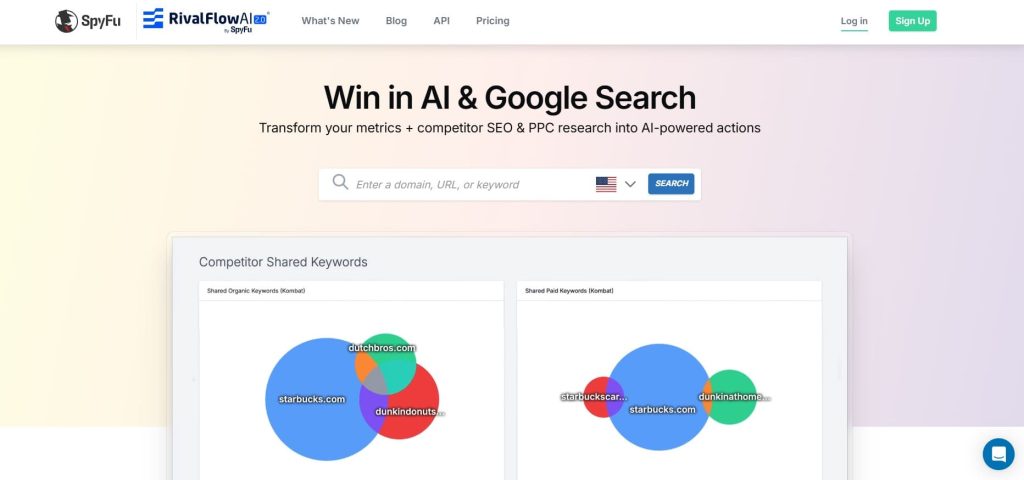
- Keyword overlap tool: Compare your keyword profile to multiple competitors simultaneously. Shows where you’re competing, where they have advantages, and opportunities you’re missing.
- SEO and PPC combat reports: Visual representation of your competitive landscape showing who you’re competing against for organic and paid rankings. Makes it easy to identify your real competitors.
- Backlink outreach recommendations: Find sites linking to competitors but not to you. The tool prioritizes opportunities and provides contact information for outreach.
- Rank tracking with branded and organic split: Monitor rankings with the ability to filter out branded searches. Gives a clearer picture of your organic performance without branded terms inflating numbers.
SpyFu Pros
- Historical data is genuinely unique: No other tool shows 15+ years of competitor PPC history. When launching new campaigns, seeing what competitors tested and kept tells you what actually converts. Saved us thousands in testing budgets.
- PPC competitive intelligence is unmatched: For paid search campaigns, SpyFu provides more actionable insights than Google Ads alone. You see competitor budgets, ad copy that worked, and keyword strategies before committing your own budget.
- Kombat reports simplify competitive analysis: Instead of analyzing competitors one by one, kombat shows your entire competitive landscape visually. Makes it fast to identify threats and opportunities.
- Downloadable reports and data exports: Unlike some tools that lock data behind their interface, SpyFu lets you export everything. Essential for creating custom reports or importing data into other systems.
- API access for custom integrations: Pull SpyFu data into your own dashboards or combine it with other data sources. We’ve built client dashboards that merge SpyFu competitive data with actual campaign performance.
SpyFu Cons
- SEO features lag behind dedicated SEO tools: The organic search features work but they’re not as deep as Ahrefs or Semrush. If SEO is your primary focus, SpyFu alone won’t cut it.
- Data accuracy for smaller advertisers is questionable: SpyFu’s estimates are reliable for major advertisers but less accurate for businesses with smaller budgets. Treat estimates as directional for smaller competitors.
- Backlink database is limited: The backlink checker exists but it’s not competitive with Ahrefs or even Moz. Fine for basic link prospecting, inadequate for comprehensive link analysis.
- Interface hasn’t evolved much: The platform works but feels dated compared to modern tools. Small usability issues add friction, especially when training new team members.
- Limited international coverage: Data is strongest for the US market. Other English-speaking countries have decent coverage, but non-English markets are weak.
SpyFu Pricing
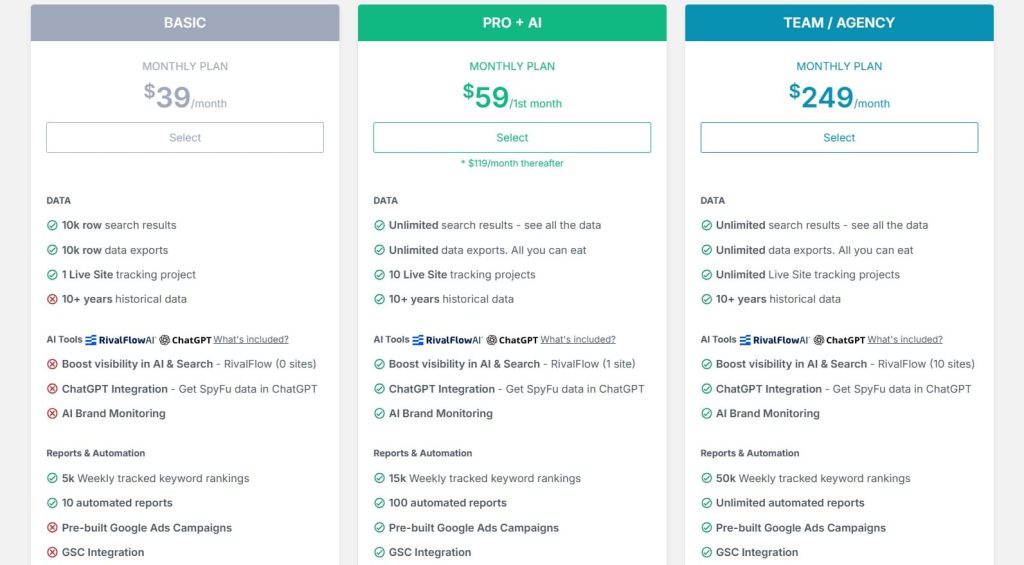
- Basic: $39/month
- Pro+AI: $59/1st month; $119/month thereafter
- Team/Agency: $249/month
SpyFu Reviews
- G2: 4.6 out of 5 stars (516+ reviews)
- Capterra: 4.5 out of 5 stars (144+ reviews)
Customers highlight the value of its historical PPC metrics and competitive research strengths. Still, many note the clunky interface and minimal SEO depth. Conclusion: indispensable for PPC analysts, but not ideal for SEO-first workflows.
What are the Best Ahrefs Alternatives for You?
Not sure which Ahrefs alternative fits your needs? Here’s a quick breakdown by common use cases, based on hands-on experience with all these tools across client projects.
- Best for beginners: Mangools
If you’re new to SEO or run a blog/small business, Mangools stands out with its clean, intuitive interface and spot-on keyword difficulty scores. Tools like KWFinder make research feel straightforward and enjoyable. No overwhelming dashboards.
- Best for agencies: SE Ranking
Agencies managing multiple clients love SE Ranking’s professional white-label reports, customizable branding, and seamless client deliverables. It handles rank tracking, audits, and competitor analysis at a fraction of premium prices, with excellent support and scalability.
- Best budget choice: Ubersuggest
On tight budgets, Ubersuggest is unbeatable, starting low with lifetime deals available, it covers basics like keyword ideas, site audits, and rank tracking.
- Best AI-powered workflow: Semrush
In 2025, Semrush leads with advanced AI features like the AI Visibility Toolkit (tracking brand presence in ChatGPT, Perplexity, and Google AI Overviews), real-time content optimization, and prompt-based research.
- Best all-rounder: Semrush
For a complete platform that rivals (and often exceeds) Ahrefs in breadth, Semrush is the top pick. It excels in keyword magic, position tracking across markets, content tools, advertising research, and massive databases, plus strong backlink and technical audit capabilities.