Finding broken links, crawl errors, and indexing issues on your site shouldn’t feel like detective work for SEO teams.
But without the right SEO audit tool, that’s exactly what it becomes — hours of manual checks, scattered data, and no clear path forward SEO content optimization, competitor analysis, or informed keyword research.
I’ve run technical audits on hundreds of sites at OneLittleWeb, from small startups to enterprise SaaS platforms.
Through years of campaign work across different industries and markets, I’ve learned which audit tools actually uncover the issues that matter — and which ones just generate noise.
When we took on this B2C brand campaign, one of our first steps was running a deep technical audit. The tool we used flagged critical schema markup errors and mobile usability issues that were silently killing their conversion potential. Fixing those foundational problems set the stage for everything else we built.
In this guide, I’m breaking down the 13 best SEO audit tools I rely on in 2026. You’ll see which platforms deliver the most comprehensive crawls, which are best for non-technical users, and which offer the best value whether you’re working solo or managing client sites at scale.
Here’s what I evaluated each tool on:
- Crawl depth and technical accuracy
- Report clarity and usability
- Pricing structure (free vs. paid tiers)
- Integration with other SEO tools
- Quality of actionable recommendations
Let’s get into it.
What is an SEO Audit Tool?
An SEO audit tool is software that crawls your website to identify technical issues, on-page SEO problems, and opportunities for improvement. It scans your site the way search engines do.
It checks for broken links, missing meta tags, slow page speeds, crawl errors, indexing issues, and more, while generating data you can use for ongoing SEO reporting.
These tools are essential for anyone managing a website, whether you’re an in-house marketer, agency SEO, or site owner.
Many of the best SEO tools now combine technical auditing with performance tracking, competitor insights, and workflow features that support long-term optimization.
Without an audit tool, you’re essentially flying blind. You might be creating great content and building links, but if your site has technical issues like blocked pages, broken redirects, or poor mobile performance, you’re leaving rankings and traffic on the table.
The right SEO audit tool turns hours of manual checking into a 10-minute scan with a prioritized action plan. That’s why every serious SEO strategy starts with a comprehensive technical audit.
What to Look for in the Best SEO Audit Tool
Here’s what separates a mediocre audit tool from one that actually moves the needle:
Crawl Depth and Accuracy
The tool should crawl your entire site architecture — not just surface-level pages. Look for platforms that can handle JavaScript rendering, detect redirect chains, identify orphaned pages, and catch canonicalization issues that lighter tools miss.
Technical SEO Coverage
A solid audit tool needs to check Core Web Vitals, structured data validation, hreflang implementation, XML sitemap errors, robots.txt conflicts, and mobile usability. The more technical ground it covers in one scan, the less you’ll need to patch together from multiple tools.
Report Clarity and Prioritization
Raw data dumps aren’t helpful. The best tools categorize issues by severity (critical, warning, notice) and explain the SEO impact of each problem. You should be able to hand the report to a developer or client and have them understand what needs fixing first.
Scheduling and Monitoring
One-time audits are useful, but ongoing monitoring is better. Look for tools that let you schedule automatic crawls weekly or monthly so you catch new issues before they hurt rankings. Alert notifications for critical errors are a major plus.
Integrations with Your SEO Stack
The tool should integrate with Google Search Console, Google Analytics, and other platforms you’re already using. Being able to cross-reference crawl data with actual search performance and traffic patterns gives you much better context for prioritization.
Pricing and Scalability
Consider whether the tool charges per site, per crawl, or offers unlimited audits. If you’re managing multiple clients or large sites with thousands of pages, you need a plan that scales without breaking your budget. Some tools cap crawl limits at 500 or 1,000 pages on lower tiers.
API Access and White-Label Options
For agencies, API access lets you pull audit data into your own dashboards or client reports. White-label reporting capabilities mean you can brand the outputs as your own — critical if you’re delivering these audits as a service.
How I Selected the Best SEO Audit Tools
I tested 23 different SEO audit tools over the past few years — some during client onboarding, others while troubleshooting ranking drops or indexing issues. Not all of them made this list.
I’ve personally used these tools to diagnose technical SEO problems across hundreds of campaigns at OneLittleWeb — everything from ecommerce sites with crawl budget issues to SaaS platforms struggling with JavaScript rendering and indexation.
I know which tools catch the problems that actually matter and which ones just generate bloated reports full of low-priority warnings.
Here’s what I measured during testing:
Crawl Completeness
Does the tool accurately map your site architecture, or does it miss pages behind JavaScript, faceted navigation, or AJAX loading? I compared crawl results against Google Search Console’s index coverage to see what each tool caught or missed.
Issue Detection Accuracy
I looked for tools that correctly identify canonical tag conflicts, redirect chains, orphaned pages, broken structured data, and duplicate content — not just surface-level meta tag issues.
Core Web Vitals and Performance Auditing
With Google’s page experience signals now a ranking factor, I prioritized tools that flag LCP, CLS, and FID issues with actionable recommendations, not just scores.
Reporting Quality
Can a non-technical client or developer actually understand the output? I tested how each tool prioritizes issues by severity and whether the explanations include clear next steps.
Real-World Usability
I evaluated setup time, crawl speed for large sites (10,000+ pages), scheduling capabilities, and whether the tool integrates with GSC, GA4, and our existing SEO stack.
The tools that made this list consistently delivered accurate crawls, surfaced critical technical issues first, and saved our team hours of manual auditing work.
Summary Table: 13 Best SEO Audit Tools
Here’s a quick comparison of the 13 best SEO audit tools I tested. Use this table to narrow down your options based on your budget, site size, and technical needs.
| Tool Name | Best For | Key Features | Starting Price | Our Notes |
| Screaming Frog | Deep technical audits on large sites | Unlimited crawls, JavaScript rendering, custom extraction, API access | $245/year | Industry standard for a reason — best crawl depth and customization |
| Semrush Site Audit | All-in-one SEO platform users | 140+ checks, Core Web Vitals, thematic reports, scheduled crawls | $165.17/month | Best if you’re already using Semrush for other SEO tasks |
| Ahrefs Site Audit | Agencies managing multiple sites | 100+ issues tracked, health score, integration with Ahrefs data | $129/month | Clean interface, excellent for client reporting |
| Sitebulb | Visual learners and agencies | Stunning visual reports, hints system, crawl comparison | $180/year | Best reporting visuals I’ve seen — clients love these |
| Lumar | Enterprise sites with complex architecture | Cloud-based, unlimited projects, advanced segmentation | Custom pricing | Overkill for small sites, perfect for enterprise |
| Google Search Console | Budget-conscious site owners | Free index coverage, Core Web Vitals, mobile usability | Free | Essential baseline — use alongside paid tools |
| Moz | Small agencies and consultants | Site crawl, page optimization, rank tracking included | $31/month | Decent all-arounder but crawl limits frustrate on larger sites |
| SE Ranking | Budget-focused agencies | White-label reports, on-page checker, competitor analysis | $52/month | Solid value for smaller agencies on tight budgets |
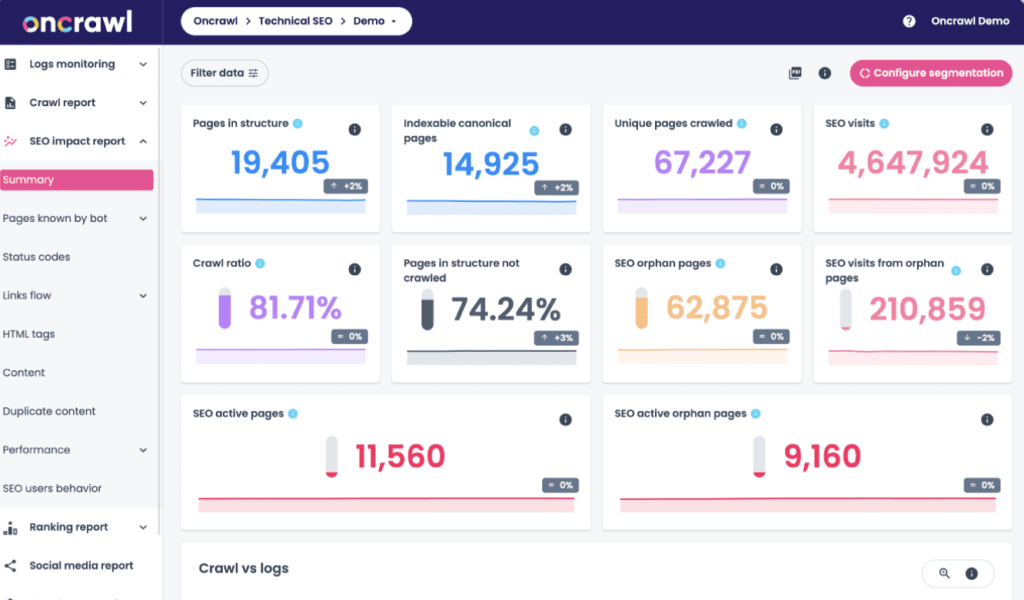
| Oncrawl | Technical SEO specialists | Log file analysis, data studio integration, predictive insights | Custom pricing | Best for log file analysis and advanced technical work |
| Raven Tools | Agencies needing client management | White-label reports, client portal, marketing reports | $39/month | More marketing-focused than purely technical SEO |
| Serpstat | International SEO campaigns | Multi-language support, rank tracking, site audit | $44/month | Good for international sites but crawl can be slow |
| WooRank | Quick audits and client demos | Instant reports, marketing checklist, PDF exports | $89.99/month | Great for fast client-facing reports, not deep technical work |
| Siteliner | Finding duplicate content fast | Free duplicate content checker, broken link finder | Free | Single-purpose but does it well — useful supplementary tool |
13 Best SEO Audit Tools in 2026 (Free + Paid)
- Screaming Frog — best for deep technical audits
- Semrush Site Audit — best for all-in-one SEO platforms
- Ahrefs Site Audit — best for agency client reporting
- Sitebulb — best for visual audit reports
- Lumar — best for enterprise-level site audits
- Google Search Console — best free baseline audit tool
- Moz — best for small agency workflows
- SE Ranking — best for budget-conscious agencies
- Oncrawl — best for log file analysis
- Raven Tools — best for client management platforms
- Serpstat — best for international SEO audits
- Woorank — best for quick client-facing reports
- Siteliner — best for duplicate content checks
Here’s what each tool does well, where it falls short, and which situations actually call for it.
1. Screaming Frog – Best for Deep Technical Audits
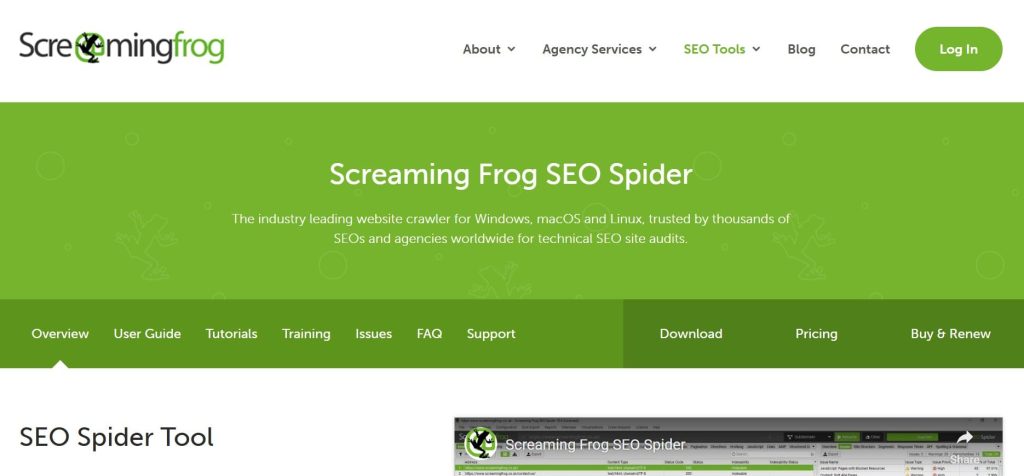
Best For: SEO professionals and agencies who need the most comprehensive technical crawl data available, especially for large or complex sites.
How I Use It: I fire up Screaming Frog whenever we onboard a new client at OneLittleWeb. It’s my go-to for deep technical audits—uncovering redirect chains, identifying orphaned pages, and spotting canonicalization issues that lighter tools miss entirely.
Quick Overview
Screaming Frog SEO Spider is a desktop crawling tool founded in 2010 that’s become the industry standard for technical SEO audits. Unlike cloud-based tools with crawl limits, Screaming Frog crawls your entire site from your local machine—whether that’s 500 pages or 500,000.
What sets it apart is the sheer depth of data extraction and customization. You can configure custom extraction using XPath or regex, integrate it with Google Analytics and Search Console APIs, and export nearly any data point you need.
It renders JavaScript, follows redirect chains, validates structured data, and generates detailed XML sitemaps.
This isn’t a beginner-friendly tool with pretty dashboards. It’s built for SEO professionals who understand site architecture and need granular control over crawl settings.
If you’re managing enterprise sites, migrating domains, or diagnosing complex technical issues, Screaming Frog is irreplaceable. For casual users who want automated reports, it’s overkill.
Screaming Frog Key Features
- Unlimited Desktop Crawling: The paid version removes all crawl limits. We’ve run audits on sites with 100,000+ pages without throttling or usage caps. You control crawl speed, user agent, and rendering mode—crucial when auditing sites with aggressive rate limiting or JavaScript-heavy frameworks like React or Angular.
- Custom Extraction and Data Mining: Use XPath, CSS Path, or regex to extract any element from pages during crawls. We’ve pulled custom meta fields, schema markup, pricing data, and even competitor analysis points straight from crawl results. This turns Screaming Frog into a data extraction powerhouse beyond basic SEO auditing.
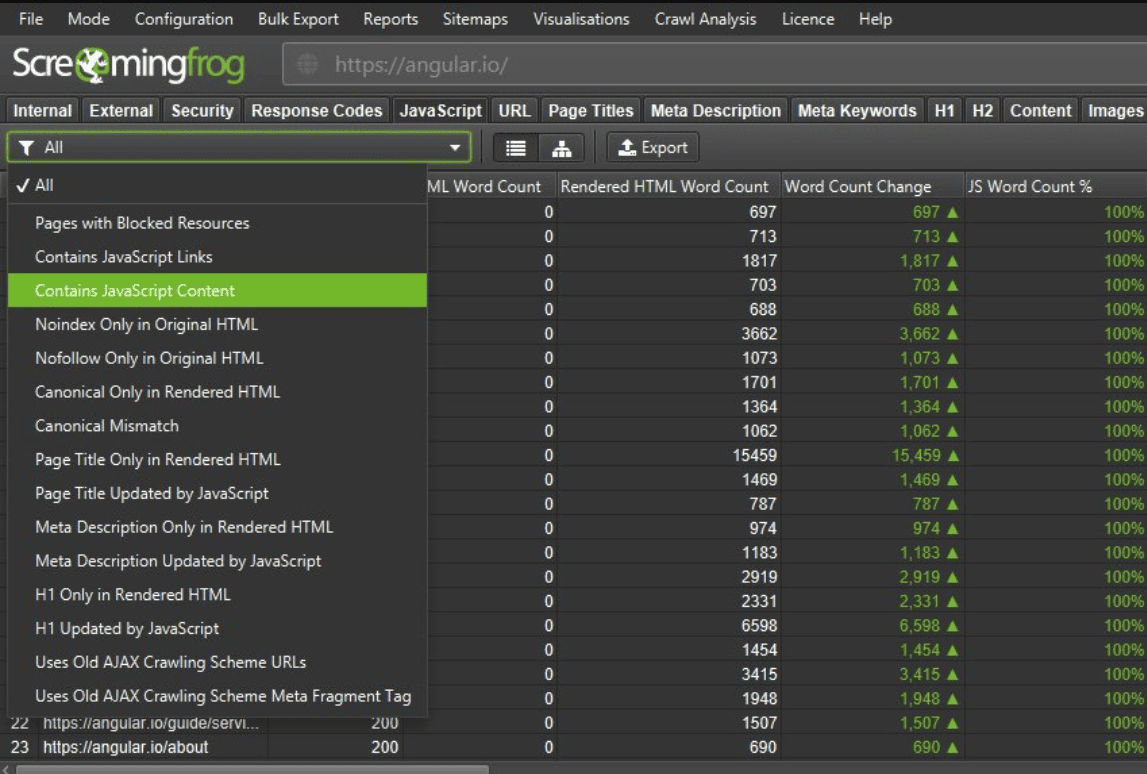
- JavaScript Rendering: Built-in Chromium rendering means the tool crawls sites the way Google actually sees them. This catches content hidden behind JavaScript that traditional crawlers miss—critical for modern frameworks. You can toggle between text-only and rendered crawls to compare what’s visible to different crawlers.
- API Integration: Connect directly to Google Analytics, Search Console, and PageSpeed Insights APIs to pull performance metrics, traffic data, and index coverage into your crawl results. This context helps prioritize fixes based on actual traffic impact rather than just technical severity.
- Redirect Chain Mapping: Identifies multi-hop redirect chains (301 → 302 → 200) that waste crawl budget and slow page speed. We’ve found client sites with 5+ redirect hops that were killing load times. The tool maps the entire chain so you can flatten redirects to direct paths.
- Structured Data Validation: Crawls and validates Schema.org markup against Google’s specifications. It flags missing required properties, deprecated types, and syntax errors in JSON-LD, Microdata, and RDFa formats—saving hours of manual validation in Google’s Rich Results Test.
Screaming Frog Pros
- Unlimited crawl capacity eliminates site size restrictions. Unlike cloud tools that cap crawls at 10,000 or 20,000 URLs, Screaming Frog handles massive sites without additional fees. We’ve audited ecommerce platforms with 80,000+ product pages and enterprise sites with complex subdomain structures—all in a single crawl session.
- Custom extraction turns it into a data mining tool. Beyond standard SEO checks, we’ve used XPath extraction to pull competitor pricing, scrape meta fields for content audits, and gather custom taxonomy data for site migrations. This flexibility makes it useful far beyond basic technical audits.
- JavaScript rendering catches issues other crawlers miss. Modern sites built on React, Vue, or Angular hide content from traditional crawlers. Screaming Frog’s Chromium rendering reveals what Google actually indexes versus what’s in the raw HTML—essential for diagnosing indexation problems on JavaScript-heavy sites.
- API integrations add traffic and performance context. Pulling Google Analytics data into crawl results lets you see which broken pages actually get traffic versus which are just technical noise. PageSpeed Insights integration flags slow pages that matter for user experience and Core Web Vitals.
- Scheduling and automation via command line. You can automate regular crawls using command-line parameters and scripts. We’ve set up weekly crawls for large clients that run overnight and export results automatically—no manual intervention needed.
Screaming Frog Cons
- Steep learning curve for non-technical users. The interface is dense with tabs, filters, and configuration options. New users often feel overwhelmed by the data volume and don’t know where to start. If you’re looking for automated reports with clear priorities, this isn’t it.
- Resource-intensive on large crawls. Crawling 50,000+ pages with JavaScript rendering enabled can max out CPU and RAM. We’ve had crawls stall on older machines or require overnight runs. Cloud-based tools don’t have this limitation since processing happens on their servers.
- No built-in reporting or client-friendly outputs. The tool exports raw data in spreadsheets—you’ll need to create your own reports or use templates. For agencies billing clients for audit reports, you’re building dashboards from scratch or exporting to other tools.
- No cloud-based collaboration. Each license is tied to a single machine. If multiple team members need access, you’re buying separate licenses or passing files around. Cloud tools let teams view and share crawl data instantly.
Screaming Frog Pricing
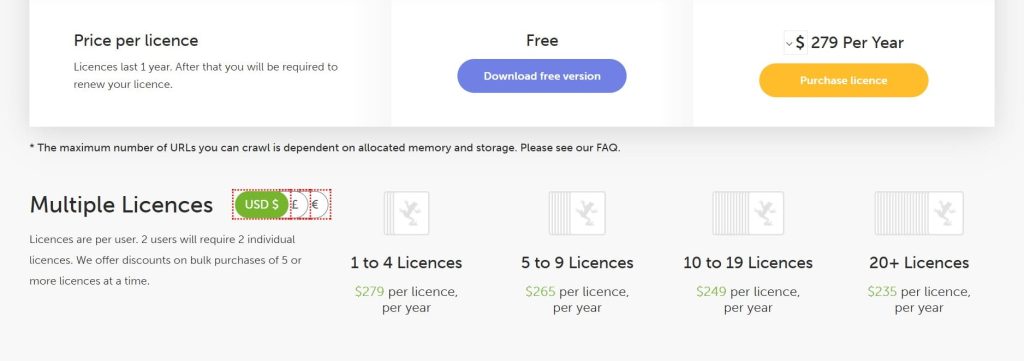
- Free version available
- Paid: $245/year
Screaming Frog Reviews
- G2: 4.7 out of 5 stars (184+ reviews)
- Capterra: 4.9 out of 5 stars (132+ reviews)
Users consistently praise the crawl depth and data customization capabilities. Common sentiment: “Screaming Frog is the Swiss Army knife of technical SEO—nothing else comes close for granular crawl control, but expect a learning curve before you’re proficient.”
2. Semrush Site Audit – Best for All-in-One SEO Platforms
Best For: Marketers and agencies already using Semrush who want seamless site auditing integrated with their keyword research, backlink analysis, and rank tracking workflows.
How I Use It: We use Semrush Site Audit for clients who are already subscribed to the platform. It’s convenient to run technical audits, check Core Web Vitals, and pull reports without switching between tools.
Quick Overview
Semrush Site Audit is part of the Semrush all-in-one SEO platform, launched in 2008 and now serving over 10 million users globally. The Site Audit tool performs 140+ automated checks covering technical SEO, on-page optimization, site performance, and Core Web Vitals.
What makes it stand out is the integration with Semrush’s broader SEO toolkit. You can cross-reference audit findings with keyword rankings, backlink profiles, and traffic analytics—all in one place.
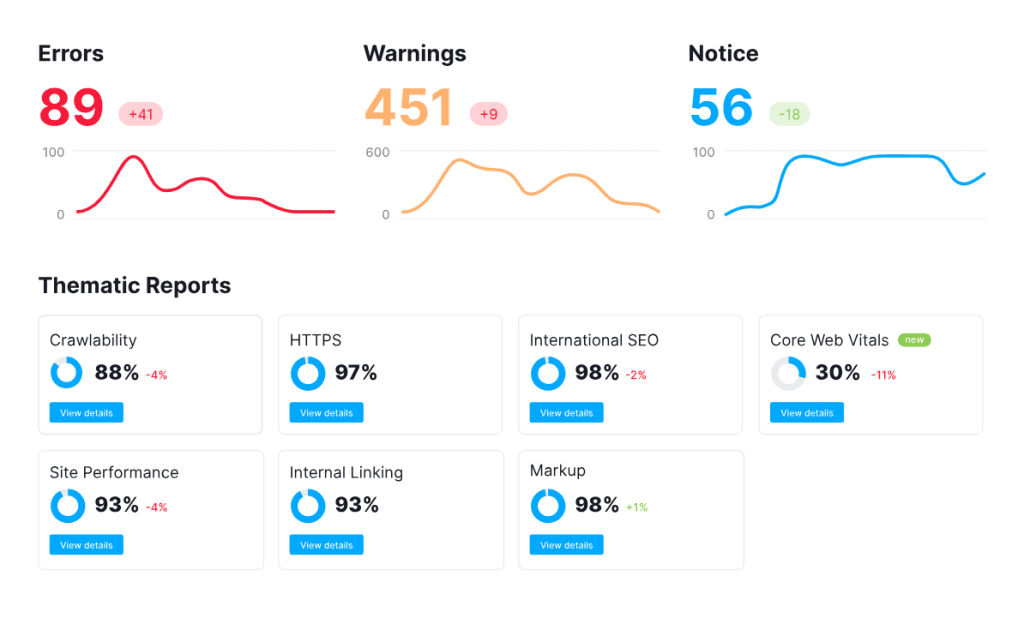
The tool generates thematic reports (HTTPS, Core Web Vitals, crawlability, site performance) that make it easy to segment issues by category.
It’s cloud-based with scheduled crawls, so you can monitor site health over time and get alerts when new critical issues appear.
The interface is polished and beginner-friendly compared to Screaming Frog, making it accessible for less technical team members or clients who want to view audit dashboards directly.
This is best for teams already invested in the Semrush ecosystem. If you only need site auditing and don’t use Semrush’s other features, you’re paying for functionality you won’t touch.
Semrush Site Audit Key Features
- 140+ Automated Checks Across Technical SEO: The tool scans for broken links, duplicate content, missing meta tags, HTTPS issues, hreflang errors, canonical problems, crawlability blocks, and more. Each issue is categorized by severity (errors, warnings, notices) so you know what to prioritize first.
- Core Web Vitals Monitoring: Tracks LCP (Largest Contentful Paint), CLS (Cumulative Layout Shift), and FID (First Input Delay) directly in the audit dashboard. You see which pages fail Google’s thresholds and get specific recommendations for improving load times and user experience metrics.
- Thematic Reports for Focused Analysis: Instead of one massive list of issues, Semrush organizes findings into thematic reports—HTTPS implementation, international SEO (hreflang), site performance, crawlability, and markup validation. This makes it easier to delegate specific fixes to developers or content teams.
- Integration with Semrush Position Tracking: You can overlay audit data with keyword ranking changes to see if technical issues correlate with traffic drops. For example, if crawlability errors spike and rankings fall simultaneously, you have a clear diagnosis and fix path.
- Scheduled Crawls and Email Alerts: Set up weekly or monthly automated crawls and receive email notifications when new critical errors appear. We’ve caught indexation issues and server errors this way before they had a major traffic impact—essential for proactive site maintenance.
- Site Health Score and Progress Tracking: The tool calculates an overall site health percentage based on issue severity and volume. You can track this score over time to demonstrate SEO improvements to clients or stakeholders—useful for monthly reporting and proving ROI.
Semrush Site Audit Pros
- Seamless integration with Semrush’s full SEO suite. If you’re already using Semrush for keyword research, rank tracking, or backlink audits, adding site auditing doesn’t require learning a new tool. Everything lives in one dashboard, which streamlines workflows and reduces tool fatigue.
- Thematic reports make delegation easier. Instead of handing a developer a 5,000-row spreadsheet, you can share the “Crawlability” or “HTTPS” report with specific issues and fixes. This segmentation has saved us hours of back-and-forth explaining what needs attention.
- Core Web Vitals tracking is built-in. Unlike older audit tools that ignore page experience signals, Semrush flags LCP, CLS, and FID issues with actionable recommendations. This matters now that Google uses these metrics as ranking factors—you’re not auditing in a vacuum.
- Scheduled crawls catch issues before they hurt rankings. Automatic weekly crawls with email alerts mean we’ve spotted server errors, broken redirects, and noindex accidents within days instead of months. Proactive monitoring beats reactive firefighting.
- Client-friendly dashboards for reporting. The visual health score and categorized issues make it easy to walk clients through audit findings without overwhelming them with technical jargon. We’ve used these dashboards in pitch meetings and monthly reviews with great success.
- Unlimited projects on higher plans. Unlike tools that charge per site, Semrush’s Business and Enterprise plans allow unlimited projects. For agencies managing 20+ client sites, this is a massive cost saver compared to per-site pricing models.
Semrush Site Audit Cons
- Crawl limits on lower-tier plans are restrictive. The Pro plan caps audits at 100,000 pages per month across all projects. For agencies with multiple large clients, you’ll hit this limit fast. Higher plans raise the cap, but you’re paying significantly more.
- Less granular than Screaming Frog for deep technical work. While Semrush covers the essentials well, it doesn’t offer custom extraction, advanced regex filtering, or the same level of crawl customization. For complex migrations or intricate technical diagnostics, we still reach for Screaming Frog.
- JavaScript rendering isn’t always perfect. We’ve had cases where Semrush missed content rendered by JavaScript that Google actually indexed. The crawl relies on their cloud infrastructure, which doesn’t always match how Googlebot processes modern frameworks.
- Report customization is limited compared to white-label tools. While you can export PDFs, you can’t fully customize branding or report layout the way tools like SE Ranking or Sitebulb allow. For agencies selling branded audit reports, this matters.
Semrush Site Audit Pricing
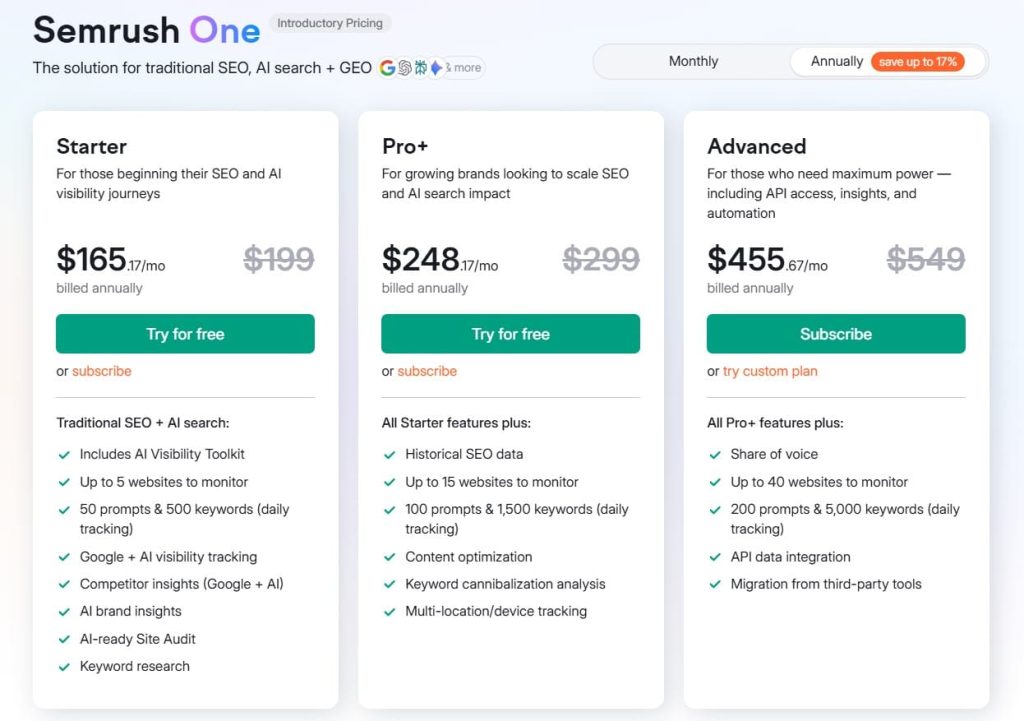
- 7-day free trial
- Starter: $165.17/month
- Pro+: $248.17/month
- Advanced: $455.67/month
Semrush Site Audit Reviews
- G2: 4.5 out of 5 stars (3,026+ reviews)
- Capterra: 4.6 out of 5 stars from (2,299+ reviews)
Users consistently praise the all-in-one convenience and thematic reporting. Common sentiment: “Semrush Site Audit is perfect if you’re already in the ecosystem—it’s not the deepest crawl tool, but the integration and automation make site monitoring effortless.”
3. Ahrefs Site Audit – Best for Agency Client Reporting
Best For: Agencies managing multiple client sites who need clean, easy-to-understand audit reports combined with Ahrefs’ powerful backlink and keyword data.
How I Use It: We run Ahrefs Site Audit for most of our retainer clients at OneLittleWeb. The health score gives us a quick monthly benchmark, and the integration with Ahrefs’ backlink and keyword tools means we can correlate technical issues with ranking drops or link losses in one place.
Quick Overview
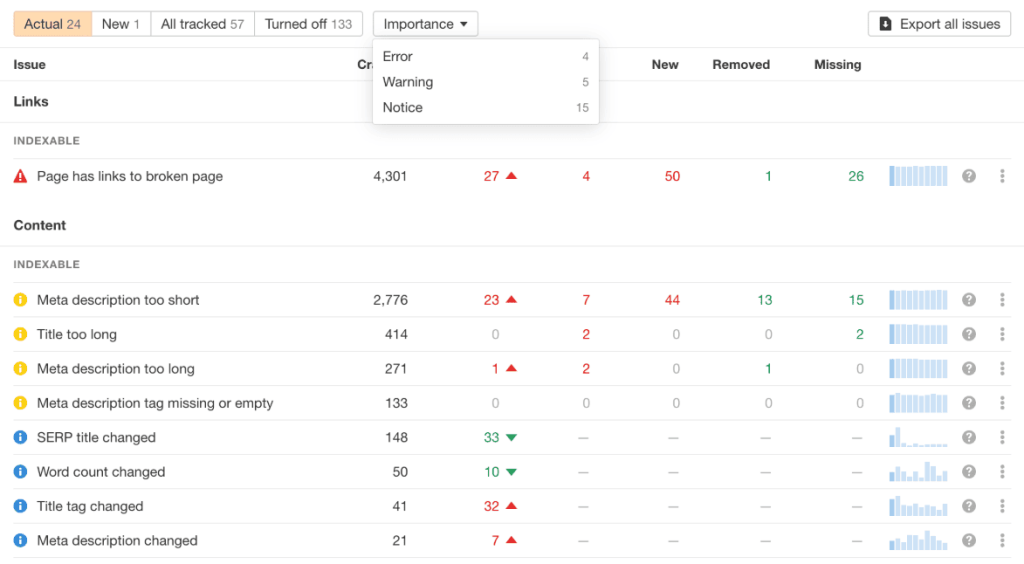
Ahrefs Site Audit is part of the Ahrefs SEO toolset, founded in 2010 and known primarily for its industry-leading backlink index. The Site Audit feature scans for 100+ technical and on-page issues, presenting findings in a clean, color-coded interface with an overall health score.
What sets Ahrefs apart is the UI clarity and client-friendly reporting. The health score (0-100) gives stakeholders an instant visual benchmark, and the issue prioritization makes it obvious what to fix first.
The tool integrates seamlessly with Ahrefs’ backlink analysis, organic keyword tracking, and content explorer—so you can diagnose whether traffic drops stem from technical issues, lost backlinks, or algorithm updates.
Crawls are cloud-based and can be scheduled to run weekly or monthly. You get email alerts when new critical issues appear, and historical health score tracking shows whether your technical SEO is improving or degrading over time.
This is ideal for agencies that value clean reporting and cross-referencing audit data with Ahrefs’ keyword and backlink tools. If you only need site auditing without the broader Ahrefs suite, you’re paying for unused features.
Ahrefs Site Audit Key Features
- 100+ Technical and On-Page Checks: Scans for broken links, redirect chains, duplicate content, missing or duplicate meta tags, slow-loading pages, orphaned pages, canonical issues, hreflang errors, and schema markup problems. Each issue includes an explanation and recommended fix.
- Health Score for Quick Benchmarking: Calculates an overall site health percentage (0-100) based on the ratio of healthy URLs to URLs with issues. This score is weighted by issue severity, so critical errors hurt the score more than minor warnings. Great for month-over-month client reporting.
- Integration with Ahrefs Backlink and Keyword Data: You can overlay audit findings with organic traffic, keyword rankings, and backlink profiles. If your health score drops and rankings fall simultaneously, you can pinpoint whether the cause is technical issues, lost backlinks, or content decay.
- Scheduled Crawls and Monitoring: Set up automatic weekly or monthly audits and receive email notifications when new errors appear. We’ve caught indexation blocks, server errors, and broken internal links this way before they caused significant traffic loss.
- Internal Link Opportunities Report: Identifies pages with low internal link counts and suggests which high-authority pages could link to them. This helps distribute PageRank more effectively and surface orphaned content that’s not being discovered by crawlers.
- External Links Report: Flags broken outbound links, nofollow/dofollow status, and pages linking to suspicious or irrelevant external domains. Useful for cleaning up spammy or outdated external references that hurt user experience.
Ahrefs Site Audit Pros
- A clean, intuitive interface makes reporting effortless. The color-coded health score and categorized issues are easy for non-technical clients to understand. We’ve walked clients through audit dashboards in 10 minutes without needing to explain technical jargon—something that’s much harder with raw Screaming Frog exports.
- Integration with Ahrefs’ backlink and keyword tools is unmatched. Being able to cross-reference technical issues with ranking drops, traffic loss, and backlink changes in one platform saves hours of manual correlation. If a site’s health score tanks and backlinks drop simultaneously, the diagnosis is obvious.
- Health score tracking shows improvement over time. Clients and stakeholders love seeing the health score climb from 60% to 85% over a few months. It’s a tangible metric that demonstrates ROI from technical SEO work—much more compelling than a list of fixed issues.
- Scheduled crawls with alerts catch problems early. Automatic monitoring means we’ve spotted critical errors like accidental noindex tags or server misconfigurations within days instead of waiting for the next manual audit. This proactive approach has saved clients from major traffic hits.
- Internal link suggestions improve site architecture. The tool flags orphaned pages and suggests which high-authority pages should link to them. We’ve used this to improve crawlability and PageRank distribution on large content sites where important pages weren’t getting discovered.
- Fast cloud-based crawls handle large sites efficiently. Unlike desktop tools that can stall on big sites, Ahrefs processes large crawls quickly on their infrastructure. We’ve audited 50,000+ page sites without performance issues or long wait times.
Ahrefs Site Audit Cons
- Crawl depth isn’t as granular as Screaming Frog. While Ahrefs covers the essentials well, it doesn’t offer custom extraction, advanced regex filtering, or the same level of crawl customization. For complex migrations or deep technical diagnostics, we supplement with Screaming Frog.
- JavaScript rendering can miss dynamically loaded content. We’ve had instances where Ahrefs didn’t fully render content loaded via AJAX or single-page applications, leading to incomplete audits on React or Vue-based sites. Screaming Frog’s Chromium rendering is more reliable for JavaScript-heavy sites.
- No white-label reporting for agencies. You can export PDFs, but you can’t fully customize branding or layout. For agencies selling branded audit reports as a deliverable, this is a limitation compared to tools like SE Ranking or Sitebulb.
- Issue explanations can be generic. While the tool flags problems, some explanations lack the depth needed for developers unfamiliar with SEO. We’ve had to supplement Ahrefs reports with additional context when handing fixes to dev teams.
Ahrefs Site Audit Pricing
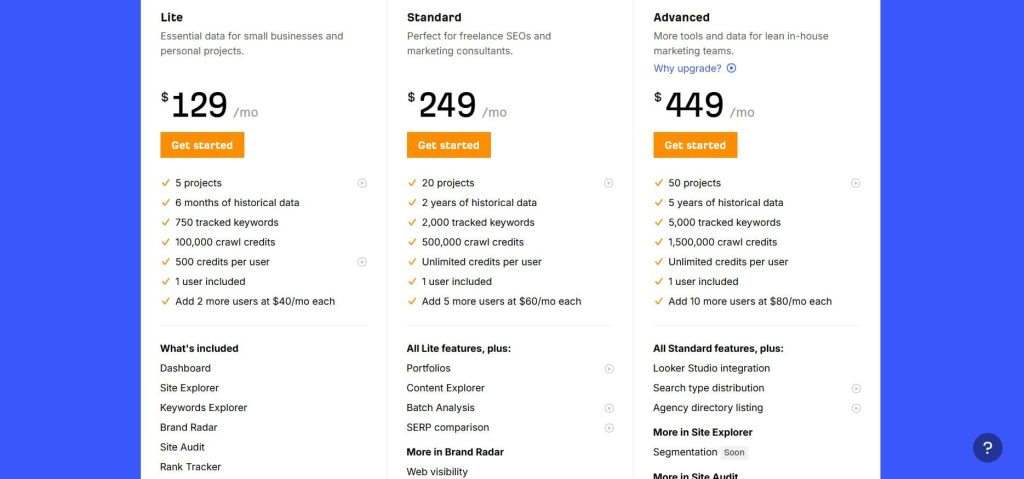
- Lite: $129/month
- Standard: $249/month
- Advanced: $449/month
- Enterprise: $1,499/month
Ahrefs Site Audit Reviews
- G2: 4.5 out of 5 stars (606+ reviews)
- Capterra: 4.7 out of 5 stars (577+ reviews)
Users consistently praise the clean interface and health score tracking. Common sentiment: “Ahrefs Site Audit makes technical SEO accessible—clients actually understand the reports, and the integration with backlink data is a game-changer for diagnosing ranking drops.”
4. Sitebulb – Best for Visual Audit Reports
Best For: Agencies and consultants who need stunning, client-ready visual reports that explain technical SEO issues without overwhelming non-technical stakeholders.
How I Use It: I use Sitebulb when I need to deliver audit reports that look professional and explain complex technical issues visually.
The interactive charts, crawl visualizations, and color-coded hints make it incredibly easy to walk clients through findings in presentations or pitch meetings.
Quick Overview
Sitebulb is a desktop SEO auditing tool launched in 2017 by former agency SEOs who were frustrated with existing audit tools’ poor reporting.
It’s built specifically to make technical SEO findings visual, understandable, and actionable—even for people without technical backgrounds.
What sets Sitebulb apart is the quality of its reports. Instead of raw data dumps or simple PDFs, Sitebulb generates interactive HTML reports with visualizations, crawl graphs, URL structure diagrams, and a “hints” system that explains every issue in plain English with recommended fixes.
The tool also includes audit comparisons, so you can crawl a site before and after changes to prove the impact of your work.
It’s a desktop application like Screaming Frog, but with a much friendlier learning curve and better out-of-the-box reporting.
Crawl settings are simplified with presets for different site types (ecommerce, news, corporate), making it accessible for junior team members while still offering advanced customization for technical users.
This is perfect for agencies that bill for audit reports as a deliverable or consultants who need to present findings to non-technical decision-makers. If you only need raw data for your own analysis and don’t care about reporting, other tools are cheaper.
Sitebulb Key Features
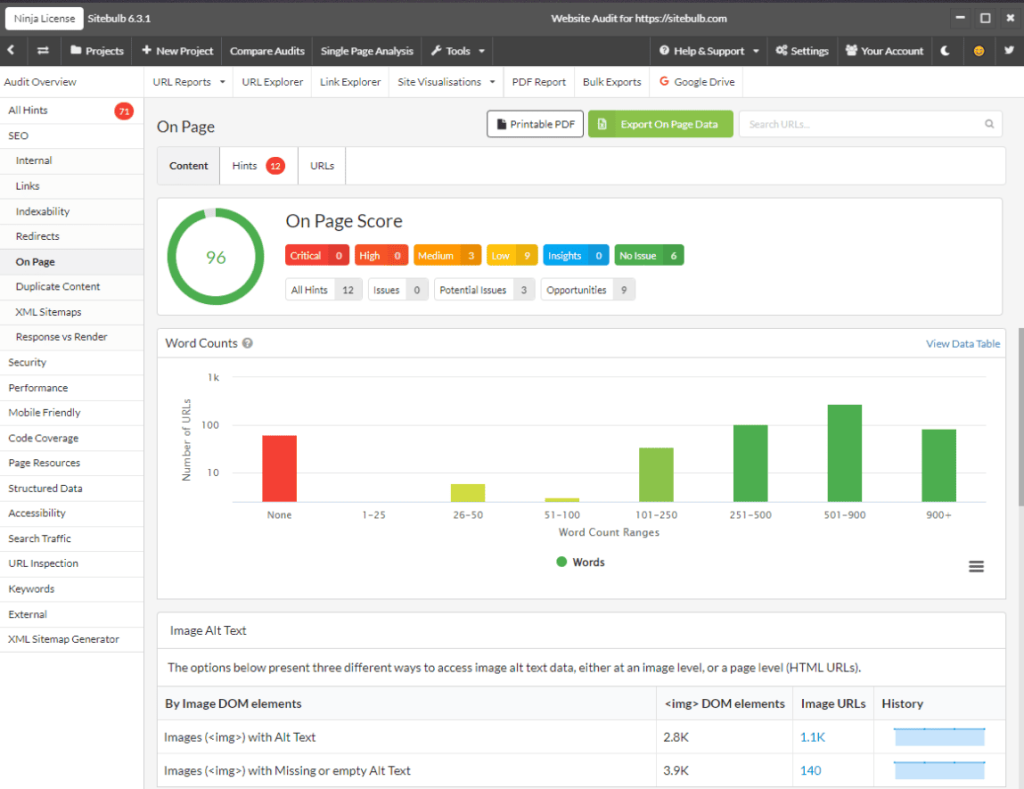
- Visual Crawl Reports with Interactive Charts: Generates beautiful HTML reports with interactive charts, graphs, and URL structure visualizations. You can click through issues, filter by severity, and drill into specific problem URLs—all within the report itself. Clients can explore findings on their own without needing to schedule a walkthrough.
- Hints System for Plain-English Explanations: Every issue flagged in the audit includes a “hint”—a detailed explanation of what the problem is, why it matters for SEO, and how to fix it. These hints are written for non-technical audiences, so you can hand reports directly to clients or developers without translating jargon.
- Audit Comparison for Before/After Analysis: Run two crawls at different points in time and Sitebulb will compare them side-by-side, highlighting what changed—new errors, resolved issues, health score shifts. This is invaluable for proving ROI after technical SEO work or diagnosing what broke after a site migration.
- URL Structure Visualization: Maps your site’s internal linking structure visually, showing how pages connect and where orphaned pages exist. You can see crawl depth, PageRank flow, and link equity distribution in a way that makes site architecture problems immediately obvious.
- Presets for Different Site Types: Includes crawl configuration presets optimized for ecommerce, news sites, corporate sites, and more. This saves time setting up crawls and ensures you’re checking the right things for each site type—useful for agencies handling diverse client industries.
- Chrome Rendering for JavaScript Sites: Built-in Chrome rendering crawls sites the way Google does, capturing content loaded dynamically via JavaScript. This ensures audits on React, Vue, or Angular sites don’t miss critical content or SEO elements.
Sitebulb Pros
- The best audit reports I’ve seen from any SEO tool. Sitebulb’s visual reports are polished enough to send directly to clients without additional formatting. The interactive charts, crawl visualizations, and plain-English hints make technical issues understandable for non-SEO stakeholders—this has closed deals for us in pitch meetings.
- The hint system eliminates the need to explain every issue. Instead of spending hours writing explanations for developers or clients, Sitebulb’s hints do the heavy lifting. Each issue includes context, SEO impact, and fix recommendations in language anyone can understand—saving us significant time on client communication.
- Audit comparison proves ROI and diagnoses problems. Being able to compare crawls before and after technical fixes shows exactly what improved and what didn’t. We’ve used this to demonstrate the impact of our work in monthly reports and to quickly identify what broke after a client’s dev team pushed changes.
- URL structure visualization makes site architecture tangible. Seeing internal linking and crawl depth visually helps clients understand why certain pages aren’t ranking or getting traffic. This has been especially useful for explaining why orphaned pages need better internal links or why navigation structure needs fixing.
- Desktop app means no crawl limits or subscription restrictions. Like Screaming Frog, you own the software outright. No monthly page caps, no usage limits, no throttling. You can run as many audits as needed on sites of any size without worrying about hitting a ceiling.
- Great for training junior team members. The simplified interface and presets make it easy for less experienced SEOs to run quality audits without deep technical knowledge. We’ve onboarded new hires faster with Sitebulb than with more complex tools like Screaming Frog.
Sitebulb Cons
- The desktop app requires local resources for large crawls. Like Screaming Frog, crawling massive sites (50,000+ pages) with JavaScript rendering can tax your CPU and RAM. Cloud-based tools offload this processing, but Sitebulb runs entirely on your machine—older computers may struggle.
- No cloud-based collaboration or team features. Each license is tied to a single machine. If multiple team members need to run audits or review results, you’re buying separate licenses or exporting files. Cloud tools offer better collaboration for distributed teams.
- Limited integrations with other SEO platforms. Unlike Semrush or Ahrefs, Sitebulb doesn’t integrate with Google Analytics, Search Console, or keyword tracking tools. You’re getting pure audit data without the ability to cross-reference traffic, rankings, or backlinks in the same dashboard.
- Overkill if you don’t need visual reports. If you’re comfortable with spreadsheets and don’t present findings to clients, you’re paying extra for reporting features you won’t use. Screaming Frog offers similar crawl depth at a similar price without the polish.
- A smaller user base means fewer community resources. Compared to Screaming Frog or Semrush, there are fewer tutorials, templates, and community forums for troubleshooting. You’re more reliant on official documentation and support.
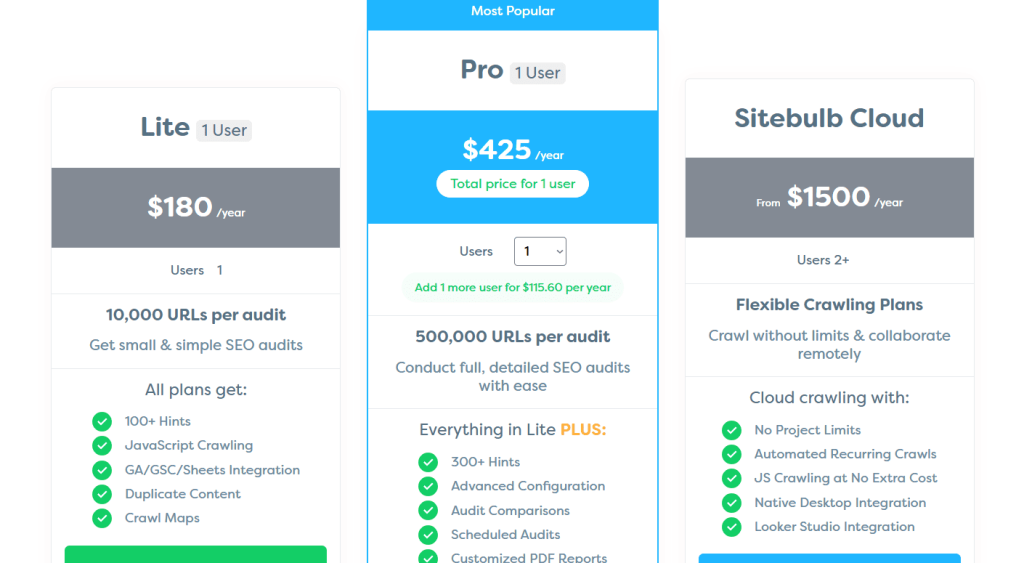
Sitebulb Pricing
- Lite: $180/year
- Pro: $425/year
- Cloud: $1500/year
Sitebulb Reviews
- G2: 4.5 out of 5 stars (13+ reviews)
- Capterra: 4.9 out of 5 stars (24+ reviews)
Users consistently rave about the report quality and hints system. Common sentiment: “Sitebulb transformed how we present audit findings to clients—the visual reports are so good we barely need to explain anything, and the hints make every issue actionable.”
5. Lumar – Best for Enterprise-Level Site Audits
Best For: Enterprise organizations with massive, complex site architectures that need cloud-based auditing, advanced segmentation, and unlimited project management.
How I Use It: We’ve used DeepCrawl (now Lumar) for a handful of enterprise clients with 100,000+ page sites and complex subdomain structures.
It’s our choice when we need to segment audits by site section, track changes across multiple properties, and collaborate with large internal teams.
Quick Overview
DeepCrawl was founded in 2011 and rebranded to Lumar in 2021 after acquiring several other SEO tools. It’s a cloud-based enterprise SEO platform designed for large organizations managing complex, high-traffic websites across multiple domains, subdomains, and languages.
What sets Lumar apart is scalability and segmentation. You can audit unlimited projects, segment crawls by site section or template type, and set up advanced rules for different parts of your site architecture.
It integrates with Google Analytics, Search Console, and Adobe Analytics, allowing you to overlay technical issues with actual traffic and revenue data.
The platform is built for teams—multiple users can access audits, set up custom alerts, and collaborate on findings without passing files around.
Automated scheduled crawls, custom reporting dashboards, and API access make it suitable for enterprise SEO workflows where automation and integration matter more than individual crawl depth.
This is overkill for small businesses, agencies with SMB clients, or solo consultants. The pricing reflects its enterprise positioning—you’re paying for scale, collaboration, and infrastructure that smaller operations don’t need.
Lumar Key Features
- Unlimited Projects and Cloud-Based Crawling: No limits on the number of sites you can audit or crawl frequency. Everything runs on Lumar’s cloud infrastructure, so you’re not constrained by local machine resources. Ideal for enterprises managing dozens of properties or agencies with large client rosters.
- Advanced Segmentation and Custom Rules: Segment crawls by URL pattern, site section, template type, or custom rules. You can audit ecommerce product pages separately from blog content, or compare mobile vs. desktop crawls. This granularity helps diagnose issues specific to certain parts of massive sites.
- Integration with Analytics and Search Console: Pull Google Analytics traffic data, Search Console index coverage, and Adobe Analytics metrics directly into crawl results. This lets you prioritize fixes based on actual traffic impact rather than just technical severity—critical for enterprise sites where not all pages matter equally.
- Automated Scheduled Crawls with Custom Alerts: Set up weekly, monthly, or triggered crawls that run automatically. Custom alert rules notify specific team members when new critical issues appear—like broken redirects, server errors, or indexation blocks. This proactive monitoring prevents issues from snowballing.
- API Access for Custom Integrations: Lumar offers a robust API for pulling crawl data into your own dashboards, BI tools, or internal reporting systems. Enterprises with custom analytics stacks can integrate audit data seamlessly without manual exports.
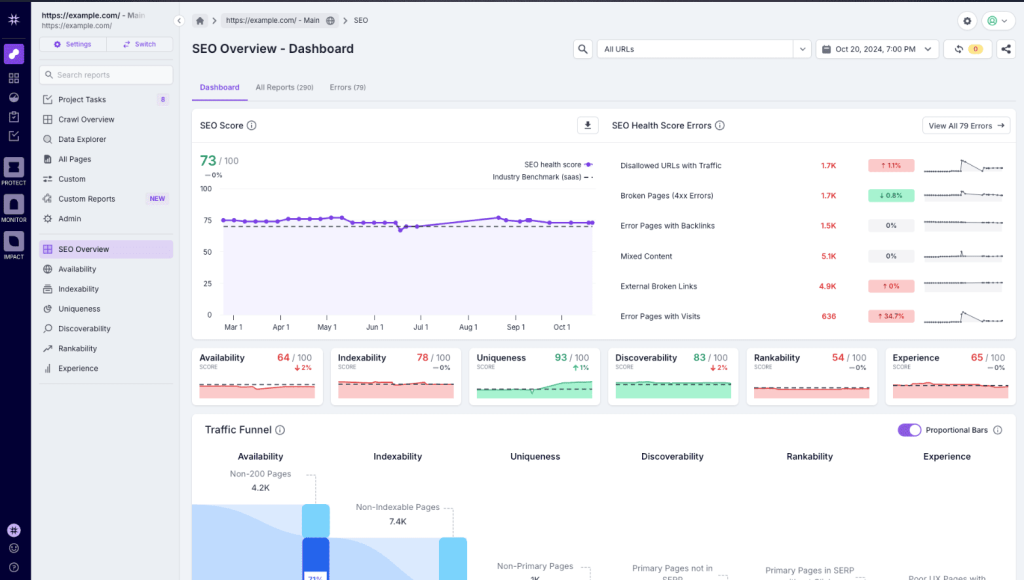
- Change Monitoring and Historical Tracking: Tracks changes over time—health score trends, new issues, resolved problems, URL count shifts. You can see how technical health correlates with algorithm updates, site releases, or seasonal traffic patterns.
Lumar Pros
- Unlimited projects eliminate per-site pricing constraints. For enterprises managing 50+ properties or agencies with large client rosters, unlimited auditing is a massive cost advantage. You’re not nickel-and-dimed per site or crawl like with many SaaS tools.
- Cloud infrastructure handles massive crawls effortlessly. We’ve audited sites with 500,000+ pages without performance issues or long wait times. The cloud-based processing scales automatically, unlike desktop tools that choke on large sites.
- Segmentation makes diagnosing complex sites manageable. Being able to isolate product pages, blog posts, or regional subdomains helps pinpoint issues faster on sprawling enterprise sites. You’re not drowning in a single 200,000-row report—you can focus on specific segments that matter.
- Analytics integration adds business context to technical issues. Overlaying traffic data with crawl findings lets you prioritize fixes based on revenue impact. If a broken page gets 10 visitors per month, it’s low priority. If it gets 10,000, it’s urgent. This context is invaluable for resource allocation.
- Team collaboration features streamline workflows. Multiple users can access audits, set up alerts for their areas of responsibility, and track progress on fixes without emailing spreadsheets around. For large internal SEO teams, this coordination is essential.
- Change tracking proves the impact of technical SEO work. Historical health score trends and issue resolution tracking make it easy to demonstrate ROI to executives. You can show how technical improvements correlated with traffic gains or prevented issues during migrations.
Lumar Cons
- Overkill for small to mid-sized sites. If you’re auditing a 5,000-page site with straightforward architecture, you don’t need Lumar’s segmentation, unlimited projects, or enterprise integrations. You’re paying for features you won’t use when simpler tools cost 90% less.
- Steeper learning curve than simpler audit tools. The platform has extensive features, segmentation options, and configuration settings. New users need training to leverage its full capabilities—it’s not as intuitive as Sitebulb or Ahrefs for quick, out-of-the-box audits.
- Reporting isn’t as visually polished as Sitebulb. While Lumar generates comprehensive reports, they’re more data-heavy than visually engaging. If you need stunning client-facing reports, you’re supplementing with other tools or building custom dashboards.
- Requires sales process to get started. You can’t just sign up and start auditing—you need to talk to sales, get a demo, and negotiate pricing. For teams that want to test a tool quickly, this friction is a barrier.
Lumar Pricing
Custom pricing
Lumar Reviews
- G2: 4.6 out of 5 stars (101+ reviews)
- Capterra: 4.3 out of 5 stars (12+ reviews)
Users consistently praise the scalability and segmentation capabilities. Common sentiment: “Lumar is the only audit tool that can handle our enterprise site’s complexity—unlimited projects and analytics integration make it indispensable, but it’s definitely built for large organizations.”
6. Google Search Console – Best Free Baseline Audit Tool
Best For: Website owners, small businesses, and SEOs who need free, reliable insights directly from Google about indexing, mobile usability, and Core Web Vitals.
How I Use It: Google Search Console is the first tool I check for every client at OneLittleWeb. It tells me exactly what Google sees—which pages are indexed, which have errors, how Core Web Vitals perform, and what manual actions exist. It’s the baseline for every technical audit we run.
Quick Overview
Google Search Console (GSC) is a free tool from Google, launched in 2015 as the successor to Google Webmaster Tools. It provides direct insights from Google about how your site performs in search—indexing status, crawl errors, mobile usability, security issues, and Core Web Vitals.
What makes GSC indispensable is that it’s the source of truth. Other tools guess how Google sees your site; Search Console shows you exactly what Google indexed, what it blocked, and why.
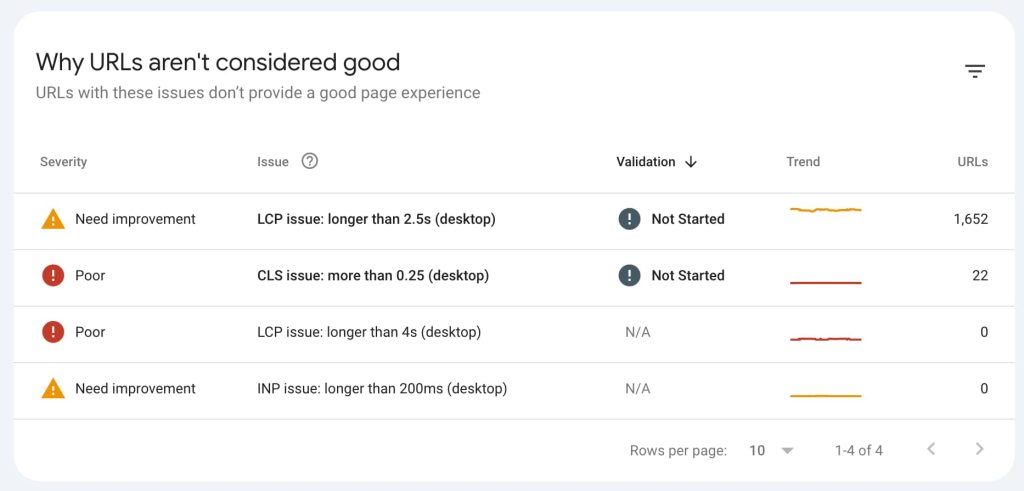
The Index Coverage report flags pages with errors, warnings, or exclusions. The Mobile Usability report identifies pages failing mobile-friendliness checks. The Core Web Vitals report shows which URLs fail Google’s page experience thresholds.
It’s not a comprehensive audit tool—it doesn’t crawl your entire site or catch every technical issue. But it’s essential for diagnosing indexation problems, submitting sitemaps, requesting re-indexing, and understanding Google’s perspective.
This is best for everyone. If you own a website, you should have a Search Console set up. It’s free, authoritative, and catches issues other tools miss.
Google Search Console Key Features
- Index Coverage Report: Shows which pages Google successfully indexed, which have errors (server errors, 404s, redirect issues), which are valid but excluded (canonicalized, noindexed, blocked by robots.txt), and which have warnings. This is the first place we look when pages mysteriously disappear from search results.
- Core Web Vitals Report: Tracks LCP, FID, and CLS performance across your site, categorized by URL group. You see which pages fail Google’s thresholds and need optimization. Since Core Web Vitals are ranking factors, this data is critical for diagnosing page experience issues.
- Mobile Usability Report: Flags pages with mobile usability problems—text too small to read, clickable elements too close together, content wider than the screen, viewport not set. Essential for diagnosing mobile-specific SEO issues that hurt rankings in mobile search.
- URL Inspection Tool: Lets you check how Google sees a specific URL—whether it’s indexed, what canonical Google selected, what structured data it detected, and whether it’s mobile-friendly. You can also request indexing directly from this tool, which is faster than waiting for Google to recrawl naturally.
- Sitemap Submission and Monitoring: Submit XML sitemaps and monitor their processing status. Google reports how many URLs were discovered, how many were indexed, and which had errors. This helps diagnose why new content isn’t getting indexed or why certain sections are being ignored.
- Manual Actions and Security Issues: Alerts you if Google has applied a manual penalty (for spam, unnatural links, etc.) or detected security issues like malware or hacked content. These notifications are critical—other tools don’t have access to this data, and missing a manual action can tank your traffic overnight.
Google Search Console Pros
- It’s free and directly from Google. You’re getting authoritative data straight from the source—not estimates, not simulations, but exactly what Google indexed and how it categorized your pages. This makes GSC the ultimate baseline for any technical audit.
- Index coverage catches issues other tools miss. We’ve had cases where third-party crawlers reported pages as fine, but GSC showed them excluded due to canonical conflicts or soft 404s. Google’s perspective is what matters for rankings, so GSC is the final word on indexation.
- Core Web Vitals data comes from real user metrics. Unlike synthetic lab tests, GSC’s Core Web Vitals are based on Chrome User Experience Report (CrUX) data—actual measurements from real users. This field data is what Google uses for ranking, making it more accurate than simulated tests.
- URL Inspection Tool speeds up indexing. When we publish new content or fix critical pages, we use the URL Inspection Tool to request immediate indexing instead of waiting days for Google to recrawl naturally. This has helped clients get time-sensitive content ranked faster.
- Mobile usability insights are mobile-specific. Desktop audit tools often don’t catch mobile-only issues like touch target sizing or viewport problems. GSC’s Mobile Usability report flags these problems explicitly, which is critical since Google uses mobile-first indexing.
- Manual action and security alerts prevent catastrophic losses. Getting immediate notifications about manual penalties or security issues lets you respond before traffic craters. We’ve saved clients from prolonged downtime by catching malware infections flagged in GSC within hours.
Google Search Console Cons
- It’s not a comprehensive site crawler. GSC only reports on pages Google has attempted to crawl or index. If pages are orphaned and Google hasn’t discovered them yet, they won’t appear in reports. You need a full-site crawler like Screaming Frog to catch these.
- Data is delayed by 1-3 days. GSC isn’t real-time—index coverage and performance data lag by a day or more. If you need to diagnose an issue that happened this morning, you’re waiting for the data to refresh.
- Limited technical SEO checks. GSC doesn’t flag duplicate content, broken internal links, redirect chains, missing meta tags, or many other common technical issues. It’s essential but incomplete—you need supplementary tools for full audits.
- No historical data beyond 16 months. GSC only retains data for 16 months. If you need to analyze trends or issues from years ago, that data is gone. Other tools archive historical crawl results indefinitely.
- The interface can be confusing for non-technical users. The reports are data-heavy and assume some SEO knowledge. New users often struggle to interpret what “Excluded by robots.txt” or “Crawled – currently not indexed” actually means without guidance.
Google Search Console Pricing
Free
Google Search Console Reviews
- G2: 4.6 out of 5 stars (530+ reviews)
- Capterra: 4.7 out of 5 stars (710+ reviews)
Users consistently praise the direct Google data and free access. Common sentiment: “Google Search Console is non-negotiable—it’s the only tool that shows you exactly what Google sees, and it’s free. Use it alongside other audit tools, never instead of them.”
7. Moz – Best for Small Agency Workflows
Best For: Small agencies and consultants who want a unified platform for site auditing, rank tracking, and keyword research without the price tag of Semrush or Ahrefs.
How I Use It: We’ve used Moz Pro for smaller clients who need straightforward audits and rank tracking but don’t require the depth of enterprise tools. The site crawl feature catches the essentials, and the integrated rank tracking saves us from juggling multiple subscriptions.
Quick Overview
Moz Pro is an all-in-one SEO platform launched in 2004, making it one of the oldest names in SEO software. It includes site crawling, rank tracking, keyword research, link analysis, and on-page optimization recommendations—all in one subscription.
What makes Moz appealing for small agencies is the simplicity and integration. The site crawl feature scans for common technical issues, prioritizes them by importance, and tracks improvements over time. You can monitor keyword rankings, research new opportunities, and audit backlinks without leaving the platform.
The interface is clean and beginner-friendly compared to more technical tools like Screaming Frog. Moz’s “Priority” score helps non-experts understand which issues to fix first based on potential traffic impact.
The platform also includes educational resources and a supportive community, making it accessible for teams with junior SEOs.
The downside is that Moz’s crawl depth and feature set lag behind Semrush and Ahrefs. The lower-tier plans have restrictive crawl limits, and the tool doesn’t handle JavaScript rendering well. It’s best for smaller sites with straightforward architectures—not complex enterprise platforms.
Moz Key Features
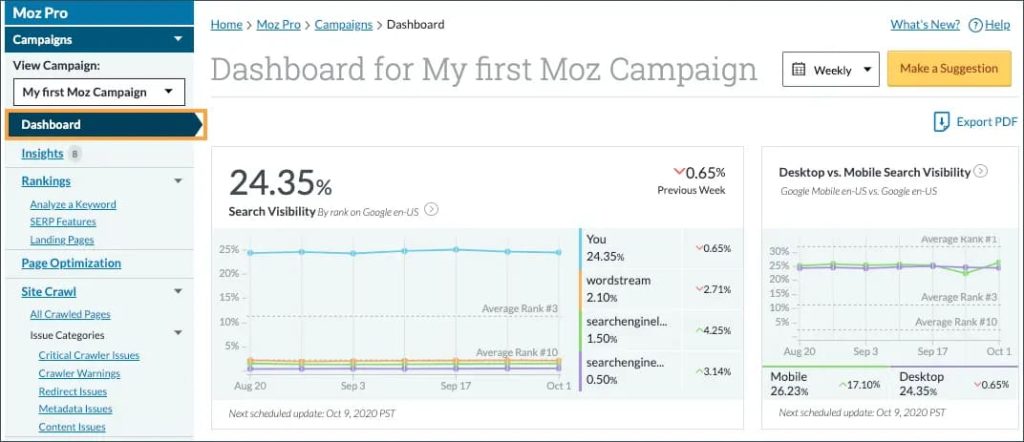
- Site Crawl with Priority Scoring: Scans your site for 200+ technical and on-page issues—broken links, duplicate content, missing meta tags, slow pages, redirect chains, and more. Each issue gets a “Priority” score (high, medium, low) based on estimated traffic impact, helping you focus on fixes that matter most.
- On-Page Optimization Recommendations: The Page Optimization feature analyzes individual URLs and suggests improvements for title tags, meta descriptions, content length, keyword usage, and internal linking. It compares your page to top-ranking competitors and highlights gaps.
- Integrated Rank Tracking: Track keyword rankings across desktop and mobile, by location, and over time. Rankings sync with site crawl data, so you can correlate ranking changes with technical issues or fixes. Useful for monthly client reporting without needing a separate rank tracker.
- Link Explorer for Backlink Analysis: Moz’s backlink index isn’t as large as Ahrefs, but it’s sufficient for most small to mid-sized sites. You can audit your backlink profile, identify toxic links, find new link opportunities, and track competitors’ link-building activity.
- Keyword Explorer for Research: Built-in keyword research with search volume, difficulty scores, and SERP analysis. The tool suggests keyword opportunities based on your domain authority and competitive landscape—helpful for content planning alongside technical audits.
- Automated Crawl Scheduling: Set up weekly or monthly automated site crawls and receive email alerts when new critical issues appear. This proactive monitoring helps catch problems before they hurt rankings—similar to Semrush and Ahrefs but on a smaller scale.
Moz Pros
- All-in-one platform reduces tool sprawl. For small agencies managing 5-10 clients, having site auditing, rank tracking, keyword research, and backlink analysis in one subscription simplifies workflows and reduces costs. You’re not juggling three separate tools and logins.
- Priority scoring makes triage easier for non-experts. Junior team members or clients can understand which issues to fix first based on Moz’s priority system. This is more accessible than raw technical reports that require deep SEO knowledge to interpret.
- Lower pricing tier is affordable for solopreneurs. At $49/month (Standard plan), Moz is cheaper than Semrush or Ahrefs’ entry tiers. For freelancers or small agencies on tight budgets, this makes professional SEO tooling accessible without enterprise-level investment.
- Educational resources and community support. Moz’s blog, Whiteboard Friday videos, and community forums provide extensive SEO education. This is valuable for agencies training junior staff or clients who want to understand SEO better.
- Clean, beginner-friendly interface. The dashboard is less cluttered and intimidating than Screaming Frog or Semrush. New users can navigate site audits, rankings, and keyword research without extensive training.
Moz Cons
- No JavaScript rendering for modern sites. Moz’s crawler doesn’t execute JavaScript, so it misses content loaded dynamically on React, Vue, or Angular sites. This makes audits incomplete on modern frameworks—you’ll need to supplement with tools that render JavaScript.
- The backlink index is smaller than Ahrefs or Semrush. Moz’s Link Explorer has a fraction of the backlinks that Ahrefs or Majestic index. For competitive link analysis or comprehensive backlink audits, Moz’s data feels thin compared to competitors.
- Crawl depth and customization lag behind specialized tools. Moz covers the basics well but doesn’t offer the granular crawl settings, custom extraction, or advanced segmentation that Screaming Frog or Sitebulb provide. For complex technical diagnostics, it’s insufficient.
- Rank tracking updates are slower than dedicated trackers. Moz updates rankings once or twice per week on lower plans, while dedicated rank trackers update daily or even hourly. If you need real-time ranking monitoring, Moz’s cadence is too slow.
- Feels dated compared to newer platforms. The interface and feature set haven’t evolved as rapidly as Semrush or Ahrefs. Some features feel legacy, and the tool lacks modern integrations or AI-powered insights that newer platforms offer.
Moz Pricing
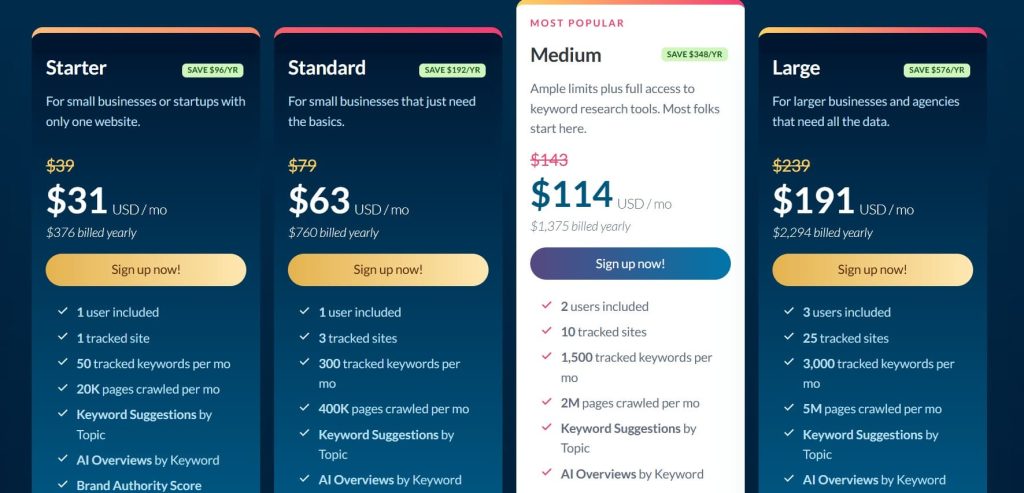
- Starter: $31/month
- Standard: $63/month
- Medium: $114/month
- Large: $191/month
Moz Reviews
- G2: 4.3 out of 5 stars (605+ reviews)
- Capterra: 4.5 out of 5 stars (349+ reviews)
Users appreciate the all-in-one convenience and affordability but note limitations. Common sentiment: “Moz Pro is a solid entry-level SEO platform—it’s affordable and covers the basics well, but you’ll outgrow it as your clients or site complexity scale.”
8. SE Ranking – Best for Budget-Conscious Agencies
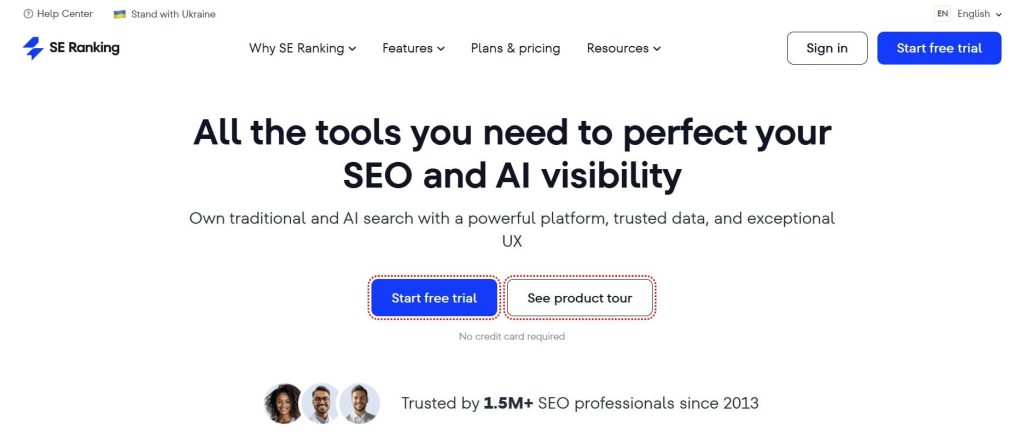
Best For: Budget-focused agencies and consultants who need white-label reporting, site auditing, and rank tracking at a lower price point than Semrush or Ahrefs.
How I Use It: We’ve used SE Ranking for clients who need regular audits and rank tracking but don’t have the budget for premium tools. The white-label reporting feature lets us deliver branded audit reports without building custom dashboards, which saves time on client deliverables.
Quick Overview
SE Ranking is an all-in-one SEO platform founded in 2013, designed to compete with Semrush and Ahrefs at a significantly lower price point.
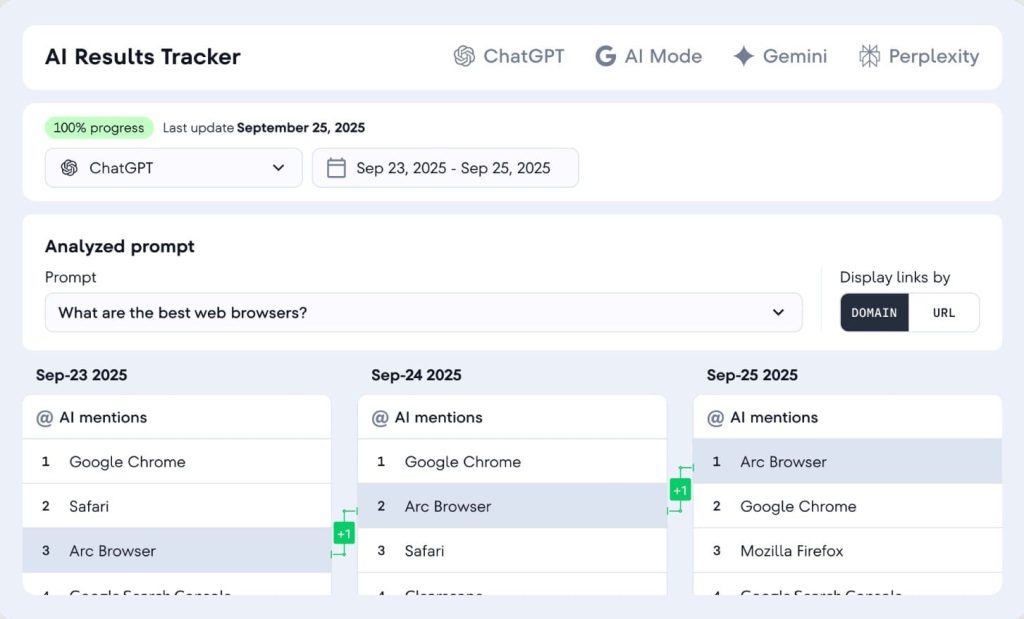
It includes site auditing, rank tracking, keyword research, backlink monitoring, competitor analysis, and white-label reporting.
What makes SE Ranking attractive for agencies is the white-label capabilities. You can rebrand reports, dashboards, and even the platform interface with your agency’s logo and colors.
For agencies selling SEO services to clients who want branded deliverables, this is a major selling point without the enterprise pricing.
The site audit tool scans for 120+ technical and on-page issues, generates health scores, and provides fix recommendations. Crawls are cloud-based with scheduling and email alerts. The interface is straightforward, though not as polished as Ahrefs or Semrush.
The main trade-off is crawl depth and data accuracy. SE Ranking’s backlink index is smaller, crawl speeds can be slower, and JavaScript rendering isn’t as reliable as premium tools. It’s best for agencies with budget constraints serving small to mid-sized clients—not complex enterprise sites.
SE Ranking Key Features
- Site Audit with 120+ Checks: Scans for broken links, duplicate content, missing meta tags, slow pages, crawlability issues, canonicalization problems, and more. Each issue is categorized by severity (critical, high, medium, low) with explanations and fix recommendations.
- White-Label Reporting and Dashboards: Customize reports and client dashboards with your agency’s branding—logo, colors, domain. Clients log into a branded portal to view their rankings, audits, and keyword data. This feature is typically reserved for enterprise-tier tools but is included in SE Ranking’s mid-tier plans.
- On-Page SEO Checker: Analyzes individual pages against top-ranking competitors and provides optimization recommendations—title tags, meta descriptions, content length, keyword density, internal linking. Helps content teams optimize pages without deep SEO knowledge.
- Rank Tracking with Local and Mobile Options: Track keyword rankings by location, device (desktop/mobile), and search engine. Rankings update daily (more frequently than Moz), and you can segment by groups or tags for easier client reporting.
- Competitor Analysis and Keyword Research: Research new keyword opportunities, analyze competitor rankings, and identify content gaps. The keyword database isn’t as extensive as Semrush, but it covers most markets adequately for small to mid-sized campaigns.
- Backlink Checker and Monitoring: Monitor your backlink profile, identify new and lost links, and analyze competitors’ backlinks. The backlink index is smaller than Ahrefs or Majestic, but sufficient for most small business and local SEO needs.
SE Ranking Pros
- White-label capabilities at mid-tier pricing. For agencies that bill clients for SEO reports, white-labeling is a game-changer. You can deliver branded dashboards and reports without building custom solutions—a feature that typically costs 3x more on enterprise platforms.
- Significantly cheaper than Semrush or Ahrefs. At $52/month for the Essential plan, SE Ranking costs less than half of Semrush or Ahrefs’ entry tiers. For budget-conscious agencies or freelancers, this makes professional SEO tooling accessible without breaking the bank.
- All-in-one platform reduces subscription fatigue. Site audits, rank tracking, keyword research, backlink monitoring, and competitor analysis in one tool means you’re not juggling multiple subscriptions. For small teams, this consolidation saves money and simplifies workflows.
- Daily rank tracking updates. Unlike Moz’s weekly updates, SE Ranking refreshes rankings daily. This is important for tracking volatile SERPs or running time-sensitive campaigns where ranking changes need immediate visibility.
SE Ranking Cons
- Crawl speeds are slower than premium tools. Large site audits (20,000+ pages) can take significantly longer than Semrush, Ahrefs, or cloud-based tools built on faster infrastructure. We’ve had crawls that took hours compared to minutes on faster platforms.
- The backlink index is smaller and less accurate. SE Ranking’s backlink data doesn’t match Ahrefs’ comprehensiveness or update frequency. For competitive backlink analysis or deep link audits, the data feels incomplete—you’re supplementing with other tools.
- JavaScript rendering is inconsistent. We’ve had cases where SE Ranking missed content on React or Vue sites that other tools caught. The crawler doesn’t always execute JavaScript reliably, leading to incomplete audits on modern frameworks.
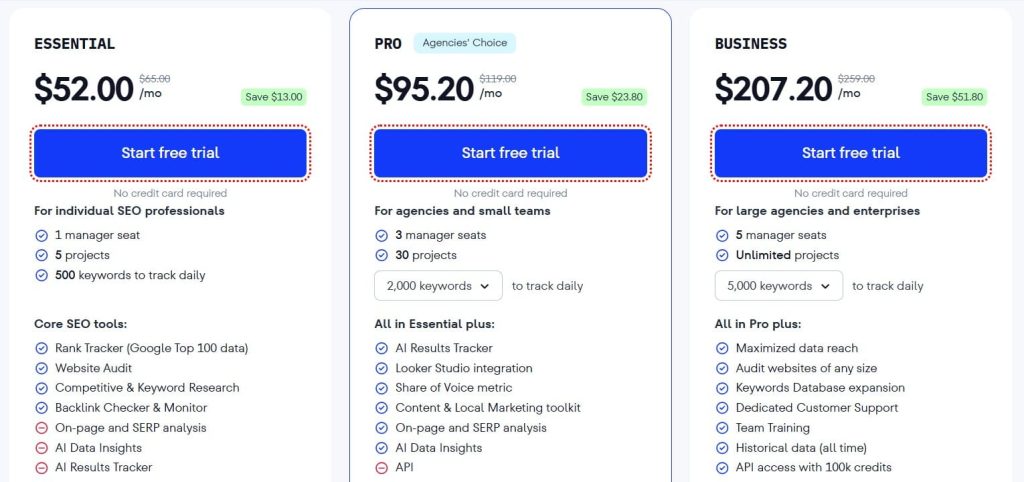
SE Ranking Pricing
- Free trial available
- Essential: $52/month
- Pro: $95.20/month
- Business: $207.20/month
SE Ranking Reviews
- G2: 4.7 out of 5 stars (2,330+ reviews)
- Capterra: 4.7 out of 5 stars (296+ reviews)
Users appreciate the affordability and white-label features but note limitations. Common sentiment: “SE Ranking offers incredible value for budget-conscious agencies—white-label reporting and comprehensive features at half the price of competitors, though crawl speed and data accuracy don’t quite match premium tools.”
9. Oncrawl – Best for Log File Analysis
Best For: Technical SEO specialists and enterprise teams who need advanced log file analysis, crawl budget optimization, and predictive insights for large, complex sites.
How I Use It: We’ve used Oncrawl on a few large enterprise clients where log file analysis was critical for diagnosing crawl budget issues.
It’s not a tool we reach for on typical client audits, but when we need to understand how Googlebot is actually crawling a massive site, Oncrawl is unmatched.
Quick Overview
Oncrawl is a cloud-based technical SEO platform launched in 2013, designed specifically for enterprise-level sites with complex architectures.
It combines traditional site crawling with log file analysis, allowing you to correlate how your crawler sees the site versus how Googlebot actually crawls it.
What sets Oncrawl apart is the depth of log file insights. You can upload server logs and Oncrawl will analyze which pages Googlebot crawled, how often, which pages were ignored, and where crawl budget is being wasted.
This is invaluable for diagnosing why certain pages aren’t getting indexed on massive sites (100,000+ pages) where crawl budget matters.
The platform also includes data visualization, custom segmentation, and integration with Google Data Studio for building automated reporting dashboards. It’s built for technical SEOs who need granular control and advanced analytics—not for beginners or small sites.
This is overkill for most use cases. If you’re managing sites under 10,000 pages or don’t need log file analysis, you’re paying for features you won’t use. Oncrawl is for enterprise SEO teams and specialists handling complex technical challenges.
Oncrawl Key Features
- Log File Analysis and Crawl Budget Optimization: Upload server logs and Oncrawl analyzes Googlebot’s actual crawling behavior, which pages were crawled, how frequently, which were ignored, and where crawl budget is wasted. This helps diagnose indexation issues on large sites where not all pages get crawled regularly.
- Correlation Between Crawls and Real Search Behavior: Compare Oncrawl’s site crawl data with server log data to identify discrepancies. Pages that your crawler sees but Googlebot ignores indicate structural or priority issues—orphaned pages, blocked sections, or low-value content consuming crawl budget.
- Advanced Segmentation and Data Filtering: Segment your site by URL patterns, page type, template, or custom rules. You can isolate ecommerce product pages, blog posts, or regional subdomains and analyze each segment’s health independently—critical for sprawling enterprise sites.
- Predictive SEO Insights: Oncrawl’s machine learning models predict the impact of technical changes before you implement them. For example, it can estimate how fixing canonicalization issues or improving internal linking will affect crawl efficiency and rankings.
- Google Data Studio Integration: Export crawl data, log file insights, and health metrics directly into Google Data Studio for automated reporting dashboards. This is useful for enterprise teams that need ongoing monitoring and executive-level reporting.
- API Access for Custom Workflows: Oncrawl offers a robust API for pulling data into your own systems, BI tools, or custom dashboards. Enterprises with complex reporting requirements can integrate Oncrawl data seamlessly.
Oncrawl Pros
- Log file analysis is unmatched for crawl budget optimization. No other mainstream SEO tool offers this depth of log file insights. We’ve used Oncrawl to diagnose why thousands of low-value pages were consuming crawl budgets on ecommerce sites, preventing high-priority product pages from being indexed promptly.
- Segmentation makes auditing massive sites manageable. Being able to isolate specific page types, templates, or URL patterns helps diagnose issues on complex enterprise architectures. You’re not drowning in a single 500,000-row report—you can focus on segments that matter.
- Predictive insights help prioritize technical fixes. Oncrawl’s ML models estimate the traffic impact of technical changes, which helps justify ROI to executives. If fixing canonicalization issues is predicted to improve traffic by 15%, that’s a compelling case for prioritizing the work.
- Data Studio integration automates reporting workflows. For enterprise teams running monthly or quarterly SEO reports for executives, automated dashboards save hours of manual export-and-format work. Data updates automatically as new crawls run.
- Best for diagnosing complex indexation problems. When pages mysteriously aren’t getting indexed and traditional crawlers can’t explain why, log file analysis reveals whether Googlebot is even attempting to crawl them—critical for troubleshooting large sites.
Oncrawl Cons
- Custom pricing makes it inaccessible for most agencies. Oncrawl doesn’t publish transparent pricing. You need a sales call and custom quote.
- Overkill for small to mid-sized sites. If you’re auditing a 5,000-page site, you don’t need log file analysis or predictive ML models. The platform’s depth is wasted on straightforward architectures where simpler tools work fine.
- Steep learning curve for non-technical users. Oncrawl assumes advanced technical SEO knowledge—log file interpretation, crawl budget concepts, segmentation logic. New users need training to leverage the platform effectively, and it’s not intuitive for junior team members.
- Reporting isn’t as visually polished as Sitebulb. While Oncrawl generates comprehensive reports, they’re data-heavy and less visually engaging. If you need stunning client-facing reports, you’re supplementing with other tools or custom dashboards.
Oncrawl Pricing
Custom pricing
Oncrawl Reviews
- G2: 4.4 out of 5 stars (17+ reviews)
- Capterra: 3.8 out of 5 stars (4+ reviews)
Users praise the log file analysis and segmentation but note the learning curve. Common sentiment: “Oncrawl is the only tool that truly solves crawl budget problems on massive sites—log file analysis is game-changing, but it’s expensive and requires technical expertise to use effectively.”
10. Raven Tools – Best for Client Management Platforms
Best For: Agencies that need an all-in-one client management platform combining site auditing, rank tracking, reporting, and marketing analytics in one interface.
How I Use It: We tested Raven Tools for a period when we needed a centralized client portal where clients could log in and view their SEO metrics, audits, and marketing reports without us building custom dashboards.
Quick Overview
Raven Tools is a digital marketing platform founded in 2007, designed specifically for agencies managing multiple clients. It combines site auditing, rank tracking, backlink monitoring, competitor analysis, and white-label reporting into a single client management system.
What sets Raven apart is the client portal and marketing report builder. Clients can log into a branded portal to view their SEO metrics, social media analytics, PPC performance, and audit findings—all in one place.
The report builder pulls data from 20+ integrations (Google Analytics, Google Ads, Facebook Ads, etc.) to create comprehensive marketing reports without manual data gathering.
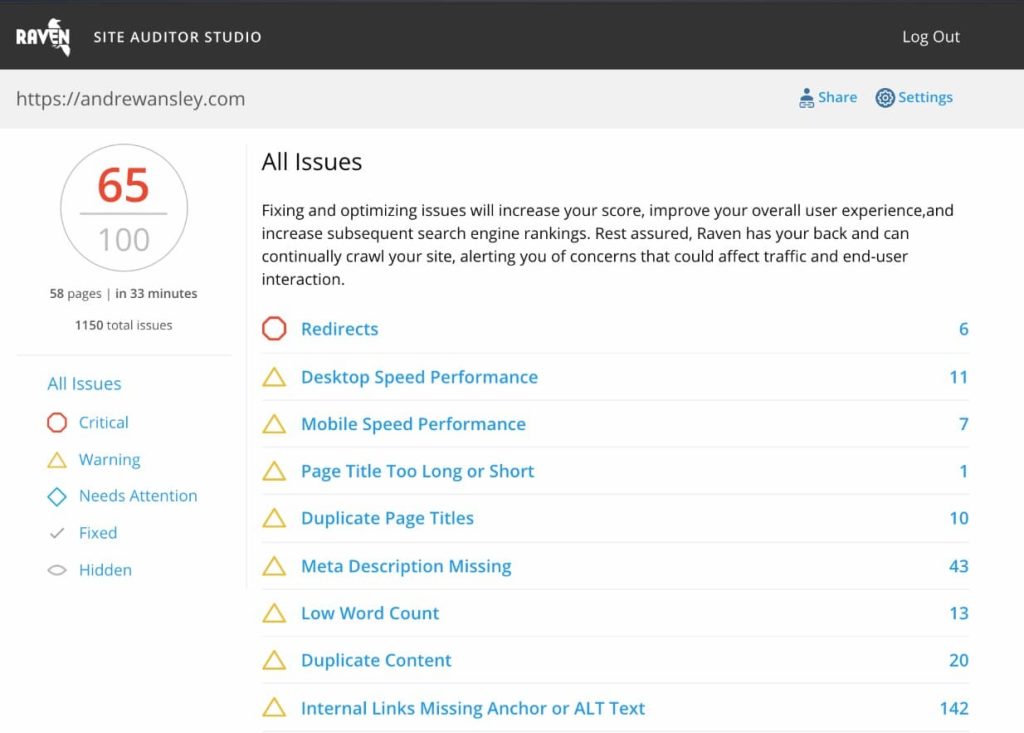
The site audit feature is more basic than dedicated audit tools—it covers essentials like broken links, duplicate content, and missing meta tags, but doesn’t offer the depth of Screaming Frog or the advanced features of Semrush.
Raven is best for agencies that prioritize client communication and centralized reporting over granular technical diagnostics.
This is ideal for agencies managing 10-50 clients who want a single platform for client dashboards, SEO basics, and marketing reporting. If you need deep technical audits or extensive crawl customization, you’ll supplement with other tools.
Raven Tools Key Features
- White-Label Client Portal: Clients log into a branded portal (your agency’s logo, colors, domain) to view their SEO metrics, rankings, audits, and marketing performance. This positions your agency as the platform provider and keeps clients from seeing competitor tools.
- Marketing Report Builder with 20+ Integrations: Pull data from Google Analytics, Search Console, Google Ads, Facebook Ads, Instagram, Twitter, Moz, Majestic, and more into unified reports. This eliminates manual data gathering and creates comprehensive client deliverables in minutes.
- Site Auditor for Basic Technical Checks: Scans for broken links, duplicate content, missing meta tags, slow pages, and basic on-page issues. Reports categorize findings by severity and provide fix recommendations—sufficient for small to mid-sized client sites.
- Rank Tracking Across Search Engines and Locations: Track keyword rankings on Google, Bing, and Yahoo by location, device, and language. Rankings update daily with historical trend data. Useful for monthly client reporting without needing a separate rank tracker.
- Competitor Analysis and Keyword Research: Research new keyword opportunities, analyze competitor rankings, and identify content gaps. The data comes from integrated tools like Moz and Majestic rather than proprietary databases—adequate but not as comprehensive as dedicated research tools.
- Link Manager for Backlink Monitoring: Track your backlink profile, identify new and lost links, and monitor competitor backlinks. Data comes from Moz and Majestic integrations, so depth depends on those tools’ indexes rather than Raven’s own crawling.
Raven Tools Pros
- Client portal centralizes communication and reduces meetings. Clients can log in anytime to view their metrics without scheduling status calls. This reduces back-and-forth emails and frees up agency time for actual work instead of constant reporting.
- Marketing report builder saves hours on monthly deliverables. Pulling data from Google Analytics, Google Ads, Facebook, and SEO tools into one report used to take hours. Raven automates this, letting us generate comprehensive client reports in 10-15 minutes.
- White-label branding positions your agency as the platform. Clients see your agency’s brand, not third-party tool names. This strengthens your positioning and reduces the risk of clients realizing they could subscribe to the same tools directly.
- All-in-one platform reduces subscription costs. For agencies managing 10+ clients, having site audits, rank tracking, backlink monitoring, and reporting in one subscription is more cost-effective than maintaining separate tools for each function.
- Easy onboarding for non-technical team members. Raven’s interface is straightforward and designed for marketers, not developers. Junior team members or account managers can run audits and generate reports without deep technical training.
Raven Tools Cons
- Site audit depth is limited compared to specialized tools. Raven covers the basics but doesn’t offer custom extraction, JavaScript rendering, log file analysis, or advanced segmentation. For complex technical diagnostics, you’re supplementing with Screaming Frog or other dedicated crawlers.
- Data comes from integrations, not proprietary crawling. Keyword and backlink data relies on Moz and Majestic integrations. If those tools’ data is stale or incomplete, Raven’s reports reflect those limitations—you’re not getting fresh, independent crawls.
- Crawl speeds and accuracy lag behind premium tools. Large site audits can be slow, and we’ve noticed occasional discrepancies between Raven’s findings and what Screaming Frog or Semrush flag. The crawler isn’t as robust as dedicated audit platforms.
- More marketing-focused than SEO-focused. Raven tries to be an all-in-one marketing platform (SEO, PPC, social, email), which means no single function is best-in-class. If you’re purely an SEO agency, you’re paying for features you won’t use.
Raven Tools Pricing
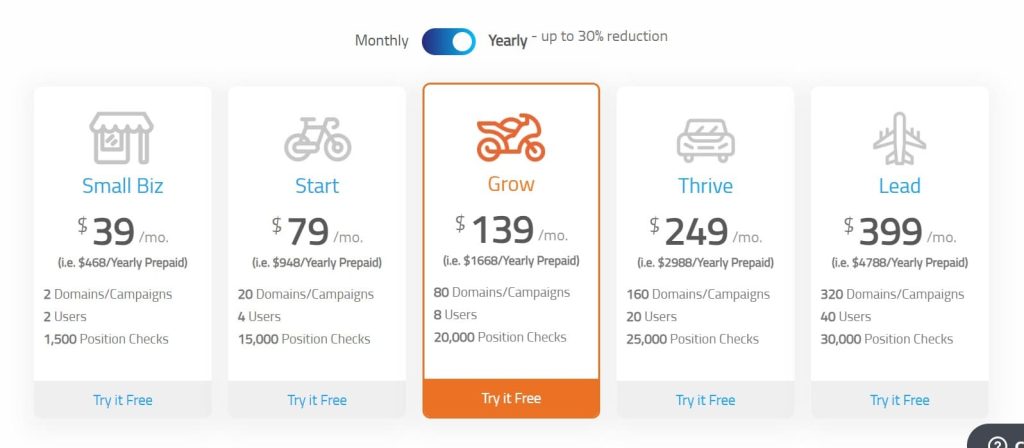
- Free trial available
- Small Biz: $39/month
- Start: $79/month
- Grow: $139/month
- Thrive: $249/month
- Lead: $399/month
Raven Tools Reviews
- G2: 4.2 out of 5 (154+ reviews)
- Capterra: 4.4 out of 5 (121+ reviews)
Users appreciate the client portal and report builder but note audit limitations. Common sentiment: “Raven Tools excels at client management and reporting automation—the white-label portal is a win for agencies, but the site audit features are basic compared to dedicated SEO tools.”
11. Serpstat – Best for International SEO Audits
Best For: Agencies and businesses running international or multi-language SEO campaigns who need site auditing, rank tracking, and keyword research across global markets.
How I Use It: We’ve used Serpstat for clients with international presence—ecommerce sites selling in multiple countries or SaaS companies targeting different languages.
The multi-language support and regional databases help us run audits and track rankings across different markets without juggling multiple tools.
Quick Overview
Serpstat is an all-in-one SEO platform founded in 2013, headquartered in Ukraine with a focus on international and multi-language SEO. It includes site auditing, rank tracking, keyword research, backlink analysis, and competitor research—all with support for 230+ countries and regions.
What makes Serpstat useful for international SEO is the breadth of regional databases. You can track rankings in France, research keywords in German, analyze backlinks in Japan, and audit sites targeting specific countries—all from one platform.
The tool supports Cyrillic, Asian languages, and non-Latin scripts better than many Western-focused competitors.
The site audit feature scans for 70+ technical and on-page issues, though it’s less comprehensive than Semrush or Ahrefs. Crawl speeds can be slower, especially for large sites, and JavaScript rendering isn’t always reliable.
But for agencies managing clients across multiple countries, the regional coverage and affordability make it appealing.
This is best for international businesses or agencies with clients in non-English markets. If you’re only targeting the US or UK, you’re paying for regional databases you won’t use when more specialized tools offer better value.
Serpstat Key Features
- Multi-Language and Regional SEO Support: Track rankings, research keywords, and audit sites across 230+ countries and regions with support for Cyrillic, Asian, and non-Latin languages. Serpstat’s databases cover markets that Western tools sometimes neglect—useful for international campaigns.
- Site Audit with 70+ Technical Checks: Scans for broken links, duplicate content, missing meta tags, slow pages, crawlability issues, and basic technical problems. Reports categorize findings by severity with fix recommendations—adequate for small to mid-sized international sites.
- Rank Tracking Across Global Search Engines: Track keyword rankings on Google, Bing, Yandex, and regional search engines by country, city, device, and language. Useful for monitoring local SEO performance across multiple markets without separate tools.
- Keyword Research and Search Volume Data: Access search volume, keyword difficulty, and SERP features for keywords in different countries and languages. The database isn’t as extensive as Semrush for competitive markets like the US, but covers international markets well.
- Competitor Analysis and Backlink Monitoring: Analyze competitor rankings, identify keyword gaps, and monitor backlink profiles. The backlink index is smaller than Ahrefs or Majestic but sufficient for most international markets where backlink competition is less intense.
- API Access for Custom Integrations: Serpstat offers an API for pulling keyword data, rankings, and audit results into your own dashboards or reporting systems. Useful for agencies building custom client portals or integrating with internal tools.
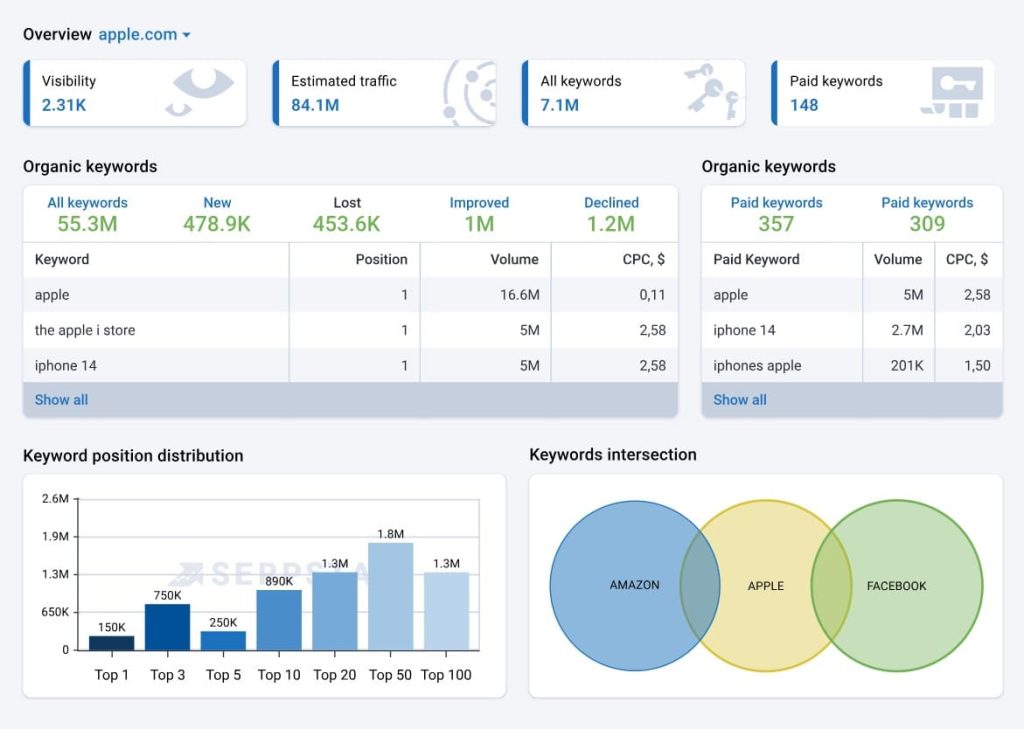
Serpstat Pros
- Best regional coverage for international SEO campaigns. If you’re managing clients in Russia, Eastern Europe, Asia, or other non-English markets, Serpstat’s databases and language support are more comprehensive than Western-focused tools. We’ve used it successfully for clients in Germany, France, and Japan.
- Affordable pricing compared to Semrush or Ahrefs. At $59/month for the Lite plan, Serpstat is significantly cheaper than premium tools. For agencies managing international clients on tight budgets, this makes professional SEO tooling accessible.
- All-in-one platform reduces tool sprawl. Site audits, rank tracking, keyword research, backlink monitoring, and competitor analysis in one subscription simplifies workflows. You’re not juggling separate tools for different markets.
- Multi-language support handles non-Latin scripts. Serpstat handles Cyrillic, Chinese, Japanese, Arabic, and other non-Latin languages better than many Western tools. If you’re optimizing for markets using these scripts, Serpstat’s interface and data support them natively.
- API access enables custom reporting workflows. For agencies with custom client portals or internal dashboards, Serpstat’s API allows data integration without manual exports. This is useful for automating international reporting across multiple markets.
Serpstat Cons
- Crawl speeds are frustratingly slow on large sites. Audits for sites with 20,000+ pages can take hours, sometimes overnight. Other cloud-based tools like Semrush or Ahrefs complete similar crawls in minutes—Serpstat’s infrastructure isn’t as robust.
- Limited crawl depth compared to specialized audit tools. Serpstat covers basic technical checks but doesn’t offer JavaScript rendering, log file analysis, custom extraction, or advanced segmentation. For complex technical diagnostics, you’re supplementing with other tools.
- Backlink data is less comprehensive than Ahrefs. Serpstat’s backlink index is smaller and updates less frequently. For competitive backlink analysis or comprehensive link audits, the data feels incomplete compared to Ahrefs or Majestic.
- The interface feels clunky and less polished. Navigation isn’t as intuitive as Semrush or Ahrefs. Features are sometimes buried in menus, and the learning curve is steeper for new users trying to find specific functions.
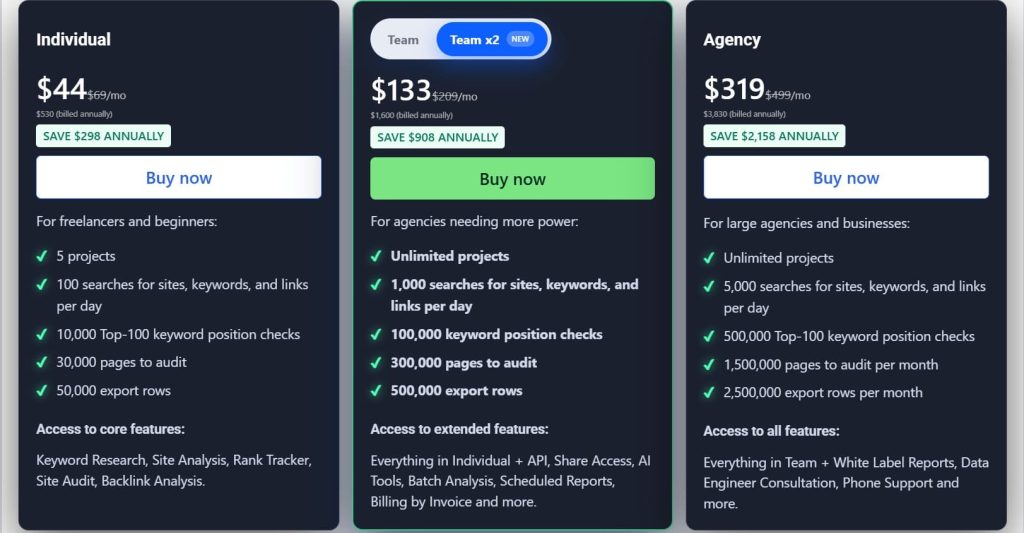
Serpstat Pricing
- Individual: $44/month
- Team: $133/month
- Agency: $319/month
Serpstat Reviews
- G2: 4.6 out of 5 stars (463+ reviews)
- Capterra: 4.7 out of 5 stars (170+ reviews)
Common sentiment: “Serpstat is the go-to for international SEO—regional databases and multi-language support are excellent, but crawl speeds lag behind competitors and the interface needs polish.”
12. Woorank – Best for Quick Client-Facing Reports
Best For: Agencies and consultants who need to generate fast, professional-looking audit reports for client pitches, sales demos, or initial site assessments.
How I Use It: We use Woorank primarily for prospect pitches and first-contact client meetings. It generates instant reports with a clean visual layout that impresses clients who aren’t technical.
Quick Overview
Woorank is a website analysis and SEO audit tool founded in 2011, designed to generate instant, client-friendly reports. It scans your site and produces a comprehensive PDF within minutes, covering SEO, mobile usability, social media integration, and basic technical checks.
What makes Woorank appealing is speed and presentation. You enter a URL, and within 60 seconds you get a polished report with a site score, prioritized recommendations, and explanations written for non-technical audiences.
The reports look professional enough to share directly with prospects or clients without additional formatting.
The tool also includes a marketing checklist, competitive analysis, and keyword tracking (on paid plans). But the core value is the instant audit reports—they’re great for initial assessments, sales pitches, or quick checks, but lack the depth of specialized audit tools for ongoing technical work.
This is best for agencies that need fast, visually appealing reports for client acquisition or quarterly check-ins. If you’re doing ongoing technical SEO work, you’ll need deeper tools alongside Woorank.
Woorank Key Features
- Instant Website Audit Reports: Enter a URL and get a comprehensive report within 60 seconds. The report includes an overall site score (0-100), prioritized recommendations across SEO, mobile, usability, social, and technical categories, and explanations written for non-technical users.
- Marketing Checklist for Quick Wins: The report includes a checklist of marketing tasks—missing meta descriptions, unoptimized images, social media integration gaps, broken links. This makes it easy for clients or junior marketers to action improvements without deep SEO knowledge.
- Competitive Analysis and Benchmarking: Compare your site’s performance against competitors on metrics like traffic estimates, keyword rankings, backlink profiles, and social media presence. Useful for positioning your agency’s services by showing gaps between the prospect’s site and competitors.
- Keyword Tracking (Paid Plans): Track keyword rankings over time with historical data and competitor comparison. The tracking isn’t as robust as dedicated rank trackers but is sufficient for basic monitoring and monthly reporting.
- White-Label PDF Reports: Export branded PDF reports with your agency’s logo and colors. These are polished enough to deliver directly to clients as audit deliverables—useful for agencies billing for initial site assessments.
- Chrome Extension for On-the-Fly Audits: The Woorank Chrome extension lets you run quick audits on any website you’re browsing without logging into the platform. Useful for prospecting or competitive research on the fly.
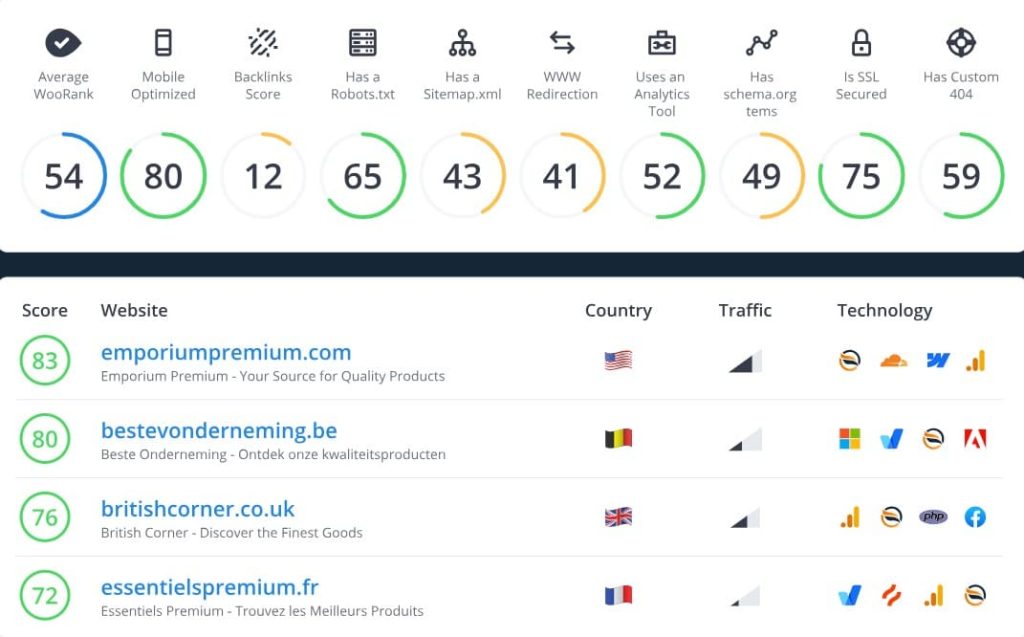
Woorank Pros
- Instant reports are perfect for client pitches. Within 60 seconds, you have a professional-looking report that positions you as knowledgeable and thorough. We’ve used these in first meetings with prospects to demonstrate value before they even sign a contract.
- Client-friendly language makes reports accessible. Unlike technical audit tools that require translation, Woorank’s explanations are written for non-SEOs. Clients can read the report and understand what needs fixing without a 30-minute walkthrough.
- White-label PDFs save time on formatting. You can export branded reports without building custom dashboards or manually formatting spreadsheets. For agencies billing for audit reports, this turns a 2-hour task into a 5-minute task.
- Marketing checklist helps clients take action. The actionable checklist format makes it easy for clients to delegate fixes to their team—developers handle technical items, content teams handle meta tags, etc. This reduces back-and-forth explaining what needs to happen.
- Chrome extension enables quick competitive research. Being able to audit any competitor’s site instantly while browsing is useful for discovery calls or pitching clients on gaps between their site and competitors. We’ve used this in real-time during sales meetings.
Woorank Cons
- Audit depth is shallow for ongoing technical work. Woorank covers the basics but doesn’t offer JavaScript rendering, log file analysis, custom extraction, or advanced segmentation. For complex technical diagnostics or large site audits, you’re using other tools.
- Crawl accuracy can miss nuanced issues. We’ve seen Woorank miss canonicalization problems, redirect chain complexities, or structured data errors that Screaming Frog or Semrush catch. It’s best for high-level assessments, not deep technical work.
- Free reports are limited and lack detail. The free version gives you a basic overview but restricts access to full data—you can’t see all backlinks, keyword opportunities, or detailed recommendations. You’re pushed toward the paid plan quickly.
- Not suitable for large or complex sites. Woorank works well for small to mid-sized sites (5,000-10,000 pages) but doesn’t handle enterprise-level complexity or massive ecommerce platforms. The instant scan format sacrifices depth for speed.

Woorank Pricing
- Pro: $89.99/month
- Premium: $199.99/month
- Enterprise: Custom
Woorank Reviews
- G2: 4.3 out of 5 stars (52+ reviews)
- Capterra: 4.4 out of 5 stars (69+ reviews)
Common sentiment: “Woorank is fantastic for quick client-facing reports and sales pitches—the instant audits look professional and impress non-technical clients, but you’ll need deeper tools for actual technical SEO work.”
13. Siteliner – Best for Duplicate Content Checks
Best For: Anyone who needs to quickly identify duplicate content, broken links, and basic site health issues without paying for a full-featured audit tool.
How I Use It: We use Siteliner as a quick supplementary check when duplicate content is suspected. It’s free for sites up to 250 pages, generates reports in minutes, and highlights exact duplicate content percentages across pages.
Quick Overview
Siteliner is a free website analysis tool created by Copyscape (the plagiarism detection service) in 2008. It crawls your site and identifies duplicate content, broken links, average page size, and page load times—all for free on sites up to 250 pages.
What makes Siteliner useful is its focus on duplicate content detection. It shows exactly which pages have duplicate text, what percentage is duplicated, and where the duplicates exist on your site.
This is invaluable for diagnosing content cannibalization, identifying scraped content, or spotting template issues that create unintentional duplication.
The tool is barebones compared to comprehensive audit platforms—no JavaScript rendering, no advanced technical checks, no integration with other tools. But for quick duplicate content audits or spotting broken links on small sites, it does the job well and costs nothing.
This is best as a supplementary tool for quick checks, not a primary audit solution. If you’re managing ongoing technical SEO, you’ll use Siteliner alongside more comprehensive tools like Screaming Frog or Semrush.
Siteliner Key Features
- Duplicate Content Detection: Scans your site and identifies pages with duplicate or similar content. Shows the exact percentage of duplicate text on each page and highlights which other pages contain the same content—critical for diagnosing content cannibalization.
- Broken Link Finder: Flags broken internal and external links across your site. You see which pages contain broken links and which URLs are returning 404s or server errors—useful for quick link cleanup.
- Page Size and Load Time Analysis: Reports the average page size and load time for your site, comparing it to other sites Siteliner has analyzed. This gives you a rough benchmark for performance, though it’s not as detailed as PageSpeed Insights or GTmetrix.
- Site-Wide Statistics and Averages: Provides high-level stats like average page word count, internal links per page, and most/least linked pages. This helps identify thin content, orphaned pages, or internal linking imbalances.
- Free for Small Sites: Sites with 250 pages or fewer can be scanned for free with full reports. Larger sites require a premium account, but for small business sites or blogs, the free tier is sufficient.
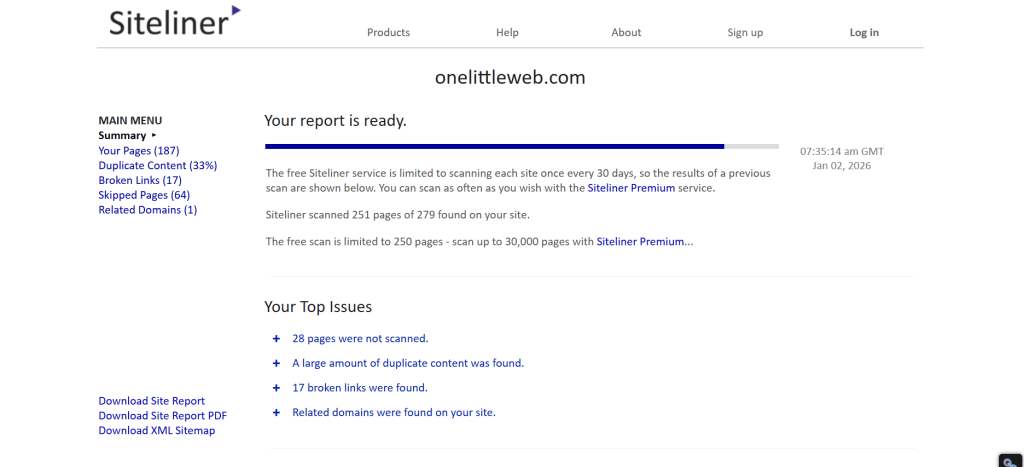
Siteliner Pros
- Best free tool for duplicate content detection. Siteliner’s core function—identifying duplicate content and showing where it exists—is more focused and accurate than many paid tools. For diagnosing content cannibalization or template duplication, it’s the fastest free option.
- Instant reports without signup (for free tier). You can scan a site and get results immediately without creating an account. This is useful for quick competitive research or prospect analysis when you just need a fast check.
- Highlights exact duplicate percentages and sources. Instead of vague “duplicate content exists” warnings, Siteliner shows you precisely what percentage of each page is duplicated and links to the pages containing the same content. This makes fixing the issue straightforward.
- Broken link detection is fast and accurate. For small sites, Siteliner’s broken link finder is as good as specialized tools like Screaming Frog’s free tier. It’s a quick way to clean up link errors without paying for a full audit tool.
- Useful for quick client demos or pitches. When prospecting, being able to instantly show a potential client their duplicate content or broken link issues can be a compelling selling point. Siteliner generates these reports in seconds.
Siteliner Cons
- Limited to 250 pages on the free tier. For any site larger than a small business site or blog, you’ll need to upgrade to premium. This severely limits its usefulness for agencies managing mid-sized or large client sites.
- No technical depth beyond duplicate content and links. Siteliner doesn’t check for canonicalization issues, structured data errors, crawlability problems, or any advanced technical SEO concerns. It’s a single-purpose tool masquerading as a site auditor.
- No JavaScript rendering. Sites built on React, Vue, or Angular that load content dynamically won’t be fully audited. Siteliner only sees what’s in the raw HTML, missing content that’s rendered client-side.
- No integrations or advanced features. Siteliner is a standalone tool with no API, no integrations with Google Analytics or Search Console, and no scheduling or automation. You’re manually running scans and exporting results.
Siteliner Pricing
Free
Siteliner Reviews
N/A
Users appreciate the free duplicate content detection but note limitations. Common sentiment: “Siteliner is the best free tool for finding duplicate content fast—it does one thing really well, but beyond that, you’ll need more comprehensive audit tools for ongoing SEO work.”
What’s the Best SEO Audit Tool for You?
Choosing the right SEO audit tool depends on your budget, technical expertise, and what you’re actually trying to accomplish. Here’s my breakdown based on real-world use cases:
- Best for Beginners: Google Search Console + Woorank
If you’re new to technical SEO, start with Google Search Console (free) to understand what Google sees and identify critical indexing issues. Pair it with Woorank for instant, easy-to-understand audit reports that explain issues in plain English.
- Best for Agencies: Screaming Frog + Ahrefs Site Audit
For agencies managing multiple clients, Screaming Frog gives you unlimited deep crawls without per-site fees, while Ahrefs Site Audit provides clean client-facing reports with health score tracking. Use Screaming Frog for technical diagnostics and Ahrefs for ongoing monitoring and client reporting.
- Best Budget Choice: SE Ranking
SE Ranking ($52/month) delivers the most value for agencies on tight budgets. You get site auditing, rank tracking, keyword research, competitor analysis, and white-label reporting for less than half the cost of Semrush or Ahrefs.
- Best for Enterprise Sites: Lumar
For massive, complex sites with 100,000+ pages, Lumar is the only tool that combines unlimited projects, advanced segmentation, log file analysis, and analytics integration at enterprise scale. It’s expensive but essential when crawl budget optimization and site architecture complexity matter.
- Best All-Rounder: Semrush Site Audit
Semrush Site Audit is the best general-purpose choice for most teams. It balances crawl depth, automation, Core Web Vitals tracking, and integration with Semrush’s keyword research and rank tracking in one platform.