The difference between content that ranks on page one and content that disappears on page three often comes down to one thing: whether you’re guessing what works or using data to guide every decision.
Modern SEO content optimization and AI marketing tools remove the guesswork. They uncover high-impact keywords through advanced keyword research, run deep competitor analysis, and show you exactly how to structure content that can compete, even against sites with significantly higher domain authority.
Over 8 years at OneLittleWeb, I’ve tested a plethora of content optimization tools while managing SEO campaigns for thousands of clients across the US, UK, Canada, and Australia.
Some tools promised everything and delivered little. Others became indispensable—the kind of tools we open first thing every morning because they consistently help us move the needle.
For a B2C outdoor brand, we used content optimization tools to write valuable content that naturally included links to their product pages. Read the full case study here including the strategy we used and the outcome.
That kind of targeted, product-aligned content doesn’t happen by accident—it comes from tools that reveal exactly what search engines (and users) reward.
In this guide, I’ve listed the 10 tools we personally use and trust for real campaigns. Each platform has been evaluated in real-world SEO work, across different industries, budgets, and team sizes.
You’ll see options ranging from free tools to enterprise platforms, along with clear pros and cons drawn from hands-on experience.
Each tool was evaluated based on five criteria:
- Accuracy: Do the recommendations actually improve rankings, or just create busywork?
- Pricing: Is the cost justified based on the results it delivers for your workflow?
- Integrations: Does it fit smoothly into tools you already use like Google Docs or WordPress, or create friction?
- Ease of Use: Can your team surface insights quickly, or does the learning curve slow everything down?
- Reliability: Can you depend on it during critical deadlines, or are bugs and inconsistencies a recurring issue?
Let’s break down which tools are actually worth your time.
What is an SEO Content Optimization Tool?
An SEO content optimization tool helps you create and improve content so it ranks higher in search engines.
These platforms analyze top-ranking pages for your target keyword, then show you what to include in your own content—relevant keywords, topic coverage, headings structure, word count, and readability improvements.
Content writers, SEO specialists, and marketing teams use these tools to bridge the gap between what they think will rank and what actually performs in Google.
Instead of guessing which keywords matter or how thoroughly to cover a topic, the tool gives you data-driven recommendations based on pages already ranking on page one.
For businesses, this means less time spent rewriting underperforming content and more confidence that what you publish has a real shot at driving organic traffic.
When a blog post takes 6–8 hours to write, knowing it’s optimized correctly from the start—using proven AI marketing and SEO tools—makes that investment worthwhile.
What to Look for in an SEO Content Optimization Tool
Not all content optimization tools are created equal. Here’s what actually matters when you’re trying to create content that ranks.
SERP Analysis Methodology
Basic tools just scrape keyword frequency from ranking pages. Advanced platforms perform comprehensive on-page analysis including TF-IDF scoring, entity extraction, content depth metrics, and heading hierarchy patterns across the top 10-20 SERP positions.
Look for tools that reverse-engineer ranking factors through semantic analysis and topical relevance scoring, not just term frequency calculations.
Content Scoring Algorithm
Scores based solely on keyword density are outdated and risk over-optimization penalties. The best platforms use multi-factor algorithms that evaluate semantic keyword distribution, LSI term inclusion, content comprehensiveness through topic cluster coverage, Flesch-Kincaid readability metrics, and natural language processing patterns.
NLP and Semantic Keyword Intelligence
You need more than a basic keyword list. Look for platforms that identify primary keywords, semantic variations, LSI keywords, and NLP entities with clear prioritization based on relevance weighting.
Tools should provide term frequency-inverse document frequency (TF-IDF) recommendations and distinguish between core semantic entities versus supplementary variations so you’re optimizing for topic authority, not just keyword matching.
Real-Time Content Optimization Feedback
Static content briefs create workflow inefficiencies. The right tool provides live scoring updates as you write, showing exactly which on-page elements improve topical relevance scores and which optimizations fall below the threshold for ranking impact.
This feedback loop should track keyword placement optimization, semantic density, and content gap resolution in real-time.
Competitive Content Gap Analysis
Surface-level keyword overlap reports are insufficient. Advanced tools perform entity-level content gap analysis using semantic clustering algorithms to identify missing topic clusters, subtopic coverage deficiencies, and related entity opportunities.
Look for platforms that map content comprehensiveness through topical authority scoring and provide actionable recommendations for semantic relevance improvements.
Data Freshness and SERP Volatility Tracking
Tools analyzing cached or outdated SERP data provide recommendations based on deprecated ranking signals. Look for platforms that perform real-time SERP scraping and track algorithm update impacts on ranking factor weights.
The tool should update its content optimization models regularly as Google’s core algorithm and helpful content system parameters evolve.
How I Selected the Best SEO Content Optimization Tools
I tested a plethora of content optimization platforms over the last 8 years while managing SEO campaigns for 1,200+ clients at OneLittleWeb.
This wasn’t theoretical research. I’ve personally used these tools for on-page optimization, content audits, semantic keyword mapping, and SERP gap analysis across hundreds of campaigns spanning SaaS, eCommerce, B2B, and B2C verticals.
My evaluation focused on whether each platform could reliably improve organic search performance in competitive SERPs. I measured tools against five core criteria:
SERP Analysis Accuracy
Does the tool’s data match actual ranking factors? I cross-referenced recommendations against Google Search Console performance data and verified whether suggested optimizations correlated with ranking improvements over 30-90 day tracking periods.
Content Scoring Methodology
I evaluated whether scoring algorithms rewarded topical authority and semantic relevance or simply incentivized keyword density. Tools that penalized natural language or encouraged over-optimization were flagged as problematic.
Keyword Intelligence Depth
I tested how well platforms surfaced NLP entities, LSI keywords, and semantic variations beyond basic term frequency analysis. The best tools provided TF-IDF recommendations and semantic cluster mapping that aligned with actual entity-based ranking patterns.
Workflow Efficiency
I tracked time-to-optimization across our content team. Tools requiring extensive training or creating bottlenecks in our WordPress and Google Docs workflow were deprioritized regardless of feature depth.
Data Reliability Under Scale
I stress-tested each platform across high-volume content production cycles. Tools with inconsistent SERP data, API rate limit issues, or scoring algorithm volatility were noted as reliability concerns.
The platforms that made this list consistently delivered actionable optimization guidance that translated into measurable organic traffic growth across diverse client portfolios.
Summary Table: 10 Best SEO Content Optimization Tools
Before diving into detailed reviews, here’s a quick comparison of the 10 platforms I tested. Use this table to narrow down which tools match your workflow, budget, and optimization needs.
| Tool Name | Best For | Key Features | Starting Price | Our Notes |
| Surfer SEO | Content teams needing real-time optimization | Live content scoring, NLP keyword analysis, topic coverage gaps, SERP analyzer, Google Docs integration | $79/month | Our most-used tool at OLW. Excellent balance of accuracy and ease of use. |
| Clearscope | Teams prioritizing content quality over speed | Keyword discovery, content grading, readability scoring, content decay monitoring, WordPress integration | $129/month | Strong readability focus. Best for editorial-heavy workflows. |
| Frase | Structured content creation workflows | SERP research, AI outline generation, content briefs, topic clustering, optimization scoring | $38/month | Budget-friendly entry point. Good for solopreneurs and small teams. |
| MarketMuse | Enterprise content strategy | Topic modeling, content gap analysis, competitive intelligence, content briefs, site-wide audits | N/A | Deep topic authority analysis. Steeper learning curve. |
| Ahrefs Content Helper | Ahrefs users adding optimization | Search intent analysis, AI writing assistance, competitor heading analysis, inline optimization | $129/month | Best value if you’re already using Ahrefs for link analysis. |
| Semrush Writing Assistant | Technical SEO issue detection | Readability analysis, SEO recommendations, tone of voice scoring, originality checker, plagiarism detection | $165.17/month | Excels at flagging technical issues like missing alt text and meta problems. |
| PageOptimizer Pro | Technical on-page optimization | TF-IDF analysis, LSI keywords, E-E-A-T scoring, competitive benchmarking, NLP term extraction | $56/month | Deep technical recommendations. Best for SEO specialists. |
| Yoast SEO | WordPress users on tight budgets | Focus keyword analysis, readability checks, meta optimization, XML sitemaps, schema markup | $118.80/year | Solid free option for basic optimization. Limited competitor analysis. |
| Dashword | Quick content brief generation | Keyword research, SERP-based outlines, content scoring, performance monitoring, Google Analytics integration | $99/month | Fast brief creation. Lighter in depth than competitors. |
| Lex | Long-form content editing | AI writing checks, grammar optimization, style consistency, passive voice detection, confidence scoring | $24.99/month | Focus on writing quality over SEO data. Best as a supplementary tool. |
Each tool serves different optimization priorities. The detailed reviews below break down exactly when each platform makes sense for your content workflow.
10 Best SEO Content Optimization Tools in 2026
- Surfer SEO — Best for real-time content optimization
- Clearscope — Best for content quality and readability
- Frase — Best for structured content workflow automation
- MarketMuse — Best for enterprise content strategy planning
- Ahrefs Content Helper — Best for existing Ahrefs subscribers
- Semrush Writing Assistant — Best for technical SEO issue detection
- PageOptimizer Pro — Best for advanced on-page technical optimization
- Yoast SEO — Best for WordPress users on budgets
- Dashword — Best for rapid content brief generation
- Lex — Best for long-form content editing quality
Scroll down to explore the details of each tool.
1. Surfer SEO – Best for Real-Time Content Optimization
Best For: Content teams and agencies that need live optimization feedback while writing, without requiring deep SEO expertise from every writer.
How I Use It: I use Surfer daily at OneLittleWeb for optimizing client content, conducting SERP analysis before writing briefs, and training freelance writers on keyword placement without overwhelming them with technical SEO concepts.
Quick Overview
Surfer SEO is a content optimization platform that analyzes top-ranking pages for your target keyword and provides real-time recommendations as you write. Founded in 2017, it’s become one of the most widely adopted tools in the content SEO space—and for good reason.
What sets Surfer apart is its balance between data depth and usability. While tools like MarketMuse offer deeper topic modeling, and platforms like Clearscope focus more on readability.
On the other hand, Surfer hits the sweet spot where recommendations are both actionable and accurate without requiring an SEO specialist to interpret them.
The platform works inside Google Docs through a Chrome extension, integrates with WordPress for direct publishing, and connects with AI writing tools like Jasper and ChatGPT.
This makes it one of the few optimization tools that actually fits into existing content workflows rather than forcing you to adopt a completely new process.
For agencies managing multiple writers or in-house teams scaling content production, Surfer removes the bottleneck of having an SEO specialist review every article before publication. Writers can see optimization guidance in real-time and make adjustments as they go.
Surfer SEO Key Features
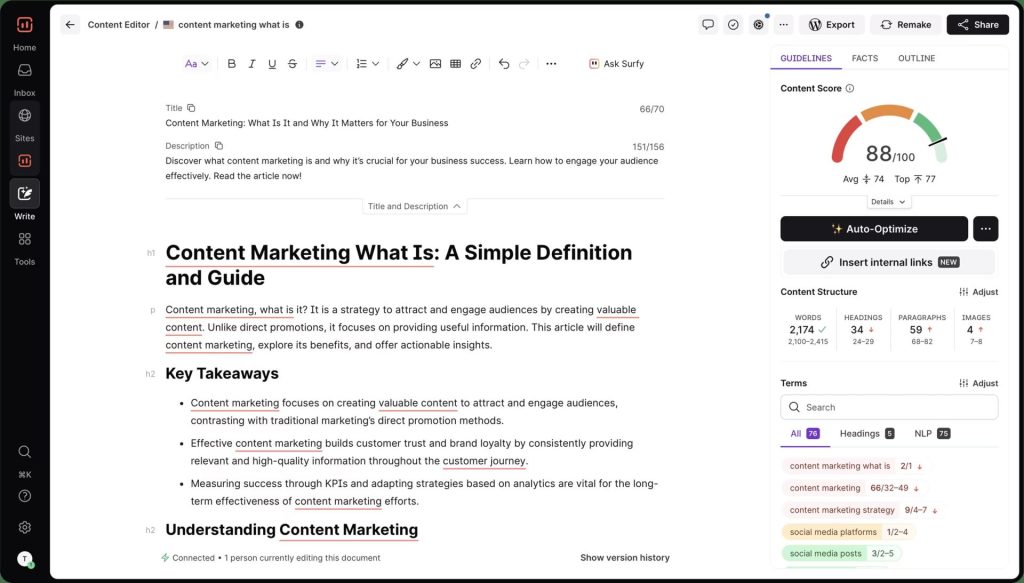
- Real-Time Content Score: As you write, Surfer analyzes your content against top-ranking pages and provides a live score (0-100) showing optimization quality. The score updates with every sentence, highlighting which changes improve your ranking potential and which don’t move the needle.
- NLP Keyword Analysis: The platform identifies semantic keywords, LSI terms, and NLP entities that appear across ranking content. Keywords are prioritized by importance. Primary terms like “content optimization” carry more weight than tangential phrases, so you’re not treating every suggestion equally.
- Topic Coverage Gap Analysis: Surfer scans ranking pages to identify topics and subtopics your content needs to cover. It shows exactly which sections competitors included that you’re missing, giving you a clear roadmap for comprehensiveness rather than just keyword density.
- SERP Analyzer with Competitive Metrics: Before writing, you can analyze the top 10-50 ranking pages for any keyword. The tool breaks down their word count, heading structure, keyword usage patterns, image count, and domain authority—helping you understand what’s actually working in the SERP.
- Content Audit for Existing Pages: You can analyze published content to identify optimization opportunities. The audit shows which keywords to add, which topics to expand, and how your content compares to what’s currently ranking. We’ve used this to resurrect pages stuck on page 2-3.
- Outline Builder from SERP Data: Surfer automatically generates content outlines based on headings used across ranking pages. You can accept, reject, or modify suggestions, making it easier to structure content that matches search intent before you start writing.
Surfer SEO Pros
- Real-time content scoring eliminates guesswork during writing. The live 0-100 score updates with every sentence, showing exactly which changes improve optimization and which don’t move the needle. Writers can see immediately if adding a keyword helps or if they’ve already hit optimal usage—preventing over-optimization that triggers penalties.
- NLP keyword prioritization prevents keyword stuffing. Unlike tools that dump 100+ terms with equal weight, Surfer ranks keywords by importance. Primary terms like “content optimization” appear at the top, secondary terms below. This hierarchy has helped our writers create natural-reading content that ranks without sounding robotic.
- Topic coverage analysis identifies specific content gaps. The Content Structure feature shows which subtopics ranking pages cover that your draft misses. For a client’s project management software article, Surfer identified that all top-10 results discussed mobile apps and integrations—sections we hadn’t planned. Adding them moved us from position 8 to position 3.
- Google Docs integration actually works reliably. The Chrome extension syncs smoothly without document lag or constant re-authentication issues we’ve experienced with other tools. Multiple writers can see optimization recommendations simultaneously during collaborative editing, which matters for agency workflows.
- Accurate SERP data matches real ranking patterns. After testing Surfer recommendations across 200+ client articles, I’ve found the keyword usage frequencies and word count suggestions align closely with what actually ranks. The platform updates its algorithm regularly as Google’s signals evolve.
- Zero learning curve for non-SEO writers. Freelance writers with no SEO background can follow Surfer’s guidance within their first article. The color-coded keyword highlighting and clear scoring make optimization accessible without understanding TF-IDF or semantic analysis theory.
- Audit feature resurrects underperforming content. We’ve used Content Audit to identify optimization opportunities on 50+ client pages stuck on page 2-3. The tool shows which keywords to add, which topics to expand, and structural improvements—resulting in ranking jumps for 70% of audited pages within 60 days.
Surfer SEO Cons
- AI writing assistant (Surfy) produces generic content. The AI can draft sections, but output quality is inconsistent and lacks brand voice. We’ve found it useful for overcoming writer’s block or expanding bullet points, but every AI-generated paragraph needs significant editing—it’s not a replacement for actual writing.
- Keyword suggestions sometimes feel repetitive. For related queries, Surfer recommends very similar terms that don’t add semantic value: “SEO tools,” “tools for SEO,” “SEO software tools.” Including all three feels forced and unnatural, but the tool counts them as separate optimization opportunities.
- No built-in rank tracking creates workflow gaps. Surfer optimizes content but doesn’t monitor post-publication performance. You need a separate rank tracker (Ahrefs, Semrush, or SERPWatcher) to verify whether optimizations actually improved rankings—adding another tool subscription to your stack.
Surfer SEO Pricing
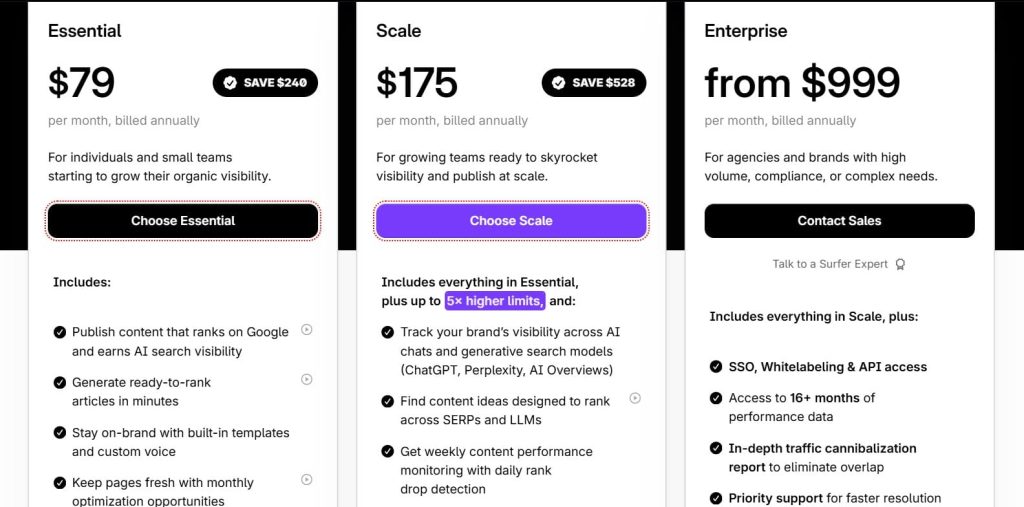
- Essential: $79/month
- Scale: $175/month
- Enterprise: from $999/month
Surfer SEO Reviews
- G2: 4.8 out of 5 stars (538+ reviews)
- Capterra: 4.9 out of 5 stars (421+ reviews)
Users consistently praise real-time optimization and ease of adoption. Common sentiment: “Surfer turned our content team into an SEO-optimized machine without requiring everyone to become an SEO expert.”
2. Clearscope – Best for Content Quality and Readability
Best For: Editorial teams and content marketers who prioritize writing quality, readability, and long-term content performance over pure ranking speed.
How I Use It: I use Clearscope primarily for high-value pillar content where readability and comprehensiveness matter as much as keyword optimization—typically for client thought leadership pieces and in-depth guides.
Quick Overview
Clearscope is a content optimization platform focused on helping you create high-quality, comprehensive content that ranks well while maintaining strong readability.
Founded in 2016, it’s built specifically for content teams that refuse to sacrifice writing quality for SEO performance.
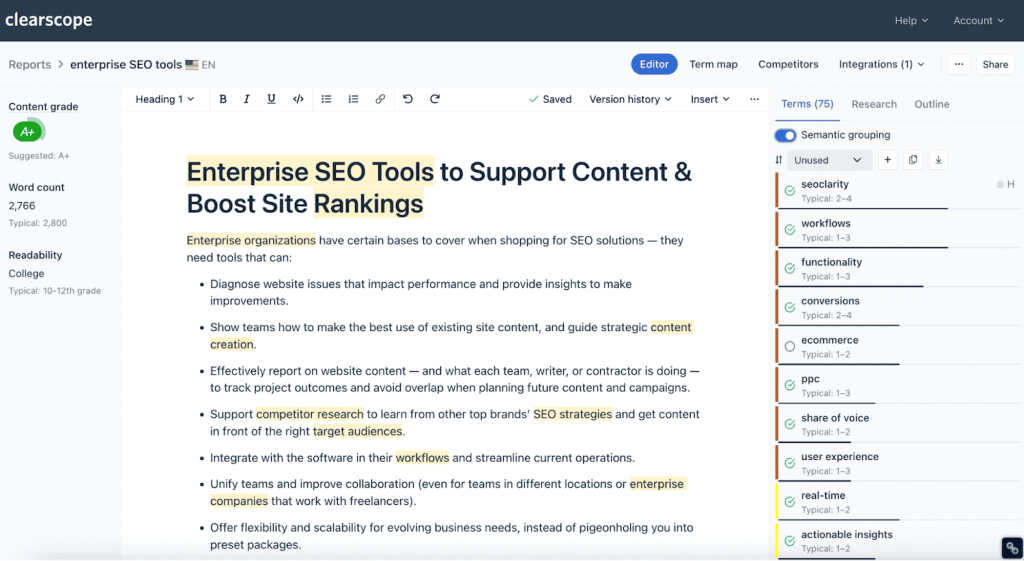
What distinguishes Clearscope from competitors is its emphasis on content grade over content score. While tools like Surfer focus heavily on keyword placement and topic coverage, Clearscope weighs readability metrics more heavily in its recommendations.
The platform analyzes Flesch-Kincaid scores, sentence complexity, and vocabulary appropriateness alongside keyword suggestions.
The tool integrates natively with Google Docs and WordPress, making it easy to optimize content within your existing workflow.
The Google Docs sidebar is particularly clean. Its recommendations don’t overwhelm you with data, but they give you enough context to make informed decisions about which keywords to include and where.
Clearscope also includes content monitoring features that track performance degradation over time. This content decay detection helps you identify which published articles need refreshing before they lose significant traffic.
Clearscope Key Features
- Keyword Discovery with Competitive Context: Enter your target keyword and Clearscope pulls related search queries with monthly volume, competition scores, and CPC data. You can also analyze competitor URLs to see which keywords they’re ranking for, helping you identify content gaps in your strategy.
- Content Editor with Real-Time Grading: As you write, Clearscope provides a content grade (A+ to F) based on keyword usage, readability, and topic relevance. The grade updates live, showing which terms to add and whether your content matches the comprehensiveness of ranking pages.
- Readability Analysis Beyond Basic Scoring: Clearscope evaluates sentence length, paragraph structure, vocabulary complexity, and transition quality. It flags sections that are too dense or technical for your target audience, helping you maintain accessibility while covering complex topics.
- Content Monitoring and Decay Detection: The platform tracks published content performance over time and alerts you when pages start losing traffic. It identifies technical issues (broken links, 404 errors, indexing problems) and content freshness problems that contribute to ranking declines.
- Google Search Console Integration: Connect your GSC account to see which queries drive impressions and clicks for specific pages. This data helps you identify keyword opportunities you’re ranking for on page 2-3 that need minor optimization to reach page 1.
- Term Frequency Recommendations: Unlike basic keyword lists, Clearscope shows optimal usage ranges for each term based on analysis of ranking content. If top pages use “content marketing” 8-12 times, the tool guides you toward that range rather than suggesting arbitrary frequency.
Clearscope Pros
- Readability analysis prevents over-optimization. Clearscope balances SEO requirements with human readability better than competitors. It flags keyword stuffing, awkward phrasing, and overly complex sentences before you publish—ensuring content passes editorial review without extensive SEO-focused rewrites.
- Content decay monitoring catches ranking drops early. The monitoring feature alerts us when client pages start losing traffic, often 2-3 weeks before significant drops appear in Google Analytics. We’ve recovered dozens of pages by catching decay early and refreshing content proactively, preventing 20-40% traffic losses.
- Clean interface reduces analysis paralysis. Unlike Surfer or MarketMuse, which show dozens of metrics simultaneously, Clearscope displays keyword suggestions, readability score, and content grade—enough data to optimize effectively without overwhelming writers. This simplicity has improved adoption rates with editorial teams.
- Google Search Console integration surfaces hidden opportunities. Connecting GSC shows which queries generate impressions but few clicks—typically keywords ranking positions 8-15. We’ve identified 30+ quick-win optimization targets for clients by focusing on these near-page-one terms rather than starting from scratch.
- Content grade methodology aligns with editorial standards. The A+ to F grading system weighs content quality heavily, not just keyword density. Articles that score well in Clearscope also pass editorial review, reducing the back-and-forth between SEO and editorial teams that slows publication.
- Keyword context from ranking pages improves usage. Beyond listing terms, Clearscope shows how top-ranking pages use keywords in context—in headings, body text, or both. This has helped our writers incorporate keywords naturally rather than forcing them into awkward positions just to hit usage targets.
Clearscope Cons
- Limited SERP analysis depth compared to competitors. Clearscope provides keyword overlap and basic metrics but not the detailed topic coverage analysis or heading structure breakdowns that Surfer and MarketMuse offer. For competitive research, we often supplement Clearscope with another tool.
- Real-time grading lags slightly during editing. The content grade takes 2-3 seconds to update after changes, versus Surfer’s near-instant scoring. When rapidly editing, this delay disrupts flow state—minor, but noticeable during intensive writing sessions.
- No AI writing assistance limits speed. Unlike Frase, GrowthBar, or Surfer, Clearscope doesn’t include AI content generation. You’re writing everything manually. For teams comfortable with that approach it’s fine, but you’ll produce content slower than with AI-assisted alternatives.
Clearscope Pricing
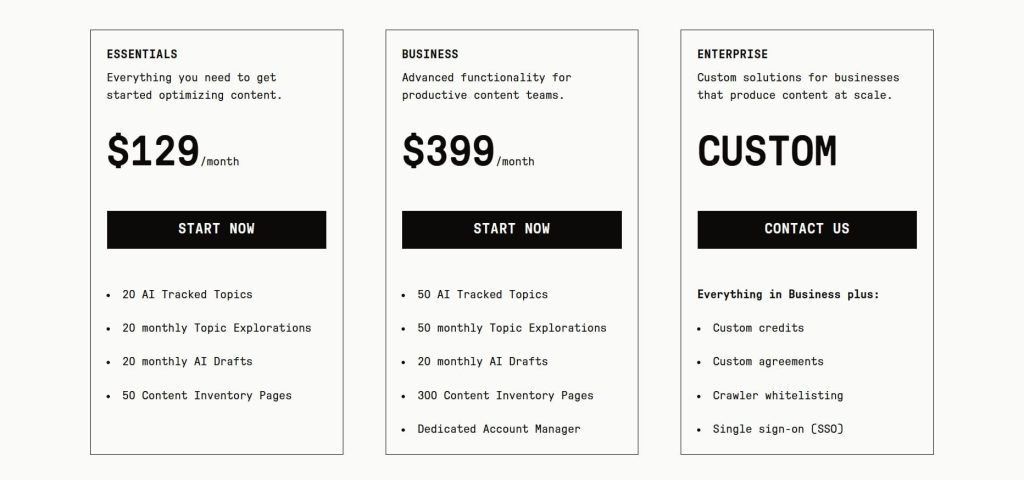
- 7-day free trial
- Essentials: $129/month
- Business: $399/month
- Enterprise: Custom
- Cancel anytime without penalty or hassle
Clearscope Reviews
- G2: 4.9 out of 5 stars (91+ reviews)
- Capterra: 4.9 out of 5 stars (60+ reviews)
Users praise content quality improvements and editorial-friendly approach. Common sentiment: “Clearscope is the first optimization tool our editorial team actually wanted to use—it improves content quality instead of compromising it.”
3. Frase – Best for Structured Content Workflow Automation
Best For: Content creators and small teams that want a systematic, step-by-step process from research through optimization, with AI assistance available at every stage.
How I Use It: I use Frase when building comprehensive content briefs for client campaigns and when I need to quickly analyze SERP patterns before assigning articles to writers. The outline builder saves hours of manual research.
Quick Overview
Frase is a content optimization and AI writing platform that guides you through a structured workflow: research the SERP, build an outline, write the content, and optimize as you go.
Founded in 2016, it’s designed for content creators who want a clear process rather than jumping straight into a blank document.
What makes Frase different is its tiered approach to content creation. Most optimization tools assume you already know what you’re writing about and just need keyword suggestions.
Frase starts earlier in the process helping you understand the SERP landscape, extract competitor headings, and build a strategic outline before you write a single word.
The platform offers flexible AI assistance throughout. You can let AI generate a complete outline based on SERP analysis, manually select headings from competitor content, or use a hybrid approach. The same flexibility applies to writing—AI can draft entire sections, help you rephrase sentences, or just sit in the background while you write manually.
For the price point ($15/month entry tier), Frase delivers exceptional value. It’s not as sophisticated as MarketMuse’s topic modeling or as polished as Surfer’s interface, but it covers the core optimization workflow at a fraction of the cost.
Frase Key Features
- SERP Research and Analysis: Enter your target keyword and Frase analyzes top-ranking pages, pulling their headings, word counts, domain authority, and key statistics. The research panel shows which topics appear most frequently across ranking content, helping you understand what Google expects for that query.
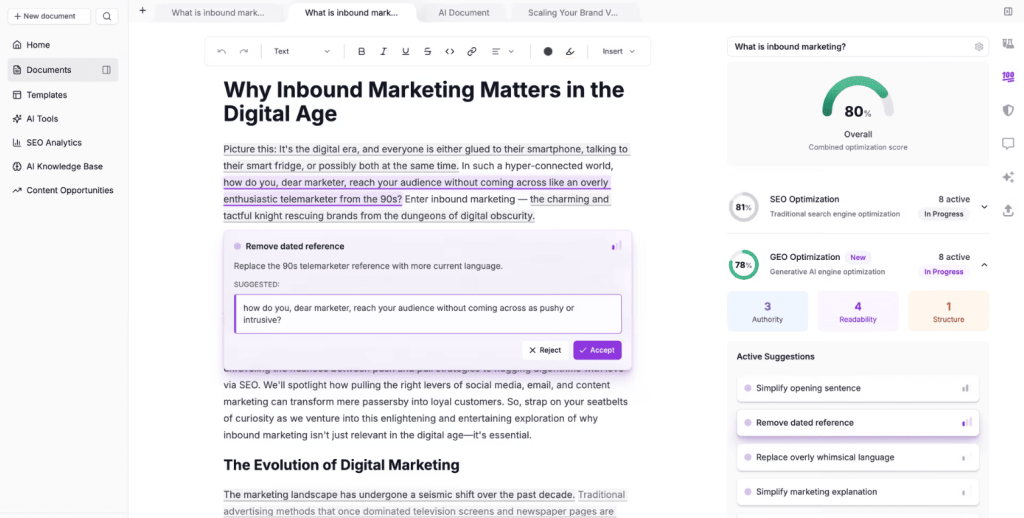
- AI and Manual Outline Generation: You can build outlines two ways. The AI option automatically generates structure based on SERP patterns. The manual approach lets you review each ranking article’s headings and drag-drop the ones that fit your content strategy—giving you more control over narrative flow.
- Content Optimizer with Live Scoring: As you write, Frase scores your content and suggests keywords to include based on TF-IDF analysis of ranking pages. The scoring updates in real-time, showing which terms improve your optimization and recommending ideal word count ranges.
- AI Writing with Competitor Context: Frase’s AI can draft content sections, continue sentences, or rephrase existing text. You can select which competitor articles the AI should reference, control tone settings, and specify topics to cover—offering more customization than generic AI writing tools.
- Question Research from PAA Boxes: The platform extracts questions from “People Also Ask” boxes and related searches, helping you identify FAQ sections, blog subtopics, or content gaps. This feature is particularly useful for creating comprehensive guides that answer related queries.
- Content Brief Templates: You can save optimized outlines and keyword lists as templates for future content. This is valuable for agencies managing multiple writers or teams that produce similar content types repeatedly (e.g., product reviews, comparison posts, how-to guides).
Frase Pros
- SERP heading extraction saves 30-45 minutes per article. Manually reviewing 10-20 ranking articles to extract headings is tedious. Frase automates this in seconds, letting you focus on strategic decisions (which headings to use, how to structure narrative) rather than data collection.
- Flexible AI assistance adapts to your workflow. You can generate a full AI outline but write manually, write your own outline but use AI for specific sections, or avoid AI entirely. This flexibility suits teams with mixed preferences better than tools forcing all-or-nothing AI approaches.
- Question research uncovers content opportunities. The PAA extraction has identified subtopics we wouldn’t have considered otherwise. For a productivity software client, Frase surfaced questions about mobile app limitations and integration costs that became valuable H3 sections, expanding the article from 1,200 to 2,100 words with relevant content.
- Content brief creation accelerates freelancer onboarding. I can create an optimized brief in Frase within 10-15 minutes: SERP analysis, suggested outline, keyword list, competitor references. This consistency has improved output quality from freelance writers who previously struggled with self-directed SEO content.
- Systematic workflow reduces decision fatigue. The structured approach—research, outline, write, optimize—helps newer content creators who feel overwhelmed by blank documents. You’re never wondering “what should I do next?” because the tool guides you through each stage sequentially.
Frase Cons
- AI content quality varies significantly by topic. For technical B2B subjects (enterprise software, complex SaaS features, specialized services), Frase’s AI output lacks depth and requires 40-60% rewriting. It works better for straightforward how-to content, listicles, or consumer-focused topics than thought leadership or technical documentation.
- Limited integrations create workflow friction. Frase doesn’t integrate with Google Docs or WordPress as smoothly as Surfer or Clearscope. You work primarily in Frase’s editor, then copy content elsewhere. For teams with established Google Workspace or WordPress workflows, this adds an annoying extra step.
- The interface is less polished than premium competitors. Compared to Surfer or Clearscope, Frase’s UI feels utilitarian. Buttons aren’t always intuitively placed, navigation requires more clicks, and the learning curve is steeper than advertised. It’s functional, just not elegant.
Frase Pricing
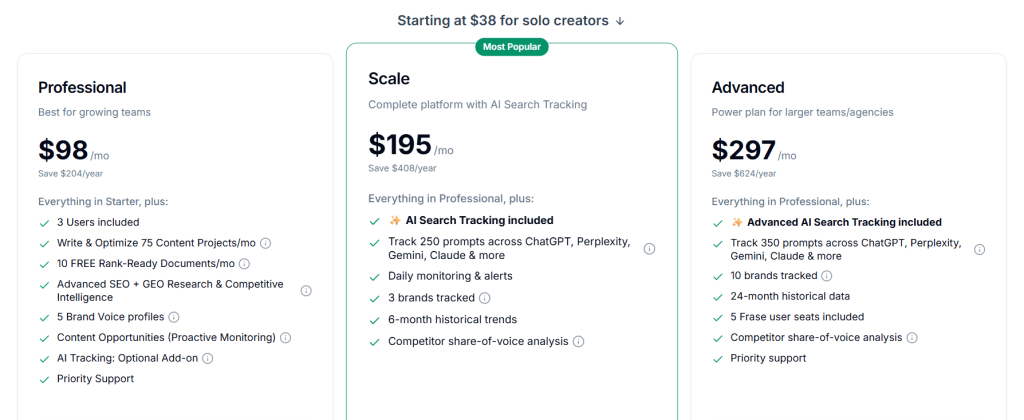
- Solo: $38/month
- Professional: $98/month
- Scale: $195/month
- Advanced: $297/month
Frase Reviews
- G2: 4.8 out of 5 stars (299+ reviews)
- Capterra: 4.8 out of 5 stars (335+ reviews)
Users praise systematic workflow and affordable pricing. Common sentiment: “Frase gives us 80% of what Surfer does at a fraction of the cost—perfect for teams that don’t need enterprise features.”
4. MarketMuse – Best for Enterprise Content Strategy Planning
Best For: Enterprise content teams and agencies that need deep topic modeling, comprehensive content gap analysis, and strategic content planning at scale.
How I Use It: I use MarketMuse when developing comprehensive content strategies for enterprise clients, identifying topic clusters for pillar content architecture, and conducting competitive content audits that require deep topical authority analysis.
Quick Overview
MarketMuse is an AI-powered content intelligence and strategy platform that goes beyond basic optimization to help you build topical authority across your entire site.
Founded in 2015, it’s designed for organizations that treat content as a strategic asset rather than just a series of individual blog posts.
What separates MarketMuse from simpler optimization tools is its focus on site-wide content strategy rather than single-article optimization.
The platform uses proprietary AI to analyze your domain’s topical authority, identify content gaps across your entire site, and recommend topic clusters that build semantic relevance signals Google’s algorithms recognize.
The Topic Navigator and Content Brief features analyze not just what keywords competitors rank for, but how comprehensively they’ve covered entire topic areas.
This helps you understand whether you need one comprehensive guide or multiple supporting articles to compete effectively in a SERP.
For enterprise teams managing hundreds or thousands of pages, MarketMuse’s inventory management and site auditing features provide visibility that’s impossible with manual analysis.
The platform can identify which existing content to update, which topics to expand, and which gaps represent the highest-value opportunities.
MarketMuse Key Features
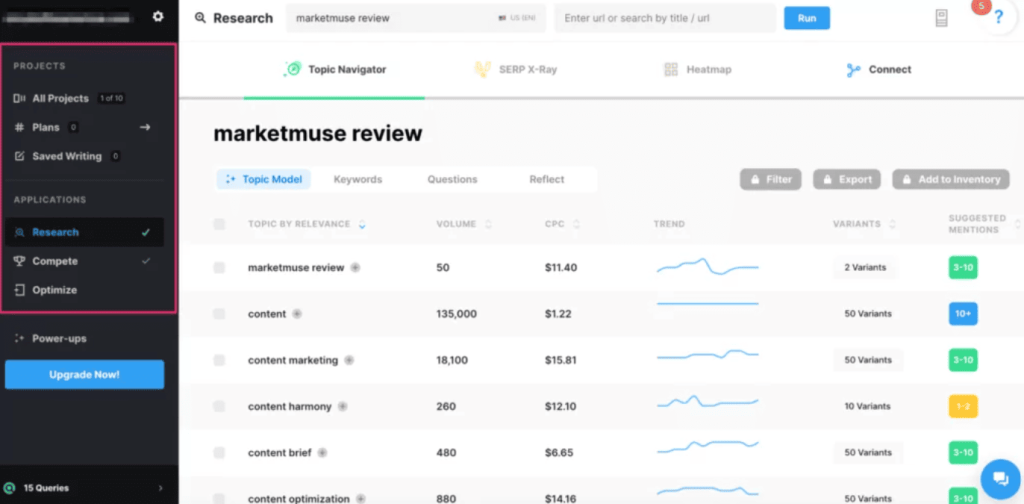
- Topic Navigator with Semantic Clustering: Enter a broad topic and MarketMuse maps related keywords into semantic clusters based on entity relationships and topical relevance. The tool shows search volume, keyword difficulty, and topical authority scores, helping you identify which clusters to target first for maximum strategic impact.
- SERP X-Ray Competitive Analysis: The platform analyzes the top 20 ranking pages for any keyword, providing detailed metrics on content depth, semantic keyword usage, internal linking patterns, and topical authority scores. This goes deeper than basic SERP analysis by showing why pages rank from a topical relevance perspective.
- Content Optimizer with Topic Modeling: MarketMuse’s optimization engine uses AI to score content based on topical comprehensiveness, not just keyword frequency. It identifies related entities and concepts that should appear in authoritative content, helping you build topical relevance that basic keyword tools miss.
- Content Briefs with AI-Generated Outlines: The platform creates detailed content briefs that include recommended structure, target word count, questions to answer, and related topics to cover. These briefs are based on semantic analysis of ranking content, not just heading extraction.
- Site-Wide Content Inventory and Audit: Connect your domain and MarketMuse audits every page, scoring topical authority and identifying content decay, cannibalization issues, and optimization opportunities. This inventory view helps enterprise teams prioritize updates across hundreds of pages.
- Competitive Content Gap Analysis: Compare your domain’s topical coverage against multiple competitors simultaneously. MarketMuse identifies topics they’ve covered comprehensively that represent gaps in your content strategy, showing estimated traffic potential for each opportunity.
MarketMuse Pros
- Topic modeling reveals strategic opportunities basic tools miss. MarketMuse’s AI identifies semantic relationships between topics that help you build topical clusters rather than isolated articles. For one SaaS client, this approach helped us grow organic traffic by 140% over 18 months by systematically building authority in three core topic areas.
- Site-wide content audits scale better than manual analysis. For enterprise clients with 500+ pages, MarketMuse’s automated inventory and authority scoring has saved our team 40+ hours per audit. The platform identifies which pages to update, consolidate, or expand based on topical authority metrics, not guesswork.
- Content briefs are more strategic than competitor tools. MarketMuse briefs include not just keywords but related concepts, entities, and semantic topics that build comprehensive coverage. Writers using these briefs consistently produce content that ranks faster—we’ve seen 30-40% shorter time-to-page-one compared to basic keyword-focused briefs.
- Competitive gap analysis drives high-ROI content decisions. The ability to compare topical coverage across 3-5 competitors simultaneously has helped us identify quick-win opportunities. For one client, we found 12 topics competitors covered minimally that we dominated with comprehensive guides, generating 25K+ monthly visits within 90 days.
- Research-backed methodology builds confidence with stakeholders. MarketMuse’s academic approach to topical authority and semantic relevance makes it easier to justify content investments to executives who question ROI. The platform provides data-driven rationale for why certain topics matter strategically.
- Prevents keyword cannibalization through topic mapping. The platform identifies when multiple pages target similar topics, helping you consolidate or differentiate content strategically. We’ve resolved cannibalization issues for 20+ client sites, often recovering 15-30% lost traffic by merging competing pages.
MarketMuse Cons
- Steep learning curve requires significant training investment. New team members typically need 3-4 weeks of daily use before navigating confidently. The platform has powerful features, but the interface isn’t intuitive—expect to invest time in training or deal with constant questions from team members.
- Topic modeling can feel over-engineered for simple content. For straightforward how-to articles or product reviews, MarketMuse’s deep semantic analysis adds complexity that doesn’t translate to better rankings. Simpler tools like Surfer often deliver comparable results for basic optimization tasks.
- AI-generated content briefs require editorial judgment. While comprehensive, MarketMuse briefs sometimes suggest related topics that aren’t actually relevant to search intent. You need someone with SEO expertise to evaluate recommendations rather than blindly following them—it’s not a “hand to junior writer” solution.
- Report generation is slower than real-time tools. Unlike Surfer’s instant content scoring, MarketMuse takes 30-60 seconds to generate reports and briefs. For teams optimizing dozens of articles weekly, these wait times accumulate into noticeable productivity losses.
MarketMuse Pricing
N/A
MarketMuse Reviews
- G2: 4.6/5 stars (216+ reviews)
- Capterra: 4.6/5 stars (28+ reviews)
Users praise strategic depth and topic modeling capabilities. Common sentiment: “MarketMuse helps us think about content strategy, not just individual articles—it’s worth the learning curve for teams managing complex content operations.”
5. Ahrefs Content Helper – Best for Existing Ahrefs Subscribers

Best For: SEO professionals and agencies already using Ahrefs for backlink analysis and keyword research who want to add content optimization without subscribing to another platform.
How I Use It: I use Ahrefs Content Helper when creating content for clients where we’re already using Ahrefs for technical SEO and link building. It’s convenient having optimization recommendations in the same platform we use for broader SEO analysis.
Quick Overview
Ahrefs Content Helper is a content optimization feature built into Ahrefs’ existing SEO toolkit. Launched in 2024 as an expansion beyond Ahrefs’ traditional strength in backlink analysis and site auditing, it provides SERP analysis, competitor content review, and AI-assisted writing within the Ahrefs ecosystem.
What makes Content Helper valuable isn’t groundbreaking functionality—it’s integration convenience. If you’re already paying $129/month or more for Ahrefs’ keyword research, rank tracking, and backlink tools, you get content optimization capabilities included without adding another subscription.
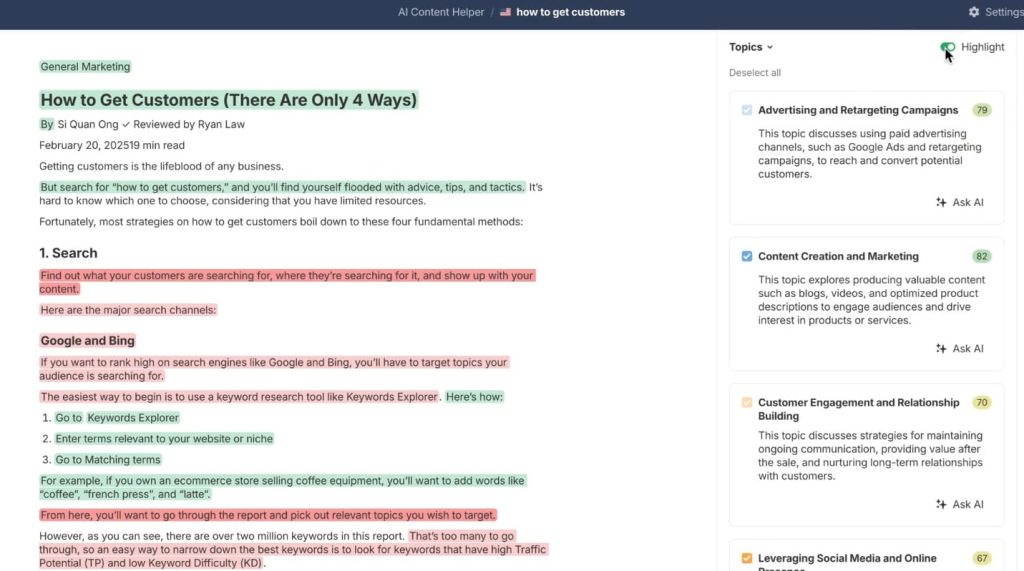
The tool analyzes search intent more deeply than most optimization platforms. Rather than just identifying keywords, Content Helper breaks down whether ranking pages serve informational, commercial, transactional, or navigational intent—then shows traffic share by intent type. This helps you understand if your target keyword actually matches your content approach.
The AI writing features are more assistant than generator. You can prompt the AI to write specific sections, rephrase text, or expand ideas—but it’s designed to supplement human writing rather than replace it entirely.
Ahrefs Content Helper Key Features
- Search Intent Analysis with Traffic Breakdown: After entering your target keyword, Content Helper identifies the different intent types (informational, commercial, transactional, navigational) that keyword serves and shows what percentage of traffic each intent captures. This prevents the common mistake of writing product comparisons for informational queries.
- Competitor Heading Analysis: The tool extracts heading structures from top-ranking pages, showing which H2s and H3s appear most frequently. You can see patterns across multiple competitors, helping you identify which topics are essential versus optional for comprehensive coverage.
- Meta Description and Title Analysis: Content Helper shows meta titles and descriptions from ranking pages, highlighting patterns in character length, keyword placement, and messaging angle. This is useful for optimizing CTR alongside rankings.
- AI Writing Assistant with Contextual Prompts: Unlike generic AI tools, the assistant understands your article’s context and can expand sections, simplify complex paragraphs, or continue incomplete sentences based on surrounding content. You can also chat with the AI to ask questions about your article or request specific revisions.
- Ahrefs Content Score: The platform assigns a content quality score based on topical relevance, keyword usage, and comprehensiveness compared to ranking pages. The scoring methodology is simpler than Surfer’s but provides directional guidance for optimization.
- Integrated Keyword Research: Because it’s part of Ahrefs, you can seamlessly move between keyword research (identifying opportunities), Content Helper (optimizing the article), and Rank Tracker (monitoring performance) without switching platforms. This workflow integration reduces context switching.
Ahrefs Content Helper Pros
- Zero additional cost if you’re already using Ahrefs. For agencies and in-house teams with existing Ahrefs subscriptions, getting content optimization included eliminates the need for a separate paid tool. This consolidation saves $1,500-2,200+ annually while reducing platform management overhead.
- Search intent breakdown prevents strategic mistakes. The traffic shared by intent has helped us catch misalignments before writing. For one client targeting “project management software,” we discovered 60% of traffic went to comparison articles versus feature explanations—changing our entire content approach and resulting in position 3 rankings versus likely page-two placement.
- Seamless workflow within the existing Ahrefs ecosystem. Moving from keyword research to content optimization to rank tracking happens in one platform. For teams already living in Ahrefs daily, this eliminates the friction of exporting data, switching tools, and managing multiple subscriptions.
- Competitor heading analysis saves manual SERP review time. Instead of manually opening 10-15 ranking articles to extract headings, Content Helper aggregates this data instantly. The pattern recognition across multiple competitors helps identify which topics are essential versus outlier choices.
- AI assistants understand article context better than generic tools. Because the AI has access to your full article content, it can make more relevant suggestions for expanding sections or rephrasing text. This contextual awareness produces better output than prompting ChatGPT with isolated paragraphs.
Ahrefs Content Helper Cons
- Optimization features are basic compared to dedicated tools. Content Helper provides keyword suggestions and content scoring, but lacks the depth of Surfer’s real-time optimization, Clearscope’s readability analysis, or MarketMuse’s topic modeling. If content optimization is your primary need, dedicated tools deliver better results.
- Content scoring methodology is less transparent. Ahrefs doesn’t explain how the content score is calculated or which factors carry the most weight. This makes it harder to understand why certain changes improve your score while others don’t—you’re optimizing somewhat blindly.
- No Google Docs or WordPress integration. You work within Ahrefs’ editor, then copy content to your publishing platform. This creates friction compared to Surfer or Clearscope, which integrate directly into your writing environment. The extra copy-paste step adds time and increases formatting errors.
- AI writing quality is inconsistent across topics. For technical B2B content or specialized industries, the AI output often lacks accuracy and requires heavy editing. It works better for general consumer topics than niche expertise areas where domain knowledge matters.
Ahrefs Content Helper Pricing
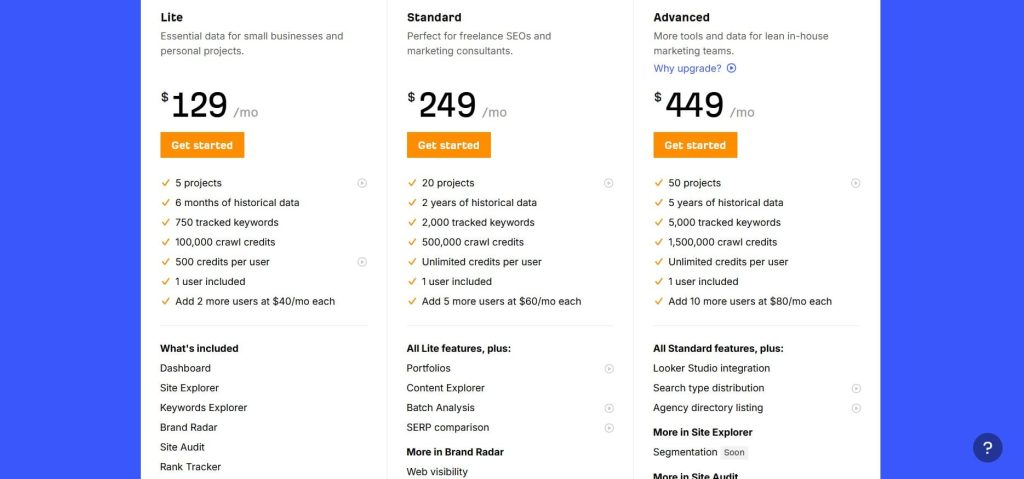
- Lite: $129/month
- Standard: $249/month
- Advanced: $449/month
- Enterprise: $1,499/month
Ahrefs Content Helper Reviews
- G2: 4.5 out of 5 stars (606+ reviews)
- Capterra: 4.7 out of 5 stars (577+ reviews)
Reviews reflect Ahrefs as a complete platform, not Content Helper specifically. Users appreciate the value-add of included content optimization, though many note it doesn’t fully replace dedicated optimization tools for content-heavy workflows.
6. Semrush Writing Assistant – Best for Technical SEO Issue Detection
Best For: SEO specialists and agencies that need to identify technical on-page issues, readability problems, and optimization gaps alongside content creation.
How I Use It: I use Semrush Writing Assistant primarily for technical content audits—identifying missing alt text, meta description issues, and readability problems across client content before publication. It catches technical issues other tools miss.
Quick Overview
Semrush Writing Assistant is a content optimization add-on to the Semrush SEO platform that analyzes content quality, readability, SEO optimization, originality, and tone of voice.
Unlike standalone optimization tools, it’s tightly integrated with Semrush’s broader SEO toolkit, allowing you to connect optimization recommendations directly to keyword research and rank tracking data.
What distinguishes Writing Assistant from competitors is its focus on technical SEO elements alongside content quality.
While tools like Surfer and Clearscope concentrate on keywords and readability, Writing Assistant flags missing alt text, excessive title tag length, thin content warnings, and other technical issues that hurt rankings but aren’t strictly “content” problems.
The tool works as a browser extension for Google Docs and WordPress, providing real-time recommendations as you write.
The scoring system evaluates four dimensions: SEO (keyword optimization and technical elements), readability (Flesch-Kincaid and sentence complexity), tone of voice (formal vs. casual), and originality (plagiarism detection).
For agencies managing clients across different industries, the tone analysis feature helps ensure content matches brand voice guidelines. The tool can detect whether writing is casual, neutral, or formal—useful for teams with multiple writers who need to maintain consistent brand voice.
Semrush Writing Assistant Key Features
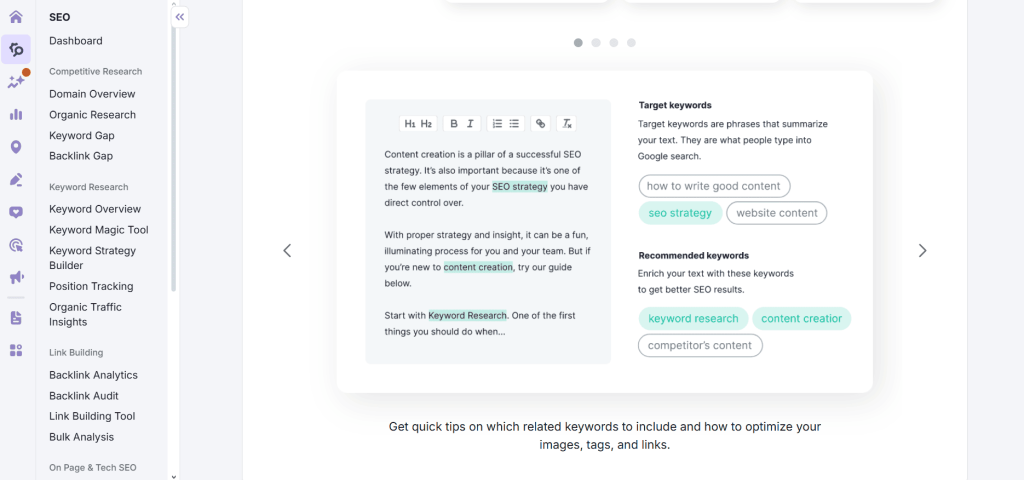
- Multi-Dimensional Content Scoring: The platform evaluates content across four categories—SEO, readability, tone, and originality—providing separate scores for each dimension. This breakdown helps you identify whether optimization issues stem from keyword gaps, writing quality problems, or technical SEO mistakes.
- Technical SEO Issue Flagging: Writing Assistant identifies technical problems like missing alt text on images, title tags exceeding 60 characters, meta descriptions outside optimal length, thin content warnings, and excessive keyword density that triggers over-optimization penalties.
- Real-Time Readability Analysis: The tool calculates Flesch-Kincaid readability scores, flags overly complex sentences, identifies passive voice usage, and highlights paragraphs that are too long. It shows exactly where readability issues occur within your text, not just aggregate scores.
- Keyword Recommendation with Semantic Variations: Based on your target keyword, Writing Assistant suggests related terms and semantic variations to include. The recommendations are less comprehensive than Surfer or MarketMuse but cover essential semantic keywords for basic optimization.
- Tone of Voice Detection: The platform analyzes writing style and assigns a tone classification—casual, neutral, or formal. You can set target tone guidelines and receive alerts when content deviates, helping maintain brand voice consistency across multiple writers.
- Plagiarism and Originality Checker: Writing Assistant scans content against a database to detect duplicate or similar text that could trigger originality issues. This is useful for catching accidental plagiarism from writers or identifying when AI-generated content too closely resembles source material.
Semrush Writing Assistant Pros
- Technical SEO issue detection catches problems competitors miss. Writing Assistant has identified missing alt text, improper heading hierarchy, and meta tag issues on 30+ client articles before publication. Catching these technical problems early prevented ranking penalties that basic content optimization tools wouldn’t have flagged.
- Integration with Semrush keyword data streamlines workflow. If you’re already using Semrush for keyword research, connecting that data directly to Writing Assistant ensures optimization targets align with your broader strategy. We can move from keyword discovery to content brief to optimization without platform switching.
- Plagiarism detection protects against duplicate content penalties. The originality checker has caught instances where freelance writers inadvertently copied competitor content or where AI tools generated text too similar to source material. This protection is worth the subscription cost alone for agencies managing multiple contributors.
- Tone analysis helps maintain brand voice consistency. For clients with strict brand guidelines, the tone detection has helped us ensure content matches their formal or casual voice requirements. This reduces editorial review cycles—content hits brand standards on the first draft more consistently.
- Real-time technical recommendations prevent common mistakes. The tool flags title tags over 60 characters or meta descriptions exceeding 160 characters as you write, preventing the common “optimize content then realize technical elements are wrong” problem that wastes time on revisions.
Semrush Writing Assistant Cons
- Keyword recommendations are less comprehensive than dedicated tools. Writing Assistant provides 15-25 keyword suggestions typically, compared to 50-100+ from Surfer or MarketMuse. For competitive keywords requiring deep semantic optimization, the limited suggestions create coverage gaps that hurt ranking potential.
- Content scoring methodology feels arbitrary at times. The platform sometimes penalizes natural writing or gives high scores to obviously over-optimized content. We’ve had articles score 85+ that felt keyword-stuffed and articles score 65 that read better—the correlation between score and ranking success is weaker than with Surfer.
- Interface integration is less smooth than competitors. The Google Docs extension occasionally disconnects, requiring re-authentication mid-writing. The sidebar can slow document performance with longer articles (3,000+ words), creating lag during editing sessions that disrupts writer flow.
- No topic coverage or content gap analysis. Writing Assistant doesn’t identify which topics ranking pages cover that your content misses—a core strength of Surfer, Frase, and MarketMuse. You’re optimizing for keywords but not necessarily comprehensiveness, which limits effectiveness for competitive topics.
- Readability suggestions can be overly prescriptive. The tool flags passive voice and complex sentences aggressively, sometimes suggesting changes that make writing sound unnatural or remove necessary technical precision. You need editorial judgment to know which suggestions to ignore.
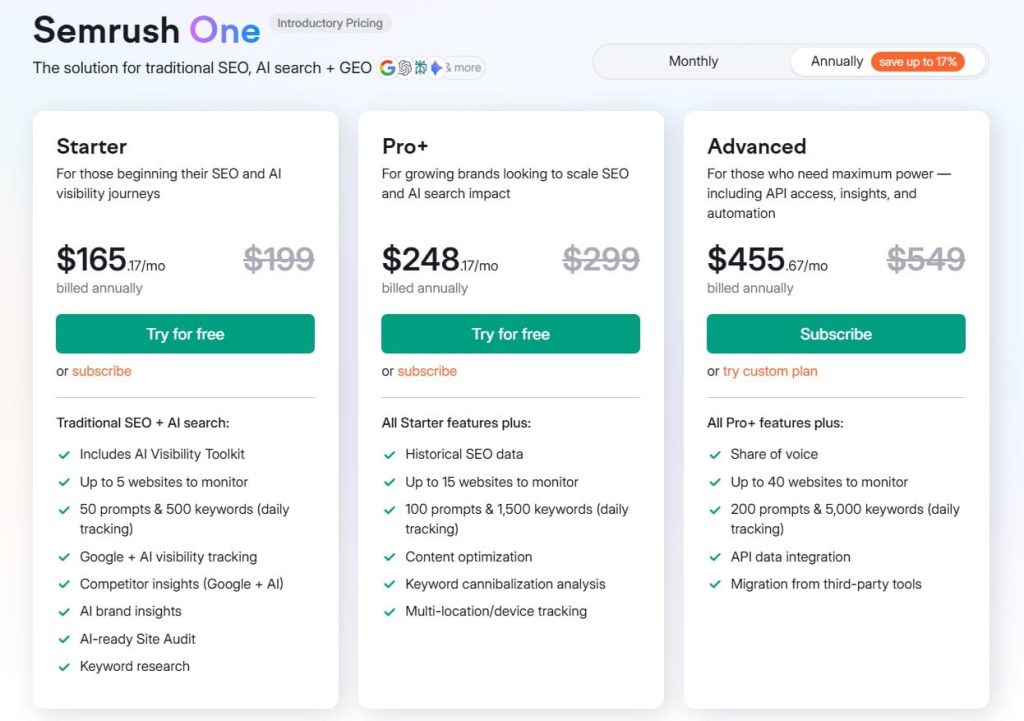
Semrush Writing Assistant Pricing
- 7-day free trial
- Starter: $165.17/month
- Pro+: $248.17/month
- Advanced: $455.67/month
Semrush Writing Assistant Reviews
- G2: 4.5 out of 5 stars (3,026+ reviews)
- Capterra: 4.6 out of 5 stars from (2,299+ reviews)
Reviews reflect Semrush’s complete platform. Users appreciate Writing Assistant’s technical SEO flagging but note it works best as a supplement to, not replacement for, dedicated content optimization tools.
7. PageOptimizer Pro – Best for Advanced On-Page Technical Optimization
Best For: SEO specialists and technical marketers who need deep TF-IDF analysis, LSI keyword extraction, and granular on-page optimization recommendations beyond basic content tools.
How I Use It: I use PageOptimizer Pro for highly competitive keywords where basic optimization isn’t enough—when we need detailed TF-IDF analysis, NLP term extraction, and technical on-page factors to outrank established competitors with high domain authority.
Quick Overview
PageOptimizer Pro (POP) is a technical on-page SEO and content optimization tool focused on granular ranking factors that separate page-one results from page-two near-misses.
Founded by Kyle Roof, known for proving SEO ranking factors through controlled experiments, POP translates technical SEO research into actionable optimization recommendations.
What separates POP from user-friendly tools like Surfer is its technical depth. While Surfer simplifies optimization for non-technical writers, POP provides detailed TF-IDF analysis, LSI keyword extraction, NLP term frequencies, and on-page element optimization (title tags, meta descriptions, header tags, image alt text) with specific character count and keyword placement recommendations.
The platform also includes E-E-A-T (Experience, Expertise, Authoritativeness, Trustworthiness) analysis—scanning your site for signals Google uses to evaluate content quality and expertise. This is particularly valuable for YMYL (Your Money, Your Life) topics where E-E-A-T signals significantly impact rankings.
POP is designed for SEO specialists who understand technical concepts and want precise control over optimization variables.
If you’re looking for a simple “follow the green lights” tool for writers, this isn’t it. If you need to understand exactly why specific optimizations matter and how to implement them technically, POP delivers.
PageOptimizer Pro Key Features
- TF-IDF Analysis with Term Frequency Recommendations: POP calculates term frequency-inverse document frequency scores for your target keyword, showing optimal usage ranges based on ranking page analysis. The tool identifies which terms appear more frequently in top results versus average results, highlighting high-value optimization opportunities.
- LSI and NLP Keyword Extraction: The platform extracts latent semantic indexing keywords and NLP entities from ranking pages, identifying related concepts and terms that build topical relevance. These go beyond simple synonyms to include contextual terms that signal comprehensive topic coverage.
- On-Page Element Optimization: POP provides specific recommendations for title tags, meta descriptions, H1-H6 headings, image alt text, and URL structure—including character counts, keyword placement positions, and semantic variations to use. This technical precision helps optimize every rankable element.
- E-E-A-T Analysis and Scoring: The platform scans your site for Experience, Expertise, Authoritativeness, and Trustworthiness signals, including author bio pages, credentials, citations, schema markup, and about pages. It provides actionable recommendations for improving E-E-A-T signals Google evaluates.
- Competitive Benchmarking with SCI Scores: POP’s SEO Competitive Index (SCI) measures keyword competitiveness based on how often terms appear in meta titles and external anchor text across ranking pages. This helps you understand how much optimization effort specific keywords require.
- Keyword Insights for Batch Analysis: Enter up to 100 keywords and POP analyzes them simultaneously, providing search volume, CPC, keyword scores, and SCI metrics. This batch processing helps prioritize keyword targets efficiently when planning content strategies across multiple topics.
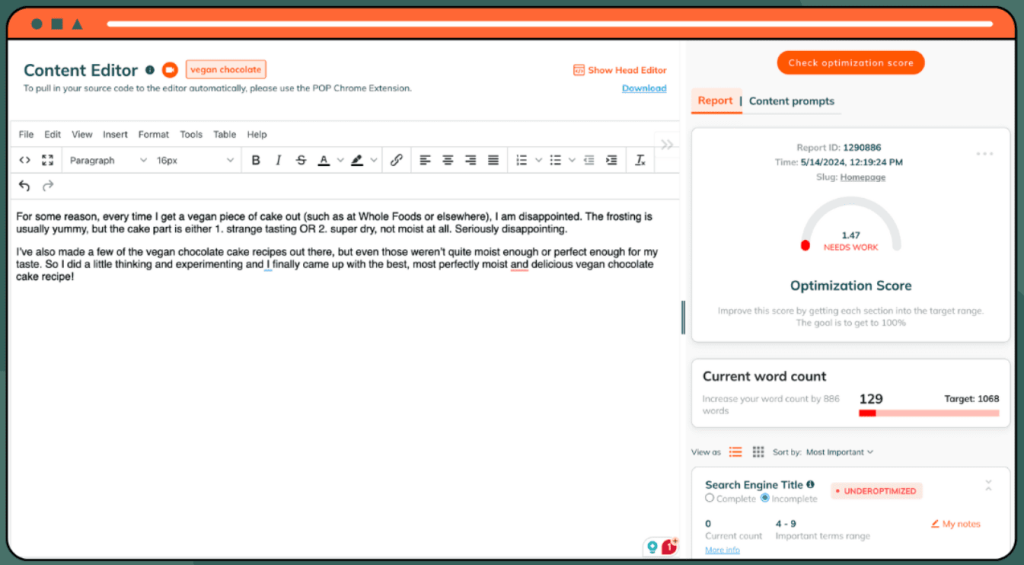
PageOptimizer Pro Pros
- TF-IDF analysis provides optimization precision other tools lack. For competitive keywords where domain authority alone won’t win, POP’s detailed term frequency recommendations have helped us outrank stronger competitors. One client ranked position 2 for “enterprise CRM software” against Salesforce and HubSpot by optimizing NLP term frequencies POP identified.
- E-E-A-T analysis improves trust signals for YMYL content. For clients in finance, healthcare, and legal industries, POP’s E-E-A-T recommendations have improved rankings by addressing expertise signals. Adding author credentials, citations, and schema markup based on POP guidance increased organic traffic 35% for a legal services client.
- Technical depth suits specialists who understand SEO mechanics. If you know what TF-IDF means and why it matters, POP gives you control over optimization variables that simplified tools abstract away. This precision matters when competing against sophisticated SEO teams.
- On-page element recommendations are more specific than competitors. POP tells you exactly where to place keywords in title tags (positions 1-3), optimal character counts (52-58 for titles), and which semantic variations to use in H2s versus H3s. This specificity eliminates guesswork.
- Keyword insights tool accelerates topic prioritization. The batch analysis of 100 keywords with SCI scores has saved hours when building content calendars. We can quickly identify which topics offer the best traffic potential relative to competition—data that normally requires manual SERP analysis.
PageOptimizer Pro Cons
- Steep learning curve for non-technical users. Writers without SEO backgrounds struggle with POP’s interface and recommendations. Terms like “TF-IDF,” “LSI keywords,” and “NLP entities” require explanation—we’ve never successfully handed POP reports to freelance writers without extensive guidance.
- Interface feels dated compared to modern tools. POP’s UI is functional but not elegant. Compared to Surfer’s polished editor or Clearscope’s clean interface, POP looks like software from 2015. This doesn’t affect functionality but impacts user experience and team adoption rates.
- No real-time optimization during writing. Unlike Surfer or Clearscope, POP doesn’t integrate with Google Docs or provide live scoring as you write. You generate a report, optimize in a separate editor, then check results—creating a less efficient workflow than real-time tools.
- Recommendations can encourage over-optimization. POP’s technical precision sometimes leads users to force keywords unnaturally to hit exact TF-IDF targets. You need SEO judgment to know when “close enough” is better than perfect scores—blindly following recommendations can create awkward, over-optimized content.
- Limited content strategy features. POP optimizes individual pages well but doesn’t help with content planning, topic clustering, or site-wide strategy like MarketMuse. If you need strategic guidance on which content to create, POP won’t help—it’s purely an optimization tool.
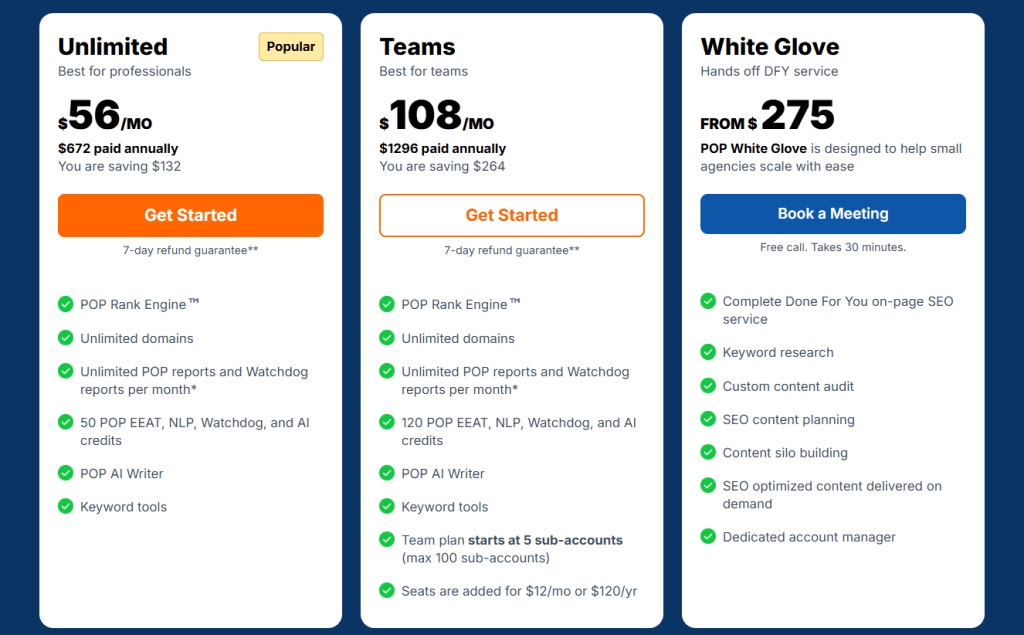
PageOptimizer Pro Pricing
- 7-day refund
- Unlimited: $56/month
- Teams: $108/month
- White Glove: $275/month
PageOptimizer Pro Reviews
- G2: 4.9 out of 5 stars (5+ reviews)
- Capterra: 5 out of 5 stars (70+ reviews)
Users praise technical depth and optimization precision. Common sentiment: “POP is perfect for SEO specialists who know what they’re doing—it gives you control over technical factors that simplified tools hide.”
8. Yoast SEO – Best for WordPress Users on Budgets
Best For: WordPress site owners, bloggers, and small businesses that need basic content optimization and technical SEO guidance without monthly subscription costs.
How I Use It: I use Yoast SEO for small business clients with simple WordPress sites who need basic optimization guidance but don’t have budget for premium tools. It handles fundamentals well enough for non-competitive local keywords.
Quick Overview
Yoast SEO is a WordPress plugin (and web tool) that provides real-time content analysis, technical SEO recommendations, and on-page optimization guidance. Founded in 2010, it’s one of the oldest and most widely adopted SEO plugins, with over 5 million active installations on WordPress sites.
What makes Yoast valuable is accessibility and cost. The free version provides basic optimization recommendations, readability analysis, and technical SEO features (XML sitemaps, canonical URLs, meta robots) that many small sites need.
For users with zero SEO knowledge, Yoast’s traffic light system (green = good, orange = needs improvement, red = problems) simplifies optimization into actionable steps.
The Premium version ($118.80/year) adds features like multiple focus keywords, internal linking suggestions, redirect management, and content insights.
While these capabilities don’t match dedicated optimization platforms, they’re sufficient for bloggers and small businesses targeting low-competition keywords.
Yoast works best for informational content and local SEO where you’re not competing against enterprise sites with sophisticated content strategies. For competitive commercial keywords or scaling content operations, you’ll outgrow Yoast’s capabilities quickly.
Yoast SEO Key Features
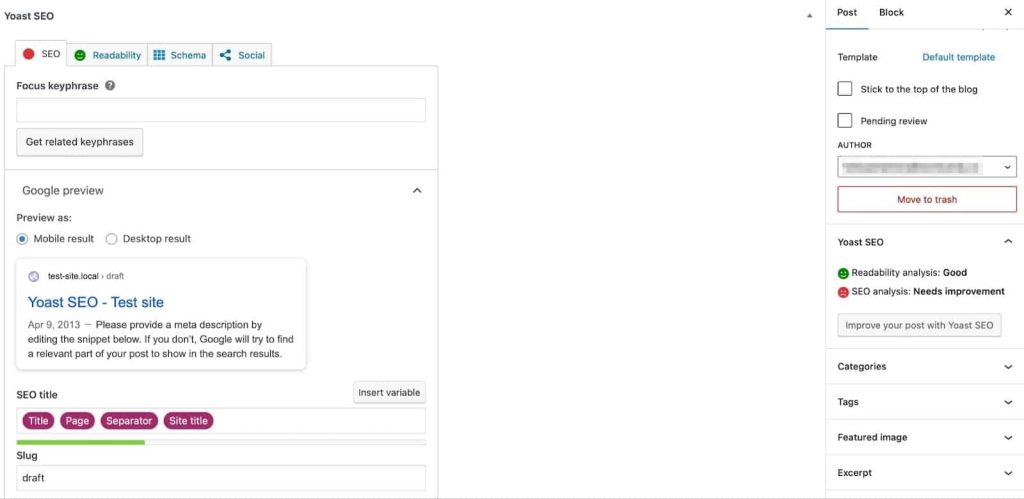
- Focus Keyword Analysis: Enter your target keyword and Yoast analyzes whether it appears in your title, meta description, URL, headings, and body text with sufficient frequency. The tool flags missing or underused keyword placements with color-coded indicators.
- Readability Analysis with Flesch Score: Yoast evaluates sentence length, paragraph structure, passive voice usage, transition words, and subheading distribution. The readability score helps ensure content is accessible to your target audience’s reading level.
- Real-Time Content Feedback: As you write in WordPress, Yoast provides live recommendations in the editor sidebar. The traffic light system shows which optimization elements are met (green), need improvement (orange), or are problematic (red).
- Technical SEO Automation: The plugin automatically generates XML sitemaps, sets canonical URLs, manages meta robots tags, and creates schema markup. These technical elements are essential for proper indexing but complex to implement manually—Yoast handles them automatically.
- Meta Description and Title Preview: Yoast shows how your title tag and meta description will appear in search results, including character count warnings if they’re too long or too short. The preview updates in real-time as you edit.
- Internal Linking Suggestions (Premium): The Premium version analyzes your content and suggests relevant internal links to other pages on your site. This helps build topical clusters and distributes page authority more effectively.
Yoast SEO Pros
- The free version provides essential optimization for zero cost. For bloggers, startups, and small businesses with tight budgets, Yoast delivers basic optimization guidance without monthly subscriptions. The free features are sufficient for non-competitive keywords. We’ve helped local service businesses rank using only free Yoast.
- Simplifies SEO for complete beginners. The traffic light system and plain-language recommendations make optimization accessible to users with zero SEO knowledge. Small business owners can follow Yoast’s guidance without hiring an SEO specialist or learning technical concepts.
- Automatic technical SEO handles critical elements. XML sitemaps, canonical URLs, and schema markup are essential but complex to implement manually. Yoast automates these technical foundations, preventing indexing issues that kill rankings before content quality even matters.
- WordPress integration is seamless and native. Because it’s built specifically for WordPress, Yoast works smoothly within the editor without third-party integrations or extensions. There’s no setup complexity—install the plugin and start optimizing immediately.
- Readability analysis improves content quality beyond SEO. The Flesch reading score and sentence length analysis help users write more accessible content that serves readers, not just search engines. This balance prevents the “optimized but unreadable” content problem.
Yoast SEO Cons
- Keyword recommendations are extremely basic. Yoast suggests using your focus keyword in specific locations but doesn’t provide semantic variations, LSI terms, or NLP entities. For competitive keywords requiring comprehensive semantic optimization, Yoast’s guidance is insufficient—you’ll rank poorly following only its recommendations.
- No competitor analysis or SERP research. Yoast doesn’t analyze ranking pages to show what’s working or identify content gaps. You’re optimizing based on general best practices, not data-driven insights about your specific keyword’s competitive landscape—this matters significantly for commercial queries.
- Content scoring methodology is overly simplistic. The tool rewards keyword density and placement without considering comprehensiveness, topic coverage, or content quality. We’ve seen articles score green in Yoast but rank poorly because they missed important subtopics competitors covered.
- Focus keyword limit creates artificial constraints. The free version allows one focus keyword per page, which is unrealistic—most content ranks for 10-50+ related terms. The Premium version allows multiple keywords, but still doesn’t approach the semantic keyword analysis real optimization tools provide.
Yoast SEO Pricing
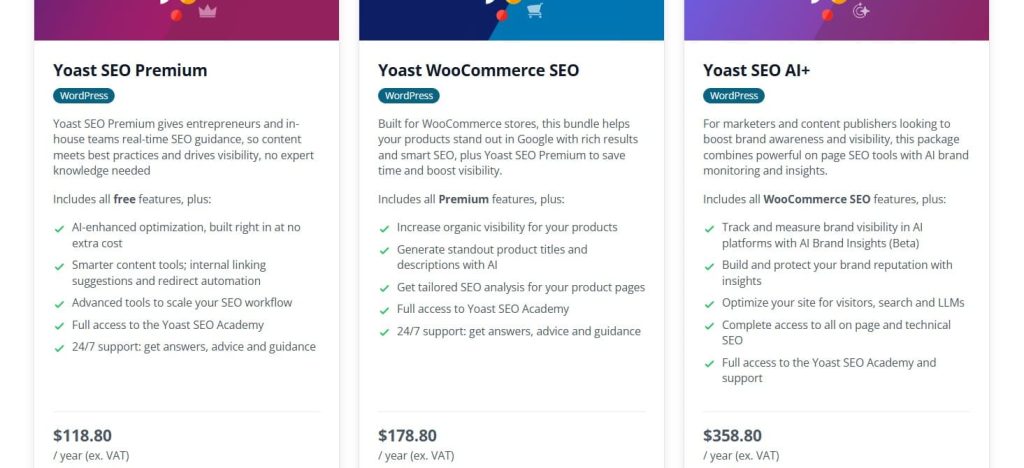
- Premium: $118.80/year
- WooCommerce: $178.80/year
- AI+: $358.80/year
Yoast SEO Reviews
- Capterra: 4.6 out of 5 stars (128+ reviews)
Users appreciate the free version for basic needs and ease of use. Common sentiment: “Yoast is perfect for getting started with SEO, but you’ll eventually need more sophisticated tools for competitive keywords.”
9. Dashword – Best for Rapid Content Brief Generation
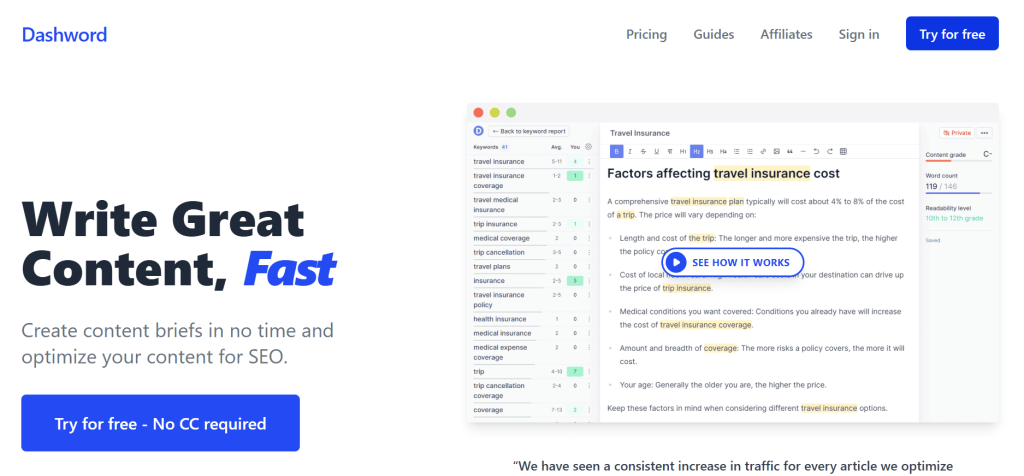
Best For: Content managers and agencies that need to create optimized content briefs quickly for freelance writers or in-house teams producing high volumes of content.
How I Use It: I use Dashword when I need to generate content briefs rapidly for multiple articles in a content sprint. The SERP-based outline builder and keyword export features make brief creation 3-4x faster than manual SERP analysis.
Quick Overview
Dashword is a content optimization and brief generation platform focused on speed and simplicity. It helps you research keywords, analyze SERPs, build content outlines, optimize drafts, and monitor performance—covering the full content workflow without the complexity of enterprise platforms.
What distinguishes Dashword from competitors is its emphasis on content brief creation rather than just optimization.
The platform is built around the assumption that many teams work with freelance writers who need clear briefs showing what to cover, which keywords to include, and how to structure articles for SEO success.
The SERP analysis and outline builder are particularly fast. You can generate a comprehensive brief—including competitor heading analysis, suggested outline, and keyword targets—in 5-10 minutes.
This speed matters when you’re managing 20-30 content pieces simultaneously and can’t spend an hour researching each topic.
The performance monitoring feature connects to Google Analytics, showing how published content performs over time. This closed-loop reporting helps you identify which brief elements correlate with ranking success, improving your brief quality over time.
Dashword Key Features
- Keyword Research with Basic Metrics: Enter a seed keyword and Dashword pulls related search terms with monthly volume, CPC, and difficulty scores. The research tool is straightforward—not as comprehensive as Ahrefs or Semrush, but sufficient for identifying content opportunities quickly.
- SERP-Based Content Brief Generation: Analyze any keyword and Dashword extracts headings from top-ranking pages. You can drag-drop headings you want to include into your outline, or use AI to automatically generate a brief based on SERP patterns. The brief includes keyword targets, suggested structure, and competitor insights.
- Content Optimizer with Real-Time Scoring: Write or paste content into Dashword’s editor and receive optimization recommendations. The tool scores your content, suggests keywords to add, and recommends target word count based on ranking page analysis.
- Outline Builder with Manual Control: Unlike tools that force AI-generated outlines, Dashword lets you review competitor headings individually and select which ones fit your content strategy. This manual control produces more strategic outlines than fully automated approaches.
- Performance Tracking via Google Analytics: Connect your GA4 account and Dashword tracks how published content performs—page views, engagement, conversions. This data helps you identify which content types and optimization approaches deliver the best results.
- Content Brief Templates: Save successful briefs as templates for recurring content types. This is valuable for agencies producing similar content repeatedly—product reviews, comparison posts, how-to guides—where you can standardize brief structure and keyword research patterns.
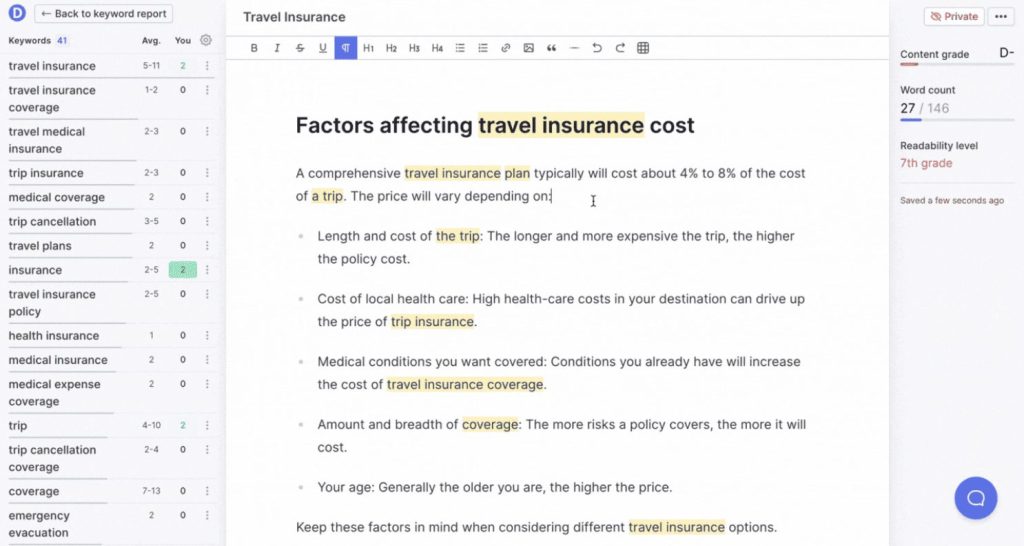
Dashword Pros
- Content brief creation is significantly faster than manual research. What typically takes 45-60 minutes of SERP analysis and heading extraction takes 10-15 minutes in Dashword. For agencies managing 20-30 content pieces monthly, this time savings adds up to 10-15 hours reclaimed per month.
- Manual outline control produces more strategic content. Being able to review and select specific competitor headings gives you more control over narrative flow than AI-generated outlines. This has improved content quality—writers receive briefs that make strategic sense, not just algorithmically assembled topics.
- Google Analytics integration closes the optimization loop. Most tools optimize content but don’t track results. Dashword’s performance monitoring has helped us identify which optimization approaches actually improve traffic versus which just improve scores—leading to 25% better ranking success by focusing on high-impact factors.
- Simple interface reduces training time for new users. Team members can navigate Dashword productively within their first session. Compared to MarketMuse’s steep learning curve or POP’s technical complexity, Dashword’s simplicity accelerates team adoption significantly.
- Brief templates standardize quality across multiple writers. For agencies managing 5-10 freelancers, template briefs ensure everyone receives consistent guidance regardless of which content manager creates the brief. This standardization has reduced revision cycles by 30%—writers hit quality targets on the first draft more consistently.
Dashword Cons
- Keyword research is more limited than dedicated tools. Dashword provides 15-25 related keywords typically, compared to 50-100+ from Surfer or hundreds from Semrush. For competitive keywords requiring comprehensive semantic coverage, the limited suggestions create optimization gaps.
- SERP analysis lacks the depth of premium competitors. You get heading structure and basic metrics but not topic coverage analysis, semantic relationships, or content gap identification that MarketMuse or Surfer provide. This limits optimization effectiveness for highly competitive keywords.
- Content scoring methodology is less sophisticated. Dashword’s optimization scoring is simpler than Surfer’s algorithm—focusing more on keyword frequency than semantic relevance or topical comprehensiveness. We’ve had articles score well in Dashword but poorly in Surfer, and the Surfer-optimized versions ranked better.
- Performance tracking requires GA4 setup expertise. Connecting Google Analytics and interpreting performance data isn’t intuitive for non-technical users. We’ve had clients struggle with the integration, limiting the value of Dashword’s monitoring features unless someone on the team understands GA4.
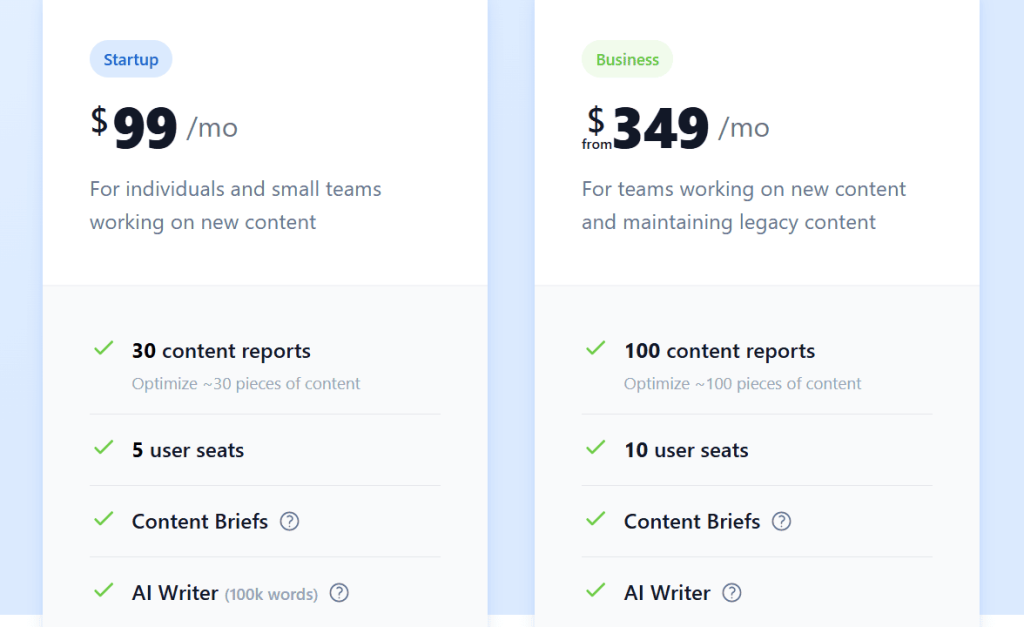
Dashword Pricing
- Startup: $99/month
- Business: $349/month
Dashword Reviews
N/A
Users praise brief generation speed and ease of use. Common sentiment: “Dashword streamlines content brief creation significantly—it’s not as powerful as MarketMuse but it’s 3x faster for 90% of use cases.”
10. Lex – Best for Long-Form Content Editing Quality
Best For: Writers and content creators who prioritize writing quality, clarity, and style refinement over SEO optimization—best used alongside dedicated SEO tools rather than as a replacement.
How I Use It: I use Lex for editing high-value long-form content where writing quality matters as much as SEO. The AI editing features help refine clarity and tone after I’ve optimized for keywords using Surfer or Clearscope.
Quick Overview
Lex is an AI-powered content editor designed to help writers create clearer, more engaging long-form content. Unlike SEO-focused optimization tools, Lex concentrates on writing quality—helping you identify weak sentences, eliminate fluff, maintain consistent voice, and improve overall readability.
What distinguishes Lex from traditional optimization tools is its editorial focus. While Surfer and Clearscope help you rank by optimizing for keywords and topics, Lex helps you write better by improving sentence structure, eliminating clichés, and ensuring your content engages readers. It’s less about search engines and more about the humans who will actually read your content.
The platform includes AI writing assistance, but it’s different from GrowthBar or Frase. Instead of generating complete sections, Lex helps you refine existing writing—expanding ideas, simplifying complex paragraphs, or suggesting alternative phrasings that improve clarity without changing your core message.
For content teams that have SEO optimization handled but struggle with writing quality, Lex fills a gap that pure SEO tools don’t address. It’s best used as a supplementary tool alongside Surfer or Clearscope, not as a replacement.
Lex Key Features
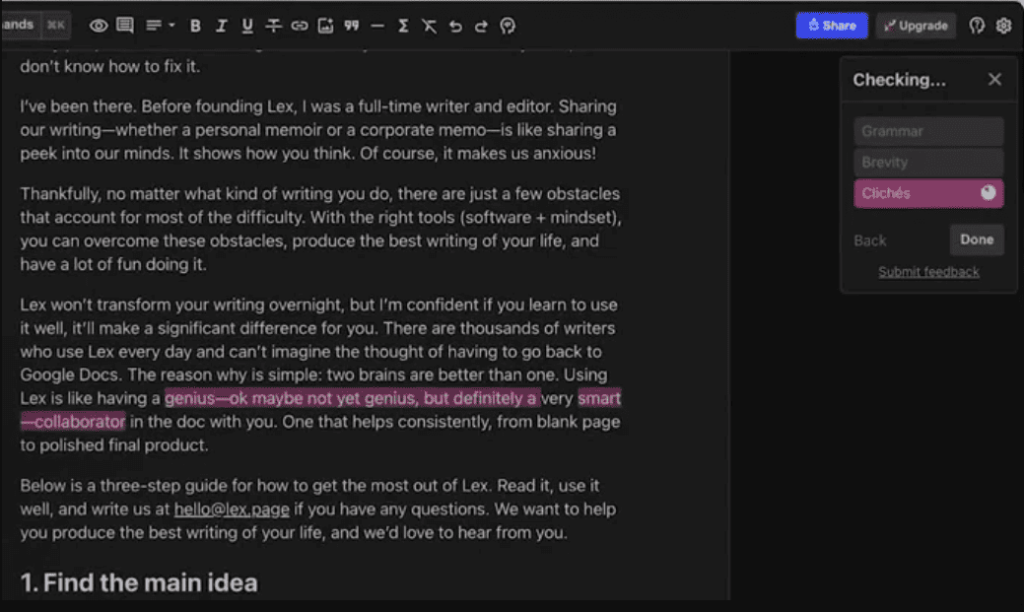
- Writing Checks for Style Patterns: Activate checks for specific patterns you want to avoid—passive voice, weak adverbs, clichés, filler words, overly long sentences, or hedging language. Lex highlights instances in real-time as you write, helping you maintain style standards.
- AI Chat for Contextual Feedback: Ask the AI questions about your content, request feedback on specific sections, or get suggestions for improving particular paragraphs. Unlike generic chatbots, Lex’s AI has the full context of your document, making recommendations more relevant to your specific content.
- Inline AI Editing: Highlight any sentence or paragraph and use AI to expand ideas, simplify complexity, adjust tone, or rephrase for clarity. The AI suggestions maintain your voice better than generating entirely new content from scratch.
- Confidence and Tone Analysis: Lex evaluates whether your writing sounds confident or uncertain, active or passive, direct or hedged. This feedback helps maintain a consistent voice—particularly valuable when multiple writers contribute to the same brand’s content.
- Grammar and Clarity Optimization: Beyond basic grammar checking, Lex identifies unnecessarily complex sentence structures, ambiguous references, and unclear phrasing that confuse readers. The recommendations improve comprehension without dumbing down your content.
- Readability Scoring: The platform calculates readability metrics showing whether your content matches your target audience’s comprehension level. You can adjust writing complexity to ensure accessibility without sacrificing necessary technical detail.
[https://appsumo.com/products/lex/]
Lex Pros
- Writing quality focus prevents “optimized but unreadable” content. SEO tools sometimes encourage keyword stuffing or structural choices that hurt readability. Lex ensures content remains engaging and clear after optimization—we’ve recovered bounce rate problems on client content by using Lex to improve readability post-SEO optimization.
- AI editing maintains your voice better than content generators. Unlike GrowthBar or Frase, which generate new text, Lex refines your existing writing. The AI suggestions feel like an editor improving your work rather than replacing it—preserving brand voice consistency matters for established content brands.
- Confidence analysis identifies weak language patterns. The tool flags hedging phrases (“might,” “could,” “perhaps”) that undermine authority. For thought leadership content where confidence matters, this feature has helped us strengthen messaging—particularly valuable for executive bylines and expert content.
- Real-time style checks maintain consistency across writers. For agencies managing 5-10 freelancers, Lex’s pattern checks (passive voice, clichés, sentence length) help ensure output consistency. Writers receive immediate feedback on style standards rather than learning through editorial revision cycles.
Lex Cons
- Zero SEO optimization capabilities. Lex doesn’t provide keyword suggestions, SERP analysis, topic coverage recommendations, or content scoring. You need a separate tool (Surfer, Clearscope, Frase) for actual optimization—Lex only handles writing quality after optimization is complete.
- Limited value for teams already using Grammarly Premium. Grammarly’s advanced features cover 60-70% of what Lex does—grammar, clarity, tone, conciseness. Unless Lex’s specific style checks or AI editing match your needs, you’re paying for overlapping functionality.
- AI suggestions can oversimplify technical content. Lex’s bias toward simplicity sometimes recommends removing necessary technical precision or industry terminology. For specialized B2B content, you need editorial judgment to ignore suggestions that would dumb down appropriately complex explanations.
- Writing checks can be distracting during initial drafting. The constant highlighting of passive voice, weak adverbs, and long sentences disrupts flow for writers who prefer drafting first and editing later. The tool doesn’t adapt to different writing workflows—it assumes you want real-time feedback always.
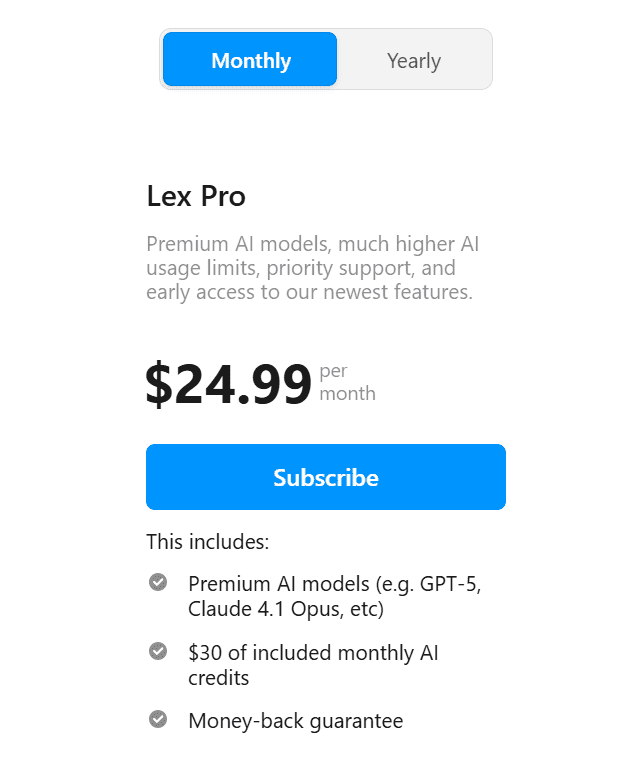
Lex Pricing
- Lex Pro: $24.99/month
- Money-back guarantee
Lex Reviews
N/A
Users praise writing quality improvements and AI editing capabilities. Common sentiment: “Lex is perfect for polishing content after SEO optimization—it makes your writing better without fighting your optimization work.”
What’s the Best SEO Content Optimization Tool for You?
Choosing the right content optimization tool depends on your budget, team size, and whether you prioritize AI-assisted speed or manual control over quality. Here’s how to narrow down your options based on what matters most to you:
- Best for Beginners: Yoast SEO
If you’re new to SEO or running a small WordPress site, Yoast SEO offers the gentlest learning curve without monthly subscription costs.
The traffic-light system (green = good, orange = needs improvement, red = problems) eliminates confusion about what to optimize.
You can identify and fix basic SEO issues within minutes of installing the plugin—missing meta descriptions, keyword placement problems, or readability concerns all get flagged with clear explanations.
- Best for Agencies: Surfer SEO
For agencies managing multiple clients and needing reliable optimization that scales across 5-10 writers, Surfer SEO delivers the most complete solution without overwhelming non-technical team members.
Writers see exactly which keywords to add, which topics competitors covered that they missed, and whether their optimization is sufficient — all within Google Docs where they’re already working.
- Best Budget Choice: Frase
If you need professional-grade content optimization without committing to heavy enterprise tools, Frase is a practical choice. It focuses on the core features that actually impact rankings rather than overwhelming users with unnecessary complexity.
Frase helps you analyze the SERP, extract competitor headings, build clear content outlines, identify important keywords, and measure content quality as you write.