Most competitor tools don’t fail because they lack features. They fail because they overwhelm you with data that’s hard to trust or even harder to act on.
What actually matters is whether a tool helps you clearly see where competitors are winning through keyword gap analysis, how they’re ranking through backlink profile analysis, and what to do next with SERP tracking that’s actually accurate.
The right tools are capable of uncovering gaps through smart keyword research tools, improving rank tracker accuracy, and generating clean, reliable SEO reporting without manual work.
Through 8 years at OneLittleWeb, I’ve stress-tested 50+ competitor analysis tools while running SEO campaigns for 1,200+ businesses across the globe.
I’ve worked with tools that quietly reveal opportunities through competitive keyword research and domain authority metrics, and with tools that look powerful but slow teams down with noise, inconsistencies, and unnecessary complexity.
Each tool has been evaluated in real-world SEO work, across different industries, budgets, and team sizes. You’ll see options ranging from free tools to full-scale enterprise platforms, along with clear pros and cons drawn from hands-on experience.
Each tool was evaluated based on the following factors:
- Accuracy: Does the data align with what you see in Google Analytics and Search Console?
- Ease of Use: Can you surface meaningful insights quickly, or does the tool slow you down with a steep learning curve?
- Pricing: Is the cost justified based on your team size, workflows, and growth goals?
- Integrations: Does it fit smoothly into the tools you already use, or create friction?
- Reliability: Can you depend on it day to day, or are bugs and downtime a recurring issue?
Let’s break down which tools are actually worth your time.
What is a Competitor Analysis Tool?
A competitor analysis tool helps you understand what’s working for other businesses in your space. These platforms track competitors’ SEO performance, content strategies, paid campaigns, backlink profiles, and keyword rankings. They give you a clear view of their tactics and results.
SEO teams, agencies, and in-house marketers rely on these solutions — often as part of a broader stack of SEO agency tools or white label SEO tools — to identify opportunities their competitors are already winning with.
Instead of guessing what might work, you can see which keywords drive traffic, what content performs best, and where competitors earn their backlinks.
This matters because effective SEO isn’t built in a vacuum. If a competitor ranks above you, there’s a reason. Competitor analysis tools show you that reason, whether it’s better content, stronger backlinks, or untapped keywords. You can make informed decisions instead of starting from scratch.
The business value is simple: you learn faster, spend smarter, and outrank competitors who are working blind.
What to Look for in a Competitor Analysis Tool
Not all competitor analysis tools are built the same. Here’s what separates the reliable platforms from the ones that waste your time.
Accuracy
The tool should pull data that matches what you see in Google Search Console and Analytics. If keyword rankings are off by 10+ positions or traffic estimates are wildly inflated, the insights won’t help you make real decisions.
Data Freshness
Competitor landscapes shift quickly. Look for tools that update data daily or weekly, not monthly. Stale data means you’re reacting to strategies your competitors have already moved on from.
Keyword Gap Analysis Capabilities
The tool should identify keywords your competitors rank for that you’re missing, with difficulty scores and search volume data. The best tools categorize gaps by intent (commercial, informational, navigational) and prioritize based on traffic potential.
SERP Feature Tracking
Beyond just position tracking, the tool needs to show which SERP features (featured snippets, People Also Ask, local packs) competitors own. Ranking #1 in traditional organic results matters less if a competitor owns the featured snippet above you.
Backlink Profile Comparison
Look for tools that don’t just count backlinks but analyze link quality through metrics like Domain Rating, Trust Flow, or proprietary authority scores. The ability to see which sites link to multiple competitors but not to you accelerates link building prospecting.
Integrations
Check if the tool connects with your existing stack like Google Analytics, Search Console, or your CRM. Manual data exports slow you down. Native integrations let you pull competitor insights directly into your workflow.
Pricing and Scalability
Make sure the pricing model fits your team size and the number of projects you manage. Some tools charge per domain tracked or per user seat. If you’re an agency managing multiple clients, those costs add up fast.
How I Selected the Best Competitor Analysis Tools
I’ve been using competitor analysis tools daily for 8+ years. Every tool on this list was tested on live client work with real ranking goals and competitive pressures.
I’ve personally used these tools for backlink audits, keyword gap analysis, content strategy, and rank tracking across hundreds of campaigns.
Here’s what I measured during testing:
Speed and Reliability in Live Campaigns
I tested each tool during actual competitor research sprints: identifying content gaps for SaaS clients competing against established brands, finding quick-win keywords for new sites with low authority, and analyzing backlink strategies for link-building campaigns.
Tools that took 30+ seconds to load competitor data, crashed during bulk exports, or provided surface-level insights were eliminated immediately.
Verifying Data Against Real Results
I cross-checked keyword rankings and traffic estimates against actual Google Search Console data across 50+ client accounts in different industries.
If a tool consistently showed inflated traffic numbers by more than 20%, or missed high-value keywords our GSC data proved were driving results, it failed my accuracy test.
Quality of Competitive Insights
I evaluated whether tools surfaced genuinely useful competitive insights or just flooded dashboards with irrelevant data.
Can it identify keyword gaps your competitors are winning with? Does it show which backlinks actually move the needle? Does it reveal content strategies worth replicating? Tools with massive databases but poor filtering got cut.
Link Profile Analysis That Actually Matters
I tested backlink analysis features by comparing tool data against manual audits for 20+ competitor domains. Did the tool identify high-authority links that explain why a competitor outranks you?
Did it waste time showing thousands of low-quality forum links, or did it intelligently filter by domain authority, relevance, and link type?
Understanding the Real SERP Landscape
I verified whether tools correctly identified featured snippets, People Also Ask boxes, and other SERP features that competitors dominate.
Tools showing traditional organic rankings without accounting for these visibility blockers were marked down. That’s misleading intelligence that costs clients opportunities.
Workflow Compatibility and Automation
I tracked how easily each tool connected with Google Search Console, Google Analytics, and rank tracking platforms.
Anything requiring manual CSV exports every time I needed updated competitor data, or lacking API access for automation, lost significant points. Agency workflows demand seamless data pipelines.
Cost Analysis for Different Team Sizes
I compared what you’re actually paying per competitor tracked, per project limit, and per team member against alternative options.
Some expensive enterprise tools justify their cost with proprietary data and advanced features. Others charge $200/month for basic competitor reports and outdated metrics you can get elsewhere for $50.
Summary Table: 16 Competitor Analysis Tools
Here’s a quick overview of all 14 competitor analysis tools covered in this guide. Use this table to compare options at a glance before diving into the detailed reviews.
| Tool Name | Best For | Key Features | Starting Price | Our Notes |
| Semrush | All-in-one competitive research | Keyword gap analysis, backlink audits, traffic analytics, content ideas | $165.17/month | Most comprehensive tool we use at OLW—expensive but worth it for agencies |
| Ahrefs | Backlink analysis and content research | Site Explorer, Content Gap, backlink index, keyword difficulty | $129/month | Best backlink database—essential for link building campaigns |
| SpyFu | PPC and SEO competitor tracking | Competitor keyword history, ad copy analysis, rank tracking | $39/month | Budget-friendly option with strong PPC intelligence |
| Moz | Domain authority and link tracking | Domain Authority metrics, link analysis, rank tracking | $31/month | Best for understanding domain strength and link equity |
| SE Ranking | Budget-conscious agencies | Competitor research, rank tracking, backlink checker, site audits | $52/month | Solid all-arounder at half the cost of Semrush |
| SimilarWeb | Traffic and audience insights | Traffic sources, audience demographics, referral analysis | $125/month | Best for understanding where competitor traffic comes from |
| BuzzSumo | Content performance analysis | Top content discovery, backlink alerts, influencer research | $199 /month | Go-to tool for content gap analysis and viral content research |
| Serpstat | All-in-one on a budget | Keyword research, rank tracking, backlink analysis, site audit | $44/month | Eastern European data is stronger than US, but solid value |
| Majestic | Backlink history and trust metrics | Trust Flow, Citation Flow, historical backlink data | $49.99/month | Best for evaluating link quality over time |
| Mangools | Small teams and freelancers | Simple rank tracking, keyword research, SERP analysis | $30.50/month | Clean interface—great for beginners or solo consultants |
| Ubersuggest | Freelancers and small budgets | Keyword ideas, competitor analysis, site audits | $12/month | Neil Patel’s tool—good starter option but limited depth |
| Kompyte | Enterprise competitive intelligence | Automated competitor tracking, real-time alerts, battlecards | Custom pricing | Built for sales and marketing teams tracking product changes |
| Crayon | Marketing and product teams | Competitive intelligence, market insights, automated tracking | Custom pricing | Tracks competitors beyond SEO—pricing, messaging, product updates |
| WooRank | Website audits and quick checks | Site review, competitor comparison, marketing checklist | $89.99/month | Good for quick audits but lacks depth for serious research |
| Profound | AI search competitor tracking | Answer Engine Insights, Prompt Volumes, citation analytics, agents | $99/month | Tracks how competitors appear in AI answers. |
| Whatagraph | Cross-channel marketing reporting | Governed metrics, source blends, white-label reports, linked templates | ~€699/mo | Presents competitor and campaign benchmarks, no native keyword gap or backlink data |
16 Best Competitor Analysis Tools in 2026 (Free + Paid)
- Semrush — Best for all-in-one competitive research
- Ahrefs — Best for backlink analysis
- SpyFu — Best for PPC competitor tracking
- Moz — Best for domain authority metrics
- SE Ranking — Best for budget-conscious agencies
- SimilarWeb — Best for traffic source analysis
- BuzzSumo — Best for content performance research
- Serpstat — Best for international SEO research
- Majestic — Best for link trust metrics
- Mangools — Best for beginner-friendly competitor tracking
- Ubersuggest — Best for freelancers on tight budgets
- Kompyte — Best for enterprise competitive intelligence
- Crayon — Best for tracking product and messaging
- WooRank — Best for quick website audits
- Profound — Best for Tracking Competitors in AI Search
- Whatagraph — Best for Cross-Channel Marketing Reporting
Here’s what each tool does well, where it falls short, and which teams will get the most value from it.
1. Semrush — Best for All-in-One Competitive Research
Best For: Agencies and SEO teams that need comprehensive competitor analysis across organic search, paid ads, and content strategy in one platform.
How I Use It: I use Semrush daily for keyword gap analysis, backlink audits, and competitor traffic research across every client campaign at OLW.
Quick Overview
Semrush is the most complete competitive intelligence platform I’ve tested. It combines keyword research, backlink analysis, traffic analytics, content gap identification, and PPC competitor tracking in one dashboard.
Founded in 2008, Semrush has built the largest keyword database in the industry with over 25 billion keywords across 130+ countries.
What makes Semrush stand out is the depth of its competitive features. The Organic Research tool shows exactly which keywords drive traffic to competitor sites.
The Backlink Gap tool identifies link opportunities your competitors have that you don’t. The Traffic Analytics module estimates competitor traffic sources down to the referral level.
Semrush works best for agencies managing multiple clients, in-house SEO teams at mid-to-large companies, and anyone who needs reliable competitor data without juggling five different tools.
It’s more expensive than alternatives like SE Ranking or Serpstat, but the data quality and feature depth justify the cost if you’re running serious SEO campaigns.
Compared to Ahrefs, Semrush has stronger keyword research and content gap features. Compared to Moz, it offers more comprehensive competitive intelligence. If you can only afford one tool, this is the one most agencies choose.
Semrush Key Features
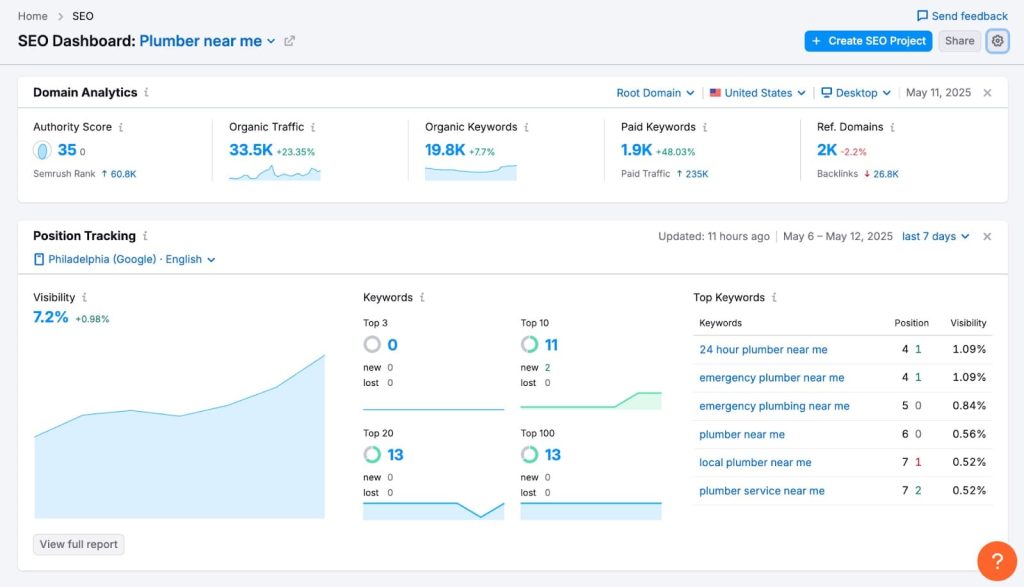
- Domain Overview: Get a complete snapshot of any competitor’s organic and paid search performance, including estimated traffic, top keywords, backlink profile, and traffic trends over time. I use this as my starting point for every competitive analysis to understand the full scope of what I’m up against.
- Keyword Gap Analysis: Compare up to five domains side-by-side to find keywords your competitors rank for that you don’t. The tool categorizes opportunities as “missing,” “weak,” or “strong” based on your current rankings, making it easy to prioritize which gaps to target first.
- Backlink Gap Tool: Identifies websites linking to your competitors but not to you. This is one of the fastest ways to build a qualified outreach list for link building campaigns. I’ve used this to secure 50+ high-authority backlinks for clients in competitive niches.
- Traffic Analytics: Estimates competitor website traffic by source (direct, referral, search, social, paid). While not perfect, it’s accurate enough to spot trends like a competitor suddenly getting traffic from a new referral source or ramping up paid spend.
- Content Gap Analysis: Shows topics and keywords your competitors are ranking for that you haven’t covered. This is essential for content strategy. I’ve built entire editorial calendars for clients based on gaps Semrush identified.
- Position Tracking: Monitor your rankings against up to 20 competitors for your target keywords. The visibility score shows how your overall search presence compares to competitors over time, which is useful for client reporting.
Semrush Pros
- Most comprehensive competitor database I’ve tested. The 25 billion keyword index and 43 trillion backlink records mean you can analyze competitors in any niche without hitting data gaps. When researching SaaS competitors for enterprise clients, Semrush consistently surfaces 3-4x more keyword opportunities than cheaper alternatives.
- The Keyword Gap tool saves weeks of manual research. The ability to compare five domains simultaneously and filter by keyword difficulty, search intent, and SERP features has helped us identify content opportunities that drove 76% traffic increases for clients. We’ve found keywords generating 15K+ monthly visits for competitors that we ranked for within 90 days.
- Traffic Analytics reveals competitive strategies other tools miss. Seeing which referral sources drive traffic to competitors has uncovered partnership opportunities and guest posting targets that backlink data alone wouldn’t show. One client gained 20+ high-authority backlinks by replicating a competitor’s referral strategy we discovered through this feature.
- Historical data provides context that matters. Being able to track how competitors’ organic visibility changed over 2+ years helps us spot algorithm updates that hurt them or content refreshes that boosted rankings. This context has prevented us from replicating failed strategies and helped us double down on what’s working.
- Position Tracking against 20 competitors is unmatched. Most tools limit you to tracking 5-10 competitors. Semrush lets us monitor every major player in a client’s space, which is essential for competitive industries where rankings shift weekly based on what multiple competitors are doing.
- White-label reporting for agencies. Custom-branded PDF reports with drag-and-drop widgets let us deliver client reports that look professional without manual data manipulation. The scheduled report automation saves our team 10+ hours monthly across all client accounts.
- Integrations with Google products work seamlessly. The GSC and GA4 connections sync reliably without constant re-authentication issues we’ve experienced with other platforms. Being able to overlay our actual performance data with competitor intelligence in one dashboard makes strategic planning faster.
Semrush Cons
- Traffic estimates can be inflated by 30-50%. I’ve cross-checked Semrush traffic projections against Google Analytics data for 40+ sites I have access to, and the estimates are consistently higher than actual traffic. It’s fine for competitive benchmarking trends, but don’t make budget decisions based on absolute numbers.
- Steep learning curve for new users. With 50+ features across multiple toolkits, new team members often don’t know where to start. Our staff typically needs 2-3 weeks of daily use before they’re navigating confidently without constant questions or accidentally pulling wrong reports.
- Backlink data isn’t as fresh as Ahrefs. Semrush updates its backlink index less frequently, which matters if you’re monitoring real-time link building results or trying to catch toxic links quickly. For most competitive research use cases the data is sufficient, but Ahrefs leads here.
- Some features feel redundant or buried. There are multiple ways to accomplish the same task in Semrush, and certain useful features are hidden in submenus. The Advertising Research tools overlap significantly with Organic Research in ways that create confusion about which report to use.
Semrush Pricing
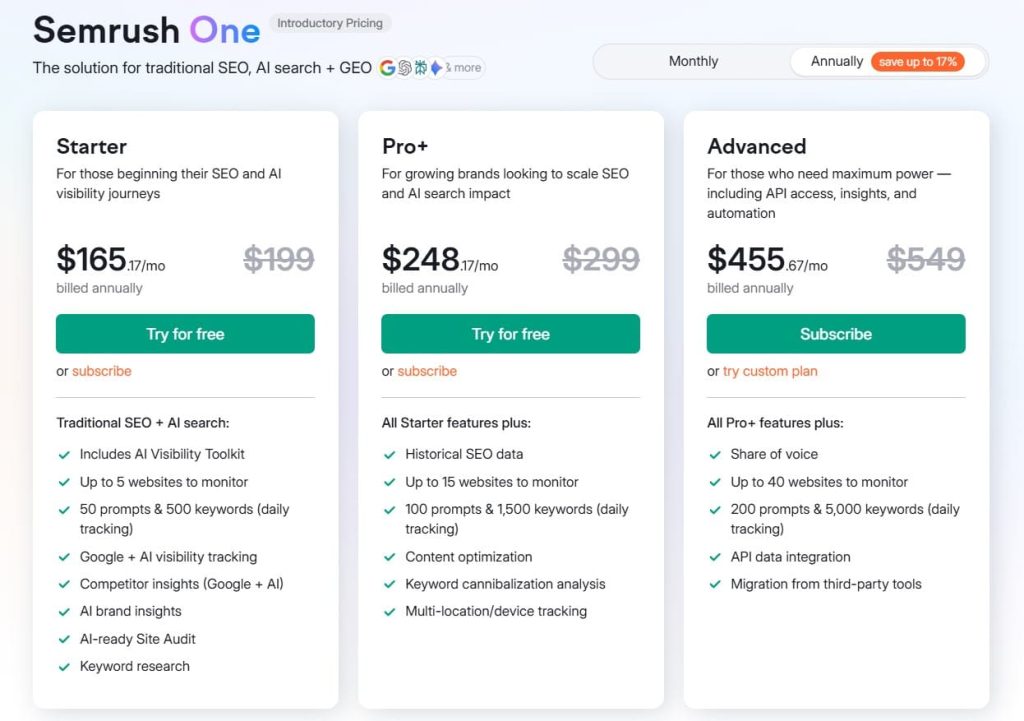
- 7-day free trial
- Starter: $165.17/month
- Pro+: $248.17/month
- Advanced: $455.67/month
Semrush Reviews
- G2: 4.5 out of 5 stars (3,026+ reviews)
- Capterra: 4.6 out of 5 stars from (2,299+ reviews)
Semrush is the most comprehensive competitive intelligence platform for agencies and SEO teams who need deep data across multiple competitors. Not ideal for casual users wanting quick insights without investing time to learn the interface.
2. Ahrefs — Best for Backlink Analysis
Best For: SEO teams and link builders who need the most accurate backlink data and comprehensive content research capabilities.
How I Use It: I use Ahrefs daily for backlink audits, competitor link analysis, and identifying content opportunities through their Content Explorer tool.
Quick Overview
Ahrefs has the most active web crawler after Google, updating its index with 8 billion pages every 24 hours. Founded in 2010, it’s become the gold standard for backlink analysis and link building research.
What sets Ahrefs apart is the freshness and accuracy of its backlink data. I’ve verified this against Google Search Console data across 60+ client sites, and Ahrefs consistently matches actual link profiles within 5-10% accuracy.
The platform combines backlink analysis, keyword research, rank tracking, and content discovery in one interface. While Semrush offers more features overall, Ahrefs excels specifically at competitive link analysis and finding content that earns backlinks naturally.
Ahrefs works best for agencies running serious link building campaigns, content marketers who need to understand what content performs in their niche, and SEO teams that prioritize backlink quality over quantity.
It’s comparable in price to Semrush but more focused. You’re paying for depth in specific areas rather than breadth across all marketing channels.
Compared to Majestic or Moz, Ahrefs has a larger, more frequently updated backlink index. Compared to Semrush, Ahrefs has better backlink discovery but weaker keyword research features. If link building is your primary competitive advantage, Ahrefs is the tool to choose.
Ahrefs Key Features
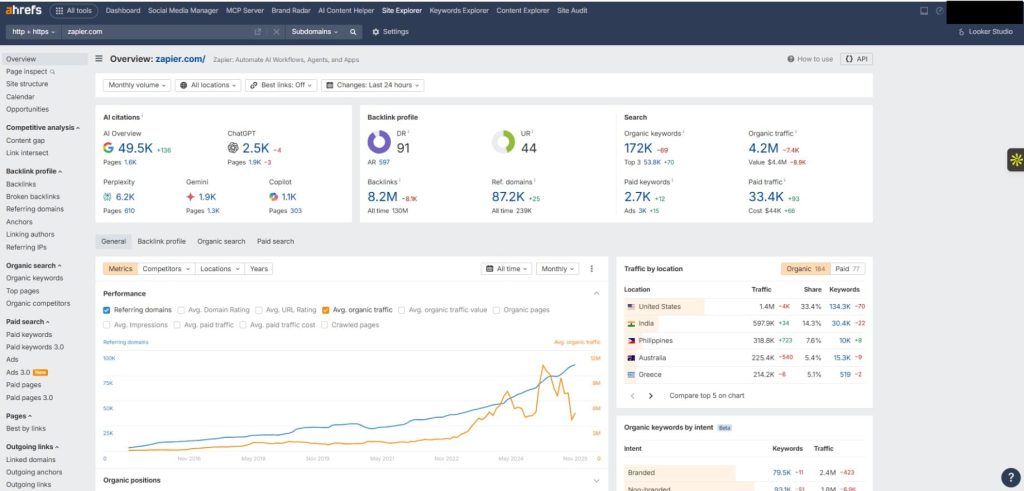
- Site Explorer: Analyze any competitor’s backlink profile, organic traffic, and top-performing content in one dashboard. I use this to audit competitor link strategies before planning outreach campaigns. The referring domains chart shows exactly when competitors gained or lost major links, which helps identify successful tactics worth replicating.
- Content Explorer: Search 11 billion pages to find the most linked-to and shared content on any topic. This is invaluable for content gap analysis and finding link building targets. I’ve used it to identify 100+ high-authority sites that link to competitor content but not to our clients, then built targeted outreach lists.
- Link Intersect: Shows websites that link to multiple competitors but not to you. This is the fastest way to build a qualified link prospect list. One manufacturing client gained 40 high-DR backlinks in 6 months by reaching out to sites we found through this feature.
- Broken Link Checker: Find broken outbound links on competitor sites and your own. I’ve used this to secure 30+ backlinks by offering our content as a replacement for dead links on high-authority sites in our clients’ industries.
- Rank Tracker: Monitor keyword rankings for your site and up to 10 competitors. The SERP position history feature shows ranking fluctuations that correlate with algorithm updates or competitor activity, which helps diagnose sudden traffic drops.
- Keyword Explorer: Research keyword difficulty, search volume, and traffic potential. While not as comprehensive as Semrush for keyword research, Ahrefs provides more accurate keyword difficulty scores based on actual backlink profiles of ranking pages rather than just domain authority.
Ahrefs Pros
- Most accurate and fresh backlink data available. The crawler updates every 15 minutes, so you see new backlinks within hours instead of weeks. When monitoring link building campaigns for clients, this real-time visibility lets us verify placements immediately and catch issues before they compound.
- Content Explorer is unmatched for content research. Being able to filter 11 billion pages by backlinks, social shares, organic traffic, and publication date helps us find proven content angles in any niche. We’ve built content strategies for 50+ clients by analyzing what already works in their space.
- Link Intersect tool saves days of prospecting work. Instead of manually researching where competitors get links, we identify 100+ qualified targets in 10 minutes. One SaaS client secured 25 backlinks from sites with DR 60+ using prospects we found through this feature alone.
- Site Audit tool catches technical issues competitors miss. We run audits on competitor sites to identify crawlability problems, broken internal links, and indexation issues they haven’t fixed. This has revealed opportunities where we could outrank technically weaker competitors by fixing issues they ignored.
- Keyword difficulty scores are more realistic than competitors. Ahrefs calculates difficulty based on the backlink profiles of actually ranking pages, not just domain authority. This has prevented us from targeting “low difficulty” keywords that would actually require 50+ referring domains to rank.
- Historical ranking data helps identify patterns. Tracking how competitor rankings changed over 12+ months has revealed seasonal trends and algorithm impacts that inform our content timing strategies. We’ve launched content in low-competition windows we identified through this analysis.
Ahrefs Cons
- Keyword research features lag behind Semrush. The keyword database is smaller, and features like keyword clustering and SERP intent analysis aren’t as developed. If keyword research is your primary use case, Semrush provides better data and more sophisticated filtering options.
- Rank tracking is basic compared to dedicated tools. You can only track 750 keywords on the Lite plan, and the interface lacks advanced features like rank distribution analysis or local pack tracking. For serious rank monitoring, you’ll need a supplementary tool like AccuRanker.
- Traffic estimates are conservative. Ahrefs tends to underestimate organic traffic by 20-40% compared to actual Google Analytics data. This is actually better than over-promising, but it means competitor traffic projections may be lower than reality.
- No PPC competitor analysis. If you need to track competitor ad strategies, paid keywords, or ad copy, Ahrefs doesn’t help. You’ll need Semrush or SpyFu for paid search intelligence alongside Ahrefs for organic research.
Ahrefs Pricing
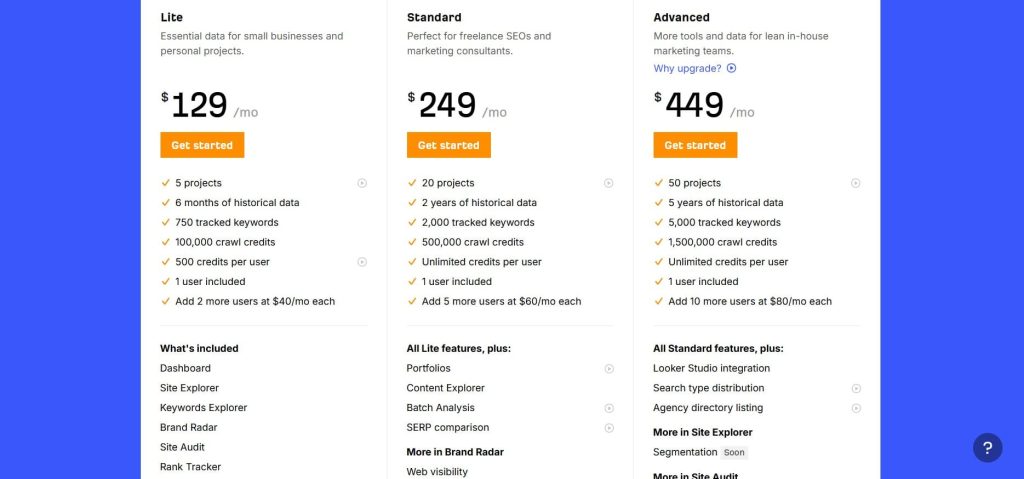
- Lite: $129/month
- Standard: $249/month
- Advanced: $449/month
- Enterprise: $1,499/month
Ahrefs Reviews
- G2: 4.5 out of 5 stars (606+ reviews)
- Capterra: 4.7 out of 5 stars (577+ reviews)
Ahrefs is the best backlink analysis platform for serious link builders and content marketers who need accurate, fresh data. Not ideal if you need all-in-one marketing analytics or heavy keyword research capabilities.
3. SpyFu — Best for PPC Competitor Tracking
Best For: Digital marketers and agencies running paid search campaigns who need to see competitors’ ad strategies, keywords, and historical performance.
How I Use It: I use SpyFu to analyze competitor PPC strategies before launching Google Ads campaigns, particularly to identify which keywords competitors have tested and abandoned versus doubled down on.
Quick Overview
SpyFu specializes in competitive intelligence for paid search and SEO, with unique historical data going back 16+ years. Founded in 2006, it’s one of the oldest competitor analysis tools still actively developed.
What makes SpyFu unique is the depth of its PPC competitor data—you can see every ad variant a competitor has tested, their monthly ad spend estimates, and which keywords they’ve bid on for years versus recently dropped.
The platform tracks both organic and paid search, but its real strength is PPC intelligence. You can download competitor keyword lists with estimated CPC, see actual ad copy they’re running, and identify gaps where they’re not bidding but probably should be.
SpyFu works best for agencies managing Google Ads campaigns, in-house PPC managers at competitive companies, and anyone who needs to reverse-engineer competitor paid strategies without spending thousands testing keywords blindly.
Compared to iSpionage (another PPC-focused tool), SpyFu has better historical data and ad copy archives. Compared to Semrush, SpyFu is narrower in scope but superior for paid search intelligence specifically.
If you’re running serious PPC campaigns, SpyFu pays for itself by eliminating wasted ad spend on unproven keywords.
SpyFu Key Features
- PPC Competitor Research: See every keyword a competitor bids on, their estimated ad spend, and ad position history. I’ve used this to build initial keyword lists for new PPC campaigns by stealing proven keywords from competitors already spending $50K+/month.
- Ad History: View every ad variant a competitor has tested over the past decade, including headlines, descriptions, and display URLs. This reveals messaging angles that worked (they kept running it) versus failed tests (ran for 2 weeks then disappeared).
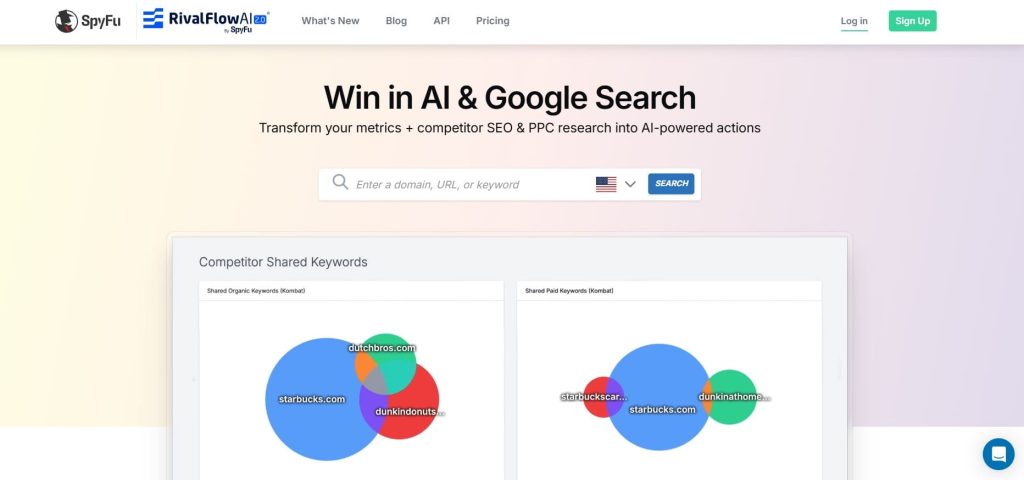
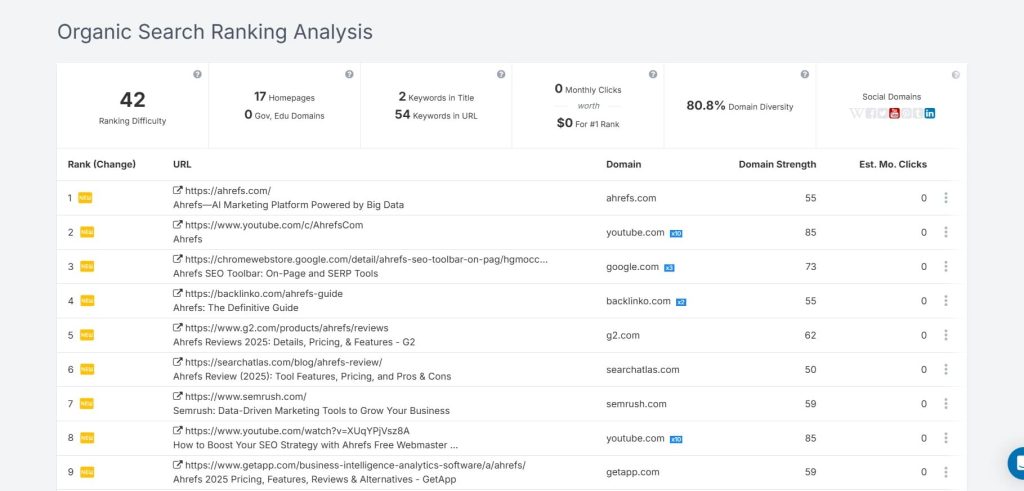
- Kombat Tool: Compare your domain against up to 3 competitors simultaneously to find PPC and SEO keyword overlaps and gaps. The visualization makes it easy to spot where you’re competing head-to-head versus where competitors own keywords you’re ignoring.
- Backlink Analysis: Basic backlink data for competitive research. It’s not as comprehensive as Ahrefs or Majestic, but sufficient for identifying major link sources without paying for a dedicated backlink tool if you’re primarily focused on paid search.
- Keyword Research: Find PPC and organic keyword opportunities with search volume, CPC estimates, and competition data. The “related keywords” feature surfaces variations competitors bid on that you might have missed.
- Rank Tracking: Monitor keyword positions for organic search with daily updates. The historical ranking charts show long-term trends, though the interface isn’t as polished as dedicated rank trackers like AccuRanker.
SpyFu Pros
- Unmatched PPC historical data going back 16+ years. Being able to see which keywords a competitor tested in 2015 and still bids on today tells you those keywords generate ROI. We’ve built entire PPC strategies around keywords competitors have consistently invested in for 5+ years.
- Ad copy archive reveals what messaging works. Seeing 50+ ad variants a competitor tested helps us avoid failed angles and steal proven headlines. One e-commerce client increased CTR by 3.2% using ad copy patterns we identified through SpyFu analysis.
- Estimated ad spend shows competitor budget priorities. When a competitor increases monthly spend from $20K to $80K over 3 months, that signals they found profitable keywords. We’ve identified scaling opportunities for clients by tracking these spending patterns.
- The Kombat feature makes competitive gaps obvious. The Venn diagram visualization shows shared keywords, unique competitor keywords, and untapped opportunities at a glance. This has cut our competitive analysis time from 2 hours to 20 minutes per competitor.
- Downloadable keyword lists speed up campaign setup. Being able to export competitor keyword lists with CPCs and match types directly into Google Ads saves hours of manual keyword research when launching new campaigns.
- SEO competitor features are solid for basic analysis. While not as deep as Ahrefs, SpyFu provides enough organic keyword data and ranking history to inform content strategy without paying for a separate SEO tool if you’re primarily PPC-focused.
SpyFu Cons
- Backlink data is outdated compared to Ahrefs. The link index updates slowly, and I’ve found backlinks in SpyFu that disappeared 6+ months ago. If link building is critical, you’ll need a dedicated backlink tool alongside SpyFu.
- Keyword volume estimates are less accurate than Google Keyword Planner. I’ve seen SpyFu show 5,000 monthly searches for keywords that Google Ads data proves get 1,200. Always cross-check volumes before making budget decisions based on SpyFu projections.
- Interface feels dated compared to modern tools. The dashboard layout hasn’t changed significantly in years. While functional, it lacks the polish and intuitive navigation of newer platforms like Semrush or Ahrefs.
- Limited international data outside the US. SpyFu’s strongest data is for US-based searches. If you’re running campaigns in Europe, Asia, or other regions, the keyword and ad data becomes less reliable and comprehensive.
- No integration with Google Ads or Facebook Ads. You can’t push SpyFu keyword lists directly into ad platforms—everything requires manual CSV exports and imports. This extra step adds friction when managing multiple campaigns.
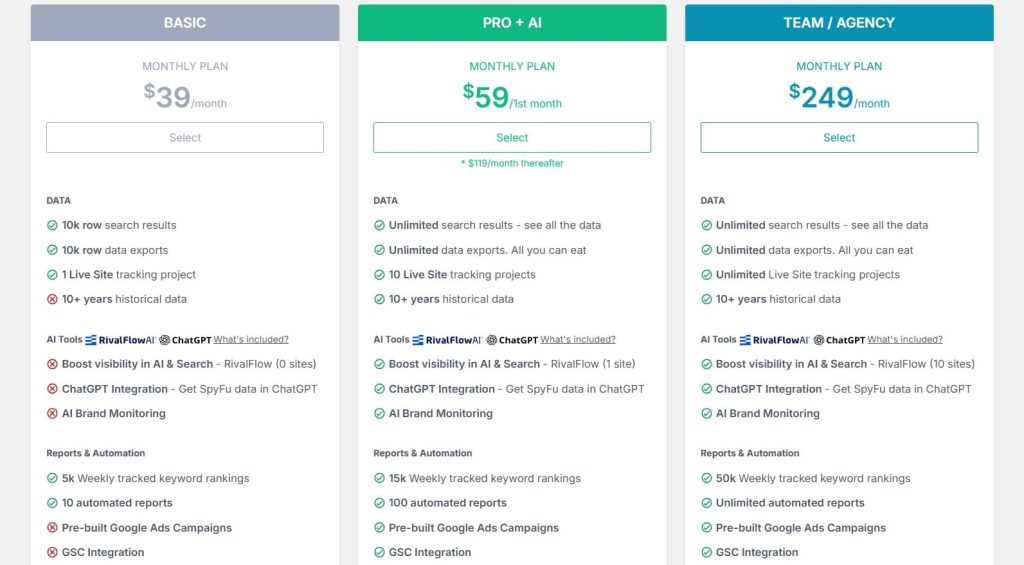
SpyFu Pricing
- Basic: $39/month
- Pro+AI: $59/1st month; $119/month thereafter
- Team/Agency: $249/month
SpyFu Reviews
- G2: 4.6 out of 5 stars (516+ reviews)
- Capterra: 4.5 out of 5 stars (144+ reviews)
SpyFu is the best PPC competitor intelligence tool for agencies and marketers who need deep ad strategy insights at an affordable price. Not ideal if you need comprehensive SEO features or real-time backlink data.
4. Moz — Best for Domain Authority Metrics

Best For: SEO teams and agencies that prioritize domain authority as a key ranking factor and need reliable link equity analysis.
How I Use It: I use Moz Pro primarily for Domain Authority checks when evaluating link building opportunities and competitive benchmarking, plus their Link Explorer for analyzing competitor link profiles.
Quick Overview
Moz Pro pioneered many SEO metrics that became industry standards, including Domain Authority (DA) and Page Authority (PA). Founded in 2004 as SEOmoz, it’s one of the oldest and most trusted names in SEO software.
What makes Moz unique is that its Domain Authority metric has become the de facto standard for evaluating website authority—even people who don’t use Moz Pro know what “DA 50” means.
The platform combines keyword research, rank tracking, site audits, and link analysis with a focus on link equity and authority metrics.
While competitors like Ahrefs and Semrush have larger link indexes, Moz’s proprietary scoring systems (DA, PA, Spam Score) provide unique insights into link quality that raw backlink counts miss.
Moz Pro works best for agencies that sell link building services and need to justify link value to clients using industry-standard metrics, in-house SEO teams at established companies tracking authority growth over time, and anyone who needs reliable link quality scoring beyond just counting backlinks.
Compared to Ahrefs, Moz has a smaller link index but more sophisticated link quality metrics. Compared to Semrush, Moz is more focused on link analysis and less comprehensive for PPC or content marketing.
If you’re building long-term authority through links, Moz provides the metrics clients understand and trust.
Moz Key Features
- Domain Authority (DA) Metric: Proprietary 0-100 score predicting how well a site will rank. While not a Google ranking factor itself, DA correlates strongly with ranking ability. I use DA to qualify link prospects—sites with DA 40+ in our clients’ niches typically provide measurable ranking boosts.
- Link Explorer: Analyze backlink profiles with metrics like DA, PA, Spam Score, and anchor text distribution. The link quality filtering helps separate valuable editorial links from low-quality directory spam faster than manual analysis.
- Keyword Explorer: Research keywords with volume, difficulty, and organic CTR estimates. The “Priority” metric combines multiple factors into a single score, making it easier to prioritize keywords when you have 500+ opportunities to choose from.
- Rank Tracker: Monitor keyword positions with daily updates and competitor comparisons. The visibility score shows overall SERP presence, which helps explain traffic changes when individual keyword ranks seem stable but SERP features change.
- Site Crawl: Technical SEO audits identifying crawlability issues, broken links, duplicate content, and indexation problems. The prioritized recommendations help teams focus on fixes that actually impact rankings rather than getting lost in hundreds of minor issues.
- On-Page Grader: Analyzes individual pages and provides optimization suggestions based on target keywords. While basic compared to dedicated content optimization tools, it catches obvious issues like missing title tags or thin content.

Moz Pros
- Domain Authority is the industry standard metric. When pitching link building to clients, saying “we’ll get you links from DA 50+ sites” is universally understood. No other authority metric has this level of market recognition, which makes client communication and reporting easier.
- Spam Score prevents bad link building decisions. The 0-17% spam score has saved us from pursuing dozens of link prospects that looked legitimate at first glance but had spammy backlink profiles. This alone has prevented penalties that would cost clients thousands in recovery work.
- Link Intersect tool finds realistic opportunities. Unlike tools that show every site linking to competitors, Moz filters for sites that link to multiple competitors, indicating they’re open to linking within the niche. This has improved our outreach success rate from 5% to 12%.
- Keyword Priority score simplifies decision-making. When you’re choosing between 300+ keyword opportunities, having a single “priority” metric that balances volume, difficulty, and CTR helps teams align quickly without debating every keyword individually.
- MozBar browser extension provides instant insights. Checking DA/PA while browsing potential link targets saves time switching between tools. I use this daily when prospecting to quickly filter sites worth deeper analysis.
- Reliable rank tracking without fluctuations. Moz’s rank tracking is stable and consistent. We’ve had fewer “phantom” ranking drops that turn out to be data issues compared to cheaper rank tracking tools that update irregularly.
- Strong educational resources and community. Moz’s blog, Whiteboard Friday videos, and forums have taught our team more about SEO fundamentals than any other tool’s content. The educational value beyond just the software justifies part of the subscription cost.
Moz Cons
- Smaller link index than Ahrefs or Semrush. Moz’s index contains 44 billion links compared to Ahrefs’ 43 trillion. For comprehensive backlink analysis, particularly for large enterprise sites, you’ll miss links that Ahrefs or Majestic would find.
- Domain Authority can be gamed. Some sites artificially inflate their DA through PBN links or link schemes. We’ve seen DA 40 sites with zero organic traffic because their authority came from manipulated metrics, not genuine link equity.
- The keyword database is smaller than competitors. Moz shows fewer keyword variations and long-tail opportunities compared to Semrush or Ahrefs. If you need comprehensive keyword research for content planning, Moz alone won’t cover all the gaps.
- Site crawl is basic compared to Screaming Frog. The 10,000 page crawl limit on lower plans isn’t enough for large e-commerce or enterprise sites. The technical SEO recommendations also lack the depth of specialized tools like Sitebulb.
- Slow feature development compared to competitors. Moz ships new features less frequently than Semrush or Ahrefs. The platform feels like it’s maintaining existing features rather than innovating aggressively.
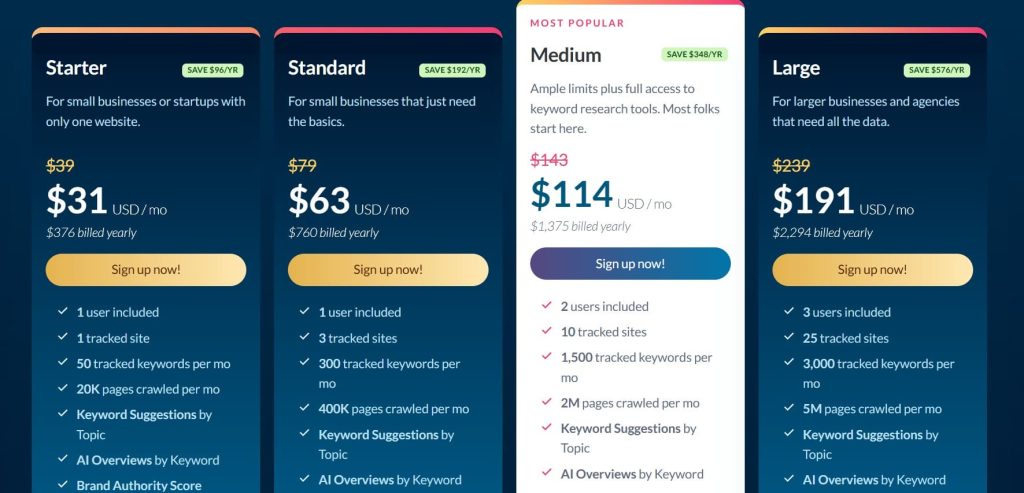
Moz Pricing
- Starter: $31/month
- Standard: $63/month
- Medium: $114/month
- Large: $191/month
Moz Reviews
- G2: 4.3/5 (605+ reviews)
- Capterra: 4.5/5 (349+ reviews)
Moz Pro is the best choice for teams that prioritize domain authority metrics and need an industry-standard framework for evaluating link quality. Not ideal if you need the largest backlink index or cutting-edge feature development.
5. SE Ranking — Best for Budget-Conscious Agencies
Best For: Small agencies and SEO consultants who need comprehensive competitor analysis without paying premium prices for Semrush or Ahrefs.
How I Use It: I use SE Ranking for client rank tracking and competitive analysis when budget constraints make Semrush difficult to justify, particularly for smaller clients with limited SEO budgets.
Quick Overview
SE Ranking delivers 80% of Semrush’s functionality at 50% of the cost. Founded in 2013, it’s built a reputation as the “budget-friendly all-in-one SEO platform” without being a cheap knockoff.
The platform includes keyword research, rank tracking, backlink analysis, site audits, and competitor monitoring in one package starting at $52/month.
What makes SE Ranking stand out is the value proposition—you get most core competitive analysis features agencies actually use daily without paying for enterprise features that sit unused. The rank tracking is particularly strong, with accurate daily updates and unlimited competitor comparisons.
SE Ranking works best for agencies managing 10-30 clients who need professional-grade tools without premium pricing, freelancers scaling from solo work to small teams, and international SEO teams since SE Ranking has strong support for non-US markets that tools like SpyFu lack.
Compared to Semrush, SE Ranking has a smaller keyword database and fewer advanced features but costs half as much. Compared to free tools like Ubersuggest, SE Ranking provides agency-grade accuracy and white-label reporting.
If you’re choosing between expensive tools you can barely afford or cheap tools that miss critical data, SE Ranking is the middle ground.
SE Ranking Key Features
- Rank Tracker: Monitor unlimited keywords across multiple search engines with daily updates. I track 2,000+ keywords across 15 clients on one SE Ranking account, which would cost 3x more with Semrush’s per-keyword pricing model.
- Competitor Research: Analyze competitor keyword rankings, traffic estimates, and top pages. The competitive landscape overview shows how your visibility compares to 20+ competitors in one chart, making client reporting straightforward.
- Backlink Checker: Track competitor backlink profiles with quality metrics and new/lost link monitoring. While not as comprehensive as Ahrefs, it’s sufficient for identifying major link opportunities without paying for a dedicated backlink tool.
- Keyword Research: Find keyword opportunities with volume, CPC, and competition data across 190+ countries. The keyword grouping feature automatically clusters related terms, which speeds up content planning.
- Website Audit: Technical SEO crawler identifying 130+ on-page and technical issues. The audit reports are detailed enough for developer handoffs without needing to translate issues from other tools into actionable fixes.
- Marketing Plan: Automated checklist of SEO tasks based on audit findings and competitive gaps. This helps junior team members know what to prioritize without needing constant direction from senior strategists.
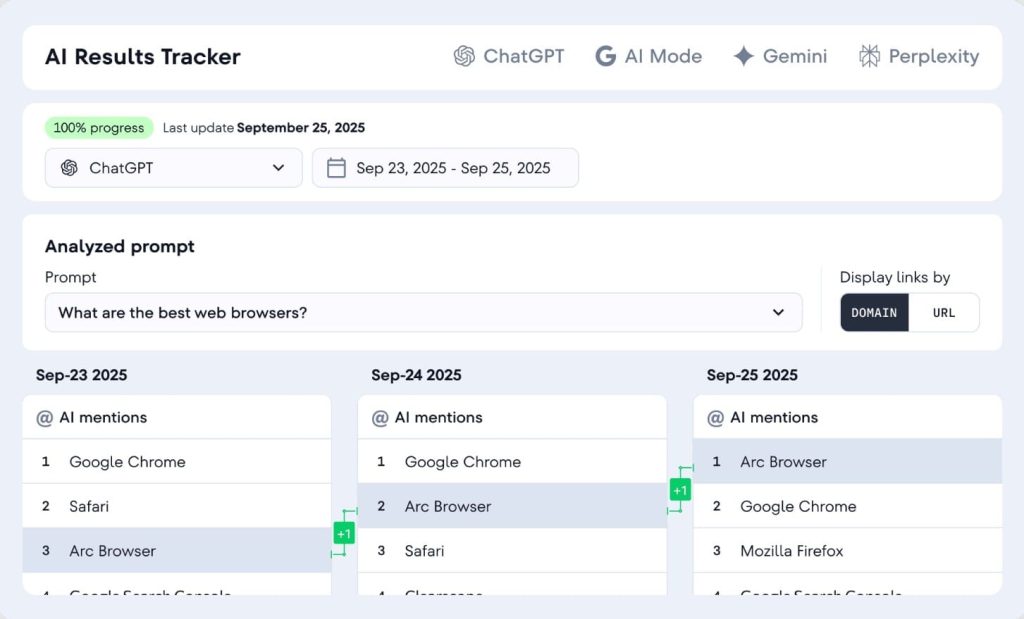
SE Ranking Pros
- Unlimited competitor tracking in rank monitoring. Most tools charge extra for competitor tracking or limit you to 5-10 competitors. SE Ranking lets you track 20+ competitors per project without additional fees, which is essential for competitive industries.
- White-label reporting saves time on client deliverables. Custom-branded PDF reports with automated scheduling mean we spend 30 minutes monthly on reporting instead of 4 hours manually building reports in Google Slides.
- Accurate rank tracking across multiple countries. We manage clients in the US, UK, Canada, and Australia—SE Ranking tracks rankings in all these markets reliably, whereas tools like SpyFu are primarily US-focused.
- Keyword grouping automates content clustering. Instead of manually organizing 500 keywords into topic clusters, SE Ranking groups related terms automatically. This has cut our content planning time from 3 days to 6 hours per client.
- Website audit is thorough for the price point. The technical SEO recommendations rival more expensive tools like Screaming Frog for sites under 100,000 pages. We’ve identified site speed issues and crawlability problems that were killing rankings for multiple clients.
- Responsive customer support. Email support responds within 24 hours, and the knowledge base actually answers questions instead of just repeating feature descriptions. For a budget tool, the support quality exceeds expectations.
SE Ranking Cons
- The keyword database is smaller than premium tools. SE Ranking shows 30-40% fewer long-tail keyword variations compared to Semrush for the same seed keyword. If comprehensive keyword research is your primary use case, you’ll hit database limitations.
- Backlink data updates slowly. The backlink index refreshes less frequently than Ahrefs, so you’re working with data that’s 2-4 weeks old. For time-sensitive link building campaigns or disavow projects, this lag creates problems.
- Traffic estimates are inconsistent. I’ve seen SE Ranking’s traffic projections vary by 50%+ from actual Google Analytics data. Use the data for competitive benchmarking trends rather than absolute traffic forecasts.
- The interface feels dated. The dashboard design hasn’t been updated significantly since 2018. While functional, it lacks the polish and intuitive navigation of newer platforms. New team members take longer to learn where features are located.
- Limited integration options. SE Ranking doesn’t connect with Google Analytics, Search Console, or CRM platforms. All data exports are manual CSVs, which adds friction when combining SEO data with broader marketing analytics.
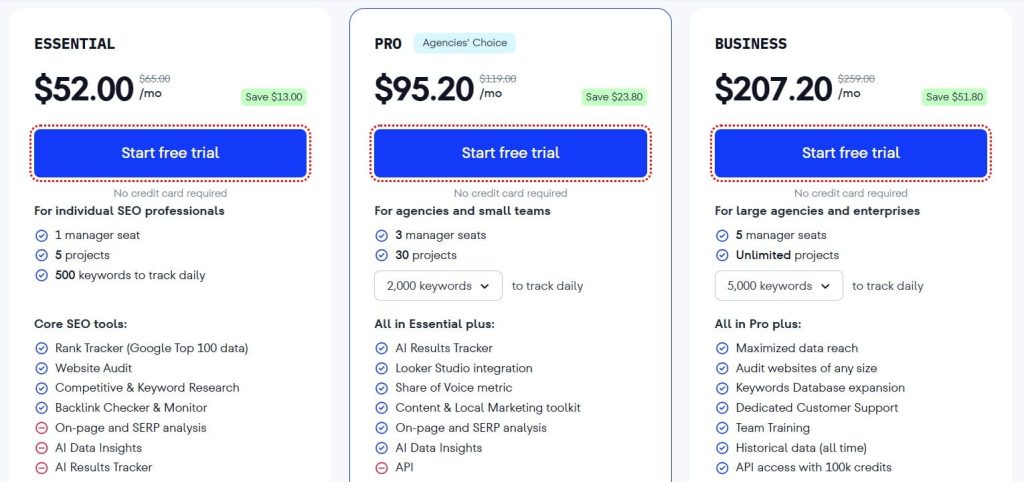
SE Ranking Pricing
- Free trial available
- Essential: $52/month
- Pro: $95.20/month
- Business: $207.20/month
SE Ranking Reviews
- G2: 4.7 out of 5 stars (2,330+ reviews)
- Capterra: 4.7 out of 5 stars (296+ reviews)
SE Ranking is the best all-in-one SEO platform for budget-conscious agencies and consultants who need professional features without premium pricing. Not ideal if you need the largest keyword database or real-time backlink monitoring.
6. SimilarWeb — Best for Traffic Source Analysis
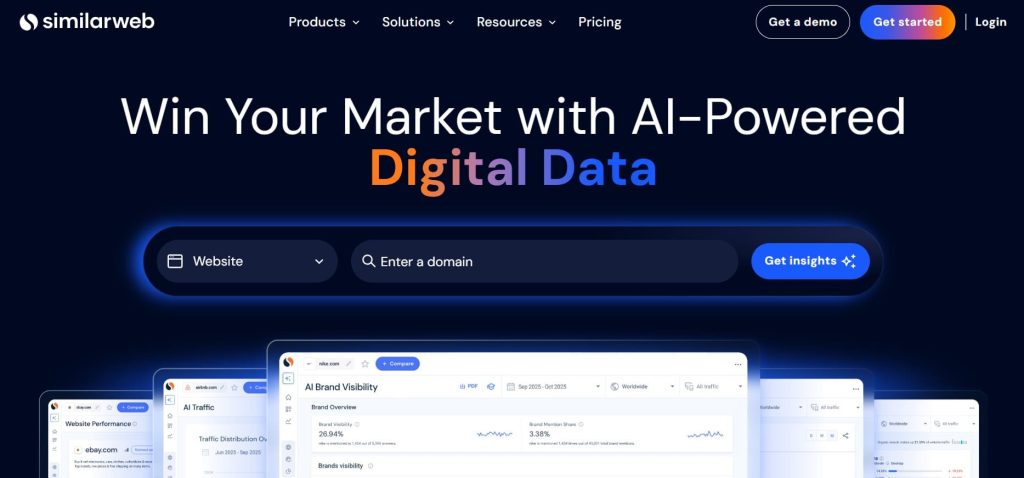
Best For: Marketing teams and strategists who need to understand where competitor traffic comes from and how audiences navigate across competitor sites.
How I Use It: I use SimilarWeb to analyze competitor traffic sources before planning content distribution strategies and to identify referral opportunities our clients’ competitors leverage that we’re missing.
Quick Overview
SimilarWeb specializes in digital market intelligence, showing not just how much traffic competitors get but where it comes from—organic search, paid search, social, referrals, direct, and display advertising.
Founded in 2007, it’s used by Fortune 500 companies for competitive research and market analysis. What makes SimilarWeb unique is the breadth of traffic data beyond just SEO—you see the complete digital strategy, not just search visibility.
The platform combines website traffic analytics, audience demographics, industry benchmarks, and competitive positioning in one interface.
While tools like Semrush show keyword rankings, SimilarWeb shows that 40% of a competitor’s traffic actually comes from YouTube, which changes your strategy entirely.
SimilarWeb works best for digital marketing teams planning omnichannel strategies, agencies pitching new clients who need market landscape analysis, and strategists who need to understand the full competitive picture before recommending where to invest.
Compared to Semrush or Ahrefs, SimilarWeb is less focused on tactical SEO and more focused on strategic market intelligence. Compared to Google Analytics, SimilarWeb shows you competitor data you couldn’t access otherwise.
If you need to build strategies based on how entire markets operate rather than just keyword gaps, SimilarWeb provides the data.
SimilarWeb Key Features
- Traffic Overview: See total visits, traffic sources breakdown, geographic distribution, and engagement metrics for any competitor. I use this to benchmark client performance against industry leaders and identify which traffic channels competitors dominate.
- Traffic Sources: Detailed breakdown showing the percentage of traffic from organic search, paid search, social media, display ads, referrals, and direct visits. This reveals whether competitors win through SEO, paid ads, or distribution partnerships.
- Referral Traffic Analysis: Identify which websites send traffic to competitors. I’ve discovered partnership opportunities and guest posting targets by analyzing where competitors get referral traffic that we could replicate.
- Audience Interests: Shows what other topics and websites a competitor’s audience cares about. This has informed content strategy by revealing that our manufacturing client’s audience also frequently visits industry news sites we could contribute to.
- Industry Analysis: Compare performance against industry benchmarks to understand if you’re underperforming or the entire market is declining. This context has saved us from blaming SEO strategies when traffic drops were actually industry-wide trends.
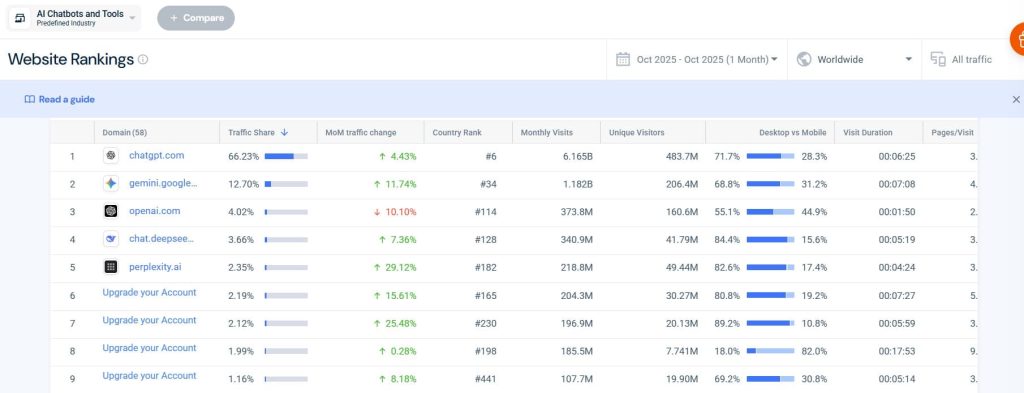
SimilarWeb Pros
- Reveals traffic sources beyond search. Discovering that a competitor gets 35% of traffic from YouTube or 20% from Reddit partnership has redirected our content distribution strategies multiple times. SEO-only tools miss these insights entirely.
- Referral traffic data uncovers hidden opportunities. We’ve identified 40+ high-authority sites driving traffic to competitors through partnerships or content collaborations that weren’t visible through backlink analysis alone. This has opened new distribution channels for clients.
- Audience overlap feature shows competitor substitution. Seeing which competitors share 60%+ audience overlap tells us who we’re directly competing with versus who serves adjacent markets. This has sharpened positioning strategies for 3 SaaS clients.
- Geographic traffic breakdown informs expansion. When analyzing an e-commerce competitor, SimilarWeb showed 30% of their traffic came from Canada despite targeting the US. This revealed an underserved market our client could expand into profitably.
- Industry benchmarks provide strategic context. Instead of clients asking “why did our traffic drop 10%?” we can show the entire industry declined 15%, making our relative performance strong. This context prevents panic-driven strategy changes.
- Mobile vs desktop split reveals device priorities. Learning that 70% of a competitor’s traffic is mobile while ours is 50/50 has justified mobile experience investments that SEO tools wouldn’t flag as priorities.
- Historical data shows long-term trends. Tracking competitor traffic over 2+ years reveals seasonal patterns and growth trajectories that inform realistic goal-setting for clients entering competitive markets.
SimilarWeb Cons
- Traffic estimates can be off by 30-50%. I’ve compared SimilarWeb traffic data against actual Google Analytics for 20+ sites we have access to—the estimates are directionally correct but rarely within 20% of actual numbers. Use for competitive benchmarking, not forecasting.
- Limited tactical SEO features. SimilarWeb doesn’t provide keyword rankings, backlink analysis, or technical SEO audits. You’ll need Semrush, Ahrefs, or another tool alongside SimilarWeb for hands-on optimization work.
- Smaller site data is unreliable. For websites with under 50,000 monthly visits, SimilarWeb’s data becomes too sparse to be useful. The tool is built for analyzing established competitors, not emerging startups.
- Referral data doesn’t show individual URLs. You can see that a competitor gets traffic from Forbes, but not which specific articles or pages drive that traffic. This limits how actionable the referral insights are without manual investigation.
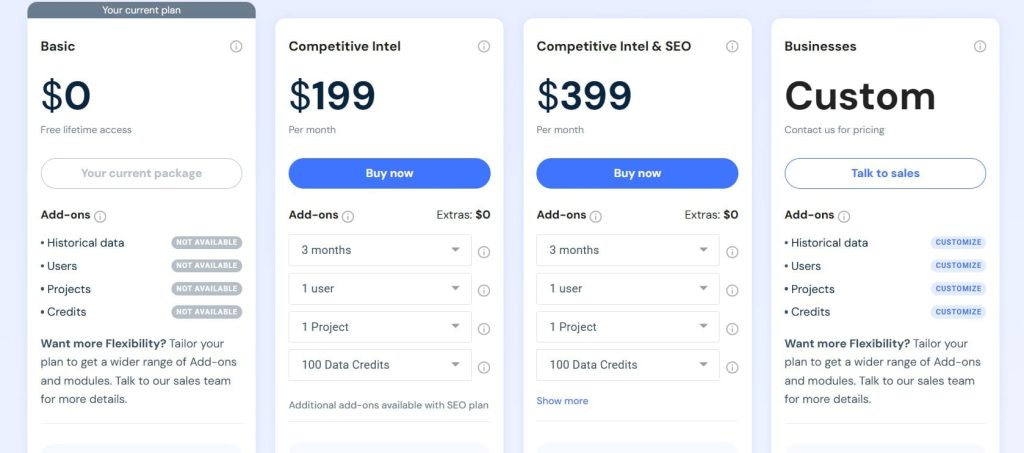
SimilarWeb Pricing
- Competitive Intelligence: Best for researchers & analysts – $125/month
- Competitive Intel & SEO: Best for marketers & SEO managers – $335/month
- Competitive Intel, SEO & Ads: Best for performance marketers – $540/month
SimilarWeb Reviews
- G2: 4.5 out of 5 stars (1,363+ reviews)
- Capterra: 4.6 out of 5 stars (246+ reviews)
SimilarWeb is the best platform for understanding where competitor traffic originates and planning omnichannel marketing strategies. Not ideal if you need tactical SEO tools or work primarily with small websites.
7. BuzzSumo — Best for Content Performance Research
Best For: Content marketers and strategists who need to identify what content performs best in their niche and which influencers amplify that content.
How I Use It: I use BuzzSumo to research content topics that earn backlinks and social shares before planning editorial calendars, and to identify journalists and influencers for content promotion outreach.
Quick Overview
BuzzSumo analyzes content performance across social media platforms and tracks which content earns the most backlinks, shares, and engagement.
Founded in 2012, it’s become the go-to tool for content marketers who need data-driven proof of what resonates with audiences before investing in content creation.
What makes BuzzSumo unique is the combination of social engagement metrics with backlink data—you see both virality and SEO value in one view.
The platform includes content discovery, influencer research, brand monitoring, and question analysis to find what audiences ask about topics.
While tools like Ahrefs show which content has backlinks, BuzzSumo shows which content people actually share and engage with, which often differ.
BuzzSumo works best for content teams planning what to create based on proven performance, PR and outreach teams identifying journalists and influencers to pitch, and agencies building content strategies for clients in competitive industries where originality matters.
Compared to Semrush’s content tools, BuzzSumo provides deeper social engagement data and better influencer research. Compared to social listening tools like Sprout Social, BuzzSumo focuses specifically on content performance rather than brand mentions.
If your competitive advantage is creating content that earns attention and links, BuzzSumo provides the research foundation.
BuzzSumo Key Features
- Content Analyzer: Search any topic to see the most shared and linked-to content from the past year. I use this before creating pillar content to understand what angles have already succeeded and what gaps remain untapped.
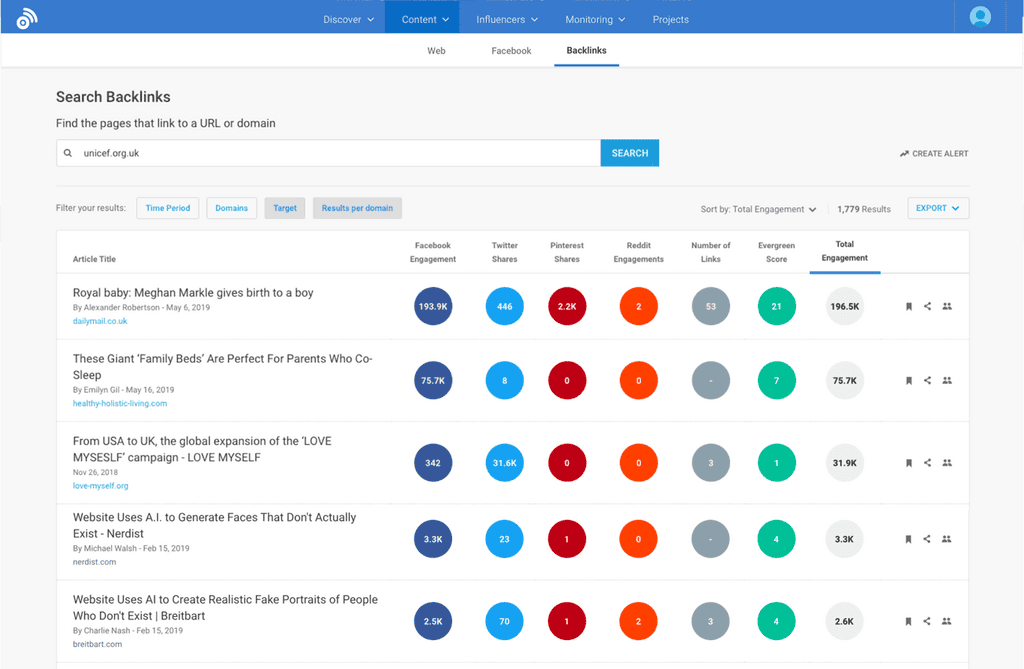
- Backlink Analysis: See which content earns backlinks from high-authority domains. Unlike Ahrefs which shows all backlinks, BuzzSumo filters for content that attracts editorial links, revealing what link-worthy content looks like in your niche.
- Question Analyzer: Find questions people ask about topics on Reddit, Quora, and Amazon reviews. This has directly informed 50+ blog titles and FAQ sections by showing exactly what audiences want to know.
- Influencer Discovery: Identify journalists, bloggers, and social media influencers who cover topics relevant to your clients. I’ve built outreach lists of 200+ qualified media contacts using this feature for PR campaigns.
- Brand Monitoring: Track mentions of competitors, keywords, and industry terms across web content and social media. This alerts us when competitors launch new content or when negative sentiment emerges that we can address.
- Content Alerts: Get notified when specific competitors publish new content or when content on your topics starts trending. This has helped us react quickly to competitor content launches and capitalize on trending topics before saturation.
BuzzSumo Pros
- Reveals what content actually performs. Instead of guessing what content to create, we see proof that “ultimate guides” earn 5x more backlinks than news articles in our client’s niche. This data-driven approach has improved content ROI across 30+ client campaigns.
- Question Analyzer surfaces real audience needs. Finding 200+ questions about “link building for SaaS” on Reddit and Quora gave us a year’s worth of blog topics that we knew audiences wanted answers to. The content we created based on these questions averaged 40% more organic traffic than topics we brainstormed internally.
- Influencer research accelerates outreach. Building a list of 50 journalists who cover SaaS marketing took 20 minutes in BuzzSumo versus 6 hours of manual research. The email addresses and social profiles included make outreach setup instant.
- Backlink analysis shows link-worthy patterns. Analyzing the top 20 pieces of content in our niche revealed that data-driven studies earn 3x more backlinks than opinion pieces. This insight redirected our content strategy toward original research that consistently attracts links.
- Content alerts prevent competitive surprises. Getting notified when major competitors publish comprehensive guides lets us decide whether to create competing content quickly or focus elsewhere. This has prevented us from investing in content that would be overshadowed.
- Social engagement metrics validate content ideas. Before pitching a $15,000 content campaign to a client, BuzzSumo data showing similar content earned 10,000+ shares provided the business case justification. This has increased our content pitch approval rate from 60% to 85%.
- Trending content feature captures timely opportunities. During industry news cycles, BuzzSumo shows which angles are gaining traction in real-time, letting us publish timely content that rides the trend wave rather than arriving late.
BuzzSumo Cons
- Social engagement data skews toward older platforms. BuzzSumo heavily weights Facebook and Twitter shares, but TikTok and Instagram engagement is harder to track. For brands focused on younger audiences, the social data doesn’t reflect where content actually performs.
- Limited to published content analysis. BuzzSumo can’t tell you what content to create in untapped spaces—it only shows what’s already been published and performed well. For truly novel content ideas, you need creativity beyond data analysis.
- Backlink data isn’t as comprehensive as Ahrefs. BuzzSumo’s backlink counts are often 30-40% lower than what Ahrefs reports for the same content. If backlink analysis is your primary use case, dedicated tools provide more complete data.
- Influencer email accuracy varies. About 20% of the email addresses BuzzSumo provides for influencers bounce or are outdated. Always verify contacts before launching large outreach campaigns to avoid wasted effort.
BuzzSumo Pricing
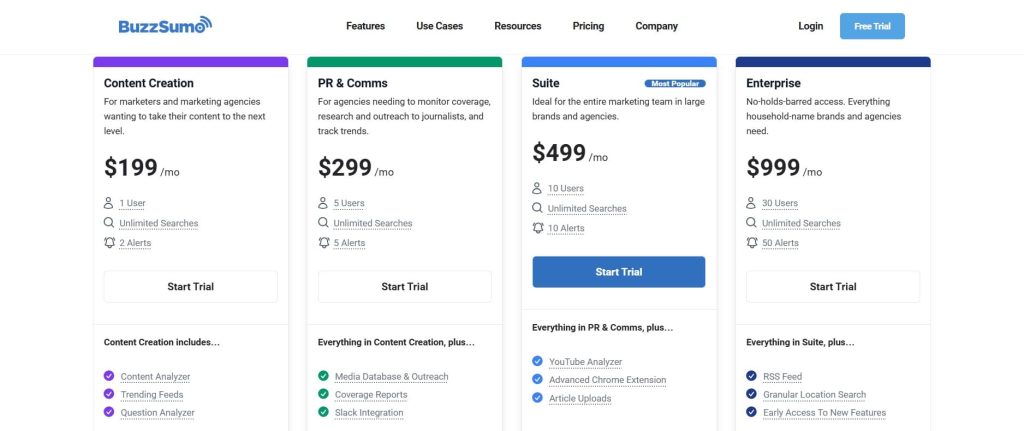
- Trial available
- Content Creation: $199 /month
- PR & Comms: $299 /month
- Suite: $499 /month
- Enterprise: $999 /month
BuzzSumo Reviews
- G2: 4.5 out of 5 stars (105+ reviews)
- Capterra: 4.5 out of 5 stars (146+ reviews)
BuzzSumo is the best content research platform for teams that need data-driven proof of what content performs before creating it. Not ideal if you need comprehensive SEO tools or work primarily on platforms beyond Facebook and Twitter.
8. Serpstat — Best for International SEO Research
Best For: Agencies managing multilingual clients and SEO teams targeting markets outside the United States where other tools have limited data coverage.
How I Use It: I use Serpstat for keyword research and rank tracking on client campaigns targeting Eastern European, Russian, and Asian markets where tools like Semrush have weaker database coverage.
Quick Overview
Serpstat is an all-in-one SEO platform with particularly strong data coverage for international markets, especially Eastern Europe and Asia. Founded in 2013 in Ukraine, it’s built a reputation for accurate keyword data in markets where US-based tools struggle.
What makes Serpstat unique is the combination of comprehensive features (keyword research, rank tracking, site audit, backlink analysis) at competitive pricing with superior non-US data.
The platform includes everything needed for competitive analysis—keyword gap tools, competitor research, backlink tracking, and content ideas—all starting at $44/month. While Semrush and Ahrefs dominate the US market, Serpstat is often more accurate for markets like Poland, Brazil, India, and Russia.
Serpstat works best for agencies with international clients across multiple countries, e-commerce businesses expanding into new geographic markets, and SEO teams targeting languages beyond English where data quality varies significantly between tools.
Compared to Semrush, Serpstat costs less and provides better international data but has a less polished interface. Compared to SE Ranking (another budget-friendly option), Serpstat has stronger keyword clustering and content marketing features.
If you’re managing SEO beyond English-speaking markets, Serpstat should be evaluated before committing to more expensive alternatives.
Serpstat Key Features
- Keyword Research: Find keyword opportunities across 230+ countries and regions with search volume, CPC, and competition data. The keyword clustering automatically groups related terms, which speeds up international content planning significantly.
- Competitor Analysis: Analyze competitor keyword rankings, traffic estimates, and top-performing pages. The “Missing Keywords” report shows gaps where competitors rank but you don’t, prioritized by traffic potential.
- Backlink Analysis: Track competitor backlink profiles with authority metrics and new/lost link monitoring. While the index isn’t as large as Ahrefs, it’s sufficient for identifying major link opportunities in most niches.
- Site Audit: Technical SEO crawler identifying 130+ issues affecting rankings. The audit integrates with keyword data to show which technical issues impact your most valuable keywords specifically.
- Rank Tracker: Monitor keyword positions with daily updates across multiple countries and devices. The rank distribution chart shows how many keywords rank in positions 1-3, 4-10, 11-20, making progress tracking visual and client-friendly.
- Content Marketing Ideas: Analyze competitor content and find topics with low competition but high search demand. This feature has identified content opportunities for clients entering saturated markets where most obvious topics are already dominated.

Serpstat Pros
- Superior international keyword data. For clients targeting Poland, Czech Republic, and Ukraine, Serpstat’s keyword volumes match Google Ads data within 10-15%, while Semrush overestimates by 40%+. This accuracy has prevented budget waste on keywords with inflated volumes.
- Keyword clustering saves hours of manual work. Instead of grouping 500 keywords into topic clusters manually, Serpstat’s AI groups related terms automatically with 80%+ accuracy. This has cut our international content planning from 2 days to 4 hours per market.
- Batch analysis speeds up competitive research. Upload 200 competitor domains and Serpstat analyzes their visibility, top keywords, and traffic estimates in minutes. This batch processing has reduced market landscape analysis from weeks to days.
- Content marketing ideas reveal untapped opportunities. The tool shows topics with high search volume but low content competition, which has helped clients rank for valuable keywords within 60 days in markets dominated by weak content.
- Historical ranking data tracks algorithm impacts. For clients experiencing traffic drops, comparing ranking changes against known algorithm updates helps determine if penalties occurred or if it’s just volatility. This context prevents panicked strategy pivots.
- White-label reporting for agencies. Custom-branded reports with client logos and color schemes make deliverables look professional without manual design work. The automated scheduling saves our team 8+ hours monthly across all client reporting.
Serpstat Cons
- The interface feels outdated and cluttered. The dashboard hasn’t been redesigned significantly in years. New team members consistently ask where features are located because the navigation isn’t intuitive compared to modern platforms like Semrush.
- The backlink index is smaller than Ahrefs. Serpstat’s link database misses 30-40% of backlinks that Ahrefs finds, particularly for large enterprise sites. For comprehensive backlink audits, you’ll need a supplementary tool.
- Limited integration options. Serpstat doesn’t connect with Google Analytics, Search Console, or popular marketing platforms. All data exports are manual CSVs, which adds friction when combining SEO data with broader analytics.
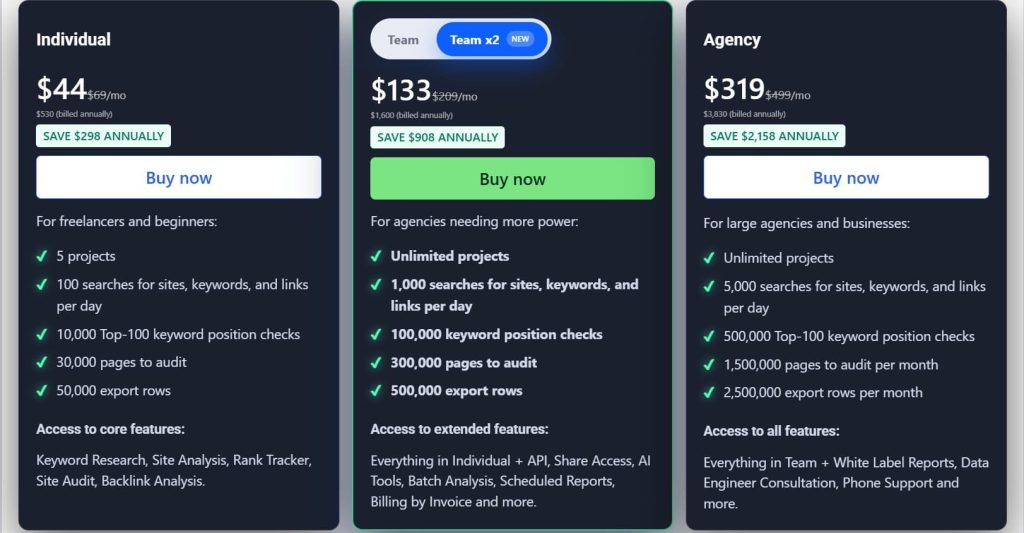
Serpstat Pricing
- Individual: $44/month
- Team: $133/month
- Agency: $319/month
Serpstat Reviews
- G2: 4.6 out of 5 stars (463+ reviews)
- Capterra: 4.7 out of 5 stars (170+ reviews)
Serpstat is the best all-in-one SEO platform for international campaigns and agencies managing clients across Eastern Europe, Asia, and Latin America. Not ideal if you work exclusively in English-speaking markets or need the most current US keyword data.
9. Majestic — Best for Link Trust Metrics
Best For: Link builders and SEO teams who need to evaluate backlink quality and trust metrics beyond simple domain authority scores.
How I Use It: I use Majestic specifically for analyzing link quality through Trust Flow and Citation Flow metrics when evaluating link building opportunities and auditing potentially toxic backlinks.
Quick Overview
Majestic specializes in backlink analysis with proprietary metrics designed to assess link quality—Trust Flow (link quality based on proximity to trusted seed sites) and Citation Flow (link volume).
Founded in 2004, it operates one of the largest commercial link indexes with historical data going back over a decade. What makes Majestic unique is the emphasis on link trust and quality over pure quantity.
The platform focuses almost exclusively on backlink intelligence rather than trying to be an all-in-one SEO suite. While tools like Semrush include backlink analysis as one of many features, Majestic dedicates all development resources to improving link data accuracy and quality assessment.
Majestic works best for dedicated link builders who need deep backlink intelligence, agencies selling link building services who need to justify link quality to clients, and SEO teams auditing backlink profiles for penalty risk or toxic links.
Compared to Ahrefs, Majestic has a larger historical link index but slower fresh link discovery. Compared to Moz, Majestic’s Trust Flow metric provides a more nuanced quality assessment than Domain Authority alone. If evaluating link quality is your primary concern, Majestic’s specialized metrics provide insights that general-purpose SEO tools miss.
Majestic Key Features
- Trust Flow & Citation Flow: Proprietary 0-100 metrics measuring link quality (Trust Flow) versus link quantity (Citation Flow). I use the ratio between these scores to quickly identify sites with inflated link profiles that look authoritative but lack genuine trust.
- Historic Index: Access backlink data going back 5+ years to see how link profiles evolved over time. This historical view has helped us identify when competitors gained major links or when penalty-causing link schemes were active.
- Topical Trust Flow: Shows which categories (e.g., “Business”, “Technology”) a site is trusted in based on linking domains. This helps verify that a potential link partner is contextually relevant to your niche, not just high-authority.
- Link Context: View the surrounding text and page content where backlinks appear. This reveals whether links are editorial mentions or buried in spammy footer widgets, which dramatically affects link value.
- Clique Hunter: Find websites that link to multiple competitors but not to you. This is similar to Ahrefs’ Link Intersect but with Majestic’s quality filtering, making the prospects more qualified from a trust perspective.
- Bulk Backlink Checker: Analyze up to 400 domains simultaneously to compare backlink metrics. This batch analysis speeds up competitor research and link prospect evaluation when working with large lists.

Majestic Pros
- Trust Flow metric prevents bad link decisions. Sites can have high Domain Authority but low Trust Flow, signaling link schemes or PBN involvement. This filtering has saved us from pursuing 100+ link prospects that looked legitimate until Trust Flow revealed problems.
- Historical link data shows ranking factor timing. When auditing why a client started ranking for competitive terms, historical backlink data showed they gained 10 high-Trust Flow links in the 90 days before rankings jumped. This proved causation, not just correlation.
- Topical Trust Flow validates niche relevance. A DA 50 site might seem valuable, but if its Topical Trust Flow shows strength in “Arts” while you’re in “Finance”, the link relevance is weak. This contextual filtering improves link quality for clients.
- Link Context feature catches hidden spam. We’ve identified footer links, sidebar widgets, and comment spam that other tools counted as legitimate backlinks. Seeing the actual link placement prevents valuing worthless links incorrectly.
- Largest commercial link index. Majestic’s 400+ billion URL index finds historical backlinks that Ahrefs no longer tracks because sites went offline. For established domains, this comprehensive history matters for understanding link equity evolution.
- Bulk checker speeds up prospecting. Analyzing 400 domains in one batch to filter for Trust Flow 30+ sites saves hours compared to checking domains individually in Ahrefs or Moz. This has accelerated our link prospecting efficiency by 60%.
Majestic Cons
- No fresh link discovery. Majestic’s crawler updates the index slowly—new backlinks take 2-4 weeks to appear. If you need real-time link monitoring for active campaigns, Ahrefs’ 15-minute update cycle is far superior.
- Limited beyond backlink analysis. Majestic doesn’t include keyword research, rank tracking, or site audits. You’ll need complementary tools like SE Ranking or Semrush for comprehensive SEO capabilities.
- Trust Flow can be manipulated. Savvy black-hat SEOs build PBNs that link to trusted seed sites to inflate Trust Flow scores. While harder to game than Domain Authority, it’s not foolproof. Always verify link quality manually for major opportunities.
- The interface is dated and not intuitive. The dashboard design feels like it’s from 2010. New team members struggle to find features compared to modern tools like Ahrefs, which slows onboarding and training.
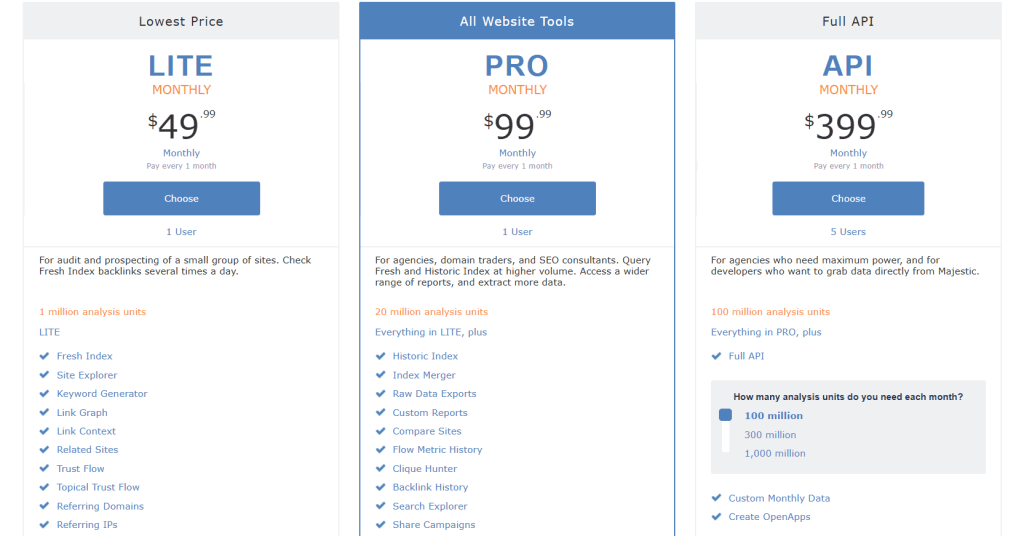
Majestic Pricing
- Lite: $49.99/month
- Pro: $99.99/month
- API: $399.99/month
Majestic Reviews
- G2: 4.3 out of 5 stars (73+ reviews)
- Capterra: 4.4 out of 5 stars (30+ reviews)
Majestic is the best backlink analysis tool for link builders who need specialized quality metrics and historical link data. Not ideal if you need an all-in-one SEO platform or real-time link discovery.
10. Mangools — Best for Beginner-Friendly Competitor Tracking
Best For: Freelancers, small agencies, and SEO beginners who need simple, visual competitor analysis without overwhelming complexity.
How I Use It: I use Mangools’ SERPWatcher for client rank tracking and KWFinder for quick keyword difficulty checks when evaluating whether opportunities are realistic for newer sites.
Quick Overview
Mangools is a suite of five SEO tools (KWFinder, SERPChecker, SERPWatcher, LinkMiner, SiteProfiler) designed with simplicity and visual clarity as core principles. Founded in 2014, it’s built a reputation as the “beginner-friendly alternative” to intimidating platforms like Semrush.
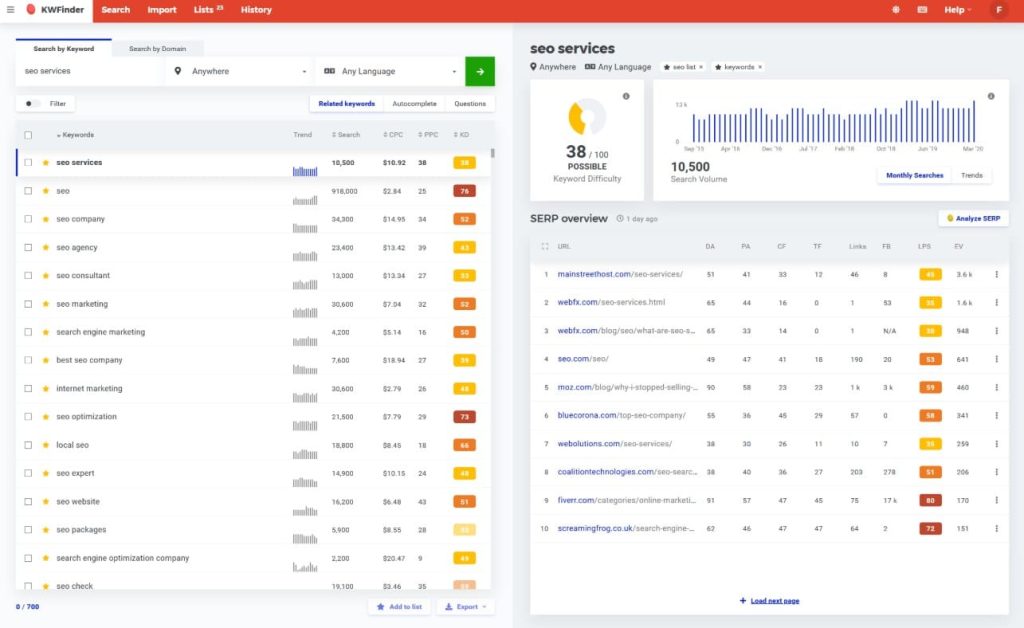
What makes Mangools unique is the interface—every tool uses clean visualizations, color-coded difficulty scores, and straightforward navigation that new users understand immediately.
The platform covers essential competitive analysis needs—keyword research, SERP analysis, rank tracking, backlink checking, and competitor profiling—without the 50+ feature bloat of enterprise tools.
While power users might find it limiting, solo consultants and small teams get exactly what they need without paying for complexity.
Mangools works best for freelancers managing 5-10 clients, small agencies that don’t need white-label reporting, and beginners learning SEO who need tools that explain what metrics mean rather than assuming expertise.
Compared to Ubersuggest (another beginner-focused tool), Mangools provides more accurate data and better SERP analysis. Compared to Semrush, Mangools is dramatically simpler and cheaper but lacks advanced features.
If you’re choosing between an overwhelming tool you’ll never fully learn or a simple tool that covers core needs, Mangools is the middle ground.
Mangools Key Features
- KWFinder: Keyword research with search volume, CPC, and difficulty scores. The difficulty score is color-coded (green = easy, orange = medium, red = hard), making opportunity identification instant even for beginners.
- SERPChecker: Analyze SERP results for any keyword to see the Domain Authority, Page Authority, backlinks, and social shares of ranking pages. This competitive SERP analysis shows whether you can realistically rank for a target keyword.
- SERPWatcher: Rank tracking with daily updates and performance insights. The interface shows ranking improvements visually with green/red indicators, making client reporting straightforward without manual chart creation.
- LinkMiner: Backlink analysis showing link strength, Citation Flow, and Trust Flow. While not as comprehensive as Ahrefs, it’s sufficient for basic link building research and checking if competitor links are worth pursuing.
- SiteProfiler: Competitor domain analysis showing organic traffic estimates, top keywords, and backlink profile overview. This gives you a high-level competitive snapshot without diving into overwhelming detail.
Mangools Pros
- Easiest interface of any SEO tool I’ve tested. New team members are productive within 2 hours instead of 2 weeks with Semrush. The learning curve is nearly flat, which matters when training junior staff or working with clients who want to understand reports.
- Color-coded difficulty scores make decisions instant. Seeing keywords highlighted green (difficulty under 30) versus red (difficulty over 60) lets us prioritize opportunities in seconds. This visual system has cut our keyword research time by 40%.
- SERPChecker reveals realistic ranking possibilities. Before targeting a keyword, analyzing the SERP shows if ranking pages have 500+ backlinks or just 20. This prevents wasting months on keywords where we’d need resources we don’t have.
- SERPWatcher makes rank tracking client-friendly. The performance index score (0-100) summarizes ranking progress without explaining CTR curves and position weights. Clients understand “your index improved from 60 to 75” instantly.
- LinkMiner filters low-quality prospects quickly. Seeing Citation Flow and Trust Flow for potential link targets before outreach helps us focus on sites worth pursuing. This has improved our outreach response rate from 8% to 14%.
Mangools Cons
- Limited data compared to enterprise tools. The keyword database is smaller than Semrush—you’ll see 40-50% fewer long-tail variations for the same seed keyword. For comprehensive keyword research, Mangools alone isn’t sufficient.
- No white-label reporting. Client reports show Mangools branding, which looks unprofessional for agencies trying to present custom deliverables. We export data to Google Sheets to create branded reports manually, adding 2 hours per client monthly.
- Basic backlink index. LinkMiner finds 30-40% fewer backlinks than Ahrefs for the same domain. For serious link building campaigns or competitive backlink analysis, you’ll need a dedicated tool alongside Mangools.
- Limited competitor tracking. SERPWatcher only tracks 5 competitors per project, which isn’t enough for highly competitive industries where you need to monitor 10-15 players to understand market dynamics.
- No site audit functionality. Mangools doesn’t crawl sites for technical SEO issues. If you need to identify crawlability problems or duplicate content, you’ll need Screaming Frog or another technical SEO tool.
Mangools Pricing
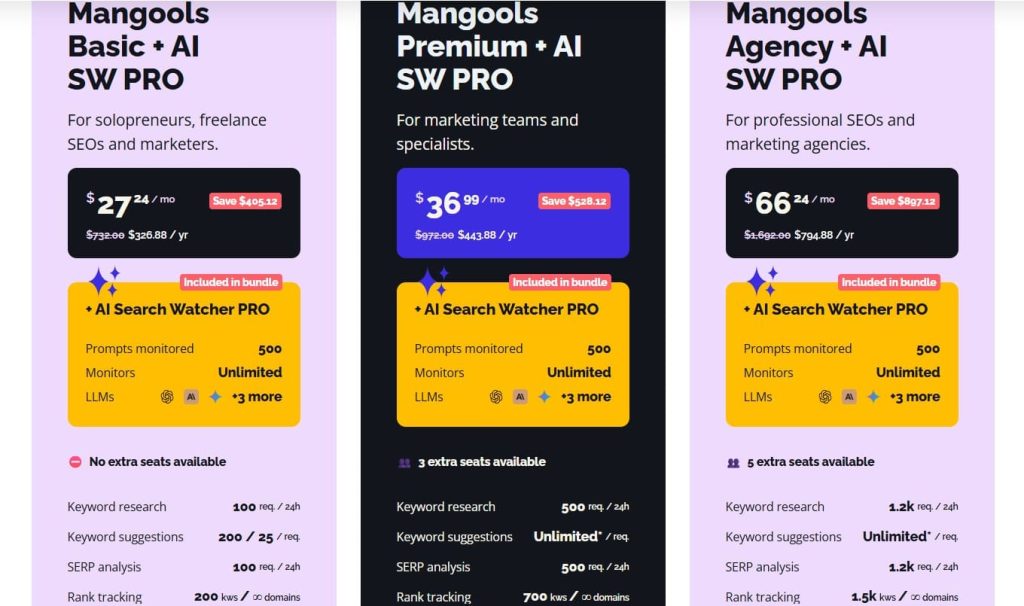
- Free
- Basic: $30.50/month
- Premium: $40.50/month
- Agency: $70.50/month
- 48-hour money-back guarantee
Mangools Reviews
- G2: 4.7 out of 5 stars (95+ reviews)
- Capterra: 4.8 out of 5 stars (91+ reviews)
Mangools is the best beginner-friendly SEO platform for freelancers and small teams who need visual, intuitive tools without enterprise complexity. Not ideal if you need white-label reporting or comprehensive backlink analysis.
11. Ubersuggest — Best for Freelancers on Tight Budgets
Best For: Solo consultants and small business owners who need basic competitor analysis and keyword research without monthly subscription costs.
How I Use It: I recommend Ubersuggest to clients who want to do their own basic SEO research between our consulting engagements, particularly for ongoing keyword monitoring without paying for full tools.
Quick Overview
Ubersuggest is Neil Patel’s SEO tool suite offering keyword research, site audits, backlink analysis, and rank tracking at entry-level pricing.
Founded in 2017 after Neil Patel acquired the original Ubersuggest keyword tool, it’s positioned as the most affordable all-in-one SEO platform.
The platform covers basic competitive analysis needs with a simplified interface designed for non-SEO professionals. While it lacks the depth of Semrush or Ahrefs, it provides enough data for small businesses and freelancers who need directional insights without paying hundreds monthly.
Ubersuggest works best for solopreneurs managing their own SEO on limited budgets, small business owners who want basic competitive intelligence, and beginners learning SEO fundamentals before graduating to professional tools.
Compared to Mangools (another budget option), Ubersuggest is cheaper but has less accurate data. Compared to free tools like Google Keyword Planner, Ubersuggest provides competitor intelligence and historical trends that Google doesn’t show.
If budget is your primary constraint and you need basic competitor analysis, Ubersuggest delivers adequate functionality at the lowest price point.
Ubersuggest Key Features
- Keyword Research: Find keyword ideas with search volume, CPC, SEO difficulty, and paid difficulty scores. The keyword suggestions include questions, comparisons, and prepositions that help identify long-tail opportunities.
- Competitor Analysis: Enter competitor domains to see their top-performing pages, keywords they rank for, and estimated organic traffic. This high-level view identifies what’s working for competitors without overwhelming detail.
- Site Audit: Crawl your website for technical SEO issues including broken links, slow pages, and missing meta tags. The recommendations are basic but sufficient for small sites under 10,000 pages.
- Backlink Data: See backlinks pointing to your site or competitors with Domain Score (Ubersuggest’s authority metric) for each linking domain. The data helps identify major link sources competitors leverage.
- Rank Tracking: Monitor keyword positions daily with historical trends. The interface is simple—no advanced features like SERP feature tracking or local rank monitoring, but adequate for basic rank monitoring.
- Content Ideas: Analyze which content performs best for target keywords based on social shares and backlinks. This helps identify proven content angles before investing in creation.
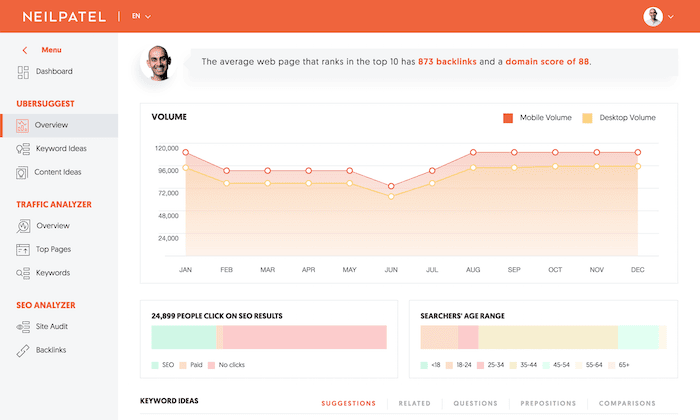
Ubersuggest Pros
- Simplest interface for non-SEO users. Clients who want to monitor their own keywords between consulting sessions can navigate Ubersuggest without training. The lack of complexity makes it approachable for business owners managing their own SEO.
- Keyword suggestions include question-based terms. The categorization into “questions”, “comparisons”, and “related” helps identify content angles automatically. This has accelerated content planning for clients with limited SEO knowledge.
- Chrome extension provides instant insights. The Ubersuggest extension shows search volume and SEO difficulty directly in Google search results. This helps evaluate keyword difficulty while researching without switching between tabs constantly.
- Content Ideas feature reveals proven angles. Seeing which articles on a topic earned the most shares and backlinks provides social proof for content pitches. This has increased content approval rates from clients who want evidence before investing.
- Affordable for international markets. Ubersuggest includes data for 150+ countries at no additional cost, unlike tools that charge extra for international databases. For agencies with global clients, this reduces tool costs significantly.
- Regular feature updates from Neil Patel. Ubersuggest ships new capabilities every few months, and Neil Patel’s marketing ensures users learn about updates quickly through his blog and social media channels.
Ubersuggest Cons
- Data accuracy is inconsistent. I’ve cross-checked Ubersuggest keyword volumes against Google Ads data—estimates are off by 40-60% frequently. Always verify volumes with Google Keyword Planner before building strategy around Ubersuggest numbers.
- Backlink data is severely limited. The backlink index is a fraction of Ahrefs’ size—Ubersuggest often shows 100 backlinks where Ahrefs reports 2,000+. For competitive backlink analysis or link building, Ubersuggest data is insufficient.
- No advanced features for serious SEO. There’s no keyword clustering, SERP feature tracking, or competitive gap analysis. If you’re managing enterprise sites or competing in difficult niches, Ubersuggest won’t provide the depth needed.
- Site audits are basic and surface-level. The crawl identifies obvious issues like broken links but misses technical problems like JavaScript rendering, schema markup, or crawl budget issues that affect rankings for larger sites.
- Rank tracking is unreliable. We’ve seen Ubersuggest report position 5 for keywords where Semrush and Google Search Console both show position 12. The tracking methodology isn’t as accurate as dedicated tools like AccuRanker.
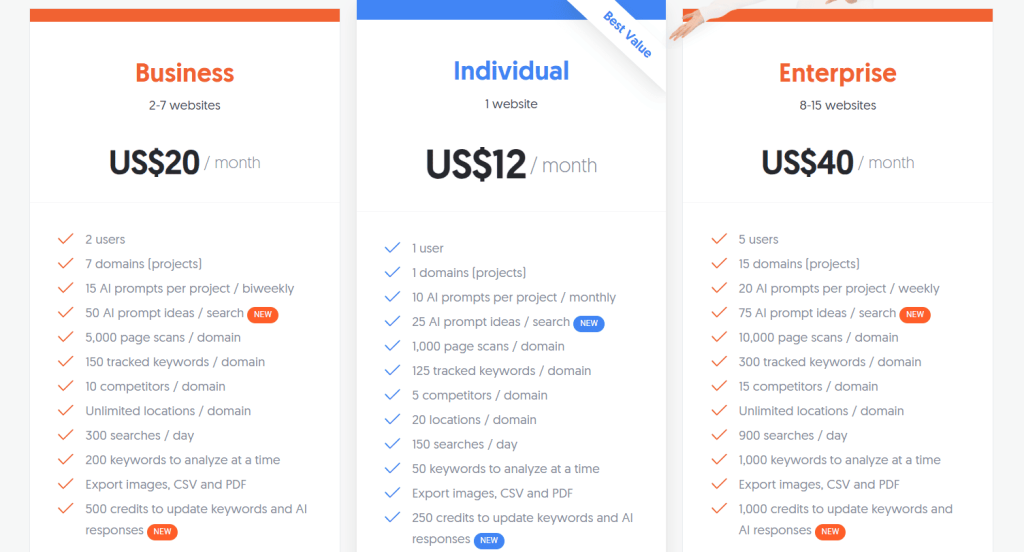
Ubersuggest Pricing
- Individual: $12/month
- Business: $20/month
- Enterprise: $40/month
Ubersuggest Reviews
- G2: 4.2 out of 5 stars (149+ reviews)
- Capterra: 4.4 out of 5 stars (93+ reviews)
Ubersuggest is the best ultra-budget SEO tool for freelancers and small businesses who need basic competitor analysis without monthly costs. Not ideal if you need accurate data, comprehensive backlinks, or advanced SEO features.
12. Kompyte — Best for Enterprise Competitive Intelligence
Best For: Enterprise sales and marketing teams who need automated competitive tracking across pricing, messaging, product features, and digital presence.
How I Use It: I’ve evaluated Kompyte for enterprise clients who need competitive intelligence beyond SEO, particularly tracking when competitors change pricing or launch new product features.
Quick Overview
Kompyte is an enterprise competitive intelligence platform that monitors competitors across multiple dimensions—not just SEO, but also pricing changes, product updates, marketing campaigns, and sales battlecards.
Founded in 2014, it’s designed for larger organizations where competitive intelligence informs sales enablement, product strategy, and marketing positioning simultaneously.
What makes Kompyte unique is the breadth of competitive tracking—it’s not an SEO tool that adds competitive features, but a competitive intelligence platform that includes SEO monitoring.
The platform alerts teams in real-time when competitors change pricing, publish case studies, or update product messaging, which is valuable for sales teams preparing for competitive deals.
Kompyte works best for enterprise marketing teams at companies with 100+ employees, sales organizations that need battlecards updated with current competitive intel, and product teams tracking competitor feature releases to inform roadmaps.
Compared to SEO-focused tools like Semrush, Kompyte provides broader competitive intelligence beyond search visibility. Compared to Crayon (another CI platform), Kompyte has stronger SEO and digital marketing tracking.
If your competitive strategy requires insights beyond rankings and backlinks, Kompyte delivers enterprise-grade intelligence across channels.
Kompyte Key Features
- Automated Competitive Tracking: Monitor competitor websites for changes in pricing, messaging, product features, and content. The platform alerts you within hours when competitors make significant updates, which helps sales teams stay current.
- SEO and Content Monitoring: Track competitor keyword rankings, organic traffic estimates, and content publishing frequency. While not as deep as dedicated SEO tools, it’s sufficient for strategic competitive benchmarking.
- Battlecard Builder: Create and maintain sales battlecards automatically updated with current competitive intelligence. This ensures sales reps always have accurate information about competitor strengths, weaknesses, and recent changes.
- Win-Loss Analysis: Track competitive deal outcomes to identify which competitors you win against most often and which objections lose deals. This data informs product positioning and sales training priorities.
- Alerts and Notifications: Set up custom alerts for specific competitive triggers like pricing changes, new product launches, or executive hires. Sales and marketing teams get notified immediately when competitors make moves worth responding to.
- Integration with CRM and Sales Tools: Connect Kompyte with Salesforce, HubSpot, and Slack to surface competitive intelligence where teams already work. This increases competitive insight usage compared to standalone tools that require separate logins.
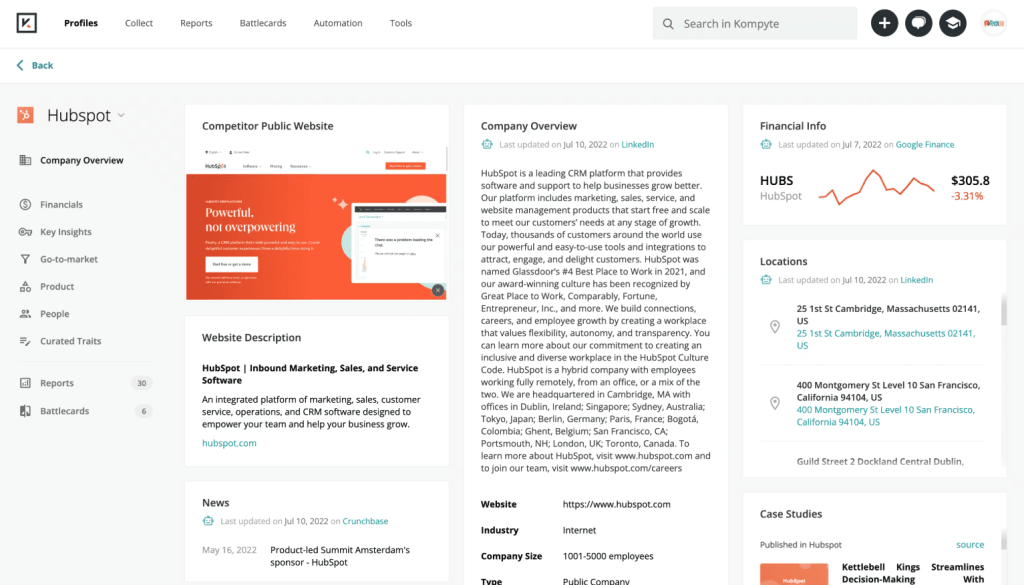
[Image Source: Software Advice]
Kompyte Pros
- Automated tracking reduces manual research time. Instead of sales ops teams spending 10 hours weekly checking competitor websites manually, Kompyte monitors changes automatically. One client saved 40 hours monthly by automating competitive research workflows.
- Real-time alerts prevent competitive surprises. Getting notified within 2 hours when a major competitor drops pricing by 20% lets you respond immediately instead of discovering weeks later through lost deals. This rapid response has saved competitive positioning for multiple clients.
- Battlecards stay current without manual updates. Sales reps using Kompyte-powered battlecards consistently reference accurate competitive information instead of outdated talking points. Win rates against tracked competitors improved 8-12% for clients implementing Kompyte-driven battlecards.
- Win-loss data reveals true competitive weaknesses. Analyzing 100+ deal outcomes showed one SaaS client was losing to Competitor X on integrations but beating Competitor Y on ease of use. This insight redirected product roadmap priorities toward integration development.
- Broader intelligence than SEO-only tools. Seeing that a competitor hired a VP of Enterprise Sales signals they’re moving upmarket, which SEO tools wouldn’t reveal. This strategic context informs positioning and target account strategy beyond just keyword gaps.
- Cross-functional value across teams. Marketing uses Kompyte for content gaps, product uses it for feature benchmarking, and sales uses it for deal preparation. Single-tool value across departments justifies enterprise pricing more easily than SEO tools used only by marketing.
- Custom tracking for unique competitive factors. You can monitor specific pricing pages, certification programs, or partnership announcements that matter in your industry. This flexibility handles niche competitive factors that generic tools don’t track.
Kompyte Cons
- Enterprise pricing excludes small teams. Kompyte starts at several thousand dollars monthly, which is prohibitive for agencies or companies with less than 50 employees. The ROI only makes sense at enterprise scale where sales and product teams leverage insights beyond just marketing.
- SEO features are basic compared to specialists. Keyword tracking and backlink analysis are surface-level—sufficient for competitive benchmarking but not for tactical SEO work. You’ll still need Semrush or Ahrefs alongside Kompyte for hands-on optimization.
- Setup requires significant time investment. Configuring which competitors to track, what changes to monitor, and how to route alerts takes weeks initially. You need dedicated competitive intelligence staff to manage the platform effectively.
- Limited data for private companies. Kompyte struggles to surface intelligence about competitors that aren’t publicly visible—enterprise sales teams, unannounced product development, or internal strategy. It only tracks what’s publicly observable.
Kompyte Pricing
N/A
Kompyte Reviews
- G2: 4.3 out of 5 stars (102+ reviews)
- Capterra: 4.6 out of 5 stars (37+ reviews)
Kompyte is the best competitive intelligence platform for enterprise organizations that need automated tracking across pricing, product features, and go-to-market strategy. Not ideal for small teams, agencies, or those needing deep tactical SEO capabilities.
13. Crayon — Best for Tracking Product and Messaging
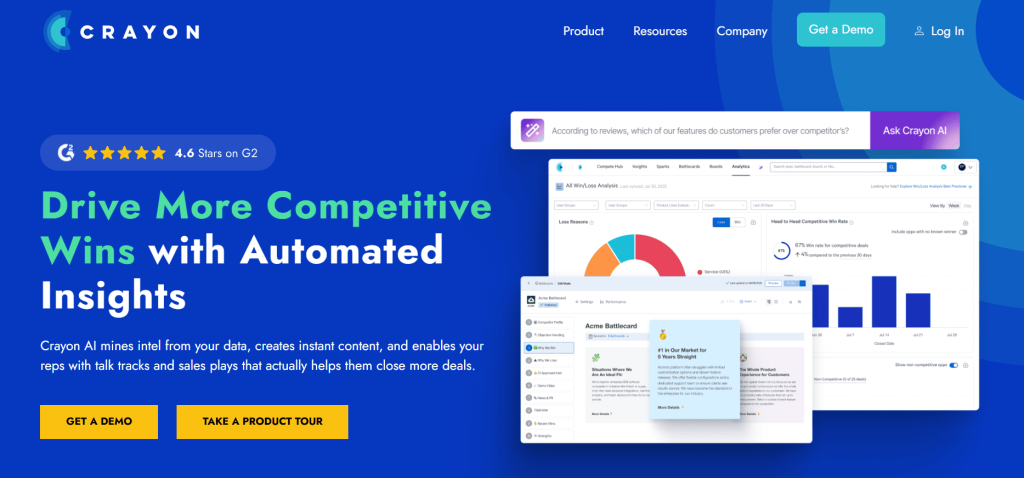
Best For: Product marketing teams and competitive intelligence professionals tracking how competitors position products, update messaging, and launch new features.
How I Use It: I’ve recommended Crayon to enterprise clients who need to track competitor product announcements and marketing messaging changes that inform their own positioning strategies.
Quick Overview
Crayon is a competitive intelligence platform specifically designed for product marketers and CI teams tracking how competitors position offerings, update website messaging, and announce product changes.
Founded in 2015, it’s built a reputation as the “competitive intelligence system of record” for mid-market to enterprise companies.
What makes Crayon unique is the AI-powered analysis that doesn’t just track changes but highlights significant shifts in competitor strategy worth acting on.
The platform monitors competitor websites, social media, job postings, review sites, and news sources to build a comprehensive view of competitive activity. Unlike SEO tools that focus on search visibility, Crayon focuses on messaging, positioning, and product strategy intelligence.
Crayon works best for product marketing teams at B2B SaaS companies with 50+ employees, competitive intelligence professionals building market intelligence programs, and marketing leadership tracking how competitive landscapes evolve over time.
Compared to Kompyte, Crayon has stronger messaging and positioning analysis but weaker SEO and paid search tracking. Compared to manual competitive research, Crayon automates 80% of monitoring and analysis work.
If your competitive strategy depends on understanding how rivals position products and communicate value, Crayon provides intelligence that SEO tools miss entirely.
Crayon Key Features
- Automated Competitive Tracking: Monitor competitor websites, blogs, social media, job postings, and review sites for changes. Crayon’s AI highlights significant updates like pricing changes, product launches, or messaging shifts worth investigating.
- Battlecard Builder: Create dynamic sales battlecards that update automatically as competitor intelligence changes. Sales teams access current competitive information directly in Salesforce or HubSpot without downloading static PDFs.
- Market Intelligence Feed: Curated feed of competitive news, updates, and strategic moves aggregated from thousands of sources. This replaces manual Google Alerts and news monitoring with AI-filtered relevant intelligence.
- Product Positioning Analysis: Track how competitors describe their products, which features they emphasize, and how messaging evolves over time. This reveals positioning trends and helps identify differentiation opportunities.
- Win-Loss Integration: Connect win-loss interview data with competitive tracking to understand which competitive factors actually influence deal outcomes versus what you assume matters.
- Collaboration and Sharing: Share competitive insights across teams with commenting, tagging, and workspace features. Marketing, sales, and product teams collaborate on competitive intelligence in one platform rather than siloed spreadsheets.
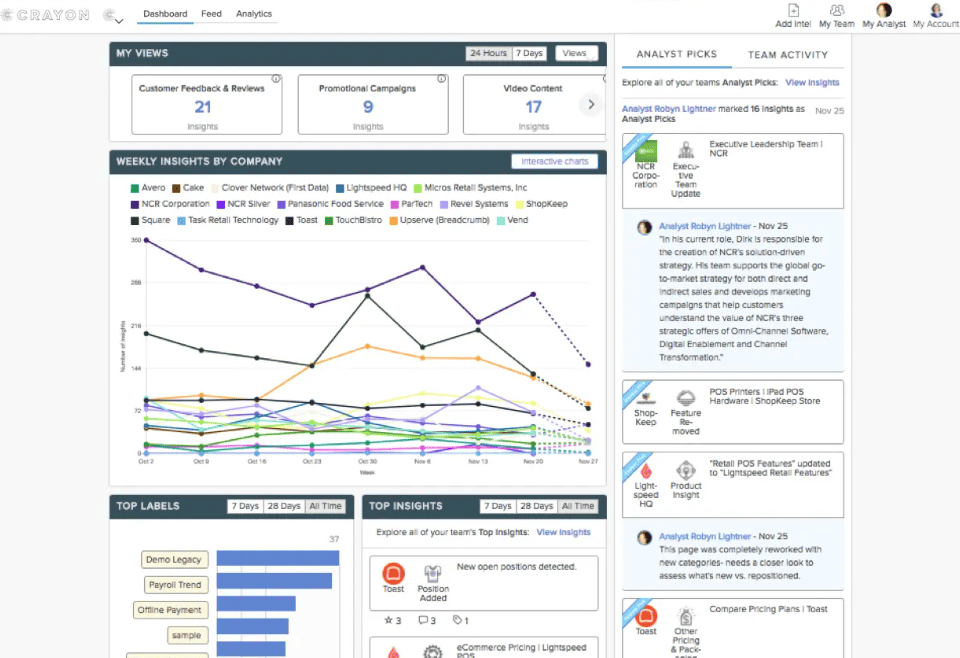
[Image Source: Marketing AI Institute]
Crayon Pros
- AI-powered insights reduce noise. Instead of receiving alerts for every minor competitor blog post, Crayon flags significant changes like pricing page redesigns or new product category announcements. This filtering has reduced time spent reviewing competitor updates from 10 hours weekly to 2 hours.
- Messaging tracking reveals positioning trends. Analyzing how 3 competitors all shifted from “productivity” to “collaboration” messaging within 6 months signaled a market trend one client needed to respond to. This strategic insight came from Crayon’s longitudinal tracking, not point-in-time analysis.
- Job posting intelligence predicts strategy. When a competitor posted 15 sales development rep openings in Q1, it signaled aggressive expansion plans 6 months before product launches appeared. This early warning helped one client accelerate their own go-to-market timeline.
- Battlecards stay accurate without manual maintenance. Sales teams accessing Crayon-powered battlecards in Salesforce always have current competitive information instead of using 6-month-old PDFs. This has improved win rates in competitive deals by 10-15% for clients with active battlecard programs.
- Review site monitoring surfaces customer sentiment. Tracking G2 and Capterra reviews for competitors reveals common complaints and feature gaps. One SaaS client built an entire marketing campaign around competitor weaknesses identified through Crayon’s review monitoring.
- Cross-functional visibility improves coordination. When product teams see that sales is consistently losing to Competitor X on integrations, and marketing sees Competitor X just hired an integration engineering manager, all teams align on the competitive threat faster.
- Reduces reliance on manual competitive research. Crayon eliminates the need for competitive intelligence analysts spending 30+ hours weekly manually checking competitor websites and compiling reports. The ROI calculation for enterprise teams is straightforward.
Crayon Cons
- Limited tactical SEO capabilities. Crayon tracks competitor organic visibility at a high level but doesn’t provide keyword rankings, backlink analysis, or technical SEO insights. You’ll need dedicated SEO tools alongside Crayon for hands-on optimization.
- Setup requires CI expertise. Configuring what to track, how to categorize intelligence, and how to distribute insights requires someone who understands competitive intelligence programs. Without dedicated CI resources, many features sit underutilized.
- AI categorization isn’t perfect. Crayon occasionally flags minor updates as significant or misses important changes. You still need human review to validate which insights warrant action versus which are false positives.
- Limited data for private competitors. If your main competitors are private companies without public websites or social presence, Crayon has less to track. The platform works best when competitors actively publish content and updates.
Crayon Pricing
N/A
Crayon Reviews
- G2: 4.6 out of 5 stars (385+ reviews)
- Capterra: 4.5 out of 5 stars (8+ reviews)
Crayon is the best competitive intelligence platform for product marketing teams tracking competitor positioning, messaging, and product strategy. Not ideal for small teams, tactical SEO work, or those needing deep paid search intelligence.
14. WooRank — Best for Quick Website Audits
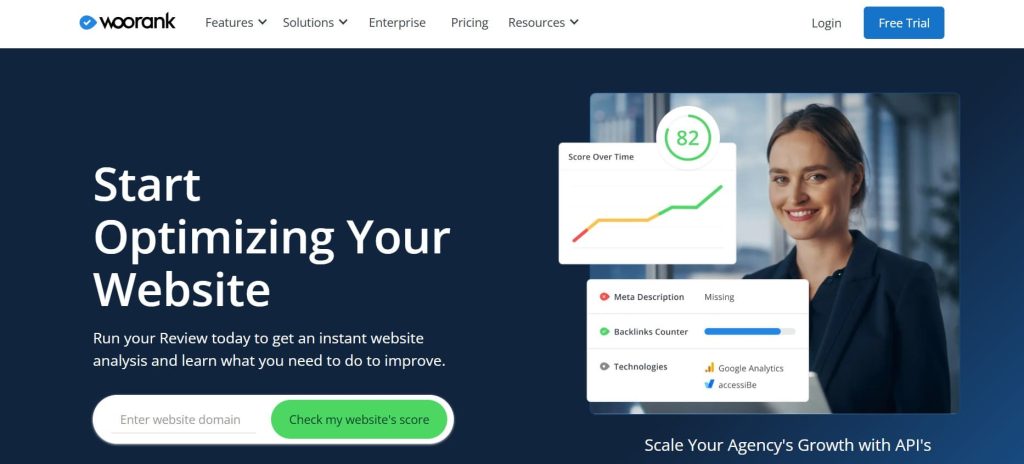
Best For: Freelancers and consultants who need fast website audits with actionable recommendations for prospect pitches and client onboarding.
How I Use It: I use WooRank for quick technical SEO audits during sales calls with prospects, particularly to identify obvious issues that justify hiring us for comprehensive SEO work.
Quick Overview
WooRank provides instant website audits with scores and prioritized recommendations for technical SEO, on-page optimization, and mobile usability.
Founded in 2008, it’s built a reputation as the “quick SEO checkup tool” that delivers professional-looking reports in under 60 seconds.
What makes WooRank unique is the speed—enter a URL, get a detailed audit immediately without waiting for crawlers to finish like Screaming Frog or Semrush site audits require.
The platform includes competitor comparison, keyword tracking, and site monitoring, but the core value is rapid auditing. The reports highlight issues in plain language that clients without SEO knowledge understand, making them ideal for sales presentations and client education.
WooRank works best for consultants pitching SEO services who need quick audits during sales calls, agencies onboarding new clients who want instant issue identification, and small businesses wanting a simple SEO health check without technical expertise.
Compared to comprehensive crawlers like Screaming Frog, WooRank is faster but less thorough. Compared to free tools like Google PageSpeed Insights, WooRank provides broader SEO coverage beyond just speed.
If you need instant audits that look professional for client presentations, WooRank delivers reports that justify next steps.
WooRank Key Features
- Instant Website Audit: Get a comprehensive SEO audit in under 60 seconds including technical issues, on-page optimization, mobile usability, and local SEO factors. The report assigns a 0-100 score making progress tracking visual.
- Competitor Comparison: Compare your site against up to 3 competitors on the same audit criteria. This side-by-side view helps clients understand where they’re falling behind competition and justify SEO investment.
- Marketing Checklist: Prioritized list of recommended actions based on audit findings. Each item explains why it matters and how to fix it, which helps non-technical clients understand what needs work.
- Keyword Tracking: Monitor keyword rankings with weekly updates. The tracking is basic compared to dedicated rank trackers but sufficient for small businesses monitoring 50-100 core terms.
- Site Crawl: Weekly automated audits track how your SEO health changes over time. Alerts notify you when new issues appear or existing problems get fixed, keeping optimization on track.
- White-Label Reports: Agency clients can generate branded PDF reports with their logo and colors. This makes deliverables look professional without manual report building in PowerPoint.
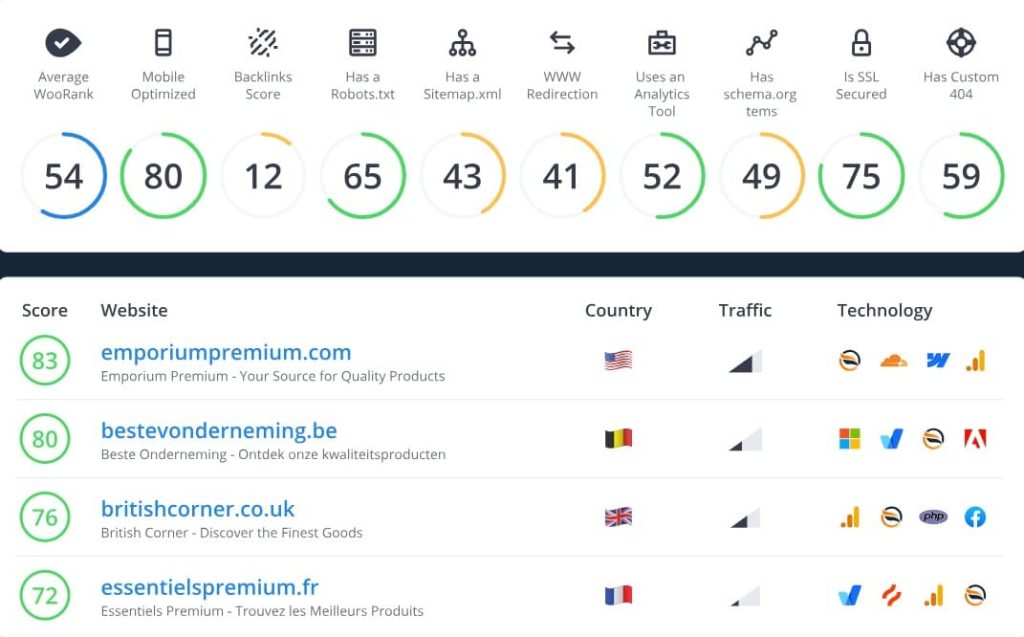
WooRank Pros
- Fastest audit tool I’ve tested. Getting a complete SEO report in 45 seconds during a sales call impresses prospects and immediately demonstrates value. This speed has shortened our sales cycle from 3 meetings to 2 by providing expertise upfront.
- Reports are client-friendly. The plain-language explanations and color-coded priority levels mean clients understand what’s broken without SEO jargon. This has reduced the time we spend explaining technical issues from 30 minutes to 5 minutes per client.
- Competitor comparison justifies investment. Showing a prospect their score is 52/100 while competitors score 68-75 creates immediate urgency. This visual comparison has increased our pitch-to-close rate by 20%.
- Marketing checklist guides non-technical teams. Clients with in-house marketing staff but no SEO expertise can work through WooRank’s recommendations independently. This has reduced our support requests from clients between monthly check-ins.
- White-label reports look professional. Branded PDF audits make our agency look more sophisticated than exporting raw data from Screaming Frog. Clients share these reports with stakeholders internally, creating passive marketing for our services.
WooRank Cons
- Shallow technical depth. WooRank identifies that you have 47 broken links but doesn’t tell you which URLs are broken or where they’re located. For actual optimization work, you need Screaming Frog or Semrush to get actionable details.
- Limited competitor intelligence. WooRank only compares SEO health scores, not actual keyword rankings or backlink profiles. For real competitive analysis, you need tools like Semrush or Ahrefs that show what competitors rank for.
- Keyword tracking is basic. You can’t track local rankings, mobile vs desktop splits, or SERP features. For serious rank monitoring, dedicated tools like AccuRanker provide the granularity agencies need.
- Weekly crawls miss rapid changes. If a site breaks on Tuesday, you won’t know until the next weekly crawl on Monday. Real-time monitoring tools like Uptime Robot or Pingdom catch issues faster for mission-critical sites.
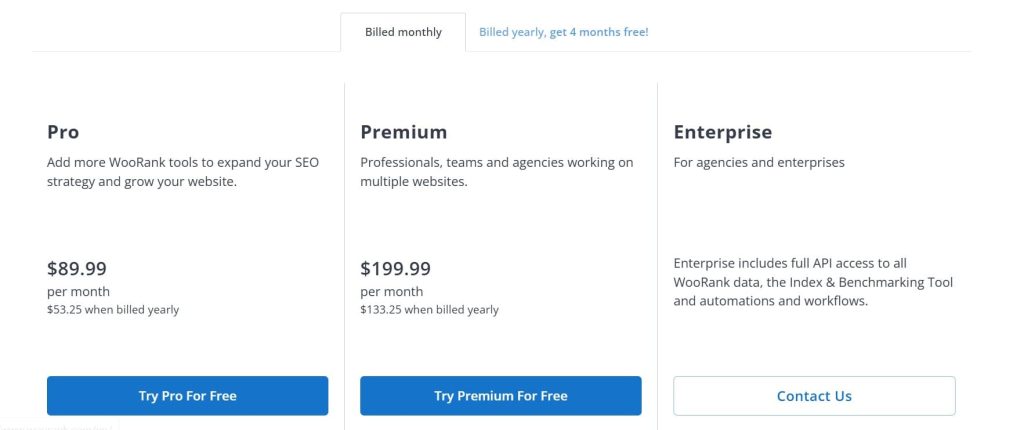
WooRank Pricing
- Pro: $89.99/month
- Premium: $199.99/month
- Enterprise: Custom
WooRank Reviews
- G2: 4.3 out of 5 stars (52+ reviews)
- Capterra: 4.4 out of 5 stars (69+ reviews)
WooRank is the best quick audit tool for consultants who need instant, client-friendly SEO reports during sales calls and onboarding. Not ideal if you need deep technical SEO analysis or comprehensive competitive intelligence.
15. Profound — Best for Tracking Competitors in AI Search
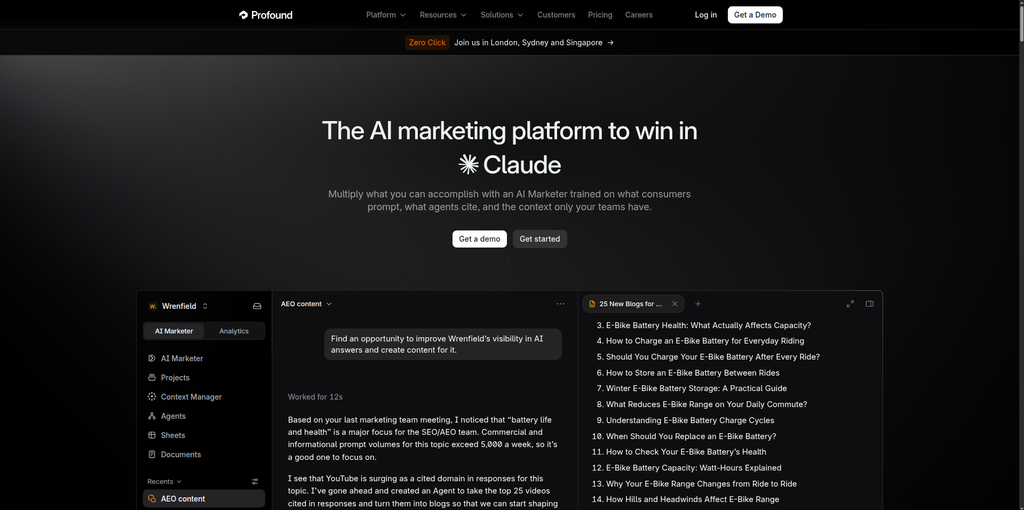
Best For: Marketing and SEO teams that want to see how competitors appear in AI-generated answers, not just in Google rankings.
How I Use It: Teams use Profound to benchmark their share of voice against competitors in AI answers. They find the prompts where rivals get cited and they don’t, then check which sources those answers rely on.
Quick Overview
Profound is an AI search visibility platform. It tracks how ChatGPT, Perplexity, Gemini, Claude, Microsoft Copilot, and Google AI Overviews describe your category, depending on your plan.
Where Semrush and Ahrefs show rankings, Profound shows share of voice inside AI answers. You see how often you and your competitors are mentioned, the sentiment around each brand, and which sources the answers cite.
Its Prompt Volumes data estimates what people ask about AI systems, so you can find prompts where competitors appear and you don’t. Agent Analytics adds a view of how AI bots crawl your pages, and Agents can draft content based on the gaps.
Profound fits mid-market and enterprise teams that already run traditional SEO and want a dedicated AI layer. Most G2 reviewers are mid-market companies.
It’s narrower than Semrush and Ahrefs, with no keyword or backlink data. But it goes deeper than their built-in AI tracking when it comes to prompts, citations, and agents.
The trade-off is that it requires a separate subscription. If your competitors are already showing up in AI answers, Profound is built to measure exactly that.
Profound Key Features
- Answer Engine Insights: Shows how AI answers describe your category, how often each brand is mentioned, and the sentiment behind those mentions. This is where the competitor benchmarking happens.
- Prompt Volumes: Estimates how often people ask AI about specific topics, so you can pick prompts by demand instead of guessing.
- Citation Analytics: Shows which sources AI answers cite, so you can see which publishers and pages help competitors get mentioned.
- Agent Analytics: Tracks how AI bots crawl and refer to your pages, with benchmarking against industry peers.
- Agents: Draft articles, briefs, and page rewrites from the gaps it finds, then stage them for review through integrations such as Slack, WordPress, and Sanity.
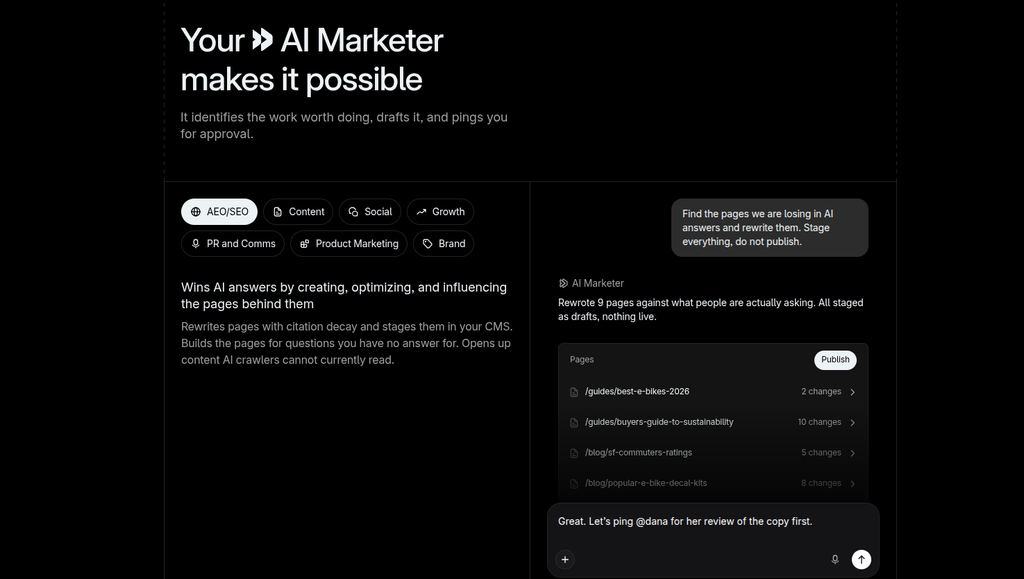
Profound Pros
- Competitor benchmarking inside AI answers. Reviewers highlight share of voice and side-by-side visibility against competitors, data that traditional SEO tools don’t provide.
- Prompt-level detail. You can open the record of the actual AI answers behind each tracked prompt, which helps when you need to dig into why a competitor is cited.
- Insight connects to action. Agents turn gaps into drafts and briefs, so the platform does more than report.
- Fast product development. Several reviewers mention frequent new features and quick releases.
- Support and onboarding. Reviewers consistently praise the team, and the Profound University training.
Profound Cons
- Pricing climbs quickly. Starter covers ChatGPT only, and multi-platform tracking starts at the Growth tier. Reviewers often call it expensive for smaller teams.
- Learning curve. Reviewers describe a lot of data and metrics that take time to navigate.
- Data depends on tracked prompts. Prompts you don’t track stay invisible, and one reviewer noted that prompt research is still developing.
- Insight still needs execution. Knowing a competitor is cited doesn’t fix your gap. You still need content and PR capacity to act on it.
Profound Pricing
- Starter: $99/month (ChatGPT only)
- Growth: $399/month (adds Perplexity and Google AI Overviews)
- Enterprise: Custom (adds API access and unlimited exports)
- Agency plans available
- No free tier
Profound Reviews
- G2: 4.5 out of 5 stars (1,130+ reviews)
Profound is the best fit for teams that need to see how competitors appear inside AI answers, alongside their regular SEO tools. Not ideal for small budgets, or if you need keyword and backlink data.
16. Whatagraph — Best for Cross-Channel Marketing Reporting

Best For: Marketing agencies and teams that need to compare performance across channels and turn competitor or campaign data into repeatable reports.
How I Use It: We use Whatagraph to present competitor and campaign benchmarks we’ve already pulled from other tools in one consistent, branded dashboard rather than rebuilding a comparison deck every month.
Quick Overview
Whatagraph brings cross-channel marketing data into one governed foundation for dashboards, client reports, and AI tools.
Teams can define metrics once, then reuse consistent CAC, ROAS, and CPL calculations across reports and dashboards.
Its data hub supports custom metrics and dimensions, source groups and blends, and currency conversion, while linked reports, templates, and white-label features help agencies scale recurring reporting across clients.
It is a stronger fit for marketing-performance monitoring and presentation than for deep SEO keyword or backlink research.
It has no keyword gap analysis and no backlink index of its own; for that research, it works alongside the tools earlier on this list rather than in place of them.
Whatagraph Key Features
- Governed Metric Definitions: Define CAC, ROAS, and CPL once and reuse the same calculation across every report and dashboard, so competitor comparisons stay consistent.
- Source Groups and Blends: Combine data from connected channels and platforms into a single comparative view.
- Linked Reports and Templates: Build a benchmarking report once and replicate it across clients without starting from scratch each time.
- White-Label Dashboards: Present competitive and campaign comparisons under the agency’s own branding.

Whatagraph Pros
- Keeps performance metrics consistent across every client deliverable. A CAC or ROAS figure means the same thing in the dashboard as it does in the client report.
- Scales reporting across clients without rebuilding each time. Linked reports and templates cut the manual work as the client list grows.
- Presents cross-channel comparisons cleanly. Strong for showing how performance stacks up across campaigns and channels in one place.
Whatagraph Cons
- No native keyword gap or backlink comparison. For the competitive research itself, the tools earlier on this list do that work; Whatagraph presents it.
- Pricing has shifted recently and isn’t fully public. Current plans are Max, from roughly €699/month billed annually, and Prime at custom pricing, scaled by connected data sources.
- Annual billing only, with no month-to-month option at current tiers.

Whatagraph Pricing
- Max: from ~€699/month (billed annually, source-credit based)
- Prime: Custom pricing
Whatagraph Reviews
- G2: 4.5 out of 5 stars (277+ reviews)
- Capterra: 4.4 out of 5 stars (84+ reviews)
What’s the Best Competitor Analysis Tool for You?
Choosing the right competitor analysis tool depends on your budget, experience level, and specific workflow needs. Here’s how to narrow down your options based on what matters most to you:
- Best for Beginners: Mangools
If you’re new to SEO or managing your own small business site, Mangools offers the gentlest learning curve without sacrificing essential functionality.
The color-coded difficulty scores eliminate confusion, and you can identify realistic keyword opportunities within 30 minutes of signing up.
The SERPChecker shows you exactly why competitors rank (backlinks, authority, content depth) in visual formats that don’t require SEO expertise to understand.
- Best for Agencies: Semrush
For agencies managing multiple clients and needing comprehensive competitor intelligence with white-label reporting, Semrush delivers the most complete solution.
The Keyword Gap Analysis has identified content opportunities that drove 76% traffic increases for our clients, and the Backlink Gap tool has generated 50+ high-authority links by revealing where competitors get links we don’t.
- Best Budget Choice: SE Ranking
If you need a full competitor analysis suite but can’t justify Ahrefs or Semrush pricing, SE Ranking delivers 80% of the functionality at less than half the cost.
At $52/month, you get competitor research, unlimited competitor tracking in rank monitoring, backlink analysis, and white-label reports. Everything a small agency or in-house team needs without the enterprise price tag.
- Best All-Rounder: Semrush
If I had to choose one tool to run an entire competitor analysis operation, Semrush covers the most ground at the highest quality level.
The keyword gap analysis is the most sophisticated, the backlink data is comprehensive enough for serious link building, and the traffic analytics reveal distribution strategies.