Semrush has been my go-to SEO platform for years. It’s incredibly comprehensive, packed with features for everything from keyword research to competitor analysis and beyond.
I’ve relied on it heavily while running campaigns at OneLittleWeb, helping clients in the US, UK, Canada, and Australia scale their organic traffic.
But over the past 8+ years, I’ve tested dozens of other SEO tools side-by-side in real campaigns. Clients often need alternatives.
Some want budget-friendly options without sacrificing data quality, others prioritize simpler interfaces for in-house teams. A few focus on specialized tools for emerging needs like local SEO, precise competitor spying, or content-led growth.
That’s why I’ve put together this guide to 11 Semrush alternatives I’ve personally used in actual client work. Not just free trials or demos. These are tools that have delivered measurable wins, from ranking improvements to traffic surges.
Before diving in, here’s what I evaluated each one on, based on cross-checking against real data from Google Search Console, Analytics, and on-site results:
- Data Accuracy & Reliability: Keyword volumes, difficulty scores, backlinks, and traffic estimates that align closely with Google’s own tools. No wild overestimations or outdated indexes.
- Feature Depth: Strong coverage of core SEO tasks (keyword research, site audits, rank tracking, backlink analysis, competitor insights) plus standout extras, without unnecessary complexity.
- Pricing: Fair plans that scale for solos, agencies, or teams, with transparent limits and no surprise add-ons that inflate costs.
- Ease of Use: Clean, intuitive dashboards that load fast and minimize the learning curve, even when handing off to clients or team members.
- Scalability: Handles large sites or multiple projects smoothly, with seamless connections to Google tools, content platforms, or reporting systems.
- Real-World Impact: Provides actionable data that translates to actual ranking gains, traffic growth, and ROI in competitive campaigns.
Let’s jump right in!
What to Look for in the Best Semrush Alternatives
When evaluating SEO platforms, surface-level feature parity isn’t enough. Here’s what actually matters when you’re running campaigns at scale:
Data Accuracy and Freshness
The platform needs a robust crawling infrastructure and regularly updated index. Check how frequently they refresh keyword volume data, backlink profiles, and SERP positions—stale data from 60–90 days ago won’t catch algorithm shifts or competitor movements in time.
Keyword Database Size and Coverage
Look at the total keyword index size and geographic coverage. If you’re managing international clients, you need accurate local search volume across markets, not just US-based projections extrapolated to other countries.
Backlink Index Depth
The size and freshness of the backlink database matters more than most features. Platforms with smaller crawl budgets miss toxic links, new referring domains, and link velocity changes that impact rankings.
API Access and Rate Limits
If you’re automating workflows or building custom dashboards, you need reliable API access with reasonable rate limits. Check whether historical data is accessible programmatically and how much it costs beyond base pricing.
Rank Tracking Granularity
Beyond basic position monitoring, look for local rank tracking (zip code level), mobile vs. desktop splits, and SERP feature tracking (featured snippets, People Also Ask, local packs). You need to see the full competitive landscape, not just position #1–10.
Technical SEO Audit Capabilities
The crawler should catch more than broken links and missing meta tags. Look for JavaScript rendering, Core Web Vitals monitoring, structured data validation, hreflang audits, and log file analysis if you’re working with large sites.
Data Export and Reporting Flexibility
You should be able to pull raw data in CSV, connect via Google Sheets API, or push to Data Studio/Looker without manual formatting.
White-label reporting is critical if you’re presenting directly to clients, and the best white label SEO tools make it effortless to brand everything from dashboards to PDFs with your agency’s logo and colors.
How I Selected the Best Semrush Alternatives
Over the past 8+ years at OneLittleWeb, I’ve tested more than 40 SEO platforms across real client campaigns, not hypothetical scenarios or demo accounts.
These tools have been used for technical audits, backlink analysis, keyword research, competitor tracking, and content gap analysis on sites ranging from local service businesses to SaaS companies pulling millions of monthly visitors.
Here’s What I Measured:
Each platform was evaluated based on how it performed under actual working conditions — tight deadlines, complex site structures, international targeting, and multi-client workflows.
I tracked data accuracy by cross-referencing keyword volume and backlink profiles against Google Search Console and manual SERP checks.
I tested crawl depth on sites with 10K+ pages to see how well technical audits surfaced real issues versus surface-level problems.
What Mattered Most:
The tools that made this list consistently delivered accurate data, provided actionable insights (not just vanity metrics), and integrated smoothly into our existing workflows.
I prioritized platforms that didn’t require extensive onboarding, offered reliable API access for automation, and scaled without forcing unnecessary plan upgrades.
I’ve personally used these tools for content audits, link-building outreach, rank tracking across multiple markets, and keyword gap analysis across hundreds of campaigns.
If a tool couldn’t handle the pressure of client work, or if the data quality dropped off after the first month. It didn’t make the cut.
Summary Table: 11 Semrush Alternatives at a Glance
Before diving into each platform, here’s a quick comparison to help you narrow down which tools fit your needs. All pricing is based on entry-level plans as of 2026.
| Tool Name | Best For | Key Features | Starting Price | Our Notes |
| Ahrefs | Backlink analysis & content research | 16T+ backlink index, Content Explorer, Site Audit, Rank Tracker | $129/month | Best backlink data we’ve used. Interface takes time to learn but worth it. |
| SE Ranking | Established agencies and mid-market teams | Rank tracking, AI search monitoring, competitor analysis, backlink checker | $129/month | Deep and sophisticated platform for traditional and Ai search |
| Moz Pro | Agencies needing client reporting | Domain Authority tracking, keyword research, site crawls, white-label reports | $31/month | Solid for local SEO and beginner-friendly dashboards. Data refresh slower than Ahrefs. |
| Mangools | Freelancers & solopreneurs | KWFinder, SERPChecker, LinkMiner, SiteProfiler | $30.50/month | Clean interface, great for quick keyword research. Limited for enterprise-scale work. |
| Surfer | Content optimization | Content Editor, SERP Analyzer, keyword clustering, AI writing assistant | $79/month | Best for optimizing existing content. Not a full SEO suite — pair it with another tool. |
| Ubersuggest | Small businesses on tight budgets | Keyword suggestions, content ideas, backlink data, site audit | $12/month | Neil Patel’s tool. Good starting point but data accuracy inconsistent at scale. |
| Serpstat | Multi-market keyword research | Keyword clustering, rank tracking, site audit, PPC analysis | $44/month | Strong international database. UX feels dated compared to newer platforms. |
| SpyFu | Competitor PPC & SEO analysis | AdWords history, keyword overlap, backlink outreach, rank tracking | $39/month | Unmatched for reverse-engineering competitor ad strategies. SEO features are secondary. |
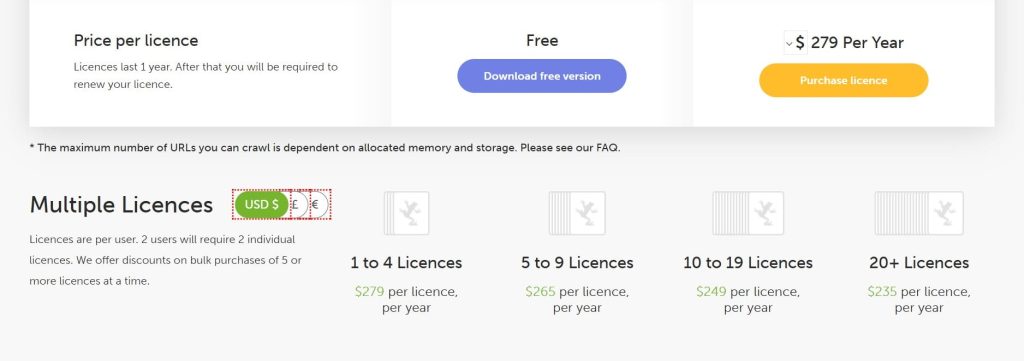
| Screaming Frog | Technical SEO audits | Site crawling, broken link detection, redirect chains, structured data validation | $245/year | Industry standard for technical audits. Paid version unlocks unlimited crawls. |
| SimilarWeb | Traffic & market intelligence | Traffic estimates, audience insights, competitor benchmarking, industry analysis | $125/month | Best for high-level competitive research. Expensive — overkill for most SEO workflows. |
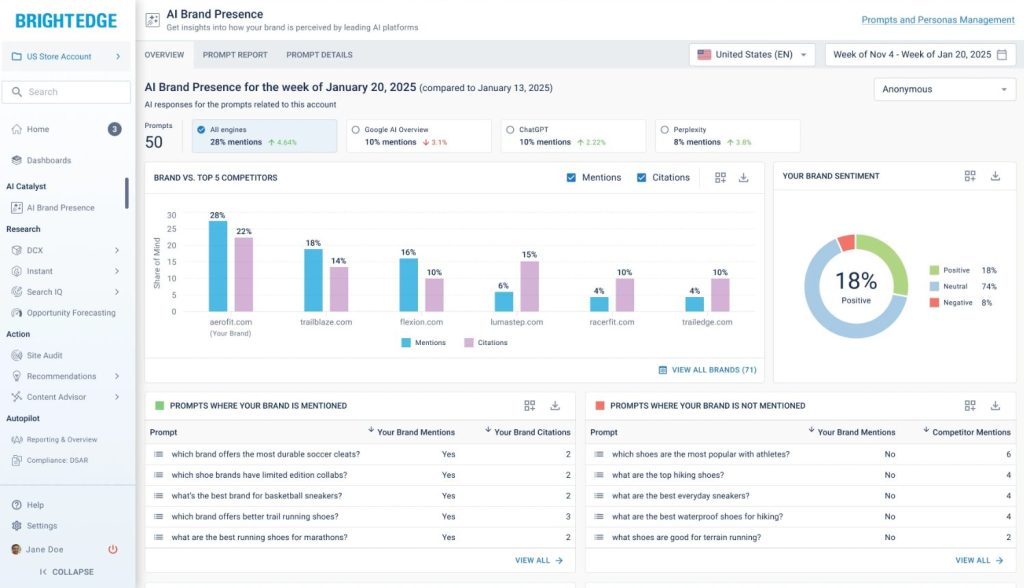
| BrightEdge | Enterprise SEO at scale | DataCube keyword database, ContentIQ, StoryBuilder, Share of Voice tracking | Custom pricing | Enterprise-grade platform. Requires a dedicated team to maximize ROI. |
If you don’t need a complete SEO suite, Keywords Everywhere is a lightweight option for keyword discovery and viewing search volume, CPC, competition, and trend data inside your browser. It won’t replace Semrush for site audits, rank tracking, or full competitor analysis, but it works well for quick keyword checks.
11 Best Semrush Alternatives in 2025
After testing dozens of platforms across client campaigns, these are the Semrush alternatives that consistently deliver accurate data, actionable insights, and reliable performance under deadline pressure.
- Ahrefs — Best for backlink and content analysis
- SE Ranking — Best SEO and GEO platform for Agencies and Mid-Market Teams
- Moz Pro — Best for white-label agency client reporting
- Mangools — Best for freelancers needing simplicity
- Surfer — Best for on-page content optimization
- Ubersuggest — Best for tight-budget small businesses
- Serpstat — Best for international multi-market keyword research
- SpyFu — Best for competitor PPC strategy analysis
- Screaming Frog — Best for technical SEO site audits
- SimilarWeb — Best for traffic and market intelligence
- BrightEdge — Best enterprise SEO for large teams
Let’s explore the tools.
1. Ahrefs – Best for Backlink and Content Analysis
Best For: SEO professionals, agencies, and content marketers who need the most comprehensive backlink data and content research capabilities available.
How I Use It: I use Ahrefs daily for backlink audits, keyword gap analysis, and content research. It’s the first tool I open when analyzing why a competitor is ranking or when building link-building strategies for clients.
Quick Overview
Ahrefs is one of the most powerful AI SEO tools on the market, built around the second-largest web crawler after Google. Founded in 2010, it’s become the industry standard for backlink analysis and link-building research.
What sets Ahrefs apart is the depth and freshness of its data. The platform indexes over 16 trillion backlinks and updates its database every 15 minutes.
I’ve used Ahrefs across hundreds of client campaigns at OneLittleWeb, from local service businesses to SaaS companies competing in brutal niches.
It’s particularly strong for content-driven SEO strategies where you need to understand what’s already ranking, why it’s ranking, and how to create something better. The Content Explorer alone has saved me countless hours of manual research.
While it’s pricier than most alternatives, the data quality justifies the cost if backlinks and content strategy are central to your work. It’s overkill for basic rank tracking or small local businesses, but for agencies and serious SEO practitioners, it’s hard to beat.
Ahrefs Key Features
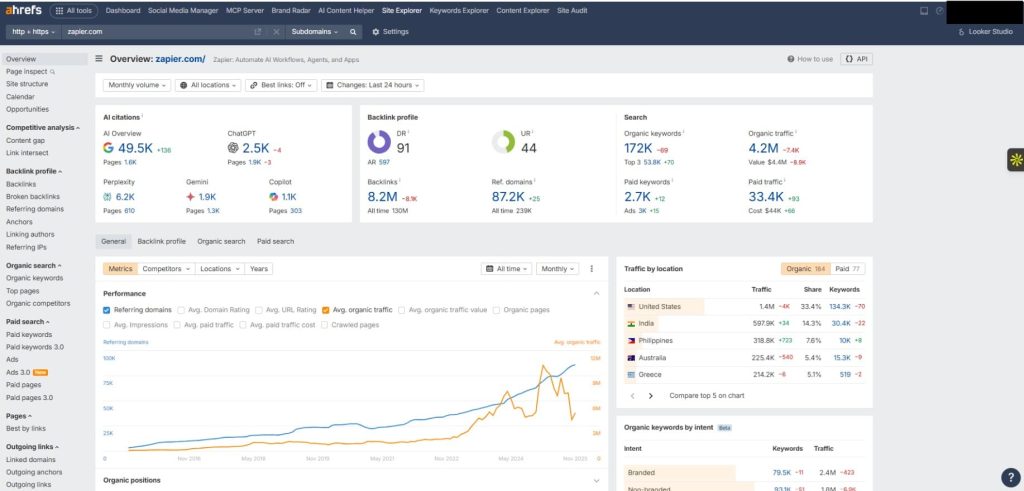
- Site Explorer: Deep backlink analysis showing referring domains, anchor text distribution, link velocity, and toxic link detection. The historical data goes back years, which is critical for understanding long-term link profile changes.
- Content Explorer: Searchable database of over 10 billion pages. Filter by traffic, backlinks, social shares, and word count to find content gaps and linkable asset opportunities. I use this weekly to reverse-engineer what’s working in any niche.
- Keyword Explorer: Shows keyword difficulty, search volume, click metrics, and SERP features across 170+ countries. The “Parent Topic” feature groups related keywords, which prevents keyword cannibalization and helps structure content strategies.
- Site Audit: Crawls up to 100K pages per project, flagging technical issues like broken links, redirect chains, orphaned pages, and Core Web Vitals problems. The visualization makes it easier to prioritize fixes.
- Rank Tracker: Monitors desktop and mobile rankings across locations with daily updates. Integrates with Google Analytics and Search Console for unified reporting.
- Alerts: Automated notifications for new backlinks, lost backlinks, brand mentions, and keyword ranking changes. Essential for proactive link management and crisis monitoring.
Ahrefs Pros
- Best backlink data in the industry. The index is massive, constantly updated, and consistently more accurate than competitors. I’ve cross-checked backlink profiles across platforms, and Ahrefs catches links others miss.
- Content Explorer is unmatched for research. Being able to search billions of pages by traffic, shares, and backlinks has changed how I approach content strategy. It’s like having x-ray vision into any niche.
- The interface is clean and intuitive. Despite being feature-heavy, the navigation makes sense. You can find what you need without digging through nested menus or outdated UX patterns.
- Historical data goes deep. You can track backlink growth, traffic trends, and ranking history over years, not just months. This context is critical when diagnosing penalties or analyzing seasonal patterns.
- API access is robust. If you’re building custom dashboards or automating reports, the API is well-documented and reliable. Rate limits are reasonable for most agency use cases.
- Educational resources are excellent. Ahrefs Academy, blog, and YouTube channel are legitimately helpful—not just thinly veiled product pitches. I’ve learned more from their content than most paid SEO courses.
- Fast crawling and data refresh. The platform updates backlink data every 15 minutes and crawls billions of pages daily. When a competitor gets a new link or loses one, you know quickly.
Ahrefs Cons
- Keyword volume can be inflated. I’ve noticed search volume numbers occasionally run higher than Google Search Console actuals, which can skew prioritization if you’re not cross-referencing data.
- Steeper learning curve for beginners. While the interface is clean, the sheer number of features and metrics can overwhelm new users. It takes time to understand which reports matter for your specific goals.
- Limited local SEO features. If you’re focused on local pack rankings, GMB insights, or citation tracking, Ahrefs isn’t built for that. You’ll need to pair it with a local SEO tool like BrightLocal.
- No built-in content writing tools. Unlike Surfer or Clearscope, Ahrefs doesn’t guide you through on-page optimization in real-time. You get the research, but you still need to write and optimize manually.
Ahrefs Pricing
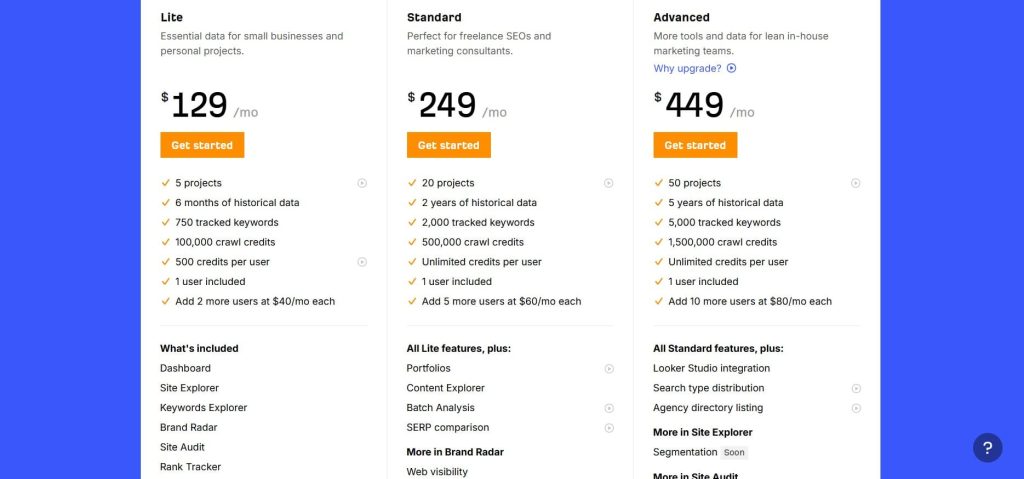
- Lite: $129/month
- Standard: $249/month
- Advanced: $449/month
- Enterprise: $1,499/month
Ahrefs Reviews
- G2: 4.5 out of 5 stars (606+ reviews)
- Capterra: 4.7 out of 5 stars (577+ reviews)
Overall sentiment: Ahrefs is widely regarded as the gold standard for backlink analysis and content research. Users who complain typically cite cost rather than functionality. If you can justify the price, the ROI is there.
2. SE Ranking – Best SEO and GEO platform for Agencies and Mid-Market Teams
Best For: Established agencies and mid-market SEO teams that need rank tracking, site audits, competitive research, white-label reporting, and AI search visibility in one platform, with API access included from the entry plan.
How I Use It: I use SE Ranking for mid-tier clients where we need solid rank tracking, competitor analysis, and automated reporting. And increasingly to show them where they’re landing in AI search alongside their regular rankings.
Quick Overview
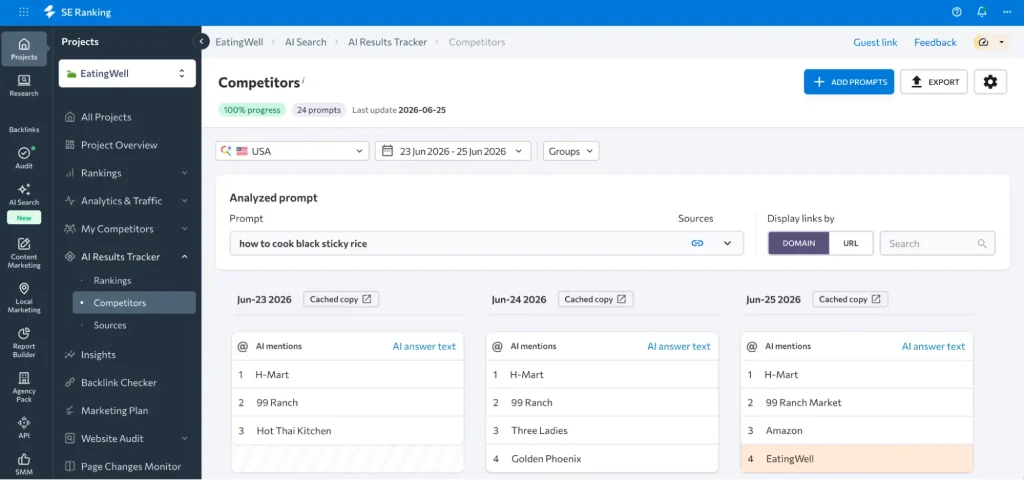
SE Ranking launched in 2013 and has expanded into a platform that covers keyword research, backlink analysis, technical audits, competitor research, and AI search visibility tracking. The AI Search module monitors brand mentions and citations across ChatGPT, Gemini, Perplexity, Google AI Overviews, and AI Mode. That data is part of what agencies need to report on.
The API story is a real point of difference. SE Ranking has a Data API for large-scale retrieval and a Project API for workflow automation, both included in every plan, plus a remote MCP server that makes the data queryable in plain English from assistants like Claude.
I’ve used SE Ranking across client campaigns at OneLittleWeb, particularly for agencies and in-house teams that want the core SEO workflow in one place. The platform covers what most teams actually need day-to-day.
SE Ranking works best for agencies managing 10–30 clients, or in-house teams that need an all-in-one solution covering SEO and AI search in one place. It’s less suited for deep backlink analysis or large-scale technical audits where you need the index depth and crawling power of premium platforms.
SE Ranking Key Features
- AI Search Visibility module: Tracks brand mentions and citations across ChatGPT, Gemini, Perplexity, Google AI Overviews, and AI Mode. Covers position data, competitor benchmarking, and historical trends.
- Rank Tracker: Monitors unlimited keywords (on higher plans) across 190+ countries with desktop, mobile, and local tracking. Daily updates and historical data visualization make it easy to spot trends.
- Website Audit: Crawls up to 250,000 pages per project, identifying over 70 technical and on-page issues. The interface color-codes priority levels, making it easier to delegate fixes to developers.
- Backlink Checker: Analyzes backlink profiles with metrics for domain trust, referring domains, anchor text distribution, and toxic link detection. The index is smaller than Ahrefs but adequate for most client work.
- Competitor Research: Side-by-side comparison of organic and paid keywords, traffic estimates, top pages, and backlink overlap. On top of that, you can research analyze competitors in AI search platforms.
- Keyword Research: Provides search volume, competition level, CPC data, and keyword difficulty scores. The keyword grouping feature clusters semantically related terms for content planning.
- API and MCP: Data API for large-scale keyword, backlink, domain, and AI search retrieval; Project API for workflow automation inside the platform. A remote MCP server adds plain-language access from AI assistants.
SE Ranking Pros
- API included in every plan: Both the Data API and Project API are available from the Core plan.
- AI search tracking in the same dashboard. Reporting on LLM visibility next to traditional rankings means you’re not exporting from a second tool before a client call.
- White-label reporting is included. Branded PDF reports, custom domains, and client portals are available even on lower-tier plans. Most competitors charge extra or reserve this for enterprise tiers.
- Technical audit is thorough. The 250K page crawl limit handles most sites comfortably, and the issue categorization makes it easy to prioritize fixes without needing deep technical SEO knowledge.
- MCP server for agentic workflows: Teams using AI assistants for SEO analysis can query live SE Ranking data in plain English through the MCP server without manual exports.
- Connects into the stack you already use. Connectors for Data Studio, n8n, and Make.com push SE Ranking data into the dashboards and automations clients already work in, and it ties into GA4 and Search Console for traffic context.
SE Ranking Cons
- The backlink index is smaller than Ahrefs or Moz. The database covers fewer domains, and updates aren’t as frequent. For aggressive link-building campaigns, you’ll want to supplement with a specialized tool.
- Keyword difficulty scores can be misleading. I’ve seen keywords marked “easy” that required significant authority to rank for. Always cross-reference with manual SERP analysis.
- No automated cross-channel correlation. SE Ranking connects to GA4 and Search Console, but correlating data across channels requires manual work for now.
- More sophisticated tool for beginners. Newbies or freelancers might find the platform overwhelming due to its depth and breadth of features.
SE Ranking Pricing
- Free trial available
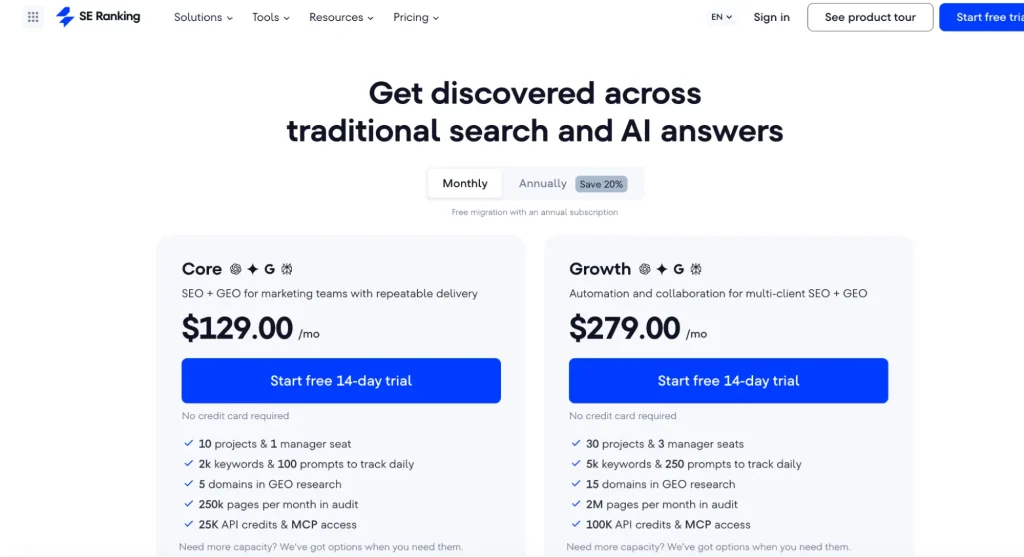
- Core: $129/month — includes 25,000 Data API credits and MCP access
- Growth: $279/month — includes 100,000 Data API credits and MCP access
- Enterprise: custom pricing
- API and MCP access included in every plan
SE Ranking Reviews
- G2: 4.7 out of 5 stars (2,330+ reviews)
- Capterra: 4.7 out of 5 stars (296+ reviews)
Overall sentiment: SE Ranking is viewed as one of the strongest SEO and GEO platforms for agencies and mid-market teams. Users who need Ahrefs-level backlink data will be disappointed, but for most day-to-day work it delivers and the bundled API, MCP server, and AI search tracking are what set it apart.
3. Moz Pro – Best for White-Label Agency Client Reporting
Best For: Digital marketing agencies that need clean, client-friendly reports and reliable local SEO tracking without overwhelming clients with technical jargon.
How I Use It: I use Moz Pro primarily for white-label reporting and Domain Authority tracking. When clients ask “how authoritative is our site?” DA gives them a number they can understand and track over time.
Quick Overview
Moz Pro has been around since 2004, making it one of the oldest SEO platforms still actively developed. While it doesn’t have the massive backlink index of Ahrefs or the feature breadth of Semrush, it excels at making SEO accessible.
Both for agencies presenting to non-technical clients and for teams just getting started with structured SEO workflows.
I’ve used Moz across client accounts at OneLittleWeb, particularly for local service businesses and small e-commerce brands where the focus is less on deep technical analysis and more on consistent monitoring and clear reporting.
The platform’s strength is in its simplicity and the trust factor that comes with Domain Authority. A metric that’s become industry shorthand for site quality, even if it’s not perfect.
Moz Pro works best for agencies managing 5–20 clients who need reliable rank tracking, basic site audits, and presentation-ready reports. It’s less suited for enterprise-level technical SEO or aggressive link-building campaigns where you need granular backlink data updated in real-time.
Moz Pro Key Features
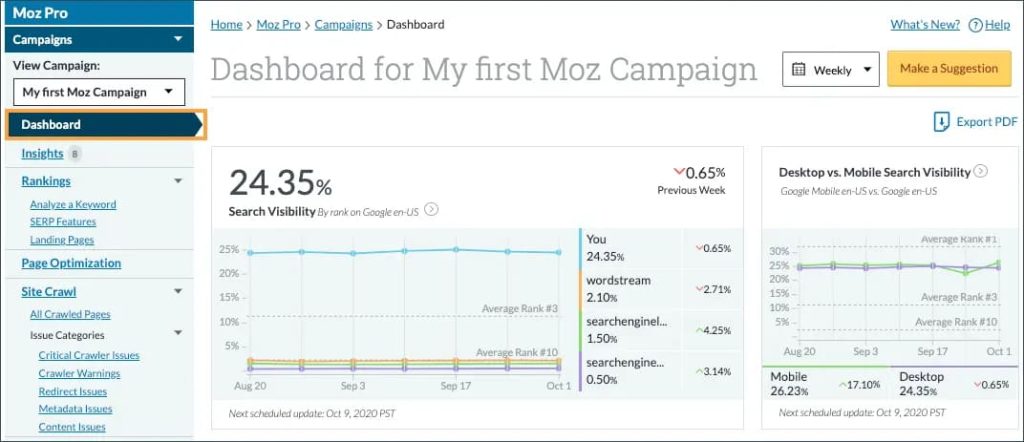
- Rank Tracker: Monitors keyword positions across search engines with customizable reporting. Tracks local rankings down to zip code level, which is essential for multi-location businesses.
- Link Explorer: Moz’s backlink database covering 44 trillion links. While smaller than Ahrefs, it’s still substantial and provides Domain Authority and Page Authority metrics that clients understand intuitively.
- Keyword Explorer: Research tool providing search volume, difficulty scores, organic CTR estimates, and priority scores. The SERP analysis shows which features (snippets, local packs, images) appear for each query.
- Site Crawl: Audits up to 3,000 pages per site (depending on plan), identifying technical issues like duplicate content, missing tags, broken links, and crawl errors. Reports are beginner-friendly compared to Screaming Frog’s output.
- On-Page Grader: Analyzes individual pages against target keywords, providing actionable recommendations for title tags, content length, internal linking, and keyword usage.
Moz Pro Pros
- Domain Authority is universally recognized. Even clients who don’t understand SEO know what DA means. It’s an easy benchmark to track progress and compare against competitors.
- White-label reporting saves hours. The branded reports look professional out of the box. I’ve sent these directly to clients without additional formatting, which is rare for SEO tools.
- Beginner-friendly interface. New team members can navigate Moz without extensive training. The learning curve is gentle compared to Ahrefs or Semrush.
- Strong local SEO features. Zip code-level rank tracking and local SERP analysis make it ideal for agencies managing local service clients like dentists, lawyers, and contractors.
- MozBar Chrome extension is excellent. Instant DA/PA visibility while browsing makes link prospecting and competitive analysis faster. I keep it active during content research.
- Educational content is genuinely helpful. Moz’s Whiteboard Friday series and Beginner’s Guide to SEO are industry staples. Their content helped me learn SEO years ago.
Moz Pro Cons
- Backlink data updates slower than competitors. The index refresh happens weekly, not daily. If you’re monitoring active link-building campaigns, the delay is noticeable compared to Ahrefs’ 15-minute updates.
- Smaller backlink index. While 44 trillion links sounds massive, it’s still significantly smaller than Ahrefs. I’ve found links in Ahrefs that Moz doesn’t show, particularly newer or less authoritative domains.
- The keyword database isn’t as comprehensive. International coverage and long-tail keyword suggestions feel thinner than Semrush or Ahrefs, especially outside the US and UK markets.
- Site crawl depth is limited. The 3,000-page cap on lower tiers is restrictive for medium-to-large sites. You’ll need to prioritize which sections to crawl, which can miss critical issues.
Moz Pro Pricing
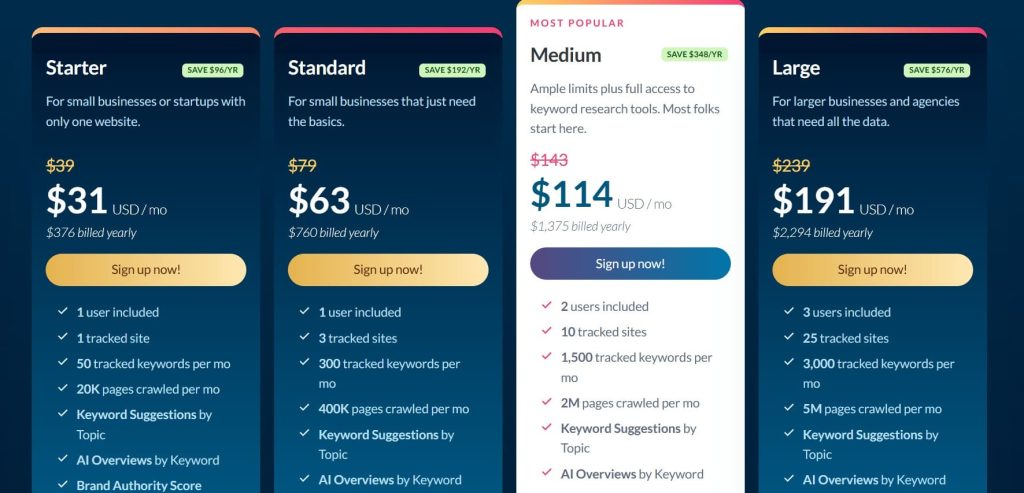
- Starter: $31/month
- Standard: $63/month
- Medium: $114/month
- Large: $191/month
Moz Pro Reviews
- G2: 4.3/5 (605+ reviews)
- Capterra: 4.5/5 (349+ reviews)
Overall sentiment: Moz Pro is seen as reliable and trustworthy, especially for agencies that value brand reputation and client communication over cutting-edge features. It’s a safe choice that won’t impress power users but won’t disappoint clients either.
4. Mangools – Best for Freelancers Needing Simplicity
Best For: Freelance SEO consultants, solopreneurs, and small content teams that need fast, intuitive keyword research without feature bloat.
How I Use It: I use Mangools (specifically KWFinder) when I need quick keyword volume checks or SERP analysis without opening my heavier tools. It’s perfect for on-the-fly research during client calls.
Quick Overview
Mangools launched in 2014 as a suite of five focused SEO tools: KWFinder (keyword research), SERPChecker (SERP analysis), SERPWatcher (rank tracking), LinkMiner (backlink analysis), and SiteProfiler (website analysis).
Rather than building one massive platform, Mangools kept each tool simple, fast, and laser-focused on a specific task.
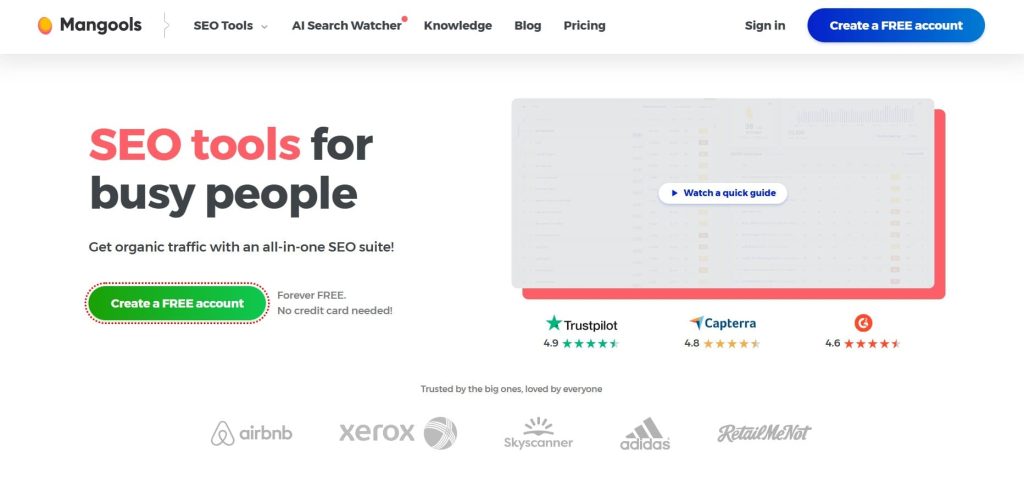
I’ve used Mangools across various projects at OneLittleWeb, particularly when training junior team members or working with clients who find traditional SEO tools overwhelming. The interface is genuinely beautiful—clean, colorful, and intuitive in a way that makes SEO feel less intimidating. It’s the tool I recommend to friends starting freelance content writing or small business owners managing their own SEO.
Mangools works best for freelancers handling 3–10 clients, bloggers doing their own keyword research, or small agencies that need a secondary tool for quick lookups.
It’s not built for enterprise-scale work, deep technical audits, or aggressive link-building campaigns where you need Ahrefs-level data depth.
Mangools Key Features
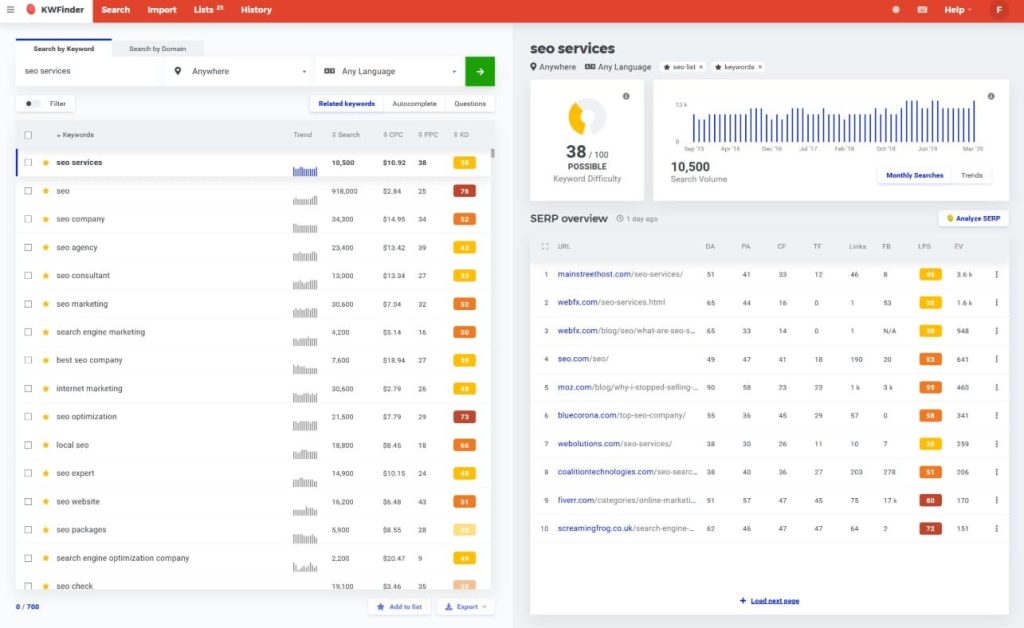
- KWFinder: Keyword research tool with search volume, keyword difficulty, trend data, and SERP previews. The autocomplete and related keyword suggestions are comprehensive, and filtering by difficulty makes prioritization easy.
- SERPChecker: Analyzes top-ranking pages for any keyword, showing domain authority, page authority, backlinks, social shares, and estimated traffic. Helps you understand what it takes to rank before committing to content creation.
- SERPWatcher: Rank tracking across desktop and mobile with daily updates. The “dominance” metric shows your overall visibility for tracked keywords, not just individual positions.
- LinkMiner: Backlink checker that highlights the strongest links on any page. The Chrome extension makes link prospecting faster by showing metrics directly in search results.
- SiteProfiler: Quick website overview showing traffic estimates, top keywords, backlink profile, and top-performing content. Good for initial competitive analysis before diving deeper.
Mangools Pros
- Interface is the cleanest in the industry. Everything feels intuitive, fast, and visually appealing. New users can start getting value within minutes, not hours of training.
- KWFinder is excellent for keyword research. The difficulty scoring is reliable, and the suggestion engine surfaces long-tail opportunities that other tools miss. I trust its volume data more than Ubersuggest.
- Chrome extension adds convenience. Being able to check keyword metrics or backlinks without leaving the browser speeds up research workflows significantly.
- SERP analysis is fast and visual. SERPChecker loads quickly and presents competitive data in a scannable format. I use it before committing to content briefs to gauge difficulty accurately.
- No steep learning curve. I’ve onboarded clients to Mangools in under 30 minutes. The simplicity means less time explaining dashboards and more time executing strategy.
- Great for local SEO research. Location-based keyword volume and difficulty data is accurate for local markets, which many enterprise tools overlook.
Mangools Cons
- Limited for large-scale SEO operations. The lookup and tracking limits hit quickly if you’re managing multiple clients or running comprehensive audits. Enterprise agencies will outgrow it fast.
- No technical site audit tool. There’s no crawler to identify broken links, redirect chains, or on-page issues. You’ll need Screaming Frog or another audit tool alongside Mangools.
- Rank tracking is basic. SERPWatcher tracks positions reliably but lacks advanced features like SERP feature tracking, local pack monitoring, or competitor comparison views.
- API access is limited. If you’re automating workflows or building custom reporting, the API restrictions on lower plans make integration challenging.
- Not built for content optimization. Unlike Surfer or Clearscope, Mangools doesn’t guide you through on-page optimization or content scoring. It gives you data, not execution.
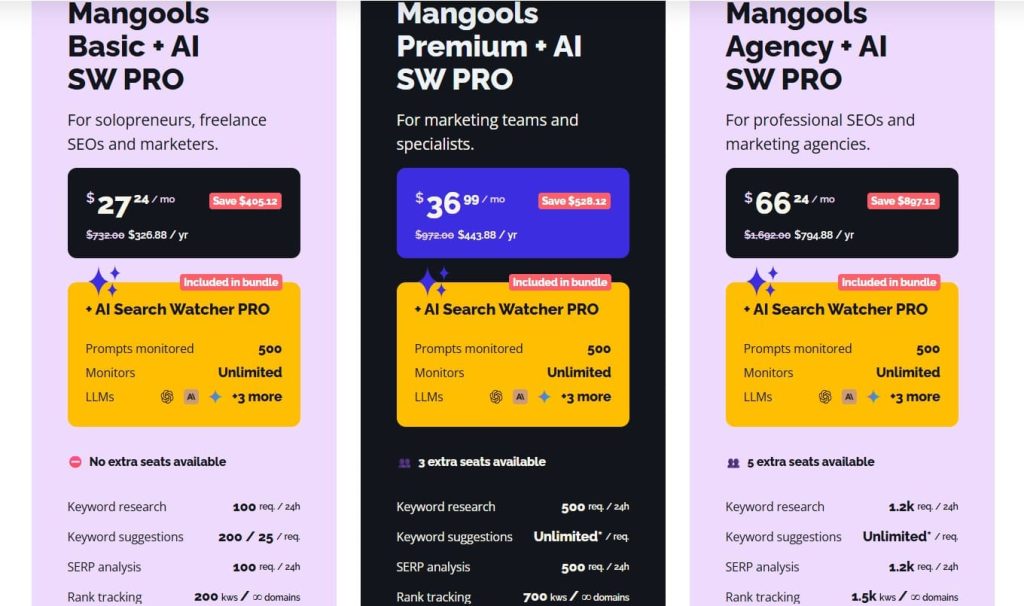
Mangools Pricing
- Free
- Basic: $30.50/month
- Premium: $40.50/month
- Agency: $70.50/month
- 48-hour money-back guarantee
Mangools Reviews
- G2: 4.7 out of 5 stars (95+ reviews)
- Capterra: 4.8 out of 5 stars (91+ reviews)
Overall sentiment: Mangools is widely regarded as the best entry-level SEO toolset for freelancers and small businesses. Power users will find it limiting, but for its target audience, it’s nearly perfect.
5. Surfer – Best for On-Page Content Optimization
Best For: Content marketers, writers, and agencies that need real-time on-page optimization guidance to improve rankings and content quality.
How I Use It: I use Surfer’s Content Editor when writing or optimizing high-priority pages. It’s open in a second tab while I write, guiding keyword density, content structure, and semantic term usage.
Quick Overview
Surfer launched in 2017 with a laser focus on one thing: helping you optimize content to match what’s already ranking.
Rather than trying to be an all-in-one SEO platform, Surfer specializes in on-page content analysis and provides actionable recommendations based on SERP data.
I’ve used Surfer across content campaigns at OneLittleWeb, particularly when we’re targeting competitive keywords where every on-page detail matters.
This AI marketing tool analyzes the top-ranking pages for your target keyword and tells you exactly what they’re doing—word count, keyword usage, heading structure, semantic terms, and more. It doesn’t guarantee rankings, but it removes the guesswork from content optimization.
Surfer works best for content-heavy SEO strategies where you’re publishing regularly and need consistent quality.
It’s less useful for technical SEO, backlink analysis, or rank tracking. It’s intentionally not trying to be those things. You’ll need to pair it with Ahrefs, Semrush, or another full-featured platform.
Surfer Key Features
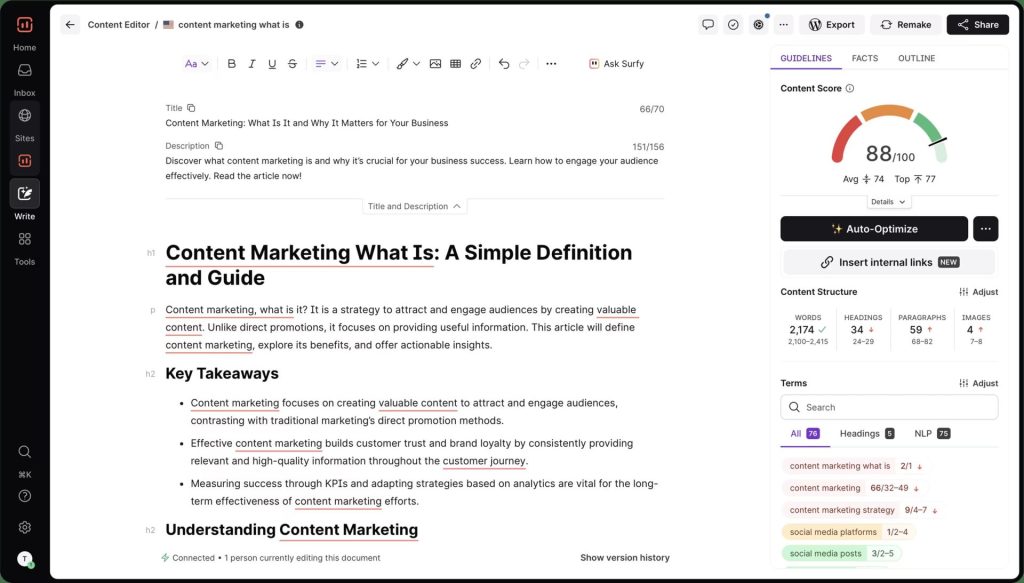
- Content Editor: Real-time optimization tool that scores your content as you write. Shows keyword density, content structure recommendations, semantic terms to include, and readability metrics. Integrates with Google Docs and WordPress.
- SERP Analyzer: Analyzes top-ranking pages for your target keyword, breaking down word count, keyword usage, heading structure, image count, and backlink profiles. Shows you exactly what’s working in the current SERP.
- Keyword Research: Generates keyword clusters and related terms based on semantic relevance. Helps you build topic clusters instead of targeting isolated keywords.
- Content Audit: Scans your existing pages against current SERP data, identifying optimization opportunities and pages that need refreshes to maintain rankings.
- Outline Builder: Generates content outlines based on headings and questions pulled from top-ranking pages. Speeds up content brief creation significantly.
- AI Writing Assistant (Surfy): Integrated AI tool that suggests sentences and paragraphs based on your target keyword and optimization guidelines. Quality is decent but still requires heavy editing.
Surfer Pros
- The Content Editor is genuinely helpful. The real-time feedback loop while writing keeps you on track without having to bounce between tabs. I’ve seen content rank faster after optimization with Surfer.
- Takes the guesswork out of on-page SEO. Instead of wondering if you’ve used a keyword enough or structured content properly, Surfer tells you based on what’s currently ranking.
- Integrations save time. Writing directly in Google Docs or WordPress with Surfer’s sidebar active means you’re optimizing as you draft, not after the fact.
- Semantic keyword suggestions are excellent. Surfer identifies related terms and concepts that strengthen topical relevance. This has helped me avoid over-optimizing for exact-match keywords.
- Content Audit identifies low-hanging fruit. Running audits on existing content quickly surfaces pages that just need minor tweaks to recover or improve rankings.
- Outline Builder accelerates briefs. Pulling common headings and questions from top-ranking pages gives writers a solid starting structure without manual SERP analysis.
- Constantly updated SERP data. Unlike static content briefs, Surfer pulls fresh data from current rankings, so your optimization targets reflect the latest algorithm behavior.
Surfer Cons
- Not a full SEO platform. You can’t use Surfer alone—you still need Ahrefs, Semrush, or similar for keyword research, backlink analysis, rank tracking, and technical audits.
- Can encourage robotic writing. Chasing the content score too aggressively leads to keyword-stuffed, unnatural content. You have to balance Surfer’s recommendations with readability and user experience.
- AI writing tools are mediocre. Surfy generates decent sentences but lacks depth and originality. It’s a starting point, not a replacement for actual writing expertise.
- SERP volatility affects recommendations. If Google’s SERP changes significantly between your analysis and publication, Surfer’s recommendations may no longer reflect the current ranking landscape.
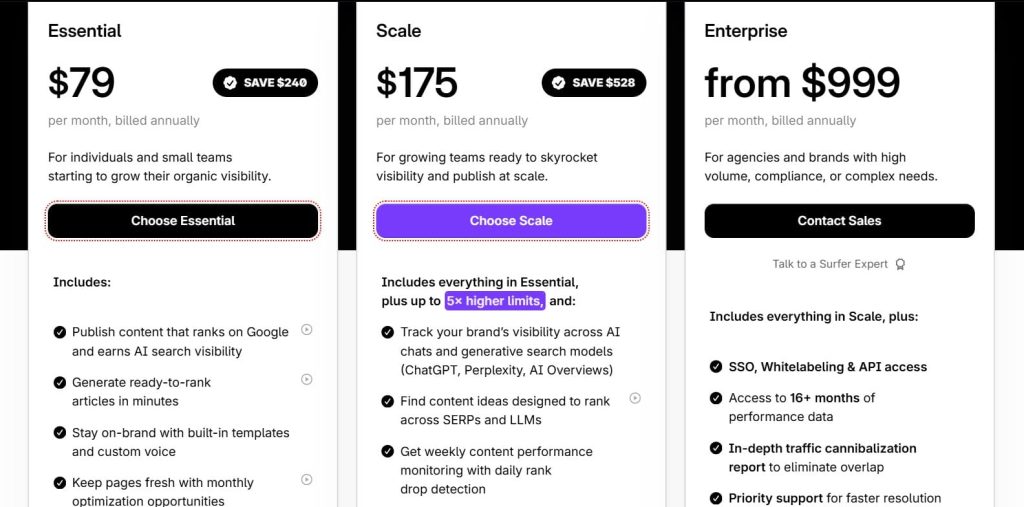
Surfer Pricing
- Essential: $79/month
- Scale: $175/month
- Enterprise: from $999/month
Surfer Reviews
- G2: 4.8 out of 5 stars (538+ reviews)
- Capterra: 4.9 out of 5 stars (421+ reviews)
Overall sentiment: Surfer is viewed as the best content optimization tool available, especially for teams that publish frequently. It’s not a replacement for strategic thinking but significantly improves execution consistency.
6. Ubersuggest – Best for Tight-Budget Small Businesses
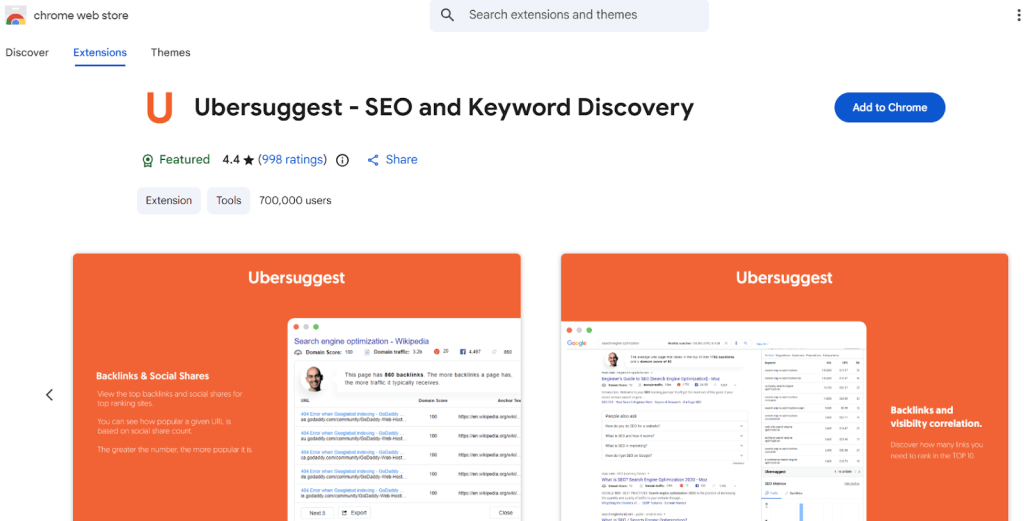
Best For: Small business owners, bloggers, and startups testing SEO on minimal budgets before committing to premium tools.
How I Use It: I occasionally use Ubersuggest for quick competitor traffic estimates or when advising early-stage startups that can’t afford Ahrefs yet. It’s a good stepping stone, not a long-term solution.
Quick Overview
Ubersuggest started as a free keyword suggestion tool before Neil Patel acquired it in 2017 and rebuilt it into a low-cost all-in-one SEO platform.
The goal was clear: make SEO accessible to people who couldn’t afford $100+ monthly subscriptions. At $12/month (lifetime deal available), it’s the cheapest full-featured SEO tool on the market.
I’ve recommended Ubersuggest to clients at OneLittleWeb who are just starting with SEO and need to understand the basics before investing heavily. It covers keyword research, site audits, backlink analysis, and rank tracking—all the core functions you’d expect.
The data quality isn’t as reliable as premium tools, but for beginners learning SEO fundamentals, it’s a reasonable entry point.
Ubersuggest works best for solopreneurs managing 1–3 sites, bloggers doing keyword research, or small business owners handling their own SEO.
It’s not suited for agencies, competitive niches, or anyone who needs accurate data for client reporting or high-stakes campaigns.
Ubersuggest Key Features
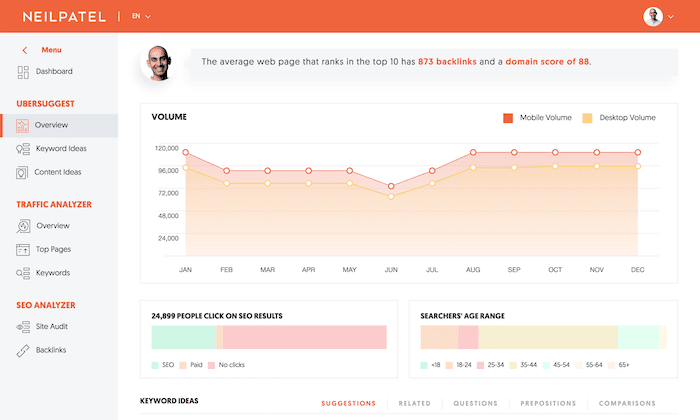
- Keyword Research: Provides search volume, SEO difficulty, paid difficulty, and CPC data. Includes keyword suggestions, related terms, and questions people are asking.
- Site Audit: Crawls your website to identify technical issues like broken links, slow pages, missing meta tags, and SEO errors. Reports are visual and beginner-friendly.
- Backlink Data: Shows referring domains, domain score, backlink quality, and new/lost links over time. The index is smaller than competitors but adequate for basic analysis.
- Traffic Analyzer: Estimates organic and paid traffic for any domain. Breaks down top pages, keywords driving traffic, and content performance.
- Rank Tracking: Monitors keyword positions with daily updates. Tracks desktop and mobile rankings across locations.
- Content Ideas: Suggests blog topics based on your niche and shows top-performing content with social shares and backlink counts.
Ubersuggest Pros
- Extremely affordable pricing. At $12/month or a one-time lifetime payment, it’s accessible to virtually anyone testing SEO. The barrier to entry is almost zero.
- Neil Patel’s brand adds credibility. For beginners unsure which tools to trust, Neil’s reputation makes Ubersuggest feel safer than lesser-known budget alternatives.
- The interface is simple and clean. New users can navigate without training. The learning curve is gentle, making it ideal for small business owners learning SEO themselves.
- Lifetime deal is available. A one-time payment option eliminates recurring costs, which appeals to bootstrapped startups and solopreneurs watching every expense.
- Chrome extension is handy. Quick SEO metrics while browsing make initial research faster. You can spot opportunities without logging into the dashboard.
- Good starting point for beginners. If you’ve never done keyword research or competitive analysis, Ubersuggest teaches the fundamentals without overwhelming you with advanced features.
- Content Ideas tool sparks topics. The blog topic generator and content performance data help beginners understand what’s working in their niche before creating their own content.
Ubersuggest Cons
- Data accuracy is inconsistent. Keyword volume numbers often don’t match Google Search Console actuals. Backlink counts are less reliable than Ahrefs or Moz.
- Backlink index is limited. The database is significantly smaller than competitors. I’ve found links in Ahrefs that Ubersuggest completely misses, especially from newer or niche sites.
- Not suitable for agencies or client work. The data quality issues make it risky for professional reporting. Clients will question accuracy if numbers don’t align with other sources.
- Site audit is surface-level. It catches basic issues but misses the technical depth that Screaming Frog or Ahrefs’ audits provide. Fine for beginners, insufficient for serious optimization.
- Limited competitor analysis depth. Traffic estimates and keyword overlap data are rough approximations. You can’t make confident strategic decisions based on Ubersuggest data alone.
- Keyword difficulty scoring is unreliable. I’ve seen keywords marked “easy” that required significant authority and content investment to rank for. Always manually verify SERPs.
Ubersuggest Pricing
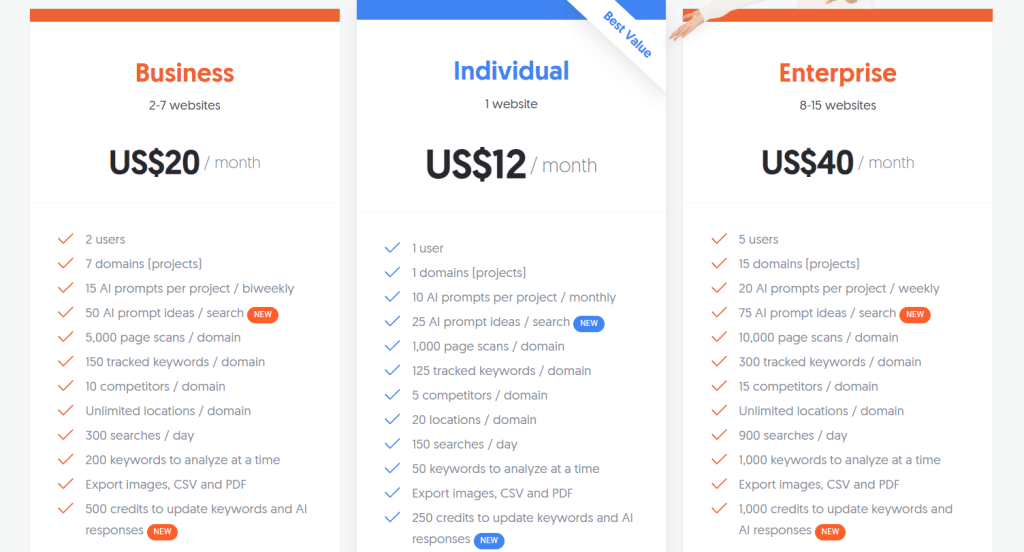
- Individual: $12/month
- Business: $20/month
- Enterprise: $40/month
Ubersuggest Reviews
- G2: 4.2 out of 5 stars (149+ reviews)
- Capterra: 4.4 out of 5 stars (93+ reviews)
Overall sentiment: Ubersuggest is seen as a training-wheels SEO tool—great for learning and initial exploration but not reliable enough for professional work. Most users eventually upgrade to Ahrefs, Semrush, or similar once they’re past the beginner stage.
7. Serpstat – Best for International Multi-Market Keyword Research
Best For: Agencies and in-house teams managing SEO campaigns across multiple countries and languages, particularly in Eastern Europe and Asia.
How I Use It: I use Serpstat when running campaigns for clients in markets where Ahrefs and Semrush have weaker data coverage—specifically Eastern Europe, Russia, and parts of Asia.
Quick Overview
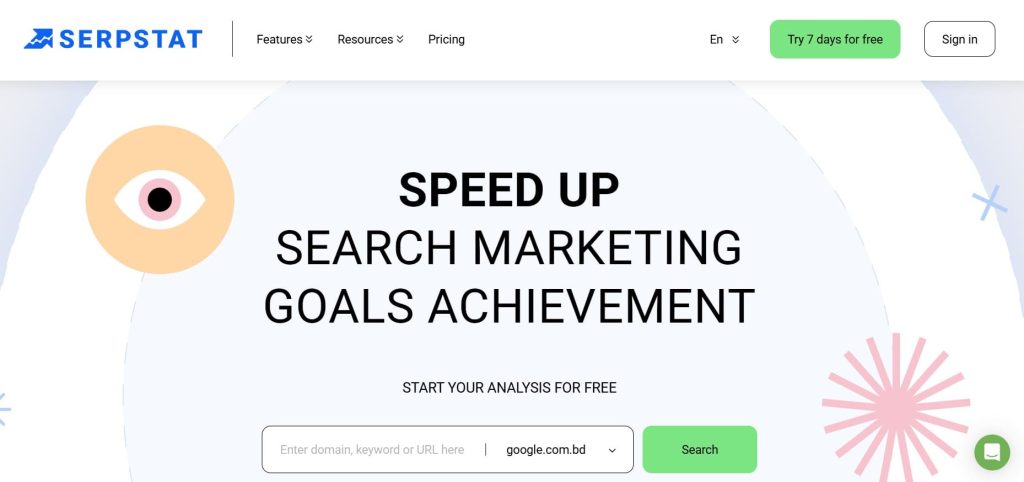
Serpstat launched in 2013 in Ukraine and has built one of the most comprehensive international keyword databases in the industry. While it offers the standard suite of SEO tools like rank tracking, site audits, backlink analysis, its real strength is keyword data across 230+ countries and regions.
If you’re managing campaigns in Poland, Czech Republic, Turkey, or Southeast Asia, Serpstat’s data coverage often exceeds what Western-focused tools provide.
I’ve used Serpstat across international campaigns at OneLittleWeb, particularly when expanding client reach into markets where English-language tools fall short.
The platform feels like a hybrid between Semrush and SE Ranking—comprehensive features at mid-tier pricing, but with a UX that hasn’t kept pace with newer competitors.
Serpstat works best for agencies managing multi-regional campaigns, e-commerce brands expanding internationally, or marketing teams in non-English markets.
It’s less suited for US-only campaigns where Ahrefs or Semrush provide better data quality and more intuitive interfaces.
Serpstat Key Features
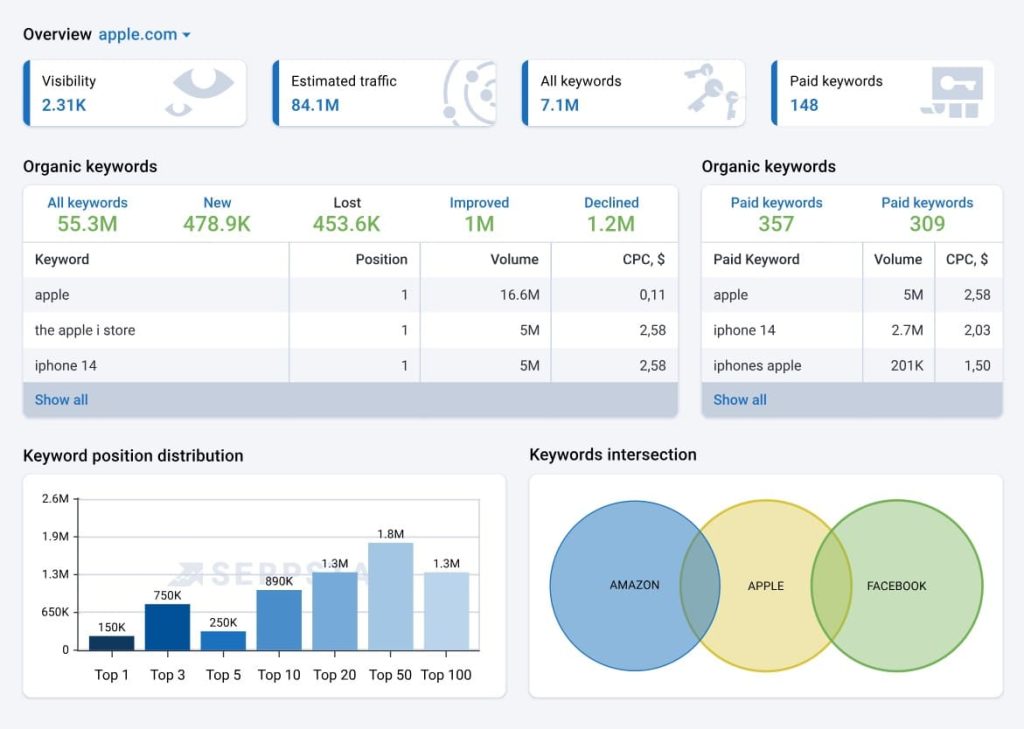
- Keyword Research: Database covering 230+ countries with search volume, keyword difficulty, CPC, and competition data. Keyword clustering groups related terms for content planning and ad group creation.
- Rank Tracking: Monitors positions across desktop and mobile with customizable update frequency. Tracks SERP features like featured snippets, local packs, and knowledge panels.
- Site Audit: Crawls up to 20,000 pages per project (depending on plan), identifying technical issues, on-page problems, and Core Web Vitals. Prioritizes issues by impact severity.
- Backlink Analysis: Shows referring domains, anchor text distribution, link types, and new/lost backlinks. Historical data helps identify link velocity patterns and potential penalties.
- Competitor Analysis: Compares keyword overlap, traffic estimates, top pages, and PPC strategies. Side-by-side analysis makes gap identification faster.
- Text Analytics: Content optimization tool similar to Surfer, analyzing top-ranking content and providing recommendations for word count, keyword usage, and structure.
- PPC Analysis: Deep dive into competitor ad campaigns, including ad copy, landing pages, keyword bids, and budget estimates. Particularly strong for Google Ads research.
Serpstat Pros
- Best international keyword coverage. If you’re working in Eastern Europe, Russia, Turkey, or Southeast Asia, Serpstat’s data is more reliable than most competitors. The local search volume accuracy is noticeably better.
- Keyword clustering is excellent. The tool automatically groups semantically related keywords, which speeds up content planning and prevents keyword cannibalization across pages.
- PPC analysis is comprehensive. The ad intelligence features rival SpyFu and Semrush. You can reverse-engineer competitor campaigns in detail, including historical ad spend estimates.
- API access is generous. Even lower-tier plans include API functionality, which is rare. If you’re building custom dashboards or automating workflows, Serpstat is flexible.
- Batch analysis saves time. You can analyze hundreds of keywords or URLs simultaneously, which is critical for large-scale audits or migrations.
- White-label reporting included. Branded reports are available without jumping to enterprise pricing, making it viable for small agencies presenting directly to clients.
Serpstat Cons
- The interface feels outdated. The UX hasn’t evolved much since launch. Navigation is functional but not intuitive compared to Ahrefs, Surfer, or even SE Ranking.
- US keyword data is less reliable. For American campaigns, Ahrefs and Semrush provide better accuracy. Serpstat’s strength is international, not domestic US markets.
- The backlink index is smaller. The link database doesn’t compete with Ahrefs or Majestic. For aggressive link-building campaigns, you’ll want to supplement with a specialized backlink tool.
- The learning curve is steeper than expected. Despite the dated interface, finding specific features isn’t always obvious. New users report needing more time to get comfortable than with competitors.
- Customer support is inconsistent. Response times vary significantly. Some users report quick resolutions, others mention waiting days for basic technical questions.
- Text Analytics isn’t as refined. The content optimization tool works but lacks the polish and real-time guidance of Surfer or Clearscope.
- Usage limits hit quickly on lower plans. If you’re running multiple campaigns or have high query volume, you’ll exhaust daily limits faster than expected.
Serpstat Pricing
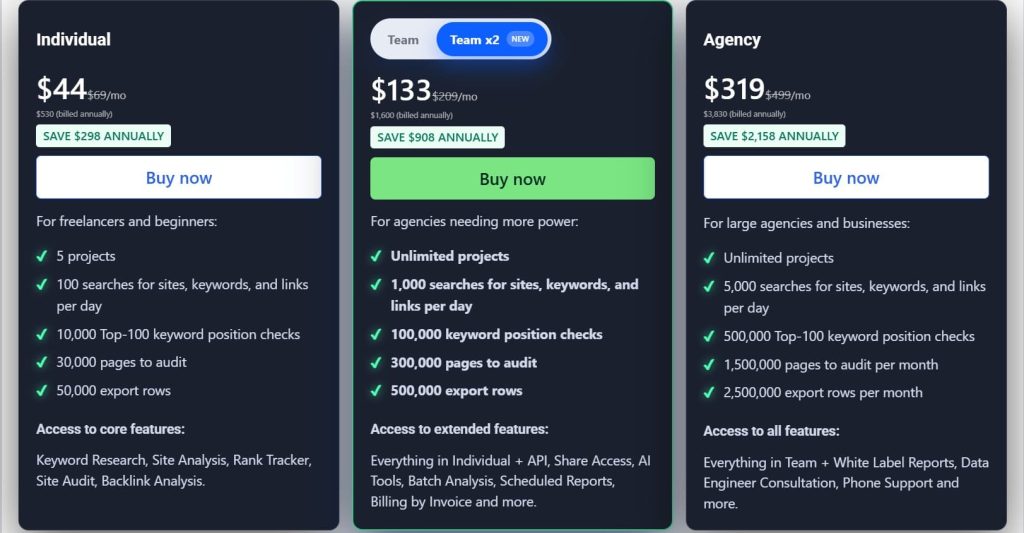
- Individual: $44/month
- Team: $133/month
- Agency: $319/month
Serpstat Reviews
- G2: 4.6 out of 5 stars (463+ reviews)
- Capterra: 4.7 out of 5 stars (170+ reviews)
Overall sentiment: Serpstat is viewed as the go-to SEO tool for international campaigns, especially in markets underserved by Western platforms. For US-only work, it’s harder to justify over more polished alternatives.
8. SpyFu – Best for Competitor PPC Strategy Analysis
Best For: PPC managers, digital marketing agencies, and competitive intelligence teams that need to reverse-engineer competitor ad strategies.
How I Use It: I use SpyFu primarily for paid search competitive analysis—understanding which keywords competitors bid on, what their ad copy looks like, and how their spend has changed over time.
Quick Overview
SpyFu launched in 2006 with a singular focus: expose every keyword competitors have bought on Google Ads and every organic ranking they’ve achieved. While it’s evolved into a broader SEO tool, its DNA remains competitive intelligence, specifically for paid search.
If you want to know what your competitors are doing in Google Ads, SpyFu provides more historical depth than any other platform.
I’ve used SpyFu across client campaigns at OneLittleWeb, particularly when developing PPC strategies for clients entering competitive markets.
Being able to see 15+ years of a competitor’s ad history, which keywords they’ve tested, which ads drove the most clicks, when they increased or decreased spend, gives you a playbook before spending a dollar. The SEO features exist, but they’re secondary to the paid search intelligence.
SpyFu works best for PPC-focused agencies, competitive intelligence teams, and businesses where paid search is a primary channel. It’s less suited for content-driven SEO strategies, technical audits, or teams that don’t run paid campaigns.
SpyFu Key Features
- Competitor Keyword Research: Shows every organic and paid keyword a domain ranks for, with search volume, CPC, competition level, and ranking history over time.
- Ad History: Complete archive of competitor ad copy going back 15+ years. See which ads ran longest, estimated click volume, and landing pages used.
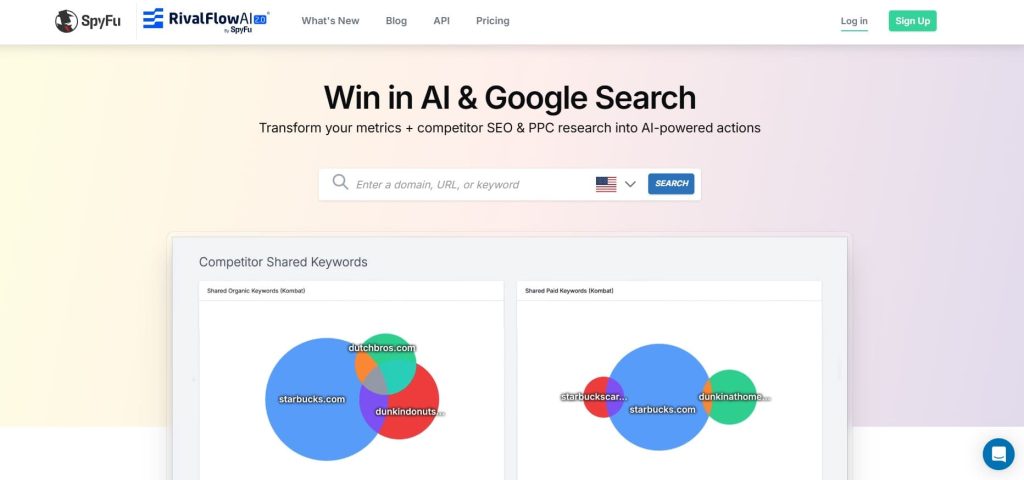
- Kombat (Competitor Comparison): Side-by-side analysis of up to three competitors showing keyword overlap, unique keywords, shared keywords, and opportunities where competitors rank but you don’t.
- Keyword Grouping: Organizes related keywords into ad groups for PPC campaign structure. Speeds up campaign setup significantly.
- Backlink Analysis: Shows referring domains, anchor text, and link history. The database is smaller than Ahrefs but functional for basic competitive analysis.
- Rank Tracking: Monitors keyword positions with historical trend data. Shows estimated traffic value for tracked keywords based on CPC.
- AdWords Advisor: Suggests negative keywords, budget allocation, and bid adjustments based on competitor performance and historical data.
SpyFu Pros
- Unmatched ad history depth. No other tool shows 15+ years of competitor ad copy and keyword bidding history. You can see exactly what worked (and didn’t) before spending your own budget.
- The Kombat feature is brilliant. The side-by-side competitor comparison instantly surfaces opportunities and gaps. I’ve built entire PPC strategies from a single Kombat report.
- Keyword grouping accelerates campaign setup. Instead of manually organizing keywords into ad groups, SpyFu does it automatically based on semantic relevance and search intent.
- PPC budget estimates are helpful. Seeing how much competitors likely spend monthly helps set realistic expectations with clients about required investment.
- Ad copy inspiration saves time. Reverse-engineering high-performing competitor ads gives you proven messaging frameworks before writing your own copy.
- Rank tracking includes PPC value. Seeing the estimated paid search value of organic rankings helps prioritize which keywords to target for SEO vs. paid campaigns.
SpyFu Cons
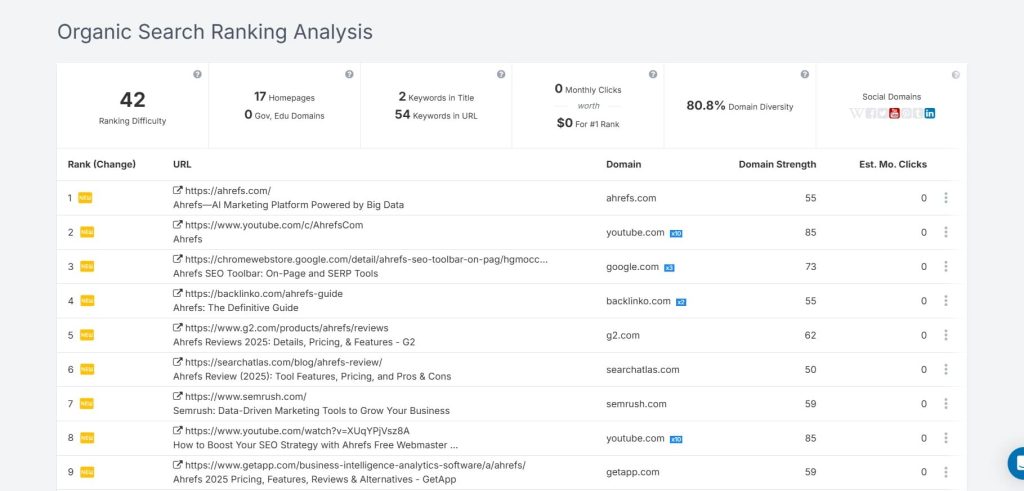
- SEO features are secondary. The organic keyword research, site audits, and backlink analysis exist but aren’t as robust as dedicated SEO platforms. You’ll likely need Ahrefs or Moz alongside SpyFu.
- Data is US-focused. International coverage is limited compared to Serpstat or Semrush. If you’re managing campaigns outside North America, the data thins out quickly.
- The interface feels dated. The UX hasn’t been modernized much. It works, but it lacks the polish and intuitiveness of newer tools like Surfer or even SE Ranking.
- The backlink database is small. For serious link-building work, you’ll need Ahrefs or Majestic. SpyFu’s backlink data is adequate for competitive overviews but not deep analysis.
- Ad history only covers Google. If you’re running Facebook Ads, LinkedIn Ads, or other platforms, SpyFu doesn’t help. It’s Google Ads-specific.
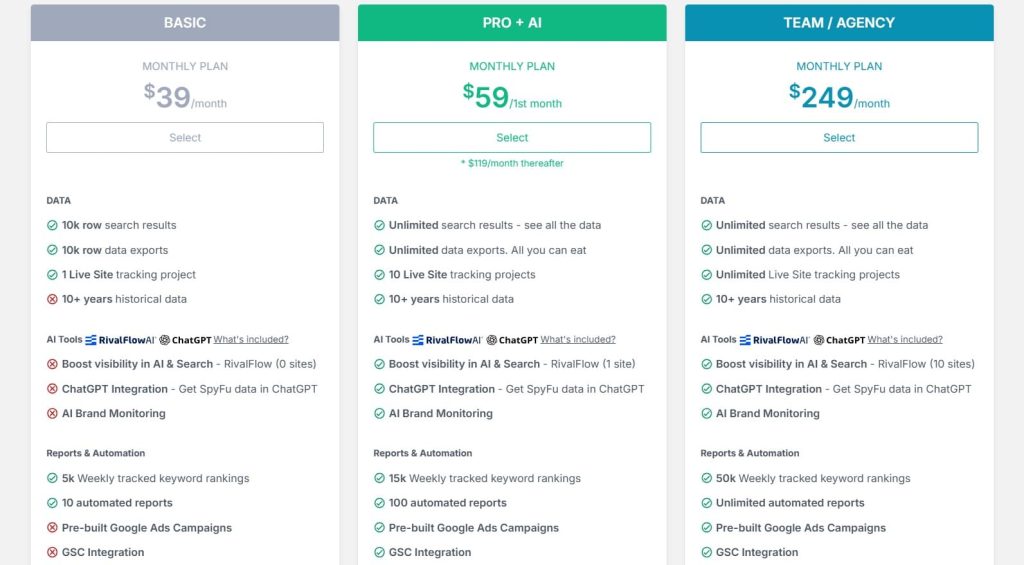
SpyFu Pricing
- Basic: $39/month
- Pro+AI: $59/1st month; $119/month thereafter
- Team/Agency: $249/month
SpyFu Reviews
- G2: 4.6 out of 5 stars (516+ reviews)
- Capterra: 4.5 out of 5 stars (144+ reviews)
Overall sentiment: SpyFu is viewed as the best tool specifically for paid search competitive intelligence. Users who need comprehensive SEO features find it lacking, but for PPC strategy development, it’s unmatched.
9. Screaming Frog – Best for Technical SEO Site Audits
Best For: Technical SEO specialists, developers, and agencies that need deep crawling capabilities and granular site analysis.
How I Use It: I use Screaming Frog for every technical audit at OneLittleWeb. When a site has crawl issues, redirect chains, or structural problems, Screaming Frog surfaces them faster and more accurately than any web-based tool.
Quick Overview
Screaming Frog SEO Spider launched in 2010 as a desktop application designed to do one thing exceptionally well: crawl websites like Googlebot does and report every technical detail.
It’s not a cloud platform with dashboards and pretty graphs. It’s a powerful, locally-run crawler that gives you raw, exportable data on every URL, redirect, meta tag, heading, image, script, and link on your site.
I’ve used Screaming Frog across hundreds of audits at OneLittleWeb, from small WordPress sites to enterprise e-commerce platforms with 50K+ pages. When clients have unexplained traffic drops, indexing issues, or migration problems, Screaming Frog is the first tool I open.
It finds problems that web-based auditors miss—orphaned pages, redirect chains, JavaScript rendering issues, and structured data errors that impact rankings.
Screaming Frog works best for technical SEOs, developers handling migrations, and agencies that need comprehensive site audits beyond surface-level checks.
It’s less suited for beginners who need guided recommendations or teams without technical SEO expertise to interpret the data.
Screaming Frog Key Features
- Site Crawling: Crawls unlimited URLs (paid version) with configurable crawl speed, user agents, and rendering options. Mimics Googlebot behavior to see sites as search engines do.
- Technical SEO Analysis: Identifies broken links (4xx errors), server errors (5xx), redirect chains, duplicate content, missing meta tags, thin content, large page sizes, and slow load times.
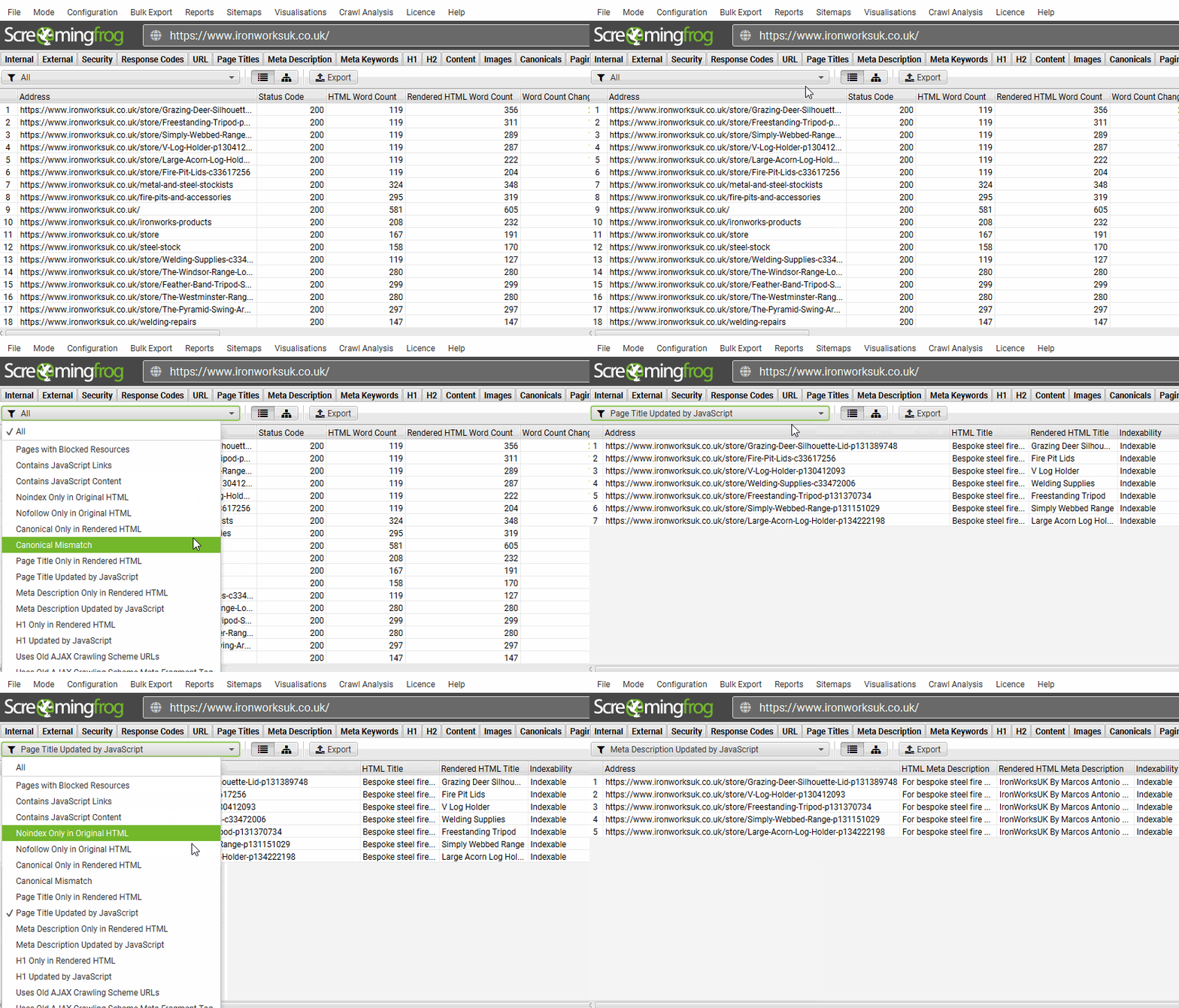
- JavaScript Rendering: Can crawl with JavaScript enabled to see sites as Google renders them. Critical for SPAs and JavaScript-heavy frameworks like React or Vue.
- Custom Extraction: Pull specific elements from pages using CSS selectors, XPath, or regex. Useful for auditing schema markup, tracking pixels, or custom meta tags.
- Structured Data Validation: Detects and validates JSON-LD, Microdata, and RDFa structured data. Integrates with Google’s Structured Data Testing Tool.
- XML Sitemap Generation: Automatically creates XML sitemaps based on crawl data. Filters by status code, content type, or custom rules.
- Log File Analyzer: Analyzes server logs to understand how Googlebot actually crawls your site. Identifies crawl budget waste and pages Google struggles to access.
- Google Analytics & Search Console Integration: Pulls traffic and performance data directly into crawl reports. Correlate technical issues with actual traffic impact.
Screaming Frog Pros
- Most comprehensive technical audit available. Nothing else surfaces technical issues with this level of detail and accuracy. It’s the industry standard for a reason.
- Handles large sites efficiently. I’ve crawled 100K+ page sites without crashes or slowdowns. The desktop application is fast and stable compared to cloud-based crawlers.
- JavaScript rendering actually works. Unlike some tools that claim JS support but fail on modern frameworks, Screaming Frog’s headless Chrome rendering is reliable.
- Custom extraction is powerful. Being able to pull any data point using CSS selectors or XPath makes it adaptable to unique auditing needs beyond standard SEO checks.
- Log file analysis is invaluable. Understanding how Googlebot actually crawls your site (vs. how you think it crawls) reveals optimization opportunities no other tool shows.
- Data export is flexible. Export everything to CSV, Excel, or Google Sheets. You can manipulate, filter, and analyze data however you need without being locked into proprietary formats.
- Active development and support. The team consistently ships updates, bug fixes, and new features. Documentation is thorough, and support is responsive.
Screaming Frog Cons
- Steep learning curve for beginners. The interface is functional but not intuitive. New users need training to understand what the data means and how to prioritize fixes.
- No guided recommendations. Screaming Frog tells you what is wrong but not how to fix it or why it matters. You need technical SEO knowledge to interpret results.
- Desktop application, not cloud-based. You have to install it locally and crawl from your machine. This limits accessibility for distributed teams or clients who want self-service access.
- Can overwhelm clients. Exporting a spreadsheet with 50K rows of URLs and status codes is useful for technical teams but terrifying for non-technical clients.
- No rank tracking or keyword research. It’s purely a technical audit tool. You’ll need Ahrefs, Semrush, or similar for keyword strategy and competitive analysis.
- Requires technical expertise. If you don’t understand HTTP status codes, redirect types, canonical tags, or hreflang, Screaming Frog’s output won’t be actionable.
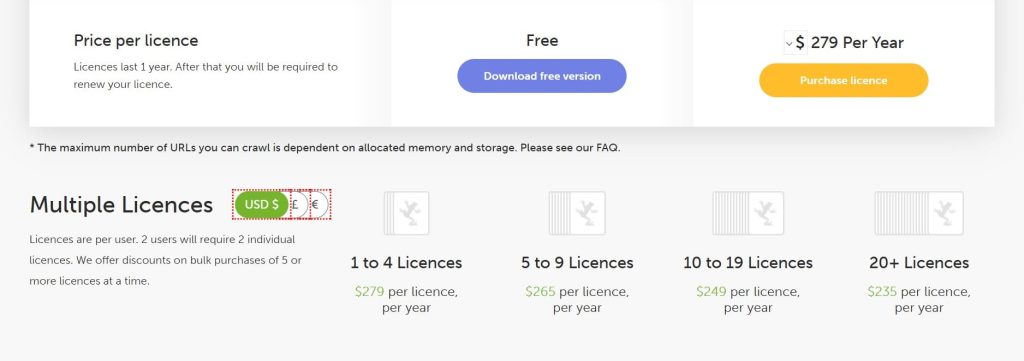
Screaming Frog Pricing
- Free version available
- Paid: $245/year
Screaming Frog Reviews
- G2: 4.7 out of 5 stars (184+ reviews)
- Capterra: 4.9 out of 5 stars (132+ reviews)
Overall sentiment: Screaming Frog is universally regarded as the gold standard for technical SEO audits. It’s not beginner-friendly, but for technical SEOs and developers, it’s irreplaceable.
10. SimilarWeb – Best for Traffic and Market Intelligence
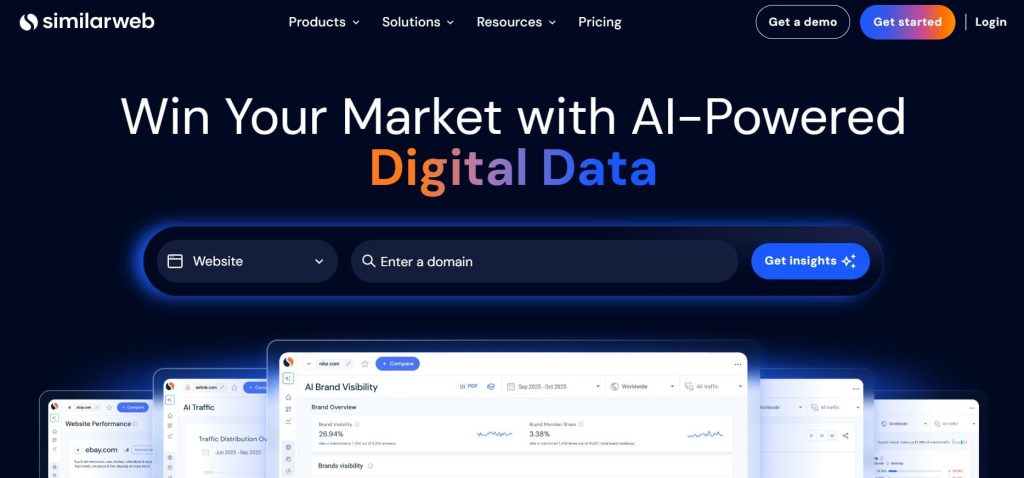
Best For: Competitive intelligence teams, market researchers, and enterprise brands that need high-level traffic analysis and industry benchmarking.
How I Use It: I use SimilarWeb for initial market research when entering new verticals—understanding total market size, top players, traffic sources, and audience demographics before building SEO strategies.
Quick Overview
SimilarWeb launched in 2009 as a web analytics and competitive intelligence platform focused on traffic estimation and digital market intelligence.
Unlike traditional SEO tools that prioritize keyword rankings and backlinks, SimilarWeb specializes in answering bigger questions: How much traffic does a competitor get? Where does it come from? Who’s their audience? How does the entire market look?
I’ve used SimilarWeb across strategic planning projects at OneLittleWeb, particularly when clients are considering market expansion or evaluating acquisition targets.
The platform provides a 30,000-foot view of the competitive landscape—traffic trends, market share, audience overlap, and channel distribution. It’s not a tool for day-to-day SEO execution, but for strategic decisions about where to invest resources.
SimilarWeb works best for enterprise brands with dedicated competitive intelligence teams, investors conducting due diligence, or agencies pitching new business where market sizing matters.
It’s expensive and overkill for small businesses, freelancers, or teams focused purely on ranking improvement.
SimilarWeb Key Features
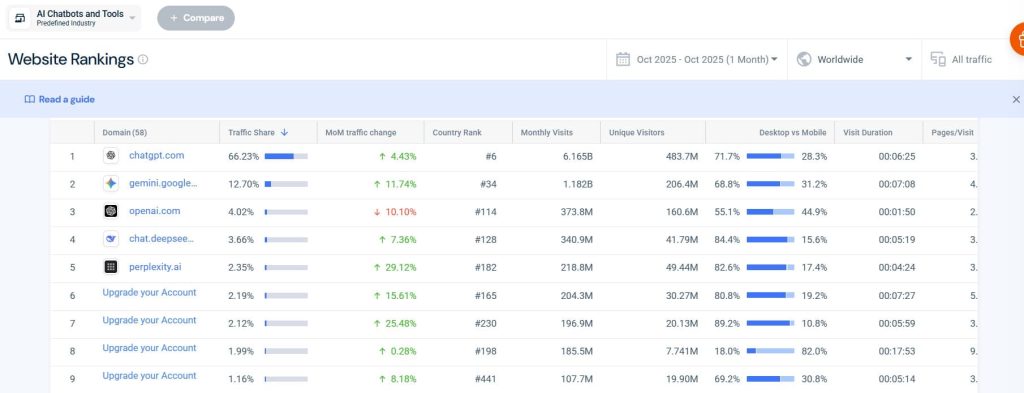
- Traffic & Engagement: Estimates total visits, unique visitors, pageviews per visit, average visit duration, and bounce rate for any website. Breaks down traffic by device (desktop vs. mobile).
- Traffic Sources: Shows the percentage of traffic from direct, referral, search (organic and paid), social, email, and display ads. Identifies top referring sites and social platforms.
- Audience Demographics: Provides gender distribution, age ranges, education levels, and household income estimates. Shows geographic distribution by country.
- Market Share Analysis: Compares multiple competitors’ traffic share within an industry. Visualizes market leaders, challengers, and niche players.
- Search Intelligence: Reveals organic and paid keywords driving traffic, search positioning trends, and keyword overlap between competitors.
- Industry Analysis: Benchmarks your site against industry averages for traffic, engagement, and channel mix. Identifies growth opportunities and market gaps.
- Website Comparison: Side-by-side analysis of up to five competitors showing traffic trends, audience overlap, and channel performance differences.
- Mobile App Intelligence: Tracks app downloads, DAU/MAU, retention, and competitive positioning for iOS and Android apps.
SimilarWeb Pros
- Best traffic estimation in the industry. While no tool is 100% accurate without direct analytics access, SimilarWeb’s estimates are the most reliable I’ve tested, especially for large sites.
- Market-level insights are unmatched. Understanding total addressable market size, growth trends, and competitive positioning helps inform strategy before execution.
- Audience demographics are valuable. Knowing who visits competitor sites—age, income, interests helps refine targeting and messaging strategies.
- Traffic source breakdown is detailed. Seeing exactly which channels drive competitor traffic (SEO, paid, social, referral) helps allocate budget across channels strategically.
- Competitive benchmarking is fast. You can quickly assess whether a competitor’s traffic growth is due to overall market expansion or genuine competitive advantage.
- App analytics included. If your competitors have mobile apps, SimilarWeb tracks downloads, engagement, and competitive positioning—data that’s hard to get elsewhere.
- Industry reports save research time. Pre-built market intelligence reports for major industries provide starting points for strategic planning without custom research.
SimilarWeb Cons
- Traffic estimates aren’t always accurate. For smaller sites (<10K monthly visitors), estimates can be wildly off. The platform works best for mid-to-large sites with substantial traffic.
- Not actionable for day-to-day SEO. You can’t optimize pages, track rankings, or audit technical issues. It’s strategic intelligence, not tactical execution.
- Limited keyword-level detail. Unlike Ahrefs or Semrush, you can’t see comprehensive keyword rankings or do deep keyword research. It’s high-level only.
- Data lag is significant. Traffic estimates are typically 30–60 days behind. If you need real-time competitive intelligence, SimilarWeb won’t deliver.
- Overkill for most businesses. Unless you’re enterprise-level or handling market research at scale, the cost-to-value ratio doesn’t justify the investment.
SimilarWeb Pricing
- Best for researchers & analysts: $125/month
- Best for marketers & SEO managers: $335/month
- Best for performance marketers: $540/month
SimilarWeb Reviews
- G2: 4.5 out of 5 stars (1,363+ reviews)
- Capterra: 4.6 out of 5 stars (246+ reviews)
Overall sentiment: SimilarWeb is viewed as the premium option for traffic intelligence and market research—powerful but expensive. Users who need tactical SEO tools find better value elsewhere.
11. BrightEdge – Best Enterprise SEO for Large Teams
Best For: Large enterprises, global brands, and in-house SEO teams managing thousands of pages across multiple domains and markets.
How I Use It: I’ve used BrightEdge during consulting projects with enterprise clients where scale and coordination across multiple teams (content, product, engineering) required a centralized platform.
Quick Overview
BrightEdge launched in 2007 and has become the dominant enterprise SEO platform used by Fortune 500 companies and global brands.
Unlike point solutions that focus on specific SEO tasks, BrightEdge is a full-stack platform designed to manage SEO at scale—coordinating strategy, content production, technical optimization, and performance tracking across massive sites and distributed teams.
I’ve encountered BrightEdge across enterprise consulting engagements at OneLittleWeb, typically with clients managing 50K+ pages, operating in 10+ countries, and coordinating SEO across product, marketing, and engineering departments.
The platform’s strength is workflow orchestration—making sure everyone knows what needs to be done, who’s responsible, and what the impact will be.
BrightEdge works best for large enterprises with dedicated SEO teams and substantial budgets. It’s not suited for agencies, small businesses, or anyone managing fewer than 100K pages. The complexity and cost only make sense at enterprise scale.
BrightEdge Key Features
- DataCube: Massive keyword database refreshed daily, covering billions of keywords across all major markets. Provides search volume, intent classification, SERP feature tracking, and forecasted traffic potential.
- ContentIQ: Content performance platform that audits existing content, identifies gaps, prioritizes optimization opportunities, and tracks ROI. Integrates with CMS platforms for workflow automation.
- StoryBuilder: Automated reporting and presentation builder. Generates executive-level reports showing SEO’s business impact, revenue attribution, and competitive positioning.
- Share of Voice: Tracks competitive visibility across all target keywords, showing your brand’s SERP presence versus competitors. Breaks down by market, device, and search intent.
- Recommendations: AI-powered prioritization engine that analyzes your site and identifies the highest-impact SEO tasks. Assigns tasks to teams with implementation guidance.
- Autopilot: Automated technical SEO monitoring that flags issues in real-time—crawl errors, page speed regressions, indexation problems, structured data failures.
- Intent Signal: Analyzes search intent across the entire customer journey. Identifies which content addresses informational, navigational, commercial, and transactional intent.
- Global Rank Tracking: Monitors keyword positions across 170+ countries with local, mobile, and desktop tracking. Updates daily with SERP feature visibility.
BrightEdge Pros
- Built for enterprise scale. Handles millions of URLs, thousands of keywords, and dozens of markets without performance degradation. The architecture is designed for complexity.
- Workflow orchestration is excellent. Assigning tasks, tracking implementation status, and measuring impact across multiple teams is seamless. Critical when coordinating between content, product, and engineering.
- Executive reporting is polished. StoryBuilder generates presentation-ready reports that translate SEO performance into business metrics executives understand—revenue, market share, competitive positioning.
- DataCube refresh is industry-leading. Daily keyword data updates mean you catch SERP changes, algorithm shifts, and competitor movements faster than competitors relying on weekly or monthly updates.
- Intent analysis is sophisticated. Understanding where content fits in the customer journey helps prioritize what to create, optimize, or retire. This prevents wasted effort on low-value pages.
- The integration ecosystem is comprehensive. Connects with Adobe Analytics, Google Analytics, Search Console, major CMS platforms, and marketing automation tools. Data flows seamlessly across systems.
- Dedicated support and strategic consulting. Enterprise clients get account managers, regular strategy reviews, and implementation support. You’re not just buying software—you’re getting an ongoing partnership.
BrightEdge Cons
- Extremely expensive. Pricing is custom but typically starts at $10K+/month for enterprise contracts. Only justifiable if you’re managing massive sites with substantial organic revenue.
- Requires a dedicated team to maximize ROI. The platform’s complexity means you need at least one full-time person (ideally multiple) managing it. Casual usage doesn’t justify the investment.
- Steep learning curve. Even experienced SEOs need extensive onboarding. The breadth of features and depth of data require months to fully understand and leverage.
- Overkill for most businesses. Unless you’re managing 100K+ pages, operating in 10+ countries, or coordinating across large distributed teams, simpler tools deliver better ROI.
- Contract lock-in is standard. Annual contracts with aggressive terms are typical. If you realize the platform isn’t a fit, exiting can be expensive and complicated.
- Feature bloat can overwhelm. BrightEdge tries to do everything, which means some features feel half-baked or redundant with other tools you’re already using.
BrightEdge Pricing
N/A
BrightEdge Reviews
- G2: 4.4 out of 5 stars (763+ reviews)
- Capterra: 4.1 out of 5 stars (45+ reviews)
Overall sentiment: BrightEdge is viewed as the best enterprise SEO platform for organizations operating at massive scale. Users at smaller companies or without dedicated SEO teams often feel they’re paying for capabilities they’ll never use.
What’s the Best Semrush Alternative for You?
Choosing the right SEO tool depends on your specific needs, budget, and workflow. Here’s how to narrow down your options based on what matters most to you:
- Best for Beginners: Mangools
If you’re new to SEO or managing your own small business site, Mangools offers the gentlest learning curve without sacrificing essential functionality. The interface is intuitive, the tools are focused, and you can start getting value within minutes of signing up.
- Best for Agencies: Ahrefs
For agencies managing multiple clients and needing reliable data for strategic decisions, Ahrefs delivers the most comprehensive backlink analysis and content research capabilities available.
The Content Explorer alone has generated more client wins for me than any other feature across platforms. White-label reporting isn’t as polished as Moz, but the underlying data quality makes up for it.
- Best Budget Choice: SE Ranking
If you need a full SEO suite but can’t justify Ahrefs or Semrush pricing, SE Ranking delivers 90% of the functionality at less than half the cost.
At $52/month, you get rank tracking, site audits, competitor analysis, backlink checking, and white-label reporting — everything a small agency or in-house team needs.
- Best AI-Powered Workflow: Surfer SEO
For content-driven SEO strategies where you’re publishing regularly and need consistent optimization quality, Surfer SEO integrates AI guidance directly into your writing workflow.
The Content Editor provides real-time feedback as you draft, eliminating guesswork about keyword usage, content structure, and semantic relevance.
- Best All-Rounder: Ahrefs
If I had to choose one tool to run an entire SEO operation, Ahrefs covers the most ground at the highest quality level.
The backlink data is industry-leading, Content Explorer revolutionizes content strategy, keyword research is comprehensive, technical audits are thorough, and rank tracking is reliable.