I have been building SEO reports for agencies long enough to know that most tools promise automation but deliver chaos.
Dashboards break. Integrations fail. White-label reports look generic. And you spend more time fixing data than analyzing it.
At OneLittleWeb, we have tested more than 50 reporting platforms over 8 years while managing hundreds of campaigns across the globe. Some tools became daily essentials. Most collected dust after the first month.
Here is what I learned: the best reporting tools are not the ones with the most features. They are the ones that save you time, show accurate data, and help you tell a clear story to clients.
We recently worked with an AI SaaS client facing declining rankings and traffic due to rising competition. After conducting a full-site audit, fixing technical SEO issues, and implementing targeted strategies, their monthly SEO traffic grew from 10.5M to 18.5M in just one year — a 76% YoY increase.
The tools we used to report and optimize this growth made the difference between guessing and knowing what actually moved the needle. So you see, the right reporting tool does not just display numbers. It explains what changed and why it matters.
In this guide, I have listed the 15 SEO reporting software we personally use and trust for real campaigns. I evaluated each one based on data accuracy, pricing transparency, integration capabilities, ease of use, and reliability at scale.
After years testing agency SEO tools on actual client work, these are the platforms that actually deliver results. Let’s get into the tools!
What are SEO Reporting Tools?
An SEO reporting tool is software that pulls data from multiple sources like Google Search Console, Google Analytics, rank trackers, and backlink analyzers and displays it in one dashboard or automated report.
These tools help marketing agencies, SEO consultancies, and freelancers track campaign performance across multiple clients without manually copying data from five different platforms into spreadsheets.
The best reporting tools show keyword rankings, organic traffic trends, conversion metrics, and technical issues in a format that clients can actually understand. Most include white-label capabilities so agencies can brand reports as their own.
SEO reporting tools matter because they transform raw data into insights clients can act on. Instead of saying “rankings improved,” you can show exactly which keywords drove 15% more qualified traffic and how that connected to revenue.
For agencies managing 10+ clients, these tools turn a task that would take 3-4 hours per client into something that happens automatically every week.
What to Look for in an SEO Reporting Tool
After testing more than 50 reporting platforms at OneLittleWeb, I have learned that the best tools share a few essential qualities. Here is what actually matters when choosing one:
Data Accuracy
Your reports are only as good as the data behind them. The tool should pull accurate metrics from Google Search Console, Analytics, and rank trackers without inflating numbers or missing critical changes. If the data does not match what you see in the source platforms, clients lose trust fast.
White-Label Capabilities
Agencies need reports that look like their own work, not a third-party tool. Look for platforms that let you add your logo, colors, and custom domain so clients never see another company’s branding. Some tools charge $250 per month extra for this. Others include it free.
Automation and Scheduling
Manual reporting wastes hours every week. The best tools let you build a report once, then schedule it to run and deliver automatically. Daily, weekly, or monthly. Email, PDF, or live dashboard link. Set it and move on to actual SEO work.
Multi-Client Management
If you manage more than three clients, you need a tool built for scale. Look for features like client portals, project grouping, and the ability to duplicate report templates across accounts. Per-client pricing models get expensive fast. Unlimited client options save money as you grow.
Integration Flexibility
Your reporting tool should connect to the platforms you already use. Google Search Console and Google Analytics are baseline requirements. Beyond that, check for integrations with Semrush, Ahrefs, rank trackers, and any niche tools in your stack. The fewer manual CSV uploads, the better.
Ease of Use
Complex dashboards slow teams down. The best tools feel intuitive within the first 15 minutes. If your team needs three training sessions to build a basic report, the tool is too complicated. Look for drag-and-drop builders, pre-built templates, and clear documentation.
Transparent Pricing
Some platforms hide costs behind “contact sales” buttons or charge per user, per client, or per data source. Others have straightforward pricing you can budget for. Watch for tools that hit you with white-label fees, extra integrations, or overage charges after you sign up.
How I Selected the Best SEO Reporting Tools
To build this list, I tested more than 50 SEO reporting software over 8 years at OneLittleWeb. I did not just sign up for free trials and click around. I used these tools on real client campaigns managing hundreds of websites across the US, UK, Canada, and Australia.
I have personally used these tools for automated client dashboards, white-label reporting, rank tracking visualization, and multi-channel performance analysis across campaigns in e-commerce, SaaS, and local service businesses.
Here is exactly what I measured:
Data Accuracy Against Source Platforms
I compared every tool’s numbers against Google Search Console, Google Analytics, and our rank trackers. If a tool showed 50,000 monthly visitors when GSC showed 35,000, it got flagged. Clients make business decisions based on reports. The data needs to be right.
Real-World Reliability
I tracked which tools had stable integrations and which ones broke every other week. Some platforms required constant re-authentication or lost connections to Google APIs. Those did not make the list. The best tools connected once and stayed connected.
Time Saved vs. Time Spent
I measured how long it took to build a report from scratch, duplicate it across clients, and troubleshoot issues. Tools that promised “5-minute setup” but required 3 hours of configuration got cut. The best platforms let you build once and scale fast.
White-Label Quality
I sent test reports to clients and team members. If the report looked generic, cluttered, or still showed the vendor’s branding after customization, it failed the test. Agencies need reports that represent their work, not someone else’s tool.
Actual Cost at Scale
I calculated the real monthly cost for managing 10, 20, and 50 clients. Some tools looked affordable at first, but charged per user, per client, or per data source. Hidden fees killed otherwise good platforms. The winners had transparent, predictable pricing.
Our Own Experience at OneLittleWeb
I prioritized the SEO tools we have used consistently across client work. The platforms that helped us demonstrate ROI, explain traffic changes, and keep clients informed without manual work every week. Those are the ones that earned their place here.
This process took years. But it means every tool in this guide has been tested in real agency workflows, not just reviewed based on feature lists.
This process took years. But it means every tool in this guide has been tested in real agency workflows, not just reviewed based on feature lists.
Summary Table: 15 Best SEO Reporting Tools
Before we dive into each tool, here is a quick comparison of all 15 platforms I tested. This table shows what each tool does best, what it costs, and what you should know before signing up.
| Tool Name | Best For | Key Features | Starting Price | Our Notes |
| SE Ranking | Best value for agencies | White-label reports, AI visibility tracking, automated scheduling | $52/mo | Exceptional price-to-feature ratio. Tracks ChatGPT and AI Overviews. |
| Semrush | Enterprise teams | 55+ tools, Share of Voice, multi-location tracking | $165.17/mo | Most comprehensive platform. Steep learning curve, but worth it. |
| AgencyAnalytics | Agency-specific needs | Built-in SEO tools, unlimited users, white-label portals | $41.30/mo | Purpose-built for agencies. Integration stability issues reported. |
| Whatagraph | Visual report design | 30-min data refresh, AI insights, premium templates | €199/mo | Best-looking reports. No public pricing (contact sales). |
| Databox | Real-time monitoring | Mobile app, goal tracking, KPI alerts | $159 | Strong mobile experience. White-label costs an extra $250/month. |
| Swydo | PPC-focused agencies | Per-source pricing, unlimited clients, strong PPC integrations | $69/mo | Transparent pricing. Limited to 50 sources per report. |
| Google Looker Studio | Budget-conscious teams | Unlimited dashboards, free native connectors | Free | Completely free but requires 10-20 hours of setup per template. |
| DashThis | Simplicity seekers | Easiest setup, pre-built widgets, grouping features | $42/mo | Fastest learning curve. Limited advanced customization. |
| TapClicks | Enterprise scale | 250+ integrations, campaign management, and competitive intelligence | N/A | Most integrations are available. Very expensive and complex. |
| ReportGarden | Budget management | Invoice tracking, ad spend monitoring, SEO audits | $75/mo | Unique budget features. Reports lack detail on the top tier. |
| Sitechecker | Technical audits | Page speed testing, technical SEO analysis, and keyword density | $89/mo | Affordable technical audits. No white-label reporting. |
| Advanced Web Ranking | Multi-engine tracking | 4,000+ search engines, pixel position tracking, forecasting | $69/mo | Best multi-engine coverage. Dated interface. |
| Seobility | European agencies | GDPR-first, free plan, 100K page crawls | €179.90/mo | Best free plan value. Mobile tracking updates every 3 days only. |
| Google Search Console | First-party data | Direct Google data, Core Web Vitals, and indexing issues | Free | Essential baseline tool. Not a full reporting platform. |
| Woorank | Quick audits | Fast website analysis, marketing checklist, sales integration | $89.99/mo | Great for client onboarding. Limited depth vs specialists. |
Key Insights: 15 Best SEO Reporting Tools
Best Overall Value: SE Ranking delivers comprehensive features at half the cost of Semrush while including AI tracking.
Best Free Option: Google Looker Studio and Google Search Console combined give you professional reporting at zero cost, but expect significant setup time.
Best for Agencies: AgencyAnalytics and Whatagraph are purpose-built for client management with unlimited users and white-label capabilities.
Best Budget Pick: Click Insights at £10/month or Sitechecker at $29/month provide professional reporting for small agencies.
Most Expensive: TapClicks ($500-1,400/month) and Semrush Business ($499/month) are enterprise solutions requiring serious budgets.
Hidden Costs to Watch: Databox charges $250/month extra for white-labeling. Whatagraph requires a sales contact for pricing. TapClicks needs both data and destination plans.
15 Best SEO Reporting Tools in 2026 (Free + Paid)
Here are the 15 best SEO reporting software in 2026 based on how they performed inside our client campaigns at OneLittleWeb. Each of these tools solves different problems in real agency workflows.
- SE Ranking — Best overall value for agencies
- Semrush — Best all-in-one enterprise platform
- AgencyAnalytics — Best purpose-built agency platform
- Whatagraph — Best for visual report design
- Databox — Best for real-time monitoring
- Swydo — Best for PPC-focused agencies
- Google Looker Studio — Best free reporting platform
- DashThis — Best for simplicity and speed
- TapClicks — Best for enterprise-scale operations
- ReportGarden — Best for budget management
- Sitechecker — Best for technical audits
- Advanced Web Ranking — Best for multi-engine tracking
- Seobility — Best European budget option
- Google Search Console — Best free first-party data source
- Woorank — Best for quick client audits
Now let’s break down each tool and see what makes them stand out.
1. SE Ranking – Best Overall Value for Agencies
Best For: Small to mid-sized agencies needing comprehensive SEO reporting with AI visibility tracking at an affordable price
How I Use It: I use SE Ranking for white-label client reports that track traditional rankings alongside AI Overviews and ChatGPT visibility without breaking the budget.
Overview
SE Ranking surprised me the most during testing. This platform quietly evolved into one of the most complete reporting tools available, especially after adding AI search tracking in 2025.
For $52 per month, you get automated white-label reports, rank tracking across 190 countries, AI Overview monitoring, and integration with Google Analytics and Search Console. That is 40-60% cheaper than Semrush or Ahrefs while delivering nearly the same core functionality.
I have been using SE Ranking across multiple OneLittleWeb client accounts since 2023. What stands out is how it addresses modern SEO reporting needs.
Most tools still focus only on Google rankings. SE Ranking shows you how your content appears in ChatGPT, Gemini, and Perplexity alongside traditional search results.
The platform targets agencies managing 5-30 clients who need professional reporting without enterprise pricing. If you are choosing between Semrush at $249/month and SE Ranking at $95/month for similar features, the decision becomes obvious.
SE Ranking Key Features
- AI Overviews Tracker monitors visibility in Google AI results, ChatGPT, Gemini, and Perplexity, showing how AI engines reference your content.
- White-Label Reporting includes unlimited automated reports with custom branding, scheduled delivery, and read-only client access on Pro and Business plans.
- 37+ SERP Feature Tracking identifies when you appear in featured snippets, local packs, knowledge panels, and other rich results that drive clicks.
- Flexible Rank Tracking lets you customize update frequency (daily, every 3 days, weekly) with 20-40% discounts for less frequent checks.
- Comprehensive Site Audits crawl up to 25,000 pages on Premium, detecting technical issues, duplicate content, and on-page SEO problems.
- Agency Pack Add-On provides lead generation tools, 10 client seats, custom domain white-labeling, and unlimited reports for $50/month extra.
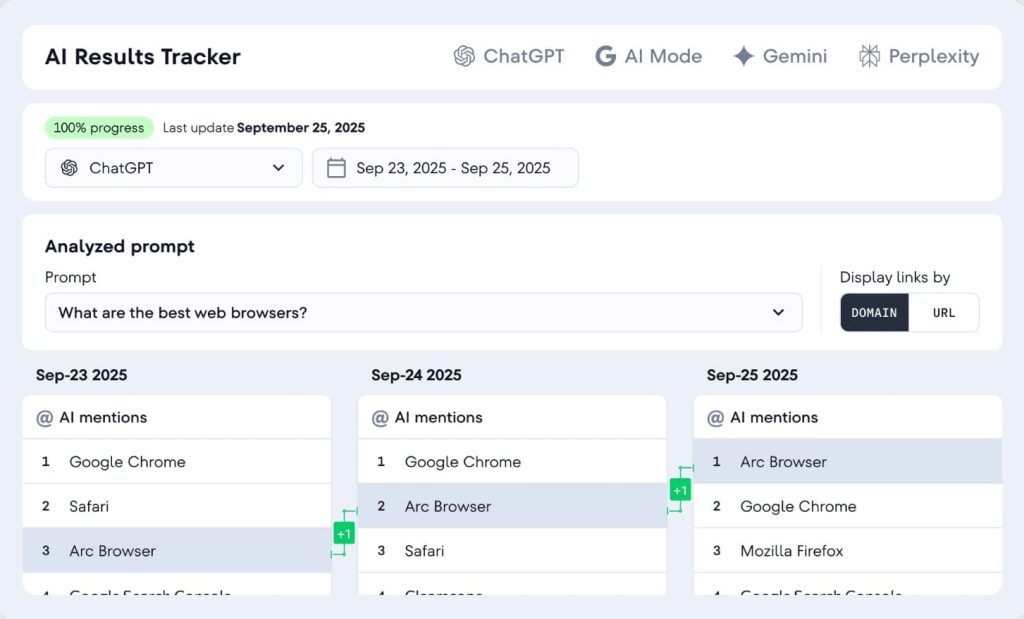
[Image Source: SERanking]
SE Ranking Pros
- Delivers 90% of Semrush functionality at 40-60% lower cost, making enterprise-grade reporting accessible to smaller agencies without sacrificing essential features.
- One of the first platforms to monitor ChatGPT, Gemini, and AI Overview visibility at this price point, addressing the reality that users increasingly get answers from AI before clicking organic results.
- Pro and Business plans include unlimited branded reports with custom domains, saving agencies the $250/month white-label fees competitors charge as add-ons.
- Users consistently report 95% accuracy compared to manual Google checks, with reliable daily position tracking across 190 countries and city-level precision for local campaigns.
SE Ranking Cons
- Link index is significantly smaller than Ahrefs (35 trillion URLs) and Semrush (25+ billion), which limits backlink discovery for comprehensive link building analysis.
- Suggests 30-40% fewer long-tail keywords than competitors in certain regions, and very niche or low-volume keywords may have limited or missing data.
- Some users report temporary issues where rankings appear down for 1-2 days before reverting to normal, requiring awkward client explanations during those windows.
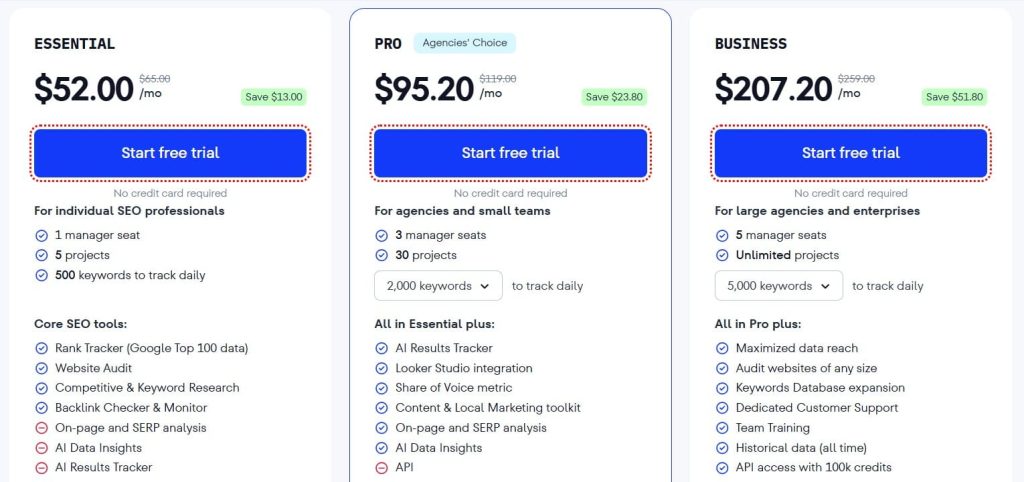
SE Ranking Pricing
- Free trial available
- Essential: $52/month
- Pro: $95.20/month
- Business: $207.20/month
SE Ranking Reviews & Ratings
- G2: 4.7 out of 5 stars (2,330+ reviews)
- Capterra: 4.7 out of 5 stars (296+ reviews)
Users consistently praise SE Ranking as the best value in the SEO tools category. One verified reviewer noted they “switched from Semrush and cut costs by 60% while keeping 90% of features.”
The most common praise focuses on accurate daily rank updates, responsive customer support, and the AI tracking capabilities at this price point.
2. Semrush – Best All-in-One Enterprise Platform
Best For: Large marketing teams and enterprises needing comprehensive SEO, PPC, content, and competitive intelligence in one platform
How I Use It: I use Semrush weekly at OneLittleWeb for multi-channel reporting that combines SEO performance, paid advertising data, and competitor analysis in automated client dashboards.
Overview
Semrush is the industry standard for all-in-one marketing platforms. If Ahrefs focuses purely on SEO, Semrush has built an entire marketing operations suite.
I have been familiar with Semrush since 2015, and over the years, it has evolved into something much bigger than a reporting tool.
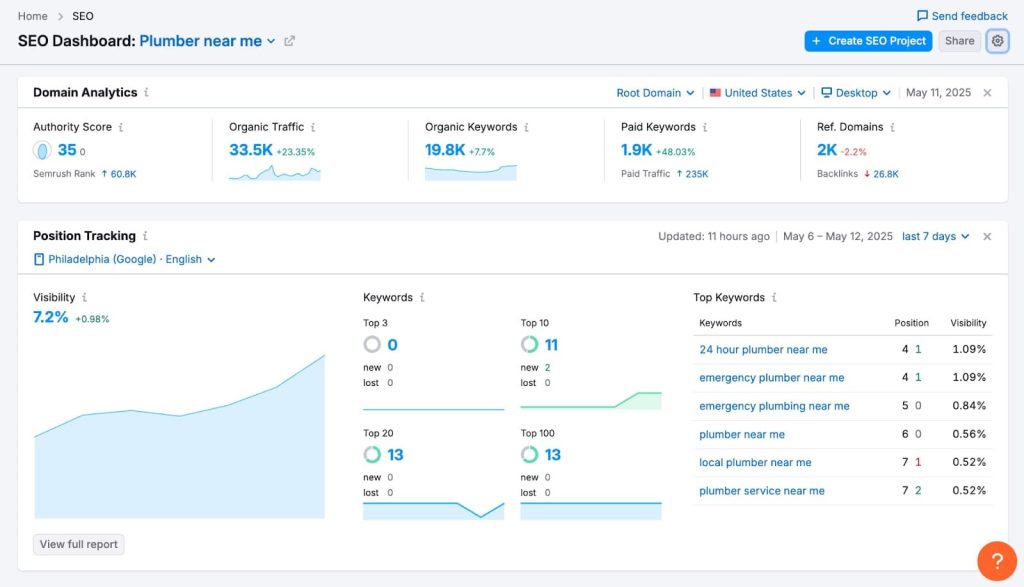
The Position Tracking module alone rivals dedicated rank trackers, but you also get 55+ tools covering keyword research, content marketing, social media, and paid advertising.
At OneLittleWeb, we use Semrush for clients who need comprehensive reporting beyond just SEO metrics. The Visibility Index and Share of Voice features help explain performance in competitive markets where rankings alone do not tell the full story.
The platform is heavy. The learning curve is steep. And the price increases significantly as you add projects and users.
But for agencies managing enterprise clients or teams handling multi-channel marketing, Semrush consolidates what would otherwise require 5-7 separate tools.
Semrush Key Features
- Position Tracking with AI Visibility monitors keyword rankings across Google, Bing, and Baidu with daily updates, now including Google AI Overviews and ChatGPT appearance tracking.
- Share of Voice Metrics show your actual market presence versus competitors by calculating the percentage of total clicks your brand captures for target keywords.
- Multi-Location Tracking segments rankings by device (mobile/desktop), country, city, and language, revealing how SERP results vary across geographic markets.
- Automated Reporting Suite generates scheduled PDF reports and Looker Studio dashboards with custom branding, alert notifications for ranking changes, and API access for custom integrations.
- Comprehensive Keyword Database includes 25+ billion keywords across 130+ countries with search volume, difficulty scores, intent classification, and SERP feature analysis.
- Integrated Marketing Stack combines SEO tracking with PPC management, social media monitoring, content optimization, and competitive intelligence in one login.
[Image Source: Semrush]
Semrush Pros
- Combines enterprise-grade SEO, PPC, content marketing, competitive research, and social media monitoring in one platform, eliminating the need for multiple subscriptions that complicate workflows.
- 25+ billion keywords across 130+ countries provide unmatched coverage for international SEO campaigns and niche market research that smaller databases cannot support.
- Share of Voice and Visibility Index reveal true competitive position beyond vanity rankings, helping agencies demonstrate market share changes that matter to executive stakeholders.
- Tracks appearance in Google AI Overviews and ChatGPT responses, addressing the modern SERP reality where AI answers reduce organic click-through rates before users see traditional results.
- Custom alert systems for ranking changes, automated scheduled reports, Looker Studio integration, and robust API access streamline agency reporting workflows at scale.
Semrush Cons
- 55+ tools create overwhelming complexity for new users, typically requiring 2-4 weeks to understand the platform fully and locate all relevant features efficiently.
- Lower pricing tiers impose PDF report limits that agencies managing multiple clients hit quickly, forcing expensive mid-contract upgrades to maintain service levels.
- Some users report 24-48 hour delays in rank updates during high-traffic periods or major algorithm updates, reducing responsiveness for time-sensitive client communications.
Semrush Pricing
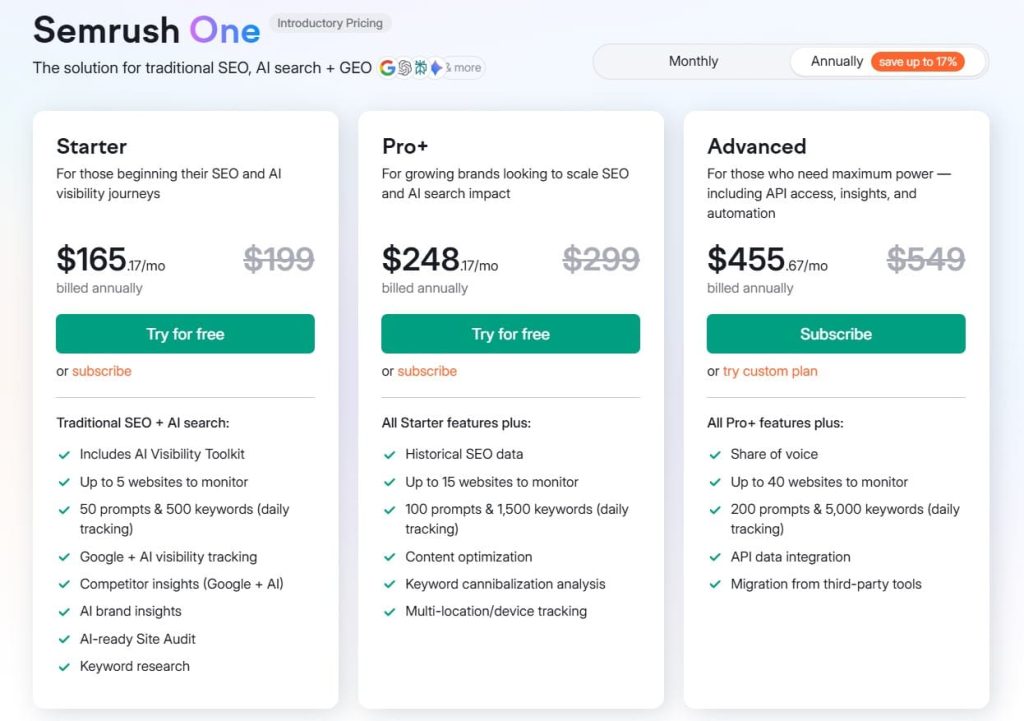
- 7-day free trial
- Starter: $165.17/month
- Pro+: $248.17/month
- Advanced: $455.67/month
Semrush Reviews & Ratings
- G2: 4.5 out of 5 stars (3,026+ reviews)
- Capterra: 4.6 out of 5 stars from (2,299+ reviews)
Semrush maintains its position as the industry standard despite premium pricing. Users consistently highlight the comprehensive dataset and multi-location tracking accuracy. One enterprise reviewer noted it “replaces 5+ separate tools our team used before.”
The most common complaints focus on the learning curve and cost, but most reviewers conclude that the investment pays off for serious marketing operations.
3. AgencyAnalytics – Best Purpose-Built Agency Platform

Best For: Marketing agencies needing client management, white-label dashboards, and built-in SEO tools without per-user charges
How I Use It: I use AgencyAnalytics at OneLittleWeb for clients who need consolidated multi-channel dashboards showing SEO, PPC, and social media performance in one branded portal.
Overview
AgencyAnalytics is one of the few platforms built exclusively for agencies from the ground up. That focus shows in features like unlimited user seats, client login portals, and white-label capabilities included free on all plans.
I started testing AgencyAnalytics in 2022 when managing 15+ client accounts. What immediately stood out was how the platform eliminates per-seat pricing.
Most reporting tools charge $50-100 per team member. AgencyAnalytics lets you add unlimited users, which saved us thousands as our team grew.
The platform includes built-in rank tracking, site audits, and backlink monitoring. For basic SEO work, you can skip separate Ahrefs or Semrush subscriptions. It also integrates with 85+ platforms, including Google Analytics, Search Console, Facebook Ads, and major SEO tools.
The biggest issue I have encountered is integration instability. Connections break more frequently than I would like, requiring re-authentication or causing data gaps in client reports. When you are presenting to a client, and the dashboard shows missing data, it damages trust fast.
AgencyAnalytics Key Features
- Built-In SEO Tools include rank tracking, site auditing, and backlink monitoring directly in the platform, eliminating the need for separate tool subscriptions for basic SEO work.
- Unlimited Users and Dashboards on all plans avoid per-seat charges that increase costs as agencies grow, with no limits on team members or client dashboards created.
- White-Label Client Portals provide branded login access where clients view their own dashboards without seeing AgencyAnalytics branding, improving professional presentation.
- 85+ Native Integrations connect to Google Analytics, Search Console, Ahrefs, Semrush, Facebook Ads, and most major marketing platforms without custom development.
- Anomaly Detection Alerts automatically notify teams when metrics exceed thresholds or show unusual patterns, preventing issues from going unnoticed between report reviews.
- Industry Benchmarking provides performance comparison data from 150,000+ campaigns, helping agencies provide context and demonstrate value against industry standards.

[Image Source: Agency Analytics]
AgencyAnalytics Pros
- Purpose-built for agencies with client management, project organization, and white-labeling as core features rather than expensive add-ons as competitors charge.
- Unlimited team members on all pricing tiers eliminate per-user fees that typically add $50-100 per person monthly as agencies hire and scale.
- Rank tracking, site audits, and backlink monitoring integrated directly save $100-200 monthly on separate SEO tool subscriptions for basic analysis needs.
AgencyAnalytics Cons
- Integration stability issues are reported frequently by users, with connections breaking or data syncing slowly, leading to inaccurate reports that damage client trust.
- Dashboard customization hits a ceiling compared to more flexible BI tools, with limited widget types and layout options frustrating agencies with specific branding needs.
- Data accuracy concerns arise when reports show late or incorrect metrics due to API connection problems, requiring manual verification before client delivery.

AgencyAnalytics Pricing
- 14-day trial available
- Freelancer: $41.30/month
- Agency: $125.30/month
- Agency Pro: $244.30/month
- Enterprise: Custom
AgencyAnalytics Reviews & Ratings
- G2: 4.7/5 (407+ reviews)
- Capterra: 4.8/5 (115+ reviews)
From what I’ve seen, people really appreciate AgencyAnalytics because it’s designed specifically for agencies and it genuinely cuts down reporting time. One verified reviewer even said it saves them 15 to 20 hours every month, which is huge.
That said, the most common frustration is with the integrations. A lot of users mention that they break pretty often, which can delay reports. And when that happens, the experience with customer support seems to be a bit hit or miss.
4. Whatagraph – Best for Visual Report Design

Best For: Agencies prioritizing visually impressive client reports with fast data refresh and AI-powered insights
How I Use It: I use Whatagraph at OneLittleWeb when clients need reports that impress executive stakeholders with modern design and clear data visualization.
Overview
Whatagraph produces the best-looking reports I have tested. Period. If your goal is to wow clients with professional, modern dashboards, no other tool comes close.
The platform refreshes data every 30 minutes versus 2-4 hours for most competitors. That speed matters when monitoring paid advertising campaigns or responding to algorithm updates.
I have used this feature to provide near real-time performance updates during product launches and seasonal campaigns.
Whatagraph IQ is their AI assistant that automatically generates narrative insights alongside data visualizations. Instead of just showing traffic dropped 15%, it explains potential causes and highlights related metrics worth investigating. This reduces time spent explaining data trends to clients.
The biggest frustration is the lack of public pricing. You must schedule a sales call to get a quote, which wastes time for agencies evaluating options.
Starting around $229/month, it is also more expensive than alternatives, though the quality justifies the cost if visual presentation matters to your clients.
Whatagraph Key Features
- 30-Minute Data Refresh provides near real-time updates versus 2-4 hour delays at competitors, critical for time-sensitive paid advertising and campaign monitoring.
- Whatagraph IQ AI Assistant automatically generates narrative insights explaining metric changes, trends, and anomalies, reducing time spent manually analyzing data for clients.
- 55+ Fully-Managed Integrations maintained by a dedicated engineering team prevent common API breakage issues that plague other platforms with less stable connections.
- Premium Visual Templates deliver modern, client-impressing layouts that require minimal customization to look professional compared to generic competitor designs.
- Comprehensive White-Labeling is included on all plans covering emails, domains, support portals, and all client touchpoints, versus $250/month add-on at competitors.
- BigQuery and Looker Studio Transfers enable advanced analytics workflows and data warehouse integration for agencies with sophisticated data needs.

Whatagraph Pros
- Industry-leading visual design produces the most aesthetically polished reports that impress clients more than any competitor, reducing the need for extensive explanation.
- 30-minute data refresh intervals provide near real-time monitoring compared to competitors’ 2-4 hour delays, crucial for paid advertising and time-sensitive campaigns.
- Full white-label branding across all touchpoints is included free on every plan, versus $250/month extra at competitors like Databox, resulting in significant cost savings.
- AI-powered insights through Whatagraph IQ automate analysis and narrative generation, highlighting key trends and anomalies that reduce manual explanation work.
Whatagraph Cons
- No public pricing requires sales conversations to get quotes, frustrating agencies wanting to evaluate costs quickly without sales pressure or time commitment.
- Higher entry cost is around $229/month, more expensive than alternatives like DashThis at $49 or Swydo at $49, limiting accessibility for smaller agencies.
- Cannot build custom integrations as easily as platforms offering open APIs, restricting agencies from using niche tools not in the 55+ source library.

Whatagraph Pricing
- Start: €199/month
- Boost: €499/month
- Max: Custom
Whatagraph Reviews & Ratings
- G2: 4.5 out of 5 stars (277+ reviews)
- Capterra: 4.4 out of 5 stars (84+ reviews)
People really love Whatagraph because the reports look amazing. One agency owner even said their reporting time dropped from 3 hours to just 15 minutes, and that clients instantly responded to the clean, modern design.
The main frustration seems to be around pricing transparency. A lot of reviewers mentioned that it took a whole week to get a quote instead of being able to see prices right away, which they found pretty annoying.
5. Databox – Best for Real-Time Monitoring
Best For: Teams needing live KPI dashboards with mobile alerts for constant campaign visibility
How I Use It: I use Databox when clients need real-time monitoring dashboards accessible on mobile devices during active campaign periods or product launches.
Overview
Databox excels at real-time monitoring rather than periodic reporting. The mobile app is the best I have tested for checking KPIs on the go, with push notifications when metrics exceed thresholds.
I tested Databox during a 6-month campaign for an e-commerce client running aggressive paid advertising. The goal tracking and performance alerts caught budget overspend issues, and conversion drops hours faster than waiting for scheduled reports. That responsiveness saved thousands in wasted ad spend.
The problem is reliability. Multiple users report frequent template failures, broken metrics, and data sync problems that persist for months despite support tickets.
During testing, I encountered integration issues that required 15-30 hours monthly, trying to make reports work correctly instead of the promised automation.
Databox also charges $250/month extra for white-labeling when most agency-focused tools include it for free. For agencies needing branded reports, that premium adds up to $3,000 annually just for basic branding capabilities.
Databox Key Features
- Real-Time KPI Dashboards provide live metric monitoring with automatic updates, designed for continuous tracking rather than periodic report generation.
- Mobile-First Experience delivers full dashboard functionality on smartphones with push notifications, enabling monitoring from anywhere without desktop access.
- Goal Tracking Integration with visual progress indicators helps teams stay aligned on targets with automated alerts when approaching or missing objectives.
- Performance Alert System sends automated notifications when metrics exceed defined thresholds, preventing issues from going unnoticed between manual report reviews.
- Pre-Built Dashboard Templates speed setup for common use cases, reducing time to first value with ready-made layouts for major marketing platforms.
- 100+ Native Data Sources connect to major marketing, analytics, and advertising platforms, covering most agency needs for multi-channel monitoring.

[Image Source: Databox]
Databox Pros
- Industry-leading mobile app provides full dashboard functionality on smartphones with the best mobile monitoring experience for checking KPIs anywhere.
- Real-time focus, designed for continuous monitoring rather than periodic reporting makes it ideal for agencies needing constant campaign visibility.
- Generous free plan with 3 sources, 3 users, and 3 dashboards allows small teams to test thoroughly before purchasing, unlike competitors.
- Goal tracking with visual indicators and progress monitoring helps teams stay aligned on KPIs with clear success metrics.
- Performance alerts with automated notifications when metrics exceed thresholds prevent issues from escalating between scheduled report reviews.
Databox Cons
- Significant reliability issues reported by users, including frequent template failures, broken metrics, and data sync problems persisting for months despite support.
- Reports not linked means editing each individually, rather than batch updates, extremely time-consuming when tweaking dozens of similar client reports.
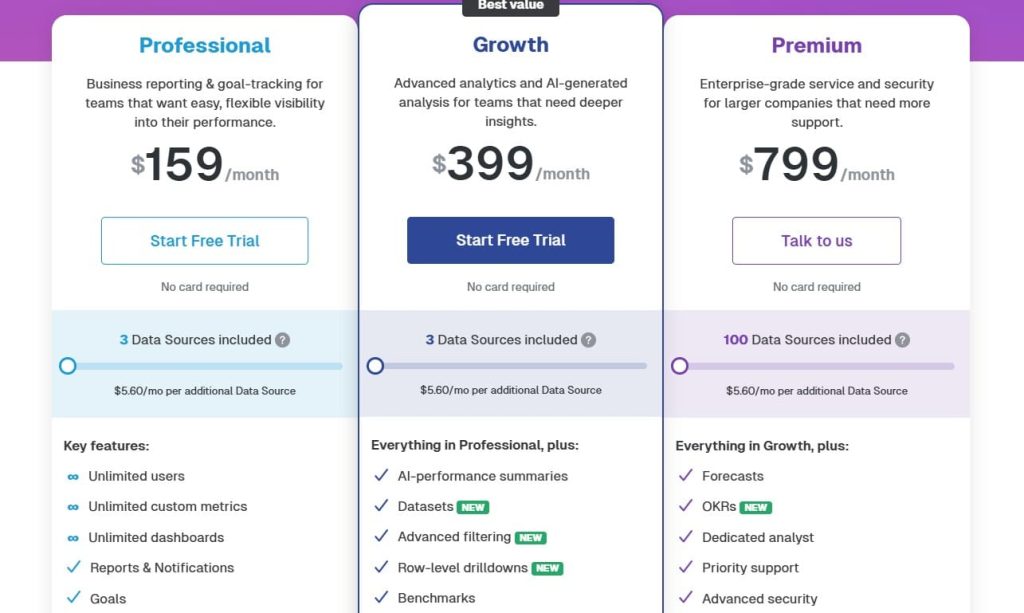
Databox Pricing
- Free trial available
- Professional: $159/month
- Growth: $399/month
- Premium: $799/month
Databox Reviews & Ratings
- G2: 4.4 out of 5 stars (193+ reviews)
- Capterra: 4.6 out of 5 stars (204+ reviews)
From my experience looking at reviews, people really like the mobile app and the real-time monitoring features. That said, most of the negative feedback focuses on reliability.
Another reviewer mentioned that agencies end up spending 15 to 30 hours every month trying to fix reporting issues instead of enjoying the automated reporting they were promised.
6. Swydo – Best for PPC-Focused Agencies
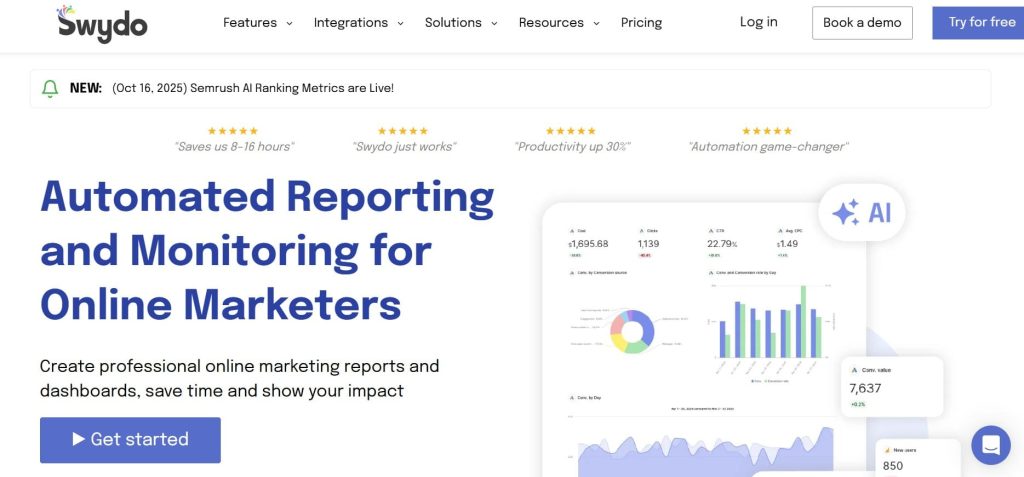
Best For: Agencies managing PPC campaigns needing transparent per-source pricing and strong advertising platform integrations
How I Use It: I use Swydo at OneLittleWeb for clients with heavy Google Ads and Facebook Ads spending who need detailed PPC performance reporting alongside SEO metrics.
Overview
Swydo stands out for transparent, predictable pricing. Instead of per-client or per-user charges, you pay based on data sources connected. The base $49/month includes 10 sources, then roughly $3-4 per additional source.
I tested Swydo managing accounts for 8 PPC-heavy clients. The pre-built templates for Google Ads, Facebook Ads, and Microsoft Ads saved hours compared to building dashboards from scratch. One Google Ads report that took 5-6 hours in Excel now takes 10-20 minutes with Swydo automation.
The platform truly delivers unlimited clients, users, reports, and dashboards. As agencies grow, costs increase only when adding data sources, not when hiring team members or signing new clients. That model makes budgeting straightforward.
The limitation is 50 sources per report. For agencies managing multi-location clients with 200 Google My Business properties, you hit this ceiling fast and must create multiple separate reports.
The widget setup also feels clunky, requiring configuration in a hidden sidebar before seeing the final layout.
Swydo Key Features
- Transparent Per-Source Pricing charges based on data connections rather than per-client or per-user, making costs predictable as agencies scale operations.
- True Unlimited Model includes genuinely unlimited clients, users, reports, and dashboards on all plans, removing growth constraints competitors impose.
- Free White-Labeling with full branding customization included at no extra cost versus $250/month add-ons at platforms like Databox.
- Strong PPC Integration particularly excels with Google Ads, Facebook Ads, and Microsoft Ads, providing deep metric coverage for advertising-focused agencies.
- Pre-Built Dashboard Library with extensive templates reduces setup from hours to 10-20 minutes per client using ready-made layouts for major platforms.
- Multi-Language Support enables agencies serving international clients to provide localized reporting in multiple languages from a single platform.

Swydo Pros
- The per-source pricing model provides clearer, more predictable costs than per-client or per-user structures, making agency budgeting straightforward.
- Consistently praised customer support with 15-minute response times helps agencies resolve issues quickly compared to slow support at competitors.
- Extensive pre-built templates reduce client onboarding from 5-6 hours to 10-20 minutes using ready-made dashboard layouts for common platforms.
- PPC specialization with particularly strong Google Ads, Facebook Ads, and Microsoft Ads integrations provides the deep metric coverage that advertising agencies need.
Swydo Cons
- The hard cap of 50 sources per report becomes a blocker for agencies managing multi-location clients requiring 200+ Google My Business properties.
- Clunky widget setup requires configuring in a hidden sidebar before seeing final layout, with no drag-and-drop grid functionality, frustrating dashboard building.
- No data export options to spreadsheets or warehouses limit advanced analysis capabilities for agencies with data-sophisticated client needs.
- Narrow platform focus is strong for PPC and SEO, but weaker for comprehensive cross-channel marketing analytics compared to broader platforms.
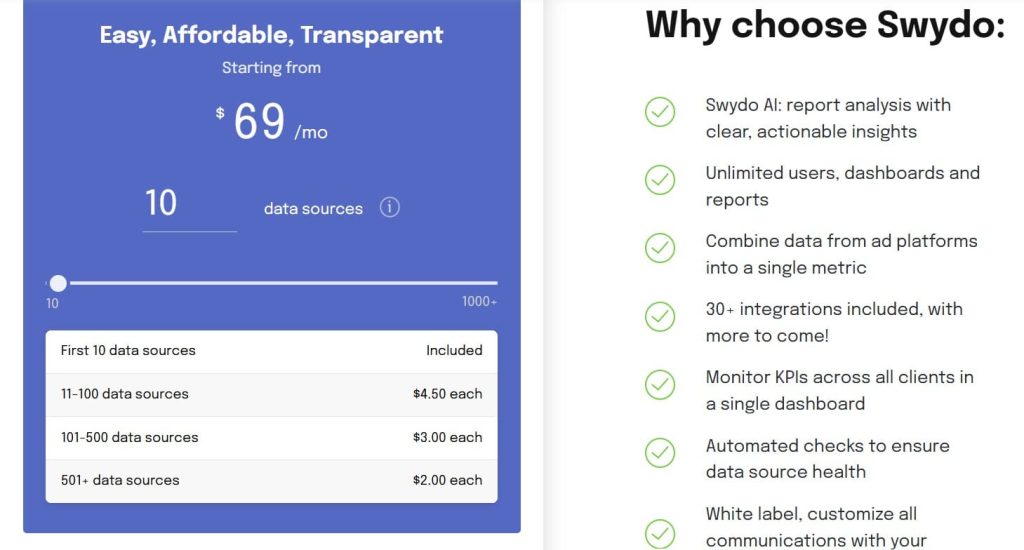
Swydo Pricing
- 10 data sources: $69/month
- 20 data sources: $114/month
- 30 data sources: $159/month
Swydo Reviews & Ratings
- G2: 4.6 out of 5 stars (104+ reviews)
- Capterra: 4.5 out of 5 stars (91+ reviews)
From what I’ve seen, people really value the time savings and the customer support. One reviewer said it “saves countless hours when Excel reports used to take 5 to 6 hours, now it’s just 10 minutes,” and added that the “customer support is amazing, with responses in under 15 minutes.”
7. Google Looker Studio – Best Free Reporting Platform

Best For: Budget-conscious agencies deeply embedded in the Google ecosystem, willing to invest setup time for zero ongoing costs
How I Use It: I use Looker Studio at OneLittleWeb for clients on limited budgets who primarily need Google Analytics, Search Console, and Ads reporting without paid tool expenses.
Overview
Google Looker Studio is completely free with unlimited dashboards, unlimited users, and no usage caps. For agencies at any budget level, accessibility is unmatched.
I have built dozens of client dashboards in Looker Studio since it launched as Data Studio in 2016. The native Google integrations work flawlessly. Connecting Analytics, Search Console, Ads, and Sheets requires zero API troubleshooting, unlike paid tools that break connections regularly.
The customization is unlimited. You can design exactly the report you envision without template restrictions or widget limitations. For agencies with specific branding requirements or unique data visualization needs, that flexibility matters.
The cost is time. Building professional reports from scratch takes 10-20 hours versus 20 minutes with pre-built templates from paid tools.
You also need technical skills. Looker Studio is not beginner-friendly. Calculated fields, data blending, and filter configuration require understanding how the platform processes data.
Google Looker Studio Key Features
- Completely Free Platform with zero cost for unlimited dashboards, unlimited users, and unlimited reports makes it accessible for agencies at any budget level.
- Seamless Google Ecosystem Integration with native connections to Analytics, Search Console, Ads, and Sheets work flawlessly without API issues plaguing paid tools.
- Unlimited Customization with no template restrictions or design limitations enables agencies to create exactly the reports they envision without compromise.
- Real-Time Data Updates with live connections to Google properties provide the most current data without refresh delays or scheduled update windows.
- Enterprise-Grade Infrastructure built on Google Cloud ensures 99.9% uptime, fast loading, and the ability to handle massive datasets without performance issues.
- Strong Developer Community provides an extensive template library, tutorial content, and troubleshooting resources from a massive user base worldwide.

Google Looker Studio Pros
- Completely free with no limitations on dashboards, users, or data access makes it accessible for agencies at any budget level or starting phase.
- Most reliable access to Google Analytics, Search Console, and Ads data with native integrations that work flawlessly without API breakage issues.
- Infinite design flexibility with no template restrictions or customization limitations, unlike platforms that constrain layout options and widget types.
- No vendor lock-in means agencies can experiment, pivot, and change approaches without sunk cost concerns or contract obligations.
Google Looker Studio Cons
- Significant time investment required, with building professional reports from scratch taking 10-20 hours versus 20 minutes with pre-built paid tool templates.
- Steep learning curve requires technical skill to build effective dashboards, not beginner-friendly compared to guided agency platform setup wizards.
- Third-party connectors cost extra at $5-50/month each, quickly eliminating cost advantage for agencies using many non-Google marketing tools.
- No white-labeling capability, with all reports showing Google branding, preventing agencies from presenting as their own work without workarounds.
Google Looker Studio Pricing
- Basic: Free
- Pro: $9 per user per project per month
Google Looker Studio Reviews & Ratings
N/A
A lot of users love that it’s free and lets them fully customize Google Analytics reports. One reviewer even said, “You can’t beat free for the Google ecosystem work, and the flexibility is unlimited.”
That said, it’s not without its challenges. Many agencies point out that setting up each report template can take 10 to 20 hours, and the expenses for third-party connectors can build up quickly, which can be frustrating for some.
8. DashThis – Best for Simplicity and Speed
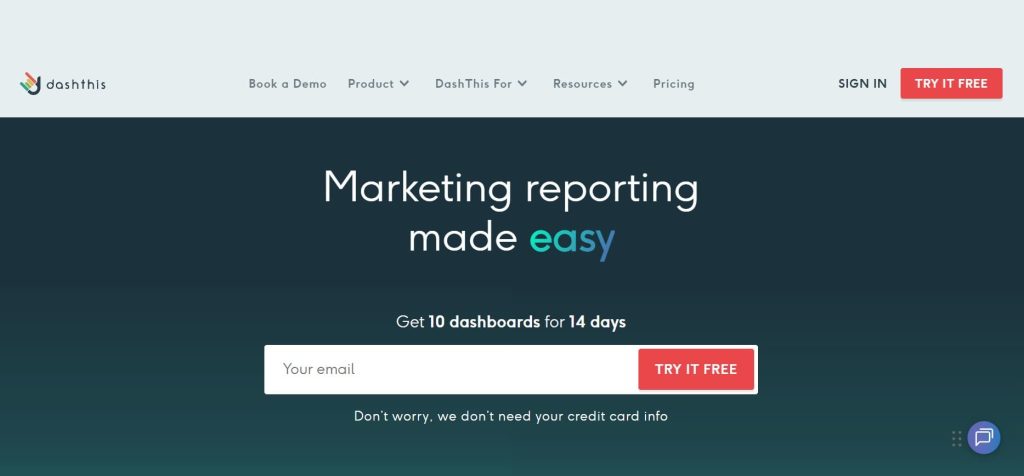
Best For: Agencies and small teams prioritizing ease of use and fast setup over advanced customization
How I Use It: I use DashThis at OneLittleWeb for clients who need straightforward reporting without complexity, especially small businesses unfamiliar with marketing analytics.
Overview
DashThis is the easiest reporting platform I have tested. Teams become productive within hours rather than the days required by complex alternatives.
I onboarded a new team member last year who had never used a reporting tool. Within 30 minutes of training, she built her first client dashboard using DashThis templates. That learning curve matters when agencies hire junior staff or work with clients who need simple explanations.
The platform includes unlimited users on all plans. No per-seat charges as teams grow make costs predictable. White-label customization with custom URL domains comes standard, not as an expensive add-on.
The grouping and cloning features save massive time. Build one dashboard, duplicate it across 10 similar clients, swap the data connections, and you are done. For agencies with standardized reporting approaches, that efficiency compounds monthly.
The limitation is the customization ceiling. DashThis is simple by design, which means fewer options for complex data transformations, calculated fields, or advanced visualizations compared to platforms built for power users.
DashThis Key Features
- Extreme Simplicity with the easiest learning curve in the category, getting teams productive within hours rather than days required by complex alternatives.
- Unlimited Users on All Plans eliminates per-seat charges as agencies grow teams, making costs predictable compared to per-user pricing models.
- Strong White-Label Support with custom URL domains and full branding included on all plans versus expensive add-ons at competitors.
- Pre-Built Widgets and Templates enable dashboard creation in 30-60 minutes versus 5-10 hours for custom-built alternatives at other platforms.
- Grouping and Cloning Features efficiently duplicate dashboards across similar clients, saving massive time for agencies with standardized reporting approaches.
- 30+ Native Data Sources are adequate for mainstream marketing needs, covering Google, social media, and advertising platforms most agencies use.

DashThis Pros
- Easiest platform to learn in the entire category with teams productive within hours rather than days, fastest time-to-value for new users.
- Unlimited users on all pricing tiers eliminate per-seat fees as agencies hire, making budget planning straightforward without surprise charges.
- Grouping and cloning efficiently duplicates dashboards across similar clients, compounding time savings monthly for standardized agency reporting.
DashThis Cons
- Limited advanced customization by design means fewer options for complex data transformations, calculated fields, or sophisticated visualizations.
- 30+ connectors are adequate for mainstream needs but limited compared to platforms offering 80-100+ integrations for less common tools.
- Basic data analysis is designed for displaying metrics, not analyzing them, and lacks sophisticated filtering, segmentation, or drill-down capabilities.
- No raw data export capability to warehouses or for deeper analysis limits the utility for agencies with data-sophisticated client requirements.
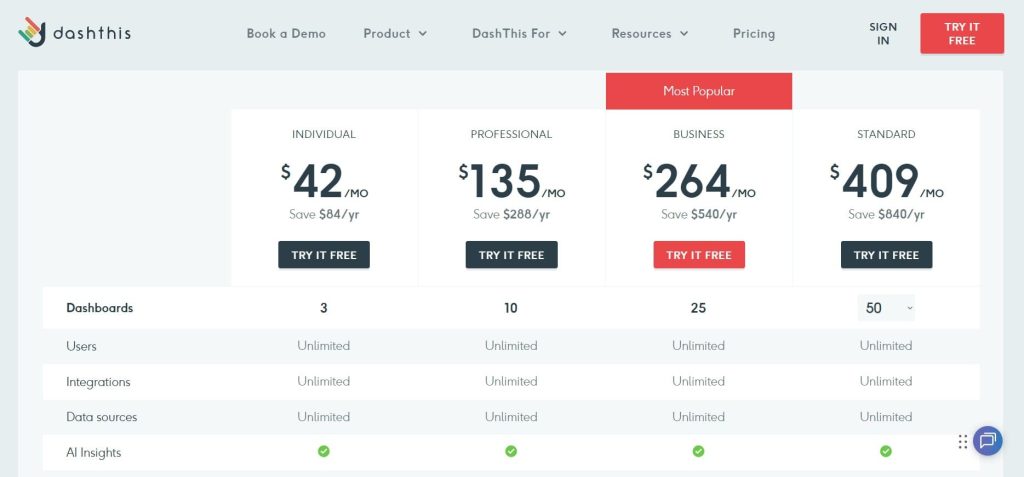
DashThis Pricing
- Individual: $42/month
- Professional: $135/month
- Business: $264/month
- Standard: $409/month
DashThis Reviews & Ratings
- G2: 4.7 out of 5 stars (82+ reviews)
- Capterra: 4.5 out of 5 stars (26+ reviews)
What stands out most about DashThis is how simple and easy it is to use. One reviewer mentioned, “Easiest reporting tool we’ve used, team trained in 30 minutes, perfect for agencies not needing advanced analytics.”
Many users appreciate that it’s straightforward enough for non-technical marketing teams and that white-labeling is included, which they see as a big plus. On the flip side, some wish it offered more advanced filtering options to give them greater control.
9. TapClicks – Best for Enterprise-Scale Operations
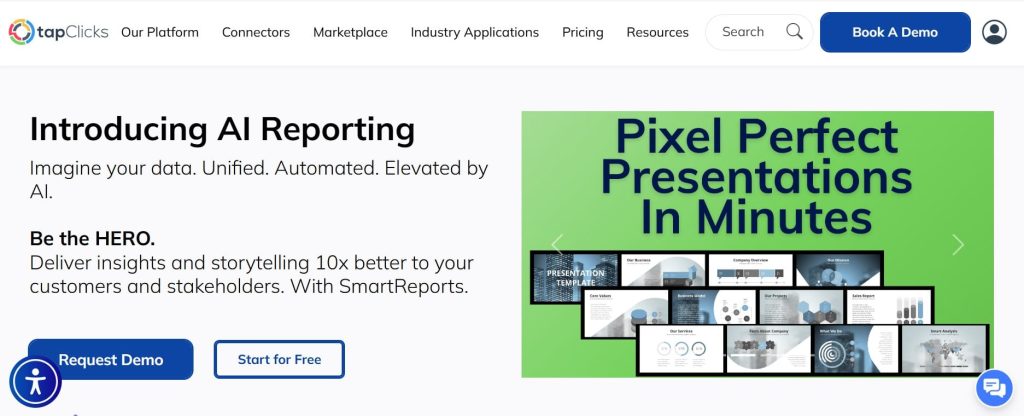
Best For: Large agencies and enterprises needing extensive data management, 250+ integrations, and a comprehensive marketing operations platform
How I Use It: I evaluate TapClicks for OneLittleWeb enterprise clients needing to consolidate data from dozens of marketing platforms with complex multi-channel operations.
Overview
TapClicks is not a reporting tool. It is a complete marketing operations platform combining reporting, campaign management, competitive intelligence, and business intelligence in one system.
The 250+ instant data connectors, plus Smart Connectors for virtually any online source, solve connectivity challenges other platforms cannot.
During enterprise evaluations, I have seen TapClicks connect to proprietary internal systems, legacy databases, and niche industry platforms that have zero integrations elsewhere.
The iSpionage integration provides PPC and SEO competitor analysis unavailable in pure reporting tools. That competitive intelligence adds strategic value beyond displaying your own metrics.
The problem is cost and complexity. Total monthly investment typically ranges $500-1,400+, depending on requirements, because you need both data extraction and destination plans.
The implementation takes weeks with dedicated technical staff time. For agencieswith under 50 clients, TapClicks is overkill.
TapClicks Key Features
- 250+ Instant Data Connectors plus Smart Connectors enable data extraction from virtually any platform, solving connectivity challenges competitors cannot.
- Campaign Management Tools go beyond reporting to include optimization, workflow automation, and order entry from initial client contact through delivery.
- Competitive Intelligence Integration with iSpionage provides PPC and SEO competitor analysis unavailable in pure reporting tools.
- Advanced Data Transformation with sophisticated calculated fields and custom metrics enables complex analysis beyond simple dashboard displays.
- Enterprise-Scale Infrastructure handles massive data volumes and complex multi-client operations better than lightweight alternatives built for small teams.
- Workflow Automation streamlines the entire client journey from order entry through campaign optimization to final reporting in a unified system.
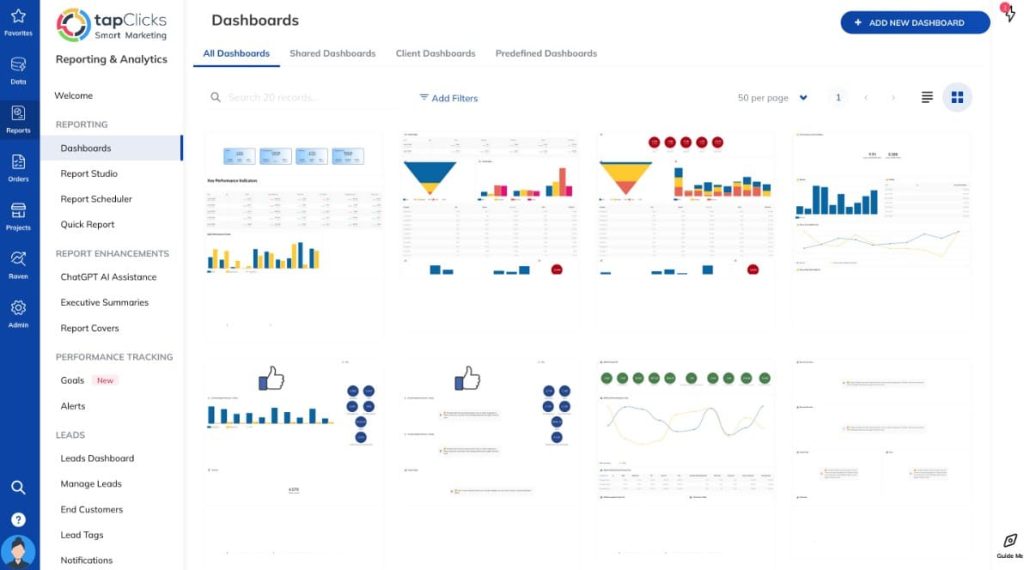
TapClicks Pros
- The most extensive integration library with 250+ native connectors plus Smart Connectors exceeds all competitors for data source coverage and connectivity.
- All-in-one operations platform combining reporting, campaign management,and competitive intelligence beyond what pure reporting tools provide agencies.
- Competitive intelligence built in through iSpionage integration provides PPC and SEO competitor analysis unavailable in standard reporting platforms.
- Workflow automation features streamline complete client operations from order entry through optimization to reporting in a single integrated system.
- Proven at scale by large agencies and enterprises managing 100+ clients with complex multi-channel operations requiring robust infrastructure.
TapClicks Cons
- Extremely high total cost with a monthly investment typically $500-1,400+ makes it prohibitively expensive for small to mid-sized agencies.
- A complex pricing structure requiring both data extraction and destination plans makes true costs unclear without extended sales conversations.
- Implementation complexity reported by users requires a lengthy, difficult setup process demanding dedicated time from technical staff members.
- Occasional data accuracy issues were noted with some users reporting metric discrepancies requiring verification against source platforms before trusting.
TapClicks Pricing
N/A
TapClicks Reviews & Ratings
- G2: 4.3 out of 5 stars (336+ reviews)
- Capterra: 4.3 out of 5 stars (175+ reviews)
Enterprise users really value the deep integrations and the wide range of features. One reviewer said, “The deep integrations solve our complex data needs. It can be overwhelming at first, but over time it’s very powerful.”
That said, cost is a common concern. Many users point out that it gets expensive once you add premium features, and there’s a learning curve that takes some time to get through—but for large operations, most agree it’s worth the effort.
10. ReportGarden – Best for Budget Management
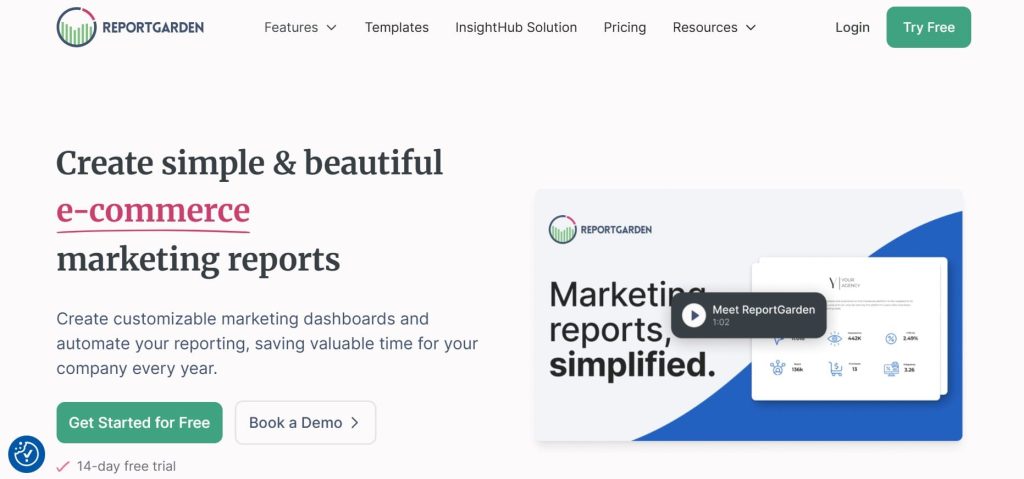
Best For: Agencies needing budget tracking, invoice management, and ad spend monitoring alongside SEO reporting
How I Use It: I use ReportGarden at OneLittleWeb for clients who need integrated budget management and ad spend tracking across multiple campaigns and platforms.
Overview
ReportGarden stands out for features most reporting tools ignore: budget tracking and invoice management. For agencies managing significant ad spend across clients, having this built into your reporting platform saves time and reduces errors.
I tested ReportGarden, managing 12 client accounts with combined monthly ad budgets exceeding $150,000. The budget alerts caught overspend issues before they became problems. The invoice management automated billing reconciliation previously required manual spreadsheet work.
The white-label monetization features let agencies customize reports with their branding and sell them as standalone products. This positions reporting as a revenue source rather than operational overhead.
The SEO features include website audits, keyword position tracking, and backlink analysis. For basic SEO needs, you can avoid separate tool subscriptions. The reports lack detail compared to specialized platforms, but for agencies prioritizing simplicity over depth, that tradeoff works.
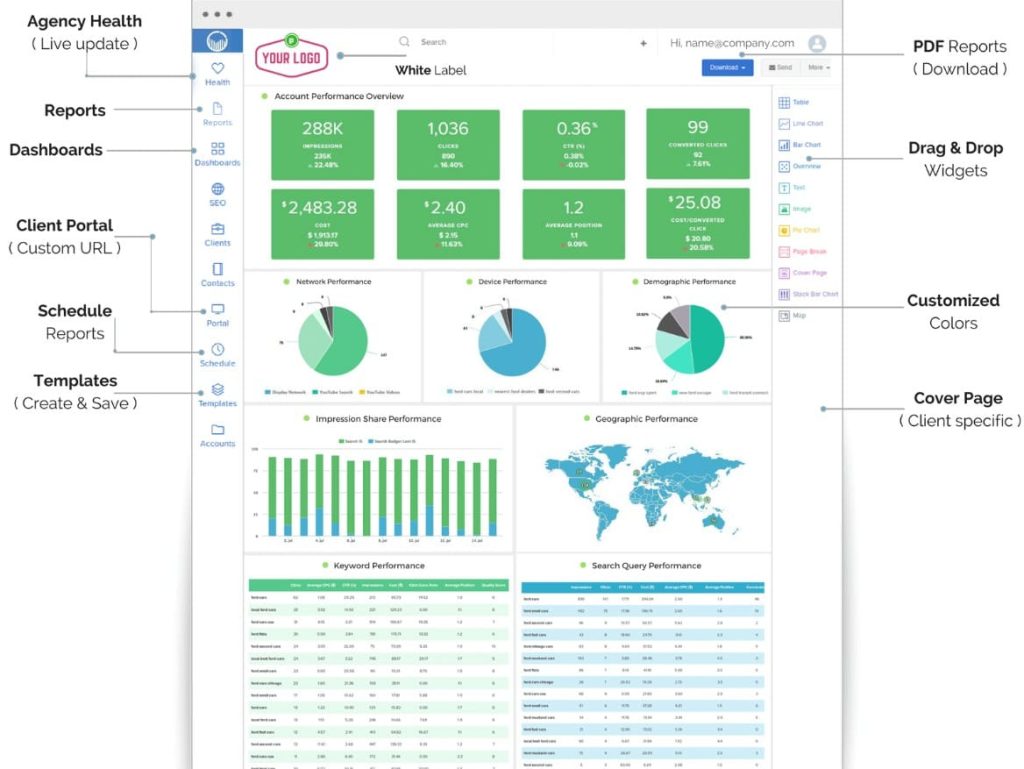
ReportGarden Key Features
- Budget and Invoice Management unique in category provides ad spend tracking, budget alerts, and automated invoice reconciliation for client billing.
- White-Label Monetization allows agencies to remove branding and add their own logo/colors to sell reports as standalone products, an uncommon capability.
- SEO Tools Included with website audits, keyword position tracking, and backlink analysis integrated, versus requiring separate tool subscriptions.
- Ad Spend Tracking monitors spending across Google Ads, Facebook Ads, and other platforms with automated alerts when approaching budget limits.
- Custom Cover Pages enable agencies to create branded front matter for reports, adding professional polish to client deliverables.
- 60+ Instant Data Connectors cover major marketing platforms, including paid advertising, social media, SEO tools, and analytics systems.
ReportGarden Pros
- Unique budget tracking and invoice management features help agencies monitor ad spend and billing across clients, uncommon in the reporting category.
- White-label monetization allows removing branding and selling reports as standalone products, positioning reporting as a revenue source, not overhead.
- SEO features, including website audits, keyword tracking, and backlink analysis integrated versus requiring separate expensive tool subscriptions.
ReportGarden Cons
- No email marketing integrations are lacking Mailchimp, Campaign Monitor, and other email platforms, requiring manual data imports for email campaigns.
- Limited report detail, even on top-tier plans produces summaries lacking granularity compared to more comprehensive specialized platforms.
- Missing advanced integrations with no custom API support or BigQuery integration limits agencies from using sophisticated data workflows.
- Basic visualization options with simple charts adequate but not as visually impressive as design-focused competitors like Whatagraph.
ReportGarden Pricing
- 14-day free trial
- Starting from $75/month
ReportGarden Reviews & Ratings
- G2: 4.5 out of 5 stars (29+ reviews)
- Capterra: 4.5 out of 5 stars (73+ reviews)
Many users like this tool for its budget tracking features and affordable pricing, especially for small agencies. One reviewer shared, “The budget tracking feature is unique and incredibly useful, perfect for agencies managing 10 to 30 clients.”
At the same time, some note that the reports aren’t as detailed as what you’d get from higher-end tools. Still, the white-label customization is solid, making it a strong value for the price.
11. Sitechecker – Best for Technical Audits
Best For: Agencies needing budget-friendly technical SEO audits and basic rank tracking without enterprise tool costs
How I Use It: I use Sitechecker at OneLittleWeb for small business clients needing technical SEO analysis and issue prioritization at accessible price points.
Overview
Sitechecker provides strong technical SEO auditing at a fraction of enterprise tool costs. Starting at $29/month makes it accessible for solo consultants and small agencies just getting started.
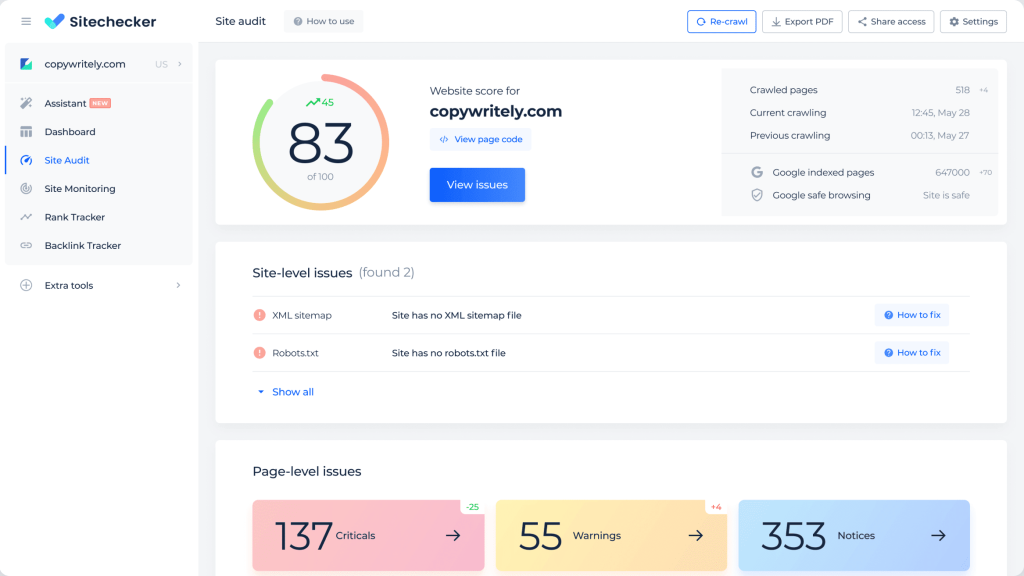
I have used Sitechecker for initial website audits during client onboarding. The platform quickly identifies broken links, duplicate content, metadata issues, and page speed problems. The HTML tag optimization recommendations are actionable, helping prioritize fixes by impact.
The Supreme plan at $399/month includes 100 projects and 10,000 keywords, ideal for agencies managing many small business websites. That capacity exceeds what most mid-tier plans offer at competitors charging 2-3x the price.
The limitations are white-label reporting and integration capabilities. You cannot fully customize reports with agency branding, which restricts professional client-facing presentation.
There are also no API connections or third-party tool integrations, limiting workflow automation and data sharing.
Sitechecker Key Features
- Affordable Entry Point starting at $29/month makes professional technical SEO auditing accessible for solo consultants and small agencies.
- Multiple Website Analysis simultaneously analyzes multiple client websites from a single login, convenient for agencies juggling many accounts.
- Comprehensive Technical Audits with detailed HTML tag optimization, page speed scores, and technical issue detection help prioritize fixes.
- Keyword Density Analysis provides content optimization insights showing how target keyword usage compares to ranking competitors.
- Automated Alert System sends notifications for ranking changes, technical issues, and backlink changes keeping agencies informed proactively.
- Large Crawl Capacity with the Supreme plan handling 50,000 pages and 100 projects, adequate for most small business and mid-market websites.
[Image Source: Sitechecker]
Sitechecker Pros
- Extremely affordable starting at $29/month makes professional technical SEO auditing accessible to budget-conscious solo consultants and small agencies.
- Offers multiple website analysis features in one dashboard, making it convenient for agencies that manage many small business clients at the same time.
- Comprehensive technical audits detecting HTML issues, page speed problems, and metadata errors help agencies prioritize high-impact fixes.
- Keyword density analysis showing how content optimization compares to competitors provides actionable insights for content improvement.
- Automated alerts for ranking changes, technical problems, and backlink updates keep agencies informed proactively without manual monitoring.
- Supreme plan value with 100 projects and 50,000 page crawls, ideal for agencies managing many small websites at a reasonable cost.
- A clean interface makes navigating between projects and finding technical issues straightforward without overwhelming complexity.
Sitechecker Cons
- Limited advanced features compared to comprehensive platforms like Semrush or Ahrefs, lacking depth for sophisticated SEO strategies.
- Smaller backlink database with link index significantly smaller than major competitors, missing many backlinks in analysis.
- No white-label reporting capability prevents fully customizing with agency branding, limiting professional client-facing presentation quality.
- Basic rank tracking is less robust than dedicated trackers with fewer location options and device tracking capabilities.
- No integrations with a lack of API or third-party tool connections restricts workflow automation and data sharing with other platforms.
- Customer support response times are longer than premium alternatives during peak periods based on user feedback.
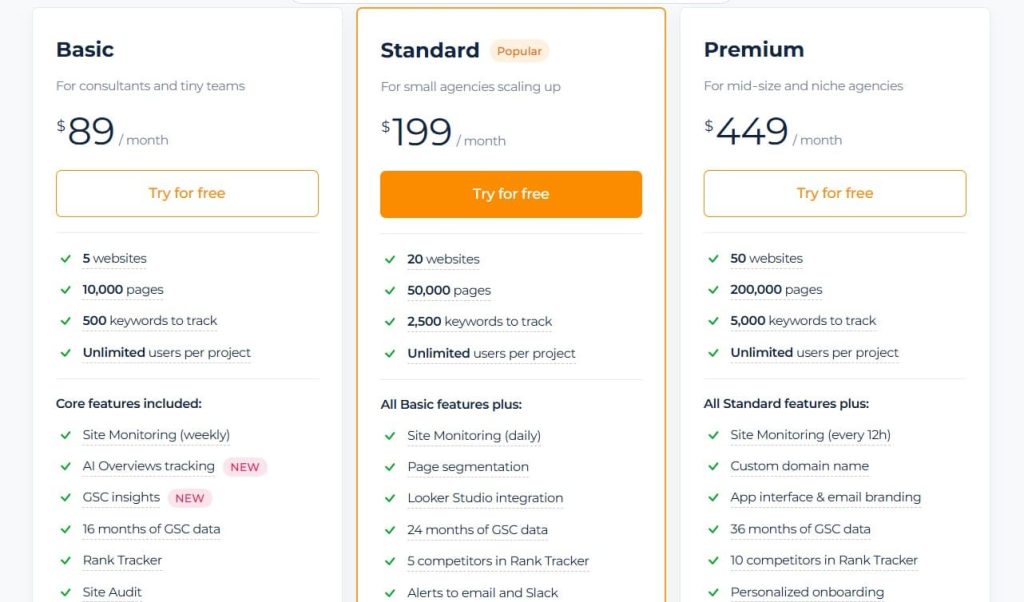
Sitechecker Pricing
- 14-day free trial
- Basic: $89/month
- Standard: $199/month
- Premium: $449/month
Sitechecker Reviews & Ratings
- G2: 4.6 out of 5 stars (127+ reviews)
- Capterra: 4.6 out of 5 stars (365+ reviews)
A lot of users talk about how much value they get from this tool, especially for technical audits at a price point that’s easier for small agencies to manage.
One reviewer shared, “Great value for technical SEO audits. The alerts keep us ahead of issues. It’s not as comprehensive as Semrush, but it costs about a fifth of the price.”
Overall, the feedback is that it’s a great fit for agencies working with small business websites, and the technical audit recommendations are straightforward and easy to act on.
12. Advanced Web Ranking – Best for Multi-Engine Tracking

Best For: Agencies needing rank tracking across 4,000+ search engines, including YouTube, Amazon, and international engines
How I Use It: I use Advanced Web Ranking at OneLittleWeb for clients with international presence or e-commerce operations needing YouTube and Amazon rank monitoring.
Overview
Advanced Web Ranking has been around since 2002. That longevity shows in reliability. Veterans recognize it as a dependable workhorse with consistent performance over decades.
The 4,000+ search engine coverage far exceeds competitors focused mainly on Google. During testing for an international e-commerce client, I tracked rankings across Google, Bing, Yahoo, YouTube, Amazon, Yandex, and Baidu simultaneously. No other tool at this price point offers that breadth.
The pixel position tracking measures exact placement on SERP to determine above-fold visibility. That is more accurate than position number alone, which does not account for SERP features pushing organic results down the page.
The white-label reports require minimal editing before client delivery. I have sent Advanced Web Ranking reports directly to clients and received positive feedback on professional presentation without additional formatting work.
The interface feels dated compared to modern alternatives. The UI lacks the visual polish of newer platforms. But for agencies prioritizing data reliability over aesthetic design, that tradeoff is acceptable.
Advanced Web Ranking Key Features
- 4,000+ Search Engine Coverage including Google, Bing, Yahoo, YouTube, Amazon, Yandex, and Baidu provides unmatched global tracking breadth.
- Pixel Position Tracking measures exact SERP placement to determine above-fold visibility, more accurate than position number alone.
- 190+ Country Support with desktop and mobile tracking across nearly every geographic market worldwide for international campaigns.
- White-Label Client Reports are polished and professional, requiring minimal editing before delivery, saving hours of formatting work weekly.
- Forecasting and Click-Share Metrics predict potential traffic based on ranking positions, helping agencies set realistic client expectations.
- Historical Trend Visualization with long-term data analysis helps agencies demonstrate progress over months and years of campaign work.

Advanced Web Ranking Pros
- Most search engines, covered with 4,000+ options including YouTube, Amazon, Baidu, and Yandex provide unmatched global tracking breadth.
- Pixel-based position tracking shows your exact placement on the SERP, giving a much clearer picture of above-the-fold visibility than traditional position numbers alone.
- Polished white-label reports requiring minimal editing before client delivery save hours of formatting work that agencies typically spend weekly.
- Strong historical data with long-term trend analysis and visualization helps demonstrate campaign progress over months and years.
Advanced Web Ranking Cons
- The dated interface feels outdated compared to modern alternatives, lacking the visual polish of newer platforms that prioritize design.
- Steeper per-keyword cost than some competitors, especially as tracking volume increases with large keyword lists.
- Limited modern integrations are lacking native connections to many contemporary marketing platforms and social channels.
- No AI visibility tracking, missing ChatGPT, Gemini, and AI Overview monitoring that newer tools provide.
Advanced Web Ranking Pricing
- Pro: $69/month
- Agency: $139/month
- Enterprise: $349/month
Advanced Web Ranking Reviews & Ratings
- G2: 4.3 out of 5 stars (21+ reviews)
- Capterra: 4.8 out of 5 stars (35+ reviews)
Many users rely on Advanced Web Ranking because it’s consistent and produces solid, professional-looking reports. One reviewer mentioned, “It’s the veteran tool agencies trust for reliability, and the white-label reports look polished right out of the box.”
People also appreciate the pixel-position tracking and the huge list of search engines, which makes it especially useful for international clients. The only common critique is that the interface feels dated and could use a refresh.
13. Seobility – Best European Budget Option
Best For: European agencies and privacy-conscious businesses needing affordable all-in-one SEO with a GDPR-first approach
How I Use It: I use Seobility for European clients prioritizing data privacy and agencies needing budget-friendly comprehensive SEO auditing.
Overview
Seobility is a German company with GDPR-first data privacy approach. That European focus appeals to privacy-conscious clients and agencies serving EU markets where data handling regulations matter.
The free forever plan includes 1,000 page crawls, actually useful unlike token free tiers from competitors offering 10-50 pages. For small businesses and agencies testing the platform, that capacity enables a real evaluation before purchasing.
At €49.90/month (roughly $53), the Premium plan delivers a comprehensive SEO toolkit at a fraction of Semrush or Ahrefs costs. The 25,000-page crawls per project handle most small businesses and mid-market websites comfortably.
The Agency plan at €179.90/month includes 15 projects and 100,000 page crawls, roomy for agencies managing multiple clients. That capacity competes with enterprise plans at other platforms charging 3 – 4x the price.
The limitation is that mobile rank tracking updates only every 3 days on paid plans versus daily desktop tracking. For agencies needing current mobile position data, that delay creates gaps in reporting accuracy.
Seobility Key Features
- Functional Free Forever Plan with 1,000 page crawls enables small businesses to start without cost, actually useful unlike token free tiers.
- European Data Privacy Focus with GDPR-first approach from German company appeals to privacy-conscious European agencies and clients.
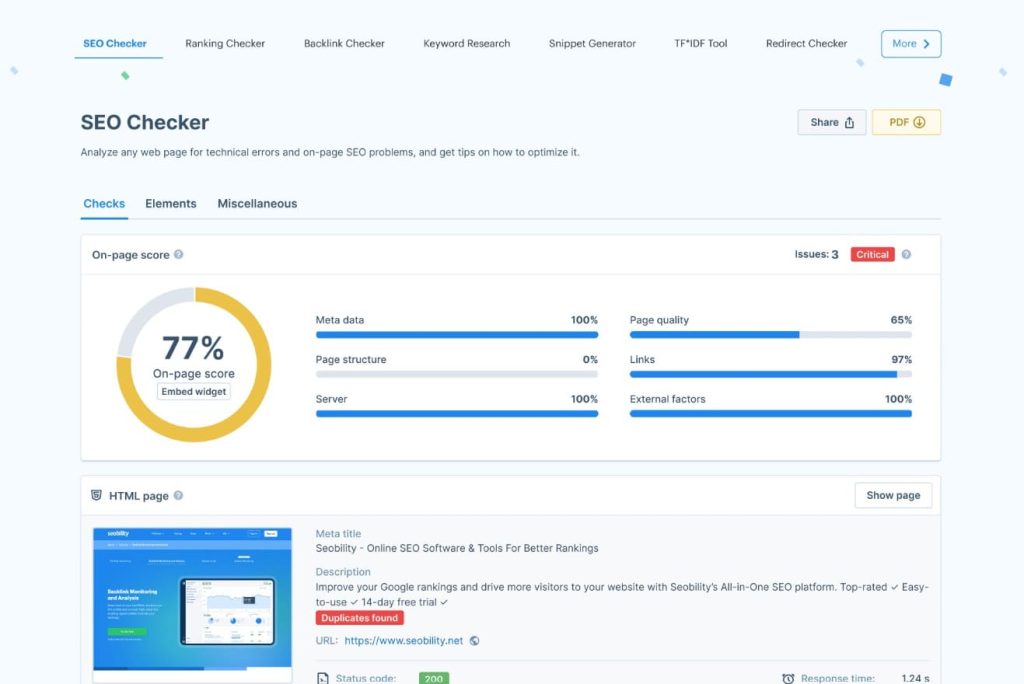
- Comprehensive Website Audits detect duplicate content, broken links, metadata issues, and JavaScript rendering problems effectively.
- Daily Desktop Rank Updates on the Premium plan provide frequent position tracking without additional costs, unlike competitors who charge extra.
- Large Crawl Capacity with an Agency plan handling 100,000 pages is comfortable for even large enterprise websites at a reasonable cost.
- TF*IDF Content Optimization tool helps optimize content based on term frequency analysis of top-ranking competitor pages.
Seobility Pros
- Exceptional price-to-feature ratio with Premium at $53/month, delivering a comprehensive toolkit at a fraction of Semrush or Ahrefs costs.
- Genuinely useful free forever plan with 1,000 page crawls enables small businesses to start, unlike token limits elsewhere.
- Strong technical auditing with detailed crawling finds duplicate content, broken links, metadata problems, and JavaScript issues effectively.
- Daily desktop rank updates on Premium plan provide frequent tracking without additional per-update charges competitors impose.
- Large Agency plan crawl capacity with 100,000 pages handles even enterprise websites comfortably at a reasonable €180/month cost.
Seobility Cons
- Mobile rank tracking delay with positions updating only every 3 days on paid plans, slower than daily competitor offerings.
- Limited advanced features with backlink analysis and keyword tracking depth restricted compared to specialized deep-dive tools.
- Interface can lag when loading larger websites during crawls based on user reports.
- No real-time data with rank and backlink updates on schedules rather than on-demand, limiting responsiveness to sudden changes.
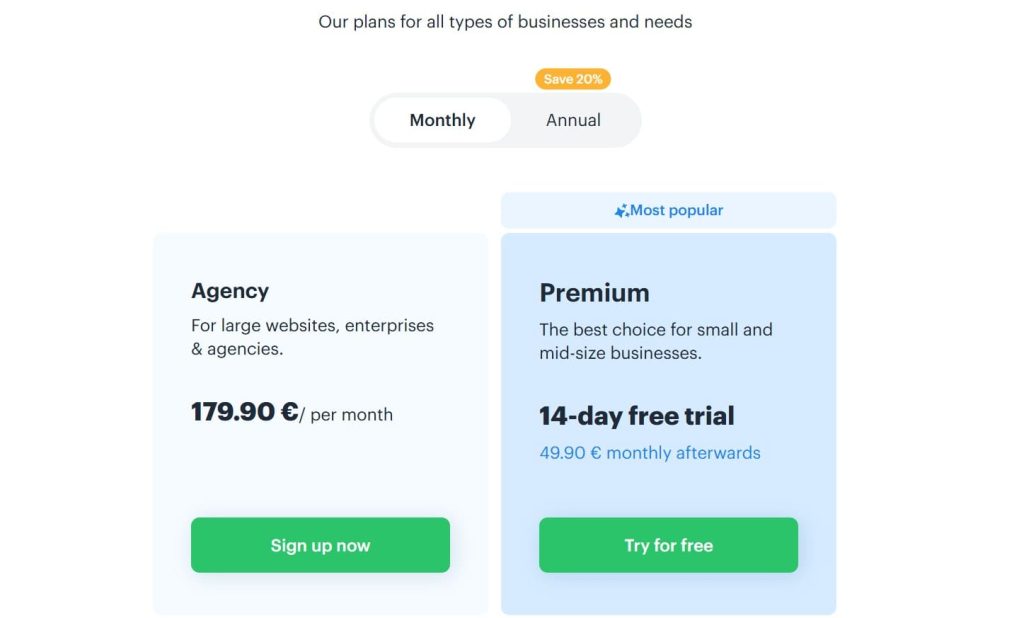
Seobility Pricing
- Basic: Free
- Agency: €179.90/month
- Premium: €49.90/month (14-day trial)
Seobility Reviews & Ratings
- G2: 4.6 out of 5 stars (393+ reviews)
- Capterra: 4.6 out of 5 stars (62+ reviews)
European users often highlight Seobility’s strong value and its focus on privacy. One reviewer shared, “It’s easy to use, quick to set up, and offers a wide range of features without feeling overwhelming. It’s especially great value for agencies in Europe.”
A lot of people echo the same sentiment, calling it one of the best SEO tools available for under €60 a month, and many are pleasantly surprised by how capable the free plan is.
14. Google Search Console – Best Free First-Party Data Source

Best For: Every website owner and agency needing Google’s actual performance data rather than third-party estimates
How I Use It: I check Google Search Console daily before trusting any paid tool because it shows exactly what Google sees, not what algorithms guess.
Overview
Google Search Console is not optional. It is the foundation every other reporting tool builds on top of.
I have tested 50+ reporting platforms, and none can replace GSC for one simple reason: it provides first-party data directly from Google. Every other tool estimates. GSC tells you what actually happened.
When a client’s traffic drops but Ahrefs shows rankings unchanged, GSC explains why. Maybe impressions stayed steady, but CTR collapsed because Google added a featured snippet.
Maybe mobile traffic tanked while the desktop held. Maybe a specific country stopped seeing your pages. Third-party tools miss these nuances.
The 24-48 hour data delay frustrates agencies wanting real-time monitoring. But that lag is acceptable because the data is accurate. I would rather wait a day for the truth than get instant estimates that mislead client conversations.
GSC also diagnoses technical issues that no reporting tool catches. Indexing problems, manual penalties, Core Web Vitals failures, and mobile usability errors. These alerts have saved client websites from catastrophic visibility loss more times than I can count.
Google Search Console Key Features
- First-Party Google Data provides actual performance metrics directly from Google rather than third-party estimates, the only source of truth.
- Device-Level Visibility splits performance by mobile versus desktop, revealing how user experience differs across devices.
- Country and Query Performance shows exactly which geographic markets and search terms drive impressions, clicks, and rankings.
- CTR Diagnostics reveal when rankings improve, but clicks do not, indicating SERP feature displacement third-party tools miss.
- Core Web Vitals Monitoring tracks page experience signals like loading speed, interactivity, and visual stability directly from Google.
- Indexing Issue Alerts notify when pages cannot be crawled, indexed, or ranked due to technical problems before traffic disappears.

[Image Source: Yoast]
Google Search Console Pros
- Completely free forever with zero cost and no limitations on websites, users, or data access makes it universally accessible.
- Essential for diagnosing technical issues, indexing problems, and manual penalties affecting rankings that reporting tools cannot detect.
- Device split insights show exactly how mobile versus desktop performance differs, crucial as mobile-first indexing dominates search.
- CTR reality check reveals when rankings improve, but clicks drop, indicating SERP feature changes third-party tools miss completely.
Google Search Console Cons
- Not a full SEO tool, lacking keyword research, backlink analysis, competitor data, and comprehensive rank tracking of paid platforms.
- Data delay of 24-48 hours means not suitable for real-time monitoring of campaign changes or immediate performance tracking.
- Limited historical data with only 16 monthsof retention versus unlimited history in paid tools, restricting long-term trend analysis.
- No keyword discovery showing only queries getting impressions, does not suggest new keyword opportunities like research tools provide.
- No competitive insights provide zero visibility into competitor performance, rankings, or market share analysis.
Google Search Console Pricing
Free
Google Search Console Reviews & Ratings
- G2: 4.7 out of 5 stars (437+ reviews)
- Capterra: 4.8 out of 5 stars (211+ reviews)
Pretty much every SEO professional sees Google Search Console as non-negotiable. Reviewers often describe it as the “essential companion to any rank tracker” and the tool that forms the foundation of their entire SEO strategy.
A lot of people point out that it reveals the real story behind third-party estimates and helps explain traffic drops that rankings alone can’t account for. The overall feeling is clear: it’s free, it’s universal, and nothing else can replace it.
15. WooRank – Best for Quick Client Audits
Best For: Agencies needing fast, comprehensive website audits during the sales process or client onboarding
How I Use It: I run WooRank audits during initial client conversations to quickly identify issues and demonstrate value before contracts are signed.
Overview
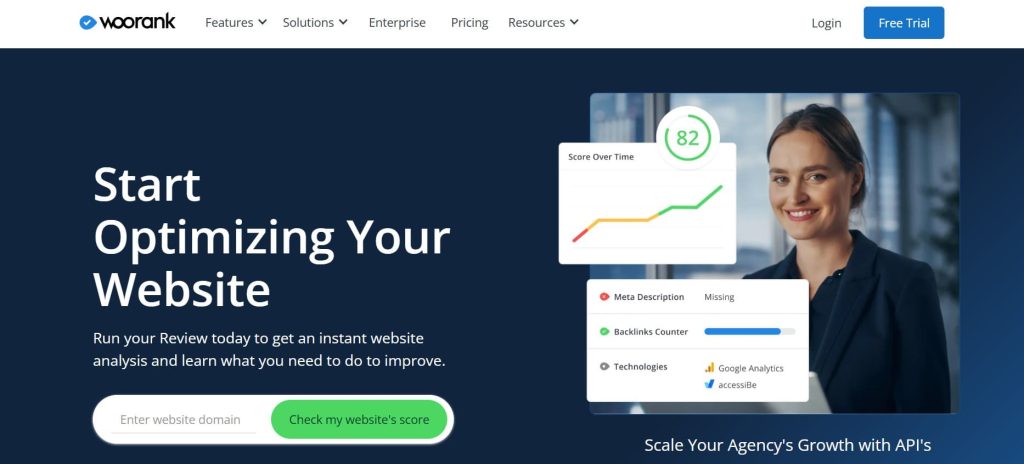
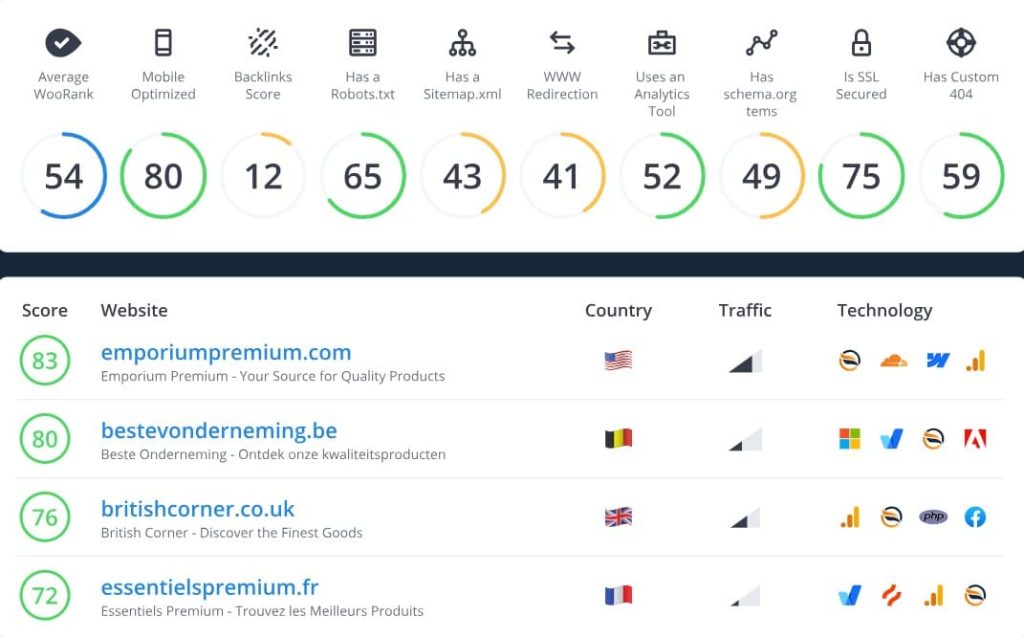
WooRank excels at one thing: fast, thorough initial audits. When a prospect asks “what’s wrong with my website,” WooRank answers in 5 minutes with a comprehensive report covering SEO, performance, and marketing issues.
I have used WooRank during dozens of sales calls. Pull up the prospect’s website, run the audit live while talking, and walk through the findings together. That immediate value demonstration converts prospects better than theoretical explanations of what you could do.
The marketing checklist approach breaks SEO into step-by-step tasks. For small businesses without dedicated specialists, that guidance makes overwhelming optimization feel manageable. Each recommendation includes explanations helping non-technical clients understand why it matters.
The white-label reports on Premium plans let agencies brand audits professionally. Some agencies sell these audits as standalone products to prospects who are not ready for full SEO services yet.
WooRank Key Features
- Fast Comprehensive Audits scan websites in minutes, providing a broad overview of SEO, performance, and marketing issues for quick initial assessment.
- Marketing Checklist Approach breaks optimization into step-by-step tasks with explanations, making SEO less overwhelming for non-specialists.
- Competitor Benchmarking shows a side-by-side comparison with competitors, helping demonstrate relative performance to clients.
- Sales Tool Integration connects SEO insights to sales processes, unique focus appealing to businesses prioritizing conversion.
- White-Label Reports on the Premium plan enable agencies to customize with branding for professional client deliverables.
- Actionable Recommendations provide clear, prioritized suggestions with explanations, helping less experienced teams understand fixes.
WooRank Pros
- Fastest comprehensive website analysis for client onboarding, delivering broad audits in 5 minutes versus hours at specialized platforms.
- A marketing checklist with step-by-step guidance makes SEO approachable for small businesses without dedicated specialists on staff.
- Sales tool integration with a unique focus on connecting SEO improvements to the sales pipeline appeals to businesses prioritizing revenue impact.
- Competitor side-by-side benchmarking helps agencies demonstrate relative performance positioning clients against market reality.
- Good for quick audits during the sales process, providing immediate value demonstration that converts prospects better than theoretical pitches.
WooRank Cons
- Limited depth as a jack-of-all-trades approach means less specialized analysis than dedicated rank trackers or technical audit platforms.
- Premium at $199/month is expensive compared to more comprehensive alternatives like SE Ranking at $95, offering deeper features.
- Small keyword database with research capabilities limited versus major platforms with billions of keywords for thorough analysis.
WooRank Pricing
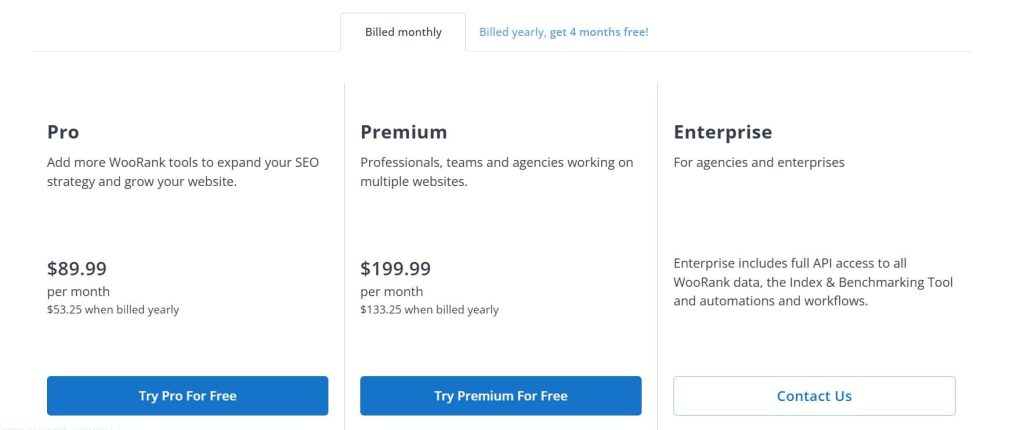
- Pro: $89.99/month
- Premium: $199.99/month
- Enterprise: Custom
WooRank Reviews & Ratings
- G2: 4.3 out of 5 stars (52+ reviews)
- Capterra: 4.4 out of 5 stars (69+ reviews)
A lot of reviewers say WooRank is great for running quick website audits during the sales process, and many appreciate the marketing checklist because it helps non-technical clients understand what needs improvement.
The main criticism is around value, with users noting that while it’s faster and simpler than Semrush, it doesn’t offer nearly as much, and the pricing feels high compared to other options.
What’s the Best SEO Reporting Tool?
The best SEO reporting software depends on your situation. After 8 years at OneLittleWeb testing these platforms, here’s my honest recommendations:
- Best Overall Value: SE Ranking
If you manage 5-20 clients and need comprehensive features without enterprise pricing, SE Ranking wins.
At $95/month for the Business plan, you get white-label reporting, AI Overview tracking, rank monitoring, site audits, and backlink analysis—basically 90% of Semrush functionality at 40% of the cost.
I switched several OLW client accounts from Semrush to SE Ranking in 2025. The $350/month savings per account added up fast without sacrificing reporting quality.
Choose SE Ranking if: You’re an agency managing multiple clients, need white-label reports, and want AI visibility tracking.
- Best for Enterprise: Semrush
When budget isn’t the constraint, Semrush remains unmatched. The 25+ billion keyword database and advanced competitive intelligence justify the $455.67/month price for larger operations.
Choose Semrush if: You’re an enterprise team with 20+ clients, need the largest keyword database, require advanced competitive intelligence, and have budget for premium tools.
- Best for Agencies: AgencyAnalytics
Purpose-built for agency workflows with unlimited users and dashboards at $244.30/month. The built-in SEO tools eliminate needing separate subscriptions for rank tracking and site audits.
Choose AgencyAnalytics if: You want purpose-built agency workflows, need unlimited team access, prefer all-in-one over multiple subscriptions.
- Best Visual Reports: Whatagraph
When clients expect executive-level presentation quality, Whatagraph produces the best-looking reports. The 30-minute data refresh and AI insights help demonstrate value with current data.
Choose Whatagraph if: Visual presentation quality impacts client retention, you need near-real-time data refresh, and $199+/month fits your budget.
- Best Free: Google Looker Studio
Zero cost with unlimited dashboards and users. The 10-20 hour setup investment per template is significant, but once built, you own that asset forever without subscription dependency.
Choose Looker Studio if: You have time to invest in setup, want zero ongoing costs, need unlimited customization, and can handle the learning curve.
- Best for Simplicity: DashThis
Team members are productive within hours rather than days. The unlimited users and white-label reporting at $135/month (10 dashboards) makes it predictable for agencies managing around 10 clients.
Choose DashThis if: Ease of use matters more than advanced features, you have high team turnover, need fast onboarding.